Skip to content

Why passwordless authentication is the way forward

Moving beyond passwords

Passwords have been the go-to method for securing access to online accounts and data from the early days of the Internet. However, as cyberattacks grow increasingly sophisticated, relying solely on passwords may no longer suffice.

Hacker-controlled machines are now too good at cracking them, particularly because many people use weak or reused passwords across multiple accounts, unaware that this practice makes the attackers’ job effortless.

And so, the time has come to move beyond passwords and adopt more modern standards to safeguard digital assets. In other words, it’s time to go passwordless.

What is passwordless authentication?

Passwordless authentication is a cybersecurity method where users can access a service or application without entering a password. How does passwordless authentication work then? It allows users to utilize alternative authentication factors such as fingerprints or face IDs to verify their identity while logging into a service.

The goal of passwordless authentication is to provide a more convenient alternative to traditional passwords that can not only maintain but also enhance the level of protection against cyberattacks.

Types of passwordless authentication

Passwordless authentication can take many forms; however, some are now more popular than others. Let’s now go through a few of the commonly used authentication techniques that do not require passwords.

Biometric authentication

Probably the most popular passwordless authentication method available today, biometrics involves using built-in scanning tools on devices to verify unique biological characteristics such as fingerprints or facial features to confirm a user’s identity. This method has become highly popular because most modern mobile phones support it. Also, fingerprints can’t be as easily stolen as James Bond movies might suggest, which makes biometric authentication a more secure option than passwords.

Authentication apps

This popular password-free authentication technique uses a dedicated app to generate time-limited codes for accessing accounts, ensuring high security. It works well because most people have their mobile phones with them, making it easier to check the app for a code than to remember all their passwords for different online accounts.

Hardware Tokens

Generally speaking, hardware tokens are physical devices that generate authentication codes or utilize cryptographic keys to grant access to systems. They are quite popular due to their reliability in providing a second factor of authentication, which significantly enhances security. Also, hardware tokens do not rely on internet connectivity or software, making them more resilient against many forms of cyber threats.

With this method, users receive a link via email that, when clicked, allows them to log in to their account without entering a password. This approach simplifies the login process while ensuring security, as the link is usually valid for a limited time and can only be used once.

Passkeys

Compared to other types of passwordless authentication described in this section, passkeys are the new kid on the block, though already quite popular. Passkeys typically involve using a pair of cryptographic keys: a private key stored on the user’s device and a corresponding public key on the website’s server. Access is granted when these keys are successfully matched in a process often initiated through biometrics. This approach enhances convenience and significantly boosts security because attackers must acquire both keys to gain unauthorized access. Stealing the private key from the user’s device is extremely difficult.

The benefits of passwordless authentication

As we’ve already covered in this article, the benefits of passwordless authentication are plenty. These advantages become even clearer when compared to what passwords can provide. So, let’s delve into each major benefit in detail, starting with…

1. Enhanced security

The first, and arguably the most important, benefit of passwordless authentication is that it provides much more protection than traditional passwords. This is because it eliminates vulnerabilities commonly associated with password-based systems, such as phishing, brute-force attacks, and password reuse. With passwordless methods like biometrics or passkeys, authentication relies on unique and difficult-to-replicate factors, significantly reducing the risk of unauthorized access. As a result, adopting passwordless authentication strengthens overall security posture and helps keep outsiders at bay.

2. Ease of use

When it comes to user convenience, passwordless authentication delivers a knockout blow to passwords, preventing them from getting back up. Firstly, the passwordless approach is much faster as it allows users to log in to a service or application with one click, whereas with passwords… well, you know the drill. Secondly, with passwordless authentication, users don’t have to remember anything, freeing their minds and preventing the frustration of repeatedly entering incorrect passwords. And thirdly, this ease of use extends to business as well, preventing account lockouts and shopping cart abandonments, and keeping customers happier and more willing to use a given service.

3. Reduced password-related support

Unlike traditional authentication methods that frequently lead to forgotten passwords and subsequent support requests, passwordless authentication effectively eliminates these issues. This significantly reduces the need for password-related support, saving time and resources while enhancing user satisfaction with a seamless login experience.

4. Enhanced regulatory compliance

Embracing passwordless authentication is a strategic way for businesses to boost their compliance with regulations on data privacy. How so? By adopting secure methods like biometrics or passkeys, organizations can meet diverse data protection requirements without compromising user convenience. This proactive approach not only helps mitigate financial and reputational risks associated with non-compliance but also builds trust among customers and stakeholders.


Passwordless authentication use cases

With the support of organizations such as the FIDO Alliance, which helps develop authentication standards to reduce the world’s reliance on passwords, passwordless authentication methods have become highly popular among key players across all industries.

This should come as no surprise, especially considering that, according to a study by Secret Double Octopus and the Ponemon Institute called “State of Workforce Passwordless Authentication,” organizations can save up to $1.9 million by implementing passwordless authentication methods.

This explains why Microsoft has been promoting passwordless authentication through Windows Hello; why Amazon, Apple, and Google have introduced support for passkeys in their services; why Twitter offers password-free login options through third-party authentication apps and security keys; and so on — almost everywhere you look, a password-free login option is available. As a result, passwordless authentication is used today by millions of users worldwide and is gradually pushing passwords out of the picture.

How to enable passwordless authentication on your service

If your website or application requires customers to log in but doesn’t offer passwordless options, consider adding this feature to your to-do list. The answer to whether your company and your customers will benefit from that is undoubtedly yes. The real question is: how can you integrate a password-free login option effectively?

Well, although you can hire a team of IT professionals and ask them to write passwordless logins into your code, this approach requires significant upfront investment and is rather time-consuming.

Fortunately, there are alternatives. For example, you can use Authopia by NordPass, a free tool that allows you to easily add a passkeys widget to the login form on your website or service. Here’s how it works: you receive pre-written code that even those with basic IT skills can implement, you activate the widget by registering with Authopia, and voilà — you have a password-free login option up and running!

As already mentioned, Authopia is free to use, which means you can quickly integrate passkey logins into your service and observe improvements in sign-ups and conversions today. So, don’t miss out on this opportunity!

About Version 2 Digital

Version 2 Digital is one of the most dynamic IT companies in Asia. The company distributes a wide range of IT products across various areas including cyber security, cloud, data protection, end points, infrastructures, system monitoring, storage, networking, business productivity and communication products.

Through an extensive network of channels, point of sales, resellers, and partnership companies, Version 2 offers quality products and services which are highly acclaimed in the market. Its customers cover a wide spectrum which include Global 1000 enterprises, regional listed companies, different vertical industries, public utilities, Government, a vast number of successful SMEs, and consumers in various Asian cities.

About NordPass
NordPass is developed by Nord Security, a company leading the global market of cybersecurity products.

The web has become a chaotic space where safety and trust have been compromised by cybercrime and data protection issues. Therefore, our team has a global mission to shape a more trusted and peaceful online future for people everywhere.

Trello data breach: Immediate steps for users

Using Trello? Your data may have been exposed

In case you haven’t heard, Trello, the popular project management tool from Atlassian, just experienced a major breach. Hackread reports that a staggering 21.1 GB of Trello data has been leaked online, putting millions of users’ sensitive information at risk.

If you’ve used Trello recently or in the past, your data might have been affected too. We’re here to fill you in on what happened, provide tips on how to minimize the impact of the breach, and offer advice on how to protect your data effectively, whether you’re an individual user or a business.

Trello breach: what happened, exactly?

According to Hackread, a hacker known as “Emo” has leaked over 20 GB of Trello data on a cybercrime platform called Breach Forums. The hacker claims to have stolen the data back in January 2024 but did not publish it until Tuesday, July 16. The leaked data includes details on millions of Trello users, such as their usernames, legal names, email addresses, associated memberships, and status information.

“Emo” detailed how they broke into Trello by exploiting a vulnerable open API endpoint that didn’t require a login. This vulnerability allowed the hacker to link email addresses to Trello accounts, exposing the identities of Trello users. The hacker then continued to exploit this vulnerability and, as they said, spread the breach out of boredom. This resulted in data being stolen from millions of Trello users, putting everyone affected at serious risk.

How Trello users should respond

While the news of a major data breach can be alarming, it’s crucial to know that there are steps you can take right away to protect yourself and minimize the damage.

First, check if your data was compromised in the Trello breach. You can use our free online Data Breach Scanner to quickly assess your exposure. If the scan indicates that your data is safe, that’s great! However, if it shows that your information has been leaked, you’ll need to take further action.

If your data has been exposed, immediately change your Trello password to prevent unauthorized access. Also, update the passwords for any other accounts where you use the same password to keep your information secure – better safe than sorry.

Next, keep a close eye on your account activity for any unusual actions that could suggest someone else has gained control. Be vigilant for phishing emails, as cybercriminals may use your email address from the breach to send fake messages pretending to be from Trello. These could be attempts to take over your account, install malware, or trick you into providing more personal information. Stay cautious!

What should businesses do in this situation?

The Trello breach is just the tip of the iceberg. This month alone, we’ve heard of reports of two other major companies, AT&T and Disney, falling victim to cyberattacks with their data ending up on crime forums. It’s a stark reminder that no business is too big or too small to be targeted.

To prevent data leaks and unauthorized access, businesses can take a few key steps to stay ahead of threats. These include:

  • Use a data breach monitoring tool: Regularly scan your systems for vulnerabilities and potential breaches – a good breach monitoring tool will help you identify weak points in your security before hackers can exploit them.

  • Monitor account activity: Keep an eye on who’s accessing your resources and watch for any unusual or unauthorized activity that might indicate a security issue.

  • Enforce a strong password policy: Implement guidelines on password complexity to make sure all employees use strong, unique passwords for their business accounts.

  • Educate your team: Hold training sessions to make sure all employees know how to recognize phishing attempts, create strong passwords, and handle sensitive data securely.

  • Implement multi-factor authentication (MFA): Ask for an extra layer of verification beyond just passwords to make it more difficult for anyone trying to gain unauthorized access.

How NordPass can help protect you or your organization

Whether you’re just a regular user of services like Trello, or a company looking to safeguard your digital assets, NordPass is a solution that can significantly boost your cybersecurity without a hassle.

For individuals, the NordPass Premium plan offers more than encrypted storage for your passwords, passkeys, and other sensitive info. It also includes features designed to protect your digital identity. For example, you get the Data Breach Scanner that constantly searches the dark web for any mentions of your information and alerts you if it finds a match. There’s also the Password Generator that creates strong, unique passwords for you on the spot, and Email Masking, which lets you use a fake email address to sign up for newsletters and services without exposing your real one.

If you’re an organization, the NordPass Business plan has you covered with everything you need to up your security game. It lets you monitor account activity in real time, set and enforce a password policy across your organization, and use a company-wide Data Breach Scanner to check for any mentions of your company data in breaches. It also allows your team to securely share credentials over encrypted channels.

NordPass is a comprehensive solution that helps you tackle many cybersecurity challenges with just one tool. Give it a try and see the difference for yourself.

Use the promo code to get one month free

We want to help you stay protected, especially after incidents like the Trello security breach. That’s why we’re giving you the promo code “haveibeenbreached,” which you can use to get an extra free month of our Premium plan. We hope this helps you feel more secure, knowing that threats can happen anytime. It’s always better to be prepared.

About Version 2 Digital

Version 2 Digital is one of the most dynamic IT companies in Asia. The company distributes a wide range of IT products across various areas including cyber security, cloud, data protection, end points, infrastructures, system monitoring, storage, networking, business productivity and communication products.

Through an extensive network of channels, point of sales, resellers, and partnership companies, Version 2 offers quality products and services which are highly acclaimed in the market. Its customers cover a wide spectrum which include Global 1000 enterprises, regional listed companies, different vertical industries, public utilities, Government, a vast number of successful SMEs, and consumers in various Asian cities.

About NordPass
NordPass is developed by Nord Security, a company leading the global market of cybersecurity products.

The web has become a chaotic space where safety and trust have been compromised by cybercrime and data protection issues. Therefore, our team has a global mission to shape a more trusted and peaceful online future for people everywhere.

How Distilled upgraded its legacy VPN with a cloud-based solution for remote network access

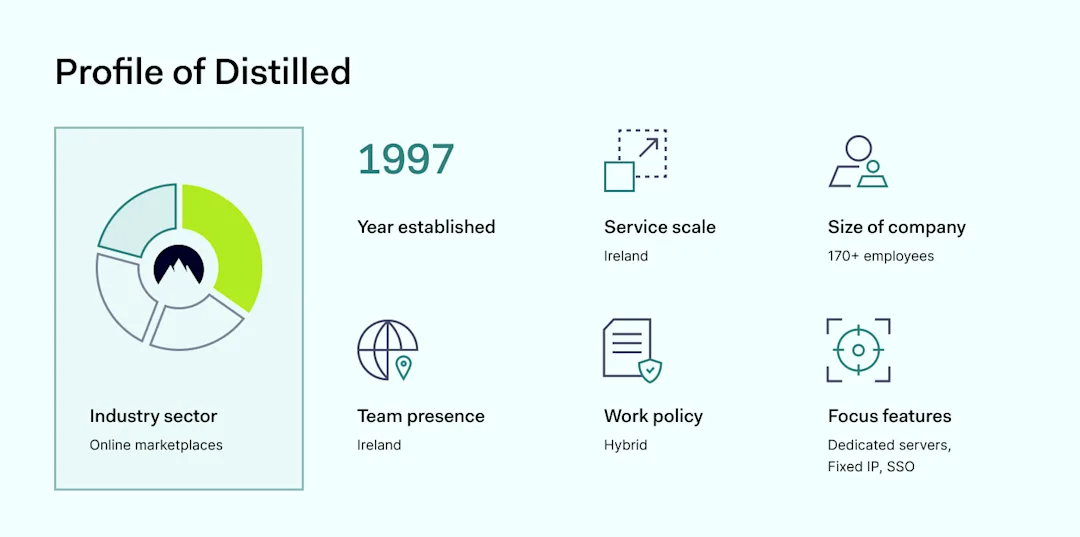
Founded in 1997, Distilled emerged as a pioneering real estate platform designed to simplify the property search for buyers in Ireland. Over the years, the company expanded through acquisitions and partnerships, such as Daft.ie, DoneDeal.ie and Adverts.ie, and became part of the international group, Adevinta. Today, Distilled focuses on managing these major brands within Ireland, offering comprehensive real estate and classified advertisement services.

Profile of Distilled

Being established in the 90s means that the technological stack is based on bespoke applications not fully compatible with all types of modern security platforms. The dedicated team had to manually configure, maintain, and upgrade the company’s physical infrastructure whether it was holidays, weekends, or after-hours. Transitioning to a modern company mindset, Distilled had to change its approach — IT Operations Manager Joe O’Brien shared how it happened.

The challenge

Complex infrastructure support for remote teams

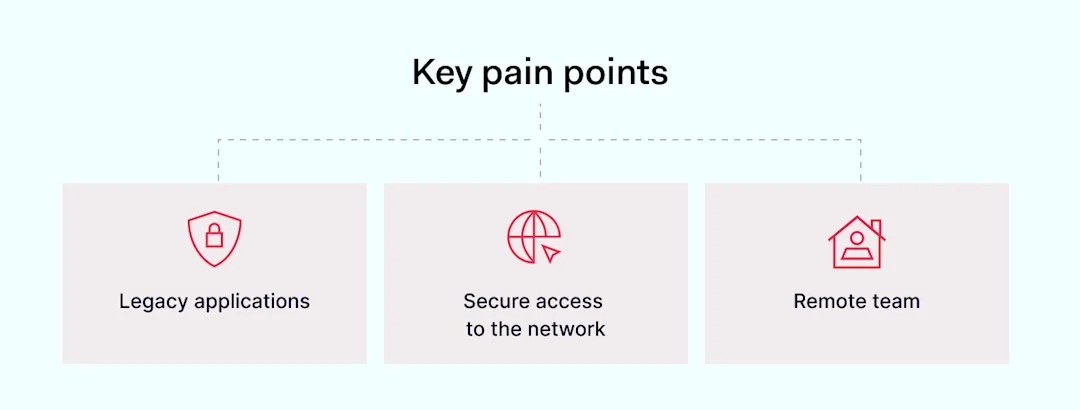
Key pain points

As the global pandemic shifted work from office to home, Distilled faced significant challenges with their legacy applications, which were accessible only through an office IP address.

“When COVID hit, employees were scattered across the country. To access our internal systems, we were using our office VPN to provide our users secure IP access —that’s what we’ve been using for the last couple of years.”

Click to tweet

This setup granted employees access to essential systems, enabling productivity across dispersed locations. However, working with legacy applications required extra labor to support them, expanding the work scope for the IT team.

“There’s a lot of infrastructure which we have to maintain: local internet, firewalls, access servers and connections between our office to remote locations. Infrastructure was too complex, had too many fail points, and was not designed as a full-time solution for all employees working remotely.”

Click to tweet

The situation called for a revision of the existing technology stack. It was necessary to exchange complex applications with solutions that are easy to use and don’t require hands-on presence. These changes enabled remote teams to access the company network securely.

The solution

Focus on a simple and secure solution

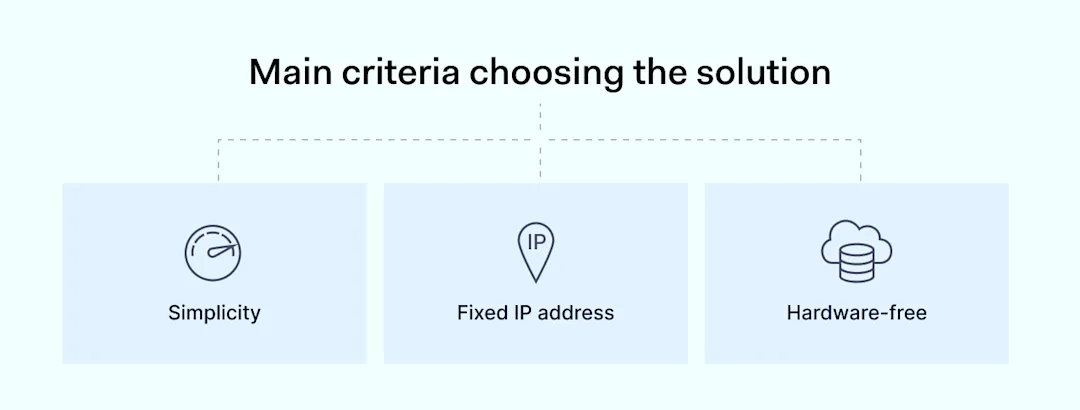
Main criteria choosing the solution

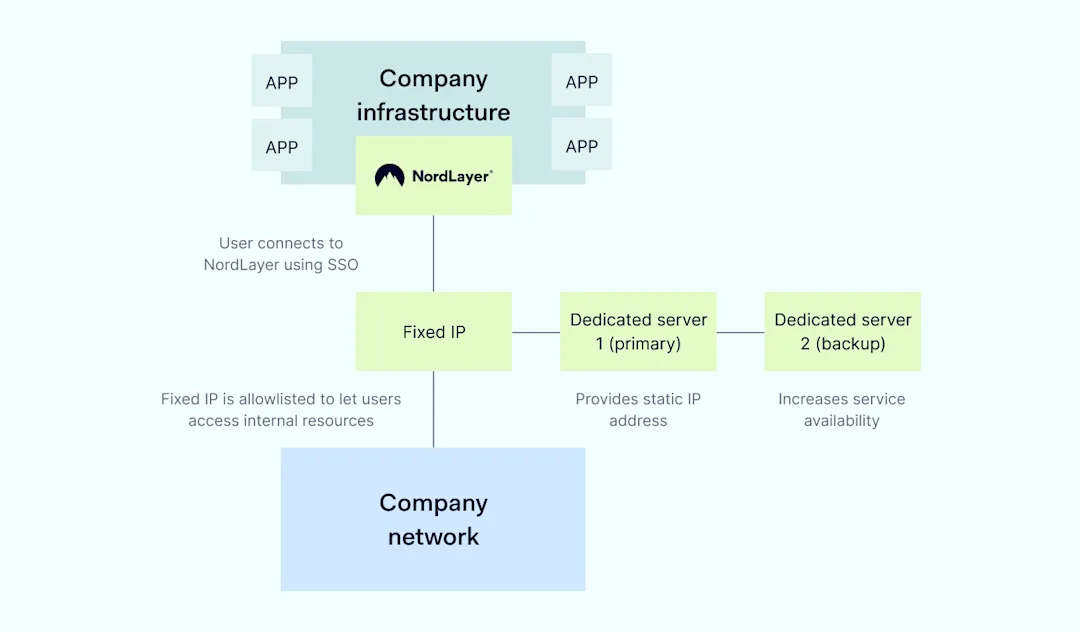
Distilled turned to NordLayer to address their connectivity and security challenges. By implementing NordLayer’s dedicated server option, the company secured a fixed IP address, simplifying remote access without the need for complex and unreliable VPN setups.

“We looked into a solution that was simple and guaranteed a fixed IP address for all of our employees. We could then use that IP as one of the security checks on our systems to grant remote workers access. NordLayer checked all the boxes I had in mind.”

Click to tweet

The integration with Distilled’s Identity and Access Management solution ensured that only company-managed devices could access these systems, enhancing overall security.

“Integration with our IAM system allowed us to quickly onboard all staff, utilising 2FA access to NordLayer from company-managed devices, and assign a fixed IP address as a secure configuration.”

Click to tweet

Distilled has a layered security strategy, one of which is based on fixed IP addresses to confirm and control user access. This way the IT team can coordinate permissions, manage employee accounts, and ensure that the company network is under a sufficient security layer.

Moreover, the company settled for 2 dedicated servers so they can rest assured that if the primary server goes down or is overloaded, the backup server will help maintain service levels unimpacted.

Why choose NordLayer

NordLayer was selected for its simplicity, reliability, and ease of integration. Unlike other solutions that required additional infrastructure, NordLayer offered a straightforward, out-of-the-box solution.

“The internal infrastructure team maintains and manages the application systems, while the IT team looks after the access security, ensuring that our employees get into the network with ease. NordLayer takes the complexity away from providing our end users with these services.”

Click to tweet

It allowed the IT team at Distilled to deploy a secure access system in minutes, significantly reducing the administrative overhead associated with managing traditional VPN solutions.

A hardware-free solution to securely connect to the company network

Scheme

Distilled was looking for an easy way to give all their end users a single fixed IP address for the whole company. Other systems they looked at required adding additional infrastructure into their offices, which the team had to manage themselves. With NordLayer, it’s all included.

The outcome

Removing the complexity for the user and IT team

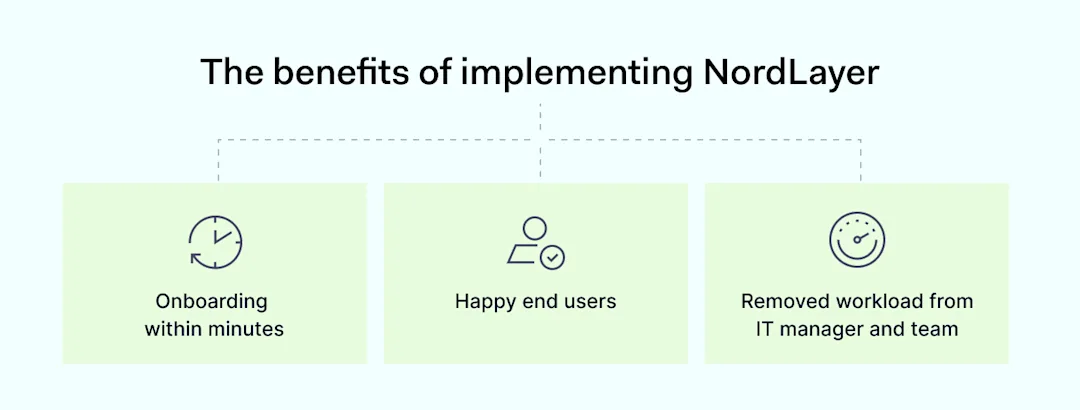
The benefits of implementing NordLayer

The adoption of NordLayer has led to a more flexible and secure remote working environment at Distilled. Employees now enjoy seamless access to critical applications without the hassles of a traditional VPN.

“The setup from a client perspective was very easy: download the app, click on the SSO login button to and you are in.”

Click to tweet

The solution has proven reliable, with no significant downtime reported, allowing the IT team to focus on more strategic tasks rather than maintaining complex network infrastructures.

“NordLayer saved so much time and it takes so much pressure off our small IT team. VPN support was needed outside of normal working hours. Previously, any time our VPN would drop, someone needed to go to the site to fix the issue. Now that we have NordLayer, it just works all the time.”

Click to tweet

Moreover, the IT Operations Manager got a lot of positive feedback from users that the app runs in the background, it doesn’t interfere with their work and he himself has nothing to worry about.

Pro cybersecurity tips

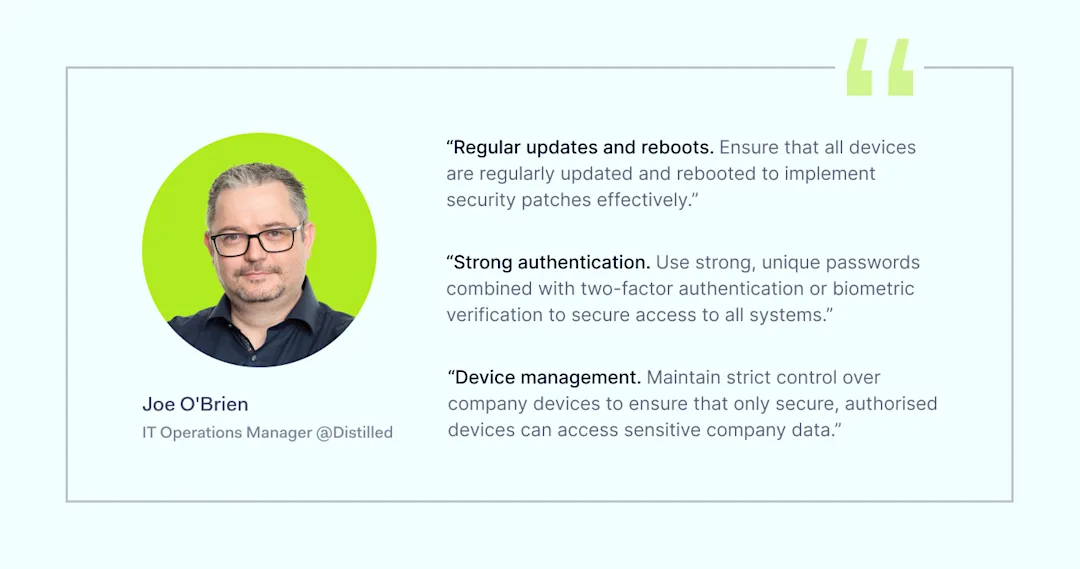
In cybersecurity, you have to know the drill. How to practise security, prevent data breaches, and stay out of the bad actors’ radar. To achieve it you don’t have to climb mountains, just be cautious and aware. Here are some tips on how Joe O’Brien, Distilled IT Operations Manager, practices security on a daily basis and you are welcome to join these activities.

Quote

Through strategic use of technology and a focus on security, Distilled has not only adapted to remote work challenges but has also positioned itself as a leader in using cybersecurity solutions to enhance business operations.

About Version 2 Digital

Version 2 Digital is one of the most dynamic IT companies in Asia. The company distributes a wide range of IT products across various areas including cyber security, cloud, data protection, end points, infrastructures, system monitoring, storage, networking, business productivity and communication products.

Through an extensive network of channels, point of sales, resellers, and partnership companies, Version 2 offers quality products and services which are highly acclaimed in the market. Its customers cover a wide spectrum which include Global 1000 enterprises, regional listed companies, different vertical industries, public utilities, Government, a vast number of successful SMEs, and consumers in various Asian cities.

About NordLayer
NordLayer is an adaptive network access security solution for modern businesses – from the world’s most trusted cybersecurity brand, Nord Security.

The web has become a chaotic space where safety and trust have been compromised by cybercrime and data protection issues. Therefore, our team has a global mission to shape a more trusted and peaceful online future for people everywhere.

About NordLayer
NordLayer is an adaptive network access security solution for modern businesses – from the world’s most trusted cybersecurity brand, Nord Security.

The web has become a chaotic space where safety and trust have been compromised by cybercrime and data protection issues. Therefore, our team has a global mission to shape a more trusted and peaceful online future for people everywhere.

RDP security: How to secure your remote desktop

With 27% of the US workforce operating remotely, companies need efficient and secure ways to connect users and central servers.

Microsoft’s Remote Desktop Protocol has become a go-to option for flexible working. More than 50% of companies report using RDP in the past year, and it’s not hard to see why. RDP allows fast connections and seamless remote work.

But is RDP a secure option for your workforce? As always, the answer depends on your security setup.

This blog will explore how RDP works and some of the main RDP vulnerabilities. As we will see, remote access creates significant security risks. However, these risks can be managed if you follow our RDP security tips and implement smart remote access solutions. Let’s find out more.

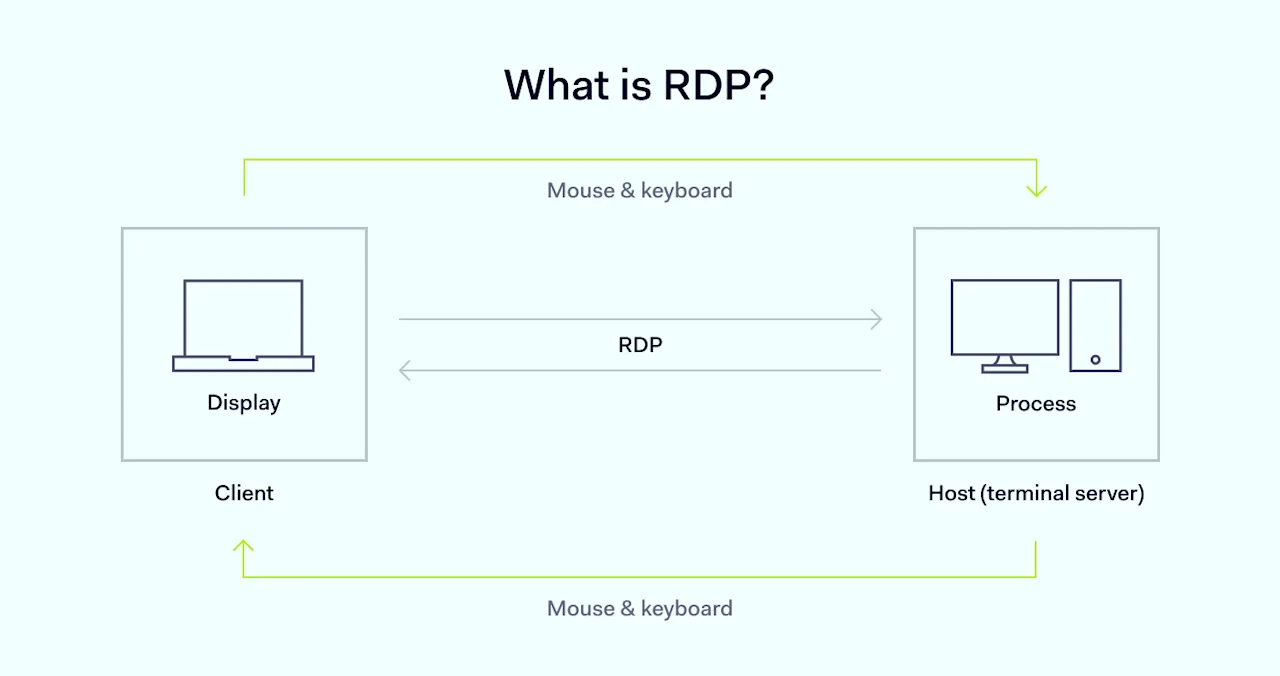
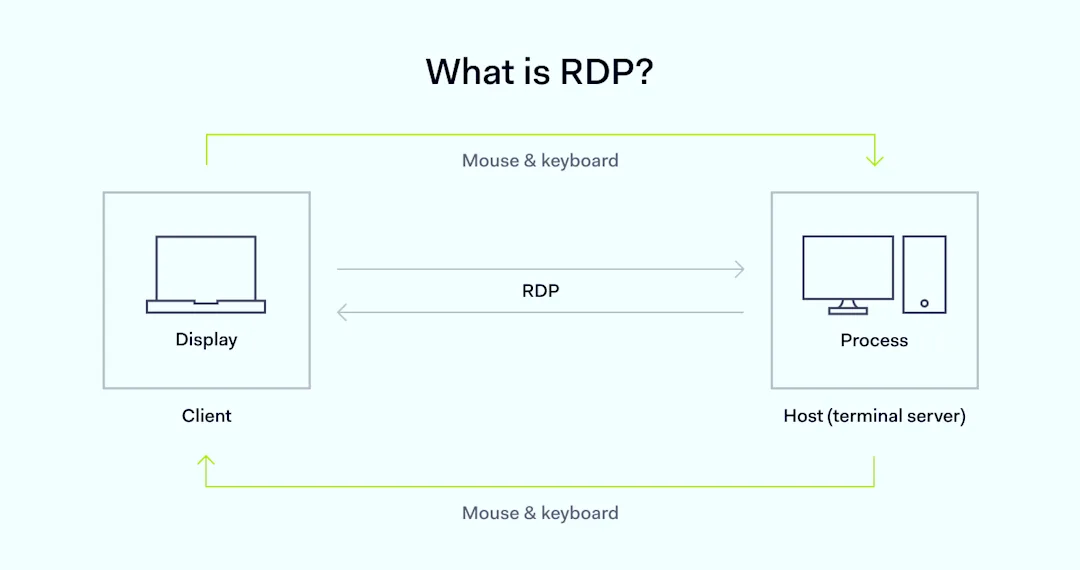
What is RDP?

Businesses use the Remote Desktop Protocol (RDP) to communicate with and control external devices. Created by Microsoft, RDP enables seamless remote work via Windows systems.

What-is-RDP

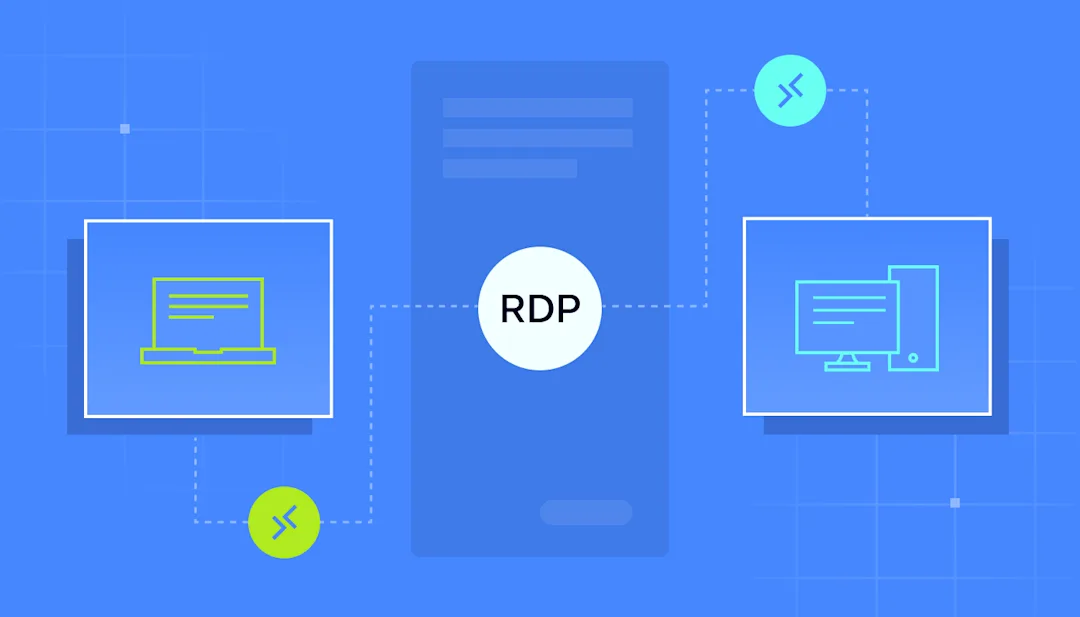
RDP functions by creating sessions between clients and servers. Clients request access. Servers authenticate requests and transmit a graphical interface to the remote client. This interface replicates the desktop contained on the server and functions just as if installed on the client.

The Remote Desktop Protocol supports this setup by carrying data about mouse movements, clicks, and keyboard presses. The protocol converts activity into data packets, which the server converts into graphical updates.

In the process, a lot of information passes across the RDP connection. RDP access handles document printing, audio, and video communications, collaborative editing, and file transfers. Much of this information could be very valuable in the wrong hands.

Why use RDP?

RDP allows remote workers to access resources located in central data centers. Workers can run applications and manipulate files just as they would in on-premises offices. Users do not need to install apps locally or download documents for local use. Everything stays on-site.

RDP also enables technicians to access remote devices. On-site specialists can diagnose problems, deliver security patches, assess device postures, and monitor remote operations. Managers and security teams can easily train remote workers.

Technicians favor the RDP protocol due to its reliability and speed. Windows compatibility is another attractive feature, making it convenient for most organizations. However, there is a downside: RDP security issues.

What are the main RDP security issues?

RDP is a transfer protocol, and protocols are almost always vulnerable to external attacks. That’s not all. Attackers can also target the servers and applications used to enable RDP access.

Attacks range from mild irritants to serious threats that put workloads and data at risk. Companies using RDP for remote work need plans to handle these threats and keep data safe.

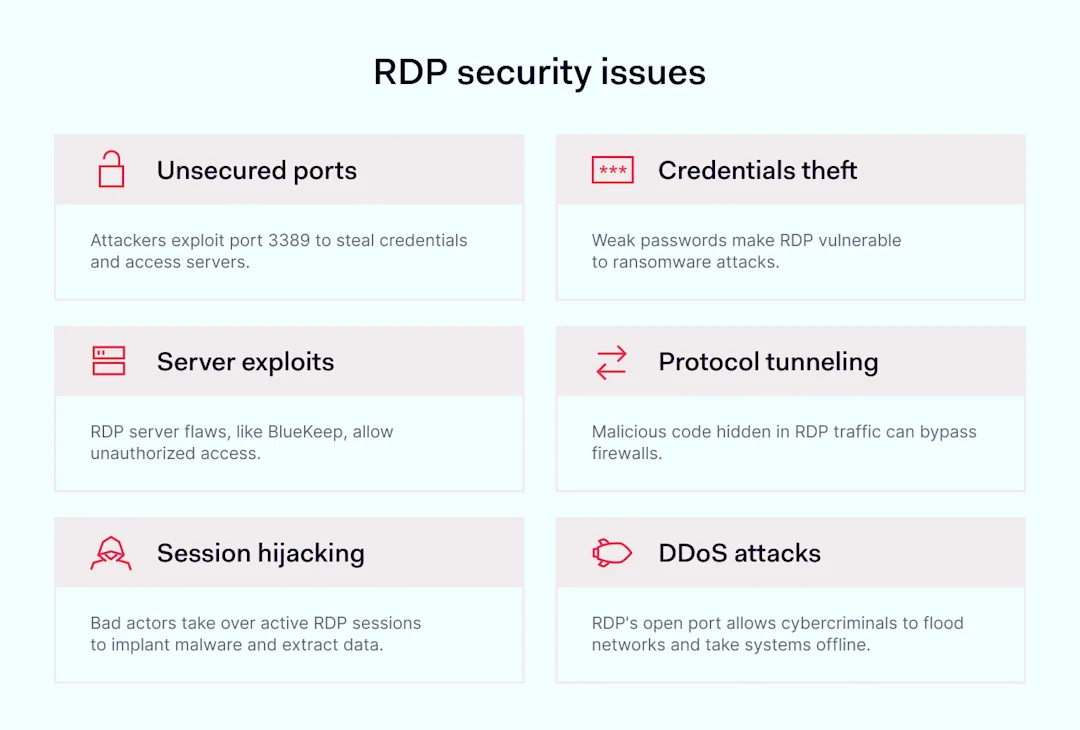
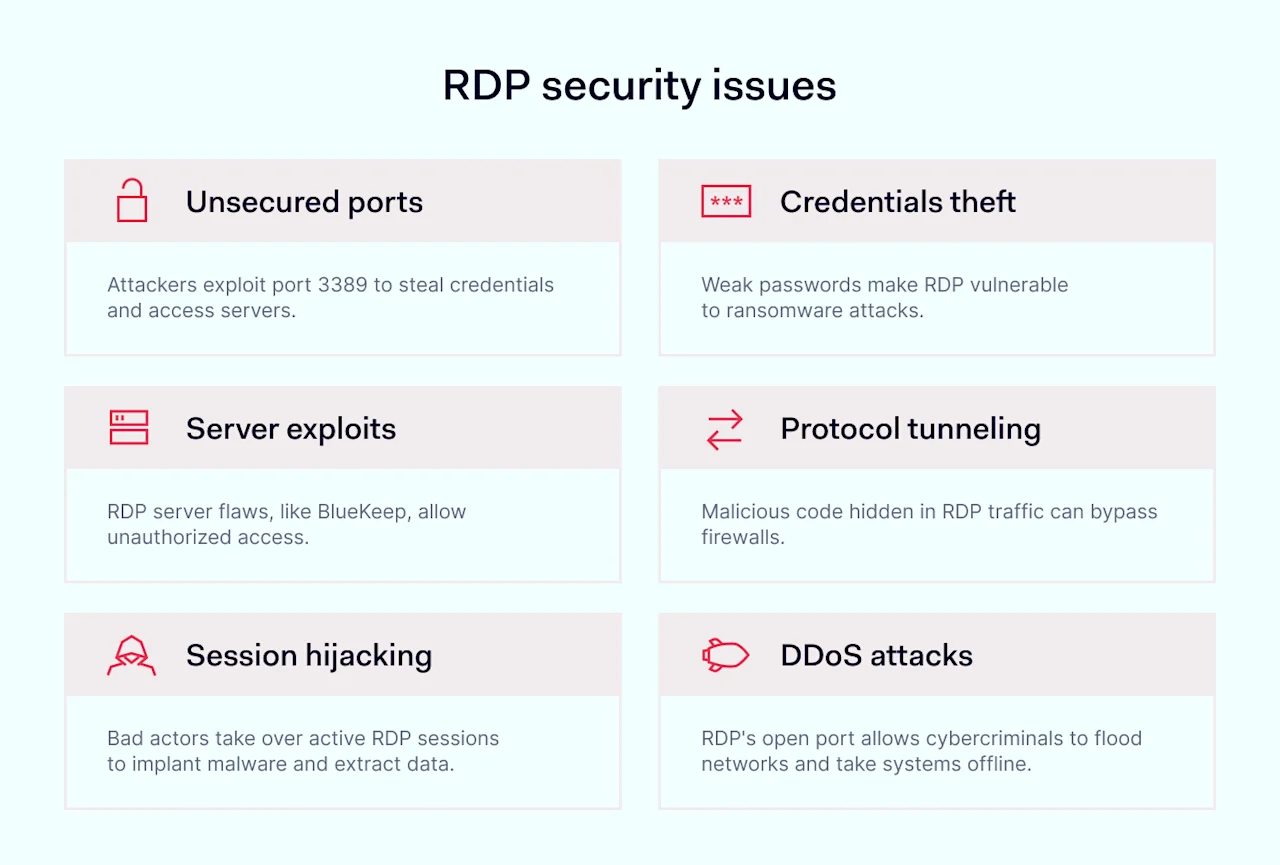
Security planning starts with awareness of common RDP threats. Here are some of the most common (and damaging) vulnerabilities:

  • Unsecured ports. RDP always uses port 3389 to establish connections. This is an external and open port. Malicious actors can impose themselves between users and port 3389 to steal credentials via on-path attacks. Attackers can then use the open port to access servers or devices.

  • Credentials theft. Weak credentials are a critical RDP security issue. Users often reuse passwords for RDP and email and access web applications. Attackers obtaining these user credentials can implant ransomware via workloads or servers. Even slightly different passwords are vulnerable to brute-force attacks.

  • Server exploits. In the past, Microsoft’s RDP services have fallen victim to remote code execution vulnerabilities. Hackers use flaws in servers or protocol codes to gain unauthorized access. For instance, an exploit called BlueKeep once exposed millions of RDP servers to external attacks. Microsoft resolved the BlueKeep issue, but exploits can emerge at any time.

  • Protocol tunneling. In tunneling attacks, hackers implant malicious code within protocol traffic. RDP traffic appears to be legitimate but carries malware or other harmful agents. Even worse, many standard firewalls struggle to detect this type of attack.

  • Session hijacking. Attackers can gain access to active remote desktop access sessions. In these situations, attackers can explore any resources available to legitimate remote users. Until they are detected, they can implant malware, extract data, and disrupt operations.

  • DDoS attacks. Attackers often use protocols to flood networks with traffic and take systems offline. RDP is vulnerable to DDoS-style attacks because it uses an open port, and servers generally do not enforce rate limits. The protocol is also relatively resource intensive, meaning attackers must unleash less traffic to achieve results.

How to secure RDP

Securing your Remote Desktop Protocol setup should be an urgent task. RDP is involved in 90% of cyberattacks, and the consequences of attacks are severe. RDP is a critical vector for ransomware, and attackers can use exposed work environments to steal confidential data.

RDP-security-issues

There is some good news. Properly secured remote desktop protocol implementations are hard to infiltrate and secure. Let’s run through some best practices to create a secure remote desktop environment.

  • Use stronger passwords. Brute-forcing attacks are much harder to mount against complex passwords. Avoid any words related to individuals or the company, and always avoid recycling passwords from other logins. Use password managers to generate strong passwords that are impossible to guess.

  • Change your RDP port. Changing your listening port from 3389 helps make RDP secure by limiting external access. Changing the port is a sensible first step, as it blocks many automated port attacks.

  • Use access controls. Administrator accounts can change RDP settings or use their privileges to access other network resources. Use access management tools to apply the principle of least privilege. Provide access to administrators when they need it for specific tasks. Otherwise, allow the fewest possible permissions for all remote users.

  • Apply firewall protection. Strengthen your defenses by casting Windows Firewall protection around RDP environments. Windows Firewall rules for RDP connections block external traffic but allow authorized users to access network resources.

  • Use Network-Level Authentication (NLA). Network-level authentication is native to RDP systems and adds an extra layer of authentication for every session. Users seeking RDP access must supply an additional form of identification, such as smart cards, one-time passcodes, or biometrics.

  • Implement lockout policies. Lockout policies block users after a certain number of unsuccessful logins. This is a good starting point for blocking brute-force attacks.

  • Monitor user sessions. Track user activity during RDP sessions to detect suspicious behavior. Monitoring should check for spikes in resource usage. This could suggest a DDoS-style attack. Technicians should also monitor access to sensitive files and limit access to essential resources.

  • Add Virtual Private Network (VPN) protection. VPNs ensure secure remote access by creating encrypted shields around remote connections. Users log onto a VPN gateway before accessing RDP servers. This adds an extra barrier for hackers and effectively anonymizes traffic.

  • Update RDP tools regularly. Promptly apply security updates for remote desktop applications and Windows Server. Ensure VPNs, multi-factor authentication tools, and firewalls are up to date. Regular updates cut the risk of exploits, making life much harder for would-be attackers.

  • Train staff in RDP security. Never allow remote workers to use RDP connections without security training. Ensure workers know how to use passwords, VPNs, and multi-factor authentication. Outline security and compliance policies.


Eliminate RDP vulnerabilities using NordLayer

RDP is among the most common secure remote access solutions available. Yet, it is not necessarily the best way to ensure secure remote access—at least not on its own.

The solution lies in combining Microsoft’s security features with external security tools. On-board tools like NLA, port settings, and user monitoring all help. However, NordLayer’s Smart Remote Access ensures secure RDP connections with end-to-end encryption.

NordLayer provides secure remote access solutions to meet your remote device access needs. Create virtual LANs around every network endpoint and protect remote users via VPN coverage. Cloud LAN enables secure file sharing from device to device, troubleshooting others’ devices, and using remote devices as virtual machines for work.

Benefit from the flexibility and efficiency remote work provides while avoiding security nightmares. To find out more, contact the NordLayer team today.

About Version 2 Digital

Version 2 Digital is one of the most dynamic IT companies in Asia. The company distributes a wide range of IT products across various areas including cyber security, cloud, data protection, end points, infrastructures, system monitoring, storage, networking, business productivity and communication products.

Through an extensive network of channels, point of sales, resellers, and partnership companies, Version 2 offers quality products and services which are highly acclaimed in the market. Its customers cover a wide spectrum which include Global 1000 enterprises, regional listed companies, different vertical industries, public utilities, Government, a vast number of successful SMEs, and consumers in various Asian cities.

About NordLayer
NordLayer is an adaptive network access security solution for modern businesses – from the world’s most trusted cybersecurity brand, Nord Security.

The web has become a chaotic space where safety and trust have been compromised by cybercrime and data protection issues. Therefore, our team has a global mission to shape a more trusted and peaceful online future for people everywhere.

About NordLayer
NordLayer is an adaptive network access security solution for modern businesses – from the world’s most trusted cybersecurity brand, Nord Security.

The web has become a chaotic space where safety and trust have been compromised by cybercrime and data protection issues. Therefore, our team has a global mission to shape a more trusted and peaceful online future for people everywhere.

What is a web application firewall (WAF)?

Ever wonder how a website protects itself from all of those cyber threats that evolve daily? Through something called the web application firewall, or WAF. But what are WAFs? And why are they important? Understanding how WAFs function and why they form an integral part of today’s modern web security infrastructure provides insight into this very critical role.

What does the web application firewall (WAF) do?

WAF is a security solution designed to protect web applications by continuously monitoring and filtering HTTP traffic between the web application and the internet. It protects against multiple threats such as SQL injection and cross-site (XXS) scripting, among others. At its core, a WAF works as a kind of protective layer that is put in between web applications and potentially malicious traffic.

How does a WAF Work?

To understand the significance of the role WAF plays in cybersecurity, we have to know how it works. In a nutshell, WAF network security, as already mentioned, works by examining the HTTP requests and responses against defined rules and policies. Here is a deep dive into the mechanisms behind WAF.

WAF

Inspection and filtering

The WAF is put between a user and a web application. So when a user sends a request to the web application, the WAF intercepts the requests passed to the web server and then inspects its contents, including headers, URLs, data payloads, and known attack signatures that might include SQL injection commands or XSS scripts.

Rule-based detection

WAF employs various rule sets to detect and stop threats. These rules define the normal and abnormal traffic behavior for a web application. For example, one of the rules could be to block the request that contains certain keywords or patterns in the message body that could be associated with SQL injection. The rules can be customized according to the needs of the web application.

Behavioral analysis

Apart from rule-based detection, some advanced WAFs will make use of various behavior analysis techniques. Fundamentally, this is the process of monitoring typical user behaviors to identify deviations that could be indicative of an attack. For example, if the user suddenly starts sending a large number of requests in a very short period, then probably a WAF will raise a red flag for a DDoS attack.

Real-time response

In the event of a threat, the WAF instantly acts to block the request from further passing on to the web application. Responsiveness in real-time is critical in suspending an attack before any serious damage occurs. Furthermore, WAFs can also generate alerts or log messages to inform administrators about identified threats and consequential actions that were performed to stop them.

By combining inspection, detection, and response mechanisms, a WAF can significantly increase the security of a network. Unsurprisingly, these days, WAFs are often a critical part of any comprehensive cybersecurity strategy.

Why is a WAF important?

Safeguard sensitive information

The amount of sensitive information that exists in web applications is vast. Sensitive data includes personally identifiable data, financial details, and proprietary business data. In cases of successful cyberattacks and breaches, all such information is exposed. The role of WAF here is to prevent such incidents by blocking off malicious traffic to the web application and disallowing unauthorized access.

Avoid compliance fines and costs

Most industries are governed by stringent regulatory laws concerning data protection and privacy. Non-compliance with these regulations is your one-way ticket to heavy fines and lawsuits. A WAF makes it easier for businesses to comply with regulations by providing the much-needed security layer. Proactive measures taken to safeguard sensitive data mean peace of mind and better chances of avoiding hefty fines.

Preserve reputation

Today, a company’s reputation is often related to its ability to protect customer data and maintain secure online services. A single successful cyber attack on an organization can put its reputation down the gutter once and for all. Implementing a WAF can mitigate such risk and further improve the reputation. Ultimately, most consumers trust a business, which means security not only in their PR statements but also in their actions.

Differences between WAF and network firewall

While WAFs and Network Firewalls both play a critical role in cybersecurity, they serve rather different purposes, and, as discussed, operate at different levels within a network. Here’s a rundown of the key differences between the two.

The role of WAFs

Security of web applications

As we discussed earlier, WAFs are built for the protection of web applications by filtering and analyzing HTTP traffic. HTTP is the protocol used for transferring data on the web, and WAFs focus on this traffic to defend against web-based attacks. WAFs can trace malicious activity against the application layer by analyzing the content of HTTP requests and responses since it works at Layer 7 of the OSI model.

Layer 7 protection

Layer 7 is where user interactions with software applications take place. As a part of their operation, WAFs track this layer for detailed content data about HTTP traffic. For example, an attacker could try to insert malicious code into a web form to gain unauthorized access to sensitive data; in such an instance, a WAF would detect and block that attempt immediately. This kind of sophisticated protection is critical for securing web applications against a variety of threats.

Should an attacker try to gain access to sensitive information by inserting malignant code in a web form, a WAF will block this attempt. This type of targeted protection is important to safeguard web applications from sophisticated threats.

The role of network firewalls

Protection of the network

A network firewall works toward protecting the entire network by managing incoming and outgoing traffic through filtering against a set of predefined security rules. It works at the network layer and the transport layer of the OSI model. These layers are responsible for proficient routing and reliable delivery of data packets in a given network. Network firewalls focus on threats like unauthorized access, DDoS attacks, and malware, ensuring that only legitimate traffic is allowed to pass through.

Layer 3 and 4 protection

Layer 3 is the network layer, including logical addressing of data packets to ensure that data sent from one device reaches the right destination, while Layer 4 is a transport layer responsible for the reliable transmission of data between devices. Network firewalls regulate the flow of data toward the destination based on IP address ports, and protocols. For example, they can be used to prevent an attacker from using an open port to access the network and so gain unauthorized access to network resources.

Bottom line

In an era where cyber threats are becoming increasingly sophisticated and pervasive, the importance of robust web security measures cannot be overstated. The implementation of a WAF is a vital component of contemporary web security. It provides the necessary tools to detect, prevent, and respond to web-based threats in real-time, ensuring the integrity and availability of web applications. As cyber threats continue to evolve, investing in a robust WAF solution will remain a critical priority for organizations seeking to protect their digital assets and maintain the trust of their users.

For comprehensive security, it’s essential to protect not only your web applications but also your access credentials. Just as a WAF safeguards against web-based threats, a robust password management solution like NordPass Enterprise ensures that your organization’s passwords are protected from unauthorized access and are easily accessible at all times. NordPass provides features such as secure password sharing, automated password generation, and real-time breach monitoring, aligning perfectly with the goals of a WAF by adding an extra layer of security to your web infrastructure.

About Version 2 Digital

Version 2 Digital is one of the most dynamic IT companies in Asia. The company distributes a wide range of IT products across various areas including cyber security, cloud, data protection, end points, infrastructures, system monitoring, storage, networking, business productivity and communication products.

Through an extensive network of channels, point of sales, resellers, and partnership companies, Version 2 offers quality products and services which are highly acclaimed in the market. Its customers cover a wide spectrum which include Global 1000 enterprises, regional listed companies, different vertical industries, public utilities, Government, a vast number of successful SMEs, and consumers in various Asian cities.

About NordPass
NordPass is developed by Nord Security, a company leading the global market of cybersecurity products.

The web has become a chaotic space where safety and trust have been compromised by cybercrime and data protection issues. Therefore, our team has a global mission to shape a more trusted and peaceful online future for people everywhere.

×

Hello!

Click one of our contacts below to chat on WhatsApp

×