



Patching That Just Works
Autonomous endpoint management with a scalable and secure
cloud-native platform configurable in 5 minutes, with no VPN needed

- Automated cross-OS and third-party apps vulnerability remediation
- Continuous patch compliance for servers and workstations
- Real-time scalability for distributed enterprise networks
- Secure and trusted: SOC 2 Type II, ISO 27001:2022 and GDPR






Third-Party Patching
Automate patching of numerous software titles with real-time progress status, even if your endpoints are offline. Includes 99% patching coverage for most enterprise environments.
Cross-OS Patching
Update Windows and macOS consistently on all your workstations and servers, even if they are not on a corporate network, disconnected from a company VPN, or not joined to a domain.
Vulnerability Management
Prevent security breaches and ransomware attacks. Detect vulnerabilities in OS and applications in real-time. Leverage built in vulnerability remediation in a single solution.
Enterprise-grade Patch Management
Enable IT security and operations teams to detect, prioritize, and remediate vulnerabilities to ensure continuous compliance –
all while reducing costs and making your enterprise secure.

Detect
Real-time visibility into missing critical updates for OS (such as macOS and Windows) and third-party apps.

Remediate
Bandwidth-efficient P2P update distribution. Patching of offline endpoints as they go online.

Comply
99% patch compliance in hours, not months. Real-time compliance reporting.
Industry Awards




Trusted by many Fortune 500 companies



See #1 cloud-native
patch management in action

What Experts Say

“Proper patch management requires your organization to evaluate, test, and approve patches. What’s really going to save your bacon, however, is automating patch deployment. If you haven’t already automated patch pushes, use the threat of ransomware as the political cover you need to make it happen.”

“According to Gartner’s Hype Cycle for Endpoint Security, 2022, security and risk leaders must prepare to select next-wave technology to continue to protect endpoints from attacks and breaches.”

“Are zero day attacks real? Absolutely. Are they the biggest issue for most organisations? No. The top issue in vulnerability management is that organizations aren’t prioritizing their patching and compensating controls to align to vulnerabilities targeted by threat actors.”

“Action1 helps to discover, prioritize, and remediate vulnerabilities in a single solution to prevent security breaches and ransomware attacks. It automates patching of third-party software and operating systems, ensuring continuous patch compliance and remediation of security vulnerabilities before they are exploited.”
Testimonials


Autonomous Endpoint Management Solution
Automatically evaluate patch success metrics before advancing through sequential update rings
- Boost Productivity: Auto-resolve issues for IT and employee efficiency
- Automate Compliance: Meet organizational and regulatory standards
- Reduce Cyber Risk: Auto-remediate, patch, and fix configuration drift
- Simplify Management: Automate software deployment and more





Autonomous Endpoint Management (AEM) Solution For Modern IT Environments
Autonomous Endpoint Management (AEM) is a modern solution for efficiently managing and securing endpoints. Harnessing automation, data analytics, and AI, AEM minimizes manual intervention, speeds up threat mitigation, simplifies maintaining security posture consistency, delivers compliance assurance and significantly boosts IT team productivity.
IT teams face mounting challenges, from evolving cyberthreats, to highly distributed workforces and IT environment complexity. They must manage frequent, critical software updates, enforce consistent policies, and meet regulatory compliance—all within tight budgets and with limited resources. AEM tackles these demands, delivering:
- Enhanced Security and Compliance: Proactively detects and mitigates threats, ensuring security posture consistency and compliance
- Efficiency and Productivity: Reduces IT disruption for users and automates endpoint management tasks, freeing up IT staff
/li>
- Visibility, Control and Empowerment: Provides asset inventory, real-time monitoring, alerts, reporting and built-in remote access/li>
Action1 Autonomous Endpoint Management Platform
Uniquely including 200 endpoints free of charge, Action1’s cloud-native Autonomous Endpoint Management (AEM) platform automates issue resolution, patching, software deployment and configuration management. Designed to address today’s challenges of distributed workforces, stringent compliance requirements, and heightened security risks, Action1 empowers IT teams to achieve operational excellence with minimal effort whilst dramatically enhancing employee experience and productivity.

Simplify IT Operations
Schedule and automate routine tasks like patching, software distribution, vulnerability remediation and compliance enforcement. Provide remote support via a built-in remote access tool.

Enhance Security
Ensure endpoints are always protected with the latest updates, while consistently enforcing security posture. Security features such as role-based access, audit trails, malware patch scanning and MFA further safeguard operations.

Improve User Experience
AEM enhances the employee experience by ensuring devices perform reliably. Potential problems are resolved before they disrupt productivity.

Support Hybrid and Remote Work
Manage endpoints across distributed and remote environments. Monitor device health, enforce policies, and deploy updates seamlessly from a centralized dashboard, regardless of endpoint location. This capability supports the flexibility required for hybrid and remote workforces.

Solve Compliance Challenges
Automate Windows OS and application patching, manage endpoint security configurations remotely, and deploy security software across devices. Maintain real-time inventory of software and hardware while ensuring patch compliance for audits.

Gain Unbeatable
ROI
Action1 offers full-featured endpoint management for up to 200 endpoints free, giving small and medium-sized businesses a risk-free path to enterprise-grade management. The platform scales effortlessly as your organization grows, with 200 endpoints always free.
Trusted by many Fortune 500 companies
10M+
Managed Endpoints
<1%
non-compliant endpoints
99%
Patching Success
What Makes Action1 Unique
Action1’s cloud-native platform revolutionizes endpoint management by automating tasks like patching, software deployment, and compliance checks, with no VPN or additional hardware required, infinite scalability and 200 endpoints included free. Here’s how Action stands out:
Get Set-Up in 5 minutes
Action1 begins delivering consistency and security across all endpoints, in minutes, not hours or even days, with no additional hardware required.
Unlock Huge Savings
Action1 includes 200 endpoints, totally free of charge, forever. If you need to scale beyond 200, enjoy a simple, transparent, all-inclusive rate.
No VPN Required
Manage and update both remote and onsite endpoints effortlessly with the Action1 Platform—no company network, domain, or VPN needed.
Avoid Network Impact
Action1 uses a proprietary peer-to-peer protocol to efficiently share updates and software within the same network, minimizing external bandwidth usage.
Reach Offline Devices
Automatically resume updates, software deployments, script execution, and other missed tasks as soon as endpoints reconnect.
Secure and Proven
Action1 is the only patch management solution with both SOC 2 Type II and ISO 27001:2022 certifications and includes advanced security features designed to safeguard your operations.
What Our Customers Say
What Experts Say

“Action1 develops a risk-based patch management platform for distributed networks trusted by thousands of global enterprises.”

“The top issue in vulnerability management is that organizations aren’t prioritizing their patching and compensating controls to align to vulnerabilities targeted by threat actors.”

“Patch management. It’s one of those tasks that nobody wants to do, but it’s essential.”
Industry Awards
See #1 cloud-native patch management in action
Frequently asked questions
Action1 is uniquely positioned to support small and medium-sized businesses (SMBs) by offering full-featured autonomous endpoint management for up to 200 endpoints free of charge. This allows SMBs to access enterprise-grade tools without the financial strain associated with traditional IT management solutions. With features like automated patch management, real-time monitoring, and compliance enforcement, SMBs can maintain secure and efficient IT operations without requiring large IT teams or infrastructure investments. Additionally, this free offering includes the same capabilities available to larger enterprises, ensuring no compromise on quality.
Yes, Action1 is designed to seamlessly manage endpoints regardless of their location. Whether devices are within an office network or spread across remote and hybrid work environments, Action1’s cloud-native architecture ensures consistent oversight and control. The platform provides centralized management through a single dashboard, enabling IT teams to monitor, patch, and update endpoints no matter where they are located. This capability is particularly valuable for organizations with distributed teams or employees who frequently work from home.
Action1 is built to handle patch deployment failures with resilience. If a patch deployment fails on a device, the platform automatically retries the process and queues updates for endpoints that are temporarily offline. Detailed diagnostics are provided, including error codes and logs, to help IT teams identify and resolve underlying issues quickly. This fail-safe approach ensures that patches are applied reliably across all endpoints, minimizing security risks and operational disruptions.
Action1 reduces user disruption during updates by leveraging silent deployments and customizable scheduling. IT teams can configure updates to run during off-hours, ensuring that endpoints are patched without interrupting productivity. For users who are actively working, updates are applied in the background with minimal system impact. This intelligent approach to updates allows organizations to maintain a high level of endpoint security while avoiding unnecessary downtime for their employees.
Yes, Action1 continuously monitors endpoint configurations to ensure they comply with organizational policies and industry standards. When a misconfiguration is detected, such as unauthorized software or incorrect security settings, the platform flags the issue and provides actionable recommendations for remediation. IT teams can also automate the remediation process, ensuring misconfigured endpoints are corrected without manual intervention. This proactive management helps maintain a secure and consistent IT environment.
Absolutely. Action1 includes robust role-based access controls (RBAC) to ensure security and streamlined operations within IT teams. Administrators can assign specific roles and permissions to team members, granting them access only to the areas of the platform relevant to their responsibilities. For example, a junior technician might only access monitoring tools, while senior administrators manage patches and compliance policies. RBAC helps reduce risks, improve accountability, and ensure a more secure endpoint management process.
Action1 simplifies compliance with regulatory frameworks such as GDPR, HIPAA, and PCI DSS by automating compliance checks and generating audit-ready reports. The platform enforces organizational policies by ensuring endpoints meet required security and configuration standards. Real-time monitoring identifies any deviations from compliance, and automated remediation tools correct issues promptly. Additionally, detailed reports provide IT teams and stakeholders with a clear overview of compliance status, streamlining the audit process and reducing the risk of regulatory penalties.
Scaling beyond the 200-endpoint free tier is seamless with Action1. 200 endpoints are always free and as organizations grow and require coverage for additional endpoints, they can scale beyond 200 with no functional limit to the number of endpoints that can be added. Only additional endpoints above 200 incur cost. The transition is completely seamless, ensuring no disruptions to existing workflows or endpoint management processes. This scalability allows makes Action1 a future-proof solution.
Action1 provides IT teams with a centralized dashboard that delivers real-time visibility into endpoint health, compliance, and security status. The dashboard aggregates data from all managed devices, presenting it in an intuitive and actionable format. IT administrators can quickly identify vulnerabilities, monitor patch deployment progress, and ensure endpoints meet configuration standards. This enhanced visibility enables faster decision-making and helps organizations maintain a secure and efficient IT environment.
No, Action1 is fully cloud-native, meaning it requires no on-premises hardware or additional infrastructure to operate. IT teams can access the platform from any location using a browser, making it ideal for distributed and remote management. The lack of hardware requirements also reduces upfront costs and simplifies the deployment process. Organizations can start managing endpoints immediately after onboarding, making Action1 an accessible and efficient solution for businesses of all sizes.
Free Initial Vulnerability Assessment
Get a free vulnerability assessment for unlimited number of endpoints
- OS and third-party vulnerability assessment
- Free initial assessment for an unlimited number of endpoints
- Forever free patching for the first 200 endpoints (no feature limits)
- Secure and trusted: SOC 2 Type II, ISO 27001:2022 and GDPR




Free one-time vulnerability assessment for unlimited endpoints
Action1 now allows assessment of the unlimited number of endpoints for software vulnerabilities by simply adding these endpoints to Action1. As soon as an Action1 agent is installed, it performs a full analysis, sends all vulnerability data to Action1, and then becomes inactive. This enables you to perform an initial assessment of your endpoint security posture without paying anything. At the same time, Action1 remains free and fully functional for the first 200 endpoints forever.

Detect third-party vulnerabilities
Detect vulnerabilities in installed software applications on what machines, either by an endpoint or by a CVE number.

Detect OS
vulnerabilities
Detect Windows OS vulnerabilities across all workstations and servers, in corporate networks or remote, VPN-free locations.

Integration with CISA catalog
All vulnerabilities listed in the CISA’s Known Exploited Vulnerabilities (KEV) catalog have an attribute indicating if it’s actively exploited.
Patch Management That Just Works

Third-Party Patching
Automate patching of numerous software and OS titles with real-time progress status, even if your endpoints are offline.

Software Repository
Private software repository maintained by in-house security team. Includes 99% patching coverage for most enterprise environments.

Real-Time Visibility
Instant visibility into endpoint vulnerabilities, without the need for periodic scans. Live dashboard for monitoring SLA-based patch compliance.

Vulnerability Remediation
Identify all vulnerable software and OS installed on endpoints in real-time. Leverage built-in vulnerability remediation in a single solution.

P2P Distribution
Minimize external bandwidth usage and ensure rapid deployment of large updates without any on-prem cache servers.

Enterprise Integrations
Integrate Action1 with Active Directory, Entra ID, Okta, Duo, and Google. More integrations are available via REST API or PowerShell scripting.
Enhance Your Microsoft Intune Experience with Action1
Third-Party Patching, Windows Updates and Feature Upgrades
- Real-time detection of missing third-party patches
- Privately maintained Software Repository
- Bandwidth-efficient P2P patch distribution
- Real-time vulnerability assessment and remediation
- Secure and trusted: SOC 2 Type II and ISO 27001:2022
Windows and third-party updates
No VPN required for remote patching
99% patching coverage in 5 minutes
Real-time vulnerability assessment
Automate the entire patch management process
Action1 enhances Microsoft Intune by extending its capabilities with a reliable and consistent patch management platform that is configurable in under 5 minutes—and it just works! Regardless of where your endpoints are situated, it automates the entire software update process, from scanning your network for missing updates, to installing patch updates to multiple endpoints in minutes and reporting on compliance status. Using Action1 alongside Intune can provide your organization with a more complete patch management solution that covers third-party patching, real-time visibility, and efficient update distribution.

Third-party patch repository
Unlike the standard approach to third-party patching, the Action1 Software Repository automates this process entirely. Managed by our in-house experts, it eliminates manual packaging of applications, ensuring your software is always up-to-date and secure.

Private P2P patch distribution
Accelerate patch delivery and sidestep bandwidth concerns without the hassle of managing local appliances or cache servers.

Real-time missing patch visibility
Instantly identify missing third-party patches without depending on stale scan results from the previous day.

Automated, policy-based remediation
Tailor your patching schedule and set automated patching criteria based on factors such as severity, update type, vendor, or specific applications.

Minimize frustration, increase security
Implement customizable reboot behavior to provide users with sufficient time to save their work and temporarily delay reboots, while still enforcing patching deadlines.

Secure and trusted
Action1 stands out as the first third-party patch management solution to attain both SOC 2 Type II and ISO 27001:2022 certifications.
Trusted by many Fortune 500 companies
10M+
Managed Endpoints
99%
Patching Success
<1%
non-compliant endpoints






Why customers choose Action1
Patching without VPN
Patch remote and onsite endpoints using Action1’s cloud-native platform. No need for a company network or VPN connection.
Ditch complexity
Start seeing results in minutes, not hours or days. Deploy and patch software consistently without the hassle of legacy technology, clunky integrations, or multiple consoles.
Avoid bandwidth issues
Accelerate software updates and maintain network availability for critical applications with Action1’s P2P patch distribution capability.
Secure and trusted
Action1 is the first patch management solution to achieve both SOC 2 Type II and ISO 27001:2022 certifications.
Patch offline devices
Enhance your patch success rates by automatically applying OS and application patches the moment endpoints that were offline reconnect.
See phenomenal ROI
No extra hardware or software required. Enjoy your first 200 endpoints for free, with no hidden catches. Easily scale up as needed at a flat rate per endpoint.
What Our Customers Say
What Experts Say

“Patch management. It’s one of those tasks that nobody wants to do, but it’s essential.”
“The top issue in vulnerability management is that organizations aren’t prioritizing their patching and compensating controls to align to vulnerabilities targeted by threat actors.”

“Action1 develops a risk-based patch management platform for distributed networks trusted by thousands of global enterprises.”
Industry Awards



See #1 cloud-native patch management in action
Frequently asked questions

Microsoft Intune is a cloud-based service that focuses on mobile device management (MDM) and mobile application management (MAM). It enables organizations to manage and secure devices used by employees, including smartphones, tablets, and laptops, regardless of their location. Intune helps IT administrators control how devices are used, ensuring that corporate data is protected while allowing users to access the resources they need. This includes features like remote wipe, app deployment, and policy enforcement, making it a comprehensive solution for managing a modern, mobile workforce.
As a strategic addition to Microsoft Intune®, Action1 enhances Microsoft’s device management software with advanced, cloud-native patching and vulnerability management, designed to scale seamlessly and ensure real-time endpoint security.
Action1 complements Microsoft Intune, augmenting Intune’s device management capabilities with its Autonomous Endpoint Management solution. This includes real-time patching and vulnerability assessments for operating systems and third-party applications, along with features like offline device patching and peer-to-peer (P2P) distribution. These capabilities offer an additional layer of compliance and protection, tailored for hybrid work environments. With a setup time of under five minutes, Action1 enables companies to quickly secure their endpoints, manage them autonomously, and stay ahead of emerging threats.
Incorporating Action1 with Microsoft Intune offers several significant benefits for your business:
- Enhanced Third-Party Application Patching: While Intune’s native support for third-party software patching is limited, Action1 automates this process across a wide range of applications. This ensures that vulnerabilities in non-Microsoft software are promptly addressed without needing extra steps or integrations.
- Real-Time Vulnerability Assessment: Unlike Intune’s scheduled compliance scans, Action1 provides continuous, real-time visibility into endpoint vulnerabilities. This proactive monitoring helps identify and mitigate risks faster, reducing the time between detection and remediation.
- Automated Remediation: Action1 streamlines patching with detailed, policy-driven automation for both operating systems and third-party software. This significantly reduces manual workloads and ensures consistent compliance across all endpoints.
- Peer-to-Peer Patch Distribution: Action1’s peer-to-peer patch distribution supports non-Microsoft updates, optimizing bandwidth usage and enabling efficient patch deployment in distributed or bandwidth-constrained environments. This is a notable improvement over Intune’s Delivery Optimization, which is primarily effective for Microsoft updates.
- Free Trial for First 200 Endpoints: Action1 offers a lifetime license for the first 200 endpoints at no cost, allowing organizations to indefinitely trial the solution before full-scale implementation. This helps businesses experience the benefits firsthand without any financial commitment.
- Compliance and Security Certifications: Action1 is certified with SOC 2 and ISO 27001, making it the first in patch management to achieve both standards. Additionally, it supports HIPAA, PCI DSS, CIS CSC, ACSC, and GLBA/FFIEC, enabling organizations to meet diverse regulatory requirements and strengthen endpoint security.
- Global Reach and Reliability: Action1’s strategically located data centers worldwide ensure fast patch deployment, supporting enterprises in scaling patch management with confidence. This is backed by robust and globally compliant infrastructure.
By integrating Action1 with Microsoft Intune, your business can enhance its endpoint security, streamline patch management, and ensure compliance with various regulatory standards, all while benefiting from a reliable and scalable solution.
Enterprise Patch Management Software That Just Works
Unified Cross-OS and Third-Party Patching
- Real-time assessment of missing patches and compliance status
- Custom application patching via Software Repository
- No VPN is required for remote, off-site patching
- Bandwidth-efficient P2P software update distribution
What Is Patch Management?
Patch management is the process of remediating software vulnerabilities by sourcing, distributing and applying software updates. Patching is the most important part of a vulnerability management program. Implementing Action1 helps to fix security vulnerabilities in operating systems and applications before they are exploited by threat actors. Action1 automates the patching process per patch management best practices by identifying missing updates, testing, approving, scheduling and deploying patches, as well as generating status reports.
Automate the entire patch management process
Unlike other patch management tools, Action1 implements a reliable and consistent patch management process, regardless of where your endpoints are. It automates the entire software update process, from scanning your network for missing updates, to installing patch updates to multiple endpoints in minutes and reporting on compliance status.
Keep operating systems patched
Update Windows and macOS consistently on all your workstations and servers, even if they are not on a corporate network, disconnected from a company VPN, or not joined to a domain.
Patch third-party applications
Deploy patches for dozens of the most common applications, tested by Action1 team shortly after release, and save the hassle of checking vendors’ websites for the latest versions. Patch your custom applications from the same console.
Detect missing patches in real-time
See in seconds what OS and application patches are pending on what machines, either by an endpoint or by an update. Be notified about new Windows, macOS updates and missing software patches waiting to be rolled out.

Enforce patch management policy
Prioritize patches based on their security severity. Choose the patching schedule for update deployment to meet your patching policy requirements, assign patches between critical and non-critical endpoints, avoid patching overlaps and user downtime.

Test and approve patches
Test patches before the rollout per established patch management best practices. Approving patches before deploying them is easy, too: specify whether updates have to be manually approved or choose to deploy all critical security patches automatically.

Deploy Windows feature updates
Centrally upgrade Windows 10 to Windows 11 or install feature upgrades for Windows 10 or Windows 11 across the entire enterprise including remote employees.
Trusted by many Fortune 500 companies
10M+
Managed Endpoints
99%
Patching Success
<1%
non-compliant endpoints
Why customers choose Action1
Patching without VPN
Patch remote and onsite endpoints with Action1 cloud-native platform. No company network or VPN connection required.
Ditch complexity
Start getting value in minutes, not hours or days. Deploy and patch software consistently without legacy technology, clunky integrations, or multiple consoles.
Avoid bandwidth issues
Deliver software updates faster and ensure network availability for critical applications with Action1’s P2P patch distribution capability.
Secure and trusted
Action1 is the only patch management solution with both SOC 2 Type II and ISO 27001:2022 certifications.
Patch offline devices
Improve your patch success rates by automatically installing OS and application patches, as soon as endpoints that have been offline come back online.
See phenomenal ROI
No additional hardware or software to deploy. Get your first 200 endpoints free, with no strings attached. Scale up as needed at a flat per-endpoint price.
What Our Customers Say
What Experts Say

“Patch management. It’s one of those tasks that nobody wants to do, but it’s essential.”

“The top issue in vulnerability management is that organizations aren’t prioritizing their patching and compensating controls to align to vulnerabilities targeted by threat actors.”

“Action1 develops a risk-based patch management platform for distributed networks trusted by thousands of global enterprises.”
Industry Awards
See #1 cloud-native patch management in action
Frequently asked questions
Action1 offers its patch management software for free to organizations or for personal use. If you intend to use Action1 on up to 200 endpoints, you may do so entirely free of charge, with no commitments, without providing credit card or corporate information. The free version never expires, does not show ads, and does not contain any hidden upsells.
You may upgrade and scale up at any point simply by getting in touch with our sales department.
Getting started with the Action1 computer patch management system takes a couple of effortless steps.
- Sign up to Action1 and create an account
- Install patch management agents to the desired endpoints
Find more details on how to get started with Action1 in the Documentation.
Patch management software automates the process of keeping software up-to-date by installing updates called patches in order to address security vulnerabilities and close them timely, add new features, fix bugs, and improve the overall performance of software and devices. The process itself includes identifying, downloading, installing, and testing updates for endpoint operating systems, applications, and devices across an organization’s network. With the main purpose to ensure that systems run smoothly, error-free, and, most importantly, eliminate every vulnerability that can lead to launched cyberattacks.
The software works through several key mechanisms:
- Discovery: Through real-time monitoring, the software creates an inventory of all assets in your network, identifying all installed software versions, missing patches, and potential vulnerabilities.
- Distribution: The software identifies the systems that require updates, downloads patches from vendor sources, and distributes them to the target systems according to predefined policies and schedules. A reliable and effective patch management software can prioritize critical security updates, ensuring the installation of the most critical ones first.
- Deployment: The software installs patches automatically or during a personally scheduled maintenance window. It can stage updates to test environments first to check for compatibility issues before rolling out across every single endpoint in the network.
- Verification: This process checks and confirms the successful installation of the patch(es) and create audit logs for compliance reporting purposes. In case there is a failed update, the software will immediately notify IT teams to investigate.
Patch management software serves as a critical defense mechanism against cyber threats by automatically addressing security vulnerabilities in systems and applications. This essential technology deploys timely updates to prevent cybercriminals from exploiting weaknesses in unpatched systems by blocking unauthorized access and malware attacks.
Regular patching effectively closes critical security gaps that malicious actors frequently target. Additionally, this software helps organizations maintain compliance with industry regulations while protecting sensitive information from potential breaches.
Through real-time monitoring capabilities, the system swiftly identifies outdated software versions and initiates immediate patches, minimizing vulnerability windows and significantly reducing organizational exposure to ransomware, malware, and other cyber attacks.
The automated processes ensure comprehensive coverage across all network endpoints while minimizing human error—traditionally cybersecurity’s weakest link—eliminating operational overhead and strengthening overall security measures. Furthermore, detailed audit trails maintain compliance records, providing clear documentation of security measures.
Patch management solutions offer centralized control over update schedules, enabling security teams to prioritize critical patches based on risk levels. This strategic approach prevents system disruptions while addressing severe vulnerabilities promptly.
Choosing the best patch management software for your organization is not an effortless task and requires careful evaluation of several critical factors to ensure both security effectiveness and business value. When evaluating potential solutions, ensure that they offer the following features:
- Real-time Visibility and Automated Patch Detection: This feature allows you to continuously monitor and identify missing patches, as well as discover vulnerabilities across your network.
- Multi-platform Support: Capable of managing updates for various operating systems.
- Third-party Application Patching: Ability to automatically identify and patch your essential third-party applications.
- Enterprise Scalability: Ability to go from hundreds to thousands of endpoints at a reasonable price.
Deployment Features:
- Automated Deployment: Installs patches automatically based on predefined rules, with flexible scheduling options to deploy updates during maintenance windows or off-peak hours.
- Test Environment: Allows patch testing before network-wide implementation.
- Rollback Capability: Reverts problematic updates to previous stable versions.
- Remote System Management: Controls update processes across distributed networks.
- Scheduled Patch Installation: This feature enables the implementation of planned updates during off-peak hours.
Security & Compliance:
- Secure Software Repository: Downloads patches from verified, secure sources.
- Vulnerability Remediation: Identifies vulnerable software and OS installed on endpoints in real-time, leveraging built-in remediation in a single solution.
- Compliance Reporting: Generates detailed reports for regulatory requirements.
- Audit Trail Maintenance: Tracks all patch-related activities and changes.
- Priority-based Deployment: Implements critical security updates first.
Management Tools:
- Centralized Dashboard: Provides unified control over all patching activities.
- Custom Deployment Policies: Creates specific rules for different device groups.
- User Notifications: Alerts employees about pending updates and system restarts.
- Success Verification: Confirms proper patch installation and system stability.
- Integration Capabilities: Connects with existing IT management tools.
Patch management software boosts IT efficiency by automating system maintenance tasks across network endpoints. Automated processes eliminate the need for manual updates while providing centralized control through a unified dashboard, enabling your team to manage thousands of devices simultaneously.
Strategic scheduling capabilities deploy updates during off-peak hours, maintaining business continuity without disruption. Furthermore, comprehensive testing features and rollback options minimize deployment risks, significantly reducing system downtime.
The automation extends to compliance documentation, generating detailed audit trails and reports that previously required extensive manual effort.
Through seamless integration with existing tools, these solutions streamline operational workflows while providing real-time monitoring of critical issues.
It is a well-known fact that advanced patch management features free your IT teams from routine maintenance, allowing them to focus on other critical tasks. This systematic approach transforms update processes, converting time-consuming tasks into efficient, automated operations that enhance overall productivity.
Reliable and effective patch management software must provide you with the following features:
- Automated patch detection and deployment across all systems
- Multi-platform support for Windows, macOS, and third-party applications
- Comprehensive reporting and compliance tracking
- Quick rollback capabilities for patch issues
- Flexible scheduling for off-peak deployments
- Real-time asset inventory management
- Pre-deployment testing environment
- Bandwidth-optimized update distribution
- Priority-based security patching
- Remote management capabilities
- Integration with existing security tools
Security Features:
- Multi-Factor Authentication (app- and email-based)
- Single Sign-On (Entra ID, Okta, Google)
- TLS 1.2/AES 256 encryption
- IP restrictions and role-based access
- Comprehensive audit trails
- Malware scanning and patch assurance
- Automated security protocols
Patch management software is beneficial for all businesses, especially those with strict security requirements like healthcare, finance, and government. These sectors deal with sensitive data and are prime targets for cybercriminals. Since they started using patch management software, which guarantees compliance with regulations and keeps their systems secure from countless cyber threats, this issue will no longer be a concern.
What are the risks of not using patch management software?
Not using patch management software exposes your systems to severe security risks, because cybercriminals could easily find and exploit unpatched vulnerability in your system. These security gaps allow them to:
- Steal sensitive customer data
- Deploy ransomware attacks
- Compromise business operations
- Access financial information
- Install malicious software
Unpatched systems often violate regulatory compliance requirements, leading to significant fines and legal consequences. Many organizations face reputational damage after data breaches, losing customer trust and business opportunities. Protecting your systems through consistent patch management isn’t just an IT decision—it’s a crucial investment in your business’s survival and success.
Patch management software connects seamlessly with critical IT infrastructure through standardized APIs. Through this foundation, integration with IT Service Management (ITSM) tools automates ticket creation and tracking for patch deployments, while connected network monitoring solutions simultaneously provide real-time visibility into update status across your environment.
Building on this monitoring capability, Security Information and Event Management (SIEM) systems receive detailed patch alerts and compliance reports to enhance security oversight. This comprehensive view combines with asset management integration to ensure accurate inventory tracking, enabling Remote Monitoring and Management (RMM) tools to coordinate updates efficiently across distributed networks.
To further strengthen control, Active Directory integration enables targeted deployments based on organizational structure, working alongside automation platforms that trigger patch workflows according to your schedule. Supporting these automated processes, Configuration Management Databases (CMDB) maintain current system states.
The Best MSP Patch Management Software
All in one MSP patch, remote access and management software
- #1 cloud-native patch management
- Built-in remote access
- Regular product updates and responsive support
- Secure and trusted: SOC 2 Type II and ISO 27001:2022

Streamline IT Management
Maximize your technicians’ efficiency and minimize downtime for your customers with an intuitive central MSP platform for patching, task automation, and remote access. The Action1 MSP solution provides everything you need to keep your clients’ environments healthy and secure.
Patch management system
Detect missing Windows and third-party patches across all the workstations and servers you manage, define patch management policies, schedule automatic deployment to maintain security and productivity.
Software deployment tools
Install, uninstall software, and optimize software distribution for all your clients — deploy apps from the App store preloaded with commonly used applications or easily add any MSI or EXE files to the library.

Real-time visibility
View and manage software inventory of your clients: see versions, volumes, available updates, security statuses and run compliance reports for effective vulnerability management.

Deliver Exceptional Remote Assistance
Impress your customers while minimizing expenses. Action1 software for MSPs enables you to effectively and efficiently support remote end-users without ever stepping foot on site.

Assist end users remotely
Support your clients’ end users remotely and troubleshoot their issues faster from anywhere in the world. See all your managed endpoints at a glance and connect to them right away.

Access remote servers
Perform system maintenance tasks on customers’ or your own servers remotely without painful VPN and RDP connections or having to drive to the server location.

Maximize efficiency
With our built-in MSP remote access software, technicians don’t need to download and install a client, switch between consoles and exchange session codes with end users.
Streamline remote monitoring and management
Drive profitable growth and efficiencies with Action1 Platform. Automate routine tasks, that are part of your managed IT services, and invest retained time into advising customers on their IT strategy.
Deploy software applications
Install and remove third-party applications ad-hoc and en masse. Choose from a built-in App Store, preloaded with popular applications, or add your custom packages.

Manage
endpoints
Reboot remote computers and run PowerShell and CMD scripts across multiple managed endpoints at a time. Pick from pre-built scripts or add your custom ones for further use.

Inventory IT
assets
Get a real-time inventory of software and hardware assets on each client’s network. Stay on top of hardware and software changes with alerts to respond to incidents quickly.

Secure and compliant MSP software
Deliver better services without jeopardizing the security of your clients’ environments and customer data.

Secure remote access
Action1 saves you from poking extra holes in your customers’ firewall configurations, such as opening an inbound port for remote sessions.

Security features
Action1 enforces two-factor authentication, provides role-based-access and audit logs, and secures all connections with TLS 1.2 and AES-256.

Compliant MSP tools
Action1 is compliant with the requirements of industry standards and regulations, such as SOC 2, ISO/IEC 27001 and HIPAA/HITECH.

Increase your profit margins
Delight customers with fast time to value and enjoy higher profit margins with the cloud-native Action1 platform, that comes at a flat all-inclusive price, and doesn’t burden you with the overhead costs of on-premise solutions.

Fully-featured Free Edition
Get started without any budgeting hassles. Simply sign up and use the Action1 MSP solution on up to 200 endpoints for free with no ads, feature or time limits.

No surprises
Our pricing is plain and simple. We do not nickel-and-dime you for each feature or resell third-party products, so you will never be surprised by additional charges.

Slash overhead costs
Get up and running and start delivering value quickly without the overhead of on-premises and cloud-based MSP solutions. Pay as you go, per endpoints you manage.
Feedback-Driven Product Updates
We strongly value customer product feedback and enhancement requests. In fact, much of our product development is based on real user feedback.

Quarterly updates
We add new features and make substantial product improvements, based on the feedback of our users, every 3-4 months.

Dynamic roadmap
Help Action1 prioritize feature development by submitting your suggestions and votes via our feedback tracking system.
Swift customer support
Our customer success team attends to each client’s request with equal diligence and care.
What Our Customers Say
Frequently asked questions
MSP (Managed Service Provider) patch management software is a tool designed to help service providers automate the process of identifying, downloading, and installing patches or updates for various software and systems across a network. It is primarily used to ensure that all devices under management are secure, compliant, and running efficiently by addressing software vulnerabilities through regular updates. MSP patch management software plays a critical role in maintaining system integrity, reducing downtime, and preventing potential security breaches caused by outdated software.
MSP patch management software is essential because it helps businesses stay ahead of security threats by keeping systems and software up to date. Cybersecurity threats constantly evolve, and patches are regularly released to address newly discovered vulnerabilities. Without timely patching, systems become susceptible to attacks, which can result in data breaches, service disruptions, or loss of business reputation. Additionally, many industries are subject to compliance regulations, which require organizations to maintain updated software to avoid legal and financial consequences.
When choosing MSP patch management software, it’s important to consider several critical features. First, automation is key, as it enables the software to detect and apply patches without manual intervention, saving time and reducing errors. Second, reporting capabilities should be robust, allowing users to track the patching process and generate reports for compliance and performance analysis. Finally, compatibility with a wide range of operating systems and applications is crucial, as businesses often run diverse environments, and the software should be able to handle all of them effectively.
Cloud-Native Software Deployment
For work-from-anywhere enterprises
- Third-party application deployment and patching
- Software Repository with an ever-growing list of common applications
- Custom application deployment via a private Software Repository
- No VPN is required for remote, off-site software deployment
- Private P2P software distribution to minimize bandwidth usage
Software deployment as easy as ABC
Automate deployment, patching, removal and inventory of software applications across your in-office and remote endpoints at scale. Install software ad-hoc to speed up new user onboarding, or en masse to roll out new software and execute software migration projects. Automated software deployment saves time you and your IT team can spend on more strategic initiatives.

Deploy commonly used applications
Ditch old-school, on-premises software repositories and insecure, community-maintained public repositories.
Deploy the most popular third-party applications from a cloud-based Software Repository, that hosts an ever-growing, up-to-date, and ready-to-deploy collection of applications, curated and tested by Action1’s security research team.

Deploy your custom applications
Upload your custom third-party or proprietary software packages to your private Software Repository within Action1, and roll them out to target workstations or servers, on-site or remote.

Patch all your software
Automatically deploy latest application updates, pre-tested by the Action1 security research team, and save the hassle of checking vendors’ websites for the latest versions. Upload new versions of your custom applications and update them using a unified patching workflow.
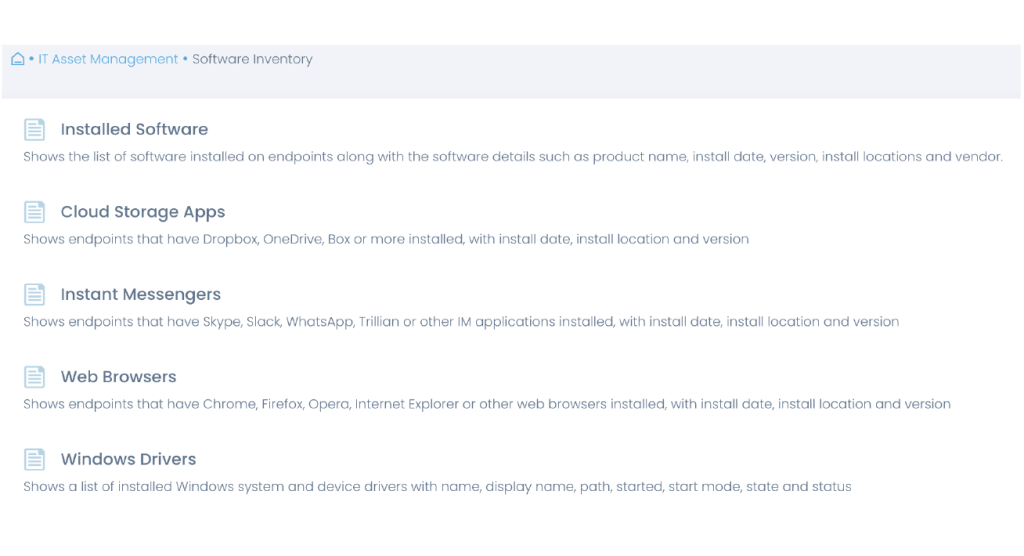
Automate software inventory
Get a real-time inventory of your software to promptly identify and deploy missing applications and patches. Make informed decisions about automating software management and deployment activities, and prove compliance.
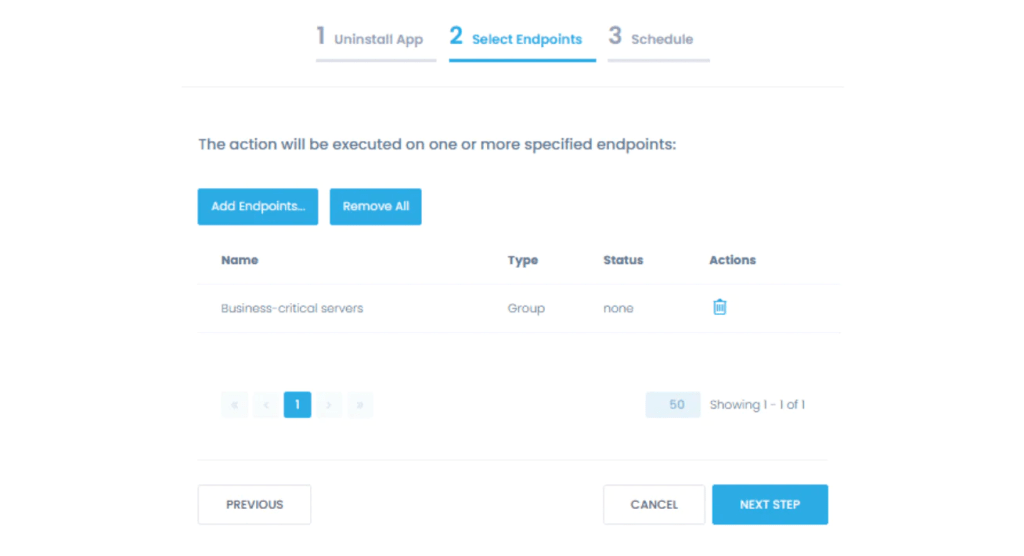
Uninstall software remotely
Discover and remove unauthorized, unlicensed, or potentially harmful applications from servers and workstations to maintain compliance. Force machines to reboot after removal, if required to finish the uninstallation process.
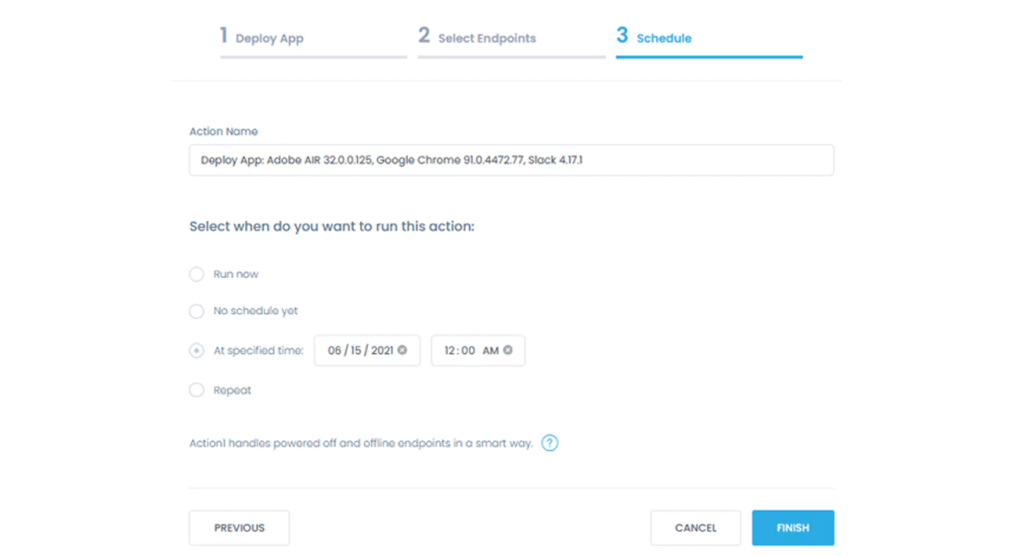
Software deployment automation
Simplify new device onboarding and migration to new software by configuring automations to install required applications to targeted groups of endpoints.
Minimize downtime by scheduling deployments during pre-set maintenance windows, and customizing reboot preferences.
Industry Awards
Trusted by many Fortune 500 companies
10M+
Managed Endpoints
25K+
automated deployments
99%
Patching Success
Why customers choose Action1
Break free from VPN
Manage software from anywhere with Action1 cloud-native platform. End users don’t need to be on a corporate network or connected to, a VPN.
Avoid bandwidth issues
Distribute software and updates faster, and ensure network availability for critical applications with Action1’s private P2P patch distribution technology.
Reach offline devices
Automatically catch up on scheduled software deployment and updates as soon as endpoints that have been offline come back online.
Ditch complexity
Start getting value in minutes, not hours or days. Deploy and patch software consistently without legacy technology, clunky integrations, or multiple consoles.
See phenomenal ROI
No additional hardware or software to deploy. Get your first 200 endpoints free of any charges, with no strings attached. Scale up as large as needed at a flat per-endpoint price.
One single solution
Patch operating systems, deploy scripts for configuration management, and access remote endpoints – all from a single console.
What Our Customers Say
See #1 cloud-native patch management in action
Third-Party Patching That Just Works
Automate detection and remediation of critical vulnerabilities in third-party applications
- Real-time detection of missing third-party patches
- Privately maintained Software Repository
- No VPN is required for remote, off-site patching
- Bandwidth-efficient P2P patch distribution
- Secure and trusted: SOC 2 Type II and ISO 27001:2022
What is Third-Party Patching?
Third-party patch management is a process of addressing vulnerabilities in outdated third-party applications, such as Google Chrome, Adobe, Java, Firefox, Zoom, and more. Ignoring third-party patching and doing only OS updates can lead to vulnerability exploitation and ransomware incidents. While many patch management solutions and RMMs support patch management for OS updates, third-party application patching is a key component that is commonly neglected by most.
Automate third-party application patch management
Action1 enables uniform automation of patch management for third-party apps and OS updates into one common process. Real-time scanning of vulnerable applications (web browsers, video conferencing tools, office apps, etc) detects missing patches as soon as they are released by the vendor. The private patch repository of pre-built and ready-to-deploy third-party application patches saves you from patch maintenance and manual patching. Policies automate third-party patching based on defined criteria.
Third-party patch repository
Unlike many community-maintained software repositories, Action1 Software Repository is securely maintained by an in-house team of trained Action1 patch management experts.
Private P2P patch distribution
Deliver patches faster and avoid bandwidth issues without maintaining local appliances or cache servers.
Real-time missing patch visibility
See missing third-party patches in seconds without relying on outdated scan results from yesterday.
Automated, policy-based remediation
Choose your patching schedule and define automated patching criteria, such as severity, update type, vendor, or specific applications.
Minimize frustration, increase security
Customizable reboot behavior to give your users ample time to save their work and postpone reboots for a limited time, but enforce your patching deadlines.
Secure and
trusted
Action1 is the only third-party patch management solution with both SOC 2 Type II and ISO 27001:2022 certifications.
Trusted by many Fortune 500 companies
10M+
Managed Endpoints
<1%
non-compliant endpoints
99%
Patching Success
Why customers choose Action1
Third-party patching without VPN
Patch applications on remote and onsite endpoints with Action1 cloud-native platform. No company network or VPN connection required.
Instant value and cost reduction
Start getting value in minutes, not hours or days. Apply software patches consistently without legacy technology, clunky integrations, or multiple consoles.
Vulnerability assessment
Instantly detect known software vulnerabilities that may or may not have patches available yet.
Remote control included
Troubleshoot issues using our built-in remote control feature without the need to invest in a separate remote access tool and install yet another agent.
Offline device security posture
Improve your third-party patching success rates by automatically deploying patches as soon as endpoints that have been offline come back online.
See phenomenal ROI
No additional hardware or software to deploy. Get your first 200 endpoints free, with no strings attached. Scale up as needed at a flat per-endpoint price.
What Our Customers Say
What Experts Say
“Action1 develops a risk-based patch management platform for distributed networks trusted by thousands of global enterprises.”
“Patch management. It’s one of those tasks that nobody wants to do, but it’s essential.”
“The top issue in vulnerability management is that organizations aren’t prioritizing their patching and compensating controls to align to vulnerabilities targeted by threat actors.”
Industry Awards
See #1 cloud-native patch management in action
Frequently asked questions
Third-party patching refers to the process of applying code changes to software applications that are developed by external vendors, other than the primary OS provider. These patches are developed to address vulnerabilities, fix bugs, add features to the software, and resolve performance issues. Keeping your third-party applications updated is critical for maintaining your system’s security and preventing potential vulnerability exploitation by cybercriminals. Regular third-party patching helps prevent security breaches, optimizes performance, and maintains compliance with security standards. Without it, systems remain vulnerable even if OS patches are current.
Third-party patching is crucial because software from external vendors often plays a key role in the overall IT infrastructure of an organization. If vulnerabilities within these applications are left unpatched, they can be exploited by cybercriminals, leading to potential data breaches or other security incidents. Keeping third-party software updated ensures that organizations are not leaving gaps in their security defenses.
Managing third-party patching presents some key challenges for every organization because of the wide variety of software applications that they use. Since each vendor follows unique update schedules and delivery methods, managing all the updates becomes impossible without centralized patch management tools.
Additionally, while testing patches for compatibility is a crucial process to prevent disruptions of your business-critical workflows, it demands significant time and resources.
Furthermore, as networks grow, IT teams face mounting difficulties in tracking and identifying all third-party applications, which often results in incomplete patch coverage. Compounding these challenges, the high volume of updates from multiple vendors creates prioritization issues and can overwhelm technical staff, especially when managing critical security patches.
Managing third-party patching presents some key challenges for every organization because of the wide variety of software applications that they use. Since each vendor follows unique update schedules and delivery methods, managing all the updates becomes impossible without centralized patch management tools.
Additionally, while testing patches for compatibility is a crucial process to prevent disruptions of your business-critical workflows, it demands significant time and resources.
Furthermore, as networks grow, IT teams face mounting difficulties in tracking and identifying all third-party applications, which often results in incomplete patch coverage. Compounding these challenges, the high volume of updates from multiple vendors creates prioritization issues and can overwhelm technical staff, especially when managing critical security patches.
Patch management software serves as a critical defense mechanism against cyber threats by automatically addressing security vulnerabilities in systems and applications. This essential technology deploys timely updates to prevent cybercriminals from exploiting weaknesses in unpatched systems by blocking unauthorized access and malware attacks.
Regular patching effectively closes critical security gaps that malicious actors frequently target. Additionally, this software helps organizations maintain compliance with industry regulations while protecting sensitive information from potential breaches.
Through real-time monitoring capabilities, the system swiftly identifies outdated software versions and initiates immediate patches, minimizing vulnerability windows and significantly reducing organizational exposure to ransomware, malware, and other cyber attacks.
The automated processes ensure comprehensive coverage across all network endpoints while minimizing human error—traditionally cybersecurity’s weakest link—eliminating operational overhead and strengthening overall security measures. Furthermore, detailed audit trails maintain compliance records, providing clear documentation of security measures.
Patch management solutions offer centralized control over update schedules, enabling security teams to prioritize critical patches based on risk levels. This strategic approach prevents system disruptions while addressing severe vulnerabilities promptly.
Neglecting third-party patching exposes organizations to severe security vulnerabilities that cybercriminals actively exploit. Unpatched applications become prime targets for data breaches, ransomware attacks, and malware infections, often leading to system downtime and business disruption.
Beyond immediate security threats, organizations face regulatory compliance violations that can result in substantial financial penalties, particularly in industries governed by strict data protection standards. Missing critical security updates also compromises the entire network infrastructure, as hackers frequently use outdated third-party software as an entry point to launch broader attacks across the system.
Vulnerability Management and Remediation Software
Vulnerability management software with built-in vulnerability remediation Detect vulnerabilities, automatically patch, or apply compensating controls
- Real-time vulnerability assessment and remediation
- Free initial vulnerability assessment for unlimited endpoints
- OS and application vulnerability patching with no VPN needed
- Management and automation of compensating controls
- Secure and trusted: SOC 2 Type II, ISO 27001:2022 and GDPR
Enterprise-grade Vulnerability Management and Remediation
Action1 is an automated vulnerability management software for real-time vulnerability detection and vulnerability remediation that includes OS and application vulnerability patching and management of compensating controls. Unlike other vulnerability management tools, Action1 combines vulnerability assessment and remediation into one unified cloud-native vulnerability management solution. This enables a consistent vulnerability management process which includes scanning for vulnerabilities, prioritization of CVEs, remediation of prioritized vulnerabilities via automated patch management, or applying compensating controls when patching is not possible.
Remediate OS vulnerabilities
Detect Windows OS vulnerabilities across all workstations and servers, in corporate networks or remote, VPN-free locations.
Remediate third-party vulnerabilities
Automatically detect vulnerabilities in installed software applications and remediate them by deploying patches tested by Action1 team shortly after they become available.
Real-time vulnerability assessment
See in seconds what OS and applications are vulnerable on what machines, either by an endpoint or by a CVE number.
What is Vulnerability Management?
Vulnerability management is the process of detecting, prioritizing and remediating software vulnerabilities, which includes vulnerability scanning, patching (deployment of OS and software updates), and applying compensating controls. Implementing a vulnerability management solution helps to address security vulnerabilities in operating systems and third-party applications before they are exploited by threat actors. Action1 vulnerability management tool enables real-time vulnerability assessment, prioritization, automated patch management, implementation of compensating control, as well as vulnerability management status reporting.
Automate vulnerability management
Choose remediation schedule for update deployment to meet your vulnerability management policy requirements and SLAs, distinguishing between critical and non-critical remediations.
Prioritize vulnerability remediation
Quickly spot most critical vulnerabilities in your entire environment, define vulnerability remediation SLAs, enforce vulnerability remediation compliance.
Apply compensating controls
When patches are not available or not feasible, automate deployment and documentation of compensating controls to mitigate unpatched vulnerabilities.
Why customers use Action1 for vulnerability management
Remediate vulns without VPN
Patch everything with Action1 cloud-native platform. No company network or VPN connection required.
Value in minutes, not hours or days
Start getting value in minutes, not hours or days. Detect and remediate vulnerabilities consistently without legacy technology, clunky integrations, or multiple consoles.
Remediate vulnerabilities offline
Improve your vulnerability remediation rates by automatically deploying OS and third-party patches, as soon as offline endpoints come back online.
Secure and trusted
Action1 is the only integrated vulnerability remediation solution with both SOC 2 Type II and ISO 27001:2022 certifications.
Avoid bandwidth issues
Remediate vulnerabilities faster and ensure network availability for critical applications with Action1’s P2P patch distribution capability.
See phenomenal ROI
No additional hardware or software to start vulnerability management. Get your first 200 endpoints free, with no strings attached. Scale up as needed at a flat per-endpoint price.
See #1 cloud-native patch management in action
Frequently asked questions

Vulnerability Management Software is a tool designed to identify, classify, and address security vulnerabilities within an organization’s IT infrastructure. It automates the process of scanning systems, applications, and networks for potential security weaknesses. This software then provides detailed reports, outlining the risks and recommending mitigation strategies.
Key features typically include continuous monitoring, automatic scanning, and integration with patch management systems. By doing so, it helps organizations to proactively manage potential security threats before they can be exploited by attackers.
Vulnerability Management Software works by conducting regular scans of an organization’s IT environment to detect potential security issues. It typically uses databases of known vulnerabilities, such as the CVE (Common Vulnerabilities and Exposures) system, to compare with the infrastructure it is scanning. When a vulnerability is detected, the software assigns a risk level, categorizes the issue, and suggests corrective actions.
The software may use techniques like network scanning, configuration reviews, and software assessments. Continuous monitoring ensures that new vulnerabilities are flagged as they emerge. The results of these scans are compiled into reports that IT teams can use to prioritize and address vulnerabilities based on severity and impact.
Vulnerability Management Software is crucial for cybersecurity because it helps organizations stay ahead of potential security breaches. Cyber threats are constantly evolving, and new vulnerabilities are discovered regularly. Without proper tools, it becomes challenging for IT teams to keep up with the identification and resolution of these weaknesses.
By continuously scanning and reporting vulnerabilities, the software helps reduce the attack surface, making it harder for malicious actors to exploit security flaws. It also ensures compliance with industry regulations and standards, which often require regular vulnerability assessments.
Choosing the right Vulnerability Management Software requires organizations to consider several factors. First, the software should be scalable, capable of handling the size and complexity of the organization’s IT infrastructure. It should also offer comprehensive coverage, scanning across different environments, including cloud, on-premises, and hybrid systems.
Another important factor is ease of use, particularly the software’s reporting and dashboard capabilities, which should be clear and actionable. Finally, the solution should integrate well with existing security tools, such as SIEM (Security Information and Event Management) systems, patch management solutions, and configuration management databases.
Patch Management for Education
Real-time discovery and remediation of third-party and OS vulnerabilities, VPN-free
- Automated vulnerability remediation for OS and third-party apps
- Continuous patch compliance for servers and endpoints
- Secure and trusted: SOC 2 Type II, ISO 27001:2022, GDPR and TX-RAMP
- Real-time scalability across your district or institution
- No VPN is required for remote, off-site patching
Action1 is trusted by



Patching That Just Works for Secure Educational Environments
Enhance your defense against cyber threats, safeguard educational operations, and mitigate potential impact of cyberattacks on local communities with Action1:

Third-Party Patching
Automate patching of numerous software and OS titles with real-time progress status, even if your endpoints are offline.

Software Repository
Private software repository maintained by in-house security team. Includes 99% patching coverage for most enterprise environments.

Real-Time Visibility
Instant visibility into endpoint vulnerabilities, without the need for periodic scans. Live dashboard for monitoring SLA-based patch compliance.
Vulnerability Remediation
Identify all vulnerable software and OS installed on endpoints in real-time. Leverage built-in vulnerability remediation in a single solution.

P2P Distribution
Minimize external bandwidth usage and ensure rapid deployment of large updates without any on-prem cache servers.

Enterprise Integrations
Integrate Action1 with Active Directory, Entra ID, Okta, Duo, and Google. More integrations are available via REST API or PowerShell scripting.
Frequently asked questions
Patch management is crucial for the education industry because it helps protect sensitive data, maintain system functionality, and ensure compliance with security regulations. Schools, universities, and educational institutions handle large amounts of personal data, including student records, financial information, and research materials. Without timely updates, outdated software may have vulnerabilities that could be exploited by cybercriminals, leading to data breaches or ransomware attacks. Since educational institutions often use a wide variety of software and operating systems, it’s essential to keep them updated to avoid security risks. Additionally, with the growing reliance on online platforms and remote learning, keeping all systems secure and functional is vital for uninterrupted operations. Regular patching ensures that security flaws are corrected before they can be exploited, safeguarding the integrity of the educational infrastructure.
The education sector is commonly targeted by cyber threats due to the valuable data it holds and the often-underfunded security measures. Some of the most common vulnerabilities include outdated software, unpatched operating systems, and weak access controls. Educational institutions tend to use a variety of legacy systems, which may lack support for the latest security patches. Phishing attacks targeting staff and students are also widespread, as users may be unaware of security risks. Additionally, unsecured network configurations, particularly for Wi-Fi, and weak passwords make it easier for attackers to gain unauthorized access. Insufficient cybersecurity awareness and training among staff and students further expose the education sector to potential vulnerabilities.
Action1 offers a cloud-based solution for automating patch management, helping educational institutions keep their systems secure without the need for extensive on-site infrastructure. It simplifies the process of identifying and deploying necessary updates across a wide variety of devices, ensuring that security vulnerabilities are addressed quickly. Action1 provides centralized visibility and control over patching operations, which is especially useful for schools and universities with distributed networks and remote learners. Its automated patching reduces the workload on IT staff, allowing them to focus on other important tasks. The platform also ensures compliance with security standards and minimizes the risk of cyberattacks by keeping systems consistently updated.
GLBA/FFIEC Compliance
Patch Management Software
For Securing Customer Data on Distributed Endpoints
- Patch Windows OS and third-party applications
- Automate inventory of endpoint software and hardware
- Enforce and maintain secure endpoint configurations
- Deploy authorized software and remove unauthorized one
FFIEC Information Security Controls Action1
Helps With
While the Gramm-Leach-Bliley Act (GLBA) mandates that financial institutions protect their customers’ personal and financial information, it is the Federal Financial Institutions Examination Council (FFIEC) that provides guidance on the implementation of GLBA and develops standards for the examination and supervision of financial institutions. The following mapping of Action1 capabilities to GLBA/FFIEC requirements is based on the “Information Security Booklet” which, among other booklets, constitutes the FFIEC Information Technology Examination Handbook (IT Handbook) designed to help financial institutions understand and comply with GLBA.
II.C.10(d); II.C.10(b); II.C.15(d); IV.A
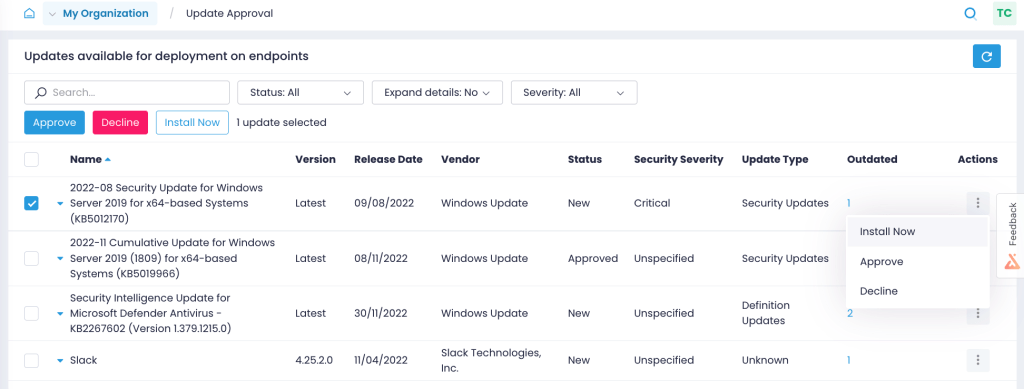
Automate patch management
Keep your OS and third-party applications, including your custom and proprietary software, up to date with the latest patches. Update all servers and workstations consistently, even if they are remote, not connected to a corporate VPN, not joined to a domain, or offline.


Identify available patches
Never miss a critical or security patch. Find out what updates are available for Windows OS and third-party applications but missing from your endpoints, and get notified of new Windows updates.

Enforce flexible policies
Prioritize patches by severity, test them on isolated systems, approve updates for deployment, and schedule patch implementation within defined patch windows to minimize downtime.

Demonstrate compliance
Verify in real time that patches have been successfully applied. Prove to auditors that you have a working patch management procedure with detailed reports on installed patches and patching history.

II.C.10(a); II.C.10(b); II.C.10(c); II.C.12; II.C.13(a); II.C.15(d); IV.A
Enforce secure endpoint configurations
Harden your endpoint environment with security configurations applied consistently across any group of endpoints, whether onsite or remote, enterprise- or employee-owned, or new or existing ones.

Automate policy enforcement
Enforce security configurations, such as enabling encryption and logging, removing local admin rights, and wiping data remotely, individually or en masse with ready-to-use and custom scripts.

Create standard builds
Build your own configuration standards with multi-step policies and apply them automatically to different groups of endpoints, including devices newly introduced to your environment.

Detect misconfigurations
Detect unauthorized configuration changes with real-time alerts. Use reports to ascertain that required security controls are working and identify misconfigurations that need to be fixed.
II.C.5; II.C.10(b); II.C.11; II.C.12; II.C.13(a); II.C.15(d); IV.A
Keep up-to-date asset inventory
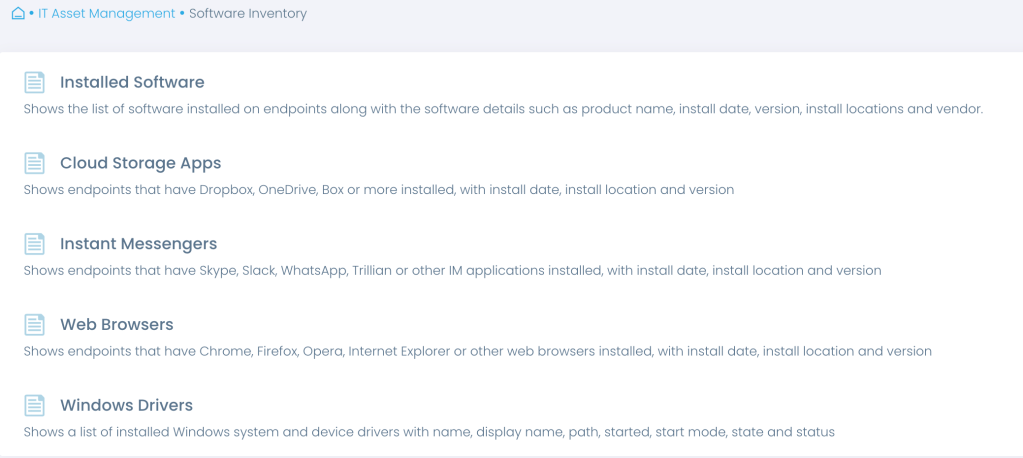
Automate asset inventory and gain accurate, real-time insights into the software and hardware used, no matter where your endpoints are located. Know what devices you have, how they are configured, what software is being used, and which devices need upgrades.

Maintain hardware inventory
Get an overview of endpoint hardware to make informed decisions about necessary replacements and upgrades, and ensure it is up-to-date, vendor-supported, and compliant.

Automate software inventory
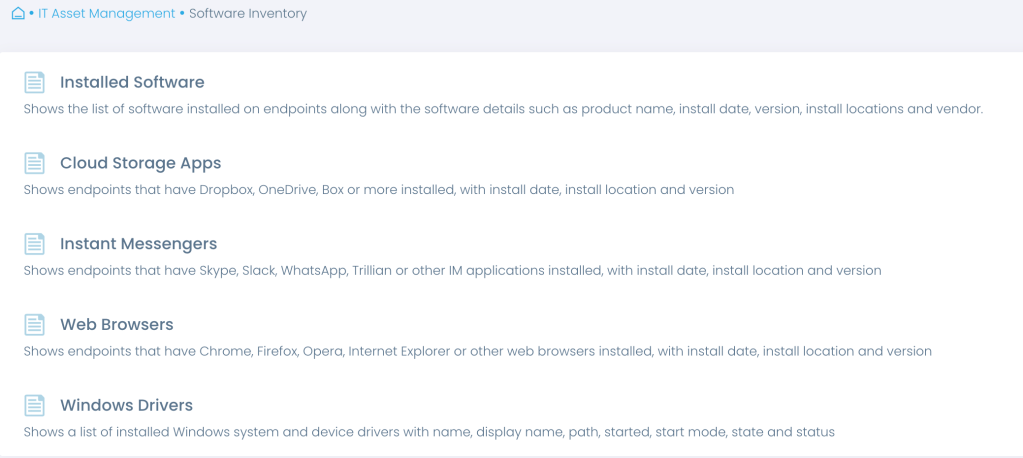
Learn what software is in use, with insights into versions, installation dates and more. Get a complete overview of all installed software or focus on specific types, such as cloud storage and instant messengers.

Detect unauthorized software
Streamline periodic reviews to verify that only authorized, up-to-date, and supported software is in use. Detect unauthorized, obsolete, or unsupported software that needs to be disposed of.

II.C.10(b); II.C.10(c); II.C.11; II.C.12; II.C.15(c); II.C.15(d); IV.A
Manage software assets
Deploy security solutions and allowed business applications, detect unauthorized installations, uninstall unauthorized software, and replace obsolete software efficiently and at scale. Your endpoints don’t need to be connected to a corporate network or VPN, or joined to a domain.

Deploy authorized software
Deploy approved software, including firewalls, anti-malware, DLP and other security solutions, automatically from a single location. Choose from ready-to-deploy apps, or upload your custom software.

Remove unauthorized software
Uninstall unauthorized applications from multiple endpoints at once, forcing a reboot if necessary to complete the process. Replace unsupported software in one go with multi-step policies.

Detect software changes
Be notified in real-time about changes that can bring you out of compliance, such as unauthorized software installations or the removal of an anti-malware solution, to respond promptly.
Secure and Compliant Solution
At Action1, security is our top priority. Action1 not only helps organizations meet FFIEC guidelines, but is also a secure solution itself, compliant with application security, remote access, and other FFIEC recommendations.

Security features
Action1 enforces two-factor authentication, provides role-based-access and audit logs, and secures all connections with TLS 1.2 and AES-256.

Compliant solution
Action1 meets the requirements of security standards and regulations, such as SOC 2, ISO/IEC 27001 and NIST SP 800-171.
Secure remote access
Action1 saves you from additional holes in your firewall configuration, such as opening an inbound port for remote connections to resources.
Trusted by many Fortune 500 companies
10M+
Managed Endpoints
3,000+
Customers
99%
Patch success rate
Why customers choose Action1
Tame complexity
Get up and running and start getting value in an hour with a solution that is easy to deploy and just works. No legacy technology, clunky tools, and features you don’t need.
Get it done in one place
Patch business-critical systems and applications, deploy and remove software, inventory assets, configure and monitor endpoints—all from a single platform.
See phenomenal ROI
Get your first 200 endpoints free of any charge, with no strings attached. Scale up at a simple, all-inclusive price without hidden costs or nickel-and-diming.
What Our Customers Say
Frequently asked questions
Patch management is critical for the financial industry due to the high value of the data it protects and the strict regulatory requirements it must adhere to. Financial institutions handle sensitive information such as customer banking details, personal identification, and financial transactions, making them prime targets for cyberattacks. Any vulnerabilities in their software or systems can lead to severe consequences, including data breaches, financial loss, and reputational damage. Additionally, regulatory bodies such as PCI DSS and GDPR require financial institutions to maintain high levels of security and regularly update their systems to address known vulnerabilities. By ensuring that all software is regularly patched, financial institutions reduce the risk of cyberattacks, improve the stability of their systems, and remain compliant with industry regulations. Patch management also ensures that operational processes, such as online banking, stock trading, and payment systems, run smoothly without disruptions.
The financial sector faces a range of vulnerabilities due to its complexity and the value of the assets it manages. Common vulnerabilities include outdated software and operating systems that have not been patched for known security flaws, making them an easy target for cybercriminals. Financial institutions are also susceptible to phishing attacks, which can lead to unauthorized access to systems and sensitive data. Additionally, third-party applications and services often integrated into financial systems may have weak security measures, creating potential entry points for attackers. Another common vulnerability is misconfigured networks or weak access controls, which can expose internal systems to unauthorized users. With the growing reliance on digital services, maintaining secure cloud environments and protecting against insider threats also remain key challenges for the financial industry.
Action1 assists the financial industry in patch management by offering a cloud-based, automated solution that ensures critical systems remain secure and up-to-date. With Action1, financial institutions can easily monitor and deploy patches across multiple devices and locations, reducing the risk of vulnerabilities being exploited. The platform provides centralized control and visibility into the patching process, which is essential for maintaining compliance with regulatory standards and preventing costly security breaches. By automating the patching process, Action1 minimizes the manual work required from IT teams, allowing them to focus on other mission-critical tasks. Furthermore, Action1’s real-time reporting and audit capabilities ensure that financial institutions can demonstrate compliance with industry regulations, while also providing a quick response to emerging threats or vulnerabilities.
Cloud-Native HIPAA Compliance
Patch Management Software
For Securing Health Data on Distributed Endpoints
- Patch Windows OS and third-party applications
- Deploy security software to remote workstations
- Inventory endpoint software and hardware
- Enforce and maintain secure endpoint configurations
How Action1 Helps with HIPAA Requirements for patching endpoints
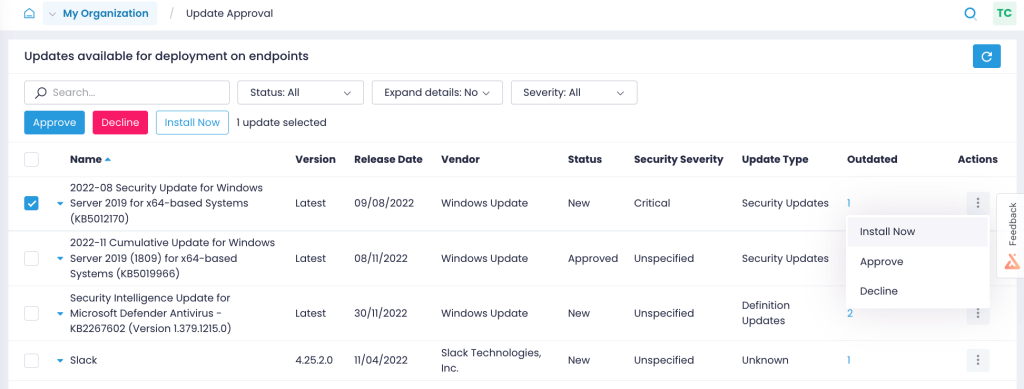
45 C.F.R. § 164.308(a)(1)(ii)(A),
45 C.F.R. § 164.308(a)(1)(ii)(B)
The HIPAA Security Rule requires covered entities and business associates to conduct a risk assessment and mitigate vulnerabilities that threaten the security of electronic protected health information (ePHI). This includes identifying and mitigating risks unpatched software poses to an organization’s ePHI.
Remediate vulnerabilities
Implement an OCR-recommended, HIPAA-compliant patch management process from end to end, and demonstrate to auditors that you have it in place. Check this box on your compliance checklist confidently and with ease.
Keep your OS and third-party applications, including your custom and proprietary software, up to date on the latest patches. Patch all servers and workstations even if they are remote, not connected to a corporate VPN, not joined to a domain, or offline.
Identify missing updates
Close the window of opportunity for attackers by identifying what Windows OS and third-party application updates are missing on what endpoints and getting alerts on new Windows updates.
Automate patching
Test patches on isolated systems before their rollout, approve updates for deployment, and schedule updates to be applied to production systems as granularly as you need.
Verify patching results
Validate in real time that patches were applied correctly without manually checking every workstation. Get reports on installed updates to prove your HIPAA compliance to auditors.
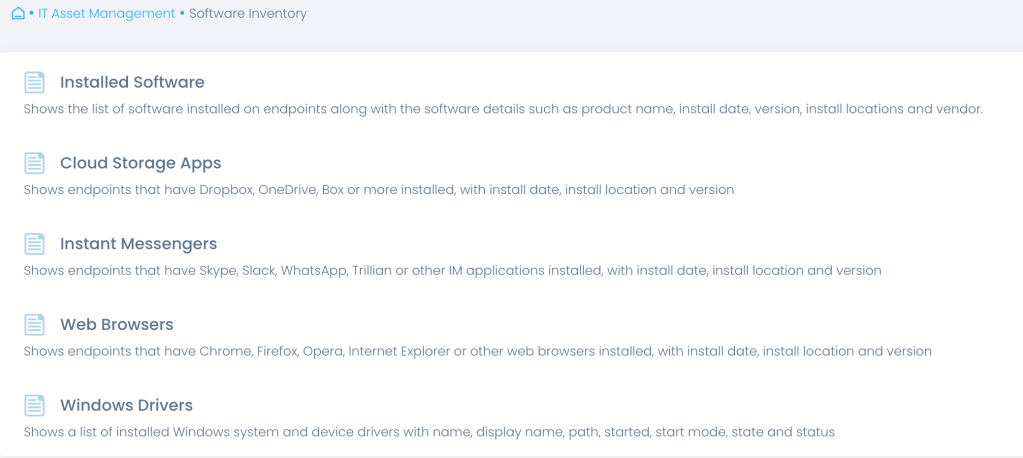
45 C.F.R. § 164.308(a)(1)(ii)(A)
As directed by OCR, covered entities should have an inventory of operating systems, applications, device firmware, and other software. It helps healthcare providers determine which patches they need to apply.
Keep up-to-date asset inventory
Start your risk management with an automated inventory. Gain accurate real-time insights into software in use, including its versions, installation dates and more, and verify that these systems and applications continue to be updated.
Verify that no unauthorized software is installed on endpoints. Automate the removal of unauthorized or unsupported software to strengthen your data security.

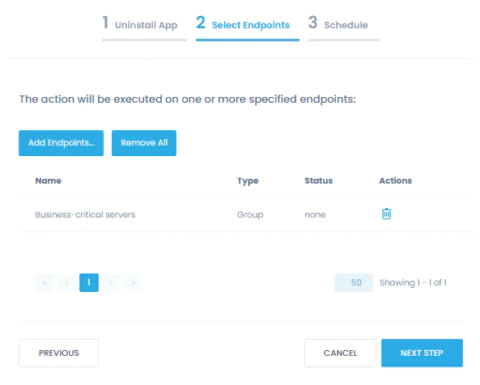
45 C.F.R. § 164.308(a)(5)(ii)(B)
HIPAA standards require covered entities to use anti-malware to prevent a data breach.
Deploy and update anti-malware
Ensure and demonstrate to auditors that your servers and workstations are protected with authorized and up-to-date anti-malware.
Deploy Webroot, Malwarebytes, or other security and HIPAA compliance solutions consistently across all onsite and remote endpoints and update it as soon as a new update is available from a single centralized location. Be notified about any removal of an anti-malware solution that can bring you out of compliance.

45 C.F.R. § 164.308(a)(6)
HIPAA requires a covered entity or business associate to identify and respond to security incidents.
Detect and respond to incidents faster
Get real-time alerts on security changes on your endpoints that may result in a breach, such as unauthorized software installations, encryption disabled or unauthorized accounts created.
Respond to incidents faster and bring your endpoints back to a secure state with automated actions applied to individual machines or in masse.


45 C.F.R. § 164.312(a)(2)(iii)
45 C.F.R. § 164.312(a)(2)(iv)
Covered entities and business associates must implement technical controls to ensure that only personnel with authorized access rights can access ePHI.
Enforce secure endpoint configurations
Apply security configurations, such as enforcing automatic logoffs and enabling BitLocker, across onsite and remote endpoints with pre-built and custom scripts without manually connecting to individual machines.
Verify that your technical safeguards for endpoints are in place with pre-built and custom reports, e.g. that BitLocker is enabled and workstations are protected with HIPAA-compliant encryption.
Security Is Our Priority
Action1 helps healthcare providers fulfill HIPAA requirements and OCR guidelines on patch management and endpoint security configurations and is also a secure and compliant solution.
Security features
Action1 enforces two-factor authentication, provides role-based-access and audit logs, and secures all connections with TLS 1.2 and AES-256.
Compliant solution
Action1 is compliant with the requirements of security standards and regulations, such as SOC 2, ISO/IEC 27001 and HIPAA/HITECH.
Secure remote access
Action1 saves you from poking extra holes in your firewall configuration, such as opening an inbound port for remote connections to resources.
Trusted by many Fortune 500 companies
10M+
Managed Endpoints
3,000+
Customers
99%
Patch success rate
Why customers choose Action1
Tame complexity
Get up and running and start getting value in one hour with a solution that is easy to deploy and just works. No legacy technology, clunky tools, and feature overload.
Stay flexible
Implement patch management, inventory, endpoint security, and monitoring requirements the way your organization needs, with granular, easily customizable policies.
See phenomenal ROI
Get your first 200 endpoints free of any charge, with no strings attached. Scale up at a simple, all-inclusive price without hidden costs or nickel-and-diming.
What Our Customers Say
Frequently asked questions

The Health Insurance Portability and Accountability Act (HIPAA) is a federal law that was enacted in 1996. It sets forth rules and regulations designed to protect the security and privacy of personal health information. To be HIPAA-compliant, an organization must take steps to ensure that it is protecting the confidentiality, integrity, and availability of personal health information. This involves implementing certain policies and procedures, training staff on HIPAA requirements, and regularly monitoring the organization’s compliance with the law.
Yes. All individuals and organizations that handle personal health information, must be HIPAA-compliant. Violations of HIPAA can result in fines and other penalties.
HIPAA applies to a wide range of organizations and individuals known as “covered entities.” This includes healthcare providers, such as doctors and hospitals, health plans, such as insurance companies, and healthcare clearinghouses, which process health information. HIPAA also applies to certain “business associates” of covered entities, such as companies that provide billing or transcription services to a hospital. HIPAA applies to any individual or organization that handles personal health information, regardless of whether they are located in the United States.
Here are some specific steps that an organization can take to become HIPAA-compliant:
- Conduct a thorough risk assessment to identify potential vulnerabilities in the organization’s handling of personal health information.
- Develop and implement policies and procedures that are designed to protect personal health information, including policies on access control, data security, and data disposal.
- Train all staff on HIPAA requirements and the organization’s policies and procedures.
- Implement technical safeguards, such as encryption and firewalls, to protect personal health information.
- Regularly monitor and audit the organization’s compliance with HIPAA requirements.
- Work with legal and compliance experts to ensure that the organization meets all HIPAA obligations.
- Develop a plan for responding to HIPAA violations and breaches of personal health information.
It is important for organizations to consult with legal and compliance experts to develop a plan that meets their specific needs.
It is difficult to estimate the cost of HIPAA compliance, as it can vary depending on the type, size and complexity of the organization. In general, smaller organizations may be able to implement HIPAA-compliant policies and procedures at a lower cost than larger organizations. Experts estimate that ballpark numbers are $4,000 – $12,000 for a small covered entity and $50,000+ for a medium to large business. Additionally, organizations may need to invest in technology and other tools to help them comply with HIPAA requirements.
HIPAA compliance software helps healthcare organizations improve security and protect personal health information. By using HIPAA compliance software, organizations also reduce their risk of HIPAA violations and breaches of personal health information. This can help to protect the organization from financial penalties and reputational damage. Additionally, HIPAA compliance software enables healthcare organizations to reduce time and effort spent achieving and maintaining compliance so they can focus on improving individuals’ and communities’ health and wellbeing.
HIPAA Compliant Patch Management Software is a tool designed to ensure that organizations in the healthcare sector maintain up-to-date software by applying necessary security patches, all while meeting the stringent privacy and security standards set by the Health Insurance Portability and Accountability Act (HIPAA). HIPAA regulations require that healthcare organizations safeguard electronic Protected Health Information (ePHI) from unauthorized access, use, or disclosure. Failing to apply patches to systems can leave software vulnerable to cyberattacks, which may result in data breaches that compromise sensitive patient information.
Patch management software automates the process of detecting, evaluating, and deploying patches across various systems and devices, such as operating systems, medical devices, and software applications. HIPAA-compliant solutions provide enhanced features, such as detailed audit trails, encryption, and compliance reporting, which are vital for meeting HIPAA’s administrative, physical, and technical safeguard requirements.
By integrating this type of software, healthcare organizations can minimize their risk of cyberattacks and ensure they remain in compliance with HIPAA regulations. This is critical not only for protecting patient privacy but also for avoiding substantial fines and legal consequences associated with non-compliance.
Patch management plays a crucial role in HIPAA compliance because it directly impacts the security of electronic Protected Health Information (ePHI). One of the most significant threats to healthcare organizations is the vulnerability of unpatched software, which can be exploited by cybercriminals to gain unauthorized access to sensitive patient data. As per HIPAA’s Security Rule, organizations must implement technical safeguards to ensure the confidentiality, integrity, and availability of ePHI.
Unpatched systems are a primary target for cyberattacks like ransomware, malware, and phishing. These types of attacks can result in unauthorized access to ePHI, leading to data breaches, which could expose patient information and damage a healthcare organization’s reputation. Moreover, failure to secure systems could result in hefty penalties under HIPAA, with fines reaching as much as $1.5 million per violation category, depending on the severity of non-compliance.
Proper patch management ensures that all systems are up-to-date with the latest security fixes, reducing the risk of exploitation. HIPAA-compliant patch management software helps automate and monitor the patching process while ensuring that detailed records are kept, allowing organizations to demonstrate their commitment to maintaining secure systems. These records are essential for compliance audits and for proving that an organization has taken appropriate steps to protect patient information.
HIPAA-compliant patch management software is an essential tool for mitigating security risks in healthcare organizations, particularly in protecting ePHI from unauthorized access and cyberattacks. This software helps healthcare IT teams stay ahead of vulnerabilities by automatically identifying, testing, and deploying critical patches across networks and devices. Keeping systems up to date with the latest security patches reduces the attack surface that hackers might exploit.
One of the core security risks in healthcare IT systems is the reliance on multiple devices and platforms, from desktops to medical devices, all of which may require regular updates. A single unpatched device or software could expose the entire network to vulnerabilities, leading to potential breaches of ePHI. HIPAA-compliant patch management software centralizes the management of these patches, ensuring uniform security across all devices.
Additionally, this software often comes with compliance-specific features, such as robust reporting and audit logs, enabling healthcare organizations to document patching activities and demonstrate their compliance with HIPAA’s technical safeguard requirements. This is crucial in the event of a breach or audit, as organizations need to show that they have taken reasonable steps to protect patient data.
By reducing manual patching tasks, the software minimizes human error and ensures that updates are applied on time, significantly lowering the risk of attacks like ransomware, which has been a growing concern in the healthcare sector. In summary, HIPAA-compliant patch management software provides healthcare organizations with the tools to secure their IT infrastructure and protect sensitive health information.
When choosing HIPAA-compliant patch management software, several key features should be considered to ensure that it meets both security needs and regulatory requirements. First and foremost, the software must have strong encryption protocols to protect the transmission and storage of patch-related data, ensuring that sensitive information is not exposed during the patching process.
Another essential feature is detailed logging and audit trails. HIPAA mandates that healthcare organizations must be able to provide evidence of their security measures. Patch management software should record every action taken, including when patches were applied, which systems were updated, and who authorized the patching. This helps demonstrate compliance during an audit and ensures accountability within the IT team.
Automation is also a critical feature. Manual patch management is time-consuming and prone to errors, making it harder to maintain HIPAA compliance. Automated software can continuously monitor for vulnerabilities, apply patches across various systems, and generate compliance reports, freeing up IT resources for other critical tasks. Additionally, the software should support a wide range of systems, including operating systems, third-party applications, and medical devices.
Compliance-specific reporting capabilities are another must-have. The software should be able to generate comprehensive reports tailored to HIPAA compliance, which can be used to demonstrate adherence to security protocols in the event of an audit.
Patch Management for Education
Real-time discovery and remediation of third-party and OS vulnerabilities, VPN-free
- Automated vulnerability remediation for OS and third-party apps
- Continuous patch compliance for servers and endpoints
- Secure and trusted: SOC 2 Type II, ISO 27001:2022, GDPR and TX-RAMP
- Real-time scalability across your district or institution
- No VPN is required for remote, off-site patching
Action1 is trusted by
Patching That Just Works for Secure Educational Environments
Enhance your defense against cyber threats, safeguard educational operations, and mitigate potential impact of cyberattacks on local communities with Action1:
Third-Party Patching
Automate patching of numerous software and OS titles with real-time progress status, even if your endpoints are offline.
Software Repository
Private software repository maintained by in-house security team. Includes 99% patching coverage for most enterprise environments.
Real-Time Visibility
Instant visibility into endpoint vulnerabilities, without the need for periodic scans. Live dashboard for monitoring SLA-based patch compliance.
Vulnerability Remediation
Identify all vulnerable software and OS installed on endpoints in real-time. Leverage built-in vulnerability remediation in a single solution.
P2P Distribution
Minimize external bandwidth usage and ensure rapid deployment of large updates without any on-prem cache servers.
Enterprise Integrations
Integrate Action1 with Active Directory, Entra ID, Okta, Duo, and Google. More integrations are available via REST API or PowerShell scripting.
Frequently asked questions
Patch management is crucial for the education industry because it helps protect sensitive data, maintain system functionality, and ensure compliance with security regulations. Schools, universities, and educational institutions handle large amounts of personal data, including student records, financial information, and research materials. Without timely updates, outdated software may have vulnerabilities that could be exploited by cybercriminals, leading to data breaches or ransomware attacks. Since educational institutions often use a wide variety of software and operating systems, it’s essential to keep them updated to avoid security risks. Additionally, with the growing reliance on online platforms and remote learning, keeping all systems secure and functional is vital for uninterrupted operations. Regular patching ensures that security flaws are corrected before they can be exploited, safeguarding the integrity of the educational infrastructure.
The education sector is commonly targeted by cyber threats due to the valuable data it holds and the often-underfunded security measures. Some of the most common vulnerabilities include outdated software, unpatched operating systems, and weak access controls. Educational institutions tend to use a variety of legacy systems, which may lack support for the latest security patches. Phishing attacks targeting staff and students are also widespread, as users may be unaware of security risks. Additionally, unsecured network configurations, particularly for Wi-Fi, and weak passwords make it easier for attackers to gain unauthorized access. Insufficient cybersecurity awareness and training among staff and students further expose the education sector to potential vulnerabilities.
Action1 offers a cloud-based solution for automating patch management, helping educational institutions keep their systems secure without the need for extensive on-site infrastructure. It simplifies the process of identifying and deploying necessary updates across a wide variety of devices, ensuring that security vulnerabilities are addressed quickly. Action1 provides centralized visibility and control over patching operations, which is especially useful for schools and universities with distributed networks and remote learners. Its automated patching reduces the workload on IT staff, allowing them to focus on other important tasks. The platform also ensures compliance with security standards and minimizes the risk of cyberattacks by keeping systems consistently updated.
GLBA/FFIEC Compliance
Patch Management Software
For Securing Customer Data on Distributed Endpoints
- Patch Windows OS and third-party applications
- Automate inventory of endpoint software and hardware
- Enforce and maintain secure endpoint configurations
- Deploy authorized software and remove unauthorized one
FFIEC Information Security Controls Action1
Helps With
While the Gramm-Leach-Bliley Act (GLBA) mandates that financial institutions protect their customers’ personal and financial information, it is the Federal Financial Institutions Examination Council (FFIEC) that provides guidance on the implementation of GLBA and develops standards for the examination and supervision of financial institutions. The following mapping of Action1 capabilities to GLBA/FFIEC requirements is based on the “Information Security Booklet” which, among other booklets, constitutes the FFIEC Information Technology Examination Handbook (IT Handbook) designed to help financial institutions understand and comply with GLBA.
II.C.10(d); II.C.10(b); II.C.15(d); IV.A
Automate patch management
Keep your OS and third-party applications, including your custom and proprietary software, up to date with the latest patches. Update all servers and workstations consistently, even if they are remote, not connected to a corporate VPN, not joined to a domain, or offline.
Identify available patches
Never miss a critical or security patch. Find out what updates are available for Windows OS and third-party applications but missing from your endpoints, and get notified of new Windows updates.
Enforce flexible policies
Prioritize patches by severity, test them on isolated systems, approve updates for deployment, and schedule patch implementation within defined patch windows to minimize downtime.
Demonstrate compliance
Verify in real time that patches have been successfully applied. Prove to auditors that you have a working patch management procedure with detailed reports on installed patches and patching history.
II.C.10(a); II.C.10(b); II.C.10(c); II.C.12; II.C.13(a); II.C.15(d); IV.A
Enforce secure endpoint configurations
Harden your endpoint environment with security configurations applied consistently across any group of endpoints, whether onsite or remote, enterprise- or employee-owned, or new or existing ones.
Automate policy enforcement
Enforce security configurations, such as enabling encryption and logging, removing local admin rights, and wiping data remotely, individually or en masse with ready-to-use and custom scripts.
Create standard builds
Build your own configuration standards with multi-step policies and apply them automatically to different groups of endpoints, including devices newly introduced to your environment.
Detect misconfigurations
Detect unauthorized configuration changes with real-time alerts. Use reports to ascertain that required security controls are working and identify misconfigurations that need to be fixed.
II.C.5; II.C.10(b); II.C.11; II.C.12; II.C.13(a); II.C.15(d); IV.A
Keep up-to-date asset inventory
Automate asset inventory and gain accurate, real-time insights into the software and hardware used, no matter where your endpoints are located. Know what devices you have, how they are configured, what software is being used, and which devices need upgrades.
Maintain hardware inventory
Get an overview of endpoint hardware to make informed decisions about necessary replacements and upgrades, and ensure it is up-to-date, vendor-supported, and compliant.
Automate software inventory
Learn what software is in use, with insights into versions, installation dates and more. Get a complete overview of all installed software or focus on specific types, such as cloud storage and instant messengers.
Detect unauthorized software
Streamline periodic reviews to verify that only authorized, up-to-date, and supported software is in use. Detect unauthorized, obsolete, or unsupported software that needs to be disposed of.
II.C.10(b); II.C.10(c); II.C.11; II.C.12; II.C.15(c); II.C.15(d); IV.A
Manage software assets
Deploy security solutions and allowed business applications, detect unauthorized installations, uninstall unauthorized software, and replace obsolete software efficiently and at scale. Your endpoints don’t need to be connected to a corporate network or VPN, or joined to a domain.
Deploy authorized software
Deploy approved software, including firewalls, anti-malware, DLP and other security solutions, automatically from a single location. Choose from ready-to-deploy apps, or upload your custom software.
Remove unauthorized software
Uninstall unauthorized applications from multiple endpoints at once, forcing a reboot if necessary to complete the process. Replace unsupported software in one go with multi-step policies.
Detect software changes
Be notified in real-time about changes that can bring you out of compliance, such as unauthorized software installations or the removal of an anti-malware solution, to respond promptly.
Secure and Compliant Solution
At Action1, security is our top priority. Action1 not only helps organizations meet FFIEC guidelines, but is also a secure solution itself, compliant with application security, remote access, and other FFIEC recommendations.
Security features
Action1 enforces two-factor authentication, provides role-based-access and audit logs, and secures all connections with TLS 1.2 and AES-256.
Compliant solution
Action1 meets the requirements of security standards and regulations, such as SOC 2, ISO/IEC 27001 and NIST SP 800-171.
Secure remote access
Action1 saves you from additional holes in your firewall configuration, such as opening an inbound port for remote connections to resources.
Trusted by many Fortune 500 companies
10M+
Managed Endpoints
3,000+
Customers
99%
Patch success rate
Why customers choose Action1
Tame complexity
Get up and running and start getting value in an hour with a solution that is easy to deploy and just works. No legacy technology, clunky tools, and features you don’t need.
Get it done in one place
Patch business-critical systems and applications, deploy and remove software, inventory assets, configure and monitor endpoints—all from a single platform.
See phenomenal ROI
Get your first 200 endpoints free of any charge, with no strings attached. Scale up at a simple, all-inclusive price without hidden costs or nickel-and-diming.
What Our Customers Say
Frequently asked questions
Patch management is critical for the financial industry due to the high value of the data it protects and the strict regulatory requirements it must adhere to. Financial institutions handle sensitive information such as customer banking details, personal identification, and financial transactions, making them prime targets for cyberattacks. Any vulnerabilities in their software or systems can lead to severe consequences, including data breaches, financial loss, and reputational damage. Additionally, regulatory bodies such as PCI DSS and GDPR require financial institutions to maintain high levels of security and regularly update their systems to address known vulnerabilities. By ensuring that all software is regularly patched, financial institutions reduce the risk of cyberattacks, improve the stability of their systems, and remain compliant with industry regulations. Patch management also ensures that operational processes, such as online banking, stock trading, and payment systems, run smoothly without disruptions.
The financial sector faces a range of vulnerabilities due to its complexity and the value of the assets it manages. Common vulnerabilities include outdated software and operating systems that have not been patched for known security flaws, making them an easy target for cybercriminals. Financial institutions are also susceptible to phishing attacks, which can lead to unauthorized access to systems and sensitive data. Additionally, third-party applications and services often integrated into financial systems may have weak security measures, creating potential entry points for attackers. Another common vulnerability is misconfigured networks or weak access controls, which can expose internal systems to unauthorized users. With the growing reliance on digital services, maintaining secure cloud environments and protecting against insider threats also remain key challenges for the financial industry.
Action1 assists the financial industry in patch management by offering a cloud-based, automated solution that ensures critical systems remain secure and up-to-date. With Action1, financial institutions can easily monitor and deploy patches across multiple devices and locations, reducing the risk of vulnerabilities being exploited. The platform provides centralized control and visibility into the patching process, which is essential for maintaining compliance with regulatory standards and preventing costly security breaches. By automating the patching process, Action1 minimizes the manual work required from IT teams, allowing them to focus on other mission-critical tasks. Furthermore, Action1’s real-time reporting and audit capabilities ensure that financial institutions can demonstrate compliance with industry regulations, while also providing a quick response to emerging threats or vulnerabilities.
Cloud-Native HIPAA Compliance
Patch Management Software
For Securing Health Data on Distributed Endpoints
- Patch Windows OS and third-party applications
- Deploy security software to remote workstations
- Inventory endpoint software and hardware
- Enforce and maintain secure endpoint configurations
How Action1 Helps with HIPAA Requirements for patching endpoints
45 C.F.R. § 164.308(a)(1)(ii)(A),
45 C.F.R. § 164.308(a)(1)(ii)(B)
The HIPAA Security Rule requires covered entities and business associates to conduct a risk assessment and mitigate vulnerabilities that threaten the security of electronic protected health information (ePHI). This includes identifying and mitigating risks unpatched software poses to an organization’s ePHI.
Remediate vulnerabilities
Implement an OCR-recommended, HIPAA-compliant patch management process from end to end, and demonstrate to auditors that you have it in place. Check this box on your compliance checklist confidently and with ease.
Keep your OS and third-party applications, including your custom and proprietary software, up to date on the latest patches. Patch all servers and workstations even if they are remote, not connected to a corporate VPN, not joined to a domain, or offline.
Identify missing updates
Close the window of opportunity for attackers by identifying what Windows OS and third-party application updates are missing on what endpoints and getting alerts on new Windows updates.
Automate patching
Test patches on isolated systems before their rollout, approve updates for deployment, and schedule updates to be applied to production systems as granularly as you need.
Verify patching results
Validate in real time that patches were applied correctly without manually checking every workstation. Get reports on installed updates to prove your HIPAA compliance to auditors.
45 C.F.R. § 164.308(a)(1)(ii)(A)
As directed by OCR, covered entities should have an inventory of operating systems, applications, device firmware, and other software. It helps healthcare providers determine which patches they need to apply.
Keep up-to-date asset inventory
Start your risk management with an automated inventory. Gain accurate real-time insights into software in use, including its versions, installation dates and more, and verify that these systems and applications continue to be updated.
Verify that no unauthorized software is installed on endpoints. Automate the removal of unauthorized or unsupported software to strengthen your data security.
45 C.F.R. § 164.308(a)(5)(ii)(B)
HIPAA standards require covered entities to use anti-malware to prevent a data breach.
Deploy and update anti-malware
Ensure and demonstrate to auditors that your servers and workstations are protected with authorized and up-to-date anti-malware.
Deploy Webroot, Malwarebytes, or other security and HIPAA compliance solutions consistently across all onsite and remote endpoints and update it as soon as a new update is available from a single centralized location. Be notified about any removal of an anti-malware solution that can bring you out of compliance.
45 C.F.R. § 164.308(a)(6)
HIPAA requires a covered entity or business associate to identify and respond to security incidents.
Detect and respond to incidents faster
Get real-time alerts on security changes on your endpoints that may result in a breach, such as unauthorized software installations, encryption disabled or unauthorized accounts created.
Respond to incidents faster and bring your endpoints back to a secure state with automated actions applied to individual machines or in masse.
45 C.F.R. § 164.312(a)(2)(iii)
45 C.F.R. § 164.312(a)(2)(iv)
Covered entities and business associates must implement technical controls to ensure that only personnel with authorized access rights can access ePHI.
Enforce secure endpoint configurations
Apply security configurations, such as enforcing automatic logoffs and enabling BitLocker, across onsite and remote endpoints with pre-built and custom scripts without manually connecting to individual machines.
Verify that your technical safeguards for endpoints are in place with pre-built and custom reports, e.g. that BitLocker is enabled and workstations are protected with HIPAA-compliant encryption.
Security Is Our Priority
Action1 helps healthcare providers fulfill HIPAA requirements and OCR guidelines on patch management and endpoint security configurations and is also a secure and compliant solution.
Security features
Action1 enforces two-factor authentication, provides role-based-access and audit logs, and secures all connections with TLS 1.2 and AES-256.
Compliant solution
Action1 is compliant with the requirements of security standards and regulations, such as SOC 2, ISO/IEC 27001 and HIPAA/HITECH.
Secure remote access
Action1 saves you from poking extra holes in your firewall configuration, such as opening an inbound port for remote connections to resources.
Trusted by many Fortune 500 companies
10M+
Managed Endpoints
3,000+
Customers
99%
Patch success rate
Why customers choose Action1
Tame complexity
Get up and running and start getting value in one hour with a solution that is easy to deploy and just works. No legacy technology, clunky tools, and feature overload.
Stay flexible
Implement patch management, inventory, endpoint security, and monitoring requirements the way your organization needs, with granular, easily customizable policies.
See phenomenal ROI
Get your first 200 endpoints free of any charge, with no strings attached. Scale up at a simple, all-inclusive price without hidden costs or nickel-and-diming.
What Our Customers Say
Frequently asked questions
The Health Insurance Portability and Accountability Act (HIPAA) is a federal law that was enacted in 1996. It sets forth rules and regulations designed to protect the security and privacy of personal health information. To be HIPAA-compliant, an organization must take steps to ensure that it is protecting the confidentiality, integrity, and availability of personal health information. This involves implementing certain policies and procedures, training staff on HIPAA requirements, and regularly monitoring the organization’s compliance with the law.
Yes. All individuals and organizations that handle personal health information, must be HIPAA-compliant. Violations of HIPAA can result in fines and other penalties.
HIPAA applies to a wide range of organizations and individuals known as “covered entities.” This includes healthcare providers, such as doctors and hospitals, health plans, such as insurance companies, and healthcare clearinghouses, which process health information. HIPAA also applies to certain “business associates” of covered entities, such as companies that provide billing or transcription services to a hospital. HIPAA applies to any individual or organization that handles personal health information, regardless of whether they are located in the United States.
Here are some specific steps that an organization can take to become HIPAA-compliant:
- Conduct a thorough risk assessment to identify potential vulnerabilities in the organization’s handling of personal health information.
- Develop and implement policies and procedures that are designed to protect personal health information, including policies on access control, data security, and data disposal.
- Train all staff on HIPAA requirements and the organization’s policies and procedures.
- Implement technical safeguards, such as encryption and firewalls, to protect personal health information.
- Regularly monitor and audit the organization’s compliance with HIPAA requirements.
- Work with legal and compliance experts to ensure that the organization meets all HIPAA obligations.
- Develop a plan for responding to HIPAA violations and breaches of personal health information.
It is important for organizations to consult with legal and compliance experts to develop a plan that meets their specific needs.
It is difficult to estimate the cost of HIPAA compliance, as it can vary depending on the type, size and complexity of the organization. In general, smaller organizations may be able to implement HIPAA-compliant policies and procedures at a lower cost than larger organizations. Experts estimate that ballpark numbers are $4,000 – $12,000 for a small covered entity and $50,000+ for a medium to large business. Additionally, organizations may need to invest in technology and other tools to help them comply with HIPAA requirements.
HIPAA compliance software helps healthcare organizations improve security and protect personal health information. By using HIPAA compliance software, organizations also reduce their risk of HIPAA violations and breaches of personal health information. This can help to protect the organization from financial penalties and reputational damage. Additionally, HIPAA compliance software enables healthcare organizations to reduce time and effort spent achieving and maintaining compliance so they can focus on improving individuals’ and communities’ health and wellbeing.
HIPAA Compliant Patch Management Software is a tool designed to ensure that organizations in the healthcare sector maintain up-to-date software by applying necessary security patches, all while meeting the stringent privacy and security standards set by the Health Insurance Portability and Accountability Act (HIPAA). HIPAA regulations require that healthcare organizations safeguard electronic Protected Health Information (ePHI) from unauthorized access, use, or disclosure. Failing to apply patches to systems can leave software vulnerable to cyberattacks, which may result in data breaches that compromise sensitive patient information.
Patch management software automates the process of detecting, evaluating, and deploying patches across various systems and devices, such as operating systems, medical devices, and software applications. HIPAA-compliant solutions provide enhanced features, such as detailed audit trails, encryption, and compliance reporting, which are vital for meeting HIPAA’s administrative, physical, and technical safeguard requirements.
By integrating this type of software, healthcare organizations can minimize their risk of cyberattacks and ensure they remain in compliance with HIPAA regulations. This is critical not only for protecting patient privacy but also for avoiding substantial fines and legal consequences associated with non-compliance.
Patch management plays a crucial role in HIPAA compliance because it directly impacts the security of electronic Protected Health Information (ePHI). One of the most significant threats to healthcare organizations is the vulnerability of unpatched software, which can be exploited by cybercriminals to gain unauthorized access to sensitive patient data. As per HIPAA’s Security Rule, organizations must implement technical safeguards to ensure the confidentiality, integrity, and availability of ePHI.
Unpatched systems are a primary target for cyberattacks like ransomware, malware, and phishing. These types of attacks can result in unauthorized access to ePHI, leading to data breaches, which could expose patient information and damage a healthcare organization’s reputation. Moreover, failure to secure systems could result in hefty penalties under HIPAA, with fines reaching as much as $1.5 million per violation category, depending on the severity of non-compliance.
Proper patch management ensures that all systems are up-to-date with the latest security fixes, reducing the risk of exploitation. HIPAA-compliant patch management software helps automate and monitor the patching process while ensuring that detailed records are kept, allowing organizations to demonstrate their commitment to maintaining secure systems. These records are essential for compliance audits and for proving that an organization has taken appropriate steps to protect patient information.
HIPAA-compliant patch management software is an essential tool for mitigating security risks in healthcare organizations, particularly in protecting ePHI from unauthorized access and cyberattacks. This software helps healthcare IT teams stay ahead of vulnerabilities by automatically identifying, testing, and deploying critical patches across networks and devices. Keeping systems up to date with the latest security patches reduces the attack surface that hackers might exploit.
One of the core security risks in healthcare IT systems is the reliance on multiple devices and platforms, from desktops to medical devices, all of which may require regular updates. A single unpatched device or software could expose the entire network to vulnerabilities, leading to potential breaches of ePHI. HIPAA-compliant patch management software centralizes the management of these patches, ensuring uniform security across all devices.
Additionally, this software often comes with compliance-specific features, such as robust reporting and audit logs, enabling healthcare organizations to document patching activities and demonstrate their compliance with HIPAA’s technical safeguard requirements. This is crucial in the event of a breach or audit, as organizations need to show that they have taken reasonable steps to protect patient data.
By reducing manual patching tasks, the software minimizes human error and ensures that updates are applied on time, significantly lowering the risk of attacks like ransomware, which has been a growing concern in the healthcare sector. In summary, HIPAA-compliant patch management software provides healthcare organizations with the tools to secure their IT infrastructure and protect sensitive health information.
When choosing HIPAA-compliant patch management software, several key features should be considered to ensure that it meets both security needs and regulatory requirements. First and foremost, the software must have strong encryption protocols to protect the transmission and storage of patch-related data, ensuring that sensitive information is not exposed during the patching process.
Another essential feature is detailed logging and audit trails. HIPAA mandates that healthcare organizations must be able to provide evidence of their security measures. Patch management software should record every action taken, including when patches were applied, which systems were updated, and who authorized the patching. This helps demonstrate compliance during an audit and ensures accountability within the IT team.
Automation is also a critical feature. Manual patch management is time-consuming and prone to errors, making it harder to maintain HIPAA compliance. Automated software can continuously monitor for vulnerabilities, apply patches across various systems, and generate compliance reports, freeing up IT resources for other critical tasks. Additionally, the software should support a wide range of systems, including operating systems, third-party applications, and medical devices.
Compliance-specific reporting capabilities are another must-have. The software should be able to generate comprehensive reports tailored to HIPAA compliance, which can be used to demonstrate adherence to security protocols in the event of an audit.
Data Sheet

Patching That Just Works
Autonomous endpoint management with a scalable and secure
cloud-native platform configurable in 5 minutes, with no VPN needed
- Automated cross-OS and third-party apps vulnerability remediation
- Continuous patch compliance for servers and workstations
- Real-time scalability for distributed enterprise networks
- Secure and trusted: SOC 2 Type II, ISO 27001:2022 and GDPR
Third-Party Patching
Automate patching of numerous software titles with real-time progress status, even if your endpoints are offline. Includes 99% patching coverage for most enterprise environments.
Cross-OS Patching
Update Windows and macOS consistently on all your workstations and servers, even if they are not on a corporate network, disconnected from a company VPN, or not joined to a domain.
Vulnerability Management
Prevent security breaches and ransomware attacks. Detect vulnerabilities in OS and applications in real-time. Leverage built in vulnerability remediation in a single solution.
Enterprise-grade Patch Management
Enable IT security and operations teams to detect, prioritize, and remediate vulnerabilities to ensure continuous compliance –
all while reducing costs and making your enterprise secure.
Detect
Real-time visibility into missing critical updates for OS (such as macOS and Windows) and third-party apps.
Remediate
Bandwidth-efficient P2P update distribution. Patching of offline endpoints as they go online.
Comply
99% patch compliance in hours, not months. Real-time compliance reporting.
Industry Awards
Trusted by many Fortune 500 companies
See #1 cloud-native
patch management in action
What Experts Say
“Proper patch management requires your organization to evaluate, test, and approve patches. What’s really going to save your bacon, however, is automating patch deployment. If you haven’t already automated patch pushes, use the threat of ransomware as the political cover you need to make it happen.”
“According to Gartner’s Hype Cycle for Endpoint Security, 2022, security and risk leaders must prepare to select next-wave technology to continue to protect endpoints from attacks and breaches.”
“Are zero day attacks real? Absolutely. Are they the biggest issue for most organisations? No. The top issue in vulnerability management is that organizations aren’t prioritizing their patching and compensating controls to align to vulnerabilities targeted by threat actors.”
“Action1 helps to discover, prioritize, and remediate vulnerabilities in a single solution to prevent security breaches and ransomware attacks. It automates patching of third-party software and operating systems, ensuring continuous patch compliance and remediation of security vulnerabilities before they are exploited.”
Testimonials
Autonomous Endpoint Management Solution
Automatically evaluate patch success metrics before advancing through sequential update rings
- Boost Productivity: Auto-resolve issues for IT and employee efficiency
- Automate Compliance: Meet organizational and regulatory standards
- Reduce Cyber Risk: Auto-remediate, patch, and fix configuration drift
- Simplify Management: Automate software deployment and more
Autonomous Endpoint Management (AEM) Solution For Modern IT Environments
Autonomous Endpoint Management (AEM) is a modern solution for efficiently managing and securing endpoints. Harnessing automation, data analytics, and AI, AEM minimizes manual intervention, speeds up threat mitigation, simplifies maintaining security posture consistency, delivers compliance assurance and significantly boosts IT team productivity.
IT teams face mounting challenges, from evolving cyberthreats, to highly distributed workforces and IT environment complexity. They must manage frequent, critical software updates, enforce consistent policies, and meet regulatory compliance—all within tight budgets and with limited resources. AEM tackles these demands, delivering:
- Enhanced Security and Compliance: Proactively detects and mitigates threats, ensuring security posture consistency and compliance
- Efficiency and Productivity: Reduces IT disruption for users and automates endpoint management tasks, freeing up IT staff
/li>
- Visibility, Control and Empowerment: Provides asset inventory, real-time monitoring, alerts, reporting and built-in remote access/li>
Action1 Autonomous Endpoint Management Platform
Uniquely including 200 endpoints free of charge, Action1’s cloud-native Autonomous Endpoint Management (AEM) platform automates issue resolution, patching, software deployment and configuration management. Designed to address today’s challenges of distributed workforces, stringent compliance requirements, and heightened security risks, Action1 empowers IT teams to achieve operational excellence with minimal effort whilst dramatically enhancing employee experience and productivity.
Simplify IT Operations
Schedule and automate routine tasks like patching, software distribution, vulnerability remediation and compliance enforcement. Provide remote support via a built-in remote access tool.
Enhance Security
Ensure endpoints are always protected with the latest updates, while consistently enforcing security posture. Security features such as role-based access, audit trails, malware patch scanning and MFA further safeguard operations.
Improve User Experience
AEM enhances the employee experience by ensuring devices perform reliably. Potential problems are resolved before they disrupt productivity.
Support Hybrid and Remote Work
Manage endpoints across distributed and remote environments. Monitor device health, enforce policies, and deploy updates seamlessly from a centralized dashboard, regardless of endpoint location. This capability supports the flexibility required for hybrid and remote workforces.
Solve Compliance Challenges
Automate Windows OS and application patching, manage endpoint security configurations remotely, and deploy security software across devices. Maintain real-time inventory of software and hardware while ensuring patch compliance for audits.
Gain Unbeatable
ROI
Action1 offers full-featured endpoint management for up to 200 endpoints free, giving small and medium-sized businesses a risk-free path to enterprise-grade management. The platform scales effortlessly as your organization grows, with 200 endpoints always free.
Trusted by many Fortune 500 companies
10M+
Managed Endpoints
<1%
non-compliant endpoints
99%
Patching Success
What Makes Action1 Unique
Action1’s cloud-native platform revolutionizes endpoint management by automating tasks like patching, software deployment, and compliance checks, with no VPN or additional hardware required, infinite scalability and 200 endpoints included free. Here’s how Action stands out:
Get Set-Up in 5 minutes
Action1 begins delivering consistency and security across all endpoints, in minutes, not hours or even days, with no additional hardware required.
Unlock Huge Savings
Action1 includes 200 endpoints, totally free of charge, forever. If you need to scale beyond 200, enjoy a simple, transparent, all-inclusive rate.
No VPN Required
Manage and update both remote and onsite endpoints effortlessly with the Action1 Platform—no company network, domain, or VPN needed.
Avoid Network Impact
Action1 uses a proprietary peer-to-peer protocol to efficiently share updates and software within the same network, minimizing external bandwidth usage.
Reach Offline Devices
Automatically resume updates, software deployments, script execution, and other missed tasks as soon as endpoints reconnect.
Secure and Proven
Action1 is the only patch management solution with both SOC 2 Type II and ISO 27001:2022 certifications and includes advanced security features designed to safeguard your operations.
What Our Customers Say
What Experts Say
“Action1 develops a risk-based patch management platform for distributed networks trusted by thousands of global enterprises.”
“The top issue in vulnerability management is that organizations aren’t prioritizing their patching and compensating controls to align to vulnerabilities targeted by threat actors.”
“Patch management. It’s one of those tasks that nobody wants to do, but it’s essential.”
Industry Awards
See #1 cloud-native patch management in action
Frequently asked questions
Action1 is uniquely positioned to support small and medium-sized businesses (SMBs) by offering full-featured autonomous endpoint management for up to 200 endpoints free of charge. This allows SMBs to access enterprise-grade tools without the financial strain associated with traditional IT management solutions. With features like automated patch management, real-time monitoring, and compliance enforcement, SMBs can maintain secure and efficient IT operations without requiring large IT teams or infrastructure investments. Additionally, this free offering includes the same capabilities available to larger enterprises, ensuring no compromise on quality.
Yes, Action1 is designed to seamlessly manage endpoints regardless of their location. Whether devices are within an office network or spread across remote and hybrid work environments, Action1’s cloud-native architecture ensures consistent oversight and control. The platform provides centralized management through a single dashboard, enabling IT teams to monitor, patch, and update endpoints no matter where they are located. This capability is particularly valuable for organizations with distributed teams or employees who frequently work from home.
Action1 is built to handle patch deployment failures with resilience. If a patch deployment fails on a device, the platform automatically retries the process and queues updates for endpoints that are temporarily offline. Detailed diagnostics are provided, including error codes and logs, to help IT teams identify and resolve underlying issues quickly. This fail-safe approach ensures that patches are applied reliably across all endpoints, minimizing security risks and operational disruptions.
Action1 reduces user disruption during updates by leveraging silent deployments and customizable scheduling. IT teams can configure updates to run during off-hours, ensuring that endpoints are patched without interrupting productivity. For users who are actively working, updates are applied in the background with minimal system impact. This intelligent approach to updates allows organizations to maintain a high level of endpoint security while avoiding unnecessary downtime for their employees.
Yes, Action1 continuously monitors endpoint configurations to ensure they comply with organizational policies and industry standards. When a misconfiguration is detected, such as unauthorized software or incorrect security settings, the platform flags the issue and provides actionable recommendations for remediation. IT teams can also automate the remediation process, ensuring misconfigured endpoints are corrected without manual intervention. This proactive management helps maintain a secure and consistent IT environment.
Absolutely. Action1 includes robust role-based access controls (RBAC) to ensure security and streamlined operations within IT teams. Administrators can assign specific roles and permissions to team members, granting them access only to the areas of the platform relevant to their responsibilities. For example, a junior technician might only access monitoring tools, while senior administrators manage patches and compliance policies. RBAC helps reduce risks, improve accountability, and ensure a more secure endpoint management process.
Action1 simplifies compliance with regulatory frameworks such as GDPR, HIPAA, and PCI DSS by automating compliance checks and generating audit-ready reports. The platform enforces organizational policies by ensuring endpoints meet required security and configuration standards. Real-time monitoring identifies any deviations from compliance, and automated remediation tools correct issues promptly. Additionally, detailed reports provide IT teams and stakeholders with a clear overview of compliance status, streamlining the audit process and reducing the risk of regulatory penalties.
Scaling beyond the 200-endpoint free tier is seamless with Action1. 200 endpoints are always free and as organizations grow and require coverage for additional endpoints, they can scale beyond 200 with no functional limit to the number of endpoints that can be added. Only additional endpoints above 200 incur cost. The transition is completely seamless, ensuring no disruptions to existing workflows or endpoint management processes. This scalability allows makes Action1 a future-proof solution.
Action1 provides IT teams with a centralized dashboard that delivers real-time visibility into endpoint health, compliance, and security status. The dashboard aggregates data from all managed devices, presenting it in an intuitive and actionable format. IT administrators can quickly identify vulnerabilities, monitor patch deployment progress, and ensure endpoints meet configuration standards. This enhanced visibility enables faster decision-making and helps organizations maintain a secure and efficient IT environment.
No, Action1 is fully cloud-native, meaning it requires no on-premises hardware or additional infrastructure to operate. IT teams can access the platform from any location using a browser, making it ideal for distributed and remote management. The lack of hardware requirements also reduces upfront costs and simplifies the deployment process. Organizations can start managing endpoints immediately after onboarding, making Action1 an accessible and efficient solution for businesses of all sizes.
Free Initial Vulnerability Assessment
Get a free vulnerability assessment for unlimited number of endpoints
- OS and third-party vulnerability assessment
- Free initial assessment for an unlimited number of endpoints
- Forever free patching for the first 200 endpoints (no feature limits)
- Secure and trusted: SOC 2 Type II, ISO 27001:2022 and GDPR
Free one-time vulnerability assessment for unlimited endpoints
Action1 now allows assessment of the unlimited number of endpoints for software vulnerabilities by simply adding these endpoints to Action1. As soon as an Action1 agent is installed, it performs a full analysis, sends all vulnerability data to Action1, and then becomes inactive. This enables you to perform an initial assessment of your endpoint security posture without paying anything. At the same time, Action1 remains free and fully functional for the first 200 endpoints forever.
Detect third-party vulnerabilities
Detect vulnerabilities in installed software applications on what machines, either by an endpoint or by a CVE number.
Detect OS
vulnerabilities
Detect Windows OS vulnerabilities across all workstations and servers, in corporate networks or remote, VPN-free locations.
Integration with CISA catalog
All vulnerabilities listed in the CISA’s Known Exploited Vulnerabilities (KEV) catalog have an attribute indicating if it’s actively exploited.
Patch Management That Just Works
Third-Party Patching
Automate patching of numerous software and OS titles with real-time progress status, even if your endpoints are offline.
Software Repository
Private software repository maintained by in-house security team. Includes 99% patching coverage for most enterprise environments.
Real-Time Visibility
Instant visibility into endpoint vulnerabilities, without the need for periodic scans. Live dashboard for monitoring SLA-based patch compliance.
Vulnerability Remediation
Identify all vulnerable software and OS installed on endpoints in real-time. Leverage built-in vulnerability remediation in a single solution.
P2P Distribution
Minimize external bandwidth usage and ensure rapid deployment of large updates without any on-prem cache servers.
Enterprise Integrations
Integrate Action1 with Active Directory, Entra ID, Okta, Duo, and Google. More integrations are available via REST API or PowerShell scripting.
Enhance Your Microsoft Intune Experience with Action1
Third-Party Patching, Windows Updates and Feature Upgrades
- Real-time detection of missing third-party patches
- Privately maintained Software Repository
- Bandwidth-efficient P2P patch distribution
- Real-time vulnerability assessment and remediation
- Secure and trusted: SOC 2 Type II and ISO 27001:2022
Windows and third-party updates
No VPN required for remote patching
99% patching coverage in 5 minutes
Real-time vulnerability assessment
Automate the entire patch management process
Action1 enhances Microsoft Intune by extending its capabilities with a reliable and consistent patch management platform that is configurable in under 5 minutes—and it just works! Regardless of where your endpoints are situated, it automates the entire software update process, from scanning your network for missing updates, to installing patch updates to multiple endpoints in minutes and reporting on compliance status. Using Action1 alongside Intune can provide your organization with a more complete patch management solution that covers third-party patching, real-time visibility, and efficient update distribution.
Third-party patch repository
Unlike the standard approach to third-party patching, the Action1 Software Repository automates this process entirely. Managed by our in-house experts, it eliminates manual packaging of applications, ensuring your software is always up-to-date and secure.
Private P2P patch distribution
Accelerate patch delivery and sidestep bandwidth concerns without the hassle of managing local appliances or cache servers.
Real-time missing patch visibility
Instantly identify missing third-party patches without depending on stale scan results from the previous day.
Automated, policy-based remediation
Tailor your patching schedule and set automated patching criteria based on factors such as severity, update type, vendor, or specific applications.
Minimize frustration, increase security
Implement customizable reboot behavior to provide users with sufficient time to save their work and temporarily delay reboots, while still enforcing patching deadlines.
Secure and trusted
Action1 stands out as the first third-party patch management solution to attain both SOC 2 Type II and ISO 27001:2022 certifications.
Trusted by many Fortune 500 companies
10M+
Managed Endpoints
99%
Patching Success
<1%
non-compliant endpoints
Why customers choose Action1
Patching without VPN
Patch remote and onsite endpoints using Action1’s cloud-native platform. No need for a company network or VPN connection.
Ditch complexity
Start seeing results in minutes, not hours or days. Deploy and patch software consistently without the hassle of legacy technology, clunky integrations, or multiple consoles.
Avoid bandwidth issues
Accelerate software updates and maintain network availability for critical applications with Action1’s P2P patch distribution capability.
Secure and trusted
Action1 is the first patch management solution to achieve both SOC 2 Type II and ISO 27001:2022 certifications.
Patch offline devices
Enhance your patch success rates by automatically applying OS and application patches the moment endpoints that were offline reconnect.
See phenomenal ROI
No extra hardware or software required. Enjoy your first 200 endpoints for free, with no hidden catches. Easily scale up as needed at a flat rate per endpoint.
What Our Customers Say
What Experts Say
“Patch management. It’s one of those tasks that nobody wants to do, but it’s essential.”
“The top issue in vulnerability management is that organizations aren’t prioritizing their patching and compensating controls to align to vulnerabilities targeted by threat actors.”
“Action1 develops a risk-based patch management platform for distributed networks trusted by thousands of global enterprises.”
Industry Awards
See #1 cloud-native patch management in action
Frequently asked questions
Microsoft Intune is a cloud-based service that focuses on mobile device management (MDM) and mobile application management (MAM). It enables organizations to manage and secure devices used by employees, including smartphones, tablets, and laptops, regardless of their location. Intune helps IT administrators control how devices are used, ensuring that corporate data is protected while allowing users to access the resources they need. This includes features like remote wipe, app deployment, and policy enforcement, making it a comprehensive solution for managing a modern, mobile workforce.
As a strategic addition to Microsoft Intune®, Action1 enhances Microsoft’s device management software with advanced, cloud-native patching and vulnerability management, designed to scale seamlessly and ensure real-time endpoint security.
Action1 complements Microsoft Intune, augmenting Intune’s device management capabilities with its Autonomous Endpoint Management solution. This includes real-time patching and vulnerability assessments for operating systems and third-party applications, along with features like offline device patching and peer-to-peer (P2P) distribution. These capabilities offer an additional layer of compliance and protection, tailored for hybrid work environments. With a setup time of under five minutes, Action1 enables companies to quickly secure their endpoints, manage them autonomously, and stay ahead of emerging threats.
Incorporating Action1 with Microsoft Intune offers several significant benefits for your business:
- Enhanced Third-Party Application Patching: While Intune’s native support for third-party software patching is limited, Action1 automates this process across a wide range of applications. This ensures that vulnerabilities in non-Microsoft software are promptly addressed without needing extra steps or integrations.
- Real-Time Vulnerability Assessment: Unlike Intune’s scheduled compliance scans, Action1 provides continuous, real-time visibility into endpoint vulnerabilities. This proactive monitoring helps identify and mitigate risks faster, reducing the time between detection and remediation.
- Automated Remediation: Action1 streamlines patching with detailed, policy-driven automation for both operating systems and third-party software. This significantly reduces manual workloads and ensures consistent compliance across all endpoints.
- Peer-to-Peer Patch Distribution: Action1’s peer-to-peer patch distribution supports non-Microsoft updates, optimizing bandwidth usage and enabling efficient patch deployment in distributed or bandwidth-constrained environments. This is a notable improvement over Intune’s Delivery Optimization, which is primarily effective for Microsoft updates.
- Free Trial for First 200 Endpoints: Action1 offers a lifetime license for the first 200 endpoints at no cost, allowing organizations to indefinitely trial the solution before full-scale implementation. This helps businesses experience the benefits firsthand without any financial commitment.
- Compliance and Security Certifications: Action1 is certified with SOC 2 and ISO 27001, making it the first in patch management to achieve both standards. Additionally, it supports HIPAA, PCI DSS, CIS CSC, ACSC, and GLBA/FFIEC, enabling organizations to meet diverse regulatory requirements and strengthen endpoint security.
- Global Reach and Reliability: Action1’s strategically located data centers worldwide ensure fast patch deployment, supporting enterprises in scaling patch management with confidence. This is backed by robust and globally compliant infrastructure.
By integrating Action1 with Microsoft Intune, your business can enhance its endpoint security, streamline patch management, and ensure compliance with various regulatory standards, all while benefiting from a reliable and scalable solution.
Enterprise Patch Management Software That Just Works
Unified Cross-OS and Third-Party Patching
- Real-time assessment of missing patches and compliance status
- Custom application patching via Software Repository
- No VPN is required for remote, off-site patching
- Bandwidth-efficient P2P software update distribution
What Is Patch Management?
Patch management is the process of remediating software vulnerabilities by sourcing, distributing and applying software updates. Patching is the most important part of a vulnerability management program. Implementing Action1 helps to fix security vulnerabilities in operating systems and applications before they are exploited by threat actors. Action1 automates the patching process per patch management best practices by identifying missing updates, testing, approving, scheduling and deploying patches, as well as generating status reports.
Automate the entire patch management process
Unlike other patch management tools, Action1 implements a reliable and consistent patch management process, regardless of where your endpoints are. It automates the entire software update process, from scanning your network for missing updates, to installing patch updates to multiple endpoints in minutes and reporting on compliance status.
Keep operating systems patched
Update Windows and macOS consistently on all your workstations and servers, even if they are not on a corporate network, disconnected from a company VPN, or not joined to a domain.
Patch third-party applications
Deploy patches for dozens of the most common applications, tested by Action1 team shortly after release, and save the hassle of checking vendors’ websites for the latest versions. Patch your custom applications from the same console.
Detect missing patches in real-time
See in seconds what OS and application patches are pending on what machines, either by an endpoint or by an update. Be notified about new Windows, macOS updates and missing software patches waiting to be rolled out.
Enforce patch management policy
Prioritize patches based on their security severity. Choose the patching schedule for update deployment to meet your patching policy requirements, assign patches between critical and non-critical endpoints, avoid patching overlaps and user downtime.
Test and approve patches
Test patches before the rollout per established patch management best practices. Approving patches before deploying them is easy, too: specify whether updates have to be manually approved or choose to deploy all critical security patches automatically.
Deploy Windows feature updates
Centrally upgrade Windows 10 to Windows 11 or install feature upgrades for Windows 10 or Windows 11 across the entire enterprise including remote employees.
Trusted by many Fortune 500 companies
10M+
Managed Endpoints
99%
Patching Success
<1%
non-compliant endpoints
Why customers choose Action1
Patching without VPN
Patch remote and onsite endpoints with Action1 cloud-native platform. No company network or VPN connection required.
Ditch complexity
Start getting value in minutes, not hours or days. Deploy and patch software consistently without legacy technology, clunky integrations, or multiple consoles.
Avoid bandwidth issues
Deliver software updates faster and ensure network availability for critical applications with Action1’s P2P patch distribution capability.
Secure and trusted
Action1 is the only patch management solution with both SOC 2 Type II and ISO 27001:2022 certifications.
Patch offline devices
Improve your patch success rates by automatically installing OS and application patches, as soon as endpoints that have been offline come back online.
See phenomenal ROI
No additional hardware or software to deploy. Get your first 200 endpoints free, with no strings attached. Scale up as needed at a flat per-endpoint price.
What Our Customers Say
What Experts Say
“Patch management. It’s one of those tasks that nobody wants to do, but it’s essential.”
“The top issue in vulnerability management is that organizations aren’t prioritizing their patching and compensating controls to align to vulnerabilities targeted by threat actors.”
“Action1 develops a risk-based patch management platform for distributed networks trusted by thousands of global enterprises.”
Industry Awards
See #1 cloud-native patch management in action
Frequently asked questions
Action1 offers its patch management software for free to organizations or for personal use. If you intend to use Action1 on up to 200 endpoints, you may do so entirely free of charge, with no commitments, without providing credit card or corporate information. The free version never expires, does not show ads, and does not contain any hidden upsells.
You may upgrade and scale up at any point simply by getting in touch with our sales department.
Getting started with the Action1 computer patch management system takes a couple of effortless steps.
- Sign up to Action1 and create an account
- Install patch management agents to the desired endpoints
Find more details on how to get started with Action1 in the Documentation.
Patch management software automates the process of keeping software up-to-date by installing updates called patches in order to address security vulnerabilities and close them timely, add new features, fix bugs, and improve the overall performance of software and devices. The process itself includes identifying, downloading, installing, and testing updates for endpoint operating systems, applications, and devices across an organization’s network. With the main purpose to ensure that systems run smoothly, error-free, and, most importantly, eliminate every vulnerability that can lead to launched cyberattacks.
The software works through several key mechanisms:
- Discovery: Through real-time monitoring, the software creates an inventory of all assets in your network, identifying all installed software versions, missing patches, and potential vulnerabilities.
- Distribution: The software identifies the systems that require updates, downloads patches from vendor sources, and distributes them to the target systems according to predefined policies and schedules. A reliable and effective patch management software can prioritize critical security updates, ensuring the installation of the most critical ones first.
- Deployment: The software installs patches automatically or during a personally scheduled maintenance window. It can stage updates to test environments first to check for compatibility issues before rolling out across every single endpoint in the network.
- Verification: This process checks and confirms the successful installation of the patch(es) and create audit logs for compliance reporting purposes. In case there is a failed update, the software will immediately notify IT teams to investigate.
Patch management software serves as a critical defense mechanism against cyber threats by automatically addressing security vulnerabilities in systems and applications. This essential technology deploys timely updates to prevent cybercriminals from exploiting weaknesses in unpatched systems by blocking unauthorized access and malware attacks.
Regular patching effectively closes critical security gaps that malicious actors frequently target. Additionally, this software helps organizations maintain compliance with industry regulations while protecting sensitive information from potential breaches.
Through real-time monitoring capabilities, the system swiftly identifies outdated software versions and initiates immediate patches, minimizing vulnerability windows and significantly reducing organizational exposure to ransomware, malware, and other cyber attacks.
The automated processes ensure comprehensive coverage across all network endpoints while minimizing human error—traditionally cybersecurity’s weakest link—eliminating operational overhead and strengthening overall security measures. Furthermore, detailed audit trails maintain compliance records, providing clear documentation of security measures.
Patch management solutions offer centralized control over update schedules, enabling security teams to prioritize critical patches based on risk levels. This strategic approach prevents system disruptions while addressing severe vulnerabilities promptly.
Choosing the best patch management software for your organization is not an effortless task and requires careful evaluation of several critical factors to ensure both security effectiveness and business value. When evaluating potential solutions, ensure that they offer the following features:
- Real-time Visibility and Automated Patch Detection: This feature allows you to continuously monitor and identify missing patches, as well as discover vulnerabilities across your network.
- Multi-platform Support: Capable of managing updates for various operating systems.
- Third-party Application Patching: Ability to automatically identify and patch your essential third-party applications.
- Enterprise Scalability: Ability to go from hundreds to thousands of endpoints at a reasonable price.
Deployment Features:
- Automated Deployment: Installs patches automatically based on predefined rules, with flexible scheduling options to deploy updates during maintenance windows or off-peak hours.
- Test Environment: Allows patch testing before network-wide implementation.
- Rollback Capability: Reverts problematic updates to previous stable versions.
- Remote System Management: Controls update processes across distributed networks.
- Scheduled Patch Installation: This feature enables the implementation of planned updates during off-peak hours.
Security & Compliance:
- Secure Software Repository: Downloads patches from verified, secure sources.
- Vulnerability Remediation: Identifies vulnerable software and OS installed on endpoints in real-time, leveraging built-in remediation in a single solution.
- Compliance Reporting: Generates detailed reports for regulatory requirements.
- Audit Trail Maintenance: Tracks all patch-related activities and changes.
- Priority-based Deployment: Implements critical security updates first.
Management Tools:
- Centralized Dashboard: Provides unified control over all patching activities.
- Custom Deployment Policies: Creates specific rules for different device groups.
- User Notifications: Alerts employees about pending updates and system restarts.
- Success Verification: Confirms proper patch installation and system stability.
- Integration Capabilities: Connects with existing IT management tools.
Patch management software boosts IT efficiency by automating system maintenance tasks across network endpoints. Automated processes eliminate the need for manual updates while providing centralized control through a unified dashboard, enabling your team to manage thousands of devices simultaneously.
Strategic scheduling capabilities deploy updates during off-peak hours, maintaining business continuity without disruption. Furthermore, comprehensive testing features and rollback options minimize deployment risks, significantly reducing system downtime.
The automation extends to compliance documentation, generating detailed audit trails and reports that previously required extensive manual effort.
Through seamless integration with existing tools, these solutions streamline operational workflows while providing real-time monitoring of critical issues.
It is a well-known fact that advanced patch management features free your IT teams from routine maintenance, allowing them to focus on other critical tasks. This systematic approach transforms update processes, converting time-consuming tasks into efficient, automated operations that enhance overall productivity.
Reliable and effective patch management software must provide you with the following features:
- Automated patch detection and deployment across all systems
- Multi-platform support for Windows, macOS, and third-party applications
- Comprehensive reporting and compliance tracking
- Quick rollback capabilities for patch issues
- Flexible scheduling for off-peak deployments
- Real-time asset inventory management
- Pre-deployment testing environment
- Bandwidth-optimized update distribution
- Priority-based security patching
- Remote management capabilities
- Integration with existing security tools
Security Features:
- Multi-Factor Authentication (app- and email-based)
- Single Sign-On (Entra ID, Okta, Google)
- TLS 1.2/AES 256 encryption
- IP restrictions and role-based access
- Comprehensive audit trails
- Malware scanning and patch assurance
- Automated security protocols
Patch management software is beneficial for all businesses, especially those with strict security requirements like healthcare, finance, and government. These sectors deal with sensitive data and are prime targets for cybercriminals. Since they started using patch management software, which guarantees compliance with regulations and keeps their systems secure from countless cyber threats, this issue will no longer be a concern.
What are the risks of not using patch management software?
Not using patch management software exposes your systems to severe security risks, because cybercriminals could easily find and exploit unpatched vulnerability in your system. These security gaps allow them to:
- Steal sensitive customer data
- Deploy ransomware attacks
- Compromise business operations
- Access financial information
- Install malicious software
Unpatched systems often violate regulatory compliance requirements, leading to significant fines and legal consequences. Many organizations face reputational damage after data breaches, losing customer trust and business opportunities. Protecting your systems through consistent patch management isn’t just an IT decision—it’s a crucial investment in your business’s survival and success.
Patch management software connects seamlessly with critical IT infrastructure through standardized APIs. Through this foundation, integration with IT Service Management (ITSM) tools automates ticket creation and tracking for patch deployments, while connected network monitoring solutions simultaneously provide real-time visibility into update status across your environment.
Building on this monitoring capability, Security Information and Event Management (SIEM) systems receive detailed patch alerts and compliance reports to enhance security oversight. This comprehensive view combines with asset management integration to ensure accurate inventory tracking, enabling Remote Monitoring and Management (RMM) tools to coordinate updates efficiently across distributed networks.
To further strengthen control, Active Directory integration enables targeted deployments based on organizational structure, working alongside automation platforms that trigger patch workflows according to your schedule. Supporting these automated processes, Configuration Management Databases (CMDB) maintain current system states.
The Best MSP Patch Management Software
All in one MSP patch, remote access and management software
- #1 cloud-native patch management
- Built-in remote access
- Regular product updates and responsive support
- Secure and trusted: SOC 2 Type II and ISO 27001:2022
Streamline IT Management
Maximize your technicians’ efficiency and minimize downtime for your customers with an intuitive central MSP platform for patching, task automation, and remote access. The Action1 MSP solution provides everything you need to keep your clients’ environments healthy and secure.
Patch management system
Detect missing Windows and third-party patches across all the workstations and servers you manage, define patch management policies, schedule automatic deployment to maintain security and productivity.
Software deployment tools
Install, uninstall software, and optimize software distribution for all your clients — deploy apps from the App store preloaded with commonly used applications or easily add any MSI or EXE files to the library.
Real-time visibility
View and manage software inventory of your clients: see versions, volumes, available updates, security statuses and run compliance reports for effective vulnerability management.
Deliver Exceptional Remote Assistance
Impress your customers while minimizing expenses. Action1 software for MSPs enables you to effectively and efficiently support remote end-users without ever stepping foot on site.
Assist end users remotely
Support your clients’ end users remotely and troubleshoot their issues faster from anywhere in the world. See all your managed endpoints at a glance and connect to them right away.
Access remote servers
Perform system maintenance tasks on customers’ or your own servers remotely without painful VPN and RDP connections or having to drive to the server location.
Maximize efficiency
With our built-in MSP remote access software, technicians don’t need to download and install a client, switch between consoles and exchange session codes with end users.
Streamline remote monitoring and management
Drive profitable growth and efficiencies with Action1 Platform. Automate routine tasks, that are part of your managed IT services, and invest retained time into advising customers on their IT strategy.
Deploy software applications
Install and remove third-party applications ad-hoc and en masse. Choose from a built-in App Store, preloaded with popular applications, or add your custom packages.
Manage
endpoints
Reboot remote computers and run PowerShell and CMD scripts across multiple managed endpoints at a time. Pick from pre-built scripts or add your custom ones for further use.
Inventory IT
assets
Get a real-time inventory of software and hardware assets on each client’s network. Stay on top of hardware and software changes with alerts to respond to incidents quickly.
Secure and compliant MSP software
Deliver better services without jeopardizing the security of your clients’ environments and customer data.
Secure remote access
Action1 saves you from poking extra holes in your customers’ firewall configurations, such as opening an inbound port for remote sessions.
Security features
Action1 enforces two-factor authentication, provides role-based-access and audit logs, and secures all connections with TLS 1.2 and AES-256.
Compliant MSP tools
Action1 is compliant with the requirements of industry standards and regulations, such as SOC 2, ISO/IEC 27001 and HIPAA/HITECH.
Increase your profit margins
Delight customers with fast time to value and enjoy higher profit margins with the cloud-native Action1 platform, that comes at a flat all-inclusive price, and doesn’t burden you with the overhead costs of on-premise solutions.
Fully-featured Free Edition
Get started without any budgeting hassles. Simply sign up and use the Action1 MSP solution on up to 200 endpoints for free with no ads, feature or time limits.
No surprises
Our pricing is plain and simple. We do not nickel-and-dime you for each feature or resell third-party products, so you will never be surprised by additional charges.
Slash overhead costs
Get up and running and start delivering value quickly without the overhead of on-premises and cloud-based MSP solutions. Pay as you go, per endpoints you manage.
Feedback-Driven Product Updates
We strongly value customer product feedback and enhancement requests. In fact, much of our product development is based on real user feedback.
Quarterly updates
We add new features and make substantial product improvements, based on the feedback of our users, every 3-4 months.
Dynamic roadmap
Help Action1 prioritize feature development by submitting your suggestions and votes via our feedback tracking system.
Swift customer support
Our customer success team attends to each client’s request with equal diligence and care.
What Our Customers Say
Frequently asked questions
MSP (Managed Service Provider) patch management software is a tool designed to help service providers automate the process of identifying, downloading, and installing patches or updates for various software and systems across a network. It is primarily used to ensure that all devices under management are secure, compliant, and running efficiently by addressing software vulnerabilities through regular updates. MSP patch management software plays a critical role in maintaining system integrity, reducing downtime, and preventing potential security breaches caused by outdated software.
MSP patch management software is essential because it helps businesses stay ahead of security threats by keeping systems and software up to date. Cybersecurity threats constantly evolve, and patches are regularly released to address newly discovered vulnerabilities. Without timely patching, systems become susceptible to attacks, which can result in data breaches, service disruptions, or loss of business reputation. Additionally, many industries are subject to compliance regulations, which require organizations to maintain updated software to avoid legal and financial consequences.
When choosing MSP patch management software, it’s important to consider several critical features. First, automation is key, as it enables the software to detect and apply patches without manual intervention, saving time and reducing errors. Second, reporting capabilities should be robust, allowing users to track the patching process and generate reports for compliance and performance analysis. Finally, compatibility with a wide range of operating systems and applications is crucial, as businesses often run diverse environments, and the software should be able to handle all of them effectively.
Cloud-Native Software Deployment
For work-from-anywhere enterprises
- Third-party application deployment and patching
- Software Repository with an ever-growing list of common applications
- Custom application deployment via a private Software Repository
- No VPN is required for remote, off-site software deployment
- Private P2P software distribution to minimize bandwidth usage
Software deployment as easy as ABC
Automate deployment, patching, removal and inventory of software applications across your in-office and remote endpoints at scale. Install software ad-hoc to speed up new user onboarding, or en masse to roll out new software and execute software migration projects. Automated software deployment saves time you and your IT team can spend on more strategic initiatives.
Deploy commonly used applications
Ditch old-school, on-premises software repositories and insecure, community-maintained public repositories.
Deploy the most popular third-party applications from a cloud-based Software Repository, that hosts an ever-growing, up-to-date, and ready-to-deploy collection of applications, curated and tested by Action1’s security research team.
Deploy your custom applications
Upload your custom third-party or proprietary software packages to your private Software Repository within Action1, and roll them out to target workstations or servers, on-site or remote.
Patch all your software
Automatically deploy latest application updates, pre-tested by the Action1 security research team, and save the hassle of checking vendors’ websites for the latest versions. Upload new versions of your custom applications and update them using a unified patching workflow.
Automate software inventory
Get a real-time inventory of your software to promptly identify and deploy missing applications and patches. Make informed decisions about automating software management and deployment activities, and prove compliance.
Uninstall software remotely
Discover and remove unauthorized, unlicensed, or potentially harmful applications from servers and workstations to maintain compliance. Force machines to reboot after removal, if required to finish the uninstallation process.
Software deployment automation
Simplify new device onboarding and migration to new software by configuring automations to install required applications to targeted groups of endpoints.
Minimize downtime by scheduling deployments during pre-set maintenance windows, and customizing reboot preferences.
Industry Awards
Trusted by many Fortune 500 companies
10M+
Managed Endpoints
25K+
automated deployments
99%
Patching Success
Why customers choose Action1
Break free from VPN
Manage software from anywhere with Action1 cloud-native platform. End users don’t need to be on a corporate network or connected to, a VPN.
Avoid bandwidth issues
Distribute software and updates faster, and ensure network availability for critical applications with Action1’s private P2P patch distribution technology.
Reach offline devices
Automatically catch up on scheduled software deployment and updates as soon as endpoints that have been offline come back online.
Ditch complexity
Start getting value in minutes, not hours or days. Deploy and patch software consistently without legacy technology, clunky integrations, or multiple consoles.
See phenomenal ROI
No additional hardware or software to deploy. Get your first 200 endpoints free of any charges, with no strings attached. Scale up as large as needed at a flat per-endpoint price.
One single solution
Patch operating systems, deploy scripts for configuration management, and access remote endpoints – all from a single console.
What Our Customers Say
See #1 cloud-native patch management in action
Third-Party Patching That Just Works
Automate detection and remediation of critical vulnerabilities in third-party applications
- Real-time detection of missing third-party patches
- Privately maintained Software Repository
- No VPN is required for remote, off-site patching
- Bandwidth-efficient P2P patch distribution
- Secure and trusted: SOC 2 Type II and ISO 27001:2022
What is Third-Party Patching?
Third-party patch management is a process of addressing vulnerabilities in outdated third-party applications, such as Google Chrome, Adobe, Java, Firefox, Zoom, and more. Ignoring third-party patching and doing only OS updates can lead to vulnerability exploitation and ransomware incidents. While many patch management solutions and RMMs support patch management for OS updates, third-party application patching is a key component that is commonly neglected by most.
Automate third-party application patch management
Action1 enables uniform automation of patch management for third-party apps and OS updates into one common process. Real-time scanning of vulnerable applications (web browsers, video conferencing tools, office apps, etc) detects missing patches as soon as they are released by the vendor. The private patch repository of pre-built and ready-to-deploy third-party application patches saves you from patch maintenance and manual patching. Policies automate third-party patching based on defined criteria.
Third-party patch repository
Unlike many community-maintained software repositories, Action1 Software Repository is securely maintained by an in-house team of trained Action1 patch management experts.
Private P2P patch distribution
Deliver patches faster and avoid bandwidth issues without maintaining local appliances or cache servers.
Real-time missing patch visibility
See missing third-party patches in seconds without relying on outdated scan results from yesterday.
Automated, policy-based remediation
Choose your patching schedule and define automated patching criteria, such as severity, update type, vendor, or specific applications.
Minimize frustration, increase security
Customizable reboot behavior to give your users ample time to save their work and postpone reboots for a limited time, but enforce your patching deadlines.
Secure and
trusted
Action1 is the only third-party patch management solution with both SOC 2 Type II and ISO 27001:2022 certifications.
Trusted by many Fortune 500 companies
10M+
Managed Endpoints
<1%
non-compliant endpoints
99%
Patching Success
Why customers choose Action1
Third-party patching without VPN
Patch applications on remote and onsite endpoints with Action1 cloud-native platform. No company network or VPN connection required.
Instant value and cost reduction
Start getting value in minutes, not hours or days. Apply software patches consistently without legacy technology, clunky integrations, or multiple consoles.
Vulnerability assessment
Instantly detect known software vulnerabilities that may or may not have patches available yet.
Remote control included
Troubleshoot issues using our built-in remote control feature without the need to invest in a separate remote access tool and install yet another agent.
Offline device security posture
Improve your third-party patching success rates by automatically deploying patches as soon as endpoints that have been offline come back online.
See phenomenal ROI
No additional hardware or software to deploy. Get your first 200 endpoints free, with no strings attached. Scale up as needed at a flat per-endpoint price.
What Our Customers Say
What Experts Say
“Action1 develops a risk-based patch management platform for distributed networks trusted by thousands of global enterprises.”
“Patch management. It’s one of those tasks that nobody wants to do, but it’s essential.”
“The top issue in vulnerability management is that organizations aren’t prioritizing their patching and compensating controls to align to vulnerabilities targeted by threat actors.”
Industry Awards
See #1 cloud-native patch management in action
Frequently asked questions
Third-party patching refers to the process of applying code changes to software applications that are developed by external vendors, other than the primary OS provider. These patches are developed to address vulnerabilities, fix bugs, add features to the software, and resolve performance issues. Keeping your third-party applications updated is critical for maintaining your system’s security and preventing potential vulnerability exploitation by cybercriminals. Regular third-party patching helps prevent security breaches, optimizes performance, and maintains compliance with security standards. Without it, systems remain vulnerable even if OS patches are current.
Third-party patching is crucial because software from external vendors often plays a key role in the overall IT infrastructure of an organization. If vulnerabilities within these applications are left unpatched, they can be exploited by cybercriminals, leading to potential data breaches or other security incidents. Keeping third-party software updated ensures that organizations are not leaving gaps in their security defenses.
Managing third-party patching presents some key challenges for every organization because of the wide variety of software applications that they use. Since each vendor follows unique update schedules and delivery methods, managing all the updates becomes impossible without centralized patch management tools.
Additionally, while testing patches for compatibility is a crucial process to prevent disruptions of your business-critical workflows, it demands significant time and resources.
Furthermore, as networks grow, IT teams face mounting difficulties in tracking and identifying all third-party applications, which often results in incomplete patch coverage. Compounding these challenges, the high volume of updates from multiple vendors creates prioritization issues and can overwhelm technical staff, especially when managing critical security patches.
Managing third-party patching presents some key challenges for every organization because of the wide variety of software applications that they use. Since each vendor follows unique update schedules and delivery methods, managing all the updates becomes impossible without centralized patch management tools.
Additionally, while testing patches for compatibility is a crucial process to prevent disruptions of your business-critical workflows, it demands significant time and resources.
Furthermore, as networks grow, IT teams face mounting difficulties in tracking and identifying all third-party applications, which often results in incomplete patch coverage. Compounding these challenges, the high volume of updates from multiple vendors creates prioritization issues and can overwhelm technical staff, especially when managing critical security patches.
Patch management software serves as a critical defense mechanism against cyber threats by automatically addressing security vulnerabilities in systems and applications. This essential technology deploys timely updates to prevent cybercriminals from exploiting weaknesses in unpatched systems by blocking unauthorized access and malware attacks.
Regular patching effectively closes critical security gaps that malicious actors frequently target. Additionally, this software helps organizations maintain compliance with industry regulations while protecting sensitive information from potential breaches.
Through real-time monitoring capabilities, the system swiftly identifies outdated software versions and initiates immediate patches, minimizing vulnerability windows and significantly reducing organizational exposure to ransomware, malware, and other cyber attacks.
The automated processes ensure comprehensive coverage across all network endpoints while minimizing human error—traditionally cybersecurity’s weakest link—eliminating operational overhead and strengthening overall security measures. Furthermore, detailed audit trails maintain compliance records, providing clear documentation of security measures.
Patch management solutions offer centralized control over update schedules, enabling security teams to prioritize critical patches based on risk levels. This strategic approach prevents system disruptions while addressing severe vulnerabilities promptly.
Neglecting third-party patching exposes organizations to severe security vulnerabilities that cybercriminals actively exploit. Unpatched applications become prime targets for data breaches, ransomware attacks, and malware infections, often leading to system downtime and business disruption.
Beyond immediate security threats, organizations face regulatory compliance violations that can result in substantial financial penalties, particularly in industries governed by strict data protection standards. Missing critical security updates also compromises the entire network infrastructure, as hackers frequently use outdated third-party software as an entry point to launch broader attacks across the system.
Vulnerability Management and Remediation Software
Vulnerability management software with built-in vulnerability remediation Detect vulnerabilities, automatically patch, or apply compensating controls
- Real-time vulnerability assessment and remediation
- Free initial vulnerability assessment for unlimited endpoints
- OS and application vulnerability patching with no VPN needed
- Management and automation of compensating controls
- Secure and trusted: SOC 2 Type II, ISO 27001:2022 and GDPR
Enterprise-grade Vulnerability Management and Remediation
Action1 is an automated vulnerability management software for real-time vulnerability detection and vulnerability remediation that includes OS and application vulnerability patching and management of compensating controls. Unlike other vulnerability management tools, Action1 combines vulnerability assessment and remediation into one unified cloud-native vulnerability management solution. This enables a consistent vulnerability management process which includes scanning for vulnerabilities, prioritization of CVEs, remediation of prioritized vulnerabilities via automated patch management, or applying compensating controls when patching is not possible.
Remediate OS vulnerabilities
Detect Windows OS vulnerabilities across all workstations and servers, in corporate networks or remote, VPN-free locations.
Remediate third-party vulnerabilities
Automatically detect vulnerabilities in installed software applications and remediate them by deploying patches tested by Action1 team shortly after they become available.
Real-time vulnerability assessment
See in seconds what OS and applications are vulnerable on what machines, either by an endpoint or by a CVE number.
What is Vulnerability Management?
Vulnerability management is the process of detecting, prioritizing and remediating software vulnerabilities, which includes vulnerability scanning, patching (deployment of OS and software updates), and applying compensating controls. Implementing a vulnerability management solution helps to address security vulnerabilities in operating systems and third-party applications before they are exploited by threat actors. Action1 vulnerability management tool enables real-time vulnerability assessment, prioritization, automated patch management, implementation of compensating control, as well as vulnerability management status reporting.
Automate vulnerability management
Choose remediation schedule for update deployment to meet your vulnerability management policy requirements and SLAs, distinguishing between critical and non-critical remediations.
Prioritize vulnerability remediation
Quickly spot most critical vulnerabilities in your entire environment, define vulnerability remediation SLAs, enforce vulnerability remediation compliance.
Apply compensating controls
When patches are not available or not feasible, automate deployment and documentation of compensating controls to mitigate unpatched vulnerabilities.
Why customers use Action1 for vulnerability management
Remediate vulns without VPN
Patch everything with Action1 cloud-native platform. No company network or VPN connection required.
Value in minutes, not hours or days
Start getting value in minutes, not hours or days. Detect and remediate vulnerabilities consistently without legacy technology, clunky integrations, or multiple consoles.
Remediate vulnerabilities offline
Improve your vulnerability remediation rates by automatically deploying OS and third-party patches, as soon as offline endpoints come back online.
Secure and trusted
Action1 is the only integrated vulnerability remediation solution with both SOC 2 Type II and ISO 27001:2022 certifications.
Avoid bandwidth issues
Remediate vulnerabilities faster and ensure network availability for critical applications with Action1’s P2P patch distribution capability.
See phenomenal ROI
No additional hardware or software to start vulnerability management. Get your first 200 endpoints free, with no strings attached. Scale up as needed at a flat per-endpoint price.
See #1 cloud-native patch management in action
Frequently asked questions
Vulnerability Management Software is a tool designed to identify, classify, and address security vulnerabilities within an organization’s IT infrastructure. It automates the process of scanning systems, applications, and networks for potential security weaknesses. This software then provides detailed reports, outlining the risks and recommending mitigation strategies.
Key features typically include continuous monitoring, automatic scanning, and integration with patch management systems. By doing so, it helps organizations to proactively manage potential security threats before they can be exploited by attackers.
Vulnerability Management Software works by conducting regular scans of an organization’s IT environment to detect potential security issues. It typically uses databases of known vulnerabilities, such as the CVE (Common Vulnerabilities and Exposures) system, to compare with the infrastructure it is scanning. When a vulnerability is detected, the software assigns a risk level, categorizes the issue, and suggests corrective actions.
The software may use techniques like network scanning, configuration reviews, and software assessments. Continuous monitoring ensures that new vulnerabilities are flagged as they emerge. The results of these scans are compiled into reports that IT teams can use to prioritize and address vulnerabilities based on severity and impact.
Vulnerability Management Software is crucial for cybersecurity because it helps organizations stay ahead of potential security breaches. Cyber threats are constantly evolving, and new vulnerabilities are discovered regularly. Without proper tools, it becomes challenging for IT teams to keep up with the identification and resolution of these weaknesses.
By continuously scanning and reporting vulnerabilities, the software helps reduce the attack surface, making it harder for malicious actors to exploit security flaws. It also ensures compliance with industry regulations and standards, which often require regular vulnerability assessments.
Choosing the right Vulnerability Management Software requires organizations to consider several factors. First, the software should be scalable, capable of handling the size and complexity of the organization’s IT infrastructure. It should also offer comprehensive coverage, scanning across different environments, including cloud, on-premises, and hybrid systems.
Another important factor is ease of use, particularly the software’s reporting and dashboard capabilities, which should be clear and actionable. Finally, the solution should integrate well with existing security tools, such as SIEM (Security Information and Event Management) systems, patch management solutions, and configuration management databases.
Patch Management for Education
Real-time discovery and remediation of third-party and OS vulnerabilities, VPN-free
- Automated vulnerability remediation for OS and third-party apps
- Continuous patch compliance for servers and endpoints
- Secure and trusted: SOC 2 Type II, ISO 27001:2022, GDPR and TX-RAMP
- Real-time scalability across your district or institution
- No VPN is required for remote, off-site patching
Action1 is trusted by
Patching That Just Works for Secure Educational Environments
Enhance your defense against cyber threats, safeguard educational operations, and mitigate potential impact of cyberattacks on local communities with Action1:
Third-Party Patching
Automate patching of numerous software and OS titles with real-time progress status, even if your endpoints are offline.
Software Repository
Private software repository maintained by in-house security team. Includes 99% patching coverage for most enterprise environments.
Real-Time Visibility
Instant visibility into endpoint vulnerabilities, without the need for periodic scans. Live dashboard for monitoring SLA-based patch compliance.
Vulnerability Remediation
Identify all vulnerable software and OS installed on endpoints in real-time. Leverage built-in vulnerability remediation in a single solution.
P2P Distribution
Minimize external bandwidth usage and ensure rapid deployment of large updates without any on-prem cache servers.
Enterprise Integrations
Integrate Action1 with Active Directory, Entra ID, Okta, Duo, and Google. More integrations are available via REST API or PowerShell scripting.
Frequently asked questions
Patch management is crucial for the education industry because it helps protect sensitive data, maintain system functionality, and ensure compliance with security regulations. Schools, universities, and educational institutions handle large amounts of personal data, including student records, financial information, and research materials. Without timely updates, outdated software may have vulnerabilities that could be exploited by cybercriminals, leading to data breaches or ransomware attacks. Since educational institutions often use a wide variety of software and operating systems, it’s essential to keep them updated to avoid security risks. Additionally, with the growing reliance on online platforms and remote learning, keeping all systems secure and functional is vital for uninterrupted operations. Regular patching ensures that security flaws are corrected before they can be exploited, safeguarding the integrity of the educational infrastructure.
The education sector is commonly targeted by cyber threats due to the valuable data it holds and the often-underfunded security measures. Some of the most common vulnerabilities include outdated software, unpatched operating systems, and weak access controls. Educational institutions tend to use a variety of legacy systems, which may lack support for the latest security patches. Phishing attacks targeting staff and students are also widespread, as users may be unaware of security risks. Additionally, unsecured network configurations, particularly for Wi-Fi, and weak passwords make it easier for attackers to gain unauthorized access. Insufficient cybersecurity awareness and training among staff and students further expose the education sector to potential vulnerabilities.
Action1 offers a cloud-based solution for automating patch management, helping educational institutions keep their systems secure without the need for extensive on-site infrastructure. It simplifies the process of identifying and deploying necessary updates across a wide variety of devices, ensuring that security vulnerabilities are addressed quickly. Action1 provides centralized visibility and control over patching operations, which is especially useful for schools and universities with distributed networks and remote learners. Its automated patching reduces the workload on IT staff, allowing them to focus on other important tasks. The platform also ensures compliance with security standards and minimizes the risk of cyberattacks by keeping systems consistently updated.
GLBA/FFIEC Compliance
Patch Management Software
For Securing Customer Data on Distributed Endpoints
- Patch Windows OS and third-party applications
- Automate inventory of endpoint software and hardware
- Enforce and maintain secure endpoint configurations
- Deploy authorized software and remove unauthorized one
FFIEC Information Security Controls Action1
Helps With
While the Gramm-Leach-Bliley Act (GLBA) mandates that financial institutions protect their customers’ personal and financial information, it is the Federal Financial Institutions Examination Council (FFIEC) that provides guidance on the implementation of GLBA and develops standards for the examination and supervision of financial institutions. The following mapping of Action1 capabilities to GLBA/FFIEC requirements is based on the “Information Security Booklet” which, among other booklets, constitutes the FFIEC Information Technology Examination Handbook (IT Handbook) designed to help financial institutions understand and comply with GLBA.
II.C.10(d); II.C.10(b); II.C.15(d); IV.A
Automate patch management
Keep your OS and third-party applications, including your custom and proprietary software, up to date with the latest patches. Update all servers and workstations consistently, even if they are remote, not connected to a corporate VPN, not joined to a domain, or offline.
Identify available patches
Never miss a critical or security patch. Find out what updates are available for Windows OS and third-party applications but missing from your endpoints, and get notified of new Windows updates.
Enforce flexible policies
Prioritize patches by severity, test them on isolated systems, approve updates for deployment, and schedule patch implementation within defined patch windows to minimize downtime.
Demonstrate compliance
Verify in real time that patches have been successfully applied. Prove to auditors that you have a working patch management procedure with detailed reports on installed patches and patching history.
II.C.10(a); II.C.10(b); II.C.10(c); II.C.12; II.C.13(a); II.C.15(d); IV.A
Enforce secure endpoint configurations
Harden your endpoint environment with security configurations applied consistently across any group of endpoints, whether onsite or remote, enterprise- or employee-owned, or new or existing ones.
Automate policy enforcement
Enforce security configurations, such as enabling encryption and logging, removing local admin rights, and wiping data remotely, individually or en masse with ready-to-use and custom scripts.
Create standard builds
Build your own configuration standards with multi-step policies and apply them automatically to different groups of endpoints, including devices newly introduced to your environment.
Detect misconfigurations
Detect unauthorized configuration changes with real-time alerts. Use reports to ascertain that required security controls are working and identify misconfigurations that need to be fixed.
II.C.5; II.C.10(b); II.C.11; II.C.12; II.C.13(a); II.C.15(d); IV.A
Keep up-to-date asset inventory
Automate asset inventory and gain accurate, real-time insights into the software and hardware used, no matter where your endpoints are located. Know what devices you have, how they are configured, what software is being used, and which devices need upgrades.
Maintain hardware inventory
Get an overview of endpoint hardware to make informed decisions about necessary replacements and upgrades, and ensure it is up-to-date, vendor-supported, and compliant.
Automate software inventory
Learn what software is in use, with insights into versions, installation dates and more. Get a complete overview of all installed software or focus on specific types, such as cloud storage and instant messengers.
Detect unauthorized software
Streamline periodic reviews to verify that only authorized, up-to-date, and supported software is in use. Detect unauthorized, obsolete, or unsupported software that needs to be disposed of.
II.C.10(b); II.C.10(c); II.C.11; II.C.12; II.C.15(c); II.C.15(d); IV.A
Manage software assets
Deploy security solutions and allowed business applications, detect unauthorized installations, uninstall unauthorized software, and replace obsolete software efficiently and at scale. Your endpoints don’t need to be connected to a corporate network or VPN, or joined to a domain.
Deploy authorized software
Deploy approved software, including firewalls, anti-malware, DLP and other security solutions, automatically from a single location. Choose from ready-to-deploy apps, or upload your custom software.
Remove unauthorized software
Uninstall unauthorized applications from multiple endpoints at once, forcing a reboot if necessary to complete the process. Replace unsupported software in one go with multi-step policies.
Detect software changes
Be notified in real-time about changes that can bring you out of compliance, such as unauthorized software installations or the removal of an anti-malware solution, to respond promptly.
Secure and Compliant Solution
At Action1, security is our top priority. Action1 not only helps organizations meet FFIEC guidelines, but is also a secure solution itself, compliant with application security, remote access, and other FFIEC recommendations.
Security features
Action1 enforces two-factor authentication, provides role-based-access and audit logs, and secures all connections with TLS 1.2 and AES-256.
Compliant solution
Action1 meets the requirements of security standards and regulations, such as SOC 2, ISO/IEC 27001 and NIST SP 800-171.
Secure remote access
Action1 saves you from additional holes in your firewall configuration, such as opening an inbound port for remote connections to resources.
Trusted by many Fortune 500 companies
10M+
Managed Endpoints
3,000+
Customers
99%
Patch success rate
Why customers choose Action1
Tame complexity
Get up and running and start getting value in an hour with a solution that is easy to deploy and just works. No legacy technology, clunky tools, and features you don’t need.
Get it done in one place
Patch business-critical systems and applications, deploy and remove software, inventory assets, configure and monitor endpoints—all from a single platform.
See phenomenal ROI
Get your first 200 endpoints free of any charge, with no strings attached. Scale up at a simple, all-inclusive price without hidden costs or nickel-and-diming.
What Our Customers Say
Frequently asked questions
Patch management is critical for the financial industry due to the high value of the data it protects and the strict regulatory requirements it must adhere to. Financial institutions handle sensitive information such as customer banking details, personal identification, and financial transactions, making them prime targets for cyberattacks. Any vulnerabilities in their software or systems can lead to severe consequences, including data breaches, financial loss, and reputational damage. Additionally, regulatory bodies such as PCI DSS and GDPR require financial institutions to maintain high levels of security and regularly update their systems to address known vulnerabilities. By ensuring that all software is regularly patched, financial institutions reduce the risk of cyberattacks, improve the stability of their systems, and remain compliant with industry regulations. Patch management also ensures that operational processes, such as online banking, stock trading, and payment systems, run smoothly without disruptions.
The financial sector faces a range of vulnerabilities due to its complexity and the value of the assets it manages. Common vulnerabilities include outdated software and operating systems that have not been patched for known security flaws, making them an easy target for cybercriminals. Financial institutions are also susceptible to phishing attacks, which can lead to unauthorized access to systems and sensitive data. Additionally, third-party applications and services often integrated into financial systems may have weak security measures, creating potential entry points for attackers. Another common vulnerability is misconfigured networks or weak access controls, which can expose internal systems to unauthorized users. With the growing reliance on digital services, maintaining secure cloud environments and protecting against insider threats also remain key challenges for the financial industry.
Action1 assists the financial industry in patch management by offering a cloud-based, automated solution that ensures critical systems remain secure and up-to-date. With Action1, financial institutions can easily monitor and deploy patches across multiple devices and locations, reducing the risk of vulnerabilities being exploited. The platform provides centralized control and visibility into the patching process, which is essential for maintaining compliance with regulatory standards and preventing costly security breaches. By automating the patching process, Action1 minimizes the manual work required from IT teams, allowing them to focus on other mission-critical tasks. Furthermore, Action1’s real-time reporting and audit capabilities ensure that financial institutions can demonstrate compliance with industry regulations, while also providing a quick response to emerging threats or vulnerabilities.
Cloud-Native HIPAA Compliance
Patch Management Software
For Securing Health Data on Distributed Endpoints
- Patch Windows OS and third-party applications
- Deploy security software to remote workstations
- Inventory endpoint software and hardware
- Enforce and maintain secure endpoint configurations
How Action1 Helps with HIPAA Requirements for patching endpoints
45 C.F.R. § 164.308(a)(1)(ii)(A),
45 C.F.R. § 164.308(a)(1)(ii)(B)
The HIPAA Security Rule requires covered entities and business associates to conduct a risk assessment and mitigate vulnerabilities that threaten the security of electronic protected health information (ePHI). This includes identifying and mitigating risks unpatched software poses to an organization’s ePHI.
Remediate vulnerabilities
Implement an OCR-recommended, HIPAA-compliant patch management process from end to end, and demonstrate to auditors that you have it in place. Check this box on your compliance checklist confidently and with ease.
Keep your OS and third-party applications, including your custom and proprietary software, up to date on the latest patches. Patch all servers and workstations even if they are remote, not connected to a corporate VPN, not joined to a domain, or offline.
Identify missing updates
Close the window of opportunity for attackers by identifying what Windows OS and third-party application updates are missing on what endpoints and getting alerts on new Windows updates.
Automate patching
Test patches on isolated systems before their rollout, approve updates for deployment, and schedule updates to be applied to production systems as granularly as you need.
Verify patching results
Validate in real time that patches were applied correctly without manually checking every workstation. Get reports on installed updates to prove your HIPAA compliance to auditors.
45 C.F.R. § 164.308(a)(1)(ii)(A)
As directed by OCR, covered entities should have an inventory of operating systems, applications, device firmware, and other software. It helps healthcare providers determine which patches they need to apply.
Keep up-to-date asset inventory
Start your risk management with an automated inventory. Gain accurate real-time insights into software in use, including its versions, installation dates and more, and verify that these systems and applications continue to be updated.
Verify that no unauthorized software is installed on endpoints. Automate the removal of unauthorized or unsupported software to strengthen your data security.
45 C.F.R. § 164.308(a)(5)(ii)(B)
HIPAA standards require covered entities to use anti-malware to prevent a data breach.
Deploy and update anti-malware
Ensure and demonstrate to auditors that your servers and workstations are protected with authorized and up-to-date anti-malware.
Deploy Webroot, Malwarebytes, or other security and HIPAA compliance solutions consistently across all onsite and remote endpoints and update it as soon as a new update is available from a single centralized location. Be notified about any removal of an anti-malware solution that can bring you out of compliance.
45 C.F.R. § 164.308(a)(6)
HIPAA requires a covered entity or business associate to identify and respond to security incidents.
Detect and respond to incidents faster
Get real-time alerts on security changes on your endpoints that may result in a breach, such as unauthorized software installations, encryption disabled or unauthorized accounts created.
Respond to incidents faster and bring your endpoints back to a secure state with automated actions applied to individual machines or in masse.
45 C.F.R. § 164.312(a)(2)(iii)
45 C.F.R. § 164.312(a)(2)(iv)
Covered entities and business associates must implement technical controls to ensure that only personnel with authorized access rights can access ePHI.
Enforce secure endpoint configurations
Apply security configurations, such as enforcing automatic logoffs and enabling BitLocker, across onsite and remote endpoints with pre-built and custom scripts without manually connecting to individual machines.
Verify that your technical safeguards for endpoints are in place with pre-built and custom reports, e.g. that BitLocker is enabled and workstations are protected with HIPAA-compliant encryption.
Security Is Our Priority
Action1 helps healthcare providers fulfill HIPAA requirements and OCR guidelines on patch management and endpoint security configurations and is also a secure and compliant solution.
Security features
Action1 enforces two-factor authentication, provides role-based-access and audit logs, and secures all connections with TLS 1.2 and AES-256.
Compliant solution
Action1 is compliant with the requirements of security standards and regulations, such as SOC 2, ISO/IEC 27001 and HIPAA/HITECH.
Secure remote access
Action1 saves you from poking extra holes in your firewall configuration, such as opening an inbound port for remote connections to resources.
Trusted by many Fortune 500 companies
10M+
Managed Endpoints
3,000+
Customers
99%
Patch success rate
Why customers choose Action1
Tame complexity
Get up and running and start getting value in one hour with a solution that is easy to deploy and just works. No legacy technology, clunky tools, and feature overload.
Stay flexible
Implement patch management, inventory, endpoint security, and monitoring requirements the way your organization needs, with granular, easily customizable policies.
See phenomenal ROI
Get your first 200 endpoints free of any charge, with no strings attached. Scale up at a simple, all-inclusive price without hidden costs or nickel-and-diming.
What Our Customers Say
Frequently asked questions
The Health Insurance Portability and Accountability Act (HIPAA) is a federal law that was enacted in 1996. It sets forth rules and regulations designed to protect the security and privacy of personal health information. To be HIPAA-compliant, an organization must take steps to ensure that it is protecting the confidentiality, integrity, and availability of personal health information. This involves implementing certain policies and procedures, training staff on HIPAA requirements, and regularly monitoring the organization’s compliance with the law.
Yes. All individuals and organizations that handle personal health information, must be HIPAA-compliant. Violations of HIPAA can result in fines and other penalties.
HIPAA applies to a wide range of organizations and individuals known as “covered entities.” This includes healthcare providers, such as doctors and hospitals, health plans, such as insurance companies, and healthcare clearinghouses, which process health information. HIPAA also applies to certain “business associates” of covered entities, such as companies that provide billing or transcription services to a hospital. HIPAA applies to any individual or organization that handles personal health information, regardless of whether they are located in the United States.
Here are some specific steps that an organization can take to become HIPAA-compliant:
- Conduct a thorough risk assessment to identify potential vulnerabilities in the organization’s handling of personal health information.
- Develop and implement policies and procedures that are designed to protect personal health information, including policies on access control, data security, and data disposal.
- Train all staff on HIPAA requirements and the organization’s policies and procedures.
- Implement technical safeguards, such as encryption and firewalls, to protect personal health information.
- Regularly monitor and audit the organization’s compliance with HIPAA requirements.
- Work with legal and compliance experts to ensure that the organization meets all HIPAA obligations.
- Develop a plan for responding to HIPAA violations and breaches of personal health information.
It is important for organizations to consult with legal and compliance experts to develop a plan that meets their specific needs.
It is difficult to estimate the cost of HIPAA compliance, as it can vary depending on the type, size and complexity of the organization. In general, smaller organizations may be able to implement HIPAA-compliant policies and procedures at a lower cost than larger organizations. Experts estimate that ballpark numbers are $4,000 – $12,000 for a small covered entity and $50,000+ for a medium to large business. Additionally, organizations may need to invest in technology and other tools to help them comply with HIPAA requirements.
HIPAA compliance software helps healthcare organizations improve security and protect personal health information. By using HIPAA compliance software, organizations also reduce their risk of HIPAA violations and breaches of personal health information. This can help to protect the organization from financial penalties and reputational damage. Additionally, HIPAA compliance software enables healthcare organizations to reduce time and effort spent achieving and maintaining compliance so they can focus on improving individuals’ and communities’ health and wellbeing.
HIPAA Compliant Patch Management Software is a tool designed to ensure that organizations in the healthcare sector maintain up-to-date software by applying necessary security patches, all while meeting the stringent privacy and security standards set by the Health Insurance Portability and Accountability Act (HIPAA). HIPAA regulations require that healthcare organizations safeguard electronic Protected Health Information (ePHI) from unauthorized access, use, or disclosure. Failing to apply patches to systems can leave software vulnerable to cyberattacks, which may result in data breaches that compromise sensitive patient information.
Patch management software automates the process of detecting, evaluating, and deploying patches across various systems and devices, such as operating systems, medical devices, and software applications. HIPAA-compliant solutions provide enhanced features, such as detailed audit trails, encryption, and compliance reporting, which are vital for meeting HIPAA’s administrative, physical, and technical safeguard requirements.
By integrating this type of software, healthcare organizations can minimize their risk of cyberattacks and ensure they remain in compliance with HIPAA regulations. This is critical not only for protecting patient privacy but also for avoiding substantial fines and legal consequences associated with non-compliance.
Patch management plays a crucial role in HIPAA compliance because it directly impacts the security of electronic Protected Health Information (ePHI). One of the most significant threats to healthcare organizations is the vulnerability of unpatched software, which can be exploited by cybercriminals to gain unauthorized access to sensitive patient data. As per HIPAA’s Security Rule, organizations must implement technical safeguards to ensure the confidentiality, integrity, and availability of ePHI.
Unpatched systems are a primary target for cyberattacks like ransomware, malware, and phishing. These types of attacks can result in unauthorized access to ePHI, leading to data breaches, which could expose patient information and damage a healthcare organization’s reputation. Moreover, failure to secure systems could result in hefty penalties under HIPAA, with fines reaching as much as $1.5 million per violation category, depending on the severity of non-compliance.
Proper patch management ensures that all systems are up-to-date with the latest security fixes, reducing the risk of exploitation. HIPAA-compliant patch management software helps automate and monitor the patching process while ensuring that detailed records are kept, allowing organizations to demonstrate their commitment to maintaining secure systems. These records are essential for compliance audits and for proving that an organization has taken appropriate steps to protect patient information.
HIPAA-compliant patch management software is an essential tool for mitigating security risks in healthcare organizations, particularly in protecting ePHI from unauthorized access and cyberattacks. This software helps healthcare IT teams stay ahead of vulnerabilities by automatically identifying, testing, and deploying critical patches across networks and devices. Keeping systems up to date with the latest security patches reduces the attack surface that hackers might exploit.
One of the core security risks in healthcare IT systems is the reliance on multiple devices and platforms, from desktops to medical devices, all of which may require regular updates. A single unpatched device or software could expose the entire network to vulnerabilities, leading to potential breaches of ePHI. HIPAA-compliant patch management software centralizes the management of these patches, ensuring uniform security across all devices.
Additionally, this software often comes with compliance-specific features, such as robust reporting and audit logs, enabling healthcare organizations to document patching activities and demonstrate their compliance with HIPAA’s technical safeguard requirements. This is crucial in the event of a breach or audit, as organizations need to show that they have taken reasonable steps to protect patient data.
By reducing manual patching tasks, the software minimizes human error and ensures that updates are applied on time, significantly lowering the risk of attacks like ransomware, which has been a growing concern in the healthcare sector. In summary, HIPAA-compliant patch management software provides healthcare organizations with the tools to secure their IT infrastructure and protect sensitive health information.
When choosing HIPAA-compliant patch management software, several key features should be considered to ensure that it meets both security needs and regulatory requirements. First and foremost, the software must have strong encryption protocols to protect the transmission and storage of patch-related data, ensuring that sensitive information is not exposed during the patching process.
Another essential feature is detailed logging and audit trails. HIPAA mandates that healthcare organizations must be able to provide evidence of their security measures. Patch management software should record every action taken, including when patches were applied, which systems were updated, and who authorized the patching. This helps demonstrate compliance during an audit and ensures accountability within the IT team.
Automation is also a critical feature. Manual patch management is time-consuming and prone to errors, making it harder to maintain HIPAA compliance. Automated software can continuously monitor for vulnerabilities, apply patches across various systems, and generate compliance reports, freeing up IT resources for other critical tasks. Additionally, the software should support a wide range of systems, including operating systems, third-party applications, and medical devices.
Compliance-specific reporting capabilities are another must-have. The software should be able to generate comprehensive reports tailored to HIPAA compliance, which can be used to demonstrate adherence to security protocols in the event of an audit.
Patch Management for Education
Real-time discovery and remediation of third-party and OS vulnerabilities, VPN-free
- Automated vulnerability remediation for OS and third-party apps
- Continuous patch compliance for servers and endpoints
- Secure and trusted: SOC 2 Type II, ISO 27001:2022, GDPR and TX-RAMP
- Real-time scalability across your district or institution
- No VPN is required for remote, off-site patching
Action1 is trusted by
Patching That Just Works for Secure Educational Environments
Enhance your defense against cyber threats, safeguard educational operations, and mitigate potential impact of cyberattacks on local communities with Action1:
Third-Party Patching
Automate patching of numerous software and OS titles with real-time progress status, even if your endpoints are offline.
Software Repository
Private software repository maintained by in-house security team. Includes 99% patching coverage for most enterprise environments.
Real-Time Visibility
Instant visibility into endpoint vulnerabilities, without the need for periodic scans. Live dashboard for monitoring SLA-based patch compliance.
Vulnerability Remediation
Identify all vulnerable software and OS installed on endpoints in real-time. Leverage built-in vulnerability remediation in a single solution.
P2P Distribution
Minimize external bandwidth usage and ensure rapid deployment of large updates without any on-prem cache servers.
Enterprise Integrations
Integrate Action1 with Active Directory, Entra ID, Okta, Duo, and Google. More integrations are available via REST API or PowerShell scripting.
Frequently asked questions
Patch management is crucial for the education industry because it helps protect sensitive data, maintain system functionality, and ensure compliance with security regulations. Schools, universities, and educational institutions handle large amounts of personal data, including student records, financial information, and research materials. Without timely updates, outdated software may have vulnerabilities that could be exploited by cybercriminals, leading to data breaches or ransomware attacks. Since educational institutions often use a wide variety of software and operating systems, it’s essential to keep them updated to avoid security risks. Additionally, with the growing reliance on online platforms and remote learning, keeping all systems secure and functional is vital for uninterrupted operations. Regular patching ensures that security flaws are corrected before they can be exploited, safeguarding the integrity of the educational infrastructure.
The education sector is commonly targeted by cyber threats due to the valuable data it holds and the often-underfunded security measures. Some of the most common vulnerabilities include outdated software, unpatched operating systems, and weak access controls. Educational institutions tend to use a variety of legacy systems, which may lack support for the latest security patches. Phishing attacks targeting staff and students are also widespread, as users may be unaware of security risks. Additionally, unsecured network configurations, particularly for Wi-Fi, and weak passwords make it easier for attackers to gain unauthorized access. Insufficient cybersecurity awareness and training among staff and students further expose the education sector to potential vulnerabilities.
Action1 offers a cloud-based solution for automating patch management, helping educational institutions keep their systems secure without the need for extensive on-site infrastructure. It simplifies the process of identifying and deploying necessary updates across a wide variety of devices, ensuring that security vulnerabilities are addressed quickly. Action1 provides centralized visibility and control over patching operations, which is especially useful for schools and universities with distributed networks and remote learners. Its automated patching reduces the workload on IT staff, allowing them to focus on other important tasks. The platform also ensures compliance with security standards and minimizes the risk of cyberattacks by keeping systems consistently updated.
GLBA/FFIEC Compliance
Patch Management Software
For Securing Customer Data on Distributed Endpoints
- Patch Windows OS and third-party applications
- Automate inventory of endpoint software and hardware
- Enforce and maintain secure endpoint configurations
- Deploy authorized software and remove unauthorized one
FFIEC Information Security Controls Action1
Helps With
While the Gramm-Leach-Bliley Act (GLBA) mandates that financial institutions protect their customers’ personal and financial information, it is the Federal Financial Institutions Examination Council (FFIEC) that provides guidance on the implementation of GLBA and develops standards for the examination and supervision of financial institutions. The following mapping of Action1 capabilities to GLBA/FFIEC requirements is based on the “Information Security Booklet” which, among other booklets, constitutes the FFIEC Information Technology Examination Handbook (IT Handbook) designed to help financial institutions understand and comply with GLBA.
II.C.10(d); II.C.10(b); II.C.15(d); IV.A
Automate patch management
Keep your OS and third-party applications, including your custom and proprietary software, up to date with the latest patches. Update all servers and workstations consistently, even if they are remote, not connected to a corporate VPN, not joined to a domain, or offline.
Identify available patches
Never miss a critical or security patch. Find out what updates are available for Windows OS and third-party applications but missing from your endpoints, and get notified of new Windows updates.
Enforce flexible policies
Prioritize patches by severity, test them on isolated systems, approve updates for deployment, and schedule patch implementation within defined patch windows to minimize downtime.
Demonstrate compliance
Verify in real time that patches have been successfully applied. Prove to auditors that you have a working patch management procedure with detailed reports on installed patches and patching history.
II.C.10(a); II.C.10(b); II.C.10(c); II.C.12; II.C.13(a); II.C.15(d); IV.A
Enforce secure endpoint configurations
Harden your endpoint environment with security configurations applied consistently across any group of endpoints, whether onsite or remote, enterprise- or employee-owned, or new or existing ones.
Automate policy enforcement
Enforce security configurations, such as enabling encryption and logging, removing local admin rights, and wiping data remotely, individually or en masse with ready-to-use and custom scripts.
Create standard builds
Build your own configuration standards with multi-step policies and apply them automatically to different groups of endpoints, including devices newly introduced to your environment.
Detect misconfigurations
Detect unauthorized configuration changes with real-time alerts. Use reports to ascertain that required security controls are working and identify misconfigurations that need to be fixed.
II.C.5; II.C.10(b); II.C.11; II.C.12; II.C.13(a); II.C.15(d); IV.A
Keep up-to-date asset inventory
Automate asset inventory and gain accurate, real-time insights into the software and hardware used, no matter where your endpoints are located. Know what devices you have, how they are configured, what software is being used, and which devices need upgrades.
Maintain hardware inventory
Get an overview of endpoint hardware to make informed decisions about necessary replacements and upgrades, and ensure it is up-to-date, vendor-supported, and compliant.
Automate software inventory
Learn what software is in use, with insights into versions, installation dates and more. Get a complete overview of all installed software or focus on specific types, such as cloud storage and instant messengers.
Detect unauthorized software
Streamline periodic reviews to verify that only authorized, up-to-date, and supported software is in use. Detect unauthorized, obsolete, or unsupported software that needs to be disposed of.
II.C.10(b); II.C.10(c); II.C.11; II.C.12; II.C.15(c); II.C.15(d); IV.A
Manage software assets
Deploy security solutions and allowed business applications, detect unauthorized installations, uninstall unauthorized software, and replace obsolete software efficiently and at scale. Your endpoints don’t need to be connected to a corporate network or VPN, or joined to a domain.
Deploy authorized software
Deploy approved software, including firewalls, anti-malware, DLP and other security solutions, automatically from a single location. Choose from ready-to-deploy apps, or upload your custom software.
Remove unauthorized software
Uninstall unauthorized applications from multiple endpoints at once, forcing a reboot if necessary to complete the process. Replace unsupported software in one go with multi-step policies.
Detect software changes
Be notified in real-time about changes that can bring you out of compliance, such as unauthorized software installations or the removal of an anti-malware solution, to respond promptly.
Secure and Compliant Solution
At Action1, security is our top priority. Action1 not only helps organizations meet FFIEC guidelines, but is also a secure solution itself, compliant with application security, remote access, and other FFIEC recommendations.
Security features
Action1 enforces two-factor authentication, provides role-based-access and audit logs, and secures all connections with TLS 1.2 and AES-256.
Compliant solution
Action1 meets the requirements of security standards and regulations, such as SOC 2, ISO/IEC 27001 and NIST SP 800-171.
Secure remote access
Action1 saves you from additional holes in your firewall configuration, such as opening an inbound port for remote connections to resources.
Trusted by many Fortune 500 companies
10M+
Managed Endpoints
3,000+
Customers
99%
Patch success rate
Why customers choose Action1
Tame complexity
Get up and running and start getting value in an hour with a solution that is easy to deploy and just works. No legacy technology, clunky tools, and features you don’t need.
Get it done in one place
Patch business-critical systems and applications, deploy and remove software, inventory assets, configure and monitor endpoints—all from a single platform.
See phenomenal ROI
Get your first 200 endpoints free of any charge, with no strings attached. Scale up at a simple, all-inclusive price without hidden costs or nickel-and-diming.
What Our Customers Say
Frequently asked questions
Patch management is critical for the financial industry due to the high value of the data it protects and the strict regulatory requirements it must adhere to. Financial institutions handle sensitive information such as customer banking details, personal identification, and financial transactions, making them prime targets for cyberattacks. Any vulnerabilities in their software or systems can lead to severe consequences, including data breaches, financial loss, and reputational damage. Additionally, regulatory bodies such as PCI DSS and GDPR require financial institutions to maintain high levels of security and regularly update their systems to address known vulnerabilities. By ensuring that all software is regularly patched, financial institutions reduce the risk of cyberattacks, improve the stability of their systems, and remain compliant with industry regulations. Patch management also ensures that operational processes, such as online banking, stock trading, and payment systems, run smoothly without disruptions.
The financial sector faces a range of vulnerabilities due to its complexity and the value of the assets it manages. Common vulnerabilities include outdated software and operating systems that have not been patched for known security flaws, making them an easy target for cybercriminals. Financial institutions are also susceptible to phishing attacks, which can lead to unauthorized access to systems and sensitive data. Additionally, third-party applications and services often integrated into financial systems may have weak security measures, creating potential entry points for attackers. Another common vulnerability is misconfigured networks or weak access controls, which can expose internal systems to unauthorized users. With the growing reliance on digital services, maintaining secure cloud environments and protecting against insider threats also remain key challenges for the financial industry.
Action1 assists the financial industry in patch management by offering a cloud-based, automated solution that ensures critical systems remain secure and up-to-date. With Action1, financial institutions can easily monitor and deploy patches across multiple devices and locations, reducing the risk of vulnerabilities being exploited. The platform provides centralized control and visibility into the patching process, which is essential for maintaining compliance with regulatory standards and preventing costly security breaches. By automating the patching process, Action1 minimizes the manual work required from IT teams, allowing them to focus on other mission-critical tasks. Furthermore, Action1’s real-time reporting and audit capabilities ensure that financial institutions can demonstrate compliance with industry regulations, while also providing a quick response to emerging threats or vulnerabilities.
Cloud-Native HIPAA Compliance
Patch Management Software
For Securing Health Data on Distributed Endpoints
- Patch Windows OS and third-party applications
- Deploy security software to remote workstations
- Inventory endpoint software and hardware
- Enforce and maintain secure endpoint configurations
How Action1 Helps with HIPAA Requirements for patching endpoints
45 C.F.R. § 164.308(a)(1)(ii)(A),
45 C.F.R. § 164.308(a)(1)(ii)(B)
The HIPAA Security Rule requires covered entities and business associates to conduct a risk assessment and mitigate vulnerabilities that threaten the security of electronic protected health information (ePHI). This includes identifying and mitigating risks unpatched software poses to an organization’s ePHI.
Remediate vulnerabilities
Implement an OCR-recommended, HIPAA-compliant patch management process from end to end, and demonstrate to auditors that you have it in place. Check this box on your compliance checklist confidently and with ease.
Keep your OS and third-party applications, including your custom and proprietary software, up to date on the latest patches. Patch all servers and workstations even if they are remote, not connected to a corporate VPN, not joined to a domain, or offline.
Identify missing updates
Close the window of opportunity for attackers by identifying what Windows OS and third-party application updates are missing on what endpoints and getting alerts on new Windows updates.
Automate patching
Test patches on isolated systems before their rollout, approve updates for deployment, and schedule updates to be applied to production systems as granularly as you need.
Verify patching results
Validate in real time that patches were applied correctly without manually checking every workstation. Get reports on installed updates to prove your HIPAA compliance to auditors.
45 C.F.R. § 164.308(a)(1)(ii)(A)
As directed by OCR, covered entities should have an inventory of operating systems, applications, device firmware, and other software. It helps healthcare providers determine which patches they need to apply.
Keep up-to-date asset inventory
Start your risk management with an automated inventory. Gain accurate real-time insights into software in use, including its versions, installation dates and more, and verify that these systems and applications continue to be updated.
Verify that no unauthorized software is installed on endpoints. Automate the removal of unauthorized or unsupported software to strengthen your data security.
45 C.F.R. § 164.308(a)(5)(ii)(B)
HIPAA standards require covered entities to use anti-malware to prevent a data breach.
Deploy and update anti-malware
Ensure and demonstrate to auditors that your servers and workstations are protected with authorized and up-to-date anti-malware.
Deploy Webroot, Malwarebytes, or other security and HIPAA compliance solutions consistently across all onsite and remote endpoints and update it as soon as a new update is available from a single centralized location. Be notified about any removal of an anti-malware solution that can bring you out of compliance.
45 C.F.R. § 164.308(a)(6)
HIPAA requires a covered entity or business associate to identify and respond to security incidents.
Detect and respond to incidents faster
Get real-time alerts on security changes on your endpoints that may result in a breach, such as unauthorized software installations, encryption disabled or unauthorized accounts created.
Respond to incidents faster and bring your endpoints back to a secure state with automated actions applied to individual machines or in masse.
45 C.F.R. § 164.312(a)(2)(iii)
45 C.F.R. § 164.312(a)(2)(iv)
Covered entities and business associates must implement technical controls to ensure that only personnel with authorized access rights can access ePHI.
Enforce secure endpoint configurations
Apply security configurations, such as enforcing automatic logoffs and enabling BitLocker, across onsite and remote endpoints with pre-built and custom scripts without manually connecting to individual machines.
Verify that your technical safeguards for endpoints are in place with pre-built and custom reports, e.g. that BitLocker is enabled and workstations are protected with HIPAA-compliant encryption.
Security Is Our Priority
Action1 helps healthcare providers fulfill HIPAA requirements and OCR guidelines on patch management and endpoint security configurations and is also a secure and compliant solution.
Security features
Action1 enforces two-factor authentication, provides role-based-access and audit logs, and secures all connections with TLS 1.2 and AES-256.
Compliant solution
Action1 is compliant with the requirements of security standards and regulations, such as SOC 2, ISO/IEC 27001 and HIPAA/HITECH.
Secure remote access
Action1 saves you from poking extra holes in your firewall configuration, such as opening an inbound port for remote connections to resources.
Trusted by many Fortune 500 companies
10M+
Managed Endpoints
3,000+
Customers
99%
Patch success rate
Why customers choose Action1
Tame complexity
Get up and running and start getting value in one hour with a solution that is easy to deploy and just works. No legacy technology, clunky tools, and feature overload.
Stay flexible
Implement patch management, inventory, endpoint security, and monitoring requirements the way your organization needs, with granular, easily customizable policies.
See phenomenal ROI
Get your first 200 endpoints free of any charge, with no strings attached. Scale up at a simple, all-inclusive price without hidden costs or nickel-and-diming.
What Our Customers Say
Frequently asked questions
The Health Insurance Portability and Accountability Act (HIPAA) is a federal law that was enacted in 1996. It sets forth rules and regulations designed to protect the security and privacy of personal health information. To be HIPAA-compliant, an organization must take steps to ensure that it is protecting the confidentiality, integrity, and availability of personal health information. This involves implementing certain policies and procedures, training staff on HIPAA requirements, and regularly monitoring the organization’s compliance with the law.
Yes. All individuals and organizations that handle personal health information, must be HIPAA-compliant. Violations of HIPAA can result in fines and other penalties.
HIPAA applies to a wide range of organizations and individuals known as “covered entities.” This includes healthcare providers, such as doctors and hospitals, health plans, such as insurance companies, and healthcare clearinghouses, which process health information. HIPAA also applies to certain “business associates” of covered entities, such as companies that provide billing or transcription services to a hospital. HIPAA applies to any individual or organization that handles personal health information, regardless of whether they are located in the United States.
Here are some specific steps that an organization can take to become HIPAA-compliant:
- Conduct a thorough risk assessment to identify potential vulnerabilities in the organization’s handling of personal health information.
- Develop and implement policies and procedures that are designed to protect personal health information, including policies on access control, data security, and data disposal.
- Train all staff on HIPAA requirements and the organization’s policies and procedures.
- Implement technical safeguards, such as encryption and firewalls, to protect personal health information.
- Regularly monitor and audit the organization’s compliance with HIPAA requirements.
- Work with legal and compliance experts to ensure that the organization meets all HIPAA obligations.
- Develop a plan for responding to HIPAA violations and breaches of personal health information.
It is important for organizations to consult with legal and compliance experts to develop a plan that meets their specific needs.
It is difficult to estimate the cost of HIPAA compliance, as it can vary depending on the type, size and complexity of the organization. In general, smaller organizations may be able to implement HIPAA-compliant policies and procedures at a lower cost than larger organizations. Experts estimate that ballpark numbers are $4,000 – $12,000 for a small covered entity and $50,000+ for a medium to large business. Additionally, organizations may need to invest in technology and other tools to help them comply with HIPAA requirements.
HIPAA compliance software helps healthcare organizations improve security and protect personal health information. By using HIPAA compliance software, organizations also reduce their risk of HIPAA violations and breaches of personal health information. This can help to protect the organization from financial penalties and reputational damage. Additionally, HIPAA compliance software enables healthcare organizations to reduce time and effort spent achieving and maintaining compliance so they can focus on improving individuals’ and communities’ health and wellbeing.
HIPAA Compliant Patch Management Software is a tool designed to ensure that organizations in the healthcare sector maintain up-to-date software by applying necessary security patches, all while meeting the stringent privacy and security standards set by the Health Insurance Portability and Accountability Act (HIPAA). HIPAA regulations require that healthcare organizations safeguard electronic Protected Health Information (ePHI) from unauthorized access, use, or disclosure. Failing to apply patches to systems can leave software vulnerable to cyberattacks, which may result in data breaches that compromise sensitive patient information.
Patch management software automates the process of detecting, evaluating, and deploying patches across various systems and devices, such as operating systems, medical devices, and software applications. HIPAA-compliant solutions provide enhanced features, such as detailed audit trails, encryption, and compliance reporting, which are vital for meeting HIPAA’s administrative, physical, and technical safeguard requirements.
By integrating this type of software, healthcare organizations can minimize their risk of cyberattacks and ensure they remain in compliance with HIPAA regulations. This is critical not only for protecting patient privacy but also for avoiding substantial fines and legal consequences associated with non-compliance.
Patch management plays a crucial role in HIPAA compliance because it directly impacts the security of electronic Protected Health Information (ePHI). One of the most significant threats to healthcare organizations is the vulnerability of unpatched software, which can be exploited by cybercriminals to gain unauthorized access to sensitive patient data. As per HIPAA’s Security Rule, organizations must implement technical safeguards to ensure the confidentiality, integrity, and availability of ePHI.
Unpatched systems are a primary target for cyberattacks like ransomware, malware, and phishing. These types of attacks can result in unauthorized access to ePHI, leading to data breaches, which could expose patient information and damage a healthcare organization’s reputation. Moreover, failure to secure systems could result in hefty penalties under HIPAA, with fines reaching as much as $1.5 million per violation category, depending on the severity of non-compliance.
Proper patch management ensures that all systems are up-to-date with the latest security fixes, reducing the risk of exploitation. HIPAA-compliant patch management software helps automate and monitor the patching process while ensuring that detailed records are kept, allowing organizations to demonstrate their commitment to maintaining secure systems. These records are essential for compliance audits and for proving that an organization has taken appropriate steps to protect patient information.
HIPAA-compliant patch management software is an essential tool for mitigating security risks in healthcare organizations, particularly in protecting ePHI from unauthorized access and cyberattacks. This software helps healthcare IT teams stay ahead of vulnerabilities by automatically identifying, testing, and deploying critical patches across networks and devices. Keeping systems up to date with the latest security patches reduces the attack surface that hackers might exploit.
One of the core security risks in healthcare IT systems is the reliance on multiple devices and platforms, from desktops to medical devices, all of which may require regular updates. A single unpatched device or software could expose the entire network to vulnerabilities, leading to potential breaches of ePHI. HIPAA-compliant patch management software centralizes the management of these patches, ensuring uniform security across all devices.
Additionally, this software often comes with compliance-specific features, such as robust reporting and audit logs, enabling healthcare organizations to document patching activities and demonstrate their compliance with HIPAA’s technical safeguard requirements. This is crucial in the event of a breach or audit, as organizations need to show that they have taken reasonable steps to protect patient data.
By reducing manual patching tasks, the software minimizes human error and ensures that updates are applied on time, significantly lowering the risk of attacks like ransomware, which has been a growing concern in the healthcare sector. In summary, HIPAA-compliant patch management software provides healthcare organizations with the tools to secure their IT infrastructure and protect sensitive health information.
When choosing HIPAA-compliant patch management software, several key features should be considered to ensure that it meets both security needs and regulatory requirements. First and foremost, the software must have strong encryption protocols to protect the transmission and storage of patch-related data, ensuring that sensitive information is not exposed during the patching process.
Another essential feature is detailed logging and audit trails. HIPAA mandates that healthcare organizations must be able to provide evidence of their security measures. Patch management software should record every action taken, including when patches were applied, which systems were updated, and who authorized the patching. This helps demonstrate compliance during an audit and ensures accountability within the IT team.
Automation is also a critical feature. Manual patch management is time-consuming and prone to errors, making it harder to maintain HIPAA compliance. Automated software can continuously monitor for vulnerabilities, apply patches across various systems, and generate compliance reports, freeing up IT resources for other critical tasks. Additionally, the software should support a wide range of systems, including operating systems, third-party applications, and medical devices.
Compliance-specific reporting capabilities are another must-have. The software should be able to generate comprehensive reports tailored to HIPAA compliance, which can be used to demonstrate adherence to security protocols in the event of an audit.
Data Sheet
產品查詢
電話:(852) 2893 8860
電郵:sales@version-2.com.hk


產品查詢
電話:(852) 2893 8860
電郵:sales@version-2.com.hk


