Skip to content

Achieving firewall PCI compliance: essential benefits and best practices

Imagine you’re at your favorite coffee shop, buying a latte with your credit card. In that brief moment of swiping or tapping your card, a complex web of data transfers occurs behind the scenes. Your payment information travels through various networks, all the way to the merchant’s bank, to authorize the transaction. This seamless experience relies heavily on stringent security measures to protect your sensitive cardholder data from potential cyber threats.

For businesses handling payment card data, achieving firewall PCI DSS compliance is essential to maintaining this security. Without it, the integrity of these daily transactions—and the trust customers place in using their payment cards—would be at significant risk.

This article explores the importance of PCI DSS compliance for firewall configurations, the benefits of implementing a PCI DSS-compliant firewall, and how NordLayer’s cloud firewall can help your organization achieve and maintain compliance.

What is firewall PCI DSS compliance?

Firewall PCI DSS compliance involves meeting the security standards set by the Payment Card Industry Data Security Standard (PCI DSS) for firewall configurations. These standards offer guidelines on how cardholder data should be protected from unauthorized access and breaches by controlling and monitoring inbound and outbound traffic between trusted and untrusted networks.

A firewall is a security barrier that enforces access control lists (ACLs) and other protective measures to manage traffic. In the context of PCI DSS, a compliant firewall configuration must restrict unauthorized access to cardholder data while ensuring secure communication channels for legitimate traffic. This involves a combination of hardware and software firewalls, virtual private networks (VPNs), and other network security measures.

Benefits of a PCI DSS-compliant firewall

Implementing a firewall that adheres to PCI requirements offers many advantages, enhancing both security and operational efficiency for your business. By ensuring your firewall configuration is PCI DSS-compliant, you gain the following benefits:
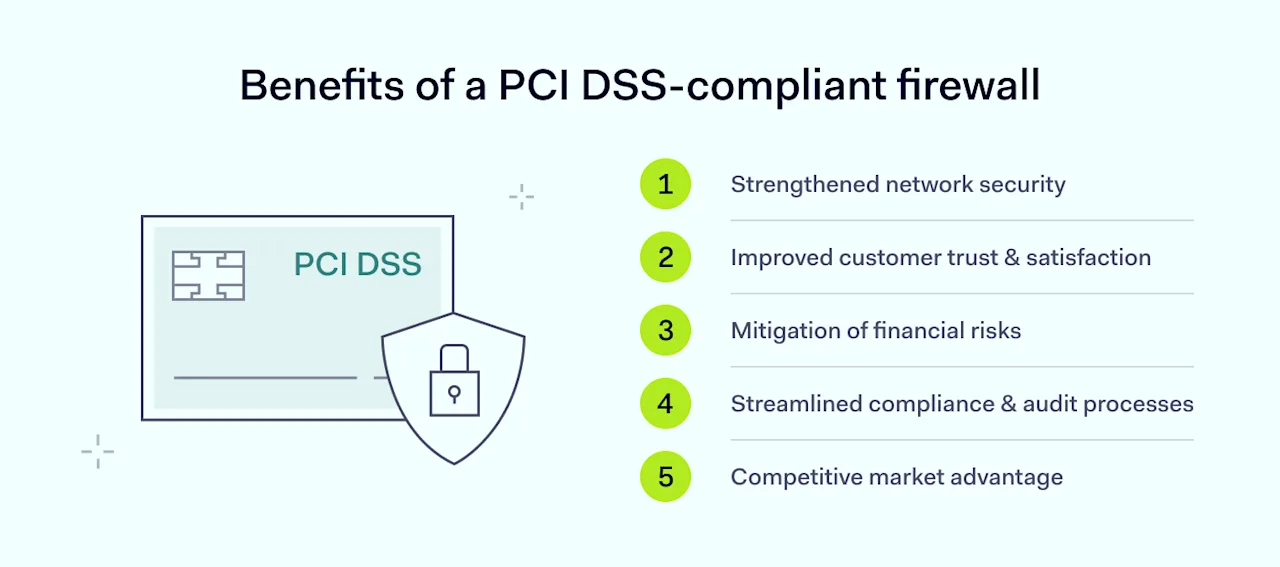
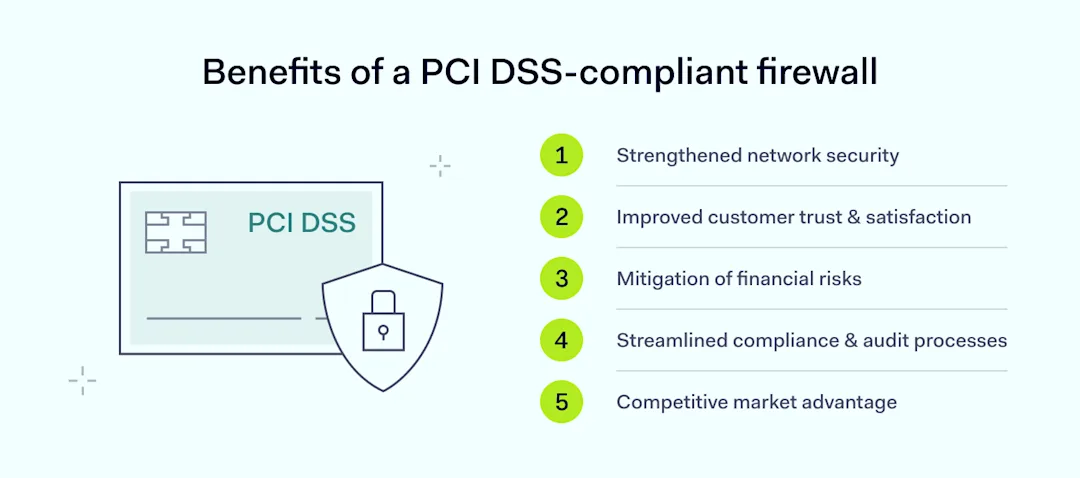
Benefits of a PCI DSS-compliant firewall

  • Strengthened network security: A PCI DSS-compliant firewall enforces stringent protective measures, including precise control over inbound and outbound traffic. This enhanced security posture minimizes the risk of unauthorized access and data breaches by restricting access to sensitive data.

  • Improved customer trust & satisfaction: Demonstrating compliance with PCI DSS builds customer confidence in your ability to safeguard their payment card data. By protecting cardholder data effectively, you foster trust and potentially increase customer loyalty and satisfaction.

  • Mitigation of financial risks: Non-compliance with PCI DSS can lead to significant financial penalties. A PCI DSS-compliant firewall helps avoid these fines, ranging from $5,000 to $100,000 per month. Additionally, preventing breaches protects your organization from the costs associated with data recovery, legal actions, and loss of business.

  • Streamlined compliance & audit processes: Meeting PCI DSS requirements simplifies compliance with other regulatory frameworks. It also streamlines audit processes by ensuring that protective measures are in place and regularly tested, reducing the burden of demonstrating compliance during audits.

  • Competitive market advantage: Achieving firewall compliance can serve as a differentiator in a competitive market. Businesses that prioritize security and compliance can appeal to customers and partners who value data protection, providing a competitive edge.

By leveraging these benefits, your organization not only strengthens its security posture but also positions itself to avoid the significant fines and penalties associated with non-compliance.

Avoiding fines and penalties

Failure to comply with PCI DSS can lead to severe financial and reputational consequences. Financially, non-compliance can result in substantial fines imposed by payment processors or acquiring banks. These fines vary based on the severity and duration of non-compliance.

For example, in 2019, Marriott International faced a fine of over $120 million due to a data breach, underscoring the significant financial risks involved. Beyond fines, non-compliance often leads to increased operational costs due to more frequent and stringent audits, which require additional resources and can disrupt regular business activities.

The reputational damage resulting from non-compliance can be even more detrimental. Customers expect businesses to protect their payment card data, and a breach can severely erode trust. According to a 2024 study by CivicScience, 56% of customers express a complete lack of trust in a company post-breach. Consumers aged 25-44 are more forgiving, while those aged 45-54 are least likely to trust a company again.

High-profile breaches have shown that customer confidence can erode rapidly, resulting in decreased sales and a long-term decline in market value. Based on recent Forbes research, 80% of customers in developed countries will abandon a business if their personal data is compromised in a security breach. Negative word-of-mouth and media coverage further amplify the reputational damage, making it challenging for businesses to rebuild trust and attract new customers.

Moreover, the legal ramifications of a data breach can be significant. Businesses may face lawsuits from affected customers or regulatory bodies, leading to costly legal proceedings and settlements. For instance, Target’s data breach cost the organization an $18 million settlement​.

These legal battles not only strain financial resources but also contribute to ongoing negative publicity, compounding the damage to the brand’s reputation. Thus, adhering to PCI DSS requirements is crucial not only for regulatory compliance but also for maintaining financial health and customer trust.


Meeting specific PCI requirements

Businesses must comply with various PCI DSS requirements to achieve compliance. These requirements—including maintaining a secure firewall configuration and regularly updating antivirus software—are designed to protect cardholder information by establishing and maintaining robust protective measures over time. Below is an overview of key PCI DSS requirements for effective firewall setup and network security:

Install and maintain a firewall configuration

Businesses must define and enforce firewall rules that control traffic between trusted and untrusted networks. To protect cardholder information, businesses must install and maintain a PCI DSS-compliant firewall setup.

Pro tip: Configure a business firewall to block all traffic from untrusted networks except for specific IP addresses necessary for business operations.

Do not use vendor-supplied defaults for system passwords and other security parameters

Using default settings is a common vulnerability. Businesses must change default passwords and settings to secure configurations and reduce the risk of unauthorized access.

Pro tip: Change the default admin password on a firewall to a complex, unique password.

Protect stored cardholder data

This requirement emphasizes protecting payment card information stored in databases, files, and other storage systems. Businesses must use encryption and other protective measures to secure stored cardholder data.

Pro tip: Encrypt credit card numbers in a database to prevent unauthorized use of the data.

Encrypt transmission of cardholder data across open, public networks

Businesses must encrypt payment card information when transmitting it over open public networks to protect it from interception by unauthorized parties.

Pro tip: Use SSL/TLS encryption to secure the transmission of credit card information from a customer’s browser to the business’s web server.

Use and regularly update anti-virus software or programs

This requirement involves deploying anti-virus software to protect systems from malware and regularly updating these programs to defend against new threats.

Pro tip: Install anti-virus software on all systems that handle cardholder data and schedule regular updates to ensure protection against the latest malware.

Develop and maintain secure systems and applications

This involves implementing security patches, conducting vulnerability scans, and maintaining secure development practices to protect applications that handle sensitive data.

Pro tip: Regularly update PCI DSS-compliant firewall software to the latest version to protect against known vulnerabilities.

Restrict access to cardholder data by business need to know

Access to payment card information should be limited to individuals whose job responsibilities necessitate it. Implementing access control lists (ACLs) helps ensure that only authorized personnel have access to sensitive information.

Pro tip: Set firewall rules to allow only the relevant departments access to payment card data.

Identify and authenticate access to system components

Businesses must use robust authentication mechanisms, such as strong passwords and multi-factor authentication, to verify the identity of users accessing system components.

Pro tip: Require employees to use a combination of passwords and biometric authentication to access network firewalls.

Restrict physical access to cardholder data

Restricting physical access involves controlling who can physically access systems and storage areas that contain cardholder data. This includes using locks, access cards, and surveillance systems.

Pro tip: Install keycard access controls and surveillance cameras in data centers that store cardholder data.

Track & monitor all access to network resources and cardholder data

Comprehensive logging and monitoring of firewall logs and network activities are essential to track access to cardholder data and identify suspicious activities.

Pro tip: Use a logging system to monitor and analyze all access attempts to cardholder data and generate alerts when unauthorized access occurs.

Regularly test security systems & processes

Regular testing involves conducting security assessments, vulnerability scans, and penetration testing to identify and address potential weaknesses in security systems.

Pro tip: Schedule regular penetration tests to evaluate the effectiveness of firewall rules and network security measures.

Maintain a policy that addresses information security for all personnel

Businesses must develop and maintain a comprehensive information security policy that outlines security responsibilities, processes, and protocols for all personnel.

Pro tip: Create a security policy that includes guidelines for firewall management, incident response, and employee training.

Implementing effective firewall configurations

Achieving PCI DSS compliance involves installing network firewalls and configuring them effectively to protect sensitive cardholder data and mitigate potential threats. This requires a comprehensive approach that includes defining clear security policies, segmenting your network, integrating advanced detection systems, and conducting regular assessments and updates.
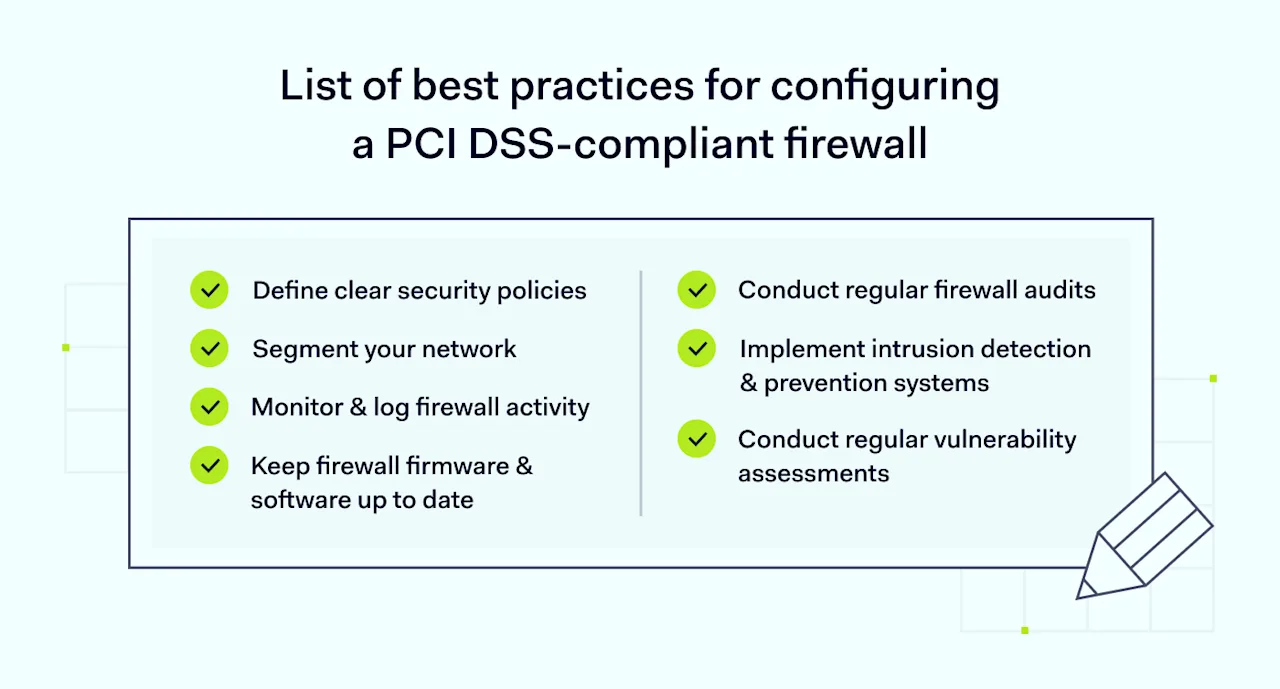
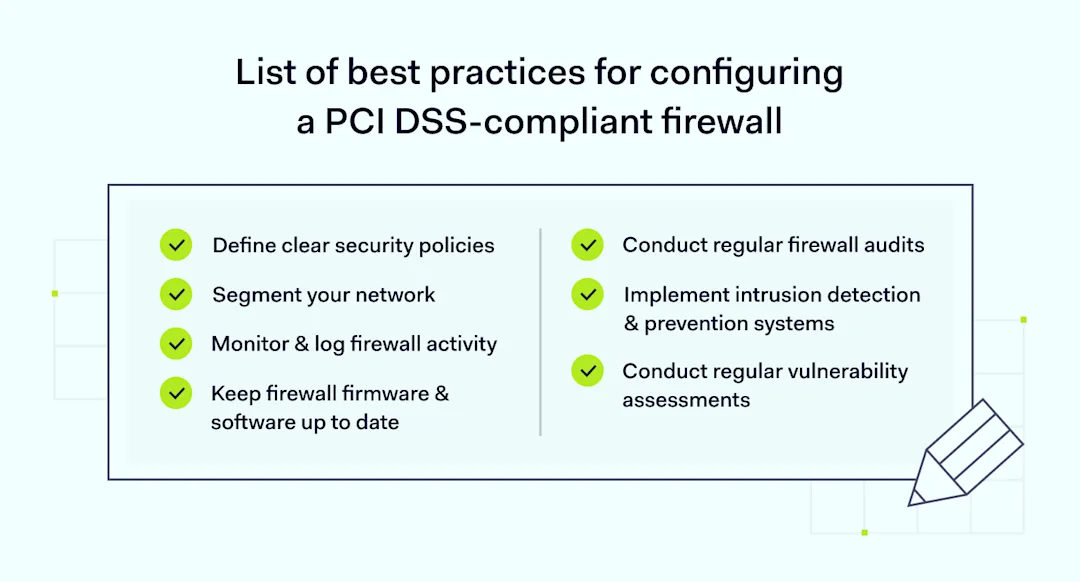
List of best practices for configuring a PCI DSS-compliant firewall

Below are the best practices for configuring a PCI DSS-compliant firewall:

1. Define clear security policies

Establish and document security policies that specify what traffic is allowed or denied. Regularly review and update these policies to reflect evolving security needs and threats.

2. Segment your network

Network segmentation involves dividing your network into smaller segments, each with its own security controls. This limits the exposure of cardholder data and helps contain potential breaches.

3. Implement intrusion detection & prevention systems

Integrate intrusion detection and prevention systems (IDPS) with your firewall to detect and respond to suspicious activities. These systems help identify unauthorized access attempts and mitigate potential threats.

4. Conduct regular vulnerability assessments

Performing regular vulnerability scans helps identify weaknesses in your firewall configuration. Address identified vulnerabilities promptly to maintain a strong security posture.

5. Keep firewall firmware & software up to date

Attackers can exploit outdated firmware and software. Regularly update your firewall to the latest versions and apply security patches to protect against known vulnerabilities.

6. Monitor & log firewall activity

Implement logging and monitoring to track firewall activities, including traffic, configuration changes, and access attempts. Use logs to investigate and respond to suspicious activities.

7. Conduct regular firewall audits

Regular audits of your firewall configuration ensure it remains compliant with PCI DSS firewall requirements. Audits should include reviewing firewall rules, testing intrusion detection capabilities, and verifying network segmentation.

How NordLayer can help in achieving PCI DSS compliance

Navigating PCI DSS compliance can be complex, but NordLayer’s cloud firewall solution simplifies the process. Here’s how NordLayer can support your compliance efforts:

  • Simplified compliance management: NordLayer’s cloud-based firewall offers centralized control and visibility, making it easier to manage firewall configurations and demonstrate compliance with PCI DSS. You can efficiently configure firewall rules, monitor traffic, and generate compliance reports.

  • Enhanced security features: NordLayer’s solution includes advanced security features such as intrusion detection, virtual private networks (VPNs), and multi-factor authentication. These features help secure your network and protect cardholder data from unauthorized access.

  • Scalable & flexible deployment: NordLayer’s cloud-based firewall can quickly be scaled according to your business needs. Whether you require protection for a small office or a large enterprise, NordLayer adapts to your security requirements.

  • Comprehensive support & guidance: NordLayer provides expert support to help you navigate the complexities of PCI DSS compliance. NordLayer’s team can assist with any questions or challenges from setup to ongoing management.

  • Cost-effective solution: NordLayer’s subscription-based model offers predictable pricing, eliminating the need for significant upfront investments in hardware and maintenance. This makes it a cost-effective alternative to a traditional hardware firewall.

  • Secure Remote Access: NordLayer’s cloud-based firewall supports Secure Remote Access, allowing employees to connect safely from any location. This is particularly important for maintaining security and compliance in remote work environments.

In conclusion, firewall PCI DSS compliance is crucial for protecting sensitive data and maintaining customer trust. By implementing effective firewall configurations and leveraging solutions like NordLayer’s cloud firewall, businesses can meet PCI requirements, enhance their network security, and avoid non-compliance’s financial and reputational consequences.

For more information on how NordLayer’s cloud-based firewall can help your organization achieve PCI DSS compliance, visit NordLayer’s cloud firewall.
About Version 2 Digital

Version 2 Digital is one of the most dynamic IT companies in Asia. The company distributes a wide range of IT products across various areas including cyber security, cloud, data protection, end points, infrastructures, system monitoring, storage, networking, business productivity and communication products.

Through an extensive network of channels, point of sales, resellers, and partnership companies, Version 2 offers quality products and services which are highly acclaimed in the market. Its customers cover a wide spectrum which include Global 1000 enterprises, regional listed companies, different vertical industries, public utilities, Government, a vast number of successful SMEs, and consumers in various Asian cities.

About NordLayer
NordLayer is an adaptive network access security solution for modern businesses – from the world’s most trusted cybersecurity brand, Nord Security.

The web has become a chaotic space where safety and trust have been compromised by cybercrime and data protection issues. Therefore, our team has a global mission to shape a more trusted and peaceful online future for people everywhere.

About NordLayer
NordLayer is an adaptive network access security solution for modern businesses – from the world’s most trusted cybersecurity brand, Nord Security.

The web has become a chaotic space where safety and trust have been compromised by cybercrime and data protection issues. Therefore, our team has a global mission to shape a more trusted and peaceful online future for people everywhere.

What is Unified Threat Management (UTM)? Everything you need to know

Network security is a complex challenge. Threats emerge from malware, viruses, software exploits, insider access, and unsecured email or collaboration tools. Diverse cybersecurity threats demand versatile solutions.

One of the most popular ways to combat every critical cybersecurity threat is Unified Threat Management (UTM). 

UTM is about consolidating security features on a single appliance. Security managers bring diagnostic, filtering, and quarantine tools together. Single control panels provide real-time awareness, identifying threats and coordinating responses.

Sounds good? Let’s explore the idea in more detail and explain how UTM could fit into your security posture.

Key takeaways

  • Unified Threat Management (UTM) combines essential security functions on a single appliance. This simplifies cybersecurity, giving security teams more control and making threats more visible.

  • UTM features include virus, malware, and spyware scanners. Implementations include firewalls and VPNs and may also include data loss prevention, intrusion prevention, and anti-spam solutions.

  • The main difference between UTM and Next-generation firewalls (NGFWs) is that NGFWs inspect network traffic in depth, while UTM includes firewalls alongside other security tools. As a result, UTM firewalls may not filter traffic as precisely as NGFWs.

  • UTM benefits include cost savings, simplification, and easy scaling. Companies can cover all core security tasks and secure network assets easily. Challenges include implementation, vendor lock-in, and network slowdown.

What is Unified Threat Management?

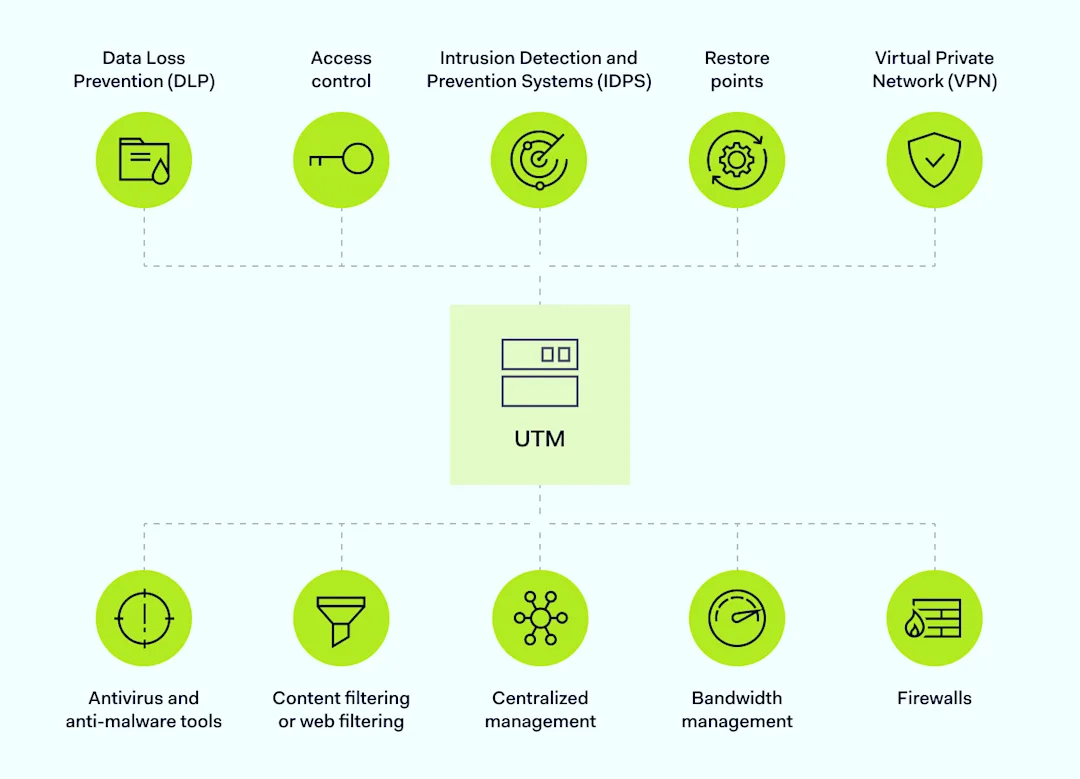
Unified Threat Management brings together every security appliance or tool an organization uses on a single device.

Traditional security solutions involved combining separate devices and software tools. With UTM, Security tools reside in a single location and are accessed via a single management console.

When properly designed, UTM simplifies cybersecurity and allows organizations to neutralize critical threats.

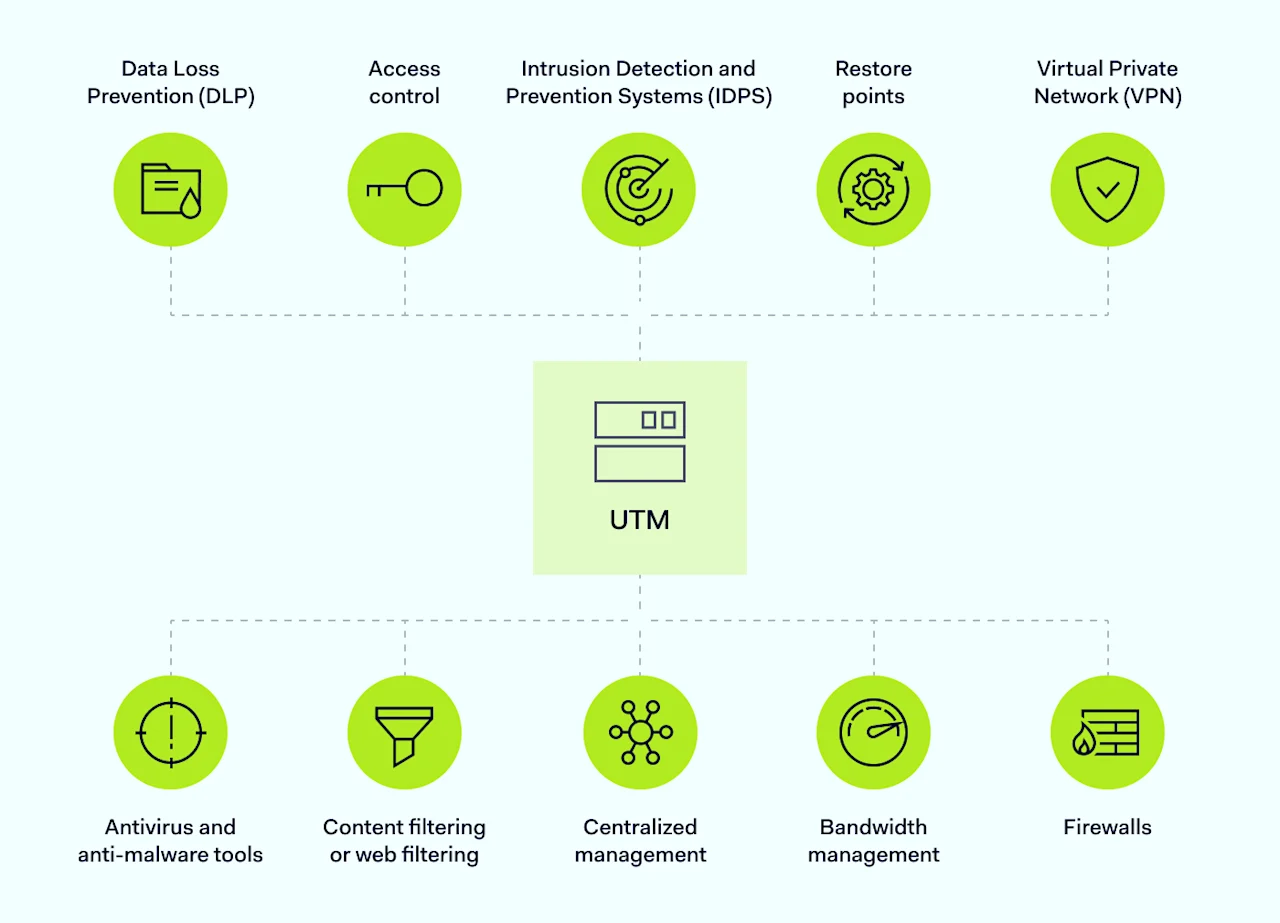
Vital security functions like firewalls, intrusion detection, content filtering, access management, virus protection, and spam removal all fall under the same umbrella. Functions are visible, easily customized, and constantly available to monitor security threats.

UTM appliances monitor and prevent data breaches. Data Loss Prevention systems (DLP) ensure that confidential data remains secure and only accessible to authorized individuals. Firewall tools, antivirus, and anti-malware scanners prevent intrusions, while VPNs guard network traffic.

How does UTM work?

UTM implementations have two components: appliances and functionalities.

UTM appliances store and consolidate multiple security features. Appliances could comprise physical hardware or applications.

Devices and appliances combine Unified Threat Management features such as virus scanners and firewalls. They enable configuration changes and application updates. Control systems also allow security teams to monitor each component via application control.

UTM functionalities are the separate components that form the security system. Specialist data loss prevention tools, email filters, malware scanners, and cloud firewall tools could all be part of the mix.

Features of a unified threat management system

The makeup of a Unified Threat Management system depends on the network traffic types. Systems must inspect incoming and outgoing traffic, detect suspicious activity, and trigger mitigation action. With that in mind, the following features are common in UTM systems.

Scheme

  • Firewalls. A network firewall filters incoming and outgoing network traffic, preventing access to unauthorized or suspicious data.

  • Intrusion Detection and Prevention Systems (IDPS). An Intrusion Detection and Prevention Systems inspect traffic within the network and at the network edge. IDPS tools identify potential threats and respond via quarantine and neutralization tools.

  • Antivirus and anti-malware tools. Counter specific types of digital threats, including persistent agents, worms, or malware from phishing attacks. Solutions may also include separate anti-spyware scanners for extra security.

  • Virtual Private Network (VPN). Creates an encryption tunnel around network traffic. This makes traffic invisible to external attackers and helps keep data safe.

  • Content filtering or web filtering. Inspects traffic and requests from network devices. It also prevents users from accessing prohibited websites or data types. UTM may include spam filtering to clean email traffic. Advanced solutions also use application control to manage access to specific apps or websites.

  • Data Loss Prevention (DLP). Tracks sensitive data, recording its location and status, and prevents data extraction via unsafe methods.

  • Centralized management. UTM pools various Unified Threat Management functions. It provides a single point of control, making alerts and network metrics visible at all times.

  • Access control. UTM may allow security teams to manage user directories and request authentication for network entry.

  • Bandwidth management. Balances network loads, ensuring smooth performance and enabling UTM tools to function without network slowdown.

  • Restore points. Records the status of network settings and assets. It enables security teams to restore operations when attacks or outages occur.

UTM benefits

UTM does not suit every situation. Companies must weigh the pros and cons before choosing a vendor. Benefits of using UTM include:

  • Simplified cybersecurity. Combines endpoint and application protection in a single system. A single team (or person) manages security, making it easier to maintain control.

  • Effective threat defense. Technicians can manage firewalls, data quarantines, and system recovery via a single panel. Fewer threats will escape your filters and scanning tools.

  • Cost savings. Using a single security device is more cost-effective than sourcing hardware firewalls, separate virus scanners, and VPNs. Instead, users purchase a single solution to cover their security needs.

  • Scaling. UTM scales naturally as networks expand, unlike security systems with diverse devices and software solutions.

Common UTM mistakes to avoid

While UTM can be beneficial, implementations can also run into problems. Challenges include:

Implementation

UTM may not integrate smoothly with existing security systems or critical apps. In those situations, rolling out a secure UTM setup takes time and expertise.

Solution: Plan UTM implementation and test compatibility before security systems go live. Use API-based integration to connect UTM with existing tools, and implement unified policy management to cover every base.

Network slowdown

Poorly implemented solutions cause network slowdown via UTM firewall configurations or improperly defined filters.

Solution: Prioritize critical network traffic with Quality of Service rules. Regularly audit firewall rules to ensure they meet efficiency goals while blocking threats.

Single point of failure

When one security system fails, others follow, leading to a complete security breakdown.

Solution: In this case, you should consider adding redundancy via multiple UTM firewalls and failover processes.

Vendor lock-in

Companies that choose poorly may be stuck with ineffective, expensive security tools.

Solution: Always assess potential vendors to find a high-quality and flexible security partner. Apply interoperability principles to allow service changes if needed.

UTM vs. next-generation firewalls

It’s important to distinguish between Unified Threat Management and next-generation firewalls (NGFWs). The two technologies perform similar roles, but they aren’t identical.

Unified Threat Management is a comprehensive cybersecurity solution. It covers all security threats in a user-friendly unified environment via a single UTM appliance.

Simplified configuration makes UTM easy to install, especially on less complex network architecture. That’s why UTM is often a go-to option when small and medium-sized enterprises need advanced threat protection.

NGFW solutions enhance traditional firewalls, using techniques like deep packet inspection (DPI) to defend the network perimeter in depth. DPI ensures a high level of protection against unauthorized intrusions.

Larger companies use NGFWs alongside separate VPNs or antivirus solutions. They tend to value the ability to customize firewall settings beyond the simplified functions of a UTM firewall.

Feature-UTM-NGFW

Key differences and similarities

In practical terms, UTMs and NGFWs unify security features and neutralize common network security threats. However, there are some things to consider when choosing between UTM and NGFW solutions.

  • NGFWs tend to be more complex to install. By contrast, you can purchase UTM systems and quickly consolidate security tools.

  • Core NGFW functions often exist within UTM solutions alongside other tools like virus protection or VPNs. Companies may need filtering systems not provided by NGFWs, making UTM solutions more useful.

  • UTM can suffer from compatibility issues. Integrating UTM with existing software or devices can be more difficult than adding an NGFW, especially in complex network settings.

  • Companies may also buy more UTM coverage than they require. In many cases, advanced firewalls provide enough security, and you can toggle firewall services to turn functions on or off.


UTM: looking to the future

UTM is evolving rapidly due to market demand. According to industry experts Jupiter Research, the UTM sector will double from $7.5 billion in 2023 to $14.8 billion in 2028.

Cutting-edge UTM solutions now cover IoT devices, cloud assets, and AI-driven cyber threats. As threats and network architecture become more complex, companies are desperate for ways to simplify cybersecurity. Cloud-based UTM is often the most convenient option.

The best future UTM solutions will use AI to anticipate critical threats and follow SASE models, defending complex local, cloud, and remote network assets. They will also deploy cloud firewall solutions to cover every file and application, wherever they reside.

How NordLayer can help

More companies now use cloud-based solutions. Sticking with only hardware limits your options to provide full security for both hybrid teams and on-site workers.

Think beyond hardware. NordLayer offers a comprehensive solution that includes DNS filtering, firewall, VPN, device posture security, multilayered network access authentication, and remote network access. It’s a cost-efficient and easy-to-implement choice. NordLayer provides many of the essential features needed for cybersecurity, making it a versatile and compatible option compared to more complex and limited UTM platforms.

Choose a security solution that suits today’s network architecture. Contact the NordLayer team to explore your options.

About Version 2 Digital

Version 2 Digital is one of the most dynamic IT companies in Asia. The company distributes a wide range of IT products across various areas including cyber security, cloud, data protection, end points, infrastructures, system monitoring, storage, networking, business productivity and communication products.

Through an extensive network of channels, point of sales, resellers, and partnership companies, Version 2 offers quality products and services which are highly acclaimed in the market. Its customers cover a wide spectrum which include Global 1000 enterprises, regional listed companies, different vertical industries, public utilities, Government, a vast number of successful SMEs, and consumers in various Asian cities.

About NordLayer
NordLayer is an adaptive network access security solution for modern businesses – from the world’s most trusted cybersecurity brand, Nord Security.

The web has become a chaotic space where safety and trust have been compromised by cybercrime and data protection issues. Therefore, our team has a global mission to shape a more trusted and peaceful online future for people everywhere.

About NordLayer
NordLayer is an adaptive network access security solution for modern businesses – from the world’s most trusted cybersecurity brand, Nord Security.

The web has become a chaotic space where safety and trust have been compromised by cybercrime and data protection issues. Therefore, our team has a global mission to shape a more trusted and peaceful online future for people everywhere.

What to do if a scammer has your email address

Can you tell who has your email address?

Initially just a method for sending letter-like messages across the internet, email has now become an integral part of everyone’s digital lives. We use it when signing up for services, creating app accounts, sharing files with our friends and colleagues, shopping online, and more – essentially making email a virtual equivalent of an ID card.

Given its various applications, it’s easy to lose track of who has our email address. Most users wouldn’t be able to name everyone who knows their email if asked. Consequently, many people may not realize that their email address has fallen into the hands of someone who might exploit it for personal gain.

If you’re concerned, let us help you find out if your email address has been compromised and understand why it might have been.

How to tell if a scammer has your email

If you trust your observational skills, there are key signs you should watch for that could indicate a scammer has gained access to your email address. These signs often include:

  1. You get many scam emails

    Have you noticed an increase in emails asking for your personal information or claiming urgent action is needed? This could indicate that a scammer has your email address and is using phishing tactics to coerce you into exposing sensitive data.

  2. You receive unexpected 2FA requests

    If you get unexpected two-factor authentication requests for services you haven’t accessed, it could mean someone is trying to gain unauthorized access to your account using your email.

  3. You have problems logging into your online accounts

    Are you experiencing difficulties accessing your online accounts, even with the correct credentials? If so, then it is very likely that someone has used your email to gain access and changed your login information, effectively locking you out of your accounts.

  4. Your contacts received messages from your email address that you haven’t sent

    If your friends or colleagues mention receiving suspicious emails that appear to be from you, it could be that your email account has been compromised. The attacker might be using your account to deceive your contacts into sharing sensitive information that could be used against them.

Bear in mind, however, that today’s hackers know how to cover their tracks and operate discreetly to minimize any signs of wrongdoing. This is to say that finding out whether a scammer has exploited your email address can often be ambiguous and may require more than just keeping your eyes peeled.

Fortunately, there are digital tools available today that can help you find out if a breach has occurred. Take NordPass’ Data Breach Scanner, for example – a tool that scans the dark web for any mentions of your email address. With this solution, you can quickly check if your email address has been compromised and take the necessary action without having to monitor for signs of unusual behavior on your device.


What scammers can do with your email address

Although we’ve touched on this topic in the previous section, it’s crucial to take a closer look at the potential dangers posed by scammers who want to exploit your email address. First of all, malicious actors may use phishing tactics to trick you into revealing sensitive personal information, or they might distribute malware via deceptive emails in an attempt to compromise your device’s security.

Moreover, if hackers gain unauthorized access to your email account, they can commit identity theft and financial fraud, as well as take over your online accounts, and access other linked services and sensitive information stored in your email. All these risks highlight the urgent need for you to protect your email address and respond immediately to any signs of data compromise.

What you can do if a scammer has your email

Depending on the timing in the “a scammer got my email” scenario—whether it’s before or after they’ve used the email address for nefarious purposes—there are different actions you can (and should) take. Let’s explore both scenarios and discuss steps to protect your data.

If a scammer only has your email address

At this point, nothing critical has happened yet, but you should stay vigilant, as phishing attempts could arrive at any moment. This means you need to be extra aware that someone might try to use your email to gain access to your digital belongings.

To secure your account, first ensure your email password is complex (consisting of letters, numbers, and symbols arranged randomly) and at least 12 characters long to resist brute-force attacks. Consider using a robust password manager like NordPass to generate and store strong passwords for all your accounts—including email—so you can avoid creating weak passwords and stop relying on your memory for storage.

Second, enable multi-factor authentication (MFA) on your email account to make it extra difficult for cybercriminals to gain access. Additionally, regularly review your email account activity and set up alerts for unusual login behavior to catch any unauthorized access attempts early.

If a scammer has already gained access to your email account

Things get really serious when someone gains access to your email account and starts using it to wreak havoc. However, this doesn’t mean you have to stand by and watch a cyberattacker carry out their malicious activities. If your email account has been compromised, you can and should act quickly.

Firstly, if you still have access to your account, go to your email settings and change your password immediately. Then, request the platform to log you out of all sessions after the password change to block the hacker’s access and regain control. Also, if you haven’t already, enable multi-factor authentication (MFA) to prevent similar security incidents in the future.

If you cannot access your account because the hacker has changed your login credentials, contact your email provider as soon as possible to report the security breach. Inform them about your situation so that their customer support team can help you restore access, reset your password, and lock out any unauthorized parties.

Once you’re certain that access to your email account is secure again, run antivirus or antimalware tools to thoroughly scan your device for any lingering malicious software that may still pose a threat. Additionally, review your account activity to identify any unauthorized changes made by the attacker while they had access.

How to protect your email account

Whether you must react to an unauthorized account takeover or aim to prevent such incidents altogether, you have several options to safeguard your email account. We’ve already discussed some: using a data breach scanner to monitor if your email address has been compromised, strengthening passwords against brute force attacks, and enabling multi-factor authentication so that a password alone isn’t sufficient for access.

Another option we touched on earlier, but will expand on now, is using a password manager like NordPass to protect your email account. With NordPass, you can generate highly secure passwords for your email and all your other accounts, and store them all in an encrypted vault accessible only to you. You can also use NordPass as an authenticator app to provide two-factor authentication codes for enhanced security.

Additionally, NordPass comes with two major features that can help you significantly enhance your email account’s security. The first is the Data Breach Scanner feature, which, as you already know, scans the dark web to check if your email has been compromised. The other feature is Email Masking, which lets you create an artificial email address when you sign up for newsletters or online services, ensuring that you can avoid exposing your real email address if you choose not to.

NordPass offers all these features to help you elevate the security of your email account and more. Given its value, it would be a missed opportunity not to try it out in its 14-day trial, wouldn’t it? The choice is yours.

About Version 2 Digital

Version 2 Digital is one of the most dynamic IT companies in Asia. The company distributes a wide range of IT products across various areas including cyber security, cloud, data protection, end points, infrastructures, system monitoring, storage, networking, business productivity and communication products.

Through an extensive network of channels, point of sales, resellers, and partnership companies, Version 2 offers quality products and services which are highly acclaimed in the market. Its customers cover a wide spectrum which include Global 1000 enterprises, regional listed companies, different vertical industries, public utilities, Government, a vast number of successful SMEs, and consumers in various Asian cities.

About NordPass
NordPass is developed by Nord Security, a company leading the global market of cybersecurity products.

The web has become a chaotic space where safety and trust have been compromised by cybercrime and data protection issues. Therefore, our team has a global mission to shape a more trusted and peaceful online future for people everywhere.

How to change autofill settings on iPhone

How to manage autofill for your contact information

Here’s how you can quickly edit your contact information, such as your address or phone number:

  1. Open Settings on your iPhone.

  2. Scroll down and tap on Safari.

  3. Select Autofill.

  4. Tap on My Info and choose your contact card.

  5. Update your information in the Contacts app, and it will automatically reflect in your autofill settings.

How to manage autofill for your credit card information

Storing your credit card information on your iPhone can make online shopping a breeze. Here’s how to add or update your credit card details:

  1. Open Settings.

  2. Go to Safari.

  3. Tap on Autofill.

  4. Select Saved Credit Cards.

  5. Authenticate via Face ID, Touch ID, or passcode.

  6. You can also add a new card by tapping Add Credit Card or update existing ones by selecting the card you want to edit.

How to autofill passwords on iPhone

Automatically filling out passwords saves time and reduces frustration related to manually typing long, complex passwords. Using autofill also allows you to forget your passwords, which is a nice bonus.

Here’s how to start using the autofill feature for passwords on your iPhone:

  1. Open Settings.

  2. Tap the Apple ID banner.

  3. Select iCloud.

  4. Tap Passwords and Keychain.

  5. Turn on the Sync this iPhone toggle switch and enter your Apple ID credentials if prompted.

Here’s how you can add new passwords or manage them on your iOS device:

  1. Open Settings.

  2. Scroll down to Passwords.

  3. Use Face ID, Touch ID, or passcode to access your saved passwords.

  4. Here, you can add new passwords or update existing ones.

Here’s an in-depth guide about managing your passwords on an iPhone.

Why could NordPass be a better option for managing your passwords and personal information?

While built-in options like the native iOS Passwords app provide basic functionalities, NordPass takes password and personal information management to a markedly higher level.

One of NordPass’s standout features is its seamless synchronization, allowing users to access their passwords and personal information across multiple devices and platforms—be it Windows, macOS, Linux, Android, or iOS. This cross-compatibility is a significant advantage for users who operate within diverse technological ecosystems​.

NordPass also goes beyond simple password management and offers a comprehensive suite of advanced tools designed to help individuals and businesses alike improve their digital security.

The Data Breach Scanner provides a way to check whether your sensitive data such as emails, passwords, or personal information, has been compromised in a breach. You can also set Breach Monitoring and receive real-time alerts in case your data appears in the breach.

Complementing the Data Breach Scanner, the Password Health feature can help you identify weak, old, and reused passwords, improving your passwords and overall security posture.

In addition, NordPass includes an Email Masking feature—a tool that generates fake, disposable email addresses that can be leveraged for online signups, making sure your real email remains a secret. This limits spam, and minimizes the risks of phishing.

In terms of support, NordPass offers 24/7 customer service, ensuring that help is available whenever it is needed. If you are already using NordPass, here’s a quick guide on enabling the NordPass autofill on iOS.

FAQ

How do I change the autofill address on my iPhone?

Open Settings. Select Safari, click Autofill, and choose My Info. Select your contact card. Update your address in the Contacts app, and it will automatically update your autofill settings.

How do I turn off autofill on my iPhone?

If you prefer not to use autofill, you can turn it off by going to Settings, selecting Safari, and taping Autofill. Toggle off the options for Use Contact Info and Credit Cards.

About Version 2 Digital

Version 2 Digital is one of the most dynamic IT companies in Asia. The company distributes a wide range of IT products across various areas including cyber security, cloud, data protection, end points, infrastructures, system monitoring, storage, networking, business productivity and communication products.

Through an extensive network of channels, point of sales, resellers, and partnership companies, Version 2 offers quality products and services which are highly acclaimed in the market. Its customers cover a wide spectrum which include Global 1000 enterprises, regional listed companies, different vertical industries, public utilities, Government, a vast number of successful SMEs, and consumers in various Asian cities.

About NordPass
NordPass is developed by Nord Security, a company leading the global market of cybersecurity products.

The web has become a chaotic space where safety and trust have been compromised by cybercrime and data protection issues. Therefore, our team has a global mission to shape a more trusted and peaceful online future for people everywhere.

Introducing NordPass Authenticator for Business

NordPass Authenticator is a unique feature that generates one-time passwords directly in your NordPass vault. It gives you all the security of two-factor authentication without an extra app.

Two-factor authentication (2FA) is the talk of the town in the corporate world for a reason. As the risk of passwords getting stolen, hacked, or guessed via brute-force attacks is ever-increasing, 2FA offers an additional layer of security to your accounts. In other words, 2FA protects accounts that would otherwise rely on passwords, typically weak ones, as their sole authentication method. So even if cybercriminals were to access your passwords, they’d be faced with an additional barrier to jump over.

However, while 2FA is quickly becoming the new standard, adding an extra step to the login process remains a stumbling block for many. Setting up two-factor solutions can be clunky, confusing, and time-consuming, appearing as more of a challenge than a convenience for employees. And employees’ annoyance isn’t just damaging to morale – it presents a serious security risk.

Cybercriminals can exploit this vulnerability with brute-force attacks. They send one second-factor request after another until users, out of exasperation or uncertainty, end up authenticating an unauthorized access request. This technique, known as MFA fatigue, was a key component in the 2023 Caesars and MGM casinos breach.

How can businesses implement two-factor authentication while avoiding its pitfalls?

NordPass Authenticator offers a simpler way to protect accounts with two-factor authentication. In a leap toward a passwordless future, NordPass patented the Stateless System To Protect Data (US Patent No. 11,528,130). This solution combines the highest security standards without compromising usability by offering multiple authentication factors within a single app.

What is NordPass Authenticator?

NordPass Authenticator is a feature that lets your organization’s members add an extra layer of security to their accounts with two-factor authentication without downloading or checking additional apps.

How does NordPass Authenticator work?

With the Authenticator, NordPass performs a double task – in addition to managing passwords, it acts as an authentication app, providing two-factor codes for any credentials stored in the vault.

If the account has 2FA switched on, you’re prompted to enter a time-based one-time password (TOTP) to unlock the account during each login attempt. NordPass members can securely unlock the verification code inside NordPass using their biometric data. That way, they don’t need to rely on authentication methods like text messages, which are prone to smishing attacks, or third-party apps like Google Authenticator or Authy.

What problems does NordPass Authenticator solve?

NordPass Authenticator helps resolve the challenges of adding an additional security layer to employee accounts. It also addresses some of the most common usability issues and vulnerabilities seen in other 2FA solutions.

Setting up two-factor authentication with TOTPs in NordPass includes benefits such as:

  • Providing phishing-resistant authentication.

  • Preventing “MFA fatigue” for credentials managed by NordPass.

  • Eliminating the need to download and manage third-party software.

  • Allowing users to add 2FA to all accounts, including those with shared passwords.

What makes NordPass Authenticator better?

Stronger security

Two-factor authentication is not just an extra step to access your accounts. It needs to be completely distinct from the first factor – in this instance, the password – and involve a different authentication type.

nordpass authenticator

The most common authentication factors can be split into three categories:

  1. Something you have – a possession factor, such as a device or token.

  2. Something you know – a knowledge factor, such as a password or TOTP.

  3. Something you are – an inherence factor or a biometric factor, such as a fingerprint or facial recognition.

Imagine you require both a key and a fob for additional security to enter your office. These two “authenticators” use the same technique to open the door – they’re something you have. If, in addition to falling under the same “factor” category, the key and the fob are attached to each other or are always stored in the same place, this security method is no more secure than the key alone. It gives the illusion of additional security without the actual benefit.

Cybersecurity works much in the same way. The password is a common “first factor.” If your second factor also falls under the “something you know” category and is stored alongside your first factor – say, in a password manager – then it doesn’t meet the 2FA security standards. That’s because the first and second factors share the same path for entry: Your master password.

Using patented technology, NordPass has overcome this limitation and delivers all the security benefits of a true second factor in the easiest and most accessible way possible.

NordPass combines something you know (your Master Password) with authentication through something you are (fingerprint or Face ID) on something you have (your device) to unlock the time-based one-time password. Combining multiple factors leads to a higher security standard and genuine second-factor authentication that’s more than just two-step verification.

More convenience

Many businesses are already overwhelmed by apps. The trend of perpetual software adoption has accelerated with the popularity of remote and hybrid work options. The last thing your peers and the IT team need is one more application whose sole purpose is generating time-based one-time passwords.

NordPass generates the codes for you without the hassle of using another authentication app. NordPass Authenticator helps improve cross-team collaboration by allowing members to share passwords that have second-factor authentication – no more two-factor code sharing on unencrypted chats or spreadsheets. Once you share a password, the recipient can unlock the TOTP code using biometrics on their device, saving time and effort and maintaining security measures intact.

Say goodbye to the hassle of sharing access to 2FA-protected accounts. From now on, your team can easily grant access with just a couple of clicks without compromising your company’s security. When it comes to security software, convenience isn’t just “nice to have” – it means the difference between your team adopting the solution or not.

Better transparency

Managing two-factor authentication inside your password management app offers more transparency and control over your cybersecurity. First, it allows you to verify whether your team members are using 2FA and for which accounts. This allows your organization to perform a more accurate audit of account and credential security, helping it turn policy into practice in a tangible way.

Second, it lets you maintain control and consistency over mandatory workplace app usage. Otherwise, your team would likely adopt a hodgepodge of different authenticator apps, preventing your organization from enforcing tailor-made security protocols and training materials.

Who can use NordPass Authenticator?

NordPass Authenticator is available on the browser extension and mobile devices with all tiers of business accounts. This User Guide provides more information on how to add our built-in authenticator to your business accounts.

And if you’re yet to check out what NordPass has to offer, go ahead and start your free 14-day trial today. Alongside NordPass Authenticator, you’ll access other security-focused features for a more convenient work experience, including Password Health, Email Masking, Data Breach Scanner, and secure sharing.

With NordPass, you can take your organizational security to the next level without compromising productivity and efficiency.

About Version 2 Digital

Version 2 Digital is one of the most dynamic IT companies in Asia. The company distributes a wide range of IT products across various areas including cyber security, cloud, data protection, end points, infrastructures, system monitoring, storage, networking, business productivity and communication products.

Through an extensive network of channels, point of sales, resellers, and partnership companies, Version 2 offers quality products and services which are highly acclaimed in the market. Its customers cover a wide spectrum which include Global 1000 enterprises, regional listed companies, different vertical industries, public utilities, Government, a vast number of successful SMEs, and consumers in various Asian cities.

About NordPass
NordPass is developed by Nord Security, a company leading the global market of cybersecurity products.

The web has become a chaotic space where safety and trust have been compromised by cybercrime and data protection issues. Therefore, our team has a global mission to shape a more trusted and peaceful online future for people everywhere.

×

Hello!

Click one of our contacts below to chat on WhatsApp

×