Skip to content

Finding FortiOS, FortiProxy, and FortiSwitchManager assets on your network

News surfaced late last week of a critical authentication bypass vulnerability present in the web administration interface of some Fortinet products. Successful exploitation of this vulnerability (tracked as CVE-2022-40684) via crafted HTTP and HTTPS requests can provide remote attackers with admin-level command execution on vulnerable FortiOS devices including FortiGate firewalls, FortiProxy web proxies, and FortiSwitchManager assets.

What is the impact?

With a CVSS critical score of 9.6, attackers running admin-level commands on compromised assets may have the ability to persist presence, explore connected internal networks, and exfiltrate data. Fortinet is aware of at least one exploit of this vulnerability in the wild, and Bleeping Computer offered a Shodan search showing more than 140k publicly accessible FortiGate devices which may be running vulnerable FortiOS. Additionally, security researchers with Horizon3.ai are planning on publishing an exploit PoC this week. For admins wanting to check if a FortiOS/FortiProxy/FortiSwitchManager asset has been exploited, Fortinet does provide an indicator of compromise (see the “Exploitation Status” section).

Are updates available?

Fortinet has called out the vulnerable FortiOS, FortiProxy, and FortiSwitchManager versions in their advisory and has made updates available for affected products. Admins should ensure that affected models are updated to the latest version as soon as possible. If updates cannot be completed in the near term, Fortinet does provide some mitigation steps (see the “Workaround” section) that can be taken to secure vulnerable assets.

How do I find potentially vulnerable FortiOS, FortiProxy, and FortiSwitchManager assets with runZero?

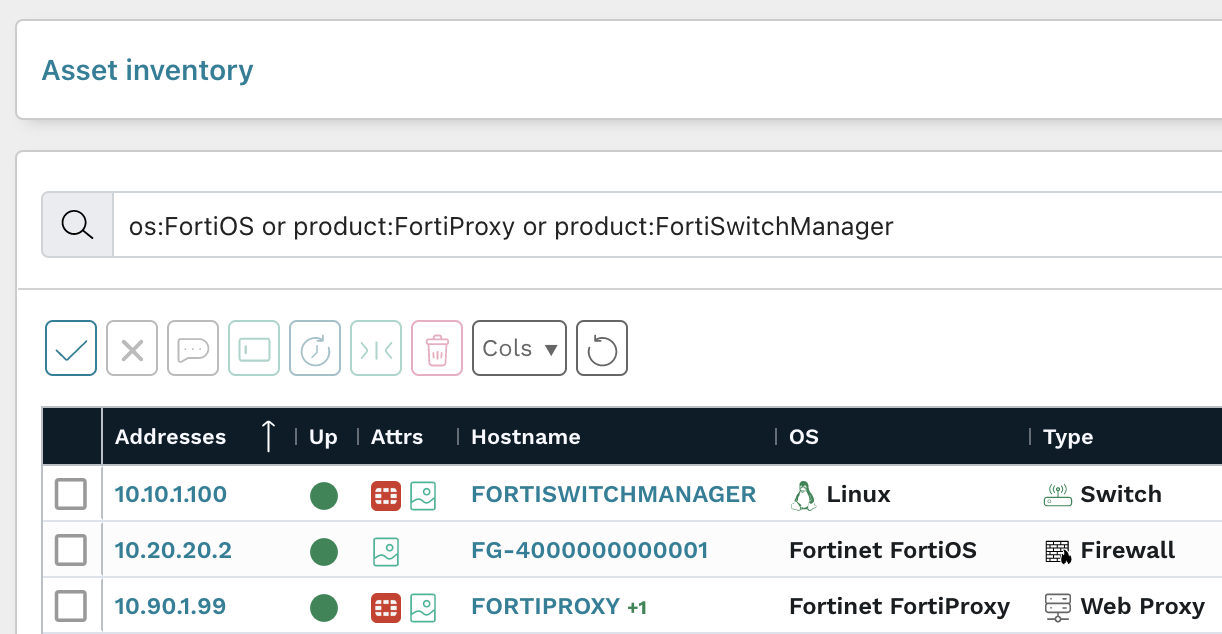
From the Asset Inventory, use the following pre-built query to locate FortiOS, FortiProxy, and FortiSwitchManager assets that may need remediation:

os:FortiOS or product:FortiProxy or product:FortiSwitchManager

As always, any prebuilt queries are available from our Queries Library. Check out the library for other useful inventory queries.

About Version 2 Digital

Version 2 Digital is one of the most dynamic IT companies in Asia. The company distributes a wide range of IT products across various areas including cyber security, cloud, data protection, end points, infrastructures, system monitoring, storage, networking, business productivity and communication products.

Through an extensive network of channels, point of sales, resellers, and partnership companies, Version 2 offers quality products and services which are highly acclaimed in the market. Its customers cover a wide spectrum which include Global 1000 enterprises, regional listed companies, different vertical industries, public utilities, Government, a vast number of successful SMEs, and consumers in various Asian cities.

About runZero
runZero, a network discovery and asset inventory solution, was founded in 2018 by HD Moore, the creator of Metasploit. HD envisioned a modern active discovery solution that could find and identify everything on a network–without credentials. As a security researcher and penetration tester, he often employed benign ways to get information leaks and piece them together to build device profiles. Eventually, this work led him to leverage applied research and the discovery techniques developed for security and penetration testing to create runZero.

How runZero helps with red team security

It’s cyber security awareness month, which is why we’re doing a series of blogs to help you identify ways to use runZero to boost your security. We’re kicking off the series with ways to integrate runZero into your red team best practices. Red teams test the effectiveness of an organization’s security controls, including those in place to defend networks, endpoint hardware and software, as well as physical locations. Red teaming focuses on the concept that an organization doesn’t know how secure they are until they’re attacked. Therefore, red teams are critical in helping organizations uncover their weaknesses before a real world attacker does, empowering the organization to be proactive instead of reactive. Let’s dig into three important red team security practices, explain their importance, and share how runZero can be best applied to each practice.

Best practice #1: Perform routine assessments

A red team assessment can include more than just penetration testing, it can also include social engineering exercises, physical penetration tests, and threat modeling as well. Tactics, techniques, and procedures (TTPs) that emulate real-world cyber attacks are critical red teaming elements. Routine assessments help keep the company prepared and can expose new vulnerabilities in the software being used or the employees that are accessing the data. Of course, these routines should always include a follow up with the results, but it is important to keep the initial assessment under wraps from the majority of the organization (except perhaps the security team, which should be determined ahead of time when negotiating the scope of assessment) to ensure an authentic representation of the existing security. runZero delivers network visibility that can expose links between assets, helping you determine the severity of risk based on the results. For example, if someone with access to customer data succumbs to a phishing attack, you can identify systems in the network an attacker could have gained access to. runZero also offers vulnerability integrations, which will enrich your asset inventory with your vulnerability scan results. With a centralized view of your assets and their vulnerability results, you can identify high-risk assets and assess the risk to your network. This creates increased value in the security assessment results and may be a great way to encourage more thorough security training throughout the company.

Best practice #2: Record everything

runZero offers more accurate asset information so you can track and identify assets that are connected on the network. This makes those security comparisons easier, as well as the overall identification of what assets are accessible. As your red team conducts security assessments and penetration tests, the team should be recording everything–from the methods used to the assets that were accessed. This allows your team to routinely repeat the process to either validate remediation or mitigation efforts or to look for new weaknesses. Having clear documentation will allow for better analysis, as similar assets can be easily compared for the same security risks. Knowing the assets that can be compromised is critical for identifying so many other issues and risks on your network. Users can be identified making it easier to track:
  • Remote access services
  • Software versions with unique vulnerabilities
  • Individual assets that are linked to sensitive data
Tracking the items listed above can make implementation of stronger security measures easier to execute efficiently.

Best practice #3: Choose the best tools

One of the first things that red teams focus on is reconnaissance. During this initial phase, it is critical to gather as much information as possible from target networks and systems. Discovery usually entails enumerating domains owned by the organization and scanning internal networks to collect information about the devices connected to them. Red teams generally perform both passive and active methods of reconnaissance, leveraging a myriad of tools to support their efforts. With runZero, you can scan public facing and internal assets to gather details about them, like their OS, open services, installed software, and SSH versions. Once the red team has enough information about the target systems, they can leverage this data to find misconfigurations, identify potential vulnerabilities, and better plan their attack methods. As a part of regular penetration tests, the red team is responsible for finding creative ways to exploit vulnerabilities. This means being aware of current system and application vulnerabilities and looking for new vulnerabilities in company software using unique methods to extract data. While this data is ultimately taken back with an intent to strengthen the security against such exploitation, the practice of being able to think like an attacker is valuable to red team practices. Red team exploitation exercises are meant to bring weaknesses in data and network security to light and can result in preventative measures. Exploitation requires choosing the right tools. For the exercise to be as authentic as possible, the tools used often need to balance effectiveness with being undisruptive. Red team methods should safely work with fragile systems with the goal of not raising any alarms or disrupting work flow.

Stay tuned for more

This is the first post for the runZero cyber security awareness month blog series. In this post, we covered best practices of routine assessments and detailed recording. We also went over the importance of vulnerability exploitations and how runZero can be applied to help in your red team endeavors.

About Version 2 Digital

Version 2 Digital is one of the most dynamic IT companies in Asia. The company distributes a wide range of IT products across various areas including cyber security, cloud, data protection, end points, infrastructures, system monitoring, storage, networking, business productivity and communication products.

Through an extensive network of channels, point of sales, resellers, and partnership companies, Version 2 offers quality products and services which are highly acclaimed in the market. Its customers cover a wide spectrum which include Global 1000 enterprises, regional listed companies, different vertical industries, public utilities, Government, a vast number of successful SMEs, and consumers in various Asian cities.

About runZero
runZero, a network discovery and asset inventory solution, was founded in 2018 by HD Moore, the creator of Metasploit. HD envisioned a modern active discovery solution that could find and identify everything on a network–without credentials. As a security researcher and penetration tester, he often employed benign ways to get information leaks and piece them together to build device profiles. Eventually, this work led him to leverage applied research and the discovery techniques developed for security and penetration testing to create runZero.

How runZero helps with red team security

October is Cybersecurity Awareness month! In honor of this event, we’re releasing a security assessment series that can help you utilize runZero to boost your security measures. We’ll go over some best practices for red, blue, and purple teaming as well as practical uses of runZero. To kick off our series for this year, we are presharing our planned topics so you can stay on top of all the content that will be dropping this month. 

We will be updating this blog post throughout the month with an overview of the key points for each topic. Subscribe to our blog to stay up to date with our latest posts.

Red teaming

Our red team blog was published on October 11 and covered three key practices: routine assessments, recording assessment data, and vulnerability exploitation. These practices are key to keeping your security team aware of cyber threats and ensuring a successful procedure is in place in the event of a real cyber attack. The digital landscape is full of new, creative exploitations, so it’s important to stay cyber smart. Check out the details on our red team blog and see how runZero can support these practices.

Blue teaming

Our blue team blog will be published on October 18. This blog will highlight three key practices for your defensive cyber security processes. A high-level overview of the discussion points will be added here upon the blog publication.

Purple teaming

Our purple team blog will be published on October 25. This blog will highlight three key practices for hybrid cyber security processes. A high-level overview of the discussion points will be added here upon the blog publication.

About Version 2 Digital

Version 2 Digital is one of the most dynamic IT companies in Asia. The company distributes a wide range of IT products across various areas including cyber security, cloud, data protection, end points, infrastructures, system monitoring, storage, networking, business productivity and communication products.

Through an extensive network of channels, point of sales, resellers, and partnership companies, Version 2 offers quality products and services which are highly acclaimed in the market. Its customers cover a wide spectrum which include Global 1000 enterprises, regional listed companies, different vertical industries, public utilities, Government, a vast number of successful SMEs, and consumers in various Asian cities.

About runZero
runZero, a network discovery and asset inventory solution, was founded in 2018 by HD Moore, the creator of Metasploit. HD envisioned a modern active discovery solution that could find and identify everything on a network–without credentials. As a security researcher and penetration tester, he often employed benign ways to get information leaks and piece them together to build device profiles. Eventually, this work led him to leverage applied research and the discovery techniques developed for security and penetration testing to create runZero.

Finding Microsoft Exchange Servers on your network

GTSC, a Vietnamese security firm, recently discovered two zero-day vulnerabilities that affect Microsoft Exchange Server 2013, 2016, and 2019. These two vulnerabilities are being tracked as CVE-2022-41040 and CVE-2022-41082. According to Microsoft, they are aware of “limited targeted attacks using the two vulnerabilities to get into users’ systems.” In order for attackers to successfully exploit the vulnerabilities, they must have authenticated access to the vulnerable Microsoft Exchange Server. 

What is the impact?

The first vulnerability, CVE-2022-41040, is a Server-Side Request Forgery (SSRF) vulnerability. The second vulnerability, CVE-2022-41082, allows remote code execution (RCE) when the attacker has access to PowerShell. According to GTSC, it appears that attackers can exploit the vulnerabilities to place webshells on exploited systems and set the stage for post-exploitation activities.

Are updates available?

As of September 30, 2022, both CVEs have not been patched, but Microsoft has indicated they are actively working on an accelerated timeline to issue a fix. According to their guidance, Microsoft Exchange Online Customers do not need to take any action. However, on-premises Microsoft Exchange customers should review and apply Microsoft’s mitigation steps on URL Rewrite Instructions and block exposed Remote PowerShell ports.

How do I find Microsoft Exchange Servers with runZero?

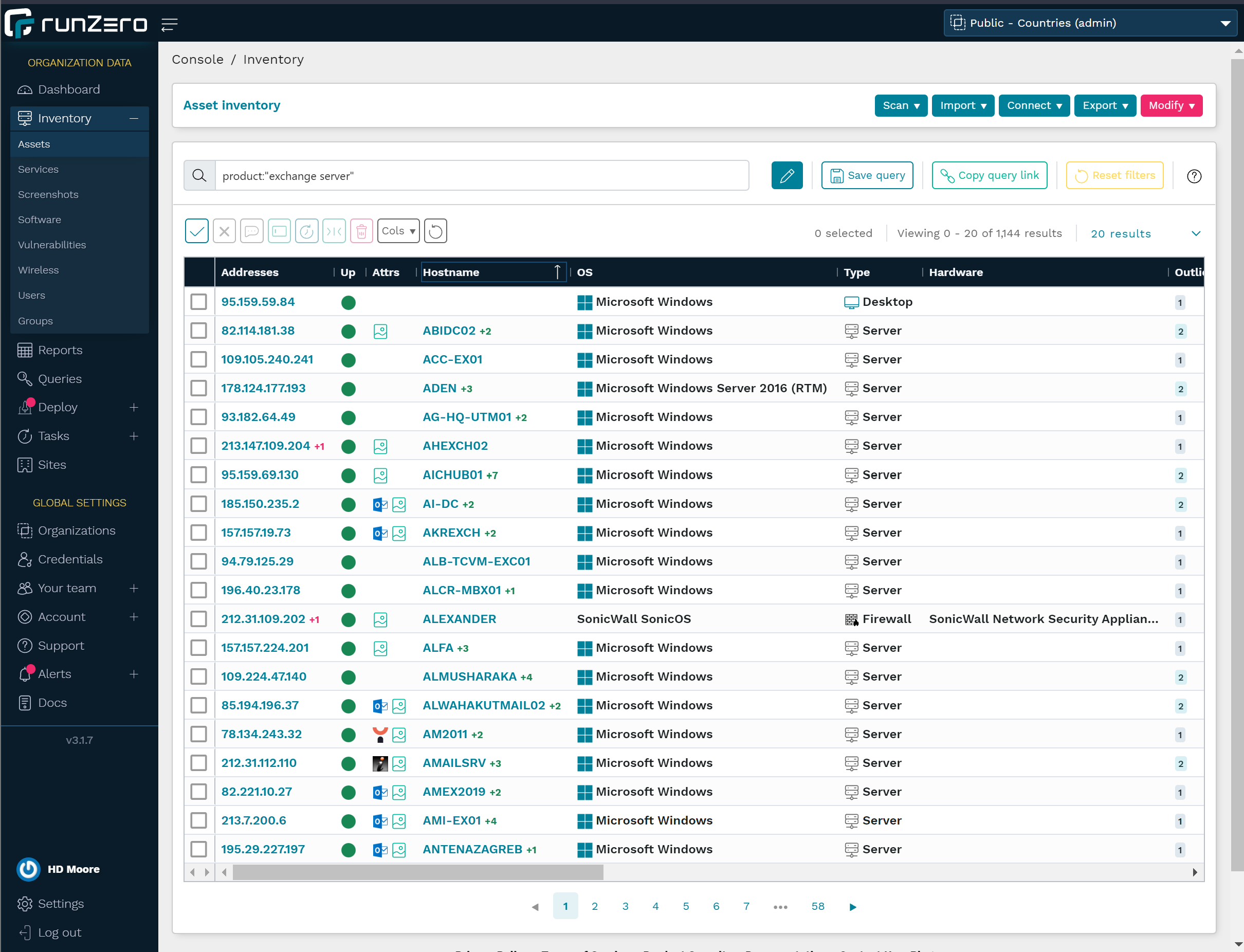
To get started, you can scan your network with runZero to collect your asset inventory. Then, from the Asset Inventory, use the following query to locate Microsoft Exchange Servers on your network:

product:"exchange server"

Check out our Queries Library for other useful inventory queries.

About Version 2 Digital

Version 2 Digital is one of the most dynamic IT companies in Asia. The company distributes a wide range of IT products across various areas including cyber security, cloud, data protection, end points, infrastructures, system monitoring, storage, networking, business productivity and communication products.

Through an extensive network of channels, point of sales, resellers, and partnership companies, Version 2 offers quality products and services which are highly acclaimed in the market. Its customers cover a wide spectrum which include Global 1000 enterprises, regional listed companies, different vertical industries, public utilities, Government, a vast number of successful SMEs, and consumers in various Asian cities.

About runZero
runZero, a network discovery and asset inventory solution, was founded in 2018 by HD Moore, the creator of Metasploit. HD envisioned a modern active discovery solution that could find and identify everything on a network–without credentials. As a security researcher and penetration tester, he often employed benign ways to get information leaks and piece them together to build device profiles. Eventually, this work led him to leverage applied research and the discovery techniques developed for security and penetration testing to create runZero.

Scanning your external attack surface with runZero

While runZero is mostly used for asset inventory behind the firewall, you can also use its scanner to discover your external attack surface.

External scans are beneficial for a number of use cases, such as:

  • Getting visibility into external hosts and exposed services
  • Assessing infrastructure of corporate acquisition targets
  • Performing vendor security screening
  • Reconnaissance for penetration testing

Differences between runZero and EASMs

New users sometimes wonder about the differences between runZero and solutions for external attack surface management (EASM), such as Censys and ShodanHQ. Many of these solutions scan the whole world so you can query their host database. However, network owners can ask to exclude their IP ranges for all users (i.e., not all hosts show up in your search). Some vendors will have tools or services that discover all of your externally-facing assets.

By contrast, runZero:

  • Is primarily an internal asset inventory and network discovery tool, but also has the ability to discover public-facing hosts.
  • Collects data through a combination of active scanning and integrations.
  • Takes inputs in the form of ASNs, domains, IPs, and FQDNs (as well as public IPs discovered in internal scans).
  • Can integrate with Shodan & Censys to identify hosts and augment data.
  • Augments scans with other sources through integrations (e.g., cloud hosting providers, vulnerability scanners, and EDR platforms).
  • Offers a much richer data set per asset.

How to scan your public-facing hosts

If you don’t have access to runZero Enterprise Edition, you can sign up for a free 21-day trial to follow this walkthrough. The free Starter Edition doesn’t contain some of the features described in this blog post.

Step 1: Determining domains and ASNs to scan

The easiest way to get started with external scans is through:

  • Domains – There are several options for finding the domains associated with your organization. Best to check with the person who’s managing your domain registrations and renewals. Doing a reverse WhoIs lookup hasn’t been a good option for a couple of years now, but if you lack alternatives, use Whoxy to find all domains registered to the same company.
  • ASNs – If you don’t know the ASN for your company, you can use a lookup service, such as ASNLookup to identify the ASNs for your organization.

For this example, let’s scan the external attack surface of a real organization and its properties, but blur any identifying data to ensure that the organization doesn’t become a target as a result of this post.
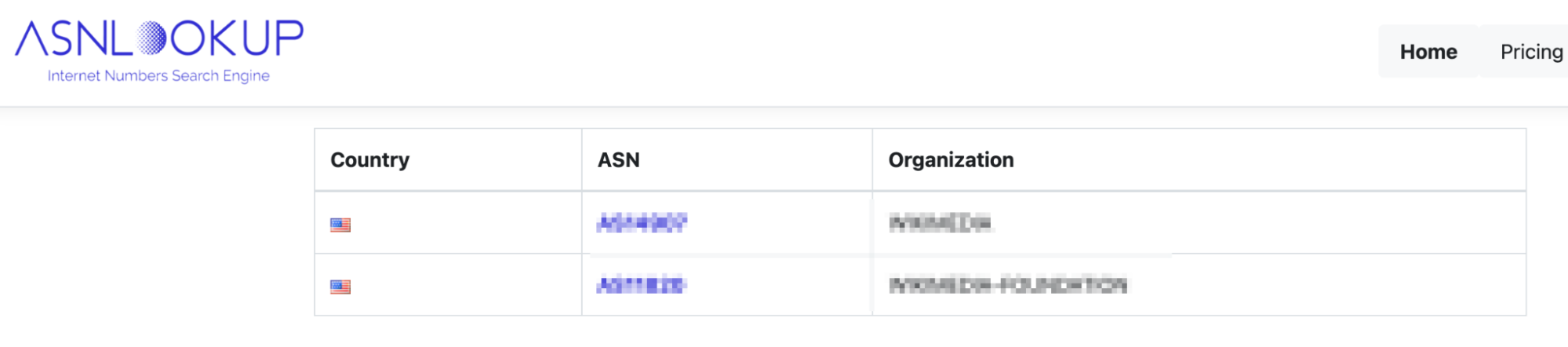
ASN lookup

Step 2: Adding Censys or Shodan integrations

You can also discover your external hosts via Shodan or Censys integration. The integration can pull in additional machines that may not be in your ASN or domain scope. To use the integration, go to Inventory > Assets in your navigation menu and select Censys search or Shodan search from the Connect dropdown menu. You’ll have to set up credentials with an API key to build the query.
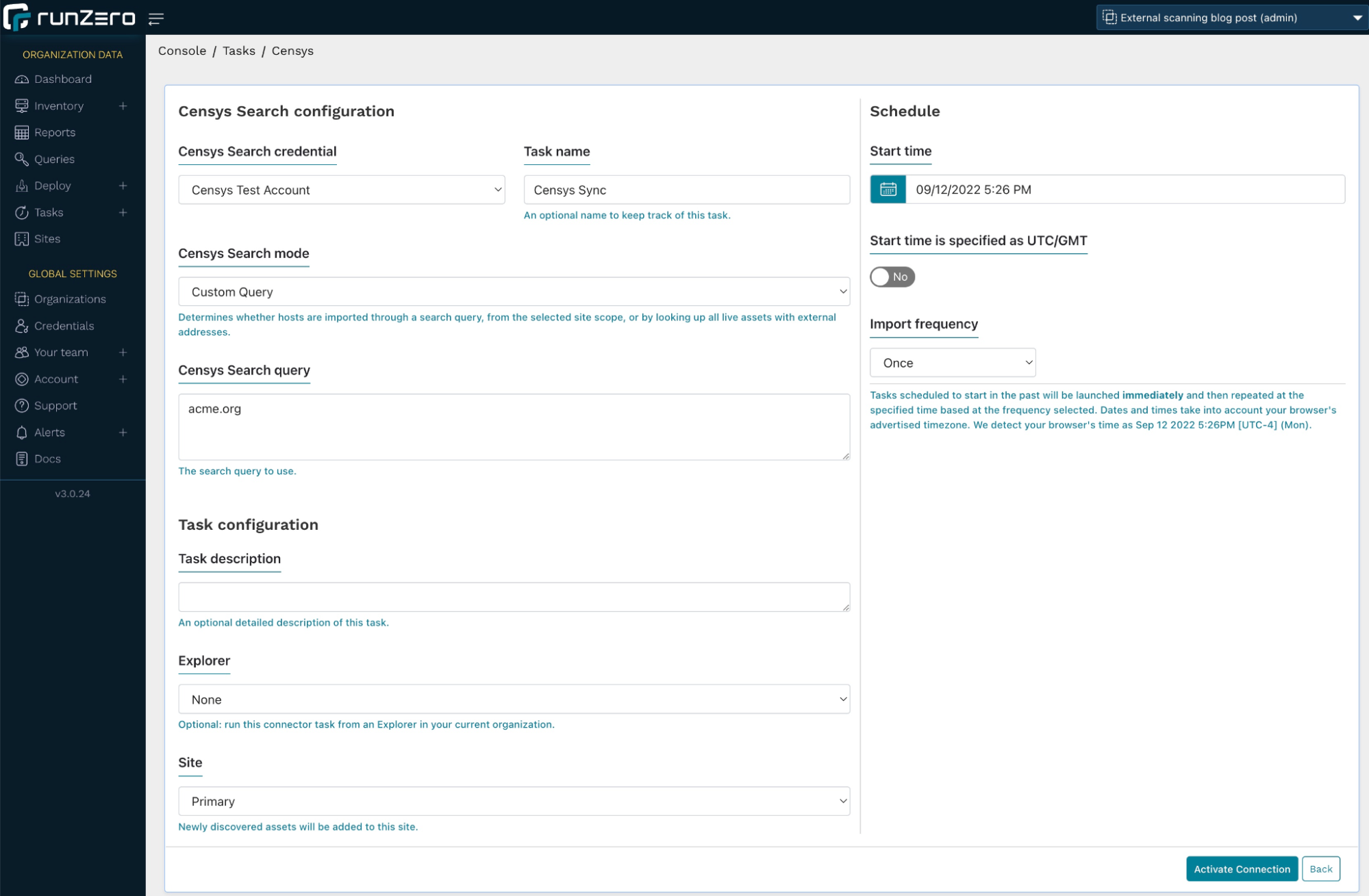
Censys Search configuration

In the Censys configuration, we query acme.org in our search. This will also find any hosts that use the string acme.org in the common name of a TLS certificate. You can run this import either once or on a schedule.

Alternatively, you can set the Censys search mode to All external assets, which will not discover new assets, but enrich the assets already captured in runZero with Censys data. However, for this use case, we’ll go with the former setting.

The import will pull any information about the matching hosts, including services and attributes, into your inventory. You should now see some assets with limited data being populated in your runZero inventory. You can view the details for one of the imported hosts and see the following information:
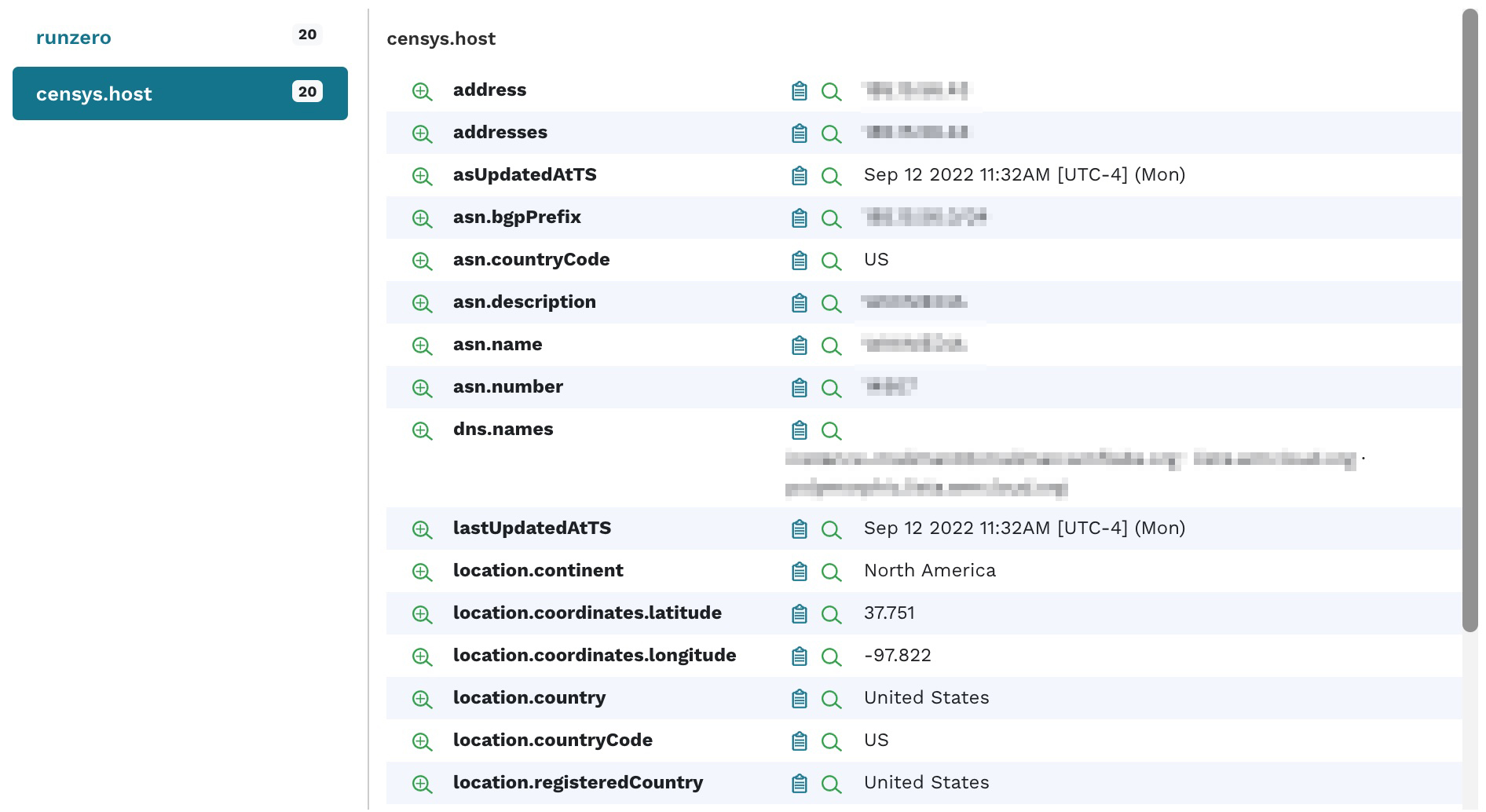
Censys attributes

Step 4: Starting an external scan using hosted zones

In runZero, set up a new organization or project, then go to the inventory, click the Scan button and select Standard scan.

From the scan configuration page:

  • Choose US – New York as the Hosted zone (this is a runZero-hosted Explorer in the cloud).
  • Increase the scan rate from 1,000 to 5,000 (to accelerate the scan).
  • In the Discovery scope, enter the following data:
    • public:all: This will scan all the public IPs that were pulled in via Shodan or Censys in the previous step. If you are scanning your internal network with runZero, this will also add all public IPs discovered by any other means into the scope.
    • asn4:12345: Enter all ASNs in this format to target all IP addresses registered to this ASN. Note the digit 4 after ASN in the notation.
    • domain:acme.org: Add all domains that you are targeting. runZero will add all subdomains connected to these domains.
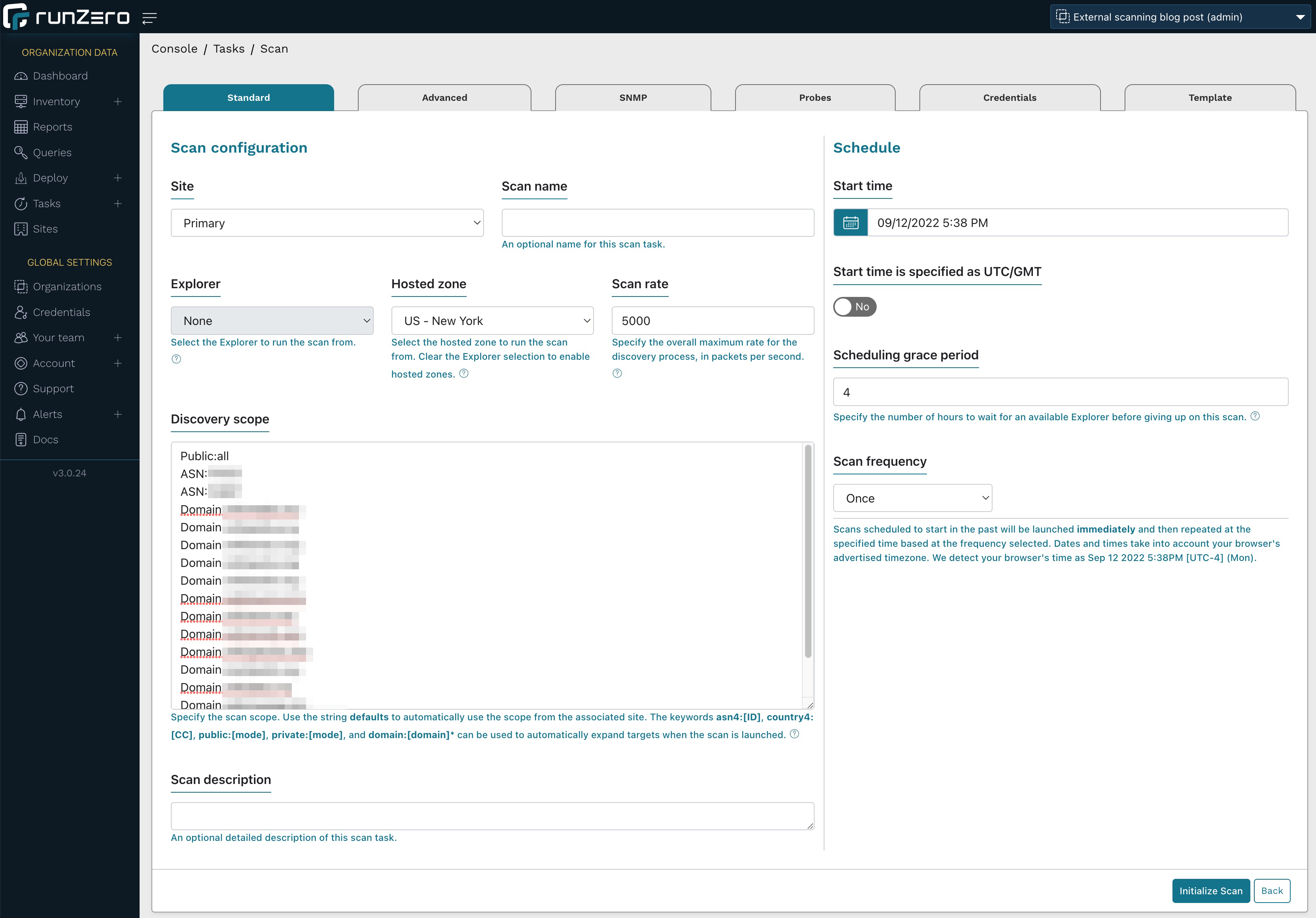
Scan configuration

Click Initialize scan. runZero now looks up both the IPs registered under the ASNs as well as all subdomains associated with the domains you are looking to scan and displays a sample for confirmation. Confirm your scan settings.
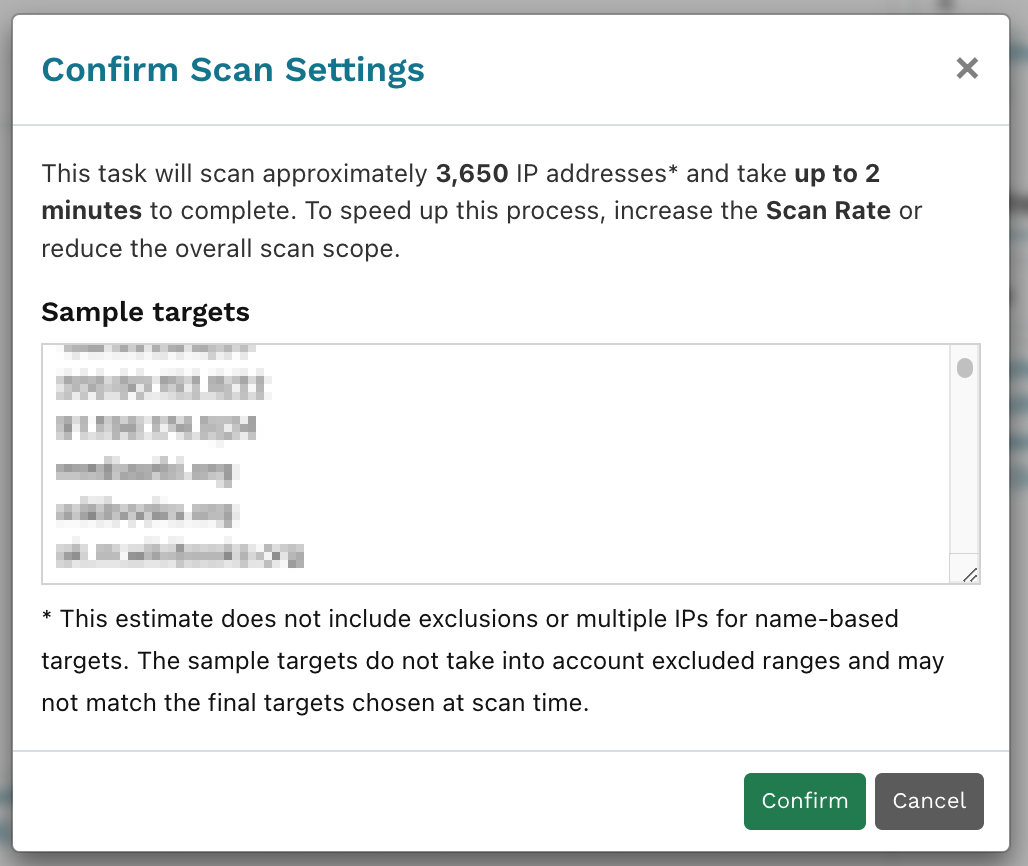
Scan configuration confirmation

Once the scan task has completed, go view your populated inventory.
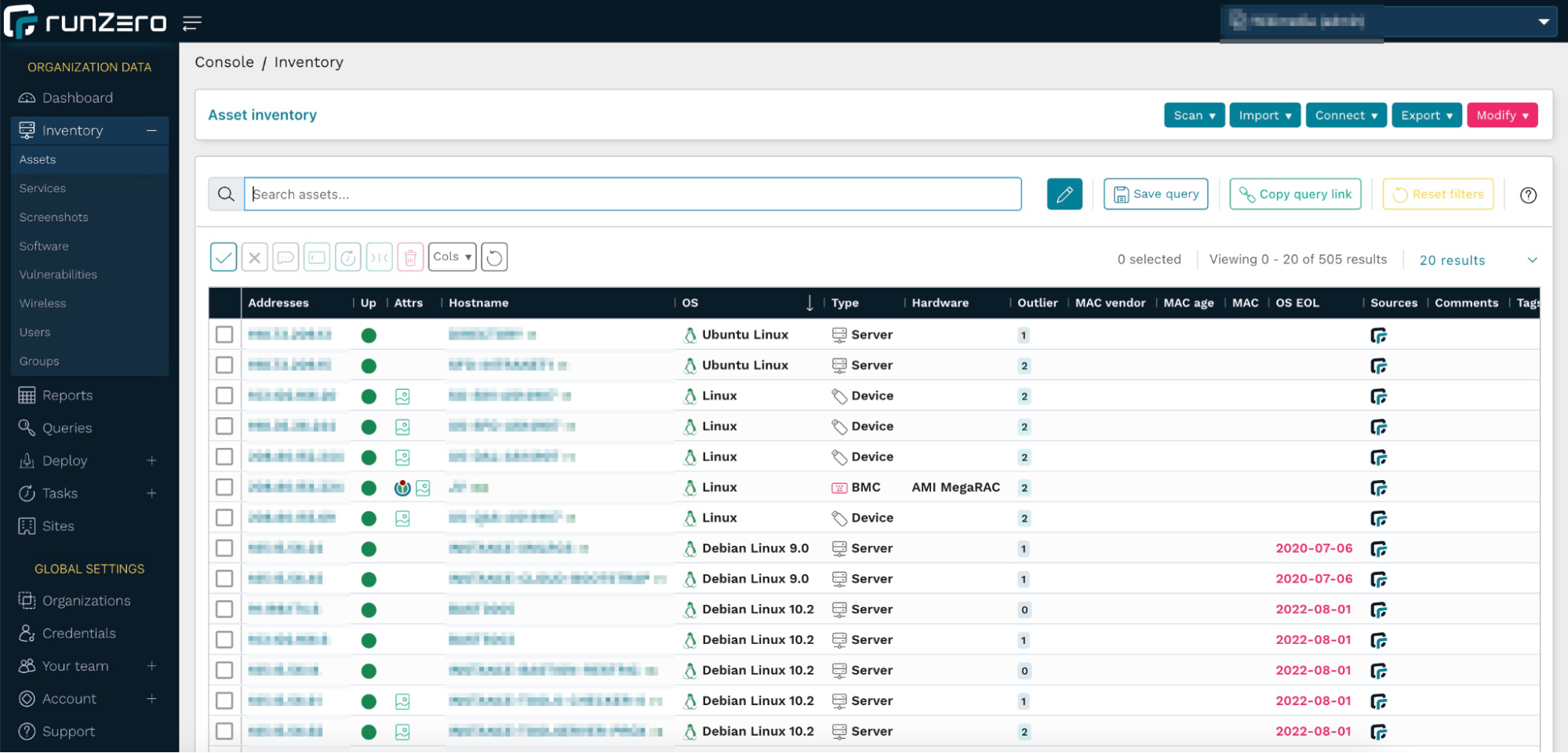
View your populated inventory

runZero hosted zones are deployed with Digital Ocean. If you prefer to host your own Explorer, we recommend Digital Ocean because AWS, Azure, and GCP all rate-limit or filter outbound scan traffic in a way that impacts the quality of scan results. The runZero hosted zones performed much better than running a scan from an ISP as well, regardless of whether a VPN was used or not.

Step 5: Digging into your inventory

Looking at this data set, there are quite a few hosts with EOL operating systems. You can use the following query to find these:

os_eol:<now

Some operating system vendors will enable you to purchase extended support services. To only view systems that are outside the extended support period, use the following query:

os_eol_extended:<now

Assets can often leak secondary IP addresses, often within the RFC 1918 range. These machines are potential pivot points into private network spaces. To find those quickly, use the query:

has_private:t

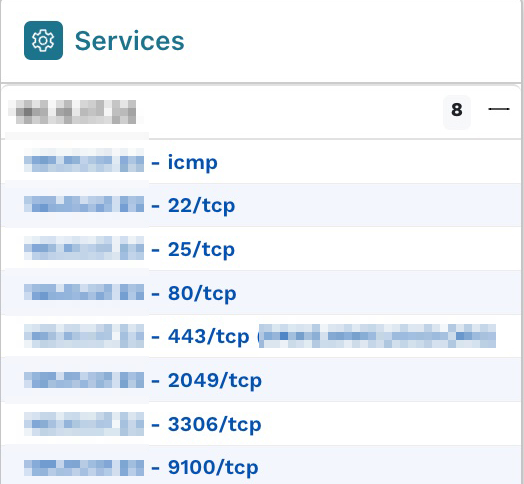
Best practices are to have as few services on a single host as possible, especially when they are public-facing, to avoid the risk of one vulnerable service compromising another one. Sorting the column with the number of services per host reveals one host with eight services. After opening the Asset Details page, we can see these in the Services section.
Services list

Each one of these services has an extensive list of attributes that provide more information.

Step 6: Finding problematic SSH services

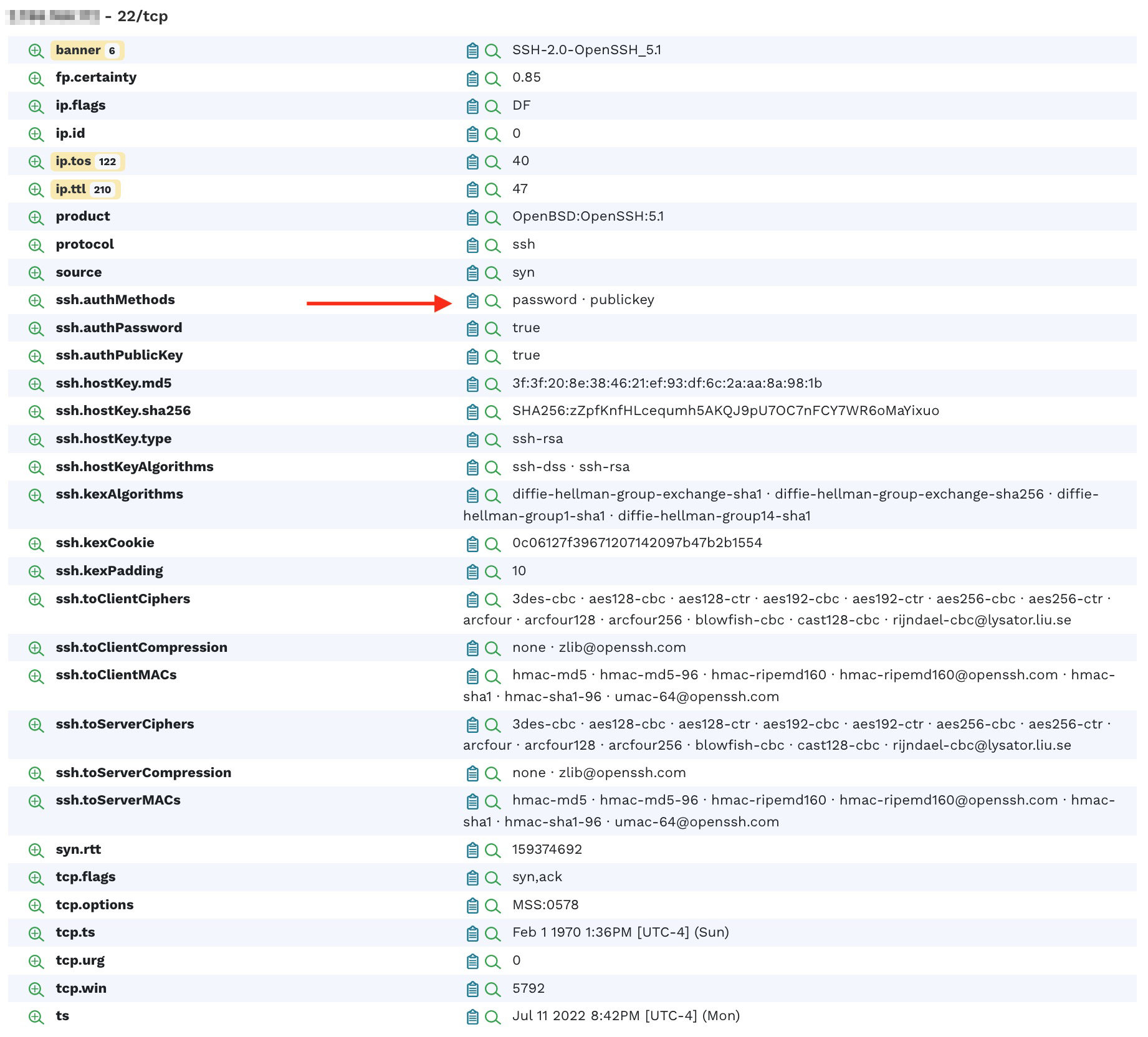
Looking at the SSH service on port 22, we see that it supports the authentication method of both password and public key. Allowing a simple password authentication may indicate elevated risk to your infrastructure.
SSH service

Clicking on the magnifying glass with the + sign next to the attribute name reveals that there are a total of 24 hosts that allow this kind of authentication.

Auth method results

Clicking on the attribute value or the count will display a list of hosts that match the query.

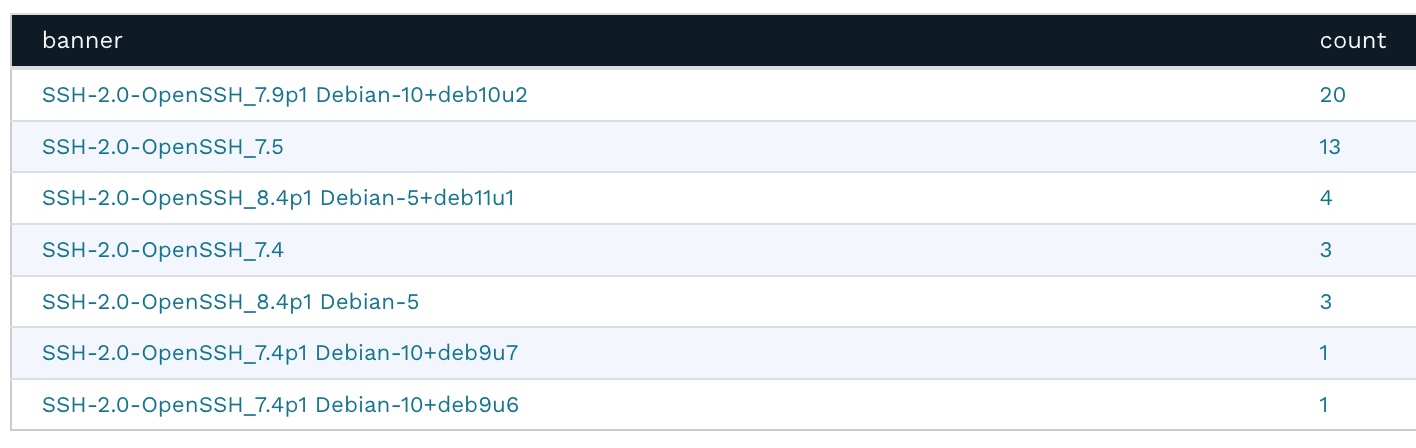
Back on the Asset Details page, clicking the magnifying glass next to the banner shows an overview of all the different SSH versions deployed in the infrastructure.
SSH versions

This works for all of the banner versions for other protocols as well. For example, you can very quickly and easily get a list of all of the Microsoft SQL Servers deployed in the environment, sorted by version number.

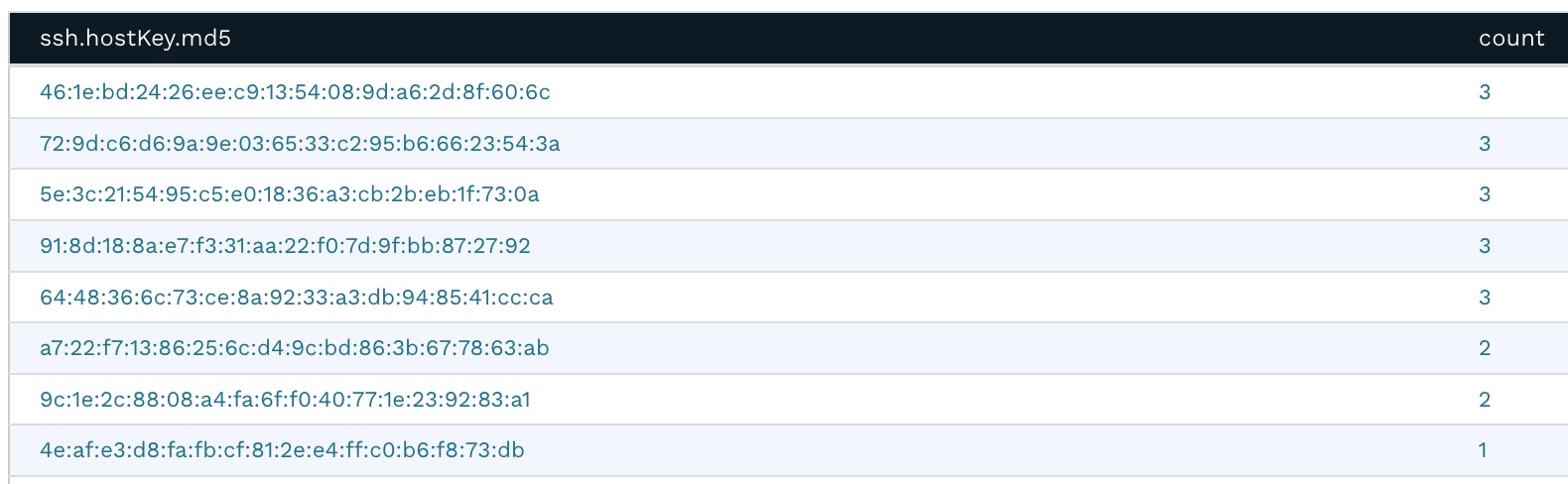
Going back to the Asset Details page, clicking the magnifying glass next to ssh.hostKey.md5 displays the frequency report for this attribute. It shows that several machines share the same SSH private key. This presents a security risk because if one of the hosts is compromised, it would also compromise other hosts sharing the same SSH private key. This typically happens when virtual machines are cloned without regenerating the SSH keys.
SSH host keys

Step 7: Identifying databases exposed to the Internet

Generally, databases should be accessible only to the applications that require access. They should never be accessible on a public IP. The same host exposes MariaDB version 10.5.15 on port 3306, which has several associated security vulnerabilities.
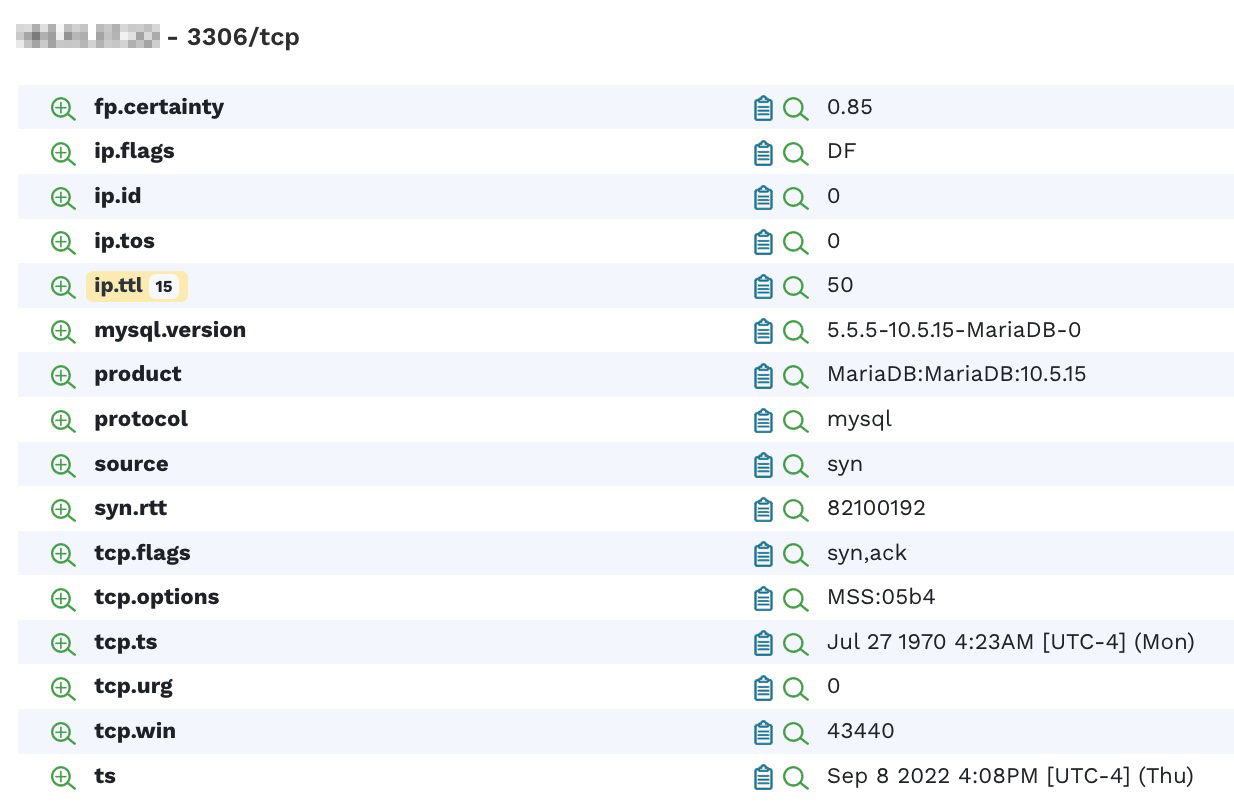
Identify databases exposed to the Internet
Is runZero a vuln scanner?

runZero is an asset inventory and network discovery solution, not a vulnerability scanner, but its findings can sometimes point to security vulnerabilities.

Step 8: Looking at exposed services

Let’s move on to the Services Inventory now. A great way to find unusual services exposed on an external IP is to sort the ports by high numbers first.
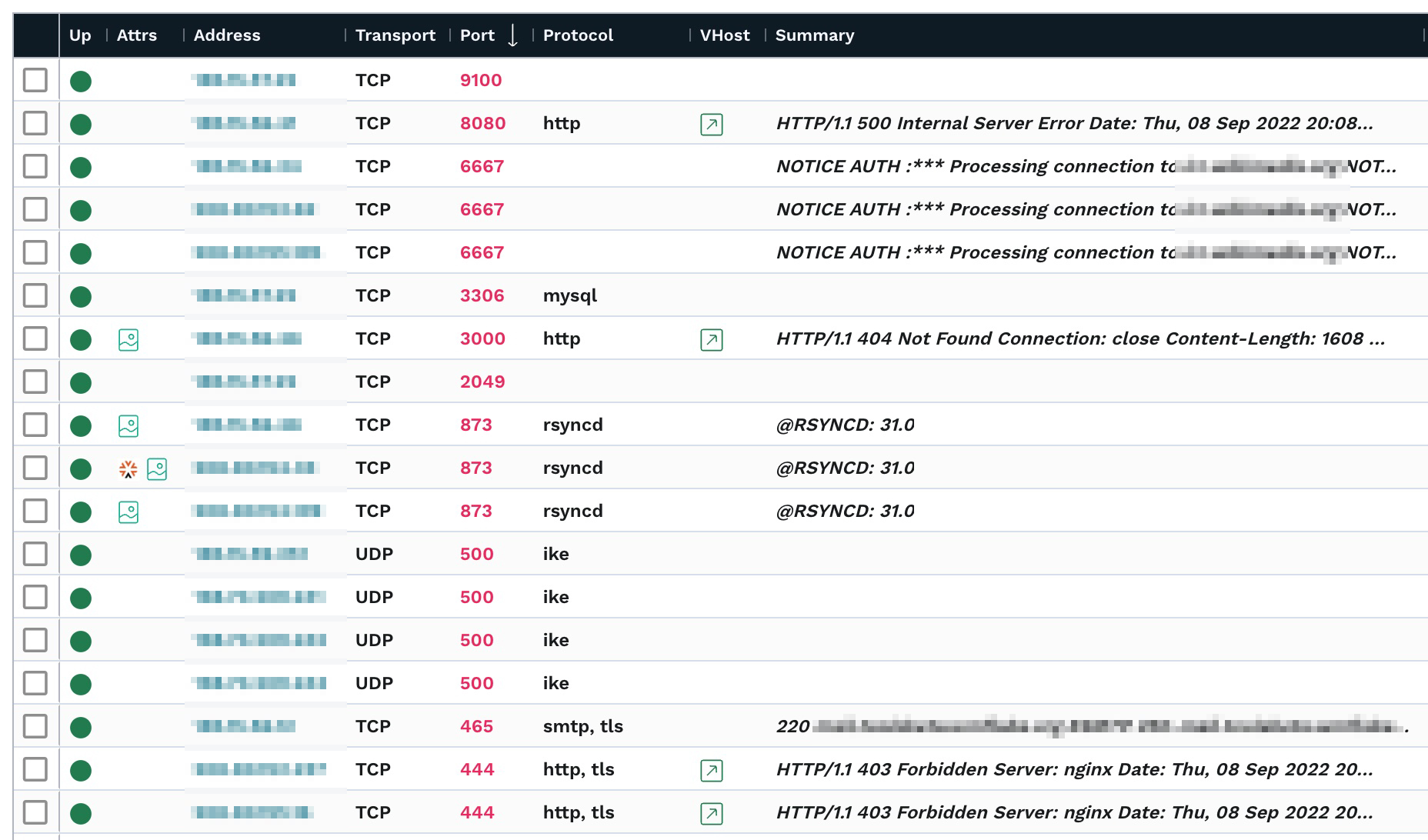
Services Inventory

In this environment, we’re seeing a Prometheus Node Exporter metrics server on port 9100, three IRC services, a mySQL/MariaDB service, NFS on port 2049, and RSYNC on three different machines. These may all provide options to an attacker. For example, insecurely configured Rsync servers are found during network penetration tests about a third of the time.

Step 9: Browsing web service screenshots

The Screenshots Inventory lists all screenshots taken from Web services. runZero uses the Google Chrome browser to render and screenshot any web pages. If you are using the cloud-hosted explorer as described above, you’re all set. If you are hosting your own explorer, please ensure that you have Chrome installed on the same machine to enable this feature.
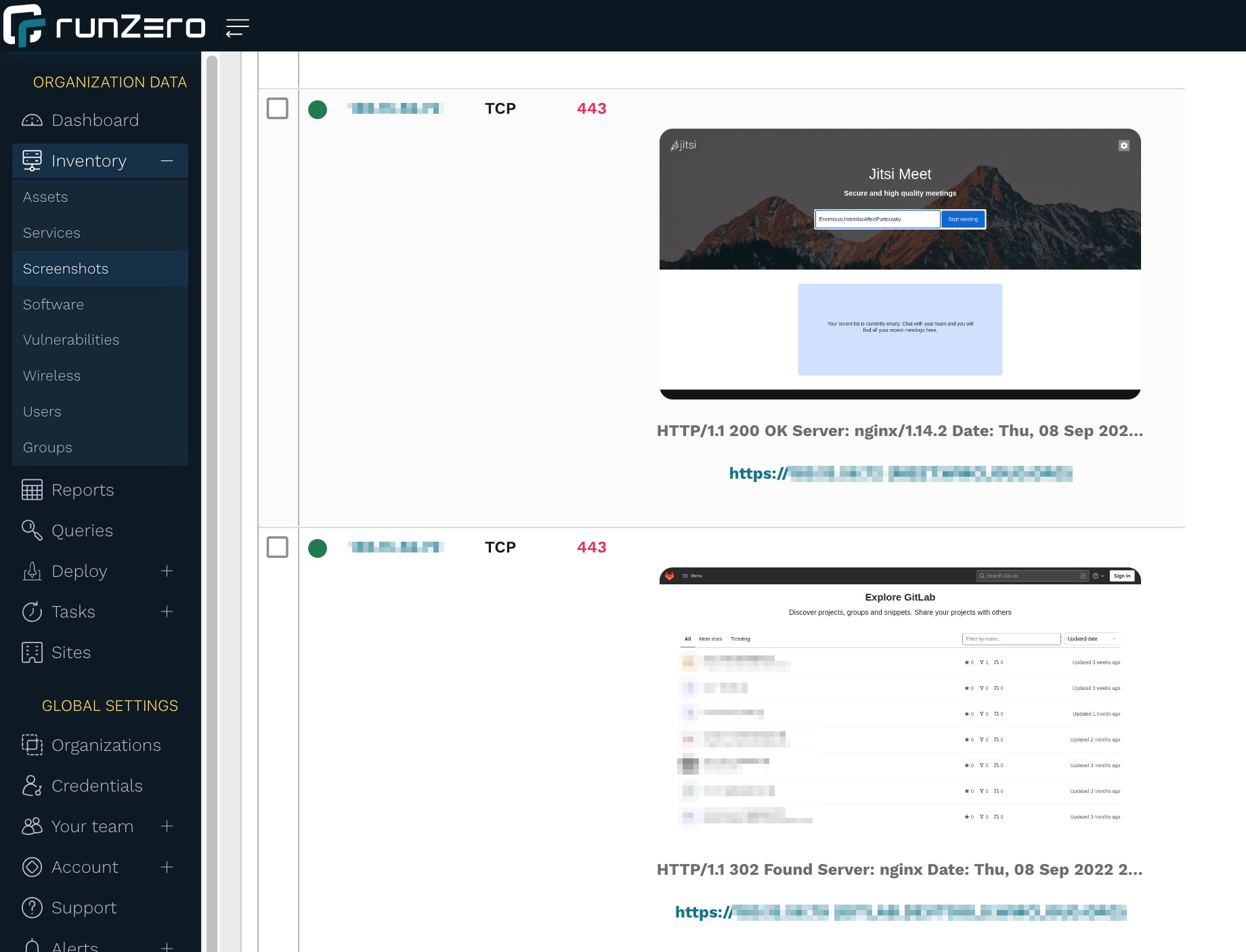
Screenshots Inventory

Browsing through the screenshots is a great, visual way to inspect exposed websites. In our example, we’re seeing Jitsi Meet and GitLab sites, which may be OK to host externally as long as they’re updated and use strong authentication.

Step 10: Looking at software inventory

runZero can also infer installed software if it can be deduced either from a network scan or an integration. runZero’s Software Inventory provides a great way to get insight into software installed on hosts that are reachable over the Internet.
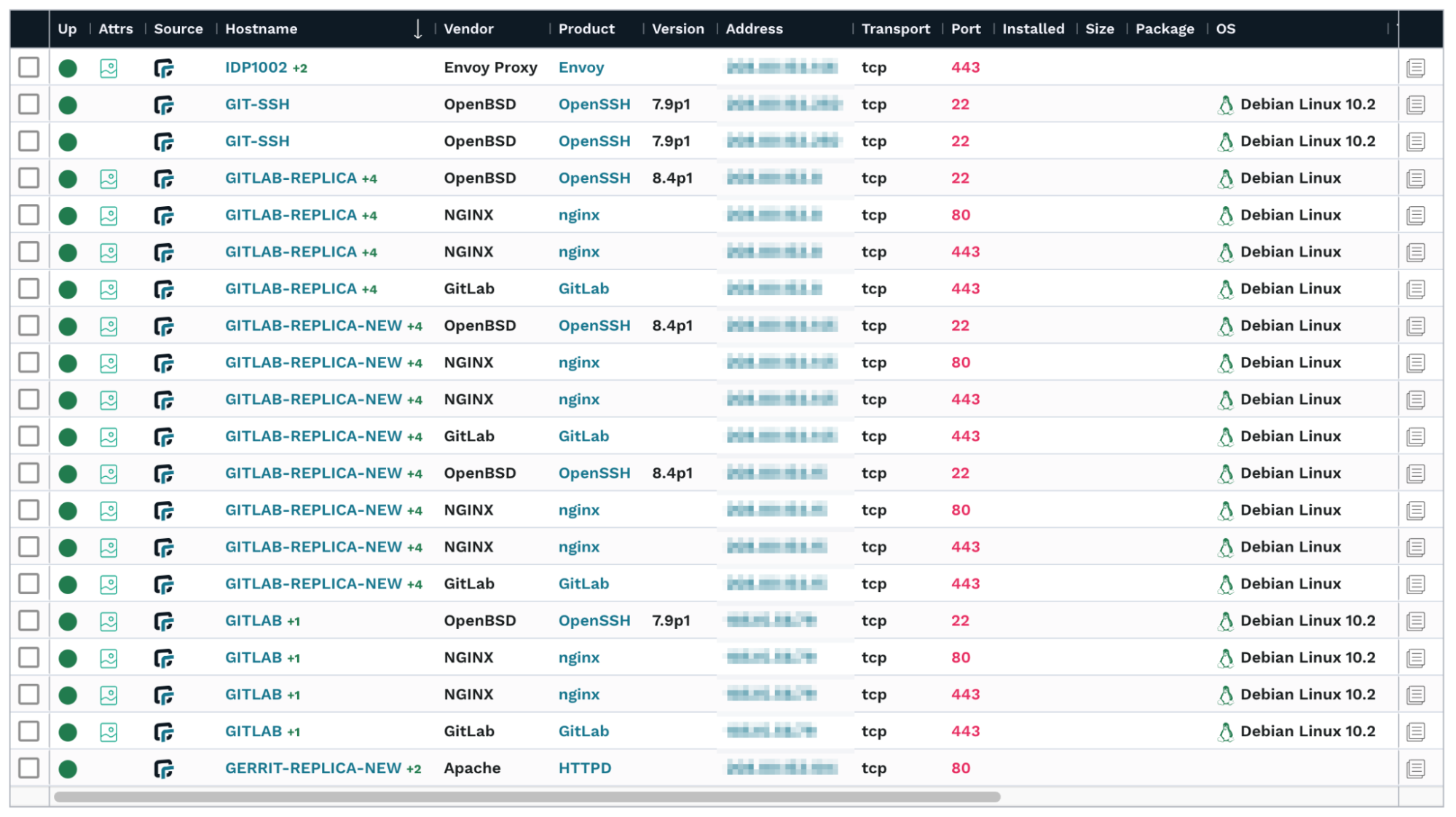
Software Inventory

A view that may be even better in understanding your product exposure is the Most seen products report on the dashboard. To access the report, go to the Dashboard and look for the Most seen products card. After you find it, click View more.
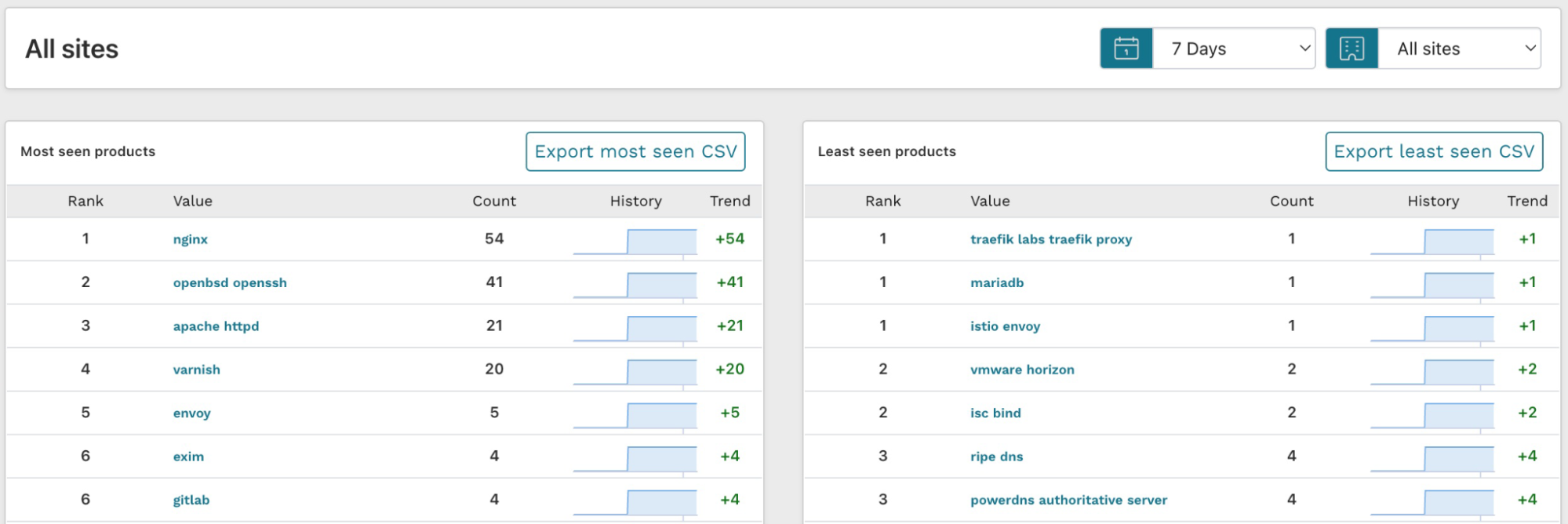
Most Products Seen

The results for least seen products are actually more interesting than the most seen ones because these show the long tail of the software inventory. If a piece of software is only installed once in your environment, it is less likely to be well configured and patched.

Step 11: Create a report for your external assets

Now that you have discovered and analyzed all of your externally-facing assets, you can also generate a report for others to review. Go to Reports, find the External Assets Report, and launch it.
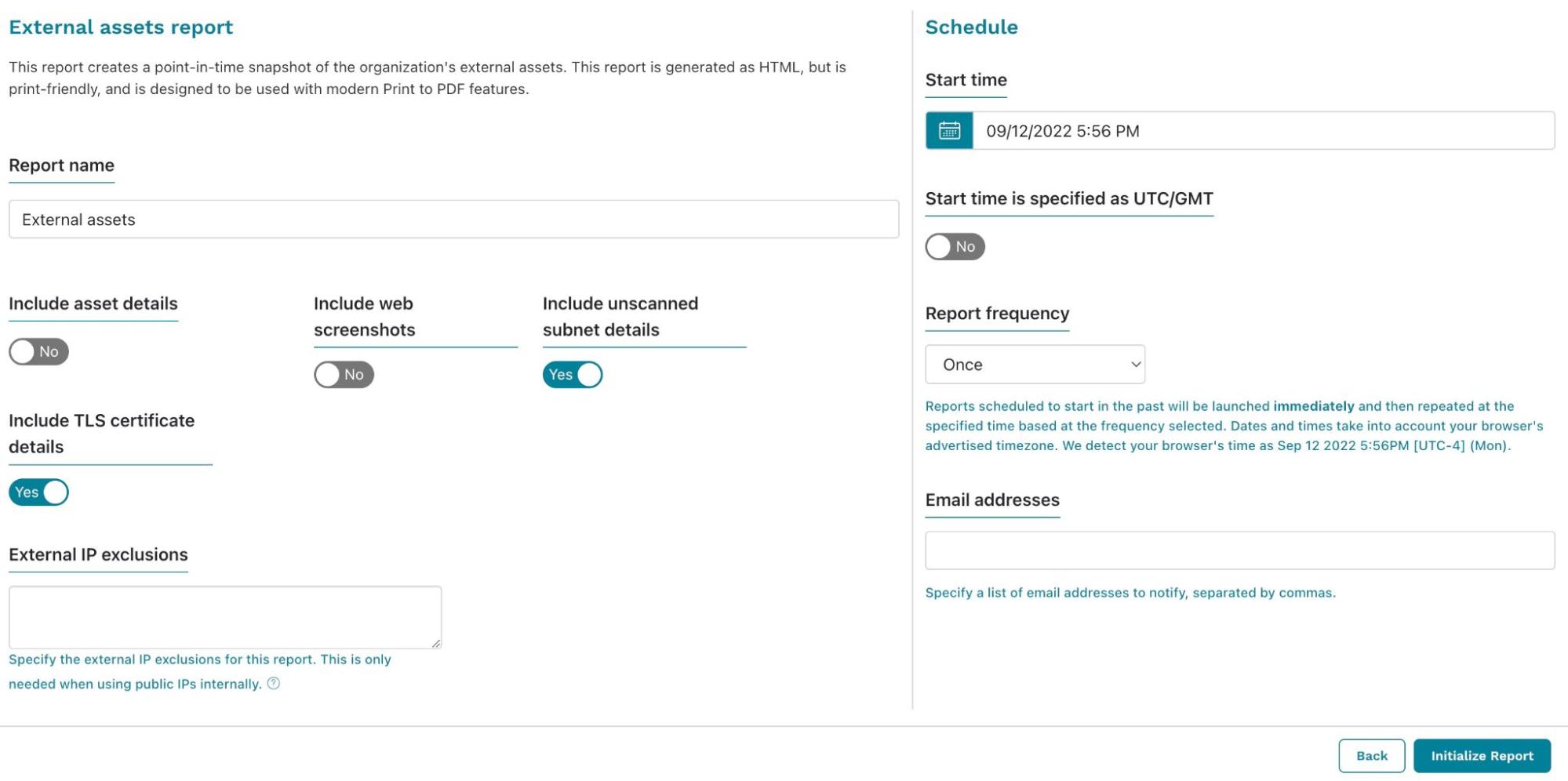
External Assets Report configuration

From the External Assets Report configuration screen, you can choose what you’d like to include in the results. Additionally, if you need to view it regularly, you can set up a schedule and email it to yourself (and any other runZero user who wants a copy). Initialize the report when you’ve finished configuring the settings. The generated report will display and show you the results. You can save the report as a PDF to easily share with others.
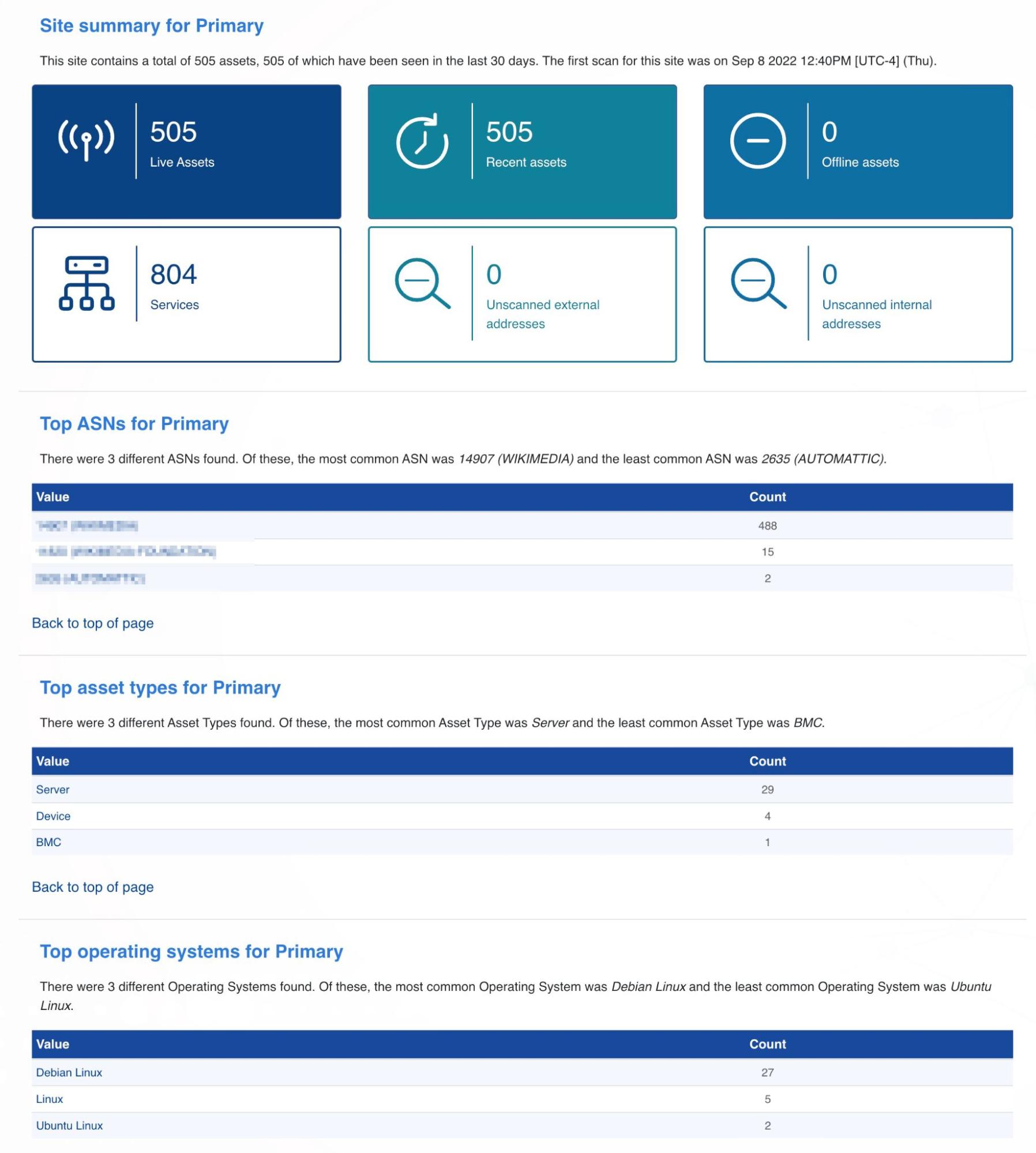
External Assets Report

Step 12: Get alerted on changes to your external asset inventory

If you work in enterprise security, you probably want to know about any changes to your external asset inventory. In this case, you should set up a Censys or Shodan import and run the hosted scan on a schedule. Then, you can set up alerts to trigger post-scan, so you know everything that has changed in your environment.

In this example we’ll use email as the method of communication. To set up an alert, go to Alerts > Channels and click Create channel. Pick a name for your channel, select Email as Channel type and enter the email address you want to notify. Then click Save channel.
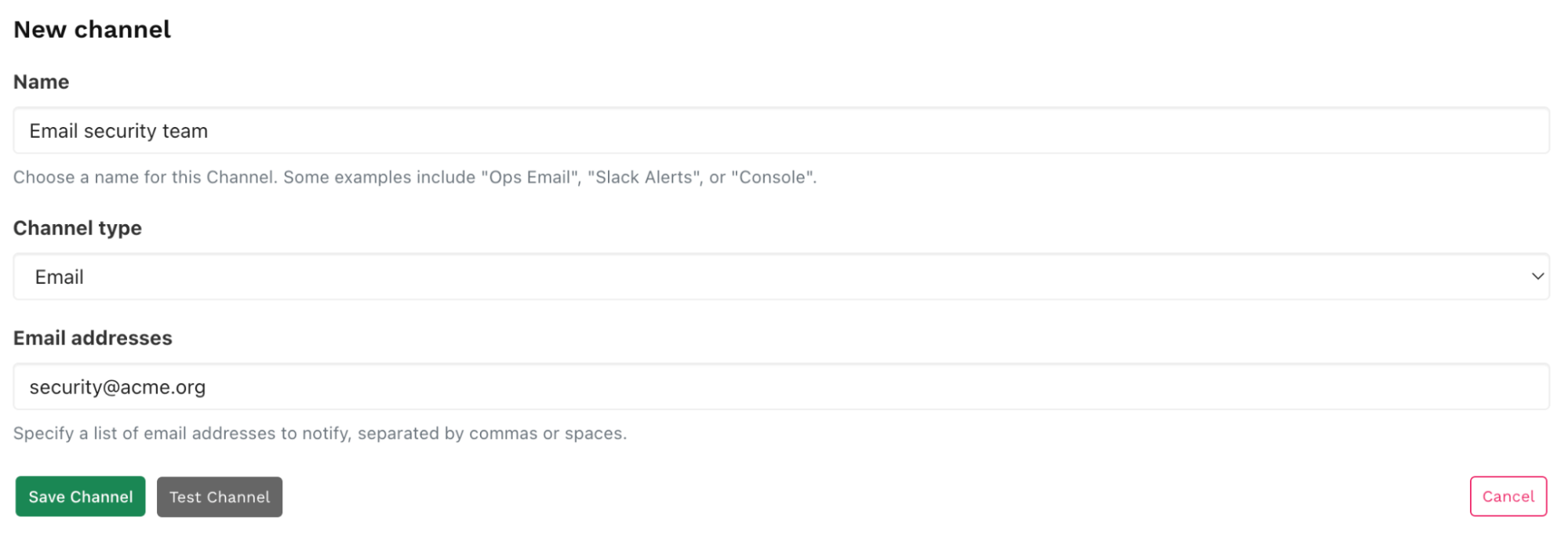
New channel

Go Alerts > Rules, and click Create rule. Select new-assets-found and click Configure rule.
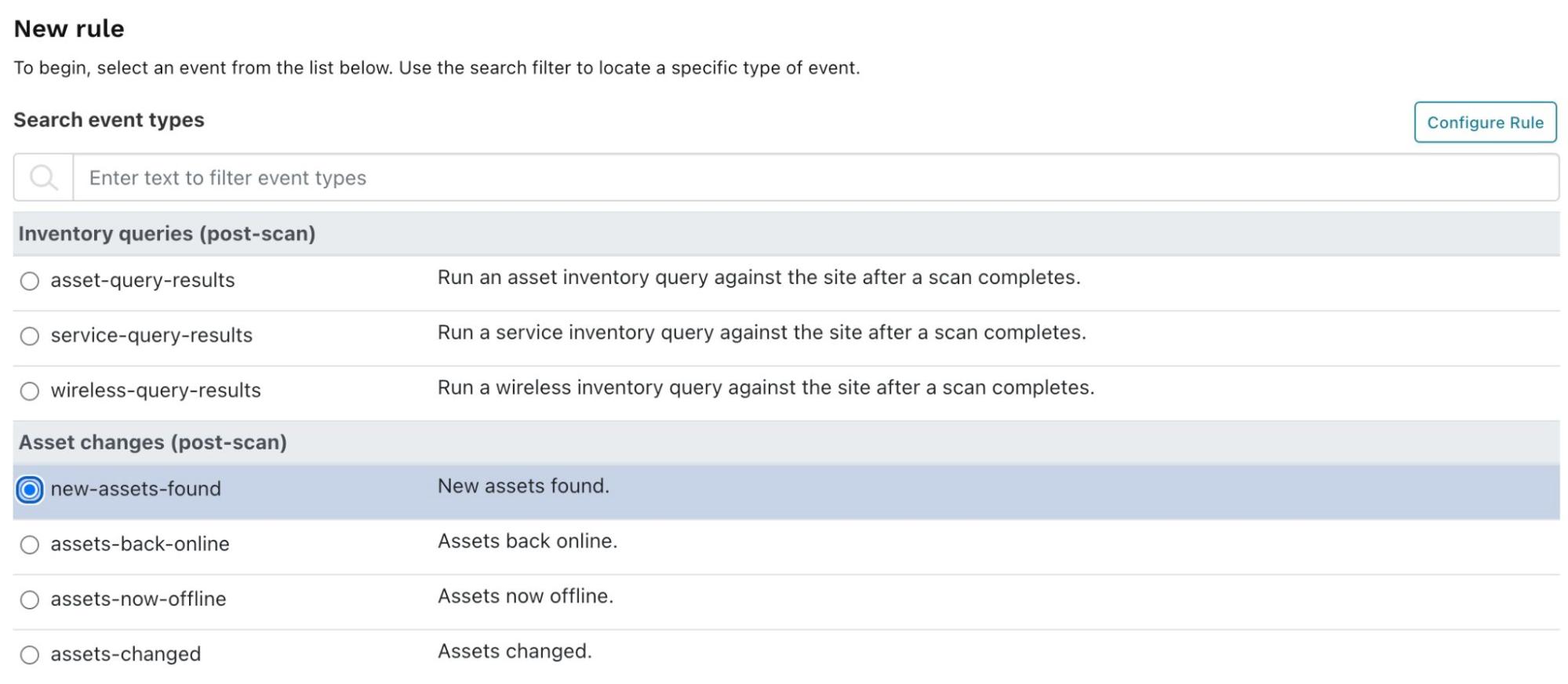
Rule event

When the New rule configuration page appears, enter the following:

  • Name:
    • A name for your rule.
  • Conditions:
    • Enter 0 to the right of is greater than. This will trigger the rule if there are any changes to assets.
    • In Limit to organization, select an organization if you have several in your account. You may choose a different organization (or site) for your external point of view rather than your internal assets.
  • Action:
    • Choose the notification channel you just created.
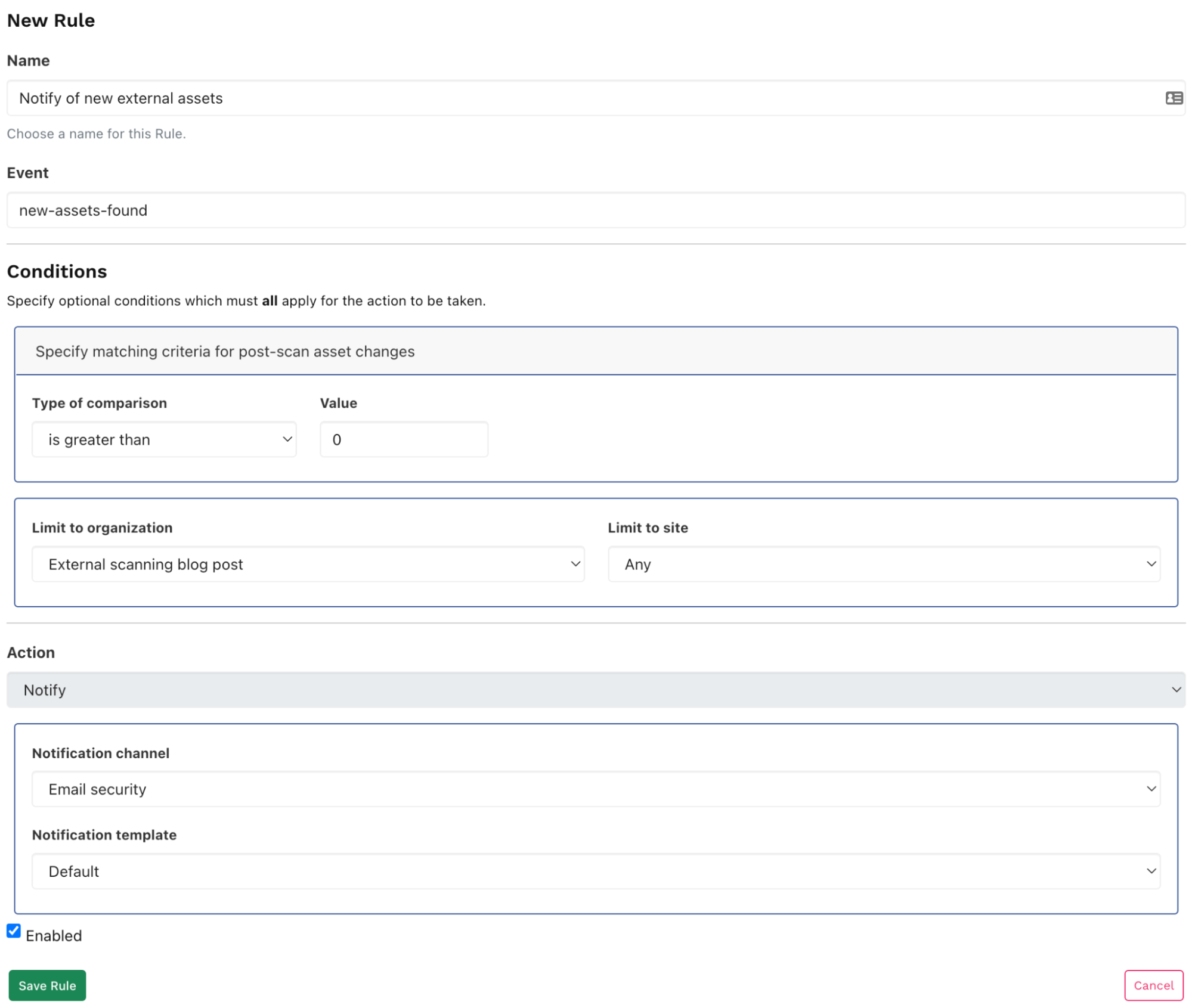
New rule

You’ll now be notified after each import or scan if the assets have changed.

Use runZero for your internal asset inventory

runZero is primarily made for discovering your internal asset inventory. As you can see, it can also be useful for understanding your externally-facing assets.

As a next step, you should set up another organization and to scan your internal network to get a better understanding of your asset inventory. You can sign up for the free 21-day trial of runZero Enterprise Edition (no credit card required). If you are a private user or work for a company with less than 256 assets, you can use runZero Starter Edition for free.

About Version 2 Digital

Version 2 Digital is one of the most dynamic IT companies in Asia. The company distributes a wide range of IT products across various areas including cyber security, cloud, data protection, end points, infrastructures, system monitoring, storage, networking, business productivity and communication products.

Through an extensive network of channels, point of sales, resellers, and partnership companies, Version 2 offers quality products and services which are highly acclaimed in the market. Its customers cover a wide spectrum which include Global 1000 enterprises, regional listed companies, different vertical industries, public utilities, Government, a vast number of successful SMEs, and consumers in various Asian cities.

About runZero
runZero, a network discovery and asset inventory solution, was founded in 2018 by HD Moore, the creator of Metasploit. HD envisioned a modern active discovery solution that could find and identify everything on a network–without credentials. As a security researcher and penetration tester, he often employed benign ways to get information leaks and piece them together to build device profiles. Eventually, this work led him to leverage applied research and the discovery techniques developed for security and penetration testing to create runZero.

×

Hello!

Click one of our contacts below to chat on WhatsApp

×