Skip to content

What you need to know about the OpenSSL 3.0.x critical vulnerability

The OpenSSL project team recently patched two buffer overflow vulnerabilities that affect 3.0.0 through 3.0.6 releases of  OpenSSL. These vulnerabilities exist within X.509 certificate verification (specifically within name constraint checking logic) and affect both client and server side applications. Attackers can exploit these vulnerabilities to cause a denial-of-service by crashing applications/services (CVE-2022-3786, CVE-2022-3602) or potentially achieve remote code execution (CVE-2022-3602). The OpenSSL project team fixed these vulnerabilities in OpenSSL 3.0.7. OpenSSL 1.x versions do NOT contain these vulnerabilities.

Is runZero affected by these OpenSSL vulnerabilities?

The runZero platform does not use OpenSSL. The runZero operations team is ensuring that appropriate updates and mitigations are being rolled out to all of our supporting systems, including endpoints, infrastructure, and supporting services.

What are the details around these vulnerabilities?

The OpenSSL project team put together a thorough blog post that covers the details.

How to find vulnerable OpenSSL 3.0.x in your network

You can use runZero to discover vulnerable 3.0.x versions of OpenSSL in your environment. We shipped initial support for remote OpenSSL version detection in runZero version v3.2.6 on Sunday, October 30th, and scans run by our SaaS users after this time will report OpenSSL in the software inventory along with the version number when possible. Self-hosted users can enable this feature by applying the v3.2.6 (or later) update and rescanning their environment. In both cases, the runZero Explorer will be automatically upgraded as needed before the scan is launched.

After your scans complete, you can find assets running OpenSSL endpoints using the query: product:openssl. This query also works for the services and software inventory.

The server-side exposure only applies to services that process client certificates. This is not a common configuration, but runZero already performs checks for it. To identify services running OpenSSL 3.0.x variants that may be vulnerable to exploitation, use the query _service.product:"OpenSSL:OpenSSL:3" AND tls.requiresClientCertificate:"true" in the service inventory search.

The runZero scanner will reliably detect OpenSSL 3.0.x versions on any TLS-enabled ports identified during a normal scan. This includes both 3.0.x and 1.1.x OpenSSL versions when TLS-enabled service uses either TLS 1.2 or 1.3. The current fingerprints handle protocols that expose TLS directly. STARTTLS and additional service support are due in the near future.

What is the impact of these vulnerabilities?

The two issues are in the punycode parsing function used to process email addresses within certificates. Punycode is a way to transform a domain name using a non-ASCII character set into a standardized label. Punycode formatting can also convert emoji unicode characters into usable domain names. For example, ☃.net is encoded as xn--n3h.net.

Both client and server applications using OpenSSL 3.0.x include the vulnerability. Exploitation requires presenting a malicious certificate to the application. This only occurs after certificate validation, which is a mitigating control, in theory. Unfortunately, some applications disable certificate validation, either entirely (in insecure mode) or via a custom validator in the application.

To attack an exposed service:

  1. An attacker would need to present a client-side certificate that triggers this issue, and
  2. The server would need to have client certificate authentication enabled.

Even under these conditions, the client certificate would either need a valid signature or the application would need to be configured to skip validation. The number of applications that meet these requirements vary from organization to organization.runZero automatically checks for the use of both OpenSSL 3.0.x and client-side certificate support (tls.requiresClientCertificate) by default.

The client-side scenario may be harder to solve. Utilities like curl and wget, system update frameworks like apt and yum, and other client-side applications, may be impacted if they disable certificate validation. Some scripts may disable validation (e.g., using curl -k) to work around missing root certificates. The script can validate the hash of the received file, but still potentially exposes the script’s host to attack by a server presenting a malicious certificate with a punycode email address attribute.

Servers that make outbound calls to other HTTP endpoints (e.g., APIs and webhooks) also fall under this client-side scenario. Finding these embedded client-side instances are trickier, since every binary on every platform is suspect until proven otherwise. While many applications use the system library for OpenSSL, quite a few also statically link the library. These instances must be individually patched even if the system libraries are up-to-date.

How to respond

First things first: identify any externally exposed network services using OpenSSL 3.0.x that support client certificate authentication. This is the most likely scenario for remote exploitation today. runZero Enterprise customers can use our hosted scan engines to quickly scan their externally-facing assets.

Next, categorize internal services using OpenSSL 3.0.x and leverage existing software inventory capabilities (like the SentinelOne and Miradore integrations in runZero) to make a list of systems that use OpenSSL 3.0.x. Ensure that these systems are configured to receive frequent updates. Spot check that updates are applied once available.

Finally, identify third-party, statically-linked applications that might be using OpenSSL. There is great work happening with YARA rules that can help.

How to remediate

Thorough remediation of this vulnerability requires:

  • Shifting all applications/services that use vulnerable OpenSSL 3.0.x software to OpenSSL 3.0.7.
  • Deleting all files associated with vulnerable OpenSSL 3.0.x software, to ensure nothing attempts to use them.

You can accomplish the above by doing the following per asset:

  • Update system and non-system OpenSSL 3.0.x libraries to 3.0.7.
  • Update installed applications that are statically linked to (or are packaged with) a vulnerable OpenSSL version.
  • Ensure older files associated with vulnerable OpenSSL 3.0.x versions are gone.

If your organization maintains applications or services which use OpenSSL:

  • Rebuild applications/services that statically link to a vulnerable OpenSSL 3.0.x version to link with 3.0.7.
  • Rebuild applications/services that repackage or specify a vulnerable OpenSSL 3.0.x version.

Software developers might also consider switching to a non-vulnerable TLS implementation, including the older OpenSSL 1.1.x branch, the LibreSSL project, or the BoringSSL project.

How to mitigate

If remediation in the near term is not an option, doing one of the following can help reduce your attack surface:

  • Disable TLS client authentication for services using a vulnerable OpenSSL version that have it enabled.
  • Stop running applications/services that use a vulnerable OpenSSL version (e.g., sshd, httpd, etc.).
  • Use access control rules in your firewalls or routers to block access to ports associated with services that use a vulnerable OpenSSL version on affected assets.
  • Disconnect from the network (or power down) devices that have services/applications/OSes using a vulnerable OpenSSL version.

Mitigation should be considered a temporary measure until remediation is possible.

How to stay on top of these vulnerabilities

Many individuals and organizations are compiling information on software affected by these OpenSSL vulnerabilities. See our Acknowledgements section below for links to those resources.

Acknowledgements


About Version 2 Digital

Version 2 Digital is one of the most dynamic IT companies in Asia. The company distributes a wide range of IT products across various areas including cyber security, cloud, data protection, end points, infrastructures, system monitoring, storage, networking, business productivity and communication products.

Through an extensive network of channels, point of sales, resellers, and partnership companies, Version 2 offers quality products and services which are highly acclaimed in the market. Its customers cover a wide spectrum which include Global 1000 enterprises, regional listed companies, different vertical industries, public utilities, Government, a vast number of successful SMEs, and consumers in various Asian cities.

About runZero
runZero, a network discovery and asset inventory solution, was founded in 2018 by HD Moore, the creator of Metasploit. HD envisioned a modern active discovery solution that could find and identify everything on a network–without credentials. As a security researcher and penetration tester, he often employed benign ways to get information leaks and piece them together to build device profiles. Eventually, this work led him to leverage applied research and the discovery techniques developed for security and penetration testing to create runZero.
How runZero finds unmanaged devices on your network

Unmanaged assets are connected to the network, but lack an identified owner and may exist outside the visibility of those responsible for the network. These devices can pose real security risks to a company or organization for numerous reasons, such as running older vulnerable operating systems or software, using insecure protocols, or having nefarious intent. Plus, they can be difficult to discover or locate, sometimes using unmanaged subnets within a network. Arising from both intentional and inadvertent situations, unmanaged assets can be classified into several categories, including:
  • Orphaned – Assets that lost their original owner but are still present on the network
  • Shadow IT – Devices/systems that are connected to the network without permission
Transient devices, such as portable, mobile, or IoT devices that “come and go” on the internal network, including bring your own device (BYOD), might be better categorized as “unmanageable” rather than “unmanaged” and can also be easily discovered via runZero scanning. Let’s take a look at how runZero is able to locate unmanaged devices on your networks.

Peek under the hood of our scan engine

At runZero, we intentionally built our offering around unauthenticated, active scanning, while complementing our technology through integrations with cloud, virtualization, and security infrastructure to provide full visibility into IT, OT, cloud, and remote devices. To start, let’s dig into our scanning capabilities. Our built-from-the-ground-up scanning logic in runZero Explorers and scanners will reach out to elicit a response from devices connected to the network. Replies received from our scan traffic are then captured for processing.

Benefits to our approach

No prior knowledge required: Our active, unauthenticated scanning approach doesn’t assume any “prior knowledge” of network-connected devices (e.g., credentials to authenticate into devices, deployed agents on managed devices, etc.), rather our network discovery capabilities are research-driven to find-and-surface every network-connected asset, whether managed or unmanaged. Highly configurable: Our scans allow you to go beyond basic subnet and speed settings. You can tune scans for specific ports or protocols that you want to know about, which can help quickly locate unmanaged devices that are running unsafe or company-prohibited protocols. Standard packets: All of our scanning packets, including probes and port/service querying, is done using standard packets to keep things safe. We never send malformed or otherwise unusual packets. Research driven: We use applied research to maximize scan result discoveries while still utilizing a “safe approach” for interacting with devices. This helps avoid any unexpected or unwanted side effects that are sometimes seen with other active scanning solutions, particularly when scanning ICS/OT and other traditionally sensitive devices/endpoints.

Comprehensive inventory of internal assets

A comprehensive asset inventory is not complete unless you know about the assets that aren’t managed by your organization. Here are some ways that runZero can help you zero in on assets you may not know about.

See your RFC 1918 coverage

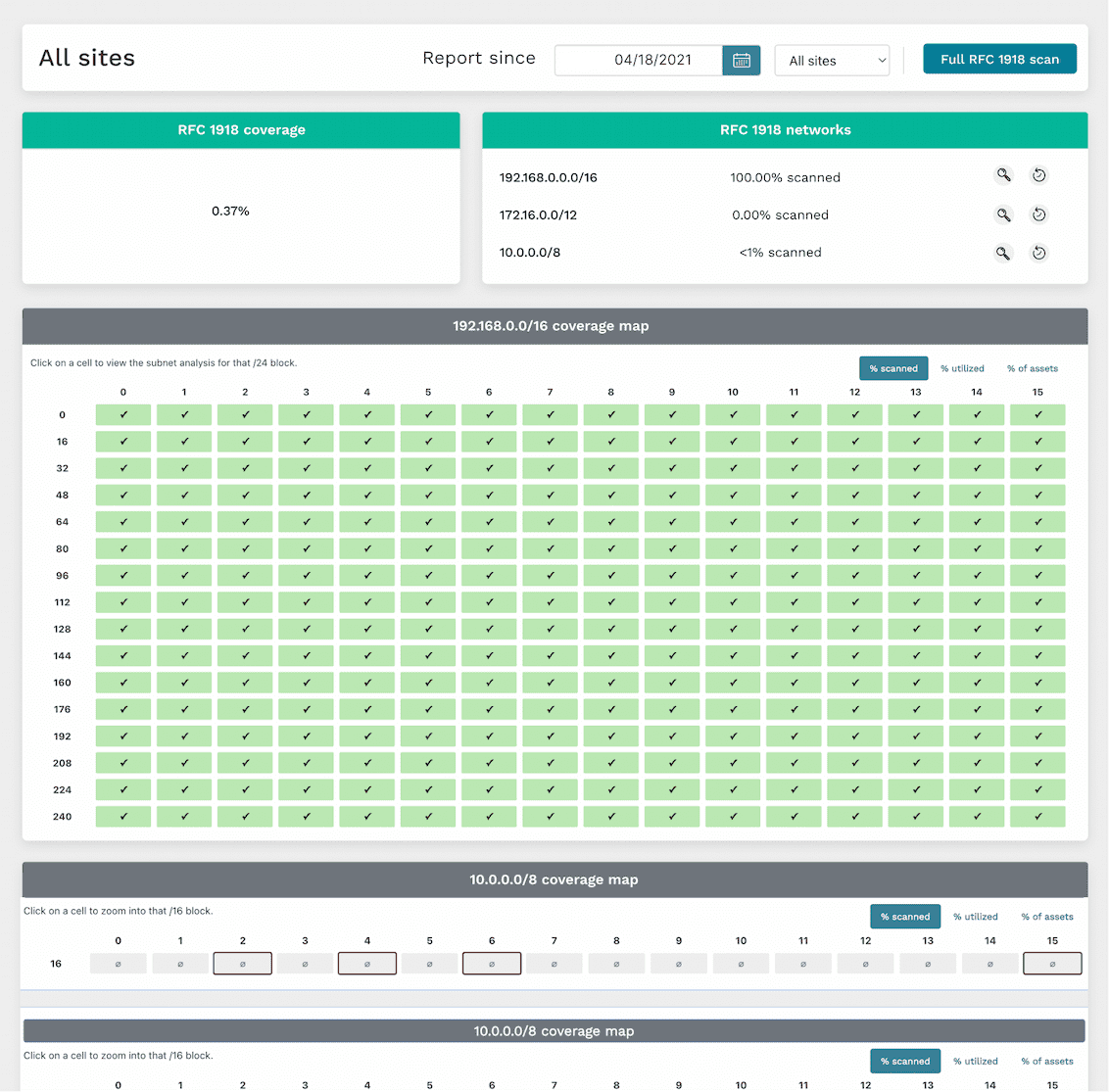
runZero’s scans can help surface unmanaged subnets in your internal network, which may harbor a bunch of unmanaged devices. Our RFC 1918 scan capability can cover the entire IPv4 internal network address space (more than 21 million addresses), checking all potential places unmanaged devices could be hiding in your network. We’ve also developed a “subnet sampling” option as an informed approach to focus on statistically-likely-to-have-devices subnets so that the RFC 1918 scan runs in shorter time while still providing good coverage. The interactive RFC 1918 coverage report presents discovered data in an easy-to-consume layout to show which subnets have been scanned, and includes additional data for unscanned subnets which might be active based on devices leaking secondary network interface information. This report allows you to “drill down” into subnets by clicking them to view discovered asset details within an address block.

Find unmapped assets

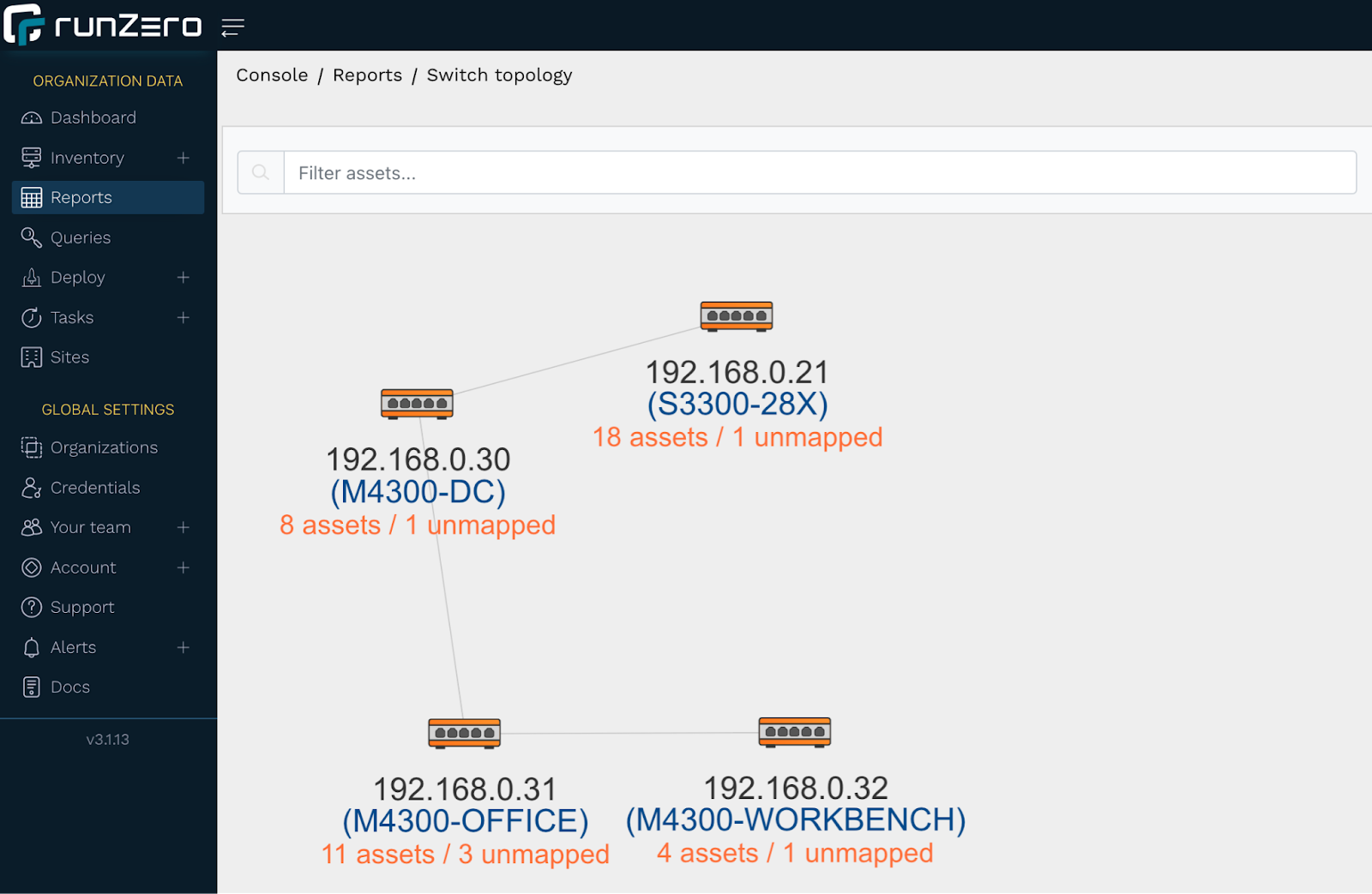
Unmanaged devices on your network can also surface in runZero as an unmapped asset. An unmapped asset is a MAC address connected to a switch, but not found in an ARP cache or through any of the other techniques runZero uses for remote MAC address discovery. Unmapped assets could be unmanaged assets, but could also be managed assets that were not included in the scope of a particular scan. You can get a visual overview of where unmapped assets appear on your network via the switch topology report, with each switch showing the number of assets (including unmapped assets) attached to it. A single click on a switch with unmapped assets will bring up a “View unmapped assets” link to the associated unmapped MACs report, which provides MAC details and the switch port the asset is connected to. This is potentially helpful for further investigation.

Search for devices missing agents in runZero

runZero uses applied research to identify other agent technologies that may be required on assets managed by your company or organization. You can find unmanaged assets that are missing these agents via runZero inventory queries. The following query example will surface any Windows assets on the network that are not running an Avast agent:
os:Windows and not edr.name:Avast
You can also search for unauthorized operating systems or applications on your network, which can be indicative of an unmanaged asset. For example, if all or your Windows systems are only allowed to be running Windows 11 or Windows Server 2022, you can create a query to surface any potentially unmanaged Windows assets not running these recent versions:
os:Windows and not (os:"Windows 11" or os:"Windows Server 2022")

Track unmanaged assets with tags

Tags are another runZero mechanism that can be used to surface unmanaged assets and also help “keep on top of” current asset ownership. This requires a bit of work up front to tag all managed assets, but requires little maintenance once in place.

Stay on top of unmanaged assets with alerts

Alerts are a powerful way to leverage queries into timely notifications in-app or via email or webhook. For example, we can build alerts for any of the queries used in this article. Rules are checked when a scan completes, and for any rule that evaluates as “true”, an alert can be generated. Check out our “Tracking asset ownership with tags” article to learn how to set up an alert rule.

Comprehensive inventory of external assets

Internal networks aren’t the only places unmanaged devices may exist. A public-facing web server could become orphaned, or a bad actor could DNS spoof/hijack a lesser-used company domain to redirect traffic to a phishing site they control. With just a domain name or ASN number set in the scan configuration, runZero can resolve the associated external-facing URLs and IP addresses to scan. And our hosted zone scanners can seamlessly run the scan, removing the step of installing an external-facing Explorer.

Uncovering unmanaged assets through integrations

At runZero, we understand the power of “better together”, and our development teams have been busy adding support for many product and service integrations. Some of these integrations can be leveraged to surface unmanaged assets in your network. For example, let’s say your organization uses SentinelOne on all managed macOS assets. One day an employee connects their personal MacBook to the corporate network without authorization: a macOS device without SentinelOne installed. You can create a runZero inventory query to surface this asset (and any others like it):
os:macOS and not source:SentinelOne
As another example, let’s say your company uses Microsoft Intune on all managed Windows 10 and Windows 11 assets. You can create a runZero inventory query to surface any Windows 10 or Windows 11 assets connected to your network that are not known by your Intune integration:
((os:"Windows 10" or os:"Windows 11") and not source:Intune
Prefer to surface your runZero-discovered assets, managed and unmanaged, via another tool? We offer integrations for several popular services, including ServiceNow and Splunk, allowing you to leverage the power of runZero’s best-in-class discovery and asset fingerprinting with other applications.

Zero unmanaged assets

Getting a handle on unmanaged assets is important, but it can feel like “one more thing” to do in an already-lengthy list of responsibilities. At runZero, we’ve done our homework through research and development to make finding your unmanaged network assets quick and easy.

About Version 2 Digital

Version 2 Digital is one of the most dynamic IT companies in Asia. The company distributes a wide range of IT products across various areas including cyber security, cloud, data protection, end points, infrastructures, system monitoring, storage, networking, business productivity and communication products.

Through an extensive network of channels, point of sales, resellers, and partnership companies, Version 2 offers quality products and services which are highly acclaimed in the market. Its customers cover a wide spectrum which include Global 1000 enterprises, regional listed companies, different vertical industries, public utilities, Government, a vast number of successful SMEs, and consumers in various Asian cities.

About runZero
runZero, a network discovery and asset inventory solution, was founded in 2018 by HD Moore, the creator of Metasploit. HD envisioned a modern active discovery solution that could find and identify everything on a network–without credentials. As a security researcher and penetration tester, he often employed benign ways to get information leaks and piece them together to build device profiles. Eventually, this work led him to leverage applied research and the discovery techniques developed for security and penetration testing to create runZero.
Contextualize honeypot alerts automatically with GreyNoise, runZero, Thinkst Canary, and Tines

This is the very first post in our new runZero practitioner’s series. We’ve invited Justin Varner, who has been in the security industry for the past 17 years, to share his thoughts on the importance of asset inventory and how it can be leveraged alongside SOAR, threat intelligence, and detection technologies. He is currently part of the Thinkst Canary Partner Program and is an active speaker on the security conference circuit.

Better Use of Your Tines: How to map Canary alerts to assets in runZero

As a Principal Solutions Architect, my job is to improve security programs and recommend ways companies can improve their breach detection capabilities.

One of use cases that comes up quite often is reducing operational overhead on incident response teams. These teams are usually overwhelmed with the number of alerts they’re getting and spend a ton of time chasing down false positives. In my role, I am constantly look for new ways to approach breach detection, and breaking away from the traditional paradigm of finding needles in a haystack. I often think about how teams can leverage automation to triage alerts more effectively and focus on the issues that are really going to impact them. How can I take a process, that is usually complex and manual, and streamline it so teams can stay on top of emerging threats?

There are an incredible number of tools out there that are in position to help teams who want to save time, and zero in on the critical issues affecting them. Some of these tools are changing the game in the asset inventory, threat intelligence, SOAR (security, orchestration, automation, and response), and detection technology space. Based on my experience using these tools, I am going to share how you can use Tines, a SOAR platform, to automate sending alerts generated by Thinkst Canary to GreyNoise for context. Then, extracting the metadata used by Greynoise to tag runZero assets, so that you can continuously maintain a comprehensive inventory with rich, full details.

Benefits of asset inventory and automation

Here are some of the reasons why these tools and this approach will help you:

  • Maintaining an accurate asset inventory is critical to managing your attack surface. As the old saying goes, “You can’t protect what you don’t know.” runZero excels at making sure you know what you need to protect. It’s the first product that can accurately identify assets and continuously update them in real-time.

  • Canary alerts are typically some of the most important alerts that your organization will receive. It’s imperative to quickly understand the full context of the alert to determine the severity of the threat (this is where GreyNoise comes in) and respond accordingly.

  • A variety of emerging threats loom every day that could directly impact your organization in a significant way. Solarwinds and Log4J are two recent examples of major threats that wrecked a multitude of organizations. If you happened to use GreyNoise and runZero back then, you had the benefit of the most current threat intelligence from GreyNoise coupled with the ability for runZero to dynamically check assets that were potentially vulnerable by searching for the Apache logging framework across your inventory.

  • Once you add Tines to the mix, you have the ability to stay on top of these emerging threats and respond swiftly to mitigate the potential impact to your organization. Tines is a powerful security automation platform, but you don’t need to understand advanced programming concepts to use it like most of the other SOAR products out there. This makes a previously complex task of integrating multiple services with disparate APIs easy with Tines.

Set up all the tools

The following walk-through shows how you can use Tines to automate sending alerts generated by Thinkst Canary to Greynoise to gather threat intelligence. Then, you’ll learn how to extract the metadata used by Greynoise to automatically tag runZero assets.

Let’s get everything ready.

Step 1: Create your Tines account

Start by creating a free Tines community account, which provides a generous allotment of resources.

Tines uses the concept of stories that consist of a variety of actions used to automate various routine tasks that people shouldn’t have to do. You have more important work to do. Let Tines handle the mundane and error prone tasks.

Learn more about Stories, Actions, and the other elements of Tines.

Step 2: Create your Thinkst Canary account

You’ll need a paid subscription to Thinkst Canary and the API must be enabled. Send an email to their amazing support team using support@canary.tools and they’ll get you sorted.

Step 3: Create a resource for Thinkst Canary in Tines

In your Canary console, navigate to the API section under global settings to retrieve the domain hash and auth token. You’ll need to add these values to Tines in order to successfully run the story.

In Tines, create a resource named canary_tools_tenant_id with the value of your domain hash and a credential named canary_tools_api_key with the value of your auth token.

Step 4: Create your GreyNoise account

GreyNoise provides a community API for free, but this particular story requires the GreyNoise enterprise API due to the metadata that we need to extract from the assets. Find your API key. You can start a 30 day trial to obtain a temporary API key.

Step 5: Set up a credential for Greynoise in Tines

Create a credential in Tines named greynoise_api_key with the value of your Enterprise API key.

Step 6: Create a runZero account

And finally you’ll need a runZero Professional or Enterprise account. You can start a 21-day trial of runZero Enterprise for access to all the features runZero has to offer, including the necessary API access needed for this tutorial.

Step 7: Set up a credential for runZero in Tines

Go to the runZero console, generate an API token for your organization by navigating to Organizations. Click your organization name, scroll down to the API tokens sections, and click Generate API Key. Copy the API token.

Then, in Tines, create a credential named runzero_organization_api_key with the value of your organization’s API token from runZero.

Pull everything together with Tines

Now, everything is in place to construct a Tines story that will orchestrate sending IPs from Thinkst Canary alerts to GreyNoise for context and tagging, and then finally, to runZero to build your asset inventory.

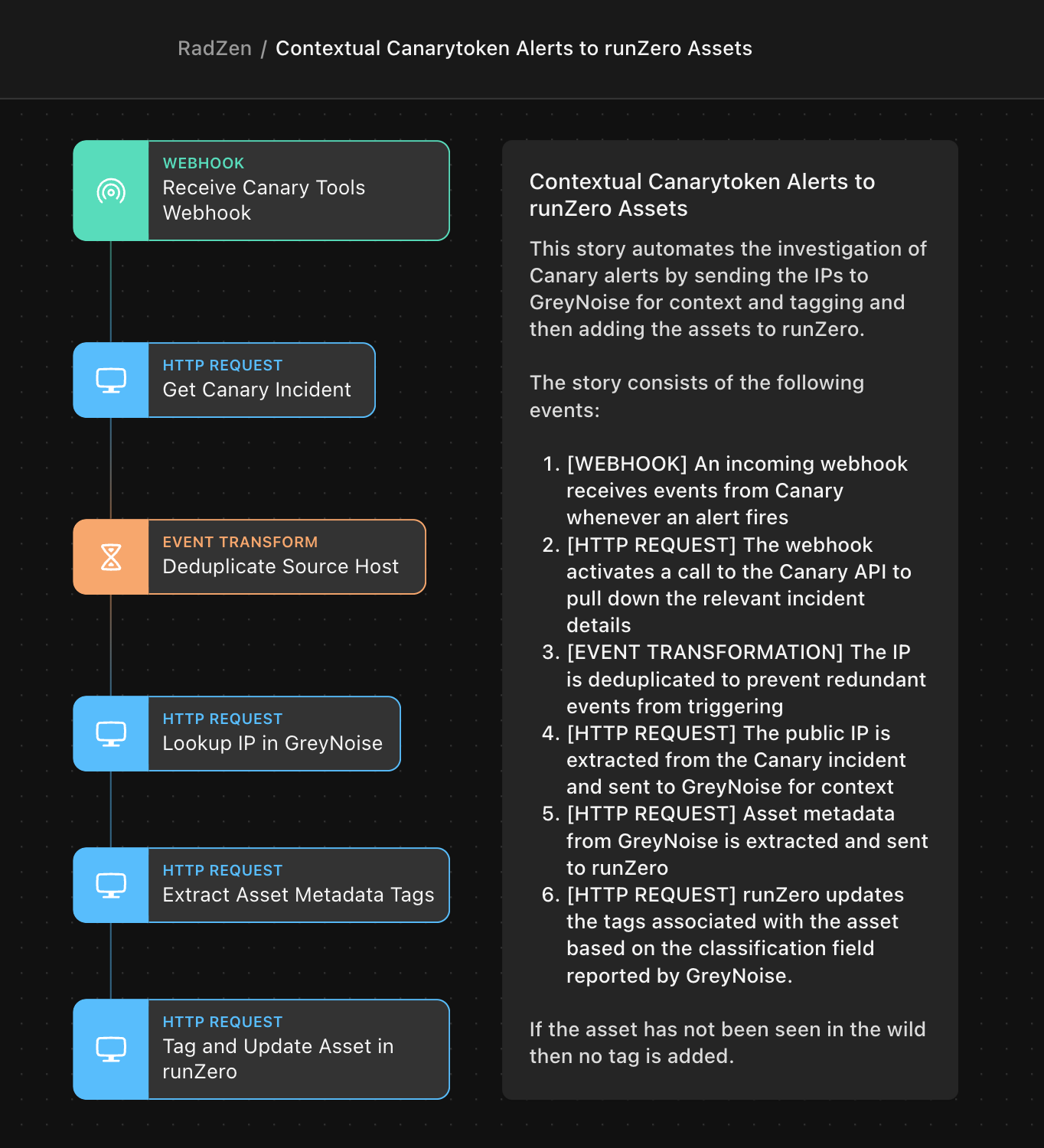
The following story is available in the Tines Story Library. Here is what the story will look like:

Tines story

The story consists of the following events:

  • [WEBHOOK] – An incoming webhook receives events from Canary whenever an alert fires
  • [HTTP REQUEST] – The webhook activates a call to the Canary API to pull down the relevant incident details
  • [EVENT TRANSFORMATION] – The IP is deduplicated to prevent redundant events from triggering
  • [HTTP REQUEST] – The public IP is extracted from the Canary incident and sent to GreyNoise for context
  • [HTTP REQUEST] – Asset metadata from GreyNoise is extracted and sent to runZero
  • [HTTP REQUEST] – runZero updates the tags associated with the asset based on the classification field reported by GreyNoise.

If the asset has not been seen in the wild then no tag is added. You can optionally send these alerts to a third-party endpoint of your choice like Slack or Jira.

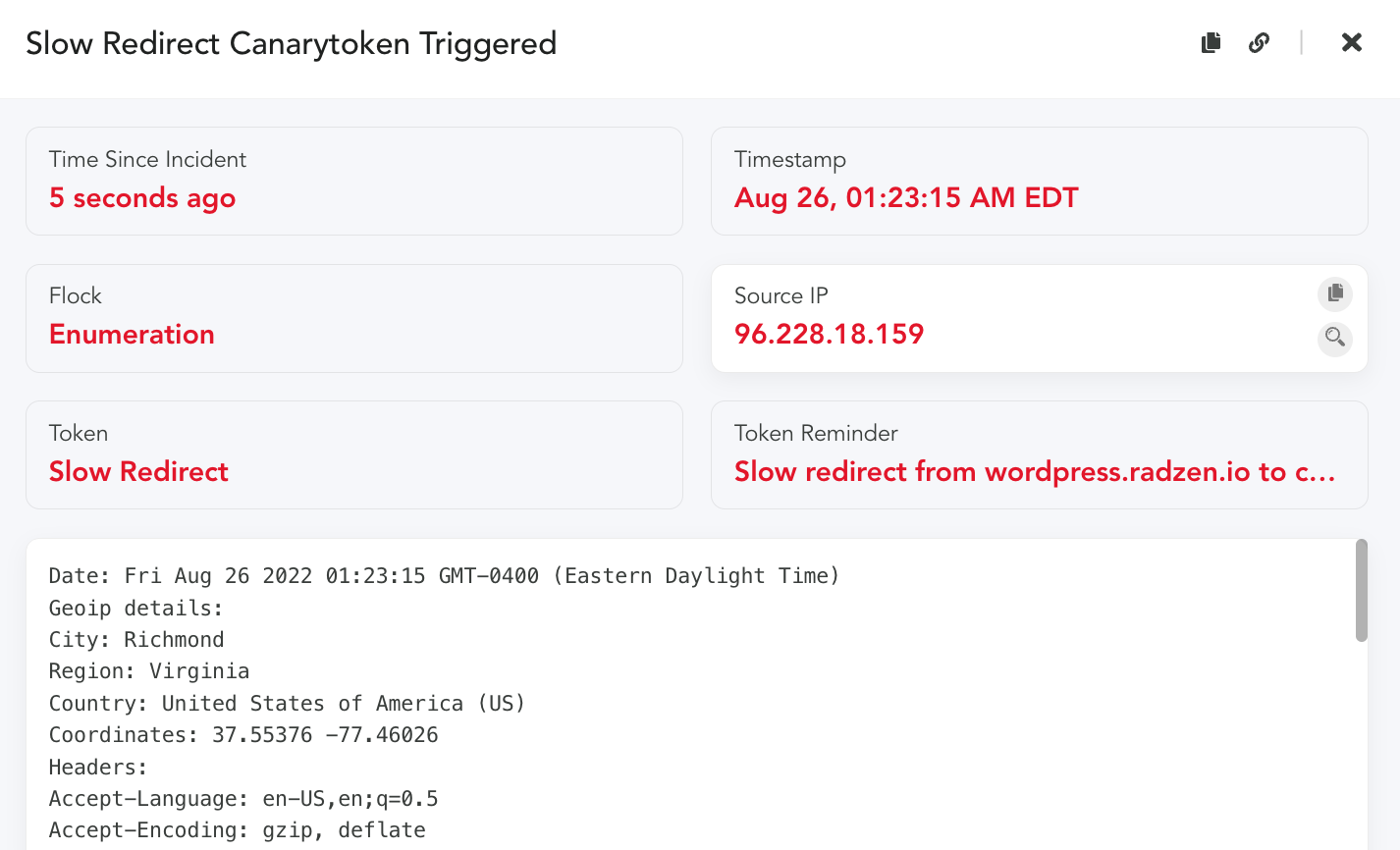
Test this story by generating a web bug token and then pasting the URL in your browser and hit enter. The Canary alert will look similar to the following:

Canary trigger

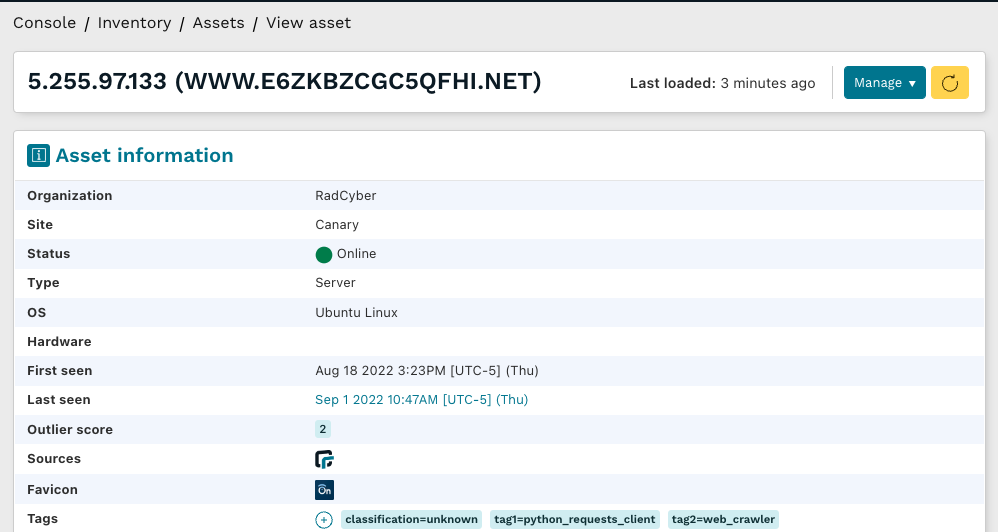
And now we see the corresponding asset in runZero added and tagged with the data from Greynoise. Now, you’ve automatically added data from Greynoise into runZero, all orchestrated by Tines. Next time an alert triggers for this asset, your runZero inventory will automatically be updated. Automation FTW!

runZero asset

About Version 2 Digital

Version 2 Digital is one of the most dynamic IT companies in Asia. The company distributes a wide range of IT products across various areas including cyber security, cloud, data protection, end points, infrastructures, system monitoring, storage, networking, business productivity and communication products.

Through an extensive network of channels, point of sales, resellers, and partnership companies, Version 2 offers quality products and services which are highly acclaimed in the market. Its customers cover a wide spectrum which include Global 1000 enterprises, regional listed companies, different vertical industries, public utilities, Government, a vast number of successful SMEs, and consumers in various Asian cities.

About runZero
runZero, a network discovery and asset inventory solution, was founded in 2018 by HD Moore, the creator of Metasploit. HD envisioned a modern active discovery solution that could find and identify everything on a network–without credentials. As a security researcher and penetration tester, he often employed benign ways to get information leaks and piece them together to build device profiles. Eventually, this work led him to leverage applied research and the discovery techniques developed for security and penetration testing to create runZero.
runZero 3.2: A 365-degree view of your Microsoft environment

What’s new with runZero 3.2?

  • Integrations with Microsoft 365 Defender and Microsoft Intune
  • Query and report on Active Directory users and groups
  • Fingerprint updates
  • User experience improvements

Complete visibility into your Microsoft assets

Over the last few months, runZero has added support for Microsoft Azure cloud assets, Azure Active Directory and on-premise Active Directory users, groups, and assets, in addition to a community integration with Microsoft Sentinel. The runZero 3.2 release fills in the missing pieces by bringing endpoint visibility into the runZero inventory through new integrations with Microsoft 365 Defender and Microsoft Intune. runZero Enterprise users can view, search, analyze, export, and alert on attributes from the Defender and Intune metadata.

Mobile device management (MDM) solutions have become essential to organizations with a remote or transient workforce because of their ability to manage and secure devices even when they aren’t on the corporate network. Similarly, endpoint detection and response (EDR) platforms are commonly used on all sorts of assets for security monitoring and automatic response. While these IT management and security tools are an important part of many security stacks, reviewing what has been onboarded to those sorts of solutions only tells you about the devices that someone is already responsible for. Those lists can’t tell you about all the assets on your network that are unprotected or unmanaged, or all the assets disconnected from your network that haven’t been scanned.

Unprotected and unmanaged devices are the bane of many organizations, and runZero can help you find them. Quickly identify unmanaged assets through a runZero query: filtering on source:runzero AND NOT (source:ms365defender OR source:intune) will return a list of assets that were found by your Explorers, but are not registered onboarded to Defender or Intune.

The inverse of this query can be used to ensure off-network assets are included in your asset inventory: (source:ms365defender OR source:intune) AND NOT source:runzero. This will give you a list of targets that may be missing from your scans and can ensure you’re gathering all the available network and asset data.

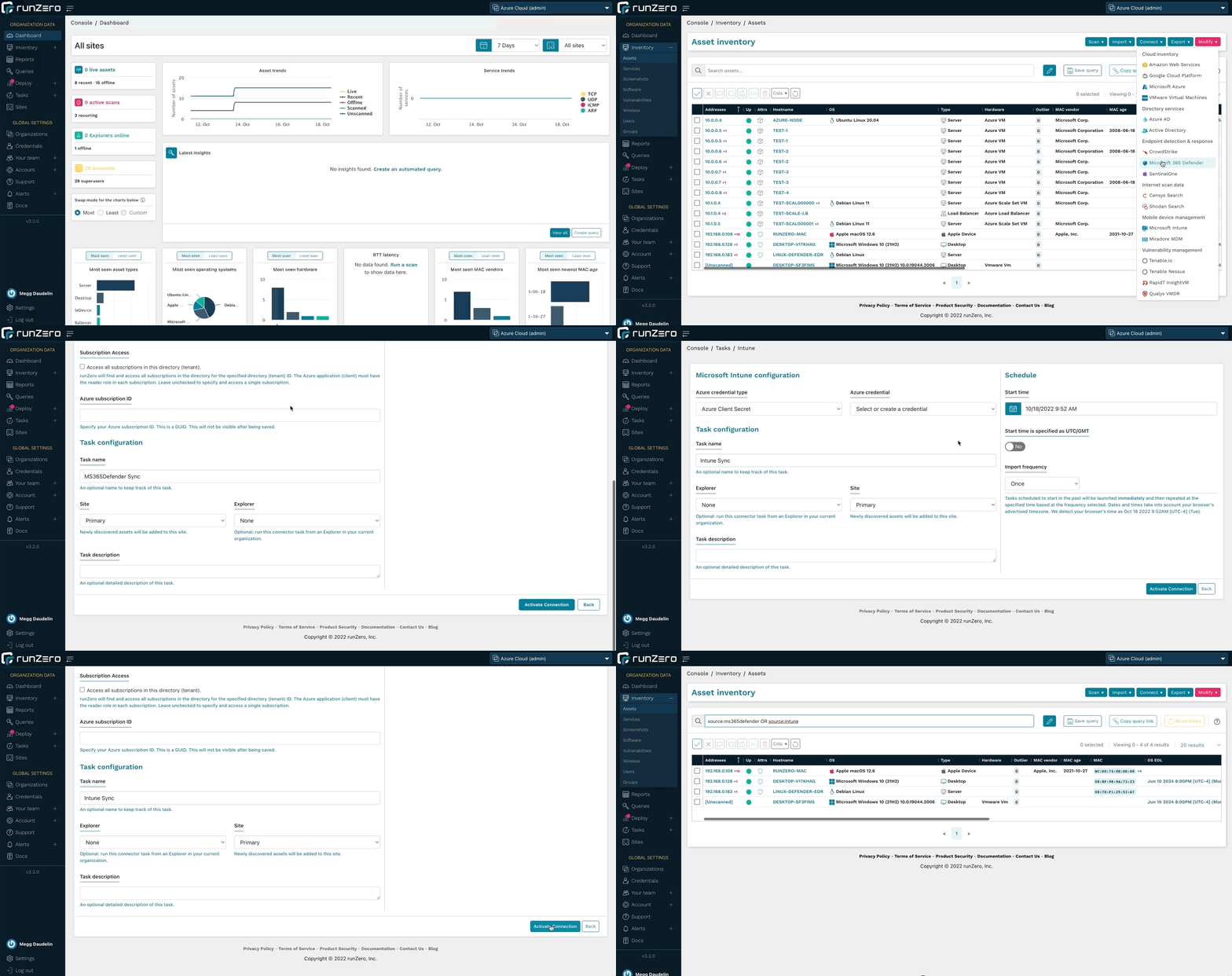
With runZero’s unmatched active network scanning and an ever-growing list of integrations, you’ll have a complete asset inventory at your fingertips. To get started, set up a connection to Microsoft 365 Defender or Microsoft Intune.

Microsoft 365 Defender and Microsoft Intune integrations

Query and alert on Active Directory users and groups

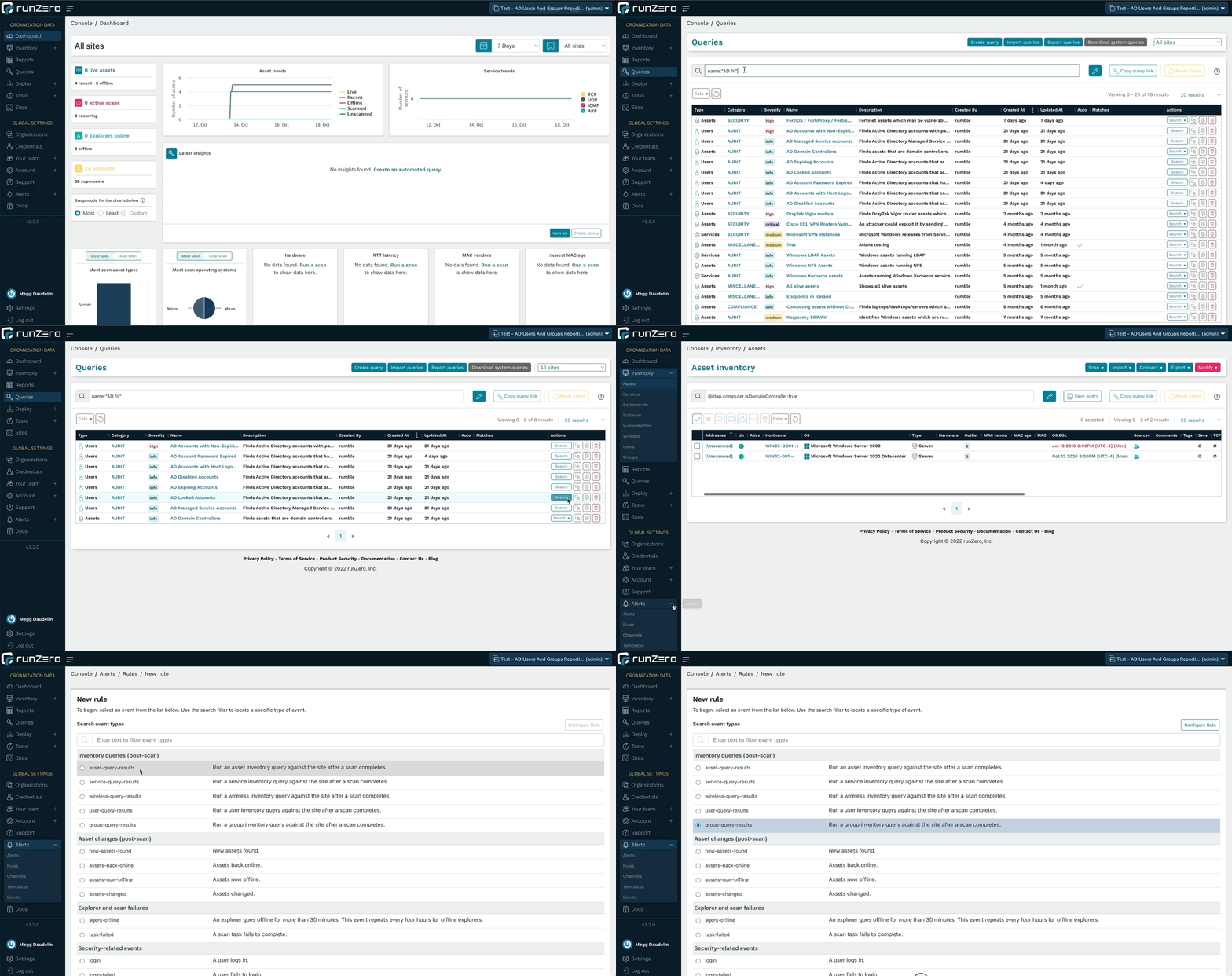
In addition to running searches in the Users and Groups inventories, runZero Enterprise users can leverage the Azure AD or Microsoft Active Directory integrations to quickly find accounts that match specific parameters. Quickly identify expired, disabled, or locked accounts, as well as managed service accounts and accounts with non-expiring passwords. These queries are included in the Query Library and can also be used to create alerts.

The Organization Overview report has also been updated to include counts of users and groups for the whole organization as well as per site.

Run queries about AD users or create an alert rule to find accounts of interest.

Query and Alert on AD Results

Fingerprinting Microsoft assets

runZero includes fingerprints for the metadata returned by the Microsoft integrations. This leads to more accurate operating system and hardware data within the runZero inventory. These fingerprints cover every aspect of the Microsoft ecosystem, from Azure cloud VMs to off-network endpoints running Microsoft Defender.

In addition to Microsoft fingerprints, runZero has also improved the coverage of Tenable.io and Nessus assets, public and private AWS AMI images, and IMAP services. Additional support was added for products by Advidia, Aiphone, Apple, ARRIS, Fortinet, Honeywell, iDevices, Lutron, Midnite Solar, Netgear, Sapling, SEH, Silex, Yeelight.

User experience improvements

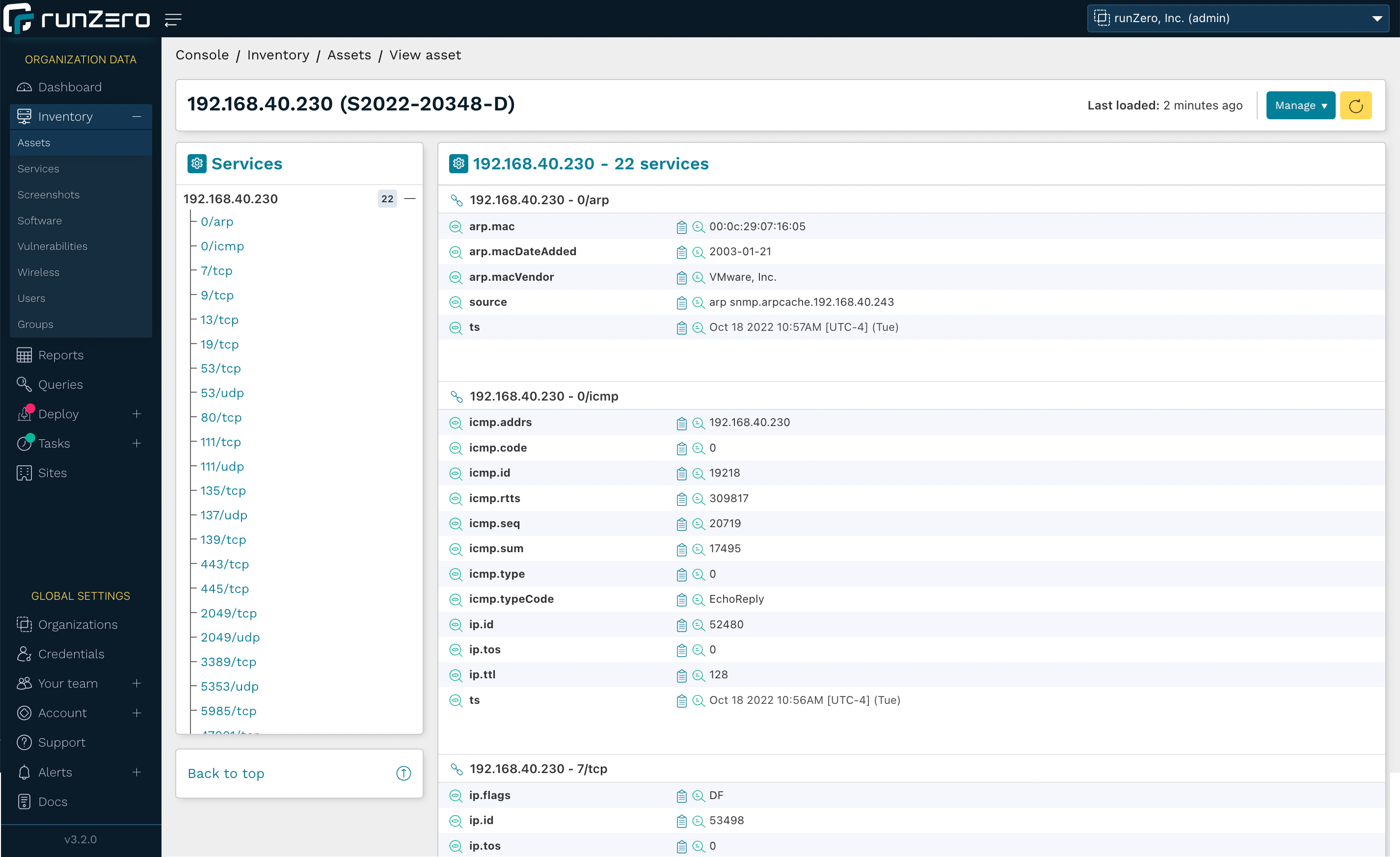
The 3.2 release includes several changes to the user interface to improve the performance of the runZero console, as well as a change to how page navigation transitions happen. As a result, the pages will load faster as you move between sections like the inventories and asset details pages. Additionally, the asset details page provides better performance and efficiency when loading all of the details for an asset.

Enhancements have also been added to make using the data easier than ever. On the asset details pages, the “last loaded” timestamp indicates when the asset details were loaded, and a refresh button has been added to be able to quickly reload the data without refreshing the whole webpage. The Vulnerabilities and Software tables on these pages now perform and load faster. Additionally, the navigation list for the Services table now displays the protocols and ports as a navigation tree to make finding the information you’re looking for simpler and a button has been added to quickly bring you back to the top of the page from the services table. As we continue to make progress on the architectural modernization of the runZero Console, you will see improvements to the performance and user experience of the product.

Asset Details Updates

Release notes

The runZero 3.2 release includes a rollup of all the 3.1.x updates, which includes all of the following features, improvements, and updates.

New features

  • runZero Enterprise customers can now sync assets from Microsoft 365 Defender.
  • runZero Enterprise customers can now sync assets from Microsoft Intune.
  • Fingerprint updates.

Security fixes

  • Three stored cross-site scripting vulnerabilities were identified and fixed as part of our annual third-party security assessment.
  • A bug that could lead to stored cross-site scripting in the scan templates view was fixed. This issue could be exploited by an authenticated, but unprivileged user to take over the session of another authenticated user.
  • A bug that could lead to stored cross-site scripting in the SSO group mappings view was fixed. This issue could be exploited by an authenticated superuser to take over the session of another authenticated user.
  • A bug that could lead to stored cross-site scripting in the team view was fixed. This issue could be exploited by an authenticated, but unprivileged user to take over the session of another authenticated user.

Product improvements

  • SNMPv2 options have been moved to the Probes tab (now labeled Probes and SNMP).
  • The toggle switch to use or not use SNMP now correctly reflects whether it is overridden by the “Use defaults” option on the Probes tab.
  • The asset details pages now include a “last loaded” time indicator and the ability to refresh the page data.
  • Alert notifications, user invitations, and password reset emails are now sent from the runzero.com domain name instead of rumble.run.
  • The rumblectl utility now has a diagnostics command to run or save a diagnostic script for self-hosted customers to collect information for runZero support.
  • Inventory pages now offer “all” and “none” column visibility selection options.
  • The search keyword os_eol_expired is now supported on the Assets inventory.
  • The rumblectl command can now be used with self-hosted deployments to configure additional superusers.
  • Email notifications are now enabled for non-recurring Organization Overview reports.
  • Relative time searches now accept negative numbers.
  • Scan tasks and templates now allow empty SNMPv1 and SNMPv2 community strings.
  • Credential validation has been improved to prevent common misconfigurations.
  • Support for Explorer hosts running virtual machines has been improved.
  • MAC vendor display behavior on inventory datagrids has been improved.
  • Tooltips on datatable icons have been improved.
  • Changes to directory users and groups are now included in the task change report.
  • Error messages related to API tokens have been improved.
  • Asset exports now filter subnet results to those containing the assets’ addresses.
  • Improved LDAP connector and probe logging.
  • Added group_count keyword to Users search.
  • Improved grouping of inputs in connector forms.
  • Search keyword has_group is now supported on the Users page.

Performance improvements

  • The asset details pages have been redesigned for improved performance.
  • Improved performance of asset exports with many subnets.
  • Improved loading times of the directory groups inventory page.
  • Improved loading times of the inventory screens, including multi-page selection.

Fingerprinting changes

  • Improved Active Directory collected data and fingerprint coverage.
  • Improved LDAP attributes for Active Directory objects.
  • Added new queries for quickly surfacing various Active Directory scenarios.
  • Improved fingerprinting coverage of Azure AD assets.
  • Improved fingerprinting coverage of Tenable assets.
  • Improved fingerprinting coverage of public AWS AMI images.
  • Added custom fingerprint support for private AWS AMI images.
  • Improved fingerprinting coverage of IMAP services.
  • Additional support added-or-improved for products by Advidia, Aiphone, Apple, ARRIS, Fortinet, Honeywell, iDevices, Lutron, Midnite Solar, Netgear, Sapling, SEH, Silex, Yeelight.

Integration improvements

  • Recent users from Microsoft Intune, SentinelOne, and CrowdStrike are now included on the asset details page.
  • The Azure AD integration now imports additional assets and no longer requires a Microsoft Intune license.
  • The Azure AD integration can now be configured to optionally import assets, users, and groups.
  • The Active Directory integration service options have been adjusted for consistency.
  • Directory users and groups can now be included in custom queries.
  • The Organization Overview report now contains summary information for directory users and groups when present.
  • The Tenable.io integration now supports a configurable API URL.
  • The Active Directory integration now supports optional import of assets, users, and groups.
  • The minimum TLS version supported by new Active Directory credentials has been increased from TLS 1.0 to TLS 1.2, with a configurable option to support older TLS versions.
  • The handling of Qualys concurrency and rate limiting has been improved.

Bug fixes

  • A bug that could prevent repeated import of task data that includes directory users and groups has been resolved.
  • A bug that caused subnet sampling and screenshots to be enabled for all scan tasks has been resolved.
  • A bug that could prevent modifying the maximum concurrent scans setting was resolved.
  • A bug that could result in an inaccurate task count on the credentials page was resolved.
  • A bug that could result in inaccurate searches by credential on the tasks page was resolved.
  • A bug that could result in inaccurate reporting of credential reuse was resolved.
  • A bug that could cause certain browser extensions to prevent configuring scans was resolved.
  • A bug that could prevent reuse of SNMP credentials for recurring scans was resolved.
  • A bug that could prevent initializing a scan in some cases was resolved.
  • A bug that prevented recurring scans from being saved in some cases was resolved.
  • A bug that prevented the first_seen timestamp from being set has been fixed.
  • A bug that could cause large Qualys imports to fail has been resolved.
  • A bug that prevented import of Azure AD users and groups when missing an active Intune license has been resolved.
  • A bug that could result in partial import of Azure AD users and groups has been resolved.
  • A bug which prevented the report.changed value from working in notification rule templates has been fixed.
  • A bug that prevented the use of client tokens to authenticate to the API has been fixed.
  • A bug that could cause insight queries for hosted zones to fail has been resolved.
  • A bug in the Shodan integration asset-mode query has been resolved.
  • A bug that could cause MAC vendor names to be cut off in datagrids has been resolved.
  • A bug that could result in missing Shodan services has been resolved.
  • A bug that incorrectly imported Active Directory Managed Service accounts as assets has been resolved.
  • A bug that could cause the Switch Topology report to not show all switches in certain situations has been resolved.
  • A bug that could result in a 500 error when exporting assets from sites with many assets and/or subnets has been resolved.
  • A bug that could result in UI elements becoming unresponsive has been resolved.
  • A bug that could prevent some service values from being saved has been resolved.
  • A bug that could result in all subnet tags being applied to exported assets has been resolved.
  • A bug that could result in missing Shodan services has been resolved.
  • A bug that could cause Azure AD imports to fail for certain configurations has been resolved.
  • A bug that could cause excessive export sizes has been resolved.
  • A bug that could obscure task errors from the task log has been resolved.

About Version 2 Digital

Version 2 Digital is one of the most dynamic IT companies in Asia. The company distributes a wide range of IT products across various areas including cyber security, cloud, data protection, end points, infrastructures, system monitoring, storage, networking, business productivity and communication products.

Through an extensive network of channels, point of sales, resellers, and partnership companies, Version 2 offers quality products and services which are highly acclaimed in the market. Its customers cover a wide spectrum which include Global 1000 enterprises, regional listed companies, different vertical industries, public utilities, Government, a vast number of successful SMEs, and consumers in various Asian cities.

About runZero
runZero, a network discovery and asset inventory solution, was founded in 2018 by HD Moore, the creator of Metasploit. HD envisioned a modern active discovery solution that could find and identify everything on a network–without credentials. As a security researcher and penetration tester, he often employed benign ways to get information leaks and piece them together to build device profiles. Eventually, this work led him to leverage applied research and the discovery techniques developed for security and penetration testing to create runZero.
Why unmanaged devices are a challenge for IT and security programs

Unmanaged devices pose a significant challenge for many organizations. As the number of devices connecting to their networks increase, security and IT teams can easily lose track and sight of these devices. As a result, organizations struggle with so many devices flying under the radar, leaving them unprotected and creating potential footholds into a network.

Unmanaged devices can take many forms:

  • Shadow IT: Imagine a developer’s test box set up with permission of the engineering team but without central governance: The machine is not on the Active Directory, not getting group policies, maintenance updates, or security controls. Because it doesn’t allow access via domain admin passwords, it’s off the radar for most CMDBs.
  • Rogue devices: Rogue devices may include a WiFi access point set up by an employee to get better wireless reception in their corner of the office. These are hard to detect because IT cannot install agents on them and doesn’t find them with an authenticated scan because SNMP strings won’t work on the device.
  • Orphaned devices: These devices were once managed but have fallen off the radar, for example an open-source web app run by a department that has since been superseded by a SaaS application but is now continuing its zombie life without patching or oversight.

Asset inventory of unmanaged devices tends to be particularly difficult for Internet of Things (IoT) and operational technology (OT) devices, such as programmable logic controllers (PLCs) in a factory. In an enterprise environment, these devices include printers, IP phones and uninterruptible power supplies (UPS). These devices often don’t take centrally managed administrative credentials and don’t allow IT teams to install an agent on them. That’s why they are often not covered by the enterprise inventory database.

Rogue devices slow down IT troubleshooting

The efficacy of IT helpdesks is often measured by how many tickets they can service. Anything that slows down troubleshooting impacts, not only that metric, but also the productivity of users and entire departments. An IT helpdesk person recently shared that they were investigating a networking issue with spotty connectivity for some users. The root cause was a rogue device with a static IP address that conflicted with other devices that received their address via DHCP in the same range. Without good asset inventory, that investigation would have turned into a wild goose chase.

Accidental network bridges bypass firewalls

In another case, a critical manufacturing line was shut down due to ransomware. Investigations showed that a rogue device had bridged from the IT to the OT network, enabling attackers to bypass a firewall that had been put in place to segment the networks. The security team lacked visibility into network bridges of unmanaged devices, which is why the issue wasn’t identified ahead of time.

Unmanaged devices hinder incident investigations

Analysts in a security operations center (SOC) need to quickly and efficiently work through alerts. In one case, an analyst received an alert that an internal IP address was communicating with a known-bad IP, notably the command & control (C2) server. However, neither the SIEM nor the CMDB had any record of the bad/poor IP on the network, nor did the vulnerability management or EDR consoles. The device turned out to be an IP camera that had been compromised by malware because it was using default credentials. With good asset inventory that tracks IoT devices, the analyst would have saved time resolving this incident as well as been able to find other devices of the same make and model to check if they were using default credentials.

End-of-life devices are bad for uptime and potentially vulnerable

Proactive IT lifecycle programs look for devices on the network that are approaching their end-of-life (EOL) or are outside the warranty period, replacing the devices before they become an issue. Manufacturers often no longer provide functional and security fixes for these devices, making them much more risky and difficult to service if something goes wrong. If unmanaged devices are not inventoried, IT and security teams are unable to get ahead of potential risks and issues. In addition, finance teams benefit from knowing which devices are fully depreciated and when a new budget is required to replace them.

Shadow IT makes network updates and migrations more risky

Carrying out updates and migrations of networks with a lot of shadow IT tends to be riskier because of potentially unknown applications and services. Having a full picture of all managed and unmanaged devices will de-risk the project because each part of the infrastructure can be planned and accounted for.

Rogue devices complicate governance of security controls

Proper governance dictates that you have security controls on every device. It’s impossible to figure out coverage gaps without knowing all of the devices on your network.

Once you have a full inventory of devices on your network, overlay the data from security controls and look for gaps, for example, finding all Windows machines missing CrowdStrike or other EDR systems. This can be a huge step in getting ahead of security issues.

Unmanaged devices are often the first foothold for attackers

Attackers often scan the network for any outliers: machines that have lower patch levels, unusual services running on ports, and unique pieces of software not found on the rest of the network. These typically become great entry points for an attack, because these machines tend to be more easily exploitable, are less likely to have security controls, and if orphaned, don’t have anybody minding the store. Identifying unmanaged devices to either update or decommission them is a great way to reduce your attack surface and mitigate risk.

Unmanaged devices are best discovered with unauthenticated scanning

Authenticated scans and agents are not effective for uncovering unmanaged devices because they require centrally managed credentials to scan or deploy, which are generally not available for rogue, IoT, and OT devices. The best solution is to use an unauthenticated scan as a baseline, then layer other information on top, such as data from your security controls consoles.

runZero scans your network in minutes to identify unmanaged devices

runZero offers free, professional, and enterprise plans to scan your network for unmanaged devices. It scales from home use to Fortune 50 companies. runZero uses a combination of unauthenticated, active scanning and integrations with cloud, virtualization, and security infrastructure to provide full visibility into IT, OT, cloud, and remote devices.

With runZero, you can:

  • Identify rogue devices to accelerate IT troubleshooting
  • Find accidental network bridges that bypass segmentation
  • Conduct asset-centric incident investigations
  • Find operating systems and networking devices that are EOL or out of warranty
  • Plan your network upgrades and migrations
  • Ensure great coverage for security controls
  • Reduce your internal and external attack surface

You can try out runZero for free–no credit card required–for 21 days and up to 50,000 devices. Try our free Starter Edition for up to 255 devices to get more visibility into your small business or home network.

Get runZero for free

Do you know about the unmanaged assets on your network? Find them with runZero.

Get started

Join our team

About Version 2 Digital

Version 2 Digital is one of the most dynamic IT companies in Asia. The company distributes a wide range of IT products across various areas including cyber security, cloud, data protection, end points, infrastructures, system monitoring, storage, networking, business productivity and communication products.

Through an extensive network of channels, point of sales, resellers, and partnership companies, Version 2 offers quality products and services which are highly acclaimed in the market. Its customers cover a wide spectrum which include Global 1000 enterprises, regional listed companies, different vertical industries, public utilities, Government, a vast number of successful SMEs, and consumers in various Asian cities.

About runZero
runZero, a network discovery and asset inventory solution, was founded in 2018 by HD Moore, the creator of Metasploit. HD envisioned a modern active discovery solution that could find and identify everything on a network–without credentials. As a security researcher and penetration tester, he often employed benign ways to get information leaks and piece them together to build device profiles. Eventually, this work led him to leverage applied research and the discovery techniques developed for security and penetration testing to create runZero.
×

Hello!

Click one of our contacts below to chat on WhatsApp

×