


Skip to content

How to test application with ZAP – Part One

Previously, I wrote about the prevention steps while developing your web application. While developing, you need to test it too, and of course, after development is done and the code is merged again, the application must be tested by the QA team. 

When the code is in the development stage, and you just want to test the functionality, you don’t need to set up an environment. The test would be done in your localhost. But if you want to do security tests, you will need to set up an environment. In this article, I want to show you how to set up a test environment, which will also serve as a reference point for the following articles.

Why is it good practice to set up an environment with virtual machines when testing a web application?

First, I will be focusing on testing the HTTP requests/responses as they are something the attacker will first try to compromise.

Thus, to test if HTTPs are secure, you can set up some virtual machines.

As I mentioned, our focus will be on HTTP. First, I will give a short description of HTTP.

HTTP – HyperText Transfer Protocol

HTTP request is a request made by a client to access some resource on the server.

HTTP response is a response made by a server to a client with the requested resources.

HTTP cycle

  • Client makes a request to the web server
  • Web servers get the request and process it
  • Server returns a response to the client
  • Client receives the response

To achieve these actions HTTP protocol uses HTTP methods:

  • POST is used when creating a new resource
  • GET is used to get some resources to read them
  • PUT is used when updating resource
  • PATCH is used when modifying a resource. It will contain changes to the resource.
  • DELETE is used to delete the resource.

Also, it is very important to mention the structure of the request/response to create or modify them.

HTTP requests/responses share a similar structure:

  1. A start-line contains information about the requests to be implemented and status (successful/failed). 
  2. A custom(optional) set of HTTP headers specifying the request or describing the body included in the message.
  3. An optional body contains data required for the request or the document associated with a response. 

The start-line and HTTP headers are called the head of the requests, and the payload is known as the body.

Setting up the environment

First, we will need to setup two virtual machines. I will be very detailed about the setup because I want this setup to be the reference for future articles. 

We will set up two machines, one with Kali and the second with Ubuntu Server. You can set up many different hypervisors such as VMware Workstation Player/Pro, Oracle VirtualBoxHyper-V-Manager(Windows Pro/Enterprise or Education), etc.

I am going to set up the environment using VMWare Pro. 

Setting up Kali

There are some prerequisites to install Kali:

  • 8 GB of memory
  • A quad-core CPU
  • 500 GB of Hard Drive

Download the Kali ISO image from their official site. Open VMware Workstation and go to File => New Virtual Machine or use Ctrl+N. Next window will pop up:
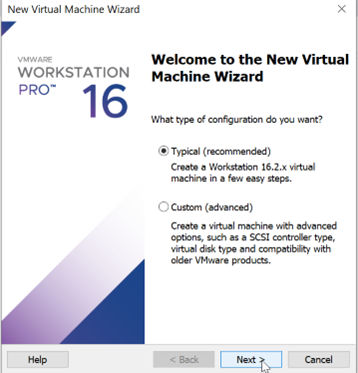
Click next, then browse to the Kali ISO file location and click next.
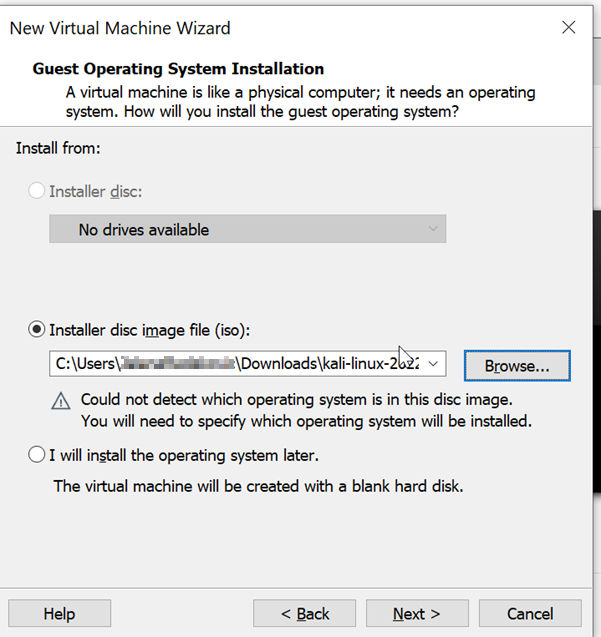
Choose Linux as the Guest Operating system, then click next.

Give the name to the VM and change location if you want, and then click on next.
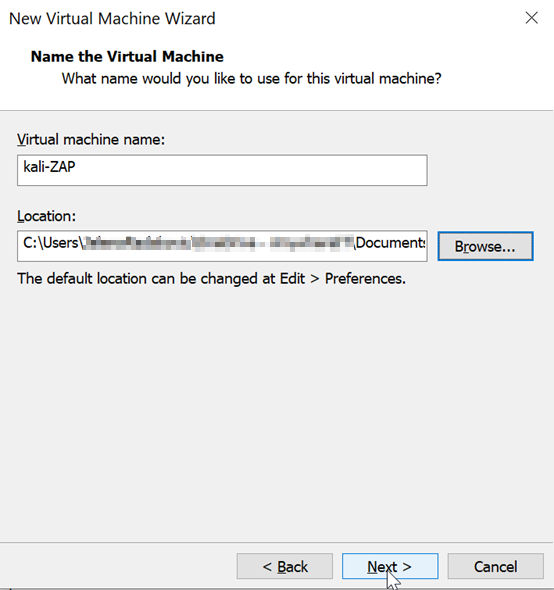
As it says, recommended disk size is default 20GB. I recommend that you give around 30-50GB. Then mark on Store virtual disk as a single file and click next.

Click on customize the hardware, and the following window will appear:
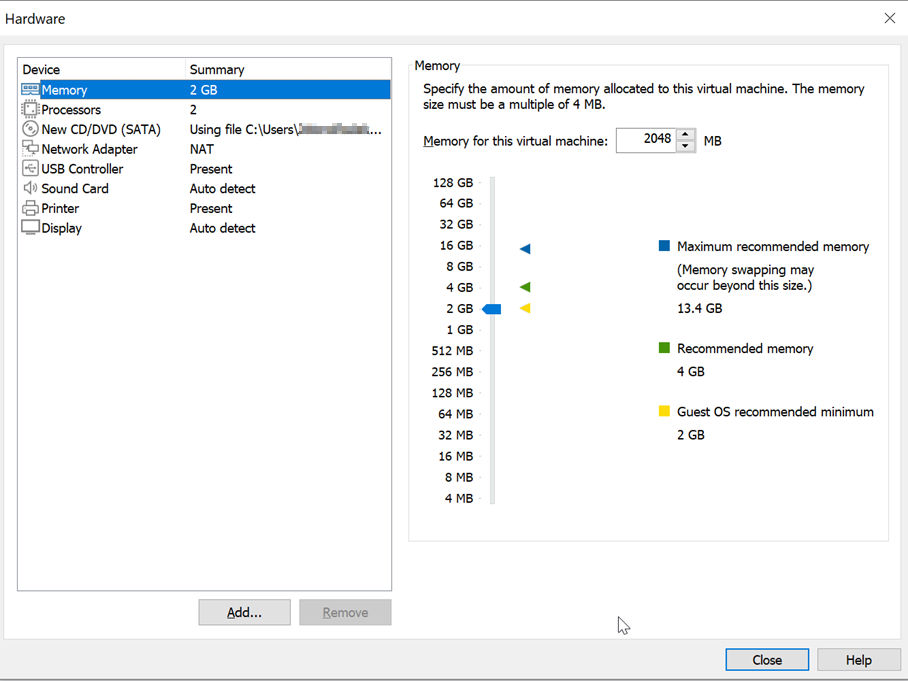
Choose tab Processors and give your Kali VM two cores. Then choose memory for the virtual machine and give it at least 2GB of RAM. The network adapter should be NAT which is the default setting. Click finish.

You have set up the VM and now need to install the OS. You will use the Kali ISO file you chose initially and power up your VM.
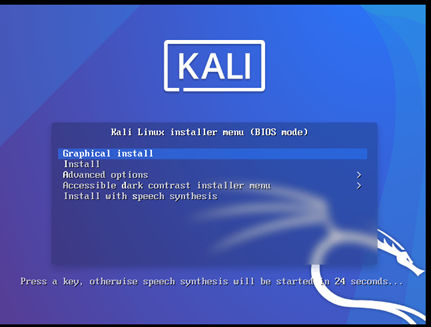
Click on Graphical install. Then choose the language.

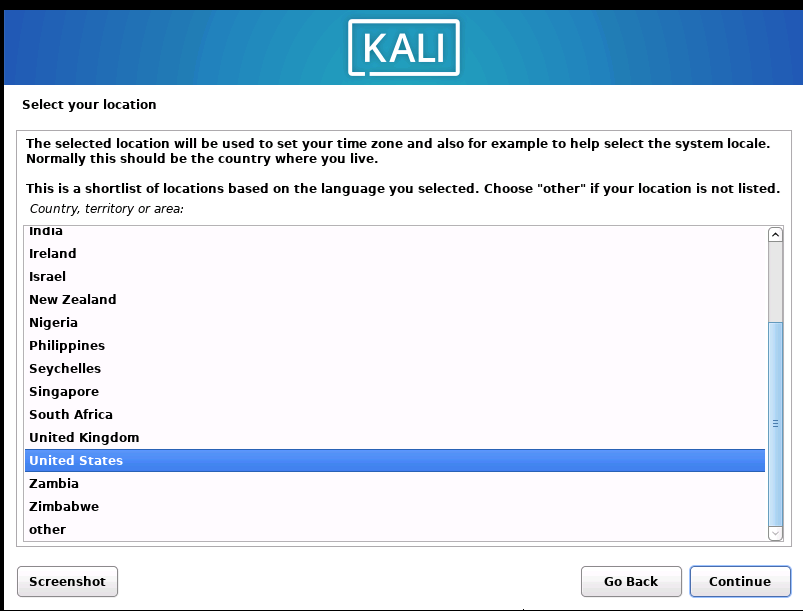
Then continue to the next step, which is choosing your location and continue. Choose the keyboard and continue.
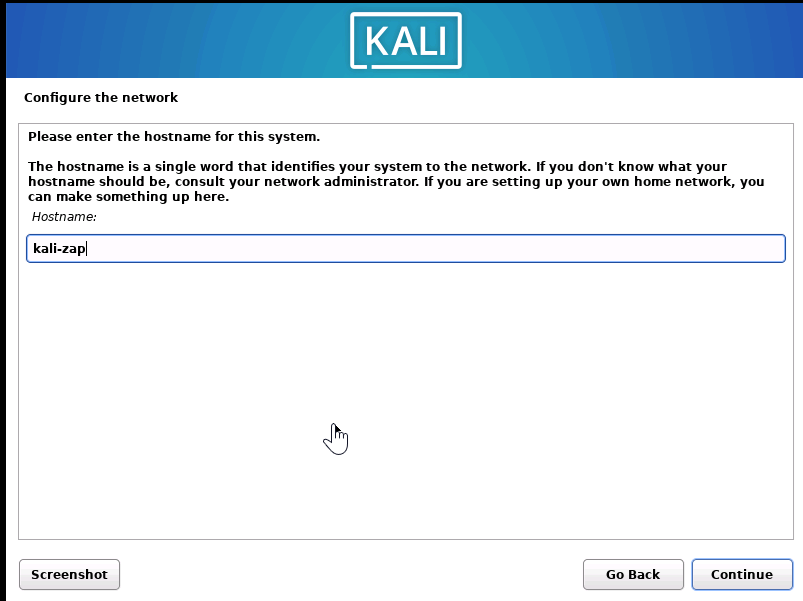
Create a name for the VM.
When you click on continue, you will see the field to write domain name, which is optional. When you click on continue, a new window will appear and ask you to write your name.

The next window will ask you to create your username; I chose jenny. Then click on continue to create your password.

Enter and re-enter your password. Then configure the clock.
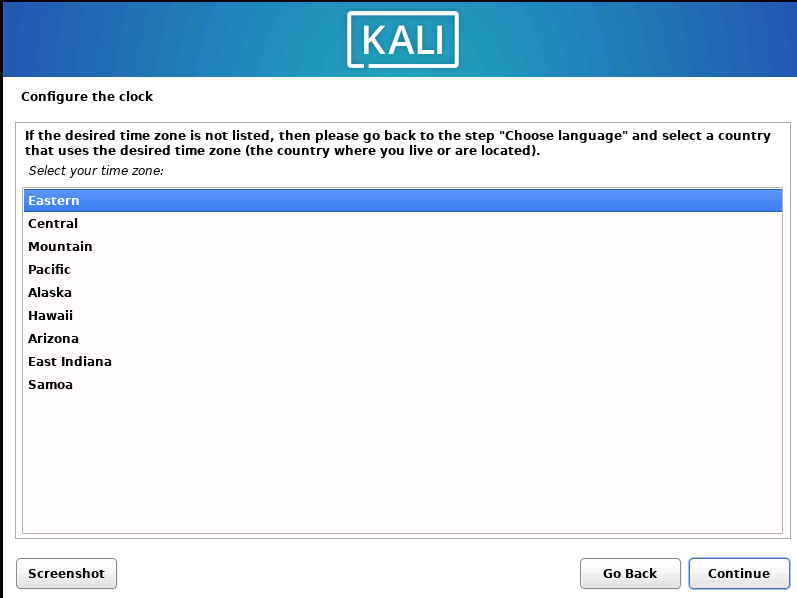
And then leave the first option selected and continue – Guided – use the entire disk.
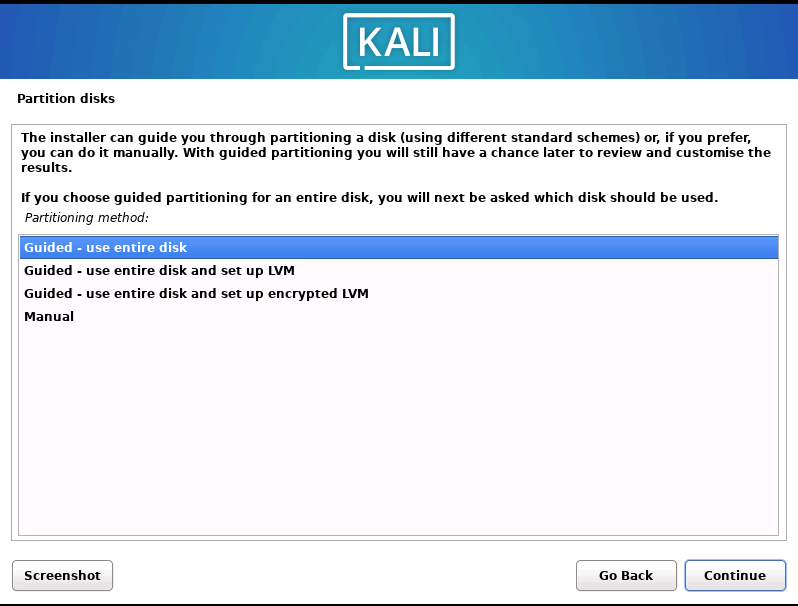
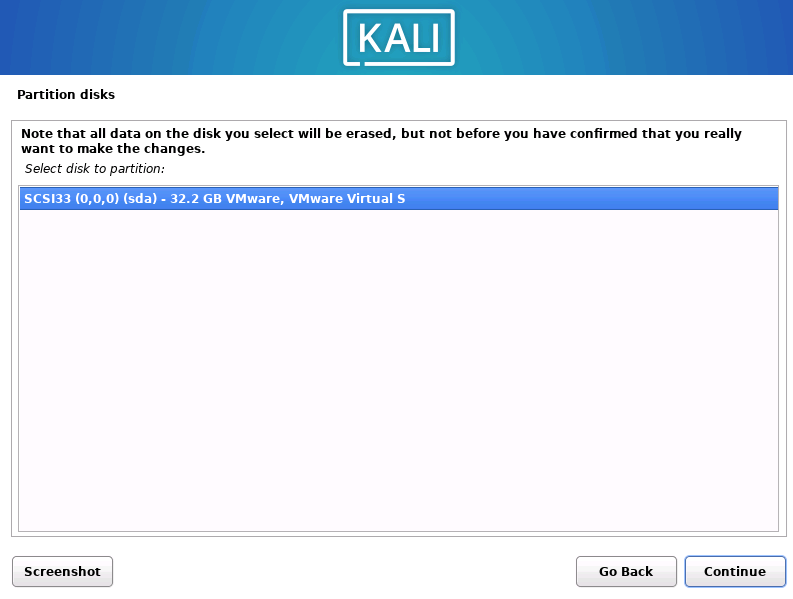
Then select the partition disk.
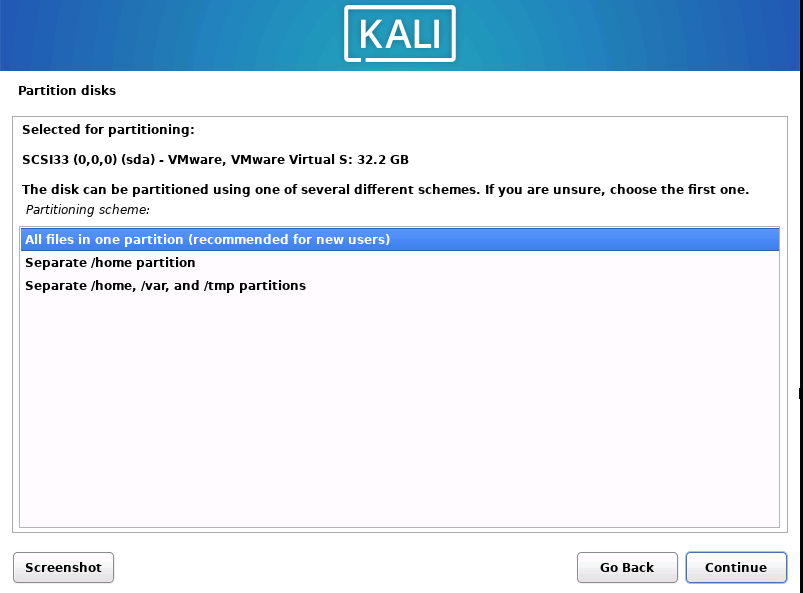
For our purpose, we can leave the first selected partitioning scheme. This is the simplest way.
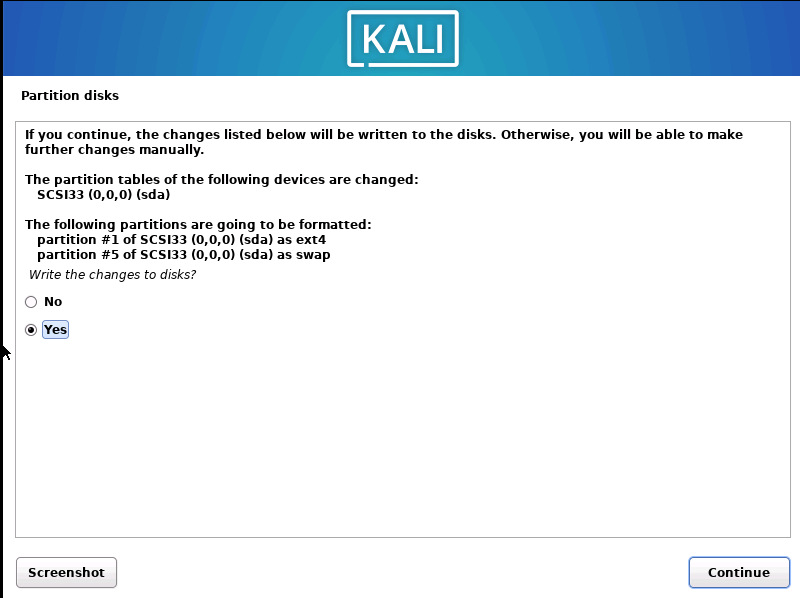
Then make sure you leave selected finish partitioning and write changes to disk.

Then choose Yes.
For software selection, just choose the defaults as in the picture below.
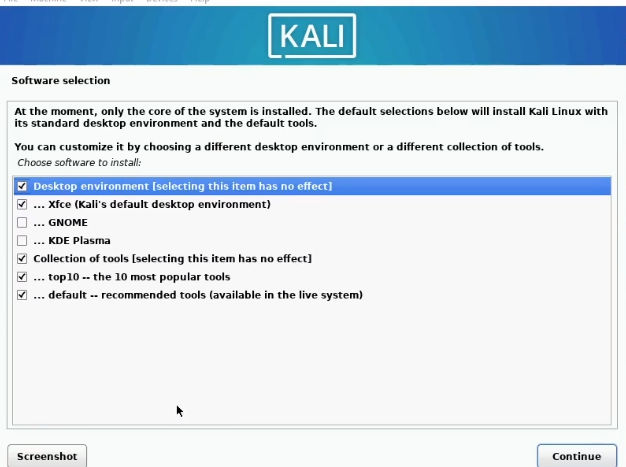
Install the GRUB bootloader by clicking on yes.

Choose your virtual hard drive to install it on. It will probably be your only option to select.

Click continue and wait for the installation to complete. Great job, the installation is now complete! Don’t forget to reboot the machine after installation.

If you get prompted with the installation again, go to your VM settings – Edit Virtual Machine Settings, choose CD/DVD and uncheck and check the Use Physical Drive box. This is done so that you don’t boot off the ISO again, which would ask you to install Kali again. You already installed it, and it is on your virtual hard drive.

Now we have set up one virtual machine and are left with the second one – our Ubuntu Server.

Setting up Ubuntu

I will repeat the step by adding a new Virtual machine in VMware Workstation.

There are some prerequisites to install Ubuntu:

  • GHz Dual Core Processor
  • 20GB hard drive space
  • 1GB RAM

Open WMware and add a new VM. Repeat the entire process in the same way as we did for Kali; just use the Ubuntu Server ISO file.

When Ubuntu VM is created, proceed with the installation of the OS.

First, power on your new Ubuntu machine. Use your keyboard to navigate through the installation process. Use Space to check boxes if you want to choose something other than defaults; use Enter to continue.
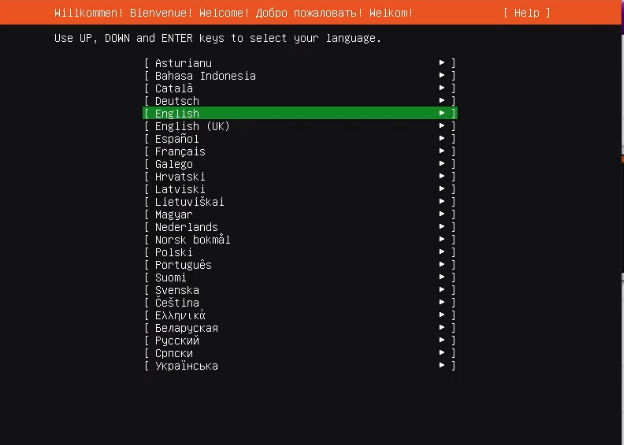
Choose language and press enter, do the same for the next step when choosing the keyboard. Then hit enter.

This looks good to me, so I move on to the next step. Then for the proxy and mirror address, press enter – I am not adding anything here, and I am choosing the default mirror as it will pick the closest server to my location, thus giving me the fastest install.
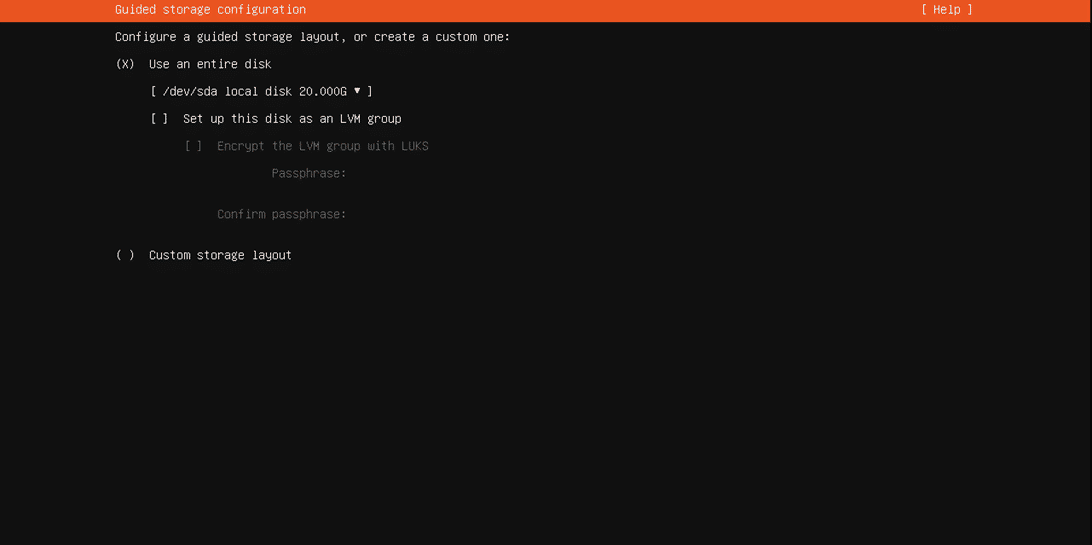
Deselect set up this disk as an LVM group. Then press enter and for the next step press enter again.
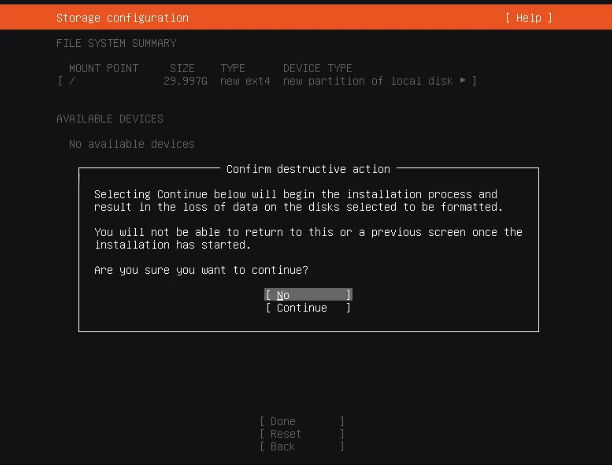
Press Continue.
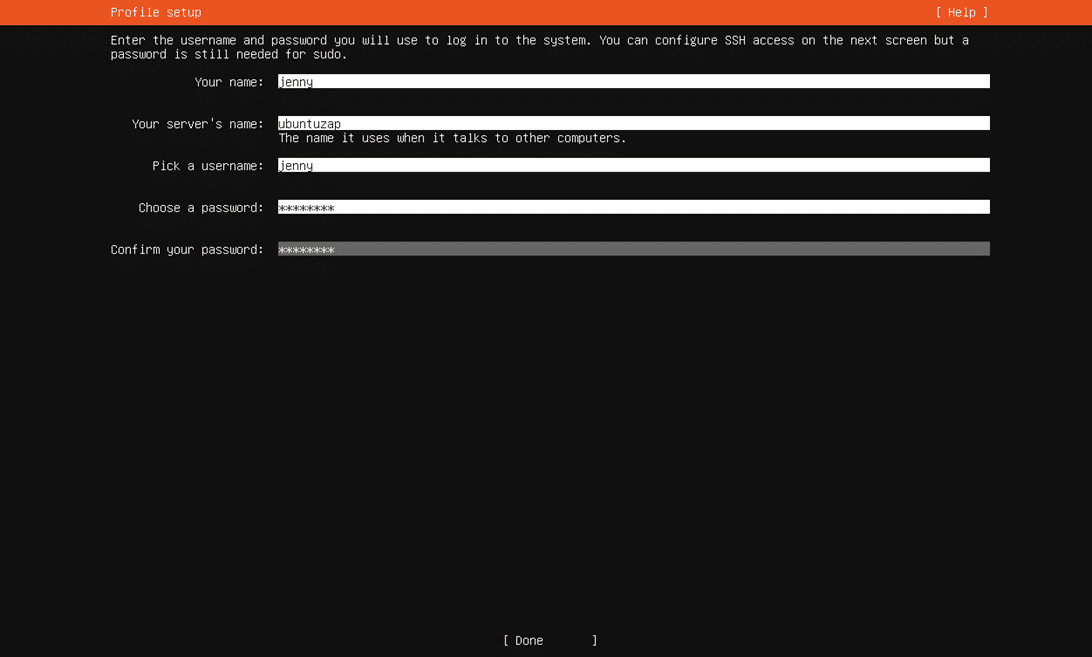
Fill in all fields and click Done. No Ubuntu token is necessary for the next step, so press enter.

Select to install OpenSSH server and enter.

For the next step, leave all unmarked and press enter. Make sure you reboot the server and press enter. Voilà! Your Ubuntu machine is ready to use!​​

We have set up the second virtual machine and are ready to ping them, so we know they see each other.

How to ping Ubuntu from Kali in the local environment

Finally, we can now run both machines and check their connection. I am using Kali as my attacker machine and Ubuntu as the target. 

I will show you in the following article how to create a basic Angular app and use Docker to deploy the app on port 8080. But until then, we will try to hit the Ubuntu machine from Kali using Ubuntu’s IP address.

But at this stage, I want to test if Kali can “see” Ubuntu. Open Ubuntu, check the IP address using command – ip a, and get the inet address under the ens3 interface. This is the network interface that was set up during installation. My IP for Ubuntu Server is: 192.168.221.129.

Open Kali, go to the terminal, and use the PING command with that IP address:

Ping was successful! 

Lastly, to make your life easier, you might want to give your Ubuntu server a static IP, and you can also edit the /etc/hosts file on your attacker machine so you can SSH in with its name without using the IP address.

Conclusion

Good work! We finished setting up, and now we are ready to familiarize ourselves with OWASP ZAP (Zed Attack Proxy), which we will use to test our web application. For the upcoming article, it is very important to follow the steps in this article so you have everything set up.

In the end, secure code is the cheapest code!   

#Kali #Ubuntu #Security_testing   

Cover photo by Markus Winkler

About Version 2 Digital

Version 2 Digital is one of the most dynamic IT companies in Asia. The company distributes a wide range of IT products across various areas including cyber security, cloud, data protection, end points, infrastructures, system monitoring, storage, networking, business productivity and communication products.

Through an extensive network of channels, point of sales, resellers, and partnership companies, Version 2 offers quality products and services which are highly acclaimed in the market. Its customers cover a wide spectrum which include Global 1000 enterprises, regional listed companies, different vertical industries, public utilities, Government, a vast number of successful SMEs, and consumers in various Asian cities.

About VRX
VRX is a consolidated vulnerability management platform that protects assets in real time. Its rich, integrated features efficiently pinpoint and remediate the largest risks to your cyber infrastructure. Resolve the most pressing threats with efficient automation features and precise contextual analysis.

CISAnalysis – September 30, 2022

CISA is typically late to the party for many of the KEV additions, but it seems like the invitation was delivered early.

A Pair of Zero-Days in Exchange

Two zero-days in Microsoft Exchange servers were discovered that when chained together, can allow remote code execution. However, the advisory states that authenticated access to the servers are necessary in order to exploit. Thus, it is likely attackers will first run a phishing/social engineering campaign to gain authorization. So if you have Exchange servers, it is important to place all of the suggested mitigations in effect from Microsoft’s guidance. But what’s equally, if not more, important is to double down on efforts to recognize and report phishing in your organization.

Critical Bug in Bitbucket

The other vulnerability is a command injection flaw in Atlassian Bitbucket reported back in August. A patch is available for this CVE and a PoC exploit is also circulating out in the wild. As Bitbucket is a code repository, some sensitive intellectual property could be at risk as well as other components connected to the larger Jira/Trello framework. A malicious actor leveraging this kind of attack is most likely after admin-level control so they can sink their teeth in further into the network.

#cisa #cisanalysis #microsoftexchange #atlassian #zeroday

About Version 2 Digital

Version 2 Digital is one of the most dynamic IT companies in Asia. The company distributes a wide range of IT products across various areas including cyber security, cloud, data protection, end points, infrastructures, system monitoring, storage, networking, business productivity and communication products.

Through an extensive network of channels, point of sales, resellers, and partnership companies, Version 2 offers quality products and services which are highly acclaimed in the market. Its customers cover a wide spectrum which include Global 1000 enterprises, regional listed companies, different vertical industries, public utilities, Government, a vast number of successful SMEs, and consumers in various Asian cities.

About VRX
VRX is a consolidated vulnerability management platform that protects assets in real time. Its rich, integrated features efficiently pinpoint and remediate the largest risks to your cyber infrastructure. Resolve the most pressing threats with efficient automation features and precise contextual analysis.

State of the Union’s Infrastructure Security According to CISA

On the heels of a few high-profile cybersecurity breaches in the civilian sector, comes a poignant operational technology/industrial control systems advisory published jointly by CISA and the NSA. Contrasting with the bland title of “Control System Defense: Know the Opponent,” you get the sense that CISA has gotten tired of ringing the control system cybersecurity bell since at least 2009. Though, according to Tom Temin of the Federal News Network, protecting the software we rely upon has been on politician’s minds since the 90’s.

OT/ICS assets that control critical infrastructure from nuclear power plants to the water processing to the air conditioning in government facilities have always been targets. With the merging of IT and OT/ICS over at least the past decade and a half, the attack surfaces of these critical systems have increased exponentially.

It’s also critical that these systems keep running “despite the fact that many systems are decades old and use insecure protocols and architectures” requiring nonstandard interface and protocol support, while the vendors that made the equipment could no longer exist.

It isn’t any secret that much of the United States’ critical-for-society-to-function infrastructure is out of date. Nor is it a secret that well-funded malicious actors are more than capable when it comes to disrupting critical sectors. We’ve seen the Russian attack on Ukraine’s electric grid and the 2017 NotPetya attack on Maersk that resulted in Los Angeles’ busiest port shutting down for two weeks.

Furthermore, design and device information are publicly available or easily attained through job listings and interviews that specify certifications and equipment knowledge. Open Source operational intelligence (OSINT) also makes it simple to track down emails, names, software in use, or remote access points. Shodan is a fun tool.

Thankfully, CISA’s advisory doesn’t just point at the problem and say “hey, doesn’t that look terrible?” It also lays out the tactics, techniques, and procedures that many cyber actors use along with mitigations. If anyone remembers David Bianco’s Pyramid of Pain,  he explains that one of the most effective ways to thwart attackers is to disrupt their gameplan. Make their tools and information useless so they’re back to square one.

But what’s the use of an advisory, if the recommended strategies therein aren’t enforced? Well, according to a Federal News Network article, Eric Goldstein, the Executive Assistant Director for Cybersecurity for CISA, stated that CISA has plans to “release performance goals starting in October that will address individual risks of the various sectors.” It seems that there might be some muscle to back up the advisory.

#CISA #ICS

About Version 2 Digital

Version 2 Digital is one of the most dynamic IT companies in Asia. The company distributes a wide range of IT products across various areas including cyber security, cloud, data protection, end points, infrastructures, system monitoring, storage, networking, business productivity and communication products.

Through an extensive network of channels, point of sales, resellers, and partnership companies, Version 2 offers quality products and services which are highly acclaimed in the market. Its customers cover a wide spectrum which include Global 1000 enterprises, regional listed companies, different vertical industries, public utilities, Government, a vast number of successful SMEs, and consumers in various Asian cities.

About VRX
VRX is a consolidated vulnerability management platform that protects assets in real time. Its rich, integrated features efficiently pinpoint and remediate the largest risks to your cyber infrastructure. Resolve the most pressing threats with efficient automation features and precise contextual analysis.

Intro to Windows (Win32) API

Since I talked about how to enumerate Windows-based systems – a step you will have during an engagement, it is only natural to expand more on the topic (Windows, not enumeration, at least for now).

You might have successfully enumerated, exploited, established persistence, and maybe even exfiltrated data… but there’s much more to it, and a lot of stuff comes into play. In the upcoming articles, I will cherry-pick the stuff that is most interesting to me, but I will also try to provide you with a general overview so that you can more easily structure and map out the stuff I’ve been talking about.

This one is geared more towards red team type of activity, as the knowledge of the Windows API can be leveraged when you care about evasion e.g., as a red teamer (of course, it’s not only about evasion…); something a pentester usually doesn’t have to worry about. Just keep that distinction in the back of your mind.

However, in the case of red team engagements, since the emulation of an adversary is essential, you will see stuff that usually doesn’t get included in your pentests or vulnerability assessments. Phishing is permitted (out of scope in most of the pentests) and is usually something red teams will opt for (gotta keep that stuff realistic, right?); evasion is also vital since an adversary will try to stay on your corporate network as long as it is possible for them. It’s also kinda in the name; you are in the role of the red team, and the evasion pertains to throwing the blue team off your tracks. This is quite different and very interesting for us here, as it opens a plethora of new options you will think about and probably use during the engagement.

Terms like living off the land, phishing, bypassing UAC, bypassing AVs, C2, etc. all come into play! And more. Much more. This is terrifyingly fun, and even though the Windows API might not be the most attractive topic of the bunch here, its important to have a firm grasp on the stuff you’re abusing, and I wanted to give you just a brief overview of how one would abuse the system calls for their nefarious purpose.

Red teams will regularly abuse the Windows API to hide and evade the blue team, in the same way, they’ll use shellcode to evade AVs, or use the LOL (living off the land) methodology, and much more (evade runtime detection, logging and monitoring, generally employing tool agnostic approach in this endeavor).

Okay! So that’s a bit more of an intro, but I wanted to level with you here and set some expectations while also (hopefully) making the upcoming articles (as well as this one and the previous one) more sensible in the grand scheme of things.

The Windows (Win32) API

The first distinction to be aware of here is that Windows has two main modes through which it accesses hardware, the kernel, and the user mode. This goes back to the release of the Win32 API which is a library that’s used to interface between the user applications and the kernel.

The API here calls the interfaces and sends the info to the system which is then processed in the kernel mode. These two modes are essential because they determine how much access a driver or an application gets – kernel, memory, or hardware access. Also, note that with some languages and their interaction with the Win32 API, the application can go through the runtime first before going through the API.

The Win32 API breakdown can be briefly described as follows:

  • In/out parameters – these are the values that call structures define

  • API calls -this is the API called that’s used, with addresses to functions that are coming from the pointers

  • Call structures – this is what defines the API call and its parameters

  • DLLs – these are the DLLs for the Win32 API, we have core DLLs – KERNEL32, USER32, ADVAPI32, and other DLLs that are a part of the API like NTDLL, COM, NETAPI32, etc.

  • Headers – these are the libraries that get imported at runtime, they are defined through the header files or imports, function addresses are obtained through pointers

Since every API call of the Win32 library lives in memory and requires a pointer to a memory address the way you get those pointers for the needed functions is obscured because of the Address Space Layout Randomization – ASLR implementations. This is for security reasons as you guessed it. 

If an attacker can discover where a DLL is loaded in any process, the attacker knows where it is loaded in all processes. Which is a quote from Mandiant’s blog post about the ASLR. From the same blog post – A low-privileged account can be used to overcome ASLR as the first step of a privilege escalation exploit.

This is also why Microsoft implemented the Windows Header File.

From Wikipedia:

windows.h is a Windows-specific header file for the C and C++ programming languages which contains declarations for all of the functions in the Windows API, all the common macros used by Windows programmers, and all the data types used by the various functions and subsystems. It defines a very large number of Windows specific functions that can be used in C.

Basically, any Win32 function can be called once you’ve included the windows.h or the Windows Header File.

Another important implementation is the P/Invoke, which allows you to access structs, callbacks, and functions in unmanaged libraries from your managed code. Most of the P/Invoke API is contained in two namespaces: System and System.Runtime.InteropServices. Using these two namespaces gives you the tools to describe how you want to communicate with the native component.

What P/Invoke does is give you a way to do the complete process of calling the Win32 API. You can then invoke the function as a managed method you created even though you’re calling an unmanaged function.

The structure of the API calls is well documented by Microsoft but you can also check out the pinvoke.net: the interop wiki! for more information.

Every API call has a pre-defined structure for its input/output parameters. For example the VirtualProtect function – memoryapi.h it looks something like this:

BOOL VirtualProtect(
 
  [in] LPVOID lpAddress,
 
  [in] SIZE_T dwSize,
 
  [in] DWORD flNewProtect,
 
  [out] PDWORD lpflOldProtect
);

For the parameters expected i/o and accepted values, Microsoft has the explanation within the docs.

Lastly, I will list some API calls that are known for their possible malicious use. Also, MalAPI.io tries to document these, so it might be worth checking out.

VirtualProtect – Changes the protection on a region of committed pages in the virtual address space of the calling process.

GetProcAddress – Retrieves the address of an exported function (also known as a procedure) or variable from the specified dynamic-link library (DLL).

GetComputerNameA – Retrieves the NetBIOS name of the local computer. This name is established at system startup, when the system reads it from the registry.

GetModuleFileNameA – Retrieves the fully qualified path for the file that contains the specified module. The module must have been loaded by the current process.

GetAdaptersInfo – The GetAdaptersInfo function retrieves adapter information for the local computer.

RegisterHotKey – Defines a system-wide hot key. Also, MalAPI says: RegisterHotKey is used to create a system wide hotkey. This function is commonly used by spyware or keyloggers to recieve a notification when a certain combination of keys are pressed.

Conclusion (for now)

I’ve just given a very brief overview here since the whole of the Win32 API is much larger. But for our purpose here, it should suffice. The main point I wanted to get across is for you to realize the potential options you might have with this and be aware of how some threat actors might leverage those system functions that are basically inseparable from the system itself.

A fun practice might be to check out what MITRE ATT&CK has documented on Native APIs and check out the Windows API calls known to be used for malicious purposes.

Cover image by Clint Adair

#win32 #API #windows

About Version 2 Digital

Version 2 Digital is one of the most dynamic IT companies in Asia. The company distributes a wide range of IT products across various areas including cyber security, cloud, data protection, end points, infrastructures, system monitoring, storage, networking, business productivity and communication products.

Through an extensive network of channels, point of sales, resellers, and partnership companies, Version 2 offers quality products and services which are highly acclaimed in the market. Its customers cover a wide spectrum which include Global 1000 enterprises, regional listed companies, different vertical industries, public utilities, Government, a vast number of successful SMEs, and consumers in various Asian cities.

About VRX
VRX is a consolidated vulnerability management platform that protects assets in real time. Its rich, integrated features efficiently pinpoint and remediate the largest risks to your cyber infrastructure. Resolve the most pressing threats with efficient automation features and precise contextual analysis.

The World’s Worst Hackers Have Flags

In several recent posts, I’ve been exploring how federal governments in the UK and Australia have funded national cybersecurity efforts. Cyber defense as a matter of national security is a fascinating and frankly quite frightening subject, so I wanted to take a closer look at how global powers are protecting themselves. In this post, I want to examine why countries are suddenly investing so much in cybersecurity…because of countries like Iran

Setting aside all ideological and geopolitical differences, Iran (along with countries like Russia and North Korea) has established itself as a malicious actor on the world’s cybersecurity scene. They’re the “bad guys” for all intents and purposes. Multiple groups with Iranian government backing have carried out attacks targeted at foreign infrastructure with the goal of disrupting public life and cultivating instability that Iran can use to its political advantage. Countries like Iran that not only allow but sponsor cyber attacks against foreign governments are exactly why the UK, Australia, and others are suddenly stressing cybersecurity like never before.

In response to the growing threat posed by Iran, the Cybersecurity & Infrastructure Security Agency (CISA) recently issued an alert to educate potential targets about what to be on guard for. That alert has some vital information about what Iran is doing, who’s a risk, and how to prop up defenses – it’s recommended reading for anyone involved with critical infrastructure. For everyone else, it’s a sobering look at why we need to keep investing (aggressively) in national cybersecurity – and what could happen if we don’t.

A Closer Look at Iran

The newest CISA alert comes shortly after a previous alert warning of Iranian cyber actors exploiting known vulnerabilities in Fortinet and Microsoft Exchange to carry out malicious activities like ransomware. Now, they’re exploiting VMware Horizon Log4j vulnerabilities as well.

This tactic of exploiting known vulnerabilities comes as no surprise (stick with what works) but nonetheless deserves highlighting. Iranian groups may have government support. But when their targets have so many vulnerabilities that are not just known but also widespread and unaddressed, it doesn’t take much to pull off an attack. This just shows us (once again) how cybersecurity needs to catch up to the threats it faces. Governments pouring billions into cybersecurity won’t make much difference if the targets are this easy.

Speaking of targets, Iranian hackers have not been selective about who they attack, primarily selecting targets with vulnerable security. In just the US they launched a ransomware attack against a police department; they encrypted the files of a large transportation company; they hijacked the computers of a municipal government for crypto mining; and they exfiltrated data from an aerospace company. As this list shows, both public and private entities can be targets, and financial gain is not necessarily the driving motivation. On the contrary, inflicting the most attacks and dealing the largest damage seems to be the motivation. To put it differently, Iran isn’t sponsoring these attacks to make money – they’re doing it to make a statement, “we can strike at anyone.

Where Do We Go From Here?

Iran may be targeting low-hanging fruit right now, but make no mistake: the hackers behind these attacks have whatever resources they need in terms of talent, tools, time, and money. They’re wanting for nothing, and they have the means to attack (probably successfully) almost any target on earth. Don’t believe me? Just look at what the Russians pulled off with SolarWinds. Iran could do something similar – it just hasn’t happened yet.

Defense is an arms race – whoever spends the most tends to be the strongest. I think what we’re seeing right now – with countries spending more on cyber offense and defense – is simply the application of that defensive principle to national cybersecurity. Countries like Iran and Russia are spending more on cyber attacks, so countries like the UK and Australia are spending more on defenses. This is just the start of a trend that will grow (a lot) as international relations increasingly intersects with the digital realm. Soon, cyber won’t be an emerging defensive line item – it will be the primary sword and shield that countries hold in their hands.

Which means we should expect increases in attacks from countries like Iran, and increases in cybersecurity spending from the rest of the world. This is the new normal. My take: the sooner we adapt the better.

#Cybersecurity #Iran #Ransomware #CISA #UK #Australia #Log4J

About Version 2 Digital

Version 2 Digital is one of the most dynamic IT companies in Asia. The company distributes a wide range of IT products across various areas including cyber security, cloud, data protection, end points, infrastructures, system monitoring, storage, networking, business productivity and communication products.

Through an extensive network of channels, point of sales, resellers, and partnership companies, Version 2 offers quality products and services which are highly acclaimed in the market. Its customers cover a wide spectrum which include Global 1000 enterprises, regional listed companies, different vertical industries, public utilities, Government, a vast number of successful SMEs, and consumers in various Asian cities.

About VRX
VRX is a consolidated vulnerability management platform that protects assets in real time. Its rich, integrated features efficiently pinpoint and remediate the largest risks to your cyber infrastructure. Resolve the most pressing threats with efficient automation features and precise contextual analysis.

×

Hello!

Click one of our contacts below to chat on WhatsApp

×