Skip to content

Computer Forensics – Windows Registry – Pt. 1

Intro

Computer Forensics is a sub-field of cybersecurity, that pertains to gathering evidence of usage of a computer. Generally, it would fall under the larger field of Digital Forensics, dealing with all kinds of digital devices, from examination and recovery to analysis of the data found within them.

Digital forensics is used, and needed, widely, from the private sector – where you might want to analyze your organization internally, or if you, for example, are doing incident response/analysis.

In a legal sense, digital forensics can be used to support some hypotheses in a civil/criminal case – or vice versa.

There are even cases that went cold for years before actually being solved through the techniques used in this field. One famous example is the BTK serial killer case that has gone cold for years, but the perpetrator met his downfall once he started taunting the authorities by sending letters to them.

Eventually, the police managed to recover a deleted MS Word document from the drive, analyze the metadata of the document, pinpoint the killer, and finally arrest him!

From the Wikipedia page, that can be found here:

Police found metadata embedded in a deleted Microsoft Word document that was, unknown to Rader, still stored on the floppy disk.[54] The metadata contained the words “Christ Lutheran Church”, and the document was marked as last modified by “Dennis”.[55] An Internet search determined that a “Dennis Rader” was president of the church council.[52] When investigators drove by Rader’s house, a black Jeep Cherokee—the type of vehicle seen in the Home Depot surveillance footage—was parked outside.[56] This was strong circumstantial evidence against Rader, but they needed more direct evidence to detain him.[57]

As you can see, computer forensics can be quite useful, and can provide us with a lot of insight on what has happened on/to our computer systems. Connecting the dots further, it can even help us ascertain what someone might have done – as illustrated in the example above.

Windows

This is de facto the most used Desktop OS right now – 75% of the market share, to be precise. That’s mostly why I intend to focus on Windows forensics but will talk about Linux forensics in the future as well.

Why is the Windows Registry important from a forensic perspective?

The Registry in Windows is practically the Database for the OS itself. It contains all the configuration data for the system – and is organized in a hierarchical way.

From MS docs:

The registry is a hierarchical database that contains data that is critical for the operation of Windows and the applications and service that run on Windows. The data is structured in a tree format. Each node in the tree is called a key. Each key can contain both subkeys and data entries called values.

This means that the registry holds information about the software, hardware, and even the user. This includes data about recently used programs or files as well as the devices that may have or are connected to the system. You probably can infer how this can be of great value to a forensic investigator.

The registry on your Windows systems comprises of these five root keys:

  1. HKEY_CURRENT_USER
  2. HKEY_HKEY_USERS
  3. HKEY_LOCAL_MACHINE
  4. HKEY_CLASSES_ROOT
  5. HKEY_CURRENT_CONFIG


HKEY_CURRENT_USER – Contains the root of the configuration information for the user who is currently logged on. The user’s folders, screen colors, Control Panel settings are stored here. This information is associated with the user’s profile. This key is sometimes abbreviated as HKCU.

HKEY_USERS – Contains all the actively loaded user profiles on the computer. HKEY_CURRENT_USER is a subkey of HKEY_USERS. HKEY_USERS is sometimes abbreviated as HKU.

HKEY_LOCAL_MACHINE – Contains configuration information particular to the computer (for any user). This key is sometimes abbreviated as HKLM.

HKEY_CLASSES_ROOT – Is a subkey of HKEY_LOCAL_MACHINE\Software. The information that is stored here makes sure that the correct program opens when you open a file by using Windows Explorer. This key is sometimes abbreviated as HKCR. Starting with Windows 2000, this information is stored under both the HKEY_LOCAL_MACHINE and HKEY_CURRENT_USER keys. The HKEY_LOCAL_MACHINE\Software\Classes key contains default settings that can apply to all users on the local computer. The HKEY_CURRENT_USER\Software\Classes key contains settings that override the default settings and apply only to the interactive user. The HKEY_CLASSES_ROOT key provides a view of the registry that merges the information from these two sources. HKEY_CLASSES_ROOT also provides this merged view for programs that are designed for earlier versions of Windows. To change the settings for the interactive user, changes must be made under HKEY_CURRENT_USER\Software\Classes instead of under HKEY_CLASSES_ROOT. To change the default settings, changes must be made under HKEY_LOCAL_MACHINE\Software\Classes. If you write keys to a key under HKEY_CLASSES_ROOT, the system stores the information under HKEY_LOCAL_MACHINE\Software\Classes. If you write values to a key under HKEY_CLASSES_ROOT, and the key already exists under HKEY_CURRENT_USER\Software\Classes, the system will store the information there instead of under HKEY_LOCAL_MACHINE\Software\Classes.

HKEY_CURRENT_CONFIG – Contains information about the hardware profile that is used by the local computer at system startup.

These root keys, combined with values and subkeys, are what make the Registry Hive.

You can check this by opening regedit.exe to look around the registry – directories you see are the Registry Keys, and the values are whatever data is stored within – as mentioned above.

Access Hives Offline

Please note that the above is true if you’re accessing a live system – through the in-built utility regedit.exe. But, if you only have the disk image, you will go on about this in a slightly different way. First, you should now that the registry hive is located on the disk in the C:\Windows\System32\Config directory.

Let me just digress here for a bit. Why is this important? Well, in an investigation you would typically clone the disk first – hence the disk image – and you would conduct your investigation on the clone. You don’t want to mess up your potential evidence by working on the original. As mentioned here, even though cloning is a straightforward process in theory, in practice it can be quite different.

The goal is simple – you want to clone one disk to another. The drive you want to clone is typically removed from the computer and connected to another computer or a cloning device. However, it is vital to have some sort of control over the writing process i.e. a hardware write block which is placed between the cloned (source disk) and the destination disk (one we’re cloning to). You need this, because you don’t want to accidentally mess up your investigation by writing data to the cloned/source disk.

You should also forensically clean the destination disk beforehand. Forensic imaging tools (FTK Imager, Autopsy, etc.) will usually create some sort of proof that the cleaning had happened. Finally, when all the preparations have been made successfully and the process starts, upon successfully cloning the disks you would have matching hashes for the source and the clone – i.e. your proof that you have an exact clone of the disk that’s investigated.

I will mention the tools above, and others, in my future articles on this topic, but for now let me get back on track and talk about the locations of the aforementioned hives on the respective disk(s).

These hives are:

  1. DEFAULT (mounted at – HKEY_USERS\DEFAULT)
  2. SAM (mounted at – HKEY_LOCAL_MACHINE\SAM)
  3. SECURITY (mounted at – HKEY_LOCAL_MACHINE\Security)
  4. SOFTWARE (mounted at – HKEY_LOCAL_MACHINE\Software)
  5. SYSTEM (mounted at – HKEY_LOCAL_MACHINE\System)

Aside from these hives, there are two more hives that keep information about the user and can be found in the User directory. The path is found at C:\Users\<username>  (this is true for Windows 7 and above versions of the Windows OS)

The two hives are these:

  1. NTUSER.DAT (mounted at HKEY_CURRENT_USER after the user would log in)
  2. USRCLASS.DAT (mounted at HKEY_CURRENT_USER\Software\CLASSES)

NTUSER.DAT is found in the C:\Users\<username> and the USRCLASS.DAT is found in the C:\Users\<username>\AppData\Local\Microsoft\Windows. Please note that both of these hives are hidden.

NTUSER.DAT

  USRCLASS.DAT


Finally, the Amcache hive, which is quite important in the Windows OS since it keeps information about programs that have been run recently. It is located at C:\Windows\AppCompat\Programs\Amcache.hve

Amcache Hive


Conclusion

To conclude, I covered some basics about Computer/Digital Forensics in general, as well as the Windows OS Registry Hive. This is exactly what threat actors exploit in numerous ways, and we will be looking at how to ascertain what they did to our devices in the next article. I will also talk about the mentioned forensic tools such as Autopsy, FTK Imager, and others. (Linux forensics will be covered too!)

Stay tuned.

Cover image by Immo Wegmann

#registry #forensics #windows

About Version 2 Digital

Version 2 Digital is one of the most dynamic IT companies in Asia. The company distributes a wide range of IT products across various areas including cyber security, cloud, data protection, end points, infrastructures, system monitoring, storage, networking, business productivity and communication products.

Through an extensive network of channels, point of sales, resellers, and partnership companies, Version 2 offers quality products and services which are highly acclaimed in the market. Its customers cover a wide spectrum which include Global 1000 enterprises, regional listed companies, different vertical industries, public utilities, Government, a vast number of successful SMEs, and consumers in various Asian cities.

About VRX
VRX is a consolidated vulnerability management platform that protects assets in real time. Its rich, integrated features efficiently pinpoint and remediate the largest risks to your cyber infrastructure. Resolve the most pressing threats with efficient automation features and precise contextual analysis.

How Has Robotic Process Automation Revolutionized Routine Execution?

For a long time, companies had data centers as their IT infrastructures, which needed to be protected from external agents. 

Business-critical data was embedded in these allocations, including internal networks, client devices, Internet gateways, applications, and servers. 

To protect these assets, firewalls, antivirus programs, intrusion systems, and demilitarized zones were used, separating those who had access authorization from those who did not.

In this type of structure, anyone could access most of the network, regardless of their need and the tasks they performed in the company.

On the other hand, accessing it remotely was a major challenge due to the Network Security Perimeter

The digital transformation process, along with the migration of infrastructures to the cloud and the adoption of remote work models, has led companies to decentralize their infrastructures. 

One of the direct consequences of this movement was the development and adoption of Zero Trust-based models and micro-segmentation, since the Network Security Perimeter has become inefficient. In this article, we will explore this subject. To facilitate your reading, we divided our text into topics:

  • What Is a Network Security Perimeter
  • Why Many Experts Believe the Network Security Perimeter has Become Outdated
  • Three Changes that Contributed to Making the Network Security Perimeter Obsolete
  • New Ways to Handle Network Security Today
  • Internet of Things and the Network Security Perimeter
  • About senhasegura
  • Conclusion

Read our content to the end and understand more about it!

What Is a Network Security Perimeter

The Network Security Perimeter refers to the model used in traditional networks to protect resources and data and prevent them from being accessed by external invaders.

For this, intrusion detection and prevention systems and firewalls are used, among other security measures. There are three best practices when it comes to Network Security Perimeter, which are:

  • Passive Monitoring

Some features can be used to promote passive monitoring by detecting vulnerabilities and identifying different devices connected to the network.

Passive monitoring allows one to locate desktops, remote servers, and routers, among others, and assess their configuration and operating system in order to find weaknesses that can be exploited by malicious agents. To do this, one must activate these features or schedule them manually. 

  • Active Monitoring

Active monitoring makes it possible to map an organization’s private network and check it continuously, identifying irregular traffic, unknown IP, and data transmission, among other patterns.

With active monitoring tools, one can keep employees in compliance with the organization’s guidelines, without exposing the system to security failures due to malicious actions or misuse. They allow you to create logs and reports to audit network security in real-time.

  • Network Zoning

Network zoning divides the areas of a network into secure, restricted, controlled, and uncontrolled zones. Its great benefit is to limit security breaches to the areas where they occurred, without affecting the others.

Each zone has different security policies and traffic can be restricted through firewalls, which leave the identity of the trusted network hidden from untrusted ones that are connected to the Internet.

With the evolution of cloud computing, the Network Security Perimeter has become insufficient to provide cybersecurity to organizations. In the next topic, we explain why.

Why Many Experts Believe the Network Security Perimeter has Become Outdated

The digital transformation has brought the possibility of accessing corporate resources from any environment, maintaining the productivity of employees who are in remote work or on a business trip. 

This can be very positive, as it ensures availability for customers, whose demands are constantly evolving. 

Adapting to digital transformation involves understanding that the security perimeter does not cover just the local network. Today, it is necessary to protect corporate resources accessed from external networks, such as hotels, cafes, or homes of employees and business partners.

For this reason, experts believe the Network Security Perimeter consists of a concept that has become insufficient and obsolete. 

This is because the traditional firewall used to consider the activities developed within a strong perimeter to be secure, and the services managed by public cloud providers extrapolate this delimitation and rely on mechanisms that require other security measures.

Digitally transforming a company requires modifying its security model, applying automated controls, detecting violations using the available signals, and applying the principle of least privilege. In addition, the actions performed by users must be constantly verified, regardless of where these users are located. We call this Zero Trust. 

Three Changes that Contributed to Making the Network Security Perimeter Obsolete

Some changes have contributed to making the Network Security Perimeter an obsolete solution. Among them, we can highlight:

  • Covid-19

The Covid-19 pandemic has caused many organizations to adopt remote work and, as it seems, this type of work may remain.

This changed the way people work: those who settled in an office today access the resources they need from any device, anywhere. 

But even before the spread of the coronavirus, the work had already changed for many: although people worked not only at home, they also worked at home.

  • VPNs

With the growth of remote work, VPNs were used by companies so that their employees could securely perform their tasks, even far from the office.

Today, they are still useful for enabling secure remote connections, but violations have already shown us that their security model is perimeter-based. That’s why organizations are looking for easier and more secure resources. 

  • Cloud Computing

Cloud computing is part of the reality of most companies today. As a result, data and resources are no longer stored in network locations and are stored in an external cloud.

In this way, your employees can access information available in the cloud environment from anywhere in the world, which provides much more dynamism to their activities.

However, it is no longer possible to talk about Network Security Perimeter, or delimiting a certain area, since it dissolves in this context. 

New Ways to Handle Network Security Today

After noting that the Network Security Perimeter has become insufficient, it is necessary to adhere to other ways of handling network security, and some of them are:

  • Zero Trust-based Models

One of the alternatives to the Network Security Perimeter is to migrate to a model based on zero trust, which assumes that one should never trust, but always verify.

Therefore, users and devices must be authenticated and constantly verified each time they access a program or resource through solutions such as SSO or multifactor authentication (MFA).

Thus, users will have access only to the data and tools they need to perform their functions.

This mechanism promotes security because it not only protects the network against external invaders but also against insider threats. At the same time, it favors flexible access to organizational systems, which can be done from any environment. 

  • Micro-segmentation

Micro-segmentation enables the creation of secure areas for companies to segment workloads that must be protected in isolation. 

This feature is useful in environments with many assets, such as cloud deployments and data centers, but it is very complex to deploy it securely in large companies with numerous networks, cloud platforms, and firewalls. 

To be efficient, micro-segmentation needs to have visibility, something that many networks do not have. This is because engineers must know which devices are on the network to target them. 

  • Software-defined Perimeter

Created by the Cloud Security Alliance (CSA), the software-defined perimeter (SDP) is a structure that controls access to resources based on user identity. Its function is to allow connection to applications, network systems, and services securely, hiding details of the infrastructure such as IP addresses and port numbers.

In this model, a network device refuses connections from any other device or application that is unnecessary to perform a certain activity, preventing attackers from exploiting the network. 

Internet of Things and the Network Security Perimeter

The Internet of Things (IoT) is characterized by making it possible to live in a hyper-connected world, in which everyday objects are connected to the Internet, working together with the minimum of human intervention.

Its evolution generates new vulnerabilities when it comes to information security, since not all people are used to adopting appropriate protection measures.

Preventing technological evolution is impossible, however, it is necessary to reflect that having everything connected anywhere makes the goal of the Network Security Perimeterunfeasible, requiring the adoption of layers of security that do not compromise the business. 

About senhasegura

We, from senhasegura, are part of the MT4 Tecnologia group, created in 2001, to promote cybersecurity.

We are present in 54 countries, providing our clients with control over privileged actions and data. In this way, we avoid the action of malicious users and data leaks. 

We understand that digital sovereignty is a right of all and this goal can only be achieved with applied technology. 

Therefore, we follow the life cycle of privileged access management, before, during, and after access, by using machine automation. Among our commitments, the following stand out:

  • Ensure more efficiency and productivity for businesses, as we avoid interruptions due to expiration;
  • Perform automatic audits on the use of privileges;
  • Automatically audit privileged changes to detect abuses;
  • Ensure customer satisfaction;
  • Perform successful deployments;
  • Provide advanced PAM capabilities;
  • Reduce risks;
  • Bring companies into compliance with audit criteria and standards such as PCI DSS, Sarbanes-Oxley, ISO 27001, and HIPAA.

Conclusion

By reading this article, you saw that:

  • Network Security Perimeter consists of a model used in traditional networks to prevent data and resources from being accessed by external invaders;
  • There are three best practices when it comes to Network Security Perimeters, which are: passive monitoring, active monitoring, and network zoning. 
  • This capability is not enough to protect corporate resources accessed from external environments by people linked to organizations;
  • It is a system that has become obsolete, due to the reduction in the use of VPNs, the Covid-19 pandemic and the wide adherence to remote work that it caused;
  • Therefore, companies have adapted themselves through solutions such as Zero Trust-based models, micro-segmentation, and software-defined perimeter;
  • The Internet of Things also represents a challenge for the Network Security Perimeter, as it makes it possible to have everything connected anywhere.

Did you like our article on Network Security Perimeters? Share it with someone who may also be interested in the topic.

About Version 2 Digital

Version 2 Digital is one of the most dynamic IT companies in Asia. The company distributes a wide range of IT products across various areas including cyber security, cloud, data protection, end points, infrastructures, system monitoring, storage, networking, business productivity and communication products.

Through an extensive network of channels, point of sales, resellers, and partnership companies, Version 2 offers quality products and services which are highly acclaimed in the market. Its customers cover a wide spectrum which include Global 1000 enterprises, regional listed companies, different vertical industries, public utilities, Government, a vast number of successful SMEs, and consumers in various Asian cities.

About Segura®
Segura® strive to ensure the sovereignty of companies over actions and privileged information. To this end, we work against data theft through traceability of administrator actions on networks, servers, databases and a multitude of devices. In addition, we pursue compliance with auditing requirements and the most demanding standards, including PCI DSS, Sarbanes-Oxley, ISO 27001 and HIPAA.

Portnox & Cisco Meraki: Better Together When Securing & Controlling Access for Cloud Managed IT

The Rise of Cloud Managed IT

Digital transformation is engulfing enterprise IT, with many legacy solutions migrating to the cloud. Paired with the Bring-Your-Own-Device (BYOD), Internet of Things (IoT), cloud adoption and mobile workforce trends, CISOs, network admins and IT teams are faced with new and complex challenges in securing their risk-based perimeter. As that perimeter extends off campus to remote environments, the need arises for convenient access that will encourage productivity and increase efficiency, while enforcing security policies and controlling exposure to emerging cyber threats.

Access Control Meets Cloud Managed IT

The Cisco Meraki and Portnox NAC-as-a-Service partnership helps enterprises realize the potential of cloud managed IT by providing complete visibility, control and management capabilities for network access. As enterprise begins to implement digital transformation, through BYOD, Internet of Things, the mobile workforce and cloud infrastructure, pervasive security tools are required to ensure that access is secured across the risk-based perimeter.

Together, Meraki and Portnox provide mid-market organizations and enterprises with the cloud and compliance infrastructure they need to embrace the benefits of digital transformation, while securing, controlling and appropriately managing access across all network endpoints.

Quick and easy deployment, low operational costs and flexible on-boarding of network endpoints makes the Meraki-Portnox collaboration an essential security tool for the innovative enterprise.

The Key Features of Our Joint Offering

  • Enhanced Security: Secure access in all locations and at all times for wired, wireless, and VPN access. 802.1x provides top-notch user authentication, adding a layer of multi-factor authentication (MFA) to VPN.
  • Full Visibility: Achieve full visibility into all network endpoints, from operating systems through to open ports and onto running applications. Carry out persistent posture assessments on devices and determine their level of access based on a machine learning devised risk score.
  • Zero-Touch Deployment: Start controlling network access today with a pre-deployed and integrated environment including certification authority (CA), RADIUS, user databases and more.
  • Complete Control Over Access: Discover all network endpoints and authorize access regardless of the endpoint’s credential validity to allow for gradual deployment of 802.1x access protection.
  • Flexible On-Boarding: Add devices to wired/wireless networks based on a variety of pre-defined or unique parameters, as well as an option for secured persistent access for contractors and guests.
  • Deep Dive into Devices: Gain context on the devices connecting to your network to better understand their level of risk including information on installed applications, services, certificates, users, open ports and user locations.
  • Widen Switch Support: The joint solution supports 802.1X, certificate, domain and MAC authentication, as well as group-based dynamic VLAN assignments.
  • Move from CAPEX to OPEX: Make the capital expenditure you continually invest in maintaining legacy security solutions operational expenditure that is investor based on level of need and degree of service use.
  • Compliance Compatible: Easily implement compliance directives automate policy management and enforcement across the network.
  • Stable and Secure Enterprise Grade Solution: With a highly available yet secured RADIUS Server, as well as agent support for all platforms, ensure business continuity no matter the circumstances.
  • Support for MSP/MSSP Model: Service providers can easily manage their existing subscriptions together with Portnox, making the solution part of its repertoire of services, including rebranding options as needed.

Portnox-Meraki Use Cases

Portnox and Meraki’s joint offering is great news for network security, access and control. Here’s how the solutions work together, providing benefits that are made possible by joining forces:

  • Persistent risk assessment of employee and contractor workstation to devise a network access control policy based on usage, location and a number of other endpoint characteristics.
  • Perform risk assessments and provide access through a one-time password when accessing over the VPN.
  • Simply control network segmentation based on VLAN assignment and Active Directory Groups.
  • Certificate-based authentication across the entire enterprise – ideal for a multi-site environment.
  • Allow for sponsored guest access, making it easier for guests and contractors to access what they need on the network, while controlling the method and scope of access permissions based on endpoint compliance and risk score.


About Cisco Meraki
Cisco Meraki is a cloud managed IT company that offers comprehensive solutions for organizations to manage all of their IT needs in one place. Meraki’s set of services include: wireless, switching, security, communications, EMM, security cameras and more, all managed through Meraki’s web-based dashboard interface. Meraki was founded in 2006 by Sanjit Bishwas, John Bicket and Hans Robertson and was acquired by Cisco in 2012.

About Version 2 Digital

Version 2 Digital is one of the most dynamic IT companies in Asia. The company distributes a wide range of IT products across various areas including cyber security, cloud, data protection, end points, infrastructures, system monitoring, storage, networking, business productivity and communication products.

Through an extensive network of channels, point of sales, resellers, and partnership companies, Version 2 offers quality products and services which are highly acclaimed in the market. Its customers cover a wide spectrum which include Global 1000 enterprises, regional listed companies, different vertical industries, public utilities, Government, a vast number of successful SMEs, and consumers in various Asian cities.

About Portnox
Portnox provides simple-to-deploy, operate and maintain network access control, security and visibility solutions. Portnox software can be deployed on-premises, as a cloud-delivered service, or in hybrid mode. It is agentless and vendor-agnostic, allowing organizations to maximize their existing network and cybersecurity investments. Hundreds of enterprises around the world rely on Portnox for network visibility, cybersecurity policy enforcement and regulatory compliance. The company has been recognized for its innovations by Info Security Products Guide, Cyber Security Excellence Awards, IoT Innovator Awards, Computing Security Awards, Best of Interop ITX and Cyber Defense Magazine. Portnox has offices in the U.S., Europe and Asia. For information visit http://www.portnox.com, and follow us on Twitter and LinkedIn.。

Cloud IAM: What Do You Need to Know?

With the adoption of remote work by most organizations, the need to join cloud computing and invest in solutions that provide security in this context has also increased.

Therefore, we recommend using Cloud IAM to limit the privilege of users according to their roles, ensuring the protection of data and corporate files in the cloud.

This is only possible through practices such as the use of mechanisms with multi factor authentication (MFA), as we will explain in this article. To facilitate your understanding, we divided our text into topics:

  • What Is Cloud IAM?
  • What Does IAM Mean?
  • How Important Is Cloud IAM?
  • Advantages of Cloud IAM
  • How Does Cloud IAM Work?
  • Cloud Types
  • The Principle of Least Privilege in Cloud Environments
  • What Is the Difference Between Cloud IAM and ICES?
  • About senhasegura
  • Conclusion
    Enjoy reading!

What Is Cloud IAM?

Identity and access management (IAM) consists of a process structure that enables information technology managers to manage users’ access to critical information in their companies.

Its capabilities include privileged access management and mechanisms such as two-factor authentication, multifactor authentication, and single sign-on systems.

All this ensures the security of sharing only the necessary data and also the possibility of storing profile and identity information in a protected manner.

You can deploy IAM systems using a cloud-based or hybrid subscription model through the services of a third-party provider. In an IAM system:

  • One can protect sensitive information within a system;
  • Users and groups can have different levels of access;
  • Users and their roles can be added, removed, and updated in the system;
  • One can identify roles in the systems and verify their attribution to each user;
  • One can identify the users in the system.

What Does IAM Mean?

IAM stands for Identity and Access Management.

It is a technology that allows people to have access to a company’s data in a limited way, in order to ensure a higher level of information security.

As mentioned in the previous topic, this is possible through the following resources:

  • Single sign-on systems;
  • Privileged access management; and
  • Multifactor authentication.

How Important Is Cloud IAM?

When we talk about cloud computing, we refer to the possibility of accessing data and files from any environment, not just from a company’s devices, which is increasingly common with the growth of remote work.

This situation creates great challenges for leaders responsible for protecting corporate documents and data, after all, if access control was made possible based on the network perimeter in the past, today, this is no longer possible.

Thus, what should be considered when granting access to cloud data is the user’s identity.

However, manually assigning and tracking user privileges can be quite a risky procedure. With that in mind, we recommend using IAM, an automated solution.

Affordable for businesses of all sizes, it has a wide range of capabilities, including AI, behavior analysis, and biometrics.

Advantages of Cloud IAM

Cloud IAM brings several benefits to the companies that invest in this solution. Check out the main advantages below:

It Contemplates Cloud Services

In the context of digital transformation, organizations prioritize the migration of identity infrastructure to the cloud. With Cloud IAM, this process occurs faster and more affordably, since cloud services do not require investment in staff and hardware.
Performing an upgrade also becomes easier, especially for companies that rely on cloud providers.

It Reduces Operational Costs

With remote work on the rise and professionals using personal devices for work, there is a greater mobilization of IT teams to manage these resources, which increases the costs of hiring experts and purchasing and maintaining equipment.
By investing in Identity as a Service (IDaaS) and Cloud IAM, these costs can be reduced.

Scalability

No matter how many employees a company has to add in a new location or if its website will attract numerous visitors to shop online during a sale: one can scale Cloud IAM solutions easily for new users.

More Security

With Cloud IAM, you can use features such as multifactor authentication, which ensures more cybersecurity for your company. This is possible because this technology strengthens password security, as it requires more than one authentication factor.

To make the procedure even simpler, eliminating the need for passwords, it is also possible to opt for authentication without using them.

It Saves User Time

Through Cloud IAM, single sign-on allows one to log in and access resources in an agile manner. With this, customers of e-commerce can log in seamlessly and employees can use several applications to perform their activities without wasting time.

It Decreases the Need to Reset Passwords

IAM reduces the need to reset passwords, as well as the occurrence of problems with stolen access. Today, it is believed half of IT technical support tickets are aimed at resetting passwords and each reset would cost about $70.

How Does Cloud IAM Work?

With an IAM solution, one can control people’s access to a company’s critical data. This control is based on the roles of each user within the organization, defined according to their position, authority, and responsibility.

IAM systems capture and record login information, manage the user identity database, and enable the assignment and removal of access privileges, allowing the oversight and visibility of all user base details.

In addition to managing the digital identities of humans, they manage the identities of applications and devices to ensure more security.

It can work as identity or authentication, and the service provider is responsible for registering and authenticating users and managing their information.

Cloud Types

There are several cloud options available, which allow you to use the one that best suits your business needs and your budget. Check it out:

Public Clouds

They are hosted by cloud service providers, such as Google Cloud Platform (GCP) and Amazon Web Services (AWS).

Private Clouds

They are usually hosted in the organization itself, providing flexibility and security.

Partner Clouds

They are often hosted in a public cloud by a partner who manages the environment.

Hybrid Clouds

They combine different types of cloud to ensure security, flexibility, and value for money.

Multiclouds

In general, they combine more than one of the top three public cloud providers, Google Cloud Platform (GCP), Microsoft Azure, and Amazon Web Services (AWS).

The Principle of Least Privilege in Cloud Environments

Each cloud provider offers different capabilities for access permissions. Therefore, IT security teams need to control entitlements when migrating the infrastructure to the cloud, following the principle of least privilege.

This is because conventional IAM permission models are not appropriate for cloud environments, but are designed to protect systems and applications deployed in an organization’s data center.

Cloud environments are accessed by a larger number of people, from any environment, which makes their management much more complex to monitor.

Unlike traditional data centers, a cloud environment belongs to and is operated by the cloud provider by following a shared responsibility model.

In this case, traditional privileged and non-privileged access designations do not apply to the cloud. Information security makers should extend permission models to cloud environments.

IAM permissions control access to cloud resources such as Kubernetes containers, virtual machine servers and files, and cloud services such as database, virtualization, storage, and network services.

What Is the Difference Between Cloud IAM and ICES?

More and more organizations use public cloud providers to simplify their operations and ensure innovation, with many adhering to multi-cloud solutions in order to increase availability and reduce costs.

In this sense, conventional identity and access management (IAM) practices are not enough to protect these dynamic resources, since they are designed to protect static local applications and infrastructure.

For this reason, cloud services create their own IAM resources to contribute to companies that need to protect cloud environments.

Despite this, the diversity, scalability, and dynamism of this solution still generate challenges when it comes to information security.

But with CIEM solutions, one can address these challenges by viewing and correcting incorrect IAM settings and enabling access with the least privilege in this context.

In practice, the difference between Cloud IAM and CIEM is that while CIEM manages privileges (entitlements) and their policies in the environment, Cloud IAM manages, including provisioning credentials such as users and access keys.

About senhasegura

We at senhasegura believe in the importance of promoting digital sovereignty, providing our clients with control over privileged actions and data, and avoiding theft and leaks of information.
When it comes to Cloud IAM, we offer a unique solution in relation to competitors, allowing provisioning, de-provisioning, and access flow for users and access keys.

Conclusion

By reading this article, you learned that:

  • IAM is a process structure that enables information technology managers to manage users’ access to critical information in their organizations;
  • One can deploy IAM systems using a cloud-based or hybrid subscription model through the services of a third-party provider;
  • In Cloud IAM, the user’s identity is considered when granting access to cloud data.
  • Some advantages of this solution are the fact that it includes cloud services, allows cost reduction, provides scalability, security, and saves user time, in addition to reducing the need to reset passwords.
  • In Cloud IAM, three authentication factors are usually used. These are: knowledge factor, possession factor, and inheritance factor.
  • CIEM solutions allow one to address viewing and fixing incorrect IAM settings in cloud environments and enable access with least privilege.

Did you like our article on Cloud IAM? So, share our text with someone else who might be interested in this topic.

About Version 2 Digital

Version 2 Digital is one of the most dynamic IT companies in Asia. The company distributes a wide range of IT products across various areas including cyber security, cloud, data protection, end points, infrastructures, system monitoring, storage, networking, business productivity and communication products.

Through an extensive network of channels, point of sales, resellers, and partnership companies, Version 2 offers quality products and services which are highly acclaimed in the market. Its customers cover a wide spectrum which include Global 1000 enterprises, regional listed companies, different vertical industries, public utilities, Government, a vast number of successful SMEs, and consumers in various Asian cities.

About Segura®
Segura® strive to ensure the sovereignty of companies over actions and privileged information. To this end, we work against data theft through traceability of administrator actions on networks, servers, databases and a multitude of devices. In addition, we pursue compliance with auditing requirements and the most demanding standards, including PCI DSS, Sarbanes-Oxley, ISO 27001 and HIPAA.

runZero 3.0: Check out our new name, and sync assets, software, and vulnerability data from Qualys

What’s new with runZero 3.0?

  • Meet our new brand: runZero!
  • Sync assets, software, & vulnerability data from Qualys

Introducing runZero

Rumble is officially runZero! This name change reflects our growth as a product and as a company. Over the past year, Rumble has added so many new capabilities, presenting an opportunity to evolve so that our brand reflects all of our existing and planned features. runZero continues our mission of making asset inventory easy, fast, and accurate, while giving us runway to grow our platform.

Gathering vulnerability data from Qualys

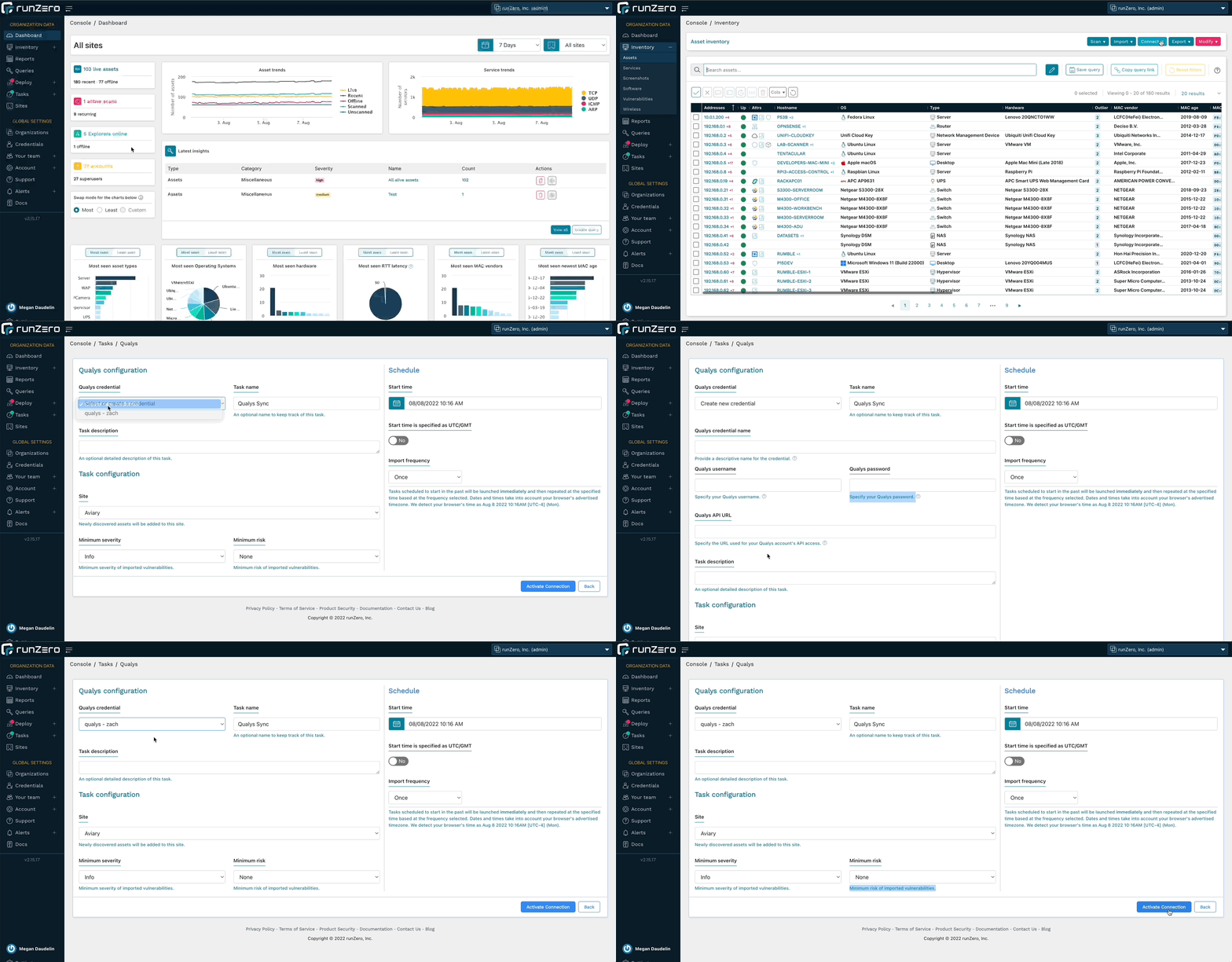
runZero Enterprise users can now enrich their inventory with vulnerability data from Qualys. This allows you to search for Qualys attributes, software entries, and vulnerabilities in runZero, as well as find assets not scanned by Qualys. runZero automatically correlates Qualys assets to runZero assets based on unique fields. Vulnerability data can be viewed in the asset detail view as well as a dedicated inventory tab. Vulnerability attributes include CVSS score, relevant CVEs, vulnerability description, and any recommended remediations.

To get started, set up a connection to Qualys.

Qualys integration

Release notes

The runZero 3.0 release includes a rollup of all the 2.15.x updates, which includes all of the following features, improvements, and updates.

New features

  • Rumble is now runZero and the product UX has been updated to match.
  • runZero Enterprise customers can now sync asset and vulnerability data from Qualys VMDR.
  • Users can now specify a Default Organization in the profile settings page.
  • A custom query to find DrayTek Vigor routers has been added.
  • The Organization API now supports asset merging.

Product improvements

  • Outlier calculations and insight queries now automatically run as daily analysis tasks.
  • Outlier calculations and insight queries can be regenerated on demand using the Metrics menu on the Tasks overview page.
  • Merging assets with foreign attributes from the same source now retains all sets of foreign attributes.
  • Software entries imported from SentinelOne and Tenable now report their service addresses.
  • The Software and Vulnerabilities datatables now have a “view more details” button.
  • The Asset and Service attributes reports can now be filtered by Site.
  • API keys are now shown hidden by default and can be copied to the clipboard through a click.
  • Vulnerability details are now available on the Vulnerability Inventory screen.
  • Improved ability to extract Microsoft Windows information from web services.
  • Improved ability to extract information from NetBIOS, including new detection of Domain Controller roles.
  • Hosted Zone scan limits have been increased.
  • The runZero Explorer now logs configuration file loading and reports any syntax errors.
  • Hostname identification from LDAP responses has been improved.
  • Filtering of non-unique MAC addresses has been improved.
  • Inconsistent SNMP data handling has been improved for certain classes of devices.
  • The API now returns all attributes, sources, and subnets for a single asset.
  • The runZero Explorer now runs as a delayed auto start process on Windows to increase reliability after reboots.
  • The Organization Overview report now includes navigation links to return to the top of the report.
  • Click-to-copy functionality has been restored for MAC addresses displayed on inventory pages.
  • Asset export query errors now return HTTP 400 status code with descriptive bodies.

Performance improvements

  • The Queries datatable has been redesigned and is now more performant.
  • The Route Pathing report is now more performant and aborts early in out-of-memory scenarios.
  • Processing speed for large Nexpose and Tenable imports has been improved.
  • Improved support for processing very large scans.
  • Improved performance of the software and vulnerabilities tables.

Fingerprinting changes

  • Improved operating system fingerprints for Amazon, Azure, and GCP integrations.
  • Improved operating system fingerprints for Red Hat Enterprise Linux / CentOS, Fedora, Rocky, and Ubuntu releases.
  • Improved fingerprints for Windows operating system.
  • Added the ability to fingerprint McAfee ePolicy Orchestrator (ePO) and Agent.
  • Improved NetBIOS, NTLM, and LDAP fingerprinting logic.
  • Improved coverage for networking gear, including vendors Cisco, Dell, and Extreme Networks.
  • Improved NTP banner fingerprints.
  • Printer detection has been improved.
  • OS fingerprinting will now use Rapid7 fingerprints, when Rapid7 is the only data source.
  • Additional support for products by 2N, Axis, D-Link, DrayTek, FortiNet, Foscam, FrontRow, Hisense, Impinj, Kentec, OleumTech, Schneider Electric, SEL, Synology, and VMware.

Integration improvements

  • Improved hostname-based merging for Rapid7 imports.
  • Improved support for processing very large Rapid7 imports.
  • Software will now be populated from Rapid7 imports.
  • Rapid7 foreign attributes have been adjusted for clarity.
  • Services will now be populated from Censys.
  • The InsightVM integration now supports larger imports.

Bug fixes

  • A bug in the AWS Configuration UI causing the “Lambda instances” option to not persist has been resolved.
  • A bug that could prevent external users from being directed to their main SSO login page has been resolved.
  • A bug which could cause stale software entries to be retained has been fixed.
  • A bug in the Insights table which could render very large buttons has been fixed.
  • A bug that could lead to a 500 error when accessing the users endpoint of the organization API has been resolved.
  • A bug that could cause tooltips to persist on the screen has been resolved.
  • A bug that could cause the vulnerabilities table to appear empty when sorted by the details column has been fixed.
  • A bug that could cause the HTTP probe to abort early has been resolved.
  • The asset tag update and bulk asset tag update APIs now work as documented.
  • Fixed a bug which prevented all org admins from deleting other users.
  • The User Last Activity date now shows the correct date.
  • A bug that could prevent connector tasks from running in parallel while connecting to third-party APIs has been resolved.
  • A bug that prevented organization administrators from deleting other users has been resolved.
  • A bug affecting inventory multi-select operations has been resolved.
  • A bug preventing inventory column selection has been resolved.
  • A bug that could indefinitely stall a task has been resolved.
  • A bug affecting license warning banners has been fixed.
  • A bug affecting macOS Explorer upgrades on M1 systems has been fixed.
  • A bug that prevented importing VMware assets has been fixed.
  • When a templated task fails due to an Explorer being unavailable, copying the failed task now retains the connection to the template.
  • A bug in the Overview report which showed blank addresses for Unscanned assets has been resolved.
  • A bug that caused scan copies to get assigned to a different site has been resolved.
  • A bug that prevented OS icons from showing on inventory tables has been resolved.
  • A bug that prevented copying or updating Nessus connector tasks has been resolved.
  • A bug that could lead to an error in the External Asset Report when no assets were present has been resolved.
  • A bug that could cause the Export API to return a 500 instead of 400 for invalid queries has been resolved.
  • A bug that caused some Explorer updates to fail on Windows has been resolved.

About Version 2 Digital

Version 2 Digital is one of the most dynamic IT companies in Asia. The company distributes a wide range of IT products across various areas including cyber security, cloud, data protection, end points, infrastructures, system monitoring, storage, networking, business productivity and communication products.

Through an extensive network of channels, point of sales, resellers, and partnership companies, Version 2 offers quality products and services which are highly acclaimed in the market. Its customers cover a wide spectrum which include Global 1000 enterprises, regional listed companies, different vertical industries, public utilities, Government, a vast number of successful SMEs, and consumers in various Asian cities.

About runZero
runZero, a network discovery and asset inventory solution, was founded in 2018 by HD Moore, the creator of Metasploit. HD envisioned a modern active discovery solution that could find and identify everything on a network–without credentials. As a security researcher and penetration tester, he often employed benign ways to get information leaks and piece them together to build device profiles. Eventually, this work led him to leverage applied research and the discovery techniques developed for security and penetration testing to create runZero.

×

Hello!

Click one of our contacts below to chat on WhatsApp

×