

Skip to content

runZero 3.2: A 365-degree view of your Microsoft environment

What’s new with runZero 3.2?

  • Integrations with Microsoft 365 Defender and Microsoft Intune
  • Query and report on Active Directory users and groups
  • Fingerprint updates
  • User experience improvements

Complete visibility into your Microsoft assets

Over the last few months, runZero has added support for Microsoft Azure cloud assets, Azure Active Directory and on-premise Active Directory users, groups, and assets, in addition to a community integration with Microsoft Sentinel. The runZero 3.2 release fills in the missing pieces by bringing endpoint visibility into the runZero inventory through new integrations with Microsoft 365 Defender and Microsoft Intune. runZero Enterprise users can view, search, analyze, export, and alert on attributes from the Defender and Intune metadata.

Mobile device management (MDM) solutions have become essential to organizations with a remote or transient workforce because of their ability to manage and secure devices even when they aren’t on the corporate network. Similarly, endpoint detection and response (EDR) platforms are commonly used on all sorts of assets for security monitoring and automatic response. While these IT management and security tools are an important part of many security stacks, reviewing what has been onboarded to those sorts of solutions only tells you about the devices that someone is already responsible for. Those lists can’t tell you about all the assets on your network that are unprotected or unmanaged, or all the assets disconnected from your network that haven’t been scanned.

Unprotected and unmanaged devices are the bane of many organizations, and runZero can help you find them. Quickly identify unmanaged assets through a runZero query: filtering on source:runzero AND NOT (source:ms365defender OR source:intune) will return a list of assets that were found by your Explorers, but are not registered onboarded to Defender or Intune.

The inverse of this query can be used to ensure off-network assets are included in your asset inventory: (source:ms365defender OR source:intune) AND NOT source:runzero. This will give you a list of targets that may be missing from your scans and can ensure you’re gathering all the available network and asset data.

With runZero’s unmatched active network scanning and an ever-growing list of integrations, you’ll have a complete asset inventory at your fingertips. To get started, set up a connection to Microsoft 365 Defender or Microsoft Intune.
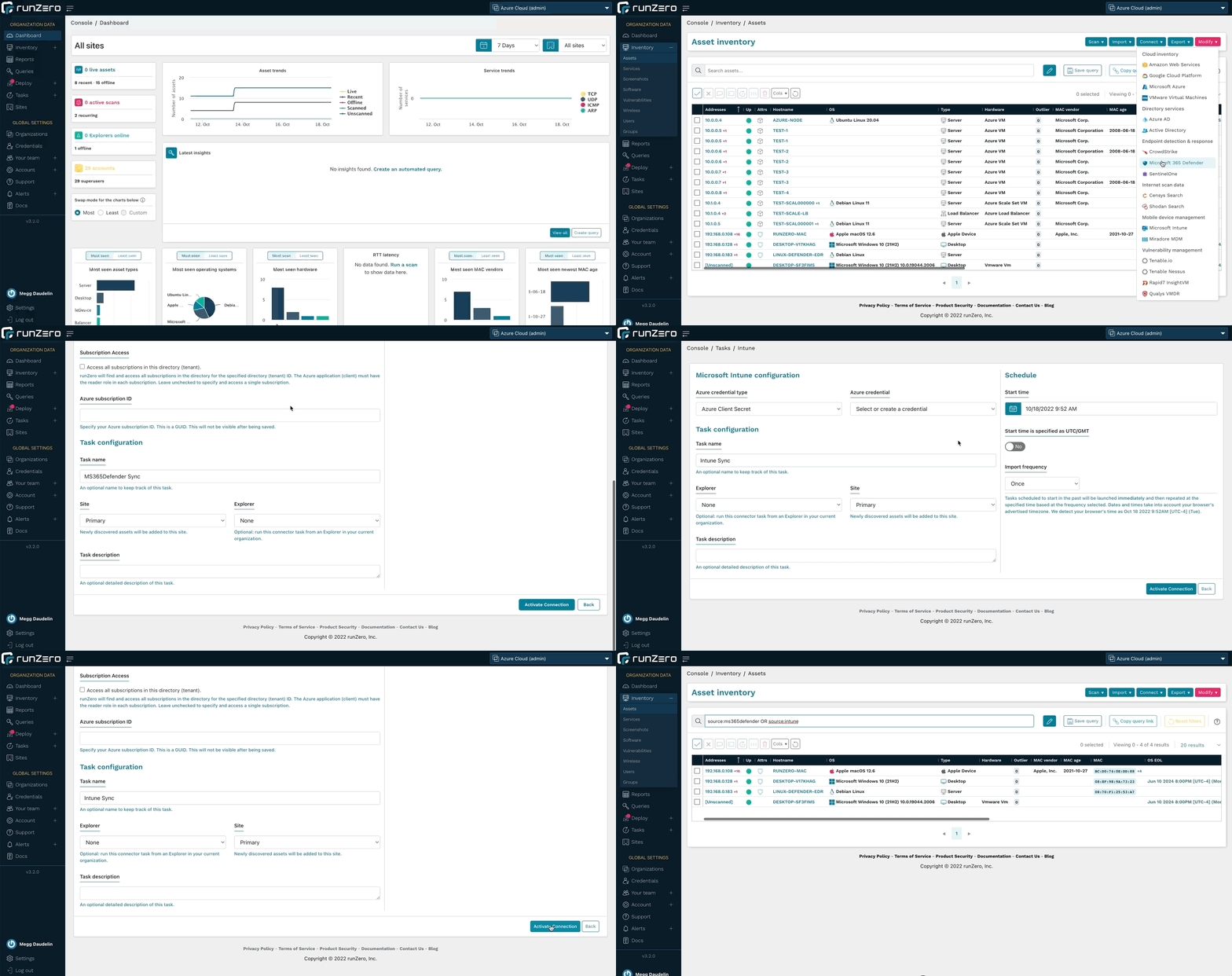
Microsoft 365 Defender and Microsoft Intune integrations

Query and alert on Active Directory users and groups

In addition to running searches in the Users and Groups inventories, runZero Enterprise users can leverage the Azure AD or Microsoft Active Directory integrations to quickly find accounts that match specific parameters. Quickly identify expired, disabled, or locked accounts, as well as managed service accounts and accounts with non-expiring passwords. These queries are included in the Query Library and can also be used to create alerts.

The Organization Overview report has also been updated to include counts of users and groups for the whole organization as well as per site.

Run queries about AD users or create an alert rule to find accounts of interest.
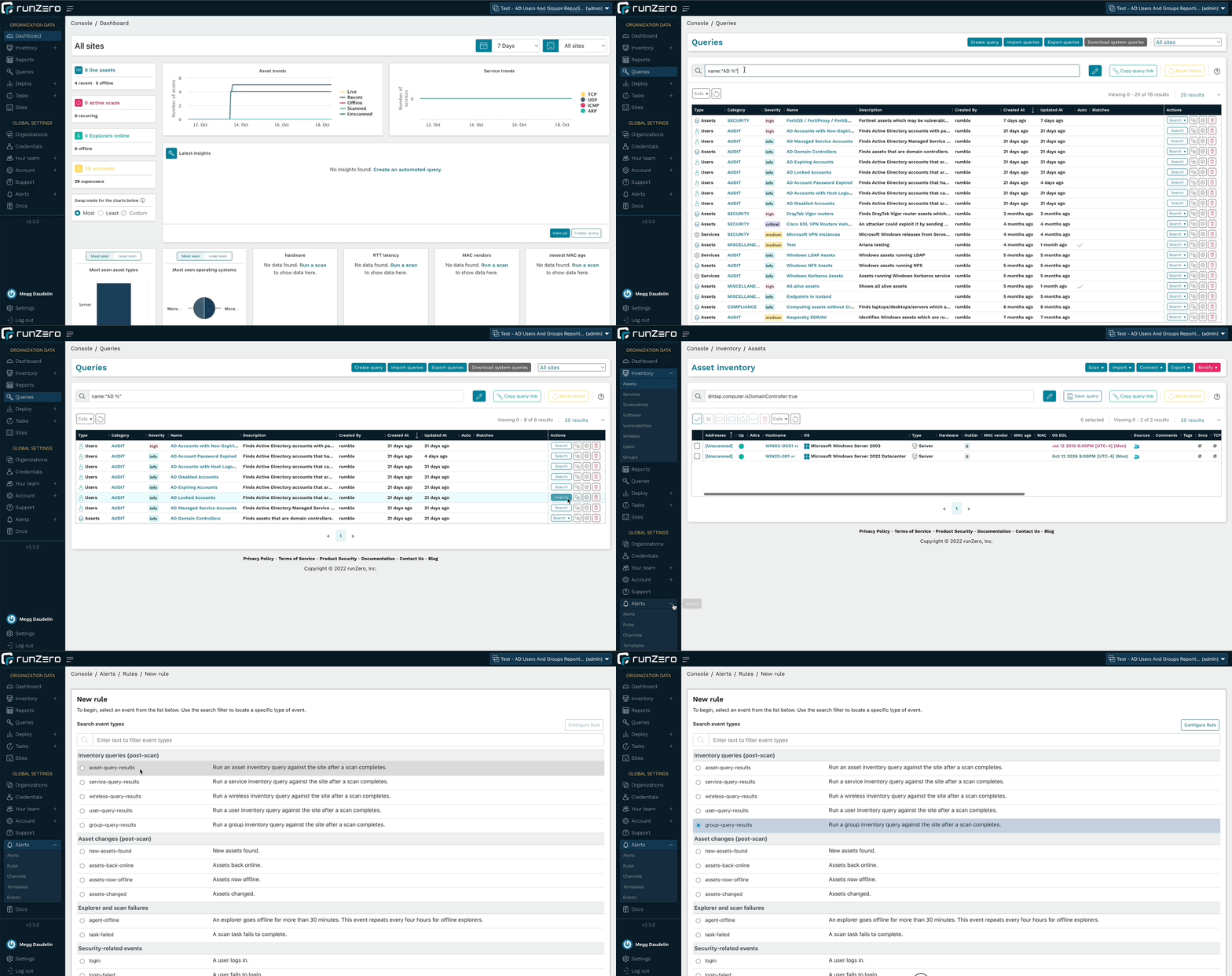
Query and Alert on AD Results

Fingerprinting Microsoft assets

runZero includes fingerprints for the metadata returned by the Microsoft integrations. This leads to more accurate operating system and hardware data within the runZero inventory. These fingerprints cover every aspect of the Microsoft ecosystem, from Azure cloud VMs to off-network endpoints running Microsoft Defender.

In addition to Microsoft fingerprints, runZero has also improved the coverage of Tenable.io and Nessus assets, public and private AWS AMI images, and IMAP services. Additional support was added for products by Advidia, Aiphone, Apple, ARRIS, Fortinet, Honeywell, iDevices, Lutron, Midnite Solar, Netgear, Sapling, SEH, Silex, Yeelight.

User experience improvements

The 3.2 release includes several changes to the user interface to improve the performance of the runZero console, as well as a change to how page navigation transitions happen. As a result, the pages will load faster as you move between sections like the inventories and asset details pages. Additionally, the asset details page provides better performance and efficiency when loading all of the details for an asset.

Enhancements have also been added to make using the data easier than ever. On the asset details pages, the “last loaded” timestamp indicates when the asset details were loaded, and a refresh button has been added to be able to quickly reload the data without refreshing the whole webpage. The Vulnerabilities and Software tables on these pages now perform and load faster. Additionally, the navigation list for the Services table now displays the protocols and ports as a navigation tree to make finding the information you’re looking for simpler and a button has been added to quickly bring you back to the top of the page from the services table. As we continue to make progress on the architectural modernization of the runZero Console, you will see improvements to the performance and user experience of the product.

Asset Details Updates

Release notes

The runZero 3.2 release includes a rollup of all the 3.1.x updates, which includes all of the following features, improvements, and updates.

New features

  • runZero Enterprise customers can now sync assets from Microsoft 365 Defender.
  • runZero Enterprise customers can now sync assets from Microsoft Intune.
  • Fingerprint updates.

Security fixes

  • Three stored cross-site scripting vulnerabilities were identified and fixed as part of our annual third-party security assessment.
  • A bug that could lead to stored cross-site scripting in the scan templates view was fixed. This issue could be exploited by an authenticated, but unprivileged user to take over the session of another authenticated user.
  • A bug that could lead to stored cross-site scripting in the SSO group mappings view was fixed. This issue could be exploited by an authenticated superuser to take over the session of another authenticated user.
  • A bug that could lead to stored cross-site scripting in the team view was fixed. This issue could be exploited by an authenticated, but unprivileged user to take over the session of another authenticated user.

Product improvements

  • SNMPv2 options have been moved to the Probes tab (now labeled Probes and SNMP).
  • The toggle switch to use or not use SNMP now correctly reflects whether it is overridden by the “Use defaults” option on the Probes tab.
  • The asset details pages now include a “last loaded” time indicator and the ability to refresh the page data.
  • Alert notifications, user invitations, and password reset emails are now sent from the runzero.com domain name instead of rumble.run.
  • The rumblectl utility now has a diagnostics command to run or save a diagnostic script for self-hosted customers to collect information for runZero support.
  • Inventory pages now offer “all” and “none” column visibility selection options.
  • The search keyword os_eol_expired is now supported on the Assets inventory.
  • The rumblectl command can now be used with self-hosted deployments to configure additional superusers.
  • Email notifications are now enabled for non-recurring Organization Overview reports.
  • Relative time searches now accept negative numbers.
  • Scan tasks and templates now allow empty SNMPv1 and SNMPv2 community strings.
  • Credential validation has been improved to prevent common misconfigurations.
  • Support for Explorer hosts running virtual machines has been improved.
  • MAC vendor display behavior on inventory datagrids has been improved.
  • Tooltips on datatable icons have been improved.
  • Changes to directory users and groups are now included in the task change report.
  • Error messages related to API tokens have been improved.
  • Asset exports now filter subnet results to those containing the assets’ addresses.
  • Improved LDAP connector and probe logging.
  • Added group_count keyword to Users search.
  • Improved grouping of inputs in connector forms.
  • Search keyword has_group is now supported on the Users page.

Performance improvements

  • The asset details pages have been redesigned for improved performance.
  • Improved performance of asset exports with many subnets.
  • Improved loading times of the directory groups inventory page.
  • Improved loading times of the inventory screens, including multi-page selection.

Fingerprinting changes

  • Improved Active Directory collected data and fingerprint coverage.
  • Improved LDAP attributes for Active Directory objects.
  • Added new queries for quickly surfacing various Active Directory scenarios.
  • Improved fingerprinting coverage of Azure AD assets.
  • Improved fingerprinting coverage of Tenable assets.
  • Improved fingerprinting coverage of public AWS AMI images.
  • Added custom fingerprint support for private AWS AMI images.
  • Improved fingerprinting coverage of IMAP services.
  • Additional support added-or-improved for products by Advidia, Aiphone, Apple, ARRIS, Fortinet, Honeywell, iDevices, Lutron, Midnite Solar, Netgear, Sapling, SEH, Silex, Yeelight.

Integration improvements

  • Recent users from Microsoft Intune, SentinelOne, and CrowdStrike are now included on the asset details page.
  • The Azure AD integration now imports additional assets and no longer requires a Microsoft Intune license.
  • The Azure AD integration can now be configured to optionally import assets, users, and groups.
  • The Active Directory integration service options have been adjusted for consistency.
  • Directory users and groups can now be included in custom queries.
  • The Organization Overview report now contains summary information for directory users and groups when present.
  • The Tenable.io integration now supports a configurable API URL.
  • The Active Directory integration now supports optional import of assets, users, and groups.
  • The minimum TLS version supported by new Active Directory credentials has been increased from TLS 1.0 to TLS 1.2, with a configurable option to support older TLS versions.
  • The handling of Qualys concurrency and rate limiting has been improved.

Bug fixes

  • A bug that could prevent repeated import of task data that includes directory users and groups has been resolved.
  • A bug that caused subnet sampling and screenshots to be enabled for all scan tasks has been resolved.
  • A bug that could prevent modifying the maximum concurrent scans setting was resolved.
  • A bug that could result in an inaccurate task count on the credentials page was resolved.
  • A bug that could result in inaccurate searches by credential on the tasks page was resolved.
  • A bug that could result in inaccurate reporting of credential reuse was resolved.
  • A bug that could cause certain browser extensions to prevent configuring scans was resolved.
  • A bug that could prevent reuse of SNMP credentials for recurring scans was resolved.
  • A bug that could prevent initializing a scan in some cases was resolved.
  • A bug that prevented recurring scans from being saved in some cases was resolved.
  • A bug that prevented the first_seen timestamp from being set has been fixed.
  • A bug that could cause large Qualys imports to fail has been resolved.
  • A bug that prevented import of Azure AD users and groups when missing an active Intune license has been resolved.
  • A bug that could result in partial import of Azure AD users and groups has been resolved.
  • A bug which prevented the report.changed value from working in notification rule templates has been fixed.
  • A bug that prevented the use of client tokens to authenticate to the API has been fixed.
  • A bug that could cause insight queries for hosted zones to fail has been resolved.
  • A bug in the Shodan integration asset-mode query has been resolved.
  • A bug that could cause MAC vendor names to be cut off in datagrids has been resolved.
  • A bug that could result in missing Shodan services has been resolved.
  • A bug that incorrectly imported Active Directory Managed Service accounts as assets has been resolved.
  • A bug that could cause the Switch Topology report to not show all switches in certain situations has been resolved.
  • A bug that could result in a 500 error when exporting assets from sites with many assets and/or subnets has been resolved.
  • A bug that could result in UI elements becoming unresponsive has been resolved.
  • A bug that could prevent some service values from being saved has been resolved.
  • A bug that could result in all subnet tags being applied to exported assets has been resolved.
  • A bug that could result in missing Shodan services has been resolved.
  • A bug that could cause Azure AD imports to fail for certain configurations has been resolved.
  • A bug that could cause excessive export sizes has been resolved.
  • A bug that could obscure task errors from the task log has been resolved.

About Version 2 Digital

Version 2 Digital is one of the most dynamic IT companies in Asia. The company distributes a wide range of IT products across various areas including cyber security, cloud, data protection, end points, infrastructures, system monitoring, storage, networking, business productivity and communication products.

Through an extensive network of channels, point of sales, resellers, and partnership companies, Version 2 offers quality products and services which are highly acclaimed in the market. Its customers cover a wide spectrum which include Global 1000 enterprises, regional listed companies, different vertical industries, public utilities, Government, a vast number of successful SMEs, and consumers in various Asian cities.

About runZero
runZero, a network discovery and asset inventory solution, was founded in 2018 by HD Moore, the creator of Metasploit. HD envisioned a modern active discovery solution that could find and identify everything on a network–without credentials. As a security researcher and penetration tester, he often employed benign ways to get information leaks and piece them together to build device profiles. Eventually, this work led him to leverage applied research and the discovery techniques developed for security and penetration testing to create runZero.

Why unmanaged devices are a challenge for IT and security programs

Unmanaged devices pose a significant challenge for many organizations. As the number of devices connecting to their networks increase, security and IT teams can easily lose track and sight of these devices. As a result, organizations struggle with so many devices flying under the radar, leaving them unprotected and creating potential footholds into a network.

Unmanaged devices can take many forms:

  • Shadow IT: Imagine a developer’s test box set up with permission of the engineering team but without central governance: The machine is not on the Active Directory, not getting group policies, maintenance updates, or security controls. Because it doesn’t allow access via domain admin passwords, it’s off the radar for most CMDBs.
  • Rogue devices: Rogue devices may include a WiFi access point set up by an employee to get better wireless reception in their corner of the office. These are hard to detect because IT cannot install agents on them and doesn’t find them with an authenticated scan because SNMP strings won’t work on the device.
  • Orphaned devices: These devices were once managed but have fallen off the radar, for example an open-source web app run by a department that has since been superseded by a SaaS application but is now continuing its zombie life without patching or oversight.

Asset inventory of unmanaged devices tends to be particularly difficult for Internet of Things (IoT) and operational technology (OT) devices, such as programmable logic controllers (PLCs) in a factory. In an enterprise environment, these devices include printers, IP phones and uninterruptible power supplies (UPS). These devices often don’t take centrally managed administrative credentials and don’t allow IT teams to install an agent on them. That’s why they are often not covered by the enterprise inventory database.

Rogue devices slow down IT troubleshooting

The efficacy of IT helpdesks is often measured by how many tickets they can service. Anything that slows down troubleshooting impacts, not only that metric, but also the productivity of users and entire departments. An IT helpdesk person recently shared that they were investigating a networking issue with spotty connectivity for some users. The root cause was a rogue device with a static IP address that conflicted with other devices that received their address via DHCP in the same range. Without good asset inventory, that investigation would have turned into a wild goose chase.

Accidental network bridges bypass firewalls

In another case, a critical manufacturing line was shut down due to ransomware. Investigations showed that a rogue device had bridged from the IT to the OT network, enabling attackers to bypass a firewall that had been put in place to segment the networks. The security team lacked visibility into network bridges of unmanaged devices, which is why the issue wasn’t identified ahead of time.

Unmanaged devices hinder incident investigations

Analysts in a security operations center (SOC) need to quickly and efficiently work through alerts. In one case, an analyst received an alert that an internal IP address was communicating with a known-bad IP, notably the command & control (C2) server. However, neither the SIEM nor the CMDB had any record of the bad/poor IP on the network, nor did the vulnerability management or EDR consoles. The device turned out to be an IP camera that had been compromised by malware because it was using default credentials. With good asset inventory that tracks IoT devices, the analyst would have saved time resolving this incident as well as been able to find other devices of the same make and model to check if they were using default credentials.

End-of-life devices are bad for uptime and potentially vulnerable

Proactive IT lifecycle programs look for devices on the network that are approaching their end-of-life (EOL) or are outside the warranty period, replacing the devices before they become an issue. Manufacturers often no longer provide functional and security fixes for these devices, making them much more risky and difficult to service if something goes wrong. If unmanaged devices are not inventoried, IT and security teams are unable to get ahead of potential risks and issues. In addition, finance teams benefit from knowing which devices are fully depreciated and when a new budget is required to replace them.

Shadow IT makes network updates and migrations more risky

Carrying out updates and migrations of networks with a lot of shadow IT tends to be riskier because of potentially unknown applications and services. Having a full picture of all managed and unmanaged devices will de-risk the project because each part of the infrastructure can be planned and accounted for.

Rogue devices complicate governance of security controls

Proper governance dictates that you have security controls on every device. It’s impossible to figure out coverage gaps without knowing all of the devices on your network.

Once you have a full inventory of devices on your network, overlay the data from security controls and look for gaps, for example, finding all Windows machines missing CrowdStrike or other EDR systems. This can be a huge step in getting ahead of security issues.

Unmanaged devices are often the first foothold for attackers

Attackers often scan the network for any outliers: machines that have lower patch levels, unusual services running on ports, and unique pieces of software not found on the rest of the network. These typically become great entry points for an attack, because these machines tend to be more easily exploitable, are less likely to have security controls, and if orphaned, don’t have anybody minding the store. Identifying unmanaged devices to either update or decommission them is a great way to reduce your attack surface and mitigate risk.

Unmanaged devices are best discovered with unauthenticated scanning

Authenticated scans and agents are not effective for uncovering unmanaged devices because they require centrally managed credentials to scan or deploy, which are generally not available for rogue, IoT, and OT devices. The best solution is to use an unauthenticated scan as a baseline, then layer other information on top, such as data from your security controls consoles.

runZero scans your network in minutes to identify unmanaged devices

runZero offers free, professional, and enterprise plans to scan your network for unmanaged devices. It scales from home use to Fortune 50 companies. runZero uses a combination of unauthenticated, active scanning and integrations with cloud, virtualization, and security infrastructure to provide full visibility into IT, OT, cloud, and remote devices.

With runZero, you can:

  • Identify rogue devices to accelerate IT troubleshooting
  • Find accidental network bridges that bypass segmentation
  • Conduct asset-centric incident investigations
  • Find operating systems and networking devices that are EOL or out of warranty
  • Plan your network upgrades and migrations
  • Ensure great coverage for security controls
  • Reduce your internal and external attack surface

You can try out runZero for free–no credit card required–for 21 days and up to 50,000 devices. Try our free Starter Edition for up to 255 devices to get more visibility into your small business or home network.

Get runZero for free

Do you know about the unmanaged assets on your network? Find them with runZero.

Get started

Join our team

About Version 2 Digital

Version 2 Digital is one of the most dynamic IT companies in Asia. The company distributes a wide range of IT products across various areas including cyber security, cloud, data protection, end points, infrastructures, system monitoring, storage, networking, business productivity and communication products.

Through an extensive network of channels, point of sales, resellers, and partnership companies, Version 2 offers quality products and services which are highly acclaimed in the market. Its customers cover a wide spectrum which include Global 1000 enterprises, regional listed companies, different vertical industries, public utilities, Government, a vast number of successful SMEs, and consumers in various Asian cities.

About runZero
runZero, a network discovery and asset inventory solution, was founded in 2018 by HD Moore, the creator of Metasploit. HD envisioned a modern active discovery solution that could find and identify everything on a network–without credentials. As a security researcher and penetration tester, he often employed benign ways to get information leaks and piece them together to build device profiles. Eventually, this work led him to leverage applied research and the discovery techniques developed for security and penetration testing to create runZero.

Finding FortiOS, FortiProxy, and FortiSwitchManager assets on your network

News surfaced late last week of a critical authentication bypass vulnerability present in the web administration interface of some Fortinet products. Successful exploitation of this vulnerability (tracked as CVE-2022-40684) via crafted HTTP and HTTPS requests can provide remote attackers with admin-level command execution on vulnerable FortiOS devices including FortiGate firewalls, FortiProxy web proxies, and FortiSwitchManager assets.

What is the impact?

With a CVSS critical score of 9.6, attackers running admin-level commands on compromised assets may have the ability to persist presence, explore connected internal networks, and exfiltrate data. Fortinet is aware of at least one exploit of this vulnerability in the wild, and Bleeping Computer offered a Shodan search showing more than 140k publicly accessible FortiGate devices which may be running vulnerable FortiOS. Additionally, security researchers with Horizon3.ai are planning on publishing an exploit PoC this week. For admins wanting to check if a FortiOS/FortiProxy/FortiSwitchManager asset has been exploited, Fortinet does provide an indicator of compromise (see the “Exploitation Status” section).

Are updates available?

Fortinet has called out the vulnerable FortiOS, FortiProxy, and FortiSwitchManager versions in their advisory and has made updates available for affected products. Admins should ensure that affected models are updated to the latest version as soon as possible. If updates cannot be completed in the near term, Fortinet does provide some mitigation steps (see the “Workaround” section) that can be taken to secure vulnerable assets.

How do I find potentially vulnerable FortiOS, FortiProxy, and FortiSwitchManager assets with runZero?

From the Asset Inventory, use the following pre-built query to locate FortiOS, FortiProxy, and FortiSwitchManager assets that may need remediation:

os:FortiOS or product:FortiProxy or product:FortiSwitchManager

As always, any prebuilt queries are available from our Queries Library. Check out the library for other useful inventory queries.

About Version 2 Digital

Version 2 Digital is one of the most dynamic IT companies in Asia. The company distributes a wide range of IT products across various areas including cyber security, cloud, data protection, end points, infrastructures, system monitoring, storage, networking, business productivity and communication products.

Through an extensive network of channels, point of sales, resellers, and partnership companies, Version 2 offers quality products and services which are highly acclaimed in the market. Its customers cover a wide spectrum which include Global 1000 enterprises, regional listed companies, different vertical industries, public utilities, Government, a vast number of successful SMEs, and consumers in various Asian cities.

About runZero
runZero, a network discovery and asset inventory solution, was founded in 2018 by HD Moore, the creator of Metasploit. HD envisioned a modern active discovery solution that could find and identify everything on a network–without credentials. As a security researcher and penetration tester, he often employed benign ways to get information leaks and piece them together to build device profiles. Eventually, this work led him to leverage applied research and the discovery techniques developed for security and penetration testing to create runZero.

How runZero helps with red team security

It’s cyber security awareness month, which is why we’re doing a series of blogs to help you identify ways to use runZero to boost your security. We’re kicking off the series with ways to integrate runZero into your red team best practices. Red teams test the effectiveness of an organization’s security controls, including those in place to defend networks, endpoint hardware and software, as well as physical locations. Red teaming focuses on the concept that an organization doesn’t know how secure they are until they’re attacked. Therefore, red teams are critical in helping organizations uncover their weaknesses before a real world attacker does, empowering the organization to be proactive instead of reactive. Let’s dig into three important red team security practices, explain their importance, and share how runZero can be best applied to each practice.

Best practice #1: Perform routine assessments

A red team assessment can include more than just penetration testing, it can also include social engineering exercises, physical penetration tests, and threat modeling as well. Tactics, techniques, and procedures (TTPs) that emulate real-world cyber attacks are critical red teaming elements. Routine assessments help keep the company prepared and can expose new vulnerabilities in the software being used or the employees that are accessing the data. Of course, these routines should always include a follow up with the results, but it is important to keep the initial assessment under wraps from the majority of the organization (except perhaps the security team, which should be determined ahead of time when negotiating the scope of assessment) to ensure an authentic representation of the existing security. runZero delivers network visibility that can expose links between assets, helping you determine the severity of risk based on the results. For example, if someone with access to customer data succumbs to a phishing attack, you can identify systems in the network an attacker could have gained access to. runZero also offers vulnerability integrations, which will enrich your asset inventory with your vulnerability scan results. With a centralized view of your assets and their vulnerability results, you can identify high-risk assets and assess the risk to your network. This creates increased value in the security assessment results and may be a great way to encourage more thorough security training throughout the company.

Best practice #2: Record everything

runZero offers more accurate asset information so you can track and identify assets that are connected on the network. This makes those security comparisons easier, as well as the overall identification of what assets are accessible. As your red team conducts security assessments and penetration tests, the team should be recording everything–from the methods used to the assets that were accessed. This allows your team to routinely repeat the process to either validate remediation or mitigation efforts or to look for new weaknesses. Having clear documentation will allow for better analysis, as similar assets can be easily compared for the same security risks. Knowing the assets that can be compromised is critical for identifying so many other issues and risks on your network. Users can be identified making it easier to track:
  • Remote access services
  • Software versions with unique vulnerabilities
  • Individual assets that are linked to sensitive data
Tracking the items listed above can make implementation of stronger security measures easier to execute efficiently.

Best practice #3: Choose the best tools

One of the first things that red teams focus on is reconnaissance. During this initial phase, it is critical to gather as much information as possible from target networks and systems. Discovery usually entails enumerating domains owned by the organization and scanning internal networks to collect information about the devices connected to them. Red teams generally perform both passive and active methods of reconnaissance, leveraging a myriad of tools to support their efforts. With runZero, you can scan public facing and internal assets to gather details about them, like their OS, open services, installed software, and SSH versions. Once the red team has enough information about the target systems, they can leverage this data to find misconfigurations, identify potential vulnerabilities, and better plan their attack methods. As a part of regular penetration tests, the red team is responsible for finding creative ways to exploit vulnerabilities. This means being aware of current system and application vulnerabilities and looking for new vulnerabilities in company software using unique methods to extract data. While this data is ultimately taken back with an intent to strengthen the security against such exploitation, the practice of being able to think like an attacker is valuable to red team practices. Red team exploitation exercises are meant to bring weaknesses in data and network security to light and can result in preventative measures. Exploitation requires choosing the right tools. For the exercise to be as authentic as possible, the tools used often need to balance effectiveness with being undisruptive. Red team methods should safely work with fragile systems with the goal of not raising any alarms or disrupting work flow.

Stay tuned for more

This is the first post for the runZero cyber security awareness month blog series. In this post, we covered best practices of routine assessments and detailed recording. We also went over the importance of vulnerability exploitations and how runZero can be applied to help in your red team endeavors.

About Version 2 Digital

Version 2 Digital is one of the most dynamic IT companies in Asia. The company distributes a wide range of IT products across various areas including cyber security, cloud, data protection, end points, infrastructures, system monitoring, storage, networking, business productivity and communication products.

Through an extensive network of channels, point of sales, resellers, and partnership companies, Version 2 offers quality products and services which are highly acclaimed in the market. Its customers cover a wide spectrum which include Global 1000 enterprises, regional listed companies, different vertical industries, public utilities, Government, a vast number of successful SMEs, and consumers in various Asian cities.

About runZero
runZero, a network discovery and asset inventory solution, was founded in 2018 by HD Moore, the creator of Metasploit. HD envisioned a modern active discovery solution that could find and identify everything on a network–without credentials. As a security researcher and penetration tester, he often employed benign ways to get information leaks and piece them together to build device profiles. Eventually, this work led him to leverage applied research and the discovery techniques developed for security and penetration testing to create runZero.

How runZero helps with red team security

October is Cybersecurity Awareness month! In honor of this event, we’re releasing a security assessment series that can help you utilize runZero to boost your security measures. We’ll go over some best practices for red, blue, and purple teaming as well as practical uses of runZero. To kick off our series for this year, we are presharing our planned topics so you can stay on top of all the content that will be dropping this month. 

We will be updating this blog post throughout the month with an overview of the key points for each topic. Subscribe to our blog to stay up to date with our latest posts.

Red teaming

Our red team blog was published on October 11 and covered three key practices: routine assessments, recording assessment data, and vulnerability exploitation. These practices are key to keeping your security team aware of cyber threats and ensuring a successful procedure is in place in the event of a real cyber attack. The digital landscape is full of new, creative exploitations, so it’s important to stay cyber smart. Check out the details on our red team blog and see how runZero can support these practices.

Blue teaming

Our blue team blog will be published on October 18. This blog will highlight three key practices for your defensive cyber security processes. A high-level overview of the discussion points will be added here upon the blog publication.

Purple teaming

Our purple team blog will be published on October 25. This blog will highlight three key practices for hybrid cyber security processes. A high-level overview of the discussion points will be added here upon the blog publication.

About Version 2 Digital

Version 2 Digital is one of the most dynamic IT companies in Asia. The company distributes a wide range of IT products across various areas including cyber security, cloud, data protection, end points, infrastructures, system monitoring, storage, networking, business productivity and communication products.

Through an extensive network of channels, point of sales, resellers, and partnership companies, Version 2 offers quality products and services which are highly acclaimed in the market. Its customers cover a wide spectrum which include Global 1000 enterprises, regional listed companies, different vertical industries, public utilities, Government, a vast number of successful SMEs, and consumers in various Asian cities.

About runZero
runZero, a network discovery and asset inventory solution, was founded in 2018 by HD Moore, the creator of Metasploit. HD envisioned a modern active discovery solution that could find and identify everything on a network–without credentials. As a security researcher and penetration tester, he often employed benign ways to get information leaks and piece them together to build device profiles. Eventually, this work led him to leverage applied research and the discovery techniques developed for security and penetration testing to create runZero.

×

Hello!

Click one of our contacts below to chat on WhatsApp

×