Skip to content

Searching for a password manager? Discover the best review sites


Suppose you were Stefan Thomas, a San Francisco-based German programmer who is left with two guesses to figure out a decade-old password to access his $321M fortune. In that case, you’d probably be banging your head against the wall trying to figure out why you didn’t use a password manager back then.

These days password managers are an everyday essential. Choosing the right one for you — out of all available options — can be tricky, especially if you have no experience with password managers. And that’s when we often turn to review sites.

This post is your shortcut to understanding how to use review and comparison sites to your advantage so you can make the best possible decision.

What makes a reliable password manager comparison site?

Transparency of evaluation and methodology

The cornerstone of any reliable review site is openness about its editorial integrity and review criteria. Such sites should be transparent about what they value in a password manager or any other app in terms of features or functionalities. This also includes being frank about their evaluation methodologies and review timelines.

Up-to-date information

Any reputable comparison site should update its reviews to reflect how a product or service has changed. The reviewers should look to include the latest features or any other disclosures that may determine the user’s choice in either buying or avoiding the product.

Disclosure of conflicts of interest

A comparison site that wants to be taken seriously or considered as trustworthy should be open about its connections and relationships with various developers. Ultimately, the site stands more to gain than lose when it comes to disclosure of conflict of interest.

Key password manager features to consider

Not all password managers are created equal. When choosing the best fit for your needs, here are the essential features you should consider.

Encryption

The foundation of any password manager worth its salt is encryption. Put simply, encryption scrambles data into a code that only the correct key can decode. Strong encryption means that the likelihood of hackers accessing your passwords in the password manager’s vault is essentially zero.

Device sync

We live in a multi-device world, where switching between smartphones, tablets, and computers is a fact of life. A password manager that is worth your buck should offer seamless sync across devices and platforms.

Password generation

Weak passwords are the leading cause of unauthorized access. It’s no secret that we—humans are terrible at password creation. Machines, on the other hand, usually excel there. When considering a password manager, look for a built-in password generator.

Extra features

Password managers come packed with a variety of advanced security features. To get the best bang for your buck, look for a password manager that offers email mask creation, allows you to add emergency contact, and notifies you if your data ever appears in a data breach.

Secure sharing

There are times when you need to share a password with a family member or colleague. There’s no way around it. So be sure to look for a password manager that provides a secure way to share passwords and other sensitive information that you might keep in its encrypted vault.

Built-in Multi-factor authentication (MFA)

Multi-factor authentication (MFA) is another feature that you might want to look for in a password manager because it adds an extra layer of security. You likely already know what MFA is, but just to recap, it’s a security method that requires users to present multiple proofs of identity. So with MFA enabled along with a master password you’d need to enter an additional code that might be sent to you via text, email, or an authentication app.

User-friendly interface

Security tools are most effective when used consistently. And so that’s exactly where a clean, intuitive user interface can make or break a product—a good user interface will not dissuade you from using the app.

Top review sites for password managers

Here, we’ve presented you with some of what we consider leading review sites. Each of them offers unique insights that can help you decide on a password manager:

  • TechRadar is known for its balanced approach, offering detailed comparisons and honest takes on products that caters to both tech enthusiasts and everyday users. They focus on usability, security features, and the overall value.

  • CyberNews focuses more on cybersecurity. They tend to test encryption strength and privacy protections. It is an ideal comparison site for those who are more into the technical details of what’s going on behind the hood.

  • Forbes Advisor as the brand name suggests, blends financial and tech insights, assessing password managers through the lens of security and cost-effectiveness.

  • VPNOverview seems to emphasize user experience, ease of use, compatibility, and daily application. Their reviews offer readers straightforward, practical advice on choosing a password manager for their daily online routines.

  • All About Cookies focuses more on privacy and data protection. It also tends to explore how password managers handle and secure user data. Its reviews cater for the privacy-conscious.

  • The Wall Street Journal provides in-depth analysis of software utility with a consumer electronics spin to it. Their thorough reviews and comparisons are meant for readers seeking expert opinions.

  • How-To Geek is known for making technology accessible. They break down the features and functionalities of password managers and so many other apps into easy-to-understand reads. Their approach is perfect for those new to password manager or those looking for a down-to-earth explanation.

  • Engadget provides a variety of reviews, offering a broad overview of password managers on the market. Their generalist approach is ideal for readers starting their search and looking for a list of available options.

  • FrAndroid provides detailed reviews for the French-speaking audience, focusing on the user interface, features, and language support. Their reviews and comparisons are invaluable for French users seeking a password manager that meets their specific needs.

  • Tom’s Hardware Italia offers comprehensive coverage tailored to Italian users. Their reviews are meticulously crafted to address the unique things Italians value in password security.

Wrapping up

Choosing a password manager that’s right for you can be tricky. With so many options and opinions out there, we hope this article made it a little bit easier for you to make an informed choice on which reviews sites to consider.

About Version 2 Digital

Version 2 Digital is one of the most dynamic IT companies in Asia. The company distributes a wide range of IT products across various areas including cyber security, cloud, data protection, end points, infrastructures, system monitoring, storage, networking, business productivity and communication products.

Through an extensive network of channels, point of sales, resellers, and partnership companies, Version 2 offers quality products and services which are highly acclaimed in the market. Its customers cover a wide spectrum which include Global 1000 enterprises, regional listed companies, different vertical industries, public utilities, Government, a vast number of successful SMEs, and consumers in various Asian cities.

About NordPass
NordPass is developed by Nord Security, a company leading the global market of cybersecurity products.

The web has become a chaotic space where safety and trust have been compromised by cybercrime and data protection issues. Therefore, our team has a global mission to shape a more trusted and peaceful online future for people everywhere.

Saily Review: Evaluating the New eSIM App from Nord Security

Here at Nord Security, we take great pride in the fact that we offer a wide range of quality cybersecurity products and services, including NordPass and NordVPN. Each product we deliver has its own identity and is developed by a dedicated team, making it feel like each is a unique division within the company.

This actually allows us to try something a bit out of the ordinary — right now, the NordPass team will give an honest review of Nord Security’s latest product — Saily. Why? Because we’re not shy about critiquing our colleagues’ work. In fact, by sharing constructive criticism, we can all better understand where we stand, which helps us deliver an excellent experience for our users. So, let’s get started.

First things first — what is Saily?

Saily is an eSIM application that allows users to switch between mobile carriers and plans on their devices without dealing with any physical SIM cards. In other words, it enables you to activate a cellular data plan, just like with a traditional SIM card, but without having to buy or insert a new card.

Since no physical SIM cards are involved and everything happens in the app, Saily lets you quickly compare and select data plans from different vendors, so you don’t have to sort through a bunch of SIM card packages and plan details. Basically, it’s meant to be a quick and easy way to switch your mobile carrier whenever you like.

Why would you want to use this app?

While the description itself might already give you some ideas about how Saily could be helpful to you, we will now explore some of the key benefits in more detail.

Saily is designed for anyone traveling to a different country, but it’s especially useful for frequent travelers like business professionals and globetrotters. With Saily, you can keep your phone number and use the app to get as much cellular data as you need during your trip.

For those who need to stay connected while traveling, Saily eliminates the hassle of switching SIM cards or paying for costly international roaming plans. So, for global sales managers, for example, it’s an affordable way to stay in touch with clients and teams almost anywhere they are at the moment. For world travelers, it’s a way to get internet data for maps and guides, helping them make the most of their trips.

How does Saily work?

We were really impressed by how user-friendly the app is. Creating your account is incredibly simple and takes less than a minute. But the best part is how quickly you can switch mobile carriers and choose a plan — it’s just as fast!

The way it works is you browse the list of countries or use the search feature to find a specific one, compare the carriers and plans for that location, pick the one that suits you best, and you’re good to go.

Saily is compatible with both iOS and Android, so you can download the app from the AppStore or Google Play in no time. If you have any service-related questions, there’s a 24/7 customer support chat ready to help. However, the app is so intuitive and easy to use that you’ll probably never need customer support for app-related issues — perhaps only for specific carrier questions.

What about the price of Saily?

According to user feedback from multiple platforms, Saily is among the most cost-effective eSIM apps on the market, offering great value.

First, Saily is available in more than 150 countries and territories, including the United States, Brazil, Australia, Japan, Turkey, and China. Creating a Saily account is free, and the price of your plan depends on the country, carrier, and plan you choose. The most affordable plans start at just $2.49.

Speaking of data plans, Saily offers several options for the carriers in each country. You can choose anything from 1GB for 7 days to 20GB for 30 days, depending on your needs. For payment, you can choose from various options like credit or debit cards, Google Pay, Apple Pay, and PayPal.

Quick summary

  • Functionality

    Changing mobile carriers and selecting different data plans on a device

  • Plans

    Multiple data plans, ranging from 1GB/7 days to 20GB/30 days

  • Cost

    Starting at $1.99

  • Countries

    150+

  • Compatibility

    iOS, Android

  • Support

    24/7 live chat via the app

  • Payment method

    Credit or debit card, Google Pay, Apple Pay, and PayPal

  • Our score

    4.5/5

Saily is an app that does exactly what it is supposed to do. It lets you switch mobile carriers quickly and use data plans to avoid high roaming costs. This means you can access the internet without a hitch, wherever you are. The app is incredibly user-friendly and requires no expert knowledge to get started.

One drawback is that Saily doesn’t offer unlimited data plans for now, so if you’re traveling for more than 30 days or use a lot of data, you might need to buy additional cellular data plans. We hope this will be addressed in the future, but despite this limitation, Saily is an almost perfect app that delivers on its promise. We’re really proud of the team behind it and are excited to see Saily become the next big product in the Nord Security lineup.

Give it a try and form your own opinion

While our Saily review can give you quite a good understanding of what the app does and how it works, there’s nothing quite like experiencing it for yourself. That’s why we suggest you go to the App Store or Google Play, download and install the Saily app on your device, and try it on your next trip. We think you’ll be pleasantly surprised.

Also, while creating a password for your Saily account, remember to make it unique and strong. Consider using NordPass to generate the password and safely store it, along with all your other passwords and passkeys. For more information, visit www.nordpass.com.

About Version 2 Digital

Version 2 Digital is one of the most dynamic IT companies in Asia. The company distributes a wide range of IT products across various areas including cyber security, cloud, data protection, end points, infrastructures, system monitoring, storage, networking, business productivity and communication products.

Through an extensive network of channels, point of sales, resellers, and partnership companies, Version 2 offers quality products and services which are highly acclaimed in the market. Its customers cover a wide spectrum which include Global 1000 enterprises, regional listed companies, different vertical industries, public utilities, Government, a vast number of successful SMEs, and consumers in various Asian cities.

About NordPass
NordPass is developed by Nord Security, a company leading the global market of cybersecurity products.

The web has become a chaotic space where safety and trust have been compromised by cybercrime and data protection issues. Therefore, our team has a global mission to shape a more trusted and peaceful online future for people everywhere.

What is the Principle of Least Privilege (PoLP)?

In cybersecurity, the principle of least privilege (PoLP) is a concept that states that a user should have the least amount of access privileges possible to carry out. PoLP aims to squash risks associated with unauthorized access and improve the security perimeter generally.

Today, we’re taking a deeper look at the principle of least privilege. We’re showcasing why PoLP is important, how it relates to zero-knowledge principles and how it can help organizations to further improve their overall security posture.

How does the principle of least privilege work?

Technically speaking, the principle of least privilege, which is deeply embedded in the Zero Trust security philosophy, works by simply limiting a user’s (employees) access rights to certain data, applications, resources, and systems — leaving the user with the least amount of privileges that are needed to do their job. However, before the least access principle can be applied in a business setting, it is critical to first assess user roles and responsibilities, in other words, to pinpoint which access rights and privileges are essential for which users. Once the analysis is complete and users are assigned their appropriate access rights, the next step is the continuous management of these permissions. After all, employees come and go, roles change, and so access rights have to be adjusted accordingly.

Why is the principle of least privilege important?

Let’s look at a hypothetical situation. Say an HR employee has access to the human resources management system to update employee records. But if they also have access rights to access the IT infrastructure, which are not essential for their HR-related tasks, the risk of a full-blown data breach increases significantly in the event their account is compromised.

The hypothetical above showcases the principle of least privilege benefits, which include:

  • Reduce the potential attack surface: Limiting user access privileges means fewer opportunities for bad actors to exploit those privileges.

  • Minimize the impact of exploits: Even if a hacker can gain unauthorized access to the user’s account, the security principle of least privilege confines the possible damage.

  • Come closer to adhering to regulatory frameworks such as GDPR and HIPAA: Regulatory frameworks such as GDPR and HIPAA require strict access controls. By applying PoLP and ensuring users have access only to the information and system essential for their tasks, an organization can get closer to being compliant with various regulations.

  • Improve security within the hybrid work environment: In a hybrid work environment, where employees access systems remotely, maintaining strict access controls becomes even more important. Implementing the principle of least privilege ensures that the security risks associated with remote access are reduced significantly.

Zero Trust vs Least Privilege

Zero Trust is a cybersecurity concept built on another simple idea: never trust, always verify. Unlike the traditional security frameworks, Zero Trust Security assumes that threats can come from within as well as outside the network.

At its core, Zero Trust embodies the principle of least privilege by enforcing strict access controls and permissions. Every access or connection request, regardless of origin, is treated as untrusted until verified otherwise. This stringent verification process is an extension of PoLP’s main idea — to provide users with only the necessary access levels.

In practice, Zero Trust treats every access request as if it’s the first request coming from an untrusted network. Each request is always re-authenticated regardless of previous requests or connections. In this sense, you can think of Zero Trust as a dynamic framework while PoLP can be considered static because it provides users with specific access rights that remain the same unless adjusted.

To make the distinction between Zero Trust and PoLP clearer, let’s imagine a high-end office building. In this case, Zero Trust would be the foundation of the building’s security system, which requires employees, regardless of their position, to use an access card to enter the office building and other facilities. The principle of least privilege, in this scenario, could be likened to the specific programming of access cards based on the employee’s role: for instance, providing the IT staff with access to server rooms, while not granting the same privileges to, say, the marketing team.

What is Privilege Creep?

Privilege creep is a term that refers to a user that gradually accumulates more access rights than are required to execute their function. Privilege creeps most often come into being due to role changes that do not trigger an adjustment concerning access privileges. When thinking about organizational cybersecurity, privilege creeps pose a serious risk where unauthorized access to a single account could lead to an enterprise-wide data breach.

Here are best practices when it comes to the principle of least privilege, helping to prevent privilege creeps from materializing:

  • Implement role-based access controls: Clearly define roles and associated permissions to make sure access rights are granted based on the necessities of the job.

  • Conduct regular access reviews: Schedule periodic reviews of user privileges to identify and rectify any discrepancies or excessive access rights.

  • Enforce a Zero-Trust security approach: Adopt a zero-trust policy where no user is trusted by default. Verify every access request, regardless of the user’s position within the organization.

  • Make use of automated tools: Leverage automation for managing access rights. Tools like Privileged Access Management (PAM) systems can help in monitoring and controlling access rights efficiently.

  • Promote security awareness: Educate employees about the risks of privilege creep and the importance of adhering to cyber security protocols.

By proactively managing user permissions and educating employees, you can significantly mitigate the risk of privilege creep and enhance your organization’s overall security posture.

How to Implement the Least Privilege Principle in Your Organization

Adopting the principle of least privilege in your organization can be a lengthy process; however, the juice is well worth the squeeze. Once your organization operates under PoLP, the potential attack surface will shrink significantly. Here are a few best practices when it comes to the implementation of PoLP:

  • Define access requirements clearly: Before adopting the principle of least privileges in your organization, you need to have a clear understanding of the data access needs of various roles within the organization.

  • Implement Role-based access control (RBAC): Once you have a clear understanding of access requirements, setting up RBAC will be a lot easier. You’ll need to create roles based on job functions and assign permissions to these roles rather than for individual users.

  • Utilize Just-In-Time (JIT) privilege access: Enhance security by granting time-limited privileges on a need-to-use basis. Establishing JIT access privileges will restrict the window of opportunity for access to sensitive data, minimizing the risk of insider threats or external breaches that would exploit user access privileges.

  • Enforce Multi-factor authentication (MFA) and password policies: Strengthen the authentication processes by establishing MFA as an additional layer of security next to company-wide password policies. MFA ensures that even if the password of a critical account is compromised, the attackers will not have a chance to access it as they will not have another authentication factor required.

  • Implement system monitoring: Establish surveillance of system and user activities to quickly identify and respond to abnormal access patterns or potential security incidents.

How can NordPass help?

These days, when access points seem to multiply as fast as potential security threats, adopting the principle of least privilege within a business setting should be a no-brainer. PoLP implementation can reduce, quite significantly, the organization’s attack surface and generally improve overall cybersecurity. There’s also the added benefit of coming closer to compliance with various regulatory frameworks such as HIPAA or GDPR.

While the adoption of PoLP can be challenging, there are tools that can make this a lot easier and NordPass Enterprise is one of them. It’s an enterprise-grade password manager that’s built on the principle of the Zero-Knowledge architecture and is equipped with the XChaCha20 encryption algorithm.

But that’s just the tip of the iceberg. NordPass’s integration with Single Sign-On (SSO) is a key asset in adopting PoLP. By allowing users to use a single set of credentials to access multiple resources, SSO simplifies authentication and enhances security. NordPass Enterprise is compatible with major identity providers such as Microsoft Azure AD, MS ADFS, and Okta. This centralized management system is effective in preventing unauthorized access and minimizing potential security breaches by assigning user access based on specific roles.

NordPass also helps organizations in managing user access effectively. It allows administrators to assign, revoke, or modify user access to login credentials, personal information, payment card data, and other sensitive data according to specific needs. This flexibility, powered by the Activity log feature, is critical when adopting PoLP. Thanks to this functionality, you can easily adjust access rights in response to changes in roles or employment status.

Learn more about how NordPass Enterprise can benefit your organization’s overall security strategy by visiting the official NordPass Enterprise website.

About Version 2 Digital

Version 2 Digital is one of the most dynamic IT companies in Asia. The company distributes a wide range of IT products across various areas including cyber security, cloud, data protection, end points, infrastructures, system monitoring, storage, networking, business productivity and communication products.

Through an extensive network of channels, point of sales, resellers, and partnership companies, Version 2 offers quality products and services which are highly acclaimed in the market. Its customers cover a wide spectrum which include Global 1000 enterprises, regional listed companies, different vertical industries, public utilities, Government, a vast number of successful SMEs, and consumers in various Asian cities.

About NordPass
NordPass is developed by Nord Security, a company leading the global market of cybersecurity products.

The web has become a chaotic space where safety and trust have been compromised by cybercrime and data protection issues. Therefore, our team has a global mission to shape a more trusted and peaceful online future for people everywhere.

Is your company data on the dark web? Key webinar takeaways

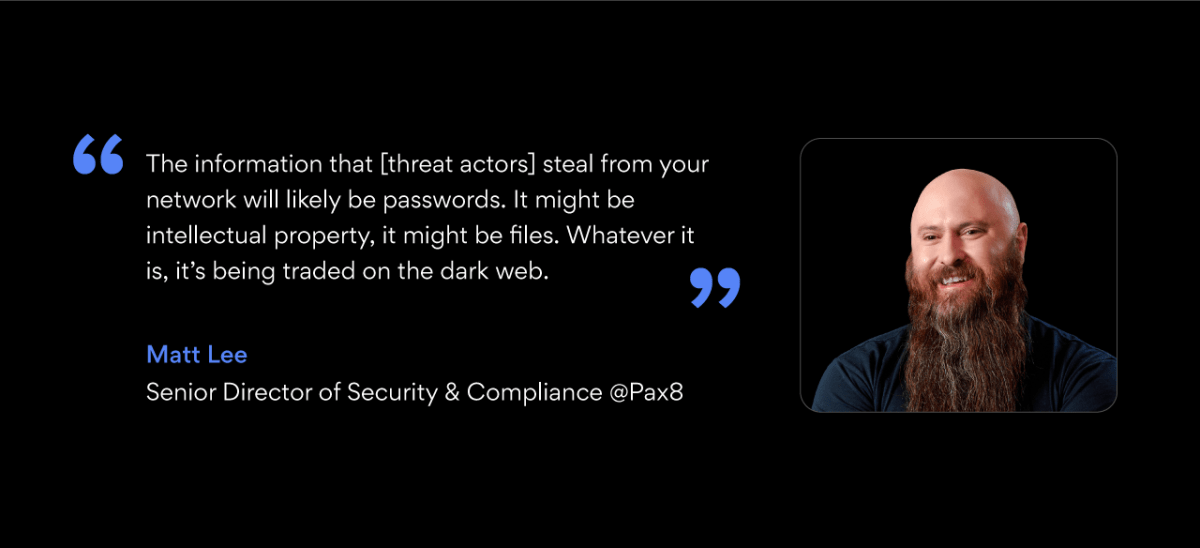
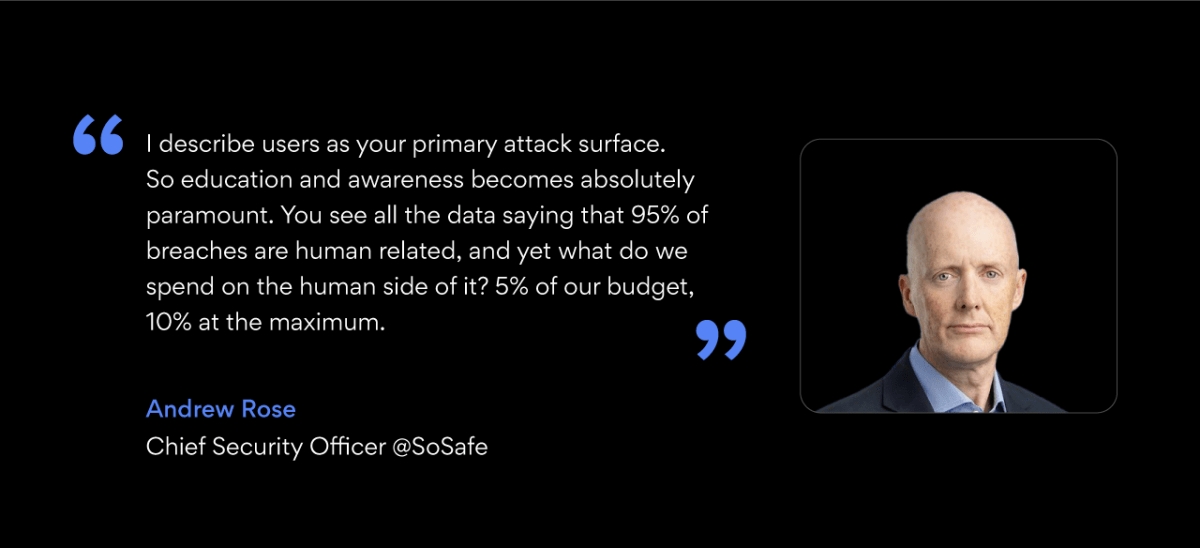
Cybersecurity experts Vladimir Krupnov, Threat Intelligence Lead at Revolut, Andrew Rose, Chief Security Officer at SoSafe, and Matt Lee, Senior Director of Security and Compliance at Pax8, joined Gerald Kasulis, VP Sales at NordStellar, to share their experiences and insights on dark web monitoring, and how they leverage threat intelligence to secure their organizations’ data. Enjoy the recording above for its comprehensive discussion on the topic, or keep reading for key business takeaways.

Understanding the dark web

The dark web refers to parts of the internet that are not indexed by typical search engines and require specific browsers or tools to access. According to Matt, it is “where data has been traded… where a lot of criminal business has historically been transmitted.” To Vladimir,  “It’s a cyberspace where criminals – or potential criminals – communicate and carry out malicious activity, which could be related to your company, government, or anything else.”

But as Andrew points out, it’s not all doom and gloom. The dark web has proven time and again to be a beneficial technology, providing a vital platform for journalists and social movements across the world for free speech and anonymous communication.

For security leaders, it’s a vast, largely untapped wellspring of information and data that isn’t attainable on the clear web. Fearing or ignoring it as a large business equates to simply wasting a good source of intelligence and/or value.

Quote bubble: “You have to embrace the dark web as well as fear it, because it might be serving your business, your community or your social group, not just endangering your business.”

So why do cybercriminals flock to the dark web? According to Matt, it offers threat actors a way to “control the discoverability” of illegal activities, leveraging end-to-end encrypted technologies for anonymity. Vladimir points out the ease with which individuals can now become cybercriminals, thanks to platforms like Telegram that host thousands of illicit groups: “this is a massive problem because it lowers the barrier for the typical person to become a cybercriminal. It just takes 2 clicks nowadays.”

What are they after?

Vladimir states that the point is not to be fully invisible, but to have an easy escape and lower traceability (compared to the “clear” web): “You can always find anyone… It all comes down to time and effort. If someone sells credentials belonging to your company and the existing damage is less than a few million, it’s unlikely to be picked up by law enforcement unless it’s a part of a broader campaign.”

Disposable fake profiles are a key tool in a threat actor’s arsenal. “They just burn the profile,” says Matt. “He would just say, they’re getting too close to me, time to burn my PGP key. Next I’ll just build a new profile. They’re living in plain sight. That said, they hate burning a persona. It sucks. But yes, they do it when they need to.”

Hacker gangs operate better than most think, he continues. “Their tradecraft and OPSEC (operations security) is better than most people give credit for, and I would also say is probably better than most companies’… it is the risk/reward of what they’re doing – since the risk is extremely high, they respond with better offset and better methodologies.”

Assessing and addressing business exposure

Matt Lee advises businesses to adopt a mindset of “live compromised,” focusing on limiting damage and improving incident response: “How do I limit the blast radius? How do I find it faster?”

This proactive stance can be supported by using threat intelligence services, as Andrew’s experience shows: “A threat intel firm brought me information about one of our staff members’ identities being sold online… We reached out immediately to that staff member and helped them close down all of those loops. We knew that although it was a personal issue for them, that could very easily turn into an insider threat, blackmail, or risk for us.”

Andrew explains that his team effectively scans for anything to do with their brand or company. In this case, it was a lucky find: “It just so happened that part of the details that were being sold said that this person is working for this organization in this role. So that was our trigger, that was our hook.”

He points out ethical concerns for business leaders when dealing with dark web resources. “You look at things like the Ashley Madison data dump… and we’re wondering what we do with this? Do we download this data and look at it to see whether any of our staff have been compromised and therefore potentially being blackmailed? Because that’s us downloading illegally stolen data. Or do we step away from it?”

Proactive measures and best practices for security leaders

Each expert supports ramping up education efforts and budget quotas for cybersecurity.


Business leaders, particularly newly hired executives, are singled out by threat actors with targeted phishing and vishing attempts, according to Vladimir, underscoring the need for comprehensive security protocols from day one.

What about “selling” to stakeholders and business leadership? As always, it comes down to communication. Andrew stated: “You have to take stories to your exec. Take my previous examples of finding at-risk employees online and being able to protect them, thus protecting the company. Or receiving a phone call from a threat intel provider, letting me know that there were discussions about attacking my sector. 

Should smaller companies be concerned about the dark web threats? There’s a common misconception that small companies are not a target for cybercriminals, with media exposure focusing on large scale data breaches of well-known brands. Matt Lee thinks so: “If I land on your credentials, your data, it doesn’t have to be valuable to me, it doesn’t have to be valuable to the world. It only has to matter to you to get you to pay.” Vladimir reminds us to watch out for fourth party risk – any risk posed to your organization from a business relationship a third party has with its vendor.

Insights and recommendations for threat exposure management

Matt recommends using canaries (attractive decoy targets for threat actors) as warning beacons on your security perimeter. “It enables you to take action, and makes that credential no longer valuable. Remove the credential, remove the persistence, whatever it may be.” A common question crops up: How can security leaders measure the effectiveness of dark web monitoring solutions? The panelists agree on measuring intelligence quality by how much of it their security teams can act upon.

Andrew looks at how current the data his solution is providing is, acknowledging that there are barren periods, but “it was never a service you could do without. Because you always knew that next month might be when suddenly they’d find something which could make the whole contract worthwhile.”

Matt agreed, saying it’s simply good strategy, relevant to sports, life, and cybersecurity: “You go scout the other team!”

Any final words? Incident response plan. If you don’t have one, Matt says, sort it out. “Too many companies lack this.” This plan should be reviewed annually and adapted to evolving threat and business environments. Ultimately, this is all about setting a strategic baseline for cybersecurity best practices. “Everything we’re talking about here is part of basic data hygiene and governance. Live as close to the CIS framework as you can.”

With actionable data, timely insights, and increased visibility into the online underworld, staying one step ahead of threat actors becomes possible. For CISOs protecting their organization’s data and security, this means having the ability to not just react to threats, but to anticipate them.

About Version 2 Digital

Version 2 Digital is one of the most dynamic IT companies in Asia. The company distributes a wide range of IT products across various areas including cyber security, cloud, data protection, end points, infrastructures, system monitoring, storage, networking, business productivity and communication products.

Through an extensive network of channels, point of sales, resellers, and partnership companies, Version 2 offers quality products and services which are highly acclaimed in the market. Its customers cover a wide spectrum which include Global 1000 enterprises, regional listed companies, different vertical industries, public utilities, Government, a vast number of successful SMEs, and consumers in various Asian cities.

About NordLayer
NordLayer is an adaptive network access security solution for modern businesses – from the world’s most trusted cybersecurity brand, Nord Security.

The web has become a chaotic space where safety and trust have been compromised by cybercrime and data protection issues. Therefore, our team has a global mission to shape a more trusted and peaceful online future for people everywhere.

How to analyze network traffic: a step-by-step guide

Network traffic is the data that passes through on-premises, cloud, and hybrid cloud networks. Traffic consists of larger files divided into data packets. Packet data flows between network nodes before being put back together at destination devices.

Network traffic is crucial because it enables users and applications to communicate. Traffic carries data files and queries, extracting data from cloud resources for employees to use. It connects users with devices like cameras and printers, facilitates video streaming, and links local workstations to internet resources.

Understanding and managing network traffic includes learning how to analyze network traffic effectively. This analysis helps monitor and interpret these data flows to optimize performance, ensure security, and manage resources effectively. One method to model and understand network traffic relates to network topography, which illustrates how data moves through the network.

  • North-south data passes from data centers to connected devices on a hub and spoke model. This data class includes web browser traffic originating outside the network.

  • East-west traffic travels inside a data center, such as communications between on-premises workstations.

Another method models network traffic based on priority.

  • Real-time network traffic includes high-priority packet data requiring instant transmission and high levels of accuracy. For instance, voice-over-IP can’t work well without high fidelity, instant transfers.

  • Non-real-time traffic includes routine email transfers and FTP downloads that are not operationally crucial.

Network traffic types also relate to how we inspect data.

  • Flow data aggregates simple information about network traffic. Examples include packet origins and data quantities.

  • Packet data involves granular analysis of individual packets through techniques like deep packet inspection. This level of analysis assists security investigations and micro-level performance optimization.

Engineers must consider how these network traffic types interact. Monitoring systems must take account of network topography and implement solutions to capture relevant, high-value data about network traffic.

What is network traffic analysis (NTA)?

Network traffic analysis applies continuous monitoring of network traffic. This has two main functions: ensuring network availability and securing network assets.

NTA determines the availability of network assets. Tools detect anomalies and performance issues, alerting IT teams to enable prompt responses. For instance, monitoring may identify and suppress high-volume data transfers or bursts of inbound traffic.

Network monitoring tools also have a critical security role. Tracking tools enforce security policies by detecting and blocking threats. They scan for suspicious activity and flag potential issues before data breaches or system outages result.

Monitoring systems check for vulnerable protocols or encryption ciphers, informing administrators if data becomes insecure. Tools also identify blind spots in network architecture. Technicians can plug gaps in the attack surface created by new devices or user activity.

Good reasons to adopt network traffic analysis

Analyzing network traffic is a wise move for all companies. Modern business depends on constant data flows and reliable network performance. Measuring how data travels empowers IT managers to make improvements and optimize network performance

Understanding and implementing strategies on how to improve network performance can significantly enhance the efficiency and reliability of data flow. It will also ensure that business operations remain smooth and uninterrupted.

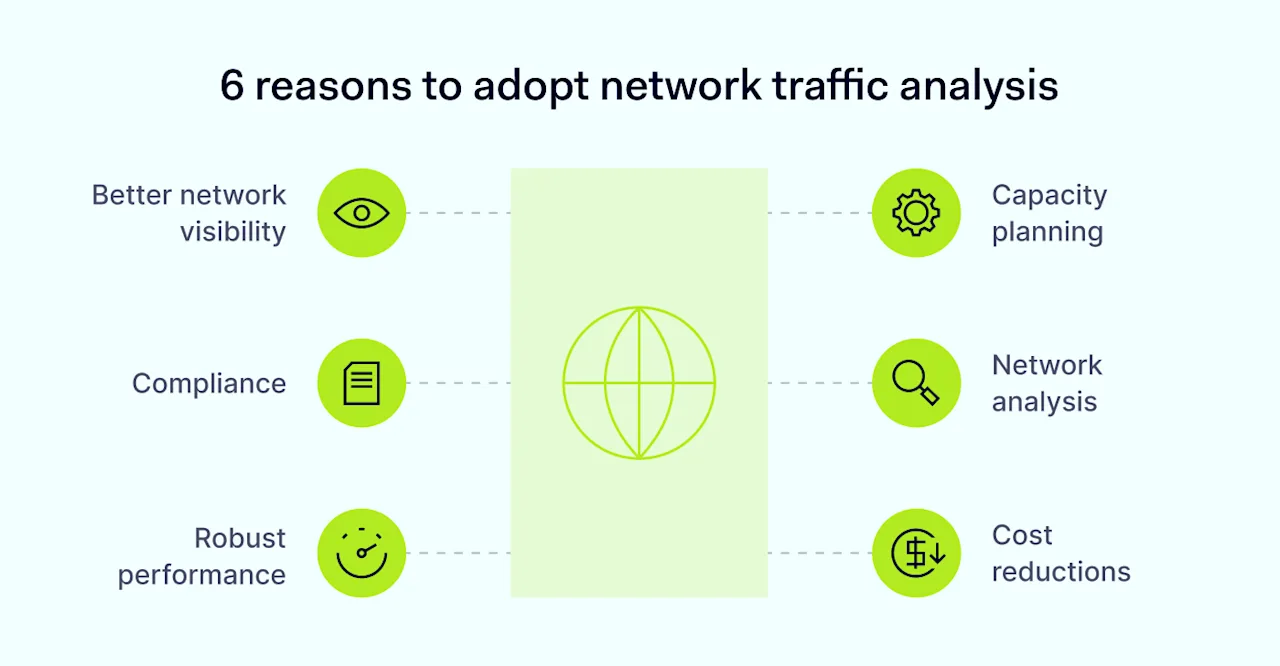
6-reasons-to-adopt-network-traffic-analysis

Beyond that general benefit, network traffic analysis has the following advantages:

#1 Better network visibility

Network visibility tools create inventories of devices connected to the network. Companies can add new devices securely and secure network traffic to existing devices.

#2 Compliance

Businesses that monitor network traffic are well-placed to detect threats and safeguard customer data in line with GDPR and HIPAA regulations.

#3 Robust performance

Continuous monitoring identifies technical problems with the availability of applications and data centers. IT teams can troubleshoot issues before downtime occurs.

#4 Capacity planning

Engineers can model future network traffic loads and plan for smooth change management.

#5 Network analysis

Engineers can leverage monitoring logs to analyze performance and find fixes to improve speed or reliability. Monitoring provides network context to investigate security incidents.

#6 Cost reductions

Monitoring network traffic identifies redundant components and suggests efficient ways to route data, cutting networking costs.

Related articles


In Depth, Remote Work

Best practices for achieving cybersecurity visibility in hybrid work environments

18 Apr 20246 min read

Cybersecurity visibility


In Depth

Data speaks volumes: how analytics improves network visibility

21 Nov 20237 min read

Data speaks volumes web cover 1400x800


How to get started with network traffic analysis

The benefits of network traffic analysis are clear. However, analyzing network traffic is harder to grasp. Businesses need monitoring systems that cover relevant data sources. Monitoring must be accurate and deliver usable outputs, but analyzing network traffic must not affect speeds or general performance.

Follow the step-by-step guide below to analyze network traffic in a way that meets those core conditions.

1. Assess your data sources

Before analyzing network traffic, you must understand what data flows through your network. Traffic monitoring can only track visible data flows. A thorough data assessment is essential.

On the device side, data sources include routers, servers, and switches that facilitate data transfers. Firewall appliances and proxy gateways may also be relevant if you use them. User workstations lie inside the scope of network traffic monitoring, as do remote work devices and IoT accessories.

Data sources also include the applications that process or store network data. Include applications stored on-site alongside cloud services that users rely on.

Automation helps you discover connected devices and apps and model device dependencies. Application and network discovery tools scan endpoints, and data flows to assess network topography.

Manually assessing network maps is also possible but time-consuming. Maps also become outdated without regular updates, while automation tools adapt as network traffic changes.

The outcome of this exercise should be a clear map of critical data flows, including a list of device and application dependencies.

2. Decide how to collect network traffic

Now, we need to create systems to extract information from data sources. There are two basic approaches: agent-based collection and agentless collection.

Agent-based systems deploy agents on devices. Agents are tiny apps that continually collect data about performance, availability, traffic volume, and inbound or outbound communications.

Agents are essential to monitor network traffic at the level of network packets. However, they can interfere with network speeds or lead to storage problems.

Agentless collection does not rely on agents to gather information. These solutions generally use protocols like the Simple Network Management Protocol (SNMP) or APIs supplied by data source vendors.

Agentless systems send monitoring queries to apps or devices. Targets respond, supplying data about their availability and security status. Agentless collection is a slightly less detailed way of analyzing network traffic. However, network traffic data is still sufficient for most monitoring purposes.

3. Configure context-based network visibility

Now, set the rules for network traffic analysis. Robust network visibility is not just about collecting masses of network traffic. IT teams must also consider network context to understand the reason for data spikes or speed issues.

Contextual information includes user authentication requests, app usage, or threat intelligence. This information may explain why traffic is spiking on particular devices. The absence of contextual data could indicate an imminent threat.

Combining raw network traffic data with situational knowledge empowers security teams and technicians. The more you know about your network environment, the easier it is to identify problems and avoid security incidents.

Choose a traffic analysis solution that integrates with threat detection and response systems. Even better, opt for a network visibility solution that blends threat detection and performance monitoring.

4. Check network restrictions

Before turning on network traffic monitoring, engineers must check local network restrictions and verify that monitoring will function properly.

For example, encrypted traffic may not be visible to tracking systems without key sharing. Bandwidth restrictions may apply, and some ports may be inaccessible to monitoring protocols. Monitoring cloud data can also be challenging. Providers operate their own data restrictions, potentially compromising network visibility.

Legacy systems often co-exist with cloud implementations. Engineers should ensure traffic monitoring covers all data sources and replace applications or devices you cannot monitor. Firewall appliances and network traffic segmentation can also influence data collection.

Compliance is another consideration. Privacy regulations prohibit the unauthorized collection of private data. Network traffic collection should not extend to user or customer identities without consent.

Finally, network traffic analysis must consider malicious threats. Can monitoring tools identify suspicious traffic and work around obfuscation techniques? If not, alternative solutions may be preferable.

5. Decide how to collect tracking data

Collecting network traffic is useless without a secure and accessible storage solution. This storage facility guards your collection tools and is a reliable destination for harvested traffic.

Separating tracking systems from general network traffic is advisable. Separation protects data from external attacks or outages. The best solution is using a secure cloud-based provider to store tracking data or building separate on-premises hardware.

Virtualized storage solutions suit multi-cloud or single-cloud networks with low on-premises involvement. Hardware is ideal for traditional office networks with few cloud components.

6. Put in place traffic analysis tools

IT teams need the ability to view, analyze, and use network traffic data. Beware: not all monitoring systems include visualization panels and ways to aggregate tracking logs.

Without visualization features, engineers face libraries of text files, and it takes hard labor to extract data from tracking logs. Unless you are comfortable with those processes, choose a tracking partner that makes analysis easy.

Effective solutions allow users to generate reports for audits and investigations. They enable application and user-level traffic analysis. Automating routine security tasks and network traffic map generation are also helpful features.

Don’t forget: Systems for analyzing network traffic also need alert functions to trigger user responses. Choose network traffic analysis solutions with customized alerts and robust measures to detect false positives.

7. Test network traffic analysis before going live

Deploy network traffic analysis gradually. Measured deployment gives you time to check components are functional and deliver the data you need. Rushed implementations waste resources and may lead to inadequate long-term coverage – giving you a false sense of security.

Begin by tracking a small group of data sources. Start with a single data server or cloud-based application. Only expand network traffic analysis when you know that everything works as designed.

How NordLayer can help you achieve network visibility

Network traffic analysis identifies performance and security problems before they impact business operations. In a world of constant data breaches and evolving cybersecurity threats, visibility is everything. Companies that remain in the dark will eventually suffer.

Fortunately, effective network visibility solutions are available for all business contexts. NordLayer’s network visibility tools track relevant traffic and simplify analysis – putting you back in control of network data flows.

Our tools let you dive deep into network activity. Device posture monitoring, server usage analysis, and user activity tracking deliver invaluable insights to guide security teams. Detect suspicious connections, only admit compliant devices, and keep track of network availability.

Network traffic analysis is the key to understanding performance and improving network security

About Version 2 Digital

Version 2 Digital is one of the most dynamic IT companies in Asia. The company distributes a wide range of IT products across various areas including cyber security, cloud, data protection, end points, infrastructures, system monitoring, storage, networking, business productivity and communication products.

Through an extensive network of channels, point of sales, resellers, and partnership companies, Version 2 offers quality products and services which are highly acclaimed in the market. Its customers cover a wide spectrum which include Global 1000 enterprises, regional listed companies, different vertical industries, public utilities, Government, a vast number of successful SMEs, and consumers in various Asian cities.

About NordLayer
NordLayer is an adaptive network access security solution for modern businesses – from the world’s most trusted cybersecurity brand, Nord Security.

The web has become a chaotic space where safety and trust have been compromised by cybercrime and data protection issues. Therefore, our team has a global mission to shape a more trusted and peaceful online future for people everywhere.

About NordLayer
NordLayer is an adaptive network access security solution for modern businesses – from the world’s most trusted cybersecurity brand, Nord Security.

The web has become a chaotic space where safety and trust have been compromised by cybercrime and data protection issues. Therefore, our team has a global mission to shape a more trusted and peaceful online future for people everywhere.

×

Hello!

Click one of our contacts below to chat on WhatsApp

×