Skip to content

NordPass for Android: Release Notes

NordPass 3.51

Happy New Year, NordPassers. We’re starting the year with a few important updates. Here’s what to expect in this release:

  • B2B TOTP. It might sound like random letters pieced together, but this means that NordPass Business users can now use TOTP functionality on Android devices. How exciting is that?

  • AUTOFILL ISSUE REPORTING BETA. Is autofill not working as expected on your favorite browser? You can now tell us what’s wrong. Look for the Feedback (Beta) when filling in passwords.

NordPass 3.50

This time we worked on nitty gritty details to make your password management experience even smoother. Here’s what to expect with this release:

  • MORE BROWSERS WITH BETTER AUTOFILL. We added native autofill support to Tor, Via, Phoenix, Maxthon; meaning that if you use any of these browsers it will now be easier for NordPass to recognize input fields and fill your passwords.

  • MINOR DESIGN CHANGES TO AUTOFILL SETTINGS.

  • BUG FIXES.

NordPass 3.49

We’re happy to present you with a new release. Here’s what we’ve got this time:

  • UI IMPROVEMENTS. New users will see an updated onboarding design, while the veterans will notice slight changes to the new password history feature.

  • BUG FIXES.

NordPass 3.48

No big announcements from us this time. However, we hope you’ll still enjoy an updated NordPass version with fewer bugs.

NordPass 3.47

We’re happy to present you with a new release. Here’s what we’ve got this time:

  • RATE NORDPASS IN-APP. Are you enjoying NordPass so far? Look for a pop-up to rate NordPass and help others choose their password manager.

  • AUTOFILL IN VIVALDI BROWSER. You will now fill your passwords and other information easier when using the Vivaldi browser.

  • IMPROVED AUTOFILL FOR OTHER LANGUAGES. If your browser is set to your local language, autofill will now pick it up quicker and help you save your passwords.

NordPass 3.46

No major updates this time, just a new and improved app release with fewer bugs for you to bump into – enjoy!

NordPass 3.45

Building good things takes time. So since the last release, we have focused on catching and eliminating pesky bugs.

NordPass 3.44

It’s a big day today. Premium users, get ready. From now on, you’ll be able to monitor breaches.

Your Breach Scanner can now scan breaches while you sleep. Set up an email you’d like us to monitor and will check breaches for you. If we find your email, we’ll notify you so you can take immediate action and protect your data. Look for this new functionality by going to the Breach Scanner.

P.S. We also fixed some bugs to improve your overall experience.

NordPass 3.43

No big announcements from us this time. However, we hope you’ll still enjoy an updated NordPass version with fewer bugs.

NordPass 3.42

This time we’ve waved bye-bye to some pesky bugs and have also spruced up the place a touch – enjoy!

NordPass 3.41

We’re happy to present you with a new release. Here’s what we’ve got this time:

  • PROFILE PHOTO. You can now add your favorite photo instead as your profile icon. With a customized profile icon, it’s easier to recognize your profile when sharing items or switching accounts.

  • NATIVE AUTOFILL ON BRAVE. This means your autofill and autosave experience has just leveled up. It will now be easier for us to recognize password fields and fill in your information.

  • BUG FIXES.

NordPass 3.40

Building good things takes time. So since the last release, we focused on catching and eliminating pesky bugs.

NordPass 3.39

No big announcements from us this time. However, we hope you’ll still enjoy an updated NordPass version with fewer bugs.

NordPass 3.38

This time we’ve waved bye-bye to some pesky bugs and have also spruced up the place a touch – enjoy!

NordPass 3.37

Building good things takes time. So since the last release, we have mainly focused on catching and eliminating pesky bugs.

NordPass 3.36

A new week and a new NordPass release. Here’s what we’ve got:

  • NEW SETTING: CLEAR COPY ITEM DATA. When you copy your password or other item data, it’s typically saved in the clipboard. To avoid pasting it somewhere you didn’t intend; you can now choose the clipboard to clear after a set time.

  • LITHUANIAN LANGUAGE. For our Lithuanian friends out there, you can now use NordPass in your mother tongue. Simply head to Settings to change the language.

  • BUG FIXES.

NordPass 3.35

We’re happy to present you with a new release. Here’s what we’ve got:

  • SWITCH ACCOUNT. A long-awaited feature is here! If you have a few NordPass accounts, like personal and business, switching between them will now be a breeze. Just click on your profile account and look for a “Switch Account” button.

  • CARD PIN. From now on, you can also add your PIN when saving your card details. Don’t worry; it won’t be autofilled. It’s for your reference only.

  • BUG FIXES.

NordPass 3.34

Happy pancake day, people! Though if it were up to NordPass, every day would be a pancake day. In the meantime, while you are enjoying your pancakes, donuts, or pastries, we are presenting you with a new NordPass release with fewer bugs.

NordPass 3.33

Our bug busters have been working hard since the last time you heard from us. That’s why today we can proudly present another NordPass release with even fewer bugs. We hope you’ll like it.

NordPass 3.32

Did you know that January has one of the most depressing days? It’s called Blue Monday, they say. Good that it’s over. But if you are still feeling a little bit blue, here’s what you can do to survive this winter:

  • Enjoy the outdoors, go for a walk or take up a new sport;

  • Connect with a long-lost friend or family member;

  • Run the Data Breach Scanner and update your vulnerable passwords. Once you do, select “Resolved” for the updated passwords and they won’t appear next time you run the scan.

NordPass 3.31

Like last year, in 2022, we’ll strive to become a better, smoother-running, and more user-friendly app. So why not start with this week? We present you with a new NordPass version with fewer bugs and Autofill issues.

NordPass 3.30

We hope you are not sick and tired of Christmas songs, even if you’ve heard them a million times before. And we hope that you are not stressed buying last-minute presents or thinking about a Christmas menu. But if you’re, it will all be ok.

After all, ‘It’s the most beautiful time of the year.’ Merry Christmas!

P.S. And here’s a new NordPass release to bring you a little cheer.

NordPass 3.29

Did you know that if your password is ‘ginger,’ it would take a hacker less than 1s to guess it? If you use NordPass, we know you can do better than that. Create strong and unique passwords with your NordPass mobile app, and don’t let any Grinch steal your Christmas (or your accounts) this year.

NordPass 3.28

It’s 5 weeks until Christmas! Yes, it’s time to buy presents for your loved ones. But do you sometimes slip and buy gifts for yourself instead? Because we do. Don’t tell this to anyone.

So if you slip this year, don’t worry too much about it. You can save up to 75% of NordPass Premium plans and give the so-needed peace of mind for you and your family guilt-free.

We’re making the NordPass app for Android better, smoother, slicker – one release at a time. How exactly? Read all the highlights in our release notes and make sure to never miss a new version – we want you to get all the best stuff.

NordPass 3.27

–Beep beep– app update incoming:

  • Native autofill on Chrome. Simply put, Nordpass is now better at recognizing login fields. It means smoother and faster autofill!

  • Data Breach Scanner update. If you use a leaked password for several accounts, the app will notify you about accounts put at risk. Remember to update them!

  • Title suggestions. Running out of ideas for naming items in your vault? No worries – NordPass will suggest using the website name for the title.

  • Usual bug-fixing business.

NordPass 3.26

Trick or treat? Who are we kidding? It’s always just treated here at NordPass. So here’s our Halloween treat to you – a brand new NordPass release. Don’t worry, nothing to be scared of—just a smoother running version of your password manager.

NordPass 3.25

Getting your data stolen isn’t nice. But if that happens to you, it’s important to identify the stolen information and act quickly. That’s why from this release, you can use the Breach Scanner to find out the type of data that was leaked and see it in plain text.

We also wanted to improve our communication with you. So from now, if you open the app and see a red dot next to a bell icon, just know that it’s some important information from us to you.

NordPass 3.24

Seasons change. Leaves turn yellow and brown.
It might be sad, but don’t feel too down.
Just remember, your passwords are safe and sound.

And if you don’t like amateur rhymes, that’s fine.
With this release, you’ll have less bugs in your life.

NordPass 3.22

Good things are meant to be shared, right? That’s why now, when you invite a friend to try NordPass, we’ll award both of you with a free month of Premium (max 3 months). You can invite as many friends as you wish. Just head to the app, select “Invite a friend,” and send the invite.

NordPass 3.21

What do you have in the box this time NordPass? Well, let me see…

  • Email or username suggestion. That’s right, now when creating a new item, you only need to enter a few letters in the username field, and NordPass will suggest filling it with one of your already used ones.

  • Autofill fixes.

  • Bug fixes, bug fixes, and more bug fixes.

NordPass 3.20

It’s the end of the summer, eh? You must be sad. Or happy? Maybe because you’ve just got NordPass at the end of summer sale. Or perhaps you live down under, and it’s actually not the end of the summer but the end of winter. Either way, we hope you’ll enjoy a new NordPass version with fewer bugs and more love.

NordPass 3.19

Random fact of the day: Did you know that there’s a bunch of ladies working at NordPass? Yes, we don’t follow any stereotypes here. So in this release, we want to thank all the women who tirelessly and continuously work to make NordPass a better password manager.

NordPass 3.18

Hola! Last week we presented you NordPass in Italian. Can you guess what we have in store this week? Yes, that’s right. NordPass is now available in Spanish! Head to Settings to update your language preferences.

And, of course, we continue to work on any pesky bugs you or we identify. Bye, bugs!

NordPass 3.17

Buongiorno! What a year this was for Italy. First the Eurovision, then Euro Cup, and now, coincidence or not, NordPass. Yes, you are right, you can now use NordPass in Italian, and it doesn’t matter if you are enjoying the sun in Rome or simply practicing your Italian skills. You can change your language preference in Settings.

And of course, what release is without bug fixes? We crushed them too.

NordPass 3.16

Hey NordPass user, do you like scrolling? Not when I’m looking for a password, you will say. Yeah, we thought so. That’s why we introduced a quick scroller. Now when scrolling through your items, you’ll see that they are grouped. Go on, find your passwords with ease.

P.S We have also resolved those pesky bugs. Bye-bye, bugs.

NordPass 3.15

Searching for bugs…
Loading…
Loading…
Bugs found…
BUGS FIXED!

*Works only if you install the update first to put those BUG FIXES in place. Stay safe and happy!

NordPass 3.14

Sharing is caring, right? Well, now you can select multiple items and share them all at once. Easy peasy. Just always make sure you trust the people you share your credentials with.

NordPass 3.13

You know that moment when you create a super-strong password with NordPass Generator and forget to save it? Yeah, we’ve been there too. That’s why you’ll now see a little clock icon in your Generator. Tap on it to see previously generated passwords.

And, of course, we won’t release a new NordPass version without getting rid of as many bugs as possible.

NordPass 3.12

You want strong and unique passwords, simple – you generate them with the Password Generator. But what if you want a strong password you need to remember? Yes, we thought about this too.

So in this release, you’ll see some changes to your Password Generator. Now you can generate passwords made out of words, spaces, hyphens, and much more. How cool is that?

NordPass 3.11

We’re coming back with a bunch of updates to help you make your accounts even more secure.

  • PASSWORD HEALTH INTEGRATION. You can now see how healthy your password is by opening the item — no need to go to Password Health. If your password could be stronger, you’ll see “weak, old, or reused” next to it.

P.S. There’s more. We’ve fixed a ton of autofill bugs for a smoother login experience.

NordPass 3.10

Are your passwords healthy or vulnerable? If you haven’t checked it yet, now is a good time. We’ve just revamped the Password Health tool, and it’s looking better than ever. It’s so much easier to use too. Check it out.

Anything else? Of course! Our team is continuously working on improving the Autofill feature so that you’d have a smooth one-click-to-login experience.

NordPass 3.9

If you haven’t tried the Breach Scanner yet, now you have a reason. We completely revamped the design. Oh boy, it looks even more pleasing to the eye.

What are you waiting for? Go and make sure your accounts are secure.

NordPass 3.8

Bonjour. Comment ça va? Yes, our French-speaking friends, this release is for you! NordPass is now available in French. Head to Settings and change the language.

In other news:

  • LIMITED RIGHTS CHANGES. From now on, once you receive an item with Limited Rights, it’s for you only. No further shares allowed.

  • B2B GROUPS. NordPass Business users say hello to Groups. Now it will be easier to share passwords with a group of people all at once. Think, your Marketing or Finance department.

NordPass 3.7

Sometimes what we do is either too difficult to explain or too difficult to see. Yes, you guessed it. This week we put all our effort into finding and getting rid of bugs. We hope we’ll have something more exciting for you next week.

NordPass 3.6

Sprichst du Deutsch? Then we have good news for you. You can now enjoy NordPass in German. Just go to your settings and change the language.

But that’s not it. We have some exciting news for anyone who speaks french too. Stay tuned. 😉

NordPass 3.5

This release theme? Fixes, fixes, and more fixes. Quality over quantity. So what did we actually do?

  • Found and got rid of your beloved dark theme bugs.

  • Improved Autofill by killing nasty bugs.

  • Other teeny-tiny bug fixes.

NordPass 3.4

No breaking news this time. We know. We’ll do better! Just business as usual and a ton of bug fixes for a smoother app experience.

NordPass 3.3

Guten Tag, – says NordPass. Yes, that’s correct. If your phone’s default language is German, you can now enjoy NordPass in your preferred language. Anything else? Of course! More bug fixes.

NordPass 3.2

Well, hello there. It’s NordPass calling with a shiny brand new release. Here’s what we’ve got:

  • CHANGES IN 2FA SETUP. Now two-factor authentication will be set up for your Nord Account and applied to all Nord products you might use.

  • AUTOFILL AND AUTOSAVE ISSUES FIXED, so you could continue saving and filling passwords quicker than you can blink.

  • DARK MODE BUGS FIXED. Minor bugs were found since we released the dark mode. Nothing to worry about; they are now gone.

NordPass 3.1

Still recovering from the last release? If you haven’t heard (or seen it yet), you can now enjoy NordPass dark mode!

Unfortunately, we are not superheroes, so we can’t drop any big news today. Plus, it wouldn’t be fun this way. So this time, we worked on some maintenance tasks to keep your app running smoothly:

  • COPY CHANGES to help you navigate through the app.

  • AUTOSAVE ISSUES FIXED to help you save those passwords in a click.

  • BUG FIXES. Because no release is complete without them, right?

NordPass 3.0

Where’s the drumroll, please? You ready? You’d better sit down for this one. I’m serious; sit down. OK, you’re finally sitting.

I’m just scared you’ll fall and hurt yourself once you hear this, that’s all. Oh, I know. It’s so annoying when someone is creating tension but not telling you what this is all about, right?

Well, OK, not long to go. Let’s count together.

One.

Two.

Three.

You can now enjoy NordPass Dark MODE!

Fireworks shooting in the distance

NordPass 2.17

Ready, set, new release! What can you expect to see in the new and shiny NordPass 2.17?

  • AUTOFILL FIXES. Slowly but surely, we are conquering the net and one website at a time, making signing in easier than ever. Magic x2!

  • ADD CREDIT CARD WITH NFC. Yes, you heard it. You can now scan your credit cards and keep them in NordPass by simply touching your card against your phone. Magic!

NordPass 2.16

8 letters, 2 words, one meaning.

9 letters, 3 words, one feeling.

We felt kind of nervous to say it out loud… But again, they say – don’t talk, just act. So we’re bringing you yet another collection of chocolate-flavoured, hand-picked BUG FIXES to express how much WE LOVE YOU. Please update to enjoy even smoother app experience.

NordPass 2.15

Once upon a time, a password manager named NordPass lived. They wanted to become the best password manager there ever was, and did it one release at a time.

  • AUTOFILL ISSUES FIXED. Salvador Dali said not to fear perfection as we’ll never reach it, but we’ll still give it a good go.

  • QUICK ACTIONS ADDED. Just click on the app and quickly access Password Generator, search your items, or add a new password.

  • TOOLS AND MENU REWORK. Now you can enjoy a much cleaner and Menu, Settings, and Tools tab.

NordPass 2.14

AbraCadabra boom! No, it’s not magic. It’s just your passwords and credit cards information filling in quicker and smoother than ever before. Bye-bye, annoying bugs who tried to stop you.

What else can you expect in this release? Some copy changes to make the app easier to navigate, and we are super excited to share with you some news – Dark theme is coming soon.

NordPass 2.13

New Year, new NordPass release. Here’s what you’ll see in the latest version:

  • AUTOFILL IMPROVEMENTS. The sky’s the limit for this one.

  • BETTER LOOKING ITEMS. Items with no accounts have just become more stylish, or in other words, more colorful.

  • AUTOSAVE IMPROVEMENTS, so you could save your passwords in a blink of an eye.

  • EASY-TO-UNDERSTAND PASSWORD FORMATTING. We hear you; telling apart 0 from O when creating passwords isn’t easy, but it will be from now on.

NordPass 2.12

Yeah, Christmas will be different this year. But we’ve still got something to spread a little cheer.

In this release, you will see:

  • ITEM ACTION FIXES, which we noticed when scrolling through an item’s action list.

  • COPY CHANGES to make your app easier to navigate.

  • AUTOFILL FIXES, so you could smoothly log in to even more websites and apps.

  • MULTISELECT AND SORTING. You can now select multiple items and move them to a specified folder or Trash and sort them by Title or Date Last Used.

NordPass 2.11

NordPass has turned 1 year old, can you believe it? We can honestly say that this year, we are the most grateful for YOU, our dear NordPass user. You, who believed in us and drove us to release one update after another.

So here’s one more. Full of even more design edits, bug fixes, and love:

MINOR DESIGN AND COPY CHANGES because who doesn’t like a good-looking app. AUTOFILL BUG FIXES, so you could log in to your favorite websites and apps quicker than you can count to three.

NordPass 2.10

  • ADD/EDIT ITEM FIXES. Next time you add a new item, or edit an existing one, pay attention to the new design. Sleek, isn’t it?

  • IN-APP SHARED ITEM NOTIFICATION. Someone shared an item with you? You’ll get a notification in your app instantaneously. Forget emails.

  • BUG FIXES. No bugs allowed in our app.

NordPass 2.9

NORDPASS BUSINESS AVAILABLE ON ANDROID. Business people beware, it’s your time to shine. Fill in passwords on mobile browsers and apps (like a boss!), sign in to your accounts with a fingerprint (like a boss!), and never ever have those dreadful phone calls with Brian from IT because you forgot your computer password after a long long holiday (Ouch!).

NordPass 2.8

  • SECURE NOTES FORMATING – FIXED. It looks like we’ve accidentally deleted text formating options on a previous app update. Sorry about that! Formating is back and now ready for your bold, italic or quoted notes more than ever before.

  • DESIGN IMPROVEMENTS. A little treat for eagle-eye users – please welcome those charming menu icons and precise text formatting.

  • AUTOFILL IMPROVEMENTS. No app update was or will be released without this one.

  • BUG FIXES = smoother password-managing experience.

NordPass 2.7

  • BREACH REPORT. Now this one may feel like a fun lottery, except the fact that it’s probably better not to ‘win’ anything. By clicking a ‘Scan’ button, you can find out if any of your accounts were ever caught in data breaches. Fingers crossed, they’re not.

  • AUTOFILL IMPROVEMENTS. Even more websites are ready to autofill your passwords.

  • DESIGN IMPROVEMENTS only eagle eyes will spot. We all know who lies in the details, right?

NordPass 2.6

  • PASSWORD HEALTH CHECKER. If you hear someone coughing and no one is at home – that might be a password in your vault. Take a chance to use this new fancy tool for making your precious passwords stronger and happier (and accounts safer) without leaving the house.

  • AUTOFILL IMPROVEMENTS. You probably might start thinking that we are making up this one each time, just to add something to the release notes. The truth is that with each update, we are getting closer to perfection.

NordPass 2.5

  • NORDVPN. Nobody likes snoopers – especially online ones. Luckily, VPN helps. Look for getting NordVPN in Menu – surf the Internet privately, no matter where your path may lead you.

  • AUTOFILL IMPROVEMENTS. Every time you tap NordPass icon to autofill, there’s an actual person who copies and pastes your login details. Wait, do they see your passwords?! No, of course not – they are trained to work wearing blindfolds. We hired more people to this department, so “auto”fill is now way better.

NordPass 2.4

They say – small changes make a big difference. Behold – the update with a bunch of app upgrades is here. Let’s see what we’ve got here:

  • VISUAL IMPROVEMENTS. Mirror mirror on the wall, who is prettiest of them all? Well, our designer’s brush made some magic tweaks, so the answer is clear now – it’s those tiny cute little app icons. Lookin’ good!

  • APP LOADING FASTER. Need for speed? You’re welcome! Fasten your seatbelt and put the pedal to the metal – the project “Make the app faster” was completed successfully.”

  • BUG FIXES. Dear sneaky bugs, thanks for visiting, farewell, let’s never meet again.”

NordPass 2.3

  • AUTOSAVE. We’ve invited web browsers and mobile apps to the summer password-training camp. Result: those who attended will now suggest saving your credentials to the vault. Whenever you type them manually.”

  • OTHER IMPROVEMENTS. We also did some tinkering under the hood to make your password-managing experience even smoother.”

NordPass 2.2

  • PERSONAL INFO. Ready to fill online forms even quicker? Keep your name, email, phone number and address in the vault to fill delivery info or other online forms. Faster than ever.

  • AUTOFILL IMPROVEMENTS. Brought to life by popular demand, the project “Make autofill better” was completed successfully. The result: the app automatically fills your credentials on even more apps and websites.

NordPass 2.1

  • ADD ITEM TO FOLDERS. Instantly – when creating or editing an item. Just select a folder, and you’re good to go.

  • VISUAL IMPROVEMENTS. Mirror mirror on the wall, who is the prettiest of them all? FYI, our designer’s brush made some small visual improvements in the vault. Lookin’ good!

  • AUTOFILL IMPROVEMENTS. You report – we improve. Win-win!

NordPass 2.0

APP DESIGN IMPROVEMENTS. Here you go. A piece of nicely, freshly baked update – straight from the oven. Enjoy these deliciously sweet visual improvements and improved password-managing experience. Bon Appéti

NordPass 1.9

  • NORD ACCOUNT. Meet new and simplified way to sign up and log into NordPass.

  • STRONGER MASTER PASSWORDS. Added some guidance for leveling-up your Master Password. For even better vault protection.

  • UPDATED SHARED ITEM VIEW. An easier way to find out who has access to shared items.

  • AUTOFILL IMPROVEMENTS. More websites will be pleased to autofill your credit card details. Faster online checkouts FTW.

NordPass 1.8

  • SWIPE DOWN TO SYNC ITEMS. The best thing since sliced bread – refresh the vault by swiping down to sync your items across devices.

  • INTERFACE CHANGES. No more going ‘home’ to find the item you need. Browse vault categories to browse items.

  • You say ‘AUTOFILL’, we say ‘IMPROVEMENTS’. Nothing else to add but even smoother app experience.

  • ADD LOGIN – AT FLOATING BUTTON. All you need is milk and cookie – for adding new logins. One more addition for native browser lovers!

NordPass 1.7

  • SETTINGS – SAVED. The app was sometimes forgetful about your settings. It went through some memory training, and things are now much better – no more forgotten preferences.

  • PASSWORD GENERATOR IMPROVEMENTS. Strong passwords everywhere – generate some while creating new logins.

  • TEXT FORMATTING. Jazz up your notes – make them bold, make them italic – make them FUN.

  • AUTOFILL IMPROVEMENTS. Autofill is now multilingual – fill in credentials to even more websites and apps.

  • Also, fewer app crashes.

NordPass 1.6

This update is oddly satisfying. Meet and greet:

  • FOLDERS. All that sorting, managing, organizing, arranging, categorizing, and many more synonyms to describe one thing – that pleasure putting your items in order. Or in folders – just as you like it.

  • COPY SELECTED TEXT. You can now select only a part of the text in your note. Finally! Smoother copying – faster pasting.

  • TEXT UPDATES. The magic of great copy in the app is invisible – you might not notice it, but it helps to do the job.

NordPass 1.5

Let’s run the password-managing world with this update:

  • AUTOFILL improvements. More supported browsers, more flawless autofilling and saved time.

  • PASSWORD GENERATOR. We’ve heard you, and now we proudly announce: password generator is ready at your command. Let’s begin the new ge-ne-ra-tion for stronger passwords.

  • Our designers and copywriters felt inspired by their muses, so they added some nice brush flicks at the app. Hopefully, we’re getting closer to becoming a piece of art someday.

NordPass 1.4

Are you ready? Here’s what’s new with NordPass:

  • NATIVE AUTOFILL feels like heaven. Those cosmic odysseys of saving new passwords to the vault are so intuitive, fast, and smooth like never before. Relax and enjoy the journey.

  • Look, mom, no hands! Meet FACE UNLOCK – an amazing addition to accessing your vault with biometrics. Put that p-p-p-poker face on and unlock NordPass on the go.

  • Some minor bugs were caught and added to our trophy collection.

NordPass 1.3

Hey you! What’s new with NordPass:

  • Vault SCREENSHOTS. You may now screenshot not only your crush’s stories on social media but also your vault. Of course, you can also disable them for even better protection of your vault. Handy, right?

  • DESIGN IMPROVEMENTS. Better looks = better quality = better navigation.

  • ITEM IMPORT from mobile browsers. No fancy words needed – it’s simply an awesome feature itself.

  • Some minor catches at the bug-hunting department. Bang!

NordPass 1.2

We woke up like this. What’s new with NordPass:

  • Tap tap tap. All flawless, shiny and new interface for tablet fanboys and cheer girls. Enjoy scrolling your vault miles away on a bigger screen.

  • Scan scan scan. Texts, books, magazines, credit cards, road signs, billboards – whatever your heart desires. It’s a kind of magic.

  • Fix fix fix. Minor fixes under the hood – nothing too fancy, just making sure to be the coolest guy on the block.

NordPass 1.1

NordPass has leveled up!

IN:

  • ITEM SHARING. Sharing is always about caring. From now on you will be able to share your items in the vault via phone. Safe and easy, of course.

  • IN-APP PURCHASES. Forget password stress without getting off the couch – you can now upgrade to NordPass Premium with a few taps on your screen.

OUT: various small bugs. Goodbye fellows, it was nice to meet you but we doubt we ever miss you.
About Version 2 Digital

Version 2 Digital is one of the most dynamic IT companies in Asia. The company distributes a wide range of IT products across various areas including cyber security, cloud, data protection, end points, infrastructures, system monitoring, storage, networking, business productivity and communication products.

Through an extensive network of channels, point of sales, resellers, and partnership companies, Version 2 offers quality products and services which are highly acclaimed in the market. Its customers cover a wide spectrum which include Global 1000 enterprises, regional listed companies, different vertical industries, public utilities, Government, a vast number of successful SMEs, and consumers in various Asian cities.

These days, cybercrime is rampant. It’s no longer a matter of “if” you’re going to suffer an attack but “when” it will happen. All companies want to be ready for any crisis. And this is where a business continuity plan comes into play.

But what is a business continuity plan exactly? Why is it important? What should one include? Today, we’re exploring all these questions in-depth.

What is a business continuity plan?

A business continuity plan (BCP) is a document that sets guidelines for how an organization will continue its operations in the event of a disruption, whether it’s a fire, flood, other natural disaster or a cybersecurity incident. A BCP aims to help organizations resume operations without significant downtime.

Unfortunately, according to a 2020 Mercer survey, 51% of businesses across the globe don’t have a business continuity plan in place.

What’s the difference between business continuity and disaster recovery plans?

We often confuse the terms business continuity plan and disaster recovery plan. The two overlap and often work together, but the disaster recovery plan focuses on containing, examining, and restoring operations after a cyber incident. On the other hand, BCP is a broader concept that considers the whole organization. A business continuity plan helps organizations stay prepared for dealing with a potential crisis and usually encompasses a disaster recovery plan.

Importance of business continuity planning

The number of news headlines announcing data breaches has numbed us to the fact that cybercrime is very real and frequent and poses an existential risk to companies of all sizes and industries.

Consider that in 2021, approximately 37% of global organizations fell victim to a ransomware attack. Then consider that business interruption and restoration costs account for 50% of cyberattack-related losses. Finally, take into account that most cyberattacks are financially motivated and the global cost of cybercrime topped $6 trillion last year. The picture is quite clear — cybercrime is a lucrative venture for bad actors and potentially disastrous for those on the receiving end.

To thrive in these unpredictable times, organizations go beyond conventional security measures. Many companies develop a business continuity plan parallel to secure infrastructure and consider the plan a critical part of the security ecosystem. The Purpose of a business continuity plan is to significantly reduce the downtime in an emergency and, in turn, reduce the potential reputational damage and — of course — revenue losses.

Business continuity plan template

Password security for your business

Store, manage and share passwords.

30-day money-back guarantee

Business Continuity Plan Example

[Company Name]

[Date]

I. Introduction

  • Purpose of the Plan

  • Scope of the Plan

  • Budget

  • Timeline

The initial stage of developing a business continuity plan starts with a statement of the plan’s purpose, which explains the main objective of the plan, such as ensuring the organization’s ability to continue its operations during and after a disruptive event.

The Scope of the Plan outlines the areas or functions that the plan will cover, including business processes, personnel, equipment, and technology.

The Budget specifies the estimated financial resources required to implement and maintain the BCP. It includes costs related to technology, personnel, equipment, training, and other necessary expenses.

The Timeline provides a detailed schedule for developing, implementing, testing, and updating the BCP.

II. Risk Assessment

  • Identification of Risks

  • Prioritization of Risks

  • Mitigation Strategies

The Risk Assessment section of a Business Continuity Plan (BCP) is an essential part of the plan that identifies potential risks that could disrupt an organization’s critical functions.

The Identification of Risks involves identifying potential threats to the organization, such cybersecurity breaches, supply chain disruptions, power outages, and other potential risks. This step is critical to understand the risks and their potential impact on the organization.

Once the risks have been identified, the Prioritization of Risks follows, which helps determine which risks require the most attention and resources.

The final step in the Risk Assessment section is developing Mitigation Strategies to minimize the impact of identified risks. Mitigation strategies may include preventative measures, such as system redundancies, data backups, cybersecurity measures, as well as response and recovery measures, such as emergency protocols and employee training.

III. Emergency Response

  • Emergency Response Team

  • Communication Plan

  • Emergency Procedures

This section of the plan focuses on immediate actions that should be taken to ensure the safety and well-being of employees and minimize the impact of the event on the organization’s operations.

The Emergency Response Team is responsible for managing the response to an emergency or disaster situation. This team should be composed of individuals who are trained in emergency response procedures and can act quickly and decisively during an emergency. The team should also include a designated leader who is responsible for coordinating the emergency response efforts.

The Communication Plan outlines how information will be disseminated during an emergency situation. It includes contact information for employees, stakeholders, and emergency response personnel, as well as protocols for communicating with these individuals.

The Emergency Procedures detail the steps that should be taken during an emergency or disaster situation. The emergency procedures should be developed based on the potential risks identified in the Risk Assessment section and should be tested regularly to ensure that they are effective.

IV. Business Impact Analysis

The Business Impact Analysis (BIA) section of a Business Continuity Plan (BCP) is a critical step in identifying the potential impact of a disruption to an organization’s critical operations.

The Business Impact Analysis is typically conducted by a team of individuals who understand the organization’s critical functions and can assess the potential impact of a disruption to those functions. The team may include representatives from various departments, including finance, operations, IT, and human resources.

V. Recovery and Restoration

  • Procedures for recovery and restoration of critical processes

  • Prioritization of recovery efforts

  • Establishment of recovery time objectives

The Recovery and Restoration section of a Business Continuity Plan (BCP) outlines the procedures for recovering and restoring critical processes and functions following a disruption.

The Procedures for recovery and restoration of critical processes describe the steps required to restore critical processes and functions following a disruption. This may include steps such as relocating to alternate facilities, restoring data and systems, and re-establishing key business relationships.

The Prioritization section of the plan identifies the order in which critical processes will be restored, based on their importance to the organization’s operations and overall mission.

Recovery time objectives (RTOs) define the maximum amount of time that critical processes and functions can be unavailable following a disruption. Establishing RTOs ensures that recovery efforts are focused on restoring critical functions within a specific timeframe.

VI. Plan Activation

  • Plan Activation Procedures

The Plan Activation section is critical in ensuring that an organization can quickly and effectively activate the plan and respond to a potential emergency.

The Plan Activation Procedures describe the steps required to activate the BCP in response to a disruption. The procedures should be clear and concise, with specific instructions for each step to ensure a prompt and effective response.

VII. Testing and Maintenance

  • Testing Procedures

  • Maintenance Procedures

  • Review and Update Procedures

This section of the plan is critical to ensure that an organization can effectively respond to disruptions and quickly resume its essential functions.

Testing procedures may include scenarios such as natural disasters, cyber-attacks, and other potential risks. The testing procedures should include clear objectives, testing scenarios, roles and responsibilities, and evaluation criteria to assess the effectiveness of the plan.

The Maintenance Procedures detail the steps necessary to keep the BCP up-to-date and relevant.

The Review and Update Procedures describe how the BCP will be reviewed and updated regularly to ensure its continued effectiveness. This may involve conducting a review of the plan on a regular basis or after significant changes to the organization’s operations or threats.

What should a business continuity plan checklist include?

Organizations looking to develop a BCP have more than a few things to think through and consider. Variables such as the size of the organization, its IT infrastructure, personnel, and resources all play a significant role in developing a continuity plan. Remember, each crisis is different, and each organization will have a view on handling it according to all the variables in play. However, all business continuity plans will include a few elements in one way or another.

  • Clearly defined areas of responsibility

    A BCP should define specific roles and responsibilities for cases of emergency. Detail who is responsible for what tasks and clarify what course of action a person in a specific position should take. Clearly defined roles and responsibilities in an emergency event allow you to act quickly and decisively and minimize potential damage.

  • Crisis communication plan

    In an emergency, communication is vital. It is the determining factor when it comes to crisis handling. For communication to be effective, it is critical to establish clear communication pipelines. Furthermore, it is crucial to understand that alternative communication channels should not be overlooked and outlined in a business continuity plan.

  • Recovery teams

    A recovery team is a collective of different professionals who ensure that business operations are restored as soon as possible after the organization confronts a crisis.

  • Alternative site of operations

    Today, when we think of an incident in a business environment, we usually think of something related to cybersecurity. However, as discussed earlier, a BCP covers many possible disasters. In a natural disaster, determine potential alternate sites where the company could continue to operate.

  • Backup power and data backups

    Whether a cyber event or a real-life physical event, ensuring that you have access to power is crucial if you wish to continue operations. In a BCP, you can often come across lists of alternative power sources such as generators, where such tools are located, and who should oversee them. The same applies to data. Regularly scheduled data backups can significantly reduce potential losses incurred by a crisis event.

  • Recovery guidelines

    If a crisis is significant, a comprehensive business continuity plan usually includes detailed guidelines on how the recovery process will be carried out.

Business continuity planning steps
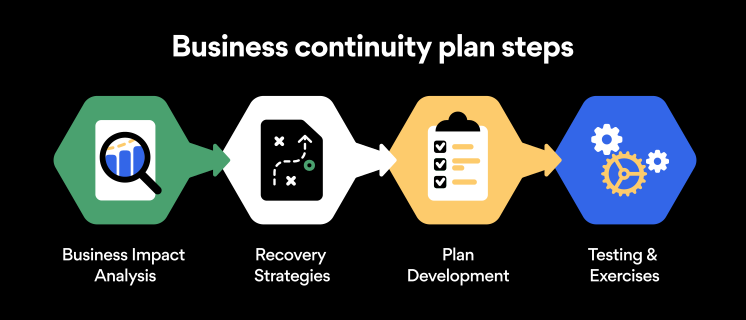
Here are some general guidelines that an organization looking to develop a BCP should consider:

Analysis

A business continuity plan should include an in-depth analysis of everything that could negatively affect the overall organizational infrastructure and operations. Assessing different levels of risk should also be a part of the analysis phase.

Design and development

Once you have a clear overview of potential risks your company could face, start developing a plan. Create a draft and reassess it to see if it takes into account even the smallest of details.

Implementation

Implement BCP within the organization by providing training sessions for the staff to get familiar with the plan. Getting everyone on the same page regarding crisis management is critical.

Testing

Rigorously test the plan. Play out a variety of scenarios in training sessions to learn the overall effectiveness of the continuity plan. By doing so, everyone on the team will be closely familiar with the business continuity plan’s guidelines.

Maintenance and updating

Because the threat landscape constantly changes and evolves, you should regularly reassess your BCP and take steps to update it. By making your continuity plan in tune with the times, you will be able to stay a step ahead of a crisis.

Level up your company’s security with NordPass Business

A comprehensive business continuity plan is vital for the entire organization’s security posture. However, in a perfect world, you wouldn’t have to use it. This is where NordPass Business can help.

Remember, weak, reused, or compromised passwords are often cited as one of the top contributing factors in data breaches. It’s not surprising, considering that an average user has around 100 passwords. Password fatigue is real and significantly affects how people treat their credentials. NordPass Business counters these issues.

With NordPass Business, your team will have a single secure place to store all work-related passwords, credit cards, and other sensitive information. Accessing all the data stored in NordPass is quick and easy, which allows your employees not to be distracted by the task of finding the correct passwords for the correct account.

In cyber incidents, NordPass Business ensures that company credentials remain secure at all times. Everything stored in the NordPass vault is secured with advanced encryption algorithms, which would take hundreds of years to brute force.

If you are interested in learning more about NordPass Business and how it can fortify corporate security, do not hesitate to book a demo with our representative.

About Version 2 Digital

Version 2 Digital is one of the most dynamic IT companies in Asia. The company distributes a wide range of IT products across various areas including cyber security, cloud, data protection, end points, infrastructures, system monitoring, storage, networking, business productivity and communication products.

Through an extensive network of channels, point of sales, resellers, and partnership companies, Version 2 offers quality products and services which are highly acclaimed in the market. Its customers cover a wide spectrum which include Global 1000 enterprises, regional listed companies, different vertical industries, public utilities, Government, a vast number of successful SMEs, and consumers in various Asian cities.

About NordPass
NordPass is developed by Nord Security, a company leading the global market of cybersecurity products.

The web has become a chaotic space where safety and trust have been compromised by cybercrime and data protection issues. Therefore, our team has a global mission to shape a more trusted and peaceful online future for people everywhere.

NordLayer features in review: Site-to-Site

Can any employee access company resources from anywhere and at any time? It depends on the company’s infrastructure. Recently established businesses have more chances to provide access wherever their teams are. However, companies with legacy architectures need to readapt to have the same time and place flexibility.

Every company infrastructure setup is unique. Therefore, it may require a different approach to solving the same challenges — like how users can access office-based data, applications, or devices while not being present on that particular site.

The most common solution is to choose VPN for security purposes and enablement of distributed teams. However, the VPN selection depends on its type and existing company network arrangement.

If your target is to enable employees to securely connect to different offices and branches of the organization despite being elsewhere, Site-to-Site VPN is the option to explore.

Site-to-Site solution using NordLayer 

Site-to-Site allows users to reach office-bind resources on HQ, your assigned office, or another company branch while not actually being on-site. It is a type of VPN that establishes an encrypted connection to a requested resource on the company network.

NordLayer’s cloud-based feature elevates typical industry Site-to-Site capabilities by connecting not just different corporate sites and resources but by enabling both on-site present and remote users to connect to any company resource on the network.

Click to tweet

Therefore, connection to a single physical location via a virtual private gateway using VPN translates into user connection to all devices and resources assigned to a company router or firewall.

How does NordLayer’s Site-to-Site feature work?

The cloud-based feature can be enabled by connecting NordLayer’s virtual private gateway to the company’s router or firewall.

Moreover, cloud-based Site-to-Site makes it possible to configure a dedicated VPN server to connect to cloud service providers like Amazon AWS, Google Cloud, or Azure.

Users with VPN access – whether present in the branch office, HQ, or remote – can connect to the company network and access the added internal resources and the on-site devices connected to the router/firewall, even though they don’t support a VPN connection.

  • Remote user connection:

  • Connection from a company branch:

  • Connection from HQ:

NordLayer’s Site-to-Site feature requires virtual private gateways and physical location configuration. Once it’s ready, a VPN connects users to the local company network and allows them to access company resources like applications, data, computers, or printers.

The same logic applies to users accessing the company’s cloud service provider resources. VPN established connection and router/firewall configuration to support IKEv2 Site-to-Site functionality with a static public IP address can provide access to resources for employees despite their location.

Shortly, suppose an employee for a job needs to access your organization’s customer information stored in a database located in HQ, the email server that stands in an office branch on another continent and needs to print it out while working from home. In that case, it’s all available via NordLayer’s Site-to-Site VPN functionality.

How NordLayer’s Site-to-Site is different?

Traditional WAN companies have an architecture based on an all-to-one setup when business units – remote locations and resources of the corporate – are connected to one main point.

Such organizations exploit extensive legacy Site-to-Site architectures that employees use to connect to the network’s main point, allowing them to access company-enclosed resources from different locations. This type of network architecture delivers interconnectivity yet lacks remote flexibility and has downsides affecting network performance, efficiency, and scalability.

As a solution to legacy Site-to-Site, NordLayer is developed to provide flexible and simple problem-solving to the general downsides of using legacy networking. When focusing on the feature functionality, the distinction between legacy setup and cloud-based remote network access solution comes from overcoming the limitations of traditional Site-to-Site solutions.

Cloud-based NordLayer solution handles legacy infrastructure challenges of increasing remote connections with quick integration to the existing architecture. It reverts performance–efficiency–scalability limitations to company advantage:

  • Decreased deployment time and expenses. NordLayer solution is fully hardware-free and compatible with hardware-based or hybrid existing infrastructures. Functionalities can be deployed within minutes and don’t require complex costs and long delivery times, focusing on time-to-value for the organization.

  • Maintained security and productivity levels. NordLayer Site-to-Site distributes encrypted user traffic to company resources based on the request nature without affecting connection quality instead of bulk processing all users to a primary point of connection and allocating to requested resources afterward. 

  • User traffic distribution. The feature decreases the heavy traffic load directing users to the internet resources, internal data centers, servers, or applications in a more streamlined manner. Therefore, the increased remote user traffic peaks don’t impact performance quality as with a traditional Site-to-Site setup. 

  • Efficiency and scalability. Naturally, user traffic distribution significantly reduces on-site equipment use managing the ad-hoc demand to upgrade. On the contrary, cloud-based Site-to-Site functionality enables the company to scale on demand without resource-intensive planning.  

The feature brings another level to team performance in business operations using Site-to-Site. NordLayer’s cloud-based feature ‘helps cut hardware-ing and distance corners’, bringing efficiency to secure data sharing and authorized access of on-site devices within the organizations, even if physically impossible.

Benefits of Site-to-Site VPN 

Primarily, Site-to-Site VPN allows for establishing non-office-only based connections. The VPN enables secure data transfers and trusted user activity between the on-premise network and the public network established over the internet.

Implementing NordLayer on top of your existing infrastructure, Site-to-Site unlocks effective and robust cybersecurity measures for various organizational aspects.

Increased network security

Sensitive data and confidential information is the target of most cyber attacks. Thus, encrypted data transfers between organization members utilizing Site-to-Site, whether in the office or remote, help safeguard against data breaches.

Streamlined business operations

Team performance is heavily related to the availability and capacity of the company network. Therefore, Site-to-Site feature maintains a good speed and stable data traffic flow to provide users with quality connectivity and constant access to resources that influence business continuity.

Flexible and scalable protection

Hardware-free Site-to-Site configuration is a beneficial add-on to the existing company network, even the largely hardware-based ones. Thus, the reaction-to-action time to solve ad-hoc challenges is multiple times shorter and easier. It requires minimal resources and provides a solution based on business needs within minutes. 

Entering NordLayer’s Site-to-Site

NordLayer solution provides a modern approach-based Site-to-Site VPN. The feature allows present and remote employees to access data and devices in multiple corporate environments.

Using our remote network access solution to enable Site-to-Site VPN for the organization, IT admins have to follow simple actions to configure the feature. First, they need to create VPN gateways via the Control Panel as entry points into the network and assign teams or role-based employees to access the gateway so they can enter the company network. Site-to-Site has to be configured for every company unit for the seamless cooperation of teams.

With fewer systems to manage, unlimited scalability, flexibility, and easy setup, companies can ensure smooth and productive connections for their users and maintain high-security levels of the business.

About Version 2 Digital

Version 2 Digital is one of the most dynamic IT companies in Asia. The company distributes a wide range of IT products across various areas including cyber security, cloud, data protection, end points, infrastructures, system monitoring, storage, networking, business productivity and communication products.

Through an extensive network of channels, point of sales, resellers, and partnership companies, Version 2 offers quality products and services which are highly acclaimed in the market. Its customers cover a wide spectrum which include Global 1000 enterprises, regional listed companies, different vertical industries, public utilities, Government, a vast number of successful SMEs, and consumers in various Asian cities.

These days, cybercrime is rampant. It’s no longer a matter of “if” you’re going to suffer an attack but “when” it will happen. All companies want to be ready for any crisis. And this is where a business continuity plan comes into play.

But what is a business continuity plan exactly? Why is it important? What should one include? Today, we’re exploring all these questions in-depth.

What is a business continuity plan?

A business continuity plan (BCP) is a document that sets guidelines for how an organization will continue its operations in the event of a disruption, whether it’s a fire, flood, other natural disaster or a cybersecurity incident. A BCP aims to help organizations resume operations without significant downtime.

Unfortunately, according to a 2020 Mercer survey, 51% of businesses across the globe don’t have a business continuity plan in place.

What’s the difference between business continuity and disaster recovery plans?

We often confuse the terms business continuity plan and disaster recovery plan. The two overlap and often work together, but the disaster recovery plan focuses on containing, examining, and restoring operations after a cyber incident. On the other hand, BCP is a broader concept that considers the whole organization. A business continuity plan helps organizations stay prepared for dealing with a potential crisis and usually encompasses a disaster recovery plan.

Importance of business continuity planning

The number of news headlines announcing data breaches has numbed us to the fact that cybercrime is very real and frequent and poses an existential risk to companies of all sizes and industries.

Consider that in 2021, approximately 37% of global organizations fell victim to a ransomware attack. Then consider that business interruption and restoration costs account for 50% of cyberattack-related losses. Finally, take into account that most cyberattacks are financially motivated and the global cost of cybercrime topped $6 trillion last year. The picture is quite clear — cybercrime is a lucrative venture for bad actors and potentially disastrous for those on the receiving end.

To thrive in these unpredictable times, organizations go beyond conventional security measures. Many companies develop a business continuity plan parallel to secure infrastructure and consider the plan a critical part of the security ecosystem. The Purpose of a business continuity plan is to significantly reduce the downtime in an emergency and, in turn, reduce the potential reputational damage and — of course — revenue losses.

Business continuity plan template

Password security for your business

Store, manage and share passwords.

30-day money-back guarantee

Business Continuity Plan Example

[Company Name]

[Date]

I. Introduction

  • Purpose of the Plan

  • Scope of the Plan

  • Budget

  • Timeline

The initial stage of developing a business continuity plan starts with a statement of the plan’s purpose, which explains the main objective of the plan, such as ensuring the organization’s ability to continue its operations during and after a disruptive event.

The Scope of the Plan outlines the areas or functions that the plan will cover, including business processes, personnel, equipment, and technology.

The Budget specifies the estimated financial resources required to implement and maintain the BCP. It includes costs related to technology, personnel, equipment, training, and other necessary expenses.

The Timeline provides a detailed schedule for developing, implementing, testing, and updating the BCP.

II. Risk Assessment

  • Identification of Risks

  • Prioritization of Risks

  • Mitigation Strategies

The Risk Assessment section of a Business Continuity Plan (BCP) is an essential part of the plan that identifies potential risks that could disrupt an organization’s critical functions.

The Identification of Risks involves identifying potential threats to the organization, such cybersecurity breaches, supply chain disruptions, power outages, and other potential risks. This step is critical to understand the risks and their potential impact on the organization.

Once the risks have been identified, the Prioritization of Risks follows, which helps determine which risks require the most attention and resources.

The final step in the Risk Assessment section is developing Mitigation Strategies to minimize the impact of identified risks. Mitigation strategies may include preventative measures, such as system redundancies, data backups, cybersecurity measures, as well as response and recovery measures, such as emergency protocols and employee training.

III. Emergency Response

  • Emergency Response Team

  • Communication Plan

  • Emergency Procedures

This section of the plan focuses on immediate actions that should be taken to ensure the safety and well-being of employees and minimize the impact of the event on the organization’s operations.

The Emergency Response Team is responsible for managing the response to an emergency or disaster situation. This team should be composed of individuals who are trained in emergency response procedures and can act quickly and decisively during an emergency. The team should also include a designated leader who is responsible for coordinating the emergency response efforts.

The Communication Plan outlines how information will be disseminated during an emergency situation. It includes contact information for employees, stakeholders, and emergency response personnel, as well as protocols for communicating with these individuals.

The Emergency Procedures detail the steps that should be taken during an emergency or disaster situation. The emergency procedures should be developed based on the potential risks identified in the Risk Assessment section and should be tested regularly to ensure that they are effective.

IV. Business Impact Analysis

The Business Impact Analysis (BIA) section of a Business Continuity Plan (BCP) is a critical step in identifying the potential impact of a disruption to an organization’s critical operations.

The Business Impact Analysis is typically conducted by a team of individuals who understand the organization’s critical functions and can assess the potential impact of a disruption to those functions. The team may include representatives from various departments, including finance, operations, IT, and human resources.

V. Recovery and Restoration

  • Procedures for recovery and restoration of critical processes

  • Prioritization of recovery efforts

  • Establishment of recovery time objectives

The Recovery and Restoration section of a Business Continuity Plan (BCP) outlines the procedures for recovering and restoring critical processes and functions following a disruption.

The Procedures for recovery and restoration of critical processes describe the steps required to restore critical processes and functions following a disruption. This may include steps such as relocating to alternate facilities, restoring data and systems, and re-establishing key business relationships.

The Prioritization section of the plan identifies the order in which critical processes will be restored, based on their importance to the organization’s operations and overall mission.

Recovery time objectives (RTOs) define the maximum amount of time that critical processes and functions can be unavailable following a disruption. Establishing RTOs ensures that recovery efforts are focused on restoring critical functions within a specific timeframe.

VI. Plan Activation

  • Plan Activation Procedures

The Plan Activation section is critical in ensuring that an organization can quickly and effectively activate the plan and respond to a potential emergency.

The Plan Activation Procedures describe the steps required to activate the BCP in response to a disruption. The procedures should be clear and concise, with specific instructions for each step to ensure a prompt and effective response.

VII. Testing and Maintenance

  • Testing Procedures

  • Maintenance Procedures

  • Review and Update Procedures

This section of the plan is critical to ensure that an organization can effectively respond to disruptions and quickly resume its essential functions.

Testing procedures may include scenarios such as natural disasters, cyber-attacks, and other potential risks. The testing procedures should include clear objectives, testing scenarios, roles and responsibilities, and evaluation criteria to assess the effectiveness of the plan.

The Maintenance Procedures detail the steps necessary to keep the BCP up-to-date and relevant.

The Review and Update Procedures describe how the BCP will be reviewed and updated regularly to ensure its continued effectiveness. This may involve conducting a review of the plan on a regular basis or after significant changes to the organization’s operations or threats.

What should a business continuity plan checklist include?

Organizations looking to develop a BCP have more than a few things to think through and consider. Variables such as the size of the organization, its IT infrastructure, personnel, and resources all play a significant role in developing a continuity plan. Remember, each crisis is different, and each organization will have a view on handling it according to all the variables in play. However, all business continuity plans will include a few elements in one way or another.

  • Clearly defined areas of responsibility

    A BCP should define specific roles and responsibilities for cases of emergency. Detail who is responsible for what tasks and clarify what course of action a person in a specific position should take. Clearly defined roles and responsibilities in an emergency event allow you to act quickly and decisively and minimize potential damage.

  • Crisis communication plan

    In an emergency, communication is vital. It is the determining factor when it comes to crisis handling. For communication to be effective, it is critical to establish clear communication pipelines. Furthermore, it is crucial to understand that alternative communication channels should not be overlooked and outlined in a business continuity plan.

  • Recovery teams

    A recovery team is a collective of different professionals who ensure that business operations are restored as soon as possible after the organization confronts a crisis.

  • Alternative site of operations

    Today, when we think of an incident in a business environment, we usually think of something related to cybersecurity. However, as discussed earlier, a BCP covers many possible disasters. In a natural disaster, determine potential alternate sites where the company could continue to operate.

  • Backup power and data backups

    Whether a cyber event or a real-life physical event, ensuring that you have access to power is crucial if you wish to continue operations. In a BCP, you can often come across lists of alternative power sources such as generators, where such tools are located, and who should oversee them. The same applies to data. Regularly scheduled data backups can significantly reduce potential losses incurred by a crisis event.

  • Recovery guidelines

    If a crisis is significant, a comprehensive business continuity plan usually includes detailed guidelines on how the recovery process will be carried out.

Business continuity planning steps

Here are some general guidelines that an organization looking to develop a BCP should consider:

Analysis

A business continuity plan should include an in-depth analysis of everything that could negatively affect the overall organizational infrastructure and operations. Assessing different levels of risk should also be a part of the analysis phase.

Design and development

Once you have a clear overview of potential risks your company could face, start developing a plan. Create a draft and reassess it to see if it takes into account even the smallest of details.

Implementation

Implement BCP within the organization by providing training sessions for the staff to get familiar with the plan. Getting everyone on the same page regarding crisis management is critical.

Testing

Rigorously test the plan. Play out a variety of scenarios in training sessions to learn the overall effectiveness of the continuity plan. By doing so, everyone on the team will be closely familiar with the business continuity plan’s guidelines.

Maintenance and updating

Because the threat landscape constantly changes and evolves, you should regularly reassess your BCP and take steps to update it. By making your continuity plan in tune with the times, you will be able to stay a step ahead of a crisis.

Level up your company’s security with NordPass Business

A comprehensive business continuity plan is vital for the entire organization’s security posture. However, in a perfect world, you wouldn’t have to use it. This is where NordPass Business can help.

Remember, weak, reused, or compromised passwords are often cited as one of the top contributing factors in data breaches. It’s not surprising, considering that an average user has around 100 passwords. Password fatigue is real and significantly affects how people treat their credentials. NordPass Business counters these issues.

With NordPass Business, your team will have a single secure place to store all work-related passwords, credit cards, and other sensitive information. Accessing all the data stored in NordPass is quick and easy, which allows your employees not to be distracted by the task of finding the correct passwords for the correct account.

In cyber incidents, NordPass Business ensures that company credentials remain secure at all times. Everything stored in the NordPass vault is secured with advanced encryption algorithms, which would take hundreds of years to brute force.

If you are interested in learning more about NordPass Business and how it can fortify corporate security, do not hesitate to book a demo with our representative.


About Version 2 Digital

Version 2 Digital is one of the most dynamic IT companies in Asia. The company distributes a wide range of IT products across various areas including cyber security, cloud, data protection, end points, infrastructures, system monitoring, storage, networking, business productivity and communication products.

Through an extensive network of channels, point of sales, resellers, and partnership companies, Version 2 offers quality products and services which are highly acclaimed in the market. Its customers cover a wide spectrum which include Global 1000 enterprises, regional listed companies, different vertical industries, public utilities, Government, a vast number of successful SMEs, and consumers in various Asian cities.

About NordPass
NordPass is developed by Nord Security, a company leading the global market of cybersecurity products.

The web has become a chaotic space where safety and trust have been compromised by cybercrime and data protection issues. Therefore, our team has a global mission to shape a more trusted and peaceful online future for people everywhere.

Home is the new office: remote work trends

The year was 2023 — three years after the pandemic started (and came close to an end), yet 75% of global workers were fully convinced remote work was the new normal. But what’s the actual status of remote work, and what perspectives does it have?

The pandemic became a massive sandbox that proved people don’t necessarily need to be nurtured by the office culture to be productive.

Workers argue that flexibility is their right whether they prefer to work in the best countries for remote work, like Germany, Denmark, the US, or any other location of their choice if the job is completed as requested. Management counters with the importance of organizational environment and team bond effectiveness created only by the presence in the office.

Both sides have their points, so what’s next — will we return to an on-site-only setup or transition to fully remote? Will more companies compromise on hybrid work after all? Let’s see where the remote work projections are guiding us.

How new is the ‘new normal’ of remote work?

It would be incorrect to say that remote work didn’t exist before 2020. Freelancers were the pioneers of working online — an adventurous and free-spirited career path. Before the pandemic, 2,9% of ‘teleworkers’ globally were exclusively working remotely. For instance, in the US market, only 6% had never worked in any kind of remote work setup.

The scope of work from home mainly spiked because of a safety measure to prevent virus spread. Even though the alertness settled and life started returning to normal, in 2022, at least occasional remote workers reached 62% globally.

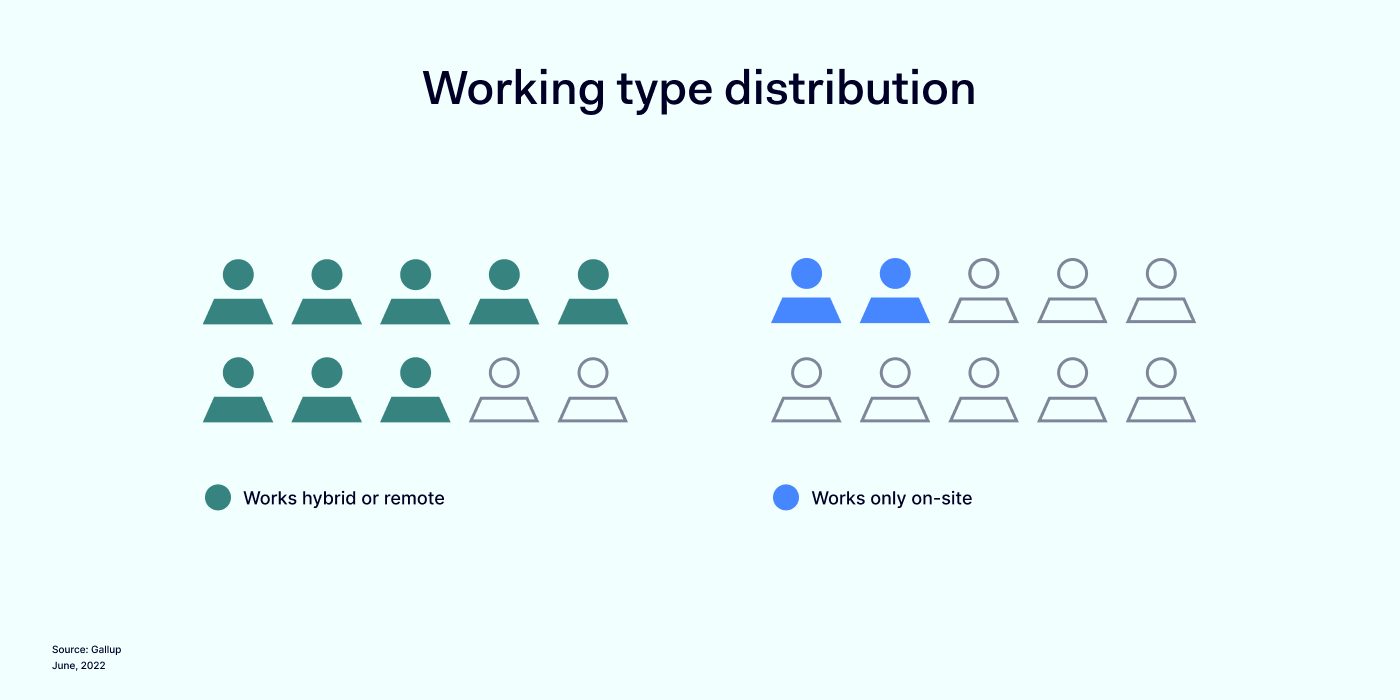
According to Gallup research results, only 2 out of 10 people returned to the old routine — entirely on-site jobs. Meanwhile, the rest of 8 out of 10 employees are split between remote and hybrid work arrangements in the US.

Working type models distribution chart

The discussion mainly circles whether employees want to work exclusively remotely (49%) or want to share their time between home and the office (46%). Yet the same research reveals that only 6% of employees see the ideal work environment exclusively on-site.

Remote work tendency: to increase or decrease?

The swing in the longevity of time spent at home before and after the pandemic compares drastically. Let’s fact-check.

According to Statista, remote work in the US before the 2020s was a relatively rare yet existing event, occurring 1-2 times per week. However, 3-4 and 5+ days of work from home per week in the post-pandemic period replaced the then-popular 1-2 days/week work from home.

Talking numbers, the remote workforce reached 53%, and the pool of employees that never worked from home decreased by 13% after COVID-19.

The data of the US-based respondents reflects the increasing trend of staying at home rather than working from the office.

2020 was the rush-hour year, so comparing the difference jump from 2019 to 2021, the number remains increasing as the amount of remote workers has tripled. If we take data from 2018-2021, the fully remote workforce grew four times bigger.

How has remote work escalated in Europe? The growing tendency of remote work in European countries is also significant.

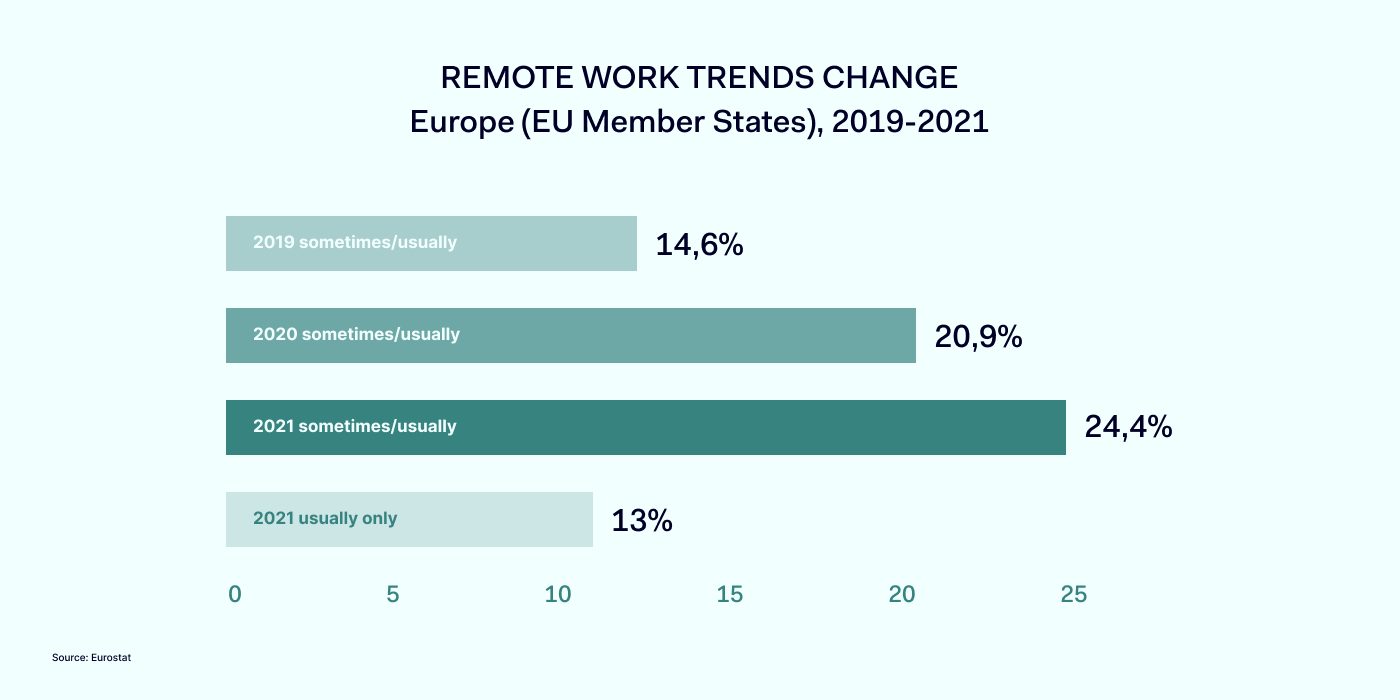
Eurostat data from 2019-2021 illustrates the increasing number of employed people spending more and more time working from home. The average of EU Member States climbed from

  • 14,6% WFH sometimes or usually* in 2019, 

  • 20,9% WFH sometimes or usually in 2020 to

  • 24,4% WFH sometimes or usually in 2021. 

In 2021, the usually only working individuals made just a little less than sometimes or usually in 2019 — 13% in contrast to 14,6%. Note that ’usually’ refers to at least half of the work days spent working from home in a reference period of 4 weeks.

REMOTE WORK TRENDS CHANGE in the EU

The shift is evident in both the US and Europe — remotes were quick to adapt to the circumstances and increasingly function between the office and home, identifying as remote workers.

Let’s not forget that the covid-era introduced a new work-life cultural concept, ‘workation,’ that combines working and vacationing simultaneously. Therefore, it’s challenging to believe that trend swing will take the working world back to the close-to-none remote setup.

Remote work perspective

It’s worth defining the happy medium for understanding remote work. There are different opinions — for some, it’s home-only; for others — home-never. A hybrid work setup seems acceptable for most organizations and employees that can apply non-site work arrangements.

The perspective of hybrid model growth should double from 42% in 2021 to 81% in 2024, according to AT&T findings. The forecast predicts almost one in four Americans will work remotely by 2025.

The prediction is supported by the forecast of conferencing software (like Teams, Zoom, or Google Meet) market growth — in 2021, it reached $14.6 billion worth, and in 2026 is expected to reach as high as $27.3 billion worth. The growing demand shows the need to communicate remotely in the future.

Hybrid work influencing factors

What are the influencing factors for hybrid work escalations — is it just the peer pressure of employees? 83% of professionals say they would decline a job offer without offering flexible work options, according to International Working Group.

Expectations are high as almost everyone (97%) expects organizations to be flexible regarding the work environment. FlexJob indicates that more than half (57%) of organization members would change jobs if they weren’t allowed to work hybrid. After all, 77% of employees see flexibility as the second most important factor after salary in their employment.

The reasoning behind it can be based on preference to save time on commuting, make Mondays less anxious without knowing you must show up in the office at 8 AM, or work from a different city or country.  

Productivity and engagement in remote work

Hybrid or remote work help achieve a better work-life balance that resolves into a positive chain reaction. Employees and organizations notice that staff is exposed to less stress, leading to workers being more present and engaged despite online environments.

It proves that hybrid work isn’t entirely a one-way road. At first, being unavailable to observe employees’ activity on-site might have needed convincing the management of the hybrid work benefits.

According to Zippia’s Remote Work Statistics report, 32.2% of managers agree that productivity has increased after the 2020 remote work shift. Generally, 68% of organizations say there’s been an improvement in employee productivity since the remote work arrangements. 

Return or not to return?

The determination to work remotely is clear for most of the employees. Besides the long list of benefits the workers learned by heart, 20% of the workforce who vouch for flexibility would agree to give up vacation time over office-defined work.

The worth of remote work can be calculated more precisely — a typical organization saves an average of $11,000 per employee yearly if the employee spends half of the working time outside the office.

Saving funds and time open more personal, team, and company opportunities. Organizations have a better chance to scale globally. It brings us to a solution to a raging issue of limited talent pool companies struggle with significantly.

Talent and remote work

Knowledge workers are in high demand to cover the growing need for professionals in all industries. According to Uplers’ research, 69% of companies face a shortage of skilled talent, and geographic limitations are one of the leading factors reserving the reach of the potential talent pool.

According to the Upwork study, companies with remote or hybrid work policies appear to be less negatively impacted by talent shortage — only every third of such organizations see a limited talent pool as a challenge. Half of the knowledge workers who provide computer programing, IT, marketing, and business consulting services to companies are freelancers.

Regarding company size, large companies tend to have a higher demand for talent that turns over with more noticeable talent shortages compared to small or medium-sized companies.

According to Manpower data, 64% of small companies (10-49 employees) struggle to find the right profile workers, while 72% of medium-sized companies (50-249 employees) and 74% of large enterprises (250+ employees) are impacted by a deficiency of skilled professionals.

Remote work by industry

Technological advancements and flexibility allow companies of various industries to adopt hybrid work for its benefit. It’s noticeable that consulting-type services are quicker to move to telecommute. The trend can be justified by the opportunities to unlock markets worldwide, streamline the workload, and better prepare for modern technological setups.

Taking hybrid work through the industry axis, IT is the leading industry to adopt remote work. Finance, customer service, healthcare, marketing, education, and sales industries are primary areas to explore and utilize the benefits of the remote workforce.

Remote work and security

The massive migration to remote work during the pandemic was kick-started for safety reasons. However, home offices opened gaps for cybersecurity vulnerabilities that many companies weren’t exposed to before.

According to Statista, cyberattacks are one of the major risks concerning organizations. Cyber threats increased exponentially with the growing number of unprotected home networks and distributed teams.

REMOTE WORK CONCERNS IN ORGANIZATIONS

The other top risks on the list include human error, cloud computing vulnerabilities, mobile device security, and loss of corporate data and information, as the concerns of organizations in Europe and the US.

Securing hybrid environments

Many organizations proved flexible in times of change — growing cyberattacks and risks were repulsed with security and hybrid work-adapted business solutions. Transitioning to cloud environments allow companies not only to enable remote workers but implement hybrid infrastructure models to support new ways of working.

Circumstances determined businesses’ push to improve network security even though upgrading existing legacy architectures wasn’t in the strategy.

During the later years, evolved Zero Trust security models now define modern remote access and cybersecurity standard. A combination of cloud application security, endpoint protection, and identity management solutions helps protect company assets and users effectively from potential vulnerabilities imposed by remote and hybrid work.

About Version 2 Digital

Version 2 Digital is one of the most dynamic IT companies in Asia. The company distributes a wide range of IT products across various areas including cyber security, cloud, data protection, end points, infrastructures, system monitoring, storage, networking, business productivity and communication products.

Through an extensive network of channels, point of sales, resellers, and partnership companies, Version 2 offers quality products and services which are highly acclaimed in the market. Its customers cover a wide spectrum which include Global 1000 enterprises, regional listed companies, different vertical industries, public utilities, Government, a vast number of successful SMEs, and consumers in various Asian cities.

These days, cybercrime is rampant. It’s no longer a matter of “if” you’re going to suffer an attack but “when” it will happen. All companies want to be ready for any crisis. And this is where a business continuity plan comes into play.

But what is a business continuity plan exactly? Why is it important? What should one include? Today, we’re exploring all these questions in-depth.

What is a business continuity plan?

A business continuity plan (BCP) is a document that sets guidelines for how an organization will continue its operations in the event of a disruption, whether it’s a fire, flood, other natural disaster or a cybersecurity incident. A BCP aims to help organizations resume operations without significant downtime.

Unfortunately, according to a 2020 Mercer survey, 51% of businesses across the globe don’t have a business continuity plan in place.

What’s the difference between business continuity and disaster recovery plans?

We often confuse the terms business continuity plan and disaster recovery plan. The two overlap and often work together, but the disaster recovery plan focuses on containing, examining, and restoring operations after a cyber incident. On the other hand, BCP is a broader concept that considers the whole organization. A business continuity plan helps organizations stay prepared for dealing with a potential crisis and usually encompasses a disaster recovery plan.

Importance of business continuity planning

The number of news headlines announcing data breaches has numbed us to the fact that cybercrime is very real and frequent and poses an existential risk to companies of all sizes and industries.

Consider that in 2021, approximately 37% of global organizations fell victim to a ransomware attack. Then consider that business interruption and restoration costs account for 50% of cyberattack-related losses. Finally, take into account that most cyberattacks are financially motivated and the global cost of cybercrime topped $6 trillion last year. The picture is quite clear — cybercrime is a lucrative venture for bad actors and potentially disastrous for those on the receiving end.

To thrive in these unpredictable times, organizations go beyond conventional security measures. Many companies develop a business continuity plan parallel to secure infrastructure and consider the plan a critical part of the security ecosystem. The Purpose of a business continuity plan is to significantly reduce the downtime in an emergency and, in turn, reduce the potential reputational damage and — of course — revenue losses.

Business continuity plan template

Password security for your business

Store, manage and share passwords.

30-day money-back guarantee

Business Continuity Plan Example

[Company Name]

[Date]

I. Introduction

  • Purpose of the Plan

  • Scope of the Plan

  • Budget

  • Timeline

The initial stage of developing a business continuity plan starts with a statement of the plan’s purpose, which explains the main objective of the plan, such as ensuring the organization’s ability to continue its operations during and after a disruptive event.

The Scope of the Plan outlines the areas or functions that the plan will cover, including business processes, personnel, equipment, and technology.

The Budget specifies the estimated financial resources required to implement and maintain the BCP. It includes costs related to technology, personnel, equipment, training, and other necessary expenses.

The Timeline provides a detailed schedule for developing, implementing, testing, and updating the BCP.

II. Risk Assessment

  • Identification of Risks

  • Prioritization of Risks

  • Mitigation Strategies

The Risk Assessment section of a Business Continuity Plan (BCP) is an essential part of the plan that identifies potential risks that could disrupt an organization’s critical functions.

The Identification of Risks involves identifying potential threats to the organization, such cybersecurity breaches, supply chain disruptions, power outages, and other potential risks. This step is critical to understand the risks and their potential impact on the organization.

Once the risks have been identified, the Prioritization of Risks follows, which helps determine which risks require the most attention and resources.

The final step in the Risk Assessment section is developing Mitigation Strategies to minimize the impact of identified risks. Mitigation strategies may include preventative measures, such as system redundancies, data backups, cybersecurity measures, as well as response and recovery measures, such as emergency protocols and employee training.

III. Emergency Response

  • Emergency Response Team

  • Communication Plan

  • Emergency Procedures

This section of the plan focuses on immediate actions that should be taken to ensure the safety and well-being of employees and minimize the impact of the event on the organization’s operations.

The Emergency Response Team is responsible for managing the response to an emergency or disaster situation. This team should be composed of individuals who are trained in emergency response procedures and can act quickly and decisively during an emergency. The team should also include a designated leader who is responsible for coordinating the emergency response efforts.

The Communication Plan outlines how information will be disseminated during an emergency situation. It includes contact information for employees, stakeholders, and emergency response personnel, as well as protocols for communicating with these individuals.

The Emergency Procedures detail the steps that should be taken during an emergency or disaster situation. The emergency procedures should be developed based on the potential risks identified in the Risk Assessment section and should be tested regularly to ensure that they are effective.

IV. Business Impact Analysis

The Business Impact Analysis (BIA) section of a Business Continuity Plan (BCP) is a critical step in identifying the potential impact of a disruption to an organization’s critical operations.

The Business Impact Analysis is typically conducted by a team of individuals who understand the organization’s critical functions and can assess the potential impact of a disruption to those functions. The team may include representatives from various departments, including finance, operations, IT, and human resources.

V. Recovery and Restoration

  • Procedures for recovery and restoration of critical processes

  • Prioritization of recovery efforts

  • Establishment of recovery time objectives

The Recovery and Restoration section of a Business Continuity Plan (BCP) outlines the procedures for recovering and restoring critical processes and functions following a disruption.

The Procedures for recovery and restoration of critical processes describe the steps required to restore critical processes and functions following a disruption. This may include steps such as relocating to alternate facilities, restoring data and systems, and re-establishing key business relationships.

The Prioritization section of the plan identifies the order in which critical processes will be restored, based on their importance to the organization’s operations and overall mission.

Recovery time objectives (RTOs) define the maximum amount of time that critical processes and functions can be unavailable following a disruption. Establishing RTOs ensures that recovery efforts are focused on restoring critical functions within a specific timeframe.

VI. Plan Activation

  • Plan Activation Procedures

The Plan Activation section is critical in ensuring that an organization can quickly and effectively activate the plan and respond to a potential emergency.

The Plan Activation Procedures describe the steps required to activate the BCP in response to a disruption. The procedures should be clear and concise, with specific instructions for each step to ensure a prompt and effective response.

VII. Testing and Maintenance

  • Testing Procedures

  • Maintenance Procedures

  • Review and Update Procedures

This section of the plan is critical to ensure that an organization can effectively respond to disruptions and quickly resume its essential functions.

Testing procedures may include scenarios such as natural disasters, cyber-attacks, and other potential risks. The testing procedures should include clear objectives, testing scenarios, roles and responsibilities, and evaluation criteria to assess the effectiveness of the plan.

The Maintenance Procedures detail the steps necessary to keep the BCP up-to-date and relevant.

The Review and Update Procedures describe how the BCP will be reviewed and updated regularly to ensure its continued effectiveness. This may involve conducting a review of the plan on a regular basis or after significant changes to the organization’s operations or threats.

What should a business continuity plan checklist include?

Organizations looking to develop a BCP have more than a few things to think through and consider. Variables such as the size of the organization, its IT infrastructure, personnel, and resources all play a significant role in developing a continuity plan. Remember, each crisis is different, and each organization will have a view on handling it according to all the variables in play. However, all business continuity plans will include a few elements in one way or another.

  • Clearly defined areas of responsibility

    A BCP should define specific roles and responsibilities for cases of emergency. Detail who is responsible for what tasks and clarify what course of action a person in a specific position should take. Clearly defined roles and responsibilities in an emergency event allow you to act quickly and decisively and minimize potential damage.

  • Crisis communication plan

    In an emergency, communication is vital. It is the determining factor when it comes to crisis handling. For communication to be effective, it is critical to establish clear communication pipelines. Furthermore, it is crucial to understand that alternative communication channels should not be overlooked and outlined in a business continuity plan.

  • Recovery teams

    A recovery team is a collective of different professionals who ensure that business operations are restored as soon as possible after the organization confronts a crisis.

  • Alternative site of operations

    Today, when we think of an incident in a business environment, we usually think of something related to cybersecurity. However, as discussed earlier, a BCP covers many possible disasters. In a natural disaster, determine potential alternate sites where the company could continue to operate.

  • Backup power and data backups

    Whether a cyber event or a real-life physical event, ensuring that you have access to power is crucial if you wish to continue operations. In a BCP, you can often come across lists of alternative power sources such as generators, where such tools are located, and who should oversee them. The same applies to data. Regularly scheduled data backups can significantly reduce potential losses incurred by a crisis event.

  • Recovery guidelines

    If a crisis is significant, a comprehensive business continuity plan usually includes detailed guidelines on how the recovery process will be carried out.

Business continuity planning steps

Here are some general guidelines that an organization looking to develop a BCP should consider:

Analysis

A business continuity plan should include an in-depth analysis of everything that could negatively affect the overall organizational infrastructure and operations. Assessing different levels of risk should also be a part of the analysis phase.

Design and development

Once you have a clear overview of potential risks your company could face, start developing a plan. Create a draft and reassess it to see if it takes into account even the smallest of details.

Implementation

Implement BCP within the organization by providing training sessions for the staff to get familiar with the plan. Getting everyone on the same page regarding crisis management is critical.

Testing

Rigorously test the plan. Play out a variety of scenarios in training sessions to learn the overall effectiveness of the continuity plan. By doing so, everyone on the team will be closely familiar with the business continuity plan’s guidelines.

Maintenance and updating

Because the threat landscape constantly changes and evolves, you should regularly reassess your BCP and take steps to update it. By making your continuity plan in tune with the times, you will be able to stay a step ahead of a crisis.

Level up your company’s security with NordPass Business

A comprehensive business continuity plan is vital for the entire organization’s security posture. However, in a perfect world, you wouldn’t have to use it. This is where NordPass Business can help.

Remember, weak, reused, or compromised passwords are often cited as one of the top contributing factors in data breaches. It’s not surprising, considering that an average user has around 100 passwords. Password fatigue is real and significantly affects how people treat their credentials. NordPass Business counters these issues.

With NordPass Business, your team will have a single secure place to store all work-related passwords, credit cards, and other sensitive information. Accessing all the data stored in NordPass is quick and easy, which allows your employees not to be distracted by the task of finding the correct passwords for the correct account.

In cyber incidents, NordPass Business ensures that company credentials remain secure at all times. Everything stored in the NordPass vault is secured with advanced encryption algorithms, which would take hundreds of years to brute force.

If you are interested in learning more about NordPass Business and how it can fortify corporate security, do not hesitate to book a demo with our representative.


About Version 2 Digital

Version 2 Digital is one of the most dynamic IT companies in Asia. The company distributes a wide range of IT products across various areas including cyber security, cloud, data protection, end points, infrastructures, system monitoring, storage, networking, business productivity and communication products.

Through an extensive network of channels, point of sales, resellers, and partnership companies, Version 2 offers quality products and services which are highly acclaimed in the market. Its customers cover a wide spectrum which include Global 1000 enterprises, regional listed companies, different vertical industries, public utilities, Government, a vast number of successful SMEs, and consumers in various Asian cities.

About NordPass
NordPass is developed by Nord Security, a company leading the global market of cybersecurity products.

The web has become a chaotic space where safety and trust have been compromised by cybercrime and data protection issues. Therefore, our team has a global mission to shape a more trusted and peaceful online future for people everywhere.

How Hostinger onboarded a global remote team overnight with a 5-step plan

Hostinger is a hosting service provider for developers and their customers. With 1.2 million users worldwide and growing, the company works hard on improving customer support and continues updating its server technology for an even better customer experience. On the side, teams are fine-tuning home-designed hPanel, so the work there runs in a high pace environment.

various informating relating to the profile of hostinger

To support business projects and a large customer base, Hostinger has several departments to maintain all the projects and services up and running. Therefore, originally based in Kaunas, Lithuania, the company now has an extensive team of over 1000 employees in 51 countries across the globe. Yet a large team brings its challenges in times of change. Egidijus Navardauskas, Head of Cybersecurity at Hostinger, gives his insider experience on their journey of implementing remote work in extreme situations.

The Challenge

Rapid organization onboarding to remote work during lockdown

Hostinger as most of the companies in the pre-pandemic time, lived a daily office-based life. However, it changed during Covid as all teams started working remotely and adjusting to the new way of living.

“Before the pandemic, we used to work from the office full time —  there was no need for most of the teams to use an internal VPN solution except for a part of the IT staff.”

Click to tweet

Once the lockdown period came into effect and workforce borders started expanding, the existing VPN solution limitations were revealed. It wasn’t initially built to scale sufficiently and provide a reliable VPN connection to handle the fast growth of remote employees in different countries.

The employee distribution and work from personal networks required the company to grant them a swift connection to internal resources. However, operational continuity was at high risk, and the current setup lacked role-based network access controls for maintaining security levels. 

The Solution

Replace the existing VPN with a more agile solution

The employees used to work from the office all the time, and only a part of the IT staff was using an internal VPN solution as there was no need for most of the teams to access internal resources after working hours. 

“As Hostinger had to move to a remote working model due to the pandemic and fast growth of remote employees in different counties, the existing VPN solution was not scalable enough to handle many users.”

Click to tweet

Transitioning from an on-site environment to remote work quickly can be challenging for any business. Especially in the case of Hostinger, which experienced a sudden necessity to change its work and infrastructure approach.

Ad-hoc tasks are difficult to squeeze into tight schedules even in extreme circumstances, so time management and efficient distribution of resources are crucial — choosing the right solution from the first shoot is critical.

“Time shortage and lack of human resources, as all IT teams were very busy with their quarterly goals, were the additional factors that impacted the remote work situation.”

Click to tweet

Therefore, the journey from identifying the issue, selecting a solution, and making the delivery had to be well-organized and smooth.

Why choose NordLayer?

NordLayer provided an optimal solution to change the existing company VPN and seamlessly integrate it into the current infrastructure.

Even though the requirements for a new VPN were extended to establish remote connections of the worldwide-distributed high number of employees to organizational resources and provide secure identity management measures to the IT administrators. 

“NordLayer topped the shortlisted solutions by Hostinger by being the most cost-effective and easiest-to-manage option — this is how we chose the solution.”

Click to tweet

When selecting a cybersecurity solution, Hostinger usually uses a risk-driven approach, and of course, the solution has to fulfill requirements that are suitable for our company’s needs. Following the practice ensures the organization’s main security goals, which are confidentiality, integrity, and availability of resources and data. 

5 steps to onboard a global remote team overnight: decision-making process and proceeding with NordLayer

Clear steps and objectives helped Hostinger to optimize and streamline its process of problem-solving from understanding the current solution limitations — cannot scale with a growing team,  what are the desired results — provide network access controls, meet compliance and security requirements, and provide backup servers, to overviewing the plan and implementing to the whole organization.

The Outcome

Fast adaptation to a crisis with extended security outcome

The company achieved a remote work setup on time, so business and team productivity weren’t affected. It all happened while facing a global lockdown with time and human resources limitations.

Today, all Hostinger employees use the solution daily as the team works in a hybrid model. We utilize ten private virtual gateways for our company needs — all this just having NordLayer and a 5-people cybersecurity team.

Most importantly, Hostinger employees can connect securely to internal resources no matter where they are. Moreover, the IT staff can focus more on other projects rather than maintaining internal VPN infrastructure — the service provider is responsible for the maintenance of the servers, so it saves a lot of valuable time. 

Pro cybersecurity tips 

The pandemic may start feeling like old news at some point the more time passes by, yet it was an unusual situation that had effects on businesses that reflect up to this day and will stay relevant in the future, like teaching to react to extreme situations to keep businesses running. Even though not everything can be foreseen, thus it’s beneficial to have a strategy and a sound plan in place to be well-prepared.

It’s good to start even from small things — Head of Cybersecurity of Hostinger Egidijus Navardauskas shares his tips for business security:

Have you considered how your organization would hold if stress-tested? What would be the main impediments to securing business continuity? Even expected challenges can bring to light lacking security and adoption of implemented infrastructure. Therefore, it’s always worth exploring the possibilities and performing crisis drills even on paper — be ready to ensure teams and organization perforation despite the work setup, and reach out to learn more about a remote access network solution for modern companies.

About Version 2 Digital

Version 2 Digital is one of the most dynamic IT companies in Asia. The company distributes a wide range of IT products across various areas including cyber security, cloud, data protection, end points, infrastructures, system monitoring, storage, networking, business productivity and communication products.

Through an extensive network of channels, point of sales, resellers, and partnership companies, Version 2 offers quality products and services which are highly acclaimed in the market. Its customers cover a wide spectrum which include Global 1000 enterprises, regional listed companies, different vertical industries, public utilities, Government, a vast number of successful SMEs, and consumers in various Asian cities.

These days, cybercrime is rampant. It’s no longer a matter of “if” you’re going to suffer an attack but “when” it will happen. All companies want to be ready for any crisis. And this is where a business continuity plan comes into play.

But what is a business continuity plan exactly? Why is it important? What should one include? Today, we’re exploring all these questions in-depth.

What is a business continuity plan?

A business continuity plan (BCP) is a document that sets guidelines for how an organization will continue its operations in the event of a disruption, whether it’s a fire, flood, other natural disaster or a cybersecurity incident. A BCP aims to help organizations resume operations without significant downtime.

Unfortunately, according to a 2020 Mercer survey, 51% of businesses across the globe don’t have a business continuity plan in place.

What’s the difference between business continuity and disaster recovery plans?

We often confuse the terms business continuity plan and disaster recovery plan. The two overlap and often work together, but the disaster recovery plan focuses on containing, examining, and restoring operations after a cyber incident. On the other hand, BCP is a broader concept that considers the whole organization. A business continuity plan helps organizations stay prepared for dealing with a potential crisis and usually encompasses a disaster recovery plan.

Importance of business continuity planning

The number of news headlines announcing data breaches has numbed us to the fact that cybercrime is very real and frequent and poses an existential risk to companies of all sizes and industries.

Consider that in 2021, approximately 37% of global organizations fell victim to a ransomware attack. Then consider that business interruption and restoration costs account for 50% of cyberattack-related losses. Finally, take into account that most cyberattacks are financially motivated and the global cost of cybercrime topped $6 trillion last year. The picture is quite clear — cybercrime is a lucrative venture for bad actors and potentially disastrous for those on the receiving end.

To thrive in these unpredictable times, organizations go beyond conventional security measures. Many companies develop a business continuity plan parallel to secure infrastructure and consider the plan a critical part of the security ecosystem. The Purpose of a business continuity plan is to significantly reduce the downtime in an emergency and, in turn, reduce the potential reputational damage and — of course — revenue losses.

Business continuity plan template

Password security for your business

Store, manage and share passwords.

30-day money-back guarantee

Business Continuity Plan Example

[Company Name]

[Date]

I. Introduction

  • Purpose of the Plan

  • Scope of the Plan

  • Budget

  • Timeline

The initial stage of developing a business continuity plan starts with a statement of the plan’s purpose, which explains the main objective of the plan, such as ensuring the organization’s ability to continue its operations during and after a disruptive event.

The Scope of the Plan outlines the areas or functions that the plan will cover, including business processes, personnel, equipment, and technology.

The Budget specifies the estimated financial resources required to implement and maintain the BCP. It includes costs related to technology, personnel, equipment, training, and other necessary expenses.

The Timeline provides a detailed schedule for developing, implementing, testing, and updating the BCP.

II. Risk Assessment

  • Identification of Risks

  • Prioritization of Risks

  • Mitigation Strategies

The Risk Assessment section of a Business Continuity Plan (BCP) is an essential part of the plan that identifies potential risks that could disrupt an organization’s critical functions.

The Identification of Risks involves identifying potential threats to the organization, such cybersecurity breaches, supply chain disruptions, power outages, and other potential risks. This step is critical to understand the risks and their potential impact on the organization.

Once the risks have been identified, the Prioritization of Risks follows, which helps determine which risks require the most attention and resources.

The final step in the Risk Assessment section is developing Mitigation Strategies to minimize the impact of identified risks. Mitigation strategies may include preventative measures, such as system redundancies, data backups, cybersecurity measures, as well as response and recovery measures, such as emergency protocols and employee training.

III. Emergency Response

  • Emergency Response Team

  • Communication Plan

  • Emergency Procedures

This section of the plan focuses on immediate actions that should be taken to ensure the safety and well-being of employees and minimize the impact of the event on the organization’s operations.

The Emergency Response Team is responsible for managing the response to an emergency or disaster situation. This team should be composed of individuals who are trained in emergency response procedures and can act quickly and decisively during an emergency. The team should also include a designated leader who is responsible for coordinating the emergency response efforts.

The Communication Plan outlines how information will be disseminated during an emergency situation. It includes contact information for employees, stakeholders, and emergency response personnel, as well as protocols for communicating with these individuals.

The Emergency Procedures detail the steps that should be taken during an emergency or disaster situation. The emergency procedures should be developed based on the potential risks identified in the Risk Assessment section and should be tested regularly to ensure that they are effective.

IV. Business Impact Analysis

The Business Impact Analysis (BIA) section of a Business Continuity Plan (BCP) is a critical step in identifying the potential impact of a disruption to an organization’s critical operations.

The Business Impact Analysis is typically conducted by a team of individuals who understand the organization’s critical functions and can assess the potential impact of a disruption to those functions. The team may include representatives from various departments, including finance, operations, IT, and human resources.

V. Recovery and Restoration

  • Procedures for recovery and restoration of critical processes

  • Prioritization of recovery efforts

  • Establishment of recovery time objectives

The Recovery and Restoration section of a Business Continuity Plan (BCP) outlines the procedures for recovering and restoring critical processes and functions following a disruption.

The Procedures for recovery and restoration of critical processes describe the steps required to restore critical processes and functions following a disruption. This may include steps such as relocating to alternate facilities, restoring data and systems, and re-establishing key business relationships.

The Prioritization section of the plan identifies the order in which critical processes will be restored, based on their importance to the organization’s operations and overall mission.

Recovery time objectives (RTOs) define the maximum amount of time that critical processes and functions can be unavailable following a disruption. Establishing RTOs ensures that recovery efforts are focused on restoring critical functions within a specific timeframe.

VI. Plan Activation

  • Plan Activation Procedures

The Plan Activation section is critical in ensuring that an organization can quickly and effectively activate the plan and respond to a potential emergency.

The Plan Activation Procedures describe the steps required to activate the BCP in response to a disruption. The procedures should be clear and concise, with specific instructions for each step to ensure a prompt and effective response.

VII. Testing and Maintenance

  • Testing Procedures

  • Maintenance Procedures

  • Review and Update Procedures

This section of the plan is critical to ensure that an organization can effectively respond to disruptions and quickly resume its essential functions.

Testing procedures may include scenarios such as natural disasters, cyber-attacks, and other potential risks. The testing procedures should include clear objectives, testing scenarios, roles and responsibilities, and evaluation criteria to assess the effectiveness of the plan.

The Maintenance Procedures detail the steps necessary to keep the BCP up-to-date and relevant.

The Review and Update Procedures describe how the BCP will be reviewed and updated regularly to ensure its continued effectiveness. This may involve conducting a review of the plan on a regular basis or after significant changes to the organization’s operations or threats.

What should a business continuity plan checklist include?

Organizations looking to develop a BCP have more than a few things to think through and consider. Variables such as the size of the organization, its IT infrastructure, personnel, and resources all play a significant role in developing a continuity plan. Remember, each crisis is different, and each organization will have a view on handling it according to all the variables in play. However, all business continuity plans will include a few elements in one way or another.

  • Clearly defined areas of responsibility

    A BCP should define specific roles and responsibilities for cases of emergency. Detail who is responsible for what tasks and clarify what course of action a person in a specific position should take. Clearly defined roles and responsibilities in an emergency event allow you to act quickly and decisively and minimize potential damage.

  • Crisis communication plan

    In an emergency, communication is vital. It is the determining factor when it comes to crisis handling. For communication to be effective, it is critical to establish clear communication pipelines. Furthermore, it is crucial to understand that alternative communication channels should not be overlooked and outlined in a business continuity plan.

  • Recovery teams

    A recovery team is a collective of different professionals who ensure that business operations are restored as soon as possible after the organization confronts a crisis.

  • Alternative site of operations

    Today, when we think of an incident in a business environment, we usually think of something related to cybersecurity. However, as discussed earlier, a BCP covers many possible disasters. In a natural disaster, determine potential alternate sites where the company could continue to operate.

  • Backup power and data backups

    Whether a cyber event or a real-life physical event, ensuring that you have access to power is crucial if you wish to continue operations. In a BCP, you can often come across lists of alternative power sources such as generators, where such tools are located, and who should oversee them. The same applies to data. Regularly scheduled data backups can significantly reduce potential losses incurred by a crisis event.

  • Recovery guidelines

    If a crisis is significant, a comprehensive business continuity plan usually includes detailed guidelines on how the recovery process will be carried out.

Business continuity planning steps

Here are some general guidelines that an organization looking to develop a BCP should consider:

Analysis

A business continuity plan should include an in-depth analysis of everything that could negatively affect the overall organizational infrastructure and operations. Assessing different levels of risk should also be a part of the analysis phase.

Design and development

Once you have a clear overview of potential risks your company could face, start developing a plan. Create a draft and reassess it to see if it takes into account even the smallest of details.

Implementation

Implement BCP within the organization by providing training sessions for the staff to get familiar with the plan. Getting everyone on the same page regarding crisis management is critical.

Testing

Rigorously test the plan. Play out a variety of scenarios in training sessions to learn the overall effectiveness of the continuity plan. By doing so, everyone on the team will be closely familiar with the business continuity plan’s guidelines.

Maintenance and updating

Because the threat landscape constantly changes and evolves, you should regularly reassess your BCP and take steps to update it. By making your continuity plan in tune with the times, you will be able to stay a step ahead of a crisis.

Level up your company’s security with NordPass Business

A comprehensive business continuity plan is vital for the entire organization’s security posture. However, in a perfect world, you wouldn’t have to use it. This is where NordPass Business can help.

Remember, weak, reused, or compromised passwords are often cited as one of the top contributing factors in data breaches. It’s not surprising, considering that an average user has around 100 passwords. Password fatigue is real and significantly affects how people treat their credentials. NordPass Business counters these issues.

With NordPass Business, your team will have a single secure place to store all work-related passwords, credit cards, and other sensitive information. Accessing all the data stored in NordPass is quick and easy, which allows your employees not to be distracted by the task of finding the correct passwords for the correct account.

In cyber incidents, NordPass Business ensures that company credentials remain secure at all times. Everything stored in the NordPass vault is secured with advanced encryption algorithms, which would take hundreds of years to brute force.

If you are interested in learning more about NordPass Business and how it can fortify corporate security, do not hesitate to book a demo with our representative.


About Version 2 Digital

Version 2 Digital is one of the most dynamic IT companies in Asia. The company distributes a wide range of IT products across various areas including cyber security, cloud, data protection, end points, infrastructures, system monitoring, storage, networking, business productivity and communication products.

Through an extensive network of channels, point of sales, resellers, and partnership companies, Version 2 offers quality products and services which are highly acclaimed in the market. Its customers cover a wide spectrum which include Global 1000 enterprises, regional listed companies, different vertical industries, public utilities, Government, a vast number of successful SMEs, and consumers in various Asian cities.

About NordPass
NordPass is developed by Nord Security, a company leading the global market of cybersecurity products.

The web has become a chaotic space where safety and trust have been compromised by cybercrime and data protection issues. Therefore, our team has a global mission to shape a more trusted and peaceful online future for people everywhere.

Microsoft Office 365 security best practices for business

Office 365 is a popular business platform worldwide. Its blend of collaboration tools, office apps, and cloud storage components makes Office 365 a go-to option for many companies. But the popularity of Office also makes it a popular target for cyber-attackers.

Securing data and protecting assets is critically important when using Office 365. This blog will discuss the major threats faced by users and we will suggest some security best practices. Office 365 is a safe place to run business operations. But you need awareness and policies to make that safety a reality.

How secure is Office 365?

Office 365 is a suite of cloud-based business tools. Like all cloud applications and platforms, Office is vulnerable to external attackers. Cyber-attackers can breach user defenses. They can access sensitive data, disrupt operations, and cause plenty of damage before they are stopped.

Security concerns are real. Up to 85% of organizations using Office 365 suffered an email data loss in 2021. 15% of organizations using the platform suffered more than 500 breaches in the same year. Just 4% of organizations not using Office 365 reported the same data breach frequency.

Microsoft has toughened Office security features in the past few years. However, Office 365 users still need to control their security posture. If you can find a secure configuration that meets your needs, you can use the platform safely. The first step in doing so is mastering the security features supplied by Microsoft.

Security features in Office 365

Users can access most Office 365 security features via the Security and Compliance Center on Microsoft Accounts. This cloud-based portal allows users to choose several critical security functions. These functions include:

1. Identity and Access Management (IAM)

Microsoft’s IAM solution lets you set up digital identities for all Office users.

Every user has a digital identity containing their authentication details and authorization information. This lets administrators add adaptive multi-factor authentication for all log-ins. Admins can manage passwords efficiently, onboard and remove users as needed.

IAM also allows you to manage authorization options for all users. Admins can set privileges based on roles or individual requirements. This limits app access to users with appropriate permissions. Unauthorized outsiders won’t be able to intrude.

2. Information security

With Microsoft Information Protection (MIP), users can manage data as it travels across Office cloud resources and even on remote work devices.

Users can classify data to ensure it only reaches authorized devices. Set different sensitivity levels to make data available or defend it as required.

Classification works alongside Data Loss Prevention (DLP) and Microsoft Information Governance (MIG) tools. Create robust security controls for confidential data, and set lifecycle controls to delete data when it is not needed.

3. Threat defenses

Microsoft offers Office-native Security Information and Event Management (SIEM) and Extended Detection and Response (XDR) features. Together, they neutralize cyber threats and track traffic to assess security weaknesses.

Azure Sentinel is a SIEM system that uses Artificial Intelligence to monitor the Office environment. Sentinel can track every active Office application and device. Security teams benefit from real-time visibility across the threat surface.

Azure Defender and Office 365 Defender are XDR tools. They extend threat detection to all endpoints, including email accounts and cloud applications.

4. Risk management

Office 365 includes a suite of tools to manage risks and ensure compliance. These tools identify and classify risks, focusing on data protection across an Office 365 environment.

Risk management tools allow security teams to assess insider threats, manage the risk of insecure communications, and fine-tune privileges for admin accounts. Audit tools let you drill down into compliance issues until every data security weakness is covered.

What are the most important Office 365 security concerns?

The security tools above are comprehensive and flexible. But they are generally voluntary. Users need to create their own security setup and choose measures that fit their Office implementation.

Office 365 leaves plenty of room for misconfigurations. And these gaps are the ideal space for attackers to work. Here are some critical threats for security managers to assess:

1. Credential theft and unauthorized access

Cyber attackers may gain access to your entire Office 365 environment if they steal user credentials. Users can leak credentials in many ways. For instance, employees could:

  • Share information insecurely via Office collaboration apps

  • Click on attachments that extract personal data

  • Follow unsafe links in social engineering email messages

  • Install malware onto a connected device

Credential theft is a constant security concern for Office 365 managers. Office does include multi-factor authentication, but MFA is not enabled as a default. Many companies forget to apply extra authentication and suffer as a result.

2. Unsafe privileges

According to Zero Trust principles, Office 365 users should have access to the resources they need and nothing more. Limiting access to sensitive data makes data extraction and loss less likely. Hackers cannot freely access data. Employees won’t be able to leak data during their tasks accidentally.

However, privileges creep can lead to too many people having access to too much data. By default, every Global Administrator Account has extensive privileges. Security teams need to restrict admin accounts manually. This potentially leaves scope to abuse access and steal data.

3. Data loss

Data breaches are a nightmare scenario for Office 365 managers, but they are possible without adequate security controls.

The major problem here is sharing. Office is built to enable information exchange. Workers share documents, conversations, databases, and much more. This is great at an operational level. But the flow of data is a security problem.

Data can leak via many storage locations or sharing tools. Employees may not know about data sharing risks or how to store data securely. And data can pass to unauthorized third parties without the knowledge of security teams.

4. Complacency

Many companies move from on-premises Office implementations to cloud-based 365 environments. While the applications are familiar, the security context of these two setups is very different.

Security managers may lack visibility of all cloud endpoints and in-use applications. They may lose sight of data containers or fail to turn on necessary security features. Sharing tools like SharePoint present new risks, such as allowing access for third-party guests. But these new risks aren’t always detected during cloud transitions.

Office 365 security best practices for business

the best practices for using microsoft office 365 for business

What can businesses do about the security threats listed above? The answer lies in applying Office 365 security best practices. By following these security practices, you can enjoy the benefits of information sharing and keeping data safe.

1. Enable IAM

Access management is the top priority when securing Office 365 environments. Companies must create a secure perimeter and restrict access for unauthenticated users. Users should have the privileges they need to carry out work, but no more access than they require.

Office 365 has built-in IAM tools to control authentication and authorization centrally. Set conditional access policies for every role and back up password access with MFA technologies. Bring all Office 365 apps together via Single Sign On (SSO). This makes it easier for employees to manage passwords. It also simplifies access management for security professionals.

It is advisable to create separate user accounts for admins with elevated privileges. Every admin account requires maximum protection. Users should only use administrative accounts for specialist tasks, and rely on other accounts for everyday work.

2. Educate users to understand Office 365 security

Employees must know how to avoid phishing attacks. Build anti-phishing training into all onboarding processes and refresh this knowledge regularly. Workers should always be aware of dangerous email attachments and how to spot malicious links.

Users also require training in how to share information securely. Educate staff on how to use SharePoint and Teams without compromising security.

3. Collaborate securely

Education combines with robust collaboration app security to protect data in-transit. Install DLP systems to track sensitive files and ensure they stay within the network perimeter. DLP will alert managers if employees share critical data, and block any illegitimate transfers.

Set up Message Encryption on Teams and other communication tools. This protects the content of messages. Only authorized users will be able to read messages or open files.

Use Safe Attachments to scan all email attachments and shared files. Extend attachment protection to Teams, SharePoint and OneDrive so that all potential endpoints enjoy security coverage.

4. Put in place anti-phishing protections

Office 365 includes specialist tools to handle phishing attacks. These advanced threat protection tools go beyond trusting employees not to open malicious links. They actively inspect emails to detect malicious content.

For example, users can sandbox attachments automatically with Application Guard. This creates a protected environment to open pdfs or spreadsheets. Application Guard scans files to detect unsafe sources. This matters because Office files are common attack vectors. Sandboxing makes it much less likely that an innocent document will spark a security alert.

Safe Links is another useful anti-phishing tool that scans URLs to detect security concerns. And you can set “external” email tagging for inbound messages. This alerts users to be careful when opening external communications.

These measures do not remove all phishing risks. Zero-day threats are still an issue. But together, Application Guard, email tagging and Safe Links provide plenty of defense against social engineering attacks.

5. Use anti-malware solutions

When anti-phishing measures fail, malware protection tools enter the picture. Office 365 users should take advantage of Microsoft’s anti-malware tools wherever possible.

Implement SIEM protection via Azure Sentinel, and use XDR to scan all endpoints. These two tools work together to detect malware infections and quarantine affected files. This should neutralize ransomware attacks before they take down network infrastructure.

6. Strengthen your password policies

User access is the major Office 365 security weak point. And credential theft is the most common attack vector. Make it harder to mount credential stuffing attacks by enforcing strong password policies across all users.

Make sure Office users avoid real names and familiar words. Include multiple symbols and numbers, in combinations that are impossible to anticipate. Use password manager tools to store and update passwords. This reduces the risk of human error.

Generally, make sure users do not reuse passwords from other network assets. Every Office 365 user requires unique credentials, with no exceptions.

7. Strengthen data security controls

Employ MIP to lock down sensitive information and allow access to less important data. Office 365 lets you label sensitive information such as personally identifiable information (PII) and financial records. These labels enforce tools to keep sensitive data secure, such as encryption or watermarking.

DLP also allows you to track data movements and prevent data leaving organizational boundaries. This makes it easier to work remotely without creating additional data loss risks.

8. Check compliance and security scores

Data security measures aim to meet strict compliance goals. For instance, you may need to protect financial records to comply with PCI-DSS, or meet HIPAA rules when handling patient details. Microsoft has created tools to make the compliance task easier, so use them when available.

The Office 365 compliance portal provides guidance for meeting important regulations. It also includes a compliance score that charts your progress. Updated in real-time, the compliance score suggests required actions. It provides a useful road map to compliance across all Office 365 services.

Office also provides an overall Secure Score. This can be found in the Security Center, which records a percentage based on an organization’s security posture. Adding extra security measures boosts the score, and the system delivers recommendations based on your Office 365 setup.

9. Optimize mobile device security

Employees may use mobile devices to access Microsoft’s SaaS applications. This particularly applies to companies with large communities of remote workers or BYOD setups. In any case, it is advisable to implement Mobile Device Management (MDM) security solutions,

Office 365’s MDM tools encrypt confidential data on mobile devices. They can wipe data from devices in the event of theft. And they prevent network access for stolen or compromised devices.

10. Put in place rock-solid Office auditing

Be sure to enable the Unified Audit Log via the Office 365 Security Center. The UAL lets you track user activity across all accounts. You can see who is sharing information and how that information spreads across your cloud environment.

By default, audit logs provide 90 days of historical information, which isn’t that much. However, you can extend the scope of audit logging to as long as ten years if desired. Longer periods provide a better evidence base for compliance management, but you will need measures to efficiently store and search audit data.

Ensure secure access to Office 365 with NordLayer

Collaborate, strategize, and store data safely with our office 365 security best practices. On-board security tools and solid staff education let you use Microsoft’s business environment without creating unnecessary risks.

However, just relying on Office 365 controls is a risky move. That’s especially true for companies with hybrid cloud environments who manage multiple platforms and require secure access to SaaS apps. In those cases, it makes sense to apply enterprise-wide security solutions like NordLayer.

NordLayer’s IP allowlisting tools supplement Office 365 security controls. Admins can define a list of authorized addresses. These IP addresses are then permitted access to Office resources. Unlisted devices are excluded or require additional verification.

NordLayer encrypts traffic passing between employee devices and Office 365, countering man-in-the-middle style attacks. Threatblock also blocks malicious websites, reducing the risks posed by phishing attacks. Use Microsoft’s internal features to secure Office 365. But go further, integrating Office into your wider cybersecurity setup. To find out more, contact the NordLayer team today.

About Version 2 Digital

Version 2 Digital is one of the most dynamic IT companies in Asia. The company distributes a wide range of IT products across various areas including cyber security, cloud, data protection, end points, infrastructures, system monitoring, storage, networking, business productivity and communication products.

Through an extensive network of channels, point of sales, resellers, and partnership companies, Version 2 offers quality products and services which are highly acclaimed in the market. Its customers cover a wide spectrum which include Global 1000 enterprises, regional listed companies, different vertical industries, public utilities, Government, a vast number of successful SMEs, and consumers in various Asian cities.

These days, cybercrime is rampant. It’s no longer a matter of “if” you’re going to suffer an attack but “when” it will happen. All companies want to be ready for any crisis. And this is where a business continuity plan comes into play.

But what is a business continuity plan exactly? Why is it important? What should one include? Today, we’re exploring all these questions in-depth.

What is a business continuity plan?

A business continuity plan (BCP) is a document that sets guidelines for how an organization will continue its operations in the event of a disruption, whether it’s a fire, flood, other natural disaster or a cybersecurity incident. A BCP aims to help organizations resume operations without significant downtime.

Unfortunately, according to a 2020 Mercer survey, 51% of businesses across the globe don’t have a business continuity plan in place.

What’s the difference between business continuity and disaster recovery plans?

We often confuse the terms business continuity plan and disaster recovery plan. The two overlap and often work together, but the disaster recovery plan focuses on containing, examining, and restoring operations after a cyber incident. On the other hand, BCP is a broader concept that considers the whole organization. A business continuity plan helps organizations stay prepared for dealing with a potential crisis and usually encompasses a disaster recovery plan.

Importance of business continuity planning

The number of news headlines announcing data breaches has numbed us to the fact that cybercrime is very real and frequent and poses an existential risk to companies of all sizes and industries.

Consider that in 2021, approximately 37% of global organizations fell victim to a ransomware attack. Then consider that business interruption and restoration costs account for 50% of cyberattack-related losses. Finally, take into account that most cyberattacks are financially motivated and the global cost of cybercrime topped $6 trillion last year. The picture is quite clear — cybercrime is a lucrative venture for bad actors and potentially disastrous for those on the receiving end.

To thrive in these unpredictable times, organizations go beyond conventional security measures. Many companies develop a business continuity plan parallel to secure infrastructure and consider the plan a critical part of the security ecosystem. The Purpose of a business continuity plan is to significantly reduce the downtime in an emergency and, in turn, reduce the potential reputational damage and — of course — revenue losses.

Business continuity plan template

Password security for your business

Store, manage and share passwords.

30-day money-back guarantee

Business Continuity Plan Example

[Company Name]

[Date]

I. Introduction

  • Purpose of the Plan

  • Scope of the Plan

  • Budget

  • Timeline

The initial stage of developing a business continuity plan starts with a statement of the plan’s purpose, which explains the main objective of the plan, such as ensuring the organization’s ability to continue its operations during and after a disruptive event.

The Scope of the Plan outlines the areas or functions that the plan will cover, including business processes, personnel, equipment, and technology.

The Budget specifies the estimated financial resources required to implement and maintain the BCP. It includes costs related to technology, personnel, equipment, training, and other necessary expenses.

The Timeline provides a detailed schedule for developing, implementing, testing, and updating the BCP.

II. Risk Assessment

  • Identification of Risks

  • Prioritization of Risks

  • Mitigation Strategies

The Risk Assessment section of a Business Continuity Plan (BCP) is an essential part of the plan that identifies potential risks that could disrupt an organization’s critical functions.

The Identification of Risks involves identifying potential threats to the organization, such cybersecurity breaches, supply chain disruptions, power outages, and other potential risks. This step is critical to understand the risks and their potential impact on the organization.

Once the risks have been identified, the Prioritization of Risks follows, which helps determine which risks require the most attention and resources.

The final step in the Risk Assessment section is developing Mitigation Strategies to minimize the impact of identified risks. Mitigation strategies may include preventative measures, such as system redundancies, data backups, cybersecurity measures, as well as response and recovery measures, such as emergency protocols and employee training.

III. Emergency Response

  • Emergency Response Team

  • Communication Plan

  • Emergency Procedures

This section of the plan focuses on immediate actions that should be taken to ensure the safety and well-being of employees and minimize the impact of the event on the organization’s operations.

The Emergency Response Team is responsible for managing the response to an emergency or disaster situation. This team should be composed of individuals who are trained in emergency response procedures and can act quickly and decisively during an emergency. The team should also include a designated leader who is responsible for coordinating the emergency response efforts.

The Communication Plan outlines how information will be disseminated during an emergency situation. It includes contact information for employees, stakeholders, and emergency response personnel, as well as protocols for communicating with these individuals.

The Emergency Procedures detail the steps that should be taken during an emergency or disaster situation. The emergency procedures should be developed based on the potential risks identified in the Risk Assessment section and should be tested regularly to ensure that they are effective.

IV. Business Impact Analysis

The Business Impact Analysis (BIA) section of a Business Continuity Plan (BCP) is a critical step in identifying the potential impact of a disruption to an organization’s critical operations.

The Business Impact Analysis is typically conducted by a team of individuals who understand the organization’s critical functions and can assess the potential impact of a disruption to those functions. The team may include representatives from various departments, including finance, operations, IT, and human resources.

V. Recovery and Restoration

  • Procedures for recovery and restoration of critical processes

  • Prioritization of recovery efforts

  • Establishment of recovery time objectives

The Recovery and Restoration section of a Business Continuity Plan (BCP) outlines the procedures for recovering and restoring critical processes and functions following a disruption.

The Procedures for recovery and restoration of critical processes describe the steps required to restore critical processes and functions following a disruption. This may include steps such as relocating to alternate facilities, restoring data and systems, and re-establishing key business relationships.

The Prioritization section of the plan identifies the order in which critical processes will be restored, based on their importance to the organization’s operations and overall mission.

Recovery time objectives (RTOs) define the maximum amount of time that critical processes and functions can be unavailable following a disruption. Establishing RTOs ensures that recovery efforts are focused on restoring critical functions within a specific timeframe.

VI. Plan Activation

  • Plan Activation Procedures

The Plan Activation section is critical in ensuring that an organization can quickly and effectively activate the plan and respond to a potential emergency.

The Plan Activation Procedures describe the steps required to activate the BCP in response to a disruption. The procedures should be clear and concise, with specific instructions for each step to ensure a prompt and effective response.

VII. Testing and Maintenance

  • Testing Procedures

  • Maintenance Procedures

  • Review and Update Procedures

This section of the plan is critical to ensure that an organization can effectively respond to disruptions and quickly resume its essential functions.

Testing procedures may include scenarios such as natural disasters, cyber-attacks, and other potential risks. The testing procedures should include clear objectives, testing scenarios, roles and responsibilities, and evaluation criteria to assess the effectiveness of the plan.

The Maintenance Procedures detail the steps necessary to keep the BCP up-to-date and relevant.

The Review and Update Procedures describe how the BCP will be reviewed and updated regularly to ensure its continued effectiveness. This may involve conducting a review of the plan on a regular basis or after significant changes to the organization’s operations or threats.

What should a business continuity plan checklist include?

Organizations looking to develop a BCP have more than a few things to think through and consider. Variables such as the size of the organization, its IT infrastructure, personnel, and resources all play a significant role in developing a continuity plan. Remember, each crisis is different, and each organization will have a view on handling it according to all the variables in play. However, all business continuity plans will include a few elements in one way or another.

  • Clearly defined areas of responsibility

    A BCP should define specific roles and responsibilities for cases of emergency. Detail who is responsible for what tasks and clarify what course of action a person in a specific position should take. Clearly defined roles and responsibilities in an emergency event allow you to act quickly and decisively and minimize potential damage.

  • Crisis communication plan

    In an emergency, communication is vital. It is the determining factor when it comes to crisis handling. For communication to be effective, it is critical to establish clear communication pipelines. Furthermore, it is crucial to understand that alternative communication channels should not be overlooked and outlined in a business continuity plan.

  • Recovery teams

    A recovery team is a collective of different professionals who ensure that business operations are restored as soon as possible after the organization confronts a crisis.

  • Alternative site of operations

    Today, when we think of an incident in a business environment, we usually think of something related to cybersecurity. However, as discussed earlier, a BCP covers many possible disasters. In a natural disaster, determine potential alternate sites where the company could continue to operate.

  • Backup power and data backups

    Whether a cyber event or a real-life physical event, ensuring that you have access to power is crucial if you wish to continue operations. In a BCP, you can often come across lists of alternative power sources such as generators, where such tools are located, and who should oversee them. The same applies to data. Regularly scheduled data backups can significantly reduce potential losses incurred by a crisis event.

  • Recovery guidelines

    If a crisis is significant, a comprehensive business continuity plan usually includes detailed guidelines on how the recovery process will be carried out.

Business continuity planning steps

Here are some general guidelines that an organization looking to develop a BCP should consider:

Analysis

A business continuity plan should include an in-depth analysis of everything that could negatively affect the overall organizational infrastructure and operations. Assessing different levels of risk should also be a part of the analysis phase.

Design and development

Once you have a clear overview of potential risks your company could face, start developing a plan. Create a draft and reassess it to see if it takes into account even the smallest of details.

Implementation

Implement BCP within the organization by providing training sessions for the staff to get familiar with the plan. Getting everyone on the same page regarding crisis management is critical.

Testing

Rigorously test the plan. Play out a variety of scenarios in training sessions to learn the overall effectiveness of the continuity plan. By doing so, everyone on the team will be closely familiar with the business continuity plan’s guidelines.

Maintenance and updating

Because the threat landscape constantly changes and evolves, you should regularly reassess your BCP and take steps to update it. By making your continuity plan in tune with the times, you will be able to stay a step ahead of a crisis.

Level up your company’s security with NordPass Business

A comprehensive business continuity plan is vital for the entire organization’s security posture. However, in a perfect world, you wouldn’t have to use it. This is where NordPass Business can help.

Remember, weak, reused, or compromised passwords are often cited as one of the top contributing factors in data breaches. It’s not surprising, considering that an average user has around 100 passwords. Password fatigue is real and significantly affects how people treat their credentials. NordPass Business counters these issues.

With NordPass Business, your team will have a single secure place to store all work-related passwords, credit cards, and other sensitive information. Accessing all the data stored in NordPass is quick and easy, which allows your employees not to be distracted by the task of finding the correct passwords for the correct account.

In cyber incidents, NordPass Business ensures that company credentials remain secure at all times. Everything stored in the NordPass vault is secured with advanced encryption algorithms, which would take hundreds of years to brute force.

If you are interested in learning more about NordPass Business and how it can fortify corporate security, do not hesitate to book a demo with our representative.


About Version 2 Digital

Version 2 Digital is one of the most dynamic IT companies in Asia. The company distributes a wide range of IT products across various areas including cyber security, cloud, data protection, end points, infrastructures, system monitoring, storage, networking, business productivity and communication products.

Through an extensive network of channels, point of sales, resellers, and partnership companies, Version 2 offers quality products and services which are highly acclaimed in the market. Its customers cover a wide spectrum which include Global 1000 enterprises, regional listed companies, different vertical industries, public utilities, Government, a vast number of successful SMEs, and consumers in various Asian cities.

About NordPass
NordPass is developed by Nord Security, a company leading the global market of cybersecurity products.

The web has become a chaotic space where safety and trust have been compromised by cybercrime and data protection issues. Therefore, our team has a global mission to shape a more trusted and peaceful online future for people everywhere.