

Skip to content

Salesforce data security: is native security enough?

Salesforce is a dominant player in the Customer Relationship Management sector. Around 150,000 companies use Salesforce to manage customer data and launch marketing campaigns, and the company enjoys a 33% market share.

It’s easy to see why. Salesforce’s cloud-based tools save costs and time, simplify customer analysis, and integrate smoothly with other SaaS services. But is Salesforce a secure environment to run your business?

While Salesforce is generally safe to use, data security in Salesforce is still something users need to consider. Data breaches have exposed potential vulnerabilities. And users need to know how to use the Salesforce data security model when making their implementation more secure.

Data security in Salesforce

Data security is the protection of sensitive data handled by an organization. In the context of Salesforce, this refers to customer records, including financial information and private personal details such as names and contact details.

The consequences can be severe if an organization loses control of data privacy protection. According to IBM, the average cost of a data breach is approximately $4.35 million. Companies that lose large volumes of sensitive customer data can expect to pay hefty compensation.

Salesforce is no exception. In 2019, Salesforce client Hanna Andersson suffered a major data breach. A malware infection on the clothing retailer’s Salesforce platform exposed over 200,000 customer accounts. Neither Hanna Andersson nor Salesforce knew anything about it.

Three months after the Salesforce breach began, law enforcement officers discovered confidential data for sale on the Dark Web. Customers immediately sued under the California Consumer Privacy Act (CCPA).

Salesforce and Hanna Andersson eventually settled the claim in 2021. Both companies accepted shortcomings in protecting user data, detecting malware, and informing customers. And they had to pay as much as $5,000 to affected customers.

Related articles


Network Access Control best practices web 1400x800

In Depth

6 Network Access Control best practices

29 Dec 202213 min read


SaaS Security Best Practices

In Depth

SaaS Security 101: The Definitive Guide

10 May 20229 min read


The Hanna Andersson settlement shows that data security is a critical vulnerability and could happen to any Salesforce user. So let’s dig deeper into the Salesforce data security model to explain how secure the platform is and what companies can do to protect their data.

The Salesforce data security model

Since the 2019 Salesforce data breach, the platform has tightened up its native security features.

Data at rest on Salesforce is encrypted, concealing it from outsiders. Logging systems allow users to track weaknesses and handle alerts. MFA adds strength to authentication processes. And users can even create bespoke protection for data analysis with the Data Mask feature.

However, one set of controls in the data security field is all-important. Permission sets enable Salesforce users to manage data access. Users can use permission sets to ensure that only authorized users can access data. Everyone else is blocked by default – until they are granted necessary privileges.

There are four Salesforce permission sets. Each one plays a role in locking down confidential customer information:

  • Organization level – At the organization level, users can manage access for all users in their enterprise. Multi-factor authentication factors make Salesforce portals more secure. Connection limits, location tracking, and IP range screening exclude malicious actors.

  • Object level – Organizations can limit access to Salesforce databases and apps. Object level controls allow administrators to set aside portions of the Salesforce environment and create restricted zones with limited access.

  • Record level – Security teams can create permission sets for specific records. Marketing teams may need access to information about customer purchases. But financial data can be locked away. Admins can set objects to read-only or allocate editing privileges for certain users.

  • Field level – At the field level, users can restrict how users interact with database fields. This provides tight control over how data is used. Many employees may have object access to CRM data. Only a tiny number will have field level access to edit and export the most sensitive data.

Salesforce security issues

Applying access controls is critical, but users must also be aware of Salesforce security vulnerabilities. Be sure to factor in these issues when planning your security strategy.

1. Inadequate data classification

Before you can protect confidential data, you need to understand the data you hold. Companies need to classify every record according to its value and vulnerability. When you have that information, you can start creating field level controls and setting permissions.

Review your databases and assign risk levels to the information they contain. Use regulations as a framework. For instance, the CCPA mandates robust protection of customer financial records. HIPAA requires tight control of any patient data.

Classification matters because it isn’t always practical to secure all customer data. Unclassified data generates noise and confusion. Security teams are presented with false positives and waste time on securing low-value data.

2. Confusing data ownership

Who is responsible for securing your Salesforce CRM system? Many companies cannot answer this question and rely on multiple stakeholders to secure customer data.

Data ownership should be clear and communicated to all Salesforce users. Assign an individual or team to manage data security. They should ensure compliance with relevant regulations, apply native Salesforce controls, and integrate enterprise-wide security systems with the CRM system.

Take advantage of Salesforce’s training materials. The platform offers courses in identity and access management (IAM). With this information, your security manager can master Salesforce permission sets and protect critical databases.

3. Poor Salesforce security awareness

Knowledge about Salesforce security should extend beyond the data security lead. Every CRM user must know security policies and the importance of protecting against phishing attacks.

Remember the Hanna Andersson case. A single Salesforce cyber attack can compromise huge data sets. Poor training and a shallow security culture can have huge implications.

Extended awareness matters because Salesforce is highly customizable. Employees can easily misconfigure communities in the Experience Cloud. And teams can add Salesforce services without IT teams knowing.

Both actions expand the threat surface, potentially compromising a Salesforce environment. Avoid them by educating Salesforce users and creating policies that explain how to use the platform safely.

4. Not understanding how shared responsibility works

As with all cloud-based products, security responsibility is shared between Salesforce and service users. Unfortunately, this is something that users easily forget.

Users may assume that Salesforce protects data, but this is partially correct. Salesforce does encrypt data and guards against malware infection. Clients are responsible for ensuring secure access and object configurations.

Companies using Salesforce can over-provision employees, giving them too much access to sensitive data. They might allow wide third-party access to databases, even down to field level. Marketing teams could create vulnerabilities as they customize their Salesforce solution.

Be aware of your responsibilities under the shared responsibility model. If not, data breaches will probably be due to your own negligence.

Why do you need additional security in SalesForce?

Native security features provided by Salesforce are powerful but insufficient to achieve data security. Companies need to combine internal controls like Salesforce data encryption with external security solutions.

The 2019 data breach demonstrates why external security is so important. Salesforce and Hanna Andersson did not know about the malware infection. Security teams had no idea that gigabytes of user data had been stolen.

While the single data breach cost both companies plenty of money, the cost could have been higher without the actions of law enforcement professionals.

The initial malware infection involved a ‘magecart’ attack that skimmed customer data from the retailer’s payment portal. This agent probably arrived via a phishing attack on a Hanna Andersson employee. None of Salesforce’s internal controls could prevent it, but external security solutions could help.

SIEM tools to scan attachments and quarantine suspicious links can stop phishers in their tracks. IP allowlisting screens devices and permits access for approved IP addresses. VPNs encrypt company networks and conceal credentials from external observers.

Salesforce allows in-depth access management and security logging. But when fine-tuning their CRM security, companies should supplement native features with additional measures.

How can NordLayer help with Salesforce security?

Salesforce makes CRM simple, allowing eCommerce businesses to thrive. But recent data breaches have shown that the cloud-based platform has some critical cybersecurity vulnerabilities.

NordLayer’s tools supplement native Salesforce security and make it easier to achieve regulatory compliance.

Our cloud security solutions include access management tools and Single Sign On that bridge company networks and cloud portals. 

IP allowlisting is another core NordLayer feature. Allowlisting lets you set approved IP addresses and block everything else. This makes it safer to admit remote workers to your Salesforce environment. It also means that credential theft does not automatically provide access to your data. Attackers without approved IP addresses will still remain outside the perimeter, unable to steal customer information. 

Discover how to create a rock-solid Salesforce security posture. Get in touch with our team and discuss your options today.
About Version 2 Digital

Version 2 Digital is one of the most dynamic IT companies in Asia. The company distributes a wide range of IT products across various areas including cyber security, cloud, data protection, end points, infrastructures, system monitoring, storage, networking, business productivity and communication products.

Through an extensive network of channels, point of sales, resellers, and partnership companies, Version 2 offers quality products and services which are highly acclaimed in the market. Its customers cover a wide spectrum which include Global 1000 enterprises, regional listed companies, different vertical industries, public utilities, Government, a vast number of successful SMEs, and consumers in various Asian cities.

These days, cybercrime is rampant. It’s no longer a matter of “if” you’re going to suffer an attack but “when” it will happen. All companies want to be ready for any crisis. And this is where a business continuity plan comes into play.

But what is a business continuity plan exactly? Why is it important? What should one include? Today, we’re exploring all these questions in-depth.

What is a business continuity plan?

A business continuity plan (BCP) is a document that sets guidelines for how an organization will continue its operations in the event of a disruption, whether it’s a fire, flood, other natural disaster or a cybersecurity incident. A BCP aims to help organizations resume operations without significant downtime.

Unfortunately, according to a 2020 Mercer survey, 51% of businesses across the globe don’t have a business continuity plan in place.

What’s the difference between business continuity and disaster recovery plans?

We often confuse the terms business continuity plan and disaster recovery plan. The two overlap and often work together, but the disaster recovery plan focuses on containing, examining, and restoring operations after a cyber incident. On the other hand, BCP is a broader concept that considers the whole organization. A business continuity plan helps organizations stay prepared for dealing with a potential crisis and usually encompasses a disaster recovery plan.

Importance of business continuity planning

The number of news headlines announcing data breaches has numbed us to the fact that cybercrime is very real and frequent and poses an existential risk to companies of all sizes and industries.

Consider that in 2021, approximately 37% of global organizations fell victim to a ransomware attack. Then consider that business interruption and restoration costs account for 50% of cyberattack-related losses. Finally, take into account that most cyberattacks are financially motivated and the global cost of cybercrime topped $6 trillion last year. The picture is quite clear — cybercrime is a lucrative venture for bad actors and potentially disastrous for those on the receiving end.

To thrive in these unpredictable times, organizations go beyond conventional security measures. Many companies develop a business continuity plan parallel to secure infrastructure and consider the plan a critical part of the security ecosystem. The Purpose of a business continuity plan is to significantly reduce the downtime in an emergency and, in turn, reduce the potential reputational damage and — of course — revenue losses.

Business continuity plan template

Password security for your business

Store, manage and share passwords.

30-day money-back guarantee

Business Continuity Plan Example

[Company Name]

[Date]

I. Introduction

  • Purpose of the Plan

  • Scope of the Plan

  • Budget

  • Timeline

The initial stage of developing a business continuity plan starts with a statement of the plan’s purpose, which explains the main objective of the plan, such as ensuring the organization’s ability to continue its operations during and after a disruptive event.

The Scope of the Plan outlines the areas or functions that the plan will cover, including business processes, personnel, equipment, and technology.

The Budget specifies the estimated financial resources required to implement and maintain the BCP. It includes costs related to technology, personnel, equipment, training, and other necessary expenses.

The Timeline provides a detailed schedule for developing, implementing, testing, and updating the BCP.

II. Risk Assessment

  • Identification of Risks

  • Prioritization of Risks

  • Mitigation Strategies

The Risk Assessment section of a Business Continuity Plan (BCP) is an essential part of the plan that identifies potential risks that could disrupt an organization’s critical functions.

The Identification of Risks involves identifying potential threats to the organization, such cybersecurity breaches, supply chain disruptions, power outages, and other potential risks. This step is critical to understand the risks and their potential impact on the organization.

Once the risks have been identified, the Prioritization of Risks follows, which helps determine which risks require the most attention and resources.

The final step in the Risk Assessment section is developing Mitigation Strategies to minimize the impact of identified risks. Mitigation strategies may include preventative measures, such as system redundancies, data backups, cybersecurity measures, as well as response and recovery measures, such as emergency protocols and employee training.

III. Emergency Response

  • Emergency Response Team

  • Communication Plan

  • Emergency Procedures

This section of the plan focuses on immediate actions that should be taken to ensure the safety and well-being of employees and minimize the impact of the event on the organization’s operations.

The Emergency Response Team is responsible for managing the response to an emergency or disaster situation. This team should be composed of individuals who are trained in emergency response procedures and can act quickly and decisively during an emergency. The team should also include a designated leader who is responsible for coordinating the emergency response efforts.

The Communication Plan outlines how information will be disseminated during an emergency situation. It includes contact information for employees, stakeholders, and emergency response personnel, as well as protocols for communicating with these individuals.

The Emergency Procedures detail the steps that should be taken during an emergency or disaster situation. The emergency procedures should be developed based on the potential risks identified in the Risk Assessment section and should be tested regularly to ensure that they are effective.

IV. Business Impact Analysis

The Business Impact Analysis (BIA) section of a Business Continuity Plan (BCP) is a critical step in identifying the potential impact of a disruption to an organization’s critical operations.

The Business Impact Analysis is typically conducted by a team of individuals who understand the organization’s critical functions and can assess the potential impact of a disruption to those functions. The team may include representatives from various departments, including finance, operations, IT, and human resources.

V. Recovery and Restoration

  • Procedures for recovery and restoration of critical processes

  • Prioritization of recovery efforts

  • Establishment of recovery time objectives

The Recovery and Restoration section of a Business Continuity Plan (BCP) outlines the procedures for recovering and restoring critical processes and functions following a disruption.

The Procedures for recovery and restoration of critical processes describe the steps required to restore critical processes and functions following a disruption. This may include steps such as relocating to alternate facilities, restoring data and systems, and re-establishing key business relationships.

The Prioritization section of the plan identifies the order in which critical processes will be restored, based on their importance to the organization’s operations and overall mission.

Recovery time objectives (RTOs) define the maximum amount of time that critical processes and functions can be unavailable following a disruption. Establishing RTOs ensures that recovery efforts are focused on restoring critical functions within a specific timeframe.

VI. Plan Activation

  • Plan Activation Procedures

The Plan Activation section is critical in ensuring that an organization can quickly and effectively activate the plan and respond to a potential emergency.

The Plan Activation Procedures describe the steps required to activate the BCP in response to a disruption. The procedures should be clear and concise, with specific instructions for each step to ensure a prompt and effective response.

VII. Testing and Maintenance

  • Testing Procedures

  • Maintenance Procedures

  • Review and Update Procedures

This section of the plan is critical to ensure that an organization can effectively respond to disruptions and quickly resume its essential functions.

Testing procedures may include scenarios such as natural disasters, cyber-attacks, and other potential risks. The testing procedures should include clear objectives, testing scenarios, roles and responsibilities, and evaluation criteria to assess the effectiveness of the plan.

The Maintenance Procedures detail the steps necessary to keep the BCP up-to-date and relevant.

The Review and Update Procedures describe how the BCP will be reviewed and updated regularly to ensure its continued effectiveness. This may involve conducting a review of the plan on a regular basis or after significant changes to the organization’s operations or threats.

What should a business continuity plan checklist include?

Organizations looking to develop a BCP have more than a few things to think through and consider. Variables such as the size of the organization, its IT infrastructure, personnel, and resources all play a significant role in developing a continuity plan. Remember, each crisis is different, and each organization will have a view on handling it according to all the variables in play. However, all business continuity plans will include a few elements in one way or another.

  • Clearly defined areas of responsibility

    A BCP should define specific roles and responsibilities for cases of emergency. Detail who is responsible for what tasks and clarify what course of action a person in a specific position should take. Clearly defined roles and responsibilities in an emergency event allow you to act quickly and decisively and minimize potential damage.

  • Crisis communication plan

    In an emergency, communication is vital. It is the determining factor when it comes to crisis handling. For communication to be effective, it is critical to establish clear communication pipelines. Furthermore, it is crucial to understand that alternative communication channels should not be overlooked and outlined in a business continuity plan.

  • Recovery teams

    A recovery team is a collective of different professionals who ensure that business operations are restored as soon as possible after the organization confronts a crisis.

  • Alternative site of operations

    Today, when we think of an incident in a business environment, we usually think of something related to cybersecurity. However, as discussed earlier, a BCP covers many possible disasters. In a natural disaster, determine potential alternate sites where the company could continue to operate.

  • Backup power and data backups

    Whether a cyber event or a real-life physical event, ensuring that you have access to power is crucial if you wish to continue operations. In a BCP, you can often come across lists of alternative power sources such as generators, where such tools are located, and who should oversee them. The same applies to data. Regularly scheduled data backups can significantly reduce potential losses incurred by a crisis event.

  • Recovery guidelines

    If a crisis is significant, a comprehensive business continuity plan usually includes detailed guidelines on how the recovery process will be carried out.

Business continuity planning steps
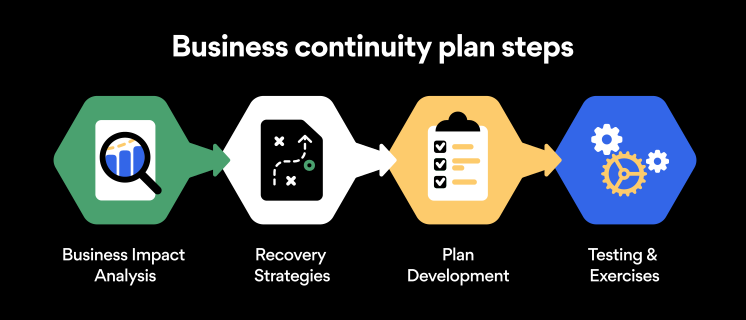
Here are some general guidelines that an organization looking to develop a BCP should consider:

Analysis

A business continuity plan should include an in-depth analysis of everything that could negatively affect the overall organizational infrastructure and operations. Assessing different levels of risk should also be a part of the analysis phase.

Design and development

Once you have a clear overview of potential risks your company could face, start developing a plan. Create a draft and reassess it to see if it takes into account even the smallest of details.

Implementation

Implement BCP within the organization by providing training sessions for the staff to get familiar with the plan. Getting everyone on the same page regarding crisis management is critical.

Testing

Rigorously test the plan. Play out a variety of scenarios in training sessions to learn the overall effectiveness of the continuity plan. By doing so, everyone on the team will be closely familiar with the business continuity plan’s guidelines.

Maintenance and updating

Because the threat landscape constantly changes and evolves, you should regularly reassess your BCP and take steps to update it. By making your continuity plan in tune with the times, you will be able to stay a step ahead of a crisis.

Level up your company’s security with NordPass Business

A comprehensive business continuity plan is vital for the entire organization’s security posture. However, in a perfect world, you wouldn’t have to use it. This is where NordPass Business can help.

Remember, weak, reused, or compromised passwords are often cited as one of the top contributing factors in data breaches. It’s not surprising, considering that an average user has around 100 passwords. Password fatigue is real and significantly affects how people treat their credentials. NordPass Business counters these issues.

With NordPass Business, your team will have a single secure place to store all work-related passwords, credit cards, and other sensitive information. Accessing all the data stored in NordPass is quick and easy, which allows your employees not to be distracted by the task of finding the correct passwords for the correct account.

In cyber incidents, NordPass Business ensures that company credentials remain secure at all times. Everything stored in the NordPass vault is secured with advanced encryption algorithms, which would take hundreds of years to brute force.

If you are interested in learning more about NordPass Business and how it can fortify corporate security, do not hesitate to book a demo with our representative.


 

About Version 2 Digital

Version 2 Digital is one of the most dynamic IT companies in Asia. The company distributes a wide range of IT products across various areas including cyber security, cloud, data protection, end points, infrastructures, system monitoring, storage, networking, business productivity and communication products.

Through an extensive network of channels, point of sales, resellers, and partnership companies, Version 2 offers quality products and services which are highly acclaimed in the market. Its customers cover a wide spectrum which include Global 1000 enterprises, regional listed companies, different vertical industries, public utilities, Government, a vast number of successful SMEs, and consumers in various Asian cities.

About NordPass
NordPass is developed by Nord Security, a company leading the global market of cybersecurity products.

The web has become a chaotic space where safety and trust have been compromised by cybercrime and data protection issues. Therefore, our team has a global mission to shape a more trusted and peaceful online future for people everywhere.

The LastPass Data Breach and How NordPass Keeps Your Data Safe

On December 22, 2022, LastPass announced that a data breach first disclosed in August 2022 was far more extensive than initially thought. The news sent shockwaves through the industry, leaving many password manager users — especially LastPass users — concerned about the security of their sensitive information.

The breach serves as a stark reminder that no online service provider may be completely bulletproof breach-wise. So today, let’s get into the LastPass data breach and what it means for NordPass users.

The LastPass data breach breakdown

Cybercriminal activity has been on a steady rise for the last decade, and it looks that the trend is not about to change. In fact, today, cybercrime is the most lucrative criminal activity and is estimated to cost the world $10.5 trillion annually by 2025.

So as our personal and financial information is increasingly getting stored online, it is critical that companies take all necessary steps to protect their customers’ data. Unfortunately, the recent LastPass data breach shows that even well-known companies can fall short security-wise.

The company’s latest statement explains that an unauthorized party was able to access LastPass’ cloud-based storage environment and copy customer vault data along with information from a backup of customer account information.

The extent of the breach is not yet clear, but it is likely that it included some personally identifiable data such as email addresses, phone numbers, and billing information for some users.

The response from LastPass to the breach has been met with criticism from both industry experts and customers. In fact, it has already led to a class-action lawsuit, with one plaintiff alleging that the data breach resulted in the theft of around $53,000 worth of Bitcoin.

Did the LastPass data breach affect all password manager users?

Let’s be clear — the LastPass data breach does not have any direct effect on NordPass, its users, or users data.

After all, we’re two different companies and products with completely different security approaches and mindsets. However, we admit that seeing a competitor affected by a breach of this magnitude is an acute reminder to stay vigilant and prepared at all times.

Is NordPass a secure place for your digital valuables?

Given the severity of the LastPass data breach, it’s only natural that people are questioning the security of their password manager, including NordPass.

First, one of the key elements of NordPass is that it is a zero-knowledge password manager equipped with an advanced encryption algorithm known as XChaCha20 to ensure protection of everything you store in NordPass.

This means that all data stored in the NordPass vault is first encrypted on your device and only then sent to the cloud-based server. Because of the way NordPass is set up, it is only you — the user — who holds the decryption key and has access to everything stored in their vault.

The NordPass team can’t see or access anything. The same principle applies in situations of breaches. Even if a bad actor were able to get their hands on your vault data, they would still need your device, which holds the decryption key, to access the actual contents of the vault data.

NordPass CTO Tomas Smalakys offers a more detailed explanation:

quotes

Each NordPass user has a unique public-key cryptography key pair. The Public Key is always stored in plaintext form. The Private Key, on the other hand, exists in plaintext form only on the user’s end device for a limited period of time and never leaves it.

When we need to store a user’s Private Key, it’s encrypted with secret-key cryptography (XChaCha20-Poly1305-IETF) on the user’s device and only then passed to us. While the app is unlocked, the unencrypted Private Key is stored in the secure memory accessible only to the NordPass application. When the application is locked, either by the user or automatically after a set period of inactivity, the Private Key is deleted from the secure memory.

For the user’s Private Key encryption, the Master Key is used. The Master Key is derived from the Master Password and a 16-byte unique-per-user cryptographic salt using the key derivation function (Argon2id). We ask the user for the Master Password every time we need to decrypt the user’s Private Key.


– Tomas Smalakys

NordPass CTO

Tomas further explains that in addition to the encryption principles above, every item (folder, password, credit card, etc.) has two types of data:

  • Metadata (title, website address, cardholder name, etc.)

  • Secret data.

For secret-key (symmetric) cryptography, we use an authenticated encryption algorithm:

  • XChaCha20 stream cipher encryption.

  • Poly1305 MAC authentication.

For public-key (asymmetric) cryptography, we use an authenticated encryption algorithm:

  • X25519 key exchange.

  • XSalsa20 stream cipher encryption.

  • Poly1305 MAC authentication.

User data is encrypted on their devices and never leaves the device in plain text. This means that when the data is in transit or at rest, it is fully encrypted. In the database, both metadata and secret data is encrypted. This means that if bad actors are able to get access to the database or any of its backups, no user data can be accessed.

Furthermore, at NordPass, we feel that due to the nature of our product, our security practices should be transparent. Both NordPass and NordPass Business have had their security posture thoroughly audited by Cure53, a renowned German auditing firm.

NordPass Business has also successfully passed the SOC 2 Type 1 Audit, which ensures that NordPass Business provides proper security controls to manage customer data and protect their interests with regard to privacy.

All these measures help to ensure that the sensitive data stored in NordPass vaults is protected at all times. However, these days bad actors are creative and no longer function as a one-person operation. So it’s always important to be vigilant with your own security and use strong, unique passwords for each account as well as enable two-factor authentication whenever possible.

Bottom line

It remains to be seen how the LastPass breach will impact the company and the password management industry as a whole, but one thing is clear: it has shaken user trust and serves as a cautionary tale for the importance of data security.

Regulatory Compliance and NordPass Business

Designed to ensure the safety and security of an organization’s operations and protection of its customers, regulatory compliance standards are a fact of life in today’s business world. Fail to comply and be ready to face serious financial, legal, and reputational harm to your organization.

Today, we’re taking an in depth look at regulatory compliance, exploring different standards, and looking into how NordPass Business can help your organization meet the requirements in an easier and more efficient way.

What is regulatory compliance?

Regulatory compliance refers to various processes and procedures of adhering to the laws, regulations, and standards set by various governing bodies. The regulations can come from numerous sources such as local, state, federal, or even international agencies, industry groups, and professional associations. The intention behind various regulatory compliance is to protect consumers and other stakeholders.

Importance of regulatory compliance

The aim of regulatory compliance is to make sure that businesses and organizations operate in a secure, responsible, and ethical manner. Regulatory compliance can also provide businesses and organizations with a competitive advantage by helping to create a culture of transparency and credibility with customers, employees, and other involved parties. Furthermore, adhering to regulatory compliance can improve internal processes, risk management procedures, and mitigate potential legal issues, which in turn lays a great foundation for a sustainable organization.

However, it’s critical to remember that most regulatory compliance is mandatory. Failing to comply with any of the mandatory regulations can result in hefty fines. For instance, Google has been fined nearly $57 million by French regulators for violation of the General Data Protection Regulation (GDPR). Meta — the company formerly known as Facebook — recently has been fined over $400 million by top EU regulators for forcing users to accept targeted ads.

Besides financial losses, non-compliance can cause major damage to the organization’s reputation as clients may lose trust in the organization. This can even lead to serious legal issues.

Below are some of the most common regulatory compliance standards.

National Institute of Standards and Technology (NIST)

The National Institute of Standards and Technology (NIST) is a US federal agency that develops technology, metrics, and standards to drive innovation and ensure operational security within a business environment. NIST compliance is mandatory for all US-based federal information systems except those related to national security. However, the standard can be adopted by any organization.

To be NIST-compliant, a company needs to implement access controls to limit the risk of unauthorized access, develop a comprehensive incident response plan, and devise audit procedures and schedules.

General Data Protection Regulation (GDPR)

The General Data Protection Regulation (GDPR) is a data protection law that applies to businesses and organizations operating within the European Union (EU) and the European Economic Area (EEA). It sets out rules for how organizations can collect, use, and store personal data, and provides individuals the right to access and control their personal data.

To adhere to the GDPR, organizations and businesses need to implement measures such as obtaining consent from individuals before collecting their data, providing clear and concise information about their data collection practices, and implementing appropriate security measures to protect personal data.

Health Insurance Portability and Accountability Act (HIPAA)

The Health Insurance Portability and Accountability Act (HIPAA) is a US law that sets out standards for the protection of personal health information. The law applies to healthcare providers and all other entities that handle personal health information in the US.

To meet the requirements set out by the HIPAA, organizations need to implement secure systems for storing and transmitting personal health information, providing training to employees on HIPAA requirements, and implementing access controls to prevent unauthorized access to personal health information.

Payment Card Industry Data Security Standard (PCI DSS)

The Payment Card Industry Data Security Standard (PCI DSS) is a set of security standards that apply internationally to organizations that handle credit card transactions. The regulatory standard sets out requirements for protecting cardholder data and preventing unauthorized access to such data.

The PCI DSS regulations require businesses and organizations that process payment card information to implement secure systems for storing and transmitting cardholder data, conduct regular security assessments, and implement further security controls to prevent unauthorized access to cardholder data.

ISO/IEC 27001

The ISO/IEC 27001 is an international standard that outlines best practices for an information security management system (ISMS). The standard has been developed to help organizations protect their information assets and manage risks related to information security. The ISO/IEC 27001 is not a mandatory requirement.

To meet the ISO/IEC 27001 compliance, organizations need to conduct regular risk assessments, implement controls to protect against unauthorized access, and regularly review and update their information security management systems.

California Consumer Privacy Act (CCPA)

The California Consumer Privacy Act (CCPA) is a privacy law that in many ways mimics its European counterpart — the GDPR. However, the CCPA applies to businesses operating in California and it provides California residents with the right to access and control their personal data, and imposes certain requirements on businesses that collect and handle personal data.

For an organization to be CCPA compliant, it needs to implement security measures to protect customer data. Furthermore, companies are also required to provide clear and concise information about data collection practices, allowing California residents to request access to and deletion of their personal data.

Gramm-Leach-Bliley Act (GLBA)

The Gramm-Leach-Bliley Act (GLBA) is a US law that applies to financial institutions within the US. Like many of the regulatory compliance standards we already discussed, GLBA requires financial institutions to implement safeguards that would protect personal information as well as to disclose their data collection and sharing practices to customers.

To comply with the GLBA regulatory standards, financial institutions may need to implement secure systems for storing and transmitting personal financial information, providing customers with information about their data collection and sharing practices, and implementing access controls to prevent unauthorized access to personal financial information.

Center for Internet Security (CIS)

The Center for Internet Security (CIS) is a nonprofit organization that provides cybersecurity guidance and best practices to help organizations protect their systems and data. The CIS comprises 18 Critical Security Controls for identifying and protecting against the most common cyber threats.

To be CIS compliant, companies and organizations need to establish a comprehensive cybersecurity perimeter to ensure protection of their data and information management systems.

Opinion 498

The Formal Opinion 498 outlined by the American Bar Association (ABA) provides guidance for US-based lawyers and law firms with regard to virtual practice. While the ABA Model Rules of Professional Conduct permit virtual practice, the Formal Opinion 498 provides an additional set of guidelines for virtual practice.

To follow the guidelines set out by the Opinion 498, organizations or individuals are urged to establish secure information management systems and protect them with complex passwords to ensure secure storage and access to client data.

Agence nationale de la sécurité des systèmes d’information (ANSSI)

ANSSI compliance combines a set of security standards set by the French National Cybersecurity Agency. The ANSSI has been developed as a regulatory standard in France to protect sensitive information and systems from cyber threats such as hacking, malware, and data breaches. Companies that store and handle sensitive information may be required to comply with the ANSSI standards in order to ensure the security of that information.

Compliance with the ANSSI standards may involve regular audits, penetration testing, and other security measures to identify and address vulnerabilities in a company’s systems.

How can NordPass help with regulatory compliance?

Meeting regulations and staying compliant can be a complex and time-consuming process, as businesses and organizations must stay up-to-date with the latest regulatory requirements and implement appropriate policies, procedures, and tools.

However, with the right tools at your disposal compliance can be less of a hassle than you might think. One such tool is NordPass Business — a secure and easy-to-use password manager designed for business use and it can help your organization comply with the security guidelines and requirements outlined in the regulatory compliance standards listed above. But how exactly can it help?

Strong passwords and secure password storage

Most regulatory compliance standards require organizations to implement some sort of security measures to limit the possibility of unauthorized access.

For instance, PCI DSS, GLBA, GDPR, and CIS Controls all have outlined guidelines for ensuring the security of personal data processing and storage.

This is where NordPass comes in as a tool that can help. Designed by the principles of zero-knowledge architecture and equipped with an advanced XChaCha20 encryption algorithm, NordPass offers a secure way to store and access business passwords and other sensitive information in line with regulatory requirements.

Password Policy — a NordPass Business feature — can also play a critical role in compliance. Using Password Policy, companies can set certain specifications for password complexity for the entire organization, which can significantly fortify the overall security of the organization.

To easily follow Password Policy rules and specifications, users can use our very own Password Generator — a tool that can generate a password adhering to all the specifications outlined in the Password Policy in just a few clicks.

On top of that, NordPass Business can ensure that all of your organization’s passwords are stored securely and in line with the regulatory requirements.

Secure access management

Some compliance standards require organizations to implement secure access management solutions. For example, this is the case with ANSSI compliance as well as with HIPAA and NIST.

Here NordPass Business and its Admin Panel can play a major role because it is designed to provide organizations a way to effectively and easily manage access privileges across the entire organization.

Via the Admin Panel, solution owners and admins can grant or revoke access to systems as well as monitor member activity within the organization. The Admin Panel is also the place where you can set the Password Policy for the organization, ensuring that passwords throughout the company adhere to certain specifications.

Breach Monitoring

Regulatory compliance standards also tend to outline best practices for responding to a security incident such as a data breach. This is explicitly outlined in the GDPR’s Article 33, which states that data breach including personal data breach should be reported within 72 hours to the supervisory authority. Failing to do so may result in a fine of 10 million or 2% of annual revenue.

NordPass Business is equipped with a Data Breach Scanner — a tool that can scan the entire company’s domain list for potential breaches. Because the Data Breach Scanner issues a notification to all members of the organization, the company potentially affected by a breach can act quickly and efficiently to contain it.

The NordPass Password Health tool can help you detect potentially weak, old, or reused passwords throughout the organization and significantly reduce the risk of unauthorized access.

Bottom line

These days, regulatory compliance is an inseparable part of running a business. Fail to comply and be ready to face hefty fines and serious reputational damage. However, compliance is never easy. But with the right tools at your disposal, the whole process can be a lot smoother.

NordPass Business can be a tool to assist organizations in meeting various requirements in an easier and more efficient way. By staying compliant, organizations can not only avoid costly fines and legal issues, but also gain a competitive advantage by building a culture of transparency and credibility with their customer base or investors.

About Version 2 Digital

Version 2 Digital is one of the most dynamic IT companies in Asia. The company distributes a wide range of IT products across various areas including cyber security, cloud, data protection, end points, infrastructures, system monitoring, storage, networking, business productivity and communication products.

Through an extensive network of channels, point of sales, resellers, and partnership companies, Version 2 offers quality products and services which are highly acclaimed in the market. Its customers cover a wide spectrum which include Global 1000 enterprises, regional listed companies, different vertical industries, public utilities, Government, a vast number of successful SMEs, and consumers in various Asian cities.

These days, cybercrime is rampant. It’s no longer a matter of “if” you’re going to suffer an attack but “when” it will happen. All companies want to be ready for any crisis. And this is where a business continuity plan comes into play.

But what is a business continuity plan exactly? Why is it important? What should one include? Today, we’re exploring all these questions in-depth.

What is a business continuity plan?

A business continuity plan (BCP) is a document that sets guidelines for how an organization will continue its operations in the event of a disruption, whether it’s a fire, flood, other natural disaster or a cybersecurity incident. A BCP aims to help organizations resume operations without significant downtime.

Unfortunately, according to a 2020 Mercer survey, 51% of businesses across the globe don’t have a business continuity plan in place.

What’s the difference between business continuity and disaster recovery plans?

We often confuse the terms business continuity plan and disaster recovery plan. The two overlap and often work together, but the disaster recovery plan focuses on containing, examining, and restoring operations after a cyber incident. On the other hand, BCP is a broader concept that considers the whole organization. A business continuity plan helps organizations stay prepared for dealing with a potential crisis and usually encompasses a disaster recovery plan.

Importance of business continuity planning

The number of news headlines announcing data breaches has numbed us to the fact that cybercrime is very real and frequent and poses an existential risk to companies of all sizes and industries.

Consider that in 2021, approximately 37% of global organizations fell victim to a ransomware attack. Then consider that business interruption and restoration costs account for 50% of cyberattack-related losses. Finally, take into account that most cyberattacks are financially motivated and the global cost of cybercrime topped $6 trillion last year. The picture is quite clear — cybercrime is a lucrative venture for bad actors and potentially disastrous for those on the receiving end.

To thrive in these unpredictable times, organizations go beyond conventional security measures. Many companies develop a business continuity plan parallel to secure infrastructure and consider the plan a critical part of the security ecosystem. The Purpose of a business continuity plan is to significantly reduce the downtime in an emergency and, in turn, reduce the potential reputational damage and — of course — revenue losses.

Business continuity plan template

Password security for your business

Store, manage and share passwords.

30-day money-back guarantee

Business Continuity Plan Example

[Company Name]

[Date]

I. Introduction

  • Purpose of the Plan

  • Scope of the Plan

  • Budget

  • Timeline

The initial stage of developing a business continuity plan starts with a statement of the plan’s purpose, which explains the main objective of the plan, such as ensuring the organization’s ability to continue its operations during and after a disruptive event.

The Scope of the Plan outlines the areas or functions that the plan will cover, including business processes, personnel, equipment, and technology.

The Budget specifies the estimated financial resources required to implement and maintain the BCP. It includes costs related to technology, personnel, equipment, training, and other necessary expenses.

The Timeline provides a detailed schedule for developing, implementing, testing, and updating the BCP.

II. Risk Assessment

  • Identification of Risks

  • Prioritization of Risks

  • Mitigation Strategies

The Risk Assessment section of a Business Continuity Plan (BCP) is an essential part of the plan that identifies potential risks that could disrupt an organization’s critical functions.

The Identification of Risks involves identifying potential threats to the organization, such cybersecurity breaches, supply chain disruptions, power outages, and other potential risks. This step is critical to understand the risks and their potential impact on the organization.

Once the risks have been identified, the Prioritization of Risks follows, which helps determine which risks require the most attention and resources.

The final step in the Risk Assessment section is developing Mitigation Strategies to minimize the impact of identified risks. Mitigation strategies may include preventative measures, such as system redundancies, data backups, cybersecurity measures, as well as response and recovery measures, such as emergency protocols and employee training.

III. Emergency Response

  • Emergency Response Team

  • Communication Plan

  • Emergency Procedures

This section of the plan focuses on immediate actions that should be taken to ensure the safety and well-being of employees and minimize the impact of the event on the organization’s operations.

The Emergency Response Team is responsible for managing the response to an emergency or disaster situation. This team should be composed of individuals who are trained in emergency response procedures and can act quickly and decisively during an emergency. The team should also include a designated leader who is responsible for coordinating the emergency response efforts.

The Communication Plan outlines how information will be disseminated during an emergency situation. It includes contact information for employees, stakeholders, and emergency response personnel, as well as protocols for communicating with these individuals.

The Emergency Procedures detail the steps that should be taken during an emergency or disaster situation. The emergency procedures should be developed based on the potential risks identified in the Risk Assessment section and should be tested regularly to ensure that they are effective.

IV. Business Impact Analysis

The Business Impact Analysis (BIA) section of a Business Continuity Plan (BCP) is a critical step in identifying the potential impact of a disruption to an organization’s critical operations.

The Business Impact Analysis is typically conducted by a team of individuals who understand the organization’s critical functions and can assess the potential impact of a disruption to those functions. The team may include representatives from various departments, including finance, operations, IT, and human resources.

V. Recovery and Restoration

  • Procedures for recovery and restoration of critical processes

  • Prioritization of recovery efforts

  • Establishment of recovery time objectives

The Recovery and Restoration section of a Business Continuity Plan (BCP) outlines the procedures for recovering and restoring critical processes and functions following a disruption.

The Procedures for recovery and restoration of critical processes describe the steps required to restore critical processes and functions following a disruption. This may include steps such as relocating to alternate facilities, restoring data and systems, and re-establishing key business relationships.

The Prioritization section of the plan identifies the order in which critical processes will be restored, based on their importance to the organization’s operations and overall mission.

Recovery time objectives (RTOs) define the maximum amount of time that critical processes and functions can be unavailable following a disruption. Establishing RTOs ensures that recovery efforts are focused on restoring critical functions within a specific timeframe.

VI. Plan Activation

  • Plan Activation Procedures

The Plan Activation section is critical in ensuring that an organization can quickly and effectively activate the plan and respond to a potential emergency.

The Plan Activation Procedures describe the steps required to activate the BCP in response to a disruption. The procedures should be clear and concise, with specific instructions for each step to ensure a prompt and effective response.

VII. Testing and Maintenance

  • Testing Procedures

  • Maintenance Procedures

  • Review and Update Procedures

This section of the plan is critical to ensure that an organization can effectively respond to disruptions and quickly resume its essential functions.

Testing procedures may include scenarios such as natural disasters, cyber-attacks, and other potential risks. The testing procedures should include clear objectives, testing scenarios, roles and responsibilities, and evaluation criteria to assess the effectiveness of the plan.

The Maintenance Procedures detail the steps necessary to keep the BCP up-to-date and relevant.

The Review and Update Procedures describe how the BCP will be reviewed and updated regularly to ensure its continued effectiveness. This may involve conducting a review of the plan on a regular basis or after significant changes to the organization’s operations or threats.

What should a business continuity plan checklist include?

Organizations looking to develop a BCP have more than a few things to think through and consider. Variables such as the size of the organization, its IT infrastructure, personnel, and resources all play a significant role in developing a continuity plan. Remember, each crisis is different, and each organization will have a view on handling it according to all the variables in play. However, all business continuity plans will include a few elements in one way or another.

  • Clearly defined areas of responsibility

    A BCP should define specific roles and responsibilities for cases of emergency. Detail who is responsible for what tasks and clarify what course of action a person in a specific position should take. Clearly defined roles and responsibilities in an emergency event allow you to act quickly and decisively and minimize potential damage.

  • Crisis communication plan

    In an emergency, communication is vital. It is the determining factor when it comes to crisis handling. For communication to be effective, it is critical to establish clear communication pipelines. Furthermore, it is crucial to understand that alternative communication channels should not be overlooked and outlined in a business continuity plan.

  • Recovery teams

    A recovery team is a collective of different professionals who ensure that business operations are restored as soon as possible after the organization confronts a crisis.

  • Alternative site of operations

    Today, when we think of an incident in a business environment, we usually think of something related to cybersecurity. However, as discussed earlier, a BCP covers many possible disasters. In a natural disaster, determine potential alternate sites where the company could continue to operate.

  • Backup power and data backups

    Whether a cyber event or a real-life physical event, ensuring that you have access to power is crucial if you wish to continue operations. In a BCP, you can often come across lists of alternative power sources such as generators, where such tools are located, and who should oversee them. The same applies to data. Regularly scheduled data backups can significantly reduce potential losses incurred by a crisis event.

  • Recovery guidelines

    If a crisis is significant, a comprehensive business continuity plan usually includes detailed guidelines on how the recovery process will be carried out.

Business continuity planning steps

Here are some general guidelines that an organization looking to develop a BCP should consider:

Analysis

A business continuity plan should include an in-depth analysis of everything that could negatively affect the overall organizational infrastructure and operations. Assessing different levels of risk should also be a part of the analysis phase.

Design and development

Once you have a clear overview of potential risks your company could face, start developing a plan. Create a draft and reassess it to see if it takes into account even the smallest of details.

Implementation

Implement BCP within the organization by providing training sessions for the staff to get familiar with the plan. Getting everyone on the same page regarding crisis management is critical.

Testing

Rigorously test the plan. Play out a variety of scenarios in training sessions to learn the overall effectiveness of the continuity plan. By doing so, everyone on the team will be closely familiar with the business continuity plan’s guidelines.

Maintenance and updating

Because the threat landscape constantly changes and evolves, you should regularly reassess your BCP and take steps to update it. By making your continuity plan in tune with the times, you will be able to stay a step ahead of a crisis.

Level up your company’s security with NordPass Business

A comprehensive business continuity plan is vital for the entire organization’s security posture. However, in a perfect world, you wouldn’t have to use it. This is where NordPass Business can help.

Remember, weak, reused, or compromised passwords are often cited as one of the top contributing factors in data breaches. It’s not surprising, considering that an average user has around 100 passwords. Password fatigue is real and significantly affects how people treat their credentials. NordPass Business counters these issues.

With NordPass Business, your team will have a single secure place to store all work-related passwords, credit cards, and other sensitive information. Accessing all the data stored in NordPass is quick and easy, which allows your employees not to be distracted by the task of finding the correct passwords for the correct account.

In cyber incidents, NordPass Business ensures that company credentials remain secure at all times. Everything stored in the NordPass vault is secured with advanced encryption algorithms, which would take hundreds of years to brute force.

If you are interested in learning more about NordPass Business and how it can fortify corporate security, do not hesitate to book a demo with our representative.

About Version 2 Digital

Version 2 Digital is one of the most dynamic IT companies in Asia. The company distributes a wide range of IT products across various areas including cyber security, cloud, data protection, end points, infrastructures, system monitoring, storage, networking, business productivity and communication products.

Through an extensive network of channels, point of sales, resellers, and partnership companies, Version 2 offers quality products and services which are highly acclaimed in the market. Its customers cover a wide spectrum which include Global 1000 enterprises, regional listed companies, different vertical industries, public utilities, Government, a vast number of successful SMEs, and consumers in various Asian cities.

About NordPass
NordPass is developed by Nord Security, a company leading the global market of cybersecurity products.

The web has become a chaotic space where safety and trust have been compromised by cybercrime and data protection issues. Therefore, our team has a global mission to shape a more trusted and peaceful online future for people everywhere.

You Are Concerned About Data Privacy – but Are You Doing Anything About It?

You’d be hard-pressed to find someone who doesn’t care about their privacy. It’s human nature. You want control over what private information you share and who you share it with. Unfortunately, you can lose this control with a careless click.

What is private data?

Private data is anything that reveals information about you. It can be your name, your photos, your posts on social media, your email addresses, or your IP.

Some of these details are highly sensitive, including your banking information, genetic data, health records, social security number, and home address. As a rule of thumb, any information that could cause you financial or reputational damage can be considered sensitive.

What is data privacy and why is it important?

Data privacy, also known as information privacy, generally refers to a person’s right to choose for themselves when, how, with whom, and to what extent they want to share their private data with others.

As internet usage has become ubiquitous over the years, so has the importance of data privacy and protection. Various websites and applications often collect your private data in exchange for its services.

Some platforms and applications may exceed their reach when it comes to data collection, storage, and usage. Others may have a lax attitude toward private data protection.

The key questions to ask when talking about data privacy are:

  1. Who has access to information about you?

  2. Who controls this access?

  3. Is it secure?

When private data falls into the wrong hands, consequences can be dire. A data breach on an online platform could put your sensitive information into the hands of cyber crooks. Users whose data is leaked are put at risk of identity theft, bank fraud, and other online-related scams and crimes. These days, data is king and there’s no way around it. Thus, it’s not surprising that protection is paramount.

Your privacy in the hands of the government

Various entities handle your private data. First – the government and its institutions. Let’s take the justice system as an example. You cannot go to court or file a claim without revealing your identity. And that’s fine — it wouldn’t be fair to the other side if you were suing them anonymously.

Similarly, you can’t get public services (for example, electricity, a high school education, or healthcare) without identifying yourself.

In a perfect world, the government does not infringe upon your privacy more than necessary. In the real world, some governments store every bit of data they can get their hands on. Even worse, others engage in mass surveillance of their citizens.

Your privacy in the hands of businesses

You can buy apples at a fruit stand and remain a stranger to the vendor. But buy apples online, and you’ll give away private information about yourself. It may be a fact as simple as you liking apples. This information will be sold to an advertiser, and the next time you go online, an ad for apples will pop up on your screen.

Almost everything you do online leaves a data footprint. You have little control over how your digital footprint is collected.

Usually, it works like this. Before you start using a new online service, you have to read a wall of fine print. But you don’t, because who has time to wade through paragraphs of legal jargon? You click “Agree,” and that’s how you begin to give away your private data. The agreement can’t be changed, and you cannot bargain — take it or leave it. This service will collect your data and use it for marketing purposes or sell it to the highest bidder. And there’s nothing you can do.

It’s easy to say “Don’t use these services.” The problem is that most online services collect information. If you want none of your private data on the internet, you have to quit using the internet. And that’s a price most people find too high to pay.

Data protection laws

Over the years, as technology and the internet came to be an inseparable part of our lives, governments around the globe took part in creating and passing laws regulating private data. Most countries today have various laws governing data collection, storage, and usage. Here are some of the most important and impactful ones:

The General Data Protection Regulation (GDPR)

The GDPR regulates data privacy laws across all EU member countries. It was designed to replace previous data regulation laws and provide greater protection and rights to individuals, essentially giving subjects the right to control their personal data and ensuring the right to be forgotten. The GDPR also outlines how individuals’ private data should be collected, stored, and used as well as outlining the limitations. The GDPR is one of the most impactful and comprehensive regulations developed in the past decade.

Data privacy laws in the US

At the moment, the United States has no federal law or legislation that comprehensively addresses data privacy. However, individual states have enacted their own laws and regulations to address issues of data privacy in different industries such as healthcare, finance, and marketing. But, even with all these different laws and regulations, there’s still one important agency that helps to make sure everyone is following the rules.

The Federal Trade Commission (FTC) is the agency that oversees data privacy regulations and ensures consumer protection. The FTC Act grants the organization the authority to prevent unfair or deceptive trade practices and enforce privacy laws.

The FTC can take action against organizations that fail to implement reasonable data security measures, violate consumer data privacy rights, or engage in misleading advertising practices.

There are also other federal laws that govern the collection of information online, such as the Children’s Online Privacy Protection Act (COPPA), the Health Insurance Portability and Accounting Act (HIPAA), the Gramm Leach Bliley Act (GLBA), the Fair Credit Reporting Act (FCRA), and the Family Educational Rights and Privacy Act (FERPA). These laws focus on ensuring the protection of specific types of information, such as data related to children, health, and finances.

National data protection laws

Many countries around the world, including Australia, Canada, and Japan have comprehensive data protection laws in place that outline the ways personal data should be handled, much like the GDPR.

Increasing use of AI and ML in data protection

As we move into 2023, the use of artificial intelligence (AI) and machine learning (ML) in data security and privacy is becoming increasingly prevalent. AI can be a powerful tool for protecting consumer privacy.

In 2023 we’ll start seeing an increase in the use of both AI and ML to proactively identify and prevent cyber threats and detect patterns that may indicate a potential data breach.

However, data protection through automation has not yet advanced as much as we would like. Nevertheless, in 2023 and beyond, we can expect to see significant improvements in this area as the technology matures and becomes more suited for ensuring the privacy and security of sensitive data.

Data security and privacy will be a priority for consumers

Because data breaches are more common and sophisticated than ever, consumers are unsurprisingly becoming more vigilant about the security of their personal information. Increasingly more people these days are being selective about who they trust with their data. A company’s data-sharing practices and policies now are a crucial factor for many consumers.

In 2023, businesses should be ready for increased scrutiny around their data security and privacy practices. If you are a company that looks to succeed this year, it is vital for you to earn and maintain the trust of your clientele by being transparent about your data protection approach. Trust is a two-way street, and in today’s digital age, it’s more important than ever.

Increasing collaboration between government entities and private companies

Because a decrease in cyber criminal activity is nothing we can bet on in 2023, expect to see heightened levels of collaboration between private companies and government entities aiming to improve data security and privacy.

The collaboration between private and government entities may take many forms, from joint research and development of new security technologies and processes, to more information-sharing in an effort to craft well-rounded regulatory mechanisms.

The rise of passwordless authentication and regulation of biometric data

Passwordless authentication methods are already gaining popularity due to their convenience and security benefits. In 2023, we can expect to see more online service providers adopting various forms of passwordless authentication.

The major advantage of passwordless authentication is that it eliminates the need for users to remember and manage multiple passwords. Additionally, passwordless authentication greatly reduces the risk of password-related security breaches. However, most passwordless technology leverages biometric data for authentication purposes and 2023 might be the year when we will see more regulatory entities coming up with standards and requirements to ensure the secure storage and handling of biometric data. We might see laws and regulations establishing best practices as well as penalties for entities that fail to comply with such standards.

What can you do to protect your data privacy?

Information privacy will become an even hotter topic once technologies create more invasive tools. You’ll be surrounded by facial-recognition cameras, smart speakers that listen to your conversations, e-textiles, wearable health monitors, and other data-gathering gadgets.

That means you must take action now:

  • Foster healthy online habits. Refrain from publicly sharing your personal information on social media. Leverage privacy settings and make your social media profiles private to limit exposure. Be weary of attachments or links in emails that come your way from unknown senders. Make use of multi-factor authentication (MFA) and enable it on your online accounts whenever possible. Use strong, unique passwords for all your accounts and employ a password manager to securely store your passwords and other sensitive information.

  • Use tools and services that enhance your privacy. Choose private search engines, private email providers, and privacy-focused browsers. And use encryption tools — they’re much more user friendly than they sound. NordPass itself uses state-of-the-art encryption to protect your passwords. In addition, NordVPN makes sure your traffic is invisible to your internet service provider.

  • Don’t need it? Then don’t use it. Don’t sign up if you don’t really need the service. And if you do need it, read the fine print before clicking “Agree.” If the fine print is too complicated, look for comments and reviews regarding the service’s privacy policies.

Fight for information privacy and make the internet better for all.

About Version 2 Digital

Version 2 Digital is one of the most dynamic IT companies in Asia. The company distributes a wide range of IT products across various areas including cyber security, cloud, data protection, end points, infrastructures, system monitoring, storage, networking, business productivity and communication products.

Through an extensive network of channels, point of sales, resellers, and partnership companies, Version 2 offers quality products and services which are highly acclaimed in the market. Its customers cover a wide spectrum which include Global 1000 enterprises, regional listed companies, different vertical industries, public utilities, Government, a vast number of successful SMEs, and consumers in various Asian cities.

These days, cybercrime is rampant. It’s no longer a matter of “if” you’re going to suffer an attack but “when” it will happen. All companies want to be ready for any crisis. And this is where a business continuity plan comes into play.

But what is a business continuity plan exactly? Why is it important? What should one include? Today, we’re exploring all these questions in-depth.

What is a business continuity plan?

A business continuity plan (BCP) is a document that sets guidelines for how an organization will continue its operations in the event of a disruption, whether it’s a fire, flood, other natural disaster or a cybersecurity incident. A BCP aims to help organizations resume operations without significant downtime.

Unfortunately, according to a 2020 Mercer survey, 51% of businesses across the globe don’t have a business continuity plan in place.

What’s the difference between business continuity and disaster recovery plans?

We often confuse the terms business continuity plan and disaster recovery plan. The two overlap and often work together, but the disaster recovery plan focuses on containing, examining, and restoring operations after a cyber incident. On the other hand, BCP is a broader concept that considers the whole organization. A business continuity plan helps organizations stay prepared for dealing with a potential crisis and usually encompasses a disaster recovery plan.

Importance of business continuity planning

The number of news headlines announcing data breaches has numbed us to the fact that cybercrime is very real and frequent and poses an existential risk to companies of all sizes and industries.

Consider that in 2021, approximately 37% of global organizations fell victim to a ransomware attack. Then consider that business interruption and restoration costs account for 50% of cyberattack-related losses. Finally, take into account that most cyberattacks are financially motivated and the global cost of cybercrime topped $6 trillion last year. The picture is quite clear — cybercrime is a lucrative venture for bad actors and potentially disastrous for those on the receiving end.

To thrive in these unpredictable times, organizations go beyond conventional security measures. Many companies develop a business continuity plan parallel to secure infrastructure and consider the plan a critical part of the security ecosystem. The Purpose of a business continuity plan is to significantly reduce the downtime in an emergency and, in turn, reduce the potential reputational damage and — of course — revenue losses.

Business continuity plan template

Password security for your business

Store, manage and share passwords.

30-day money-back guarantee

Business Continuity Plan Example

[Company Name]

[Date]

I. Introduction

  • Purpose of the Plan

  • Scope of the Plan

  • Budget

  • Timeline

The initial stage of developing a business continuity plan starts with a statement of the plan’s purpose, which explains the main objective of the plan, such as ensuring the organization’s ability to continue its operations during and after a disruptive event.

The Scope of the Plan outlines the areas or functions that the plan will cover, including business processes, personnel, equipment, and technology.

The Budget specifies the estimated financial resources required to implement and maintain the BCP. It includes costs related to technology, personnel, equipment, training, and other necessary expenses.

The Timeline provides a detailed schedule for developing, implementing, testing, and updating the BCP.

II. Risk Assessment

  • Identification of Risks

  • Prioritization of Risks

  • Mitigation Strategies

The Risk Assessment section of a Business Continuity Plan (BCP) is an essential part of the plan that identifies potential risks that could disrupt an organization’s critical functions.

The Identification of Risks involves identifying potential threats to the organization, such cybersecurity breaches, supply chain disruptions, power outages, and other potential risks. This step is critical to understand the risks and their potential impact on the organization.

Once the risks have been identified, the Prioritization of Risks follows, which helps determine which risks require the most attention and resources.

The final step in the Risk Assessment section is developing Mitigation Strategies to minimize the impact of identified risks. Mitigation strategies may include preventative measures, such as system redundancies, data backups, cybersecurity measures, as well as response and recovery measures, such as emergency protocols and employee training.

III. Emergency Response

  • Emergency Response Team

  • Communication Plan

  • Emergency Procedures

This section of the plan focuses on immediate actions that should be taken to ensure the safety and well-being of employees and minimize the impact of the event on the organization’s operations.

The Emergency Response Team is responsible for managing the response to an emergency or disaster situation. This team should be composed of individuals who are trained in emergency response procedures and can act quickly and decisively during an emergency. The team should also include a designated leader who is responsible for coordinating the emergency response efforts.

The Communication Plan outlines how information will be disseminated during an emergency situation. It includes contact information for employees, stakeholders, and emergency response personnel, as well as protocols for communicating with these individuals.

The Emergency Procedures detail the steps that should be taken during an emergency or disaster situation. The emergency procedures should be developed based on the potential risks identified in the Risk Assessment section and should be tested regularly to ensure that they are effective.

IV. Business Impact Analysis

The Business Impact Analysis (BIA) section of a Business Continuity Plan (BCP) is a critical step in identifying the potential impact of a disruption to an organization’s critical operations.

The Business Impact Analysis is typically conducted by a team of individuals who understand the organization’s critical functions and can assess the potential impact of a disruption to those functions. The team may include representatives from various departments, including finance, operations, IT, and human resources.

V. Recovery and Restoration

  • Procedures for recovery and restoration of critical processes

  • Prioritization of recovery efforts

  • Establishment of recovery time objectives

The Recovery and Restoration section of a Business Continuity Plan (BCP) outlines the procedures for recovering and restoring critical processes and functions following a disruption.

The Procedures for recovery and restoration of critical processes describe the steps required to restore critical processes and functions following a disruption. This may include steps such as relocating to alternate facilities, restoring data and systems, and re-establishing key business relationships.

The Prioritization section of the plan identifies the order in which critical processes will be restored, based on their importance to the organization’s operations and overall mission.

Recovery time objectives (RTOs) define the maximum amount of time that critical processes and functions can be unavailable following a disruption. Establishing RTOs ensures that recovery efforts are focused on restoring critical functions within a specific timeframe.

VI. Plan Activation

  • Plan Activation Procedures

The Plan Activation section is critical in ensuring that an organization can quickly and effectively activate the plan and respond to a potential emergency.

The Plan Activation Procedures describe the steps required to activate the BCP in response to a disruption. The procedures should be clear and concise, with specific instructions for each step to ensure a prompt and effective response.

VII. Testing and Maintenance

  • Testing Procedures

  • Maintenance Procedures

  • Review and Update Procedures

This section of the plan is critical to ensure that an organization can effectively respond to disruptions and quickly resume its essential functions.

Testing procedures may include scenarios such as natural disasters, cyber-attacks, and other potential risks. The testing procedures should include clear objectives, testing scenarios, roles and responsibilities, and evaluation criteria to assess the effectiveness of the plan.

The Maintenance Procedures detail the steps necessary to keep the BCP up-to-date and relevant.

The Review and Update Procedures describe how the BCP will be reviewed and updated regularly to ensure its continued effectiveness. This may involve conducting a review of the plan on a regular basis or after significant changes to the organization’s operations or threats.

What should a business continuity plan checklist include?

Organizations looking to develop a BCP have more than a few things to think through and consider. Variables such as the size of the organization, its IT infrastructure, personnel, and resources all play a significant role in developing a continuity plan. Remember, each crisis is different, and each organization will have a view on handling it according to all the variables in play. However, all business continuity plans will include a few elements in one way or another.

  • Clearly defined areas of responsibility

    A BCP should define specific roles and responsibilities for cases of emergency. Detail who is responsible for what tasks and clarify what course of action a person in a specific position should take. Clearly defined roles and responsibilities in an emergency event allow you to act quickly and decisively and minimize potential damage.

  • Crisis communication plan

    In an emergency, communication is vital. It is the determining factor when it comes to crisis handling. For communication to be effective, it is critical to establish clear communication pipelines. Furthermore, it is crucial to understand that alternative communication channels should not be overlooked and outlined in a business continuity plan.

  • Recovery teams

    A recovery team is a collective of different professionals who ensure that business operations are restored as soon as possible after the organization confronts a crisis.

  • Alternative site of operations

    Today, when we think of an incident in a business environment, we usually think of something related to cybersecurity. However, as discussed earlier, a BCP covers many possible disasters. In a natural disaster, determine potential alternate sites where the company could continue to operate.

  • Backup power and data backups

    Whether a cyber event or a real-life physical event, ensuring that you have access to power is crucial if you wish to continue operations. In a BCP, you can often come across lists of alternative power sources such as generators, where such tools are located, and who should oversee them. The same applies to data. Regularly scheduled data backups can significantly reduce potential losses incurred by a crisis event.

  • Recovery guidelines

    If a crisis is significant, a comprehensive business continuity plan usually includes detailed guidelines on how the recovery process will be carried out.

Business continuity planning steps

Here are some general guidelines that an organization looking to develop a BCP should consider:

Analysis

A business continuity plan should include an in-depth analysis of everything that could negatively affect the overall organizational infrastructure and operations. Assessing different levels of risk should also be a part of the analysis phase.

Design and development

Once you have a clear overview of potential risks your company could face, start developing a plan. Create a draft and reassess it to see if it takes into account even the smallest of details.

Implementation

Implement BCP within the organization by providing training sessions for the staff to get familiar with the plan. Getting everyone on the same page regarding crisis management is critical.

Testing

Rigorously test the plan. Play out a variety of scenarios in training sessions to learn the overall effectiveness of the continuity plan. By doing so, everyone on the team will be closely familiar with the business continuity plan’s guidelines.

Maintenance and updating

Because the threat landscape constantly changes and evolves, you should regularly reassess your BCP and take steps to update it. By making your continuity plan in tune with the times, you will be able to stay a step ahead of a crisis.

Level up your company’s security with NordPass Business

A comprehensive business continuity plan is vital for the entire organization’s security posture. However, in a perfect world, you wouldn’t have to use it. This is where NordPass Business can help.

Remember, weak, reused, or compromised passwords are often cited as one of the top contributing factors in data breaches. It’s not surprising, considering that an average user has around 100 passwords. Password fatigue is real and significantly affects how people treat their credentials. NordPass Business counters these issues.

With NordPass Business, your team will have a single secure place to store all work-related passwords, credit cards, and other sensitive information. Accessing all the data stored in NordPass is quick and easy, which allows your employees not to be distracted by the task of finding the correct passwords for the correct account.

In cyber incidents, NordPass Business ensures that company credentials remain secure at all times. Everything stored in the NordPass vault is secured with advanced encryption algorithms, which would take hundreds of years to brute force.

If you are interested in learning more about NordPass Business and how it can fortify corporate security, do not hesitate to book a demo with our representative.
About Version 2 Digital

Version 2 Digital is one of the most dynamic IT companies in Asia. The company distributes a wide range of IT products across various areas including cyber security, cloud, data protection, end points, infrastructures, system monitoring, storage, networking, business productivity and communication products.

Through an extensive network of channels, point of sales, resellers, and partnership companies, Version 2 offers quality products and services which are highly acclaimed in the market. Its customers cover a wide spectrum which include Global 1000 enterprises, regional listed companies, different vertical industries, public utilities, Government, a vast number of successful SMEs, and consumers in various Asian cities.

About NordPass
NordPass is developed by Nord Security, a company leading the global market of cybersecurity products.

The web has become a chaotic space where safety and trust have been compromised by cybercrime and data protection issues. Therefore, our team has a global mission to shape a more trusted and peaceful online future for people everywhere.

Google Cloud Security best practices

Cloud adoption continues at a rapid pace. Security is becoming a critical priority as companies move assets and data to locations like Google Cloud Platform (GCP).

Cloud platforms host customer databases, powering worldwide eCommerce empires. They allow workers in different countries to communicate, share files, and collaborate on complex projects. And they reduce hardware overheads, driving down costs.

Whatever role they play, cloud services need robust protection. This blog will look at how to secure assets on GCP. While Google’s tools offer some protection, there are plenty of things companies can do to supplement those tools. Let’s look in more detail and offer some best practices to boost your Google Cloud security.

What is GCP?

Google Cloud Platform is a collection of cloud-based services based on the powerful Google Compute Engine. GCP allows users to host apps, store data, implement machine learning processes, and manage app development. It also integrates with other Google services, including Gmail and Docs.

GCP can host a few SaaS apps or scale up to IaaS and PaaS implementations. It is a go-to platform for hosting Kubernetes cubes and cloud storage containers, with a strong record for resource availability. However, clients must implement their own security controls to protect resources hosted by GCP.

GCP security seeks to protect assets hosted on the Google Cloud Platform. The scope of security policies varies depending on each user’s cloud architecture. For example, if you use a single SaaS service, security mainly relates to access control to that individual app. But if you use a PaaS solution, security must apply across the infrastructure stack.

What challenges does Google Cloud Platform face?

GCP users face a range of security challenges. Here are some critical issues you will likely face when following GCP security best practices.

1. Ensuring visibility

The flexibility of GCP makes it popular with cloud architects. But flexibility comes with a price: confused and complex visibility. Cloud assets can come online and disappear within hours. Security teams may not know when app configurations change. Keeping track of cloud-based assets can become extremely difficult.

Tracking threats and applying security controls is impossible without strong visibility. You cannot secure apps that change constantly. Environments with poorly controlled user privileges can spiral out of control, creating huge surfaces for data thieves to exploit.

2. Managing privileges

Over-provisioned users pose a critical threat to cloud environments. If attackers gain the credentials of over-provisioned users, they can access confidential data, change app settings, and compromise cloud performance. Watertight access control is essential.

Security teams must create logical privileges for roles and individuals. Every GCP-hosted app requires a separate privileges policy. And admins must classify data, keeping sensitive information locked away from most users.

3. Application sprawl

Without clear policies on provisioning apps, GCP environments easily fall victim to application sprawl. It is extremely easy to spin up virtual machines or add new apps on the Google platform. The resource hierarchy can change in an instant.

Balancing flexibility and security is a central challenge. Companies need clear hierarchies that reflect their organizational needs. But users need the freedom to reshape cloud environments to fit different circumstances.

4. Identity management at the cloud edge

Managing access to on-premises networks is simple. Authentication occurs at a well-defined edge. But this isn’t the case with GCP. Users can access a cloud resource anywhere. They can use multiple devices and log on via insecure public networks. This makes robust IAM essential.

Security teams require ways to authenticate every connection request. This is particularly difficult in multi-cloud settings. As a result, companies often implement Single Sign On (SSO) to bring all cloud assets together.

5. Cloud misconfigurations

Poorly configured GCP apps present an open door for attackers. For instance, researchers have expressed concerns about attacks originating from misconfigured virtual machines.

Users can also misconfigure the internal IAM tools that Google provides. Administrators may fail to apply domain restricted sharing to GCP containers. Or they might fail to engage logging services to detect threats and weaknesses.

Another common issue is misconfigured VPC firewalls. These firewalls surround cloud data with additional protection. But admins can set overly broad IP address ranges, permitting too much access to sensitive data.

6. Uncontrolled outbound access

Users must secure access to networks. But they also need to manage data flows from cloud assets. Data Loss Prevention (DLP) tools can track files and data and block unauthorized exfiltration. But restrictions on outbound access are not always applied properly.

7. Unpatched GCP assets

Unpatched VMs present a constant security risk. Attackers can exploit privileged access to connected resources or launch horizontal attacks if cloud environments are improperly segmented.

GCP users are responsible for patch management. However, they are not always aware of their duties under the shared responsibility model. Legacy threat scanning tools can also miss unpatched cloud assets. Cloud-native, automated update management tools can fill the gap if security teams choose to use them.

Why is GCP security Important?

There are three core reasons to follow GCP security best practices:

  • The GCP hosts vast amounts of confidential information. Data encryption, robust authorization and authentication processes are critical to prevent malicious access to this data.

  • Assets on GCP are available 24/7 for companies to access. This maximizes uptime and availability. But it broadens the threat surface, requiring robust security counter-measures.

  • Data security regulations apply to critical assets. Users of GCP must protect information covered by GDPR, HIPAA, or PCI-DSS.

These three issues demand a comprehensive security response. Companies must classify and secure data. They must manage access and apply encryption. And they need to apply regulatory frameworks through auditing and security planning.

Cloud-based security features in GCP

Google has included a wide range of security features in GCP. Best practices include leveraging these features where possible while supplementing them with external tools. Important internal security features include:

  • Virtual Private Cloud (VPC) – Allows users to create segmented VMs or VM groups, with stateful firewalls and network security controls.

  • Data encryption – All data in transit through the GCP is encrypted. Data at rest is also encrypted and unreadable to outsiders.

  • Cloud Key Management – Centralized customer-managed keys tools allow administrators to distribute and change keys. This can integrate with hardware keys for secure remote access.

  • Logging – Google provides access to continuous activity logs. Users can visualize security easily with real-time data.

  • Data Loss Prevention (DLP) – Targets sensitive data and prevents outward transmission to unauthorized actors.

  • Binary Authorization – Secures Kubernetes clusters by creating trusted workloads.

  • Web App and API Protection (WAAP) – Monitors API activity for common cyberattacks. Allows users to assess integrations with GCP environments, making new app implementations safer.

  • Identity and Access Management (IAM) – Enable users to control access to GCP environments. Provides a way to authorize actions within apps and groups. Unifies GCP workloads into one pane of glass.

  • Cloud Asset Inventory – Allows admins to quickly inventory connected apps and track any changes as they occur.

External security systems work alongside these internal tools. For example, network penetration testing by third-party software can verify the effectiveness of GCP security. SSO and external IAM cover hybrid networks with multiple cloud deployments. VPNs encrypt data outside GCP, guarding user credentials.

Google Cloud Platform (GCP) security best practices

Companies need to create and implement a data security strategy for their GCP deployments.

This strategy should leverage the internal tools listed above while taking into account specific business needs. Best practices for GCP security include:

1. Implement Google Cloud IAM

Identity is the new battleground in cloud security. Attackers constantly seek high-value user credentials and access to confidential customer or corporate data. That’s why implementing Google’s native IAM systems should be a core priority.

Google IAM allows you to:

  • Set privileges for GCP resources – The most important role of IAM. Admins can set permissions for roles or individuals and determine which apps or workloads are available to each cloud identity. Privileges can be extremely detailed to protect sensitive data. Or they can be more general for low-value assets.

  • Enforce safe email policies. Only allow access to cloud platform services from corporate email accounts. Prevent access by personal accounts.

  • Strengthen admin accounts with security key enforcement. Security keys are even more robust than MFA factors. They apply to high-privilege users such as senior developers or administrators.

  • Prevent user access to service accounts used by VMs and automated processes. Reduce the number of user-managed service account keys to an absolute minimum.

A strong IAM system locks down user and service accounts. Insecure connections will be denied or limited. Access to resources will only be possible to authorized users based on need.

However, don’t stop with Google’s internal IAM. Some critical IAM cloud functions require outside assistance.

For example, when you use the GCP, you can allowlist IP addresses to block dangerous devices or networks. There is no realistic native way on Google Cloud to allowlist IP addresses. But you can use external allowlisting solutions like NordLayer to harden your overall cloud security setup.

2. Visualize your cloud environment

Google allows companies a lot of control over how they segment cloud environments. But to create a secure architecture, assets and data must be visible and well-understood.

Use GCP’s internal tools to discover connected apps and create a map of the assets you need to protect. Try to trace the connections between resources. If you understand data flows and user requirements, you can create efficient groups to apply security controls.

Connect roles to cloud assets and target privileges to guard resources. For example, accountants or sales teams may require access to cloud SQL instances, but other employees do not. Always map roles to assets to avoid over-privileging users.

3. Protect assets via Virtual Private Clouds (VPCs)

VPCs are guarded by internal firewalls but can communicate securely via VPC peering. IAM tools enable precise controls over VPC access, and you can create private clouds for projects or departments.

This segments the cloud environment, preventing horizontal movement for malicious actors. For instance, you can set robust barriers around cloud storage containers handling financial information – a valuable aspect of compliance strategies.

4. Use Customer Supplied Encryption Keys (CSEK)

Google Cloud Platform users can rely on keys supplied by Google. But they can also provide their own encryption keys. This is potentially a more secure option.

With CSEK, keys are only known to your employees. Nobody within Google can access them. You have total responsibility to manage and change them when needed.

By default, data handled by the Compute Engine is protected by 256-bit AES encryption. Customer-supplied keys supplement this protection. They also give you more control over assigning keys and managing access.

5. Enable MFA for Google Cloud resources

Multi-factor authentication adds an extra layer of identity protection when logging onto cloud assets.

MFA is not a default setting, so admins will need to remember to engage it via the IAM console. Google Cloud users can add third-party identity providers if required. This allows users to connect via external apps, making remote access more secure.

MFA options on GCP include various cloud identity factors. This includes one-time passwords, email codes, or secure links sent to user devices. You can use separate authentication hardware for high-security connections or rely on less secure SMS-based authentication for a smoother but less secure access process.

6. Centralize logging processes

Google Cloud’s best practices include achieving total awareness of user activity and app configurations. Google provides a suite of logging tools that collect and present information for security teams to monitor.

Users can implement Cloud Logging to collect data from Google Cloud projects. Each project has its own log bucket to contain data, and users can analyze this information via the Logs Explorer tool. You can also enable flow logs to gather information from Kubernetes clusters or VM groups.

If possible, integrate Cloud Logging with your enterprise-wide SIEM systems. Google lets you export log data to many popular SIEM solutions. This makes it easier to track network security via a single pane of glass. Specialist SIEM solutions also tend to provide more functionality than Google’s internal monitoring tools.

7. Use security foundations blueprints

Security managers do not need to work in the dark when implementing GCP best practices. Securing novel cloud settings such as GCP can be challenging without prior experience. That’s why Google offers a series of security foundation blueprints.

Blueprints provide guidance and recommended security practices. Subjects covered include critical tasks like key management, network segmentation, logging, and authentication. The information is presented in a general format but includes plenty of suggestions that will apply to most GCP implementations.

8. Automate security to boost efficiency

Administrators can automate many security functions on Google Cloud. Automation reduces the risk of human error and liberates time to spend on critical security tasks.

The Security Command Center collects threat intelligence and can automatically transfer alerts to third-party SIEM systems. Users can also create automated compliance policies to check that GCP assets are properly configured.

Admins can automate password security, demanding regular resets and enforcing strong passwords. And automated app updates help stay on top of virtual machine patches. Most tasks on Google Cloud have automation settings. Leverage them where possible as part of Cloud Security Posture Management (CSPM).

How NordLayer secures access to Google Cloud

Google Cloud Platform is an easy-to-use, flexible, and feature-rich cloud hosting platform. And many companies use Google Cloud as a location to store or exchange confidential data. This is efficient and cost-effective, but relying on GCP comes with security risks.

Following the GCP security best practices outlined above will help achieve data security. Users can encrypt information, set internal IAM policies for apps and containers, and create firewalls around virtual machines.

However, a robust GCP security posture requires a mix of Google’s internal security functions and external solutions. NordLayer provides the ideal solution when securing Google cloud deployments.

NordLayer allows admins to integrate GCP security into their general IAM setup. Users can ensure secure access to apps via MFA and use Single Sign On to access all cloud assets quickly. They can strengthen access control with IP address allowlisting, which admits authenticated users and blocks unknown or insecure IP addresses. NordLayer applies network segmentation to separate GCP assets and encrypts data in transit to hide it from outsiders.

Add another layer to your GCP security posture with NordLayer. Our tools allow you to combine external and internal security controls. The result will be a GCP security setup that covers every vulnerability. Contact the NordLayer team today to find out more.

About Version 2 Digital

Version 2 Digital is one of the most dynamic IT companies in Asia. The company distributes a wide range of IT products across various areas including cyber security, cloud, data protection, end points, infrastructures, system monitoring, storage, networking, business productivity and communication products.

Through an extensive network of channels, point of sales, resellers, and partnership companies, Version 2 offers quality products and services which are highly acclaimed in the market. Its customers cover a wide spectrum which include Global 1000 enterprises, regional listed companies, different vertical industries, public utilities, Government, a vast number of successful SMEs, and consumers in various Asian cities.

These days, cybercrime is rampant. It’s no longer a matter of “if” you’re going to suffer an attack but “when” it will happen. All companies want to be ready for any crisis. And this is where a business continuity plan comes into play.

But what is a business continuity plan exactly? Why is it important? What should one include? Today, we’re exploring all these questions in-depth.

What is a business continuity plan?

A business continuity plan (BCP) is a document that sets guidelines for how an organization will continue its operations in the event of a disruption, whether it’s a fire, flood, other natural disaster or a cybersecurity incident. A BCP aims to help organizations resume operations without significant downtime.

Unfortunately, according to a 2020 Mercer survey, 51% of businesses across the globe don’t have a business continuity plan in place.

What’s the difference between business continuity and disaster recovery plans?

We often confuse the terms business continuity plan and disaster recovery plan. The two overlap and often work together, but the disaster recovery plan focuses on containing, examining, and restoring operations after a cyber incident. On the other hand, BCP is a broader concept that considers the whole organization. A business continuity plan helps organizations stay prepared for dealing with a potential crisis and usually encompasses a disaster recovery plan.

Importance of business continuity planning

The number of news headlines announcing data breaches has numbed us to the fact that cybercrime is very real and frequent and poses an existential risk to companies of all sizes and industries.

Consider that in 2021, approximately 37% of global organizations fell victim to a ransomware attack. Then consider that business interruption and restoration costs account for 50% of cyberattack-related losses. Finally, take into account that most cyberattacks are financially motivated and the global cost of cybercrime topped $6 trillion last year. The picture is quite clear — cybercrime is a lucrative venture for bad actors and potentially disastrous for those on the receiving end.

To thrive in these unpredictable times, organizations go beyond conventional security measures. Many companies develop a business continuity plan parallel to secure infrastructure and consider the plan a critical part of the security ecosystem. The Purpose of a business continuity plan is to significantly reduce the downtime in an emergency and, in turn, reduce the potential reputational damage and — of course — revenue losses.

Business continuity plan template

Password security for your business

Store, manage and share passwords.

30-day money-back guarantee

Business Continuity Plan Example

[Company Name]

[Date]

I. Introduction

  • Purpose of the Plan

  • Scope of the Plan

  • Budget

  • Timeline

The initial stage of developing a business continuity plan starts with a statement of the plan’s purpose, which explains the main objective of the plan, such as ensuring the organization’s ability to continue its operations during and after a disruptive event.

The Scope of the Plan outlines the areas or functions that the plan will cover, including business processes, personnel, equipment, and technology.

The Budget specifies the estimated financial resources required to implement and maintain the BCP. It includes costs related to technology, personnel, equipment, training, and other necessary expenses.

The Timeline provides a detailed schedule for developing, implementing, testing, and updating the BCP.

II. Risk Assessment

  • Identification of Risks

  • Prioritization of Risks

  • Mitigation Strategies

The Risk Assessment section of a Business Continuity Plan (BCP) is an essential part of the plan that identifies potential risks that could disrupt an organization’s critical functions.

The Identification of Risks involves identifying potential threats to the organization, such cybersecurity breaches, supply chain disruptions, power outages, and other potential risks. This step is critical to understand the risks and their potential impact on the organization.

Once the risks have been identified, the Prioritization of Risks follows, which helps determine which risks require the most attention and resources.

The final step in the Risk Assessment section is developing Mitigation Strategies to minimize the impact of identified risks. Mitigation strategies may include preventative measures, such as system redundancies, data backups, cybersecurity measures, as well as response and recovery measures, such as emergency protocols and employee training.

III. Emergency Response

  • Emergency Response Team

  • Communication Plan

  • Emergency Procedures

This section of the plan focuses on immediate actions that should be taken to ensure the safety and well-being of employees and minimize the impact of the event on the organization’s operations.

The Emergency Response Team is responsible for managing the response to an emergency or disaster situation. This team should be composed of individuals who are trained in emergency response procedures and can act quickly and decisively during an emergency. The team should also include a designated leader who is responsible for coordinating the emergency response efforts.

The Communication Plan outlines how information will be disseminated during an emergency situation. It includes contact information for employees, stakeholders, and emergency response personnel, as well as protocols for communicating with these individuals.

The Emergency Procedures detail the steps that should be taken during an emergency or disaster situation. The emergency procedures should be developed based on the potential risks identified in the Risk Assessment section and should be tested regularly to ensure that they are effective.

IV. Business Impact Analysis

The Business Impact Analysis (BIA) section of a Business Continuity Plan (BCP) is a critical step in identifying the potential impact of a disruption to an organization’s critical operations.

The Business Impact Analysis is typically conducted by a team of individuals who understand the organization’s critical functions and can assess the potential impact of a disruption to those functions. The team may include representatives from various departments, including finance, operations, IT, and human resources.

V. Recovery and Restoration

  • Procedures for recovery and restoration of critical processes

  • Prioritization of recovery efforts

  • Establishment of recovery time objectives

The Recovery and Restoration section of a Business Continuity Plan (BCP) outlines the procedures for recovering and restoring critical processes and functions following a disruption.

The Procedures for recovery and restoration of critical processes describe the steps required to restore critical processes and functions following a disruption. This may include steps such as relocating to alternate facilities, restoring data and systems, and re-establishing key business relationships.

The Prioritization section of the plan identifies the order in which critical processes will be restored, based on their importance to the organization’s operations and overall mission.

Recovery time objectives (RTOs) define the maximum amount of time that critical processes and functions can be unavailable following a disruption. Establishing RTOs ensures that recovery efforts are focused on restoring critical functions within a specific timeframe.

VI. Plan Activation

  • Plan Activation Procedures

The Plan Activation section is critical in ensuring that an organization can quickly and effectively activate the plan and respond to a potential emergency.

The Plan Activation Procedures describe the steps required to activate the BCP in response to a disruption. The procedures should be clear and concise, with specific instructions for each step to ensure a prompt and effective response.

VII. Testing and Maintenance

  • Testing Procedures

  • Maintenance Procedures

  • Review and Update Procedures

This section of the plan is critical to ensure that an organization can effectively respond to disruptions and quickly resume its essential functions.

Testing procedures may include scenarios such as natural disasters, cyber-attacks, and other potential risks. The testing procedures should include clear objectives, testing scenarios, roles and responsibilities, and evaluation criteria to assess the effectiveness of the plan.

The Maintenance Procedures detail the steps necessary to keep the BCP up-to-date and relevant.

The Review and Update Procedures describe how the BCP will be reviewed and updated regularly to ensure its continued effectiveness. This may involve conducting a review of the plan on a regular basis or after significant changes to the organization’s operations or threats.

What should a business continuity plan checklist include?

Organizations looking to develop a BCP have more than a few things to think through and consider. Variables such as the size of the organization, its IT infrastructure, personnel, and resources all play a significant role in developing a continuity plan. Remember, each crisis is different, and each organization will have a view on handling it according to all the variables in play. However, all business continuity plans will include a few elements in one way or another.

  • Clearly defined areas of responsibility

    A BCP should define specific roles and responsibilities for cases of emergency. Detail who is responsible for what tasks and clarify what course of action a person in a specific position should take. Clearly defined roles and responsibilities in an emergency event allow you to act quickly and decisively and minimize potential damage.

  • Crisis communication plan

    In an emergency, communication is vital. It is the determining factor when it comes to crisis handling. For communication to be effective, it is critical to establish clear communication pipelines. Furthermore, it is crucial to understand that alternative communication channels should not be overlooked and outlined in a business continuity plan.

  • Recovery teams

    A recovery team is a collective of different professionals who ensure that business operations are restored as soon as possible after the organization confronts a crisis.

  • Alternative site of operations

    Today, when we think of an incident in a business environment, we usually think of something related to cybersecurity. However, as discussed earlier, a BCP covers many possible disasters. In a natural disaster, determine potential alternate sites where the company could continue to operate.

  • Backup power and data backups

    Whether a cyber event or a real-life physical event, ensuring that you have access to power is crucial if you wish to continue operations. In a BCP, you can often come across lists of alternative power sources such as generators, where such tools are located, and who should oversee them. The same applies to data. Regularly scheduled data backups can significantly reduce potential losses incurred by a crisis event.

  • Recovery guidelines

    If a crisis is significant, a comprehensive business continuity plan usually includes detailed guidelines on how the recovery process will be carried out.

Business continuity planning steps

Here are some general guidelines that an organization looking to develop a BCP should consider:

Analysis

A business continuity plan should include an in-depth analysis of everything that could negatively affect the overall organizational infrastructure and operations. Assessing different levels of risk should also be a part of the analysis phase.

Design and development

Once you have a clear overview of potential risks your company could face, start developing a plan. Create a draft and reassess it to see if it takes into account even the smallest of details.

Implementation

Implement BCP within the organization by providing training sessions for the staff to get familiar with the plan. Getting everyone on the same page regarding crisis management is critical.

Testing

Rigorously test the plan. Play out a variety of scenarios in training sessions to learn the overall effectiveness of the continuity plan. By doing so, everyone on the team will be closely familiar with the business continuity plan’s guidelines.

Maintenance and updating

Because the threat landscape constantly changes and evolves, you should regularly reassess your BCP and take steps to update it. By making your continuity plan in tune with the times, you will be able to stay a step ahead of a crisis.

Level up your company’s security with NordPass Business

A comprehensive business continuity plan is vital for the entire organization’s security posture. However, in a perfect world, you wouldn’t have to use it. This is where NordPass Business can help.

Remember, weak, reused, or compromised passwords are often cited as one of the top contributing factors in data breaches. It’s not surprising, considering that an average user has around 100 passwords. Password fatigue is real and significantly affects how people treat their credentials. NordPass Business counters these issues.

With NordPass Business, your team will have a single secure place to store all work-related passwords, credit cards, and other sensitive information. Accessing all the data stored in NordPass is quick and easy, which allows your employees not to be distracted by the task of finding the correct passwords for the correct account.

In cyber incidents, NordPass Business ensures that company credentials remain secure at all times. Everything stored in the NordPass vault is secured with advanced encryption algorithms, which would take hundreds of years to brute force.

If you are interested in learning more about NordPass Business and how it can fortify corporate security, do not hesitate to book a demo with our representative.

 

About Version 2 Digital

Version 2 Digital is one of the most dynamic IT companies in Asia. The company distributes a wide range of IT products across various areas including cyber security, cloud, data protection, end points, infrastructures, system monitoring, storage, networking, business productivity and communication products.

Through an extensive network of channels, point of sales, resellers, and partnership companies, Version 2 offers quality products and services which are highly acclaimed in the market. Its customers cover a wide spectrum which include Global 1000 enterprises, regional listed companies, different vertical industries, public utilities, Government, a vast number of successful SMEs, and consumers in various Asian cities.

About NordPass
NordPass is developed by Nord Security, a company leading the global market of cybersecurity products.

The web has become a chaotic space where safety and trust have been compromised by cybercrime and data protection issues. Therefore, our team has a global mission to shape a more trusted and peaceful online future for people everywhere.