Skip to content

Monitor Sensitive Assets Using “Read Only” Agent Mode

Starting from agent version 4.1.1 , you can set the Topia agent to run in “Read Only” mode. This will ensure that your sensitive assets will not receive any changes and/or updates initiated from the Topia dashboard. For more information, please refer to https://customer-portal.vicarius.io/read-only-agent.

Please note that agent 4.1.1 was not released to all customers. Please contact support if you wish to receive Topia agent right away.

#topia_updates

About Version 2 Digital

Version 2 Digital is one of the most dynamic IT companies in Asia. The company distributes a wide range of IT products across various areas including cyber security, cloud, data protection, end points, infrastructures, system monitoring, storage, networking, business productivity and communication products.

Through an extensive network of channels, point of sales, resellers, and partnership companies, Version 2 offers quality products and services which are highly acclaimed in the market. Its customers cover a wide spectrum which include Global 1000 enterprises, regional listed companies, different vertical industries, public utilities, Government, a vast number of successful SMEs, and consumers in various Asian cities.

About VRX
VRX is a consolidated vulnerability management platform that protects assets in real time. Its rich, integrated features efficiently pinpoint and remediate the largest risks to your cyber infrastructure. Resolve the most pressing threats with efficient automation features and precise contextual analysis.

Back Disk Encryption

Intro


I will go over what is disk encryption, why you should care about it, what are some of the implementations, attacks, as well as what options you can choose from aside from Bitlocker/Filevault.


What is disk encryption


You know this already, but I will mention it, nonetheless as a sanity check of sorts.

Disk encryption is protection of a logical part of a disk such as a folder and/or partition, or a whole disk with the use of cryptography.

That Disk can be internal or external, a USB flash drive, an SD card, a DVD/CD, an ISO image, and most storage mediums/filesystems/blobs, etc.


Software Disk Encryption


Disk encryption can be implemented with software. Some of those solutions include:

And many more.


Hardware Disk Encryption


Disk encryption can also be implemented in hardware. This is usually implemented in modern SSDs and is called self-encrypting drives a.k.a. SEDs.


Whole disk encryption


Important thing to note here is that this type of encryption encompasses the whole OS and files/data. Even though the name implies that all of the bits found on that disk are encrypted, this is not necessarily true in all cases.

It mostly won’t be true for software-based disk encryption because the boot/swap partitions, MBR (Master Boot Record)  can happen to be non-encrypted. When it comes to hardware-based disk encryption, there are some self-encrypting drives that actually can do a full disk encryption.

On the other hand, just a partition or a container can be encrypted, in which case, the data selected within the partition/container ends up encrypted instead of the entire system.


What does disk encryption protect from and how?


It is quite important to understand what types of threats can disk encryption mitigate, as well as to not misunderstand the purpose of disk encryption.

First and foremost, disk encryption protects your data in case someone was to obtain physical access to your device. In cases such as you are losing your device, or it being stolen, seized, or if its left unguarded (prevents tampering/accessing the device) … other potential cases where disk encryption can protect you is if the hardware is sent to the repair, or is being shipped, as well as if you want to get rid of your hardware securely.

It’s important to note that disk encryption also protects the integrity of your files/OS, due to built in integrity controls. This prevents a slew of nastiness, such as Keyloggers, Rootkits, and other malware.

Simply put, disk encryption protects you by rendering the files on the disk unreadable without the correct key/password (password, in most cases, actually creates that key). To read the files on your encrypted disk your OS needs to be running, and you have to enter your key.

Remember, even a (complex) password on your OS (lock screen), without disk encryption doesn’t protect you from a case in which someone has physical access to your device. They can simply bypass your password by booting it into another system to explore it. Or they can remove the hard drive and plug it in into another device. This is also where disk encryption comes into play – they can not go through your filesystem if it has full disk encryption.


What is not protected with disk encryption?


This is important to understand, and, in fact, disk encryption won’t protect you from a wide array of threats, however, it protects against physical access-based attacks against your device. Your traffic can still be observed, malware can still get inside your device, etc.

This is because of the way it works, and after you’ve entered your key (password) and your OS is running, you won’t have any protection. Thus, any malware that slips inside can in theory get access to your data and do whatever it was designed for (it can even steal your key – from memory, or by installing keyloggers, etc).

This is due to the fact that when you punch your password in to decrypt your drive, the key will reside in memory. If someone can access your memory, they can also find your key, thus can decrypt your drive.

You’ve probably heard of the Cold Boot Attack… this is possible because the key can remain in memory for a short period of time after you’ve switched your device off.

There is also something called key disclosure law, you can also check out this site to read a summary of how a specific country handles encryption.


Attacks


I want to go over some potential attacks against (whole) disk encryption. There’s the breaking of crypto algorithms and brute force attacks, as you might imagine… let’s try and figure out how effective can those be.

Those will usually involve ciphers (like AES, Blowfish, etc.) and a cipher is considered strong as long as a there isn’t any method for breaking it that exists. However, this doesn’t guarantee that in the future we might not develop methods that could break them. Bear that in mind, AES might be strong today, but there’s a realistic chance it will stop being useful for us in the future. AES, Blowfish, and such ciphers should be good for the next decade or two, though, from what we know through our studies of these ciphers.

If we’re talking about (potentially) mitigating these, some encryption systems allow us to combine encryption algorithms – for example, you can have AES(Twofish(Serpent)). This could imply that the attacker would have to devise a method per algorithm so they can break that encryption.

Basically, the only practical attacks (currently) against crypto algorithms are brute force attacks – dictionary/hybrid.


What does the future hold? Quantum computers


As we all know, quantum computers will become a thing at some point in the future, and there’s been much fuss about how that will bring the end of the world because of their ability to crack all currently used crypto algorithms with ease – such as AES.

The truth is that they will effectively half the strength of symmetric keys, which implies we would have to double the size of our key to get the approximate level of protection as we currently have. This implies that 128-bit keys could be broken with a quantum computer.

However, 256-bit keys would still provide protection from quantum computers. Asymmetric algorithms would need to be replaced, though. Asymmetric encryption isn’t used in disk encryption, by the way.

The reason why 256-bit keys could still hold up against the quantum computer is the fact that if you were to attack the 256-bit key space, you’d have to go against the laws of nature themselves… and in this particular case it means checking for  keys, and even if your computer could check for billions keys per second, it would still take an unimaginable amount of time. It’s just the way it is. This is another interesting article on the topic. Quantum anything really, is always somewhat of a mystery… even though today’s smartphone batteries and the whole advance in that field owes tremendeous debt to Fermi’s levels/Fermi’s energy (part of solid state physics) we still don’t fundamentally understand the topic, as Feynmann so succintly pointed out.

Quantum weirdness is not out of the question and we might uncover something that will indeed be game changing, but 256-bit will still be decently strong, if not totally unbreakable, for a decent period of time to come…

Thus, if you’d like to future proof for a bit, go for more than 128-bits, 156 or more, ideally 256 – why not, if you can? Of course, since passwords are used to generate encryption keys so you would also want to use strong passwords here.


Hardware and software encryption systems – implementations vulnerabilities


Implementation and configuration vulnerabilities are generally your weakest link. When it comes to these crypto systems, since they can be either open source or closed source, depending on their origin they might rely more on the scrutiny from the community, or on the trust from its creator, for the latter.

Generally, these systems should be audited well, if one were to place actual trust into that specific product, but since this is what we have, I just wanted to mention that so you can take it into consideration, adjust your threat/risk model, and go on about your day!

They could also have implementation weaknesses/backdoors that have been introduced by an adversary (usually of the 3-letter agency level of skill, regardless if it’s a govt or a criminal group… )

Lastly, there are also unknown risks that stem from the features that are unknown, whatever it is that we haven’t accounted for. These aren’t something you can fully prepare against, but you can try and adjust your model so you have some sort of compensating controls, in case something like that ever happens.


Conclusion

I hoped you enjoyed my short encryption-themed article and some of the considerations I’ve laid out in the article for you. It’s an exciting topic, as we all know how much our digital world relies on cryptography; while it can also be used by some (maybe not intentionally) to scare people, which is why I included the What does the future hold? paragraph, in hopes of providing a sort of disambiguation on that topic.

Stay tuned!


Cover image by Maximal Focus

#encryption #aes #full-disk-encryption #attacks #quantum-computers

Tags

  • #encryption

  • #attacks

  • #vicarius_blog

  • #aes

  • #full-disk-encryption

  • #quantum-computers

” alt=”users/photos/cl09w23tf2efa0mpf8sov0k5q.jpg” data-v-5bf3e860=”” data-v-85c4bf60=”” data-v-0bbc59dc=”” />

Written by

acephale 4w


About Version 2 Digital

Version 2 Digital is one of the most dynamic IT companies in Asia. The company distributes a wide range of IT products across various areas including cyber security, cloud, data protection, end points, infrastructures, system monitoring, storage, networking, business productivity and communication products.

Through an extensive network of channels, point of sales, resellers, and partnership companies, Version 2 offers quality products and services which are highly acclaimed in the market. Its customers cover a wide spectrum which include Global 1000 enterprises, regional listed companies, different vertical industries, public utilities, Government, a vast number of successful SMEs, and consumers in various Asian cities.

About VRX
VRX is a consolidated vulnerability management platform that protects assets in real time. Its rich, integrated features efficiently pinpoint and remediate the largest risks to your cyber infrastructure. Resolve the most pressing threats with efficient automation features and precise contextual analysis.

runZero 3.3: Unmatched visibility into your Google ecosystem

What’s new with runZero 3.3?

  • Extended visibility into Google Workspace
  • Queries for Google Workspace users and groups
  • Fingerprinting for Google assets
  • Identification of OpenSSL services
  • Improvements to the runZero Console

Extended visibility into Google Workspace
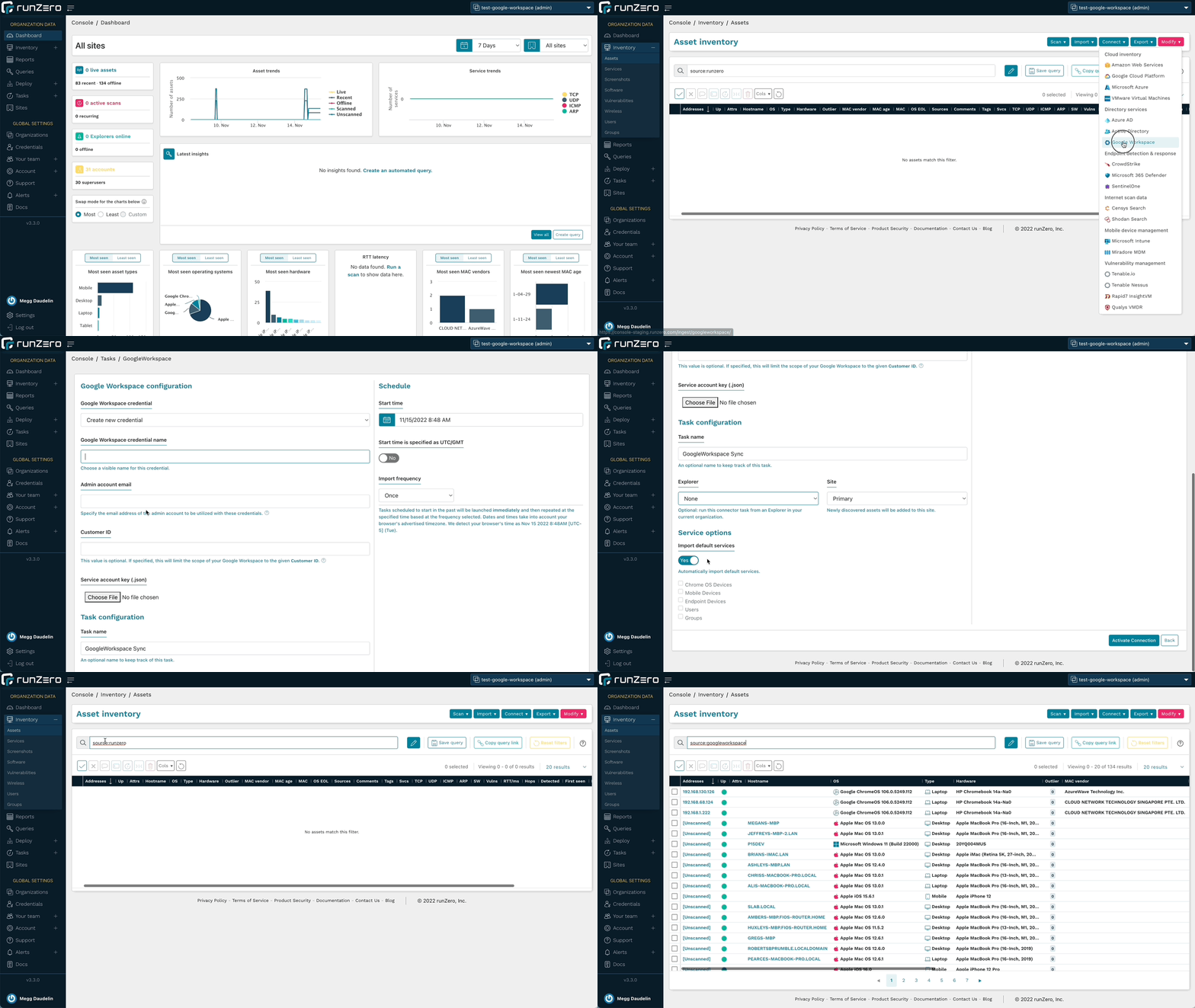
runZero 3.3 furthers the visibility into your Google ecosystem through a new integration with Google Workspace. runZero Professional+ users will be able to sync Google Workspace asset details from mobile devices, endpoints, and managed Chrome systems, while runZero Enterprise users will also be able to sync Users and Groups. Once the integrations are configured, users can view, search, analyze, export, and alert on attributes from both Google Workspace and Google Cloud Platform.

One of the key reasons to leverage the runZero integrations is to get better insight into the scope of your environment and completeness of coverage since MDM and IAM platforms can’t provide any insights into devices that haven’t been onboarded. To identify assets on your network that aren’t onboarded to Google Workspace, use the query source:runZero AND NOT source:googleworkspace. Conversely, use this query to find assets from Google Cloud Platform or Google Workspace that have not been scanned by runZero yet: (source:gcp OR source:googleworkspace) AND NOT source:runzero. These queries can help you keep pace with unmanaged and disconnected assets.

The integration also pulls in many Google Workspace attributes to give you comprehensive asset visibility. This could include attributes like when a device was last synced, whether a device has a password enabled or is encrypted, or whether it supports the use of a work profile. The Recent Users list in the asset details can also provide insight into device ownership and usage. You can filter for a specific user by using the @googleworkspace.mobile.email attribute for mobile devices or the @googleworkspace.chromeos.recentUsers attribute for ChromeOS devices. To find mobile devices that aren’t locked with a password try the query @googleworkspace.mobile.devicePasswordStatus:=”Off”, or use @googleworkspace.mobile.encryptionStatus:=”Not Encrypted” to find ones without encryption enabled. The wildcard operator also lets you find results with a range of OS versions, such as using @googleworkspace.endpoint.osVersion:=”MacOS 12.% to find Google Workspace assets running macOS Monterey.

runZero offers unmatched active network scanning, while also integrating with an ever-growing list of data sources so that you have a complete asset inventory at your fingertips. To get started, set up a connection to Google Workspace or Google Cloud Platform.

Queries for Google Workspace users and groups
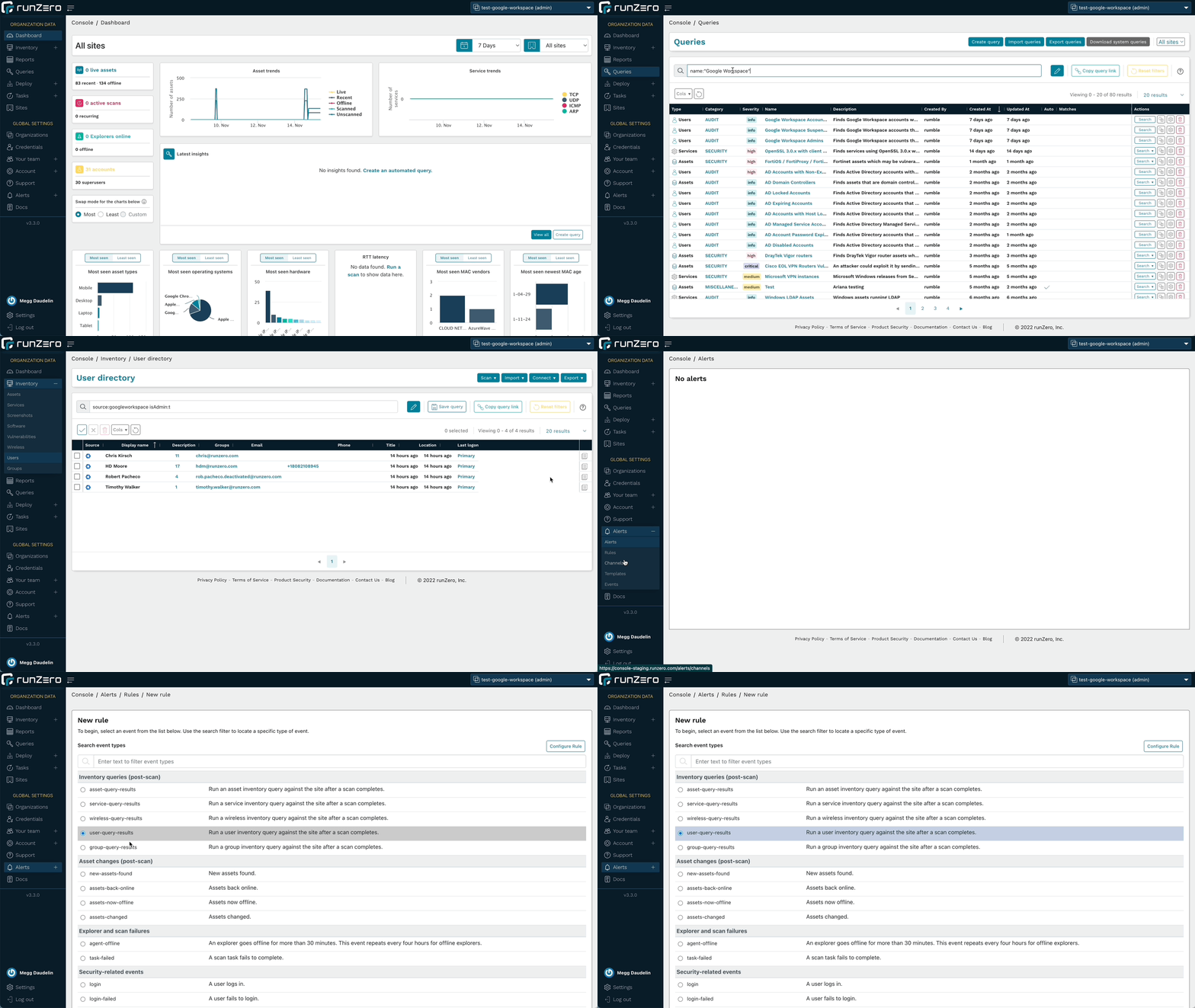
runZero Enterprise users can leverage the new queries tailored for the Google Workspace integration to quickly find and alert on accounts that match particular parameters, in addition to being able to run searches in the Users and Groups inventories. Identify administrator accounts, suspended accounts, and accounts without MFA to improve IAM efforts and better protect your environment. These queries are included in the Query Library and can also be used to create alerts.

Run queries about Google Workspace users or create an alert rule to find assets of interest.

Fingerprinting for Google assets
runZero includes fingerprints for the metadata returned by the Google integrations, including Google Cloud Platform and Google Workspace. This will help provide the most accurate operating system and hardware data about the assets in your inventory.

In addition to Google fingerprints, runZero has also improved fingerprinting coverage of Microsoft 365 Defender assets and SNMP devices. Additional support was added or improved for products by Apache, Aruba, Avaya, Axon, Cisco, CyberPower, Debian, Eaton, Epson, Fortinet, Fujifilm, Geist, Hikvision, Lexmark, Oracle, Sato, Sony, Vivi, and VMware.

Identification of OpenSSL services
In preparation for the OpenSSL vulnerability announcement, runZero released remote, unauthenticated fingerprinting for OpenSSL 3 services, allowing our users to get ahead of the mitigation process prior to the vulnerability details becoming public. This capability has since expanded to detect even more TLS implementations and track the TLS stacks in use on each asset. runZero users can find OpenSSL endpoints using the query product:openssl, in the assets, services, and software inventories.

The server-side exposure only applies to services that process client certificates. runZero already performs checks for this, even though it is not a common configuration. To identify services running OpenSSL 3.0.x variants that may be vulnerable to exploitation, use the following query in the service inventory search: _service.product:”OpenSSL:OpenSSL:3″ AND tls.requiresClientCertificate:”true”.

Improvements to the runZero Console
The 3.3 release includes several changes to the user interface to improve the performance of the runZero console. The tables on the Explorers, Sites, Organizations, and Your team pages now perform and load faster. This will let users query and sort the results in tables more efficiently, getting to the answers they need faster.

The release also extends the availability of the All Organizations view. All users now have a view that will show them the results from all of the organizations that they have access to. The available permissions in that view reflect their per-organization permissions so that they can manage resources just like they would when viewing a single organization.

Release notes
The runZero 3.3 release includes a rollup of all the 3.2.x updates, which includes all of the following features, improvements, and updates.

New features

  • runZero Professional and Enterprise customers can now sync assets from Google Workspace.
  • runZero Enterprise customers can now sync users and groups from Google Workspace.
  • The “All Organizations” view is now available to restricted users with a filtered scope.
  • User interface tables were revamped for Organizations,
  • Sites, Explorers, and Teams.
  • Live validation is no longer required for Qualys VMDR and InsightVM credentials.
    Fingerprint updates.

Product improvements

  • The subnet utilization report now supports filtering by site.
  • CSV export of assets now includes the same hostname information as the inventory view.
  • Up-to-date ARM64 builds of the standalone scanner are now available.
  • The account API endpoint for creating organizations now accepts the argument types documented.
  • Merging two assets now correctly updates the date of the newest MAC address for the resulting asset.
  • Disabling all scan probes now disables the SNMP probe.
    Service Provider information is now displayed with a default domain before SSO settings are configured.
  • Explorers are now ordered alphabetically on the scan configuration and connector configuration pages.
  • runZero users logging in via SSO are now presented with the terms and conditions acceptance dialogue.
  • A new tls.stack attribute that tracks the TLS software provider and version has been added for assets and services.
  • A new canned query for OpenSSL 3.0.x with client certificate authentication has been added.
  • The scanner now reports OpenSSL versions via TLS fingerprinting.
    The scanner now reports Tanium agent instances on the network.
  • The scanner now reports additional detail for SSLv3 services.
  • The search keywords has_os_eol and has_os_eol_extended are now supported on the Assets and Vulnerabilities inventory pages.
  • The “last seen” link to the most recent scan details has been restored on the asset details page.

Performance improvements

  • Improved performance when scanning from macOS hosts that have certain EDR solutions installed.
  • Improved performance of Intune integration when importing a large number of users and devices.
  • Scan task processing speed has been improved for SaaS and self-hosted customers.
  • The baseline memory usage of Explorers has been reduced.
  • Error handling of misconfigured fingerprints has been improved to reduce Explorer and scanner crashes.

Fingerprinting changes

  • Improved fingerprinting coverage of Microsoft 365 Defender for Endpoints assets.
  • Improved fingerprinting coverage of SNMP devices.
  • Tanium agent detection now sets the edr.name attribute.
  • Added fingerprinting of OpenSSL, GnuTLS, and Windows TLS stacks, including version when possible.
  • Apple ecosystem OS fingerprint updates.
  • Additional support added-or-improved for products by Apache, Aruba, Avaya, Axon, Cisco, CyberPower, Debian, Eaton, Epson, Fortinet, Fujifilm, Geist, Hikvision, Lexmark, Oracle, Sato, Sony, Vivi, and VMware.

Integration improvements

  • The AWS integration now includes an option to delete AWS-only assets that were not seen in the most recent import.
  • The Qualys integration now includes an option to import unscanned assets and is disabled by default.
  • Processing speed for large Qualys imports has been improved.
  • GCP credentials can now be configured to import assets from multiple projects.
  • The error message indicating that an AWS integration credential has insufficient permissions has been improved.

Bug fixes

  • A bug that could prevent the use of third-party credentials when using TLS thumbprints or the insecure connection option with a public URL has been resolved.
  • A bug which sometimes prevented GCP imports from completing has been fixed.
  • A bug in how Service Inventory searches were launched from the
  • Asset details page had been resolved.
  • A bug that could prevent TLS probes from completing has been resolved.
  • A bug that could prevent updating site metrics has been resolved.
  • A bug that could prevent the Intune integration from completing long-running tasks has been resolved.
  • A bug that could prevent the GCP integration from returning all assets has been resolved.
  • A bug that could result in a recurring integration running again before the previous task finished has been resolved.
  • A bug that could prevent importing assets from Microsoft Intune has been resolved.
  • A bug that could prevent importing assets from Microsoft 365 Defender has been resolved.
  • A bug that could prevent importing assets from Microsoft 365 Defender has been resolved.
  • A bug that could cause broken asset links has been resolved.
  • A bug that could cause missing service data for services with conflicting virtual hosts has been resolved.
  • A bug that could cause inaccurate user counts for imported directory groups has been resolved.
  • A bug that affected tooltip display has been resolved.
  • A bug that prevented “open in new tab” navigation using middle/right click has been resolved.
  • A bug that could prevent Azure AD imports has been resolved.

About Version 2 Digital

Version 2 Digital is one of the most dynamic IT companies in Asia. The company distributes a wide range of IT products across various areas including cyber security, cloud, data protection, end points, infrastructures, system monitoring, storage, networking, business productivity and communication products.

Through an extensive network of channels, point of sales, resellers, and partnership companies, Version 2 offers quality products and services which are highly acclaimed in the market. Its customers cover a wide spectrum which include Global 1000 enterprises, regional listed companies, different vertical industries, public utilities, Government, a vast number of successful SMEs, and consumers in various Asian cities.

About runZero
runZero, a network discovery and asset inventory solution, was founded in 2018 by HD Moore, the creator of Metasploit. HD envisioned a modern active discovery solution that could find and identify everything on a network–without credentials. As a security researcher and penetration tester, he often employed benign ways to get information leaks and piece them together to build device profiles. Eventually, this work led him to leverage applied research and the discovery techniques developed for security and penetration testing to create runZero.

Cybersecurity Summit in Madrid: “Europe is already on alert for data to not depend on third parties”

Madrid hosted on October 26th and 27th one of the major international cybersecurity summits. 

The fair Cyber Security World has brought together large technology companies, public administrations and references from the IT sector to address the main topics. 

Among them that of cybersecurity

An increasingly analyzed concept that, in the midst of the Ukrainian war, has multiplied its concern among companies and governments.

What do you know about the Madrid cybersecurity summit?

Data hosting in the cloud, the adaptation of the different administrations and the emergence of new solutions are some of the issues addressed by the major players in the sector with the aim of preparing for the new digital era.

“Europe is already on alert for data to not depend on third parties.

It is a maxim both among public administrations and among companies, who may see their systems attacked by hackers or simple computer errors,” 

ensures monitoring expert Sancho Lerena, CEO of the IT company Pandora FMS

The European Commission, in fact, has already set ahead the goal of achieving technological independence by 2030. 

According to the data they provided, 90% of the data of the European Union are managed by American companies

In addition, less than 4% of major online platforms are European. 

An example of this technological fragility is that the European market represents less than 10% in the microchip manufacturing sector. 

“In a couple of years, more than 50% of companies should be using the Cloud,” the expert says. 

The European future of cybersecurity

The challenge for 2030 is to maximize digitisation within the European Union. 

The project Compass Digital, for example, includes multiple investments and objectives, but the sector agrees that many steps must be taken to achieve full cybersecurity nowadays. 

“There are many companies that still have legacy, outdated systems that cannot incorporate the latest security developments,” acknowledges Lerena.

The IT company Pandora FMS is one of those that works with both digital administrations and companies through its monitoring system. 

The concept of monitoring is increasingly widespread in the sector, as it allows the real-time management of all data generated within an IT structure. 

That way, companies achieve greater efficiency and reduce costs.

“This technology not only helps improve the control of data and activity of a platform, it also strengthens security and warns about possible errors to improve reaction time.” 

Explains the head of technology, whose solution is present in institutions such as Madrid Digital, relying on the Comunidad de Madrid, or the EMT

Also, having international giants such as Rakuten or Toshiba shows the importance that this type of technology currently has.

Europe is already looking to 2030 with the intention of extending this digitisation.

Companies are incorporating monitoring systems and strengthening the cybersecurity of their companies.The objective is none other than to prevent European actors from being “well below the EU’s global economic weight” in technologically relevant areas.

Essential for Smart Cities

Cybersecurity will become increasingly important.

Especially considering that the objective of the most developed countries is to implement those known as Smart Cities where technology and data control will be fundamental for the efficient management of cities.

The concept of Smart Cities responds to those cities where, through data analysis and the use of the latest technological solutions, services are more efficient for citizens and do not generate a negative impact either in economic terms or in the environmental field. 

For example, to find out in which areas more waste is generated to improve the garbage service in that area or the management of public transport through citizen accessibility. 

Therefore, the proper processing of these data and their security will be a pillar for the cities of the future

“Without the control of these data, and without technological independence, it will be very difficult to develop these Smart Cities in a stable way”, says Lerena. 

About Version 2 Digital

Version 2 Digital is one of the most dynamic IT companies in Asia. The company distributes a wide range of IT products across various areas including cyber security, cloud, data protection, end points, infrastructures, system monitoring, storage, networking, business productivity and communication products.

Through an extensive network of channels, point of sales, resellers, and partnership companies, Version 2 offers quality products and services which are highly acclaimed in the market. Its customers cover a wide spectrum which include Global 1000 enterprises, regional listed companies, different vertical industries, public utilities, Government, a vast number of successful SMEs, and consumers in various Asian cities.

About PandoraFMS
Pandora FMS is a flexible monitoring system, capable of monitoring devices, infrastructures, applications, services and business processes.
Of course, one of the things that Pandora FMS can control is the hard disks of your computers.

The most dangerous computer viruses in history

Here, in our beloved Pandora FMS blog, we have talked a big deal about computer risks. This does not mean of course that we consider ourselves to be faint-hearted or timid, but rather cautious heroes. And in order not to be alone in a battle against the evil that lurks around, today, continuing with this theme of terror and digital desolation, we bring you: some of the most dangerous computer viruses in human history!

These are the computer viruses you should fear the most!

What is a computer virus?

Before bringing on the storm, listing malicious software, we’d better explain a little what this whole thing about computer viruses is and why, although you have to be careful with them, you don’t need to use masks.

A computer virus is a malicious program or code created and conceived to truncate the operation of a computer. 

Like the biological microorganism, they are also infectious, although these replicate only within computer equipment.

They propagate from one computer to another, usually attached to a legitimate document, then execute their cursed code.

Although you may think the computer virus has been with us since the first pulley system, it was Leonard M. Adleman, in 1984, the first to use the term while finding similarities between his student Fred Cohen’s college experiment and the HIV virus.

List of the most dangerous computer viruses that have ever existed

Now, let’s get down to business!

We go into it!

I LOVE YOU

Funny thing is, this virus does everything but love and appreciate you for who you are. In fact, on its own, it has devoted itself to creating chaos around the world with about 10 million dollars in damages.

It came to be believed that 10% of all computers in the world were infected by it and it caused large institutions and governments to disable their email system for not wanting to take any risks.

You see, something not even the tiresome, stalking Linkedin publicity achieved.

I love you was created in the Philippines by Reonel Ramones and Onel de Guzman using social engineering (“A set of techniques that cybercriminals use to trick incautious users into sending them confidential data, infecting their computers with malware, or opening links to infected sites”) they sneaked it into the Philippines, to all of Asia, and in a short time to the rest of the world.
Fun fact:

As the email they sent for you to click on the attachment was a declaration of love, the virus was called “I Love You”.

MELISSA

Its creator was David L. Smith and detonated in ’99 as an infected Word document that was presented to the world as the best thing ever for perverts:

“Hello, I am a list of passwords for pornographic websites.”

At that time the virus was mailed to the fifty most important people in your email and created havoc with his deceptive list of passwords. Of course, the most curious and salacious ones fell for it right away.

It also came with a sort of cover letter, a reference to the Simpsons.

Less than a week after his presentation to the public, David L. Smith was captured by the police. Oh, I’m sorry, David.

However, for his special collaboration with the authorities in trapping other perfidious virus creators, his sentence was reduced from 10 years to 20 months.

Still… His virus caused 80 million dollars in damage.

Fun fact:

If “Melissa” sounds like a sinuous and more like the name of a hurricane, it has to do with the fact that it comes from an exotic dancer from Florida.

ZEUS

A trojan (“A malware that presents itself to the user as a seemingly legitimate and harmless program, but which, when executed, gives an attacker remote access to the infected computer”) created especially to truncate computers with Windows.

It did a number of awkward things on your computer, including capturing forms.
Most computers became infected due to hidden downloads or phishing (“A technique that involves sending an email from a cybercriminal to a user pretending to be a legitimate entity”).

It was used for such ominous things as stealing login credentials from social networks, emails, and bank accounts.

In the United States alone, more than one million computers were infected.

Fun fact:

It compromised corporations such as Amazon, Oracle, Bank of America, Cisco, and many more.

STUXNET 

The virus is believed to have been created by the Israel Defense Forces along with the United States Government.

With these two agents involved, what do you think? That the virus was spawned as an experimental project and that it got out of hand? Or that it was done, expressly, to bring chaos upon our civilization?

Bingo!

This virus was designed for cyber warfare.

It had the goal of halting Iran’s advances in nuclear defense. And so it was, much of the infection took place in Iran.

Fun fact:

It spread through infected pen drives and altered the speed of the devices until they became damaged.

CRYPTOLOCKER 

A ransomware (“A type of malicious program that restricts access to certain parts or files of the infected operating system and asks for a ransom in exchange for removing this restriction”) Trojan that uses, among other means, email to spread.

Once your computer was infected it went on to encrypt some files from the hard drive.

The thing here is that, even though it’s easy to remove as a virus, the files it encrypted stayed still encrypted, unless you paid a ransom by a deadline.

The ransom used to be $ 400, although it could increase, and the number of infected computers was 500,000.

Make the numbers yourself… With only half paying the scammers, you could afford a house in Florida!

Thank God, Evgeny Bogachev, leader of the organization that operated with this virus was arrested and forced to return all encrypted keys.

Fun fact:

In the end, only 1.3% of those infected fell into the scam… That’s about 3 million dollars. Not bad at all!

Dimas P.L., de la lejana y exótica Vega Baja, CasiMurcia, periodista, redactor, taumaturgo del contenido y campeón de espantar palomas en los parques. Actualmente resido en Madrid donde trabajo como paladín de la comunicación en Pandora FMS y periodista freelance cultural en cualquier medio que se ofrezca. También me vuelvo loco escribiendo y recitando por los círculos poéticos más profundos y oscuros de la ciudad.

Dimas P.L., from the distant and exotic Vega Baja, CasiMurcia, journalist, editor, thaumaturgist of content and champion of scaring pigeons in parks. I currently live in Madrid where I work as a communication champion in Pandora FMS and as a freelance cultural journalist in any media offered. I also go crazy writing and reciting in the deepest and darkest poetic circles of the city.


About Version 2 Digital

Version 2 Digital is one of the most dynamic IT companies in Asia. The company distributes a wide range of IT products across various areas including cyber security, cloud, data protection, end points, infrastructures, system monitoring, storage, networking, business productivity and communication products.

Through an extensive network of channels, point of sales, resellers, and partnership companies, Version 2 offers quality products and services which are highly acclaimed in the market. Its customers cover a wide spectrum which include Global 1000 enterprises, regional listed companies, different vertical industries, public utilities, Government, a vast number of successful SMEs, and consumers in various Asian cities.

About PandoraFMS
Pandora FMS is a flexible monitoring system, capable of monitoring devices, infrastructures, applications, services and business processes.
Of course, one of the things that Pandora FMS can control is the hard disks of your computers.

×

Hello!

Click one of our contacts below to chat on WhatsApp

×