Skip to content

Updates on SafeDNS

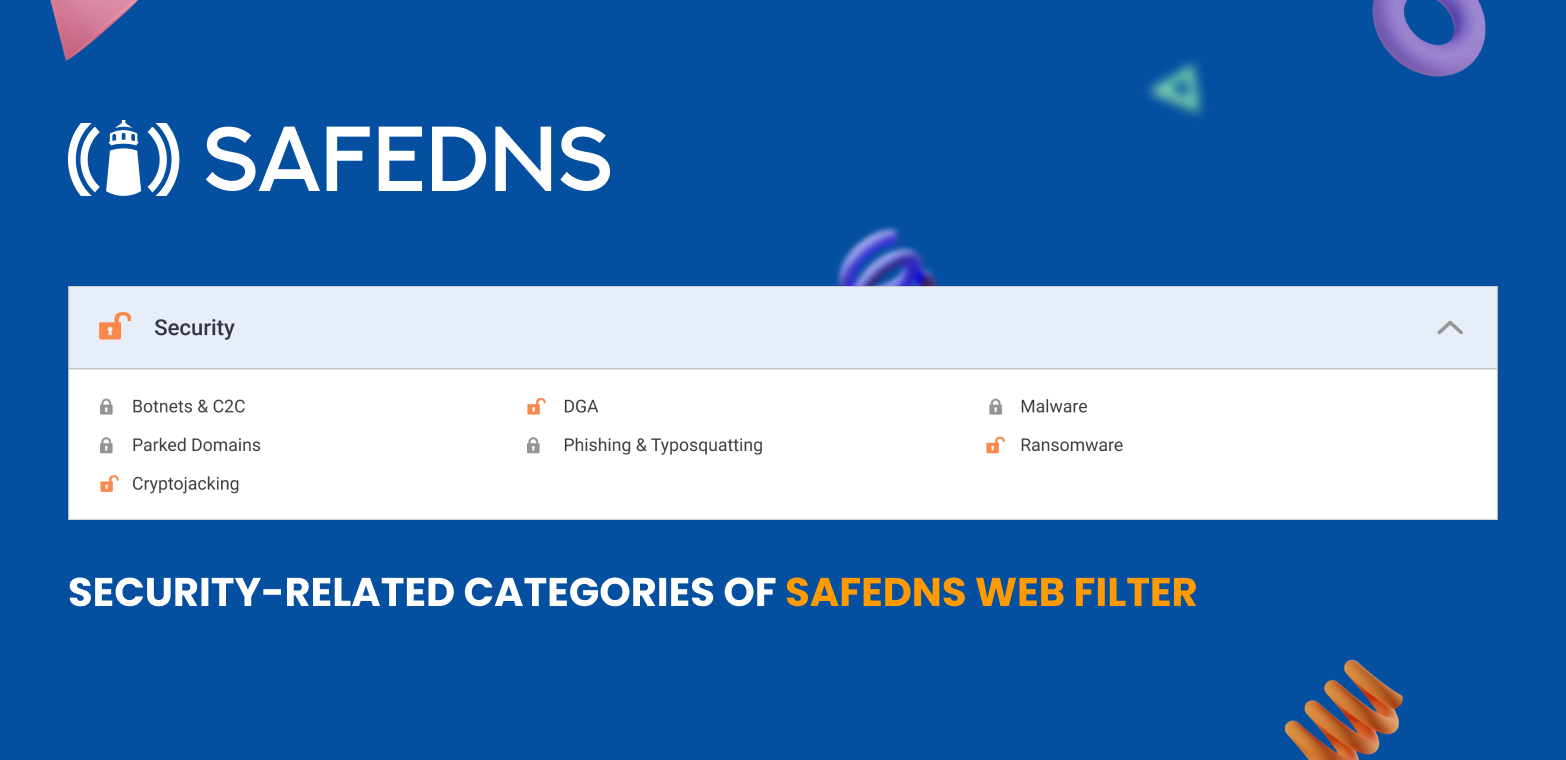
SafeDNS has updated Security categories that now have DGA, Cryptojacking and others as part of the Security group.

New categories include Malware, Ransomware, Phishing & Typosquatting (sites deceiving internet users, fake pages, scams, fraud), Cryptojacking (sites illegally mining cryptocurrencies) & DGA which is algorithms detected in various malware families, which are used to periodically generate a large number of domain names that can be used as a default with their management and control servers.

We also just carried out work to optimize the processing of statistical data, which made it possible to reduce the speed of collecting statistics, achieving relevance indicators at the level of 5-10 minutes, instead of 30-60 minutes earlier.

Current task is to work towards real-time statistics which should be up by the end of 2022 – early 2023. 

About Version 2 Digital

Version 2 Digital is one of the most dynamic IT companies in Asia. The company distributes a wide range of IT products across various areas including cyber security, cloud, data protection, end points, infrastructures, system monitoring, storage, networking, business productivity and communication products.

Through an extensive network of channels, point of sales, resellers, and partnership companies, Version 2 offers quality products and services which are highly acclaimed in the market. Its customers cover a wide spectrum which include Global 1000 enterprises, regional listed companies, different vertical industries, public utilities, Government, a vast number of successful SMEs, and consumers in various Asian cities.

About SafeDNS
SafeDNS breathes to make the internet safer for people all over the world with solutions ranging from AI & ML-powered web filtering, cybersecurity to threat intelligence. Moreover, we strive to create the next generation of safer and more affordable web filtering products. Endlessly working to improve our users’ online protection, SafeDNS has also launched an innovative system powered by continuous machine learning and user behavior analytics to detect botnets and malicious websites.

How to secure your device in one step

Oftentimes, we talk about the need to be good role models to our children, limiting their technology use and time spent in front of a screen. But what about us? We may want to protect our children, but just try unplugging yourself.

It’s been a few years now since we started talking about the always-on culture and how damaging it can be. But it is not only at work where we are constantly plugged in. Just consider your device use day-to-day. Research from 2018 shows that the average person in the UK spends an entire day a week on their devices. And even worse, the figures seem to be growing. More recent research uncovered that the average person spends up to six hours and 57 minutes looking at a screen each day. Add that up, and you’ve got a whopping two whole days.

Changes in behavior at a societal level are tough to make. And maybe we won’t be turning away from our screens anytime soon, but that makes it all the more important to consider securing these large blocks of time in our lives. We make sure our houses, cars, and other possessions and properties are well protected with locks, CCTVs and guard dogs 24/7. How about those two days online? How are we protecting our online world?

Every device is a window for cybercriminals to enter and wreak havoc. Think about it, we use our devices to conduct business, make bank transactions, research places to eat, check public transport details, call a taxi service, talk to our relatives, shop online and much more. What was previously possible to do outside of our homes we now do from the comfort of our couches.

So how exactly can you best protect all those activities? Well, the first step is to have a trusted digital security solution. ESET has come out with a new and improved version of its consumer offering. This includes all levels: essential security (ESET NOD32 Antivirus), advanced security (ESET Internet Security) and premium security (ESET Smart Security Premium). All of these were improved to ensure a smooth digital experience for all users, with 24/7 protection.

Consumer products from ESET offer the ultimate multilayer antimalware protection, including proactive security against never-before-seen threats. The integral part is ESET´s award-winning technology, which includes Advanced Machine Learning to improve malware detection. ESET is also now enabling Intel® Threat Detection Technology (Intel® TDT) found on Intel® Core™ processors to further boost our ransomware protection. This new layer of security will boost ransomware protection by integrating Intel’s hardware-based ransomware detection technology.

This demonstrates that ESET is always focused on producing solutions that are high performing while keeping the operating system and device load low.

With the ESET HOME web portal and mobile app, ESET is making sure you are always aware of your security environment and are always protected. The ecosystem features all devices added to the account and sends updates about its security status, providing a tool to keep track of all your devices in one place. ESET HOME is also protected by its own 2FA (two-factor authentication) and password authentication.

As mentioned before, being protected is very important when it comes to our finances. ESET’s Banking & Payment Protection is an additional layer of protection for your financial data during online transactions. The integrated “Secure all browsers” mode ensures to open all supported browsers automatically in a secure mode. This provides protection for the browser process against any malicious changes or intervention.

To further protect your financial activities, Anti-Phishing technology is integrated into all levels of ESET security. This protects your privacy and assets against attempts by fake websites to acquire sensitive information, such as your username, password or banking details.

Among the features is Brute-Force Attack Protection, which blocks password-guessing attacks for the Remote Desktop Protocol. A brute-force attack is a method of discovering a targeted password by systematically trying all combinations of letters, numbers and symbols. Other technologies include ESET LiveGrid®, ESET LiveGuard, UEFI Scanner and Ransomware Shield.

All of the integrated features and technologies are here and improved for your privacy protection and security. Having a good and trustworthy digital security solution will give you peace of mind and help to keep your digital world safe and secure 24/7. Just as protecting your home is second nature, protecting your digital world should be too . ESET is here to protect your devices.

About Version 2 Digital

Version 2 Digital is one of the most dynamic IT companies in Asia. The company distributes a wide range of IT products across various areas including cyber security, cloud, data protection, end points, infrastructures, system monitoring, storage, networking, business productivity and communication products.

Through an extensive network of channels, point of sales, resellers, and partnership companies, Version 2 offers quality products and services which are highly acclaimed in the market. Its customers cover a wide spectrum which include Global 1000 enterprises, regional listed companies, different vertical industries, public utilities, Government, a vast number of successful SMEs, and consumers in various Asian cities.

About ESET
For 30 years, ESET® has been developing industry-leading IT security software and services for businesses and consumers worldwide. With solutions ranging from endpoint security to encryption and two-factor authentication, ESET’s high-performing, easy-to-use products give individuals and businesses the peace of mind to enjoy the full potential of their technology. ESET unobtrusively protects and monitors 24/7, updating defenses in real time to keep users safe and businesses running without interruption. Evolving threats require an evolving IT security company. Backed by R&D facilities worldwide, ESET became the first IT security company to earn 100 Virus Bulletin VB100 awards, identifying every single “in-the-wild” malware without interruption since 2003.

How to Enable Full Disk Encryption in Ubuntu 22.04

Jump to Tutorial

Security-minded system administrators prioritize taking all the necessary measures to safeguard confidential and protected data. The compromise of a device can prove costly if it contains sensitive company information, especially when organizations have compliance requirements. Disk encryption is one of the best ways to mitigate this risk.

Encryption is the process of encoding data. Data is converted from plain text to ciphertext using a special mathematical algorithm that renders the data unreadable unless the encryption key is provided. This key should always remain a secret to the person authorized to access the data.

There are two major types of encryption in a computer: Full Disk Encryption (FDE) and File Level Encryption (FLE).

Full Disk Encryption

In full disk encryption, also known as hard drive encryption, the entire hard drive or volume — including all the files — is protected. During booting, a passphrase or secret key is required to unlock the drive before logging in with your user account credentials.

Implementing FDE guarantees data privacy and security for all the files from unauthorized users or anyone with malicious intent. Learn more about the benefits of FDE, and five reasons you should consider requiring it in your organization.

File Level Encryption 

As the name infers, file level encryption happens at the file system level. This type of encryption targets individual files and directories, but not the entire hard disk.

Both full disk encryption and file level encryption can be used simultaneously to achieve a higher level of data protection.

In this tutorial, we will focus on how to enable full disk encryption on Ubuntu 22.04 using LUKS. 

What Is Linux Unified Key Setup (LUKS)?

LUKS is a standard hard drive encryption technology for major Linux systems including Ubuntu. It is a platform-independent disk encryption specification and the de facto disk encryption standard for Linux systems.

LUKS was originally developed for Linux systems and is used in nearly all Linux distributions. It is also a popular encryption format for network-attached storage (NAS) devices. It encrypts entire block devices, making it an ideal choice for encrypting SSD, hard disk drives, and even removable drives.

In addition to offering FDE, LUKS allows users to create and run encrypted containers with the same level of protection as LUKS full disk encryption.

With LUKS, disk encryption can be enabled during the installation of an operating system. In fact, full disk encryption is only achieved during the installation of the Ubuntu Desktop operating system. It encrypts all the partitions including swap space, system partitions, and every bit of data stored on the block volume with the exception of the Master Boot Record (MBR).

How to Fully Encrypt Data on Ubuntu 22.04

If you already have a running instance of Ubuntu 22.04 and you want to enable full disk encryption, you’re required to reinstall it. You cannot fully encrypt it once it is installed. You can only encrypt directories or partitions post-installation.

If you forget your encryption passphrase, all your data will be inaccessible. As such, it is recommended to pick one that you can easily remember or store on a password vault or manager. Better yet, if you have used a complex password, you can note it down somewhere and keep it under lock and key.

Additionally, before starting this process, be sure to backup any critical data that could potentially be lost during the reinstallation process.

Getting Started

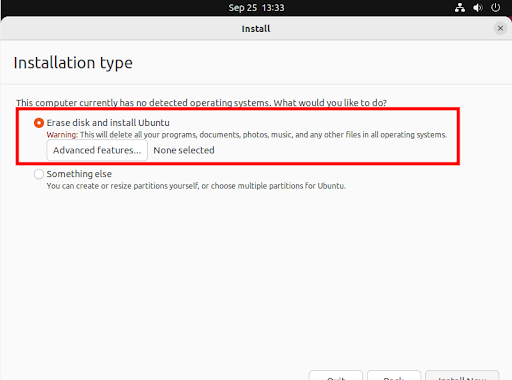
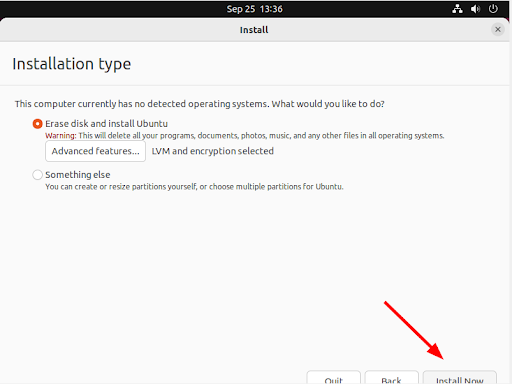
We will skip the few installation steps on Ubuntu 22.04 and head straight to the “Installation Type” step that requires you to select your preferred disk partition mode.

Two options will be presented. The first one (the default option) is “Erase disk and install Ubuntu” which wipes out all the existing data and automatically partitions the drive. The second option is “Something else” which is used to manually configure the disk partitions yourself. Please note that you will not be able to enable full disk encryption by selecting the second option.

Select the first option: “Erase disk and install Ubuntu” and click the “Advanced features” button as indicated.

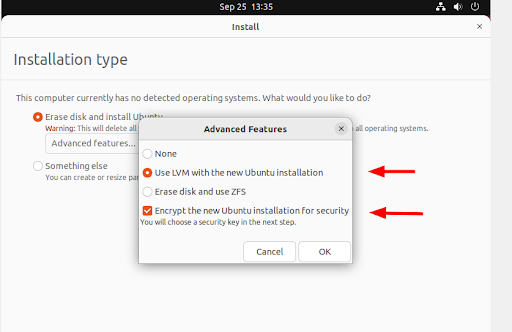
Once you click the “Advanced features” button, a pop-up appears. Be sure to select “Use LVM with new Ubuntu installation” and the “Encrypt the new Ubuntu installation for security” options.

Then click “OK.”

Next, assuming you have already backed up any important data, click “Install Now.”

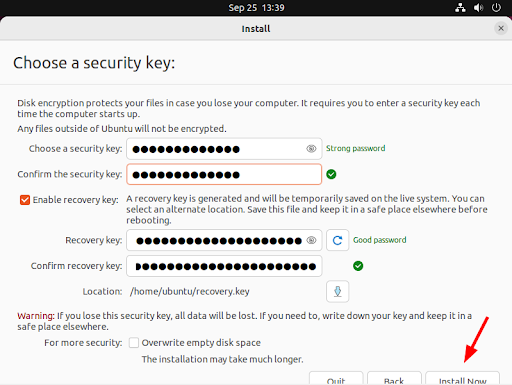
Disk encryption requires a security key in order to access your files each time your device boots. In this step, provide a strong security key or passphrase.

You can also enable a recovery key which enables a user to access the encrypted disk if they forget their password, or if the disk needs to be installed on a new device.

Then click “Install Now.”

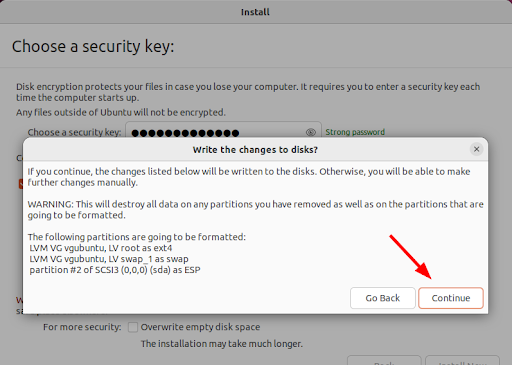
On the pop-up dialogue that appears, click “Continue” to write changes to the disk.

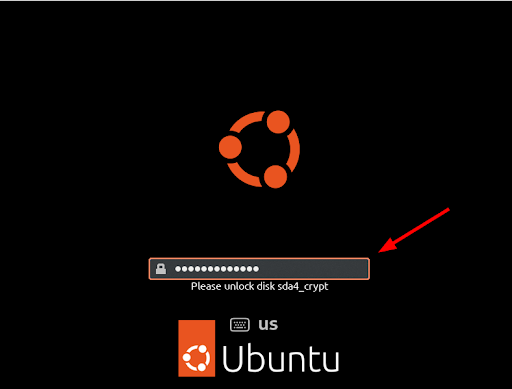
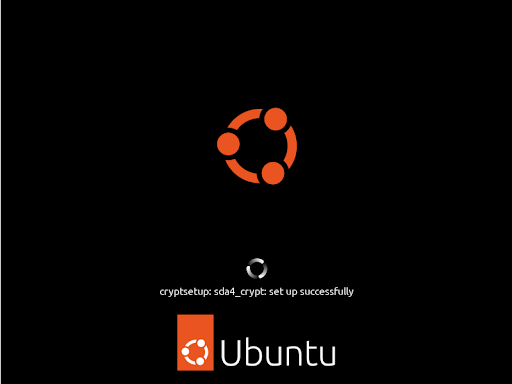
From here, continue with the installation process until the end, and finally, reboot the system. Provide the security key that you generated and hit ENTER prior to logging in.

The secret key unlocks your drive thereby granting you access to your system.

From here, you can log in to your new Ubuntu installation by providing your user account’s password and pressing ENTER.

Conclusion

In this guide, we walked you through the implementation of full disk encryption using LUKS on Ubuntu 22.04. FDE provides a robust way to safeguard your data in case of theft or accidental loss of your device. 

Encryption is just one approach to ensuring the privacy and safety of your data. Therefore, you should not relax enforcing other data protection measures such as firewalls, identity and access management (IAM), and Zero Trust controls such as multi-factor authentication (MFA).

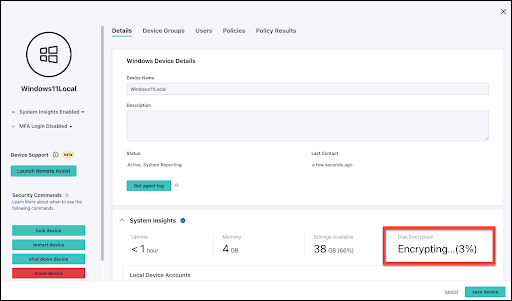
JumpCloud’s open directory platform is available to easily implement full disk encryption throughout your entire fleet. Pre-built policies make it possible to achieve full disk encryption for Windows and macOS devices, with granular control and visibility for BitLocker.

Linux devices can also be managed and monitored for encryption status. To see how this works, along with a number of other device security and management features, sign up today to get started. JumpCloud is free to use for up to 10 users and 10 devices; we also provide 24×7 in-app support for the first 10 days of use.

Would you prefer tailored, white-glove implementation assistance? Schedule a free 30-minute technical consultation to learn about the service offerings available to you and your fleet.

About Version 2 Digital

Version 2 Digital is one of the most dynamic IT companies in Asia. The company distributes a wide range of IT products across various areas including cyber security, cloud, data protection, end points, infrastructures, system monitoring, storage, networking, business productivity and communication products.

Through an extensive network of channels, point of sales, resellers, and partnership companies, Version 2 offers quality products and services which are highly acclaimed in the market. Its customers cover a wide spectrum which include Global 1000 enterprises, regional listed companies, different vertical industries, public utilities, Government, a vast number of successful SMEs, and consumers in various Asian cities.

About JumpCloud
At JumpCloud, our mission is to build a world-class cloud directory. Not just the evolution of Active Directory to the cloud, but a reinvention of how modern IT teams get work done. The JumpCloud Directory Platform is a directory for your users, their IT resources, your fleet of devices, and the secure connections between them with full control, security, and visibility.

Improper Offboarding Poses Significant Security Risks

October is Cybersecurity Awareness Month, and this year’s theme is See Yourself in Cyber, which focuses on the individual’s role in cybersecurity. While cybersecurity can feel complex and inaccessible to the average person, the reality is that everyone has a role to play in security, from executives to the IT team to end users. This month, the JumpCloud blog will focus on helping you empower everyone in your organization to do their part regarding cybersecurity. Tune in throughout the month for more cybersecurity content written specifically for IT professionals and MSPs.


Many organizations spend quite a bit of time onboarding new employees and making sure they have access to everything they need; however, the same care is often lacking when it comes to offboarding. Whether a long-time employee suddenly leaves on bad terms, a contractor is no longer being utilized for some period of time, or an employee goes on leave, improper offboarding or suspension of that user’s permissions and access poses significant risk for your organization.

Offboarding and deactivating a user’s identity can be a manual and time-consuming process, yet it is also very time-sensitive and sometimes requires IT admins to be available at a moment’s notice. Not every employee gives notice prior to leaving, and unforeseeable events can happen that force admins to scramble at the last minute to deprovision that user’s access to company resources.

This process becomes even more difficult if your organization needs to provide access to IT resources for temporary workers like contractors and interns, or has full-time employees that may need to be temporarily offboarded or have their IT resource access suspended rather than be permanently offboarded due to personal events like marriages, births, family care, overcoming an illness or injury, and more.

Most Companies Struggle With Offboarding

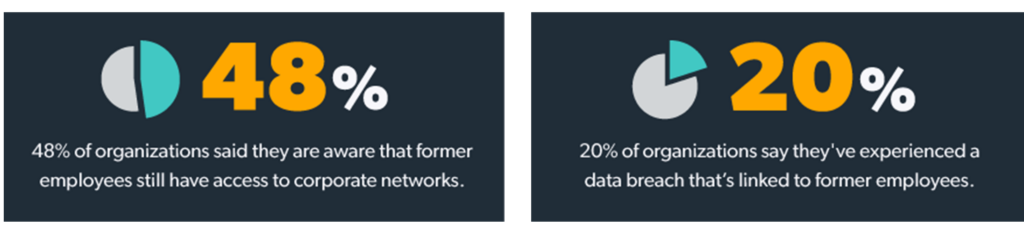
Improperly offboarding employees is a dangerous game to play, yet, according to TechRepublic, 48% of organizations said they are aware that former employees still have access to corporate networks. Further, 20% of organizations say they’ve experienced a data breach that’s linked to former employees.

These stats tell us that improperly offboarded employees are a predominant threat to organizations; however, the tools and resources needed to fix this issue aren’t there. The missing link here could be a lack of time, no simple way to quickly offboard or suspend user access to all IT resources, and/or lack of insight into the security risks posed by inadequate processes. It puts a spotlight on the notion that offboarding is as much a security issue as it is an operational one for IT.

Another important finding from TechRepublic is: 

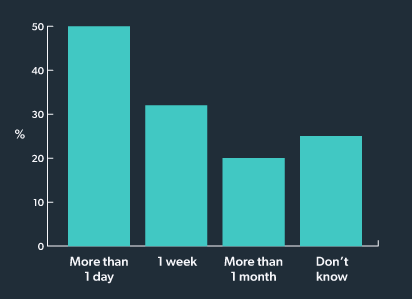
Half of IT leaders said that ex-employees’ accounts remain active for longer than a day after their departure, 32% said it takes a week to deactivate an account, and 20% said it takes a month or more. Another 25% said they don’t know how long accounts remain active once the employee has left the company.

These percentages pose a significant problem for the organizations that fit into these stats. It only takes one angry ex-employee, one ex-employee that’s simply being careless with the handling of their credentials, or one employee on leave that still has active access to make damaging changes in some shared resource, even though they weren’t there for the last best practices discussion.

Case Study: Improper Offboarding and Compliance Violations

Here’s a real world example of how improper offboarding of employees and contractors can lead to considerable compliance violations, substantial fines, and the subsequent loss of public trust.

Pagosa Springs Medical Center (PSMC)

In 2018, Pagosa Springs Medical Center found itself at the epicenter of a major HIPAA violation which ended up costing them $111,400 — all because they did not properly offboard a terminated employee.

After their termination, the former PSMC employee retained remote access to PSMC’s web-based scheduling calendar, which contained patients’ electronic protected health information (ePHI). The investigation revealed that PSMC impermissibly disclosed the ePHI of 557 individuals to this former employee.

HIPAA calls out the need for a formal offboarding process under the security rule section – § 164.308(a)(3)(ii)(C): “Implement procedures for terminating access to electronic protected health information when the employment of a workforce member ends.“

Source: HHS

HIPAA is just one standard that can easily be violated due to improper offboarding — there are many others out there with similarly severe consequences for non-compliance.

A Quick Offboarding Checklist

Even at organizations where offboarding is seen as a fairly quick process, i.e. less than a couple of hours, the risk of that ex-employee or another bad actor taking advantage of existing access is still prevalent. 

TechRepublic also found that 70% of IT decision makers surveyed said it can take up to an hour to deprovision all of a single former employee’s corporate application accounts. Keep in mind, this does not include revoking an employee’s access to their devices and networks.

To combat this and improve your organization’s security posture, it’s helpful to put steps in place that improve offboarding efficiency. One of these steps should include an offboarding checklist to ensure that no loose ends are left after an employee’s departure.

Your offboarding checklist should include deactivation of access to:

  • All applications
  • Productivity tools:
    • Ex. Google Workspace and Slack
  • CRM tools:
    • Ex. Salesforce and Zoho
  • Cloud Infrastructure
  • File shares
  • Devices
  • Corporate Networks
    • VPN
    • RADIUS
    • Or, if WiFi access is not centrally managed, periodically refresh the Corporate WPA2 passphrase
  • And ensure return of equipment

Questions to Consider When Improving Offboarding Workflows:

  • Does HR inform you in a timely manner when an employee leaves your organization?
  • If an employee is terminated or leaves abruptly, are you able to deactivate their identity immediately?
  • Are you able to suspend the identity for contractors who leave the company and may return?
    • What about employees on medical leave who may return?

Improving Employee Offboarding

Sticking to an offboarding checklist to ensure all access is revoked is extremely important, but what’s just as important is the process in which everything is deactivated. Not only are manual offboarding processes time-consuming, but they also leave a lot of room for human error. 

While working to improve and standardize your entire offboarding workflow, we also recommend that you establish routine communication with HR around onboarding and offboarding, as well as find an identity provider (IdP) to streamline the process.

Establish Routine Communication With HR

If you’re not already in continuous communication with HR regarding employees coming and going, you need to establish a better process between departments. HR should let you know when an employee is scheduled to leave or immediately notify IT when someone leaves abruptly. HR should also inform you in advance when an employee is scheduled to return from leave or their contract is renewed.

Though many project management tools exist to help alert internal stakeholders about new tasks, and some HRIS systems can even directly integrate into your core directory service to fully automate this process, this communication can be quickly achieved by creating an email alias or group with select individuals from HR and IT. Whenever someone across the organization alerts HR of a change in employment, they can CC this email alias to give IT the necessary “heads up” they need to act quickly.

Find the Right Identity Provider

When choosing an identity provider, find one that has the following capabilities:

  • Allows you to automate deactivation of a user’s identity
    • Once you set the date/time of deactivation, your IdP should take care of the rest
  • Lets you easily and quickly revoke access to ALL resources
    • Deactivating a user’s identity should revoke access to applications, devices, networks, and any other resources that user had access to
  • Simplifies user activation and reactivation
    • If an employee returns from leave or a contractor’s contract is renewed, you should be able to quickly and easily reactivate their identity in a just few steps
  • Includes integration capabilities with common HRIS software

Fixing the communication disconnect between HR and IT and implementing the right identity provider will allow you to securely and efficiently revoke access and re-provision access as needed, through just a few clicks.

JumpCloud’s Offboarding and User Suspension Features

Using JumpCloud® as your primary IdP allows you to quickly deprovision user access to virtually all of their IT resources. Our scheduled suspension features allows you to schedule a date and time for user deactivation which revokes access to applications, devices, networks, and any other IT resource their account has permissions for. 

If the user in question will be returning, you can use this capability as a temporary suspension, and the user can later be reactivated; what’s more, they’ll receive updated permissions and access to new or changed resources as determined by their associated user, device, and policy groups automatically once reactivated. If the user in question will not be returning, use this feature to schedule their deactivation and then fully remove their account when appropriate (as dictated by compliance regulations or internal policy).

The JumpCloud scheduled user suspension feature simplifies and automates the deactivation workflow for scheduled permanent offboarding, as well as temporary suspension of contractors, freelancers, and employees on leave. This feature lets you revoke access to all resources, not just corporate applications. All of this works together to improve your overall security posture and ensure that your organization remains compliant with relevant standards.

All of this coupled with the fact that JumpCloud integrates with HR software like Workday and Bamboo, as well as provides API-based integration with other tools, provides a seamless onboarding and offboarding experience for IT admins.

JumpCloud

Protect your organization from data breaches and compliance violations

Try Scheduled User Suspension Free

This feature can be found within the JumpCloud Admin Console — find it under User Management > Users. Try it for free for up to 10 users and 10 devices by creating a JumpCloud Free account. Enjoy all of the functionality of the JumpCloud Directory Platform, including scheduled user suspension, and see if JumpCloud is the right IdP for your organization!

About Version 2 Digital

Version 2 Digital is one of the most dynamic IT companies in Asia. The company distributes a wide range of IT products across various areas including cyber security, cloud, data protection, end points, infrastructures, system monitoring, storage, networking, business productivity and communication products.

Through an extensive network of channels, point of sales, resellers, and partnership companies, Version 2 offers quality products and services which are highly acclaimed in the market. Its customers cover a wide spectrum which include Global 1000 enterprises, regional listed companies, different vertical industries, public utilities, Government, a vast number of successful SMEs, and consumers in various Asian cities.

About JumpCloud
At JumpCloud, our mission is to build a world-class cloud directory. Not just the evolution of Active Directory to the cloud, but a reinvention of how modern IT teams get work done. The JumpCloud Directory Platform is a directory for your users, their IT resources, your fleet of devices, and the secure connections between them with full control, security, and visibility.

How runZero finds unmanaged devices on your network

Unmanaged assets are connected to the network, but lack an identified owner and may exist outside the visibility of those responsible for the network. These devices can pose real security risks to a company or organization for numerous reasons, such as running older vulnerable operating systems or software, using insecure protocols, or having nefarious intent. Plus, they can be difficult to discover or locate, sometimes using unmanaged subnets within a network. Arising from both intentional and inadvertent situations, unmanaged assets can be classified into several categories, including:
  • Orphaned – Assets that lost their original owner but are still present on the network
  • Shadow IT – Devices/systems that are connected to the network without permission
Transient devices, such as portable, mobile, or IoT devices that “come and go” on the internal network, including bring your own device (BYOD), might be better categorized as “unmanageable” rather than “unmanaged” and can also be easily discovered via runZero scanning. Let’s take a look at how runZero is able to locate unmanaged devices on your networks.

Peek under the hood of our scan engine

At runZero, we intentionally built our offering around unauthenticated, active scanning, while complementing our technology through integrations with cloud, virtualization, and security infrastructure to provide full visibility into IT, OT, cloud, and remote devices. To start, let’s dig into our scanning capabilities. Our built-from-the-ground-up scanning logic in runZero Explorers and scanners will reach out to elicit a response from devices connected to the network. Replies received from our scan traffic are then captured for processing.

Benefits to our approach

No prior knowledge required: Our active, unauthenticated scanning approach doesn’t assume any “prior knowledge” of network-connected devices (e.g., credentials to authenticate into devices, deployed agents on managed devices, etc.), rather our network discovery capabilities are research-driven to find-and-surface every network-connected asset, whether managed or unmanaged. Highly configurable: Our scans allow you to go beyond basic subnet and speed settings. You can tune scans for specific ports or protocols that you want to know about, which can help quickly locate unmanaged devices that are running unsafe or company-prohibited protocols. Standard packets: All of our scanning packets, including probes and port/service querying, is done using standard packets to keep things safe. We never send malformed or otherwise unusual packets. Research driven: We use applied research to maximize scan result discoveries while still utilizing a “safe approach” for interacting with devices. This helps avoid any unexpected or unwanted side effects that are sometimes seen with other active scanning solutions, particularly when scanning ICS/OT and other traditionally sensitive devices/endpoints.

Comprehensive inventory of internal assets

A comprehensive asset inventory is not complete unless you know about the assets that aren’t managed by your organization. Here are some ways that runZero can help you zero in on assets you may not know about.

See your RFC 1918 coverage

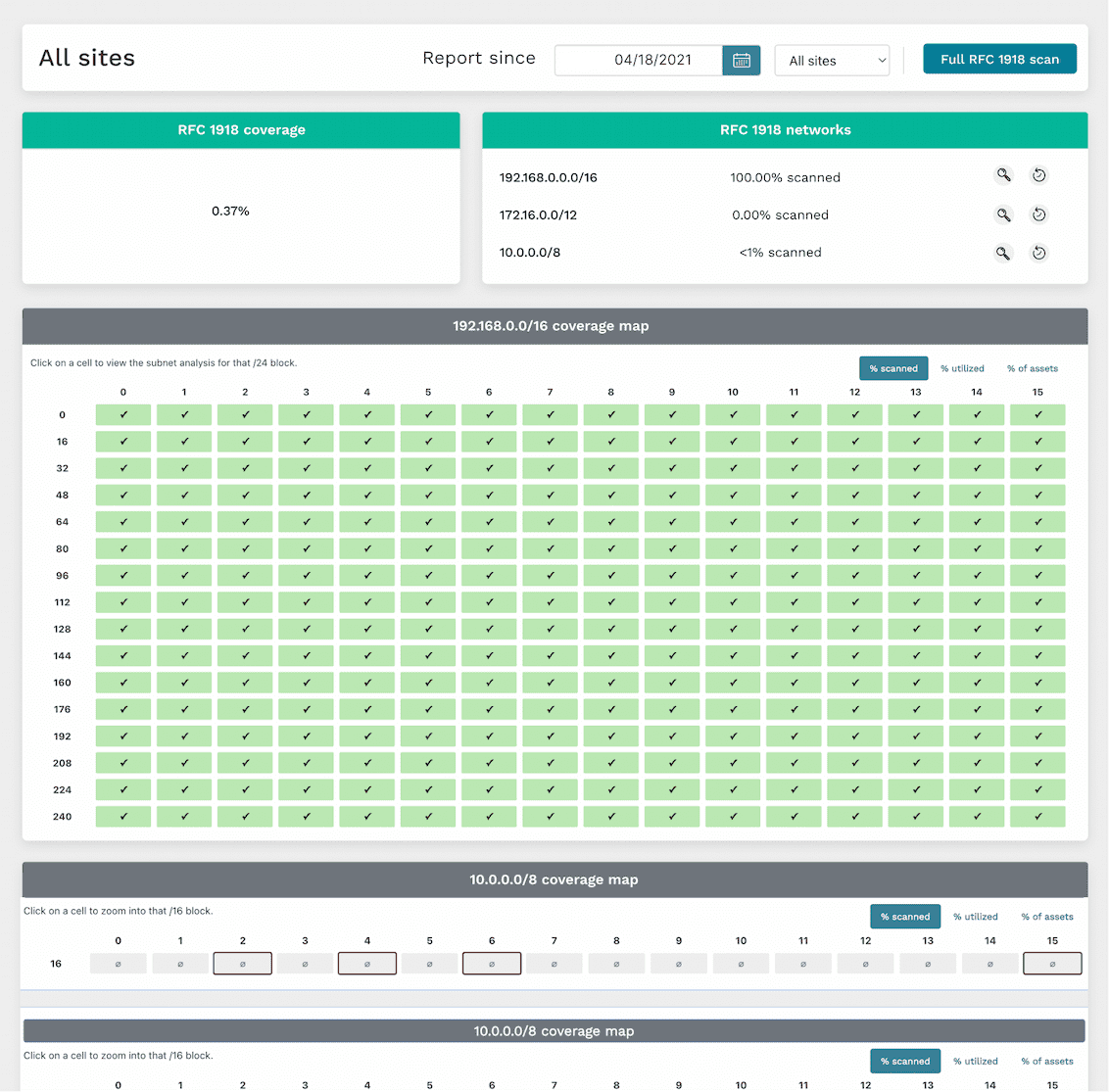
runZero’s scans can help surface unmanaged subnets in your internal network, which may harbor a bunch of unmanaged devices. Our RFC 1918 scan capability can cover the entire IPv4 internal network address space (more than 21 million addresses), checking all potential places unmanaged devices could be hiding in your network. We’ve also developed a “subnet sampling” option as an informed approach to focus on statistically-likely-to-have-devices subnets so that the RFC 1918 scan runs in shorter time while still providing good coverage. The interactive RFC 1918 coverage report presents discovered data in an easy-to-consume layout to show which subnets have been scanned, and includes additional data for unscanned subnets which might be active based on devices leaking secondary network interface information. This report allows you to “drill down” into subnets by clicking them to view discovered asset details within an address block.

Find unmapped assets

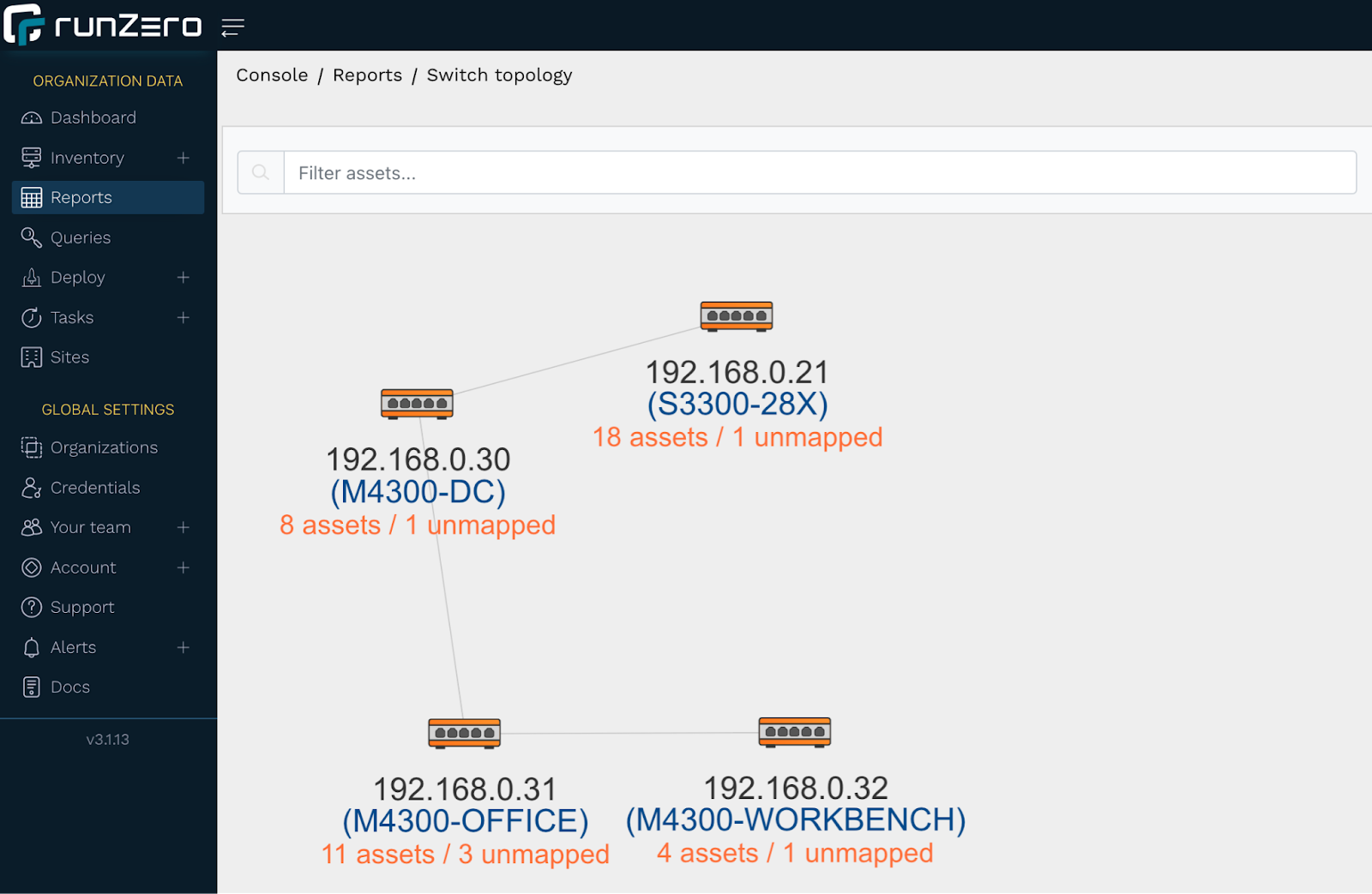
Unmanaged devices on your network can also surface in runZero as an unmapped asset. An unmapped asset is a MAC address connected to a switch, but not found in an ARP cache or through any of the other techniques runZero uses for remote MAC address discovery. Unmapped assets could be unmanaged assets, but could also be managed assets that were not included in the scope of a particular scan. You can get a visual overview of where unmapped assets appear on your network via the switch topology report, with each switch showing the number of assets (including unmapped assets) attached to it. A single click on a switch with unmapped assets will bring up a “View unmapped assets” link to the associated unmapped MACs report, which provides MAC details and the switch port the asset is connected to. This is potentially helpful for further investigation.

Search for devices missing agents in runZero

runZero uses applied research to identify other agent technologies that may be required on assets managed by your company or organization. You can find unmanaged assets that are missing these agents via runZero inventory queries. The following query example will surface any Windows assets on the network that are not running an Avast agent:
os:Windows and not edr.name:Avast
You can also search for unauthorized operating systems or applications on your network, which can be indicative of an unmanaged asset. For example, if all or your Windows systems are only allowed to be running Windows 11 or Windows Server 2022, you can create a query to surface any potentially unmanaged Windows assets not running these recent versions:
os:Windows and not (os:"Windows 11" or os:"Windows Server 2022")

Track unmanaged assets with tags

Tags are another runZero mechanism that can be used to surface unmanaged assets and also help “keep on top of” current asset ownership. This requires a bit of work up front to tag all managed assets, but requires little maintenance once in place.

Stay on top of unmanaged assets with alerts

Alerts are a powerful way to leverage queries into timely notifications in-app or via email or webhook. For example, we can build alerts for any of the queries used in this article. Rules are checked when a scan completes, and for any rule that evaluates as “true”, an alert can be generated. Check out our “Tracking asset ownership with tags” article to learn how to set up an alert rule.

Comprehensive inventory of external assets

Internal networks aren’t the only places unmanaged devices may exist. A public-facing web server could become orphaned, or a bad actor could DNS spoof/hijack a lesser-used company domain to redirect traffic to a phishing site they control. With just a domain name or ASN number set in the scan configuration, runZero can resolve the associated external-facing URLs and IP addresses to scan. And our hosted zone scanners can seamlessly run the scan, removing the step of installing an external-facing Explorer.

Uncovering unmanaged assets through integrations

At runZero, we understand the power of “better together”, and our development teams have been busy adding support for many product and service integrations. Some of these integrations can be leveraged to surface unmanaged assets in your network. For example, let’s say your organization uses SentinelOne on all managed macOS assets. One day an employee connects their personal MacBook to the corporate network without authorization: a macOS device without SentinelOne installed. You can create a runZero inventory query to surface this asset (and any others like it):
os:macOS and not source:SentinelOne
As another example, let’s say your company uses Microsoft Intune on all managed Windows 10 and Windows 11 assets. You can create a runZero inventory query to surface any Windows 10 or Windows 11 assets connected to your network that are not known by your Intune integration:
((os:"Windows 10" or os:"Windows 11") and not source:Intune
Prefer to surface your runZero-discovered assets, managed and unmanaged, via another tool? We offer integrations for several popular services, including ServiceNow and Splunk, allowing you to leverage the power of runZero’s best-in-class discovery and asset fingerprinting with other applications.

Zero unmanaged assets

Getting a handle on unmanaged assets is important, but it can feel like “one more thing” to do in an already-lengthy list of responsibilities. At runZero, we’ve done our homework through research and development to make finding your unmanaged network assets quick and easy.

About Version 2 Digital

Version 2 Digital is one of the most dynamic IT companies in Asia. The company distributes a wide range of IT products across various areas including cyber security, cloud, data protection, end points, infrastructures, system monitoring, storage, networking, business productivity and communication products.

Through an extensive network of channels, point of sales, resellers, and partnership companies, Version 2 offers quality products and services which are highly acclaimed in the market. Its customers cover a wide spectrum which include Global 1000 enterprises, regional listed companies, different vertical industries, public utilities, Government, a vast number of successful SMEs, and consumers in various Asian cities.

About runZero
runZero, a network discovery and asset inventory solution, was founded in 2018 by HD Moore, the creator of Metasploit. HD envisioned a modern active discovery solution that could find and identify everything on a network–without credentials. As a security researcher and penetration tester, he often employed benign ways to get information leaks and piece them together to build device profiles. Eventually, this work led him to leverage applied research and the discovery techniques developed for security and penetration testing to create runZero.

×

Hello!

Click one of our contacts below to chat on WhatsApp

×