Skip to content

CISAnalysis – September 8, 2022

Another day, another dozen vulnerabilities added to the ’log (as they say on TikTok). Imagine showing up to the office with this box of doughnuts: the classic powdered sugar zero-day in Chrome, jelly filled remote code execution in Oracle, and an overwhelming amount of old-fashioned glazed that’ll make your head spin.

What do we mean by old-fashioned glazed? Hardware. Usually the CVEs we see added to the KEV are located in software, SaaS tools, web browsers, or Windows. It is abnormal to see so many vulnerabilities in hardware, and in particular, routers.

Of the dozen vulnerabilities, 50% of them are in routers. D-Link, a networking equipment manufacturer based in Taiwan, has four vulnerabilities alone, all affecting products that are end-of-life. One of them, CVE-2011-4723, involves storing cleartext passwords! Sorry Charlie Sheen but that is not “winning” (a vulnerability this old deserves an old reference).

CISA only adds vulnerabilities to the KEV catalog if there is clear remediation guidance. In this case, the action is clear: disconnect the product if still in use.

#cisa #cisanalysis #d-link #vulnerabilities #rce

About Version 2 Digital

Version 2 Digital is one of the most dynamic IT companies in Asia. The company distributes a wide range of IT products across various areas including cyber security, cloud, data protection, end points, infrastructures, system monitoring, storage, networking, business productivity and communication products.

Through an extensive network of channels, point of sales, resellers, and partnership companies, Version 2 offers quality products and services which are highly acclaimed in the market. Its customers cover a wide spectrum which include Global 1000 enterprises, regional listed companies, different vertical industries, public utilities, Government, a vast number of successful SMEs, and consumers in various Asian cities.

About VRX
VRX is a consolidated vulnerability management platform that protects assets in real time. Its rich, integrated features efficiently pinpoint and remediate the largest risks to your cyber infrastructure. Resolve the most pressing threats with efficient automation features and precise contextual analysis.

Choosing the Right Web Application Firewall – Part One

In my previous articles, I mentioned firewalls, so I decided to dedicate this entire article to that topic. First, I want to give a basic explanation of firewalls and more information about web application firewall so you can make a more informed decision. I have mainly mentioned the usage of web application firewalls to prevent attacks such as SQL Injection, XSS (cross-site scripting), cookie poisoning, etc.

What is a firewall?

  A firewall is software or hardware used to monitor network data (traffic) and compare it against a set of rules. Depending on the rules, traffic will be passed or blocked. On the Internet, you might hear this analogy: a firewall is a guard or gatekeeper at the entrance of an event. This gatekeeper can check the ID of individuals against a set of rules before letting them enter (or leave).   But before I explain more, I need to cover some basics – OSI layers and TCP/IP.  

Layers of the OSI model and TCP/IP

  The OSI Model (Open Systems Interconnection Model) is used to describe how a network system functions. This model is split into seven abstraction layers:  
  • Physical – lowest level responsible for a physical connection between devices, transmitting bits from one node to the next. This layer converts data to 0s and 1s to the next Data Link layer.
  • Data Link – this layer is responsible for checking if data transfer is error-free (error checking/formatting) between one node to another in the physical layer. The primary purpose of the data link layer is to help the sender send a set of meaningful bits to the receiver.
  • Network – this layer is responsible for defining which physical path the data will take. It is taking care of the transmission of data from one host to another that are on different networks.
  • Transport – transmits data using transmission protocols (TCP and UDP). It contains information if the data transmission is successful, and then, if yes, it transmits the data. If an error is found, the data is re-transmitted.
  • Session – this layer maintains connections and is responsible for controlling ports and sessions.
  • Presentation – this layer ensures that data is in a usable format. It is also where encryption occurs.
  • Application – this layer interacts with the user and displays the received information to them.
  *OSI model was published in 1984 by the International Organization for Standardization (ISO). For more information of the layers (and their functions), you can check out this site.   Keep in mind that today’s Internet is based on the TCP/IP stack. OSI model is an abstraction, and something we use to learn about the internet protocols. The implementation is based on the TCP/IP stack, not the OSI model.   TCP/IP layers are the four layers of the TCP/IP model: link layer, network, transport, and application. Data is passed in a particular order. (From the bottom layer to the top layer and back) If you want to read about TCP/IP layers, check out this site.  

Classifications of firewalls

  There are a few classifications for firewalls.   The first one is a hardware or software firewall. Hardware is when the firewall is separate hardware through which the network traffic is going (such as Cisco ASA). A software firewall is software that comes with the OS, such as Windows Defender Firewall – which is also called a host firewall. On Linux, you usually get a built-in host firewall called ufw (uncomplicated firewall). You can also install a third-party solution (Comodo, Norton, etc.)   The second one is the classification by personal or commercial use. Personal is mainly for use at home and it is designed for small networks. The commercial firewall is designed to protect medium to large networks.   However, the most important classification is by the layers on which the firewall operates. Firewalls mainly focus on layers 3 and 4 (sometimes even 2). Next-generation firewalls cover layers 5, 6, and 7.   The third classification is based on firewall abilities:
  • Packet-Filtering FirewallCircuit-Level Gateway
  • Stateful Inspection Firewall
  • Proxy Firewall – all traffic goes through WAF on its way to the server
  • Next-Generation Firewall (NGFW)
  • Cloud Firewall or Firewall as a Service (FWaaS)
  I will focus on the Web Application Firewall, an example of Proxy Firewall and Firewall as a Service (FWaaS).  

Web Application Firewall

  Definition of WAF by OWASP on their siteA “‘ web application firewall (WAF)'” is an application firewall for HTTP applications. It applies a set of rules to an HTTP conversation. Generally, these rules cover common attacks such as Cross-site Scripting (XSS) and SQL Injection. While proxies generally protect clients, WAFs protect servers. A WAF is deployed to protect a specific web application or set of web applications.   The proxy firewall inspects the content of the payload (packets). As a difference between the third classification from the paragraph above, this one is not limited to packet headers. FWaaS is a hardware firewall in a cloud environment. Its features depend on the service provider, and it benefits from the scalability of cloud architecture.  

Types of Web application firewalls

  There are three types of web application firewall: hardware, software, and cloud-based. All of them have advantages and disadvantages, and it is very important to know them before choosing the right one for your web application.   1- Hardware – This hardware solution is installed locally in LAN close to application and web servers. This solution is good because it can be modified, and it supports configurations and updates. It is very fast, and it has high performance. This type is perfect for big organizations when the application has many visits on daily basis. For small organizations, it is not cost-efficient because it can be costly. List of WAFs: WAPPLES, Imperva SecureSphere, Barracuda Web Application Firewall, Citrix Netscaler Application Firewall, Fortinet FortiWeb, F5 BIG-IP Application Security Manager (ASM).   2- Software – this one is different than a hardware firewall because you would need a virtual machine instead of dedicated hardware. Of course, as you can guess that this solution is usually cheaper than hardware. The advantage is that it can be used in your on-prem systems, while you can also deploy it in the cloud. A disadvantage is that it is slower because it runs on a VM. This solution is suitable for small and medium organizations.   3- Cloud – this firewall is provided and managed in the form of software as a service – SaaS. This solution is entirely in the cloud. This solution is good because the service provider provides optimizations and updates, so you would not need to manage anything. On the other hand, it is also a disadvantage because if you require some customizations, you can simply not do it, or if there exists such an option, it will probably be more complex in some way. This solution is good for small and medium organizations which don’t have enough resources that would focus on the management of WAF.   *List of software and cloud-based WAFs will be covered in the next part of the article.  

How is WAF configured?

  WAF can be configured in three different ways:
  • Whitelisting
  • Blacklisting
  • Hybrid
  If you choose to use the whitelisting model, you would usually start by blocking everything (no Internet at all!), and then you would go on gradually from there, allowing only what’s necessary for your application.   On the other hand, the blacklisting model is the opposite of whitelisting. You would need to create a list of criteria by which the traffic will be blocked.   The third model is hybrid. If you decide to use this model, you will probably have an application with some specific criteria required where you will combine whitelisting and blacklisting. Ideally, you will use the best of both worlds, so to speak.   To choose a model, you would first need to define the needs for your application. (You might also want to consider your infrastructure.)

About Version 2 Digital

Version 2 Digital is one of the most dynamic IT companies in Asia. The company distributes a wide range of IT products across various areas including cyber security, cloud, data protection, end points, infrastructures, system monitoring, storage, networking, business productivity and communication products.

Through an extensive network of channels, point of sales, resellers, and partnership companies, Version 2 offers quality products and services which are highly acclaimed in the market. Its customers cover a wide spectrum which include Global 1000 enterprises, regional listed companies, different vertical industries, public utilities, Government, a vast number of successful SMEs, and consumers in various Asian cities.

About VRX
VRX is a consolidated vulnerability management platform that protects assets in real time. Its rich, integrated features efficiently pinpoint and remediate the largest risks to your cyber infrastructure. Resolve the most pressing threats with efficient automation features and precise contextual analysis.

A Summary of the Palo Alto Networks Ransomware Threat Report 2022: Key Points You Must Know

2021 has shattered economies of almost every sector with the pandemic wreaking havoc worldwide. On top of it, most industries have had to contend with malicious cyber activities, as ransomware threats are some of the most challenging cyber threats organizations worldwide have to deal with. Almost every industrial sphere, including government departments, the education sector, the retail sector, and manufacturing establishments, has felt the impact of ransomware at some point.

Unit 42, the threat research team of Palo Alto Networks, has compiled a comprehensive 2022 Ransomware Threat Report highlighting ransomware activity worldwide. The report can help organizations perceive the seriousness of the situation and take remedial steps to prevent becoming victims of such cyber attacks and therefore jeopardizing the confidentiality, integrity, and availability of valuable information assets.

Source of the Report

Unit 42 relied mainly on the following two sources while generating the report:

  1. Actual cases handled by the unit that provided a realistic view of the extensive range of threat actors.
  2. Analysis of leak sites that included malicious activities like multi-extortion to coerce or even threaten victims to pay the ransom.

Crucial Statistics from the Report

Before going into the detailed summary of the 2022 Ransomware Threat Report, here are some important statistics to better understand the scope of this matter.

  • The average ransom demand grew 144%, from $900K in 2020 to 2.2M in 2021.
  • Simultaneously, the average ransom payment grew to $541K, a 78% increase from 2020.
  • The US remains the most targeted country with 60% of ransomware cases in 2021, followed by the European, Middle lEast, and African (EMEA) countries with 31%. The Asia-Pacific region was in the third position with 9% of ransomware cases.
  • Professional and legal services were the most targeted sectors, with 1,100 victim organizations, followed by the construction sector, with nearly 600.

(Data Source: Palo Alto RansomwareThreat Report 2022)

Understanding Ransomware 

Ransomware is a specialized malware used to paralyze organizational functioning by encrypting its data to extort money. They usually demand ransom in cryptocurrency to prevent establishing a trail. When the ransom is received, , the malicious actors provide the decrypting code, allowing the organization to retrieve its information assets.

Usually, threat actors use social engineering tactics like phishing emails to introduce malware into the target’s information systems. This scheme relies on the victims clicking on the malicious links, and therefore accidentally downloading the ransomware into the information system. Once the malware is installed, it takes over the functioning and stops access to critical data by encrypting it.

Change in Tactics

Malicious actors employed more sophisticated tactics, such as the ones mentioned below, in 2021 compared to 2020, as they widened their scope of attacks.

  • Ransomware-as-a-Service: Malicious actors started offering RaaS packages to anyone interested in launching an attack. It lowered the technical barrier for non-experts to access information systems and thus enhanced the speed of cyberattacks.
  • Multi-Extortion: Besides asking for the regular ransom, malicious actors started blackmailing their victims, threatening to leak critical information and launching DDoS attacks to extort ransom quickly.
  • The Exploitation of Zero-Day Vulnerabilities: Threat actors started taking advantage of zero-day vulnerabilities such as Log4Shell to launch ransomware and continued to exploit organizations that failed to patch them properly.

The Overall Ransomware Landscape

Below are the critical emerging trends concerning the transformation of the overall ransomware landscape over the years, according to the Palo Alto Networks Report. It can help organizations formulate effective defense and incident-response strategies.

Ransomware Actors’ Psychology

Ransomware has evolved over the years. Here are some latest psychological traits observed among ransomware actors.

  • Exploit Shortcuts: Today, ransomware actors hire the services of brokers who provide access to information systems, as it saves them time and effort. It has increased the scope of attacks as non-expert attackers can easily drop malware into an already compromised environment.
  • Go to Extremes: They have started using anonymized services like TOR (The Onion Router) to make it challenging for law enforcement authorities to track their activities and identify the indicators of compromise (IoC).
  • Innovation: Ransomware groups now use updated ransomware variants instead of standalone malware. For example, HelloKitty uses Linux and BlackCat uses Rust to launch attacks quickly.

Ransomware Trends for 2022

Consequent to the innovative tactics used by ransomware actors, the trends for 2022 have changed considerably, as is evident below.

  • Increase in Victim Shaming: Ransomware actors have increasingly started using techniques like double-extortion to prevent organizations from restoring data from backup alternatives and resuming operations. Threat actors like Black Matter, Grief, and Hive used such tactics. BlackCat and Suncrypt even use triple extortion tactics like threatening to launch DDoS attacks besides leaking confidential and sensitive information. Over 2,500 victims were publicly shamed in 2021.
  • Increase in RaaS: Malicious actors have now started offering Ransomware-as-a-Service to anyone who wants to hire them. Thus, it has widened the scope for ransomware attacks as individuals with little knowledge of ransomware can launch cyberattacks. Nearly 56 RaaS groups have been identified, and the number is expected to grow in 2022.
  • Exploiting Zero-Day Vulnerabilities: Ransomware actors have increased, exploiting zero-day vulnerabilities as an initial compromise vector. Malicious operators used nearly 42 such instances in 2021. Unpatched vulnerabilities are serious, as observed in the Kaseya attacks by REvil. Organizations should take note and act accordingly to plug such gaping holes instantly.

The Emergence of Ransomware Gangs 

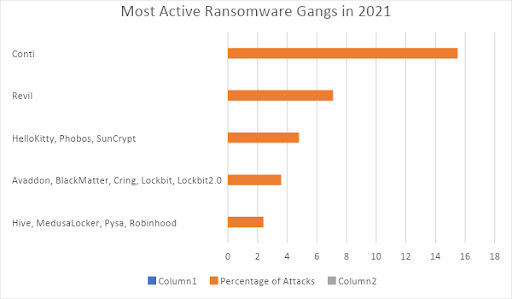
2021 was the year of ransomware gangs, and thirty-five have been identified recently. Trends show that some groups lie low for a while before resurfacing to launch more powerful attacks. Conti was the most active ransomware gang, responsible for 15.5% of ransomware activity. REvil was the second with 7.1%, followed by HelloKitty and two others, each with a 4.8% share of the attacks.

(Data Source: Palo Alto RansomwareThreat Report 2022)

Below passages will give a brief idea of the major gangs and their activities:

  • Conti: Conti was the most active ransomware gang in 2021, with an initial ransom demand of $50K. It rose substantially to an average of $1.78M for the year, with the highest ransom demanded at $3M. The gang has affected more than 600 organizations since 2020, including law enforcement agencies, construction projects, emergency services, and hospitals.
  • REvil: REvil, also known as Sodinokibi, had the highest activity in 2020. But it dropped down to second place in 2021. However, their average ransom has increased to approximately $2.2M, and their highest demand has been $5.4M. REvil is a major provider of RaaS.
  • BlackCat: BlackCat is another main RaaS provider notorious for observing and soliciting affiliates in cybercrime forums. It allows affiliates to retain 80% to 90% of the ransom while keeping only the remaining 10 to 20% to themselves. The group attacked various sectors, including construction, retail, insurance, transport, professional services, automotive establishments, and pharmaceuticals.
  • Other Ransomware Actors: Other big ransomware names include AvosLocker, Hive, HelloKitty, LockBit 2.0, Mespinoza, and eChOraix.

Initial Ransom Amount Vs. Payment Amount

Generally, there is a difference between the initial ransom amount demanded and the payment amount due to various negotiations between the attackers and the victims. In one instance, BlackCat demanded a payment of $9M and even received $8.5M. On average, the ransom payout in 2021 was around 42.87% of the initial ransom demand.

(Data Source: Palo Alto RansomwareThreat Report 2022)

Multi-Extortion Techniques

Earlier, ransomware actors used to launch their attacks and send the ransom note to the victim. Once the victim pays the ransom, the attackers provide the decryption key enabling the target to access its data and resume its operations. However, this method had its shortcomings. The ransomware attacks do not exfiltrate data but only encrypt them. So, organizations having a separate backup could always restore the data and avoid paying the ransom.

Now, the ransomware actors have upgraded their modus operandi by exfiltrating data and threatening the victim about releasing it in the public domain, which could lead to massive data breaches and loss of reputation. Thus, there is a double extortion demand. One is the regular ransom for obtaining the decryption key, and the other is for the attackers’ refraining from exposing the data to the public. Such a scenario is known as double extortion. Maze popularized this method in 2019.

As mentioned earlier, Suncrypt and BlackCat threatened the victims to launch DDoS attacks on their organizations’ infrastructures if the ransom negotiation failed. Besides, they threatened to leak critical information on the dark web and taint their reputation. This type of extortion is known as triple extortion.

Critical Insights from Ransomware Leak Sites

Conti and LockBit 2.0 were the two most significant ransomware gangs to indulge in leaking critical information and leveraging double-extortion threats. Compared to 2020, there is an 85% increase in public postings involving 2,566 victims. Conti accounted for 511 postings, and LockBit, for 406.

Most Targeted Sectors

Ransomware actors did not spare any sector in 2021. The most targeted sector was the Professional and Legal Services industry, followed by the Construction industry. One reason is that many organizations in these sectors do not run on up-to-date software, becoming more prone to cyberattacks.

Besides, the malicious actors know that these industries lose their reputation quickly if their information systems are compromised, as they often provide services using their dedicated software. These sectors also work on tight deadlines, increasing the chances of paying the ransom amounts.

(Data Source: Palo Alto RansomwareThreat Report 2022)

Rebranding of Ransomware Gangs

Many ransomware gangs vanished from the scene following failures due to flaws in their ransomware. Many resurfaced later as new brands with more sophisticated technology. Attacker groups also lie low due to pressure from law enforcement agencies, internal struggles, and peer competition.

Ransomware in the Cloud

Today, organizations increasingly store their data and function in a cloud environment. However, the dynamic workloads in a multi-cloud environment can be challenging. Though there were no major instances of ransomware attacks on the cloud, it is only a matter of time, considering the valuable information assets stored there. The example of Log4j vulnerability highlights the need to secure the cloud environment and maintain a robust vulnerability management program.

Trends show that ransomware actors use cloud APIs to access and encrypt crucial information assets. Therefore, organizations should strengthen these aspects and use strict IAM (Identity and Access Management) practices to secure access to these APIs.

Ransomware Costs

Besides the financial loss of paying the ransom, the affected organizations suffer from other collateral damage, such as downtime, disruptions, reputational loss, time loss in recovery, legal expenses, and loss of information assets. The Palo Alto report states that 58% of organizations preferred paying the ransom, whereas 14% spent money more than once.

Recovery Time

Studies show that 41% of organizations recovered within one month of the ransomware attack, whereas 20% of victims recovered within three months. And while 29% took more than three months, 9% even took more than five to six months for recovery.

(Data Source: Palo Alto RansomwareThreat Report 2022)

Recommendations to Remain Resilient to Ransomware Attacks

Finally, Unit 42 recommends the following actions for organizations to stay more resilient to ransomware attacks.

  • Keep your information systems updated to take care of the evolving threat landscape.
  • Evaluate and analyze the impact of compromising your information assets.
  • Assess your readiness levels and have a clear incident response plan.
  • Implement and follow a Zero Trust policy.
  • Identify your exposed information assets.
  • Protect your systems from known and unknown threats.
  • Automate your systems and use secure cloud workloads.
  • Use IR retainers (contracts with incident response experts) to reduce response time.

Final Words

Ransomware has gradually become one of the worst cybersecurity threats in recent times. The situation can worsen in the forthcoming years, especially with more organizations working online. However, one can take remedial measures and enhance vigilance to prevent becoming a victim of a ransomware attack. The 2022 Ransomware Threat Report from Palo Alto Networks provides comprehensive information on ransomware trends and highlights the significance of treating this cyber threat with utmost seriousness.

Today, ransomware actors don’t just target bigger organizations, but everyone, including small businesses and even individuals, is on their radar. Thus, one needs to have adequate preventive measures to ensure threat actors cannot get their hands on the organization’s information assets in the first place. Besides, there must be a business recovery and continuity plan in place for the worst-case scenario when ransomware actors are able to infiltrate the information systems.

References

  1. Minutes, 10. (2021, December 12). Update: Prisma Cloud addresses Log4Shell: CVE-2021-44228, CVE-2021-45046 mitigations. Palo Alto Networks Blog. https://www.paloaltonetworks.com/blog/prisma-cloud/log-4-shell-vulnerability/
  2. Santos, D. (2022, June 3). Understanding REvil: REvil threat actors may have returned (updated). Unit 42. https://unit42.paloaltonetworks.com/revil-threat-actors/
  3. (N.d.). Paloaltonetworks.com. Retrieved August 6, 2022, from https://www.paloaltonetworks.com/content/dam/pan/en_US/assets/pdf/reports/2022-unit42-ransomware-threat-report-final.pdf

#ransomware #unit42 #threat #cybersecurity

About Version 2 Digital

Version 2 Digital is one of the most dynamic IT companies in Asia. The company distributes a wide range of IT products across various areas including cyber security, cloud, data protection, end points, infrastructures, system monitoring, storage, networking, business productivity and communication products.

Through an extensive network of channels, point of sales, resellers, and partnership companies, Version 2 offers quality products and services which are highly acclaimed in the market. Its customers cover a wide spectrum which include Global 1000 enterprises, regional listed companies, different vertical industries, public utilities, Government, a vast number of successful SMEs, and consumers in various Asian cities.

About VRX
VRX is a consolidated vulnerability management platform that protects assets in real time. Its rich, integrated features efficiently pinpoint and remediate the largest risks to your cyber infrastructure. Resolve the most pressing threats with efficient automation features and precise contextual analysis.

Windows Registry Forensics – pt. 3

Intro


Continuing where I left off, I will look at some more tools you can use to look at the Registry of your Windows host, as well as some useful keys.


Tooling


I am sure there are many tools out there, created specifically for this purpose, and please feel free to search for them. I will cover the ones that I’ve used or know.

From previous parts, you know that the Registry Editor works only with live systems and can’t load exported hives, so keep that in the back of your mind.

When you need that offline functionality, you can use some of the following tools.


Zimmerman’s Registry Explorer


The author of this tool has created a bunch of tools that can be extremely handy for performing Digital Forensics. (Check out the stuff here)

One of those tools is his Registry Explorer. Registry Explorer has the ability to load multiple hives at the same time, while it can also use/add data from the transaction logs into the hive, enriching it with more accurate data. It also has the Bookmarks functionality which will contain forensically valuable keys. You can use the bookmarks to immediately pull up some interesting keys and/or values.
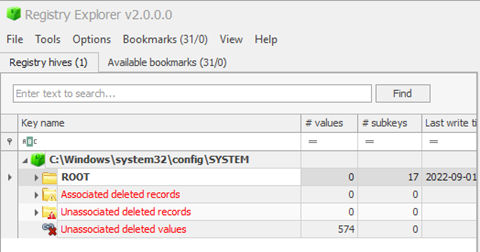
Above, I just loaded one hive (SYSTEM) from my live system, and I already have 31 recommendations (bookmarks) from Registry Explorer. As a very simple demo, when I switch over to that tab, I can immediately glean some interesting information. For example, I can immediately pick up the hostname of the device.

I filtered out the bookmarks here, showing only the Device Name. As you can see, you even have a small window below with the category, name, path, and description of the key.

On the righthand side of this view, I can see my hostname.

Under Data, I can see the name of my device – 4w.

I will circle back to the Registry Explorer, but let me briefly introduce another tool, for the sake of your awareness.


RegRipper


A useful utility that can take the have as input and spit out a report which will try to extract data from (forensically) important keys/values within that specific hive. However, note that RegRipper doesn’t take transaction logs into consideration, which is also stated it in the repo’s readme file:

This tool does NOT automatically process hive transaction logs. If you need to incorporate data from hive transaction logs into your analysis, consider merging the data via Maxim Suhanov’s yarp + registryFlush.py, or via Eric Zimmerman’s rla.exe which is included in Eric’s Registry Explorer/RECmd.

Luckily, you can use the Registry Explorer for this.


SYSTEM – Registry Explorer

As you can see, Registry Explorer will even give you the ControlSet – Control Set is basically the hive that keeps the device configuration data that’s used for the control of the system startup.

From the image above, Registry Explorer apparently has some knowledge about the USB devices I’ve been plugging in these days…

Let’s check it out.

The first USB device on the list is an external DVD/Optical drive that I plugged in to transfer some stuff from a CD. (don’t @ me please, they still have some uses 😊)

And, as you can see, I’ve also plugged in four different USB devices, two of them being Kingston made flash drives. All with the timestamps, etc. (I really did this, as I was transferring/cleaning up some old stuff.)

All this goes to show how simple and useful the Bookmarks option that Registry Explorer has can be.


Specific Registry Keys


Here, I’d like to mention some specific keys/values that might be of interest to you. This can pertain to system, recently used apps, or even a user. That doesn’t matter.


OS Version


For the OS version, I just view the SOFTWARE\Microsoft\Windows NT\CurrentVersion key.

From Registry Explorer, one could ascertain that the device I’m doing this demo from is running Windows 11 Pro.

Current Control Set


As I mentioned before, this hive will have the device config data that is used for the control of the system startup. There are (usually) two sets – ControlSet001 and ControlSet002, within the SYSTEM hive.

Generally, ControlSet001 points to the Control Set your device used to boot. ControlSet002 will be what’s known as last known good config.

They can be found at SYSTEM\ControlSet001 and SYSTEM\ControlSet002.

Do note that there’s also a volatile Control Set, created by Windows, when the device is live, and it’s called CurrentControlSet – location: HKLM\SYSTEM\CurrentControlSet.

This is an important hive, and the one you will probably end up referring to for the most part of your investigation.

In the screenshot above I checked the SYSTEM\Select and within I’ve found the last known good entry which tells me that the ControlSet001 holds the last known good config.

SYSTEM\Select\LastKnownGood – key that will hold the last known good config, regarding the Control Sets.


Computer Name


This one is always important during the investigation, and you will look it up by checking the

SYSTEM\CurrentControlSet\Control\ComputerName\ComputerName

From Registry Explorer. On the righthand side of the app, you’ll see the keys and their values/data.

Timezone Information


This one is usually used to figure out the time zone of the device i.e., where it is located. It can help you figure out that timeline of events, which is of great importance to you – the investigator!

You would want to start here:

SYSTEM\CurrentControlSet\Control\TimeZoneInformation


Devices


This is all about tracking the USB devices that were plugged into the system. It will usually contain the vendor id, version of the USB device, and product id. This is cool as it can help you to identify devices themselves. These locations will also store timestamps for the devices that were plugged in.

 
SYSTEM\CurrentControlSet\Enum\USBSTOR
SYSTEM\CurrentControlSet\Enum\USB


(I already added this screenshot above, where I mentioned the USB I recently plugged in)

It’s also important to know when this USB was plugged in for the first and last time, and you can find that out by checking the

SYSTEM\<CurrentControlSet>\Enum\USBSTOR\<vendor_prod_version>\<serial>\Properties\<some_GUID>\<value>

The values you are interested in are – 0064, 0066, and 0067. 64 is the first connection time, 66 last connection time, and 67 the last removal time.


It would look something like this:

And, on the right hand side, I can see the timestamp associated with my Kingston USB that I’ve used.

For 0067 – when I removed the USB device:
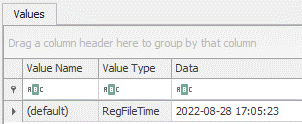
It was on 28th of August, at 17:05. (Which I know is true)

Note that Registry Explorer already parses this data, and you can get it if you select the USBSTOR key.


USB Name


The name of the plugged in USB can be found here:


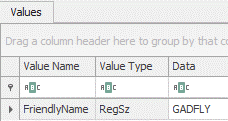
SOFTWARE\Microsoft\Windows Portable Devices\Devices

Under data, an investigator would figure out that the USB I used to be named – GADFLY.


Conclusion


And there you have it! More registry stuff. I’ve been focusing a bit more on the tooling, as it can really save you a lot of time and trouble. But, I will (sometime in the near future) also make a ‘compilation’ of sorts, regarding more of these interesting keys. Even though I covered some here, there’s a lot more stuff that will be of interest to an investigator.

Stay tuned!

Cover image by Immo Wegmann

#registry_forensics #windows #registry_explorer #regripper

About Version 2 Digital

Version 2 Digital is one of the most dynamic IT companies in Asia. The company distributes a wide range of IT products across various areas including cyber security, cloud, data protection, end points, infrastructures, system monitoring, storage, networking, business productivity and communication products.

Through an extensive network of channels, point of sales, resellers, and partnership companies, Version 2 offers quality products and services which are highly acclaimed in the market. Its customers cover a wide spectrum which include Global 1000 enterprises, regional listed companies, different vertical industries, public utilities, Government, a vast number of successful SMEs, and consumers in various Asian cities.

About VRX
VRX is a consolidated vulnerability management platform that protects assets in real time. Its rich, integrated features efficiently pinpoint and remediate the largest risks to your cyber infrastructure. Resolve the most pressing threats with efficient automation features and precise contextual analysis.

Windows Registry Forensics – Pt. 2

Intro

I talked for a bit about the Windows Registry and what are its main purposes, as well as what we can do with it; before delving further into that, I wanted to briefly mention a tool you might use for your forensic Analysis – Autopsy.

I will also just touch upon another tool you might use as well – FTK Imager.

Finally, I will also provide some useful links at the end of the article.


Data Acquisition

So, you have a disk to analyze, and want to access it so you can dig around for useful artifacts to uncover what has transpired on the said system. Remember that your disk needs cloning/imaging – this is best practice, and you should always try to copy the data you want to do some forensics on. This is also known as data acquisition.

By now, you know that you can look at the Windows Registry with the registry editor (regedit.exe), however the best way to do this is to acquire a copy of that data and analyze the copy.

Tooling

You can go to %WINDIR%\System32\Config and try to copy those files that are in fact our registry hives:

I selected the files here and tried to copy them to my Desktop:

After checking the box and clicking on continue, Windows won’t let me copy the files to the desktop:

This happens because the files are restricted.

Luckily, there are tools that can help us with acquisition of the registry hive files. One such tool is Autopsy, which lets you acquire data from both live system and disk images.

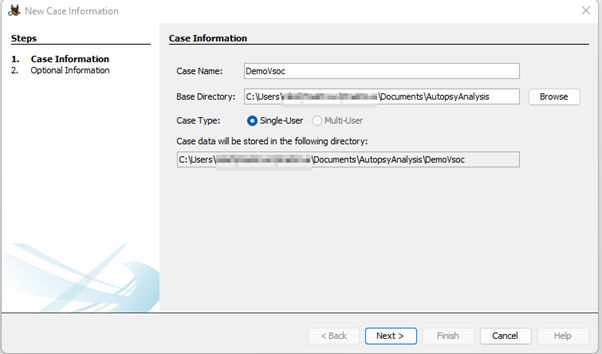
Once installed and ran, you need to create a new case:

You then have some optional info to fill, to help you stay organized etc. (I won’t be doing that here – see the image below)

Further, you need to add a data source:

I am choosing Disk Image or VM file here which I previously downloaded from the Cfreds (Computer Forensics Reference DataSet portal) found here:

Note that if you download the dataset I linked, you should download all the files from .7z.001 to .7z.003 and place them in the same folder; afterward, just extract the .001 and 7z will know to merge the three files together, giving you the disk image I am using in the article here.

For the configure ingest step, you can do a lot of stuff here, but I am choosing just two options – Recent Activity and File Type Identification. If you were to choose all for let’s say a disk that’s slightly larger, you’d have to wait for a bit, before Autopsy did all its stuff.

Now, I just must wait for Autopsy to do its thing and see what I’ve got!

One more quick note: This can take some time and eat up your RAM – Autopsy 64bit recommends you have 16GB RAM. Also, when ran on Windows it will create a max heap size of 4GB, leaving the remaining memory to the OS, and Solr text indexing service. You can change this value by changing the value of Maximum JVM memory, found under Tools -> Options -> Application as shown in the image below:

Going back to our dataset, the situation is now looking something like this:

As you can see in the screenshot above, Autopsy has found a bunch of very interesting things! From Installed software to OS info, Web History, Bookmarks… so many artifacts! 

But, since the topic here is the Registry, let’s investigate that specifically.

Before going further, I’d like to add that this image comes with 12 questions for you to try and answer. This is perfect for the scope of this article and the reason why I included it.

I will answer a couple of questions and leave you to try and solve the others yourself. With some Google-fu, you could probably find the answers online, but for the sake of learning do try to go for the questions yourself first. (There’s even a Youtube video, that I won’t link here, but if you get stuck search for it, or write in the comment section of this article and I will share it with you)

Practice Questions

The questions are:

  1. What operating system was used on the computer?
  2. When was the install date?
  3. Who is the registered owner?
  4. What is the computer name?
  5. Who was the last user to logon into PC?
  6. What is the account name of the user who mostly uses the computer?
  7. When was the last recorded computer shutdown date/time?
  8. What is the timezone settings?
  9. Explain the information of network interface(s) with an IP address assigned by DHCP.
  10. List all accounts in OS except the system accounts: Administrator, Guest, systemprofile, LocalService
  11. What applications were installed by the suspect after installing OS?
  12. List external storage devices attached to PC.

Q1: What operating system was used on the computer?

A: For this, we can look under the Operating System Information – which is the output for the ingest module:

On the righthand side we can see two source files for the Software hive, by clicking on one of those, we can see in the window below all that Autopsy knows about this image.

From the underlined part above, we can conclude that this is a backup of the Registry – because of the RegBack in the path.

When we look at the second Software Hive, we can see what OS is used on this computer:

We now know the answer to first question is – Windows 7 Ultimate SP 1.


Q2: When was the install date?

A: I will just drop a hint here! The answer is already visible… no need to even install Autopsy and load the image from this article.

Q3: Who is the registered owner?

A: See above.

Q4: What is the computer name?

A: Same as Q3.

Q5: Who was the last user to logon to the PC?

A:

Q6: What is the account name of the user who mostly uses the computer?

A:

Q7: When was the last recorded computer shutdown date/time?

A: We can look at the System Hive again, and click on the Application tab (remember to use the one that doesn’t have RegBack in its name)

Under application, we drill down to ControlSet001, expand the Control node, and go all the way down to the Windows node (notice the size of the scroll bar)

Highlighting the Windows node, we can see the ShutdownTime key, which we now just need to convert to something human readable

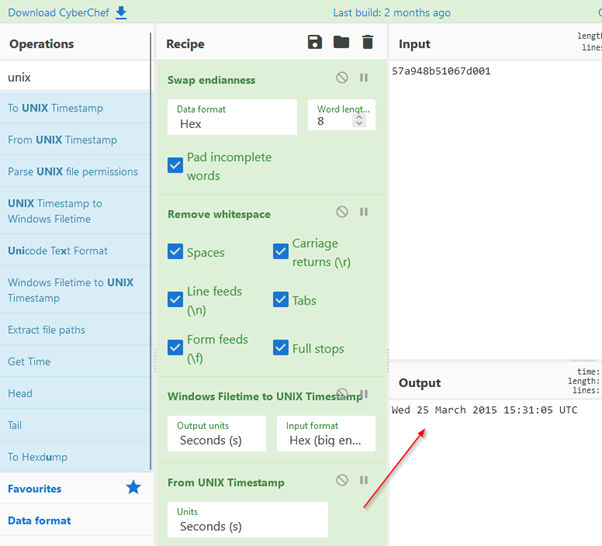
We go to our trusty Cyberchef and create our recipe to decode this value.

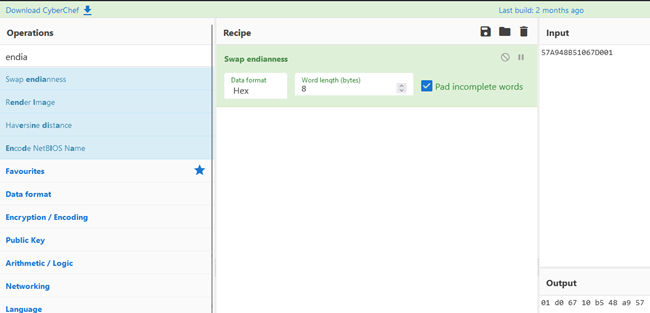
Step 1 – We change the Little Endian in our Cyberchef recipe – we used Swap Endianness recipe

Note that I copied the value from Autopsy, but removed the whitespaces

We’re also converting from 8 byte words, so I changed the default 4 byte word length to 8 bytes.

Step 2 – We search for Remove Whitespace module and add it to our recipe

Step 3 – We add Windows Filetime to UNIX Timestamp to our recipe

The output above is what we’re after, we just need to convert the UNIX timestamp. Also, the default is Decimal, which I changed to Hex (Big Endian)

Step 4 – For our final step, we add one last ingredient to the recipe – From UNIX Timestamp

And that’s it! The answer to our question is – last recorded shutdown time was on Wednesday, 25th of March, 15:31:05 UTC, 2015

*Note that in the Windows Filetime to Unix Timestamp Hex (big endian) is selected. Change it to Little endian, and pay close attention to the output.

Questions 8 to 12 (and other unanswered questions) are left for you to try and solve. Feel free to share your experiences, results, or anything really, in the comment section!

FTK Imager

Before concluding, I wanted to mention another tool you might end up using in your analysis – FTK Imager.

This one can also extract files from a disk image (or a live system) through the mounting of the disk/drive in the program.

Below is one screenshot of my mounted C: drive.

You can also extract the Registry Hives with FTK Imager by clicking on the little yellow safe icon (image above) – called Obtain Protected Files.

This option is only there when a live system is being investigated. Also, I’d like to note that this option, even though it can extract all the hives to a path you chose, it isn’t able to copy the Amcache.hve (See 1st part of the series) which keeps information about executed applications, which are usually interesting (even necessary) to investigate when conducting a forensic analysis – specifically because it contains evidence about programs last executed.

Conclusion

I hope you liked my part 2 of the series! It was a blast for me, and I will continue with this topic in the future.

I purposefully chose to make a ‘demo’ by using a tool, but I will also write about some important artifacts/keys that you might want to keep in mind when investigating those hives!

Stay tuned.


Links/Resources

https://www.autopsy.com/

https://what-when-how.com/windows-forensic-analysis/registry-analysis-windows-forensic-analysis-part-1/

https://content-calpoly-edu.s3.amazonaws.com/cci/1/documents/ccic_forensics_manual/CCIC%20Chapter%204%20-%20Understanding%20the%20Registry.pdf

https://cfreds.nist.gov/

Cover image by Alexandre Debiève

#autopsy #registry #ftk_imager #windows #hives

About Version 2 Digital

Version 2 Digital is one of the most dynamic IT companies in Asia. The company distributes a wide range of IT products across various areas including cyber security, cloud, data protection, end points, infrastructures, system monitoring, storage, networking, business productivity and communication products.

Through an extensive network of channels, point of sales, resellers, and partnership companies, Version 2 offers quality products and services which are highly acclaimed in the market. Its customers cover a wide spectrum which include Global 1000 enterprises, regional listed companies, different vertical industries, public utilities, Government, a vast number of successful SMEs, and consumers in various Asian cities.

About VRX
VRX is a consolidated vulnerability management platform that protects assets in real time. Its rich, integrated features efficiently pinpoint and remediate the largest risks to your cyber infrastructure. Resolve the most pressing threats with efficient automation features and precise contextual analysis.

×

Hello!

Click one of our contacts below to chat on WhatsApp

×