關於 Version 2 Digital Version 2 Digital 是立足亞洲的增值代理商及IT開發者。公司在網絡安全、雲端、數據保護、終端設備、基礎設施、系統監控、存儲、網絡管理、商業生產力和通信產品等各個領域代理發展各種 IT 產品。透過公司龐大的網絡、通路、銷售點、分銷商及合作夥伴,Version 2 提供廣被市場讚賞的產品及服務。Version 2 的銷售網絡包括台灣、香港、澳門、中國大陸、新加坡、馬來西亞等各亞太地區,客戶來自各行各業,包括全球 1000 大跨國企業、上市公司、公用事業、醫療、金融、教育機構、政府部門、無數成功的中小企及來自亞洲各城市的消費市場客戶。
Scalefusion 的 macOS 應用程式目錄為 IT 團隊提供了一個集中化的方式來處理第三方應用程式分發,減少了複雜性和行政管理工作量。
macOS 應用程式目錄通過進階功能簡化了應用程式管理,包括應用程式的靜默安裝、提供自助服務目錄讓使用者可按需從超過 400 個經批准的應用程式列表中進行安裝,以及自動後台更新以確保第三方應用程式的安全性和合規性。此外,可自訂的安裝行為使 IT 團隊能夠配置工作流程、應用特定設置,並高效管理應用程式版本。
「一如既往,我們在 Scalefusion 的使命是為 IT 團隊提供減少複雜性並提高效率的工具。隨著 macOS 應用程式目錄的推出,我們讓第三方應用程式管理變得更高效,減少了 IT 團隊的時間消耗。我們的目標是幫助 IT 團隊節省時間,確保 IT 管理員和最終使用者都能擁有順暢的體驗,」Scalefusion 產品與增長副總裁 Spurti Preetham Gurram 表示。
關於 Version 2 Digital Version 2 Digital 是立足亞洲的增值代理商及IT開發者。公司在網絡安全、雲端、數據保護、終端設備、基礎設施、系統監控、存儲、網絡管理、商業生產力和通信產品等各個領域代理發展各種 IT 產品。透過公司龐大的網絡、通路、銷售點、分銷商及合作夥伴,Version 2 提供廣被市場讚賞的產品及服務。Version 2 的銷售網絡包括台灣、香港、澳門、中國大陸、新加坡、馬來西亞等各亞太地區,客戶來自各行各業,包括全球 1000 大跨國企業、上市公司、公用事業、醫療、金融、教育機構、政府部門、無數成功的中小企及來自亞洲各城市的消費市場客戶。
Managing macOS applications presents a distinct challenge for IT administrators. Unlike iOS, where apps are centralized within the App Store, the majority of macOS apps are distributed through various external sources. This decentralized approach makes it difficult to monitor installations, manage updates, and ensure proper configurations.
At Scalefusion, we’ve taken on this challenge head-on, introducing a streamlined solution that redefines how enterprises manage macOS applications—simplifying processes, enhancing control, and minimizing administrative overhead.
This is why, we are excited to announce the App Catalog for macOS.
This feature is designed to streamline the way IT admins deploy, update, and manage third-party applications. With this release, we’re putting the control back in the hands of IT teams, ensuring a seamless experience for both admins and end-users.
What’s new?
The App Catalog for macOS introduces a suite of powerful features to enhance application management:
App Catalog: Give your users the freedom to install approved apps from a curated list known as the App Catalog, minimizing the need for IT support.
Centralized app installation and updates: Enable end-users to install and update 400+ third-party applications directly from the Scalefusion dashboard, saving time and reducing complexity.
Automated updates: Set up automatic updates for supported applications to ensure devices are always running the latest versions, eliminating the risks associated with outdated software.
Pre- and Post-installation scripts: Configure custom scripts to tailor application behavior before and after installation, catering to your organization’s specific needs.
Manage app permissions: Effortlessly auto-grant app permissions while ensuring security policy compliance with minimal user intervention.
How it works?
The macOS App Catalog leverages Installomator, a robust tool designed for seamless application installation and management. Here’s how it functions within Scalefusion:
Comprehensive catalog access: View and select 400+ applications directly on the Scalefusion dashboard.
Easy deployment: Once selected, apps can be deployed to device groups or profiles with just a few clicks.
Configurable options: Customize app installations with pre- and post-installation scripts to meet organizational requirements.
Real-time updates: Stay informed about app installation and update statuses to ensure uninterrupted functionality across devices.
Why App Catalog for macOS?
With App Catalog for macOS, we’re addressing one of the most significant pain points for IT teams, which is the efficient management of third-party applications on managed macOS devices.
This feature aims to simplify the application management lifecycle, right from deployment to updates, allowing IT teams to focus on strategic initiatives rather than operational hurdles.
Start simplifying macOS app management today
Scalefusion’s App Catalog for macOS is designed to make life easier for IT teams while enhancing the user experience for employees. We’re excited to introduce this feature as a step forward in enhancing macOS device management for IT teams. Your feedback is invaluable to us, so don’t hesitate to share your thoughts and suggestions at support@scalefusion.com.
About Scalefusion Scalefusion’s company DNA is built on the foundation of providing world-class customer service and making endpoint management simple and effortless for businesses globally. We prioritize the needs and feedback of our customers, making sure that they are at the forefront of all decision-making processes. We are dedicated to providing comprehensive customer support services, and place emphasis on customer-centric thinking throughout the organization.
About Version 2 Digital
Version 2 Digital is one of the most dynamic IT companies in Asia. The company distributes a wide range of IT products across various areas including cyber security, cloud, data protection, end points, infrastructures, system monitoring, storage, networking, business productivity and communication products.
Through an extensive network of channels, point of sales, resellers, and partnership companies, Version 2 offers quality products and services which are highly acclaimed in the market. Its customers cover a wide spectrum which include Global 1000 enterprises, regional listed companies, different vertical industries, public utilities, Government, a vast number of successful SMEs, and consumers in various Asian cities.
A device getting stolen or lost can lead to devastating consequences for businesses, whether they operate on-premises, remotely, or in a hybrid model. In fact, studies show that 41% of all data breaches are the result of lost or stolen devices, highlighting the urgent need for robust security measures.[1]
Remote wiping of Windows devices is an effective solution to mitigate this risk. By remotely erasing all data on a device, organizations can prevent unauthorized access to sensitive information, ensuring that even if a device is lost or stolen, the data remains secure.
Let’s explore how to remotely wipe data if your Windows laptop or desktop is lost or stolen, and discover the added benefits of using a UEM solution for this task. You’ll also learn how to remotely wipe a Windows device using Scalefusion UEM.
How to remote wipe a Windows computer?
1. By Enabling ‘Find My Device’ in Microsoft
Microsoft has its built-in ‘Find My Device’ feature that can help small businesses and individuals to remotely wipe Windows-based laptops and PCs.
Step 1. Enable Find My Device via Settings > Update & Security > Find My Device.
Step 2: Sign in to Your Microsoft Account.
Step 3: Select the lost or compromised device and choose the ‘Erase’ option.
2. Using Command Line Scripts
For IT professionals and advanced users, leveraging command-line scripting is a direct way to remotely wipe Windows devices. This method requires prior configuration of remote desktop access and appropriate administrative privileges on the target device.
For example, you can use PowerShell to execute a disk-wiping script. Here’s a sample command:
This command clears the specified disk, removing all data without requiring user confirmation. Ensure you double-check the disk number to avoid accidental data loss on unintended drives.
3. Using third-party UEM/MDM software
Unlike the initial two methods, remote wiping your Windows-based laptop using a Unified Endpoint Management solution has additional benefits. While former methods are suitable for personal Windows computers and laptops and small deployments, managing a large and distributed fleet of Windows devices is much more difficult. UEM solutions have become indispensable for streamlining device management, including secure remote wiping.
Why choose a UEM for Remote Wiping?
Centralized management: UEM platforms provide a single console to manage all enrolled devices, making it easier to initiate remote actions like wiping, even for large-scale deployments.
Real-time control: With a UEM in place, IT admins can monitor device activity in real-time and instantly execute a remote wipe if a device is lost, stolen, or compromised. This minimizes the window of vulnerability.
Compliance assurance: Many industries have stringent data protection regulations. UEM solutions help organizations stay compliant by ensuring sensitive data is erased securely and effectively.
Automation capabilities: Advanced endpoint management tools allow for automated workflows, such as triggering a remote wipe when a device is reported lost or after multiple failed login attempts.
Cross-platform support: Most UEM solutions support not only Windows but also other operating systems such as iOS, macOS, Android, Linux, and ChromeOS, enabling consistent security practices across diverse device inventories.
Remote wiping Windows devices with Scalefusion UEM
Scalefusion UEM offers an organized and easy-to-navigate dashboard, allowing IT admins to monitor devices, enforce security policies, and execute remote commands like wiping or factory resetting devices from a single console. By leveraging Scalefusion, organizations enhance their ability to safeguard devices and data, making remote wiping a proactive component of their overall security strategy.
How to wipe Windows devices using Scalefusion UEM?
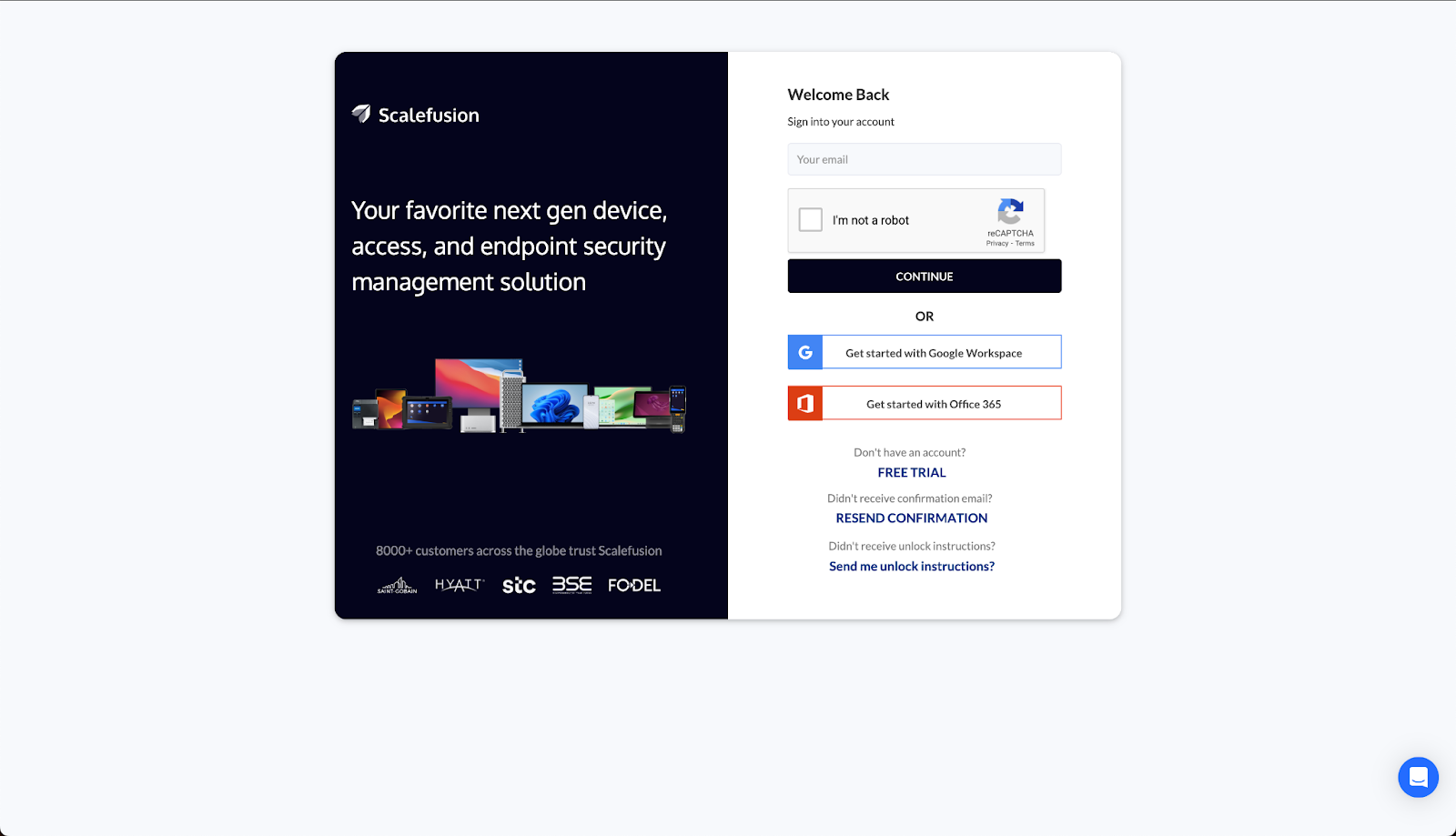
Follow the step below to wipe data on Windows laptops and desktops with Scalefusion UEM
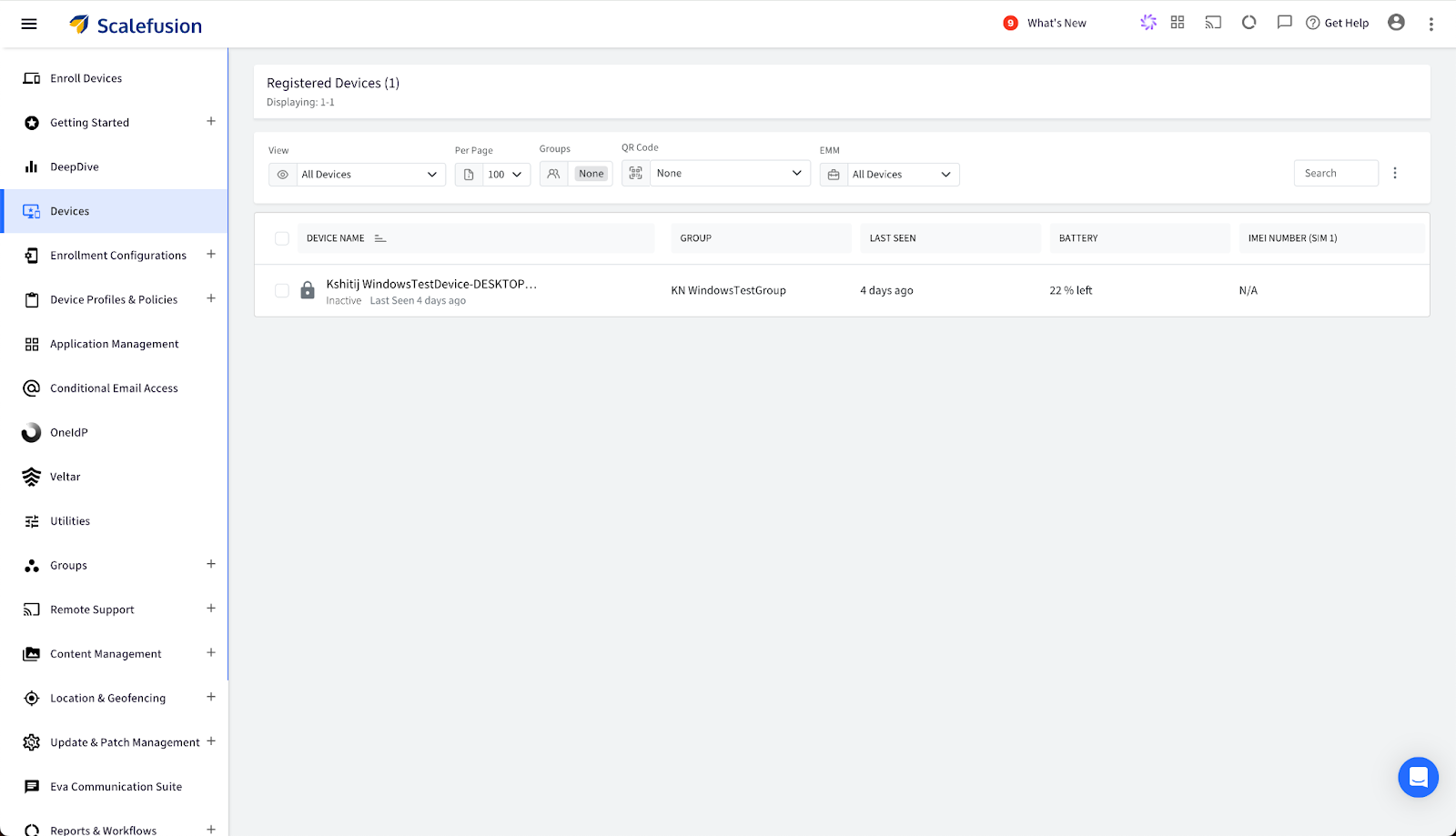
Step 2. Navigate to the ‘Devices’ tab in the panel on the right. This displays the entire list of managed devices. Now, click on the name of the Windows device you want to wipe and lock.
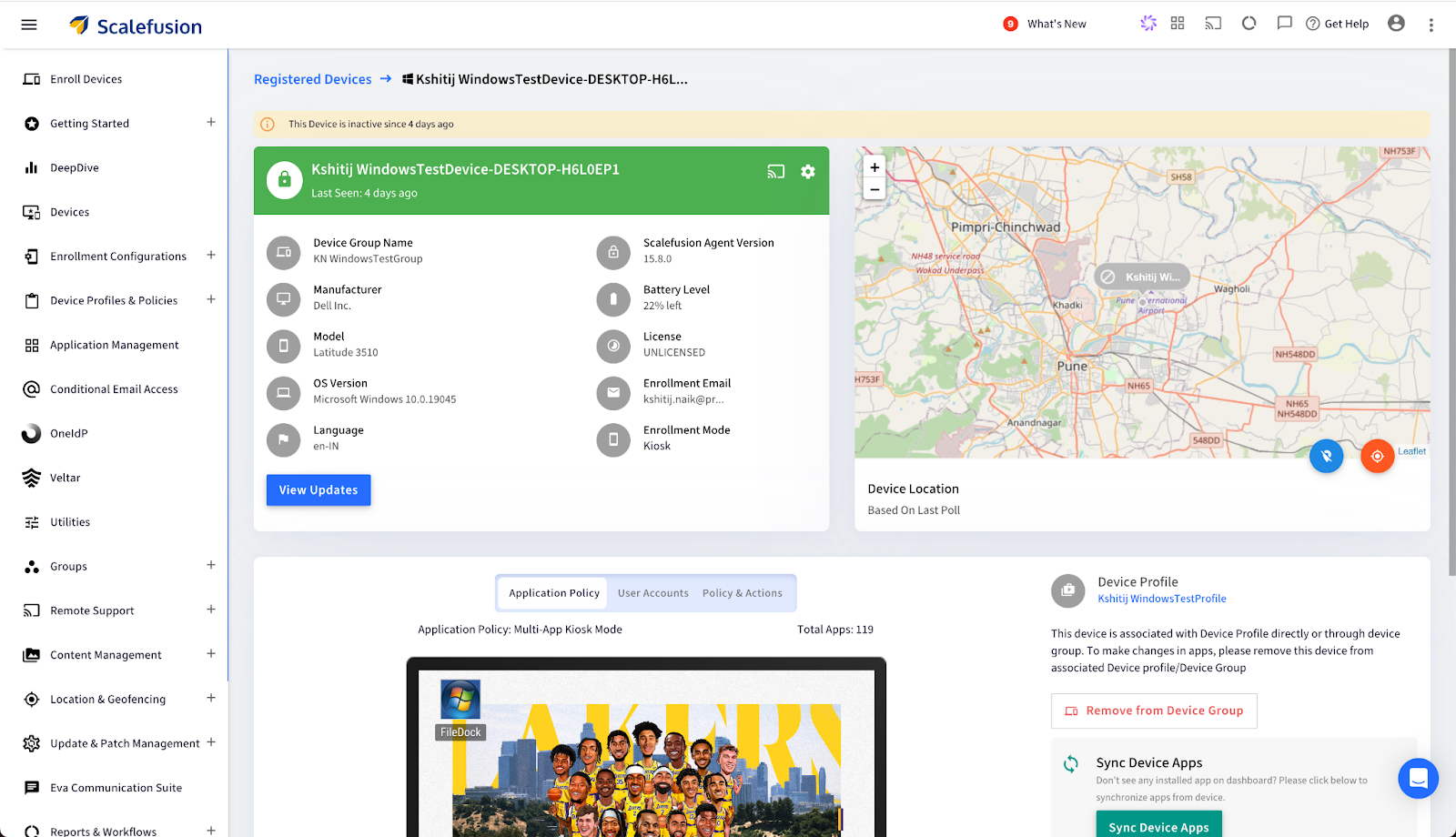
Step 3. A ‘Registered Devices’ screen will appear with all the necessary device details and device location. Click on the ‘Settings’ icon on the top right of the device details section.
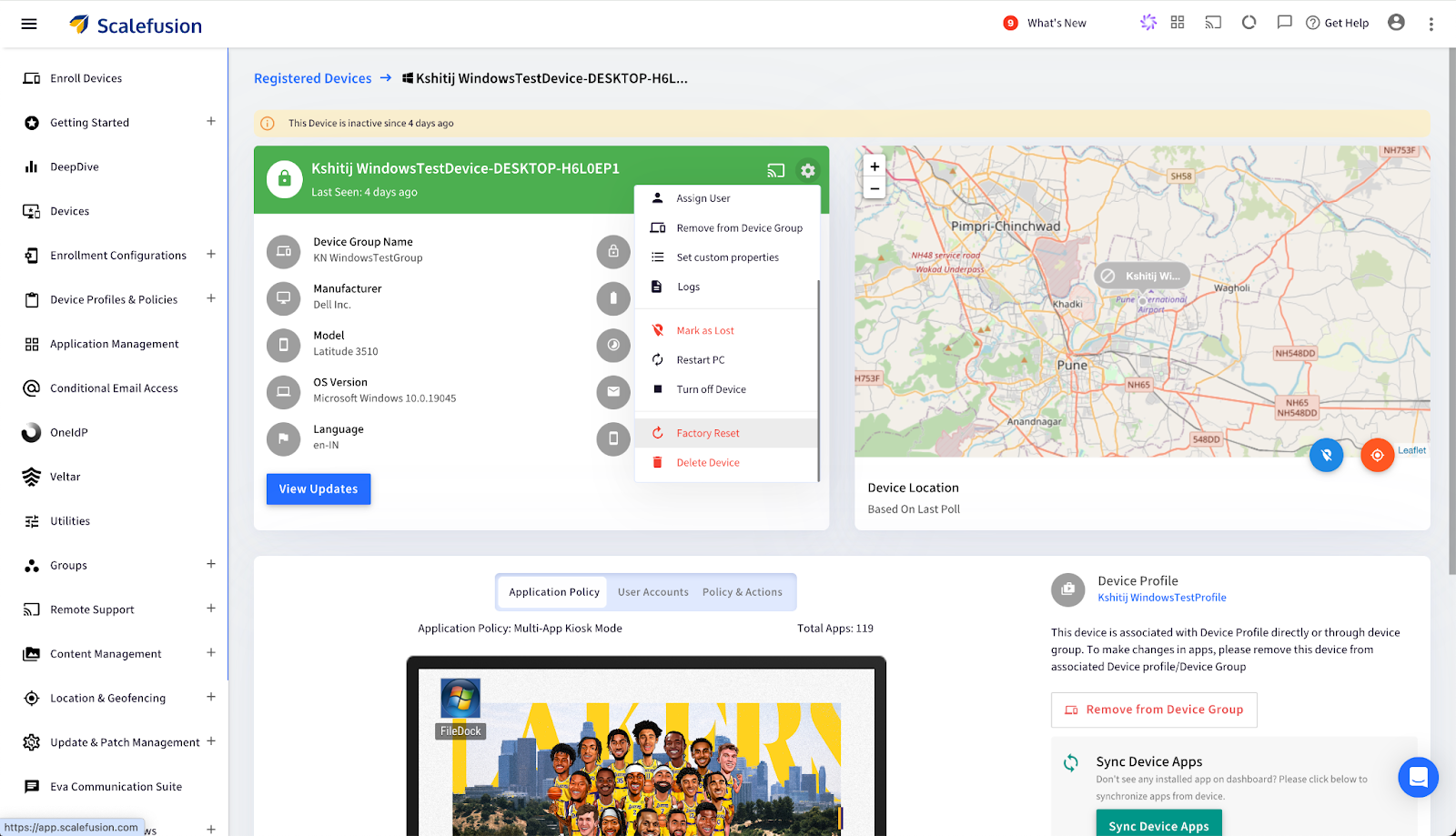
Step 4. A drop-down menu will appear. Scroll to the bottom of the menu and click the ‘Factory Reset’ option.
Step 5. Click on ‘Ok’ on the ‘Are you sure’ dialog box that pops up.
Step 6. Now, enter your Scalefusion dashboard login password in the ‘Confirm Action’ dialog box. Click on confirm to execute.
This wipes off the complete data of the selected device, keeping it secured and protected.
Gain complete security of Windows devices with Scalefusion UEM
Whether you’re safeguarding devices for a small business or a large enterprise, experience top-notch Windows Endpoint Management with Scalefusion UEM. Take proactive steps to maintain data security, compliance, and peace of mind. With Scalefusion get a centralized dashboard, real-time device monitoring, and automated workflows make it an ideal choice for organizations managing diverse and distributed device fleets.
About Scalefusion Scalefusion’s company DNA is built on the foundation of providing world-class customer service and making endpoint management simple and effortless for businesses globally. We prioritize the needs and feedback of our customers, making sure that they are at the forefront of all decision-making processes. We are dedicated to providing comprehensive customer support services, and place emphasis on customer-centric thinking throughout the organization.
About Version 2 Digital
Version 2 Digital is one of the most dynamic IT companies in Asia. The company distributes a wide range of IT products across various areas including cyber security, cloud, data protection, end points, infrastructures, system monitoring, storage, networking, business productivity and communication products.
Through an extensive network of channels, point of sales, resellers, and partnership companies, Version 2 offers quality products and services which are highly acclaimed in the market. Its customers cover a wide spectrum which include Global 1000 enterprises, regional listed companies, different vertical industries, public utilities, Government, a vast number of successful SMEs, and consumers in various Asian cities.
Many people feel tingled while buying a new Mac or using it for the first time. Its sleek design and seamless performance make it feel invincible. Macs can even be considered superhero devices, but even superheroes have their weaknesses, right? And your Mac? Well, it’s no exception.
Yes, Macs have a reputation for being secure—almost like the Fort Knox of computers. But before you pat yourself on the back for choosing “the safer option”, let me throw a curveball: They’re not bulletproof. In fact, that “Macs don’t get hacked” myth is as outdated as a floppy disk.
Mac Endpoint Security
Think about it—cybercriminals aren’t sitting around ignoring one of the most popular ecosystems in the world. They’re targeting it. And with the rise of sophisticated malware and security threats, Macs are no longer immune. This is where endpoint security steps in.
So, why does your beloved Mac need Mac endpoint security? Let’s break it down.
The Mac myth: Where it all started
For years, Apple marketed its devices as more secure than the rest. The narrative was simple: “Get a Mac, forget about viruses.” To be fair, this wasn’t entirely wrong back in the day. MacOS had built-in defenses like Gatekeeper, XProtect, and Sandboxing, making them less susceptible to threats than Windows.
But here’s the kicker—cybercriminals evolve. And with the increasing popularity of Macs, they’ve become a lucrative target. In fact, Macs might have a lower malware infection rate than Windows but according to a report, malware made up 11% of all threat detections on Macs in 2023.[1] While it’s still a smaller fraction compared to the threats faced by Windows environments, it’s not something to shrug off.
You can’t rely solely on built-in tools. It’s like using a lock on your door but leaving your windows wide open.
Threats targeting Macs
Macs, once considered impervious to most security threats, are now increasingly targeted by a distinct set of sophisticated attacks. Here are some of the most prevalent threats:
Ransomware: The belief that ransomware won’t affect Macs is a misconception. Incidents like the KeRanger attack demonstrate that Macs are firmly on the radar of cybercriminals.
Adware and spyware: The presence of unexpected pop-ups or unfamiliar applications often indicates adware infiltrating your system. These malicious programs are designed to collect your data discreetly and are becoming alarmingly common.
Phishing attacks: Macs are not immune to phishing campaigns. Cybercriminals deploy fraudulent emails and websites that are equally effective in compromising macOS users.
Zero-day exploits: Perhaps the most concerning, these attacks target vulnerabilities that are unknown even to Apple, exploiting them before they can be patched.
Why built-in Mac security isn’t enough
Apple’s native security features, while effective to a degree, fall short in addressing the advanced threats. Here’s a closer look:
Gatekeeper: This feature acts as a gatekeeper for apps, blocking known malicious software. However, it struggles with newer, unidentified malware, leaving gaps in protection.
XProtect: Apple’s built-in malware scanner is a solid tool, but its effectiveness depends on timely updates. Unfortunately, these updates can lag behind rapidly evolving threats.
Sandboxing: While this isolates apps in controlled environments, it doesn’t shield users from phishing attempts or browser-based attacks, which often bypass these restrictions entirely.
The reality is that these tools are foundational but not comprehensive. Against the backdrop of rising threats, relying solely on built-in features is akin to patching a leaking dam with duct tape—it might hold for now, but it’s not a long-term solution.
Why an Endpoint security solution is a must-have for macOS
macOS endpoint security solutions provide protection that goes far beyond the core features of macOS, serving as a comprehensive shield against modern threats. Here’s why they are indispensable:
Real-time protection: Unlike built-in tools that rely on periodic updates, endpoint security solutions monitor your Mac constantly, detecting and neutralizing threats as they arise.
Advanced threat detection: Using artificial intelligence and machine learning, these solutions identify suspicious patterns, catching malware even before it is formally recognized.
Data encryption: For sensitive or confidential files, endpoint security ensures data is encrypted, safeguarding it against unauthorized access or breaches.
Remote management: Ideal for businesses, endpoint security allows IT admins to oversee and secure multiple Macs from a centralized dashboard, ensuring consistent protection across all devices.
So, what is endpoint security for Mac? It’s the ultimate defense layer that ensures your device remains secure, efficient, and protected in an increasingly dangerous digital environment.
Features to look for in an Endpoint security solution
If you’ve decided it’s time to fortify your Mac’s defenses, these are the key features to prioritize:
Comprehensive malware protection: Opt for solutions that address both known and emerging threats, including zero-day vulnerabilities.
Firewall integration: A robust firewall adds an extra layer of protection, preventing unauthorized access and securing your network.
Phishing prevention: An essential feature to shield against deceptive emails and websites that could compromise your data.
Device control: Control over connected peripherals and external storage ensures tighter security and minimizes risks.
User-friendly interface: A straightforward, intuitive design ensures that even non-technical users can navigate and manage the solution effectively.
Busting the “too expensive” myth
It’s a common question: “Macs are already pricey; why add the cost of endpoint security?”
Here’s the reality: the potential cost of not having endpoint security is far greater. Imagine losing access to critical work files, experiencing downtime, or having your personal information exposed and sold on the dark web. Recovering from a breach can involve significant financial loss, reputational damage, and countless hours of stress.
Investing in a reliable Mac endpoint protection solution is about safeguarding not just your device but your peace of mind. When compared to the potential fallout of a successful attack, the cost is a small price to pay for comprehensive protection.
Veltar: The essential protection your Mac deserves
Your Mac is a masterpiece of technology, but it’s not invincible. Cybercriminals are getting smarter, threats are growing, and the stakes are higher than ever.
Endpoint security is not just a fancy add-on, it ensures your Mac stays safe while maintaining its performance and user experience.
Whether you’re a casual user, a creative professional, or running a business, the question isn’t whether your Mac needs endpoint security—it’s which solution you should choose.
Scalefusion’s Veltar combines protection with seamless usability, offering features such as application control and storage device access control. These features are designed to provide comprehensive security for your Mac without compromising its performance, ensuring that your device remains protected and optimized for every task.
Stay smart. Stay secure. And let your Mac keep doing what it does best—without interruptions.
About Scalefusion Scalefusion’s company DNA is built on the foundation of providing world-class customer service and making endpoint management simple and effortless for businesses globally. We prioritize the needs and feedback of our customers, making sure that they are at the forefront of all decision-making processes. We are dedicated to providing comprehensive customer support services, and place emphasis on customer-centric thinking throughout the organization.
About Version 2 Digital
Version 2 Digital is one of the most dynamic IT companies in Asia. The company distributes a wide range of IT products across various areas including cyber security, cloud, data protection, end points, infrastructures, system monitoring, storage, networking, business productivity and communication products.
Through an extensive network of channels, point of sales, resellers, and partnership companies, Version 2 offers quality products and services which are highly acclaimed in the market. Its customers cover a wide spectrum which include Global 1000 enterprises, regional listed companies, different vertical industries, public utilities, Government, a vast number of successful SMEs, and consumers in various Asian cities.