Skip to content

Engineering and development in Pandora FMS

Pandora FMS started as a totally personal open source project back in 2004. I wasn’t even a professional programmer, I was doing Unix security consulting. In fact, I chose PHP but Pandora FMS was my first application with PHP, I knew some things about ASP and my favorite programming language had been C.

A project with a single programmer and no professional users of his software yet is very different from a project with several dozen programmers and hundreds of clients using the software in critical environments. The evolution that Pandora FMS has undergone from 2004 to 2021 is a real case of steady improvement in software engineering.

Fortunately, I did not pay much attention to that subject of the degree, because most of the things that work and that I have learned with practice do not come in a book, nor are they explained at the university, because each software project and each team of people is very different. It may sound cliché, but it is the truth, and it is better to accept it and avoid formulas, because building a solid software product that can grow over time is not trivial at all.

In this article, I am going to talk about our experience, our evolution over time, but above all, about how our engineering processes work today. I have always believed that the most important part of open source is transparency, and that this should apply to everything, not only to software but also to processes and knowledge in general.

Version control system

It is an essential part of any software project. Today the ubiquitous GIT is everywhere (by the way, not everyone knows that Git is the work of Linus Torvalds, original author of the Linux kernel). A version control system helps, in short, a group of developers work without overlapping their jobs.

When the Pandora FMS project started, I was working without version control, because there were no other people. When some people began to collaborate on it, we realized that a simple shared directory was not worth it, because we were overlapping the code and, yes, making backups to save old versions was not a very efficient method.

The first version control system we used was CVS, which we have been using for eight years or more. Around 2008, we started using SVN (Subversion) another slightly more efficient system and it wasn’t until 2013 when we started using GIT and opened our official repository on Github.

Ingeniería-y-desarrollo-en-Pandora-FMS

Pandora FMS public repository on Github

Since Pandora FMS has an open source version and an Enterprise version -with proprietary code and commercial licenses- we have two GIT projects, one public on GitHub and the other private, which we manage with GitLab. The GitHub version is in sync with our private copy on GitLab at our offices. Some partners who collaborate with us in developing have access to this private repository, and through an extension of our support application (Integria IMS) we share all development planning tickets by releases with some of our partners, so that they can see in real time, the development planning based on “releases” and all the details of each ticket.

Ingeniería-y-desarrollo-en-Pandora-FMS

GitLab ticket view in Integria IMS/em>

Ingeniería-y-desarrollo-en-Pandora-FMS

Release ticket view

Development methodology used in Pandora FMS

At Pandora FMS, we have been using our own methodology from the beginning, although we have borrowed many ideas from agile methodologies, especially from SCRUM. From a life cycle point of view, we use an adaptation of the Rolling Release methodology

These are some important definitions when defining how we work, some of them come from Scrum, others from other methodologies.

Objectives of Pandora FMS work methodology

The objectives involve not only the development members, but also QA, the documentation team and part of the marketing team:

    • Maximum visualization: The entire team must see the same information, and it must flow from bottom to top and from top to bottom. By sharing objectives we will be able to do a more effective job.
    • What is not seen does not exist, which implies that all information relevant to the project must be reflected in the management, implemented with Gitlab. What is not seen does not exist, and what does not exist will not be taken into account for any purpose. Strictly following this methodology will allow everyone to be very aware of the planning:

-Strict deadline compliance.

-Advance planning without last minute modifications.

-Clearer information and in due time.

-Elimination of work peaks and etc.

  • Integrity,, with an increasingly large and complex project, it is imperative to keep integrity during development. All code must follow standards..


Ticket

The ticket is the minimum work unit. There is a single person responsible for its completion and it is planned to be carried out in a milestone (version release).

A ticket is the way in which the development work is broken down, so a big feature will be made up by different tickets, on which ideally several people can work.

The ticket must contain a functional or description of the requirements, which can include diagrams, specifications, interface diagrams (mockup), test sets, examples, etc. In some cases it may even contain the analysis and design of the whole solution.

A completed ticket must perform as specified in the functional document (ticket) and the changes that have been made to these specifications must be reflected in the ticket.

The functional is key so that QA can validate a ticket or not. QA will have to reopen a ticket if it does not meet any of the functional aspects.

Members and working groups

Product Owner (PO)

The PO defines where Pandora FMS has to go, in contact with customers, support and
the “real” market situation, providing technical and functional guidelines but without getting involved in development as such.

Product Committee

Group of people who will meet permanently with the PO to agree where the product is going to, trying to ensure that all PO decisions are collegiate. It is made up of the leader of each Development, QA, Support, Projects and Documentation team.

Development Manager (DM)

The DM will manage the entire development cycle: define milestones, priorities, manage
individually all members and make operational decisions. The DM reports exclusively to PO and is the leader of the development team.

Development Team

They are in charge of the development of large features and product improvements, complete code refactoring, change development (small features), bug fixes and product maintenance improvements.

QA Team

They verify that each development atomic unit works as defined in the
specifications. They will also create and maintain an ecosystem of automated testing for both backend and user experience.

Support Team

They are the ones who deal directly with the client solving issues. Their experience with the product’s day-to-day means that their opinions must be taken into account, that is why they are part of the product committee.

Project team

They implement it on the end customer and are the ones closest to the customer, since they are often there before the project exists, and they usually offer ideas and all kinds of features in hand, for all purposes they are the “speaker” of the commercial department, therefore they are part of the product committee.

Training and Documentation Team

Responsible for training and the product’s documentation. They coordinate with the marketing team and the translation team.

Remote working

All team members (development, QA, documentation) telework freely. In fact, developers from Europe, Asia and America participate in Pandora FMS, and within Spain they are distributed throughout the national territory. We are a 100% distributed and decentralized company, although with traditional hierarchies.

In order to telework, we need each member to take responsibility for their work, be autonomous and commit to planning. Teleworking entails minimizing the need for oral communication and physical personal meeting, replacing them not with teleconferences, but with a precise use of the tools of the development process.

Development watch-keeping

A developer on the team is especially devoted to solving incidences involving code, in permanent connection with the support team (from 8 am to 8 pm, CEST). This allows not only to have maximum agility when solving a problem on a client, but also code changes are integrated into the code repository in an organized way.

Ticket creation and classification process

Any member of the company (including salespeople) can create a ticket in GitLab. This includes customers and partners, although in their case there is a prior filter by the support team and the sales team respectively.

The more detailed the ticket, the more unequivocal the development will be. Add images, gifs, animations and all the necessary clarifications. As well as the way to access the environment where the problem has been found or the contact persons. A developer will never contact a customer directly. If there is the need to interact with them, it will be done through the support or project team.

Nobody, except for the DM or PO, can change a ticket milestone. On creation, the ticket will not have an assigned milestone or assigned user. The task of defining which release a ticket belongs to is the responsibility of PO and DM exclusively.

When a ticket is finished and the developer thinks it should be reviewed by a colleague, they mention it in the merge request through @xxxxx. The review must be nominal. This review is independent of the code review carried out by the department manager.

General ticket workflow

  • The ticket is assigned to a programmer by the DM. If it does not have a ticket assigned, the ticket will be auto-assigned. (See below the terms that regulate this system).
  • The developer must understand/solve any questions that may arise after reading the functional document, if necessary, check with the DM or the author of the ticket. This must be done before starting to develop. Once read, you must, in order:
  1. Evaluate (by assigning labels) its complexity and size, reaching a prior consensus with the DM.
  2. Develop the feature following the ticket specifications
  3. Document everything developed in the same ticket or, if required, in a new documentation ticket. This ticket must relate to the “parent” ticket by ticket #ID.
  4. The developer must test its functionality at least in:
    -standard docker development environment
    -docker development environment with data.
  • When it is deemed complete, it will be tagged ~ QA Pending and placed in the hands of QA.
  • For each FEATURE ticket, there will be a reference person, generally from projects, support or even the PO itself. This person will be the one who will define part of the functional (together with the DM and PO), but above all, this person will be the reference person for the developer to ask any details during development, and most importantly, should see the development progress, step by step, so that it is validated.
  • Any change to the functional will be reflected by the reference person in the ticket as comments, without altering the original functional.
  • If there is a child documentation ticket, QA will validate the ticket using the documentation generated by the reference person, NOT by the functional of the ticket, validating the documentation and the feature at the same time.

Release planning

When creating a ticket, the milestone must be empty (not assigned) like the user. The only ones that can classify a ticket are: DM and PO.

A series of milestones have been defined to support the ticket classification process, some of them, those dated (releases), can be seen as milestones, while the rest should be seen as simple ticket containers.

  • (Not allocated): It is the absence of milestones in a ticket. For all intents and purposes, this ticket “does not exist yet.” The DM and PO will validate each and every one of these tickets to see if they make sense in the product roadmap. No developer should take any of these tickets.
  • Feature backlog: Tickets that will be made at some indeterminate time in the future that sooner or later will have to be addressed. No developer should take any of these tickets.
  • Low priority bugs: Reported bugs with no priority assigned yet by PO/DM. No developer should take any of these tickets.
  • STAGE: Tickets proposed by each department for planning in a product release. At each planning meeting, these tickets will be discussed, and moved to other milestones. At the end of the cycle start meeting, this milestone should be empty. The DM is the one who has the final decision as to which STAGE tickets are assigned to a certain release and which are not, relying on the product committee if necessary. No developer should take any of these tickets.
  • XXX: Release XXX. Milestone that groups a series of tickets that will be released on a certain date. A milestone has a deadline associated with it. In the case of RRR releases, this date could change, in the case of LTS not.
  1. The development of the tickets associated with a release must be finished 5 days before the scheduled day for the release. Tickets not completed before that date will be delayed to the next release and the delay will have to be justified to the DM.
  2. There are two types of release milestones:
    -LTS: in April and November. They are 6 months apart.
    -Regular Releases (RRR): There will be 2 to 4 regular releases between LTS releases.
  • A developer with no assigned tasks for a release, as long as there are no pending assignment tickets in the release milestones for the developer’s team, can take one of the unassigned tickets from:
    -The closest release, based on date.
    -Second closest release, based on date.

CICD

Pandora FMS developers integrate the code of their branches in a central repository several times a day, causing a series of automatic tests to be executed whose objective is to detect faults as soon as possible and improve the quality of the product.

These tests run dynamically in a series of executors or “runners”, some of them specific, for certain architectures (e.g., ARM), that execute static code analyzers, unit tests, and activate containers to carry out integration tests in a real installation of the application.

The generation of Pandora FMS packages is completely automated. Packages are generated every night from the development branch for manual testing. They can also be generated on demand by any developer or member of the QA or support teams, from any branch through the GitLab web interface.

When a release is made from the stable branch, in addition to package generation, a series of steps are executed that deploy them to Ártica’s internal package server, to SourceForge, to Ártica’s customer support environment, and that, likewise, update the Debian, SUSE and CentOS repositories along with the official Docker images.

About Version 2 Digital

Version 2 Digital is one of the most dynamic IT companies in Asia. The company distributes a wide range of IT products across various areas including cyber security, cloud, data protection, end points, infrastructures, system monitoring, storage, networking, business productivity and communication products.

Through an extensive network of channels, point of sales, resellers, and partnership companies, Version 2 offers quality products and services which are highly acclaimed in the market. Its customers cover a wide spectrum which include Global 1000 enterprises, regional listed companies, different vertical industries, public utilities, Government, a vast number of successful SMEs, and consumers in various Asian cities.

About PandoraFMS
Pandora FMS is a flexible monitoring system, capable of monitoring devices, infrastructures, applications, services and business processes.
Of course, one of the things that Pandora FMS can control is the hard disks of your computers.

Proactive Monitoring in Digital Transformation Times

Pandora FMS is a proactive, advanced, flexible and easy-to-configure monitoring tool according to each business. Pandora FMS integrates with the needs of the business, being able to monitor servers, network equipment, terminals and whatever is necessary.

In this article we will focus on monitoring using Pandora FMS, bearing in mind the new reality, which has arrived to stay, known as “Digital Transformation”.

Digital Transformation

First of all, let’s start by understanding what Digital Transformation is all about, a widely used term, but at the same time somewhat confusing for many people, due to its broad definition.

Digital transformation is a concept that encompasses the integration of the different technologies, used in the different areas of a company, fundamentally changing the way it works and delivers value to its customers. It is also a cultural shift that requires organizations to constantly challenge the status quo, experiment, and feel comfortable with the change.

It is not new that technology advances faster and faster generating a constant challenge, that is why we must be on the watch for these advances, to be able to adopt new technologies and achieve the cycle of “Continuous Improvement”, taking advantage of the tools that allow us to be more and more efficient.

As part of this change, there are key technologies that allow us to digitize our information and adapt to this new reality that is here to stay.

  • Cloud Computing (Amazon AWS, Microsoft Azure, Google Cloud): It gives your organization faster access to the software it needs, new features and updates, as well as data storage. Cloud computing allows you to be agile enough to transform quickly.
  • Information technology: It allows an organization to focus its investment on talent, research and development, and customized solutions that support the requirements and processes that differentiate it in the market.
  • Machine learning and artificial intelligence technologies: They provide organizations with more accurate information for decision-making on sales, marketing, product development and other strategic areas.
  • Other technologies that drive business transformation are: blockchain, blockchain, augmented reality and virtual reality, social networks, and the Internet of Things (IoT).

Since the beginning of computing, companies had at least one server/computer as part of their daily tasks. This implied additional tasks such as: technical support, and infrastructure maintenance.

Some years ago, it was common to find email servers, installed in the company, generating the great challenge to keep a critical service, like this one, running 24/7. Today there are private cloud solutions such as: Microsoft 365 or Google Apps, that allow you to have email with a very high SLA, without the need for your own infrastructure, using the service as SAAS (Software as a Service).

To understand where we are at and where to start, with the digital transformation process, we are going to explain the four most common infrastructure scenarios:

On-Premise (Local Infrastructure): Servers that work in the company and require a great effort to maintain them.

IaS Cloud (Infrastructure as a Service): In this scenario, virtual machines can be run in the cloud, such as, for example, a Windows Server, some Linux distribution where you install the essential tools to use the corporate application that you need to use. The provider ensures the availability of the virtual machine and the company is responsible for the software that is installed. In this case, Amazon AWS, Microsoft Azure, Google Cloud, etc. can be used.

PaaS Cloud (Platform as a Service): Services that work in the cloud and that have a platform such as: SQL Server, Oracle, SAP, Docker, Etc.

SaaS Cloud (Software as a Service):
 Services that work in the cloud and have a management tool, such as Exchange Online, Google Apps (Corporate Gmail), OneDrive, Google Docs, Etc.

After this introduction, we are going to understand the value of Pandora FMS for any of the previous scenarios, at the time of Digital Transformation.

Some time ago, we already published an article on this blog with the installation script for IaS Cloud. As a requirement you need to have a Virtual Machine with CentOS 7, which has 2 GB of RAM and 20 GB of Disk.

Executing the following command: curl -Ls https://pfms.me/deploy-pandora | sh on a computer that has an Internet connection, you will obtain an installation of Pandora FMS Community in an On-Premise scenario or in the cloud that you use:

https://pandorafms.com/community/get-started/

For the Enterprise version, we have a Free 30-day Trial. 

Now that you know that you can install Pandora FMS in the scenario that is most convenient for you, we are going to see which are the required ports to be able to use the tool from a public cloud:

PortDescription
443 TCP (https)WEB console
41121 TCP (Tentacle)Software Agent Connection/td>

With this configuration you can use Pandora FMS key features. We are going to see just a few of them. Very useful for this reality of continuous changes.

Remote Configuration, Policies and Collections: With this configuration you can make all the changes on the monitoring agents, using Pandora FMS web console, being able to build the Agent Plugins and distributing them in a centralized and simple way.

Agents with Remote Configuration

Satellite Server: A very interesting possibility is to set up an agent with advanced features. It allows you to discover the different remote networks, servers, and network computers, using ICMP, SNMP and WMI protocols. It is not necessary to open any ports on the firewall, where the Satellite Server is installed. You have the possibility of reaching Pandora FMS server with port 41121 TCP Tentacle and, for example, remotely monitor the devices from the different locations and/or branches.

 Several Satellite Servers, reporting to a console in Azure


Ubiquiti AP UC-AC-LR (Satellite through SNMP)

Pandora FMS Ubiquiti AP UC-AC-LR Web Console

https://pandorafms.com/docs/index.php?title=Pandora:Documentation_es:Arquitectura#Servidor_Sat.C3.A9lite

Finally, and as a complementary tool, you can count on the possibility of having usage and consumption metrics in the cloud, from the “Discovery” option, or with add-ons from the Enterprise library.

Discovery Cloud View

At the time I wrote this article, the clouds supported by Pandora FMS were:

*It is possible that new cloud technologies will be added over time.

In the next tree view you can see some of the metrics that we have available for AWS and Azure. In this view, you can see the status of the virtual machines, the consumption of Network, Memory, etc.
All these parameters are configured according to the specific needs of each client.

https://pandorafms.com/docs/index.php?title=Pandora:Documentation_en:Discovery#Discovery_Cloud (Discovery Cloud Documentation)

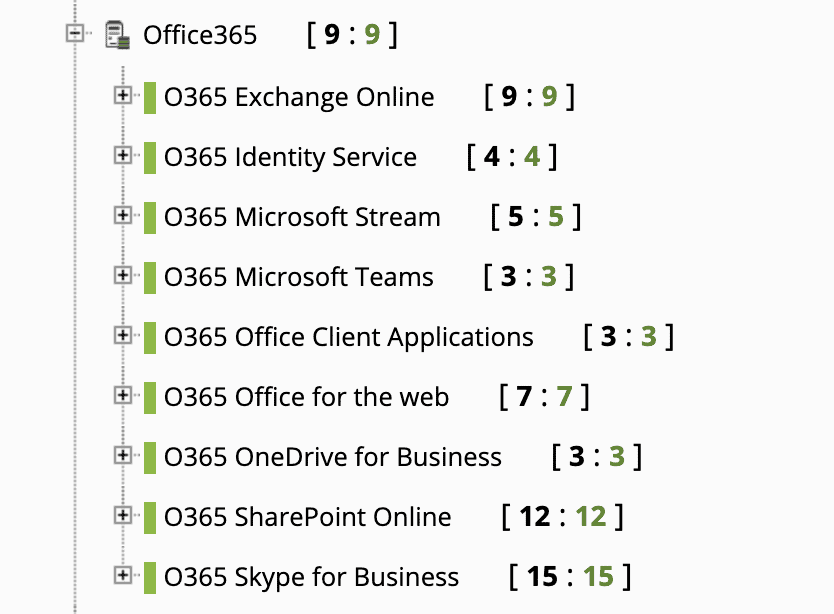
Finally, Microsoft 365 cloud has an API to be able to monitor the health status of its services. Pandora FMS has a plugin in the Enterprise library that allows you to collect data from the Microsoft 365 API.

https://pandorafms.com/library/pandora-office-365-monitoring/

Partial View of Microsoft 365 Services

I hope this article was useful for you to understand what the best monitoring scenario for your company is.

About Version 2 Digital

Version 2 Digital is one of the most dynamic IT companies in Asia. The company distributes a wide range of IT products across various areas including cyber security, cloud, data protection, end points, infrastructures, system monitoring, storage, networking, business productivity and communication products.

Through an extensive network of channels, point of sales, resellers, and partnership companies, Version 2 offers quality products and services which are highly acclaimed in the market. Its customers cover a wide spectrum which include Global 1000 enterprises, regional listed companies, different vertical industries, public utilities, Government, a vast number of successful SMEs, and consumers in various Asian cities.

About PandoraFMS
Pandora FMS is a flexible monitoring system, capable of monitoring devices, infrastructures, applications, services and business processes.
Of course, one of the things that Pandora FMS can control is the hard disks of your computers.

WHAT’S NEW Pandora FMS 754

What’s new in Pandora FMS latest release, Pandora FMS 754

Let’s take a look together at the features and improvements included in this new Pandora FMS release: Pandora FMS 754.

NEW FEATURES AND IMPROVEMENTS

Metaconsole Dashboards

Dashboards can now be used within the Metaconsole, to be able to centrally manage all the information more visually.

New AWS monitoring. Amazon S3

The possibility of monitoring Amazon S3 cubes has been added to be able to monitor the files they include, the size of each file, the number of items in each cube, permissions, etc.

New installers for Cloud

In previous versions, we prepared a remote script to install Pandora FMS in any environment: virtual, cloud or physical, by just having access to the internet. In this version, we have done the same to install Pandora FMS agents, in a customized way with just one click.

Check out the documentation or try it yourself:

curl -Ls https://pfms.me/agent-deploy | bash

Improved event widget in Dashboard

It now allows you to incorporate saved filters, so that the widget will show events using those custom filters.

Release-754

Visual enhancements to console settings

Pandora FMS console setup display has been improved to not show anymore all the options in a single column and thus be able to see it more easily and quickly.

Release-754

About Version 2 Digital

Version 2 Digital is one of the most dynamic IT companies in Asia. The company distributes a wide range of IT products across various areas including cyber security, cloud, data protection, end points, infrastructures, system monitoring, storage, networking, business productivity and communication products.

Through an extensive network of channels, point of sales, resellers, and partnership companies, Version 2 offers quality products and services which are highly acclaimed in the market. Its customers cover a wide spectrum which include Global 1000 enterprises, regional listed companies, different vertical industries, public utilities, Government, a vast number of successful SMEs, and consumers in various Asian cities.

About PandoraFMS
Pandora FMS is a flexible monitoring system, capable of monitoring devices, infrastructures, applications, services and business processes.
Of course, one of the things that Pandora FMS can control is the hard disks of your computers.

Violence and Redemption: SNMP Protocol History

You know what it is, but do you know SNMP protocol history?

There was a dark time, more than dark, sepia or beige, in short, that tone in which we find the photos of our grandparents inside the drawer of the oldest and worst decorated closet in our house. A time that is hardly talked about anymore, but that points us as a weapon so that we continue to keep it in our memories. Those were the times of bank robbers and speakers, old rolls, borsalino hats and cameras with lightbulbs, they smoked more, the police were still called “coppers” and toothpaste brands had not yet produced any flavored toothpaste, not even menthol. We go back that far to get to know more about SNMP protocol history.

In this house, Pandora FMS blog, we had already talked before about the relation of the SNMP protocol with the noir part of life. It was hard, few reported that case, but we got to the media, and they, from Newcastle Tribuna to the smallest local newspaper, have endlessly asked us to come back and delve into the subject. That is why we want to make a little review of SNMP protocol history, a story full of caramel nuances and fish bones, swimming pools on the outskirts and tombs in the desert, long and slender legs and hard knuckles like the piles of prelates or pontiffs.

Naaah, in fact, if we want to find out SNMP protocol history and its evolution throughout the years, we just have to go back a couple of decades, no more. In 1988, we started having some news for the first time about this famous protocol. The 80s, pal, a very hard time too, we don’t want to take away any of its prominence. Leg heaters, carded hair and Mustangs ruled. It was around this time that what we know as the first data networks began their journey. More and more “cooler” and more and more widespread around the world.

At that time, with an administrator it was enough for an “analog” or manual way to understand a whole network infrastructure of a company. You can guess the kind of network infrastructure that could exist in a company at that time… It was made up of scarce resources or equipment because the immeasurable variety of services that are provided today did not exist, nor users, nor anything similar.

It was not until more or less the arrival of the 2000s, time of Nokias with poly tones, the return of the bell bottoms and the consolidation of Britney Spears at the highest levels of the music scene charts, that computers, Big Daddy (Internet) and the rest of the technology reached the necessary parameters to accommodate things as far ahead of their time as the SNMP protocol.

The range of services and possibilities was that expanded thanks to convergent networks that we were finally able to handle all kinds of information and data, including voice and video. Infrastructures were expanded by force, and users began to flock like flies to honey. A failure in the system could no longer be accepted. The stakes were high.

That was the time for the proliferation of monitoring systems, yes, like Pandora FMS, owner and master of this blog and my skin. They were shown as essential gadgets for the tasks of technology departments of any company that wanted to stay safe from possible incidents and even anticipate them by detecting them in advance. Monitoring systems, servers, applications, networks, events and a long list of devices. Collecting information, just what we wanted to monitor, all to collect it and represent it visually, in order to carry out the necessary actions that our systems might require. What a monitoring progress!

Like coffee, a morning shower and the geek figures in the office, it is impossible to remove monitoring systems from the daily lives of network administrators, and most of these systems are based on the Simple Network Management Protocol, also known on the streets as the SNMP Protocol, which makes the exchange of management information between network devices easier and fills our lives with hope and management data.

And this is the thick and outrageous SNMP Protocol history. in fact, it has stayed with us for many years. From that first version to SNMPv3, so focused on security and administration… And for many years more old friend! I personally hope you see my grandchildren grow old and I see you get implemented in a crass, ineluctable and ad infinitum way!

Some of the sources used for this article:

https://en.wikipedia.org/wiki/Simple_Network_Management_Protocol

https://coreun.com/2020/07/08/la-monitorizacion-protocolo-snmp-y-su-evolucio

About Version 2 Digital

Version 2 Digital is one of the most dynamic IT companies in Asia. The company distributes a wide range of IT products across various areas including cyber security, cloud, data protection, end points, infrastructures, system monitoring, storage, networking, business productivity and communication products.

Through an extensive network of channels, point of sales, resellers, and partnership companies, Version 2 offers quality products and services which are highly acclaimed in the market. Its customers cover a wide spectrum which include Global 1000 enterprises, regional listed companies, different vertical industries, public utilities, Government, a vast number of successful SMEs, and consumers in various Asian cities.

About PandoraFMS
Pandora FMS is a flexible monitoring system, capable of monitoring devices, infrastructures, applications, services and business processes.
Of course, one of the things that Pandora FMS can control is the hard disks of your computers.

Everything you need to know about Office 365 Monitoring

Do you know everything about Office 365 Monitoring?

Microsoft Office 365 Monitoring (Known as Office 365)

Pandora FMS is a proactive, advanced and flexible monitoring tool which is also easy-to-configure according to each business and their needs. It can be integrated into all the needs of servers, network computers and terminals. Besides, in a world where the cloud has taken more prominence, it can also monitor its services or computers.

In this article, we will focus on Office 365 monitoring from Pandora FMS using the module available in the Enterprise library.

https://pandorafms.com/library/pandora-office-365-monitoring/

What is Office 365?

Microsoft 365, also known as Office 365, is the tool conceived by the giant Microsoft that allows you to create, access and share documents online with different users in Word, Excel, PowerPoint and OneNote, among others. To that end, you only need to have access to the Internet and have OneDrive of course.

Microsoft 365 offers different packages, depending on the size of your company or the number of users who will make use of these services. In addition, users may choose between three types of packages: for private use, for businesses or for students or teachers. Each one has its own features (number of users, integrated programs, space…) and it is offered at different prices accordingly.

Microsoft 365 Health

Microsoft 365 provides a page to see the health of cloud services. You may take a look at the following url:

https://status.office365.com

Office-365-monitoring

You may observe the health status of the services in Microsoft 365

Office-365-monitoring

What we can see is that, on demand, we can find out in what state the services are, but by having Pandora FMS, we will be able to improve this overview and also have all of this information and generate alerts about the services that may be essential for the daily work or tasks of our company.

Microsoft 365 in Pandora FMS

In order to carry out Office 365 monitoring, what we need is to be able to see the services in our Pandora FMS WEB console, as exemplified in the following image:

Office-365-monitoring

To get that result, we are going to use the Enterprise library module . But first, let’s take a look at the requirements you need to meet to achieve our goal:

  • In Pandora FMS Environment: The plugin server must be enabled, Python 3.8.
  • In Microsoft 365: Read permissions are required for the o365 API.

Office-365-monitoring

  • Know the following Authentication data: TenantID, ClientID, Secret

The plugin is designed to run as a server plugin but can be run on an agent using module_plugin with no issues at all.

Script Running

So that you can notice, very simply, how the script is executed, we are going to see an example of that, where we will execute its binary version with the following command:

pandora_o365 -c xxxxxxxx-xxxx-xxxx-xxxx-xxxxxxxxxxxx -t xxxxxxxx-xxxxx-xxxx-xxxxx-xxxxxxxxx -s xxxxxxxxxxxxxx~xxxxxxxxxx~xx~xxxxx

Office-365-monitoring

When executing the script, if the ClientIT, TenantID and Secret values are correct, we will get the following response:

Office-365-monitoring

Finding out the status of the services from Pandora FMS

We already have Microsoft 365 service agents, to finish up this idea let’s look at a service on Microsoft 365 health page and what it looks like in Pandora FMS.

Microsoft 365 Health Page:

Office-365-monitoring

Office-365-monitoring

We clearly see that there is a service degradation.

Health in Pandora FMS:

Office-365-monitoring

Office-365-monitoring

We check and verify that, indeed, we have the same information and that with these texts it is very easy to define alerts on the status of the different services.

Log collection

If we have Pandora FMS Syslog Server feature enabled, we can save all the issues that take place in Microsoft 365. For this, just add the parameter -l in the execution of pandora_o365 module -c xxxxxxxx-xxxx-xxxx-xxxx-xxxxxxxxxxxx -t xxxxxxxx-xxxxx-xxxx-xxxxx-xxxxxxxxx -s xxxxxxxxxxxxxx ~ xxxxxxxxxx ~ xx ~ xxxxx -l

That way you can save, very easily and with no issues at all, Microsoft 365 incidences in Pandora FMS.

Office-365-monitoring

Office-365-monitoring

That way, you may now proactively monitor all Microsoft 365 services. And we achieved our goal, Office 635 monitoring is ready to work!

Would you like to find out more about what Pandora FMS can offer you? Find out clicking here .

If you have to monitor more than 100 devices, you can also enjoy a FREE 30-day Pandora FMS Enterprise TRIAL. Installation in Cloud or On-Premise mode, you choose!! Get it here !

Last but not least, remember that if you have a reduced number of devices to monitor, you can use the Pandora FMS OpenSource version. Find more information here .

Do not hesitate to send us your questions. Pandora FMS team will be happy to help you!

And if you want to keep up with all our news and you like IT, releases and, of course, monitoring, we are waiting for you in our blog and in our different social media, from Linkedin to Twitter not forgetting of course Facebook . We even have a YouTube channel, and with the best storytellers.

About Version 2 Digital

Version 2 Digital is one of the most dynamic IT companies in Asia. The company distributes a wide range of IT products across various areas including cyber security, cloud, data protection, end points, infrastructures, system monitoring, storage, networking, business productivity and communication products.

Through an extensive network of channels, point of sales, resellers, and partnership companies, Version 2 offers quality products and services which are highly acclaimed in the market. Its customers cover a wide spectrum which include Global 1000 enterprises, regional listed companies, different vertical industries, public utilities, Government, a vast number of successful SMEs, and consumers in various Asian cities.

About PandoraFMS
Pandora FMS is a flexible monitoring system, capable of monitoring devices, infrastructures, applications, services and business processes.
Of course, one of the things that Pandora FMS can control is the hard disks of your computers.

×

Hello!

Click one of our contacts below to chat on WhatsApp

×