Skip to content

Passkeys vs. passwords — which is better?

It’s not if but how you authenticate

Most online services and applications require you to log in before using them. There’s no way around it, as our identity and your right to access digital products must be verified. The methods for this verification can vary though: You might enter a PIN or password, use biometrics like a fingerprint or facial recognition, click on a link sent to your email, and more.

The most commonly used authentication method remains the traditional password. However, a new kid on the block called ‘passkeys’ has recently emerged, sparking discussions about its superiority to passwords. We will now delve into and share our perspective on this debate. But first….

What is a password, really?

Passwords have existed for hundreds, perhaps thousands, of years. However, in the pre-digital age, they were primarily verbal phrases you had to say aloud to gain access to restricted areas. If this gives you the ‘Open Sesame’ vibes, you’re right on target.

These days, however, passwords inhabit the virtual realm as combinations of letters, numbers, and symbols that we use to authenticate and secure access to online accounts or systems. Their purpose is to protect our digital privacy and security, a role they have effectively fulfilled over time.

But the problem with many passwords is that they can be cracked. This is to say, if a password lacks enough complexity, cybercriminals can use modern hacking technologies to breach it, gaining unauthorized access to your accounts. For this very reason, many organizations have been searching for a successor to passwords for quite some time now—and it appears they’ve found one in passkeys.

‘Sorry, what is a passkey?’

It’s difficult to come up with a simple definition of passkeys, but we will do our best to explain this term in the easiest way possible. Basically, passkeys are a new type of credential consisting of two separate cryptography keys: a public key registered with the website or application and a private key stored locally on your device. During login, these keys must be paired to grant access.

What makes passkeys great is that biometric authentication tools on your device, such as fingerprint scanners or face ID, can initiate this pairing process, eliminating the need for passwords or other authentication factors.

As a result, using passkeys can not only enhance convenience but also significantly boost security by minimizing the risk of password theft. In other words, users can log into their online accounts much faster and with greater peace of mind regarding their cybersecurity.


The difference between passkeys and passwords

At this point, you should be able to distinguish between the two solutions, but we’ll still break down the key differences between passwords and passkeys to make sure it’s all clear. These are:

  • Passwords are user-created strings of characters, whereas passkeys are system-generated cryptographic keys.

  • Passkeys are unique by default, while passwords are as complex as the user makes them.

  • Passwords are stored on servers or databases, while passkeys consist of a public key stored on servers and a private key stored on a device.

  • Passkeys enhance cybersecurity through their dual-key authentication system, unlike passwords, which depend on their complexity.

  • Passwords are authenticated only via servers, whereas passkeys require pairing public and private keys, stored on the servers and the user’s device, respectively.

  • Users can change passwords, but managing passkeys usually requires specialized software.

  • Passkeys provide strong protection against phishing and brute-force attacks, whereas passwords are inherently more vulnerable to such threats.

Are passkeys safer than passwords?

Although we briefly answered this question in the previous section, we would like to discuss the security aspect in more detail.

Passkeys are generally considered more secure than passwords, and there are several reasons for this claim. Firstly, passkeys do not need to be remembered or manually created, unlike passwords, which require you to come up with complex combinations of letters, numbers, and symbols and then try to memorize them.

Moreover, passkeys are generated automatically using cryptography, which splits credentials into two parts. So, in case of a data breach where an attacker accesses your public key, that key alone remains useless without the corresponding private key.

We also need to mention that major companies like Google, Microsoft, and Apple already support passkeys and are collaborating with organizations like the FIDO Alliance to ensure passkey implementation across platforms. This widespread adoption by industry leaders underscores their trust in passkeys as a safer alternative to passwords, enhancing overall security for their users.

Store your passkeys and passwords in a secure password manager

Being one of the first password managers to support passkey technology, NordPass offers a cybersecurity solution that combines the best of both worlds, allowing you to securely and efficiently use passkeys and passwords.

With NordPass, encryption goes beyond just passkeys—stored in its encrypted vault, your passwords are protected from unauthorized access. Additionally, features such as autosave and autofill make storing and filling in passwords quick and easy. NordPass also includes a Password Generator that can create complex passwords on the spot, preventing you from using weak or previously used passwords in the future.

NordPass effectively addresses common password challenges, empowering its customers to adopt more sophisticated security practices. Whether you prefer using passwords or aim to transition to a passwordless future, NordPass provides the flexibility and tools to support both choices. Which way you will go is up to you.

About Version 2 Digital

Version 2 Digital is one of the most dynamic IT companies in Asia. The company distributes a wide range of IT products across various areas including cyber security, cloud, data protection, end points, infrastructures, system monitoring, storage, networking, business productivity and communication products.

Through an extensive network of channels, point of sales, resellers, and partnership companies, Version 2 offers quality products and services which are highly acclaimed in the market. Its customers cover a wide spectrum which include Global 1000 enterprises, regional listed companies, different vertical industries, public utilities, Government, a vast number of successful SMEs, and consumers in various Asian cities.

About NordPass
NordPass is developed by Nord Security, a company leading the global market of cybersecurity products.

The web has become a chaotic space where safety and trust have been compromised by cybercrime and data protection issues. Therefore, our team has a global mission to shape a more trusted and peaceful online future for people everywhere.

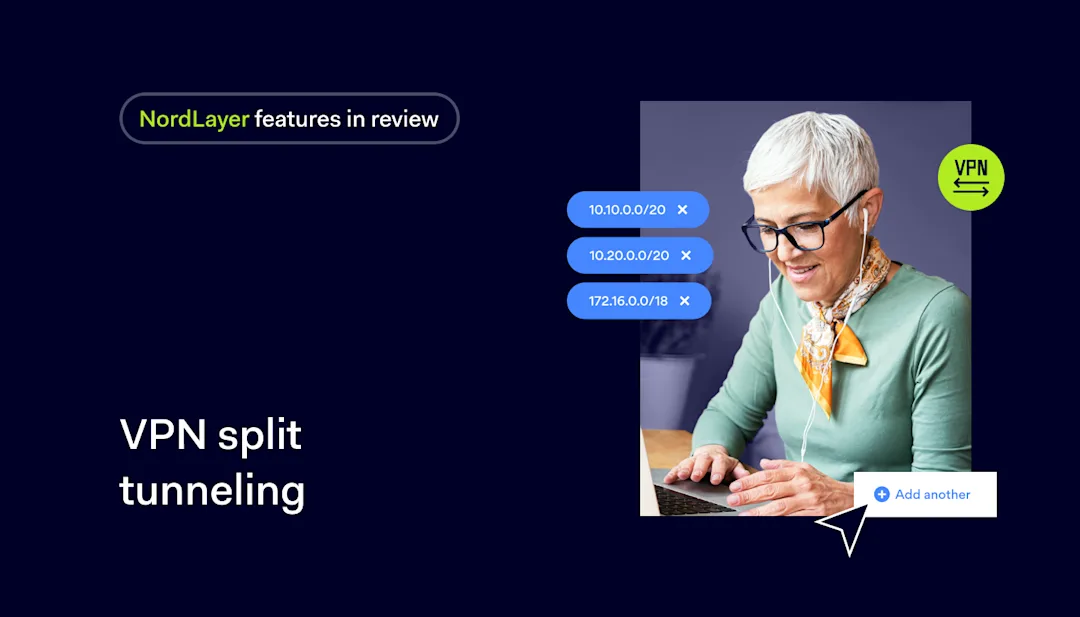
NordLayer features in review: VPN split tunneling

Maintaining secure network connections is paramount when our lives merge with technology. However, striking an optimal balance between security and performance remains a complex task, especially in our fast-paced business environments.

At NordLayer, we understand this complexity, which is why we’re excited to introduce our VPN split tunneling feature—a cutting-edge solution that empowers organizations with granular control over their network traffic.

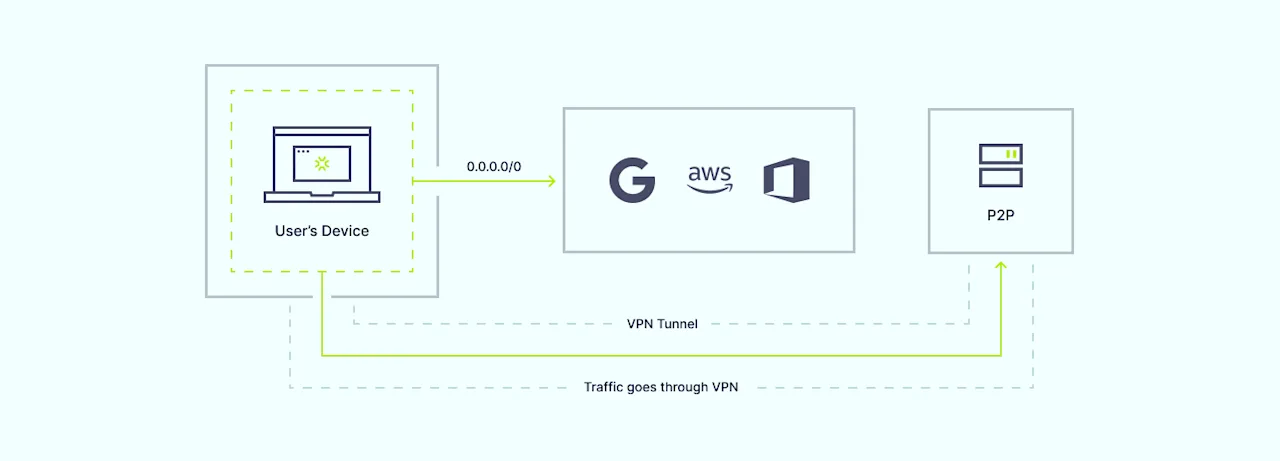
Split tunneling allows you to specify which traffic should traverse the secure VPN tunnel and which can access the internet directly. By “splitting” the traffic based on user-defined rules, you can tailor your network security approach to meet your organization’s unique needs.

Our VPN split tunneling functionality offers a tailored approach to traffic management, enabling you to selectively encrypt and route specific data streams while maintaining optimal speeds for non-sensitive traffic. This innovative feature provides a fresh approach to network security, paving the way for enhanced productivity, flexibility, and peace of mind.

How does VPN split tunneling work?

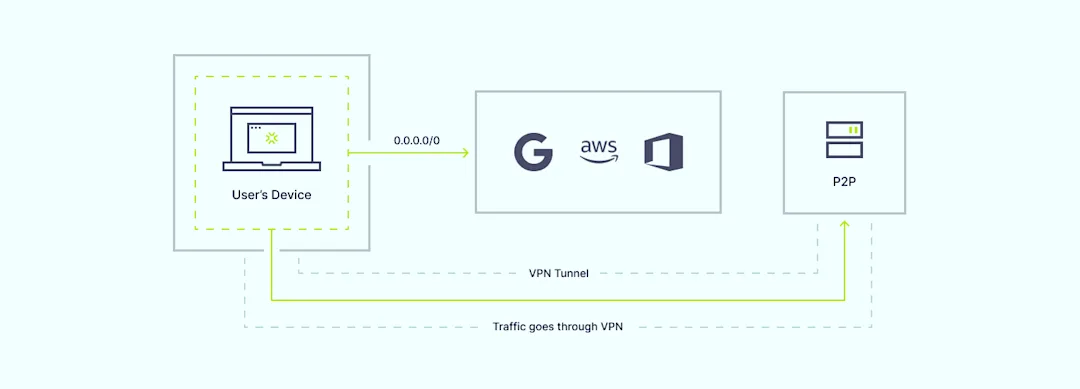
Traditional VPN connections route all internet traffic through an encrypted tunnel, providing robust security but potentially impacting performance for certain applications or services. VPN split tunneling breaks free from this one-size-fits-all approach by enabling you to specify which traffic should traverse the secure VPN tunnel and which can access the internet directly.

How NordLayer VPN split tunneling works

The process is remarkably straightforward: IT administrators define rules based on IP addresses, subnets, domain names, or even specific applications. By tailoring the rules to the organization’s needs, they can determine which network resources require the added protection of encrypted tunneling. This granular control ensures that mission-critical data associated with specific applications remains secure while other traffic, such as regular web browsing, flows uninterrupted. This optimization of network performance reduces potential bottlenecks, enhancing the user’s experience.

VPN split tunneling with NordLayer

At NordLayer, we’ve made it our mission to simplify the implementation of advanced networking solutions. Our VPN split tunneling feature easily integrates with our existing suite of products, providing a seamless and user-friendly experience.

To harness the power of VPN split tunneling, simply navigate to the “Network” section of the NordLayer Control Panel, select the desired server, and configure the split tunneling settings. Here, you can input the specific IP addresses or subnets you wish to route through our secure VPN servers, ensuring that only designated traffic utilizes the encrypted tunnel.

You also have the option to enable URL-based split tunneling directly from the Control Panel. Go to “Settings” and choose “Browser Extension Settings” to add specific domains you want to exclude from the encrypted VPN tunnel. This allows certain internet traffic to bypass encryption for optimized performance while maintaining security for other resources.

With our Core and Premium subscription plans, you gain access to this feature, unlocking new realms of network control and optimization. Premium subscribers can further leverage the Site-to-Site and Cloud Firewall capability, allowing secure access to private network subnets through the NordLayer gateway.

Differences between URL-based and IP-based split tunneling

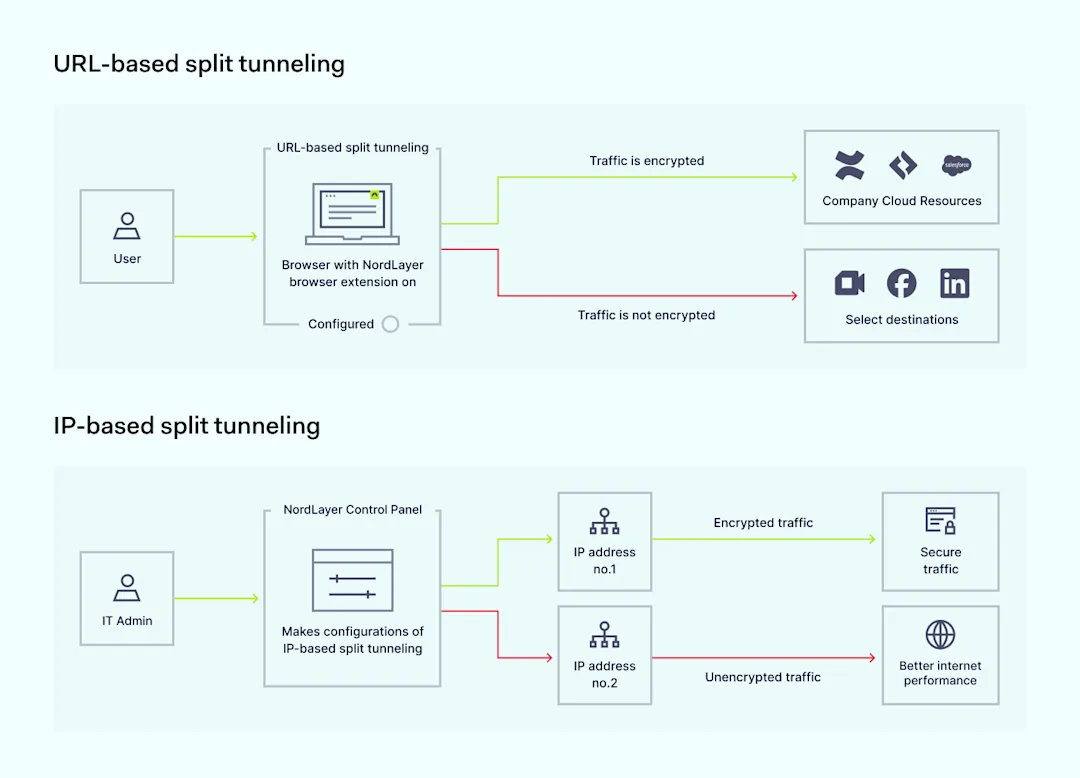
While VPN split tunneling is not a novel concept, NordLayer’s implementation stands apart, offering a flexible split tunneling solution with both URL-based and IP-based filtering options. This dual approach addresses the needs of modern organizations by allowing customized network security configurations.

URL-based split tunneling vs IP-based split tunneling

URL-based split tunneling

URL-based split tunneling for the Browser Extension allows you to create exceptions by excluding specific domains from the encrypted VPN tunnel. This method is ideal for scenarios where you want to bypass VPN encryption for certain domains to optimize the internet performance while keeping the security for organizational resources.

IP-based split tunneling

On the other hand, IP-based split tunneling, our newly released feature for desktop and mobile apps, takes a more targeted approach. Instead of excluding domains, it allows you to include specific IP addresses or subnets for encryption through the NordLayer VPN tunnel. It provides less sensitive web browsing traffic to bypass encryption while keeping the protective layer on through the use of NordLayer’s Secure Internet Access features, such as DNS Filtering by Category and ThreatBlock.

This granular control enables you to pinpoint the exact network resources that require the heightened security of encrypted tunneling, while all other traffic traverses the internet directly.

Together, these two methods create NordLayer’s comprehensive VPN split tunneling feature, providing unprecedented flexibility in tailoring your organization’s network security posture. By combining URL-based and IP-based split tunneling, NordLayer enables you to customize your network security posture according to your organization’s specific needs and use cases.

Benefits of VPN split tunneling

The advantages of implementing NordLayer’s VPN split tunneling are multifaceted, catering to the diverse needs of IT administrators, end-users, and the organization as a whole.

  • Selective encryption for resource access: By encrypting only the traffic destined for specific resources, IT administrators maintain optimal performance for non-sensitive data streams, ensuring critical resources remain secure

  • Increased flexibility for network access security: IT admins can choose whom to grant access to specific resources

  • Better VPN and internet performance: VPN split tunneling helps when users experience latency or disruptions by optimizing traffic flows

  • Optimized bandwidth usage: Some traffic bypasses the corporate network, reducing VPN congestion and improving overall performance

  • Enabling access to restricted sites: Certain websites like financial services or government portals may block VPN connections, but VPN split tunneling allows making exceptions while keeping other traffic secure

For IT administrators

Enhanced control over network traffic allows tailored routing policies based on organizational priorities. Additionally, streamlined management from the Control Panel provides the flexibility to configure the feature to suit the organization’s unique requirements.

For end-users

Improved productivity stems from encrypting only selected sensitive traffic, reducing potential latency and performance bottlenecks. VPN split tunneling also increases flexibility and freedom to access organizational resources or specific domains or applications without compromising speed or user experience.

For organizations

Optimized network efficiency results from selectively routing traffic through the VPN tunnel, reducing congestion and optimizing bandwidth usage. Furthermore, elevated security and risk mitigation are attained by directing critical internal systems through a VPN while allowing web browsing traffic to bypass encryption.

Should you use NordLayer’s VPN split tunneling?

The answer to this question lies in your organization’s specific needs and priorities. If you’re seeking a solution that strikes the perfect balance between robust security measures and uninterrupted performance, NordLayer’s VPN split tunneling is an invaluable asset.

This feature is particularly beneficial for organizations with remote or hybrid workforces, where employees require seamless access to both corporate resources and the open internet. By selectively encrypting traffic to internal systems and applications, you can maintain a high level of security without sacrificing productivity or user experience.

Additionally, VPN split tunneling can be a game-changer for businesses operating in regulated industries or those with strict compliance requirements. By granularly controlling the flow of sensitive data, you can ensure adherence to industry-specific regulations while optimizing network performance.

Take control of your network traffic with NordLayer

In the realm of cybersecurity, where threats evolve and network demands surge, mastering the delicate balance between security and performance becomes paramount. NordLayer’s VPN split tunneling feature empowers organizations to take control of their network traffic, ensuring sensitive data remains secure while maintaining optimal speeds for non-sensitive activities.

Embrace the power of VPN split tunneling and experience a new level of network control, flexibility, and peace of mind. Don’t settle for compromise—choose NordLayer’s VPN split tunneling to level up your network security and performance. Reach out to our team and discover how this innovative solution can transform the way you approach network management.

Together, let’s redefine what’s possible in the world of secure networking.

About Version 2 Digital

Version 2 Digital is one of the most dynamic IT companies in Asia. The company distributes a wide range of IT products across various areas including cyber security, cloud, data protection, end points, infrastructures, system monitoring, storage, networking, business productivity and communication products.

Through an extensive network of channels, point of sales, resellers, and partnership companies, Version 2 offers quality products and services which are highly acclaimed in the market. Its customers cover a wide spectrum which include Global 1000 enterprises, regional listed companies, different vertical industries, public utilities, Government, a vast number of successful SMEs, and consumers in various Asian cities.

About NordLayer
NordLayer is an adaptive network access security solution for modern businesses – from the world’s most trusted cybersecurity brand, Nord Security.

The web has become a chaotic space where safety and trust have been compromised by cybercrime and data protection issues. Therefore, our team has a global mission to shape a more trusted and peaceful online future for people everywhere.

About NordLayer
NordLayer is an adaptive network access security solution for modern businesses – from the world’s most trusted cybersecurity brand, Nord Security.

The web has become a chaotic space where safety and trust have been compromised by cybercrime and data protection issues. Therefore, our team has a global mission to shape a more trusted and peaceful online future for people everywhere.

Making sense of popular methods of authentication

They: Authenticate yourself! — You: But how?

Every time you log in to an account, you must first prove that you are who you say you are. It’s like entering a military base: no pass, no entry. But that’s what authentication is essentially about — verifying a user’s identity so that no unauthorized parties can get on the inside.

Depending on the platform, the methods used for authentication vary in complexity. Sometimes, a single password is enough to gain access. Other times, you must provide additional codes, click a link sent to you via email, or stare at your device’s camera so it can scan your face.

With so many methods of authentication available, we aim to help you navigate this landscape and understand why it’s important to authenticate and how to do so safely and conveniently. Let’s start with the “why.”

Why is user authentication important?

While we’ve already touched on the importance of authentication in the previous section, let’s delve deeper into why it’s so crucial.

Authentication serves as the gatekeeper to your online accounts and services. Its primary role is to ensure that only you — and authorized individuals — can access your financial records, personal messages, and other sensitive information.

Moreover, authentication helps prevent attempts to misuse your accounts for fraudulent transactions or nefarious activities under false identities. In other words, it ensures that you have control of your accounts and that no deceitful actions can be made in your name.

Needless to say, as a user, you are also more likely to engage with online services, share personal information, and conduct transactions when user authentication methods are in place. So, in a way, it is also a way to form and nurture trust between you, the user, and the service provider.

Types of authentication methods

Among the array of user authentication methods available today, six stand out as the most popular and crucial for cybersecurity. These include:

Token authentication

This form of authentication involves the use of a physical device, such as a USB token or smart card, to generate a one-time password or cryptographic key for accessing systems or services. The token authentication method provides an additional layer of security as the token must be in your possession.

Password authentication

Passwords are the most widely used method for user authentication, requiring individuals to provide unique combinations of characters to access their accounts or systems. Strong passwords should be complex and unique, incorporating a mix of letters, symbols, and numbers arranged randomly to thwart cybercriminals’ attempts at guessing them.

Biometric authentication

Biometric authentication utilizes unique physical or behavioral characteristics of individuals to verify their identity. This can include fingerprint recognition, facial recognition, iris scanning, or voice recognition. Biometric authentication offers a high level of security as it is difficult to replicate or fake these biological traits.

Multi-factor authentication

Multi-factor authentication (MFA) combines two or more authentication factors, such as something you know (password), something you have (token), or something you are (biometric), to verify a user’s identity. By requiring users to provide multiple identity proofs, MFA adds an extra layer of security, reducing the risk of unauthorized access — even if one factor is compromised.

A common implementation of MFA is two-factor authentication (2FA), which requires users to provide two different types of authentication factors before accessing their accounts

Certificate-based authentication

This method involves the use of digital certificates issued by a trusted authority to verify the identity of users or devices. The certificates are used in combination with public-key cryptography to authenticate users and encrypt data during transmission, ensuring secure communication between parties.

Passkey authentication

Passkeys are a new form of authentication where users are granted access without providing their password. Passkey technology combines biometric verification with cryptographic keys for a safer and easier way to log in. Each user has a unique pair of keys: a public one stored on the server and a private one on their device. When logging in, the server asks for the private key, which the device provides. If they match, you’re granted access.

Which authentication method is the safest one?

Naming just one of the secure authentication methods described above as the safest is not easy, especially since each method has its own strengths and weaknesses depending on the situation. For instance, while biometric authentication methods are highly effective, they are not immune to theft. So, if a cybercriminal gains access to someone’s fingerprint, that authentication method becomes compromised. After all, unlike a password, you cannot change your fingerprint.

So, if we were pushed to choose just one, we would say that passkeys are the safest authentication method because they help eliminate the risk of phishing, cannot be easily stolen or guessed (unlike weak passwords), and utilize strong cryptographic techniques to ensure the integrity and confidentiality of user credentials. Passkeys also avoid the pitfalls of traditional methods as they do not rely on something you need to remember, like a password, or something that can be physically stolen, like a security token.

In reality, however, the best approach is to use a combination of different methods tailored to the specific situation and required level of security. The best part is that you only need one tool to make this possible.

You don’t have to settle for just one authentication method

If you use NordPass, an advanced yet intuitive password manager designed by the team behind NordVPN, you gain immediate access to many of the best authentication methods available, allowing you to mix and match them for optimal security. How so?

First, NordPass can generate strong passwords on the spot and allows you to store your credentials safely in an encrypted vault that only you can access. It also enables you to implement multi-factor authentication for your online accounts, using the NordPass app as your authenticator to provide TOTP codes. Additionally, NordPass supports passkey technology, empowering you to effectively protect your accounts without passwords and access them instantly through methods such as biometric authentication.

With NordPass, authentication management becomes seamless and secure — get the 14-day free trial and see for yourself.

About Version 2 Digital

Version 2 Digital is one of the most dynamic IT companies in Asia. The company distributes a wide range of IT products across various areas including cyber security, cloud, data protection, end points, infrastructures, system monitoring, storage, networking, business productivity and communication products.

Through an extensive network of channels, point of sales, resellers, and partnership companies, Version 2 offers quality products and services which are highly acclaimed in the market. Its customers cover a wide spectrum which include Global 1000 enterprises, regional listed companies, different vertical industries, public utilities, Government, a vast number of successful SMEs, and consumers in various Asian cities.

About NordPass
NordPass is developed by Nord Security, a company leading the global market of cybersecurity products.

The web has become a chaotic space where safety and trust have been compromised by cybercrime and data protection issues. Therefore, our team has a global mission to shape a more trusted and peaceful online future for people everywhere.

How to disable Google Password Manager

Ready to make the next step in your password management journey and move on past the Google Password Manager? Well, you’re in the right place.

As much as Google’s password manager is convenient, some of you might be looking for higher levels of protection and flexibility. Be it more advanced encryption, in-depth insights on password strength, or the ability to handle your passwords seamlessly across any device, NordPass can serve as an excellent alternative. Let’s see why you may want to make the change and how you can disable Google’s password manager.

Important: Before you disable Google’s password manager

Before you disable the Google Password Manager, we highly recommend exporting all of your saved passwords. This step is critical in case something goes wrong during the transition to the new password manager. It also simplifies the process of importing all the login data into your next password manager such as NordPass, ensuring a seamless transition without the loss of any critical information. On top of that, having a copy of your stored passwords provides peace of mind; if you encounter any issues during the transition, you will still have a copy of your login credentials for your most important online accounts and services.

How to export your passwords from the Google Password Manager

Here’s a quick step-by-step guide for exporting your passwords from the Google Password Manager in Chrome:

  1. Open Google Chrome and go to Settings.

  2. Select the Autofill and Passwords tab and click Google Password Manager.

  3. Open Settings and select Download File.

  4. Enter your device’s password to export the passwords.

  5. Save the CSV file to your device.

That’s it! You’ve successfully exported your password from the Google Password Manager.

How to turn off Google Password Manager in Chrome on desktop

The Google Password Manager is turned on by default in all Chrome browsers. Switching it off is quick and easy though. Here’s how you can do it:

  1. Open Google Chrome and select your profile in the upper-right corner.

  2. Select the key icon under the profile image.

  3. Open Settings.

  4. Now switch off the toggle next to Offer to save passwords and Sign in automatically.

That’s it! The Google Password Manager on Chrome is now disabled.

How to turn off Google Password Manager on Android

Here’s a quick rundown of how you can turn off the Google Password Manager on your Android device:

  1. Open the Chrome app on your Android device.

  2. Tap the three dots in the top-right corner.

  3. Open Settings.

  4. Tap Password Manager.

  5. Select the gear icon next to Password Manager.

  6. Turn off the toggle next to Offer to save passwords and Auto sign-in.

You’re all done, the Google Password Manager is now turned off on your Android device.

How to turn off Google Password Manager on iOS

Here’s how you can turn off the Google Password Manager on your iOS device:

  1. Open the Chrome app on your iOS device.

  2. Tap the three dots in the bottom-right corner.

  3. Select Password Manager.

  4. Turn off the toggle next to Offer to save passwords.

How to set up a third-party password management solution

Transitioning from the Google Password Manager to a dedicated password manager such as NordPass is a significant step towards enhancing your online security and simplifying your online interactions.

NordPass is designed with user convenience and security in mind and offers a more tailored and robust password management experience. By setting up NordPass as your dedicated password manager, you’ll get a more secure and efficient way of managing your login credentials, credit card data, personal information, and more. The switch to NordPass is seamless and can be done in just a few simple steps. Here’s how you can set up NordPass as your primary password manager:

Download and install NordPass

  • Visit the NordPass website to download the extension or go to the App Store (iOS) or Google Play Store (Android) to get the mobile app.

  • Follow the setup instructions provided on the website or app store.

  • Sign up for a new account.

Import your passwords on desktop

Once you have NordPass installed, the next step is importing your passwords. This process ensures that all your login credentials from Google Password Manager are transferred to NordPass without any data loss. Here’s a rundown of how to do it:

  1. Open the NordPass extension on your browser.

  2. Open Settings.

  3. Navigate to the Import section.

  4. Select Google Password Manager or Google Chrome from the list of options.

  5. Click Import. (Alternatively, you can choose the Other option in the Import menu.)

  6. Now, upload the CSV file you previously exported from Google Password Manager.

That’s it! Your passwords from Google Password Manager will now appear in your NordPass Vault.

Import your passwords on mobile devices

  1. Open the NordPass application on your mobile device.

  2. Open Profile.

  3. Select the browser you want to import your login information from.

  4. Follow the steps on exporting your passwords from the specific browser.

Once you complete these steps, all saved passwords will appear in your NordPass vault.

Set up NordPass as your default password manager

To make the most out of NordPass, setting it as your default password manager will ensure all your new passwords and changes are automatically saved. Here’s how you can do that:

For Desktop:

  1. Download the NordPass browser extension from the Chrome Web Store or your preferred browser’s extension store.

  2. Install the extension and log in with your NordPass account.

For Android:

  1. Open the NordPass on your Android device.

  2. Select Profile and open Settings.

  3. Switch the toggle next to Turn on autofill.

  4. Select Open Autofill Service.

  5. Now select NordPass as the preferred autofill service in device settings.

That’s it! Now NordPass will allow you to autosave and autofill your credentials, which will essentially make NordPass your default password manager on your Android device.

For iOS:

  1. Open your device’s Settings.

  2. Go to Passwords.

  3. Tap Autofill Passwords.

  4. Select NordPass and disable any other services for the best autofill experience.

By following these steps, you will effortlessly transition to NordPass as your default password manager, enjoying a more secure, efficient, and comprehensive password management experience.

About Version 2 Digital

Version 2 Digital is one of the most dynamic IT companies in Asia. The company distributes a wide range of IT products across various areas including cyber security, cloud, data protection, end points, infrastructures, system monitoring, storage, networking, business productivity and communication products.

Through an extensive network of channels, point of sales, resellers, and partnership companies, Version 2 offers quality products and services which are highly acclaimed in the market. Its customers cover a wide spectrum which include Global 1000 enterprises, regional listed companies, different vertical industries, public utilities, Government, a vast number of successful SMEs, and consumers in various Asian cities.

About NordPass
NordPass is developed by Nord Security, a company leading the global market of cybersecurity products.

The web has become a chaotic space where safety and trust have been compromised by cybercrime and data protection issues. Therefore, our team has a global mission to shape a more trusted and peaceful online future for people everywhere.

Threat Protection Pro: Everyday online threats in numbers


According to new research by NordVPN, adult content, free video hosting sites, and sites that impersonate well-known and reputable brands have the most security and privacy threats, such as malware, intrusive ads, and trackers.

According to new research by NordVPN, a leading cybersecurity company, adult content, free video hosting sites, and sites that impersonate well-known and reputable brands have the most security and privacy threats, such as malware, intrusive ads, and trackers.

In May alone, NordVPN’s Threat Protection Pro feature blocked more than 5B intrusive ads, almost 40B trackers, and 60M malware infection attempts. With more than 50M malware-related incidents Americans are among the most affected among all Threat Protection Pro users globally. A thorough analysis of these suspended incidents revealed vital cybersecurity and privacy threats that users should be aware of and protect themselves.

“Every day, we face cyber threats without even noticing them. Even if we do not see malware or trackers with the naked eye or can handle the irritation caused by intrusive ads, it does not save us from severe privacy and cybersecurity issues. We should improve our knowledge and use trusted technology tools to avoid these threats. Most anti-malware features integrated into popular VPNs are usually limited to simple DNS filtering. NordVPN’s digital protection tool is now upgraded to Threat Protection Pro and helps users avoid hacking, tracking, phishing, scams, malware, and annoying ads and cookies,” says Adrianus Warmenhoven, a cybersecurity advisor at NordVPN.

Malware is malicious software: viruses, trojans, ransomware, and spyware designed to harm a user’s devices. It can steal sensitive data, encrypt important files, or even take over the devices, putting the criminal in complete control. The most common way users can get their devices infected with malware is by visiting malicious sites.

NordVPN research shows that from January 1 to May 31, Threat Protection Pro blocked more than 24M malicious links in adult content sites (or 8% from all blocked sites), as well as 16M links in uncategorized (5%), and 13M in web services (4%) sites.

Moreover, cybercriminals more often use deceptive misspellings of popular brands to trick victims into clicking phishing links and downloading infected files. As much as 99% of all phishing attacks use just 300 brands for deception. The most popular brands that users impersonated for spreading malware are Office365 (86K impersonated URLs discovered), Gazprom (60K), AT&T (28K), Facebook (19K), and Bet365 (15K)*.

“The brands themselves are not at fault — fakes like these also hurt their reputation, forcing companies to actively hunt them down. But high brand awareness can lull victims into a false sense of security and get them to lower their guard,” Warmenhoven says.

One device in The United States faces 89 malware attacks a month

The risk of getting infected with malware also varies by geographic region. These differences could be attributed to the varying levels of internet connectivity, economic development, and cybersecurity awareness in different countries.

NordVPN research showed that Threat Protection Pro blocked more than 50M attempts to infect American users’ devices during the research period. On average, one device owned by an American user is exposed to 89 malware-related incidents every month. In comparison, Ukraine is the most affected country, with 786 attempts to infect one device with malware per month.

Privacy-invading trackers reign in free video hosting websites

Web trackers are a broad category of privacy-invading tools that collect information on user activity. Trackers typically take the form of special scripts, browser cookies, or tracking pixels. Unfortunately, in the case of a data breach, the stored tracker data could end up falling into the hands of cybercriminals.

With this in mind, users should be highly attentive when using free video hosting (28% of all blocked trackers), online storage (13%), and search engines (13%), which, according to the research, are leaders in tracking user activities. Since January 1, Threat Protection Pro has blocked 39B trackers from free video hosting sites alone, while the online storage category is accountable for 18B trackers.

“Websites often share or sell data collected by trackers to third parties. But those who want to protect their privacy can use several tools to become less trackable. For example, VPN, which will change real IP address and virtual location, tracker blocker or privacy browsers”, says Warmenhoven.

Intrusive ads are not just annoying

Invasive and irrelevant ads popping up unexpectedly, blocking the host page, and opening new pages and windows are also the most common for free video hosting, adult content, and advertisement sites. Since the beginning of the year, Threat Protection Pro has detected and blocked billions of them: more than 2B, 1B, and 807M, respectively.

Moreover, intrusive ads are much more than just an annoying part of internet surfing; they are a matter of privacy and security. They can also infect users’ devices by linking to malicious sites, violate privacy by collecting data from web activity, and impact website loading speed.

How to stay safe from common cyber threats

To protect yourself from common cybersecurity threats like malware, trackers, and intrusive ads, Adrianus Warmenhoven advises to take these precautions:

  • Develop good cybersecurity habits. Cybercriminals prey on apathy, confusion, and ignorance, hoping that victims will forego due diligence. For example, most phishing attempts involve distorted names of popular brands.

  • Verify, download, scan, install. Malware executables may be disguised as or even hidden in legitimate files. Always verify the website you wish to download from, and always use anti-malware tools like Threat Protection Pro to inspect the files you download. This includes suspicious email attachments.

  • Be careful of where you go online. Certain web domain categories are much more likely to host malware that could compromise your device than others. If you visit websites that are likely to contain malware, pay attention to what you type, click, and download.

  • Let Threat Protection Pro keep you safe. Threat Protection Pro combines the best aspects of essential cybersecurity tools into one comprehensive security package. It will scan each file you download for malware, stop you from visiting malicious pages used for phishing, scams, and hosting malware, and block annoying ads.

Methodology: The statistics mentioned above were acquired by analyzing aggregated data gathered by NordVPN’s Threat Protection Pro service from January 1 to May 31, 2024. NordVPN is not endorsed by, maintained, sponsored by, affiliated, or in any way associated with the owners of the mentioned brands. Brands are indicated solely for the purpose of accurately reporting information related to brands that were most likely to be impersonated for spreading malware*.

ABOUT NORDVPN

NordVPN is the world’s most advanced VPN service provider, used by millions of internet users worldwide. NordVPN provides double VPN encryption and Onion Over VPN and guarantees privacy with zero tracking. One of the key features of the product is Threat Protection, which blocks malicious websites, malware during downloads, trackers, and ads. The latest service by the Nord Security team is Saily — a new global eSIM. NordVPN is very user friendly, offers one of the best prices on the market, and has over 6,200 servers covering 111 countries worldwide. For more information: https://nordvpn.com.

About Version 2 Digital

Version 2 Digital is one of the most dynamic IT companies in Asia. The company distributes a wide range of IT products across various areas including cyber security, cloud, data protection, end points, infrastructures, system monitoring, storage, networking, business productivity and communication products.

Through an extensive network of channels, point of sales, resellers, and partnership companies, Version 2 offers quality products and services which are highly acclaimed in the market. Its customers cover a wide spectrum which include Global 1000 enterprises, regional listed companies, different vertical industries, public utilities, Government, a vast number of successful SMEs, and consumers in various Asian cities.

About Nord Security
Nord Security is a cybersecurity company known for its flagship product, NordVPN. The company is dedicated to providing online security and privacy solutions to individuals and businesses globally.

×

Hello!

Click one of our contacts below to chat on WhatsApp

×