Skip to content

What is WebAuthn? A deep dive into passwordless authentication

We’re sorry, passwords – you’re just not enough anymore

There was a time when passwords were our go-to for authentication. When they were made strong, they were reliable, tough to guess, and hard to crack. These days, however, with hackers using highly sophisticated phishing tactics and advanced password-cracking algorithms, passwords have been reduced to a weak link in our security practices. Sad but true.

And so, it’s time for us to explore better options for protecting our accounts and data. This means moving to a passwordless approach, which might sound a bit daunting but can actually make things more secure and user-friendly. Let us explain a bit more.

Limitations of password-based authentication

An average internet user has around 170 online accounts. Let’s suppose you have fewer, say, 40 accounts. Even then, once you start using a strong, 16-character password for each and every one of those accounts, you’ll quickly see it’s not a convenient method of ensuring online protection. And the problem is, it’s not so safe anymore, either.

According to Verizon’s 2023 Data Breach Investigations Report, stolen credentials are among the top three main methods of accessing organizations. This happens for a few reasons. First, many people reuse passwords across multiple accounts, so if one account is compromised, it can lead to others being at risk, too. Second, a lot of people use weak passwords that are easy to guess or crack. Third, cybercriminals trick users into revealing their login details through phishing. Additionally, many users don’t use multi-factor authentication (MFA), which normally provides an extra layer of security when hackers get ahold of their login credentials.

With these security concerns in mind, some organizations have explored the possibility of getting rid of passwords altogether and replacing them with something better. This brings us to WebAuthn.

What is WebAuthn, exactly?

Developed by the World Wide Web Consortium (W3C) in collaboration with the FIDO Alliance, WebAuthn is a web standard for secure authentication based on public-key cryptography. In simpler terms, WebAuthn allows users to log in to websites without using passwords, instead relying on biometrics, security keys, or other authenticators like passkeys.

The main goal of WebAuthn is to provide a more secure alternative to passwords, creating a safer online environment and significantly reducing the risk of phishing and other cyberattacks. Importantly, WebAuthn is backed by major web browsers and platforms, so you get a seamless and secure experience no matter what device or service you’re using.

So, how does WebAuthn work?

The process is pretty straightforward, and once you know the steps, you can easily visualize WebAuthn in action. Here’s how it works in a nutshell:

  1. Signing up: When you register for a service, the server sends a random value (also known as a “challenge”) to your device.

  2. Creating keys: Your device uses this challenge to generate a pair of keys: a public key, which is sent to and stored on the server, and a private key, which remains safely on your device.

  3. Logging in: Each time you log in, the server sends a new challenge. Your device encrypts this challenge with the private key, and the server verifies the encrypted data using the public key it has stored.

The whole idea is to keep your private key safe, even if the server gets hacked. This way, unauthorized parties can’t get access because the private key never leaves your device.


The benefits of WebAuthn

The WebAuthn standard is a real game-changer for everyone involved, though the benefits vary depending on whether you’re an end-user or a business. So, let’s now break down what each side can potentially gain and dive into how WebAuthn can help both hit a home run.

End-users

The biggest benefit for users is how much easier and quicker logging in becomes. No more hassle with complex passwords – often, it’s just one click to get into your accounts. And you don’t have to stress about security, either. WebAuthn boosts your privacy by using advanced cryptography, making it nearly impossible for cybercriminals to get into your accounts. Plus, it seriously cuts down on the risk of password theft and phishing attacks.

Businesses

For businesses, WebAuthn is a way to fight off the growing threat of credential-based cyberattacks. By adopting this standard, organizations can enhance their security posture with minimal disruption, as WebAuthn integrates smoothly with existing systems and workflows. This transition also translates into cost savings and improved operational efficiency by reducing password-related support requests. Not to mention the fact that businesses that implement WebAuthn can elevate their reputation by being seen as security-conscious.

Thanks to organizations like the FIDO Alliance, WebAuthn is gaining traction across many different sectors. In e-commerce, it’s revolutionizing the way customers log in and pay, making transactions more secure and smoother. Banking institutions have started to use WebAuthn to safeguard online transactions and account access, adding a robust defense against unauthorized access. Social media sites are also jumping on board, using WebAuthn to fend off phishing attacks and streamline the login process for their users. There are many other industries where WebAuthn has made a significant impact, which is why it’s becoming a technology that might soon make passwords a relic of the past.

Challenges and limitations

This might sound a little bold, but there are no major challenges or limitations when dealing with WebAuthn. While there might be some obstacles, they can be easily addressed with common-sense actions or by using available tools. Let us explain.

First, for WebAuthn to work properly and provide the right level of security, biometric data must be handled with the utmost care, ensuring it is protected against unauthorized access and misuse. This is a straightforward practice and essential for maintaining user trust. Though some might find this a big challenge, it is manageable with current security protocols and best practices, making it more of a standard requirement than a hurdle.

Second, some might argue that reliance on biometric devices may not be universally available or convenient for all users. However, as biometric technology becomes more prevalent in our digital lives, this concern is diminishing. NordVPN’s survey shows that more than 50% of Americans use biometrics daily, while other research indicates that over 80% of smartphones have biometric capabilities. So, we’re on track to make it a global standard.

Third, some claim that implementing passwordless solutions can be complex for developers, requiring companies to make significant investments and extra effort. However, there are already tools available that simplify this process, enabling businesses to implement password-free logins based on passkeys with ease. One such tool is Authopia.

Introduce passwordless logins for your customers today

Dedicated to helping organizations make passwordless options part of their login experience, we’ve created a tool called Authopia that allows them to easily add a passkey widget to their website or service.

It’s super simple to use: you just grab the pre-written code, have someone with basic IT knowledge implement it, register your product with Authopia, and voilà – you’ve got a passkey option available for your customers. It’s quick, efficient, and doesn’t require a big investment or the hiring of additional IT specialists. So, if you want to be ahead of the curve and enhance your login experience, consider giving Authopia a try.

If you need more info on going passwordless, check out our other materials, like the one where we compare passwords and passkeys to help you decide which is best.

About Version 2 Digital

Version 2 Digital is one of the most dynamic IT companies in Asia. The company distributes a wide range of IT products across various areas including cyber security, cloud, data protection, end points, infrastructures, system monitoring, storage, networking, business productivity and communication products.

Through an extensive network of channels, point of sales, resellers, and partnership companies, Version 2 offers quality products and services which are highly acclaimed in the market. Its customers cover a wide spectrum which include Global 1000 enterprises, regional listed companies, different vertical industries, public utilities, Government, a vast number of successful SMEs, and consumers in various Asian cities.

About NordPass
NordPass is developed by Nord Security, a company leading the global market of cybersecurity products.

The web has become a chaotic space where safety and trust have been compromised by cybercrime and data protection issues. Therefore, our team has a global mission to shape a more trusted and peaceful online future for people everywhere.

What NordPass can do that OS-specific password managers can’t

It’s not about the name – it’s about functionality

Apple recently made headlines with the launch of Apple Passwords, a new password management app currently in beta for iOS 18 users. Although this is significant news, this isn’t the first time a major tech player has ventured into password management. Microsoft introduced its Windows Credential Manager with Windows XP back in 2001, and it has been a part of every version of Windows since then, continuously updated.

When a big name like Apple releases a new product, there’s always a buzz about it aiming to be the best in its category. However, a big brand name doesn’t always guarantee the best option available—though it doesn’t mean the product is bad either.

So, when it comes to choosing the right password manager, it’s important to look beyond the brand and focus on functionality. To help with that, let’s compare the features of these OS-specific password managers with NordPass and highlight the elements that stand out.

OS-specific password managers vs. NordPass

When comparing NordPass to platform-specific password managers, two key factors to consider are security and ease of use. Let’s dive into these aspects in detail:

Security

Although the core function of all password managers is to keep all passwords safe in one place, it is not that all password managers provide the same level of protection.

Password storage

Microsoft Credential Manager stores passwords locally on your device and encrypts them using the Windows Data Protection API (DPAPI). This setup is convenient for Windows users, but it relies on the security of the Windows operating system itself. Apple Passwords, in contrast, stores passwords in the iCloud Keychain, allowing secure access across all Apple devices.

NordPass takes a slightly different approach by keeping all passwords and other sensitive data in an encrypted cloud vault that can be accessed from any device. Moreover, NordPass uses XChaCha20, an encryption standard known for its exceptional security and performance, to encrypt the data before it is uploaded to the cloud. This ensures that all the information stored in the vault remains fully secure.

The zero-knowledge architecture

The term “zero-knowledge architecture” describes a design where a product is built so that the provider cannot access the user’s data stored in the system or service. Microsoft Credential Manager doesn’t fully follow this approach. Although it encrypts passwords, the encryption keys and processes are managed by Windows, which means Windows itself could potentially decrypt the data.

Apple Passwords uses a version of zero-knowledge with end-to-end encryption. This setup ensures that Apple can’t access your passwords because only your device holds the decryption keys.

NordPass goes all in with zero-knowledge architecture, with encryption and decryption occurring only on the user’s device to ensure that no one—including the NordPass team—can access their passwords.

Safe credential sharing

Microsoft Credential Manager doesn’t offer a built-in way to share passwords, so you have to do it manually, which can be quite risky. Apple Passwords makes sharing easier and more secure by using AirDrop and iCloud, with encryption to protect your credentials during transfer. NordPass, however, offers secure password-sharing features directly in the app, allowing you to share passwords with trusted contacts through encrypted channels.


Ease of use

The ease of use for password managers largely depends on their compatibility with your devices and how simple it is to use and manage your stored passwords. Let’s look at how these aspects compare among the OS-specific solutions and NordPass.

Compatibility

Windows Credential Manager is well-integrated with the Windows system but is limited to Microsoft environments. It only supports browser extensions for Internet Explorer and Microsoft Edge, which might be inconvenient for users who prefer other browsers.

The Apple Passwords app works seamlessly across Apple devices like iPhones, iPads, and Macs, and integrates well with various Apple services. It also offers browser extensions for Safari, providing a smooth experience for users within the Apple ecosystem. However, its support for non-Apple platforms and browsers is highly limited.

NordPass offers broad compatibility across multiple operating systems, including Windows, macOS, Linux, iOS, and Android. It also provides extensions for popular browsers like Chrome, Firefox, and Edge, ensuring a consistent experience regardless of the platform or browser you’re using.

Login experience

Microsoft Credential Manager does a decent job with autofill and autosave for Windows apps, but it’s quite basic compared to other options. Apple Passwords excels at autofill and autosave features within the Apple ecosystem. It automatically fills in login details and saves new passwords across Safari and other supported apps, making it easy for users to manage their credentials on Apple devices.

NordPass offers robust autofill and autosave features across various browsers and applications. It ensures that your credentials are automatically filled in and saved as you browse, making password management effortless. NordPass also provides seamless integration with its mobile and desktop apps, enhancing the overall user experience.

Additional features

Some modern password managers do more than just help you manage your passwords – they offer extra features that can boost your cybersecurity and make navigating the online world somewhat easier. However, this isn’t true for all of them.

OS-specific solutions

Microsoft Credential Manager mainly focuses on handling credentials without offering much beyond that. Its key extra feature is support for Windows Hello, which allows you to log in using biometric authentication.

Apple Passwords, on the other hand, provides a wider range of features. It can detect weak, reused, and compromised passwords, generate strong new ones, and sync credentials across Apple devices. It also integrates with two-factor authentication, generating and autofilling verification codes for supported accounts. These features make Apple Passwords a more optimal choice for Apple customers.

NordPass

NordPass includes the features of Apple Passwords, such as password health checks, secure credential sharing, two-factor authentication (2FA), password generation, and data breach alerts. But it also offers some additional benefits:

  • Email Masking: This feature lets users create temporary email addresses for signing up for services or newsletters so that they don’t have to share their real email addresses.

  • Activity Log: With NordPass, businesses can keep an eye on all account access activity across their organizations, making sure that only the right people are getting into the right resources.

  • Data Breach Scanner: Apple Passwords can alert you if your passwords are compromised, and so can NordPass. But NordPass goes a step further with its advanced data breach monitoring tool for businesses. It scans the dark web for any mentions of a company’s credentials and sends instant alerts if its business information is at risk.

  • Company-Wide Settings: NordPass also lets organizations set and enforce a strong password policy for all employees. This ensures everyone uses secure passwords, enhancing overall security.

Additionally, by making it easy to onboard and offboard members, and featuring a user-friendly design that’s easy to navigate, NordPass provides a comprehensive solution that covers a lot of cybersecurity ground. This allows both individual users and organizations to protect themselves more effectively and enjoy greater freedom online.

What are the risks associated with using an OS-specific password manager?

First off, using a password manager tied to a specific OS, like Apple Passwords, can cause issues if you want to sync or access your passwords across different devices, unless they’re all from Apple. This could lock you into one vendor’s ecosystem and make it difficult to switch platforms later without losing access to your passwords. There are also potential security risks if the OS updates, which could affect how the password manager works and lead to compatibility issues or vulnerabilities.

For companies, the problems can be even bigger. Employees on different operating systems might face inefficiencies because there’s no unified solution, leading to downtime and decreased productivity. IT departments would need to manage multiple systems, which can be more complex and require more time to support and maintain. This might also mean extra training, which adds to the costs.

Additionally, since it’s uncommon for all employees to use the same brand of device, enforcing consistent security policies for multiple password managers becomes challenging. This can create security gaps and make it harder to meet some industry standards and data privacy regulations.

Give NordPass a try and form your own opinion

We could go on to explain the differences between NordPass and OS-specific password managers, and point out how we think NordPass excels in terms of security and usability. However, it’s always better to feel the difference rather than just hear about it.

Therefore, we encourage you to try our 14-day free trial for the Business plan (30 days for Premium) and see for yourself how NordPass offers an enhanced password management experience beyond what you might expect from similar tools. We’d be interested to hear your thoughts!

About Version 2 Digital

Version 2 Digital is one of the most dynamic IT companies in Asia. The company distributes a wide range of IT products across various areas including cyber security, cloud, data protection, end points, infrastructures, system monitoring, storage, networking, business productivity and communication products.

Through an extensive network of channels, point of sales, resellers, and partnership companies, Version 2 offers quality products and services which are highly acclaimed in the market. Its customers cover a wide spectrum which include Global 1000 enterprises, regional listed companies, different vertical industries, public utilities, Government, a vast number of successful SMEs, and consumers in various Asian cities.

About NordPass
NordPass is developed by Nord Security, a company leading the global market of cybersecurity products.

The web has become a chaotic space where safety and trust have been compromised by cybercrime and data protection issues. Therefore, our team has a global mission to shape a more trusted and peaceful online future for people everywhere.

Understanding the differences between DORA and NIS2

Are you prepared for the new cyber storm on the horizon? Major regulatory changes are coming that will impact many European organizations. With the rise of cyber threats in recent years, European governments have introduced new regulations to strengthen the cybersecurity requirements for organizations across industries.

Two major upcoming directives—DORA and NIS2 from the European Union—aim to bolster cyber resilience for essential services. Strengthening defenses is crucial, yet sorting through shifting security rules and standards can feel overwhelming.

While both address improving cyber defenses, these regulations differ in scope and requirements. This guide is here to help you navigate the changes with clarity. We’ll explore the key details of each directive, compare their differences, and discuss how to prepare your organization for compliance.

What is DORA?

The Digital Operational Resilience Act (DORA) is an EU regulation aimed at ensuring the financial sector within the EU can withstand, respond to, and recover from all types of ICT-related disruptions and threats. It focuses specifically on financial entities like banks, investment firms, and others that provide critical financial services.

The primary goal of DORA regulation is to enhance operational resilience and manage risks associated with third-party service providers. Set to take effect in January 2025, DORA will significantly impact financial sector organizations operating within the European Union.

What is NIS2?

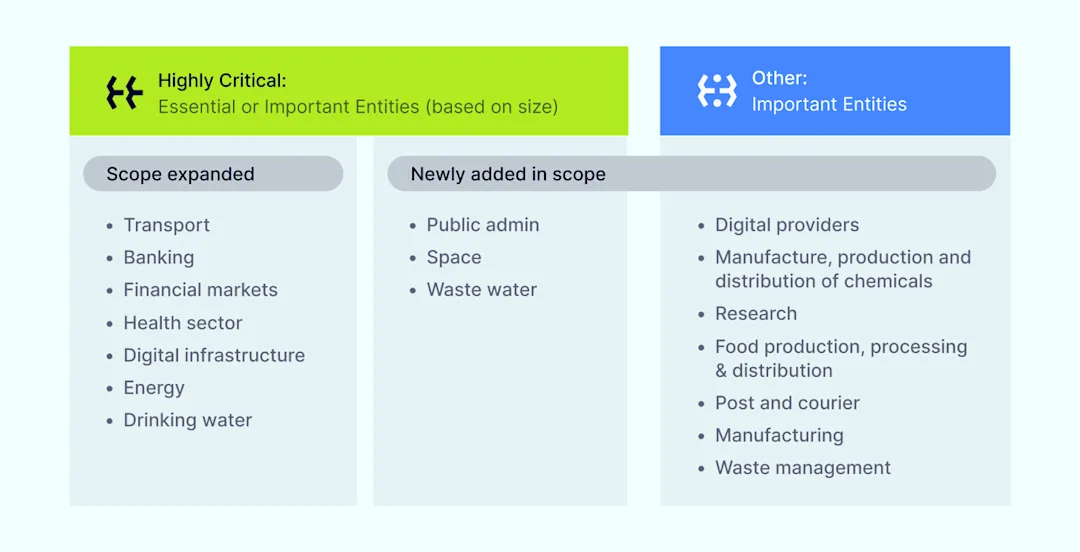
The Revised Network and Information Systems (NIS2) Directive is an updated EU cybersecurity law that expands the scope of its 2013 predecessor. NIS2 broadens the categories of “important” and “essential” entities subject to the regulation beyond just operators of critical infrastructure like energy, transport, banking, financial market infrastructures, and health. 

Essential versus important entities

The directive also imposes new requirements for supply chain security, risk assessments, incident reporting, and third-party risk management. The NIS2 Directive will be enforced starting in October 2024 and apply to any essential service provider operating within the EU.

Why are NIS2 and DORA important?

Attacks can disrupt essential functions and compromise privacy as more services and personal data move online. To mitigate cyber risks, both NIS2 and DORA aim to increase operational resilience and security practices across crucial sectors.

Therefore, the two directives are crucial for businesses due to several compelling reasons:

  • Enhanced cybersecurity. DORA focuses on the financial sector, emphasizing operational resilience and risk management, ensuring financial entities can withstand and quickly recover from cyber incidents. NIS2 applies to a broader range of essential service providers, significantly bolstering their cybersecurity measures.

  • Regulatory compliance. Both directives set strict regulatory requirements. Non-compliance can lead to hefty fines, sanctions, and damage to a company’s reputation. Ensuring compliance helps businesses avoid these financial and legal risks, maintaining a positive standing with regulators and customers.

  • Customer trust & confidence. Compliance with NIS2 and DORA demonstrates a business’s commitment to protecting personal and financial data, fostering trust and confidence among customers. This trust can translate into customer loyalty and a competitive edge in the market.

  • Operational resilience. Both directives aim to enhance the resilience of critical infrastructure. DORA ensures that the financial sector can continue operating smoothly during cyberattacks, whereas NIS2 focuses on ensuring the continuity of services provided by essential entities across various sectors.

  • Supply chain security. NIS2 requires businesses to assess and manage risks associated with their third-party vendors, mitigating potential vulnerabilities. DORA also includes provisions for third-party risk mitigation, ensuring robust measures are in place to manage risks from external service providers.

  • Incident reporting & response. Both NIS2 and DORA mandate comprehensive incident reporting and response mechanisms, ensuring businesses can promptly detect, respond to, and recover from cyber incidents. Regular breach reporting and analysis help improve overall cybersecurity strategies.

  • Harmonized standards. These directives aim to harmonize cybersecurity standards across the EU, creating a more consistent and secure digital environment. This simplifies compliance efforts and ensures businesses operate at the highest security standards across all regions.

  • Future-proofing. As cyber threats evolve, regulatory requirements are likely to become more stringent. By complying with DORA and NIS2, businesses position themselves ahead of the curve, proactively adopting best practices to adapt to future regulatory changes.

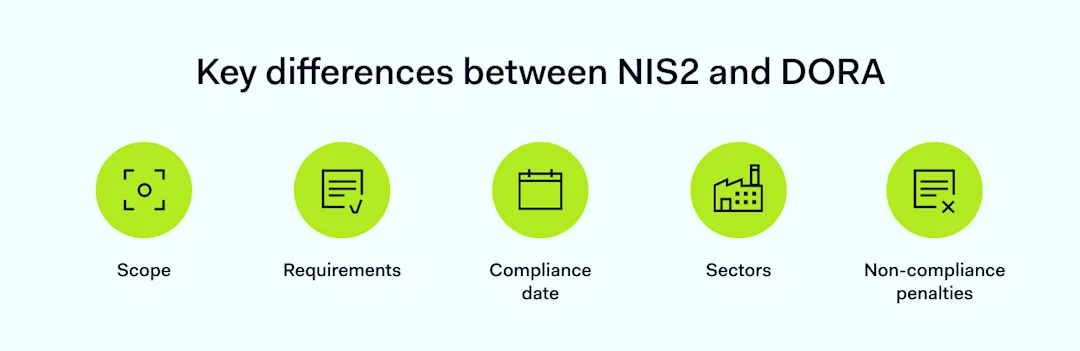
Key differences between NIS2 and DORA

Even though NIS2 and DORA directives may seem similar, there are some key differences organizations should be aware of. While both frameworks aim to bolster security, their scopes, sectors, compliance dates, and requirements vary.

  • Scope: DORA applies to financial sector entities within the EU, while NIS2 Directive covers all essential service providers across the EU

  • Sectors: DORA targets the financial sector, whereas NIS2 expands to industries like health, energy, and more

  • Compliance date: DORA is set to take effect in January 2025, while NIS2 Directive goes into effect in October 2024

  • Requirements: DORA regulation emphasizes operational resilience, whereas NIS2 includes comprehensive supply chain reviews and stringent reporting obligations

  • Non-compliance penalties: Entities found non-compliant with DORA may face fines up to 2% of annual global turnover or €1 million for individuals, whereas NIS2 establishes larger fines of up to €10 million or 2% of turnover—whichever is higher—for non-compliance

By recognizing these distinctions, businesses can better navigate their compliance strategies, ensuring they meet the necessary standards and improve their cybersecurity defenses.

Preparing for increased compliance

To effectively prepare for NIS2 and DORA compliance, businesses should take the following steps:

Conduct risk assessments

Perform thorough vulnerability assessments to identify potential vulnerabilities and threats. Evaluate the impact of identified risks on your organization and prioritize mitigation strategies.

Review third-party relationships

Assess the security posture of all third-party vendors and partners and ensure that third-party risk mitigation practices, including regular audits and reviews, are in place.

Develop and document incident response plans

Create detailed incident response plans outlining steps to take during a cybersecurity event; ensure these plans are well-documented and accessible to all relevant personnel.

Implement reporting procedures

Establish clear procedures for reporting security incidents to regulators and stakeholders. Ensure these procedures comply with the requirements of NIS2 and DORA.

Train staff regularly

Conduct regular training sessions on cyber hygiene, focusing on password management and recognizing phishing attempts—provide specialized training on spear phishing and other targeted attack methods.

Document compliance efforts

Maintain thorough documentation of all compliance-related activities and efforts. This documentation demonstrates diligence and can be beneficial during regulatory reviews.

Outsource to experts

Consider outsourcing functions like cloud infrastructure management, security monitoring, or compliance auditing to specialized service providers. Leveraging expert services can reduce the burden on in-house teams and ensure higher compliance standards.

Audit & update regularly

Schedule regular internal audits to review compliance status and identify areas for improvement. Stay updated on changes in regulatory requirements and adjust your strategies accordingly.

Engage with regulatory bodies

Maintain open communication with relevant regulatory bodies to stay informed about compliance expectations. Seek guidance and clarification on any aspects of DORA and NIS2 that may be unclear.

How NordLayer can help achieve compliance

As a network security provider, NordLayer offers tools and services tailored to help organizations achieve compliance with both directives:

  1. Secure access management: Utilize our business VPN for encrypted connections with masked identities, and implement Always-On VPN and Multi-Factor Authentication (MFA) to ensure safe and controlled access to your network. Secure access technologies ensure compliance with DORA’s emphasis on thorough access control practices, in addition to fulfilling many of the access governance standards outlined in NIS2.

  2. Network segmentation: Enforce stringent security policies using a robust Cloud Firewall and advanced access control features like Network Access Control (NAC).

  3. Continuous visibility & monitoring: A network visibility solution ensures comprehensive monitoring of network activity and devices. It fuses activity information, Server Usage Analytics, and Device Posture Monitoring to track traffic and performance in real-time. Ensure secure network access through features such as DNS filtering and Device Posture Security checks that verify endpoint security posture before network entry. Such visibility is crucial for meeting regulatory requirements, facilitating audits, and demonstrating practical usage of security controls.

  4. Protection of sensitive information: Comply with data sovereignty requirements through comprehensive NAC solutions like VPN gateways, dedicated servers, Cloud Firewall, and Device Posture Security, as well as advanced user authentication methods, such as MFA, biometrics, SSO, and user provisioning—addressing DORA’s and NIS2’s mandates for data protection.

  5. Manage vendor risks: Our solutions isolate third-party access to only needed resources. Additionally, NordLayer can be trusted to comply with customers’ vendor security requirements and international standards.

With NordLayer, businesses can simplify infrastructure security management and meet the stringent requirements of both the NIS2 and DORA directives. Contact us to discuss how we can assist with your compliance journey.

About Version 2 Digital

Version 2 Digital is one of the most dynamic IT companies in Asia. The company distributes a wide range of IT products across various areas including cyber security, cloud, data protection, end points, infrastructures, system monitoring, storage, networking, business productivity and communication products.

Through an extensive network of channels, point of sales, resellers, and partnership companies, Version 2 offers quality products and services which are highly acclaimed in the market. Its customers cover a wide spectrum which include Global 1000 enterprises, regional listed companies, different vertical industries, public utilities, Government, a vast number of successful SMEs, and consumers in various Asian cities.

About NordLayer
NordLayer is an adaptive network access security solution for modern businesses – from the world’s most trusted cybersecurity brand, Nord Security.

The web has become a chaotic space where safety and trust have been compromised by cybercrime and data protection issues. Therefore, our team has a global mission to shape a more trusted and peaceful online future for people everywhere.

About NordLayer
NordLayer is an adaptive network access security solution for modern businesses – from the world’s most trusted cybersecurity brand, Nord Security.

The web has become a chaotic space where safety and trust have been compromised by cybercrime and data protection issues. Therefore, our team has a global mission to shape a more trusted and peaceful online future for people everywhere.

How to change or reset your Instagram password

Why reset your Instagram password? 

Most people don’t think about changing their login details unless they forget them, but there are several reasons why you should know how to reset your Instagram password.

The primary concern when you’re online is security. For most users, Instagram’s private messenger is now one of its main appeals. Many also depend on the app to promote their business, which makes maintaining security even more essential.

Hackers are always looking for new ways to steal data, and social media accounts are tempting targets. These days, Instagram scams are rampant. Bad actors are increasingly becoming more sophisticated in the way they act. One of the best ways to combat this threat is by changing your password regularly or using a password manager.

Using the same details for multiple sites increases the risk of password cracking. The hack could spread if one account is compromised unless you can quickly change passwords elsewhere.

What happens if your Instagram is hacked?

We usually worry about attackers spying on emails or stealing banking information, but a hacked Instagram account can also be a real problem. Once a malicious actor takes control of the profile, they can change the password and lock the user out.

For many of us, Instagram is one of our main messaging services, through which we share personal photos, talk to our friends, and keep in touch with family. Would you want a stranger to access your inbox?

As we mentioned before, for many businesses and entrepreneurs, Instagram provides an essential platform for promotion and direct sales. Losing control of that account could mean a disruption in revenue and, even worse, the loss of a critical marketing channel.

Being able to change your login details is a must. You can reset Instagram passwords through a web browser if you don’t have access to your phone or directly through the app on your device.

How to change your Instagram password on the app

The process of resetting your Instagram passwords is essentially the same whether you use an iOS or Android device. Here are the steps that you should follow:

  1. Open your Instagram app.

  2. Click the account icon in the lower-right corner.

  3. Click the three horizontal lines at the top right of the screen.

  4. Click “Settings.”

  5. Click “Security.”

  6. On the Security page, click “Password.”

  7. Input your current password.

  8. Input your new password and click “Save” or the checkmark.

How to change your Instagram password on the desktop website

  1. Navigate to the Instagram site on your web browser.

  2. Click the account button in the top-right of the window and click “Profile.”

  3. Click the “gear” button to the right of Edit Profile.

  4. Click “Change Password.”

  5. Input your current password.

  6. Input your new password and click “Change Password.”

How to reset a forgotten Instagram password

You can reset a forgotten password through a browser or directly through the app.

  1. Navigate to the login page, either in-app or through a browser.

  2. Click “Forgot password?” or “Get help logging in.”

  3. Input your username or email address. Depending on how you’ve set up your account, you may also be able to use your phone number.

  4. Instagram will send instructions to your associated email address, which you can follow to confirm your identity and reset the password.

How to reset your password using your Facebook account

If your Instagram account is linked to your Facebook profile, you can use your Facebook account to reset your Instagram password. Here’s how to do it:

  1. Open the Instagram app.

  2. Click on “Forgot password?” on the login interface.

  3. Select “Log in with Facebook.” This will take you to a Facebook login screen if you’re not already logged in to Facebook on your device.

  4. Log in to Facebook.

  5. Follow the instructions provided to reset your Instagram password.

Additionally, if you need instructions on how to reset your Facebook password, check out our blog on the subject.

Password protection

Changing your login credentials regularly is an integral part of password best practice. To secure your accounts online, a password manager will ensure that you never get locked out of your Instagram account again.

NordPass generates complex passwords that hackers will struggle to crack, storing them in encrypted vaults. The service auto-fills forms and login interfaces, so you don’t need to worry about remembering your details.

It’s a simple solution that will strengthen your data security and make accessing social media the stress-free experience it should be.

About Version 2 Digital

Version 2 Digital is one of the most dynamic IT companies in Asia. The company distributes a wide range of IT products across various areas including cyber security, cloud, data protection, end points, infrastructures, system monitoring, storage, networking, business productivity and communication products.

Through an extensive network of channels, point of sales, resellers, and partnership companies, Version 2 offers quality products and services which are highly acclaimed in the market. Its customers cover a wide spectrum which include Global 1000 enterprises, regional listed companies, different vertical industries, public utilities, Government, a vast number of successful SMEs, and consumers in various Asian cities.

About NordPass
NordPass is developed by Nord Security, a company leading the global market of cybersecurity products.

The web has become a chaotic space where safety and trust have been compromised by cybercrime and data protection issues. Therefore, our team has a global mission to shape a more trusted and peaceful online future for people everywhere.

Third-party reviews: Tailscale alternatives and competitors

With the rise in cyber-attacks, choosing the right tool to protect your organization is crucial. The best tool for you depends on the features you need, your IT team’s capabilities, budget, and other factors. Tailscale is one option offering Zero Trust Network Access (ZTNA) features. This article reviews Tailscale’s competitors and alternatives, comparing secure network access solutions and VPNs with other popular options.

Overview of Tailscale

Tailscale focuses on securely connecting users, services, and devices for remote access. It uses WireGuard, an open-source protocol, to create secure VPN connections. Due to its high-speed cryptography and integration within the Linux kernel, WireGuard is faster than older protocols like IPsec and OpenVPN.

While some users see Tailscale’s B2C offering as just a more user-friendly version of WireGuard, its offering for organizations includes additional features. Tailscale’s Zero Trust features and VPN support remote work and protect segmented networks.

Most mentioned product strengths

Tailscale has several notable features that make it popular for remote access and network security:

  1. WireGuard protocol which ensures fast and secure connections

  2. Multi-factor authentication makes systems more secure

  3. End-to-end encryption protects network traffic

  4. Device sharing feature helps in troubleshooting

Most mentioned overall product benefits of Tailscale

Here’s what users enjoy about the software:

  1. Easy to set up

  2. User-friendly

  3. Fast because it uses WireGuard

  4. Offers a free trial

Tailscale’s limitations

Tailscale’s limitations, according to the review platforms, are:

  1. Limited security and compliance features for enterprise needs

  2. Payment by invoice is only available for the Enterprise plan

  3. Requires opening ports on corporate firewalls

Let’s look now at Tailscale alternatives.

Disclaimer: This product review is based on information provided on VPN review sites and forum social networks such as G2 and Reddit and assessed customer feedback shared on these platforms, accessed on August 5, 2024.

NordLayer

Overview of NordLayer

NordLayer is a network protection solution that provides secure access to company resources from anywhere. It boosts network security, supports remote work, and helps achieve compliance. NordLayer is a multi-layered network protection tool from Nord Security, the creators of NordVPN, a widely used VPN service.

NordLayer helps organizations adopt Firewall as a Service (FWaaS), Zero Trust Network Access (ZTNA), and Secure Web Gateway (SWG) principles, focusing on the Secure Service Edge (SSE). It provides SaaS security features for internet, resource, and network access control.

NordLayer is flexible and scalable, making it a good fit for businesses of all sizes.

Product strengths

The solution enhances network security with several capabilities:

  1. ZTNA features, such as Cloud Firewall, Device Posture Security, Virtual Private Gateways, etc., allow only authorized users and devices to access the network

  2. Encryption and a set of SWG features for safe browsing, like DNS filtering and ThreatBlock, make internet access more secure

  3. Establishes a reliable remote connection to hybrid networks and remote devices, enabling secure remote work

  4. Offers strong identity and access management solutions that include Multi-Factor Authentication (MFA), Single Sign-On (SSO), and user provisioning

Product benefits of NordLayer

Product benefits of NordLayer

The solution’s strengths include:

  1. Easy integration with the existing infrastructure

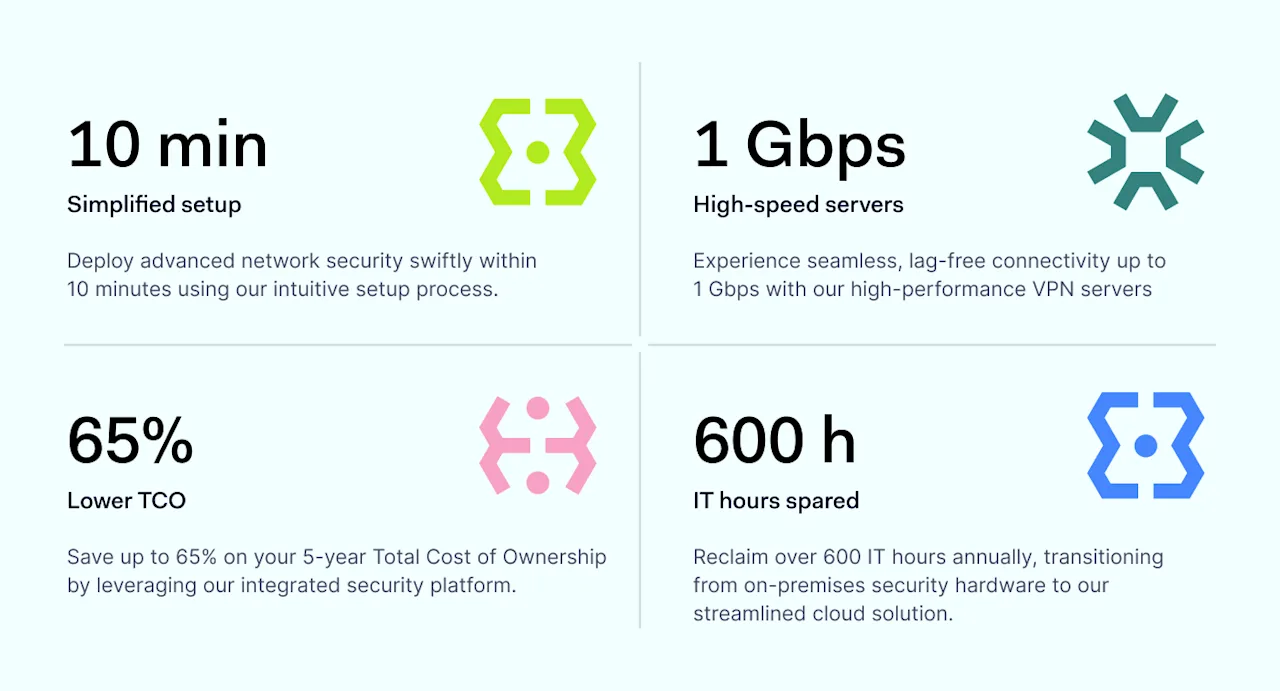
  2. Fast setup (only 10 minutes)

  3. User-friendly Control Panel

  4. Requires no hardware and is easy to maintain

  5. Offers 14-day money-back guarantee

Unique offering of NordLayer

NordLayer provides unique advantages that differentiate it from its competitors.

  1. High-performance 24/7 support available with all plans

  2. Proactive help during onboarding, troubleshooting, and scaling

  3. Browser Extension for better performance and extended secure device perimeter

  4. ThreatBlock, protecting against malicious sites

  5. Quarterly follow-ups for better product usage and adoption

  6. Customer-centric product development with client feedback shaping the roadmap

  7. NordLynx protocol, built around the WireGuard® protocol. It uses a double Network Address Translation system, allowing secure connections to VPN servers without storing any identifiable data

NordLayer’s limitations

NordLayer has some limitations:

  1. It can be expensive for smaller businesses

  2. Requires a minimum of 5 seats

  3. Specialized providers may be more affordable for customers needing only one function

NordLayer reviews

For an objective product evaluation, we will consult major VPN review sites such as Gartner, Capterra, and Cybernews and analyze client feedback from these sources.

NordLayer reviews

Here’s what users appreciate about NordLayer:

NordLayer reviews

For details on NordLayer’s secure network access features and plans, check our pricing.

GoodAccess

Overview of GoodAccess

GoodAccess positions itself as ‘Zero Trust Architecture as a Service’ for small and medium enterprises. The tool offers a software-defined perimeter, business VPN, secure web gateway, Zero Trust Network Access, remote access VPN, and security compliance.

Most mentioned product strengths

Here’s what users mentioned most in their positive reviews:

  1. VPN

  2. Static IP addresses

  3. Cloud-based platform

  4. Secure access from any physical location

Most mentioned overall product benefits of GoodAccess

GoodAccess provides several benefits:

  1. Ease of use

  2. Simple implementation

  3. Strong customer support

  4. Reliable

GoodAccess’s limitations

Users also weren’t happy about these things:

  1. High price

  2. Only one mobile device and one tablet/PC can use the connection at a time

  3. Limited features

  4. Lacking reporting capabilities

  5. High scaling costs when adding extra gateways

  6. Viewing credentials in the account management portal resets the user’s password

Disclaimer: This product review is based on information provided on VPN review sites such as Gartner, Capterra and G2 and assessed customer feedback shared on these platforms, accessed on August 5, 2024.

Twingate

Overview of Twingate

Twingate uses Zero Trust to improve remote access security, offering a safer alternative to traditional VPNs. It is easy to set up and manage. Twingate supports remote teams and offers responsive customer support to meet secure access needs.

Most mentioned product strengths

Twingate offers several capabilities to enhance network security:

  1. Provides Zero Trust Network Access (ZTNA) features and Secure Web Gateway (SWG)

  2. Granular control of access and visibility into who accesses the network

  3. Detailed Access Control Lists control permissions

Most mentioned overall product benefits of Twingate

Twingate offers several benefits:

  1. Easy to implement, use, and manage; no networking knowledge required

  2. Transparent routing and access for end users

Twingate’s limitations

Twingate has some weaknesses:

  1. Sometimes causes disruptions for users; stability needs improvement

  2. No Linux VPN client, only supports MacOS

  3. Admin interface needs better UX design

Disclaimer: This product review is based on information provided on VPN review sites such as Gartner, Reddit and G2 and assessed customer feedback shared on these platforms, accessed on August 5, 2024.

OpenVPN

Overview of OpenVPN

OpenVPN is a popular open-source VPN solution known for its flexibility and security. Widely used by businesses, it helps to secure remote access by encrypting network traffic and protecting privacy. It allows employees to access main office systems remotely.

Most mentioned product strengths

OpenVPN offers several capabilities:

  1. Secure remote access

  2. Strong encryption

  3. Additional features, like connection stats and connecting via URL

Most mentioned overall product benefits of OpenVPN

OpenVPN provides several benefits.

  1. Trusted by many businesses

  2. Well-written documentation

OpenVPN’s limitations

OpenVPN has some weaknesses.

  1. Slower than the WireGuard protocol

  2. Confusing admin GUI

  3. High cost for advanced features

  4. Difficult to reset multi-factor authentication for users who lose their phone

  5. Lacks additional ZTNA features, making it less comprehensive for businesses needing advanced solutions

Disclaimer: This product review is based on information provided on VPN review sites such as G2 and Capterra and assessed customer feedback shared on these platforms, accessed on August 5, 2024.

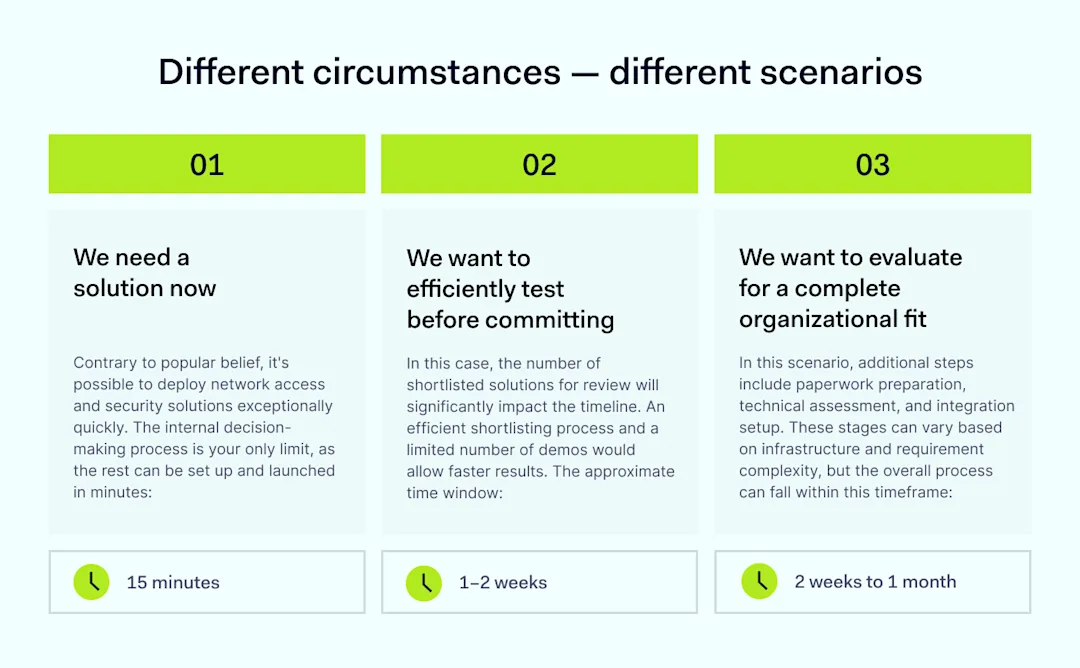
Different circumstances — different scenarios

Choosing the right solution for securing local networks and protecting your team can be challenging. Decision-makers often struggle with where to begin.

NordLayer offers a Decision Maker’s Kit, a free resource designed to help you build a strategy for selecting the most suitable solution for your organization. This kit provides step-by-step guidance from start to finish, ensuring you make an informed decision.

Disclaimer: The information in this article is provided for informational purposes only, is based on publicly available third-party reviews, user feedback, and online sources accessed on August 5, 2024, and should not be considered definitive or permanent. While we strive for accuracy and completeness, Nord Security Inc. and its affiliates make no guarantees regarding the information’s accuracy, completeness, or suitability. We do not undertake, warrant or represent that any product, or its feature, is or will remain publicly regarded as better or worse than other options, serve any purpose, has mentioned features, benefits, strengths, and limitations for any period of time. Product features, pricing, and other details may change, and we advise readers to verify these directly with vendors. We disclaim liability for any errors, omissions, or actions taken based on this information. The inclusion of competitor products does not imply affiliation, or endorsement, and all trademarks mentioned are the property of their respective owners. Readers should conduct their own research and seek independent advice before making purchasing decisions.

About Version 2 Digital

Version 2 Digital is one of the most dynamic IT companies in Asia. The company distributes a wide range of IT products across various areas including cyber security, cloud, data protection, end points, infrastructures, system monitoring, storage, networking, business productivity and communication products.

Through an extensive network of channels, point of sales, resellers, and partnership companies, Version 2 offers quality products and services which are highly acclaimed in the market. Its customers cover a wide spectrum which include Global 1000 enterprises, regional listed companies, different vertical industries, public utilities, Government, a vast number of successful SMEs, and consumers in various Asian cities.

About NordLayer
NordLayer is an adaptive network access security solution for modern businesses – from the world’s most trusted cybersecurity brand, Nord Security.

The web has become a chaotic space where safety and trust have been compromised by cybercrime and data protection issues. Therefore, our team has a global mission to shape a more trusted and peaceful online future for people everywhere.

About NordLayer
NordLayer is an adaptive network access security solution for modern businesses – from the world’s most trusted cybersecurity brand, Nord Security.

The web has become a chaotic space where safety and trust have been compromised by cybercrime and data protection issues. Therefore, our team has a global mission to shape a more trusted and peaceful online future for people everywhere.

×

Hello!

Click one of our contacts below to chat on WhatsApp

×