ScottMaden is a management consulting group that supports Fortune 500 companies. The service provider focuses on two primary business areas: the energy sector and corporate & shared services. With 40-year experience in the industry, ScottMadden provides its clients with strategic planning through implementation across different business fields and functions.
Addressing numerous global clientele challenges represents ScottMadden’s expertise in sophisticated planning. Therefore, how does a company with up to 250 full-time employees throughout the United States and three local East Coast offices face internal security issues? Clinton Miller, IT Director of ScottMadden, shares their story on filling in the missing links in the organization’s cybersecurity strategy.
The Challenge
Securing employees on the go the right way
The company consults domestic and international clients — employees travel quite a bit to client sites and work hands-on on their projects. Hence, a hybrid work model wasn’t the new normal for the organization once the pandemic hit.
ScottMadden consultants spend a lot of time in airports and other public spaces where they would connect to the airport or mobile hotspots and hotel wifi. Yet, the company’s solution wasn’t as good for protecting and running smoothly while traveling.
“The concern was to improve the existing security model and ensure our employees had an encrypted connection regardless of which network they were on.”
Having better performance, following industry best practices, and fulfilling client requirements to protect data outside the office were the driving factors in looking for a change. But is there a solution that can solve the problem effectively and efficiently onboard?
The Solution
Streamlined client drive-out to different environments
The traveling ScottMadden consultants and employees working from home used to rely on browser-based encryption. Using built-in data encoding in Office365 applications allowed them to perform job tasks and communicate with teams with some security levels.
However, the issue was the poor connection flow while video conferencing — latency is a deal breaker for online business meetings in a remote setup.
“Everyone during the pandemic did a lot of video conferencing via Google Meet, Microsoft Teams, or Zoom. We aimed to ensure there was a minimal impact on video calls.”
One thing is handling latency to elevate employees’ and clients’ experience. But can the transition process administratively have a minimal impact on existing company infrastructure and cybersecurity strategy?
“One of the things we wanted to do was to push out the client fairly easily, operating on an SSO solution already in use.”
ScottMadden uses solution Azure AD single sign-on solution for user identification within the organization. The company operates in macOS and Windows environments, so the chosen solution had to fit into the criteria for integration and simplicity.
Why choose NordLayer?
NordLayer solution is compatible with major service providers on the market. Thus, the company could integrate with AzureAD IAM solution and roll out organization-wide onboarding to a new solution using existing SSO.
The endpoint management solution allowed remote access in macOS and Windows environments.
“The implementation of NordLayer went a lot easier when we connected clients to Azure AD. It relieved us from setting up new individual accounts for every 250+ people in the organization.”
The IT Director handled the process — it didn’t require a lot of resources and time to deploy the solution in the organization.
Organization onboarding using Azure AD by ScottMadden
According to Clinton Miller, the IT Director of the company, the longest step was to create an Azure group and add NordLayer. Once it was solved, the complete rollout to NordLayer solution took only a few hours.
The Outcome
Onboarding to a chosen solution enabled the company to secure team connections and extensive access to functionalities that comply with ScottMadden set benchmarks. Achieving data security didn’t have to compromise connection speed and video conferencing quality.
“Anytime employees are outside the office – at home or coffee shop – wherever they might be, we validated that they can reach all the services they needed, and speed wasn’t an issue.”
The transition to the new tool was heavily based on the company’s SSO. The documentation, knowledge base, and support team are highly responsive with communication to walk IT leaders through the process.
“For other potential decision-makers: onboarding NordLayer isn’t a heavy lift — you have the support and knowledge base ready, so it’s pretty straightforward.”
Moreover, NordLayer’s Control Panel provides a good cross-reference point for those using the tool while working outside the office by filtering ongoing active connections.
It also delivers another step in the reporting process for the IT admin and the whole organization. For instance, it verifies that the organization follows internal policies by exporting connection data to verify and justify to a third-party audit.
Pro cybersecurity tips
Different sectors, industries, and services, but the same goal unites every organization’s IT leaders — securing their company assets. Following best practices and professional knowledge helps achieve security targets easier. Clinton Miller, the IT Director at ScottMadden, shares his top-on-the-list tips:
Do you need to upgrade existing tools used in your organization to align with best practices in the industry, improve processes and performance for the team, or expand your capabilities of tracking and reviewing the implemented security strategy?
Using NordLayer, you can integrate more features and functionalities with the organization’s preferred tools, service providers, and IAM solutions. It is possible without committing to massive changes and re-organizing current policies and infrastructure. Reach out to find out about your options on how to secure connections for the off-office employees and improve their experience while working online.
About Version 2 Digital
Version 2 Digital is one of the most dynamic IT companies in Asia. The company distributes a wide range of IT products across various areas including cyber security, cloud, data protection, end points, infrastructures, system monitoring, storage, networking, business productivity and communication products.
Through an extensive network of channels, point of sales, resellers, and partnership companies, Version 2 offers quality products and services which are highly acclaimed in the market. Its customers cover a wide spectrum which include Global 1000 enterprises, regional listed companies, different vertical industries, public utilities, Government, a vast number of successful SMEs, and consumers in various Asian cities.
About NordLayer NordLayer is an adaptive network access security solution for modern businesses – from the world’s most trusted cybersecurity brand, Nord Security.
The web has become a chaotic space where safety and trust have been compromised by cybercrime and data protection issues. Therefore, our team has a global mission to shape a more trusted and peaceful online future for people everywhere.
The consequences of non-compliance can be devastating.
In 2023, businesses have more to fear than just the formal penalties issued by regulatory or legislative entities. With cybercrime rates at a seemingly all-time high, and even once-trusted cybersecurity companies proving susceptible to breaches, organizations are on high alert.
Failing to comply is more than just a compliance issue or an unchecked box. It can represent an unchecked vulnerability that may give way to a data breach that will have your brand name on consumers’ lips for all the wrong reasons.
That’s why we invited two compliance and security experts to speak on the future and state of compliance. Here’s a short recap of the conversation moderated by Gerald Kasulis, VP of business operations at Nord Security, with:
Deena Swatzie, SVP, Cyber Security Strategy and Digital Innovation at Truist,
Joy Bryan, GRC/Privacy Technology Analyst, RNSC Technologies, LLC.
Kasulis asked the panelists astute questions about the implications of adopting tech powered by AI, the current corporate climate, and how businesses can prioritize compliance on a shoestring budget.
Watch the webinar recording in full right now or keep reading to find out three takeaways that will help kickstart or support your compliance agenda this year.
Increasingly savvy consumers will hold businesses accountable
When data breaches happen, usually it’s the consumers who suffer. The consequences range in severity and kind, but whether major or minor, reputational or financial, a violation of one’s privacy through personal data exposure is never a welcome outcome.
As businesses become hyperaware of the likelihood of a data breach, consumers are equally tuned in.
Consumers are getting smarter in that [data privacy] space. They’re going to expect more, they’re going to hold companies accountable. And so that’s why your compliance needs to be in place.
– Joy Bryan
GRC/Privacy Technology Analyst at RNSC Technologies, LLC
Consumers are more likely than ever to want assurances that their personal data will be kept safe as concerns surrounding data privacy become more mainstream. They want to know how their information will be stored and what measures businesses are taking to protect it.
In today’s climate, trust is a linchpin of customer satisfaction. A recent survey revealed that 71% of consumers are unlikely to buy from a company that loses their trust — which is bad news for businesses that have suffered major breaches.
Meeting compliance standards and earning certifications can be a shorthand for establishing (or re-establishing) customers’ confidence: this ensures that businesses are following the agreed-upon best practices in a verifiable way.
At the end of the day, the buck stops with corporations who collect and store personal data. They will be held accountable for their (in)ability to protect the data they keep.
“Consider yourself as the consumer,” says Swatzie. She suggests that businesses should use the golden rule as a framework — treat consumer data as you would hope and expect yours to be treated.
Additional resources may not be the answer
Even when we talk about talent and the workforce, everyone’s immediate response is ‘we need more resources.’ You don’t always necessarily need more resources.
– Deena Swatzie
SVP, Cyber Security Strategy and Digital Innovation at Truist
Swatzie explained that it’s important to understand what exactly is required to meet compliance standards so that you can balance what you have with what you need. Here, collaboration between teams is key. Security and compliance initiatives will overlap.
Both experts agree that it’s best to start by looking at in-house tech and talent before making an investment. And on the occasion when you do require an additional resource, like software, be sure that you’re adopting tools that serve multiple functions.
I think that whatever platforms and technologies are implemented should have a collaborative feel — where you’re tackling multiple things at once.
– Joy Bryan
GRC/Privacy Technology Analyst at RNSC Technologies, LLC
NordPass Business, for instance, delivers so much more than password management. Get a powerful data breach scanner, password health metrics, a detailed activity log, company-wide advanced security settings, and multi-factor authentication.
On the topic of breaches, take solace in NordPass’ zero-knowledge architecture which ensures that only you hold the key to your business credentials and vault items. In the unlikely event of a breach at NordPass, your private information will remain encrypted and out of reach to cybercriminals.
New investments in tech solutions should add value to what many teams are likely to prioritize the most: workflow efficiency. Consider how and whether security and compliance tools speak to that need.
Get into the nitty gritty. Take the time to consider your existing and prospective tools’ full scope to avoid overinvesting in overlapping functions.
According to Swatzie, “Privacy is everybody’s responsibility. Security is everybody’s responsibility. Compliance is everyone’s responsibility.” For that reason, it’s important not to take buy-in for granted with a top-down approach.
Ask yourself: will my team be open to adopting this policy or software? Does it promote or detract from their respective top priorities?
The word of the day is “proactive”
If we had to summarize the experts’ advice in just two words: be proactive. Specifically, on the topic of lessons learned from a turbulent 2022:
I would hope that in terms of lessons learned, it allows businesses to be a little bit more proactive in their approach and in their strategies.
– Joy Bryan
GRC/Privacy Technology Analyst at RNSC Technologies, LLC
If your compliance and security strategy is only reactive, then it shows a lack of forward-thinking, meaning you’re likely to be continuously caught off guard and lagging behind. Swatzie suggests that compliance professionals and business leaders “put on their auditor hat.”
I’m used to being heavily regulated and audited so I’ve learned enough from the auditors to know exactly what they’re going to ask me before they ask me. So going back to what Joy said earlier, be as proactive as possible.
– Deena Swatzie
SVP, Cyber Security Strategy and Digital Innovation at Truist
Where possible, brace your business for what’s likely to come down the compliance pipeline by studying the standards themselves. With an intimate understanding of the “spirit of the law” you should be able to intuit what’s next and prepare accordingly.
That being said, it’s not a lack of motivation that leaves security and compliance professionals in a reactive position. When it comes to cyber incidents, board and senior leadership members sometimes struggle to see prevention as the cure — waiting until after an event has occurred to implement more stringent security measures.
To learn more about how to get buy-in from colleagues and management before the fact, read our guide on how to campaign internally for cybersecurity.
Summary
Facing increasingly savvy and appropriately demanding consumers, businesses should understand that they will be held accountable for breaches of personal data and plan accordingly.
But, that doesn’t necessarily mean rushing to acquire additional talent and technological resources. Invest wisely and make it count. In particular, security software should be multi-functional.
Finally, the key to success is in forward-thinking. Adopt a proactive strategy to avoid a constant scramble to respond after-the-fact.
About Version 2 Digital
Version 2 Digital is one of the most dynamic IT companies in Asia. The company distributes a wide range of IT products across various areas including cyber security, cloud, data protection, end points, infrastructures, system monitoring, storage, networking, business productivity and communication products.
Through an extensive network of channels, point of sales, resellers, and partnership companies, Version 2 offers quality products and services which are highly acclaimed in the market. Its customers cover a wide spectrum which include Global 1000 enterprises, regional listed companies, different vertical industries, public utilities, Government, a vast number of successful SMEs, and consumers in various Asian cities.
About NordPass NordPass is developed by Nord Security, a company leading the global market of cybersecurity products.
The web has become a chaotic space where safety and trust have been compromised by cybercrime and data protection issues. Therefore, our team has a global mission to shape a more trusted and peaceful online future for people everywhere.
The lines are blurred in the modern business lifestyle. There’re no boundaries between employees working from the office or anywhere in the world. And technological privilege enables linking personal devices to work applications for user and organization convenience.
This flexibility and ability to be mobile also mean that business matters simultaneously mix with personal activities online. And mobility is not alone to blame — the internet is often a necessary tool to perform job tasks and operate in different organization layers. Uncontrolled access to the internet provides vast resources incompatible with the work environment. How to manage what employees can do online without imposing risks on the company?
Deep Packet Inspection (DPI) is one of the most straightforward tools that limit free roaming online while connected to the company network. Establishing a set of restrictions helps create a secure perimeter for online activities within the company network.
It’s an important feature that supports performance and security efforts. Non-work-related activities can distract and reduce productivity. Moreover, entering various websites and apps can lure employees into malicious activities, so DPI is a choice for IT administrators to get a grip on the company’s traffic flow.
DPI solution using NordLayer
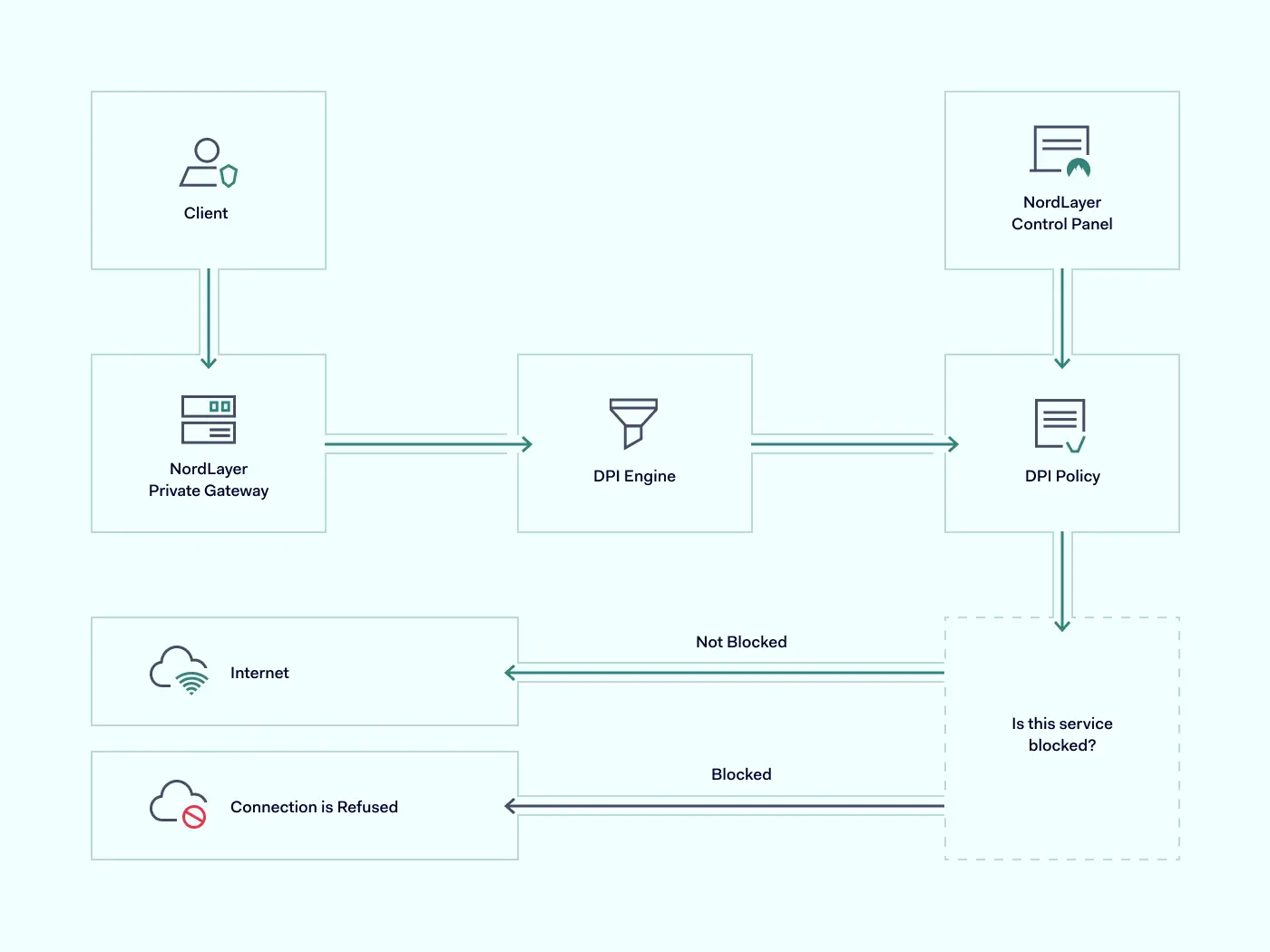
NordLayer solution offers a DPI Lite feature that allows IT administrators to control what user-requested data goes through or gets blocked from entering the company’s network.
The DPI Lite technology at NordLayer works on nDPI open-source protocol classification engine. It offers the most popular and acknowledged services (ports and protocols) that are used by websites and network apps to operate on the internet.
With NordLayer, admins choose specific ports and protocols they want to include in the custom-defined block list. The policy applies only when a user is connected to the organization’s virtual private gateway. Thus, employees who work on job-related projects can’t simultaneously use blocklisted online resources and network applications with restricted access.
How does NordLayer’s DPI Lite feature work?
The cloud-based feature is available only with a virtual private gateway configuration. It’s set to active within 24 hours upon request. IT admins can add or remove specific ports and protocols open to access through the company’s network. They can do it by submitting an inquiry via NordLayer’s Control Panel.
The IT administrators can navigate and choose from a wide range of alphabetically arranged services (no slot restriction) that cover dual-use online resources, potentially harmful to business operations:
Apple services
Domain Name System
E-commerce
Email client protocol/Email services
File sharing
Gaming
Google services
Hypertext Transfer Protocol
Identity
Infrastructure/Networking
IP tunneling protocol
Messaging protocol/services
Microsoft services
Monitoring/SCIM
Music streaming services
News services
Peer-to-peer file sharing
Remote Access
Social media
Software Development
Streaming services
VoIP protocol
VPN services
Other (miscellaneous)
Our internal data shows the tendency to stop services primarily related to unapproved Peer-to-peer file sharing, Social media, and Gaming categories. It comes as no surprise that customers are particularly interested in limiting access to non-work-related services that impose the biggest risks to company assets and staff performance.
However, if an employee needs access to company-level blocked sources, for example, a Social Media Manager working on Facebook and LinkedIn, IT administrators can purchase a separate dedicated Virtual Private Gateway for such employees and configure it with fewer restrictions.
The categories expand to a complete list of 250 available ports and protocols. You can choose only certain types of services, like blocking all messaging services except Slack, used for organizational communication.
NordLayer’s DPI Lite feature is managed only by the IT administrator and doesn’t have an ON/OFF function on the user side. The feature operates on the Application layer (OSI model Level 7) and Browser layer (OSI model Level 3). It means DPI inspects incoming data on the web and within network apps.
Enabled DPI Lite runs when the user, connected to the company’s virtual private network (or VPN), sends a request to access online resources or uses network-dependent applications. Once disconnected from the organizational network, the DPI policy isn’t active. Thus, it’s crucial to permit access to internal resources and applications only when they are connected to the network.
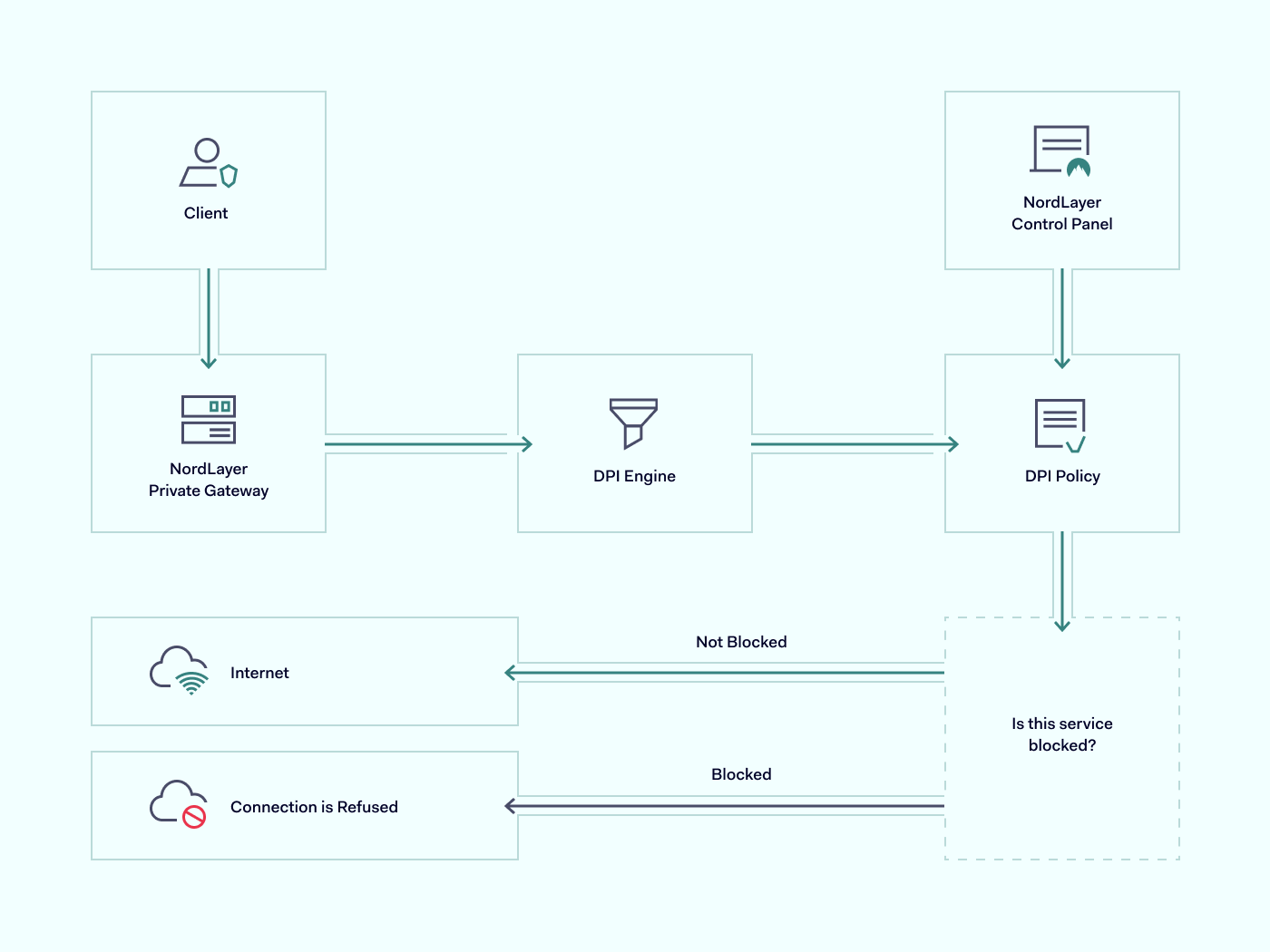
The incoming data is screened and filtered using the nDPI engine against the DPI Policy defined by the company’s IT administrator. The user is connected to a requested website if traveling data packets don’t include blocked services.
However, the connection to the requested online resource is restricted if there is a match between the data packet and the DPI block list policy.
How NordLayer’s DPI Lite is different?
Some solutions allow DPI to incorporate extensive categories and be customizable for every client’s preferences to restrict content online. However, a more complex approach may lead to excessive expenses. It may also require challenging configuration and become limiting to the company’s disadvantage.
Extensive data processing defined with all types of possible keywords can disrupt the connection flow and block access to online resources that initially weren’t intended to be restricted. On the other hand, if the company is set for hardware infrastructure and decides to continue with the same type of DPI technology, it will need to know how to configure and perform in-house maintenance. All these additional steps create an unnecessary workload for IT administrators.
To streamline the DPI implementation to the company infrastructure, NordLayer incorporates an easy-to-launch and control DPI Lite feature. It is cloud-native and easy to add or remove without investing in excessive resources. Its activation takes short notice and can be managed centrally, enabling flexibility and focus to the teams and operations:
Keep productivity on point. NordLayer’s DPI Lite feature encloses the company network with work-only online resources within employees’ reach. Leave no space for distractions, so teams are less likely to spend time on their personal activities and decrease the chances of human error.
Establish security levels. Entering unsecured websites or downloading data to work-linked endpoints can become a freeway for malicious actors accessing internal data and resources. DPI Lite can help filter out hidden remote computer access and control software planted by cybercriminals.
Quick implementation and adoption. DPI Lite, like all the other NordLayer features, is entirely cloud-based and thus simple to integrate into existing infrastructure. Besides short enablement time, it is compatible with other data processing features like DNS filtering by category, constructing a more robust organization security posture.
Easy to adhere to business needs. The categories or services of DPI Lite are simple to manage. A complete list or a few exceptions can be added or removed from the DPI Policy as required to suit the company’s service scope.
NordLayer offers a packet inspection solution that doesn’t overwhelm network security strategy and focuses on the most common business pain points. A well-sifted service list doesn’t leave space to overthink data to block or spend time researching what online resources to consider, so no openings are left. Overall, DPI Lite helps organizations handle their teams’ efficiency and activity while at work.
Benefits of DPI Lite
Establishing limits for online activity while working is like a reminder to focus on your tasks. But it’s not just about preventing employees from distractions using company gateways.
Adding DPI Lite as an additional security measure fortifies network security and advances business performance in different ways.
Prevent data leaking
Whether intentional or accidental, data leaks are damaging to businesses. DPI Lite adds to security measures by restricting the download of data-leaking apps or the usage of data-sharing and emailing services. Suppose employees try to send files from the company network via Dropbox or Google Drive. In that case, DPI Lite will recognize data packets containing related ports, protocols, and headers and will stop the action from completing the request.
Eliminate traffic overload
Online activities create traffic on network gateways: the more requests, the more overloaded infrastructure, ultimately resulting in performance issues. DPI Lite implementation to the virtual private gateways helps limit created traffic as users cannot access online resources. Online streaming and seeding services or visual-heavy social media increase network usage a few folds. Hence, with DPI blocking, fewer data packets must be inspected and unclog the network. Out of user sight, out of admin mind.
Protect static IP addresses
Unrestricted internet usage could create convenient conditions for employees to hide behind company IP addresses to perform illegal activities. For example, using torrents on a work network can result in copyright holders initiating blocked IP addresses or even legal prosecution for piracy on the organizational level.
With open internet access, scam attempts have a free pass. If law enforcement authorities identify IP during their investigation of a crime done by your employee from the company’s IP address, it might lead to the company’s liability and even hardware confiscation. Hence, whether the network is managed internally or via a vendor like Internet Service Provider (ISP), deep packet inspection as an additional security measure can help establish internal online activity limits to prevent any illicit acts from happening under the company name.
Entering NordLayer’s DPI Lite
Organization-first mindset while at work or dealing with company-related content can be seen as restricting user activity. Although it’s a strong push toward cybersecurity strategy implementation, preventing possible gaps and openings.
Deep packet inspection is part of the bigger picture when combined with other NordLayer security features like DNS filtering by category, ThreatBlock, and Jailbroken/rooted device detection. Enforcing our remote network access solution into your company infrastructure and activating the DPI Lite feature is a matter of a couple of days or less. Organization administrators need to access NordLayer Control Panel, navigate to Servers or Gateways under the Network tab, and configure it by selecting Deep Packet Inspection (Lite) categories as required.
Utilizing simple and affordable tools like NordLayer’s DPI Lite doesn’t overcomplicate the existing cybersecurity strategy and upgrades team productivity, network performance, and company security for better business performance.
About Version 2 Digital
Version 2 Digital is one of the most dynamic IT companies in Asia. The company distributes a wide range of IT products across various areas including cyber security, cloud, data protection, end points, infrastructures, system monitoring, storage, networking, business productivity and communication products.
Through an extensive network of channels, point of sales, resellers, and partnership companies, Version 2 offers quality products and services which are highly acclaimed in the market. Its customers cover a wide spectrum which include Global 1000 enterprises, regional listed companies, different vertical industries, public utilities, Government, a vast number of successful SMEs, and consumers in various Asian cities.
About NordLayer NordLayer is an adaptive network access security solution for modern businesses – from the world’s most trusted cybersecurity brand, Nord Security.
The web has become a chaotic space where safety and trust have been compromised by cybercrime and data protection issues. Therefore, our team has a global mission to shape a more trusted and peaceful online future for people everywhere.
Microsoft Azure is a dominant cloud hosting platform, serving around 70 percent of organizations worldwide. A popular hosting environment for SQL databases, Azure also provides a flexible way to run up to 200 cloud applications.
This flexibility is a game-changer for many businesses. But there’s a catch. To function properly, it’s essential to create a secure Azure environment. Otherwise, cloud apps and databases can leak sensitive data. Credentials may be at risk, and companies can suffer huge compliance penalties.
Fortunately, solutions exist. This blog will explain how to secure your cloud environment with Azure security best practices. And we will look at how to create a layered security strategy that goes beyond Microsoft’s controls.
Why is securing access to Azure so important?
Azure security matters because Microsoft’s cloud platform hosts a range of critical assets. Companies use Azure to host .Net apps for web applications or gaming DevOps. Azure storage accounts host SQL databases containing client data, while Kubernetes clusters support private cloud infrastructure.
Whatever Azure services companies rely on, security is a priority. Insecure Azure apps can leak data and provide an entry point for cyber attackers. And you cannot rely on Microsoft to cover every security challenge.
Azure clients have wide areas of responsibility to secure their cloud configuration. Clients need to restrict access to sensitive data. Users must manage access and exclude malicious actors. They also have to manage how data flows between cloud apps. The need for an Azure security policy is obvious when you put these tasks together.
Microsoft Azure security best practices
Any companies that rely on Microsoft’s cloud services should get to know Azure security best practices.
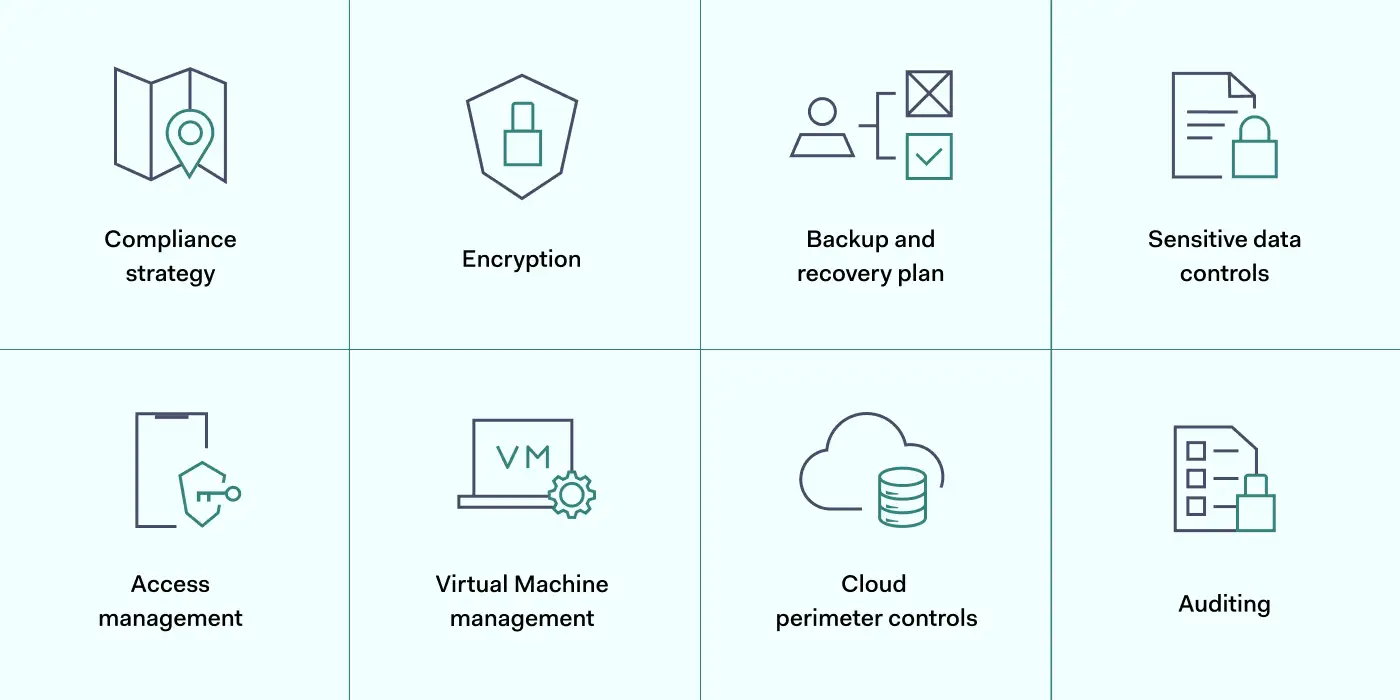
The best approach is adopting a layered strategy. Users should exploit security tools provided by Microsoft. But they should add additional security controls where necessary. These Azure security best practices will explain how the layered security approach works.
1. Map Azure assets and create a compliance strategy
The first step in layering Azure security is understanding the cloud environment. Before applying any of the best practices below, you must understand what assets need to be protected.
Map the cloud assets on your Azure platform. Include all apps and data stores, and classify data according to importance. You should know exactly where client data is stored and who has access to that data.
It is also advisable to create a clear compliance strategy for Azure environments. Define your core goals, including HIPAA, DCI-PSS, or GDPR compliance. Use these data security frameworks as a baseline to improve Azure security and meet regulatory requirements.
Track your compliance progress with the scoring tools in the Azure Security Center. The compliance dashboard provides detailed information about security levels and required actions.
2. Encrypt critical data
Data security on Azure apps is the responsibility of clients, not Microsoft. So take action to encrypt data and hide it from malicious actors.
Encrypt sensitive data at rest using Microsoft’s server-side symmetric key encryption tools. You can use these tools to segment data by importance. This ensures that operational data is available to employees. But financial or personal information is only accessible to users with specific encryption keys.
Azure Disk Encryption works alongside Microsoft’s SSE. It creates another layer of data security for virtual machines and data containers. This reduces the risk of attackers exploiting Virtual Hard Disk (VHD) files. Attackers will find it much harder to create virtual machines within Azure environments.
When you apply Azure encryption, key storage is your responsibility. Secure encryption keys in IAM controls in place to prevent unauthorized access. The Azure Key Vault is a good key management solution and integrates well with Azure app environments.
Users should also encrypt sensitive data in transit. Data constantly flows between Azure apps, remote devices, and on-premises workstations. VPN encryption provides a solution, adding another layer of protection above Azure security controls.
3. Create a backup and disaster recovery plan
A strong Azure security posture features a fall-back plan when systems fail, or attackers succeed. Microsoft offers an end-to-end DR service via Azure Site Recovery (ASR). Combine this with Azure Backup to create tailored data backup plans.
With an ASR failover plan, you can recover application states with minimal information loss. You might also add Azure Storage Replication, which regularly generates multiple copies of important files.
4. Secure sensitive data with robust controls
Encryption is not the only data security control for Azure users. Consider a range of additional tools and find a mix that secures sensitive data without compromising user experience. Options to think about include:
Activate auditing tools. Users can instruct Azure to audit databases. This creates a data stream that tracks database changes. Data visibility makes it easier for security teams to detect anomalies and unsafe user activity.
Add Azure SQL threat detection. Many Azure apps rely on SQL, but SQL presents critical security threats. Using SQL databases, turn on SQL threat detection to isolate security weaknesses and secure the threat surface.
Use Azure Firewall. Azure Firewall adds another layer of data security protection for Azure-hosted apps. You can manage firewall settings centrally, and coverage can increase as new apps come online. Cloud-native TLS inspection provides valuable protection against malware attacks.
Enable Azure Monitor alerts. Gain additional awareness by engaging Azure Monitor alerts. Users can target alerts at single resources and use many metrics to identify vulnerabilities. Azure Monitor Action Groups make it easy to automate alerts and deliver precise information when threats arise.
Implement Azure Defender. Defender is a subscription-based security service that leverages extended threat detection and response (XDR) and contextual security. It covers hybrid and multi-cloud environments, delivering threat protection and remediation advice. Azure Defender may well be a sensible addition when securing complex cloud environments,
Use Shared Access Signatures. Created via Active Directory, Shared Access Signatures let you manage access to Azure resources to third parties and employees for limited periods. Best practices include creating a SAS for all short-term network users, as it allows admins to set granular controls.
5. Manage access with IAM
Preventing illegitimate access to cloud infrastructure is one of the most important Azure security best practices. The best way to manage user access is by adding Identity and Access Management (IAM) to your security arsenal.
Microsoft provides a cloud-native IAM system called Azure Active Directory (AAD). AAD authenticates logins and compares user credentials to a secure Active Directory database.
IAM best practices for Azure include using AAD to set role-based access controls (RBAC). With RBAC, admins can put the Zero Trust ‘principle of least privilege’ into action. Every user has very limited privileges. Privileges only apply after users supply multiple credentials.
Role-based privileges have big practical benefits. Developers will not retain access to resources when their project involvement ends. Attackers obtaining their credentials will be relatively powerless. They will struggle to achieve Virtual Machine access. Breaching Azure SQL databases will be much harder.
Add another layer to your security posture by combining AAD with Single-Sign-On (SSO). SSO combines all cloud and on-premises assets. Remote workers can log in to the apps they need via a single sign-on portal.
Users can apply Multi-Factor Authentication (MFA) at this stage. This requests an extra authentication factor for each login, such as biometric data or one-time codes delivered to smartphones.
IP allowlisting also features in recommended Azure security best practices. Allowlisting lets you specify trusted IP addresses. You can add remote work devices or employee smartphones and exclude every other device until it passes MFA and IAM controls.
6. Add workload and VM protection
Azure security best practices include securing virtual machines via specialist controls. For instance, Azure includes the option of applying just-in-time controls for VMs. These Azure security controls allow users to access VMs for limited periods, removing the possibility of accessing assets after sessions expire.
VM controls also allow administrators to lock vulnerable ports and limit access to authorized users. Restrict access to RDP, WinRM, and SSH ports commonly used by VMs. Access should only be available when absolutely required.
You can apply controls easily by assigning workloads and VMs to Network Security Groups (NSGs). These groups define security procedures for each asset and add another protective layer via the Azure Firewall.
Additionally, remember to keep workload patches up to date. Unpatched Azure apps can be vulnerable to exploits. Automate software updates where possible and audit unpatched tools to minimize your exploit vulnerability.
7. Control the cloud perimeter with network security
Internal Azure cloud security works alongside general network security. Attackers can steal credentials from devices outside the cloud or launch attacks via internet-facing endpoints. This is why Azure’s best practices include measures to harden on-premises security. These measures can protect the whole network perimeter:
Track internet-facing cloud endpoints and minimize the contact between the wider web and company resources.
Use a Security Information and Event Management solution. SIEM tracks network traffic and identifies potential threats. Integrate it with Azure Defender to cover external and cloud-based vulnerabilities.
Apply network segmentation. Separate cloud endpoints from data centers and workstations with internet access.
Install a VPN or similar security tool to encrypt data and conceal user identities.
8. Audit user identities and access policies
Your Azure cloud security posture can weaken over time. What works now may degrade and create new vulnerabilities.
Azure security teams must audit every cloud security control and ensure continuing app and data protection. Audit app ownership regularly to ensure only active users have administrative privileges. Clean up Azure platforms by removing obsolete services, groups, and users.
Use the Azure Security Center to improve auditing procedures. The ASC includes machine learning analysis tools that provide feedback and suggest security posture improvements. Real-time monitoring and audit logs provide evidence to fine-tune your security setup.
How can NordLayer secure your access to Microsoft Azure?
Microsoft Azure cloud security requires a layered mix of internal cloud-based controls and solid external security. Users must protect data at the app level, followed by workgroups, platforms, and the entire company network.
The best practices listed above provide a roadmap to achieve security at the cloud level. Encrypt data and manage Active Directory identities. Leverage the Security Center to track user activity and run regular audits. And target virtual machines and apps with specific protection.
But that’s not enough. Add an extra security layer for rock-solid SaaS access control by safeguarding the network edge and protecting credentials outside the cloud.
NordLayer will help you achieve this. Encrypt in-transit data, apply for SSO, and screen access with IP allowlisting. Limit access to trusted IP addresses and exclude everything else – an important step towards a Zero Trust security posture.
Prevent data leaks by blending NordLayer’s network security tools with Microsoft Azure’s internal controls. To find out more, get in touch with our team today.
About Version 2 Digital
Version 2 Digital is one of the most dynamic IT companies in Asia. The company distributes a wide range of IT products across various areas including cyber security, cloud, data protection, end points, infrastructures, system monitoring, storage, networking, business productivity and communication products.
Through an extensive network of channels, point of sales, resellers, and partnership companies, Version 2 offers quality products and services which are highly acclaimed in the market. Its customers cover a wide spectrum which include Global 1000 enterprises, regional listed companies, different vertical industries, public utilities, Government, a vast number of successful SMEs, and consumers in various Asian cities.
These days, cybercrime is rampant. It’s no longer a matter of “if” you’re going to suffer an attack but “when” it will happen. All companies want to be ready for any crisis. And this is where a business continuity plan comes into play.
But what is a business continuity plan exactly? Why is it important? What should one include? Today, we’re exploring all these questions in-depth.
What is a business continuity plan?
A business continuity plan (BCP) is a document that sets guidelines for how an organization will continue its operations in the event of a disruption, whether it’s a fire, flood, other natural disaster or a cybersecurity incident. A BCP aims to help organizations resume operations without significant downtime.
Unfortunately, according to a 2020 Mercer survey, 51% of businesses across the globe don’t have a business continuity plan in place.
What’s the difference between business continuity and disaster recovery plans?
We often confuse the terms business continuity plan and disaster recovery plan. The two overlap and often work together, but the disaster recovery plan focuses on containing, examining, and restoring operations after a cyber incident. On the other hand, BCP is a broader concept that considers the whole organization. A business continuity plan helps organizations stay prepared for dealing with a potential crisis and usually encompasses a disaster recovery plan.
Importance of business continuity planning
The number of news headlines announcing data breaches has numbed us to the fact that cybercrime is very real and frequent and poses an existential risk to companies of all sizes and industries.
Consider that in 2021, approximately 37% of global organizations fell victim to a ransomware attack. Then consider that business interruption and restoration costs account for 50% of cyberattack-related losses. Finally, take into account that most cyberattacks are financially motivated and the global cost of cybercrime topped $6 trillion last year. The picture is quite clear — cybercrime is a lucrative venture for bad actors and potentially disastrous for those on the receiving end.
To thrive in these unpredictable times, organizations go beyond conventional security measures. Many companies develop a business continuity plan parallel to secure infrastructure and consider the plan a critical part of the security ecosystem. The Purpose of a business continuity plan is to significantly reduce the downtime in an emergency and, in turn, reduce the potential reputational damage and — of course — revenue losses.
The initial stage of developing a business continuity plan starts with a statement of the plan’s purpose, which explains the main objective of the plan, such as ensuring the organization’s ability to continue its operations during and after a disruptive event.
The Scope of the Plan outlines the areas or functions that the plan will cover, including business processes, personnel, equipment, and technology.
The Budget specifies the estimated financial resources required to implement and maintain the BCP. It includes costs related to technology, personnel, equipment, training, and other necessary expenses.
The Timeline provides a detailed schedule for developing, implementing, testing, and updating the BCP.
II. Risk Assessment
Identification of Risks
Prioritization of Risks
Mitigation Strategies
The Risk Assessment section of a Business Continuity Plan (BCP) is an essential part of the plan that identifies potential risks that could disrupt an organization’s critical functions.
The Identification of Risks involves identifying potential threats to the organization, such cybersecurity breaches, supply chain disruptions, power outages, and other potential risks. This step is critical to understand the risks and their potential impact on the organization.
Once the risks have been identified, the Prioritization of Risks follows, which helps determine which risks require the most attention and resources.
The final step in the Risk Assessment section is developing Mitigation Strategies to minimize the impact of identified risks. Mitigation strategies may include preventative measures, such as system redundancies, data backups, cybersecurity measures, as well as response and recovery measures, such as emergency protocols and employee training.
III. Emergency Response
Emergency Response Team
Communication Plan
Emergency Procedures
This section of the plan focuses on immediate actions that should be taken to ensure the safety and well-being of employees and minimize the impact of the event on the organization’s operations.
The Emergency Response Team is responsible for managing the response to an emergency or disaster situation. This team should be composed of individuals who are trained in emergency response procedures and can act quickly and decisively during an emergency. The team should also include a designated leader who is responsible for coordinating the emergency response efforts.
The Communication Plan outlines how information will be disseminated during an emergency situation. It includes contact information for employees, stakeholders, and emergency response personnel, as well as protocols for communicating with these individuals.
The Emergency Procedures detail the steps that should be taken during an emergency or disaster situation. The emergency procedures should be developed based on the potential risks identified in the Risk Assessment section and should be tested regularly to ensure that they are effective.
IV. Business Impact Analysis
The Business Impact Analysis (BIA) section of a Business Continuity Plan (BCP) is a critical step in identifying the potential impact of a disruption to an organization’s critical operations.
The Business Impact Analysis is typically conducted by a team of individuals who understand the organization’s critical functions and can assess the potential impact of a disruption to those functions. The team may include representatives from various departments, including finance, operations, IT, and human resources.
V. Recovery and Restoration
Procedures for recovery and restoration of critical processes
Prioritization of recovery efforts
Establishment of recovery time objectives
The Recovery and Restoration section of a Business Continuity Plan (BCP) outlines the procedures for recovering and restoring critical processes and functions following a disruption.
The Procedures for recovery and restoration of critical processes describe the steps required to restore critical processes and functions following a disruption. This may include steps such as relocating to alternate facilities, restoring data and systems, and re-establishing key business relationships.
The Prioritization section of the plan identifies the order in which critical processes will be restored, based on their importance to the organization’s operations and overall mission.
Recovery time objectives (RTOs) define the maximum amount of time that critical processes and functions can be unavailable following a disruption. Establishing RTOs ensures that recovery efforts are focused on restoring critical functions within a specific timeframe.
VI. Plan Activation
Plan Activation Procedures
The Plan Activation section is critical in ensuring that an organization can quickly and effectively activate the plan and respond to a potential emergency.
The Plan Activation Procedures describe the steps required to activate the BCP in response to a disruption. The procedures should be clear and concise, with specific instructions for each step to ensure a prompt and effective response.
VII. Testing and Maintenance
Testing Procedures
Maintenance Procedures
Review and Update Procedures
This section of the plan is critical to ensure that an organization can effectively respond to disruptions and quickly resume its essential functions.
Testing procedures may include scenarios such as natural disasters, cyber-attacks, and other potential risks. The testing procedures should include clear objectives, testing scenarios, roles and responsibilities, and evaluation criteria to assess the effectiveness of the plan.
The Maintenance Procedures detail the steps necessary to keep the BCP up-to-date and relevant.
The Review and Update Procedures describe how the BCP will be reviewed and updated regularly to ensure its continued effectiveness. This may involve conducting a review of the plan on a regular basis or after significant changes to the organization’s operations or threats.
What should a business continuity plan checklist include?
Organizations looking to develop a BCP have more than a few things to think through and consider. Variables such as the size of the organization, its IT infrastructure, personnel, and resources all play a significant role in developing a continuity plan. Remember, each crisis is different, and each organization will have a view on handling it according to all the variables in play. However, all business continuity plans will include a few elements in one way or another.
Clearly defined areas of responsibility
A BCP should define specific roles and responsibilities for cases of emergency. Detail who is responsible for what tasks and clarify what course of action a person in a specific position should take. Clearly defined roles and responsibilities in an emergency event allow you to act quickly and decisively and minimize potential damage.
Crisis communication plan
In an emergency, communication is vital. It is the determining factor when it comes to crisis handling. For communication to be effective, it is critical to establish clear communication pipelines. Furthermore, it is crucial to understand that alternative communication channels should not be overlooked and outlined in a business continuity plan.
Recovery teams
A recovery team is a collective of different professionals who ensure that business operations are restored as soon as possible after the organization confronts a crisis.
Alternative site of operations
Today, when we think of an incident in a business environment, we usually think of something related to cybersecurity. However, as discussed earlier, a BCP covers many possible disasters. In a natural disaster, determine potential alternate sites where the company could continue to operate.
Backup power and data backups
Whether a cyber event or a real-life physical event, ensuring that you have access to power is crucial if you wish to continue operations. In a BCP, you can often come across lists of alternative power sources such as generators, where such tools are located, and who should oversee them. The same applies to data. Regularly scheduled data backups can significantly reduce potential losses incurred by a crisis event.
Recovery guidelines
If a crisis is significant, a comprehensive business continuity plan usually includes detailed guidelines on how the recovery process will be carried out.
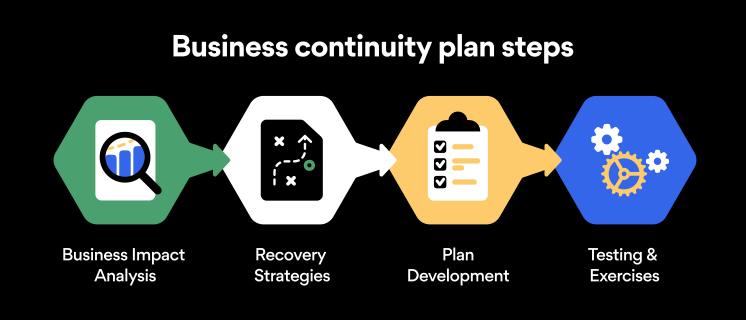
Business continuity planning steps
Here are some general guidelines that an organization looking to develop a BCP should consider:
Analysis
A business continuity plan should include an in-depth analysis of everything that could negatively affect the overall organizational infrastructure and operations. Assessing different levels of risk should also be a part of the analysis phase.
Design and development
Once you have a clear overview of potential risks your company could face, start developing a plan. Create a draft and reassess it to see if it takes into account even the smallest of details.
Implementation
Implement BCP within the organization by providing training sessions for the staff to get familiar with the plan. Getting everyone on the same page regarding crisis management is critical.
Testing
Rigorously test the plan. Play out a variety of scenarios in training sessions to learn the overall effectiveness of the continuity plan. By doing so, everyone on the team will be closely familiar with the business continuity plan’s guidelines.
Maintenance and updating
Because the threat landscape constantly changes and evolves, you should regularly reassess your BCP and take steps to update it. By making your continuity plan in tune with the times, you will be able to stay a step ahead of a crisis.
Level up your company’s security with NordPass Business
A comprehensive business continuity plan is vital for the entire organization’s security posture. However, in a perfect world, you wouldn’t have to use it. This is where NordPass Business can help.
Remember, weak, reused, or compromised passwords are often cited as one of the top contributing factors in data breaches. It’s not surprising, considering that an average user has around 100 passwords. Password fatigue is real and significantly affects how people treat their credentials. NordPass Business counters these issues.
With NordPass Business, your team will have a single secure place to store all work-related passwords, credit cards, and other sensitive information. Accessing all the data stored in NordPass is quick and easy, which allows your employees not to be distracted by the task of finding the correct passwords for the correct account.
In cyber incidents, NordPass Business ensures that company credentials remain secure at all times. Everything stored in the NordPass vault is secured with advanced encryption algorithms, which would take hundreds of years to brute force.
If you are interested in learning more about NordPass Business and how it can fortify corporate security, do not hesitate to book a demo with our representative.
About Version 2 Digital
Version 2 Digital is one of the most dynamic IT companies in Asia. The company distributes a wide range of IT products across various areas including cyber security, cloud, data protection, end points, infrastructures, system monitoring, storage, networking, business productivity and communication products.
Through an extensive network of channels, point of sales, resellers, and partnership companies, Version 2 offers quality products and services which are highly acclaimed in the market. Its customers cover a wide spectrum which include Global 1000 enterprises, regional listed companies, different vertical industries, public utilities, Government, a vast number of successful SMEs, and consumers in various Asian cities.
About NordPass NordPass is developed by Nord Security, a company leading the global market of cybersecurity products.
The web has become a chaotic space where safety and trust have been compromised by cybercrime and data protection issues. Therefore, our team has a global mission to shape a more trusted and peaceful online future for people everywhere.
You lightly place your thumb at the bottom of your phone screen and, lo and behold, it’s unlocked instantly. So why can’t we do the same at the bank or when logging in to Twitter or YouTube? Well, soon we’ll be able to do it all. The passwordless future is inevitable and it’s almost here.
At NordPass, we’re thrilled to be creating a passwordless future. But what is passwordless authentication? How does it work? Let’s answer these questions.
Why should we consider going passwordless?
Year after year, we see either “123456” or “password” top our Most Common Passwords List. Millions of people reuse absurdly simple passwords across multiple platforms, even though they are very easy to crack by using a dictionary or brute force attacks. It makes passwords (and the people using them) one of the weakest links security-wise in any company or service.
Weak passwords are just part of the problem. The way we treat passwords is an issue as well. One of the worst password sins that all of us can attest to is reusing passwords. Having a single password to secure multiple accounts is a huge security risk, to put it mildly. In such instances, a single compromised account indicates that all of user’s accounts are essentially compromised as well.
The solution lies in biometric authentication and passkeys, which combined become one of the safest and smoothest passwordless authentication options available.
Passkeys: The key to passwordless authentication
In an age where technology usage continues to rise, the need for secure and efficient authentication methods becomes all the more pressing. Passwords, which have long reigned supreme as a solution for securing online accounts, have over time proven to be unreliable and susceptible to hacking. In turn, many organizations and companies have been looking for new, more efficient, and robust ways to authenticate users.
One organization at the forefront of the effort to go passwordless is the FIDO Alliance. The alliance works with various companies, including NordPass, to develop and promote open standards for passwordless authentication.
According to the FIDO Alliance, the technology set to replace passwords is passkeys. Passkeys are digital credentials that are generated by the user’s device. Usually used in combination with biometric data, such as a fingerprint or facial recognition, to offer an extra layer of security, passkeys provide access to websites and other online services.
What passkeys bring to the table
One of the major advantages of passkeys is that the private key, which is used to generate the passkey, never leaves the user’s device. This makes it almost impossible for attackers to gain access to the key through phishing or other forms of cyberattack. Furthermore, passkeys are almost impossible to hack, making them more secure overall.
Unlike traditional passwords, passkeys are invisible to the user and are never revealed or entered manually.
Going passwordless will also improve user experience. A fingerprint scanner, for example, is a fast and reliable authentication method. It would also mean that there would be no more password reset procedures — IT departments throughout the world will be very grateful. Also, when it comes to biometric authentication, you don’t need to remember anything. You won’t have any Post-its on the computer screen or notes in your planner. You can’t lose, steal, or forget your fingerprint.
Room for improvement for current passkey-based authentication
Right now, passwordless authentication is gaining major traction among such tech giants as Microsoft, Apple, and Google. All of these companies have been introducing passwordless authentication solutions, and in most instances the solutions include the use of passkeys.
However, current passkey-based solutions have a long way to go. At the moment, these solutions limit users to a single ecosystem, which makes it difficult to share them between, say, an Android user and an iOS user. In addition, the current solutions do not offer any kind of sync with password managers.
But this is where NordPass comes into play. We are currently working on integrating passkeys into your favorite password manager.
Introducing passwordless authentication to NordPass
At NordPass, we’re excited to be at the forefront of the passwordless revolution. And by early 2023, NordPass is set to introduce passwordless authentication both for individuals and businesses.
Passwordless access to NordPass
We are currently working on enabling a passwordless sign-in to NordPass. It will be a faster and simpler process than the one now, since it will require a single biometric confirmation. In simple language, this means that you will be able to access your Nord Account and NordPass with a single tap of a finger. You read it right. No more manually entering your Nord Account and Master Password each time you need to log in. Passwordless access to NordPass is set to significantly improve user experience and overall security.
NordPass passkey storage
All NordPass users will have the ability to save passkeys for any website or app in the encrypted vault and use them to access those online services later. With NordPass, you’ll be able to use, share, and sync passkeys between multiple devices and platforms, whereas many passwordless authentication solutions tend to lack such functionalities. This will make NordPass a single place for all of your digital valuables, including passwords, passkeys, credit cards, and other sensitive information.
Passwordless multi-factor authentication (MFA) for businesses
Password-based authentication is still the industry standard. However, due to the inherent vulnerabilities that come with password-based authentication, most businesses face a variety of cybersecurity risks. To significantly reduce the risk of suffering a phishing or an account takeover attack, businesses need to rethink their security approach with regard to access to endpoint devices such as laptops, desktops, workstations, and mobile devices as well as applications that leverage regular passwords or even single sign-on solutions.
With the introduction of passwordless MFA, we’re looking to help businesses improve their overall security stance by eliminating the need for passwords and introducing an authentication method based solely on biometrics.
Passkey integration for online service providers
The world is already moving rapidly towards a passwordless future. Unfortunately, not everyone can adapt smoothly and efficiently. Many small to medium-sized businesses (SMBs) lack the resources and know-how to implement passkey authentication for their users. However, at NordPass we’re ready to leverage our security expertise to make the transition from passwords to passkeys as smooth as possible. We believe that the frictionless user experience offered by passkeys across multiple platforms and devices, combined with superior security, will help your business increase conversion rates, user engagement, and user satisfaction.
You can expect big things as early as 2023. So stay tuned, and be prepared for the inevitable passwordless future – it’s just around the corner.
About Version 2 Digital
Version 2 Digital is one of the most dynamic IT companies in Asia. The company distributes a wide range of IT products across various areas including cyber security, cloud, data protection, end points, infrastructures, system monitoring, storage, networking, business productivity and communication products.
Through an extensive network of channels, point of sales, resellers, and partnership companies, Version 2 offers quality products and services which are highly acclaimed in the market. Its customers cover a wide spectrum which include Global 1000 enterprises, regional listed companies, different vertical industries, public utilities, Government, a vast number of successful SMEs, and consumers in various Asian cities.
These days, cybercrime is rampant. It’s no longer a matter of “if” you’re going to suffer an attack but “when” it will happen. All companies want to be ready for any crisis. And this is where a business continuity plan comes into play.
But what is a business continuity plan exactly? Why is it important? What should one include? Today, we’re exploring all these questions in-depth.
What is a business continuity plan?
A business continuity plan (BCP) is a document that sets guidelines for how an organization will continue its operations in the event of a disruption, whether it’s a fire, flood, other natural disaster or a cybersecurity incident. A BCP aims to help organizations resume operations without significant downtime.
Unfortunately, according to a 2020 Mercer survey, 51% of businesses across the globe don’t have a business continuity plan in place.
What’s the difference between business continuity and disaster recovery plans?
We often confuse the terms business continuity plan and disaster recovery plan. The two overlap and often work together, but the disaster recovery plan focuses on containing, examining, and restoring operations after a cyber incident. On the other hand, BCP is a broader concept that considers the whole organization. A business continuity plan helps organizations stay prepared for dealing with a potential crisis and usually encompasses a disaster recovery plan.
Importance of business continuity planning
The number of news headlines announcing data breaches has numbed us to the fact that cybercrime is very real and frequent and poses an existential risk to companies of all sizes and industries.
Consider that in 2021, approximately 37% of global organizations fell victim to a ransomware attack. Then consider that business interruption and restoration costs account for 50% of cyberattack-related losses. Finally, take into account that most cyberattacks are financially motivated and the global cost of cybercrime topped $6 trillion last year. The picture is quite clear — cybercrime is a lucrative venture for bad actors and potentially disastrous for those on the receiving end.
To thrive in these unpredictable times, organizations go beyond conventional security measures. Many companies develop a business continuity plan parallel to secure infrastructure and consider the plan a critical part of the security ecosystem. The Purpose of a business continuity plan is to significantly reduce the downtime in an emergency and, in turn, reduce the potential reputational damage and — of course — revenue losses.
The initial stage of developing a business continuity plan starts with a statement of the plan’s purpose, which explains the main objective of the plan, such as ensuring the organization’s ability to continue its operations during and after a disruptive event.
The Scope of the Plan outlines the areas or functions that the plan will cover, including business processes, personnel, equipment, and technology.
The Budget specifies the estimated financial resources required to implement and maintain the BCP. It includes costs related to technology, personnel, equipment, training, and other necessary expenses.
The Timeline provides a detailed schedule for developing, implementing, testing, and updating the BCP.
II. Risk Assessment
Identification of Risks
Prioritization of Risks
Mitigation Strategies
The Risk Assessment section of a Business Continuity Plan (BCP) is an essential part of the plan that identifies potential risks that could disrupt an organization’s critical functions.
The Identification of Risks involves identifying potential threats to the organization, such cybersecurity breaches, supply chain disruptions, power outages, and other potential risks. This step is critical to understand the risks and their potential impact on the organization.
Once the risks have been identified, the Prioritization of Risks follows, which helps determine which risks require the most attention and resources.
The final step in the Risk Assessment section is developing Mitigation Strategies to minimize the impact of identified risks. Mitigation strategies may include preventative measures, such as system redundancies, data backups, cybersecurity measures, as well as response and recovery measures, such as emergency protocols and employee training.
III. Emergency Response
Emergency Response Team
Communication Plan
Emergency Procedures
This section of the plan focuses on immediate actions that should be taken to ensure the safety and well-being of employees and minimize the impact of the event on the organization’s operations.
The Emergency Response Team is responsible for managing the response to an emergency or disaster situation. This team should be composed of individuals who are trained in emergency response procedures and can act quickly and decisively during an emergency. The team should also include a designated leader who is responsible for coordinating the emergency response efforts.
The Communication Plan outlines how information will be disseminated during an emergency situation. It includes contact information for employees, stakeholders, and emergency response personnel, as well as protocols for communicating with these individuals.
The Emergency Procedures detail the steps that should be taken during an emergency or disaster situation. The emergency procedures should be developed based on the potential risks identified in the Risk Assessment section and should be tested regularly to ensure that they are effective.
IV. Business Impact Analysis
The Business Impact Analysis (BIA) section of a Business Continuity Plan (BCP) is a critical step in identifying the potential impact of a disruption to an organization’s critical operations.
The Business Impact Analysis is typically conducted by a team of individuals who understand the organization’s critical functions and can assess the potential impact of a disruption to those functions. The team may include representatives from various departments, including finance, operations, IT, and human resources.
V. Recovery and Restoration
Procedures for recovery and restoration of critical processes
Prioritization of recovery efforts
Establishment of recovery time objectives
The Recovery and Restoration section of a Business Continuity Plan (BCP) outlines the procedures for recovering and restoring critical processes and functions following a disruption.
The Procedures for recovery and restoration of critical processes describe the steps required to restore critical processes and functions following a disruption. This may include steps such as relocating to alternate facilities, restoring data and systems, and re-establishing key business relationships.
The Prioritization section of the plan identifies the order in which critical processes will be restored, based on their importance to the organization’s operations and overall mission.
Recovery time objectives (RTOs) define the maximum amount of time that critical processes and functions can be unavailable following a disruption. Establishing RTOs ensures that recovery efforts are focused on restoring critical functions within a specific timeframe.
VI. Plan Activation
Plan Activation Procedures
The Plan Activation section is critical in ensuring that an organization can quickly and effectively activate the plan and respond to a potential emergency.
The Plan Activation Procedures describe the steps required to activate the BCP in response to a disruption. The procedures should be clear and concise, with specific instructions for each step to ensure a prompt and effective response.
VII. Testing and Maintenance
Testing Procedures
Maintenance Procedures
Review and Update Procedures
This section of the plan is critical to ensure that an organization can effectively respond to disruptions and quickly resume its essential functions.
Testing procedures may include scenarios such as natural disasters, cyber-attacks, and other potential risks. The testing procedures should include clear objectives, testing scenarios, roles and responsibilities, and evaluation criteria to assess the effectiveness of the plan.
The Maintenance Procedures detail the steps necessary to keep the BCP up-to-date and relevant.
The Review and Update Procedures describe how the BCP will be reviewed and updated regularly to ensure its continued effectiveness. This may involve conducting a review of the plan on a regular basis or after significant changes to the organization’s operations or threats.
What should a business continuity plan checklist include?
Organizations looking to develop a BCP have more than a few things to think through and consider. Variables such as the size of the organization, its IT infrastructure, personnel, and resources all play a significant role in developing a continuity plan. Remember, each crisis is different, and each organization will have a view on handling it according to all the variables in play. However, all business continuity plans will include a few elements in one way or another.
Clearly defined areas of responsibility
A BCP should define specific roles and responsibilities for cases of emergency. Detail who is responsible for what tasks and clarify what course of action a person in a specific position should take. Clearly defined roles and responsibilities in an emergency event allow you to act quickly and decisively and minimize potential damage.
Crisis communication plan
In an emergency, communication is vital. It is the determining factor when it comes to crisis handling. For communication to be effective, it is critical to establish clear communication pipelines. Furthermore, it is crucial to understand that alternative communication channels should not be overlooked and outlined in a business continuity plan.
Recovery teams
A recovery team is a collective of different professionals who ensure that business operations are restored as soon as possible after the organization confronts a crisis.
Alternative site of operations
Today, when we think of an incident in a business environment, we usually think of something related to cybersecurity. However, as discussed earlier, a BCP covers many possible disasters. In a natural disaster, determine potential alternate sites where the company could continue to operate.
Backup power and data backups
Whether a cyber event or a real-life physical event, ensuring that you have access to power is crucial if you wish to continue operations. In a BCP, you can often come across lists of alternative power sources such as generators, where such tools are located, and who should oversee them. The same applies to data. Regularly scheduled data backups can significantly reduce potential losses incurred by a crisis event.
Recovery guidelines
If a crisis is significant, a comprehensive business continuity plan usually includes detailed guidelines on how the recovery process will be carried out.
Business continuity planning steps
Here are some general guidelines that an organization looking to develop a BCP should consider:
Analysis
A business continuity plan should include an in-depth analysis of everything that could negatively affect the overall organizational infrastructure and operations. Assessing different levels of risk should also be a part of the analysis phase.
Design and development
Once you have a clear overview of potential risks your company could face, start developing a plan. Create a draft and reassess it to see if it takes into account even the smallest of details.
Implementation
Implement BCP within the organization by providing training sessions for the staff to get familiar with the plan. Getting everyone on the same page regarding crisis management is critical.
Testing
Rigorously test the plan. Play out a variety of scenarios in training sessions to learn the overall effectiveness of the continuity plan. By doing so, everyone on the team will be closely familiar with the business continuity plan’s guidelines.
Maintenance and updating
Because the threat landscape constantly changes and evolves, you should regularly reassess your BCP and take steps to update it. By making your continuity plan in tune with the times, you will be able to stay a step ahead of a crisis.
Level up your company’s security with NordPass Business
A comprehensive business continuity plan is vital for the entire organization’s security posture. However, in a perfect world, you wouldn’t have to use it. This is where NordPass Business can help.
Remember, weak, reused, or compromised passwords are often cited as one of the top contributing factors in data breaches. It’s not surprising, considering that an average user has around 100 passwords. Password fatigue is real and significantly affects how people treat their credentials. NordPass Business counters these issues.
With NordPass Business, your team will have a single secure place to store all work-related passwords, credit cards, and other sensitive information. Accessing all the data stored in NordPass is quick and easy, which allows your employees not to be distracted by the task of finding the correct passwords for the correct account.
In cyber incidents, NordPass Business ensures that company credentials remain secure at all times. Everything stored in the NordPass vault is secured with advanced encryption algorithms, which would take hundreds of years to brute force.
If you are interested in learning more about NordPass Business and how it can fortify corporate security, do not hesitate to book a demo with our representative.
About Version 2 Digital
Version 2 Digital is one of the most dynamic IT companies in Asia. The company distributes a wide range of IT products across various areas including cyber security, cloud, data protection, end points, infrastructures, system monitoring, storage, networking, business productivity and communication products.
Through an extensive network of channels, point of sales, resellers, and partnership companies, Version 2 offers quality products and services which are highly acclaimed in the market. Its customers cover a wide spectrum which include Global 1000 enterprises, regional listed companies, different vertical industries, public utilities, Government, a vast number of successful SMEs, and consumers in various Asian cities.
About NordPass NordPass is developed by Nord Security, a company leading the global market of cybersecurity products.
The web has become a chaotic space where safety and trust have been compromised by cybercrime and data protection issues. Therefore, our team has a global mission to shape a more trusted and peaceful online future for people everywhere.






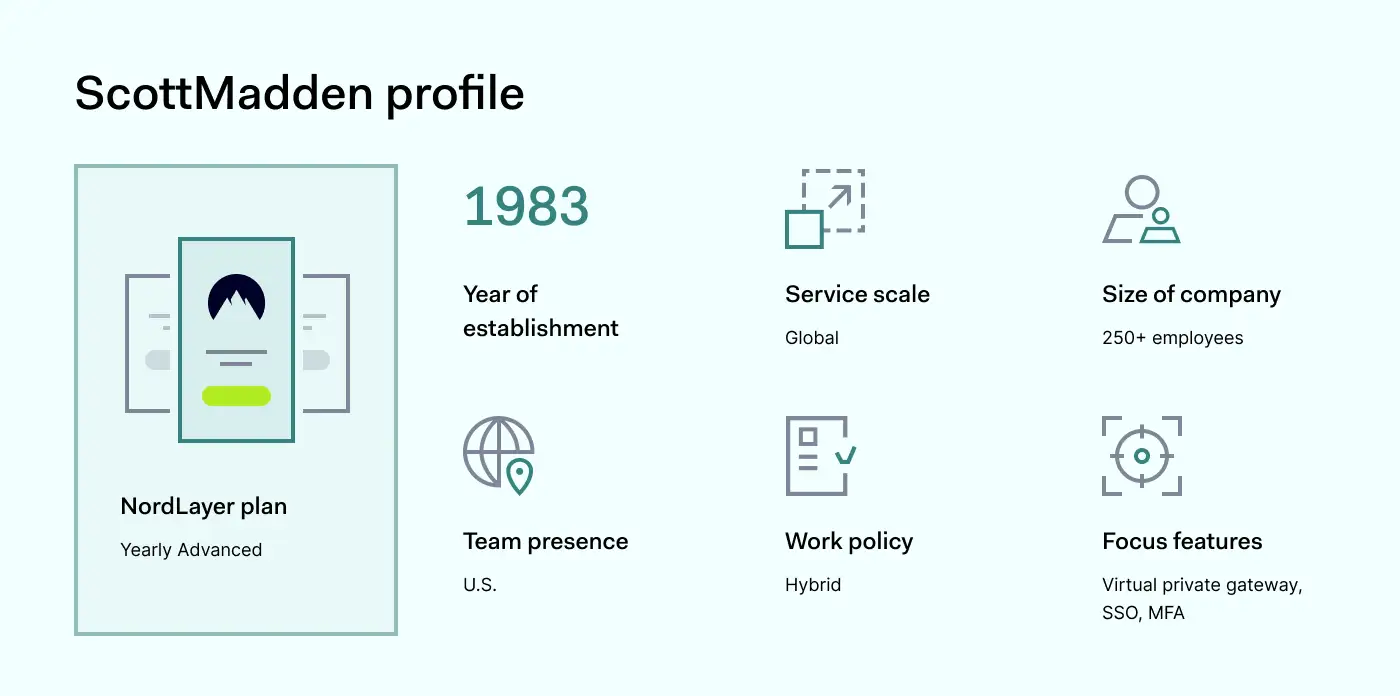
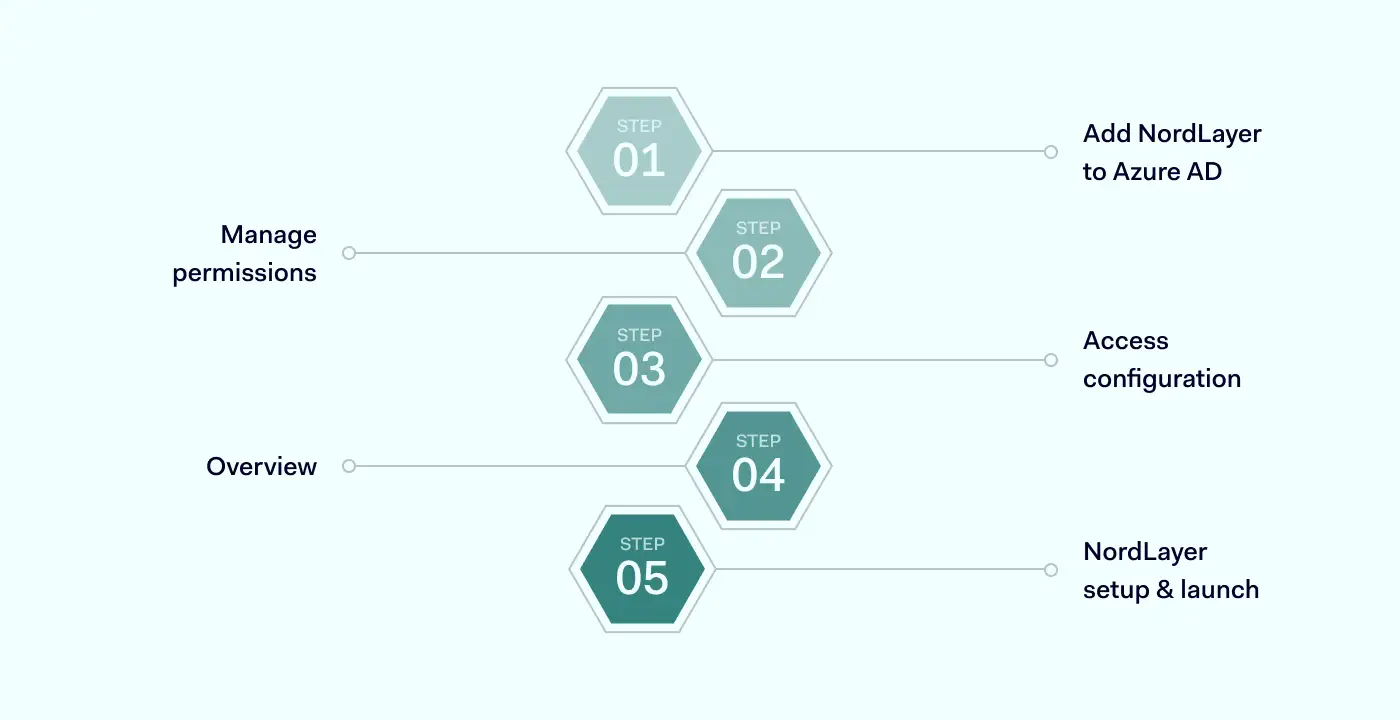
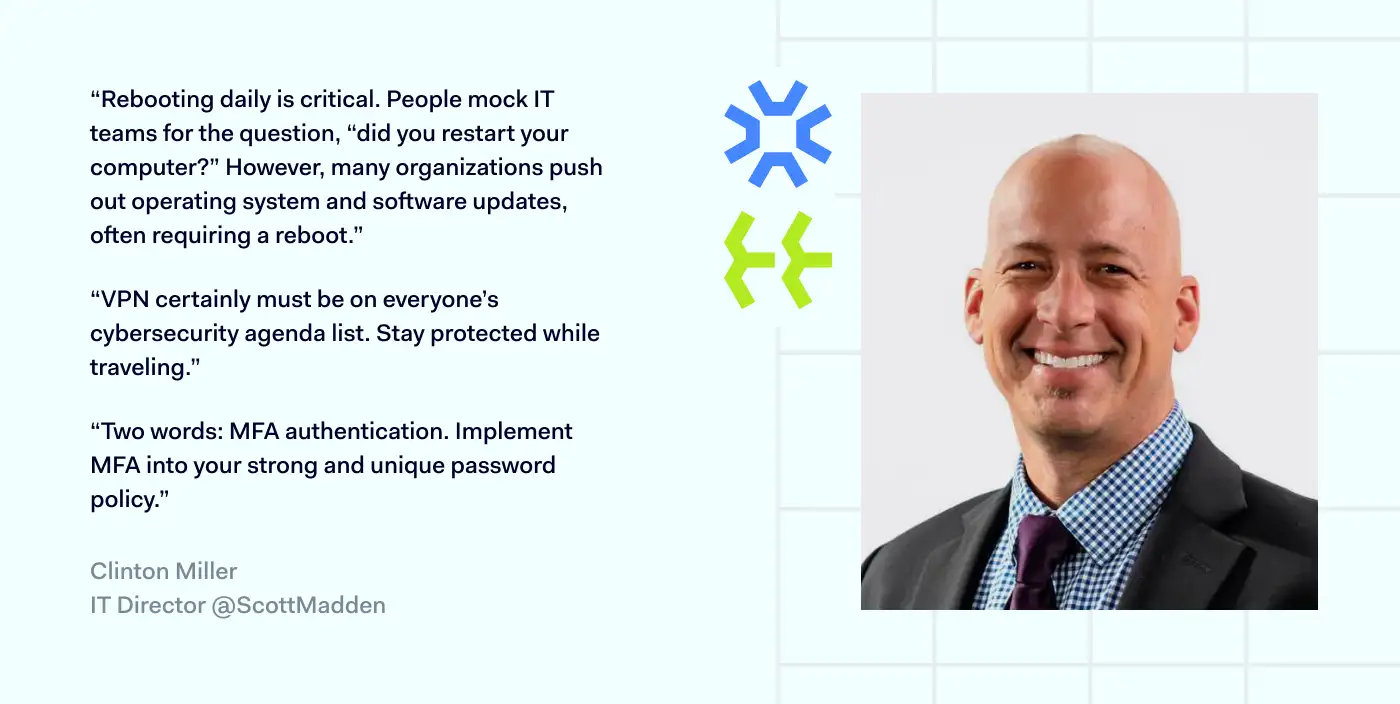


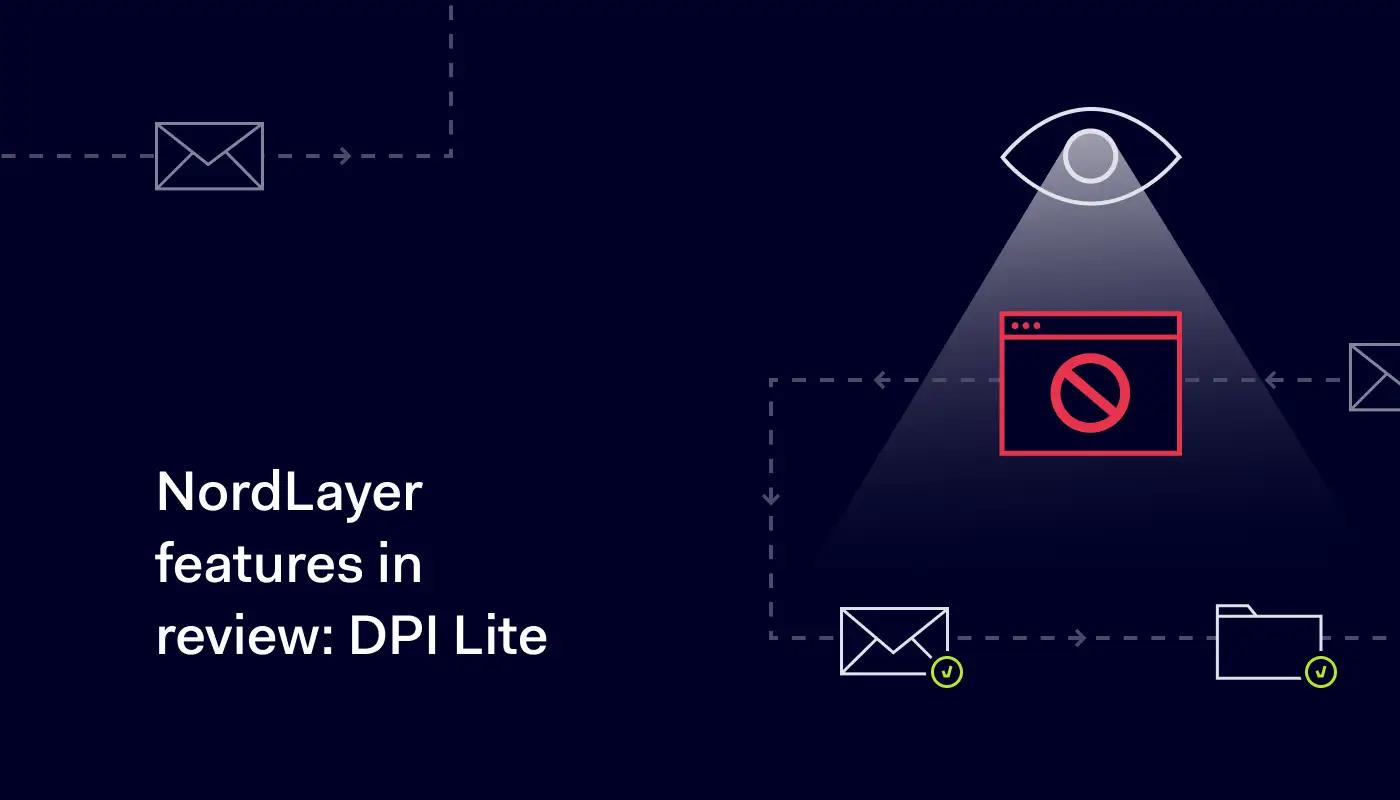
 However, if an employee needs access to company-level blocked sources, for example, a Social Media Manager working on Facebook and LinkedIn, IT administrators can purchase a separate dedicated Virtual Private Gateway for such employees and configure it with fewer restrictions.