Until recently, Windows was the de facto platform of choice in the working world as businesses set up their networks on the Microsoft operating system.
They used Word for word processing, Excel for spreadsheet work, PowerPoint for presentations, and Active Directory for domain management. However, the old paradigm has been shifting for some time now.
While Windows-based PCs and laptops are still the market leaders for large and small-to-medium-sized enterprises (SMEs), many organizations have begun to adopt Mac, Linux, and Android devices. Improved usability, convenience, and affordability are commonly cited reasons for switching.
Translation: administrators must manage and control access to their Azure Active Directory from different types of devices and operating systems.
So, can you bind a Mac to Azure Active Directory?
Let’s find out.
Mac and Azure AD: Unwilling Bedfellows
The short answer is yes — you can bind Mac to Azure. But as you can imagine, it is far from straightforward.
Competitors hardly find incentives to make life easy for each other. Think of Pepsi and Coke’s cola wars or Nike and Adidas’ sportswear battles; they’ve been at it for decades. Apple and Microsoft are no different.
With Microsoft’s Azure being a leading access management solution, many IT managers have found themselves being the grass that suffers the pinch between the giant boots of these two tech giants.
Since its release in 2000, Active Directory (AD) has been a staple for Windows networks. It provides users and IT admins with identity management, access control, and policy enforcement for Windows servers, desktops, and laptops.
Azure Active Directory (AAD) is Microsoft’s cloud-based version of its traditional on-premise Active Directory service. It allows businesses to securely access their applications and resources from anywhere on their windows device.
However, the problem arises when it comes to Apple’s Macs. While Microsoft has done an excellent job of making Windows computers compatible with AAD, the same cannot be said for Mac users.
The Challenge of Binding Macs to Azure AD
The challenge of binding Macs to Azure Active Directory is twofold:
No thanks to the Apple-Microsoft rivalry, there is no native integration between Macs and AAD.
Even when workaround solutions exist, ensuring a seamless user experience can also take time and effort.
For example, some admins have taken a cobbled approach of creating a domain within Azure using the Azure AD Domain Services (AD DS) before setting up a VPN connection between their Macs and the Azure domain. The problem, however, is that this solution is complicated and even discouraged by Microsoft.
Others, which already utilize Active Directory, can choose to implement an on-prem directory extension. However, this presents a new set of challenges, from extra costs to more infrastructure to manage.
In addition, this doesn’t enable direct Mac integration into Azure AD. Instead, admins are left with a non-future-proof method of managing endpoints.
The Solution: Step Out of Platforms And Into Identity
A better approach that IT admins take to resolve this problem is to think away from platforms and into identity.
Rather than relying on a cobbled solution that requires managing multiple directories or on-prem extensions, cloud identity management solutions such as the JumpCloud Directory Platform provide a single-user directory that can manage all users’ access to the network and other applications from one central platform.
This solution enables admins to bind not only Macs but also Windows, Linux, and other devices to Azure Active Directory in an intuitive and hassle-free manner. With JumpCloud, admins can securely manage users’ AAD access, regardless of their device or platform.
Also, IT teams that leverage other cloud-computing platforms, such as Amazon’s AWS, or Google Workspace, needn’t worry about managing different identities.
Users can access every network or resource with a single identity, such as Wi-Fi, VPN, web applications, legacy LDAP application, and on-prem or cloud-based file storage solutions. This configuration creates a true single sign-on (SSO) experience for users, making it more convenient and secure.
Manage Identity with the JumpCloud Directory Platform
JumpCloud provides an all-in-one solution for IT admins to bind Macs to Azure Active Directory without any of the earlier-mentioned problems. It’s an identity provider that delivers secure, cloud-based access services to users regardless of their devices.
The platform streamlines user experiences with SSO while unifying admin tools for mobile device management (MDM), multi-factor authentication (MFA), and compliance controls behind one pane of glass. Want to get a better handle on your heterogeneous environment? Watch our demo video and sign up for a free trial today.
Version 2 Digital is one of the most dynamic IT companies in Asia. The company distributes a wide range of IT products across various areas including cyber security, cloud, data protection, end points, infrastructures, system monitoring, storage, networking, business productivity and communication products.
Through an extensive network of channels, point of sales, resellers, and partnership companies, Version 2 offers quality products and services which are highly acclaimed in the market. Its customers cover a wide spectrum which include Global 1000 enterprises, regional listed companies, different vertical industries, public utilities, Government, a vast number of successful SMEs, and consumers in various Asian cities.
About JumpCloud At JumpCloud, our mission is to build a world-class cloud directory. Not just the evolution of Active Directory to the cloud, but a reinvention of how modern IT teams get work done. The JumpCloud Directory Platform is a directory for your users, their IT resources, your fleet of devices, and the secure connections between them with full control, security, and visibility.
Which generates reverse shell payload for linux and windows, the payload going to be saved in .md (markdown) file and once it’s imported in Notable, automatically it will be executed.
Run the exploit:
python3 CVE-2022-30507Exploit.py
Linux Payload
python3 CVE-2022-30507Exploit.py linux auto
Windows Payload
python3 CVE-2022-30507Exploit.py win auto
Test exploiting notable using the generated payload by the tool
Linux:
Windows:
Finally thoughts
Exploiting such applications on the end user’s machine it’s a really interesting topic, and it can take us to very deep research to discover new ways of exploiting and hacking end user’s machines through such applications.
This is version one of the exploitation.
We are currently developing version two which will import the payload file in the application automatically, and that will give us even more advanced persistence.
Version 2 Digital is one of the most dynamic IT companies in Asia. The company distributes a wide range of IT products across various areas including cyber security, cloud, data protection, end points, infrastructures, system monitoring, storage, networking, business productivity and communication products.
Through an extensive network of channels, point of sales, resellers, and partnership companies, Version 2 offers quality products and services which are highly acclaimed in the market. Its customers cover a wide spectrum which include Global 1000 enterprises, regional listed companies, different vertical industries, public utilities, Government, a vast number of successful SMEs, and consumers in various Asian cities.
About VRX VRX is a consolidated vulnerability management platform that protects assets in real time. Its rich, integrated features efficiently pinpoint and remediate the largest risks to your cyber infrastructure. Resolve the most pressing threats with efficient automation features and precise contextual analysis.
Recent years took cybersecurity to a new level — digital transformation, migration to the cloud environments, and remote work became the synonyms of technological business evolution. The new approach pushed such tech terms as VPN (Virtual Private Network), S(A)SE (Secure (Access) Service Edge), MFA (Multi-Factor Authentication), and many more that turned into essential modern cybersecurity elements.
Zero Trust is one of those most critical terms that already live rent-free in IT managers’ heads. It’s way past the emerging buzzword stage — now, Zero Trust is a security model that dictates organizational cybersecurity strategies and general security approaches.
But how influential is the Zero Trust model? What’s its role in the near future and its place in a broader picture of cybersecurity? Let’s take a look at what trends to expect in the Zero Trust department.
Password is dead; long live Zero Trust?!
The new cybersecurity era will likely be marked by another iconic moment in the digital age. Rumor has it that we will be done with the passwords in 2023. Hard to say if it’s true, but passwords as single-factor authentication are outdated in the context of the current cybersecurity landscape.
Lost or stolen credentials surge black markets imposing risk to data security. A glance at the high numbers of the latest data breaches of 2022:
Slash Next reports 255 million phishing-related attacks in 6 months — a 61% increase compared to 2021.
According to Verizon, weak or stolen passwords contributed to 81% of hacking-related data breaches. 82% of breaches were triggered by human error (including social engineering attacks).
Nvidia suffered an attack and lost the credentials (email addresses and Windows password hashes) of 71,000 employees.
Keeping in mind that 73% of employees recycle the same personal passwords for work-related accounts – NordLayer’s research about bad cybersecurity habits concluded weak passwords as one of the top vulnerabilities of organization security – the number of leaked personal credentials is a huge red flag for organizations.
Despite education and targeted reminders of password hygiene, more than half (59%) of workers tend to reuse passwords while being familiar with existing risks.
The remaining high data breach statistics only confirm the insufficiency of current actions regarding securing credentials and company data accordingly.
The Zero Trust mindset to ‘trust none; verify all’ is a straightforward change for companies to dismiss careless passwords from their systems and elevate security levels effectively.
A quick recap: ZT, ZTA, and ZTNA
Zero Trust (ZT) is a trust algorithm that ensures resources within specific networks can be accessed only by verified endpoints — devices or users. Yet when discussing cybersecurity, additional concepts of Zero Trust Architecture (ZTA) and Zero Trust Network Access (ZTNA) emerge — what’s the difference?
An easy way to differentiate Zero Trust, Zero Trust Architecture, and ZTNA is to define Zero Trust as the driving idea, model, or mindset that puts the theoretical foundation for the application of the method.
The Zero Trust principle turns attention to the main focus points:
Make sure to check and verify every endpoint connection request to the network.
Solely job-mandatory access rights must be granted to perform role objectives.
Plan for the maximum constraint of user movement in the network in case of a breach.
Zero Trust Architecture is a practical application of the Zero Trust approach when building security policies and IT infrastructure as if there was no traditional perimeter. ZTA combines and implements solutions for:
Endpoint verification
Network supervision.
ZTNA is a segment of Zero Trust Architecture that provides a solution to trusted-only application access. ZTNA is integral to the SASE and SSE frameworks for establishing security in remote cloud environments.
What changes does Zero Trust employ: ZTNA’s focus
Instead of discussing Zero Trust at theoretical levels, it’s beneficial to investigate ZTNA to understand what changes it suggests and how companies apply them.
According to Statista, the most common solution organizations used to enable Zero Trust segmentation in 2021 was ZTNA. Identity, Credential, and Access Management followed it.
The popularity of ZTNA comes from its adoption as a more efficient identity- and context-supported solution for controlling increasing attack surfaces in hybrid environments.
As ZK Research indicates, VPN was a go-to solution to manage and protect companies’ IT perimeters. However, VPN performance and security fallbacks brought by backhauling network traffic and open network access make it refer to VPN as a remote work solution only as a temporary one.
Therefore, to secure and connect remote workers while managing distributed endpoint, user, and application networks under the organization’s scope, companies turned to secure network access (SaaS, cloud, and edge) solutions, including ZTNA.
Shrinking the attack surface – limiting the threat actor’s activity in the network by requesting additional authentication or assigned permits to access internal applications – is the key feature of the ZTNA solution.
Prospects of Zero Trust in cybersecurity
Cyberattacks continuously challenge everyone, from consumers to federal agencies, hitting the weakest link — passwords. Attacks are disrupting business operations from intelligence businesses to manufacturers — any company with internet-connected systems and networks is vulnerable.
The Zero Trust approach can mitigate hardly controllable external and internal factors that might lead to a breach. ZTNA enables IT administrators to monitor, manage and interact with connections between endpoints and ultimately conclude whether the connection should be approved or denied.
Driving factors of ZTNA adoption
The peak of ZTNA matched with hybrid and remote work developments globally introduced by the COVID-19 pandemic. Although opinions tend to clash, remote work is here to stay, and ZTNA maintains its importance to business network security.
To securely return to old ways of working – the static office-contained perimeter, which is the least challenging to maintain and control – all of the workforce should come back to their corporate desks.
Migration to the cloud is gaining momentum as it offers more flexibility and reduces the complexity of traditional IT perimeter.
The password more often causes security issues than prevents it and needs to be reconsidered and redesigned to move to more sustainable solutions.
Evolved understanding of a workplace with WFA (Work From Anywhere) quickly showed the comforts of working from home or cafe, answering work emails from a personal phone, or watching TV series on a corporate laptop after working hours. Yet these blurred lines stretch the reach of unapproved applications and devices blending into the company network.
Although the digital landscape and new modern habits might be alarming, going backward seems unrealistic. Thus ZTNA helps manage current cybersecurity challenges in this technological evolution.
State of remote work
There’s no denying that companies will have to accept the turned tables — employees now consider not how many days they will decide to work from home but how often they are willing to show up in the office.
If the workforce is not to return to the office full-time, ZTNA naturally cannot be discarded from the company’s cybersecurity strategy.
According to ZK Research 2022 Work-from-Anywhere Study, just one – or even less – out of 10 employees consider 100% work on-site, leaving most of the workforce a risk factor to data and application security.
How do companies adopt Zero Trust?
Zero Trust is dominant in creating security strategies. Statista survey revealed that one-third of polled companies, as of January 2022, already had a formal strategy actively embracing a Zero Trust policy. Only 20 percent of respondents had no Zero Trust strategy as of 2022.
Statista also concluded that almost one-fifth of respondent organizations completely discard the Zero Trust model as a cloud security strategy while the vast majority (81%) fully or partially embrace Zero Trust model guidelines for building internal security policies.
It’s safe to say that Zero Trust has been assigned an important and influential role in shaping the security infrastructure face. The mindset combines Zero Trust backed practices of accountability, consistency, dependability, and transparency to activities and processes within the organization network.
How to transition to Zero Trust?
Benefits for businesses that adopt ZTNA to enhance the security of their network. Deploying Zero Trust-based features establishes secure cloud access and allows network segmentation for least privileged access to resources.
The model reduces insider threat by protecting internal applications and lowering the potential of account breach risk. Overall, ZTNA adoption supports the company’s journey to achieving compliance requirements.
Zero Trust Network Access is a predominant framework of any setup that deals with hybrid work as an alternative to VPN. NordLayer solution makes implementation of ZTNA easy and integrable despite the existing infrastructure in your company. Reach out to learn more about securing your business network with ZTNA within minutes.
About Version 2 Digital
Version 2 Digital is one of the most dynamic IT companies in Asia. The company distributes a wide range of IT products across various areas including cyber security, cloud, data protection, end points, infrastructures, system monitoring, storage, networking, business productivity and communication products.
Through an extensive network of channels, point of sales, resellers, and partnership companies, Version 2 offers quality products and services which are highly acclaimed in the market. Its customers cover a wide spectrum which include Global 1000 enterprises, regional listed companies, different vertical industries, public utilities, Government, a vast number of successful SMEs, and consumers in various Asian cities.
These days, cybercrime is rampant. It’s no longer a matter of “if” you’re going to suffer an attack but “when” it will happen. All companies want to be ready for any crisis. And this is where a business continuity plan comes into play.
But what is a business continuity plan exactly? Why is it important? What should one include? Today, we’re exploring all these questions in-depth.
What is a business continuity plan?
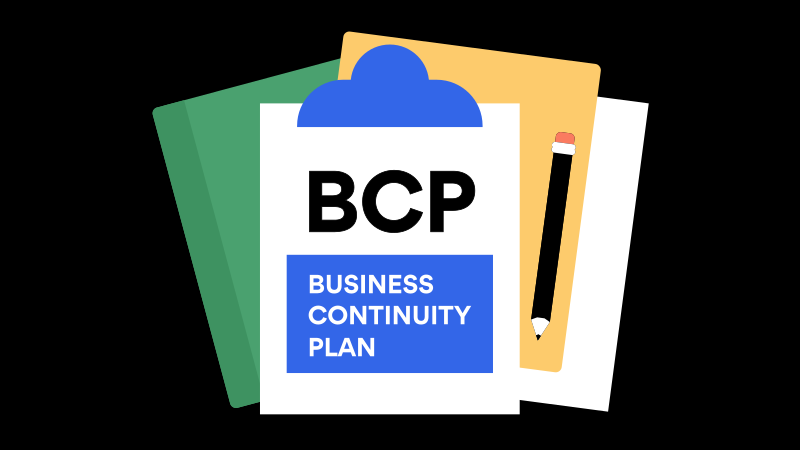
A business continuity plan (BCP) is a document that sets guidelines for how an organization will continue its operations in the event of a disruption, whether it’s a fire, flood, other natural disaster or a cybersecurity incident. A BCP aims to help organizations resume operations without significant downtime.
Unfortunately, according to a 2020 Mercer survey, 51% of businesses across the globe don’t have a business continuity plan in place.
What’s the difference between business continuity and disaster recovery plans?
We often confuse the terms business continuity plan and disaster recovery plan. The two overlap and often work together, but the disaster recovery plan focuses on containing, examining, and restoring operations after a cyber incident. On the other hand, BCP is a broader concept that considers the whole organization. A business continuity plan helps organizations stay prepared for dealing with a potential crisis and usually encompasses a disaster recovery plan.
Importance of business continuity planning
The number of news headlines announcing data breaches has numbed us to the fact that cybercrime is very real and frequent and poses an existential risk to companies of all sizes and industries.
Consider that in 2021, approximately 37% of global organizations fell victim to a ransomware attack. Then consider that business interruption and restoration costs account for 50% of cyberattack-related losses. Finally, take into account that most cyberattacks are financially motivated and the global cost of cybercrime topped $6 trillion last year. The picture is quite clear — cybercrime is a lucrative venture for bad actors and potentially disastrous for those on the receiving end.
To thrive in these unpredictable times, organizations go beyond conventional security measures. Many companies develop a business continuity plan parallel to secure infrastructure and consider the plan a critical part of the security ecosystem. The Purpose of a business continuity plan is to significantly reduce the downtime in an emergency and, in turn, reduce the potential reputational damage and — of course — revenue losses.
The initial stage of developing a business continuity plan starts with a statement of the plan’s purpose, which explains the main objective of the plan, such as ensuring the organization’s ability to continue its operations during and after a disruptive event.
The Scope of the Plan outlines the areas or functions that the plan will cover, including business processes, personnel, equipment, and technology.
The Budget specifies the estimated financial resources required to implement and maintain the BCP. It includes costs related to technology, personnel, equipment, training, and other necessary expenses.
The Timeline provides a detailed schedule for developing, implementing, testing, and updating the BCP.
II. Risk Assessment
Identification of Risks
Prioritization of Risks
Mitigation Strategies
The Risk Assessment section of a Business Continuity Plan (BCP) is an essential part of the plan that identifies potential risks that could disrupt an organization’s critical functions.
The Identification of Risks involves identifying potential threats to the organization, such cybersecurity breaches, supply chain disruptions, power outages, and other potential risks. This step is critical to understand the risks and their potential impact on the organization.
Once the risks have been identified, the Prioritization of Risks follows, which helps determine which risks require the most attention and resources.
The final step in the Risk Assessment section is developing Mitigation Strategies to minimize the impact of identified risks. Mitigation strategies may include preventative measures, such as system redundancies, data backups, cybersecurity measures, as well as response and recovery measures, such as emergency protocols and employee training.
III. Emergency Response
Emergency Response Team
Communication Plan
Emergency Procedures
This section of the plan focuses on immediate actions that should be taken to ensure the safety and well-being of employees and minimize the impact of the event on the organization’s operations.
The Emergency Response Team is responsible for managing the response to an emergency or disaster situation. This team should be composed of individuals who are trained in emergency response procedures and can act quickly and decisively during an emergency. The team should also include a designated leader who is responsible for coordinating the emergency response efforts.
The Communication Plan outlines how information will be disseminated during an emergency situation. It includes contact information for employees, stakeholders, and emergency response personnel, as well as protocols for communicating with these individuals.
The Emergency Procedures detail the steps that should be taken during an emergency or disaster situation. The emergency procedures should be developed based on the potential risks identified in the Risk Assessment section and should be tested regularly to ensure that they are effective.
IV. Business Impact Analysis
The Business Impact Analysis (BIA) section of a Business Continuity Plan (BCP) is a critical step in identifying the potential impact of a disruption to an organization’s critical operations.
The Business Impact Analysis is typically conducted by a team of individuals who understand the organization’s critical functions and can assess the potential impact of a disruption to those functions. The team may include representatives from various departments, including finance, operations, IT, and human resources.
V. Recovery and Restoration
Procedures for recovery and restoration of critical processes
Prioritization of recovery efforts
Establishment of recovery time objectives
The Recovery and Restoration section of a Business Continuity Plan (BCP) outlines the procedures for recovering and restoring critical processes and functions following a disruption.
The Procedures for recovery and restoration of critical processes describe the steps required to restore critical processes and functions following a disruption. This may include steps such as relocating to alternate facilities, restoring data and systems, and re-establishing key business relationships.
The Prioritization section of the plan identifies the order in which critical processes will be restored, based on their importance to the organization’s operations and overall mission.
Recovery time objectives (RTOs) define the maximum amount of time that critical processes and functions can be unavailable following a disruption. Establishing RTOs ensures that recovery efforts are focused on restoring critical functions within a specific timeframe.
VI. Plan Activation
Plan Activation Procedures
The Plan Activation section is critical in ensuring that an organization can quickly and effectively activate the plan and respond to a potential emergency.
The Plan Activation Procedures describe the steps required to activate the BCP in response to a disruption. The procedures should be clear and concise, with specific instructions for each step to ensure a prompt and effective response.
VII. Testing and Maintenance
Testing Procedures
Maintenance Procedures
Review and Update Procedures
This section of the plan is critical to ensure that an organization can effectively respond to disruptions and quickly resume its essential functions.
Testing procedures may include scenarios such as natural disasters, cyber-attacks, and other potential risks. The testing procedures should include clear objectives, testing scenarios, roles and responsibilities, and evaluation criteria to assess the effectiveness of the plan.
The Maintenance Procedures detail the steps necessary to keep the BCP up-to-date and relevant.
The Review and Update Procedures describe how the BCP will be reviewed and updated regularly to ensure its continued effectiveness. This may involve conducting a review of the plan on a regular basis or after significant changes to the organization’s operations or threats.
What should a business continuity plan checklist include?
Organizations looking to develop a BCP have more than a few things to think through and consider. Variables such as the size of the organization, its IT infrastructure, personnel, and resources all play a significant role in developing a continuity plan. Remember, each crisis is different, and each organization will have a view on handling it according to all the variables in play. However, all business continuity plans will include a few elements in one way or another.
Clearly defined areas of responsibility
A BCP should define specific roles and responsibilities for cases of emergency. Detail who is responsible for what tasks and clarify what course of action a person in a specific position should take. Clearly defined roles and responsibilities in an emergency event allow you to act quickly and decisively and minimize potential damage.
Crisis communication plan
In an emergency, communication is vital. It is the determining factor when it comes to crisis handling. For communication to be effective, it is critical to establish clear communication pipelines. Furthermore, it is crucial to understand that alternative communication channels should not be overlooked and outlined in a business continuity plan.
Recovery teams
A recovery team is a collective of different professionals who ensure that business operations are restored as soon as possible after the organization confronts a crisis.
Alternative site of operations
Today, when we think of an incident in a business environment, we usually think of something related to cybersecurity. However, as discussed earlier, a BCP covers many possible disasters. In a natural disaster, determine potential alternate sites where the company could continue to operate.
Backup power and data backups
Whether a cyber event or a real-life physical event, ensuring that you have access to power is crucial if you wish to continue operations. In a BCP, you can often come across lists of alternative power sources such as generators, where such tools are located, and who should oversee them. The same applies to data. Regularly scheduled data backups can significantly reduce potential losses incurred by a crisis event.
Recovery guidelines
If a crisis is significant, a comprehensive business continuity plan usually includes detailed guidelines on how the recovery process will be carried out.
Business continuity planning steps
Here are some general guidelines that an organization looking to develop a BCP should consider:
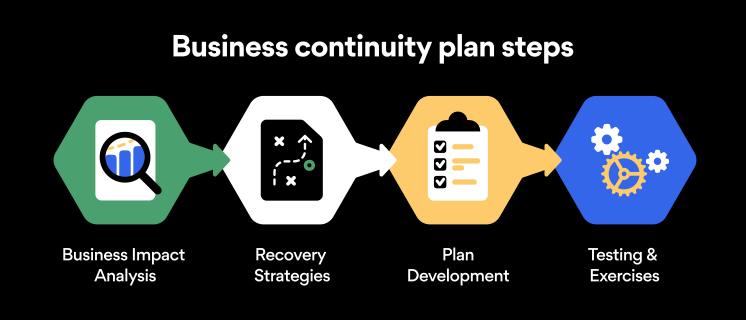
Analysis
A business continuity plan should include an in-depth analysis of everything that could negatively affect the overall organizational infrastructure and operations. Assessing different levels of risk should also be a part of the analysis phase.
Design and development
Once you have a clear overview of potential risks your company could face, start developing a plan. Create a draft and reassess it to see if it takes into account even the smallest of details.
Implementation
Implement BCP within the organization by providing training sessions for the staff to get familiar with the plan. Getting everyone on the same page regarding crisis management is critical.
Testing
Rigorously test the plan. Play out a variety of scenarios in training sessions to learn the overall effectiveness of the continuity plan. By doing so, everyone on the team will be closely familiar with the business continuity plan’s guidelines.
Maintenance and updating
Because the threat landscape constantly changes and evolves, you should regularly reassess your BCP and take steps to update it. By making your continuity plan in tune with the times, you will be able to stay a step ahead of a crisis.
Level up your company’s security with NordPass Business
A comprehensive business continuity plan is vital for the entire organization’s security posture. However, in a perfect world, you wouldn’t have to use it. This is where NordPass Business can help.
Remember, weak, reused, or compromised passwords are often cited as one of the top contributing factors in data breaches. It’s not surprising, considering that an average user has around 100 passwords. Password fatigue is real and significantly affects how people treat their credentials. NordPass Business counters these issues.
With NordPass Business, your team will have a single secure place to store all work-related passwords, credit cards, and other sensitive information. Accessing all the data stored in NordPass is quick and easy, which allows your employees not to be distracted by the task of finding the correct passwords for the correct account.
In cyber incidents, NordPass Business ensures that company credentials remain secure at all times. Everything stored in the NordPass vault is secured with advanced encryption algorithms, which would take hundreds of years to brute force.
If you are interested in learning more about NordPass Business and how it can fortify corporate security, do not hesitate to book a demo with our representative.
About Version 2 Digital
Version 2 Digital is one of the most dynamic IT companies in Asia. The company distributes a wide range of IT products across various areas including cyber security, cloud, data protection, end points, infrastructures, system monitoring, storage, networking, business productivity and communication products.
Through an extensive network of channels, point of sales, resellers, and partnership companies, Version 2 offers quality products and services which are highly acclaimed in the market. Its customers cover a wide spectrum which include Global 1000 enterprises, regional listed companies, different vertical industries, public utilities, Government, a vast number of successful SMEs, and consumers in various Asian cities.
About NordPass NordPass is developed by Nord Security, a company leading the global market of cybersecurity products.
The web has become a chaotic space where safety and trust have been compromised by cybercrime and data protection issues. Therefore, our team has a global mission to shape a more trusted and peaceful online future for people everywhere.
Microsoft Intune is a cloud-based enterprise mobility and security (EMS) management solution that enables organizations to manage mobile devices. It integrates with other components of Microsoft’s EMS platform, including Azure Active Directory (AAD) and Azure Information Protection (AIP), allowing IT teams to enforce security policies and manage how endpoints are used in the organization.
Intune allows organizations to achieve a productive mobile workforce without worrying about corporate data security. For example, IT teams can set rules and configure security policies for various devices, whether those devices are corporate-owned or personal. This helps organizations implement bring your own device (BYOD) policies while mitigating security concerns.
However, despite these benefits, Intune has only traditionally supported devices running Windows, macOS, iOS, and Android operating systems (OSs). This left out Linux-based devices that many companies use to maintain workloads out of the picture for a long time. Toward the end of 2022 however, Microsoft finally added Linux workstation support to Intune — starting with Ubuntu.
Does Intune Support Linux?
The short answer is yes. In October 2022, Microsoft announced that Microsoft Endpoint Manager (MEM) added Linux-based devices to its unified endpoint management solution, with general availability for Ubuntu LTS.
However, Microsoft has yet to release support for other distros which means IT teams are either leaving other types of Linux workstations unmanaged or using other third-party mobile application management (MAM) and mobile device management (MDM) tools.
What’s Been Discussed?
Companies need to ensure that all endpoints are secure and compliant. In this regard, IT teams need to ensure that they mitigate compliance issues by deploying software and patches to all device types, including Linux endpoints. Effective Linux MDM is particularly challenging due to the many flavors of Linux distributions.
With Linux support added to Intune, IT teams can theoretically use a unified console to manage devices and apply the same protection policies and configurations for Linux workstations. Whether Microsoft is able to accomplish that for more distros after Ubuntu remains to be seen.
Having cross-platform support in an MDM is essential because the integration of multiple operating systems into one tool streamlines:
Cloud-Based Management
If IT teams are able to combine all the applications and device controls in one cloud-based endpoint management system, they can then apply policies and endpoint configurations in the same way across a heterogenous IT environment for added security and compliance.
In addition, a unified MDM allows organizations to move their employees closer to Zero Trust security architecture and cover their entire IT infrastructure. For example, IT teams can apply management controls such as password policies, Wi-Fi profiles, and certificates in a standard way across all cloud-managed endpoints.
Compliance
Adding Linux support to an existing MDM enables companies to more easily enforce compliance policies and standards. For example, IT teams can create rules and configuration settings such as the minimum RHEL version that devices need to meet to be considered compliant.
IT teams can also create application policies that provide an extra layer of protection, allowing employees to access them on personal devices securely. Most importantly, IT teams can also take actions for non-compliance, like sending notifications to the user.
Conditional Access Policies
Determining if the device is compliant is one of the outcomes of cloud management. In a Microsoft-specific ecosystem, MEM allows organizations to assess the device’s posture while sending signals to AAD. If MEM finds that the device is compliant, it applies conditional access configurations. These configurations combine device compliance signals with other signals such as user identity risks to secure access to enterprise resources through adaptive policies.
With Intune, Microsoft’s goal is to allow IT teams to set AAD Conditional Access policies for Linux devices, as it does for Windows, macOS, iOS, and Android endpoints. This would ensure that only compliant Linux devices can access enterprise resources such as Microsoft 365 applications.
However, note that the current release only provides conditional access policies protecting web applications via Microsoft Edge. This is an example of Microsoft attempting to lock admins and users further into the Microsoft ecosystem, without allowing for the flexibility of choice in IT tools.
The Good News? A Linux Device Management Alternative Already Exists
Even if Microsoft succeeds with its Intune Linux management framework, the approach will still face some challenges. This is because of the differences between Microsoft’s approach to identity and access management (IAM) and other open source solutions.
For example, while Microsoft’s approach is to create segmented solutions that seamlessly integrate with Azure, the same cannot be said about non-Windows platforms like Linux-based OSs. Additionally, it is those very same segmented solutions that force users into Microsoft products and add additional complexity and cost for IT admins.
If you’d prefer to have a cloud-based MDM that provides the openness you need to choose the best tools and IT resources for your stack, while still resolving compliance and security issues in a heterogeneous environment, then you should consider JumpCloud® as an alternative cloud directory service.
As an open directory platform and unified MDM, JumpCloud centralizes identity and system management, irrespective of OS. It can overcome the common “admin black hole” associated with managing Linux devices, and help you reduce the number of IT tools your organization has to pay for and manage to fully secure its IT environment.
Whether you need patch management, encryption and lock-screen policies, MFA, or other capabilities applied to the Linux devices in your fleet, JumpCloud supports the following distros:
Amazon Linux 2 on x86_64 and ARM64 processors
Amazon Linux 2022 (AL2022) on x86_64 and ARM64 processors
CentOS 7, 8
Debian 10, 11 on x86_64 and ARM64 processors
Fedora 35, and 36
Mint 19, 20, 21 Cinnamon on x86_64 and ARM64 processors
RHEL 8, 9 on x86_64 and ARM64 processors
Rocky Linux 8, 9 on x86_86 and ARM64 processors
Ubuntu 18.04 (64 bit), 20.04, and 21.04, and 22.04 on x86_64 and ARM64 processors
Version 2 Digital is one of the most dynamic IT companies in Asia. The company distributes a wide range of IT products across various areas including cyber security, cloud, data protection, end points, infrastructures, system monitoring, storage, networking, business productivity and communication products.
Through an extensive network of channels, point of sales, resellers, and partnership companies, Version 2 offers quality products and services which are highly acclaimed in the market. Its customers cover a wide spectrum which include Global 1000 enterprises, regional listed companies, different vertical industries, public utilities, Government, a vast number of successful SMEs, and consumers in various Asian cities.
About JumpCloud At JumpCloud, our mission is to build a world-class cloud directory. Not just the evolution of Active Directory to the cloud, but a reinvention of how modern IT teams get work done. The JumpCloud Directory Platform is a directory for your users, their IT resources, your fleet of devices, and the secure connections between them with full control, security, and visibility.
Are you worried about employees leaking private information as they browse the web? If so, you’re probably considering setting up a Virtual Private Network (VPN) or proxy server.
Both technologies mask traffic and conceal your location. But there are significant differences between proxies and VPNs that users need to know. Let’s explore the VPN vs proxy contest in more detail and help you find the ideal privacy solution.
What is a VPN and how does it work?
VPNs are networks that route traffic through private servers before sending it to its destination. When users log onto their VPN client, the service uses special protocols to create a “tunnel” connecting data sources and destinations.
VPNs offer a couple of important security and privacy services:
Anonymization. Traffic routed through Virtual Private Network servers is assigned a new IP address. This anonymizes the data source, making it hard for outsiders to track online activity. Outside observers may know you’re using a VPN connection, but your original IP address will be inaccessible.
Encryption. VPNs encrypt data from the user device to the virtual private gateway. Any web traffic passing through a remote access VPN server is basically unreadable to outside observers while it is encrypted. Users can still browse the web or access streaming content. But their information and activity will remain private. This is very useful when dealing with financial data.
VPNs are usually paid services. A third-party VPN provider will maintain servers around the world and manage encryption. Users log on via clients, which can be integrated into web browsers if desired.
VPNs also work at the operating system level. This means they cover all traffic leaving or entering a network. They are not restricted to single apps.
What is a proxy and how does it work?
Proxies also use external servers. These proxy servers route traffic from user devices and give each data packet a new IP address. As far as outsiders are concerned, user traffic comes from the proxy’s remote server. This is a major benefit when accessing geo-restricted web content.
On the downside, proxies do not feature data encryption. They can anonymize the identity of a user but not the data they send. Sensitive data remains exposed to attackers, making proxies unsuitable for a business internet connection.
Proxies also tend to be associated with individual applications. They process traffic from web browsers or streaming games. But proxies do not provide all-around privacy at an operating system level.
Understanding the main proxy types
There are various different types of proxy servers, and each has its own use cases:
HTTP proxies. Designed to work with web pages and browsers. You can configure Chrome or Edge to route all HTTP traffic through a proxy, or just assign proxy routing to specific websites.
SOCKS5 proxies. SOCKS proxies work on the application level and route traffic from specific apps. For example, a SOCKS5 proxy could be assigned to route Skype conversations securely. SOCKS5 proxies are flexible but tend to be slower than HTTP versions.
Transparent proxies. Generally invisible to network users. A transparent proxy can filter web traffic and monitor activity. This makes them useful in settings like schools and libraries. Parents could also use them to filter the content available to children.
Private proxies. Private proxies provide a dedicated IP address for each user. This does not provide as much privacy as VPNs. However, it can help unblock geo-restricted websites and improve proxy speeds.
Key differences between proxy and VPN
We now know the main features of proxies and VPNs. But here’s the all-important question. How do VPNs and proxies differ, and which one should you choose?
1. VPNs provide encryption
Encryption is the most important difference between VPNs and proxies and probably the key consideration for business users. When you use a VPN, all of your internet traffic is encrypted.
The best paid providers use AES-256 encryption that has no known weaknesses. Encrypted data will be off-limits to thieves, limiting the risk of leaking commercial data. A remote work VPN will also lock down connections between home workers and central offices. So you can establish a secure connection between workloads and user devices.
Proxies never encrypt traffic. All they do is re-route packets and provide IP address anonymization. That can be useful when accessing blocked web pages. But data security will be relatively weak.
2. VPNs handle all traffic, proxies work with individual apps
VPNs function at the operating system layer. They apply encryption and anonymization to all data passing across network boundaries. Businesses do not have to install software on individual apps or configure settings for each service. Privacy controls apply over-the-top – a more convenient solution.
Because they work on the application level, proxies are used with specific software or services. They won’t cover all network connections, potentially leaving security gaps.
3. Proxies may be faster
Proxies don’t need to encrypt data as they route it worldwide. VPNs do. This imposes extra bandwidth overheads. VPNs may be slower, as a result, sometimes making them unworkable for streaming tasks.
However, the best VPNs match proxies in terms of speed. Free proxies generally use cheaper, less extensive infrastructure. So while they use more basic technology, they may be slower than VPN alternatives.
4. You’ll usually pay for VPNs
Proxies have low maintenance costs for providers and are usually free for users. At least, they are free at the point of use. As with most free services, proxy customers are the product. Expect your data to be stored and sold to third parties for marketing purposes.
There are free VPNs as well. However, paid services are recommended for business customers. Paid VPNs charge small fees and provide higher-quality encryption, speed, reliability, and anonymization. They also have stricter anti-logging policies. Your data should remain private and won’t be resold.
Unlike most proxies, good VPNs combine these services with customer support. All-in-all, they deliver much better online privacy for high-end users.
5. VPNs are more reliable
As a general rule, VPNs are more reliable. Your connection will drop less frequently. Speeds will be more regular. A host server around the world should be available at all times.
Proxies can be very reliable but do not have such a strong reputation. Expect connections to drop every now and then, especially when using free proxy services.
VPNs also offer more reliable DNS leak protection. Poor-quality proxies will likely leak DNS information to your internet service provider or the websites you visit. This completely compromises the privacy service.
Similarities between proxies and VPNs
As you can see, there are plenty of divergences between VPNs and proxies. But it’s important to remember the similarities as well.
Both proxies and VPNs allow anonymous web browsing. Customers use them to change their IP address. This enables access to previously blocked online services.
VPNs and proxies use third-party routers. While you can set up an in-house VPN server or proxy, both services are generally sourced from external partners.
Both can be used to control network access. Proxies are often used to block access for employees to certain websites. VPNs can also blacklist websites.
Neither represents a complete privacy solution. VPNs are more effective when anonymizing network traffic but are not completely watertight. Both proxies and VPNs can have technical flaws that expose your location. They may collect data to share with commercial partners or governments.
When should you use VPN and when proxy?
A basic rule is that VPNs should be used wherever users need security and privacy. VPNs combine reliable IP anonymization with encryption. This means company data will be protected twice as it passes over the internet. Proxies provide very little protection at all.
VPN connections can be used to enable secure remote work. Employees can install VPN clients on work devices at home and use an encrypted tunnel to join the central company network. Without VPN protection, any data sent from workers to the network will be exposed to attackers.
Site-to-Site VPNs can connect different work locations securely. They extend the main network to other sites, allowing every department or branch to access data safely.
VPNs are also used to transfer sensitive financial data. Companies can use them to make transactions or discuss commercial arrangements. Without encryption, using proxies for these tasks is extremely risky.
Proxies can play a role in some situations. Transparent proxies are often used to prevent access to undesirable websites. Companies could use HTTP proxies to wall off social media during working hours.
A proxy server may also be handy for researching content worldwide, assuming security concerns are secondary. You can use a proxy server to pose as a buyer from different countries and see how prices vary. Or you might access videos and bypass content restrictions.
VPN vs proxy: which is better for your business?
By now, you probably have an idea of which privacy solution to choose. Most businesses should opt for virtual private networks over proxies. A proxy server offers minimal security features. The service may be free of charge and fast, but data sent via a proxy server is always vulnerable.
By contrast, VPNs encrypt data – usually at levels that protect information from attackers. The best VPNs use military-grade encryption. Some offer add-ons like Double VPN protection that makes it hard to tell whether users are even employing a VPN.
VPNs come in business-friendly forms. You can set them up for remote workers, link departments, and integrate VPNs with cloud computing. If you choose a reliable provider, you can talk to support staff and optimize security and privacy. This just isn’t available with any proxies.
How can NordLayer help?
NordLayer can help you implement a secure, fast, and business-friendly VPN solution. Our software-based products include VPN services powered by the NordLynx protocol. This combines speed and cutting-edge encryption.
Create site-to-site setups to cover every workstation. Cater for remote workers, and implement Single Sign On that extends protection to all network assets. To find out more, get in touch with the NordLayer team today.
FAQ
Is a proxy server the same as a VPN?
No. Proxy and VPN servers both route internet traffic and assign anonymous IP addresses. VPNs add encryption to data transfers. They act at OSI layers 3 or 4, while proxies operate at layers 5 to 7.
Do you need a proxy server if you have a VPN?
Probably not. VPNs deliver the same services as proxy servers, with better security, performance, and support. In some cases, you could use a VPN to work around a transparent proxy if you use one to regulate internet activity. But this is relatively rare.
Are proxy servers safe?
Maybe, but how can you be sure? Free proxy services are notorious for leaking and selling data. Users should assume that someone is tracking their activity. A proxy server should never be used to send sensitive data.
Which is faster, VPN or proxy?
Proxies are often faster than VPNs as they do not require encryption. However, speeds also depend on the number of proxy server users, available servers, and the quality of those servers. In many cases, a well-managed VPN will be faster than a cheap, poorly run proxy.
Is Tor a VPN or a proxy server?
Neither. Tor is a network of nodes located around the world. These nodes are free to access. They act as a relay, bouncing traffic between nodes until it reaches its destination. It has some VPN features, such as encryption. However, Tor traffic can often be seen by volunteers, and its exit nodes are often blacklisted. Tor speeds also tend to be slower than proxies and VPNs.
About Version 2 Digital
Version 2 Digital is one of the most dynamic IT companies in Asia. The company distributes a wide range of IT products across various areas including cyber security, cloud, data protection, end points, infrastructures, system monitoring, storage, networking, business productivity and communication products.
Through an extensive network of channels, point of sales, resellers, and partnership companies, Version 2 offers quality products and services which are highly acclaimed in the market. Its customers cover a wide spectrum which include Global 1000 enterprises, regional listed companies, different vertical industries, public utilities, Government, a vast number of successful SMEs, and consumers in various Asian cities.
These days, cybercrime is rampant. It’s no longer a matter of “if” you’re going to suffer an attack but “when” it will happen. All companies want to be ready for any crisis. And this is where a business continuity plan comes into play.
But what is a business continuity plan exactly? Why is it important? What should one include? Today, we’re exploring all these questions in-depth.
What is a business continuity plan?
A business continuity plan (BCP) is a document that sets guidelines for how an organization will continue its operations in the event of a disruption, whether it’s a fire, flood, other natural disaster or a cybersecurity incident. A BCP aims to help organizations resume operations without significant downtime.
Unfortunately, according to a 2020 Mercer survey, 51% of businesses across the globe don’t have a business continuity plan in place.
What’s the difference between business continuity and disaster recovery plans?
We often confuse the terms business continuity plan and disaster recovery plan. The two overlap and often work together, but the disaster recovery plan focuses on containing, examining, and restoring operations after a cyber incident. On the other hand, BCP is a broader concept that considers the whole organization. A business continuity plan helps organizations stay prepared for dealing with a potential crisis and usually encompasses a disaster recovery plan.
Importance of business continuity planning
The number of news headlines announcing data breaches has numbed us to the fact that cybercrime is very real and frequent and poses an existential risk to companies of all sizes and industries.
Consider that in 2021, approximately 37% of global organizations fell victim to a ransomware attack. Then consider that business interruption and restoration costs account for 50% of cyberattack-related losses. Finally, take into account that most cyberattacks are financially motivated and the global cost of cybercrime topped $6 trillion last year. The picture is quite clear — cybercrime is a lucrative venture for bad actors and potentially disastrous for those on the receiving end.
To thrive in these unpredictable times, organizations go beyond conventional security measures. Many companies develop a business continuity plan parallel to secure infrastructure and consider the plan a critical part of the security ecosystem. The Purpose of a business continuity plan is to significantly reduce the downtime in an emergency and, in turn, reduce the potential reputational damage and — of course — revenue losses.
The initial stage of developing a business continuity plan starts with a statement of the plan’s purpose, which explains the main objective of the plan, such as ensuring the organization’s ability to continue its operations during and after a disruptive event.
The Scope of the Plan outlines the areas or functions that the plan will cover, including business processes, personnel, equipment, and technology.
The Budget specifies the estimated financial resources required to implement and maintain the BCP. It includes costs related to technology, personnel, equipment, training, and other necessary expenses.
The Timeline provides a detailed schedule for developing, implementing, testing, and updating the BCP.
II. Risk Assessment
Identification of Risks
Prioritization of Risks
Mitigation Strategies
The Risk Assessment section of a Business Continuity Plan (BCP) is an essential part of the plan that identifies potential risks that could disrupt an organization’s critical functions.
The Identification of Risks involves identifying potential threats to the organization, such cybersecurity breaches, supply chain disruptions, power outages, and other potential risks. This step is critical to understand the risks and their potential impact on the organization.
Once the risks have been identified, the Prioritization of Risks follows, which helps determine which risks require the most attention and resources.
The final step in the Risk Assessment section is developing Mitigation Strategies to minimize the impact of identified risks. Mitigation strategies may include preventative measures, such as system redundancies, data backups, cybersecurity measures, as well as response and recovery measures, such as emergency protocols and employee training.
III. Emergency Response
Emergency Response Team
Communication Plan
Emergency Procedures
This section of the plan focuses on immediate actions that should be taken to ensure the safety and well-being of employees and minimize the impact of the event on the organization’s operations.
The Emergency Response Team is responsible for managing the response to an emergency or disaster situation. This team should be composed of individuals who are trained in emergency response procedures and can act quickly and decisively during an emergency. The team should also include a designated leader who is responsible for coordinating the emergency response efforts.
The Communication Plan outlines how information will be disseminated during an emergency situation. It includes contact information for employees, stakeholders, and emergency response personnel, as well as protocols for communicating with these individuals.
The Emergency Procedures detail the steps that should be taken during an emergency or disaster situation. The emergency procedures should be developed based on the potential risks identified in the Risk Assessment section and should be tested regularly to ensure that they are effective.
IV. Business Impact Analysis
The Business Impact Analysis (BIA) section of a Business Continuity Plan (BCP) is a critical step in identifying the potential impact of a disruption to an organization’s critical operations.
The Business Impact Analysis is typically conducted by a team of individuals who understand the organization’s critical functions and can assess the potential impact of a disruption to those functions. The team may include representatives from various departments, including finance, operations, IT, and human resources.
V. Recovery and Restoration
Procedures for recovery and restoration of critical processes
Prioritization of recovery efforts
Establishment of recovery time objectives
The Recovery and Restoration section of a Business Continuity Plan (BCP) outlines the procedures for recovering and restoring critical processes and functions following a disruption.
The Procedures for recovery and restoration of critical processes describe the steps required to restore critical processes and functions following a disruption. This may include steps such as relocating to alternate facilities, restoring data and systems, and re-establishing key business relationships.
The Prioritization section of the plan identifies the order in which critical processes will be restored, based on their importance to the organization’s operations and overall mission.
Recovery time objectives (RTOs) define the maximum amount of time that critical processes and functions can be unavailable following a disruption. Establishing RTOs ensures that recovery efforts are focused on restoring critical functions within a specific timeframe.
VI. Plan Activation
Plan Activation Procedures
The Plan Activation section is critical in ensuring that an organization can quickly and effectively activate the plan and respond to a potential emergency.
The Plan Activation Procedures describe the steps required to activate the BCP in response to a disruption. The procedures should be clear and concise, with specific instructions for each step to ensure a prompt and effective response.
VII. Testing and Maintenance
Testing Procedures
Maintenance Procedures
Review and Update Procedures
This section of the plan is critical to ensure that an organization can effectively respond to disruptions and quickly resume its essential functions.
Testing procedures may include scenarios such as natural disasters, cyber-attacks, and other potential risks. The testing procedures should include clear objectives, testing scenarios, roles and responsibilities, and evaluation criteria to assess the effectiveness of the plan.
The Maintenance Procedures detail the steps necessary to keep the BCP up-to-date and relevant.
The Review and Update Procedures describe how the BCP will be reviewed and updated regularly to ensure its continued effectiveness. This may involve conducting a review of the plan on a regular basis or after significant changes to the organization’s operations or threats.
What should a business continuity plan checklist include?
Organizations looking to develop a BCP have more than a few things to think through and consider. Variables such as the size of the organization, its IT infrastructure, personnel, and resources all play a significant role in developing a continuity plan. Remember, each crisis is different, and each organization will have a view on handling it according to all the variables in play. However, all business continuity plans will include a few elements in one way or another.
Clearly defined areas of responsibility
A BCP should define specific roles and responsibilities for cases of emergency. Detail who is responsible for what tasks and clarify what course of action a person in a specific position should take. Clearly defined roles and responsibilities in an emergency event allow you to act quickly and decisively and minimize potential damage.
Crisis communication plan
In an emergency, communication is vital. It is the determining factor when it comes to crisis handling. For communication to be effective, it is critical to establish clear communication pipelines. Furthermore, it is crucial to understand that alternative communication channels should not be overlooked and outlined in a business continuity plan.
Recovery teams
A recovery team is a collective of different professionals who ensure that business operations are restored as soon as possible after the organization confronts a crisis.
Alternative site of operations
Today, when we think of an incident in a business environment, we usually think of something related to cybersecurity. However, as discussed earlier, a BCP covers many possible disasters. In a natural disaster, determine potential alternate sites where the company could continue to operate.
Backup power and data backups
Whether a cyber event or a real-life physical event, ensuring that you have access to power is crucial if you wish to continue operations. In a BCP, you can often come across lists of alternative power sources such as generators, where such tools are located, and who should oversee them. The same applies to data. Regularly scheduled data backups can significantly reduce potential losses incurred by a crisis event.
Recovery guidelines
If a crisis is significant, a comprehensive business continuity plan usually includes detailed guidelines on how the recovery process will be carried out.
Business continuity planning steps
Here are some general guidelines that an organization looking to develop a BCP should consider:
Analysis
A business continuity plan should include an in-depth analysis of everything that could negatively affect the overall organizational infrastructure and operations. Assessing different levels of risk should also be a part of the analysis phase.
Design and development
Once you have a clear overview of potential risks your company could face, start developing a plan. Create a draft and reassess it to see if it takes into account even the smallest of details.
Implementation
Implement BCP within the organization by providing training sessions for the staff to get familiar with the plan. Getting everyone on the same page regarding crisis management is critical.
Testing
Rigorously test the plan. Play out a variety of scenarios in training sessions to learn the overall effectiveness of the continuity plan. By doing so, everyone on the team will be closely familiar with the business continuity plan’s guidelines.
Maintenance and updating
Because the threat landscape constantly changes and evolves, you should regularly reassess your BCP and take steps to update it. By making your continuity plan in tune with the times, you will be able to stay a step ahead of a crisis.
Level up your company’s security with NordPass Business
A comprehensive business continuity plan is vital for the entire organization’s security posture. However, in a perfect world, you wouldn’t have to use it. This is where NordPass Business can help.
Remember, weak, reused, or compromised passwords are often cited as one of the top contributing factors in data breaches. It’s not surprising, considering that an average user has around 100 passwords. Password fatigue is real and significantly affects how people treat their credentials. NordPass Business counters these issues.
With NordPass Business, your team will have a single secure place to store all work-related passwords, credit cards, and other sensitive information. Accessing all the data stored in NordPass is quick and easy, which allows your employees not to be distracted by the task of finding the correct passwords for the correct account.
In cyber incidents, NordPass Business ensures that company credentials remain secure at all times. Everything stored in the NordPass vault is secured with advanced encryption algorithms, which would take hundreds of years to brute force.
If you are interested in learning more about NordPass Business and how it can fortify corporate security, do not hesitate to book a demo with our representative.
About Version 2 Digital
Version 2 Digital is one of the most dynamic IT companies in Asia. The company distributes a wide range of IT products across various areas including cyber security, cloud, data protection, end points, infrastructures, system monitoring, storage, networking, business productivity and communication products.
Through an extensive network of channels, point of sales, resellers, and partnership companies, Version 2 offers quality products and services which are highly acclaimed in the market. Its customers cover a wide spectrum which include Global 1000 enterprises, regional listed companies, different vertical industries, public utilities, Government, a vast number of successful SMEs, and consumers in various Asian cities.
About NordPass NordPass is developed by Nord Security, a company leading the global market of cybersecurity products.
The web has become a chaotic space where safety and trust have been compromised by cybercrime and data protection issues. Therefore, our team has a global mission to shape a more trusted and peaceful online future for people everywhere.