Skip to content

Network Maps with Pandora

The wait is finally over, and the seventh version of Pandora FMS, “Next Generation” has arrived to keep your networks in working order, and more. Now including UX monitoring, transaction monitoring, extra features and visual highlights, interactive network maps and events history. It’s difficult to imagine that there is a more powerful and complete monitoring software currently available. We’re excited to talk about the new network maps upgrades, but if you’d like to find out about the other new additions click here.

The glowing iridescent Pandora FMS Omni-Brain that directs the office hive-mind has instructed the developers to make changes to the network maps function, consolidating both Open and Enterprise versions into a single tool, all-in-one. It’s now possible to display network maps totally visually and dynamically, with greater interaction possibilities, and represent any kind of network topology, including manual L2 links. You can also view all and any sub-networks that your organization is running and/or maintaining, on- or off-site; create hierarchy relations allowing a greater level of topological detail than ever before.

Creating network maps

Network maps can be created from:

  • An agent group, if there are hierarchy relations between nodes in a group and these are going to be shown on the map.
  • A network mask, to define the boundaries of a sub-network.
  • Finally, one of the most usual ways, via self-discovery tasks. A reconnaissance task can be carried out to detect your network topology, respecting the connections and relations between nodes. At network interface level and layer 2 relations, information is presented automatically.

Keep in mind the relations between modules and agents to define the network topology you want to view.

In the following screenshot the available options for map-generating can be seen. You can select a group of agents (Group), a recon task (Recon task), or a network mask (CIDR IP mask).

network maps

If “Recon task” is selected the map design will show discovered nodes and any relations detected among them:

network maps

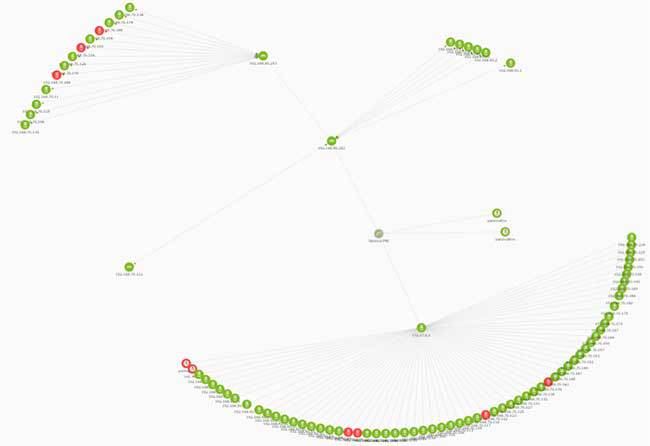
In a wider environment the perspective is going to be different: here you can see what a network map with more connected nodes would look like:

network maps

You can see how Pandora FMS connects to intermediary locations in the node diaspora. These locations usually correspond to routers, switches or access points.

Navigating network maps

Simpler than before, once a network map has been created you can move around it by simply dragging the mouse. Double-click or scroll to zoom in.

If you zoom in on a recon task-generated map you’ll see an image like the one below, allowing you to see relations between different map elements in more detail, including those at interface level.

network maps

It’s also easier to navigate map elements; simply drag and drop the elements, or scroll around the map at your leisure.

Editing maps

But there’s more; Pandora FMS 7’s maps are completely dynamic, meaning their default design can be modified, and elements displayed in the way that best suits the user. All intuitively and by simply using the mouse.

Double-click on any node on the map and you’ll see different edit options deployed, plus their relevant details. Likewise, you can now create, delete or modify relations between nodes and also their appearance.

network maps

To create a dependent relation between nodes or interfaces simply click on the node and create the relation by defining the parent and child element. You can also change the position of the node by dragging and dropping them on the map. If you need to move various nodes simultaneously, press “ctrl” and select the groups you want to move.

network maps

Right click on a node to deploy its options, see details or create a relation between two nodes at interface level, selecting the parent and child element respectively. Right click on a blank space to see the following options:

network maps

One of the most important labor-saving tools is the automatic generation of relations. This is possible thanks to self-discovery tasks, that allow relations between existing nodes to be automatically detected.

Last but not least, Pandora FMS 7 Next Generation includes the holding area. If you need to manually add new agents and relations to a pre-existing map, or if the recon task discovers new hosts, using the “refresh holding area” option will display nodes created or discovered subsequently in the “holding area”, and the original map will maintain its aesthetic, not being sullied with elements created a posteriori. Drag the new nodes out of the holding area to see its corresponding relations by clicking refresh.

In the Pandora FMS video “Network Maps” you can see everything we’ve explained in this article, and find out how to create, edit, and use a network map in a dynamic, graphic and easier way than in previous versions.


For more info visit https://pandorafms.com/ or our YouTube channel.

About Version 2 Digital

Version 2 Digital is one of the most dynamic IT companies in Asia. The company distributes a wide range of IT products across various areas including cyber security, cloud, data protection, end points, infrastructures, system monitoring, storage, networking, business productivity and communication products.

Through an extensive network of channels, point of sales, resellers, and partnership companies, Version 2 offers quality products and services which are highly acclaimed in the market. Its customers cover a wide spectrum which include Global 1000 enterprises, regional listed companies, different vertical industries, public utilities, Government, a vast number of successful SMEs, and consumers in various Asian cities.

About PandoraFMS
Pandora FMS is a flexible monitoring system, capable of monitoring devices, infrastructures, applications, services and business processes.
Of course, one of the things that Pandora FMS can control is the hard disks of your computers.

ESG Study Reveals Granular and Air-gapped Backup Are Key in Data Recovery After a Ransomware Attack

Nearly 90 percent of respondents admit that not all mission-critical data is protected from cyberattacks.

Copenhagen, Denmark – April 19, 2022 – Granular and air-gapped backup are critical to data recovery, when, not if, a business falls victim to ransomware. Those are among the key takeaways from a new Enterprise Strategy Group (ESG) study, titled “The Long Road Ahead to Ransomware Preparedness”, which surveyed information technology (IT) and cybersecurity professionals working within organizations across North America and Western Europe.

According to the report’s findings, while ransomware attacks aren’t always made public, they are a common occurrence and represent both a significant and recurring source of business disruption. Among the more than 600 respondents, 79 percent experienced a ransomware attack within the last year, with 17 percent experiencing attacks weekly and 13 percent experiencing attacks daily. 

More than three-quarters (79 percent) of the survey’s respondents said they categorize ransomware preparedness as being within the top five on their list of overall business priorities,

“Organizations are building their own individual strategies and processes in response to a lack of industry reference architecture or a blueprint for ransomware protection,” Christophe Bertrand, Practice Director at ESG. “The results of this report serve as a critical step in understanding the most important components of data recovery after a ransomware attack, and it is our hope that organizations can use this as guidance as they work towards preparedness.”

“The Long Road Ahead to Ransomware Preparedness” includes responses from 620 IT and cybersecurity professionals tasked with protecting against ransomware attacks at midmarket and enterprise organizations in North America (the United States and Canada) and Western Europe (UK, France, and Germany).

The study, sponsored by Keepit, the world’s only vendor-neutral and independent cloud dedicated to Software-as-a-Service (SaaS) data protection based on a blockchain-verified solution, sought to identify proactive and reactive strategies employed by organizations to guard against the ransomware threat, analyze ransomware mitigation best practices and identify how organizations are prioritizing and planning to mitigate the ransomware threat in the coming 12 to 18 months.

Other Key Findings Include: 

  • 56 percent of respondents admitted to having paid a ransom to regain access to their data, applications, or systems but only 14 percent got all their data back following payment. 
  • Only 1 in 7 organizations report protecting more than 90 percent of their mission-critical applications from cyberattacks.  
  • 39 percent of successful ransomware attacks impact cloud data, and 40 percent impact storage systems.   

Additionally, some trends identified in the study include:  

  • Cloud and storage systems are the most common ransomware targets across the board. 
  • Granular data restores are widely preferred as a best practice over full rollback restores. 
  • Granular and air-gapped backup have emerged as best practices among industry leaders, with hybrid methodologies favored. 
  • Backup is the clear leader for cyber recovery strategy and can empower organizations to refuse to negotiate with ransomers. 

“Public cloud infrastructure has become a destination of choice for data backup, which means that cloud data is increasingly becoming a target for cybercriminals who really want to render businesses inoperable. Organizations are concerned that their backup copies could be corrupted by ransomware attacks and protecting backup copies is a key prevention tactic,” said Jakob Østergaard, CTO at Keepit.  “Our strategy is to build in security from the ground up with immutable, blockchain-verified technology, encryption, and air-gapping, and the ESG study clearly documents how.” 

As an alternative to ransom paying, the ESG study revealed that air-gapped backup and the ability to granularly restore data have emerged as best practices among industry leaders, with hybrid methodologies favored. In the context of backing up cloud data, this means allowing the backup or recovery copies to be physically and logically separated from the rest of the network.

Air-gapping is a time-tested solution that allows backup or recovery data copies to be housed separately from the rest of the network. It is becoming a “must-have” technology when it comes to keeping cloud data out of reach of cybercriminals.  The ESG report demonstrates that IT leaders will be looking for these capabilities in their current and future backup solutions, which must be hybrid to support on-premises, cloud-only, or a combination of deployment topologies.

Access the Report

About Version 2 Digital

Version 2 Digital is one of the most dynamic IT companies in Asia. The company distributes a wide range of IT products across various areas including cyber security, cloud, data protection, end points, infrastructures, system monitoring, storage, networking, business productivity and communication products.

Through an extensive network of channels, point of sales, resellers, and partnership companies, Version 2 offers quality products and services which are highly acclaimed in the market. Its customers cover a wide spectrum which include Global 1000 enterprises, regional listed companies, different vertical industries, public utilities, Government, a vast number of successful SMEs, and consumers in various Asian cities.

About Keepit
At Keepit, we believe in a digital future where all software is delivered as a service. Keepit’s mission is to protect data in the cloud Keepit is a software company specializing in Cloud-to-Cloud data backup and recovery. Deriving from +20 year experience in building best-in-class data protection and hosting services, Keepit is pioneering the way to secure and protect cloud data at scale.

How to Protect Cloud Environments Against Cyberattacks?

Cloud computing makes it possible to access files and applications over the internet without them being on local computers. This concept became popular in 2008 but refers to the solutions envisioned in the 1960s.

Being currently widely used, especially due to remote work – which has intensified with the covid-19 pandemic, cloud environments bring several advantages to users but require specific security measures to avoid cybersecurity problems, such as unauthorized access to data and the action of malicious agents.

For this reason, we prepared an article to explore what should be done to protect cloud services from major risks. To facilitate your understanding, we divided our text into the following topics:

  • What is a Cloud Environment?
  • Why Have Companies Opted for Cloud Solutions?
  • Main Risks Faced by Cloud Environments
  • 14 Tips for Keeping Secure in Cloud Environments
  • Learn the History of Cloud Environments
  • About senhasegura
  • Conclusion

Enjoy your reading!

  • What is a Cloud Environment?

Cloud environments are the virtual space that can be shared between people who are physically distant through an infrastructure that enables the communication between devices and data centers across the globe. 

Because of its ability to store these files, the cloud environment allows one to reduce hardware costs while expanding access to memory and processing resources. Moreover, it ensures more dynamism and productivity in the daily life of organizations and can make their operations fully digital.

There are some existing deployment models, which we will explain below:

  • Private clouds: In this cloud deployment model, hosting occurs privately, through a company’s own resources, and without sharing with other organizations.

In practice, companies use tools to have exclusivity in the operation of server infrastructure, which generates benefits such as flexibility and security. On the other hand, it is a service that can have a high cost.

    • Public clouds: Public clouds are those that users share, such as Google Cloud Platform, Amazon Web Services (AWS), and Microsoft Azure, which are the services most used by companies around the world. Their main advantage is that they are services with more affordable prices or even free-to-use. However, they do not offer the same security, flexibility, and possibility of customization as is the case with private clouds. 
  • Hybrid clouds: In turn, hybrid clouds consist of the combination of public and private clouds to meet the demands of a company. With this, organizations must choose which data to direct to each available cloud environment. This integration allows taking advantage of both models. 
  • Multi-clouds: The multi-cloud environment depends on the performance of several cloud providers to be considered. This can be very useful for companies since it allows them to take advantage of what each service offers best and avoid downtime — since all services may fail at some point.

It also allows them to reduce latency, enabling companies to choose the clouds located near their customers to ensure a better experience.

When we talk about cloud environments, it is also important to think about service models, which are complementary. These are:

  • Infrastructure as a Service (IaaS)

The great purpose of IaaS is to design an on-demand, multi-tooled, and easy-to-use cloud environment. This cloud layer is often used to create operating systems, as well as machines and virtual memories, among others. 

  • Platform as a Service (PaaS)

PaaS is composed of hardware that is virtualized and offered by providers as a specialized service. It allows one to perform tests and analysis of data and develop operations, and they are very useful to developers who need to integrate tests and applications, in addition to inserting frameworks.

  • Software as a Service (SaaS)

SaaS is widely used by the end-user when they access emails or applications such as CRM and ERP. Therefore, it is considered an external layer of cloud environments. 

  • Why Have Companies Opted for Cloud Solutions?

Many organizations have already adopted cloud environments in their daily routine due to the numerous advantages this feature offers. Below, we explain some of its benefits.

  • Cloud Environments Enable Data Loss Reduction 

Several factors can cause data loss, including natural disasters, power outages, and infrastructure problems. However, with cloud environments, it is possible to easily recover this data even remotely.

Thus, it is not necessary to interrupt your company’s activities for a long period, which could impact revenue.

  • Working with Cloud Resources Promotes More Security

Cloud environments have features that provide more security to data, such as encryption, which can make it difficult for malicious agents to operate, as it prevents unauthorized users from viewing documents.

  • Business Expansion Can Be Facilitated by This Solution

A company may need more space to run systems and store data as it expands. Cloud environments enable this expansion without the need to invest in many resources. 

  • It Is Possible to Reduce Costs with Cloud Environments

By using cloud environments, your company can reduce the number of costs, including the remuneration of professionals who make up a robust technology support team. In addition, it is possible to eliminate expenses with licenses and software and hardware updates.

  • Cloud Environments Provide More Agility to Work

With files stored in the cloud, their sharing is more dynamic, which provides agility to operations. Moreover, it ensures flexibility: your employees can access the data even if they are working remotely or traveling. 

  • IT Teams Have More Time to Devote to the Company’s Core Business

Several services are provided by cloud providers, exempting internal IT teams from worrying about these activities. As a result, they have more time to devote to the technology strategies associated with the organization’s core business. 

  • Technology Upgrades Become Easier and Less Costly 

Approximately every three years, it is necessary to upgrade the storage systems and migrate the data. This process is time-consuming and can be quite costly for those who do not use cloud environments. 

However, with data stored in the cloud, this upgrade becomes easier and has a more affordable cost. Simply add new nodes to the system, which reduces downtime. 

  • Main Risks Faced by Cloud Environments

Cloud environments must have the necessary support to provide security to the end-user. This is because this infrastructure is not immune to risks. The following are some challenges for those who deal with cloud resources:

  • With the covid-19 pandemic, many companies started using cloud services in most of their activities due to the significant number of professionals who started working remotely.

Therefore, the tendency is for support services to be overwhelmed, as traffic on the networks that connect these professionals to cloud resources increases.

Therefore, it is necessary to rely on a cloud provider capable of managing this load increase and offering uninterrupted service to the customer. 

  • When supporting cloud environments, providers should consider online events instead of face-to-face meetings, which have also increased with the covid-19 pandemic. It is possible, for example, to partner with telecommunications providers, increasing cloud support for these services.
  • It is also necessary that cloud providers are efficient enough to compensate for the cuts made throughout the pandemic with IT services.
  • Another important challenge is to understand how cloud services are used by organizations to establish policies that ensure their protection while providing ease of use and flexibility.
  • It is essential to keep in mind that cloud services and local area networks present different demands when it comes to security. In the case of cloud environments, the risks are more complex. Therefore, assessing these risks is part of the best security practices.
  • Working with cloud solutions makes operations more dynamic and faster, but IT departments must have visibility into the activities performed using the cloud to protect the interactions that occur in that environment.
  • One of the most common problems of companies using the cloud environment is incorrect configuration, which generates security vulnerability. These mistakes or important settings being ignored can be discovered by malicious users, causing financial losses and numerous other inconveniences. 
  • These attacks include Cryptojacking, which involves unauthorized operations with cryptocurrencies; E-skimming, which allows attackers to have access to data from visitors of the company’s website, damaging their reputation; and unauthorized access, which can result in theft of data for various purposes, such as selling it to other cybercriminals.
  • It is important to take the opportunity to design cloud code when addressing your requirements, protecting each relevant area in order to avoid the risks we have mentioned.
  • It is also critical to inspect network traffic and ensure security through virtual patching to combat vulnerabilities.
  • 14 Tips for Keeping Secure in Cloud Environments

Here are some tips to ensure cybersecurity in cloud environments:

  • Adopt the Hybrid Cloud Model

One of the possibilities for those who do not want to migrate all the data from the organization to the cloud environments is to opt for the hybrid cloud model, widely used by IT managers. 

This makes it possible to strategically direct some files to internal servers and others to the contracted cloud service, benefiting from the availability of the cloud while storing sensitive data locally.

  • Manage Credentials in the Environment

It is essential to have an IT professional capable of managing credentials and monitoring access to sensitive data, both in the on-premises data center and in the cloud. After all, having full control of the environment is what guarantees security in these two contexts. 

  • Invest in Encryption

When hiring a cloud service provider, make sure encryption is included, with verification protocols, coding rules, and algorithm strength.

You can also leverage cloud security with an extra layer of encryption and techniques associated with multifactor authentication (MFA). 

Some cloud providers provide encryption services, as well as traditional and third-party cloud software companies. 

  • Identify Sensitive Data and Understand How It Is Being Accessed

It is only possible to maintain the security of sensitive data in the cloud by identifying it and understanding how it is accessed. Therefore, it is of paramount importance to assess the protection of applications and folders in cloud environments, classifying data and understanding the context of user access to avoid risks.

So, invest in user behavior analysis (UBA) to monitor abnormalities and reduce data loss.

  • Understand What the Shared Responsibility Model Is

In a private data center, all security issues are the responsibility of the company. But when it comes to a public cloud, the responsibility is shared between the customer and the provider. However, according to Gartner, 99% of data leaks occurring in cloud environments are the responsibility of the customer.

So, each party must understand its role in this context, avoiding communication failures that put security at risk. 

  • Train Your Employees

The protection of cloud environments depends both on the tools used by IT professionals and on the awareness of all company employees about security practices.

After all, most of the vulnerabilities of IT solutions are associated with human actions, such as failures and misuse, and, in the case of cloud services, it is no different. 

Therefore, create a security culture and rely on IT professionals to disseminate it, with clear guidelines on who can access cloud environments, how this can be done, and what data to store. 

In addition to training the team as a whole, it is essential to invest in the constant training of the IT team. This is because new threats appear every day, and it is necessary to anticipate them.

  • Invest in IDPS

Intrusion detection and prevention systems (IDPS) are among the security features in today’s most efficient cloud environments. Its role is to monitor, analyze, and respond to network traffic in both on-premises and public cloud environments. 

If they encounter risks associated with signatures and protocols, these solutions alert about the abnormalities and promote the blocking of these threats, providing time for administrators to solve the problem. 

These features are important for real-time alerts and 24-hour monitoring. Without them, evaluating network traffic for signals that indicate a sophisticated attack may become unfeasible. 

  • Monitor The Use of Unauthorized Applications

The use of unauthorized applications to access the organization’s systems, a practice known as Shadow IT, also poses a risk to security in cloud environments. 

Moreover, remote work and the use of smartphones favor this type of interaction, which should be monitored by the IT department. 

  • Ensure the Security of Your Endpoints

With the use of cloud services, it is necessary to strengthen endpoint security. Therefore, analyze your strategies and ensure the protections used deal with current threats. 

Your endpoint defense plan should include: intrusion detection, firewalls, antimalware, and access control. But keep in mind that the use of automation features such as endpoint detection and response (EDR) tools and endpoint protection (EPP) platforms can be very helpful.

These solutions bring together continuous monitoring and automated response with traditional features, meeting security criteria such as internal threat prevention, endpoint encryption,  patch management, and VPNs. 

  • Count on Efficient and Reliable Providers

It is much easier to ensure the security of cloud services when you have efficient and reliable cloud providers. 

Therefore, research the reliability of these services and invest in a company that provides support to prevent crises and is able to act immediately when they occur. 

That’s because these systems are not immune to failure. However, with planning and adjustments, it is possible to have security in cloud services. 

  • Be Up-to-Date with Compliance Criteria

Companies that have access to their customers’ personal information, such as health organizations, need to comply with strict privacy and data security policies, including the LGPD.

Depending on your location or where this data is stored, additional criteria may be added. 

So, organizations must review their compliance criteria and hire a service provider capable of meeting their demands in this regard. 

  • Count on External Help

Nowadays, many companies offer services that have the function of enhancing security in the cloud. Therefore, if the internal security team has no expertise in this matter or if security features are not suitable for cloud environments, you should consider relying on the support of an external team. 

  • Run Penetration Testing and Audits 

Do you want to know if the procedures your company has are enough to protect its data in cloud environments? So, run penetration tests, regardless of whether you rely on the support of an external cybersecurity company or an internal team. 

Another essential measure is security audits, which allow analyzing the performance and resources of cloud service providers to know if security procedures are being followed. 

  • Enable Security Logs 

Enable security logs for your cloud services. This has helped system administrators track who makes changes to cloud environments, which is virtually unfeasible to do manually. 

If a malicious agent is able to access and make changes, the logs will show their actions so that they are corrected and avoided in the future. 

This record also allows the detection of users who have more access than necessary to perform their activities, favoring the adoption of the principle of least privilege. 

  • Learn the History of Cloud Environments

In the 1960s, computer scientist John McCarthy, known for creating the expression “Artificial Intelligence,” stated that it would be more useful to use computing in two ways: through time-sharing and utility computing.

Time-sharing refers to the sharing of a computer, with more than one person using it, in order to reduce costs and expand tasks. Utility Computing is characterized by the payment of the internet that was used, similarly to the charges for electricity.

In 1962, Joseph Carl Robnett Licklider created the Arpanet network, which enabled global data sharing, originating cloud computing.

Currently, the cloud is part of the routine of individuals and legal entities, as it makes it possible to edit files, watch online series, store documents, send emails, among other capabilities.

But there are different types of cloud, such as public, private, and hybrid, covered in this article.

  • About senhasegura

senhasegura guarantees the digital sovereignty of organizations. This is because it acts by avoiding traceability of actions and loss of information on devices, networks, servers, databases, and cloud environments.

Our services are also useful to bring our customers into compliance with audit criteria and strict standards such as PCI DSS, Sarbanes-Oxley, ISO 27001, and HIPAA.

  • Conclusion

By reading this article, you saw that:

  • Cloud environments are virtual spaces where files are shared between people who are physically distant through a server that enables the communication between data centers and devices.
  • There are different types of clouds, such as private, public, and hybrid clouds.
  • Cloud environments also refer to service models: Infrastructure as a Service (IaaS), Platform as a Service (PaaS), Software as a Service (SaaS).
  • Cloud solutions ensure several advantages for businesses, such as reducing file losses, more security and lower costs with IT teams, as well as scalability for the business.
  • Users of cloud environments need adequate support to ensure the security of data stored in the cloud, which increases more and more with remote work.
  • Working with cloud solutions ensures more dynamism for operations, but it is essential that IT departments have visibility of the activities performed in this environment to ensure security.
  • When a company uses a public cloud, the security responsibility is shared between the organization and the provider, so each one must understand their role to ensure data protection. 
  • It is essential to train employees to access cloud environments without creating risks for organizations.
  • Similarly, IT teams must undergo frequent training to anticipate new threats that constantly arise.
  • It will often be necessary to rely on the external help of trusted vendors and conduct audits that enable an analysis to know if cloud service providers are performing the necessary security procedures.
  • We also covered the history of the cloud, which began in the 1960s.

If our article on cloud environments was helpful to you, share it with others who might be interested in the subject. 

ALSO READ IN SENHASEGURA’S BLOG

What Are the Main Cybersecurity Vulnerabilities in Industry 4.0

SSH Keys: Learn More About the Importance of Secure Control

Invest in Disaster Recovery Strategies and Avoid Damages to Your Company

About Version 2 Digital

Version 2 Digital is one of the most dynamic IT companies in Asia. The company distributes a wide range of IT products across various areas including cyber security, cloud, data protection, end points, infrastructures, system monitoring, storage, networking, business productivity and communication products.

Through an extensive network of channels, point of sales, resellers, and partnership companies, Version 2 offers quality products and services which are highly acclaimed in the market. Its customers cover a wide spectrum which include Global 1000 enterprises, regional listed companies, different vertical industries, public utilities, Government, a vast number of successful SMEs, and consumers in various Asian cities.

About Segura®
Segura® strive to ensure the sovereignty of companies over actions and privileged information. To this end, we work against data theft through traceability of administrator actions on networks, servers, databases and a multitude of devices. In addition, we pursue compliance with auditing requirements and the most demanding standards, including PCI DSS, Sarbanes-Oxley, ISO 27001 and HIPAA.

New Windows on ARM64 device? ESET protects both at work and at play


After the successful launch of its business-oriented siblings, ESET has extended its latest technology to home users/consumers and stands ready to protect their Windows on Arm-based devices with our award-wining full-featured products. Our development teams put a lot of effort into reengineering ESET’s already mature security technology for ARM-powered devices, which are increasingly used in both business and home applications.

Thanks to its multilayered approach to protection, ESET Smart Security® Premium, ESET Internet Security and ESET NOD32 Antivirus products for Windows on ARM offer a slew of prevention and detection technologies. A key contribution to extending these functionalities was the invaluable feedback of the ARM64 beta products’ home testers. Their insights mean you will enjoy our well-regarded user experience and the same award-winning protection ESET customers are used to.

Just like the award-wining Windows-based product, the version for ARM64 also includes ESET LiveGuard, which provides an additional proactive layer of protection against never-before-seen types of threats, protecting users before the malware has a chance to execute its action. Another feature is the addition of Password Manager, which has been completely redesigned for improved security and an even more user-friendly experience.

Underlying these key improvements is the ESET Home platform, which is designed for on-the-go security management. The platform enables users to add, manage and share licenses with family and friends, and to manage Anti-Theft, Parental Control, and Password Manager via a web portal. ESET Home directly supports ARM64 users who’ve opted to protect the progress enabled by mobile-centric “always on” devices.

With so many of us experiencing crossover use of our work and personal devices in the current work from home/hybrid work regime, ESET technologies now better reflect the extra protection that highly mobile users and their computing needs demand. Whether moving between multiple public and private networks, or managing devices visiting your home network, our new products recognize that “Always On” also risks “always” being vulnerable. The risks are backed up by considerable research showing that threats targeting employees working remotely from home have vastly increased. And, via customer research conducted by ESET showing that households often have a single person who takes care of IT security for everyone, having a solution that provides easy-to-use security management at the home admin’s fingertips is crucial.

Hence, a critical part of your move to ARM should undoubtedly be security provided by a mature consumer security solution. To find out more about the new features and improvements in the latest version of our consumer offering, head to www.eset.com.

About Version 2 Digital

Version 2 Digital is one of the most dynamic IT companies in Asia. The company distributes a wide range of IT products across various areas including cyber security, cloud, data protection, end points, infrastructures, system monitoring, storage, networking, business productivity and communication products.

Through an extensive network of channels, point of sales, resellers, and partnership companies, Version 2 offers quality products and services which are highly acclaimed in the market. Its customers cover a wide spectrum which include Global 1000 enterprises, regional listed companies, different vertical industries, public utilities, Government, a vast number of successful SMEs, and consumers in various Asian cities.

About ESET
For 30 years, ESET® has been developing industry-leading IT security software and services for businesses and consumers worldwide. With solutions ranging from endpoint security to encryption and two-factor authentication, ESET’s high-performing, easy-to-use products give individuals and businesses the peace of mind to enjoy the full potential of their technology. ESET unobtrusively protects and monitors 24/7, updating defenses in real time to keep users safe and businesses running without interruption. Evolving threats require an evolving IT security company. Backed by R&D facilities worldwide, ESET became the first IT security company to earn 100 Virus Bulletin VB100 awards, identifying every single “in-the-wild” malware without interruption since 2003.

Top 16 best network monitoring tools

As market and monitoring software evolve, deciding which of all network monitoring tools implement on your business becomes a difficult choice.

To help you choosing wisely, we have analyzed and compared the current best monitoring tools that solve your network monitoring requirements (both free and licensed).

Network monitoring tools in deep

Network monitoring is one of the most important sectors within all kinds of network tools. What we’ve done on this occasion is to use our experience with infrastructure monitoring tools to implement all of them for you to have the most complete analysis.

The objective is not to show that Pandora FMS is the best solution in network monitoring, but instead we mean to give a wide vision of all different solutions, so you can choose the best tool that adapts to your needs. Every installation is a world apart, and not all network tools are valid for every different environment.

Table of contents

  1. When to deploy a network monitoring tool?
  2. Network monitoring benefits
  3. Presales monitoring tool checklist
  4. Top 16 best monitoring tools & software review and comparison

Due to the success of the present article and the number of questions we have received, with queries about the different tools and softwares available and our criteria for choosing the right one for you, we have updated our analysis for you to have the most complete post.


Do you want to know more about network monitoring?

Remote networks, unified monitoring, intelligent thresholds… discover network monitoring in Pandora FMS Enterprise version.


When to deploy a network monitoring tool?

To ascertain whether this is the article you’re looking for, we’ll take a look at the conditions that determine if you need to install a network monitoring tool. Obviously, if you are already using network monitoring in your organization and just wish to upgrade the tool you use at the moment, you’ll know what we’re going to talk about here; just go ahead to the next section (network monitoring benefits).

For anyone else who is considering the topic for the first time, ask yourself:

  • Does my organization depend on network availability?
  • Is managing an ever-expanding IT infrastructure becoming overly time-consuming?
  • Is the growth of network traffic in my infrastructure exposing bottlenecks? Is the network scaled to optimize all my resources?

If these questions sound familiar, this article will help you answering them.

Network monitoring benefits

If proper software is chosen, main benefit of a network monitoring system is reducing costs, by avoiding company downtime and unproductivity periods. Even if you’re not motivated by profit, any organization (ONG, healthcare, public transport services…) can equally benefit by reducing lost time and streamlining their infrastructure.

Network monitoring and IT monitoring allow you to optimize both processes and resources. By giving you a global perspective of your infrastructure, you can see which nodes are bearing the strain of traffic, where you might need extra hardware and where your system is not scaled correctly. You can see where data is clogging up your system, and why and also what to do to sort out the situation.

This kind of software not only provides a heads up on when a problem is coming down the pipe, but how to avoid said problem or stop it from turning into a headache.

With a solid monitoring tool and a proper implementation, you will be able to detect malicious traffic, where is coming from and how to cancel it.

Even though, you will be capable of generating time-stamped data logs, allowing the system administrator to build up a collection of historical data that is invaluable both for analyzing how problems have been solved in the past, how your network responded to previously-logged events and allowing for prediction of how your system will behave in the future.

Presales monitoring tool checklist

We know better than anyone, that choosing the right network monitoring tool within the wide range of options that are available is a hard and complex issue. Furthermore, choosing the wrong one would certainly mean loosing time and money. Here at Pandora FMS’ headquarters, we have performed many installations based on previous wrongly implemented software.

In order to avoid these kind of implementation errors, we have created a presales checklist that covers all main elements that must be taken into consideration before choosing a monitoring tool.

  • Check that the software you’re interested in does not only monitor networks, but that it can also scale up in the case of a network expansion, with devices that includes apps, or hardware like servers, routers or switches. Making the right choice is the difference between growing smoothly, keeping everything under the oversight of a single tool, or incorporating more third-party software and losing the global, unified oversight a good network monitoring tool provides.
  • Keep in mind the question of compatibility. Are the servers and applications you’re already running going to be compatible with the new network monitoring software?
  • Be careful with licenses. Some companies take advantage of clients scaling up to introduce new licensing costs. Enquire about the cost of any additional licenses in the case of introducing new elements or components into your infrastructure.
  • Your software configuration and its management is very important. Some monitoring tools involve complex, almost bespoke, configurations that later require a more costly level of competence on behalf of your system administrator, making them almost essential for your company. We have seen cases of companies changing their monitoring tool because their system admin has left.
  • Ask your provider about their product’s scaling and performance capacities. Apart from the functional scalability already mentioned, network monitoring can also cover thousands of nodes and other elements under its aegis. In an interconnected world, businesses need to monitor other devices that are connected to its infrastructure, such as cell phones, vehicles or cash registers. In cases such as these is vital that your monitoring tool can provide monitoring to all these thousands of extra devices with maximum efficiency and performance.
  • To incorporate all these inevitable extra devices find out if your chosen tool comes with an API capable of integrating with other applications.
  • Alerts management. While it isn’t a problem managing alerts while you’re sat at the dashboard of your tool, what about when you’re not? Your chosen tool should be able to use multiple communication channels (email, SMS, messaging platforms) and them to be flexible enough to handle both the contents and the requirements of each platform.
  • If you’re working with virtual systems it’s imperative that your network monitoring software is also able to monitor those as well. With the idea in mind of expanding your virtual systems, does your tool monitor all your virtual and also the virtual infrastructure itself? Ditto for containers.
  • Do you need to inventory the components of your infrastructure and see them in a simplified way? Do you need to monitor offsite elements? If the answer is “Yes”, keep that in mind when you’re comparing softwares.
  • Monitoring embedded systems is another point to consider if you’re monitoring hardware that doesn’t use conventional systems. In Pandora FMS, for example, we’ve monitored fleets of buses, allowing operators to know the status of each vehicle thanks to monitoring their mechanical hardware.
  • Another aspect to bear in mind is generating and delivering reports. You need to show the status of the network to non-technical people, in a clear, exportable format, and directed at specific recipients who need different information. A one-size-fits-all is not acceptable here, which is why some monitoring solutions include customizable reports.
  • Monitoring with agents or agentless monitoring? The age-old question of whether you need to deploy agents will depend on the nature of your IT environment. Sometimes it isn’t possible to deploy an agent, and sometimes it’s the best solution on offer. Will your chosen monitoring tool allow you to decide?
  • Remote monitoring. If the networks to be monitored are geographically, or organizationally displaced, remote monitoring is your friend and ally. Keep disparate networks under observation from a central GUI.
  • Cloud monitoring. If all, or part, of your infrastructure isn’t already in the Cloud, it will be sooner or later. Does your network monitoring tool allow for hybrid monitoring (your own CPD and Cloud installation), and to consolidate everything in the same dashboard?
  • Saving and analyzing historic data is a crucial element of your network monitoring tool. It’s not only important to know what’s happening in real time but also to analyze past data, in order to make better informed decisions, and to modify your tool accordingly. Network monitoring is based on learning from historic metrics.
  • Finally, the GUI. Is it adaptable to your current and future requirements? Will its functionalities scale up as your system does?

Note: all tendencies commented on this article are measured on a worldwide scale.

Top 16 best network monitoring tools compared

As we said at the beginning, we are going to analyze all the monitoring software you can obtain today for you and your organization. We will summarize each tool and its usage trend in order to analyze pros and cons of using them.

Finally, we will talk about Pandora FMS as a comperhensive monitoring solution. A tool that, if you would like to monitor more than 100 different devices with its Enterprise solution, you can try 30 days for free.

1. Nagios

Nagios is probably the best known free tool, and it comes to no surprise since they’ve been working in the U.S. since 1996 to build this monitoring software. Nagios’ core is the most important part of the tool and allows you to build plugins to monitor single elements.

It’s interesting to see how the demand tendency on the Internet has been diminishing with the passage of time. What before was one of the most potent and well-known network tools, is losing terrain.

Interes mundial sobre Nagios

It’s large-scale use is due to the fact that it was the first one to develop a tool that covered unexpendable characteristics in a network monitoring process. For this reason, Nagios was very popular. Furthermore, given its great initial market penetration, it’s still quite used.

You can find in depth comparison between Nagios, Zenoss, Cacti, Zabbix and Pandora FMS in these articles:

In a nutshell, Nagios was the origin for monitoring and, as a matter of fact, lots of new network monitoring tools have inherited the Nagios code and made it evolve. Even though you may have a lot of professional profiles on the market, these must have a very vast knowledge of the program, and your installation will depend on them 100%. Future migrations may also be complicated.

Open version:  yes

Nagios PROS

  • There are a lot of professional profiles with Nagios experience
  • If there is a good knowledge of the tool involved, manual configuration can turn Nagios into a very powerful tool to monitor isolated or particular cases
  • It has a large plugin offer to adapt the product to the user’s final needs
  • Basic configuration is very easy

Nagios CONS

  • Editing or configuration processes are difficult due to the necessity to make manual modifications in order to properly set up the tool
  • The GUI lacks user-friendliness.
  • Steep and costly learning curve
  • Every installation ends up being a “puzzle” where rather than having a standard product, we finish with a personal appliance with hundreds of patches, self-made or third-party codes. All this apart from it being complicated to evolve or maintain by said third-parties.
  • Simple reports
  • Very lacking when it comes to SNMP, both in polling and trap management.

2. Zabbix

Developed by a Lithuanian company in 2005, Zabbix is known for being easy to configure and for having a very powerful GUI. It’s performance starts to decline when a large quantity of nodes is to be monitored. It’s agentless monitoring service stands out above the rest in its category.

Experience tells us you can monitor up to 10,000 nodes without performance issues.

We’ll show you the interest rate graph for Zabbix:

Interes en la herramienta de monitorizacion Zabbix a lo largo del tiempo

We’ve got the feeling that many Nagios users are moving over to Zabbix because it’s picked up on Nagios’ glove and it begins to have the visibility that Nagios used to have. The problem that we can see here is with its scaling on larger CPD’s. We have to tread carefully if our installation has various elements of the same type (for example databases) because their configurations will be complicated.

More in depth comparison here: Zabbix vs Nagios vs Pandora FMS.

Open version: Yes, Zabbix is an open software.

Zabbix PROS

  • It has quite an active community
  • At low levels, it’s still very strong and efficient.

Zabbix CONS

  • Even though it has been used for large installations, starting at 1,000 nodes its performance can be diminished
  • It’s difficult to create and define alert and report templates. Configurations can require many clicks and steps to be completed
  • It doesn’t include real-time reporting
  • Difficult to purge when there are errors
  • Poor SNMP trap treatment

3. GroundWork

An American company that reuses different software elements from Nagios, Icinga or Cacti to create a global solution. It has managed to be among the top ranked network monitoring tools thanks to its mashup of other tools.

Our experience with GroundWork hasn’t been bad, but we’ve seen complications when integrating its different modules. Also, it doesn’t have many plugins developed. For larger environments it falls short. It doesn’t show an extensive history when we monitor a lot of nodes and it doesn’t support platforms such as HP-UX or FreeBSD. If you don’t possess a large CPD  or lots of free time to tinker, we recommend checking it out since they have an interesting approach.

It’s search trend is, compared to others, residual and only focused on US market.

Open version: Yes.

GroundWork PROS

  • Has a powerful Cloud monitoring: AWS, Azure, CLoudera, Docker, Google Cloud, NedI, NetApp, OpenStack o VMware.

GroundWork CONS

  • Is not widely known
  • Lack of user community
  • Has not many plugins

4. Zenoss

Zenoss comes from an American enterprise that has created this software to monitor storage, networks, servers, applications, and virtual servers. It’s agentless monitoring is what makes it stand out. It has a “Community” version with very few features and a full-feature Commercial license.

Zenoss may seem interesting if you don’t really want to invest in monitoring software. If you don’t have that many machines and you don’t plan on investing in support or large features, then you can count on Zenoss as one of your network tools. Be careful though, Zenoss version 5 requires a very potent machine to run properly.

This is the internet trend that sees Zennos as a monitoring solution:

Interes a lo largo del tiempo de Zenoss software

Open version: Yes, but it may just be too limited

Zenoss PROS

  • All terrain regarding platforms. It’s capable of cross-platform monitoring
  • It presents a very flexible and tweakable dashboard, which is quite powerful as well
  • Great flexibility and potential in the event management offer.

Zenoss CONS

  • Depending on the installation’s complexity and on what elements need to be monitored, adapting it can be a rough task
  • The DataBase layer can get large and heavy in large environments.
  • The panel can be slow on certain installations.
  • It only has MySQL and its own database, lacking integration with other DataBase systems.
  • Topology maps are one of the weakness of the product.

5. Monitis

Focused toward small or medium-sized companies. It’s for them that this can arise as a great network tool, and for this reason we’re counting it among the 15 best network monitoring tools.

If you’re a small company, this may be the tool that best suits you. We do recommend you use the fully licensed version, since the free one is kind of basic and can be easily rendered useless unless you’re running a blog or similar webpage. If you’re a small company, this may be the tool you need.

This has been the trend evolution of Monitis monitoring tool:

Interes en Monitis como software de monitorizacion

Open version: There really is none. Although, they do offer their monitor.us version, but its features are really basic and recommended for simple websites or blogs.

Monitis PROS

  • Includes web transaction monitoring
  • Allows the user to monitor common cloud applications such as Amazon or Rackspace
  • Wonderful GUI which is both customizable and dynamic
  • Real-time reporting

Monitis CONS

  • Very focused on Linux and Windows
  • Has difficulties to add ad-hoc monitoring
  • Doesn’t have a free unlicensed version

Free version: There really is none. Although, they do offer their monitor.us version, but its features are really basic and recommended for simple websites or blogs.

6. Icinga

Icinga comes from part of the Nagios core, over which the GUI was improved. It can be integrated with many databases and its REST API interface is outstanding for integrating other applications. It’s focused on complex networks and monitoring protocols, machine resources and servers.

In 2009 a Nagios fork was created, and since then it’s followed its own path. In its last version (released 2014) they tried to fix performance issues by rewriting the core code. We think that it’s taking the same route as Nagios. It was well received back in 2009, but after a great launch, it started to fall back in demand terms. This is yet another monitoring tool that uses the Nagios core.

Evolucion del interes en Icinga que parte del core Nagios

Open version: Yes

Icinga PROS

  • Nagios core clone, technically improved.
  • Most of Nagios plugins and extensions work on Icinga

Icinga CONS

  • As Nagios, most of its configuration is based on scripts / text files.
  • It’s hard to integrate modern systems that requires more dynamism (virtual environments, cloud…)
  • Steep learning curve.

7. Manage Engine / OPManager

Manage Engine belongs to the Zoho Group, the giant enterprise conglomerate from India, and it’s one of those monitoring softwares to keep in mind. It’s tendency regarding demand is slightly on the rise.

Evolucion de las busquedas de manageengine a lo largo del tiempo

What we should warn about is its really steep learning curve, which may be expensive in resources, money and time in the beginning.

Open version: Non-existent

ManageEngine PROS

  • Easy to install
  • Very friendly GUI
  • Offers a very wide range of features to cover

ManageEngine CONS

  • Complex configurations that require a lot of documentation. Very steep learning curve.
  • Complicated user experience when navigating through its screens
  • Alarm levels limited to basics (warnings and critical status)
  • Only available on Linux and Windows
  • Lacks inventory and event correlation
  • Non-existing features for large environments that are acostumed to work with events, deployment on large architectures, etc.

8. Observium

Observium is a multiplatform web monitoring tool (mainly focused on Linux, Unix, HP). It’s a good tool, but it lacks basic features which in some cases we can recommend complementing with Nagios or Cacti.

Evolucion del interes en Observium a lo largo del tiempo

Open version: Yes.

Observium PROS

  • Graphs on Observium are known for their amount of detail and its careful design. It’s interesting for showing command panels on management levels.
  • Easy and useable interface
  • Capable of monitoring large installations

Observium CONS

  • We weren’t able to configure alerts on the free version.

9. Op5 Monitor

One of the monitoring tools that’s more focused on hardware, network traffic, and service monitoring. It’s based on Nagios as well.

It has the capability to monitor multiple platforms. It also monitors cloud systems and virtual environments. We can highlight it’s capacity when it comes to large environments and its scaling on these.

From 2008 to 2010 it had a raise in demand. Ever since then, it’s slow descent has begun. Its market is still Sweden, its country of origin.

Op5 Monitor y su demanda online

Open version: They have a free version

Op5 Monitor PROS

  • Easy to use
  • Very good load balancing system

Op5 Monitor CONS

  • Hard to extend features and monitoring processes on our own.
  • It won’t allow deployments from the console, so they have to be done manually

10. Opsview

A tool focused on network and application monitoring. It began developing in 2003, and like many other tools seen here, it started from a version of Nagios. It has a free version available.

In our office we personally like this product quite a lot, even if its demand is declining. Be careful with the tool’s performance.

The demand tendency for OPSView is quite similar to that of OP5, until 2012 it has a large raise, and from then on its decline has been quick.

Demanda de OPsView

Open version: Yes

OpsView PROS

  • It’s a rewritten Nagios, some of its plugins works in OpsView

OpsView CONS

  • Very rigid monitoring panel
  • Limited reports that cannot be exported
  • The amount of developed plugins is reduced

11. PRTG Network Monitor

Network monitoring tool that stands out for its greatly designed and easy to use interface. It has a great vantage point when it comes to configuring alerts flexibly and because of its report generating capacities. The free version (which is NOT open) is limited to monitoring 100 application types.

PRTG  is an application that can only be executed on Windows machines as a part of Microsoft Network Monitoring. Anyway, we highlight that the monitoring is multi-platform and is also able to monitor virtual systems and cloud applications. It can also generate real-time reports.

Despite decreasing, its trend has been stable throughout the years:

PRTG Network Monitor como software de monitoreo y su evolucion en trafico

Open version: Yes, but very reduced.

PRTG Network Monitor PROS

  • Very nice interface with awesome data navigation possibilities.
  • You can access monitoring from mobile devices
  • Reports can be in PDF/HTML formats
  • Very powerful and flexible alert system

PRTG Network Monitor CONS

  • Certain plugins require additional Microsoft user licenses, therefore costs can skyrocket easily
  • Limited scalability
  • Very rigid when implementing its own checks
  • Hard to deploy in environments with a complex connectivity
  • Quite inefficient when it comes to server or application monitoring

12. Solarwinds

Solarwinds is a network monitoring tool that excels for its automatic network and node mapping, without the need to manually activate it. This is added to a very powerful GUI that allows you to easily view your network topology and its status. Solarwinds also allows integrating virtual machines in its monitoring.

A very good option for medium sized companies that can afford the license costs (it’s one of the most expensive tools).

Its tendency shows that after a crushing success experienced during 2004 and 2005, a descent happened in which they’re now relatively stagnated. In fact, December 2020 abrupt rebound, far from being positive, marks the worst moment in Solarwinds Inc history, as it comes from the official notice of the hack Solarwinds systems suffered throughout several months.

Solarwinds a lo largo de los anos y el efecto del hackeo de Solarwinds

Open version: No.

Solarwinds PROS

  • Great GUI
  • Wonderful community backing it
  • Mobile device access

Solarwinds CONS

  • File and manual configuration for alerts
  • The report generation system still has room to improve
  • It doesn’t have integration with cloud applications such as Amazon
  • You cannot perform all actions from the same panel and you’ll always require to access other tools
  • Its licensing forces the user to constantly look at every check performed, since licensing is individually done for these.

13. Whatsup Gold

Whatsup Gold is one of the best network monitoring tools when it comes to balancing system loads. Its scaling is horizontal and allows the use of various processes to distribute loads. It’s capable of performing some automatic actions based on events that have occurred.

Just like other tools like SolarWinds or Pandora FMS, it has a system to discover networks and topologies.

By creating proprietary scripts you can add and integrate more applications or services within the monitoring.

We can also connect from mobile devices to access the monitoring panel. Alerts can be set to be sent via email, SMS or through other options and information is offered in real time.

Despite that, search trend is decreasing:

Whatsup Gold como herramienta de monitoring

Open version: No.

Whatsup Gold PROS

  • Easy to configure and process network discoveries
  • Reports

Whatsup Gold CONS

  • Navigation and console are not that intuitive
  • Configuration is split between web configurations and manual configurations on the console
  • Limited scalability
  • Quite poor for monitoring servers or applications

14. OpenNMS

After the large number of requests to review this monitoring tool, we have reviewed and added OpenNMS to this list.

OpenNMS is a 100% open source network monitoring tool, with no licensing requirements. The business model is to offer the software free and monetize it through consulting services, provided by the OpenNMS group, who administrate the product, through various business lines, including training and support services.

As one can see in the graph, demand for OpenNMS has been on a steady decline for the last decade.

OpenNMS a lo largo del tiempo

Open version: Yes.

OpenNMS PROS

  • It’s a flexible and high-capacity network monitoring tool, but one of its chief problems is the steep learning curve associated with it, plus an unintuitive GUI.
  • Integrates well with alert systems supports like SMS and email.
  • An active community around the tool, and a detailed wiki.
  • Can perform similarly to other, licensed products, but requires more time to learn to use and to configure

OpenNMS CONS

  • Requires a “hands-on” style of configuration, based on script editing and XMLs. In this aspect, it resembles Nagios a lot, in that a manual configuration can lead to highly idiosyncratic installations which can be difficult to decipher.
  • Importing third-party MIBs can be problematic.
  • The reports it is capable of generating are not polished enough for executive/management eyes, being quite basic visually, and without the possibility for fine-tuning intervals. In fact, it can’t present information in real-time, nor fine-tune intervals to below 24 hours.
  • Most importantly, OpenNMS, as its name suggests, is focused on network monitoring, and does not cover the full range of services which a more complete monitoring service can provide, such as server or application monitoring, and much less business processes and user experience. Due to its lack of agents, the information it can retrieve from the system under monitorization is limited to what is retrievable through SNMP, and that is not enough when it comes to monitoring applications or elements of server infrastructure. In some cases (not our own) it has been possible to use Nagios agents in an OpenNMS integration, although we can’t consider that an optimal solution.

15. Cacti

Cacti is a comprehensive monitoring solution for network graphic generation, designed to harness storage power and functionality for RRDtool app graphics.

Its user interface is easy to use, which is convenient for LAN sized systems.

Search trend Cacti evolution still has a solid foundation:

Evolucion del interes sobre Cacti herramienta de monitorizacion

Open version: Yes, it only has open version.

More in depth comparison here: Cacti vs Nagios vs Pandora FMS in depth comparison

Cacti PROS

  • Easy to instal and use.
  • Does what it say it does and makes what you expect from it.

Cacti CONS

  • Basic.
  • It’s only used for display data in graphics.
  • More modern tools (grafana) are replacing it.
  • It does not scales ok.
  • Some basic functionalities are missing in a monitoring environment (events, notifications, reports, SLAs, network maps, dashboards, multitenancy…).

16. Pandora FMS

The open version is capable of monitoring over 10,000 nodes and covers (without limitations) network, server (both with agents or remotely), and application monitoring. With features full of reports, alerts, and third party integrations through API, etc.

Differently from others, it doesn’t have Nagios core as a starting point. Instead, Pandora FMS created its own architecture from scratch, which allows perfect scaling for large environments. A network with over 100,000 nodes has been monitored with Pandora without performance issues (with the Enterprise version).

We also highlight its integration on mobile devices, which not only allows access to the console, but also to monitoring, thanks to its geolocation system.

Its network autodiscovery system is capable of finding all the elements that compose your network in a short time.

Time search evolution in Pandora Flexible Monitoring Software has been stable, with some isolated variations:

Evolucion del interes en pandora fms a lo largo del tiempo

Open version: Yes.

More in depth comparison here:

Pandora FMS PROS

  • Capable of every monitoring type (servers, networks, applications…) with a single console.
  • Great flexibility and scalability (dozens of thousands of devices).
  • Dynamic network maps, reports, SLA’s, integrated notifications, service’s maps, events, logs…, and more.
  • It’s an all-in-one monitoring software.

Pandora FMS CONS

  • Community not as big as Zabbix’s or Nagios’

Conclusions

We know that there’s a lot of competition and many options, and it is honestly quite difficult to choose the best option. With this monitoring tool comparison guide you’d have all you need to make proper decision

Most network monitoring tools that we mention are meant for small and medium enterprises. It’s difficult to find tools for large companies that actually cut it for them in performance, and that also support different technologies and protocols that this type of company needs. Within this category we can mention ZenOSS and Pandora FMS.

You should also take into account that this article discusses network monitoring tools and, today, it’s more important not only to know the status of networks and applications, but to be able to understand how a business works, from the bit that goes along a network cable, to sales being done at a specific time by a specific company. This point is related to business activity monitoring, or operational intelligence; but that’s better left for another article.

About Version 2 Digital

Version 2 Digital is one of the most dynamic IT companies in Asia. The company distributes a wide range of IT products across various areas including cyber security, cloud, data protection, end points, infrastructures, system monitoring, storage, networking, business productivity and communication products.

Through an extensive network of channels, point of sales, resellers, and partnership companies, Version 2 offers quality products and services which are highly acclaimed in the market. Its customers cover a wide spectrum which include Global 1000 enterprises, regional listed companies, different vertical industries, public utilities, Government, a vast number of successful SMEs, and consumers in various Asian cities.

About PandoraFMS
Pandora FMS is a flexible monitoring system, capable of monitoring devices, infrastructures, applications, services and business processes.
Of course, one of the things that Pandora FMS can control is the hard disks of your computers.