Skip to content

Gone Phishing – Basics

Intro

We all know what phishing is and how prevalent it is. This is the attack that accounted for more than 80% in 2021! More details can be found here and here.

With such scary numbers, it is an attack vector that warrants our attention. As we know, the security at our company is only as strong as our weakest link, and unfortunately, this is how threat actors leverage phishing attacks against us.

You can have all controls in the world, but you can still get phished; it is virtually impossible to implement an anti-phishing solution that will cover all the bases. Yes, you can have safe links, and a myriad of other controls, but that user interaction that’s at the core of this attack is how you get exploited and it’s just too difficult to account for. There are many tools out there that will do filtering for you (and whatever else), however these emails still can (and probably will) get through. You need to know what to do when that (inevitably) happens.

This all goes to say how important our education and cyber awareness in the organization are since we can be sure that we will eventually get targeted by one of these attacks.

My goal in this series is to look at and explain how a phishing attack works and how to analyse a phishing email. I will only explain some of the most important things briefly in this article. In the upcoming article, I will dive into the technical aspects of the attack.


Some Historical Context

Phishing and Spam are extremely common social engineering attacks, and not that new at all. First spam message dates all the way back to 1978 – you can read more about that here.

In the 4+ decades this attack has existed, threat actors have found creative ways to perfect it, and we’re all witnessing the results of that effort. As mentioned above, phishing is how 80% of breaches had started in 2021. We can’t know with certainty, but don’t expect this attack to fall out of favor. It is just too convenient for the attacker to at least try and phish the unsuspecting employee.

After obtaining those credentials, they’re off to the races.

Types of Phishing Attacks

Below are listed some of the phishing attack variants:

  • Phishing – Emails sent to the target, appearing to be from a legitimate source with the goal to obtain sensitive information
  • Vishing – Attack that’s based on calling the target on their mobile phone. Same logic and goal as for the regular phishing email
  • Smishing – Same as vishing, with the difference being the attacker is now sending specifically crafted SMS messages to their targets
  • Spear phishing – As phishing, but targeted at a specific individual or organization
  • Whaling – As spear phishing but targeted at C-level executives. Also known as CEO Fraud
  • Spam – Sending of unsolicited emails in bulk to a large group of people

The MO here is almost the same for every variant, even though they might leverage different methods.


Typical Phishing Email

A typical phishing email will have some (or all) of these characteristics:

  • Urgency – Almost invariably, the email will be urgent in one way or the other; be it your ‘reward’ that you just got (you claiming it would be on a timer/urgent), or be it something you need to pay to avoid penalty. It will call you to action, hoping you would react immediately
  • Bad grammar/spelling – This one is quite common and is oftentimes a really good indicator. Most of the phishing attacks will have small grammar/spelling errors within the email. Read through everything carefully. Of course, if an email is written perfectly, it can still be a phishing email
  • Mismatched domains – Email is claiming to be from one company (domain) but it is actually sent from gmail.com or another domain. Misspelling is also sometimes use to hide the illegitimate domain by tricking you into thinking the domain’s good. Example: rnicrosoft.com, google.cm, g0ogle.com, etc. also known as Typosquatting – more on that here
  • Suscpicious links/attachements – Unsolicited attachements are sent to you in an email, probably also prompting you to act on them.
  • The sender email address will act and try to appear as a trusted entity – email spoofing
  • The body of the email uses generic addressing such as Dear Sir/Madam, etc.
  • Hyperlinks – oftentimes shortened with URL shortening services so it can hide its true purpose; don’t click on these! Hover over them to see the destination
  • The body of the email is crafted in such a way that it matches a trusted entity (Google, Microsoft, for example)

This is very important to note. There are some good examples out there that illustrate the above nicely, while giving you a practical on the topic. Most companies will use similar stuff when training their employees (most likely with an internal mock phishing test). To see how you fare, you can try the quiz here.

Of course, even if we’re mindful of the above, human error can occur, so you should always pay extra attention when an unknown email pops in your inbox.

How does an Email Travel

Upon hitting SEND in your favorite email client app, there’s a lot of stuff that happens behind the curtains for your email to arrive at its destination. Three protocols are involved in this: POP3, IMAP, and SMTP.

POP3 – Post Office Protocol – receiving emails, downloading from the server

SMTP – Simple Mail Transfer Protocol – handles the sending of the emails

IMTP – Internet Message Access Protocol – stores messages on the server and syncs them across multiple devices

Slightly longer explanation can be found in this article:

IMAP:

Emails are stored on the server (meaning they can also be downloaded on multiple devices)

Sent emails are stored on the server

Messages can be synced and accessed from multiple devices

POP3:

Emails are downloaded (and stored) on a single device

Sent emails are stored on a single device, from which the email was sent

To keep messages on the server you need to enable “Keep email on server” option, because all the emails would be deleted from the server, once downloaded to the single device

Emails can only be accessed from a single device (where they were downloaded to)

SMTP:

By using SMTP, you’re sending, relaying, or forwarding messages from an email client (thinks MS Outlook) to a receiving email server

Explained here.

Lastly, to summarize, an email travelling would look something like this:

  • You hit send within your email client after composing the message, sending it to someone@example.com
  • The SMTP queries the DNS for records about example.com
  • The DNS server fetches information about example.com and sends it to the SMTP server
  • The SMTP server sends the email to someone’s mailbox at example.com
  • The email goes through many SMTP servers before being relayed to the destination SMTP server
  • Upon reaching the destination SMTP server your email is forwarded and waits in the local POP3/IMAP server waiting on someone
  • Someone logs in to their email clients
  • Their email client queries the local POP3/IMAP server for new emails
  • Your email is copied (IMAP) or downloaded (POP3) to someone’s email client

This is nicely explained here, where you can also find the diagram shown below.
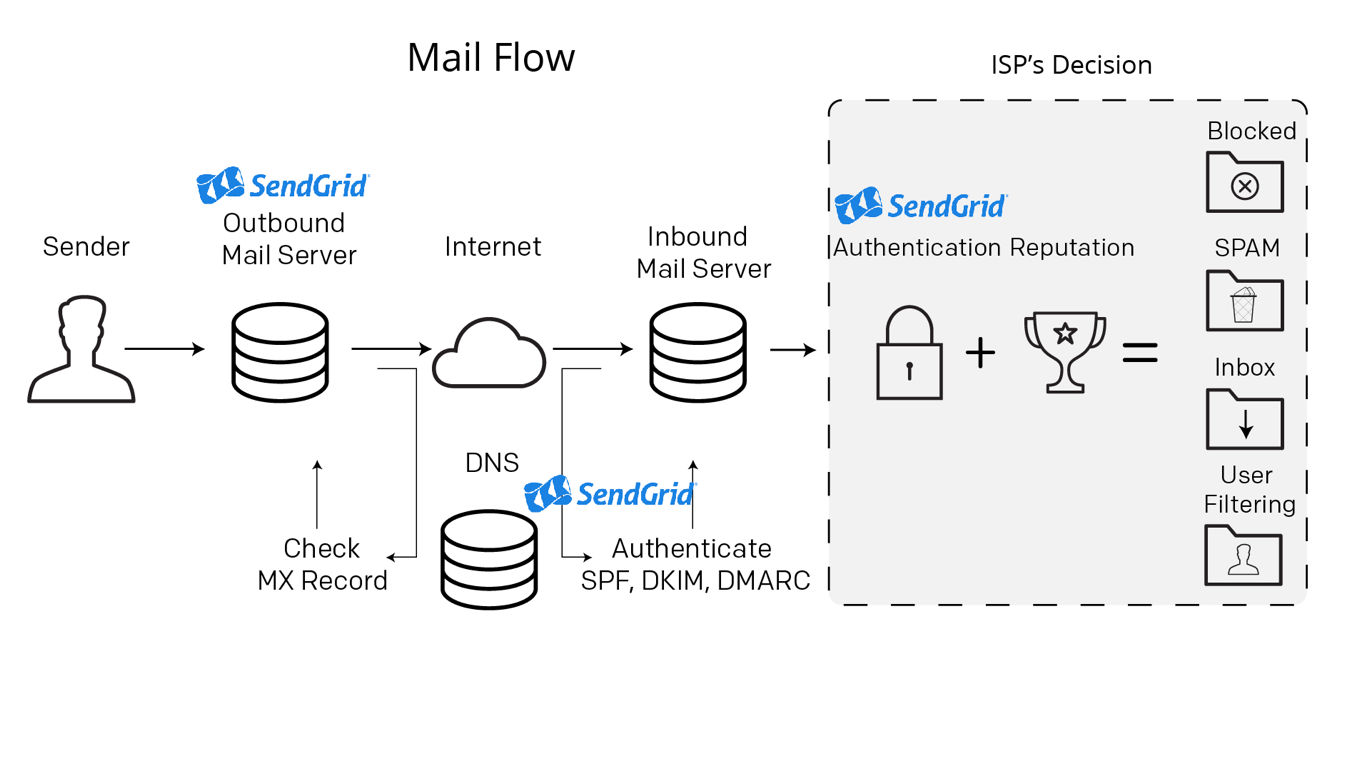
Here you can read more about these three protocols.

Default (un)encrypted ports for these protocols are:

POP3 – (110)995

IMAP – (143)993

SMTP – (25)587/465

Conclusion

Okay, so I talked a bit about phishing, how scary (real) it is, how an email travels, and I mentioned the variants of phishing attacks.

Before concluding, I’d like to emphasize again how important it is to understand/have some plan prepared against phishing as it is the best way attackers gain access, which in turn leads to some real ugly stuff. Prime example is ransomware, which is the most common way in which a ‘simple’ phishing attack evolves. (You can read more about it here, here, and here)

Finally, to let you go on a very dark note, please remember that phishing kits can be bought online quite easily, and that launching a phishing campaign can be done by someone less technical while the true danger remains; what comes after the attack i.e., what was it used for.  They might be less effective, true, but it is scary to think that it can be done in that way with so little effort – in comparison to the impact the attack can have.

Stay tuned for the next piece where I’ll be talking about header and body analysis, and more!

Cover by Mohamed Hassan

#phishing #smtp #pop3 #imap #vicarius_blog

About Version 2 Digital

Version 2 Digital is one of the most dynamic IT companies in Asia. The company distributes a wide range of IT products across various areas including cyber security, cloud, data protection, end points, infrastructures, system monitoring, storage, networking, business productivity and communication products.

Through an extensive network of channels, point of sales, resellers, and partnership companies, Version 2 offers quality products and services which are highly acclaimed in the market. Its customers cover a wide spectrum which include Global 1000 enterprises, regional listed companies, different vertical industries, public utilities, Government, a vast number of successful SMEs, and consumers in various Asian cities.

About VRX
VRX is a consolidated vulnerability management platform that protects assets in real time. Its rich, integrated features efficiently pinpoint and remediate the largest risks to your cyber infrastructure. Resolve the most pressing threats with efficient automation features and precise contextual analysis.

Sysinternals Suite – Admin’s Little Helper

Intro

Sysinternals Suite is a bundle of 70+ tools authored by Mark Russinovich back in 1996. 

Russinovich created them under his company name (Winternals) along with the help of his colleague and co-founder Bryce Cogswell.

Winternals was then acquired in 2006 by Microsoft, and Mark Russinovich ended up working for them. He is currently the CTO of Microsoft Azure!

Behind this amazing story stands an even more amazing bundle of tools. 

Those little administrative tools can (and will) make your life much easier as a Sysadmin, IT Support Engineer, etc. However, they are also amply used by threat actors/adversaries, as well as Security personnel (from SOC Analysts to Threat Hunters).

As the name implies, Sysinternals can help you dig deeper into your Windows hosts.

Today, you can download it from the Microsoft Store by typing in Sysinternals Suite. Alternatively, you can use winget (Windows Package Manager) and PowerShell to fetch it from the MS Store for you.

You can simply do

winget install sysinternals

It’s all explained here.

Sysinternals suite utilities

Sysinternals offers the following utilities:

+Misc tools (everything else in the Sysinternals Suite)

For this article, I’ve picked the most interesting ones (although that may depend on the person) while trying to cover as many categories as possible.

Process Utilities


Autoruns

As per the definition found here:

This utility, which has the most comprehensive knowledge of auto-starting locations of any startup monitor, shows you what programs are configured to run during system bootup or login, and when you start various built-in Windows applications like Internet Explorer, Explorer and media players. These programs and drivers include ones in your startup folder, Run, RunOnce, and other Registry keys. Autoruns reports Explorer shell extensions, toolbars, browser helper objects, Winlogon notifications, auto-start services, and much more. Autoruns goes way beyond other autostart utilities.

As you can see from the image below, there are many tabs, some of which can be of great value to you.

Detailed entries about what processes are doing what to the registry (and when), for example, with the option of checking the hashes on VirusTotal, too (see below)

For example, this blog post describes (among other things) how Image Hijack can be …quite sneaky in that the Windows registry has a key to launch a certain process but instead is redirected to launch a different malicious process.

Adversaries are well aware of what they can exploit, and the registry being the db for the Windows OS is a prime target.

Autoruns can help you catch that. It can also help you check these entries for tampering, which can be one way they go on about establishing persistence.

Process Explorer

From the docs:

The Process Explorer display consists of two sub-windows. The top window always shows a list of the currently active processes, including the names of their owning accounts, whereas the information displayed in the bottom window depends on the mode that Process Explorer is in: if it is in handle mode you’ll see the handles that the process selected in the top window has opened; if Process Explorer is in DLL mode you’ll see the DLLs and memory-mapped files that the process has loaded.” 

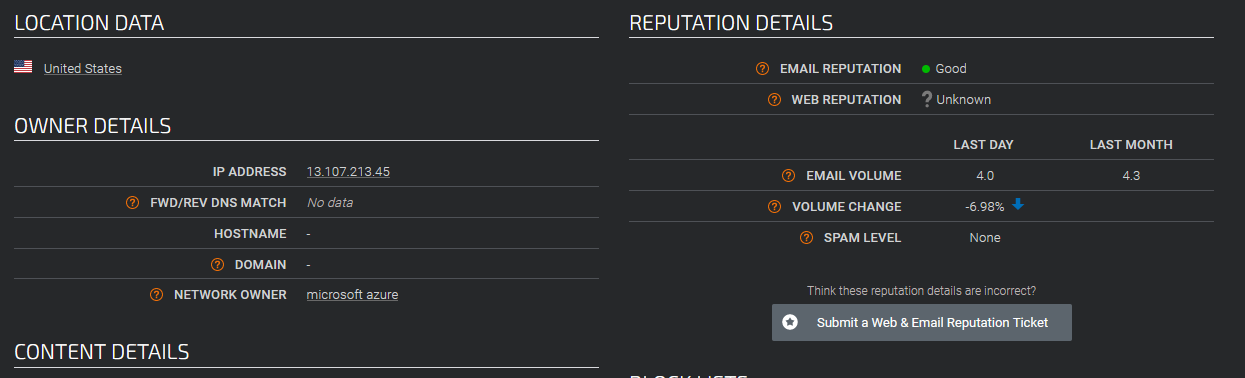
From the image below, you can see that I’ve chosen one of many Firefox.exe subprocesses, and under TCP/IP tab, I’ve inspected one of the IPs I’m connected with through Firefox. When I check the IP for reputation, I get the following (image 2.):

1.)

2.)

And this makes sense, as I have a connection to MS Azure portal.

On right-click, you can submit the specific process’ hash to VirusTotal (It’s the same with Autoruns, you can check from the application against VirusTotal). You can also create a full and partial dump. This can come in handy. Always keep in mind though, that the act of uploading to VirusTotal while helpful, means that you’re sharing your samples with the world. There are merits to both sharing and not, so figure out your whole (threat) model before just clicking on that option.

Process Explorer is, as you may have noticed, color-coded. This is explained in these two blog posts.

Under the options tab, there’s also the option called Replace Task Manager, which, you guessed it, replaces the Task Manager with the Process Explorer. You can revert to Task Manager in the same way. 

Also, note that malware would (commonly) hide within the svchost.exe – which is very nicely explained on the Malwarebytes blog I linked above. The reason behind this is primarily because the svchost.exe usually has a lot of children processes running at the same time, so it is kind of like security through obscurity. Or, in this case, maliciousness.


Process Monitor

Process Monitor or Procmon is a Windows monitoring tool; as per Microsoft’s documentation:

“Process Monitor is an advanced monitoring tool for Windows that shows real-time file system, Registry and process/thread activity. It combines the features of two legacy Sysinternals utilities, Filemon and Regmon, and adds an extensive list of enhancements including rich and non-destructive filtering, comprehensive event properties such as session IDs and user names, reliable process information, full thread stacks with integrated symbol support for each operation, simultaneous logging to a file, and much more. Its uniquely powerful features will make Process Monitor a core utility in your system troubleshooting and malware hunting toolkit.” 

Process Monitor will capture an enormous number of events in no time! 

Just as I started the app, it already has captured 78k events! By the end of the capture (around 81%), it shows ~5 million events!

This is probably one of the best guides to configure this little beast of a tool. It is an essential piece of info since you’d want to figure out what filters to use for your specific Procmon needs.


PSExec

Now this one is already somewhat infamous. Chances are you’ve heard of PSExec if you’re in Cyber. It is associated with the following MITRE techniques:

  • T1021.002 – Remote Services: SMB/Windows Admin Shares
  • T1569.002 – System Services: Service Execution
  • T1570 – Lateral Tool Transfer

Docs:

PsExec is a light-weight telnet-replacement that lets you execute processes on other systems, complete with full interactivity for console applications, without having to manually install client software. PsExec’s most powerful uses include launching interactive command-prompts on remote systems and remote-enabling tools like IpConfig that otherwise do not have the ability to show information about remote systems.”

Also, check out this resource for in-depth information on PSExec.

It’s all about sharing, or rather remote administration, which we all know how dangerous it can be, if not done right.

File and disk utilities


Streams

Another useful and interesting tool is called streams, and, as per MS docs, it:

“The NTFS file system provides applications the ability to create alternate data streams of information. By default, all data is stored in a file’s main unnamed data stream, but by using the syntax ‘file:stream’, you are able to read and write to alternates. Not all applications are written to access alternate streams, but you can demonstrate streams very simply. First, change to a directory on a NTFS drive from within a command prompt. Next, type ‘echo hello > test:stream’. You’ve just created a stream named ‘stream’ that is associated with the file ‘test’. Note that when you look at the size of test it is reported as 0, and the file looks empty when opened in any text editor. To see your stream enter ‘more < test:stream’ (the type command doesn’t accept stream syntax so you have to use more).”

Why does this matter? We know some malware devs have been using the ADS to hide their data. Further, if you, say, downloaded a file from the Internet, there are indicators written in its stream that it was indeed downloaded from the Internet.

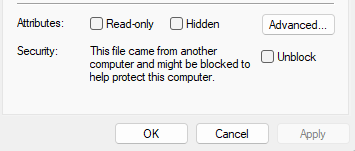
Zone.Identifier is the keyword here. And as you can see:

ADS or Alternate Data Streams is specific to the Windows NTFS. Since all files will have at least one data stream – $DATA- if you ever need another one, it’s where the ADS comes in.

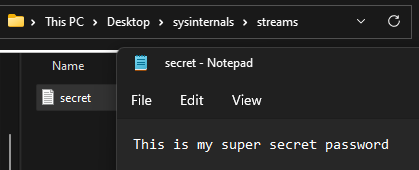
I can simply say:

echo This is my super secret password > secret.txt

Which creates the .txt file…

No nefarious stuff to be found here… but wait till we hide our secret in the ADS stream!

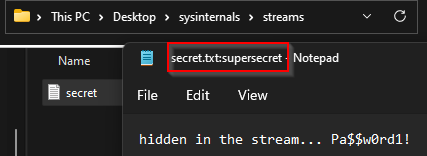
echo hidden in the stream... Pa$$w0rd1! > secret.txt:supersecret.txt

We check using CMD to see if everything went okay. Use dir /r (a very sneaky command, as /r will look for another stream – what we want!)

One answer on Stackoverflow explains this nicely.

The /r option of CMD’s dir command calls FindFirstStreamW and FindNextStreamW on each file or directory in a listing in order to list its $DATA streams.

You can notice our hidden supersecret.txt file hidden in the stream. We can uncover it with a simple command:

notepad secret.txt:supersecret.txt

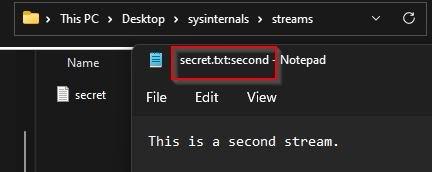
You can have more alternate data streams!

*Note the first columns (which tells us the size in bytes, respectively) – this confirms to us that something is written in the ADS. It also gives us the ADS names.

notepad secret.txt:second.txt

*Note that you can do this for .exe’s too, which is when it all becomes potentially scary. I covered the .txt’s but the logic remains the same. Google this stuff, it’s fascinating and useful! Doesn’t matter if you’re an analyst or a Red teamer.

This attack vector might contain a slight element of creativity to it, but do not underestimate it.

SDelete

Secure delete, as it promises, deletes files securely. And per Microsoft’s documentation  …implements the Department of Defense clearing and sanitizing standard DOD 5220.22-M, to give you confidence that once deleted with SDelete, your file data is gone forever.


Reliable, simple, and easy way to securely delete data, that’s Software-based. You can always use a magnet or a hammer too.


Sigcheck

A CLI utility that will give you a file version number, timestamp information, and digital signature details (as well as certificate chains). It will also have an option to check against VirusTotal.

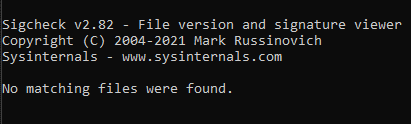
I can quickly check my executables for any unsigned ones (on Windows systems, all .exes are to be found in the C:\Windows\System32 directory – except the Explorer.exe! Explorer.exe is located in the C:\Windows path)

I check by issuing a command:

sigcheck -u -e C:\Windows\System32


 From MS docs:

-e Scan executable images only (regardless of their extension)


-u If VirusTotal check is enabled, show files that are unknown by VirusTotal or have non-zero detection, otherwise, show only unsigned files.

If you were to get a matching here, you should probably investigate that executable.

Honorable Mentions

Don’t disregard this paragraph. These are not less important or potent. I just didn’t have the space/have chosen otherwise, but I will briefly touch upon these few tools here. The reasoning is me covering just two out of (or 6 if you count misc) five categories the Suite offers.

  • Sysmon (Security utilities)
  • TCPView (Networking utilities)
  • Strings

Sysmon is extremely powerful. You can think of it as of an Event Viewer with much more details and controls. Sysmon can be used to hunt for malware, Metasploit, Mimikatz, persistence, etc. All the usual suspects, and more! 

Strings – Working on NT and Win2K means that executables and object files will many times have embedded UNICODE strings that you cannot easily see with a standard ASCII strings or grep programs. So we decided to roll our own. Strings just scans the file you pass it for UNICODE (or ASCII) strings of a default length of 3 or more UNICODE (or ASCII) characters. Note that it works under Windows 95 as well. Source.

Strings extracted from malware samples can be of valuable insight. Also, you can scan/analyze binaries. Useful.

TCPView – Technically, Windows already offers this functionality built-in within the Resource Monitor (you can call it from command-line with resmon) – you can find it under the Network tab.


As stated on the MS docs:

TCPView is a Windows program that will show you detailed listings of all TCP and UDP endpoints on your system, including the local and remote addresses and state of TCP connections. On Windows Server 2008, Vista, and XP, TCPView also reports the name of the process that owns the endpoint. TCPView provides a more informative and conveniently presented subset of the Netstat program that ships with Windows. The TCPView download includes Tcpvcon, a command-line version with the same functionality.”


This is handy to have and can actually be used for some hunting too. Though, there might be better tools for the job.

Conclusion


This brings us to the end. I hope you liked the Sysinternals Suite introduction! I also hope to cover Sysmon in the future, so stay tuned.

Cover by Joshua Hanson

#sysinternals #procmon #autoruns #sdelete #procexp #psexec #streams #sigcheck #sysmon #strings #vicarius_blog

About Version 2 Digital

Version 2 Digital is one of the most dynamic IT companies in Asia. The company distributes a wide range of IT products across various areas including cyber security, cloud, data protection, end points, infrastructures, system monitoring, storage, networking, business productivity and communication products.

Through an extensive network of channels, point of sales, resellers, and partnership companies, Version 2 offers quality products and services which are highly acclaimed in the market. Its customers cover a wide spectrum which include Global 1000 enterprises, regional listed companies, different vertical industries, public utilities, Government, a vast number of successful SMEs, and consumers in various Asian cities.

About VRX
VRX is a consolidated vulnerability management platform that protects assets in real time. Its rich, integrated features efficiently pinpoint and remediate the largest risks to your cyber infrastructure. Resolve the most pressing threats with efficient automation features and precise contextual analysis.

2022 Verizon DBIR (Data Breach Investigations Report) Key Takeaway

As malicious actors have advanced technologically and are finding new ways to infiltrate network systems globally, organizations need to respond accordingly by enhancing their knowledge and capabilities. 

The Verizon DBIR (Data Breach Investigations Report) has played a significant role in raising awareness among the workforce about the importance of maintaining cybersecurity hygiene. Below is a summary of the 2022 DBIR that helps organizations understand the essence of the report and equip themselves with better strategies to thwart cyberattacks and safeguard the confidentiality, integrity, and availability of their critical information assets.

Some Important Verizon DBIR 2022 Findings

The Verizon 2022 DBIR is an exhaustive report running more than 100 pages. Its 15th annual edition, DBIR 2022, is the most comprehensive report presented by Verizon since the first one in 2008. It analyzes 5,212 breaches in 2021 spread across eleven industrial sectors distributed in four regions globally. Below is the outline of the critical findings from the report that merit immediate consideration.

  1. Gateways that allow access: The DBIR has pointed out four significant gateways that enable malicious actors to infiltrate network systems and cause data breaches. They are:

    • Credential Theft

    • Phishing

    • Exploiting vulnerabilities

    • Botnets

No organization is safe without formulating a robust plan for handling these four compromising gateways.

  1. Ransomware’s continued growth: Ransomware continues to be a significant threat to organizations worldwide. It showed around a 13% increase last year, equivalent to the previous five years’ combined rise. Thus, it has increased by around 25% over those years combined. However, organizations can block ransomware by taking proper care of the four gateways discussed above, as the threat uses these gateways to access network systems.

  2. Supply Chain Attacks on the rise: The DBIR hints toward one significant supply chain attack that had an enormous impact. Though the report does not name the attack, it points toward the Solar Winds Supply Chain attack. As per the report, the supply chain area became responsible for 62% of last year’s system intrusions. 

  3. The internal element is still involved: The DBIR states that one cannot ignore internal involvement in data breaches. While external players comprise 80% of bad actors, the breaches caused by internal actors have been more significant, with an average breach impacting ten times more than an external one.

  4. The motive behind cyber crimes: The DBIR concludes that financial gain remains the primary motive behind 96% of cyber incidents and data breaches.

In a nutshell, the deduction will be as follows.

  • Ransomware attacks are increasing by the day.

  • Supply chain attacks are evolving into a significant threat.

  • Malicious actors and not human error cause more data breaches.

  • Cybercrime has become a significant money-spinning industry.

Eight Critical Threat Patterns Pointed out by the Report

The report highlights eight threat patterns responsible for almost all security breaches. Organizations must concentrate on these eight patterns while formulating defense strategies.

  1. System Intrusion 

System Intrusion is a complex attack pattern where malicious actors infiltrate the victim’s network systems using malware or complex intrusion techniques. Ransomware is the prime example of compromising systems and disrupting businesses for financial gains.

The DBIR mentions 7,013 incidents, of which 1,999 resulted in confirmed data breaches. Mostly, the bad actors exploited C2 (Command and Control) or a backdoor entry and included ransomware. Among the confirmed data breaches, 42% compromised credentials, while 37% compromised personal data. Besides, the report talks of increasing supply chain attack incidents.

  1. Social Engineering

Social Engineering attacks comprise the human element involved in cyber incidents. As per DBIR, about 82% of data breaches involve a human angle. It reports 2,249 social engineering attack incidents resulting in 1,063 confirmed data breaches. Furthermore, 63% of the violations compromised credentials, whereas 32% resulted in internal data loss. The primary attack modes were phishing and BEC (Business Email Compromise).

  1. Denial of Services

DDoS (Distributed Denial of Service) attacks are among the oldest attack patterns where the cyber attackers simultaneously target the network and application layers to increase traffic and compromise the application’s availability. The primary objective of the DDoS attack is to disrupt business and not steal data. The DBIR 2022 lists 8,456 disruptions, including four cases compromising information assets.  

  1. Privilege Misuse 

Privilege misuse is a dangerous trend because it compromises the trust element that employers have with their employees. Here, the malicious actors misuse their privileges and cause data breaches solely for financial gain. All of these attacks involve internal actors, with DBIR reporting 4% involving external collaboration. DBIR highlights 275 incidents resulting in 216 confirmed data breaches; 78% of such attacks are carried out for financial gain and the remaining are due to ulterior grudges, espionage, and convenience. 

  1. Basic Web Application (BWA) Attacks

The BWA attacks are similar to hit-and-run cases where the threat actors target a specific web application, compromise it, collect as much data as possible, and abandon the system. The DBIR lists 4,751 such instances culminating in 1,273 data breaches. 69% of these breaches compromised personal information and 67% credentials. Usually, the malicious actors exploit a known vulnerability in the system or use brute force to access it and compromise the information assets.

  1. Miscellaneous Errors

Miscellaneous errors generally constitute unintentional actions that directly compromise the information asset’s integrity. These could be errors like misconfiguring an asset or unwittingly sending information to the wrong person. Usually, internal employees are involved in such cases. The DBIR lists 715 such incidents, with nearly all resulting in compromising information assets, primarily personal data.  

  1. Lost and Stolen Assets

Such attack patterns involve losing track of a specific information asset. At times, there can be theft of sensitive data. The DBIR mentions 885 incidents in this category, involving 85% internal threat actors. It included 81 data breach incidents, and the stolen devices were mostly documents, desktops, laptops, and mobile phones. 

  1. Everything Else 

This section covers the incidents that do not fit into the seven patterns described above. Though the DBIR has not listed any incident in this category, it has included it in the report for organizations to introspect.

Final Words

Verizon’s DBIR is a comprehensive report that provides a wealth of information about the different types of threats in today’s cybersecurity landscape. The report highlights how security-related incidents occur and thus, helps organizations to formulate a comprehensive cybersecurity strategy. As it has systematically classified the various threat factors, it is easy for organizations to verify which security control they are deficient in and which attack vectors they need to be cautious about most. They can then improve the safeguards to ensure their valuable information assets’ confidentiality, integrity, and availability.

#verizon #vicarius_blog

Reference

  1. Verizon. Data Breach Investigations Report (DBIR) – 2022. 

https://www.verizon.com/business/resources/reports/2022/dbir/2022-dbir-data-breach-investigations-report.pdf 

About Version 2 Digital

Version 2 Digital is one of the most dynamic IT companies in Asia. The company distributes a wide range of IT products across various areas including cyber security, cloud, data protection, end points, infrastructures, system monitoring, storage, networking, business productivity and communication products.

Through an extensive network of channels, point of sales, resellers, and partnership companies, Version 2 offers quality products and services which are highly acclaimed in the market. Its customers cover a wide spectrum which include Global 1000 enterprises, regional listed companies, different vertical industries, public utilities, Government, a vast number of successful SMEs, and consumers in various Asian cities.

About VRX
VRX is a consolidated vulnerability management platform that protects assets in real time. Its rich, integrated features efficiently pinpoint and remediate the largest risks to your cyber infrastructure. Resolve the most pressing threats with efficient automation features and precise contextual analysis.

Path Traversal

This article will cover some of the best practices to prevent path traversal attacks.

There are many different names for this attack, such as “dot-dot-slash,” “directory traversal,” and “directory climbing.” As you can guess from the name of this attack, targets are folders (directories), files.

This HTTP attack would be successful if the attacker could enter restricted directories and execute malicious commands outside the web server’s root directory.


Example using parameters:


We are storing files in the application (documents in this case). The user would upload the files and choose a name; if successful, they would have access to the stored files (to preview and modify them).

So, in this case, the document is stored in the application, and the user wants to modify it. The HTTP request to access the files on a given system would be done via parameters.

kumarishefu.4507 gives a cool definition for parameters: “Parameters are query parameter strings attached to the URL that could be used to retrieve data or perform actions based on user input”.

For example, if a user wants to access and display their “DocumentOne” within the web application, the request may look as follows, 

http://example.com/preview?file=DocumentOne.pdf

Where the file is the parameter and documentOne.pdf is the file, we want to access.

For the attacker, this is important to know because they can use this information to try and do the attack if the input where the user saves (uploads) a file name is not properly sanitized and validated.

Their target is to somehow write to the server’s directory, which could lead to RCE

The image below shows the web application file/folder tree.

If we want to walk through directories (go one step up), we would use “../” – if you remember, this attack is also called “dot-dot-slash.”

How did the attacker use it in the mentioned example?


So, the target is the root directory, and they want to access the files from the /etc/passwd directory.

They would use this URL:

http://example.com/preview?file=../../../../etc/paswd

If the application is susceptible to this attack, they would list all the files in that folder when they execute such URL.

How to prevent access by filtering keywords

Usually, the attacker is interested in the /etc/passwd, /etc/shadow (if available); for example, they could check /etc/group to see if any of the users are listed in the root or wheel groups.


http://example.com/preview?file=../../../../etc/passwd


To prevent accessing sensitive information, you can filter some keywords, for example: /etc/passwd. But be aware that there are 2 ways to bypass these filters. First, by using NullByte (%00); second, by adding “/.” to the end of the filtered keyword. That URL would look like this:

http://example.com/preview?file=../../../../etc/passwd%00

or

http://example.com/preview?file=../../../../etc/passwd/.


In the same way, you can also replace “../” with an empty string. Pay attention to cover all cases, even something like this:

....//....//....//....//....//etc/passwd


A lot of filters only match and replace the first subset string “../” and don’t check again.

Summary


You saw that this attack happens because the application doesn’t have proper input validation, and it has access to sensitive data and the ability to write to the server. To prevent directory traversal, we want to cover all bases by writing an application opposite our example above.

Example using Cookies:


In many applications, cookies can access files required for the website. As you can imagine, that can be one way in for the directory traversal attack! 

This is not the best practice, but you can set up some security flags on cookies:

  • Secure Flags which are preventing the cookie from ever being sent over an unencrypted connection
  • HTTPOnly Flag prevents scripts from reading the cookie
  • SameSite Flag aims to prevent CSRF attack
  • HostOnly Flag specifies if the cookie should be accessible by subdomains

*Note: Use Session cookies if it is possible. If not set an expiration.

*Note for Angular: To set up cookie service and cookie with secure flag you can use  ngx-cookie-service package easily:


import { CookieService } from 'ngx-cookie-service';
 
constructor( private cookieService: CookieService ) { }
 
ngOnInit(): void {
const secureFlag = true; 
this.cookieService.set('cookieName', 'somevalue', 1, ‘/’ , ‘localhost’, secureFlag , "Strict");
}

 Testing application’s vulnerability:


There are some tests to check the application’s vulnerability to Directory traversal attack, which are recommended by OWASP. You can always write your own automation tests or do them manually, but I recommend using existing testing tools because they cover many different use cases.

  • Static application security testing (SAST) – this solution uses the white-box technique. In this case, this means that tests are performed on the application’s source code when it is not running. You can find out more about configuring and using SAST on the Gitlab site.
  • Dynamic application security testing (DAST) – this solution uses the black-box technique. The difference between SAST is that these tests don’t need to access the application’s source code. These tests also use Fuzzing. They would simulate a real attack on the frontend of the application while it is running. You can find out more how you can configure and use DAST on the Gitlab site.

There is one blog with a good explanation of why it is best to use both tools to get a complete analysis.

Prevention steps:

  • To prevent directory traversal on your web server, always keep your web server and operating system updated.
  • Validation of user’s input (pay special attention if the user of the application can give the name of a file – scan it for valid characters)
  • The non-admin permissions should be read-only for the files which are used
  • All URL requests which are made to manage a directory or file should be checked properly. All characters must be normalized (“%20” should be converted to spaces – for example, using encodeURIComponent() method in JS)
  • The web server should be run separately from your system disk. System disk needs to be protected because it has sensitive information
  • Implement sandbox environments (for example, chroot) to set boundaries between the processes and the operating system.

File Permissions


It is very important to have one line of defense right before accessing files. To achieve that, you can limit user access by implementing roles and permissions. We can assume that the application already had implemented authentication (such as MSAL, for example, if you are using Azure), so the next step would be authorization. Authorization is the verification process of the user’s access to files, data, etc.

Of course, all code regarding the authorization logic can be written manually, but you can also use some helper packages, such as ngx-permissions (for Angular). 

When implementing authorization, we should follow the principle of least privilege. The principle states that users should be assigned the minimum necessary access rights to achieve what’s required. Also, it states that rights should be in effect for the minimum possible duration.


*There is one example of how people found vulnerabilities in angular-HTTP-server-package versions less than 1.4.4 on this blog. So, if you are using an old version of Angular with this version of the package, update it!

Conclusion


The best way to avoid a Directory Traversal attack is to avoid writing the application that takes user input and passes it to APIs system files. 

Instead, these application functions can be rewritten to use a safer way.

If it is necessary to pass user input to APIs system files, then use the prevention steps I explained. 

In the end, secure code is the cheapest code!


System files paths in Windows and Unix


There is the list of some system files paths provided on-site:

For Unix-based operating systems:

·        /etc/passwd file: Contains information about all the user’s account

·        /etc/group file: Contains groups to which users belong

·        /etc/profile file: Contains default variables for users

·        /proc/self/environ file: Contains certain environmental variables

·        /etc/issue file: Contains message to be displayed before the login

·        /proc/version file: Contains the Linux kernel version in use

·        /proc/cpuinfo file: Contains the processor information


For Windows Operating systems:

· C:\Windows\repair\system

· C:\Windows\repair\SAM

· C:\Windows\win.ini

· C:\boot.ini

· C:\Windows\system32\config\AppEvent.Evt

If you want to familiarize yourself more with the Unix filesystem, you can check out the site, and for Windows, you can use this site.

#path_traversal #permissions #cookie_flags #vicarius_blog

Cover photo by Markus Spiske

About Version 2 Digital

Version 2 Digital is one of the most dynamic IT companies in Asia. The company distributes a wide range of IT products across various areas including cyber security, cloud, data protection, end points, infrastructures, system monitoring, storage, networking, business productivity and communication products.

Through an extensive network of channels, point of sales, resellers, and partnership companies, Version 2 offers quality products and services which are highly acclaimed in the market. Its customers cover a wide spectrum which include Global 1000 enterprises, regional listed companies, different vertical industries, public utilities, Government, a vast number of successful SMEs, and consumers in various Asian cities.

About VRX
VRX is a consolidated vulnerability management platform that protects assets in real time. Its rich, integrated features efficiently pinpoint and remediate the largest risks to your cyber infrastructure. Resolve the most pressing threats with efficient automation features and precise contextual analysis.

Cryptocurrency and Cybersecurity: Strange Bedfellows

Cryptocurrency arrived just over a decade ago promising to revolutionize the economy as we know it. Among many other bold claims, cryto was supposed to boost trust and enhance cybersecurity by recording all transactions on blockchains, an immutable ledger that makes the participants transparent to (theoretically) hold them accountable for misbehavior and deter it as a result. Evangelists claimed that the rise of cryptocurrency would prevent a whole host of cyber and financial offenses, eliminating a major source of risk from the marketplace and wiping out huge categories of crime.

But that utopia has failed to materialize. And like so many other things born from good intentions, the actual result may be a net negative. Has cryptocurrency been good for cybersecurity? The answer is no…and it could get even worse.


Where Crypto Went Wrong

If you traced the upward trajectory of cryptocurrency, a parallel line would run alongside representing the rise of ransomware. Both have exploded over the same period, which isn’t a coincidence.

The first cracks in the claim that cryptocurrency was more secure started to show when ransomware gangs began demanding payment in Bitcoin and other tokens. In an earlier era, attackers struggled to extort direct payments from their victims because it wasn’t feasible to get cash payments and too risky to work through traditional bank accounts. Hackers had to confine themselves to stealing valuable things like credit card or social security numbers and monetizing them on the black market. It kept cyber crime in check by making it harder and less profitable…until crypto came along.

Cryptocurrencies replace traditional financial institutions like banks with digital wallets. And while the transactions in those wallets are highly transparent, the identity of the people behind them can be very opaque. With crypto, hackers could demand payments from victims and receive the money without exposing themselves (thanks to a convoluted but fascinating technique called crypto tumbling). The ability to receive ransoms without putting themselves at risk made ransomware an extremely lucrative endeavor (and quite simple too), attracting more criminals, prompting more attacks, and inflating ransomware demands, only to start the cycle over again. Ransomware hit record highs in 2021 and will again in 2022. Crypto deserves a lot of the blame.

More recently, crypto has evolved from a tool of cybercrime into a target. Hackers, in June, made off with $100 million from a blockchain bridge that facilitates crypto transfers in one instance. In another, they stole NFT’s worth $360,000 through a fairly simple phishing attack. These are just two of many attacks targeted at cypto and adjacent technologies over the last few years; $14 billion was lost in 2021 alone. Don’t expect things to slow down anytime soon.


Crypto and the Future of Cybersecurity

With just a little hindsight, it seems quite obvious that crypto would undermine cybersecurity more than anything else. These currencies have attracted many billions of dollars in investment, run on under-cooked technologies, and operate outside most regulatory frameworks. In that context, crypto looks a lot like a stagecoach full of gold traveling through remote territory – of course it attracts attackers. And of course it will continue to.

Which raises a lot of difficult questions. First and foremost, what will be left after the ongoing crypto meltdown, where coins are failing in spectacular fashion and investors are fleeing? Will crypto remain a viable and valuable target or will the concept fail and die out in coming years? There are compelling arguments on both sides.

Also important will be the evolving regulatory framework around crypto. Tougher regulations look all but inevitable, especially as more of our economic infrastructure shifts into digital spaces, but what form those regulations take and when they will arrive remains to be seen. Being treated more like traditional securities won’t necessarily make crypto less susceptible to attack, and could have the effect of making crypto less innovative around defense. My purpose is not to argue for or against crypto regulations but rather to highlight that all regulations, especially those in an emerging space, have unpredictable outcomes and unintended consequences. Regulations could make crypto more secure, or not.

Advancements in blockchain and cryptography are another important element in this equation. While they have not lived up to the hype thus far, they are still interesting concepts with plenty of room to mature. It’s not hard to imagine a scenario where crypto as we currently understand it goes away but the technologies that made it possible develop into standard cybersecurity tools. That is to say, crypto could have a lasting positive impact on cybersecurity even if it takes much longer than initially advertised.

This list of questions is hardly complete. And, quite frankly, the answers seem especially elusive. Who knows what the future of cryptocurrency looks like and whether it will be a friend or foe to cybersecurity in the end.

Time will tell. In the meantime, we need to be honest about where/how cypto helps and hurts cybersecurity and factor that into our evolving understanding of cyber risk. I’m sure there are crypto skeptics and believers both in this community. What do you think the effect of crypto has been on cybersecurity, and where does it go from here? More broadly, what does cybersecurity mean in the world of Web3?

#cryptocurrency #cybersecurity #bitcoin #blockchain #infosec #vicarius_blog

About Version 2 Digital

Version 2 Digital is one of the most dynamic IT companies in Asia. The company distributes a wide range of IT products across various areas including cyber security, cloud, data protection, end points, infrastructures, system monitoring, storage, networking, business productivity and communication products.

Through an extensive network of channels, point of sales, resellers, and partnership companies, Version 2 offers quality products and services which are highly acclaimed in the market. Its customers cover a wide spectrum which include Global 1000 enterprises, regional listed companies, different vertical industries, public utilities, Government, a vast number of successful SMEs, and consumers in various Asian cities.

About VRX
VRX is a consolidated vulnerability management platform that protects assets in real time. Its rich, integrated features efficiently pinpoint and remediate the largest risks to your cyber infrastructure. Resolve the most pressing threats with efficient automation features and precise contextual analysis.

×

Hello!

Click one of our contacts below to chat on WhatsApp

×