From humble beginnings in 1984 to becoming the backbone of modern productivity, macOS has shaped how we work, create, and innovate. With every update, Apple has redefined simplicity, security, and performance—ushering in a new era of innovation. But as macOS evolved, so did the challenges for IT teams and businesses managing its widespread adoption in the workplace.
Today, macOS is more than just an operating system. It’s a critical tool for businesses, loved by creative professionals and knowledge workers. MacOS’s increasing popularity increases the need for Mac device management solutions that help businesses with the security, performance, and management of these devices.
macOS MDM (Mobile Device Management) solution—empowers IT teams to effortlessly onboard, manage, and secure their macOS fleet, no matter the scale.
Explore this infographic to journey through the evolution of macOS, from its groundbreaking beginnings to its role in shaping the modern workplace. Discover the pros and cons and the role of macOS MDM in making device management smarter and more efficient.
Add this infographic to your blog or website
About Scalefusion Scalefusion’s company DNA is built on the foundation of providing world-class customer service and making endpoint management simple and effortless for businesses globally. We prioritize the needs and feedback of our customers, making sure that they are at the forefront of all decision-making processes. We are dedicated to providing comprehensive customer support services, and place emphasis on customer-centric thinking throughout the organization.
About Version 2 Digital
Version 2 Digital is one of the most dynamic IT companies in Asia. The company distributes a wide range of IT products across various areas including cyber security, cloud, data protection, end points, infrastructures, system monitoring, storage, networking, business productivity and communication products.
Through an extensive network of channels, point of sales, resellers, and partnership companies, Version 2 offers quality products and services which are highly acclaimed in the market. Its customers cover a wide spectrum which include Global 1000 enterprises, regional listed companies, different vertical industries, public utilities, Government, a vast number of successful SMEs, and consumers in various Asian cities.
How many Apple devices are in your workplace, school, or home right now?
Do you rely on an iPhone to manage your day, or perhaps a MacBook for work?
Ever wonder how many other people in the world are doing the same?
With 2.2 billion active Apple devices globally, the answer is: a lot.[1]
Apple Endpoint Management
From students browsing away on iPads to businesses running on Macs, Apple’s devices have seamlessly infiltrated our daily lives, becoming indispensable tools for productivity, creativity, and communication. But here’s the catch—as Apple’s influence grows, so does the complexity of managing these devices.
So, who’s in charge of keeping all these devices secure? How do you ensure compliance, prevent data breaches, and keep devices running smoothly—without a team of IT experts working overtime?
The answer lies in Apple Unified Endpoint Management (UEM). It’s the solution that simplifies the complexity of managing Apple devices, ensuring they remain secure, updated, and aligned with organizational policies. Whether it’s a CEO’s iPhone or a classroom full of iPads or you need to manage 10 devices or 10,000, UEM offers the structure needed to oversee a growing ecosystem.
So, how UEM for Apple can transform your device management? Let’s find out.
What is UEM, and why does Apple need it?
Managing a bunch of Apple devices without the right tools is a tricky balancing act. Basic controls aren’t enough. Unified Endpoint Management helps by offering a centralized platform that brings order to the complexity of managing Apple devices (along with other OSs), empowering IT teams to configure, secure, and monitor them all with ease.
Apple mobile device management makes sure every iPhone, iPad, and MacBook operates in sync with organizational needs. From ensuring software is up to date, to secure data, to control what users can and can’t do on their devices, UEM does it all. The better you manage your devices, the smoother your operations will run.
Apple and UEM: A perfect match for every industry
What makes Apple such a great choice across all these industries, and how does UEM play a role in managing them effectively?
Healthcare: Protecting patient data
According to a 2024 KLAS report, 64% of healthcare organizations use Apple devices, making them the most used commercial devices in healthcare.[2] Doctors and nurses rely on iPads and iPhones for accessing patient records, prescribing medications, and communicating within the hospital. UEM ensures that these devices remain HIPAA-compliant and secure, with features like device encryption and secure app management. UEM also allows healthcare organizations to monitor and restrict access to patient data, ensuring that only authorized personnel can view sensitive information.
Education: Managing classrooms of iPads
Schools and universities have embraced Apple devices for education, using iPads, Macs, and even Apple TVs to enhance learning. With Apple UEM, institutions can easily manage a large number of devices, controlling what apps and content are accessible to students. UEM allows schools to roll out software updates, enforce security policies, and ensure that devices are used for educational purposes —preventing distractions like unauthorized browsing or gaming during class.
BFSI: Securing sensitive data
Financial institutions need to ensure that their Apple devices are secure and compliant with industry standards. UEM allows financial firms to manage apps, control data access, and track devices, all while ensuring that they meet compliance requirements like GDPR. By controlling the entire Apple ecosystem, UEM protects sensitive financial data and reduces the risk of costly breaches. Leveraging Apple for BFSI, UEM ensures a secure and compliant environment tailored for the financial sector.
Retail: Seamless operations
In retail, Apple devices are used for everything from managing inventory to running point-of-sale (POS) systems. UEM simplifies the management of these devices, enabling retail businesses to deploy, update, and secure their devices without disrupting operations. With UEM, retailers can ensure that all devices are always up to date with the latest software, providing a seamless experience for both employees and customers.
Key concepts in Apple device management
Before we explore the specific benefits of UEM for Apple devices, it’s important to understand some of the foundational concepts that drive effective device management. These concepts set the stage for why UEM is essential for organizations looking to manage and secure Apple devices at scale.
1. Device supervision: A higher level of control
Device supervision is a critical mode for managing Apple devices in business, education, and institutional settings. When Apple devices are in supervision mode, IT teams gain access to a broader set of controls, features, and configurations, far beyond what is available on unsupervised devices.
For organizations, this level of control means better security, consistent device configurations, and the ability to customize devices according to their specific use cases—whether it’s an employee’s iPhone, a classroom of iPads, or interactive kiosks in retail or hospitality settings. Supervision is achieved through the Device Enrollment Program (DEP) as the primary method, or using tools like Apple Configurator 2 (AC2).
2. Apple Configurator 2: The deployment powerhouse
For large-scale deployments, Apple Configurator 2 is an indispensable tool. This macOS application enables organizations to configure, deploy, and manage multiple Apple devices simultaneously, ensuring that they are ready for use across various environments. Whether you need to supervise a batch of devices or enforce a particular configuration, Apple Configurator 2 is designed for efficiency.
In a UEM context, Apple Configurator 2 enables unsupervised devices to be enrolled into a management system by preparing them for deployment via DEP. It integrates with UEM solutions to configure settings, install profiles, and enforce business-specific requirements, making it ideal for organizations managing high device volumes or frequent turnover.
3. Apple ID vs. Managed Apple ID: Personal vs. organization-wide access
An Apple ID is typically associated with personal use, allowing users to access a variety of Apple services, including iCloud, app purchases, and data synchronization across devices. In an organizational setting, however, an Apple ID can quickly blur the line between personal and work-related use, potentially creating security risks and management complexities.
Managed Apple IDs provide businesses, schools, and government agencies with centralized control and enforced security settings on BYO devices. They maintain data privacy, streamline app distribution, and simplify device management, making them essential for organizations prioritizing secure Apple device usage.
4. APNs: Enabling secure communication between devices and apps
Apple Push Notification Service (APNs) acts as a bridge for delivering push notifications to devices. APNs ensures that any important updates, alerts, or information are securely delivered to iOS, iPadOS, macOS, and watchOS devices in real-time.
For organizations utilizing UEM for Apple, APNs is an essential feature. Not only does it facilitate secure communication between apps and users, but it also allows UEM solutions like Scalefusion to push updates, enforce policies, and notify users about device status, security alerts, or compliance requirements.
In a business context, APNs can be leveraged to ensure that the right messages reach the right devices, whether it’s a security alert, a device configuration change, or a software update.
5. Apple Declarative Device Management: Simplifying and Streamlining Control
Apple Declarative Device Management (DDM) takes device management to the next level by introducing a more proactive and streamlined approach. Apple DDM operates on a declarative model where devices are configured to know their desired state in advance.
This innovative method reduces back-and-forth communication with servers, making updates faster and more efficient. It also ensures devices can proactively adapt to new configurations, even in high-turnover environments.
For organizations using UEM, DDM offers a significant advantage by improving scalability and responsiveness. IT teams can push policies and settings more effectively, ensuring Apple devices remain compliant, secure, and aligned with business objectives.
How UEM simplifies Apple device management
Now that we’ve gone over the basics, let’s see how UEM makes managing Apple devices easier. Apple Business Manager (ABM) helps with setup and provisioning, but it’s UEM that steps in to handle the day-to-day management, secure the devices, and keep everything running smoothly.
With Apple UEM, this job gets a lot easier.
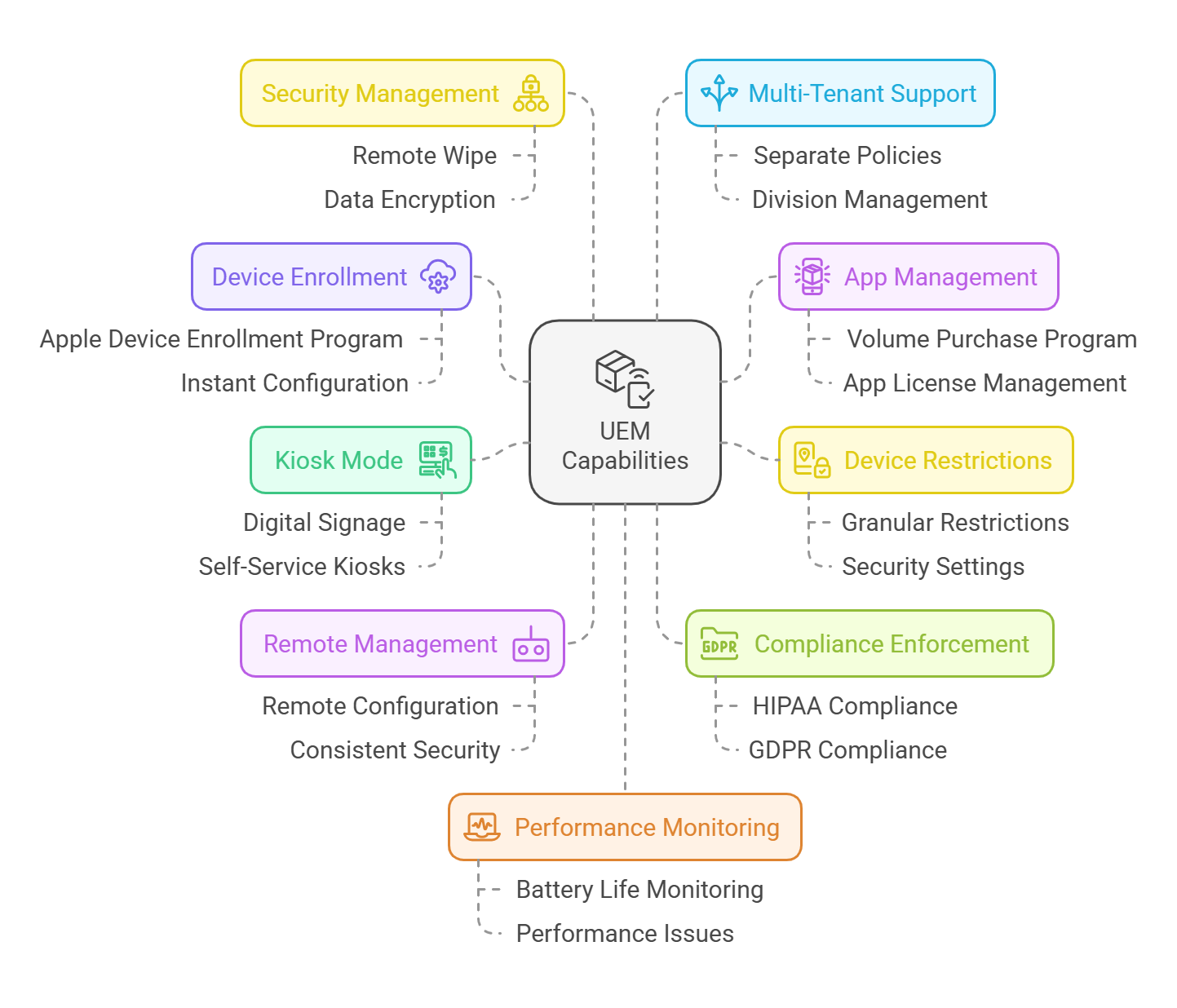
Apple device enrollment program (DEP): Automates the enrollment of devices, allowing IT teams to set up Apple devices straight out of the box. This streamlines large-scale deployments and ensures devices are instantly configured and ready for use without manual intervention.
Volume purchase program (VPP): Enables bulk purchasing and distribution of apps across multiple Apple devices. This feature allows organizations to easily manage app licenses and ensure that every device has the necessary software installed, updated, and maintained.
Granular device restrictions: UEM provides the ability to implement precise device restrictions, such as limiting access to specific apps, disabling certain features (e.g., camera or AirDrop), and enforcing security settings to align with organizational policies. This is crucial in environments like healthcare, retail, or education, where device usage needs to be controlled.
Kiosk mode: UEM allows devices to be locked down into a specific app or set of apps, turning them into dedicated kiosks. This is perfect for situations like digital signage in retail or self-service checkouts, where devices are meant to serve a single purpose and require strict usage control.
Remote configuration, support, and management: IT admins can remotely configure settings, manage devices, and apply updates across all Apple devices, eliminating the need for on-site support and making it easier to maintain consistency in configurations and security policies.
Compliance enforcement: UEM helps ensure compliance with industry standards such as HIPAA, GDPR, and PCI-DSS by enforcing security policies like encryption, password complexity, and data protection. This is essential in sectors like healthcare, finance, and education where regulatory compliance is a priority.
Security management: UEM offers advanced security controls, such as remote wipe capabilities, device tracking, and data encryption, ensuring that if a device is lost or stolen, sensitive data remains protected and inaccessible.
Multi-tenant support: For managed service providers or businesses with different divisions, UEM can provide a multi-tenant architecture, allowing for the management of different Apple device fleets under one system, but with separate policies and configurations for each tenant.
Battery and performance monitoring: UEM offers real-time monitoring of device health, including battery life and overall performance, helping IT teams proactively address issues before they impact productivity.
How UEM improves endpoint security for Apple devices
There’s no end to data breaches, malware attacks, and insider threats but we can definitely prevent them with the help of a UEM solution. Endpoint security is the first line of defense when it comes to securing Apple devices within an organization.
UEM solutions enhance security through several key features:
Device Compliance and Granular Restrictions: UEM solutions enforce security policies such as password rules, encryption, OS updates, and app restrictions. These help ensure compliance with industry regulations (HIPAA, GDPR) while protecting sensitive data from unauthorized access.
Zero Trust Access: UEM platforms enable a zero-trust security framework, where only authenticated users and compliant devices are allowed access to corporate resources, minimizing the risk of unauthorized entry.
Remote Lock and Data Wipe: In the event of a lost or stolen device, UEM solutions allow IT admins to lock or wipe the device remotely, securing sensitive corporate data and preventing unauthorized access.
Secure Network Connectivity with VPN Integration: UEM solutions configure and enforce VPN settings on Apple devices to ensure secure connections, especially for remote workers. This is further strengthened with endpoint security features like split tunneling and traffic filtering.
Proactive Security with Automatic Updates: UEM solutions ensure that devices are always up to date with the latest OS versions and security patches, protecting against vulnerabilities associated with outdated software.
I/O Device Access Control for macOS: UEM platforms allow organizations to manage and restrict the use of external devices like USBs and peripherals, preventing unauthorized data transfers and enhancing security on macOS.
Apple devices, while known for their robust security features, still face potential threats—whether it’s a lost iPhone with sensitive business data or a compromised app on an iPad. UEM solutions like Scalefusion, when paired with endpoint security solutions like Veltar, create an unbreakable defense against these risks.
Why Scalefusion is ideal for Apple device management
Scalefusion goes beyond basic UEM features like supervision, app control, and compliance enforcement. It offers robust tools to simplify and enhance the management of macOS and iOS devices, making it a comprehensive solution for businesses.
Support for all your Apple devices – Scalefusion is compatible with a wide range of Apple devices, from iPhones and iPads to Mac computers. Whether you’re managing mobile devices or desktop setups, you can handle them all from one unified platform, streamlining operations.
Dive deep with DeepDive – From the Scalefusion dashboard, you can get quick, graphical insights into your device inventory. View key metrics like platform-wise enrollment, active/inactive devices, and license usage. This data allows you to make informed decisions and track your device fleet more effectively.
Top-notch security – Keeping your business data secure is non-negotiable, and Scalefusion goes above and beyond to protect it. With features like remote device locking, data wipe, and passcode enforcement, you can ensure Apple devices are always secure and compliant with your company’s policies.
Effortless enrollment – Thanks to integration with Apple’s Device Enrollment Program (DEP), setting up Apple devices is a breeze. Zero-touch enrollment allows you to quickly onboard devices without physical interaction, making the process both fast and hassle-free.
Kiosk Mode and App Control – Scalefusion’s Kiosk Mode lets you restrict Apple devices to just one app or a set of apps, preventing unauthorized access and ensuring the device is dedicated to its intended function.
Granular policy control with Groups and Subgroups – Scalefusion gives you the ability to manage devices at a granular level. By organizing devices into groups and subgroups, you can apply specific policies to different teams or departments, offering greater control and tailoring device settings based on organizational needs.
No-code IT Workflows – Streamline IT tasks by automating and scheduling actions without coding. Create task flows, set execution times, and maintain compliance effortlessly.
Remote Troubleshooting with Remote Cast and Control – With the Remote Cast and Control feature, IT teams can mirror a device’s screen in real-time and take full control of the device to resolve problems. This eliminates the need for physical access, reduces downtime, and ensures your team can quickly address issues.
Seamless integration with Apple’s ecosystem – Scalefusion seamlessly integrates with Apple’s native services, such as iCloud, iTunes, and Apple School Manager. This tight integration ensures smooth syncing of apps, data, and settings across your Apple devices, providing a unified experience for your business.
OS Updates and Patch Management – Scalefusion simplifies OS updates and patch management, automating the process to keep your Apple devices secure and up to date. Scalefusion UEM leverages Apple’s declarative device management (DDM) protocol to further streamline the update process. With DDM, you can schedule updates for macOS devices based on your local time zone, ensuring updates are applied at optimal times. This ensures that devices always install the latest version when multiple updates are available, simplifying the update management process.
Ensure long-term success with Apple UEM
With Apple devices becoming more prevalent across businesses, schools and industries, managing them efficiently is essential. Scalefusion UEM ensures your device management solution evolves alongside your organization, seamlessly adapting to the latest Apple updates.
Scalefusion UEM provides a seamless experience for managing Apple devices, with continuous updates that ensure compatibility with the latest Apple advancements. Its scalability allows organizations to easily manage growing numbers of Apple devices, while its interoperability ensures smooth integration with not just new Apple technologies and updates but also any other OS or device type that your business or employees love and use.
Get in touch with our experts for more details and book a free demo call. Start your 14-day free trial today, with full access to all features, and discover how easy device management can be!
About Scalefusion Scalefusion’s company DNA is built on the foundation of providing world-class customer service and making endpoint management simple and effortless for businesses globally. We prioritize the needs and feedback of our customers, making sure that they are at the forefront of all decision-making processes. We are dedicated to providing comprehensive customer support services, and place emphasis on customer-centric thinking throughout the organization.
About Version 2 Digital
Version 2 Digital is one of the most dynamic IT companies in Asia. The company distributes a wide range of IT products across various areas including cyber security, cloud, data protection, end points, infrastructures, system monitoring, storage, networking, business productivity and communication products.
Through an extensive network of channels, point of sales, resellers, and partnership companies, Version 2 offers quality products and services which are highly acclaimed in the market. Its customers cover a wide spectrum which include Global 1000 enterprises, regional listed companies, different vertical industries, public utilities, Government, a vast number of successful SMEs, and consumers in various Asian cities.
The gap between identifying vulnerabilities and applying patches continues to be a major bottleneck for organizations. In December 2024, the U.S. Treasury Department reported a breach attributed to a Chinese state-sponsored actor, who exploited two known vulnerabilities in BeyondTrust’s remote tech support software to gain unauthorized access[1].
Understanding the meaning of vulnerability and patch management
This incident makes us realize the importance of robust vulnerability and patch management strategies, especially now that we are entering the Year 2025. Both processes play crucial roles in securing IT systems, yet they serve distinct purposes and operate in tandem to safeguard organizational assets.
Let’s explore the fundamentals of vulnerability and patch management, their lifecycles, and how they complement each other to form the backbone of modern cybersecurity strategies. Read On-
Vulnerability vs. patch management: Understanding the basics
The first and most important thing to understand is that patch management is a process that comes within the broader scope of vulnerability management.
Vulnerability management is the process of identifying, assessing, categorizing, prioritizing, mitigating, and finally remediating vulnerabilities from an IT infrastructure. The aim here is to eliminate the security flaws, glitches, or weaknesses found in the system, which an attacker could exploit.
Conversely, patch management is the process of managing the action of patching the vulnerabilities. It identifies, prioritizes, tests, and deploys the patch to an operating system. Patching ensures that the devices run on the latest OS and app versions, addressing any kind of bug or vulnerability.
According to Jason Firch (CEO, PurpleSec), organizations can have vulnerability management without patch management, but they can’t have patch management without vulnerability management. One is dependent on the other[2].
Learning the mechanics of vulnerability and patch management
To understand how vulnerability and patch management work we will need to understand their lifecycles.
Patch management lifecycle
1. Build an inventory of production systems such as IP addresses, OS, and applications.
2. Scan the system for missing patches.
3. Create the patching policies according to your organizational needs.
4. Prioritize patches based on their severity.
5. Stage and test patches in a controlled environment.
6. Deploy patches to required devices, servers, and operating systems.
7. Verify patch deployment to ensure that they are not only installed but also working as intended.
8. Create patch reports under the company’s IT security policies and procedures documentation.
Vulnerability management lifecycle
1. Find and identify vulnerabilities that require patching.
2. Assess vulnerabilities and their levels of risk to the organization.
3. Prioritize vulnerabilities by identifying which ones to patch first for a relevant impact on your organization.
4. Apply a patch to remediate the vulnerability.
5. Review and assess the patched vulnerabilities.
6. Continue monitoring and reporting vulnerabilities for a better patching process.
The interplay between patch and vulnerability management
Patch management and vulnerability management are complementary processes that form the cornerstone of an organization’s cybersecurity strategy.
While vulnerability management sets the stage by highlighting security gaps that need to be addressed, patch management complements vulnerability management by addressing the identified security flaws.
Patch management reduces the attack surface and reinforces the security framework by systematically addressing vulnerabilities. The synergy between vulnerability and patch management lies in their shared objective of minimizing risk.
Feedback loop: Vulnerability assessments inform patch management teams about critical vulnerabilities that require immediate action. Post-patch deployment, vulnerability scans confirm whether the issues have been resolved.
Prioritization alignment: Vulnerability management helps prioritize which patches to apply first based on the risk level, ensuring high-risk vulnerabilities are addressed promptly.
Proactive defense: Continuous monitoring by vulnerability management ensures that emerging threats are detected, while patch management provides the means to neutralize them effectively.
Patch vs vulnerability management: The odds and evens
Effective cybersecurity strategies hinge on patch and vulnerability management, as these processes address critical aspects of IT security. While they share similar goals—reducing risks and maintaining system integrity—they follow distinct methodologies and scopes.
Similarities
a. Focus on reducing risks
Both patch management and vulnerability management aim to minimize security risks by addressing potential threats. Patch management achieves this by applying software updates, while vulnerability management identifies and mitigates weaknesses in the system infrastructure.
b. Lifecycle phases
Both processes share similar lifecycle stages, such as identification, prioritization, remediation, and validation. These stages ensure vulnerabilities and patches are systematically addressed to enhance security.
c. Dependency on accurate assessment
Accurate assessment is critical for both processes. Patch management relies on understanding software versions and available updates, whereas vulnerability management depends on thorough scans to detect potential weaknesses.
Key Differences
Aspect
Patch management
Vulnerability management
Scope
Addresses software and application updates.
Covers weaknesses in networks, hardware, and software.
Approach
Reactive: Fixes known issues.
Proactive: Finds and assesses potential risks.
Tools
Patch deployment tools, and automated update systems.
Scanners, penetration testing, and risk analysis tools.
Outcome
Measured by patches applied and compliance.
Focuses on risk reduction and improved security posture.
Integration
IT asset and change management processes.
Risk management, compliance, and incident response.
a. Scope of management
Patch management: Focuses specifically on deploying updates to software and applications, addressing known vulnerabilities by fixing bugs or enhancing features.
Vulnerability management: Takes a broader approach, identifying, analyzing, and mitigating weaknesses across the entire IT environment, including network configurations, hardware, and software.
b. Proactive vs. reactive
Patch management: Often reactive, as it addresses vulnerabilities already identified and fixed by software vendors.
Vulnerability management: Proactive, involving continuous scanning and monitoring to uncover vulnerabilities that may not yet have a patch available.
c. Tools and techniques
Patch management: Relies on patch deployment tools and update management systems to automate and schedule updates.
Vulnerability management: Uses vulnerability scanners, penetration testing, and risk analysis tools to identify and assess system weaknesses.
d. Outcome and metrics
Patch Management: Success is measured by the number of systems patched and compliance with update schedules.
Vulnerability Management: Metrics focus on risk reduction, such as the number of vulnerabilities mitigated and the overall security posture improvement.
e. Integration with other processes
Patch management: Primarily integrates with IT asset management and change management processes.
Vulnerability management: Aligns more broadly with risk management, compliance, and incident response plans.
Best practices for implementing patch and vulnerability management
Effective patch and vulnerability management is essential to maintaining a strong security posture and protecting against emerging cyber threats. By adhering to best practices, organizations can reduce the risk of security breaches, improve system performance, and ensure compliance with regulatory standards. Following are some key best practices for implementing a patch and vulnerability management program:
1. Establish a comprehensive inventory
Begin by creating and maintaining an up-to-date inventory of all hardware and software assets. This includes operating systems, applications, and network devices. Knowing what needs to be patched or updated is the first step in managing vulnerabilities effectively. Regularly audit and update the inventory to ensure you aren’t missing any critical systems.
2. Prioritize patches based on risk
Not all vulnerabilities are created equal. Some may pose a more immediate threat to your organization than others. Prioritize patches based on risk levels, considering factors such as the severity of the vulnerability, the criticality of the system, and any known exploits. A risk-based approach ensures that you address the most critical threats first, minimizing potential damage.
3. Automate patch deployment
Manual patching can be time-consuming and error-prone. Automated patching allows for faster, more consistent updates across your environment. With automated solutions, patches can be tested, approved, and deployed to all systems efficiently, reducing the likelihood of human error and ensuring timely updates.
4. Test patches before deployment
While automation helps streamline the process, it’s crucial to test patches in a controlled environment before deploying them across your production systems. Testing patches ensure they don’t disrupt business operations or introduce new issues. A test environment will help identify any compatibility or performance issues, so you can address them before widespread implementation.
5. Maintain a patch management schedule
Consistency is key when managing patches. Implement a regular patch management schedule that includes daily, weekly, or monthly checks for new patches. Having a routine process in place ensures that patches are applied promptly and helps organizations stay on top of new security vulnerabilities as they emerge.
6. Monitor and report vulnerabilities
Regularly monitor for new vulnerabilities and threats affecting your systems. Implement vulnerability scanning tools to identify potential weaknesses and gaps in your security posture. Once a vulnerability is discovered, generate detailed reports to help track remediation efforts and assess the effectiveness of your patching strategy.
7. Establish incident response protocols
Even with a solid patch management strategy, incidents can still occur. Ensure that you have clear and well-documented incident response protocols in place. This should include steps to take if a vulnerability is exploited, such as isolating affected systems, analyzing the breach, and applying emergency patches if necessary.
Ensure consistent protection with Scalefusion’s automated patch management
If you want to upgrade to an advanced patch management solution for your Windows devices and third-party applications, look no further. With Scalefusion UEM’s automated patch management, you can schedule, delay, automate, and deploy patches on your device, keeping them updated and protected from vulnerabilities at all times.
About Scalefusion Scalefusion’s company DNA is built on the foundation of providing world-class customer service and making endpoint management simple and effortless for businesses globally. We prioritize the needs and feedback of our customers, making sure that they are at the forefront of all decision-making processes. We are dedicated to providing comprehensive customer support services, and place emphasis on customer-centric thinking throughout the organization.
About Version 2 Digital
Version 2 Digital is one of the most dynamic IT companies in Asia. The company distributes a wide range of IT products across various areas including cyber security, cloud, data protection, end points, infrastructures, system monitoring, storage, networking, business productivity and communication products.
Through an extensive network of channels, point of sales, resellers, and partnership companies, Version 2 offers quality products and services which are highly acclaimed in the market. Its customers cover a wide spectrum which include Global 1000 enterprises, regional listed companies, different vertical industries, public utilities, Government, a vast number of successful SMEs, and consumers in various Asian cities.
Do you know what the drill is while running a business? Data security, smooth workflows and keeping your team connected, no matter where they are. But how do you manage all of that without your business being vulnerable to cyber threats or losing control of sensitive information?
A business VPN is your armor where cyber threats are everywhere. It allows your employees to work remotely, access company data securely, and even prevent hackers from sneaking in through the cracks.
Still, that’s just the tip of the iceberg. Let’s dive into the 5 top benefits of a business VPN that will change the way you operate.
5 Benefits of Business VPN Solution
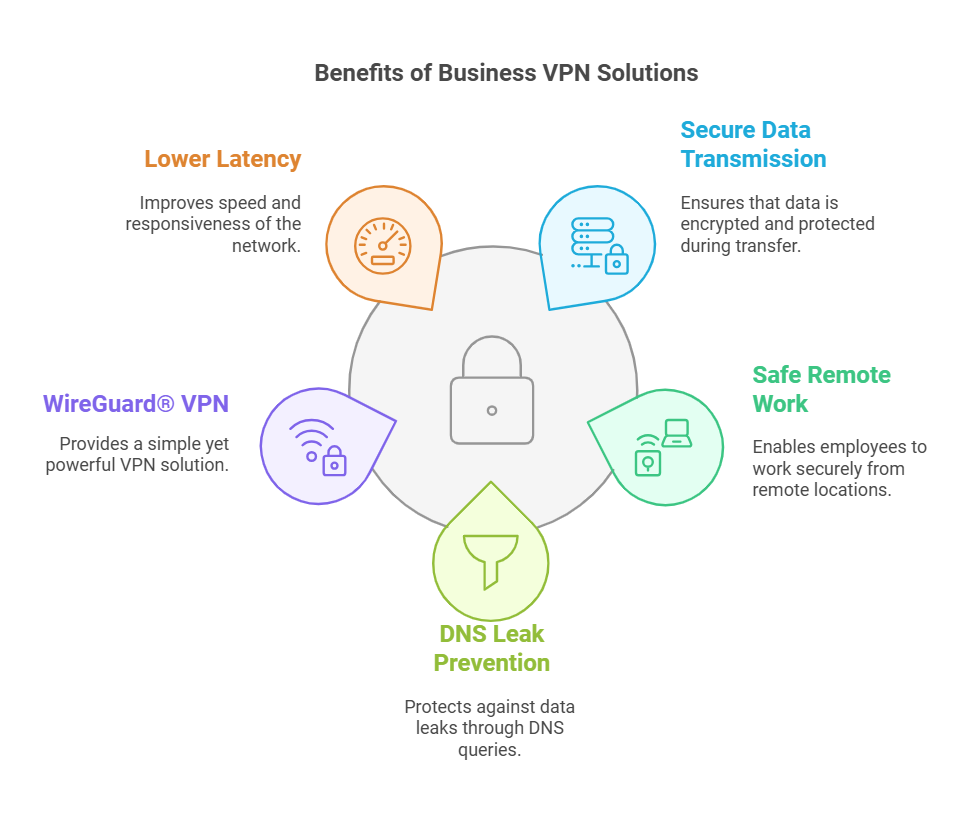
1. Secure Data Transmission
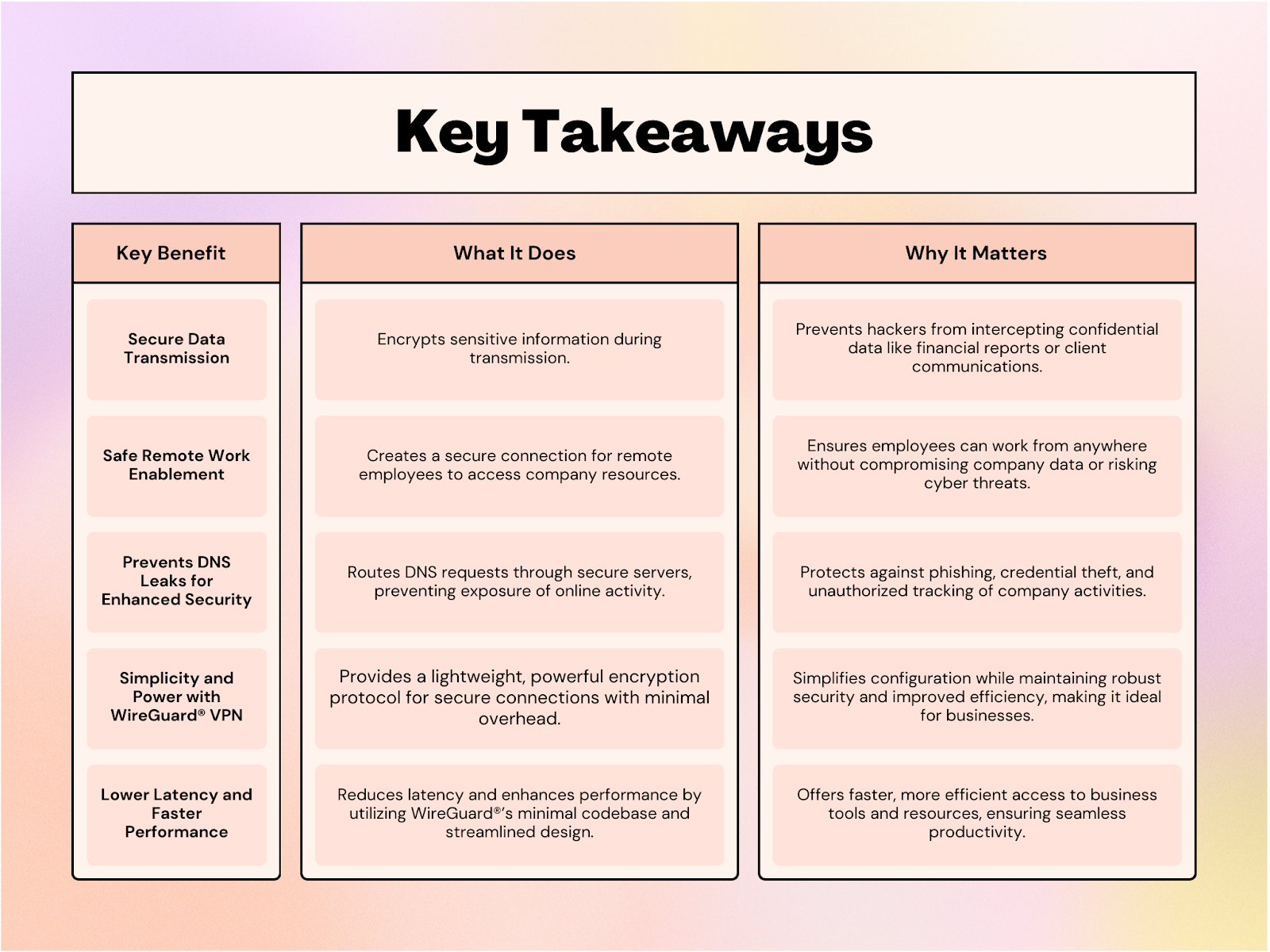
Consider sending sensitive information to a client or sharing company reports over an email. Without the right security measures, those communications could be intercepted by hackers. Here, by encrypting your data, a VPN ensures that what you send stays private, no matter what.
Encryption means that any data traveling across your network is scrambled into unreadable code until it reaches the intended recipient. Without encryption, your business is exposed to a whole world of potential breaches. VPNs make sure no one can eavesdrop or manipulate your communications.
So, whether it’s financial information, employee details, or client data, a business VPN is your lock and key for secure data transmission. You’ll never have to worry about sending a document or email and wondering who might be watching.
2. Safe Remote Work Enablement
With employees scattered across the globe, it’s essential to ensure that they can safely access company resources around the world. This secure connection allows them to access company files, applications, and resources without risking exposure to hackers. VPNs create a secure tunnel between the employee’s device and the company network, ensuring no one can hijack the connection.
Plus, with VPNs, you avoid the headaches that come with managing multiple devices and work environments. Whether employees are on a laptop, tablet, or phone, a VPN ensures their connection is secure, empowering them to work from anywhere without compromising security.
3. Prevents DNS Leaks for Enhanced Security
A Domain Name System (DNS) leak can expose sensitive information about your online activities, even when you’re using a secure network. Details like your network’s IP address, browsing history, and the IP addresses of websites visited can fall into the wrong hands. Hackers often exploit this seemingly minor information to launch targeted attacks, such as stealing employees’ login credentials or carrying out phishing scams.
A business VPN prevents DNS leaks by routing all DNS requests through its secure servers instead of your internet service provider (ISP). This ensures that your company’s online activities remain private and protected. By encrypting DNS queries, a VPN minimizes the risk of unauthorized access to sensitive data and shields your business from potential cyber threats.
4. Simplicity and Power with Veltar VPN
When it comes to balancing security and simplicity, Veltar VPN stands out. Known for its lightweight yet robust encryption, Veltar ensures data integrity without the complexity of traditional VPN protocols. Its streamlined design eliminates unnecessary overhead, making configuration incredibly simple for IT teams while maintaining powerful security features.
Veltar’s minimal codebase not only enhances performance but also reduces the chances of vulnerabilities. Whether it’s setting up secure connections or managing network traffic, the simplicity of Veltar makes it an ideal choice for businesses. With Veltar at its core, a business VPN ensures seamless integration, efficient operation, and uncompromised security, allowing your team to focus on productivity without getting bogged down in technical hurdles.
5. Lower Latency and Faster Performance
One of the standout benefits of WireGuard®-powered VPNs is the ability to offer lower latency and faster performance compared to traditional VPN solutions. Its streamlined design and minimal codebase result in quicker connection speeds and reduced lag, even when accessing resources remotely.
Businesses can enjoy smooth, uninterrupted access to critical tools and data, improving overall productivity. Whether it’s for real-time communication or accessing cloud-based applications, the reduced latency ensures that your teams can work seamlessly, regardless of their location. In a world where speed matters, this performance-enhancing feature provides a crucial advantage for businesses looking to stay ahead of the curve.
Essential Benefits of Business VPNs
Unlock the Full Potential of Business VPN with Veltar
Incorporating a VPN into your business operations benefits you with unlocking efficiency, enabling seamless remote work, and safeguarding your competitive edge. With Veltar, you gain more than just a secure tunnel. Powered by WireGuard®, Veltar provides customizable VPN tunneling, enhanced encryption, and centralized management, making it an essential tool for modern businesses.
Whether you need to secure sensitive data, optimize traffic routing, or maintain effortless control through a user-friendly console, Veltar empowers your IT admins to keep your corporate resources protected and accessible.
To know more, contact our experts and schedule a demo. Secure your operations and elevate your business workflows with Veltar.
About Scalefusion Scalefusion’s company DNA is built on the foundation of providing world-class customer service and making endpoint management simple and effortless for businesses globally. We prioritize the needs and feedback of our customers, making sure that they are at the forefront of all decision-making processes. We are dedicated to providing comprehensive customer support services, and place emphasis on customer-centric thinking throughout the organization.
About Version 2 Digital
Version 2 Digital is one of the most dynamic IT companies in Asia. The company distributes a wide range of IT products across various areas including cyber security, cloud, data protection, end points, infrastructures, system monitoring, storage, networking, business productivity and communication products.
Through an extensive network of channels, point of sales, resellers, and partnership companies, Version 2 offers quality products and services which are highly acclaimed in the market. Its customers cover a wide spectrum which include Global 1000 enterprises, regional listed companies, different vertical industries, public utilities, Government, a vast number of successful SMEs, and consumers in various Asian cities.
ProMobi Technologies announced today that Scalefusion, its leading unified endpoint management solution (UEM), introduces Veltar, an innovative endpoint security product. Designed to enhance the enterprise security posture, Veltar combines advanced threat protection with seamless device management, enabling organizations to operate confidently in an increasingly complex digital landscape.
Veltar has been introduced to tackle the critical challenges posed by fragmented security tools and limited visibility into devices and their security. With the addition of Veltar, Scalefusion now seamlessly combines unified endpoint management (UEM), identity and access management (IAM), and endpoint security (EPS) into one comprehensive solution. As the third pillar of the product, Veltar aims to complete the solution so users can now effectively manage devices, access, and security within organizations.
With Veltar, IT admins get a curated set of security tools with the prime goal of protecting data loss, securing data at rest and in motion. Its features include VPN tunneling to secure data transmission to and from on-prem assets, secure web gateway (SWG) to block domains and websites based on categories, application control to ensure only trusted software runs on your devices, and I/O device control, among others.
“Veltar marks a major leap forward in endpoint security and management, bringing crucial security features together into a single platform. It is a critical component that combines endpoint security driven by the insights of device management. We had a goal of enabling enterprises to enhance their security posture while simplifying device, identity and access management and Veltar is the third piece of the puzzle.” — said Sriram Kakarala, Chief Product Officer at Scalefusion
Veltar is designed for organizations looking to streamline operations, and management of devices that hold critical data without compromising security.
About Scalefusion Scalefusion’s company DNA is built on the foundation of providing world-class customer service and making endpoint management simple and effortless for businesses globally. We prioritize the needs and feedback of our customers, making sure that they are at the forefront of all decision-making processes. We are dedicated to providing comprehensive customer support services, and place emphasis on customer-centric thinking throughout the organization.
About Version 2 Digital
Version 2 Digital is one of the most dynamic IT companies in Asia. The company distributes a wide range of IT products across various areas including cyber security, cloud, data protection, end points, infrastructures, system monitoring, storage, networking, business productivity and communication products.
Through an extensive network of channels, point of sales, resellers, and partnership companies, Version 2 offers quality products and services which are highly acclaimed in the market. Its customers cover a wide spectrum which include Global 1000 enterprises, regional listed companies, different vertical industries, public utilities, Government, a vast number of successful SMEs, and consumers in various Asian cities.