ProMobi Technologies today announced that Scalefusion- its leading unified endpoint management solution (UEM), has now launched support for ChromeOS device management. This addition reinforces Scalefusion’s commitment to offering a versatile multi-OS management platform that caters to the diverse needs of modern businesses.
With the integration of ChromeOS, Scalefusion enables IT administrators to streamline the management of ChromeOS devices alongside Windows, macOS, Android, and Linux, simplifying the complexities of multi-OS environments.
ChromeOS has seen significant adoption across industries, from education to enterprise, thanks to its balance of affordability, speed, and security. Recognizing this growing trend, Scalefusion’s new ChromeOS device management provides organizations with the ability to provision, secure, and monitor ChromeOS devices seamlessly through the same intuitive platform used for their existing device ecosystems.
Scalefusion’s ChromeOS management empowers businesses to streamline device management by integrating ChromeOS into their existing device strategy. With Scalefusion’s unified platform, IT administrators can boost productivity by providing a consistent, unified experience for users across all platforms. Whether organizations are deploying Chromebooks in educational settings or managing ChromeOS devices for remote workforces, Scalefusion makes it simple to provision, secure, and monitor these devices—all from a single dashboard. With the addition of ChromeFlex, businesses can repurpose existing PCs and Macs by converting them to ChromeOS devices, further extending the life of their hardware while maintaining seamless management through Scalefusion’s unified platform.
Sriram Kakarala, Chief Product Officer at Scalefusion, highlighted the importance of this new addition: “With the rise of ChromeOS in diverse sectors, we saw a clear opportunity to enhance the Scalefusion platform. By adding ChromeOS support, we are delivering on our promise to simplify device management for our customers, regardless of which operating systems they choose to deploy.”
Scalefusion’s integration aims to provide organizations with a straightforward approach to managing their multi-OS device ecosystems. Request a free trial of this release by setting up a demo of Scalefusion for ChromeOS here.
About Scalefusion
ProMobi Technologies provides a leading Unified Endpoint Management solution under the brand Scalefusion. Scalefusion UEM allows organizations to secure and manage endpoints, including smartphones, tablets, laptops, rugged devices, POS and digital signage, and apps and content. It supports the management of Android, iOS, macOS, Windows, Linux, and ChromeOS devices and ensures streamlined device management operations with Scalefusion Remote Troubleshooting.
More than 8000 companies worldwide are unlocking their true potential using Scalefusion, which is used across various industries, such as Transportation & Logistics, Retail, Education, Healthcare, Manufacturing, Construction & Real Estate, Hospitality, Software & Telecom, Financial Services, and others.
About Version 2 Digital
Version 2 Digital is one of the most dynamic IT companies in Asia. The company distributes a wide range of IT products across various areas including cyber security, cloud, data protection, end points, infrastructures, system monitoring, storage, networking, business productivity and communication products.
Through an extensive network of channels, point of sales, resellers, and partnership companies, Version 2 offers quality products and services which are highly acclaimed in the market. Its customers cover a wide spectrum which include Global 1000 enterprises, regional listed companies, different vertical industries, public utilities, Government, a vast number of successful SMEs, and consumers in various Asian cities.
About Scalefusion Scalefusion’s company DNA is built on the foundation of providing world-class customer service and making endpoint management simple and effortless for businesses globally. We prioritize the needs and feedback of our customers, making sure that they are at the forefront of all decision-making processes. We are dedicated to providing comprehensive customer support services, and place emphasis on customer-centric thinking throughout the organization.
Businesses across various industries face a common challenge: managing their IT infrastructure effectively while focusing on core operations.
This challenge is particularly pronounced in the healthcare, finance, education, and retail industries, where reliable IT support can be scarce and budget-tight and work environments increasingly dispersed.
Mobile Device Management for MSPs
That’s where Managed Service Providers, or MSPs, come into the picture. They provide various IT and IT management services, with Mobile Device Management (MDM) being a key offering among them. MDM for MSPs isn’t just about keeping devices secure and up-to-date; it’s about empowering businesses to walk through compliance requirements, and data security confidently.
For example, consider a healthcare provider managing patient data across multiple devices, a financial institution safeguarding client information with security measures, or a retail operation maintaining smooth transactions and customer interactions. All of this is possible thanks to MSPs’ strategic approach to managing client devices.
In this blog, we will discuss the pivotal role of MDM service providers for MSPs. We will explore how MSPs leverage MDM solutions to streamline operations, improve security protocols, and support businesses in achieving their goals without the burden of IT complexities.
Common Challenges in Device Management: Need for MSP-driven MDM
1. Device Diversity and Compatibility Issues
MSPs often deal with a wide range of client devices across different operating systems, versions, and configurations. Seamlessly integrating these diverse devices into a unified management framework can be challenging and time-consuming.
2. Security Threats and Data Breaches
With the proliferation of cyber threats, MSPs must safeguard client devices from malware, phishing attacks, and other security vulnerabilities. Data breaches can have severe consequences, including legal liabilities and damage to client trust, making security measures a top priority.
3. Manual Device Management Complexities
Traditional, manual methods of managing devices are inefficient and prone to errors. MSPs struggle with the time and effort required to manually configure, update, and troubleshoot devices across multiple clients and locations.
4. Inefficient Troubleshooting and Support Processes
Resolving device issues remotely or on-site can be challenging due to limited visibility into device performance and user behavior. MSPs need streamlined processes and tools for proactive monitoring, quick diagnostics, and responsive support to minimize downtime and client disruption.
Strategic Approach to Managing Client Devices
1. Needs Assessment and Client Consultation
To effectively support clients, MSPs should begin by conducting thorough assessments of their IT environments and consulting closely with businesses to identify precise needs and pain points. This process involves analyzing existing device setups, evaluating security requirements, and understanding industry-specific compliance mandates.
With the help of a suited MDM solution, MSPs ensure their services align perfectly with client goals, enhancing operational effectiveness and security while addressing the challenges unique to each organization. This personalized approach increases client satisfaction and lays the groundwork for long-term, strategic IT management partnerships.
2. Selection of the Right MDM Solution
When selecting the ideal MDM solution for clients, MSPs should undertake a rigorous evaluation process. This involves comparing various MDM options based on their features, scalability, security protocols, and compatibility with client devices. MSPs should consider whether a cloud-based or on-premise MDM solution best suits the client’s preferences and existing infrastructure.
Also, it is important to emphasize choosing solutions equipped with reporting, analytics tools, and remote management capabilities. This strategic selection ensures the chosen MDM solution meets immediate needs and supports long-term scalability.
3. Customization and Configuration
MSPs must focus on customization and configuration when implementing MDM solutions. This approach helps ensure alignment with client-specific policies, compliance requirements, and security protocols. By meticulously configuring device policies, user roles, and access controls, MSPs can guarantee secure and efficient device management.
Implementing automated workflows for tasks such as device provisioning, updates, and compliance checks is essential to streamlining operations and enhancing overall IT management effectiveness for clients. This strategic approach strengthens security measures and cultivates a digital environment that meets each client’s precise operational needs.
4. Device Enrollment and Provisioning
For effective device management, MSPs should implement streamlined enrollment processes to quickly onboard client devices, including those in BYOD (Bring Your Own Device) scenarios.
Utilizing zero-touch provisioning and automated configuration, which includes OOB (Out-of-the-box) setups, is essential to minimize manual effort and accelerate deployment times. It is important to ensure all devices are properly enrolled and configured before being handed over to end users.
5. Security Management
MSPs need to deploy comprehensive security measures, including encryption, remote wipe capabilities, and secure access controls, to protect client devices. Regular updates to security policies are important to address emerging threats.
Real-time device security monitoring and swift responses to potential breaches or vulnerabilities are vital for continuous protection and client trust. This proactive approach to security management helps safeguard sensitive data and strengthen the overall IT infrastructure.
6. Continuous Monitoring and Support
MSPs need to establish continuous monitoring practices to track device performance, usage patterns, and compliance. Providing proactive support through remote troubleshooting, automated alerts, and quick resolution of issues is essential for maintaining optimal device functionality.
Maintaining open communication channels with clients for ongoing feedback and support ensures their needs are met promptly and effectively, developing a strong, collaborative relationship.
7. Reporting and Analytics
MSPs must utilize the reporting and analytics features of an MDM solution to generate detailed insights into device usage, compliance, and performance. Sharing regular reports with clients demonstrates the value of MDM and highlights areas for improvement.
Leveraging analytics to identify trends helps optimize device management strategies and overall service delivery. This data-driven approach ensures MSPs can continuously improve their services and better meet their clients’ needs.
8. Strategic Partnerships and Collaboration
MSPs need to form strategic partnerships with leading MDM providers to access the latest technologies and support. Collaborating with clients for solutions that align with their long-term goals and objectives ensures the services provided are relevant and effective.
By developing a collaborative relationship, MSPs can position themselves as trusted advisors in device management, enhancing client trust and satisfaction. This approach improves service quality and strengthens the overall client-MSP partnership.
MDM: Essential for MSP Success
Corporate mobile device management is crucial for the security, efficiency, and compliance of client devices. MDM empowers MSPs to address challenges such as device diversity, security threats, and manual management complexities. By adopting a strategic approach to MDM, MSPs can deliver solutions that can improve client operations and satisfaction.
MSPs should explore comprehensive MDM solutions like Scalefusion to stay ahead of evolving IT demands. Scalefusion offers advanced features such as remote troubleshooting, automated updates, and robust security protocols, enabling MSPs to efficiently manage diverse client device environments.
Schedule a demo with our experts and start a 14-day free trial to experience the full benefits firsthand!
About Version 2 Digital
Version 2 Digital is one of the most dynamic IT companies in Asia. The company distributes a wide range of IT products across various areas including cyber security, cloud, data protection, end points, infrastructures, system monitoring, storage, networking, business productivity and communication products.
Through an extensive network of channels, point of sales, resellers, and partnership companies, Version 2 offers quality products and services which are highly acclaimed in the market. Its customers cover a wide spectrum which include Global 1000 enterprises, regional listed companies, different vertical industries, public utilities, Government, a vast number of successful SMEs, and consumers in various Asian cities.
About Scalefusion Scalefusion’s company DNA is built on the foundation of providing world-class customer service and making endpoint management simple and effortless for businesses globally. We prioritize the needs and feedback of our customers, making sure that they are at the forefront of all decision-making processes. We are dedicated to providing comprehensive customer support services, and place emphasis on customer-centric thinking throughout the organization.
ProMobi Technologies today announced that Scalefusion- its leading unified endpoint management solution (UEM), has now launched support for ChromeOS device management. This addition reinforces Scalefusion’s commitment to offering a versatile multi-OS management platform that caters to the diverse needs of modern businesses.
With the integration of ChromeOS, Scalefusion enables IT administrators to streamline the management of ChromeOS devices alongside Windows, macOS, Android, and Linux, simplifying the complexities of multi-OS environments.
ChromeOS has seen significant adoption across industries, from education to enterprise, thanks to its balance of affordability, speed, and security. Recognizing this growing trend, Scalefusion’s new ChromeOS device management provides organizations with the ability to provision, secure, and monitor ChromeOS devices seamlessly through the same intuitive platform used for their existing device ecosystems.
Scalefusion’s ChromeOS management empowers businesses to streamline device management by integrating ChromeOS into their existing device strategy. With Scalefusion’s unified platform, IT administrators can boost productivity by providing a consistent, unified experience for users across all platforms. Whether organizations are deploying Chromebooks in educational settings or managing ChromeOS devices for remote workforces, Scalefusion makes it simple to provision, secure, and monitor these devices—all from a single dashboard. With the addition of ChromeFlex, businesses can repurpose existing PCs and Macs by converting them to ChromeOS devices, further extending the life of their hardware while maintaining seamless management through Scalefusion’s unified platform.
Sriram Kakarala, Chief Product Officer at Scalefusion, highlighted the importance of this new addition: “With the rise of ChromeOS in diverse sectors, we saw a clear opportunity to enhance the Scalefusion platform. By adding ChromeOS support, we are delivering on our promise to simplify device management for our customers, regardless of which operating systems they choose to deploy.”
Scalefusion’s integration aims to provide organizations with a straightforward approach to managing their multi-OS device ecosystems. Request a free trial of this release by setting up a demo of Scalefusion for ChromeOS here.
About Scalefusion
ProMobi Technologies provides a leading Unified Endpoint Management solution under the brand Scalefusion. Scalefusion UEM allows organizations to secure and manage endpoints, including smartphones, tablets, laptops, rugged devices, POS and digital signage, and apps and content. It supports the management of Android, iOS, macOS, Windows, Linux, and ChromeOS devices and ensures streamlined device management operations with Scalefusion Remote Troubleshooting.
More than 8000 companies worldwide are unlocking their true potential using Scalefusion, which is used across various industries, such as Transportation & Logistics, Retail, Education, Healthcare, Manufacturing, Construction & Real Estate, Hospitality, Software & Telecom, Financial Services, and others.
About Version 2 Digital
Version 2 Digital is one of the most dynamic IT companies in Asia. The company distributes a wide range of IT products across various areas including cyber security, cloud, data protection, end points, infrastructures, system monitoring, storage, networking, business productivity and communication products.
Through an extensive network of channels, point of sales, resellers, and partnership companies, Version 2 offers quality products and services which are highly acclaimed in the market. Its customers cover a wide spectrum which include Global 1000 enterprises, regional listed companies, different vertical industries, public utilities, Government, a vast number of successful SMEs, and consumers in various Asian cities.
About Scalefusion Scalefusion’s company DNA is built on the foundation of providing world-class customer service and making endpoint management simple and effortless for businesses globally. We prioritize the needs and feedback of our customers, making sure that they are at the forefront of all decision-making processes. We are dedicated to providing comprehensive customer support services, and place emphasis on customer-centric thinking throughout the organization.
Just-in-time (JIT) paradigm reforms the concept of identity and access management by emphasizing efficiency and security through time-sensitive access control and optimal resource provisioning.
It focuses on providing access and resources exactly when they are needed, rather than pre-allocating them in advance. This approach aligns with modern IT demands, where flexibility and precision are crucial.
Difference between Just-in-Time Provisioning vs Just-in-Time Privilege
JIT ensures that users receive permissions only for the duration necessary to complete their tasks. This minimizes the window of opportunity for unauthorized access and reduces the potential attack surface.
This blog will provide a comparative overview of JIT provisioning and JIT privileged access, highlighting how they work, their key components, benefits, and challenges.
What is Just-in-Time Provisioning?
Just-in-time (JIT) provisioning automates the creation of user accounts for single-sign-on (SSO) powered web applications using the security assertion markup language (SAML) protocol. When a new user attempts to log into an authorized app for the first time, JIT provisioning triggers the transfer of necessary information from the identity provider to the application.
This process of information transfer eliminates the need for manual account setup, significantly reducing administrative tasks and enhancing productivity. JIT provisioning ensures a seamless log-in experience for new users while maintaining high security and efficiency by streamlining account creation
How does it Work?
To establish just-in-time (JIT) provisioning IT admins need to configure an SSO connection between an identity provider and the target service provider (web application) and include the necessary user attributes that the service provider requires.
When a new user logs in, the identity provider sends the required information to the service provider via SAML assertions. This automatically creates the user’s account without manual intervention.
To implement JIT provisioning, administrators can use a centralized cloud identity provider or an SSO provider integrated with their existing directory. Moreover, the target service provider (web application) must also support JIT provisioning to ensure smooth operation.
JIT provisioning centralizes the application of authorization policies, providing log-in access based on user roles or groups. For instance, when a developer logs in, they automatically receive all the permissions associated with the developer role, ensuring they have immediate access to the required tools and resources.
Use Cases
Just-in-time (JIT) provisioning is particularly useful for industries with high turnover rates, a need for rapid onboarding, and significant user access management needs. JIT provisioning is most useful for the following industries:
Knowledge Worker: Just-in-Time (JIT) Provisioning serves knowledge workers by automating account creation enabling them to log into new web applications, tools and data across cross different teams or projects. With SSO integration, JIT Provisioning automatically grants access based on roles, ensuring knowledge workers have immediate access to the tools and resources they need, boosting productivity and security.
Retail: Retail environments often experience high employee turnover and need to quickly onboard new staff. JIT provisioning streamlines the process of user lifecycle management, ensuring that new hires can start working with minimal delays.
Healthcare: Healthcare organizations require strict access controls to ensure compliance with regulations such as HIPAA, and do rapid onboarding of new healthcare staff to provide them with immediate access to patient information. JIT provisioning helps maintain security and efficiency in managing healthcare professionals’ accounts.
Last mile delivery: The delivery sector frequently hires new drivers and needs to quickly integrate them into its systems. JIT provisioning facilitates rapid account creation and access to delivery management tools, improving operational efficiency and service speed.
Cab Aggregators: Ride-sharing companies experience high turnover and need to quickly onboard drivers. JIT provisioning helps manage driver accounts efficiently, ensuring that new drivers can start working as soon as possible.
What is Just-in-Time Privileged Access?
Just-in-time (JIT) privileged access is a security practice within privileged access management (PAM). It grants temporary privileged access to devices, applications, or systems, upon user request for a limited time frame. This method aligns with the principle of least privilege (PoLP), ensuring users receive just enough access to perform specific tasks, minimizing the risk of excessive or standing privileges that malicious actors could exploit.
JIT privileged access helps prevent unauthorized access and privilege creep by providing time-limited access, enhancing the overall security posture of an organization. This approach reduces the risks associated with giving users more than required privileges, creating a more secure and controlled environment.
How does it Work?
Just-in-time (JIT) privileged access is a security approach that optimizes control over user log-in based on three critical aspects: location, time, and actions. Here’s a closer look at how JIT access functions:
Location: Access is granted only to specific instances, network devices, servers, or virtual machines where the user needs to perform their tasks.
Time: Permissions are provided for a short, predefined duration, ensuring access is limited to the necessary timeframe.
Actions: Access is tailored to the user’s specific intent, allowing only the actions required for the task at hand.
In a typical JIT access workflow, a user submits a request to access a particular resource. This request is evaluated against established policies, or an administrator reviews and decides whether to grant or deny access.
Once approved, the user performs their tasks within the designated timeframe. After completion, the privileged access is automatically revoked until it is needed again in the future. This systematic approach enhances security and ensures efficient access management within an organization.
Use Case
Just-in-Time (JIT) Privileged Access is particularly useful for industries where sensitive data and systems need to be tightly controlled, and where temporary or task-specific access is common. JIT-privileged access is most beneficial for the following industries:
Banking, Financial Services, and Insurance (BFSI): JIT privileged access is extremely beneficial in the BFSI sector due to the high sensitivity of financial data and transactions. The principle of least privilege is crucial here to prevent fraud and data breaches. JIT access ensures that investigators, auditors, and IT staff only have access for the exact duration required, minimizing risk.
Healthcare: In healthcare, maintaining the confidentiality of patient data and securing medical devices is critical. JIT privileged access allows healthcare professionals to gain temporary access to sensitive information or systems for emergencies or specific tasks, enhancing security and ensuring compliance with data protection regulations.
Education: While JIT access is beneficial in educational institutions for managing IT system maintenance and administrative tasks, its impact may not be as critical compared to the BFSI and healthcare sectors. However, it still adds value by providing controlled, temporary access.
Hospitality: In the hospitality industry, JIT access helps manage and secure booking systems and guest information during special events or high-demand periods. While important, the need might not be as critical compared to industries with more stringent data protection requirements.
Knowledge Workers: Just-in-Time Privileged Access grants knowledge workers temporary elevated permissions for doing specific tasks, based on their location, time, and required actions. This ensures they only access what’s necessary for their job role within a limited timeframe, reducing the risk of excessive access while maintaining security.
Difference Between Just-in-Time Provisioning and Just-in-Time Privileged Access: Key Components, Benefits and Challenges
Just-in-Time Provisioning
Key components of JIT Provisioning
a. Real-time account creation: JIT provisioning enables the user to send a request to generate a user account in real time for accessing a web application.
b. Contextual user account: User accounts are granted according to the user’s role in the organization and the task that is to be performed.
c. Automated account management: JIT provisioning automates the process of managing account creation and deactivation without the intervention of IT admins.
What are the benefits of JIT Provisioning?
a. Efficient onboarding: JIT provisioning streamlines the onboarding process by automating user account creation. New users receive immediate access to necessary resources when they need them, enhancing overall efficiency.
b. Reduced IT workload: Automated provisioning of user accounts, minimizes the manual workload of IT teams. This allows them to focus on more strategic initiatives, saving time and reducing administrative burdens.
c. Enhanced security: JIT provisioning minimizes the risk of unnecessary or excessive access. Accounts are only created when users log in for the first time, ensuring that access levels are appropriate and creating a more secure environment.
d. Quick login experience: JIT provisioning facilitates a seamless user experience, with reduced friction during login. Users gain access to applications through Single Sign-On (SSO) avoiding unnecessary delays.
Challenges of JIT Provisioning
a. Dependency on SAML: JIT provisioning relies on the security assertion markup language (SAML) protocol. Any issues or complexities with SAML can disrupt the provisioning process and affect overall functionality.
b. Limited user assignment control: In some systems, such as project management tools, users can only be assigned roles after their initial login. This limitation can reduce control over user assignment and management.
c. Challenges with offboarding: JIT provisioning often lacks automated offboarding and account revocation features. This can make it difficult for users who no longer need it to deactivate access immediately.
d. Complexity of XML-based structure: The XML-based nature of SAML introduces complexity, which can impact the readability and ease of integration of provisioning processes.
e. Potential for SSO disruption: JIT provisioning is tied to the SAML protocol, making it vulnerable to disruptions in single sign-on (SSO) systems. Such disruptions can affect the overall authentication experience.
Just-in-Time Privileged Access
Key Components
a. Access policies and rules: Access policies and rules outline the conditions under which users can request access to specific resources, ensuring that access is granted only to authorized individuals for legitimate purposes, and complies with organizational security standards.
b. Identity verification mechanisms: Identity verification mechanisms authenticate the user requesting access to ensure that only legitimate individuals with valid credentials are granted entry, preventing unauthorized access to sensitive resources.
c. Time-limited access tokens: Users receive tokens with a set expiration time, allowing temporary access to perform tasks. Once the token expires, access is automatically revoked, reducing the risk of unauthorized privileges.
What are the benefits of JIT Privileged Access?
a. Reduces the attack surface: JIT privileged access reduces the attack surface by minimizing standing privileges, thereby minimizing the risk of malicious users exploiting privileged accounts. Once a task is completed, privileges expire and accounts are disabled, improving the overall security posture.
b. Streamlines access workflow: JIT privileged access automates the approval process for privileged access requests, streamlining workflows for administrators, operations teams, and end-users without compromising productivity. Access can be granted as needed, ensuring operational efficiency.
C. Simplified auditing: Just-in-time access controls privileged sessions and simplifies audits by keeping a detailed log of user activities carried out during the session.
d. Defines third-party access: JIT privileged access facilitates secure, time-bound access for third-party users such as contractors and vendors. Administrators can grant standard users elevated time-based privilege access for tasks like testing and maintenance. Once the time frame expires, the privileged access is automatically revoked.
e. Eases management of privileged accounts: JIT privileged access simplifies privileged user management by eliminating standing privileges, reducing the need for constant password resets and recoveries. Automated tasks include credential rotation, access expiration, and account deletion, with request approvals handled automatically.
Challenges of Just-in-Time Privileged Access
a. Violates zero-trust policy:Zero-trust security policies operate on the principle of “never trust, always verify.” Once JIT access is granted, there is an implicit trust that the user’s actions are legitimate during the active session. If an attacker gains access during this period, they can exploit the privileges without continuous verification.
b. Compliance breach: Implementing just-in-time privileged access can lead to compliance challenges. For instance, if a healthcare organization adopts JIT privilege access and a healthcare professional with JIT access leaks sensitive patient information, this breaches the Health Insurance Portability and Accountability Act (HIPAA) compliance policy which can result in legal and financial repercussions. Similarly, other compliance regulations such as the General Data Protection Regulation (GDPR) and Payment Card Industry Data Security Standard (PCI DSS) can also be violated.
c. User resistance: Due to the perceived inconvenience of frequently requesting access users might experience resistance using JIT privilege access. This resistance can hinder the effectiveness of the ongoing operations and impact overall productivity if users find the process cumbersome or disruptive to their workflow.
d. Implementation: JIT privileged access is a stand-alone feature. Its standalone nature makes it heavily dependent on a service provider such as an IAM or UEM solution. Organizations will need to adopt an IAM or a UEM solution with IAM capabilities to implement just-in-time privileged access within their organization.
Just-in-Time Provisioning vs Just-in-Time Privileged Access: A Tabular Comparison
Features
Just-in-Time Provisioning
Just-in-Time Privileged Access
Focus
Automated provision of user attributes or credentials.
Providing time-based privileged access.
Purpose
Ensures that necessary information is transferred from the identity provider to the service provider (web application).
Ensures users receive just enough access to perform specific tasks for a predefined time frame.
Best Used For
Managing temporary user profiles and accounts.
Elevating user access privilege.
Just-in-Time Provisioning and Just-in-Time Privileged Access: Leverage the Best of Both
Integrating just-in-time provisioning and just-in-time privileged access offers IT admins a balanced approach to managing users and their access. JIT provisioning optimizes resource allocation by providing them when needed, enhancing efficiency and scalability.
Simultaneously, JIT privileged access offers security by granting temporary, time-based access, minimizing the risk of unauthorized use. Together, these practices offer a comprehensive solution that enhances agility in business operations while safeguarding against potential security threats, making them best suited for modern IT environments.
Get in touch with our experts to book a demo and implement just-in-time privileged access with Scalefusion UEM.
About Version 2 Digital
Version 2 Digital is one of the most dynamic IT companies in Asia. The company distributes a wide range of IT products across various areas including cyber security, cloud, data protection, end points, infrastructures, system monitoring, storage, networking, business productivity and communication products.
Through an extensive network of channels, point of sales, resellers, and partnership companies, Version 2 offers quality products and services which are highly acclaimed in the market. Its customers cover a wide spectrum which include Global 1000 enterprises, regional listed companies, different vertical industries, public utilities, Government, a vast number of successful SMEs, and consumers in various Asian cities.
About Scalefusion Scalefusion’s company DNA is built on the foundation of providing world-class customer service and making endpoint management simple and effortless for businesses globally. We prioritize the needs and feedback of our customers, making sure that they are at the forefront of all decision-making processes. We are dedicated to providing comprehensive customer support services, and place emphasis on customer-centric thinking throughout the organization.
Managing corporate-owned macOS devices presents unique challenges as businesses grow. Scalefusion, a comprehensive Mobile Device Management (MDM) solution, addresses these challenges by providing a centralized platform to manage, monitor, and secure macOS devices.
Imagine a scenario where a company’s engineering team rapidly expands, increasing the number of macOS devices that need to be configured and maintained. Since 87% of engineering professionals rely on macOS for its stability and security[1], an efficient MDM solution like Scalefusion becomes crucial.
Enrolling macOS devices in an MDM solution like Scalefusion is essential for ensuring smooth operations and maintaining security. With approximately 100 million macOS users worldwide and Apple shipping 28.9 million Macs in a year[2], the demand for effective management solutions continues to grow.
For Mac devices not under Apple’s Device Enrollment Program (DEP), manual Mac device enrollment in the Scalefusion Dashboard is required. This blog will explore how to enroll corporate-owned macOS devices on Scalefusion.
How to Enroll Corporate-owned macOS Devices on Scalefusion MDM
Organizations can streamline the macOS device enrollment process by utilizing the Mac device enrollment program, ensuring all their Mac devices are configured and managed efficiently. Let’s explore this more.
On the dashboard:
Power on the Mac device and sign in to the user that you want to manage.
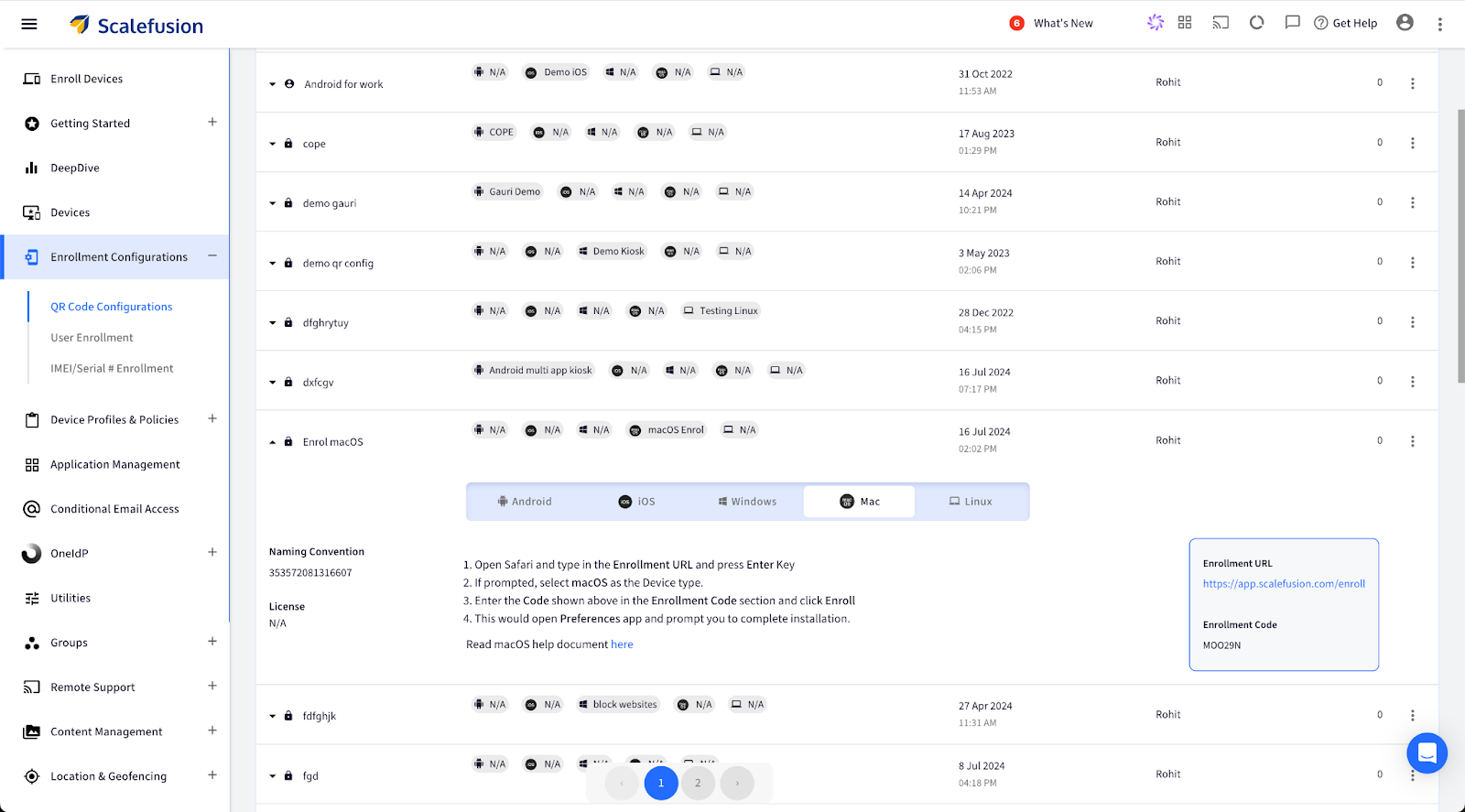
Sign In to Scalefusion Dashboard, and navigate to Enrollment Configuration> QR Code Configuration. Click the button to show the Enrollment URL. This opens a new box with the Enrollment URL and the Enrollment Code.
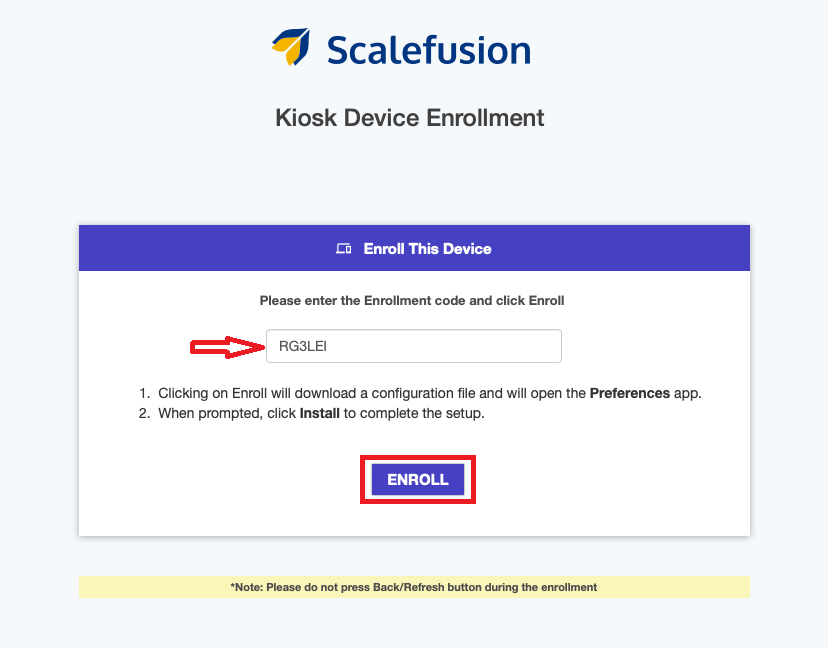
In the Safari browser, type in the enrollment URL and press the enter key. After this process, a new window, Kiosk Device Enrollment, will appear. Enter the code you have received in the Enrollment Code section and click Enroll.
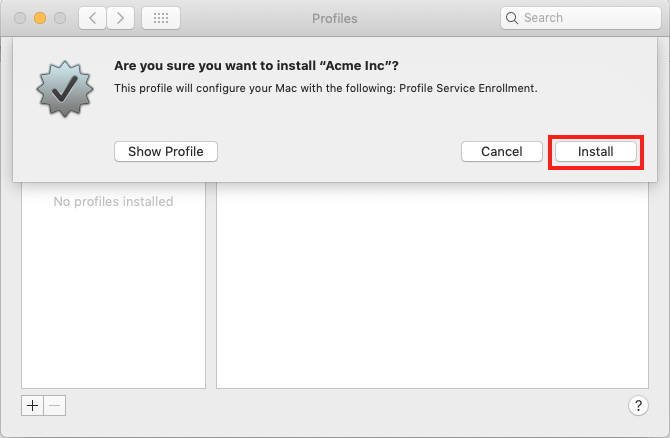
This will open the System Preferences pane, where a dialog box will appear. To proceed with the enrollment, click on “Install”.
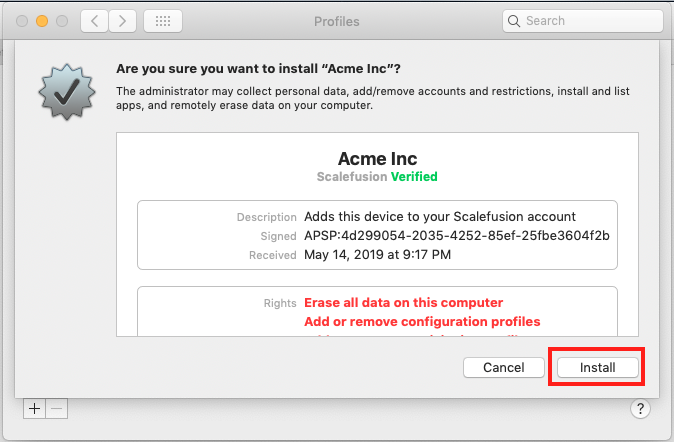
You will be shown the enrollment profile details and asked to confirm the installation. Simply click “Install” to proceed.
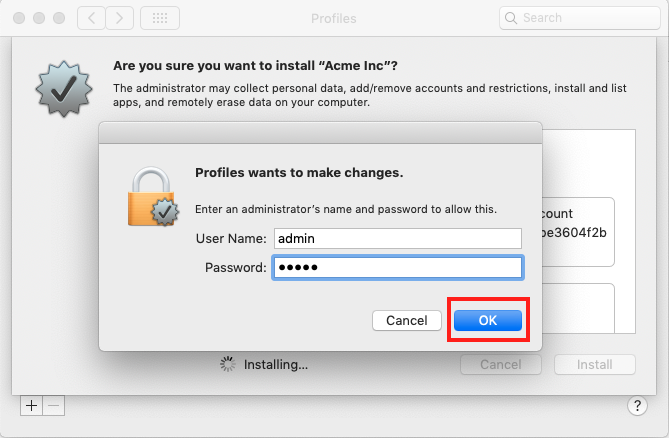
If you are enrolling from a non-administrator user account, you will need to enter administrator credentials to proceed with the installation. Simply provide the administrator credentials and click OK to confirm.
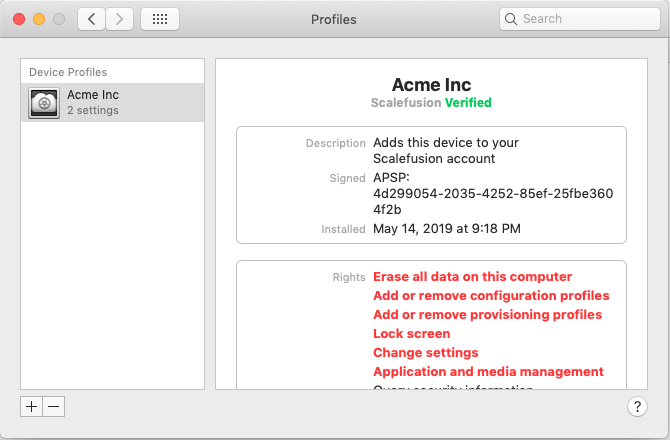
The enrollment process will be complete in about a minute, after which you will see the confirmation screen.
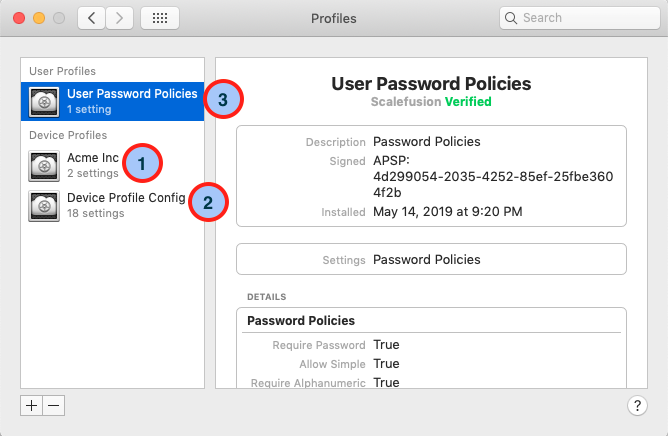
The enrollment process typically takes about 2-3 minutes. Once completed, a confirmation screen will appear. According to the Device and User Policies section, you will see three profiles installed, indicating successful enrollment.
Device Profiles
This section details the device profiles and policies applicable at the device level. Items marked 1 and 2 are device-level profiles, meaning the policies they implement affect all users of the machine.
User Profiles
This section details all Profiles/Policies applicable at the user level. Identified as point 3 in the image below, these policies are specific to the Mac user account from which the enrollment was performed.
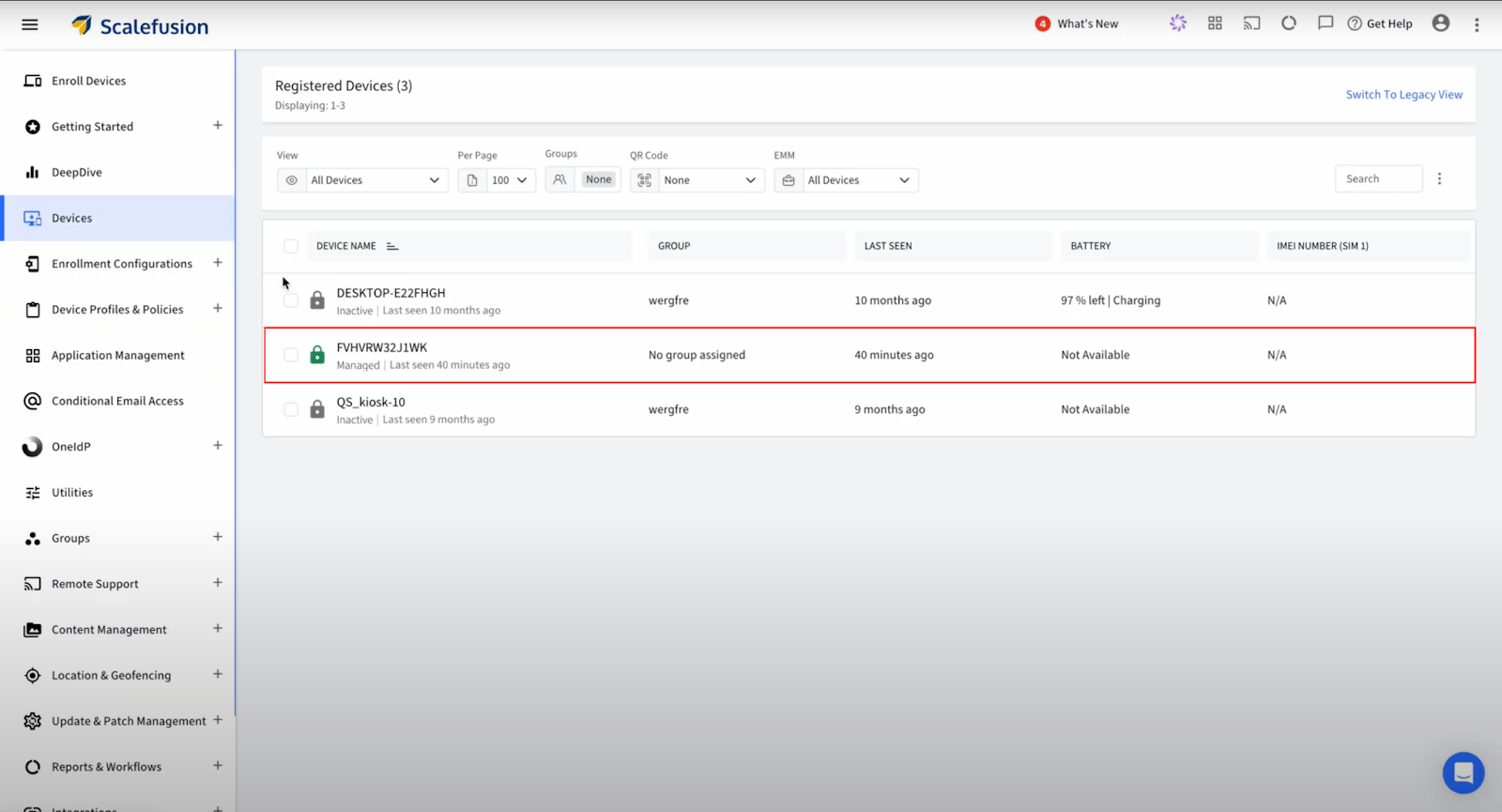
9. Once you log in to the Scalefusion Dashboard and navigate to the Devices section, you will see the newly enrolled device, confirming that the enrollment process was successful.
Enrolling corporate-owned macOS devices in Scalefusion is a game-changer for businesses aiming to streamline their device management. Scalefusion not only simplifies the enrollment process but also ensures your devices are secure and compliant with corporate policies. This powerful solution allows your IT team to focus on driving innovation and productivity. Ready to take the next step? Dive into Scalefusion and experience seamless macOS device management today!
About Version 2 Digital
Version 2 Digital is one of the most dynamic IT companies in Asia. The company distributes a wide range of IT products across various areas including cyber security, cloud, data protection, end points, infrastructures, system monitoring, storage, networking, business productivity and communication products.
Through an extensive network of channels, point of sales, resellers, and partnership companies, Version 2 offers quality products and services which are highly acclaimed in the market. Its customers cover a wide spectrum which include Global 1000 enterprises, regional listed companies, different vertical industries, public utilities, Government, a vast number of successful SMEs, and consumers in various Asian cities.
About Scalefusion Scalefusion’s company DNA is built on the foundation of providing world-class customer service and making endpoint management simple and effortless for businesses globally. We prioritize the needs and feedback of our customers, making sure that they are at the forefront of all decision-making processes. We are dedicated to providing comprehensive customer support services, and place emphasis on customer-centric thinking throughout the organization.