Skip to content

Google Cloud Identity vs. AAD

Microsoft and Google have been locked in a battle for the heart of the IT community for years now. This technological arms race has brought about a number of cloud innovations, including in identity and access management (IAM). Both contenders understand that by controlling user identities, they can lock you into their respective ecosystems and sell you additional services. 

In one corner, we have Microsoft Azure Active Directory (AAD), a cloud-based IAM solution for hybrid or cloud-only implementations. In the other corner, we have Google Cloud Identity, a cloud-based solution for managing user identities and access to Google resources. Both organizations seek to control your identities. The interesting problem is that if you are looking to replace your on-prem Active Directory instance or leverage directory services, then neither of these options can provide a solution.
In this article, we’ll compare Google Cloud Identity and Azure Active Directory, before explaining why neither is the best replacement for on-prem solutions.

What is Google Cloud Identity?

If you have ever used Google Workspace, you’re already familiar with Google cloud identities. Google identity management services enable users to connect to various applications and platforms delivered through Google. Google identity management allows for easy integrations to Google’s catalog of SaaS services and SSO applications but it does not offer support for legacy applications or on-prem resources. It also offers some authentication services via OAuth and SAML. An organization’s systems, on-prem applications, and network are outside of the scope of G Suite directory.

Unfortunately, this means that a lot of users will remain locked into their on-prem identity provider instance, namely Active Directory. While Google IDaaS is an excellent cloud user management system for Google Workspace, it is not a stand alone cloud-delivered directory service.

What is Azure Active Directory?

Microsoft’s version of the user management system is called Azure Active Directory (also called AAD, or Azure AD). The name confuses many people, because it makes it seem like Microsoft has moved their on-prem directory to the cloud. But that’s not the case. 

Rather, Azure AD works on top of Active Directory to provide single sign-on (SSO) access to a variety of SaaS applications like Office 365, Salesforce, DropBox, and many others. In essence, it is designed as a bridge between your existing legacy Active Directory instance and Microsoft’s catalog of compatible cloud-delivered services. While it is possible to sync your Active Directory instance with Azure AD, in of itself Azure AD is not a complete cloud-based directory service.

This is because Azure AD does not act as the authoritative source of truth of user identities (unless you are just using Office 365 or Azure resources). This role is still within the domain of Active Directory for many organizations, thus requiring traditional on-prem devices and dedicated IT staff to create and maintain. While Azure AD is meant to be a cloud identity platform, unfortunately, the true source of identity management is still firmly grounded with the legacy directory service, Active Directory.

The Problem with Google Cloud Identity and AAD 

As hinted above, the most glaring weakness of both of these platforms is that neither can truly function as the core identity provider for an organization. Instead, they’re user management systems designed only for their respective platforms.

Google Cloud Identity only organizes identities for Google Workspace and other Google cloud-hosted applications. It isn’t designed to be used for on-prem systems, AWS cloud servers, Azure, Office 365, and a wide range of other web and on-prem applications and networks. 

Azure Active Directory isn’t an Active Directory replacement, either. It’s a user management system for Azure, Office 365, and a web application SSO platform. If you want a core directory service, you won’t find it with either Google Cloud Identity or Azure Active Directory.

Instead, both of these platforms leave it to the IT department to figure out how to build a central, authoritative directory service for the organization. Having multiple user management platforms can create a significant amount of work and a great deal of security risk. 

Thankfully, there’s a better solution. An open directory platform can be your single authoritative source for user identities and authentication – across all platforms and operating systems. 

Open Directory Platform – the best Active Directory Replacement 

A new generation of cloud identity management is here. This independent solution, called an open directory platform, doesn’t rely on a single vendor, but works across platforms and operating systems to support authentication on Windows, Mac, Linux, Google Workspace, and more – all from the cloud, all at the same time. 

JumpCloud’s open directory platform provides the stability and authentication of Azure Active Directory and the flexibility and cloud nativity of Google workspace. You’ll also get many features, like SSO, multi-factor authentication (MFA), and password management you typically have to get from a third-party provider. 

Ready to learn more about why JumpCloud is the best replacement for active directory? Drop us a note to get a live demo, or sign up for your free account today.

About Version 2 Digital

Version 2 Digital is one of the most dynamic IT companies in Asia. The company distributes a wide range of IT products across various areas including cyber security, cloud, data protection, end points, infrastructures, system monitoring, storage, networking, business productivity and communication products.

Through an extensive network of channels, point of sales, resellers, and partnership companies, Version 2 offers quality products and services which are highly acclaimed in the market. Its customers cover a wide spectrum which include Global 1000 enterprises, regional listed companies, different vertical industries, public utilities, Government, a vast number of successful SMEs, and consumers in various Asian cities.

About JumpCloud
At JumpCloud, our mission is to build a world-class cloud directory. Not just the evolution of Active Directory to the cloud, but a reinvention of how modern IT teams get work done. The JumpCloud Directory Platform is a directory for your users, their IT resources, your fleet of devices, and the secure connections between them with full control, security, and visibility.

Same Integrations, Different (& Better) Views

The New integration screen just got published. The screen’s rework includes much simpler and intuitive navigation between all integrations options. Check it out now!

About Version 2 Digital

Version 2 Digital is one of the most dynamic IT companies in Asia. The company distributes a wide range of IT products across various areas including cyber security, cloud, data protection, end points, infrastructures, system monitoring, storage, networking, business productivity and communication products.

Through an extensive network of channels, point of sales, resellers, and partnership companies, Version 2 offers quality products and services which are highly acclaimed in the market. Its customers cover a wide spectrum which include Global 1000 enterprises, regional listed companies, different vertical industries, public utilities, Government, a vast number of successful SMEs, and consumers in various Asian cities.

About VRX
VRX is a consolidated vulnerability management platform that protects assets in real time. Its rich, integrated features efficiently pinpoint and remediate the largest risks to your cyber infrastructure. Resolve the most pressing threats with efficient automation features and precise contextual analysis.

The Rise of Iran-Sponsored Threat Actors

In mid-summer of 2022, Albania accused the Iranian government of targeting them with a series of major cyberattacks. The attacks, which targeted government servers and online portals, raised alarms about the increasing expertise and audacity of Iranian-sponsored advanced persistent threat (APT) actors. Although many specifics about the attacks are still unknown, the FBI and other international observers believe that the Iranian government first breached the networks of the Albanian government by using phishing emails and malware as early as 14 months before launching the full attack. After gaining access, the attackers were able to penetrate deeper into the systems to obtain sensitive information and cause disruption to government operations.

Continue reading

Yes we scan: How to actively scan industrial control systems safely

Many OT engineers still believe that active scanning is not safe in OT environments. However, their assumptions don’t have a legitimate basis. 

Yes, regular network and vulnerability scanners can cause devices to act erratically. Printers start spewing out pages. Embedded systems freeze up or reboot. But it doesn’t have to be this way. If you observe a few key aspects and use a purpose-built scanner, actively detecting ICS and IoT equipment is entirely safe. runZero has proven that active scanning is safe, and it’s evident across numerous industries.

Digging into issues with legacy scanners

To better understand the challenges of active scanning, we analyzed why legacy vulnerability and network scanners destabilize systems. We found four different root causes:

Let’s dig into each issue.

Malformed IP traffic

Legacy scanners often send intentionally malformed IP traffic to identify different flavors of operating systems. A robust TCP/IP stack on a Windows or Linux system will process the malformed traffic and respond in a specific manner that helps the scanner identify the flavor of the operating system.

Embedded systems often use legacy or custom TCP/IP stacks. When scanned with malformed IP traffic, these devices can freeze up or reboot because the unexpected traffic causes errors that are handled incorrectly by the stack.

Security probes

Vulnerability scanners send security probes, such as SQL injection exploits, to detect vulnerabilities in target systems. Embedded systems are often written without enough error handling built in, so the problem is similar as with malformed IP traffic: receiving unexpected network traffic can cause the devices to react erratically.

Heavy scan traffic per device

Legacy vulnerability and network scanners scan a large number of ports and can send several probes per port. This traffic is all sent to the end node in rapid succession. When all ports and probes are completed, the scanner moves on to the next host.

Enterprise IT hardware and mainstream operating systems can handle a lot of network traffic at once. OT equipment often doesn’t have a lot of processing power. Heavy scan traffic can overload the device, causing it to slow down or freeze up. In many industrial control applications, response times are critical. Even a slow down can have adverse effects on the overall environment.

Snowflake devices

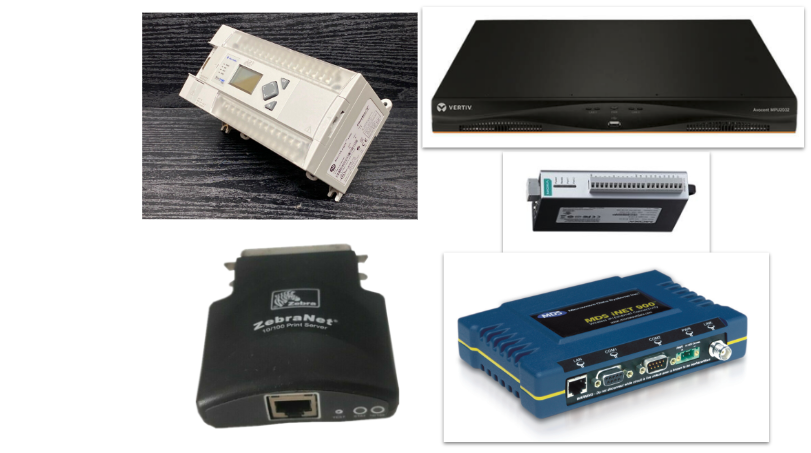
When scanners avoid malformed IP traffic, security probes, and heavy scan traffic, most of the issues on OT networks can be resolved. However, there are a handful of particularly flakey devices that become unstable with even the most regular scan traffic. Serial-ethernet connectors, also known as print servers, tend to be among the worst “snowflake” devices.

Passive monitoring is expensive and lacks accuracy

That’s why by sticking with passive monitoring solutions instead of active scanning, OT engineers are inviting these issues into their projects:

  • Longer deployment cycles – Connecting to SPAN ports or TAP appliances is more complex than deploying a software scanner in the environment.
  • Higher cost – Requires lots of disk space and processing power, usually in the form of costly hardware appliances.
  • Missing assets – You can’t inventory assets that are not communicating.
  • Missing detail – Missing ports that are not communicating.
  • Low accuracy – Spotty accuracy because passive monitoring is limited to analyzing existing traffic.
  • Not future proof – The increasing amount of encrypted traffic makes passive monitoring solutions less viable over time.

Let’s take a look at the flip side and run through the key gains of leveraging an active scanning approach.

How to safely scan ICS environments

While legacy scanners cannot be used safely on OT assets, modern purpose-built scanners can safely scan ICS environments by following a few basic rules:

  • Use only standard-conforming IP traffic – All traffic sent from the scanner must be completely RFC compliant.
  • No security probes – Very easy. Just don’t use them.
  • Throttle traffic per host – Limit the number of packets sent to each node. A good starting point is 40 packets per second. The best scanners keep overall scan times short by sending all traffic round-robin on the network when the threshold is reached.
  • Probe for snowflakes – Detect snowflake devices before running a full port scan and adapt the scan for the particular model.

Now, let’s take a look at how these rules have been applied across different industries and what organizations have been able to uncover as a result.

Active scanning is a proven methodology across industries

Doing research in a lab is one thing, but proving a methodology in the field is another. This approach has been tested and deployed in production environments across many industries, including:

  • Building automation
  • Consumer and B2B electronics manufacturing
  • Biomedical device manufacturing
  • Telecommunications
  • Broadcasting
  • Universities (e.g., research instrumentation)
  • Data center technology
  • Transportation (e.g., train signals)
  • City and state infrastructure (e.g., street signs, surveillance cameras)
  • National labs
  • Apparel manufacturing
  • Car manufacturing
  • Aerospace manufacturing
  • Building material manufacturing
  • Retail stores (e.g., POS systems, HVAC)
  • Cattle and fish farms
  • Utilities
  • Saw mills
  • Hospitals
  • ICS equipment manufacturers

Some examples of equipment found in these environments include the following device types:

  • PLCs
  • Industrial control systems
  • Serial-Ethernet converters
  • HMI/HMI controllers/HDI
  • BACNET devices
  • Device servers
  • Surveillance cameras
  • Terminal servers
  • Access control systems
  • Intercoms
  • KVMs
  • Rugged WAP

Get started with active scanning of industrial control systems

You wouldn’t deploy a new piece of software across all of your devices without testing it first. The same is true for active scanning in ICS environments. As you’re considering rolling out active scanning technology, here are some tips to get you started:

  1. Pick a purpose-built modern scanner – It’s unlikely that you will be successful with legacy network or vulnerability scanners as they send unsafe traffic. Pick a modern, purpose-built solution, such as runZero.
  2. Start small and slow – If you have a small handful of devices in a lab, start there. Otherwise, pick a handful of devices to scan during a maintenance window and check their operational status afterwards. If you know you have snowflake devices, include them in your first scan. If it doesn’t work for them, it won’t work for the full network. Start with a very low network scan frequency, such as 1,000 packets per second from the scanner and 20 packets per second per host.
  3. Try a bigger segment – Once you are comfortable with a handful of devices, scan a larger network segment during a maintenance window.
  4. Plan your deployment – Deploy one scanner per network segment. Don’t scan through any network devices that filter traffic, otherwise the accuracy of your results will be impacted. Don’t scan through stateful devices because each IP/port connection will create another session and you may overload the device. Deploy the scanners on appropriate hardware or virtual machines. For a large network segment, you may want a dedicated host. For a medium-sized network, you can use an existing host. For small environments, you can even use a Raspberry Pi.

Hopefully, these tips will help you eradicate outdated and inaccurate perceptions against active scanning. Utilize these recommended best practices and you’ll be able to safely detect ICS and IoT devices via active scanning. runZero continues to prove this over and over again across multiple industries.

About Version 2 Digital

Version 2 Digital is one of the most dynamic IT companies in Asia. The company distributes a wide range of IT products across various areas including cyber security, cloud, data protection, end points, infrastructures, system monitoring, storage, networking, business productivity and communication products.

Through an extensive network of channels, point of sales, resellers, and partnership companies, Version 2 offers quality products and services which are highly acclaimed in the market. Its customers cover a wide spectrum which include Global 1000 enterprises, regional listed companies, different vertical industries, public utilities, Government, a vast number of successful SMEs, and consumers in various Asian cities.

About runZero
runZero, a network discovery and asset inventory solution, was founded in 2018 by HD Moore, the creator of Metasploit. HD envisioned a modern active discovery solution that could find and identify everything on a network–without credentials. As a security researcher and penetration tester, he often employed benign ways to get information leaks and piece them together to build device profiles. Eventually, this work led him to leverage applied research and the discovery techniques developed for security and penetration testing to create runZero.

Finding Lexmark printer assets

Printer manufacturer Lexmark recently published details on a vulnerability that affects over 100 of their printer models. Discovered by researcher Peter Geissler, this vulnerability can be leveraged to achieve unauthenticated remote code execution for an attacker. Firmware across devices in Lexmark’s small/medium business product line and also their enterprise product line have been found to contain this vulnerability.

What is the impact?

Lexmark assigned a CVSS score of 9.0 (“critical” severity rating) to this vulnerability (tracked as CVE-2023-23560), which allows server-side request forgery (SSRF) via the Web Services feature listening on port 65002 of affected printers. A successful attacker can exploit this vuln in a chain to gain code execution as root on vulnerable devices. Lexmark’s advisory states that, as of last week, they are not aware of anyone currently exploiting this vulnerability, but proof-of-concept exploit code is publicly available.

Are updates available?

All firmware versions (release numbers 081.233 and prior) for affected printer models contain this vulnerability (CVE-2023-23560). Lexmark has made firmware updates available for each affected device, via release numbers 081.234 and later (see Lexmark’s advisory for specific release version details per affected printer).

If updating firmware isn’t a near-term option for admins/owners of affected printers, Lexmark does offer a straightforward mitigation:

Disabling the Web-Services service on the printer (TCP port 65002) blocks the ability to exploit this
vulnerability. The port can be blocked by following process: “Settings”->“Network/Ports”- > “TCP/IP”- > “TCP/IP Port Access” then uncheck “TCP 65002 (WSD Print Service )” and save.

How do I find potentially vulnerable Lexmark printer assets with runZero?

Please note that the following query relies on you having already performed a scan with our latest Explorer/scanner release (v3.4.22), which now includes the scanning of port 65002. Alternatively, you can perform a new scan using an older Explorer/scanner, just add port 65002 to the Included TCP ports list under the Advanced tab of your task settings prior to running the scan.

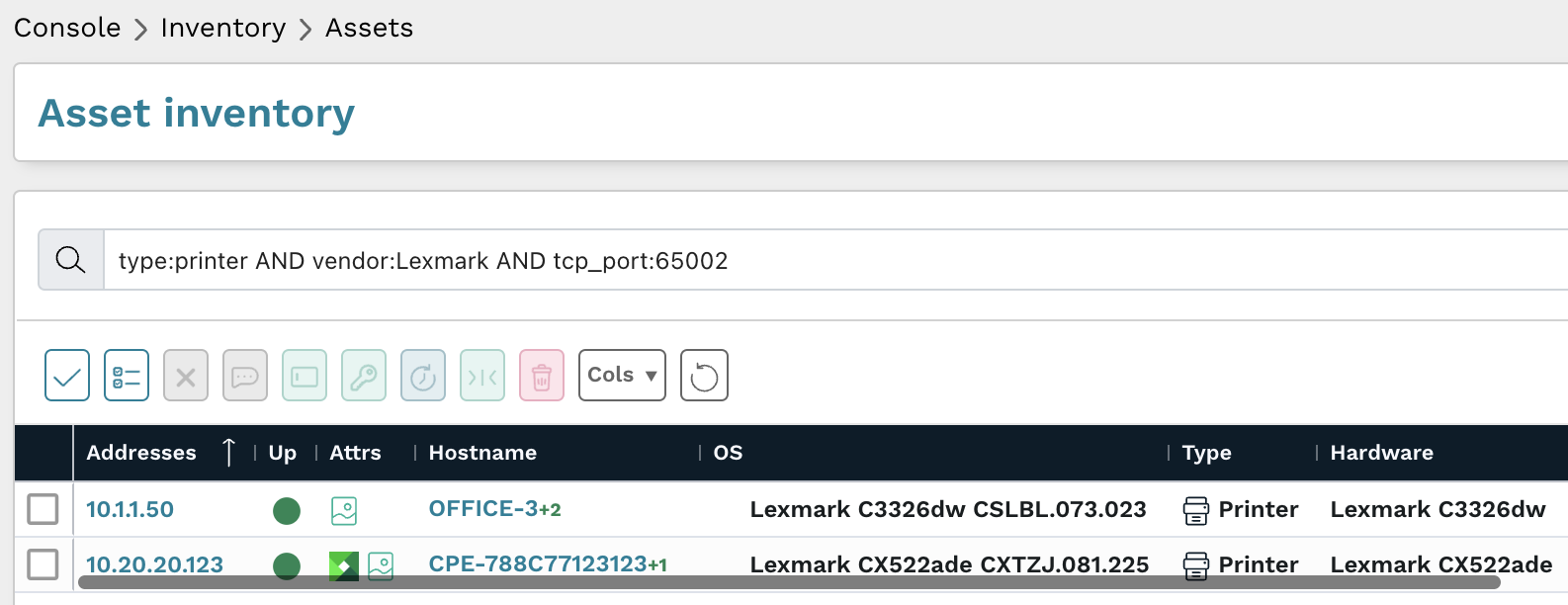
From the Asset Inventory, use the following pre-built query to locate Lexmark printer assets which may need remediation:

type:printer AND vendor:Lexmark AND tcp_port:65002

Query results can then be checked against Lexmark’s list of vulnerable models and firmware versions.

As always, any prebuilt queries are available from our Queries Library. Check out the library for other useful inventory queries.

About Version 2 Digital

Version 2 Digital is one of the most dynamic IT companies in Asia. The company distributes a wide range of IT products across various areas including cyber security, cloud, data protection, end points, infrastructures, system monitoring, storage, networking, business productivity and communication products.

Through an extensive network of channels, point of sales, resellers, and partnership companies, Version 2 offers quality products and services which are highly acclaimed in the market. Its customers cover a wide spectrum which include Global 1000 enterprises, regional listed companies, different vertical industries, public utilities, Government, a vast number of successful SMEs, and consumers in various Asian cities.

About runZero
runZero, a network discovery and asset inventory solution, was founded in 2018 by HD Moore, the creator of Metasploit. HD envisioned a modern active discovery solution that could find and identify everything on a network–without credentials. As a security researcher and penetration tester, he often employed benign ways to get information leaks and piece them together to build device profiles. Eventually, this work led him to leverage applied research and the discovery techniques developed for security and penetration testing to create runZero.

×

Hello!

Click one of our contacts below to chat on WhatsApp

×