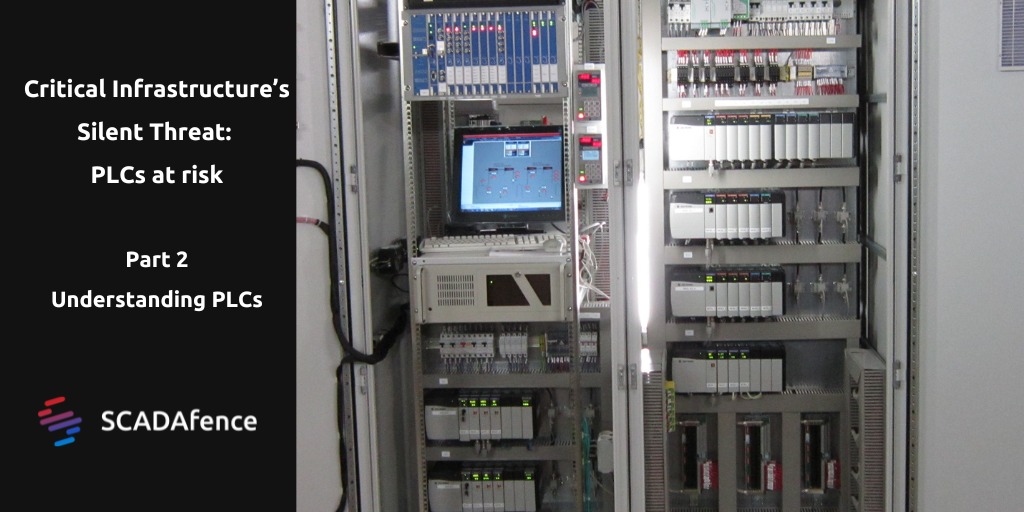
In part one of this series we explained how Programmable Logic Controllers (PLCs) have become key targets for cyber security attacks due to their legacy design, lack of built-in security features, and susceptibility to malware, and how newer PLCs are starting to incorporate more robust security features to help protect against these threats.
Before we can understand how PLCs can be targeted in attacks, we need to understand what they are, how they work and what can be targeted.
Here at Pandora FMS blog we like to get up early, prepare a cup of pennyroyal mint and while it settles, do a couple of stretches, wash our face and start the day defining strange words worth something for our readers. Today it’s time for: Telemetry!
Do you already know what telemetry is? Today we will tell you
Shall we get straight to the point?
Straight to the point then it is!
Telemetry, roughly speaking, is what automatically measures, collects and sends data from remote sources, thanks to devices that collect data.
It then transmits that data to a central location where it is analyzed and you can then consider your remote system as supervised and controlled.
Of course telemetry data helps, while controlling security, to improve customer experience and monitor application status, quality and performance.
But let’s go further, what is the true purpose of telemetry?
As can be understood, the collection of telemetry data is essential to manage IT infrastructures.
Data is used to monitor system performance and keep actionable information on hand.
How do we measure telemetry?
Easy-peasy!
Through monitoring!
Monitoring tools measure all types of telemetry data.
They start with server performance and head towards actionable infinity.
Some types of telemetry data
It all starts with a small signal that indicates whether a server is active or inactive.
Then it tends to get complicated.
Event and metric data already includes the CPU utilization of a server, including peaks and averages over different periods.
For example, a type of telemetry data to be monitored includes server memory utilization and I/O loading over time.
*This data is particularly important when using server virtualization.
In these situations, statistics provided by virtual servers may not reveal problems with CPU or memory utilization; instead, the underlying physical server may be underutilized in terms of physical memory, virtualization, CPU, and I/O connectivity with peripherals.
Finally, user requests over time and concurrent user activity on standard deviation charts should be included in server-specific metrics.
This will reveal how your systems are being used in general, as well as information about server performance.
Telemetry Data Monitoring
Now that we’ve taken a look at servers and their telemetry, let’s dig a little deeper into some of the fundamental components of their physical application.
This includes:
Network infrastructure.
Storage infrastructure.
Capacity.
Overall bandwidth consumption.
As any experienced IT guy can warn you:
Quantifying network monitoring beyond the strictly commonplace is important.
Measuring network traffic in bits per second across LANs and sub-LANs within your application infrastructure should always be part of monitoring network utilization.
To predict when packets will be lost and when storms may take place in your network, it is essential to understand the theoretical and practical limits of these segments.
The utilization of the segment’s bandwidth over time in multiple network areas must be revealed by network monitoring.
Monitoring certain network protocols will also provide a more detailed view of application usage in real time and, perhaps, of performance issues for certain features.
Likewise, monitoring requests to certain network ports can also reveal any security gaps, as well as routing and switching delays in the relevant network components.
In addition to monitoring raw network usage, it is necessary to monitor the storage systems connected to the network.
To show storage usage, waiting times, and likely disk failures, specific telemetry is required.
Again, it is important to monitor both overuse and underuse of storage resources.
Some basic application telemetry monitoring data
It is very important to monitor the telemetry that can involve access to the database and its processing, monitor the number of open database connections, which can be triggered and affect performance.
Tracking over time allows you to spot design decisions that don’t change as application usage grows.
It is equally crucial to control the number of queries to the database, their response times, and the amount of information circulating between the database and applications.
Outliers and averages should also be taken into account.
Uncommon latency can be concealed or hidden if only averages are controlled, but these outliers could still have a negative impact and irritate users.
Your monitoring strategy should always take into account tool exceptions, database errors or warnings, application server logs looking for unusual activity…
And that’s just the beginning!
Your monitoring software
Having a solid monitoring strategy is crucial, but so is having a well-thought-out reaction strategy that incorporates:
Determining, understanding and initiating root cause analysis.
A written communication strategy that includes the names and contact details of those responsible.
Identifying easy solutions to restore the program in the short term.
A research strategy to prevent future problems.
Telemetry Monitoring Elements
Some telemetry monitoring elements that you may use:
Dashboards or other real-time system information and telemetry tools.
Technologies for analyzing records safe for use with production systems.
Business intelligence to retrieve data from records, such as usage trends or security issues during specific time periods.
Tools that automate risk detection, recovery, and mitigation to get rid of manual labor.
Using a centralized system and working with a software vendor, you may set in place a robust monitoring strategy that will be developed over time and become more comprehensive.
And there, my friend, is where we come in!
As you have seen, the Oracle tasks configured in Discovery allow you to connect to remote Oracle instances to monitor them and to generate module blocks with important information.
Today we focus solely on Oracle, but it is necessary to emphasize that the Discovery menu also allows you to monitor other applications.
About Version 2 Digital
Version 2 Digital is one of the most dynamic IT companies in Asia. The company distributes a wide range of IT products across various areas including cyber security, cloud, data protection, end points, infrastructures, system monitoring, storage, networking, business productivity and communication products.
Through an extensive network of channels, point of sales, resellers, and partnership companies, Version 2 offers quality products and services which are highly acclaimed in the market. Its customers cover a wide spectrum which include Global 1000 enterprises, regional listed companies, different vertical industries, public utilities, Government, a vast number of successful SMEs, and consumers in various Asian cities.
About PandoraFMS
Pandora FMS is a flexible monitoring system, capable of monitoring devices, infrastructures, applications, services and business processes.
Of course, one of the things that Pandora FMS can control is the hard disks of your computers.
You still didn’t know it? Pandora FMS gets ISO/IEC-27001
Security is not a technology, it is a way of thinking and acting, we could even say that it is an attitude.
For years we have attended international fairs and events where computer security is offered as specific products.
Many people may think that by buying products you reinforce your company’s security, but no, that is only a small part of it.
Security is about changing the way we manage the whole organization, from how we share information to how we use systems.
Pandora FMS has always been aware of that and you may see it in our security architecture guide, our GDPR compliance guide -which is also valid for regulations such as PCI/DSS- and of course, because as a company we are certified with ISO 27001.
Certification ISO 27001 provides us with important backup towards our national and international clients, many of whom request information from us about our business continuity plans, the security of our development and implementation processes, what protection measures of information privacy we have in force and how we control the information available to our suppliers.
We understand that for them it is as important or even more than for us and having a certification that strongly supports us is something to be proud of.
Many of our clients are pharmaceutical companies, financial institutions – some over a century old – and government entities.
Due to confidentiality contracts we cannot mention their names, but large and small, to a greater or lesser extent, everyone is concerned about aspects related to information security.
Today we can proudly say that not only do we also care about it, but that we have proven our commitment.
But what is ISO/IEC 27001?
ISO/IEC 27001 is a standard for information security (Information technology – Security techniques – Information security management systems – Requirements) approved and published as an international standard in October 2005 by the International Organization for Standardization and by the International Electrotechnical Commission.
It specifies the necessary requirements to set, implement, maintain and improve an information security management system (ISMS) according to what is known as the “Cycle of Deming”:
PDCA – acronym for Plan, Do, Check, Act.
It is consistent with the best practices described in ISO/IEC 27002, formerly known as ISO/IEC 17799, with origins in the BS 7799-2: 2002 standard, developed by the British standards body, the British Standards Institution (BSI).
As you have seen, the Oracle tasks configured in Discovery allow you to connect to remote Oracle instances to monitor them and to generate module blocks with important information.
Today we focus solely on Oracle, but it is necessary to emphasize that the Discovery menu also allows you to monitor other applications.
About Version 2 Digital
Version 2 Digital is one of the most dynamic IT companies in Asia. The company distributes a wide range of IT products across various areas including cyber security, cloud, data protection, end points, infrastructures, system monitoring, storage, networking, business productivity and communication products.
Through an extensive network of channels, point of sales, resellers, and partnership companies, Version 2 offers quality products and services which are highly acclaimed in the market. Its customers cover a wide spectrum which include Global 1000 enterprises, regional listed companies, different vertical industries, public utilities, Government, a vast number of successful SMEs, and consumers in various Asian cities.
About PandoraFMS
Pandora FMS is a flexible monitoring system, capable of monitoring devices, infrastructures, applications, services and business processes.
Of course, one of the things that Pandora FMS can control is the hard disks of your computers.
Nord Security engineers have been hard at work developing Meshnet, a mesh networking solution that employs the WireGuard tunneling protocol. Here are the technical details on how we tackled the challenge of optimizing Meshnet’s speed.
Meshnet is powered by NordLynx, a protocol based on Wireguard. WireGuard is an excellent tunneling protocol. It is open, secure, lightweight, lean, and – thanks to the in-kernel implementations like in the Linux kernel or the Windows NT kernel – really, really fast.
An iperf3 speed test between NordVPN’s staging VPN servers with a single TCP connection tunneled over WireGuard.
At the heart of it is “cryptokey routing,” which makes creating a tunnel almost as easy as tracking a few hundred bytes of state. So having hundreds or even thousands of tunnels from a single machine is feasible.
These properties make WireGuard a very appealing building block for peer-to-peer mesh networks. But before getting there, a challenge or two must still be overcome. So let’s dig into them!
Ground rules
Here are ground rules to help us to better weigh tradeoffs. First, privacy and security is a priority, so any tradeoff compromising end-to-end encryption or exposing too much information is automatically off the table. Second, speed and stability is one of the most important qualities of Meshnet. Finally, to cover all major operating systems (Windows, Android, iOS, macOS, and Linux), any ideas or solutions must be implementable on those platforms.
So here are the ground rules:
Rule #1
Everything will be end-to-end encrypted. Any user data passing between devices must be inaccessible to anyone else – even to Nord Security itself.
Rule #2
No mixing of the data plane (i.e., the code that processes packets) and control plane (i.e., the code that configures the network), if possible. That’s because any additional logic (e.g., NAT traversal, packet filtering/processing) added to the WireGuard will slow it down.
Rule #3
No solutions that target a single WireGuard implementation. Remember those fast in-kernel implementations? In order to reach high throughput everywhere, we must be able to adapt to the intricacies of every platform.
Great! Now let’s get cracking!
NAT traversal 101
Every peer-to-peer application (including Meshnet) has a NAT traversal implementation at its heart. While this is a rather wide topic (just look at the amount of related RFCs: RFC3261, RFC4787, RFC5128, RFC8489, RFC8445, RFC8656…), the core principle is quite simple: NATs are generally designed to support outgoing connections really well.
They achieve this by forwarding any outgoing packets while remembering just enough information to be able to discern where and how to forward incoming response packets whenever they arrive. The exact nature of this information and how it is used will determine the type of the NAT and its specific behavior. For example, Linux NATs are based on the conntrack kernel module and one can easily check the state of this information at any moment using the conntrack -L command.
1
$ sudo conntrack -L
2
tcp 6382155 ESTABLISHED src=192.168.3.140 dst=172.217.18.3 sport=60278dport=443src=172.217.18.3 dst=192.168.3.140 sport=443dport=60278[ASSURED]mark=0use=1
3
tcp 6348377 ESTABLISHED src=192.168.228.204 dst=35.85.173.255 sport=38758dport=443src=35.85.173.255 dst=192.168.228.204 sport=443dport=38758[ASSURED]mark=0use=1
4
......
This great RFC4787 goes into a lot of detail about NAT behavior in general.
While outgoing connections are handled transparently, incoming connections can be trouble. Without outgoing packets forwarded first (and consequently without the conntrack information), NATs simply do not have any clue where to forward packets of incoming connections and the only choice left is to drop them. At this moment, we finally arrive at the core part of any peer-to-peer connection establishment:
Suppose you shoot a packet from both sides of the peer-to-peer connection at each other roughly at the same time. In this case, the connection will appear to be “outgoing” from the perspective of both NATs, allowing hosts to communicate.
Let’s unpack it a bit:
“Shoot a packet” – send a UDP packet. While there are techniques regarding other protocols, only UDP packets matter in this case, as WireGuard is UDP-based. The packet’s payload contents do not matter (it can even be empty), but it’s important to get the headers right.
“at each other” – the packet’s source and destination addresses and ports, transmitted from different sides of the connection, must mirror each other just after the first translation has been performed but before any translations by the second NAT occur. No matter what source address and port are being used by the NAT on the side for outgoing packets, the other side must send its packets to this exact address and port and vice versa. Unfortunately, some NATs make it very difficult to figure out the translations they are making, which is why NAT traversal is never 100% reliable.
“roughly at the same time” – the data about outgoing connections within a NAT isn’t stored forever, so the packet from the other side must reach the NAT before this data disappears. The storage time greatly depends on the NAT – it varies from half a minute to a few minutes.
An example NAT traversal scenario.
This technique is surprisingly general. Only small bits and pieces differ within the different cases a typical peer-to-peer application needs to support.
A few things need to be done right, but all of this is possible with vanilla WireGuard and the established ground rules. Take two packets and send them from the right source to the right destination at roughly the same time, without even worrying about what’s inside of the packets. How hard can it be? #FamousLastWords.
WG-STUN
The key part of any NAT traversal implementation is figuring out what translations will be performed by the NAT. In some cases, there is no NAT (e.g., host on the open internet), or it is possible to simply request a NAT to perform specific translations instead (e.g., by using UPnP RFC6970, PMP RFC6886). Sometimes, the translation has to be observed in action. Luckily, a standardized protocol STUN (RFC8489) does just that.
While there are some intricacies with the STUN protocol itself, the so-called STUN binding request is at its core. This binding request usually is formatted by the client behind NAT and processed by the server hosted on the open internet. Upon receiving this request, the server will look at the source IP address and port of the request packet and add it to the payload of the response packet.
A STUN binding request captured with Wireshark.
A few of the NATs will use the same translations of the source IP address regardless of the destination (let’s call them “friendly NATs”). The same source IP address and the source port will be used for the packets going to the STUN server and any Meshnet peer. But there is a catch! The same NAT translations will be performed only as long as the packets are using the same source IP and port for all destinations on the originating host.
Here’s the first challenge. Vanilla WireGuard is not capable of performing STUN requests on its own. Moreover, once WireGuard reserves a source port for communications with its peers, other programs cannot, generally, use it anymore.
While it is technically possible to add STUN functionality to WireGuard, it would be in violation of our ground rule #2 and would seriously complicate the relationship with the rule #3. The search continues.
The WireGuard protocol is designed to create IP tunnels. Maybe it’s possible to transmit STUN requests inside of the tunnel? That way, the STUN request would get encapsulated, resulting in two IP packets: inner (STUN) and outer (WireGuard). Luckily, according to the WireGuard whitepaper, all outer packets destined to any peer should reuse the same source IP and port:
Note that the listen port of peers and the source port of packets sent are always the same.
It’s been the behavior of all WireGuard implementations tested for this blog post.
Using this property, we can assume that packets destined for distinct WireGuard peers will get the same translations when going through friendly NATs. That’s precisely what we need when using an external service (like STUN) to determine which translations NAT will use when communicating with Meshnet peers.
But no standard STUN server can communicate with WireGuard directly. Even if we hosted a STUN server at the other end of the tunnel, after decapsulation, the server would respond with the inner packet’s source IP and port – but we the need outer packet’s source IP and port.
Say hello to WG-STUN, a small service that maintains WireGuard tunnels with clients and waits for STUN requests inside the tunnels. When a binding request arrives, instead of looking into the binding request packet, the STUN server takes the address from the WireGuard peer itself and writes it into the STUN binding response. Later, it encapsulates the packet according to WireGuard protocol and sends it back to the client. On the client side, to figure out what translations will be performed by the NAT for the WireGuard connections, we just need to add WG-STUN peer and transmit a standard STUN request inside the tunnel.
A Wireshark capture of a WG-STUN binding request.
In the picture above, you can see a standard WG-STUN request. In this case, a STUN request was sent to 100.64.0.4, which is a reserved IP for an in-tunnel STUN service. The request got encapsulated and transmitted by WireGuard to one of the WG-STUN servers hosted by Nord Security. This WG-STUN server is just a standard WireGuard peer with the allowed IP set to 100.64.0.4/32, and the endpoint pointed to the server itself.
A WG-STUN peer configured on Meshnet interface.
Note that the WG-STUN service is, by design, a small service that is functionally incapable of doing anything other than responding to STUN requests (and ICMP for reachability testing). This way, we are bounding this service to control-plane only and adhering to rule #2. Because the WG-STUN service is just a standard peer, WireGuard’s cross-platform interface is more than enough to control the WG-STUN peer in any of the WireGuard implementations (rule #3), Most importantly, due to WireGuard’s encryption, we get privacy and security by default (rule #1).
Path selection
Now we can perform STUN with vanilla WireGuard and figure out some translations which NAT will perform, provided that our NAT is friendly NAT. Unfortunately, that’s not enough to ensure good connectivity with Meshnet peers. What if there is no NAT at all? What if two NATs are in a chain, and our Meshnet peer is between them? What if a Meshnet peer is running in the VM of a local machine? What if a Meshnet peer managed to “ask” its NAT for specific translations via UPnP? There are quite a few possible configurations here. Sometimes we call these configurations “paths,” describing how one Meshnet peer can reach another. In the real world, the list of potential paths is a lot longer than the list of paths that can sustain the peer-to-peer connection.
For example, one Meshnet peer may access the other directly if both are within the same local area network. What’s more, if NAT supports hair-pinning, the same peer may be accessed via the WAN IP address of the router too. Additionally, it is common for a single host to participate in multiple networks at the same time (e.g., by virtualized networks, using multiple physical interfaces, DNATing, etc.). But it is impossible to know in advance which paths are valid and which are not.
For this reason, peer-to-peer applications usually implement connectivity checks to determine which paths allow peers to reach one another (e.g., checks standardized in ICE (RFC8445), and when multiple paths pass the checks, they select the best one. These checks are usually performed in the background, separate from a data channel, to avoid interfering with the currently in-use path. For example, if two peers are connected via some relay service (e.g., TURN RFC8656), an attempt to upgrade to a better path (e.g., direct LAN), which is not validated, may cause path interruption until timeout passes and that would be deeply undesirable.
While WireGuard implementations indicate the reachability of currently configured peers used for the data plane, the lightweight nature of the WireGuard protocol makes alternative path evaluation out of scope. The question is: how can we separate the data plane from connectivity checks?
Considering the affordable nature of WireGuard tunnels, the most straightforward solution would be to configure two pairs of peers on each Meshnet node – one for the data plane, the other for connectivity checks. But this solution is not feasible in practice. WireGuard peers are identified by their identity (public key), and each interface has only one identity. Otherwise, cryptokey routing and roaming functionality, in its current form, would break. Moreover, mobile platforms can have at most one interface open at any moment, restricting Meshnet nodes to a single identity at a given time.
So let’s look for solutions elsewhere. Here’s how we came to the observation which is now the core principle for performing connectivity checks out of the data plane:
Given that a connection can be established using a pair of endpoints – it is highly likely that performing the same steps with a different source endpoint will succeed.
It is possible to force this observation not to be true, but it wouldn’t be a natural occurrence. NATs will have the same mapping and filtering behavior for any pair of distinct outgoing connections. RFC4787 considers NAT determinicity as a desirable property. UPnP RFC6970, PMP RFC6886, and similar protocols will behave similarly for distinct requests. LAN is almost never filtered on a per-source-port basis for outgoing connections.
On the other hand, making such an assumption allows us to completely separate connectivity checks and the data plane. After performing a connectivity check out-of-band, a path upgrade can be done with a high degree of certainty of success.
Therefore, in our Meshnet implementation, Meshnet nodes gather endpoints (as per ICE (RFC8445) standard) for two distinct purposes. First, to perform connectivity checks, and second, to upgrade the WireGuard connection in case connectivity checks succeed. Once the list of endpoints is known, the endpoints are exchanged between participating Meshnet nodes using relay servers. For privacy and security, the endpoint exchange messages are encrypted and authenticated using the X25519 ECDH algorithm and ChaCha20Poly1305 for AEAD. Afterward, the connectivity checks are performed separately from WireGuard using plain old UDP sockets. If multiple endpoint candidates succeed in the connectivity check, the candidate with the lowest round-trip time is preferred.
We have validated a path using some pair of endpoints, so the corresponding data plane endpoints are selected, and a path upgrade is attempted. If the upgrade fails to establish a connection, it is banned for a period of time, but if it succeeds → we have successfully established a peer-to-peer connection using vanilla WireGuard.
And now we can fire up iperf3 and measure what it means. As you may have realized, we are now measuring vanilla WireGuard itself. For example, running two Meshnet nodes in docker containers on a single, rather average laptop equipped with Intel i5-8265U without any additional tweaking or tuning, we can easily surpass the 2Gbps mark for single TCP connection iperf3 test.
iperf3 single TCP connection test between two Meshnet nodes.
At the time of writing, the default WireGuard implementation used by Meshnet for Linux is the Linux kernel, Windows – WireGuard-NT or WireGuard-go, and for other platforms – boringtun.
Conclusion
By solving a few challenges, Nord Security’s Meshnet implementation managed to build a Meshnet based on WireGuard with peer-to-peer capabilities using only an xplatform interface and the benefits of in-kernel WireGuard implementations. It surpassed the 1Gbps throughput mark. Currently, the implementation is in the process of being released, so stay tuned for a big speed upgrade!
Note: WireGuard and the “WireGuard” logo are registered trademarks of Jason A. Donenfeld.
About Version 2 Digital
Version 2 Digital is one of the most dynamic IT companies in Asia. The company distributes a wide range of IT products across various areas including cyber security, cloud, data protection, end points, infrastructures, system monitoring, storage, networking, business productivity and communication products.
Through an extensive network of channels, point of sales, resellers, and partnership companies, Version 2 offers quality products and services which are highly acclaimed in the market. Its customers cover a wide spectrum which include Global 1000 enterprises, regional listed companies, different vertical industries, public utilities, Government, a vast number of successful SMEs, and consumers in various Asian cities.
About NordLayer NordLayer is an adaptive network access security solution for modern businesses – from the world’s most trusted cybersecurity brand, Nord Security.
The web has become a chaotic space where safety and trust have been compromised by cybercrime and data protection issues. Therefore, our team has a global mission to shape a more trusted and peaceful online future for people everywhere.
Small businesses are on the front line of cybersecurity. At any moment, cyberattacks could extract confidential data, damage network infrastructure, or even cause total business failure.
The risks are real. According to Verizon, 60% of small businesses that suffer cyber attacks go out of business within 6 months. Healthcare company Wood Ranch Medical is a great example. The small operator was bankrupted by a 2019 ransomware attack that prevented access to sensitive patient records.
Despite cases like Wood Ranch Medical, most small businesses fail to allocate enough time and resources to counter cyber-threats.
Don’t fall into that trap. Instead, follow this guide to implement robust cybersecurity measures. With our help, you can counter the most dangerous cyber threats faced by SMBs. Let’s find out more.
Understanding the threat landscape for SMBs
The first thing to understand is that small businesses face a diverse range of cyber threats. Any one of them could ruin your reputation and lead to regulatory fines.
Attackers can lurk for months and monitor traffic. They can steal sensitive client data or lock it away until victims pay a ransom. Or they could cause technical damage, ruining network infrastructure.
SMBs can’t afford these consequences. But how do you handle critical cybersecurity threats?
Prevention starts from awareness of the most common threats and how they fit into cybersecurity for small businesses.
Types of cyber attacks
Here’s a list of the most common types of online threats.
All of them threaten small businesses.
1. Phishing
Phishers use social engineering techniques to fool small business employees. With a few pieces of information, attackers can easily convince time-poor workers to make dangerous decisions. This might involve emails pretending to come from colleagues or trusted third parties. The links in these emails lead to malicious sites or initiate malware downloads.
2. Ransomware
Ransomware locks down high-value data and demands a ransom from targets. If attackers control these targets, they can demand a high price to restore access. And small businesses are not always able to pay.
3. Spyware
Spyware tracks data flowing through network assets and sends this information to controllers outside the targeted organization. Some spyware is legitimate. For instance, advertisers sometimes use it to deliver targeted ads. But the majority of spyware is malicious and linked to data extraction.
4. Viruses
Viruses spread between devices and their effects range from relatively light disruption to complete system failure. Some viruses remain dormant for long periods. Others set to work immediately. In all cases, small businesses need updated and effective antivirus software to defend their perimeter.
5. Malware
Malware extends beyond ransomware and spyware. For example, businesses might encounter trojans or worms that stay below the radar until activated. Bots are also common. These agents latch onto devices and create “swarms” to launch wide-scale attacks.
6. Man-in-the-middle attacks
Man-in-the-middle attacks target insecure wifi connections. Attackers can intervene between remote access workers and the corporate network. If the connection is unencrypted, hackers can harvest information from corporate network traffic and steal confidential data.
7. SQL injection
SQL injection uses SQL code to request access to valuable databases. This generally occurs via web forms connected to SQL databases. For small businesses, this could include employee gateways or payment forms. Securing web assets is absolutely essential.
8. DDoS attacks
Distributed denial-of-service attacks involve botnets featuring hundreds or thousands of agents. Botnets direct massive amounts of traffic at their target with the aim of overwhelming networks. Larger organizations may have the resources to absorb DDoS floods. But with attacks averaging 5.17 Gbps, small business websites can easily fold under the pressure.
9. Zero-day exploits
Zero-day exploits target recently documented software vulnerabilities. In these situations, vendors probably haven’t developed patches, exposing users to opportunist attackers. Small businesses rely on anti-virus, communications, and data management tools in everyday work. But any of these tools can become vulnerable overnight.
10. DNS tunneling
DNS tunneling injects malicious code into networks via DNS queries. This allows hackers to seize control of local DNS servers. When that happens, a small business can lose control of its website and network assets. DNS tunneling exploits insecure firewalls, but SMBs often retain legacy firewall products. That’s a bad idea when successful attacks can ruin reputations in seconds.
11. XSS attacks
XSS (or Cross Site Scripting) injects malicious code via web applications and browser-side scripts. XSS attacks allow attackers to change website designs, adding undesirable content. They can launch malicious software, infecting business networks and customer devices. It allows hackers to spoof legitimate identities by hijacking cookies. All of that is bad news for SMBs.
Cybersecurity best practices for small businesses
Small businesses need cybersecurity strategies that deal with critical threats. But how can you implement an effective strategy with a small business budget?
SMBs lack the resources of corporations. But cybersecurity for small businesses must still protect sensitive data and network resources. Here are some best practices to follow that balance cost and efficiency.
1. Implement a strong password policy
Employees should only use strong passwords to log into your company network. Weak passwords are easy to guess or brute force. This makes mounting attacks much simpler.
Require employees to use 10-15 character passwords. Demand a mixture of upper and lower case letters, numbers, and symbols. Enterprise-wide password management tools can help. They make storing and changing passwords easier, eliminating much of the risk of human error.
Combining password hygiene with anti-virus software and firewall protection is also good practice. That way, you can filter potential threats and authenticate users effectively.
2. Schedule regular backups
Cyber-attacks can lead to the deletion of data or system failures that compromise important workflows. This makes it vital to back up high-priority data regularly. Use secure cloud services or external locations away from your core network.
3. Train employees in cybersecurity basics
Digital cybersecurity controls rely upon human knowledge and behavior. The way employees act when encountering cyber threats is a crucial part of a small business security setup. That’s why it’s vital to focus on what is known as the human firewall.
Strengthen the human firewall by training employees to spot phishing emails and malicious links. They must know the company password and access management policies. Remote workers should also understand how to connect securely, as well as the risks of using an insecure public wi-fi network.
4. Use threat prevention measures to reduce cyber attack risks
Minimize cyber security risks by adding antivirus software and malware scanning tools to your network traffic. Use VPNs to encrypt data and anonymize user IP addresses. Create allowlists to screen user identities, admitting only authorized addresses.
Take action to secure your local network as well. You may need to upgrade your wifi network from WEP to WPA2. Check that your router SSID is anonymized and consider upgrading your firewall to add features like Deep Packet Inspection.
5. Implement protection for sensitive information
Encrypt high-value data like personnel records and customer financial information. If you rely on SaaS or PaaS tools, use any cloud data protection tools provided by your Cloud Service Provider.
Use privileges management to limit freedom within network boundaries. Confidential data should only be available to users who need it in their working tasks. That way, when a data breach occurs, attackers will struggle to access and extract data.
Minimize the number of users with administrative privileges. Avoid giving single users the power to make fundamental network changes.
Consider using Data Loss Prevention tools as well. These tools track the location and state of important data. They block data transfers to unauthorized devices and log potentially dangerous access requests. If you handle high-risk, high-value data, DLP could be a sound investment.
6. Create an Incident Response Plan
Small businesses must prepare for cybersecurity incidents. Aim to restore normal working conditions as soon as possible while protecting data and neutralizing active threats.
Carry out a risk assessment for the threats detailed above. Include an assessment of where critical data resides. Assign an individual with the responsibility to protect important data. And connect every resource with risk-reduction strategies.
Create a recovery plan for all critical assets. This should include security scans to identify any malware or virus infections. Document access requests during the security alerts and determine whether data loss has occurred.
SMBs need to be ready to act as soon as possible when cybersecurity issues arise. Be proactive and make sure everyone is aware of incident response procedures.
7. Focus on secure remote access
Many small businesses allow employees to work from home. Sales representatives may also travel widely but require access to central resources. In both cases, remote access creates cybersecurity risks.
Require strong passwords and MFA for remote connections. Consider requiring employees to use an approved VPN service when working from home. Staff may store confidential information on smartphones, creating additional risk. Enforce strict data protection policies for mobile devices.
Make sure your cyber security tools cover both on-premises and cloud resources. Remote workers can bypass central network routers if they connect to SaaS apps. This can create security gaps and compromise visibility.
8. Manage third parties securely
Small businesses rely on third-party vendors, but partners can act as vectors for cyber attackers. For example, CRM providers may not encrypt data securely, putting client data at risk. Virus checkers or low-quality VPNs may transmit spyware.
Check all third parties and ensure they have rock-solid security policies. Trust nobody, and always ask for security assurances if you aren’t sure.
9. Enable 2FA or MFA
Small companies need to secure the network edge with robust authentication procedures. 2-factor authentication or multi-factor authentication are the best options here. These tools request multiple identification factors whenever users connect to network assets. This makes it far harder to obtain access illegitimately.
If MFA is too burdensome for employees, consider using it only for administrator accounts. Or try user-friendly 2FA procedures such as fingerprint scanning. Balance user experience and security. But always go beyond simple password protection.
Ensure your company’s sensitive information is protected
Data protection is the most important cybersecurity goal for small businesses. Data losses lead to huge reputational damage and regulatory penalties. It’s critically important to secure data and show evidence that confidential information is protected. Basic data protection measures include:
Encrypting important databases
Filtering access with privileges management
Strengthening malware and firewall protection.
Using Data Loss Prevention tools
Educating employees about data security policies.
Beyond those actions, it’s also a good idea to check your data security posture. The Cybersecurity & Infrastructure Security Agency (CISA) provides a free “cyber hygiene” check. This is a good starting point. It should help you find vulnerabilities and identify areas of improvement.
Penetration testing also mimics the activities of hackers, providing a good measure of your data security setup. Robust testing will dramatically reduce the risk of data breaches in the future.
Cybersecurity checklist for small businesses
Small businesses should have a comprehensive cybersecurity plan that guides their efforts.
Follow this checklist to make sure you include the right security measures:
Data protection – Apply encryption, DLP, and privileges management. Prioritize high-value data.
Threat reduction – Put in place virus and malware scanning, and firewall protection.
Incident response – Ensure rapid restoration of critical assets with full security checks.
Backups – Regularly back up important data. Use secure cloud or external storage solutions.
2FA or Multi-Factor Authentication – Apply robust authentication to ensure legitimate access.
Education – Provide full security training for all employees with a focus on phishing risks.
Strong passwords – Use strong, regularly changed passwords. Install password management tools to automate procedures.
How can NordLayer help?
Nordlayer is the ideal partner to help small businesses secure their data. We offer a variety of solutions to strengthen network defenses and manage employee identities.
Device Posture Checks make working from home safer. Nordlayer’s systems assess every device connection. If devices fail to meet security rules, posture checks deny access. Users will instantly know about access requests from unknown or compromised devices.
IP allowlisting lets you exclude unauthorized addresses at the network edge. IAM solutions use multifactor authentication and Single Sign On to admit verified identities. Virtual Private Gateways anonymize and encrypt data, adding more remote access protection. And our Cloud VPN services lock down hard-to-secure cloud assets that small businesses rely on.
Nordlayer makes achieving compliance goals easier and provides a safer customer experience. To find out more, get in touch with our sales team today.
About Version 2 Digital
Version 2 Digital is one of the most dynamic IT companies in Asia. The company distributes a wide range of IT products across various areas including cyber security, cloud, data protection, end points, infrastructures, system monitoring, storage, networking, business productivity and communication products.
Through an extensive network of channels, point of sales, resellers, and partnership companies, Version 2 offers quality products and services which are highly acclaimed in the market. Its customers cover a wide spectrum which include Global 1000 enterprises, regional listed companies, different vertical industries, public utilities, Government, a vast number of successful SMEs, and consumers in various Asian cities.
About NordLayer NordLayer is an adaptive network access security solution for modern businesses – from the world’s most trusted cybersecurity brand, Nord Security.
The web has become a chaotic space where safety and trust have been compromised by cybercrime and data protection issues. Therefore, our team has a global mission to shape a more trusted and peaceful online future for people everywhere.