Skip to content

What is HIPAA and how can you comply?

The process of managing patient health data isn’t the same as it was a few years back. Records aren’t just stored in filing cabinets and on company devices anymore, they’re in the cloud.

The Health Insurance Portability and Accountability Act of 1996 (HIPAA) standardized how private health information (PHI) and electronic private health information (ePHI) is managed. The act details how organizations should keep patient information safe and secure, inside and outside healthcare practices.  

If you deal with PHI or ePHI – whether that’s as a healthcare provider or a business working with healthcare providers – you need to comply with HIPAA rules. This guide gives you a whistlestop tour of HIPAA compliance requirements

But before we dive into the details of how you can ensure you comply with HIPAA, let’s take a quick look at what’s at stake.

The cost of non-compliance

Failure to comply with HIPAA requirements can result in fines up to $68,928 per violation per year, civil lawsuits, and criminal charges.


4.9 million

people affected by a data loss at Tricare Management.
 
$115 million
settlement following a class action lawsuit against Anthem, Inc, in addition to a $15 million fine for HIPAA violations.
 
$2 billion
total HIPAA penalties issued since 2003.

Depending on the severity of the violation, HIPAA fines can seriously hurt an organization financially. But there’s more. If an organization is found to have been lax with keeping sensitive data safe, they will be the focus of public scrutiny which can severely damage the brand’s reputation and further hinder recovery and operations.

Let’s look at how you can avoid this by examining the rules and requirements of HIPAA.

HIPAA rules: an overview

The aim of HIPAA is to keep private health information, in all its forms, safe. For mandated organizations, this information must remain confidential both inside and outside healthcare facilities. If HIPAA rules are breached, organizations could face penalties ranging from a few hundred dollars to tens of thousands depending on the severity of the violation. 

Private health information could include a patient’s medical conditions, the healthcare they receive, and payment for this care. It’s health data that’s individually identifiable for the patient.  

There are five parts to HIPAA legislation, known as titles. Each section focuses on a different aspect of using healthcare data. Where the first title regulates group and individual health insurance policies, the second title establishes privacy and security standards for protected health information. Here’s the full list of titles: 

  1. Healthcare access, portability, and renewability 
  2. Preventing healthcare fraud and abuse, administrative simplification, and medical liability reform 
  3. Tax-related health provisions governing medical savings accounts 
  4. Application and enforcement of group health insurance requirements
  5. Revenue offsets governing tax deductions for employers 

In the next section, we focus on the second title because this is where guidance on keeping ePHI secure can be found under the Security Rule. 

HIPAA rules apply to two different groups: covered entities and business associates. Covered entities are organizations that provide treatment, healthcare plans, or deal in payments (healthcare clearinghouses). Business associates are companies working for covered entities that have access to PHI and ePHI – cloud storage companies, billing providers, and outsourced IT businesses. HIPAA compliance requirements for the Security Rule vary slightly between these two groups, but both must follow the safeguarding rules outlined in the next section.

The Security Rule

Effective HIPAA compliance relies on multiple policies, processes, and tools. The Security Rule is a core tenet of HIPAA legislation, which focuses solely on the protection of ePHI. This isn’t just relevant for healthcare providers, but for third parties that come into contact with electronic health data through their partners. 

The Security Rule requires organizations to protect ePHI through the following safeguards. 

Administrative safeguards include risk analysis and mitigation strategies (plus regular process and policy evaluations), assigning security personnel, enforcing access management policies, proper training, management, and sanctions for your workforce. 

Physical safeguards mean limiting access to physical data storage facilities, and policies that guide the use of devices and workstations. This could mean defining how work phones and laptops are used to access or manage ePHI, and how regularly passwords need to be updated.   

Technical safeguards focus on the use of technology and digital tools. This includes setting up access and audit controls and monitoring access using hardware, software, and procedures. It also includes controls that prevent ePHI from being altered or destroyed incorrectly and security measures that protect against unauthorized access to ePHI transmitted over an electronic network (encryption).

With the help of these safeguards, you must: 

  • Uphold the confidentiality, integrity, and availability of the ePHI you create or manage as an organization
  • Identify and protect against reasonably anticipated threats to the security and integrity of information
  • Protect against reasonably anticipated impermissible uses or disclosures of this information
  • Ensure compliance from your workforce

Organizations also need to have a data backup plan, complete with procedures – like an established backup schedule – to create, maintain and restore exact copies of ePHI. This should be supported by documentation, which verifies the creation of backups and their secure storage. And data should be stored in a physical location, separate from the data source. 

 You might find it helpful to create an HIPAA compliance checklist, complete with the guidance above, so you can make sure your organization is hitting the mark. And don’t forget to take a few moments to review the full HIPAA security rule guidance on the US Department of Health and Human Services website, too. 

Make HIPAA compliance seamless with CloudM Backup

Keeping a clear view of the private information you create and maintain is essential for HIPAA compliance. But you can’t have eyes everywhere – and without sturdy tools and processes in place, risks can slip through the net. 

This was the case for a behavioral healthcare provider in Maryland. The organization failed to provide good risk assessment evidence, implement robust security measures, and enforce policies and procedures for reviewing records after 14,000 patients had sensitive information stolen. This breach resulted in a $40,000 fine for violating multiple HIPAA rules.

You can avoid similar costly errors by implementing CloudM Backup. Our software helps you maintain HIPAA security rule compliance by enabling you to create regular, secure, and retrievable backups of ePHI. Information is stored in your infrastructure, and you can restore data quickly should a malicious or accidental loss occur. 

Automation features mean data retention and backup policies can be applied automatically – saving you and your team time on manual admin while ensuring consistent and reliable data management. We use the encryption standard AES-256 and are ISO 27001 certified – so you can trust us to take your and your customers’ data seriously. 

Our product is robust but flexible. You can set up bespoke policies that meet local data retention requirements, and tailor CloudM Backup to meet the needs of your organization (and HIPAA rules).  

Find out about HIPAA-compliant cloud backup and disaster recovery software

Book a call with our Backup specialists today.

About Version 2 Digital

Version 2 Digital is one of the most dynamic IT companies in Asia. The company distributes a wide range of IT products across various areas including cyber security, cloud, data protection, end points, infrastructures, system monitoring, storage, networking, business productivity and communication products.

Through an extensive network of channels, point of sales, resellers, and partnership companies, Version 2 offers quality products and services which are highly acclaimed in the market. Its customers cover a wide spectrum which include Global 1000 enterprises, regional listed companies, different vertical industries, public utilities, Government, a vast number of successful SMEs, and consumers in various Asian cities.

About CloudM
CloudM is an award-winning SaaS company whose humble beginnings in Manchester have grown into a global business in just a few short years.

Our team of tech-driven innovators have designed a SaaS data management platform for you to get the most from your digital workspace. Whether it’s Microsoft 365, Google Workspace or other SaaS applications, CloudM drives your business through a simple, easy-to-use interface, helping you to work smarter, not harder.

By automating time-consuming tasks like IT admin, onboarding & offboarding, archiving and migrations, the CloudM platform takes care of the day-to-day, allowing you to focus on the big picture.

With over 35,000 customers including the likes of Spotify, Netflix and Uber, our all-in-one platform is putting office life on auto-pilot, saving you time, stress and money.

MES Spring 2024 Recap: Why the Cloud Isn’t Right for Everyone

Scale Computing CEO Explains Why the Cloud is Not For Everyone and Wins Four XCellence Awards at MES Spring 2024 Event

At the end of April, Scale Computing went to Orlando for the Midsize Enterprise Summit (MES) event, returning home with four XCellence Awards, including the XCellence in Solutions award, the XCellence in Solutions Pavilion Strategy, the Most Midmarket Friendly award, the XCellence in Boardroom Presentation award, and the Best in Show award. The XCellence in Boardroom Presentation award was presented to Scale Computing’s CEO, Jeff Ready, for his boardroom session on edge computing.

Jeff’s session wasn’t your typical product pitch; it was a direct challenge to the status quo and the blind faith too many IT leaders have placed in an all-cloud approach. “All cloud is bad,” he cautioned, going on to acknowledge that “the cloud is a powerful tool, but relying solely on it can leave you vulnerable and locked into expensive vendor contracts.” While the cloud offers scalability and flexibility, it can also lead to significant cost overruns and long-term financial commitments that are difficult to escape. Moreover, he explained that running resource intensive AI applications in the cloud can be exorbitantly expensive compared to on-premises solutions.

To illustrate this point, Jeff uses the example of running compute-intensive AI applications in the cloud, noting that such tasks, which require substantial GPU resources, can quickly become prohibitively expensive when operated in a public cloud environment. By contrasting the cost of running a GPU-intensive game on a PlayStation versus on AWS, he showed how running similar workloads on AWS would cost up to $3,000 per month, compared to a one-time $400 cost for a PlayStation. “This is literally the difference in cost for running AI applications in the cloud versus on-prem.”

To mitigate these risks, Jeff argues in favor of a hybrid approach, one that leverages the strengths of both cloud and on-premises solutions, as both a more strategically and economically sound long-term strategy. He also explains how edge computing, which brings processing power closer to the data source, can significantly reduce costs and improve performance. By deploying AI and other resource-intensive applications at the edge, organizations can not only achieve greater efficiency and control over their infrastructure but can do so in a more cost-predictive fashion.

Jeff also touched on the theme of vendor lock-in as it relates to VMware, detailing Scale Computing’s new Seamless Switch campaign. He explained that for organizations currently tied to VMware contracts, Scale Computing offers a seamless migration path that allows them to switch without immediate financial penalties. The campaign includes free Scale Computing services for the duration of any remaining VMware contract and a generous hardware trade-in program, making it an attractive option for businesses looking to modernize their IT infrastructure while avoiding the pitfalls of vendor lock-in and escalating costs associated with VMware.

These insights set the stage for a live demo of two of Scale Computing’s edge computing solutions: SC//FleetManager and SC//HyperCore. In the first demo, Jeff shows how SC//Fleet Manager acts as a virtual control center, allowing users to manage on-premises environments as a private cloud, eliminating many of the headaches that come with managing disparate systems.

He also showed how using SC//FleetManager’s integrated Secure Link feature simplifies remote access by offering a secure, user-friendly alternative to traditional VPNs, which not only serves to enhance an organization’s overall security posture but also streamlines the remote work experience for a distributed workforce.

In his SC//HyperCore demo, Jeff explains how its core SCRIBE technology ensures that data management is fast, efficient, and reliable, allowing customers to focus on their applications without having to worry about the underlying infrastructure. Jeff then goes on to show how SCRIBE provides multiple active copies of data, enabling rapid data access and seamless failover in case of hardware failures, which serves to not only accelerate data processing but also enhances the overall resilience of the system.

At the end of the demo, Jeff goes on to make a final key point about edge computing – that it’s not just about the physical location of the infrastructure, but rather offers a fundamentally different paradigm for deploying, managing, and integrating applications. “It’s a whole new way of thinking about IT – one that requires a more distributed and intelligent approach.”

To learn more about SC//FleetManager and SC//Hypercore, take a self-guided tour through our product videos or schedule a one-on-one demo.

About Version 2 Digital

Version 2 Digital is one of the most dynamic IT companies in Asia. The company distributes a wide range of IT products across various areas including cyber security, cloud, data protection, end points, infrastructures, system monitoring, storage, networking, business productivity and communication products.

Through an extensive network of channels, point of sales, resellers, and partnership companies, Version 2 offers quality products and services which are highly acclaimed in the market. Its customers cover a wide spectrum which include Global 1000 enterprises, regional listed companies, different vertical industries, public utilities, Government, a vast number of successful SMEs, and consumers in various Asian cities.

About Scale Computing 
Scale Computing is a leader in edge computing, virtualization, and hyperconverged solutions. Scale Computing HC3 software eliminates the need for traditional virtualization software, disaster recovery software, servers, and shared storage, replacing these with a fully integrated, highly available system for running applications. Using patented HyperCore™ technology, the HC3 self-healing platform automatically identifies, mitigates, and corrects infrastructure problems in real-time, enabling applications to achieve maximum uptime. When ease-of-use, high availability, and TCO matter, Scale Computing HC3 is the ideal infrastructure platform. Read what our customers have to say on Gartner Peer Insights, Spiceworks, TechValidate and TrustRadius.

Understanding the Differences Between Endpoint Security and Endpoint Protection

In the realm of cybersecurity, the terms “endpoint security” and “endpoint protection” are often used interchangeably, leading to some confusion. While they share a common goal of safeguarding endpoints such as computers, smartphones, and other devices connected to a network, they differ significantly in scope, approach, and functionality. This blog post aims to demystify these concepts, highlighting their unique characteristics and roles in a comprehensive cybersecurity strategy.

Endpoint Security: A Broader Umbrella

Endpoint security refers to a holistic approach to securing all endpoints within a network. It encompasses a wide range of strategies, technologies, and practices designed to protect endpoints from various types of cyber threats. Endpoint security solutions typically include multiple layers of defense to detect, prevent, and respond to threats.

Key Components of Endpoint Security

  1. Antivirus and Anti-Malware: These traditional tools detect and remove malicious software, including viruses, worms, and trojans.
  2. Firewall: A firewall monitors and controls incoming and outgoing network traffic based on predetermined security rules.
  3. Intrusion Detection and Prevention Systems (IDPS): These systems monitor network traffic for suspicious activity and potential threats.
  4. Encryption: Encryption tools protect data by converting it into a secure format that can only be accessed by authorized users.
  5. Endpoint Detection and Response (EDR): EDR solutions continuously monitor endpoints to detect and respond to advanced threats.
  6. Patch Management: Ensuring that all software and systems are up to date with the latest security patches is critical for mitigating vulnerabilities.
  7. Data Loss Prevention (DLP): DLP technologies prevent sensitive data from being lost, misused, or accessed by unauthorized users.

Endpoint Protection: Focused on Prevention

Endpoint protection, on the other hand, is a subset of endpoint security. It specifically focuses on preventing threats from compromising endpoints. Endpoint protection solutions aim to block threats before they can infiltrate an endpoint, thereby minimizing the risk of a security breach.

Key Features of Endpoint Protection

  1. Next-Generation Antivirus (NGAV): NGAV goes beyond traditional antivirus by using machine learning and behavioral analysis to detect and block sophisticated threats.
  2. Application Control: This feature allows organizations to control which applications can run on their endpoints, reducing the risk of malicious software execution.
  3. Device Control: Device control solutions manage and secure the use of external devices, such as USB drives, to prevent data exfiltration and malware introduction.
  4. Threat Intelligence: Leveraging global threat intelligence feeds helps endpoint protection solutions stay ahead of emerging threats.
  5. Endpoint Hardening: This involves configuring and securing endpoints to reduce their attack surface, making them less vulnerable to exploitation.

Key Differences

While both endpoint security and endpoint protection are critical to a robust cybersecurity posture, their differences lie in their scope and primary focus:

  1. Scope: Endpoint security is a comprehensive approach that covers a broad spectrum of defensive measures, while endpoint protection is more narrowly focused on preventative measures.
  2. Functionality: Endpoint security includes detection, response, and remediation capabilities, whereas endpoint protection primarily emphasizes threat prevention.
  3. Components: Endpoint security solutions integrate various tools and technologies to provide layered defense, while endpoint protection solutions concentrate on preemptive controls to stop threats before they cause harm.

Integration and Importance

Both endpoint security and endpoint protection are essential components of a modern cybersecurity strategy. Their integration ensures a robust defense against the constantly evolving landscape of cyber threats. By combining preventative measures (endpoint protection) with comprehensive defensive tactics (endpoint security), organizations can achieve a more resilient and adaptive security posture.

Conclusion

In summary, while endpoint security and endpoint protection share the common goal of safeguarding endpoints, they differ in their scope and focus. Understanding these differences enables organizations to deploy a more effective and layered cybersecurity strategy, ultimately enhancing their ability to protect critical assets from the myriad of threats in today’s digital world.

By prioritizing both endpoint protection and endpoint security, businesses can ensure that their endpoints are not only shielded from potential threats but also equipped to detect and respond to any security incidents that may occur.

About Version 2 Digital

Version 2 Digital is one of the most dynamic IT companies in Asia. The company distributes a wide range of IT products across various areas including cyber security, cloud, data protection, end points, infrastructures, system monitoring, storage, networking, business productivity and communication products.

Through an extensive network of channels, point of sales, resellers, and partnership companies, Version 2 offers quality products and services which are highly acclaimed in the market. Its customers cover a wide spectrum which include Global 1000 enterprises, regional listed companies, different vertical industries, public utilities, Government, a vast number of successful SMEs, and consumers in various Asian cities.

About Portnox
Portnox provides simple-to-deploy, operate and maintain network access control, security and visibility solutions. Portnox software can be deployed on-premises, as a cloud-delivered service, or in hybrid mode. It is agentless and vendor-agnostic, allowing organizations to maximize their existing network and cybersecurity investments. Hundreds of enterprises around the world rely on Portnox for network visibility, cybersecurity policy enforcement and regulatory compliance. The company has been recognized for its innovations by Info Security Products Guide, Cyber Security Excellence Awards, IoT Innovator Awards, Computing Security Awards, Best of Interop ITX and Cyber Defense Magazine. Portnox has offices in the U.S., Europe and Asia. For information visit http://www.portnox.com, and follow us on Twitter and LinkedIn.。

Introducing Parallels Desktop 19.4.0!

Introducing Parallels Desktop 19.4.0!
 

Hello, Parallels Desktop community!

I’m thrilled to announce the release of our latest Parallels Desktop update, 19.4.0. It offers improvements and fixes based on your valuable feedback.

Our Product and Engineering teams have been closely monitoring your needs and working hard to ensure Parallels Desktop continues to deliver a seamless and powerful experience.

See what’s new in this 19.4.0 update

Enhanced compatibility with Windows apps on Apple silicon Macs

Compatibility with NinjaTrader, Mathematica, and other apps

We’ve received numerous requests from customers facing issues with apps that can’t properly work with network folders.

For example, the NinjaTrader app would not start by default if you had enabled “Mirror Mac and Windows user folders” feature in the virtual machine’s configuration.

We’ve reworked how Mac user folders (Documents, Desktop, Downloads, Music, Pictures, and Movies) are presented in Windows to address this issue.

Previously, Mac folders were available in Windows via a network share. For example, the NinjaTrader app would not start when installed from a network location in Windows. Other Windows apps may have errors when saving project files to a network location.

We’ve implemented a new approach using symbolic links in Parallels Desktop 19.4.0.

These symbolic links act like pointers that direct Windows applications to the actual location of your Mac’s shared folders while still appearing to be located on the local Windows C drive.

This new approach allows Windows applications to work with Mac user folders the same way as they do with native Windows folders, without encountering compatibility issues.

If you’re interested in running NinjaTrader, Mathematica, or other apps that didn’t work before, give them a try and share your feedback with us in our forums or in the comments of this post!

Compatibility with LabVIEW

Some of you have encountered serious issues installing LabVIEW in Windows 11 on Arm, particularly experiencing the crash (BSOD) after restarting Windows.

Our research indicated that this issue stemmed from Windows drivers compatibility issues between Intel x86_64 and Arm architectures. This compatibility problem prevented the OS from loading correctly and resulting in the dreaded BSOD.

Although we can’t modify the LabVIEW app directly, we have discovered that the underlying problem stems from the app loading its x86 drivers prior to the Windows drivers. This sequence disrupts the proper loading of Windows.

We previously released a KB article that provides a workaround, but customers have still reported challenges, resulting in roadblocks when working with LabVIEW in Windows 11 on Arm.

In response, we’ve implemented a fix to resolve this issue, ensuring that Windows will no longer boot into BSOD after a restart. For more details, refer to our updated KB article.

Running Microsoft SQL Server on Apple Silicon

Many customers, including students and developers, have requested the ability to run Microsoft SQL Server in Windows 11 on a Mac with Apple silicon, while the MS SQL Server is not fully compatible with Windows on Arm today.

The use cases are different. Examples include:

1. Developers who need to have an SQL database for application development, which is convenient because Visual Studio and Visual Studio Code work well in Windows 11 on Arm.

2. Students who want to work with SQL Server and connect to it from SQL Management Studio — which also works well in Windows 11.

3. People who want to install certain Windows software that requires an SQL database.

Given the current compatibility challenges, we’ve explored various solutions and are excited to introduce a new approach.

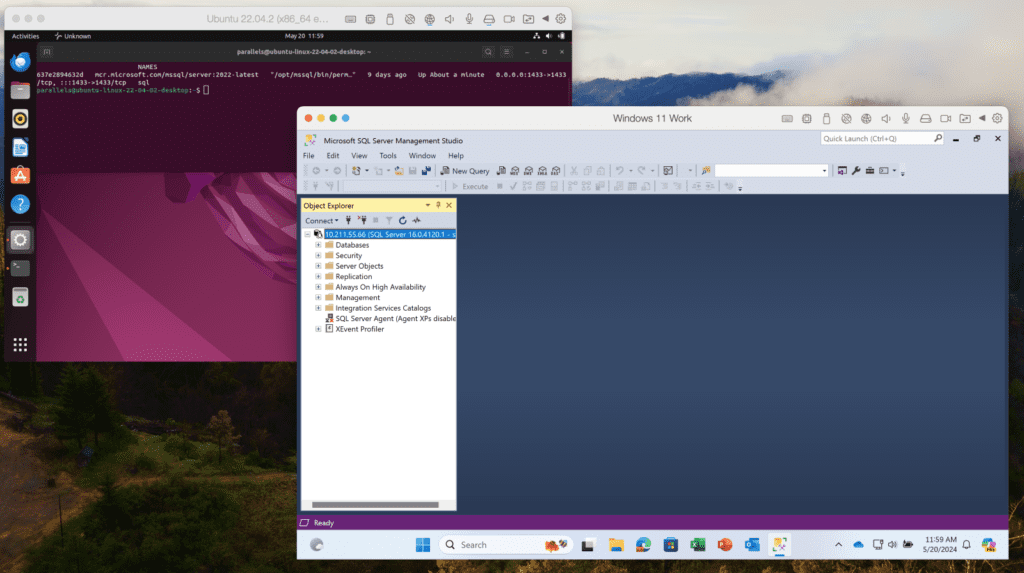
In the past, we used to offer our customers various solutions, but those didn’t work for many users. Today, we believe that one of the most useful solutions would be to create an Ubuntu VM with x86_64 emulation and a preinstalled Docker engine.

This setup allows you to get Microsoft SQL Server running with a single command, making it easy to connect from Visual Studio, VS Code, or SQL Server Management Studio within your Windows VM. Detailed instructions can be found in our KB article.

This update will guide you through this process if you attempt to install SQL Server 2019/2022 in a Windows VM.

install SQL Server 2019/2022 in a Windows VM screenshot example 

Improved integration with macOS

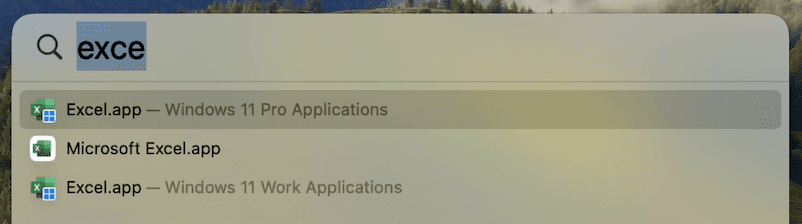
Many users enjoy using macOS Spotlight to search for applications. However, some have found it confusing when similar app names appear for their Mac and Windows/Linux apps.

To address this issue, we’ve added OS badge icons to the medium-sized icons of shared apps in Spotlight. This visual cue will help you quickly identify which OS the app belongs to without affecting your Dock icons.

os badge icons example

Command line utility improvements (only Pro and Business Editions)

We love our developer and tester community, and we are continually working to improve your experience with Parallels Desktop.

New reclaim-disk action

You can now reclaim disk space in a shutdown VM using the prlctl Command Line Utility. To reclaim free disk space, simply execute:

prlctl reclaim-disk <VM_name or VM_id>

Network conditioner control

The network conditioner is an excellent tool for users to test their applications under different network conditions and loads. We want to provide a way for this to be controlled in an automated way using prlctl.

There are two arguments supported for prlctl set now: –network conditioner and –network-conditioner-profile. For example, to run the network conditioner, execute the command below:

prlctl set <VM_name or VM_id> –network-conditioner on

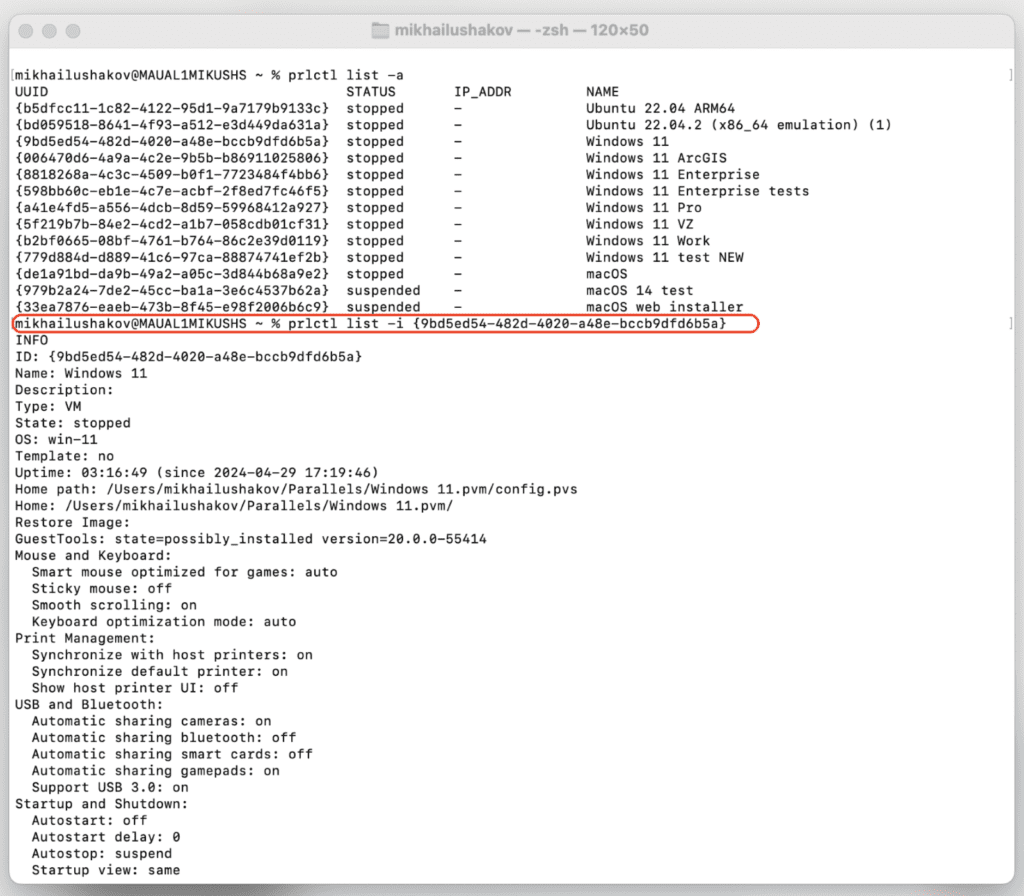
Extended output for prlctl list -i

We’ve extended the output information of the prlctl list -i command to include the IP address of running VMs, network throttling status, and whether the VM is a clone of another VM.

Here’s an example command:

prlctl list -i <VM_name or VM_id>

prlctl list -i command screenshot example

For more details, check out the Parallels Desktop developer’s guide.

Bug fixes

We’ve resolved an issue affecting our Business Edition customers. The download link in an invitation email from My Account would not activate the product with the assigned license.  We’ve restored this functionality, ensuring a smoother onboarding process for your team members.

We’ve successfully addressed an issue in which the app windows for SolidWorks, Delphi, Grammarly, and other Windows applications running in Coherence view mode were displayed as blank windows.

We’re committed to continuously improving Parallels Desktop and appreciate your feedback and support. We hope you enjoy these enhancements, and as always, we look forward to hearing your thoughts! You can post in our forums or make a comment on this post with your feedback.

New to Parallels Desktop for Mac? Get your 14-day free trial of Parallels Desktop 19.4.0 now.


About Version 2 Digital

Version 2 Digital is one of the most dynamic IT companies in Asia. The company distributes a wide range of IT products across various areas including cyber security, cloud, data protection, end points, infrastructures, system monitoring, storage, networking, business productivity and communication products.

Through an extensive network of channels, point of sales, resellers, and partnership companies, Version 2 offers quality products and services which are highly acclaimed in the market. Its customers cover a wide spectrum which include Global 1000 enterprises, regional listed companies, different vertical industries, public utilities, Government, a vast number of successful SMEs, and consumers in various Asian cities.

About Parallels 
Parallels® is a global leader in cross-platform solutions, enabling businesses and individuals to access and use the applications and files they need on any device or operating system. Parallels helps customers leverage the best technology available, whether it’s Windows, Linux, macOS, iOS, Android or the cloud.

June 2024: What’s New?

Written by Callum Sinclair – Product Engineering Manager.

“What’s New?” is a series of blog posts covering recent changes to Comet in more detail. This article covers the latest changes in Comet Voyager over June 2024. 

There were three Comet releases during June – two in the Voyager release series, plus one update for our Mimas release series.

We’ve landed a few large and exciting features:

Faster Measurement of Storage Vault Sizes

Enforcing Storage Vault Quotas is an important feature of Comet, providing our Managed Service Providers (MSPs) with the ability to restrict how much data a customer is allowed to back up. This feature offers flexibility to accommodate a wide range of business cases and ensures that resources are used efficiently.

In Comet version 24.6.1 and later, we’ve made a significant enhancement to how we measure the size of stored data in a Storage Vault. This improvement dramatically reduces the time required to start a back up job.

In our test cases, for a Storage Vault with a few terabytes of data stored it would take 10 or more minutes to measure how much data was stored. In Comet 24.6.1 this now takes a few seconds. This change benefits all our customers by enabling faster job initiation, which in turn means that jobs complete quicker.

This improvement not only enhances the user experience by reducing wait times but also optimizes resource usage, allowing our MSPs to provide even better service to their clients. We’re excited about this update and the positive impact it will have on your back up operations.

Software Build Role Tenant Settings

Software Build Role is a Comet Server feature that is responsible for generating client software installers of Comet. When enabled, it activates the Download Client Software page in the Comet Server web interface.

We have now added the ability to enable or disable the Software Build Role per tenant, providing greater flexibility for Managed Service Providers (MSPs) using Comet. Additionally, we’ve introduced support to configure whether an admin account can change these settings via policy.

These enhancements offer MSPs more control over their software build configurations, allowing for tailored management and improved service offerings.

Constellation Role Memory Improvements

Constellation Role is a Comet Server feature that provides insight across multiple Comet Servers and is essential tool for automatically removing unused storage. It works by verifying if data in a storage bucket belongs to an active user account on a Comet Server and removes data with no associated user, which can occur if a user is deleted without deleting their stored data.

In older versions of Comet, Constellation Role required a large amount of RAM to perform this function. However, in Comet 24.6.0, we have significantly reduced the RAM usage for Constellation Role, resulting in substantial speed and resource improvements. This means Constellation can prune larger amounts of data faster, and often more reliably.

This has a real benefit for our customers using Cloud Based storage, as removing unused data when it is no longer required is cost effective in the long run.

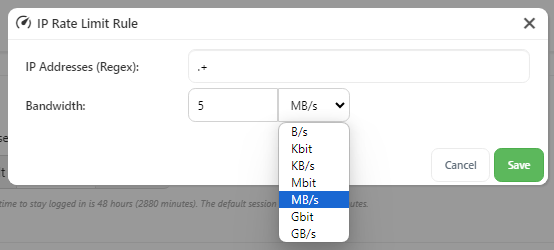
IP Rate Limiting Added to Comet Server Interface

To improve the usability of our IP rate limiting controls, we have added the ability to configure them in our Comet Server web interface. Previously this feature was only configureable via directly editing the config file of the Comet Server.

By configuring IP rate limits you can control the maximum bandwidth for IP addresses using regular expressions and set limits in bytes per second. Multiple rules can be defined, creating rate-limiting domains that match incoming requests. Rate limits apply separately to ingress and egress traffic, allowing simultaneous upload and download limits.

IP rate limiting can help maintain consistent performance and fair bandwidth usage across all users, and with our latest Comet release, it is even easier to configure.

Impossible Cloud Webinar

If you haven’t seen it, check out our recent blog post announcing our Impossible Cloud Integration as well as our joint webinar on Premier Cloud Storage & Backup for Europe’s MSPs on Wednesday, July 17th at 11am CET (Central European Time).

New Charging Model for Hyper-V and VMware Protected Items

You will notice that Hyper-V and VMware Guests will be charged daily per Protected Item from July.

This updated charging model can lead to a reduction in your overall bill. By charging per day per Protected Item, we align costs more closely with actual usage, potentially lowering your expenses.

We’re committed to continuously improving our services and look forward to delivering even more enhancements in the future. Thank you for your continued support!

About Version 2 Digital

Version 2 Digital is one of the most dynamic IT companies in Asia. The company distributes a wide range of IT products across various areas including cyber security, cloud, data protection, end points, infrastructures, system monitoring, storage, networking, business productivity and communication products.

Through an extensive network of channels, point of sales, resellers, and partnership companies, Version 2 offers quality products and services which are highly acclaimed in the market. Its customers cover a wide spectrum which include Global 1000 enterprises, regional listed companies, different vertical industries, public utilities, Government, a vast number of successful SMEs, and consumers in various Asian cities.

About Comet
We are a team of dedicated professionals committed to developing reliable and secure backup solutions for MSP’s, Businesses and IT professionals. With over 10 years of experience in the industry, we understand the importance of having a reliable backup solution in place to protect your valuable data. That’s why we’ve developed a comprehensive suite of backup solutions that are easy to use, scalable and highly secure.

×

Hello!

Click one of our contacts below to chat on WhatsApp

×