Skip to content

How to change autofill settings on iPhone

How to manage autofill for your contact information

Here’s how you can quickly edit your contact information, such as your address or phone number:

  1. Open Settings on your iPhone.

  2. Scroll down and tap on Safari.

  3. Select Autofill.

  4. Tap on My Info and choose your contact card.

  5. Update your information in the Contacts app, and it will automatically reflect in your autofill settings.

How to manage autofill for your credit card information

Storing your credit card information on your iPhone can make online shopping a breeze. Here’s how to add or update your credit card details:

  1. Open Settings.

  2. Go to Safari.

  3. Tap on Autofill.

  4. Select Saved Credit Cards.

  5. Authenticate via Face ID, Touch ID, or passcode.

  6. You can also add a new card by tapping Add Credit Card or update existing ones by selecting the card you want to edit.

How to autofill passwords on iPhone

Automatically filling out passwords saves time and reduces frustration related to manually typing long, complex passwords. Using autofill also allows you to forget your passwords, which is a nice bonus.

Here’s how to start using the autofill feature for passwords on your iPhone:

  1. Open Settings.

  2. Tap the Apple ID banner.

  3. Select iCloud.

  4. Tap Passwords and Keychain.

  5. Turn on the Sync this iPhone toggle switch and enter your Apple ID credentials if prompted.

Here’s how you can add new passwords or manage them on your iOS device:

  1. Open Settings.

  2. Scroll down to Passwords.

  3. Use Face ID, Touch ID, or passcode to access your saved passwords.

  4. Here, you can add new passwords or update existing ones.

Here’s an in-depth guide about managing your passwords on an iPhone.

Why could NordPass be a better option for managing your passwords and personal information?

While built-in options like the native iOS Passwords app provide basic functionalities, NordPass takes password and personal information management to a markedly higher level.

One of NordPass’s standout features is its seamless synchronization, allowing users to access their passwords and personal information across multiple devices and platforms—be it Windows, macOS, Linux, Android, or iOS. This cross-compatibility is a significant advantage for users who operate within diverse technological ecosystems​.

NordPass also goes beyond simple password management and offers a comprehensive suite of advanced tools designed to help individuals and businesses alike improve their digital security.

The Data Breach Scanner provides a way to check whether your sensitive data such as emails, passwords, or personal information, has been compromised in a breach. You can also set Breach Monitoring and receive real-time alerts in case your data appears in the breach.

Complementing the Data Breach Scanner, the Password Health feature can help you identify weak, old, and reused passwords, improving your passwords and overall security posture.

In addition, NordPass includes an Email Masking feature—a tool that generates fake, disposable email addresses that can be leveraged for online signups, making sure your real email remains a secret. This limits spam, and minimizes the risks of phishing.

In terms of support, NordPass offers 24/7 customer service, ensuring that help is available whenever it is needed. If you are already using NordPass, here’s a quick guide on enabling the NordPass autofill on iOS.

FAQ

How do I change the autofill address on my iPhone?

Open Settings. Select Safari, click Autofill, and choose My Info. Select your contact card. Update your address in the Contacts app, and it will automatically update your autofill settings.

How do I turn off autofill on my iPhone?

If you prefer not to use autofill, you can turn it off by going to Settings, selecting Safari, and taping Autofill. Toggle off the options for Use Contact Info and Credit Cards.

About Version 2 Digital

Version 2 Digital is one of the most dynamic IT companies in Asia. The company distributes a wide range of IT products across various areas including cyber security, cloud, data protection, end points, infrastructures, system monitoring, storage, networking, business productivity and communication products.

Through an extensive network of channels, point of sales, resellers, and partnership companies, Version 2 offers quality products and services which are highly acclaimed in the market. Its customers cover a wide spectrum which include Global 1000 enterprises, regional listed companies, different vertical industries, public utilities, Government, a vast number of successful SMEs, and consumers in various Asian cities.

About NordPass
NordPass is developed by Nord Security, a company leading the global market of cybersecurity products.

The web has become a chaotic space where safety and trust have been compromised by cybercrime and data protection issues. Therefore, our team has a global mission to shape a more trusted and peaceful online future for people everywhere.

Guardz and ConnectWise PSA Integration: Empowering MSPs with Enhanced Cybersecurity

Introduction

In a major development for MSPs, Guardz has announced its successful integration with ConnectWise PSA through the ConnectWise Invent program. This collaboration brings together the Guardz AI-powered, unified cybersecurity platform, and ConnectWise’s leading software solutions, promising enhanced security and operational efficiency for MSPs and their clients.

Certified Integration: A Milestone Achievement

Guardz has completed all necessary security certifications mandated by ConnectWise, ensuring the highest levels of safety and security for this integration. The ConnectWise Invent program, known for its rigorous standards, requires third-party software providers to pass an independent security review to certify their integration.

What is the ConnectWise Invent Program?

The ConnectWise Invent program is an integration collaboration initiative designed to help third-party software providers merge their solutions with ConnectWise’s innovative software. It supports MSPs globally in leveraging cutting-edge technologies to grow their businesses, offering Tier 1 integration support and fostering mutual productivity.

The Benefits of Guardz and ConnectWise PSA Integration

This integration brings several significant advantages to MSPs, enabling them to offer better cybersecurity solutions to their SMB clients.

Streamlined Cybersecurity Management

With the integration, MSPs can seamlessly incorporate Guardz incident data into their clients’ ConnectWise PSA environment. This enables efficient detection, prioritization, and response to security incidents directly from the service board.

Enhanced Threat Intelligence and Automation

By combining Guardz’s actionable insights into emerging threats with ConnectWise PSA’s robust automation and management capabilities, MSPs can proactively identify and address security gaps. This minimizes risks, protects critical assets, and drives operational efficiency.

Empowering MSPs to Grow and Succeed

Dor Eisner, CEO and Co-Founder of Guardz emphasized the significance of this integration: “With everything required to protect a business in one package, this integration allows more MSPs to significantly increase their range of capabilities while cutting their costs and growing their businesses.” This powerful combination of threat intelligence, remediation, and automation equips MSPs with the tools they need to deliver comprehensive security tailored specifically for SMBs.

ConnectWise’s Commitment to MSP Success

Chris Timms, EVP and GM Ecosystems at ConnectWise, expressed excitement about welcoming Guardz to the Invent Program: “Their expertise in security solutions aligns to our mission to enable MSPs with the tools and resources they need to succeed. We look forward to the innovative solutions and value they will bring to our community through the power of the Invent Program.”

The Integration Process

Integrators in the ConnectWise Invent program work closely with the ConnectWise API team to create integration roadmaps, ensuring comprehensive support throughout the development process. Upon certification, they gain access to a wealth of valuable resources, tools, and additional benefits designed to support their growth and success.

Conclusion

The integration of Guardz with ConnectWise PSA marks a significant advancement in the cybersecurity landscape for MSPs and SMBs. By leveraging the strengths of both platforms, MSPs can now offer enhanced security solutions, streamline their operations, and protect their clients more effectively.

About Version 2 Digital

Version 2 Digital is one of the most dynamic IT companies in Asia. The company distributes a wide range of IT products across various areas including cyber security, cloud, data protection, end points, infrastructures, system monitoring, storage, networking, business productivity and communication products.

Through an extensive network of channels, point of sales, resellers, and partnership companies, Version 2 offers quality products and services which are highly acclaimed in the market. Its customers cover a wide spectrum which include Global 1000 enterprises, regional listed companies, different vertical industries, public utilities, Government, a vast number of successful SMEs, and consumers in various Asian cities.

About Guardz
Guardz is on a mission to create a safer digital world by empowering Managed Service Providers (MSPs). Their goal is to proactively secure and insure Small and Medium Enterprises (SMEs) against ever-evolving threats while simultaneously creating new revenue streams, all on one unified platform.

24.6.4 Voyager released

Changes compared to 24.6.3

Enhancements

  • Added a new log message to backups that indicates that all pre-job steps are complete and backup work has begun

Bug Fixes

  • Fixed an issue for Hyper-V Protected Items that caused the error message “Incorrect Function” to occur when backing up guest VMs
  • Fixed an issue for Microsoft 365 Protected Items that caused the error message “invalid character ‘S’ looking for beginning of value” to be returned during listing of accounts
  • Fixed an issue with the Comet Backup desktop app and Comet Server changing device ID unexpectedly when SSH host keys are changed on Linux
  • Fixed an issue with backups not getting skipped even if “Skip if already running” is set when there are simultaneous backup jobs running
  • Fixed an issue with “warning 6001” error messages outputted in the Comet Server server log when generating a custom codesigned Windows client installer
  • Fixed an issue where backup jobs could complete successfully when a previous retention pass failed due to retention pass failures not being recorded properly
  • Fixed an issue with the Comet Backup desktop app crashing when a user browses a target directory using the web interface
  • Fixed an issue with Constellation Role where buckets with Object Lock enabled were not deleted
  • Fixed an issue with Hyper-V Changed Block Tracking falling back to full scans

About Version 2 Digital

Version 2 Digital is one of the most dynamic IT companies in Asia. The company distributes a wide range of IT products across various areas including cyber security, cloud, data protection, end points, infrastructures, system monitoring, storage, networking, business productivity and communication products.

Through an extensive network of channels, point of sales, resellers, and partnership companies, Version 2 offers quality products and services which are highly acclaimed in the market. Its customers cover a wide spectrum which include Global 1000 enterprises, regional listed companies, different vertical industries, public utilities, Government, a vast number of successful SMEs, and consumers in various Asian cities.

About Comet
We are a team of dedicated professionals committed to developing reliable and secure backup solutions for MSP’s, Businesses and IT professionals. With over 10 years of experience in the industry, we understand the importance of having a reliable backup solution in place to protect your valuable data. That’s why we’ve developed a comprehensive suite of backup solutions that are easy to use, scalable and highly secure.

Introducing NordPass Authenticator for Business

NordPass Authenticator is a unique feature that generates one-time passwords directly in your NordPass vault. It gives you all the security of two-factor authentication without an extra app.

Two-factor authentication (2FA) is the talk of the town in the corporate world for a reason. As the risk of passwords getting stolen, hacked, or guessed via brute-force attacks is ever-increasing, 2FA offers an additional layer of security to your accounts. In other words, 2FA protects accounts that would otherwise rely on passwords, typically weak ones, as their sole authentication method. So even if cybercriminals were to access your passwords, they’d be faced with an additional barrier to jump over.

However, while 2FA is quickly becoming the new standard, adding an extra step to the login process remains a stumbling block for many. Setting up two-factor solutions can be clunky, confusing, and time-consuming, appearing as more of a challenge than a convenience for employees. And employees’ annoyance isn’t just damaging to morale – it presents a serious security risk.

Cybercriminals can exploit this vulnerability with brute-force attacks. They send one second-factor request after another until users, out of exasperation or uncertainty, end up authenticating an unauthorized access request. This technique, known as MFA fatigue, was a key component in the 2023 Caesars and MGM casinos breach.

How can businesses implement two-factor authentication while avoiding its pitfalls?

NordPass Authenticator offers a simpler way to protect accounts with two-factor authentication. In a leap toward a passwordless future, NordPass patented the Stateless System To Protect Data (US Patent No. 11,528,130). This solution combines the highest security standards without compromising usability by offering multiple authentication factors within a single app.

What is NordPass Authenticator?

NordPass Authenticator is a feature that lets your organization’s members add an extra layer of security to their accounts with two-factor authentication without downloading or checking additional apps.

How does NordPass Authenticator work?

With the Authenticator, NordPass performs a double task – in addition to managing passwords, it acts as an authentication app, providing two-factor codes for any credentials stored in the vault.

If the account has 2FA switched on, you’re prompted to enter a time-based one-time password (TOTP) to unlock the account during each login attempt. NordPass members can securely unlock the verification code inside NordPass using their biometric data. That way, they don’t need to rely on authentication methods like text messages, which are prone to smishing attacks, or third-party apps like Google Authenticator or Authy.

What problems does NordPass Authenticator solve?

NordPass Authenticator helps resolve the challenges of adding an additional security layer to employee accounts. It also addresses some of the most common usability issues and vulnerabilities seen in other 2FA solutions.

Setting up two-factor authentication with TOTPs in NordPass includes benefits such as:

  • Providing phishing-resistant authentication.

  • Preventing “MFA fatigue” for credentials managed by NordPass.

  • Eliminating the need to download and manage third-party software.

  • Allowing users to add 2FA to all accounts, including those with shared passwords.

What makes NordPass Authenticator better?

Stronger security

Two-factor authentication is not just an extra step to access your accounts. It needs to be completely distinct from the first factor – in this instance, the password – and involve a different authentication type.

nordpass authenticator

The most common authentication factors can be split into three categories:

  1. Something you have – a possession factor, such as a device or token.

  2. Something you know – a knowledge factor, such as a password or TOTP.

  3. Something you are – an inherence factor or a biometric factor, such as a fingerprint or facial recognition.

Imagine you require both a key and a fob for additional security to enter your office. These two “authenticators” use the same technique to open the door – they’re something you have. If, in addition to falling under the same “factor” category, the key and the fob are attached to each other or are always stored in the same place, this security method is no more secure than the key alone. It gives the illusion of additional security without the actual benefit.

Cybersecurity works much in the same way. The password is a common “first factor.” If your second factor also falls under the “something you know” category and is stored alongside your first factor – say, in a password manager – then it doesn’t meet the 2FA security standards. That’s because the first and second factors share the same path for entry: Your master password.

Using patented technology, NordPass has overcome this limitation and delivers all the security benefits of a true second factor in the easiest and most accessible way possible.

NordPass combines something you know (your Master Password) with authentication through something you are (fingerprint or Face ID) on something you have (your device) to unlock the time-based one-time password. Combining multiple factors leads to a higher security standard and genuine second-factor authentication that’s more than just two-step verification.

More convenience

Many businesses are already overwhelmed by apps. The trend of perpetual software adoption has accelerated with the popularity of remote and hybrid work options. The last thing your peers and the IT team need is one more application whose sole purpose is generating time-based one-time passwords.

NordPass generates the codes for you without the hassle of using another authentication app. NordPass Authenticator helps improve cross-team collaboration by allowing members to share passwords that have second-factor authentication – no more two-factor code sharing on unencrypted chats or spreadsheets. Once you share a password, the recipient can unlock the TOTP code using biometrics on their device, saving time and effort and maintaining security measures intact.

Say goodbye to the hassle of sharing access to 2FA-protected accounts. From now on, your team can easily grant access with just a couple of clicks without compromising your company’s security. When it comes to security software, convenience isn’t just “nice to have” – it means the difference between your team adopting the solution or not.

Better transparency

Managing two-factor authentication inside your password management app offers more transparency and control over your cybersecurity. First, it allows you to verify whether your team members are using 2FA and for which accounts. This allows your organization to perform a more accurate audit of account and credential security, helping it turn policy into practice in a tangible way.

Second, it lets you maintain control and consistency over mandatory workplace app usage. Otherwise, your team would likely adopt a hodgepodge of different authenticator apps, preventing your organization from enforcing tailor-made security protocols and training materials.

Who can use NordPass Authenticator?

NordPass Authenticator is available on the browser extension and mobile devices with all tiers of business accounts. This User Guide provides more information on how to add our built-in authenticator to your business accounts.

And if you’re yet to check out what NordPass has to offer, go ahead and start your free 14-day trial today. Alongside NordPass Authenticator, you’ll access other security-focused features for a more convenient work experience, including Password Health, Email Masking, Data Breach Scanner, and secure sharing.

With NordPass, you can take your organizational security to the next level without compromising productivity and efficiency.

About Version 2 Digital

Version 2 Digital is one of the most dynamic IT companies in Asia. The company distributes a wide range of IT products across various areas including cyber security, cloud, data protection, end points, infrastructures, system monitoring, storage, networking, business productivity and communication products.

Through an extensive network of channels, point of sales, resellers, and partnership companies, Version 2 offers quality products and services which are highly acclaimed in the market. Its customers cover a wide spectrum which include Global 1000 enterprises, regional listed companies, different vertical industries, public utilities, Government, a vast number of successful SMEs, and consumers in various Asian cities.

About NordPass
NordPass is developed by Nord Security, a company leading the global market of cybersecurity products.

The web has become a chaotic space where safety and trust have been compromised by cybercrime and data protection issues. Therefore, our team has a global mission to shape a more trusted and peaceful online future for people everywhere.

We remembered KEVin!

runZero tracks vulnerabilities on assets discovered by runZero queries and numerous third-party integrations. We’re pleased to announce that the Platform now enriches these vulnerability records with information from the CISA Known Exploited Vulnerabilities (KEV) catalog, the VulnCheck KEV list, and the Exploit Prediction Scoring System (EPSS).

The CISA Known Exploited Vulnerabilities Catalog

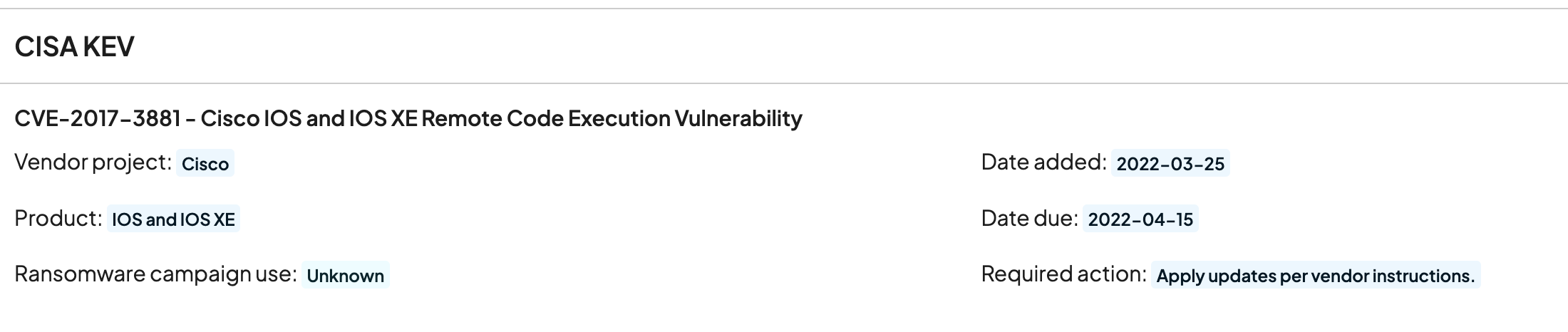
The United States Cybersecurity and Infrastructure Agency (CISA) is a federal agency tasked with informing other government agencies about cybersecurity threats, information security best practices, mediation recommendations, and so on. It is also responsible for coordinating defense of critical infrastructure, such as electrical grids, water treatment systems, pipelines, and air traffic control systems. CISA publishes a regularly-updated list of cybersecurity vulnerabilities that are known to be exploited in the wild: the Known Exploited Vulnerabilities (KEV) list. The CISA KEV list currently catalogs 1,127 vulnerabilities in hardware and software that CISA has evidence of being actively exploited. In this case “active exploitation” means that CISA has reason to believe that threat actors are currently exploiting these vulnerabilities for malicious purposes. If a vulnerability appears on this list, it should be considered a high priority; it represents not just a vulnerability, but one that is known to be under active attack. If a vulnerability has an associated CISA KEV record, runZero will display it on the vulnerability’s information page. Here’s an example from the runZero Platform:
A sample CISA KEV record attached to a vulnerability.

The VulnCheck KEV List

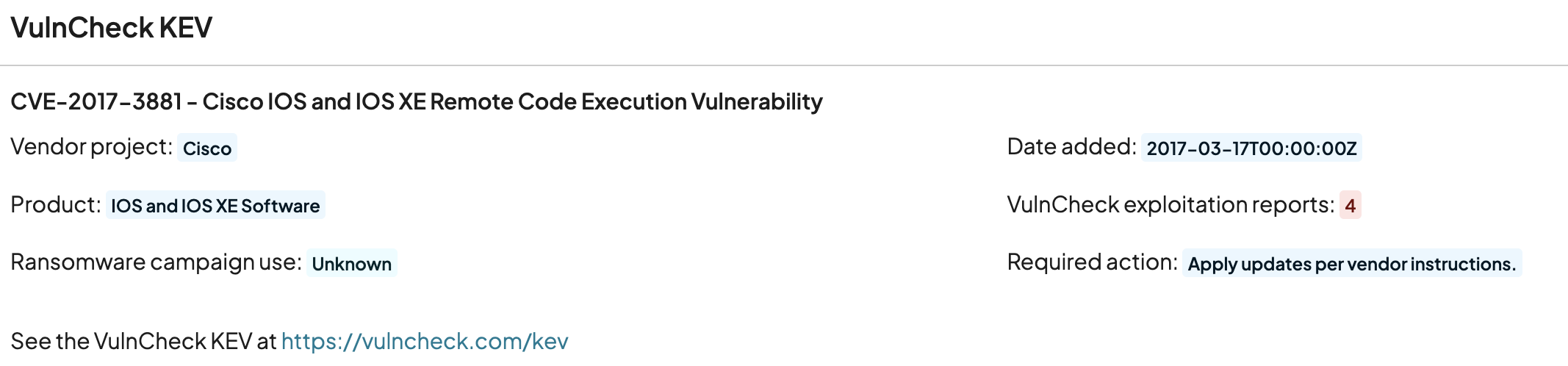
VulnCheck, a leading cybersecurity intelligence vendor, also publishes their own Known Exploited Vulnerabilities list (the VulnCheck KEV) that is timely, accurate, and frequently updated. runZero can now enrich vulnerability information with input from the VulnCheck KEV. Here’s an example:
A sample VulnCheck KEV record attached to a vulnerability.

Searching KEV Lists

It’s easy to locate vulnerabilities that appear on the KEV list by visiting the Vulnerability Inventory in runZero and using the kev: search keyword. Search for membership in a specific KEV list simply by providing its name:
kev:cisa
kev:vulncheck
Or look for vulnerabilities that appear on any KEV list (including any other KEV lists that may be added in the future):
kev:any
These query terms also work in the Asset Inventory to find assets with vulnerabilities that appear on the relevant list(s) and on individual assets, as well.

The Exploit Prediction Scoring System

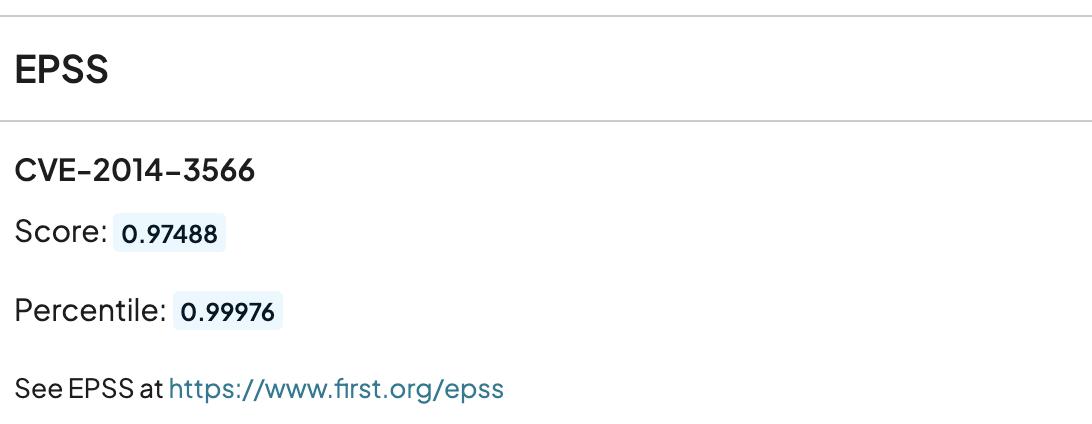
Additionally, runZero now integrates with the Exploit Prediction Scoring System (EPSS), a scoring system that predicts the likelihood that a given vulnerability will be exploited in the wild. EPSS provides a score between 0.0 (extremely unlikely to be exploited) and 1.0 (is definitely being exploited). You can search for vulnerabilities by their EPSS scores using the epss_score search term in the Vulnerability Inventory and for assets with EPSS-scored vulnerabilities in the Asset Inventory. The conventional runZero numeric search operators can be used, for example:
epss_score:>0.9
epss_score:<=0.8
In general, vulnerabilities with scores higher than around 0.9 should be looked at very closely. Like the KEV lists above, vulnerabilities with EPSS scores will have that information displayed in the vulnerability view:
A sample EPSS record attached to a vulnerability.

A Bonus: Faster CVE Searches!

The work to integrate with the CISA and VulnCheck KEV lists and the EPSS resulted in a nice little bonus: searches by CVE should now be considerably faster!

About Version 2 Digital

Version 2 Digital is one of the most dynamic IT companies in Asia. The company distributes a wide range of IT products across various areas including cyber security, cloud, data protection, end points, infrastructures, system monitoring, storage, networking, business productivity and communication products.

Through an extensive network of channels, point of sales, resellers, and partnership companies, Version 2 offers quality products and services which are highly acclaimed in the market. Its customers cover a wide spectrum which include Global 1000 enterprises, regional listed companies, different vertical industries, public utilities, Government, a vast number of successful SMEs, and consumers in various Asian cities.

About runZero
runZero, a network discovery and asset inventory solution, was founded in 2018 by HD Moore, the creator of Metasploit. HD envisioned a modern active discovery solution that could find and identify everything on a network–without credentials. As a security researcher and penetration tester, he often employed benign ways to get information leaks and piece them together to build device profiles. Eventually, this work led him to leverage applied research and the discovery techniques developed for security and penetration testing to create runZero.

×

Hello!

Click one of our contacts below to chat on WhatsApp

×