Skip to content

Essential guide to end-user security awareness training

End-user security awareness training is crucial for teaching employees about cyber threats. These include phishing attacks and the importance of password security. The need for this education is on the rise. There has been a 29% increase in cyber attacks in the first quarter of 2024 compared to 2023.

Training methods vary, including interactive webinars, gamified modules, and simulated phishing exercises. Each method is suitable for different organizational needs. This guide will discuss what security awareness training involves. It will also cover why it’s necessary and how IT admins can implement it effectively.

What is end-user security?

End-user security involves measures and practices to protect an individual’s computer, data, and network access. It guards against cyber threats and unauthorized access attempts. This security includes password security, antivirus software, and firewalls.

End-user security specifically targets risks arising from human error and individual behaviors. These can lead to security breaches. Unlike network security, application security, information security, and operational security, end-user security focuses on the human factor. This is often the weakest link in corporate security.

The need for end-user security

The need for end-user security is quite obvious and naturally fundamental. Any business that relies on digital resources must prioritize it regardless of size or industry. Implementing security awareness training helps prevent unauthorized access. This access could lead to data breaches, which are costly and damaging to a company’s reputation.

Without end-user security, businesses are more vulnerable to malware and social engineering tactics. While it is impossible to completely protect end users from a social engineering attack, conducting effective security awareness training programs can greatly reduce these risks. These threats often target end users who may not be aware of the sophisticated methods used by cybercriminals.

Organizations without training may see a 30% increase in malicious link clicks. The cost of implementing strong end-user security measures is usually less than the losses from a cyber-attack.

Common threats that end users are facing

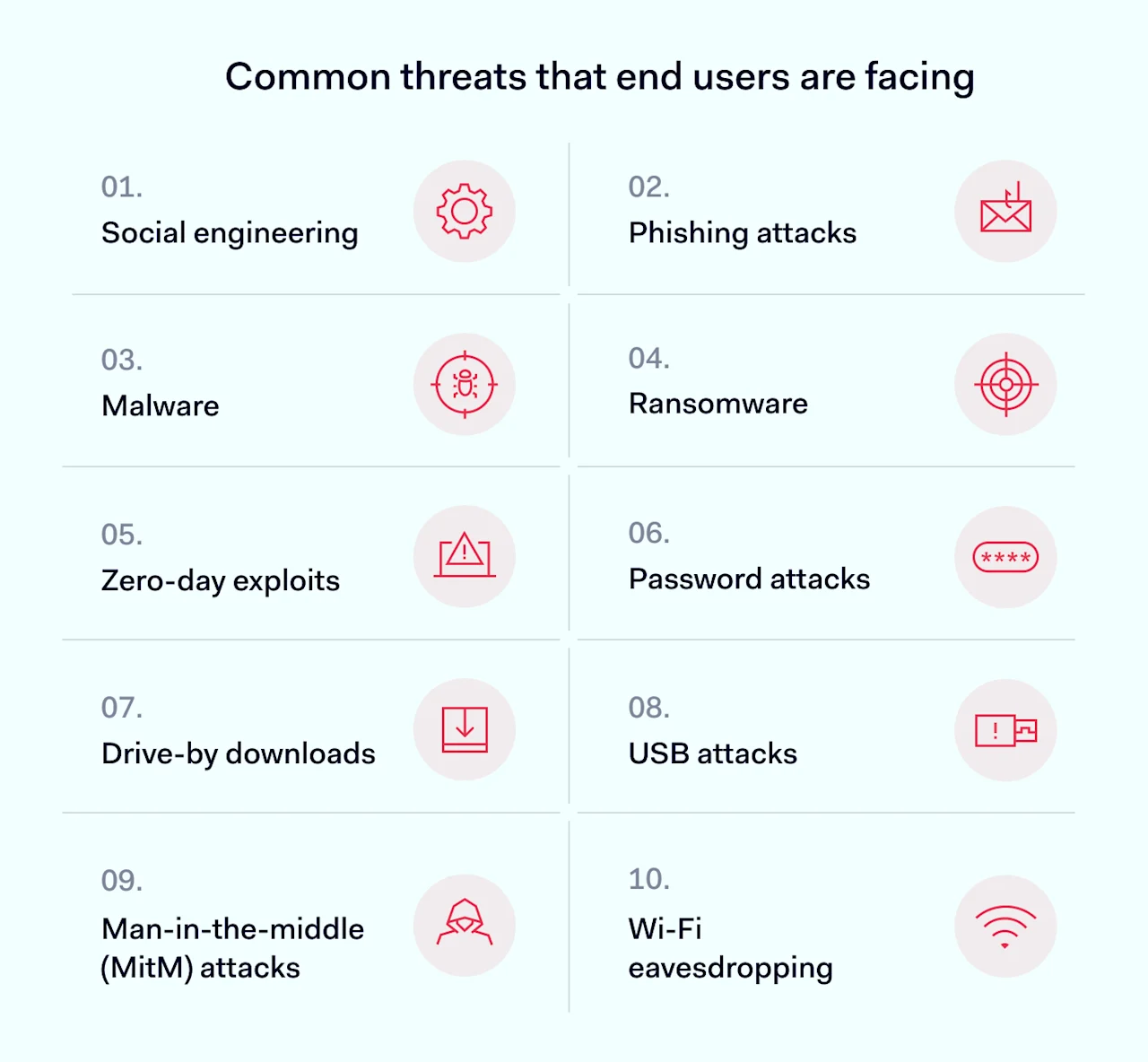
End users often represent the front line in cybersecurity, yet they are also the primary targets for many cyber threats. This vulnerability can expose entire networks to significant risks if organizations don’t manage it properly. Here’s a breakdown of the common threats that end users encounter.

Common threats that end users are facing

  • Social engineering: tactics that manipulate users into providing confidential information or making security mistakes. It’s a significant threat because it relies on human error, which can never be eliminated.

  • Phishing attacks: deceptive emails or messages that trick users into revealing sensitive information. It’s the most widespread form of social engineering.

  • Malware: malicious software that an attacker installs on a user’s device without their knowledge. It can steal data, spy on activities, or gain unauthorized access to networks. It can silently cause widespread damage to an organization or the whole supply chain.

  • Ransomware: a type of malware that encrypts data and demands a ransom to restore access. Ransomware attacks often lead to significant financial losses and operational downtime. In 2023, the average cost of each ransomware attack was over $5 million. In total, businesses paid more than $1 billion in ransoms in 2023 for the first time, and experts predict that 2024 will present even greater challenges.

  • Zero-day exploits target unknown software vulnerabilities before fixes are available. End users often suffer from these exploits, as they frequently use vulnerable software. For example, the WannaCry ransomware exploited unpatched Windows systems, impacting users worldwide. Regular updates and patches are crucial for protecting end users.

  • Password attacks: attempts to crack or steal passwords to gain unauthorized access to systems and data. They can lead to breaches of multiple accounts if users reuse passwords.

  • Man-in-the-middle (MitM) attacks are when attackers intercept and possibly alter the communication between two parties. MitM attacks also can lead to data theft.

  • Wi-Fi eavesdropping: intercepting and monitoring data transmitted over poorly secured Wi-Fi networks. This type of attack is serious because it can lead to data breaches of sensitive personal and business information.

  • Drive-by downloads: unintentional download of malicious software to a device, which often occurs when visiting an infected website. The seriousness of these threats lies in their stealth and the ease with which they can infect a system.

  • USB attacks deliver malware through USB devices. These attacks bypass network security and affect the physical security of systems.

Various cyber threats target end users in different ways. However, social engineering is the most common threat. It affects nearly everyone at some point. Complex threats like zero-day exploits happen less often than phishing attacks.

End-user security might not fully prevent sophisticated zero-day exploits. Fortunately, these are rarer than phishing attacks. So, organizations can enhance their security by focusing on phishing awareness training. This significantly strengthens their defense against the most prevalent cyber threats.

Why you need security awareness for your business

The short answer is: you don’t want a devastating cyber attack on your business. Such an attack could cost a huge amount of money or even ruin the business. But let’s break this down into several parts.

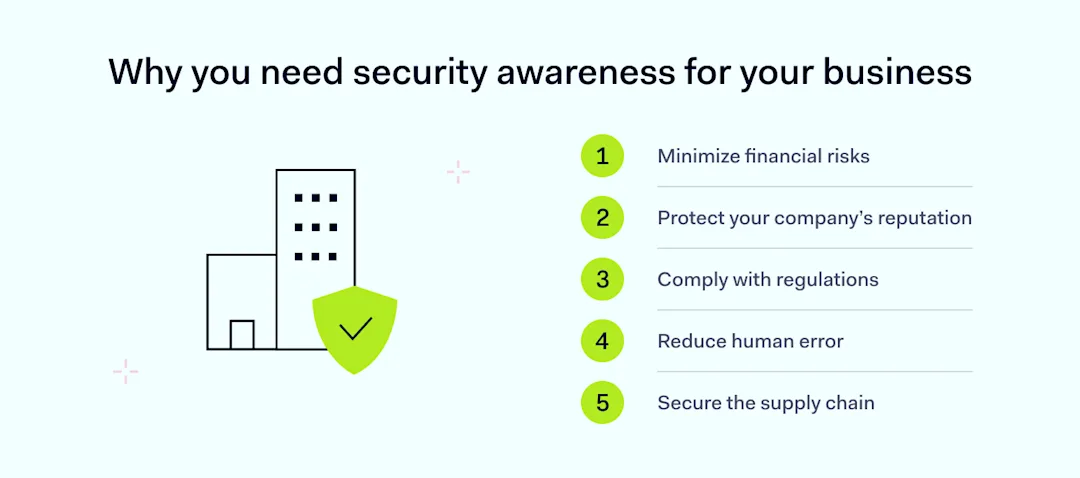
Why you need security awareness for your business

Minimize financial risks

Phishing campaigns are the starting point for about 90% of cybersecurity attacks. These lead to data breaches. These incidents can be extremely costly, and the average cost of data breaches is growing every year. The tools for cyber-attacks are also becoming less expensive. A well-structured security awareness training equips employees with the skills to identify and prevent such attacks. This can potentially save the company substantial sums in lost revenue and recovery costs.

Protect your company’s reputation

A single data breach can significantly damage your business’s reputation. This leads to a loss of customers and partners who value data security. For example, the case of 23andMe, which severely damaged its reputation after exposing the DNA data of its customers, underscores the risks. It remains uncertain whether the company will fully recover.

By integrating a comprehensive security awareness program, your business is committed to data protection. This can help maintain customer trust and business relationships.

Comply with regulations

Many industries face strict data protection regulations that charge significant fines for non-compliance. A proper security awareness training program teaches employees to handle sensitive information. This helps them comply with regulations and avoid costly legal issues. It includes finding new partners that value robust cybersecurity like ZTNA.

Reduce human error

Most security breaches come from human error. Implementing ongoing security training can greatly reduce these risks. Programs should cover password security, mobile device safety, and phishing attack recognition. Employees also learn about identity and access management. They become cautious about the data they share.

Secure the supply chain

If your business is part of a supply chain, a breach can impact more than your company. It can affect larger, critical businesses and have unpredictable consequences. A robust security program prevents employees from becoming the weak link in the chain.

Security awareness training can save a lot of money and even your business. It prevents financial losses, protects your reputation, and ensures legal compliance. It also reduces human error risks and secures your supply chain role.

For IT administrators, investing in effective training enhances business security and stability. This investment pays dividends by safeguarding against evolving threats.

How to implement end-user security awareness training

Implementing end-user security training is straightforward but needs careful planning and updates.

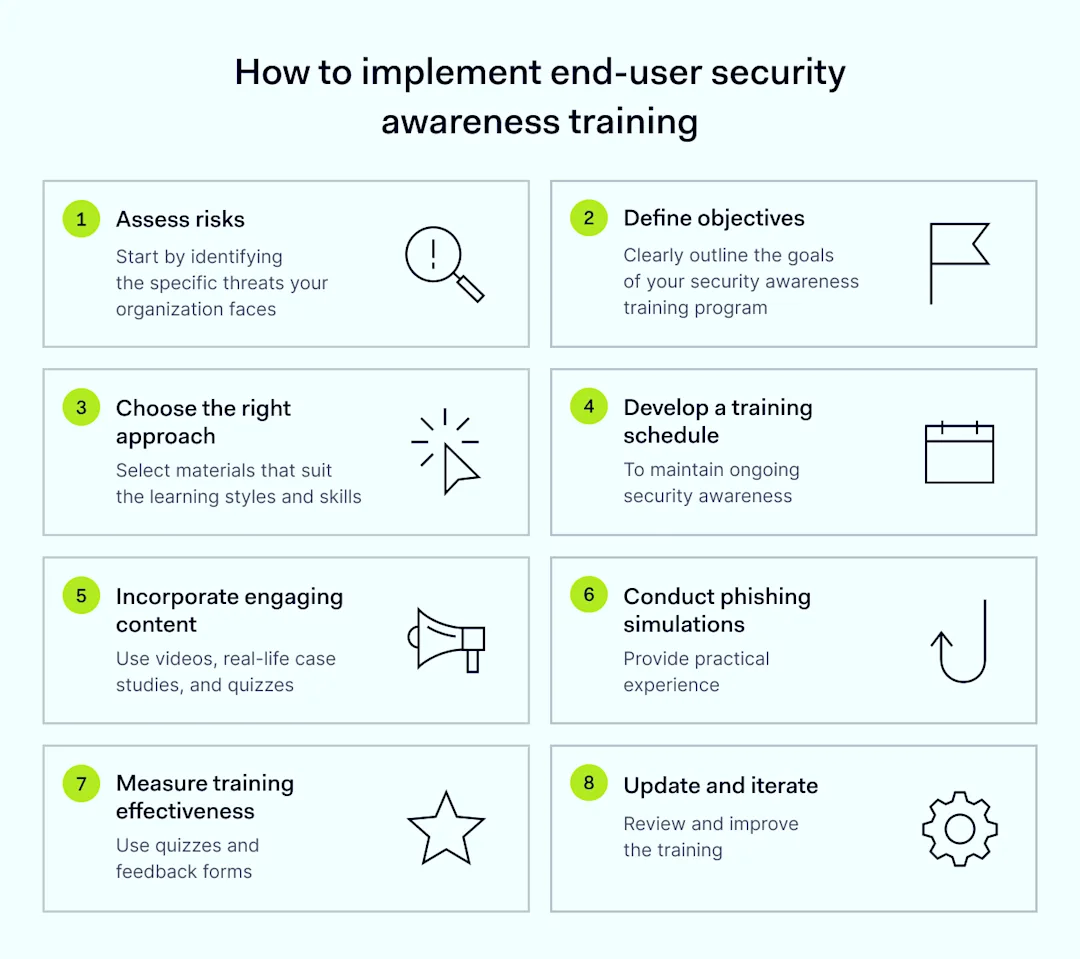
How to implement end-user security awareness training

Here are the key steps:

  1. Assess risks. Start by identifying the specific threats your organization faces. These include phishing attacks, malware, or data breaches. Determine which data types and behaviors are most at risk. A SaaS cloud company might be vulnerable to customer data breaches. A manufacturing firm might be exposed through third-party vendors. List the most at-risk data and common compromise methods like social engineering.

  2. Define objectives. Clearly outline the goals of your security awareness training program. Instead of the generic ‘be safe online,’ specify the behaviors and skills employees need to develop. If your company faces diverse cybersecurity attacks, goals might include recognizing signs of a phishing attack and managing password security and access securely. This approach ensures that the security training is focused and measurable.

  3. Choose the right approach. Select training materials and platforms that suit the learning styles and technological skills of your workforce. An interactive quiz with real-life scenarios is often a good choice because it is gamified and relatable. If your team prefers traditional methods, like reading printed materials in Times New Roman on A4 paper, opt for that approach. Choose tools that ensure information is not only presented but retained.

  4. Develop a training schedule. Establish a regular training schedule to maintain ongoing security awareness. Start with mandatory cybersecurity awareness training for new hires, then incorporate monthly security tips via newsletters and weekly reminders on Slack. This helps keep remote employees engaged and aware of the latest cyber threats.

  5. Incorporate engaging content. Use a variety of videos, real-life case studies, interactive quizzes, and gamified elements to make learning both engaging and memorable. This variety helps prevent the training from becoming just another checkbox exercise and enhances employee awareness.

  6. Conduct phishing simulations. Challenge employees with simulated phishing attacks to provide practical experience identifying suspicious emails. For example, in the NordLayer office, QR codes occasionally appear that lead to a page warning against following unknown QR codes.

  7. Measure training effectiveness. After training sessions, assess their effectiveness using quizzes, feedback forms, and by monitoring changes in employee behavior. This is crucial for understanding the training’s impact and identifying areas for improvement. Without this evaluation, programs might become outdated and ineffective.

  8. Update and iterate. As cyber threats evolve, so must your training program. Regularly review and update the training content to include recent cyber incidents and emerging threats, ensuring the program remains relevant and effective.

Overall, this project requires a team, but the investment is worthwhile because it significantly reduces the likelihood of successful cyber-attacks. Remember, no organization is too small for an attack; it can happen even to those who have previously been attacked.

How can NordLayer help?

NordLayer does not offer cybersecurity training but enhances security through robust network protection. After implementing your security awareness program and educating employees, consider the next step of securing your network. NordLayer specializes in network protection solutions, crucial for controlling who can gain access to sensitive areas. This is particularly beneficial for teams that are working remotely, ensuring that computer security is maintained across all connections.

NordLayer also helps IT admins achieve cybersecurity frameworks like Zero Trust Network Access (ZTNA), complementing your employee awareness efforts. With plans starting at $7 per user per month, NordLayer offers an affordable way to bolster your security posture. For guidance on the best plan for your needs, please contact our sales team.

About Version 2 Digital

Version 2 Digital is one of the most dynamic IT companies in Asia. The company distributes a wide range of IT products across various areas including cyber security, cloud, data protection, end points, infrastructures, system monitoring, storage, networking, business productivity and communication products.

Through an extensive network of channels, point of sales, resellers, and partnership companies, Version 2 offers quality products and services which are highly acclaimed in the market. Its customers cover a wide spectrum which include Global 1000 enterprises, regional listed companies, different vertical industries, public utilities, Government, a vast number of successful SMEs, and consumers in various Asian cities.

About NordLayer
NordLayer is an adaptive network access security solution for modern businesses – from the world’s most trusted cybersecurity brand, Nord Security.

The web has become a chaotic space where safety and trust have been compromised by cybercrime and data protection issues. Therefore, our team has a global mission to shape a more trusted and peaceful online future for people everywhere.

About NordLayer
NordLayer is an adaptive network access security solution for modern businesses – from the world’s most trusted cybersecurity brand, Nord Security.

The web has become a chaotic space where safety and trust have been compromised by cybercrime and data protection issues. Therefore, our team has a global mission to shape a more trusted and peaceful online future for people everywhere.

NordPass Desktop App: Release Notes

NordPass 5.17 (latest) 

Hold on to your seat — we’ve got some very exciting news to announce:

  • TOTP is now live on Chrome and Firefox browsers for NordPass business users. You can now create time-based one-time passwords on your favorite browser.

  • Autofill issue on Google fixed. Autofill got confused; it recognized Google login forms but treated them as new account creation forms. From this release on, the glitch has been fixed, and you’ll no longer see incorrect prompts.

NordPass 5.16

Building good things takes time. So since the last release, we’ve mainly focused on catching and eliminating pesky bugs.

NordPass 5.15

  • Item Sharing: We’ve revamped our sharing permissions so that you can now enjoy more control over the access a friend, family member or colleague has to an item. More permission options + more flexibility = more peace of mind. Check out the changes in your vault today!

  • Import: You can now easily transfer data from KeePass into NordPass via an XML file.

NordPass 5.14

Looking to import data into NordPass from another password manager? Good news we now support more file formats such as JSON, ZIP, and 1PUX.

NordPass 5.13

Introducing the latest NordPass updates:

  • New Feature: Instant Login: Logging into accounts just got even easier. Gone are the days of manually tapping the NordPass icon to fill in your passwords. With this update, NordPass automatically detects when you’re on a login page and offers to fill in your credentials for you. We hope you’ll enjoy the seamless login experience, but if you prefer the traditional method, fear not–you can disable this feature in Settings.

  • Email Masking Update: Forgot why you set up email masks? No worries! Now, you can easily identify which of your accounts are safeguarded by email masks with a quick glance.

NordPass 5.12

We’re kicking off 2024 with a few game-changing updates:

  • Email Masking: Say hello to our brand new Premium tool — Email Masking! With this tool, you can protect your real email address from spam and online threats by creating unique email masks every time a website asks for your details. With full control over email forwarding included as well, this tool really puts you in the driving seat.

  • Data Breach Scanner: We’ve enhanced this all-important tool so that you can now get real-time alerts if your credit card appears in a breach. We hope you enjoy the new look and feel too!

  • Import: We’ve tweaked our import settings so that you can now easily move all of your Proton Pass items over to NordPass.

NordPass 5.11

“Spreek je Nederlands?” Because we now do! That’s right, you can now use the NordPass extension and desktop app in Dutch — simply head over to Settings to adjust your preferred language. 

NordPass 5.10

We’ve waved bye-bye to some pesky bugs and have also spruced up the place a touch. Stay tuned for some big news that’s just around the corner!

NordPass 5.9

Hold on to your seat — we’ve got some very exciting news to announce:

  • Browser Extension: You now have the option to use a new standalone NordPass browser extension that doesn’t require our desktop app! That’s right, you can now enjoy a fast, fully browser-based NordPass experience on Chrome, Firefox, Safari and more.

  • Autofill: You asked, we’ve listened. You can now tweak your app settings to enjoy a better autofill experience on websites with a subdomain.

  • Password Health: When logging in to a website, you’ll now be prompted if your password is weak or reused so that you can quickly act to reduce the risk of your data falling into the wrong hands. 

NordPass 5.8

Gather round, folks — we’ve got some exciting updates to share:

  • Data hosting: Organizations using NordPass Business or Enterprise can now choose to store company data in the European Union.

  • Autofill: You can now instantly search for a specific item to autofill on a webpage if it’s not automatically suggested for you.

  • Custom fields: You can now personalize your NordPass experience by adding custom fields to all item types. From passport numbers and bank details to dates of birth, you’re free to securely store exactly what you need.

NordPass 5.7

Here are just a couple of highlights from our latest release:

  • Autofill: As some websites (e.g. facebook.com and messenger.com) require you to use the same login credentials, you can now add multiple web addresses to a single NordPass password item for a smoother autofill experience. Faster account access and a tidier vault sounds good to us.

  • Passkeys: Already using biometrics to unlock your NordPass vault? Good news you can now also use your face or fingerprint to verify your identity when using a passkey.

NordPass 5.6

We’ve given our passkey prompts a fresh coat of paint and have also now built them directly into the web browser experience, meaning no more jumping back and forth between our desktop app. Enjoy!

NordPass 5.5

With NordPass Enterprise, you can now instantly share a shared folder with a group! That’s right, instead of having to add teammates one by one to a shared folder, you can now share the folder with a large group of people in one go. Happy updating!

NordPass 5.4

Here’s what’s new in the latest NordPass release:

  • NordPass Business: Users can now move items with two-factor codes to shared folders. If a member has set up NordPass as an authenticator, they will be able to access the item’s two-factor code immediately.

  • Bug fixes: We’ve also fixed a few bugs and improved our app’s performance.

NordPass 5.3

As some web services now require an additional identity check to use a passkey, we’ve added a new authentication step to our passkey creation and login flows so that you can continue using passkeys to securely access your accounts.

NordPass 5.2

You asked, we’ve listened – our latest release is inspired by your valuable feedback:

  • Passkeys: You can now better control how often you see certain NordPass passkey prompts on websites. We’ve also introduced a new button in a couple of our passkey flows so that you can more easily switch to using another passkey solution instead of NordPass.

  • Autofill: You now have the power to change the autofill behavior of website form fields so that you’re suggested exactly the right information you’re looking for. For example, if you’re suggested credit card details on a login page, you can adjust the autofill logic so that you’re correctly suggested a password item in future.

  • File attachments: You can now save time by viewing attached .jpg and .png image files directly in the app, meaning there’s no longer a need to first download them.

Thanks as always for sharing your thoughts with us. If anything else crosses your mind, you can always find us at  support@nordpass.com.

NordPass 5.1

No major updates this time, just a new and improved app release with some under-the-hood performance upgrades – enjoy!

NordPass 5.0

Introducing… file attachments!

That’s right, with NordPass Premium you can now conveniently attach documents and images to any item so that you’ve got access to all-important info when you need it most. Contracts, copies of your IDs, cat photos – you name it, you can securely store it. We hope you enjoy this highly requested feature!

NordPass 4.38

Remember when we said we had some big news to announce soon? Well, here it is… say hello to a new item category: passkeys!

Passkeys are unique, end-to-end encrypted login credentials that are stronger and more convenient to use than passwords.

You can now use NordPass to create passkeys on supported websites. NordPass will also securely store your passkeys so you can use them to instantly log in to your accounts online.

Passwordless authentication: unlocked. Enjoy!

NordPass 4.37

We’ve waved bye-bye to some pesky bugs and have also spruced up the place a touch – enjoy!

NordPass 4.36

We’re starting off 2023 on the right foot with a release that’s faster and more reliable. Stay tuned for some bigger announcements!

NordPass 4.35

No major updates this time, just a new and improved app release with some under-the-hood performance upgrades – enjoy!

NordPass 4.34

We’re happy to present you with a new release. Here’s what we’ve got this time:

  • DESIGN CHANGES TO ITEMS. We updated how your item details are displayed. Hope you’ll like it.

NordPass 4.33

Building good things takes time. So since the last release, we have mainly focused on catching and eliminating pesky bugs.

NordPass 4.32

This time we’ve waved bye-bye to some pesky bugs and have also spruced up the place a touch – enjoy.

NordPass 4.31

We’re happy to present you with a new release. Here’s what we’ve got this time:

  • AUTOFILL DISABLEMENT ON WEBSITES. You can now disable autofill on any page that you don’t want to fill your details. It won’t reset when you refresh the page but you can turn it back on at any time.

  • BUG FIXES.

NordPass 4.30

Here’s what you’ll see in the new NordPass release:

  • ONBOARDING UPDATE. New users will be greeted by a refreshed onboarding experience that will help them familiarize themselves with NordPass.

NordPass 4.29

No major updates this time, just a new and improved app release with some under-the-hood performance upgrades – enjoy!

NordPass 4.28

Building good things takes time. So since the last release, we have mainly focused on catching and eliminating pesky bugs.

NordPass 4.27

This time we’ve waved bye-bye to some pesky bugs and have also spruced up the place a touch – enjoy!

NordPass 4.26

No big announcements from us this time. However, we hope you’ll still enjoy an updated NordPass version with fewer bugs and better autofill.

recovery code

NordPass 4.25

Our bug busters have been working hard since the last time you heard from us. That’s why today we can proudly present another NordPass release with even fewer bugs. We hope you’ll like it.

NordPass 4.24

Building good things takes time. So since the last release, we have mainly focused on catching and eliminating pesky bugs.

NordPass 4.23

We’re happy to present you with a new NordPass release. Here’s what we’ve got this time:

  • UPDATED PASSWORD INFO. Now you’ll get more guidance on making your passwords more secure. Open any of your passwords, and you’ll see whether it’s been reused on other accounts or it’s too old and needs changing.

  • BUG FIXES. Rome wasn’t built in a day. Therefore, we continuously aim to catch pesky bugs and provide you with the best password management experience.

NordPass 4.22

Here’s what you’ll see in the new NordPass release:

  • SWITCH ACCOUNT. A long-awaited feature is here! If you have a few NordPass accounts, like personal and business, switching between them will now be a breeze. Just click on your profile account and look for a “Switch Account” button.

  • LITHUANIAN LANGUAGE. For our Lithuanian friends out there, you can now use NordPass in your mother tongue. Simply head to Settings to change the language.

  • BUG FIXES.

NordPass 4.21

Our bug busters have been working hard since the last time you heard from us. That’s why today we can proudly present another NordPass release with even fewer bugs. We hope you’ll like it.

NordPass 4.20

We’re happy to present you with a new NordPass release. Here’s what we’ve got this week:

  • CARD PIN. From now on, you can also add your PIN when saving card details. Don’t worry; it won’t be autofilled. It’s for your reference only.

  • DELETE CLIPBOARD SETTING. When you copy your password or other item data, it’s normally saved in the clipboard. To avoid pasting it somewhere you didn’t intend; you can now choose the clipboard to clear after a set time.

  • BUG FIXES.

NordPass 4.19

It’s international women’s day! So we want to take this opportunity and say thank you to all the beautiful women who tirelessly work at NordPass. It wouldn’t be the same without you.

P.S. We mainly focused on fixing bugs this time, so we hope you like a better running app.

NordPass 4.18

Here’s what you’ll see in the new NordPass release:

  • SUBDOMAIN SORTING IMPROVEMENTS. From now on, if you have multiple items saved for one domain, the account with the matching subdomain will be shown first.

  • BUG FIXES.

NordPass 4.17

Did you know that January has a Blue Monday – the most depressing day of the year? The good news is it’s over. But if you’re still feeling a little bit blue, here’s a few things we’ve updated to hopefully cheer you up.

  • Safari import. You can now import passwords saved in Safari straight to NordPass.

  • Data Breach Report update. If your password appears in a Data Breach report and you update it on the website, select “Resolve” and the same details won’t appear next time you run the report.

  • Bug fixes. Caught many annoying bugs that hinder your experience.

Some write songs, some dedicate sonnets, some built monuments. We create release notes to honor each update of NordPass app for Windows, macOS and Linux. A single click of that magical “Update” button unlocks the newer, faster, better-performing world of stress-free password management.

NordPass 4.16

As Christmas is over, it’s time to make some New Year’s resolutions. But why wait? We want to become a better, smoother-running, and more user-friendly app now. We have strived for perfection since NordPass was launched, and this week is no exception. So we present you a new NordPass version with fewer bugs and more Autofill fixes.

NordPass 4.15

A good beginning makes a good ending, so why not start a week with a new NordPass release? Here’s what we’ve got this week:

  • BREACH SCANNER UPDATE. If your password was leaked in a data breach and you’ve reused it on other accounts, a new ‘Accounts at risk` tab will appear. There you’ll see a list of accounts that may be vulnerable. Don’t wait for a second and change their passwords to prevent cyber attacks.

  • AUTOFILL UPDATE. We’ve fixed a ton of autofill bugs so you’d have a smoother autofill experience on even more websites.

NordPass 4.14

We know that sometimes life throws challenges right at you. At those times, the last thing you want to think about is how and where to access your passwords.

That’s why from now on, you can give emergency access to your passwords and other items. Choose a person you really trust and invite them to be your emergency contact. Once they accept it, you can give them access immediately or wait for 7 days to be given automatically. Note: You can only give emergency access to another NordPass user with a Personal or Family plan.

NordPass 4.13

Trick or treat? Who are we kidding? It’s always just treated here at NordPass. So here’s our Halloween treat to you – a brand new NordPass release. Don’t worry, nothing to be scared of—just a smoother running version of your password manager.

NordPass 4.12

Tired of too many emails and banners? We get you, and we want to improve our communication with you. That’s why from now on, a lot of important information will appear as in-app notifications. So if you open the app and see a red dot next to a bell icon, just know that it’s something important from us to you.

P.S. We also solved a number of bugs.

NordPass 4.11

Getting your data stolen isn’t nice. But if that happens to you, it’s important to identify the stolen information and act quickly. That’s why with this release, Data Breach Scanner has gone even better. How?

If your data has ever appeared in any breach, you can now use the Breach Scanner to identify not just what type of data was leaked, but also see it in plain text. This includes passwords, your address, social security number, birth date, and other data types.

In addition to all this, we are continually working to improve one of our core features – Autofill. So expect to see more websites working flawlessly with NordPass.

NordPass 4.10

Can’t find tools to improve your password security? We got you. You’ll find security tools such as Password Generator, Data Breach Scanner, and Password Health in the sidebar from this release. More accessible to access and easier to use.

We also solved some pesky bugs to make your NordPass experience more enjoyable.

NordPass 4.9

What do you have in the box this time NordPass? Well, let me see…

  • Title and website address suggestion. That’s right, now when creating a new item, you only need to enter a few letters in the Title or Website address fields, and NordPass will suggest filling it with one of the thousand popular websites.

  • Spanish and Italian languages are now available on the NordPass extension.

  • Bug fixes, bug fixes, and more bug fixes.

NordPass 4.8

It’s August my friend. And you know what August is good for? Learning new languages.

Hablas español? Parli italiano? If you do, lucky you. Because you can now use NordPass in Spanish and Italian. Enjoy!

NordPass 4.7

Did you know that no one else has the same fingerprint as you? That’s why it’s the most unique password you can have. Dedicated Mac users, this release is for you. Yes, you can now sign in to your NordPass app with a fingerprint. Feeling like James Bond yet? We are!

P.S. We also solved a ton of pesky bugs to make your experience smoother than ever.

NordPass 4.6

Dear bugs, it’s time. Time to say goodbye. It won’t be the same without you. It will be better. The password managing experience will be much greater now.

NordPass 4.5

It’s officially summer, NordPass people! (Or winter, if you live in the southern hemisphere.) Wherever you are, we hope it’s sunny so that you can enjoy the brand new release. Here’s what we’ve got:

  • MULTIPLE ITEM SHARING. Sharing is caring, right? Well, now you can select multiple items and share them all at once. Easy peasy. Just always make sure you trust the people you share your credentials with.

  • PASSWORD GENERATOR HISTORY. You know that moment when you create a super-strong password with the NordPass Generator and forget to save it? Yeah, we’ve been there too. That’s why you’ll now see a little clock icon in your Generator where you can check your previously generated passwords.

  • BUG FIXES. And, of course, we won’t release a new NordPass version without getting rid of as many bugs as possible.

NordPass 4.4

“Speed” was the main keyword at NordPass this week. So what to expect in this release?

  • Updated designs so you could find your passwords or any other items at the speed of light.

  • Tons of bug fixes and maintenance work so that your app would work faster than ever and would be as pretty on the inside as it is on the outside.

NordPass 4.3

Don’t worry if you missed the chance to get NordPass Premium for less. The Summer Kick-Off Sale is here! Use this offer to get access to all the amazing Premium features.

Also, we have a little something for our Business users. From now on, all members who are added or removed from groups will be notified by email.

NordPass 4.2.18

Hello, world! We’ve prepared a nice little juicy pack of updates – just for you. Please give a warm welcome to:

  • Double EXTENSION-upgrade: from now on, not only it speaks German fluently but also is available in Dark Mode. Ready to give some rest for those sore eyes?

  • A new ge-ne-ra-tion for stronger passwords! Check out the PASSWORD GENERATOR to enjoy shiny new looks and (finally!) PASS-PHRASES for nice-and-strong-memorable-passwords.

NordPass 4.1

We are working hard on bringing Dark Mode to the NordPass extension. In the meantime, we are also doing some good old maintenance work. So expect to see some design changes in the browser extension and forget the existence of annoying bugs.

NordPass 4.0

Today is the day! You know what we are talking about. You asked for it; we delivered it. And oh boy, how good it looks! You’ll believe it once you see it.

OK, we recommend sitting down for this one. Then open your NordPass app, update it to the newest version and enjoy the shiny new DARK MODE.

And if that doesn’t impress you, well, then we have more news. You can now use NordPass in German. Whether it’s your mother tongue or just want to polish your German skills, you can now change your language preference in Settings.

NordPass 3.31

This time we’ve got many design changes to make your life easier. So let’s get to it. Here’s what you’ll see in this release.

  • TOAST MESSAGES UPDATE. Some of the success messages, such as when you import items or update your app, were outdated, so we made them easier to understand.

  • MULTISELECT REWORK. We noticed that the sorting option was missing when multiple items were selected. We introduced this option and changed long-winded buttons to visually pleasing icons.

  • BROWSER EXTENSION UPDATE. You can now access Tools from the NordPass extension, including the Password Health and the Data Breach Scanner.

NordPass 3.30

Are you ready to switch off the lights? Because Dark Mode is coming very very soon. We are working hard to make sure everything looks perfect for the release. A few more things, and we are done. Keep your eyes peeled.

In other news, we fixed some annoying bugs we found in Groups and took care of other bugs.

iconless styling

NordPass 3.29

Sometimes what we do is either too difficult to explain or too difficult to see. Yes, you guessed it. This week we put all our effort into finding and getting rid of bugs. We hope we’ll have something more exciting for you next week.

NordPass 2.34

NordPass has gone through some serious spring cleaning with this release. Why do we say so? Here’s what we did:

  • B2B GROUPS BUG FIXES. It’s new, fresh, and now with fewer bugs.

  • APP BUG FIXES. We’ll never give up on perfecting NordPass.

  • EXTENSION DESIGN REWORK. So much better looking now! You have to see it to believe it.

And something exciting is coming up very soon. So stay tuned. 😉

NordPass 2.33

This time, we’ve got good news for Business users. Let us introduce GROUPS. Admins and Owners can now assign members to groups and share passwords with a number of people instantly. Think, your finance department sharing login details every accountant needs to access.

Anything else? Of course, we got rid of more nasty bugs.

NordPass 2.32

Happy April Fool’s! Stay vigilant, and don’t get tricked by any hackers. Keep your passwords safe with an updated NordPass app. Here’s what we’ve got this time:

  • CHANGES TO MASTER PASSWORD CREATION. Now it’s easier to understand what that mysterious Master Password is and how it is different from your Nord Account password. BUG FIXES as usual.

NordPass 2.31

It’s spring! Flowers are blooming, birds are chirping, and NordPass is releasing another update. In this release, you’ll find: KEYBOARD SHORTCUTS. You can now use CTRL + F to search your items and CTRL + L to lock your app instantly. BUG FIXES. No bugs allowed here.

keyboard shortcuts

NordPass 2.30

NordPass bug hunters strike again. Yes, you guessed it. We got rid of more pesky bugs so you could enjoy an even smoother experience with NordPass. That’s it for now!

NordPass 2.29

“Could NordPass be any better?” asks our team every single week. And the answer never changes. YES, it can!

But it’s not always about new features and crazy advancements. Sometimes it’s all about perfecting those nitty-gritty details. So this week, we say another goodbye to a bunch of bugs. Bye, we won’t miss you.

NordPass 2.28

Another week, another release of a better, faster, and more secure NordPass app. And for this we say a BIG thank you to our bug hunters (aka developers). You guys rock.

NordPass 2.27

If NordPass was a dog, what would he say to a flea?

  • Stop bugging me.

The good news NordPass doesn’t need to endure nasty bugs. Bye-bye, bugs. We don’t wanna see you no more.

NordPass 2.26

Ready, set, new release! What can you expect to see in the new and shiny NordPass 2.26?

EXTENSION REWORK. Updated, upgraded, and overall better-looking browser extension. But what did we actually do? Well, we just made it even more similar to your desktop app, meaning more functional and easier to use. Voila!

BUG FIXES. Can you tell we don’t like insects? No bugs are allowed in our app. Yuck.

NordPass 2.25

It’s a very special day today. We thought about it over and over again. We were constantly considering, overthinking, and having sleepless nights about it. We even visited a fortune teller to ask if you’ll like it, or not. Yet still, our developers were nervously (but carefully!) coding that code.

And here it comes. A sincere love letter. In PDF format. Containing your Recovery Code. Save it, delete it, save it again, print it – do whatever you want, but please, keep it safe. And don’t show to anyone else! It was created from the bottom of our hearts to express how much we LOVE YOU.

Take care!

And don’t forget to update the app to get those extra bug fixes.

NordPass 2.24

Once upon a time, in a faraway land, a password manager named NordPass lived. His goal was to become the best password manager that there ever was. And he did it one release at a time.

He proudly presents his latest achievements:

  • AUTOSAVE AND PASSWORD EDIT UPDATES. Now it will be easier to understand when NordPass is prompting to update an old password or when it is offering to save a new one automatically.

  • HELP SECTION ADDED TO SETTINGS. If you need help using NordPass, head to Settings to be directed to the Help Center.

  • COPY CHANGES. Salvador Dali might have said not to fear perfection as we’ll never reach it, but we’ll still give it a good go.

  • BUG FIXES. No need to call the pest control officer; we got it fixed.

NordPass 2.23

AbraCadabra boom! No, it’s not magic. It’s just your passwords and personal information filling in quicker and smoother than ever before. Bye-bye, annoying bugs who tried to stop you. What else can you expect in this release?

  • ONLINE/OFFLINE INDICATOR appears in the NordPass extension.

  • COPY CHANGES to make the app easier to navigate.

  • MORE BUG FIXES.

NordPass 2.22

New Year, new NordPass release. Here’s what you’ll see in the latest version:

  • EASIER LOG IN WITH NORD ACCOUNT. We tweaked the steps you take logging in to NordPass for a smoother experience.

  • BUG FIXES, because no one likes bugs.

  • RECOVERY CODE PDF. You will now be able to download your Recovery Code in PDF. Keep it somewhere safe. 😉

recovery code

NordPass 2.21

Yeah, Christmas will be different this year. But we’ve still got something to spread a little cheer.

In this release, you will see:

  • ICONLESS ITEMS STYLING. Your passwords that don’t have dedicated icons will light up in a variety of colors.

  • BUG FIXES. Well, it cannot be called a release without bug fixes, right?

iconless styling

NordPass 2.20

“You guys give up? Or are you thirsty for more?” – Kevin, Home Alone, 1990

That’s the NordPass spirit, Kevin! We’ve got more:

  • Design changes. Yes, the sky’s the limit for our designers, sorry.

  • Password Generator update. Did we mention that it’s important to have long and unique passwords?

  • Browser extension update. Easier to understand, prettier to look at.

desktop instagram

NordPass 2.19

I don’t want a lot for Christmas
There is just one thing I need
I don’t care about the presents
Underneath the Christmas tree

Don’t want NordPass for my own
More than you could ever know
Making this wish come true
Giving a bug-free NordPass for you

P.S. Thanks Mariah Carey for inspiration.

NordPass 2.18

NordPass has turned 1 year old this week. Just on time for Thanksgiving, can you believe it? And we can honestly say this year we are the most grateful for YOU, our dear NordPass user. You, who believed in us and drove us to release one update after another.

So here’s one more. Full of even more design edits, bug fixes, and love:

  • LOGINS TURN TO PASSWORDS. Now all across the app, you’ll see the term “Password” instead of “Login” because it’s just easier to understand.

  • CHOOSE FOLDER WHEN AUTOSAVING to organize your passwords there and then.

  • RENEWED IMPORT. Importing passwords in bulk is now easier than ever.

  • MINOR DESIGN CHANGES because, let’s be honest, who doesn’t like a good-looking app.

  • NORD ACCOUNT DEEPLINK FIXES. No more accidental logouts when you use NordVPN and change your IP.

NordPass 2.17

Xmas is in less than 35 days. You’re welcome.

In other news, our designers, developers, and copywriters are presenting you with another brand new update. This time we fixed the annoying-forever-loading spinner, made minor changes to the way you see your items’ details, and updated the copy to make your app even more easier to navigate. Until next time 😉

NordPass 2.16

We know you have better things to do (like keep up with the news on the current presidential election. Yikes, so intense!). So we thought, ‘who are we to bombard you with more messages?’. Poof! Your login and logout messages are gone.

To make your day a little bit brighter, we also made some improvements to your items layout. And we can describe it with just one word – SLEEK. You’ll believe it when you see it 😉

And NordPass update wouldn’t be an update without bug fixes. We did the dirty work and crushed them once again.

NordPass 2.15

Trick or treat? Treat, always. We might be a few days late to any online Halloween party, but, to make up for it, we are bringing new treats to your desktop app:

  • ADD ITEM IN FOLDER. You can now add items straight from your folders. Easy, breazy, and all your items are organized.

  • ITEM DETAILS FIXES. “There is no limit to perfection!” screams the NordPass design team. Your items will now look more beautiful than ever.

  • OTHER LITTLE BUG FIXES. Little bugs and spiders might fit the Halloween theme, but they don’t look good in your NordPass app. We got rid of them to make your experience smoother and safer.

NordPass 2.14

Providing high-quality password-managing experience, routine maintenance and working under-the-hood is just as essential as releasing a new shiny feature. So nothing grand this time — just the usual bug-fixing and design-improving business. We’re packing and sending best wishes along with app improvements your way!

NordPass 2.13

  • BUG FIXES. Sometimes you couldn’t scroll down to the end of your passwords list. You simply couldn’t. The good news is that we did some magic tricks, so now you can.

  • BUG FIXES. We’ve also changed the font style, the button style, and the spacing style in the context menu of your passwords list (not exactly a bug, but we wanted to keep the release notes in style).

  • BUG FIXES for everyone.

  • BUG FIXES. Sometimes you couldn’t scroll down to the end of your passwords list. You simply couldn’t. The good news is that we did some magic tricks, so now you can.

NordPass 2.12

When life gives you Monday, we release the app update. Let’s see what we’ve got:

  • IN-APP NOTIFICATIONS sometimes were over-competitive and tried to overlap each other. Someone smart once said that the best way to kill competition is to partner it. So after some inspiring conversations about team spirit, the attitude was fixed – all notifications now act super friendly.

  • DESIGN BUG FIXES. Yes, sometimes bugs may look stylish. Even pretty. They are still bugs – and they are out now.

  • PASSWORD HEALTH IMPROVEMENTS. The development department was very excited about changing something with the algorithm. All I know is that the health of your passwords will be calculated even more accurately. I only write release notes – please don’t judge me. And have a nice day!

NordPass 2.11

Hey there! How are you? Ready for the update? Let’s go:

  • BREACH REPORT. This one feels like a lottery. By clicking a ‘Scan’ button, you can find out if any of your accounts were ever caught in data breaches. However, it probably is the first lottery where it’s better not to ‘win’ anything.

  • DESIGN IMPROVEMENTS. They see you scrollin’, they hatin’, – because scrolling with that new scroll bar has never felt so good. Just give it a go.

NordPass 2.1

Another week – another update. Let’s roll!

  • DESIGN IMPROVEMENTS. Yes, we did it again. We’ve played with UI, got lost in perfecting the details. Oh, baby baby. Yes, the item lists now look neat, the font is sent from above. It all looks perfect now!

  • PERFORMANCE IMPROVEMENTS. Let’s be honest – after entering your Master Password to unlock the vault, the app window was getting overexcited and moved all over the place. Not that it was a bad thing – but those moves really weren’t good. So, we’ve sent the app to some dancing classes. The result – the app learned some solid, stylish but still moves – more like JLo style.

NordPass 2.9

Faster than light.
Supersonic.
Fleet-footed.
Pronto.
Winged.

We’ve spent hours trying to find the right word to describe the improved speed of opening your passwords (and other items) in the vault, but none of them was good enough. They say that action speaks a thousand words, so enjoy viewing your items at full speed.

NordPass 2.8

Passwords are more human-natured than you could possibly think. They need a safe and cozy place to stay. Most of them eat well (cheat days included 😉 ) and constantly work out to become faster and stronger. However, sometimes they also may feel weak and unwell, so regular health check-ups are crucial. Luckily, we’ve found an easy way to maintain their well-being – set up a password health checker in the app. Take a chance to make your precious passwords happier (and accounts safer) without leaving the house.

Stay safe, everyone!

NordPass 2.7

The idea of throwing this party came out of thin air. Why not, we thought – work hard, party harder, right?

So we’ve ordered lots of food and drinks (everyone was curious seeing what new employees look like when they’re drunk), brought in a magical photo booth (making selfies was too mainstream), and prized trivia (to avoid awkward silences), and live music by our beloved DJ “Vibe Manager”.

Time flew, the party’s got in full swing (no one seemed to be running out of things to talk about – phew). Even NordVPN and NordLocker stopped by. After a not-work-related heated discussion about data privacy and online security, they promised to join our “Tools” department. Like, forever.

Autofill department surprised everyone with funky moves – those icons felt like dancin’ till the break of dawn. It was fun until the ‘fun’ went out of control – and out of login fields. Luckily, after taking a chill pill, everything’s got back in order.

By the way, some unwanted URL spaces were trying to crash both the party and the app. That’s kind of rude, so we’ve asked them to leave.

We’ve finished with a small team-building session with cleaning the office – it’s now nice and clean – and so is the app (we hope so).

That’s it – peace out!

NordPass 2.6

Our engineers are all about perfection. They literally were calculating coordinates for pixel-perfect autofill icons placement. However, some “wind of change” has happened, and those icons ended up finding their home OUTSIDE the login fields. Sorry for that – this unforgivable mistake was fixed.

Also, some sneaky, crawly, totally gross bugs were caught and removed. The app is much better without them – enjoy!

NordPass 2.5

This release contains some behind-the-scenes magic, usual tinkering-under-the-hood and minor design tweaks. By hitting the “Update” button, you will get one step closer to top-notch password-managing experience. Stay well!

NordPass 2.4

They say – small changes make a big difference. Behold – the update with a bunch of app upgrades is here. Let’s see what we’ve got here:

  • VISUAL IMPROVEMENTS. Mirror mirror on the wall, who is prettiest of them all? Well, our designer’s brush made some magic tweaks, so the answer is clear now – it’s those tiny cute little app icons. Lookin’ good!

  • APP LOADING FASTER. Need for speed? You’re welcome! Fasten your seatbelt and put the pedal to the metal – the project “Make the app faster” was completed successfully.

  • BUG FIXES. Dear sneaky bugs, thanks for visiting, farewell, let’s never meet again.

About Version 2 Digital

Version 2 Digital is one of the most dynamic IT companies in Asia. The company distributes a wide range of IT products across various areas including cyber security, cloud, data protection, end points, infrastructures, system monitoring, storage, networking, business productivity and communication products.

Through an extensive network of channels, point of sales, resellers, and partnership companies, Version 2 offers quality products and services which are highly acclaimed in the market. Its customers cover a wide spectrum which include Global 1000 enterprises, regional listed companies, different vertical industries, public utilities, Government, a vast number of successful SMEs, and consumers in various Asian cities.

About NordPass
NordPass is developed by Nord Security, a company leading the global market of cybersecurity products.

The web has become a chaotic space where safety and trust have been compromised by cybercrime and data protection issues. Therefore, our team has a global mission to shape a more trusted and peaceful online future for people everywhere.

Passkeys vs. passwords — which is better?

It’s not if but how you authenticate

Most online services and applications require you to log in before using them. There’s no way around it, as our identity and your right to access digital products must be verified. The methods for this verification can vary though: You might enter a PIN or password, use biometrics like a fingerprint or facial recognition, click on a link sent to your email, and more.

The most commonly used authentication method remains the traditional password. However, a new kid on the block called ‘passkeys’ has recently emerged, sparking discussions about its superiority to passwords. We will now delve into and share our perspective on this debate. But first….

What is a password, really?

Passwords have existed for hundreds, perhaps thousands, of years. However, in the pre-digital age, they were primarily verbal phrases you had to say aloud to gain access to restricted areas. If this gives you the ‘Open Sesame’ vibes, you’re right on target.

These days, however, passwords inhabit the virtual realm as combinations of letters, numbers, and symbols that we use to authenticate and secure access to online accounts or systems. Their purpose is to protect our digital privacy and security, a role they have effectively fulfilled over time.

But the problem with many passwords is that they can be cracked. This is to say, if a password lacks enough complexity, cybercriminals can use modern hacking technologies to breach it, gaining unauthorized access to your accounts. For this very reason, many organizations have been searching for a successor to passwords for quite some time now—and it appears they’ve found one in passkeys.

‘Sorry, what is a passkey?’

It’s difficult to come up with a simple definition of passkeys, but we will do our best to explain this term in the easiest way possible. Basically, passkeys are a new type of credential consisting of two separate cryptography keys: a public key registered with the website or application and a private key stored locally on your device. During login, these keys must be paired to grant access.

What makes passkeys great is that biometric authentication tools on your device, such as fingerprint scanners or face ID, can initiate this pairing process, eliminating the need for passwords or other authentication factors.

As a result, using passkeys can not only enhance convenience but also significantly boost security by minimizing the risk of password theft. In other words, users can log into their online accounts much faster and with greater peace of mind regarding their cybersecurity.


The difference between passkeys and passwords

At this point, you should be able to distinguish between the two solutions, but we’ll still break down the key differences between passwords and passkeys to make sure it’s all clear. These are:

  • Passwords are user-created strings of characters, whereas passkeys are system-generated cryptographic keys.

  • Passkeys are unique by default, while passwords are as complex as the user makes them.

  • Passwords are stored on servers or databases, while passkeys consist of a public key stored on servers and a private key stored on a device.

  • Passkeys enhance cybersecurity through their dual-key authentication system, unlike passwords, which depend on their complexity.

  • Passwords are authenticated only via servers, whereas passkeys require pairing public and private keys, stored on the servers and the user’s device, respectively.

  • Users can change passwords, but managing passkeys usually requires specialized software.

  • Passkeys provide strong protection against phishing and brute-force attacks, whereas passwords are inherently more vulnerable to such threats.

Are passkeys safer than passwords?

Although we briefly answered this question in the previous section, we would like to discuss the security aspect in more detail.

Passkeys are generally considered more secure than passwords, and there are several reasons for this claim. Firstly, passkeys do not need to be remembered or manually created, unlike passwords, which require you to come up with complex combinations of letters, numbers, and symbols and then try to memorize them.

Moreover, passkeys are generated automatically using cryptography, which splits credentials into two parts. So, in case of a data breach where an attacker accesses your public key, that key alone remains useless without the corresponding private key.

We also need to mention that major companies like Google, Microsoft, and Apple already support passkeys and are collaborating with organizations like the FIDO Alliance to ensure passkey implementation across platforms. This widespread adoption by industry leaders underscores their trust in passkeys as a safer alternative to passwords, enhancing overall security for their users.

Store your passkeys and passwords in a secure password manager

Being one of the first password managers to support passkey technology, NordPass offers a cybersecurity solution that combines the best of both worlds, allowing you to securely and efficiently use passkeys and passwords.

With NordPass, encryption goes beyond just passkeys—stored in its encrypted vault, your passwords are protected from unauthorized access. Additionally, features such as autosave and autofill make storing and filling in passwords quick and easy. NordPass also includes a Password Generator that can create complex passwords on the spot, preventing you from using weak or previously used passwords in the future.

NordPass effectively addresses common password challenges, empowering its customers to adopt more sophisticated security practices. Whether you prefer using passwords or aim to transition to a passwordless future, NordPass provides the flexibility and tools to support both choices. Which way you will go is up to you.

About Version 2 Digital

Version 2 Digital is one of the most dynamic IT companies in Asia. The company distributes a wide range of IT products across various areas including cyber security, cloud, data protection, end points, infrastructures, system monitoring, storage, networking, business productivity and communication products.

Through an extensive network of channels, point of sales, resellers, and partnership companies, Version 2 offers quality products and services which are highly acclaimed in the market. Its customers cover a wide spectrum which include Global 1000 enterprises, regional listed companies, different vertical industries, public utilities, Government, a vast number of successful SMEs, and consumers in various Asian cities.

About NordPass
NordPass is developed by Nord Security, a company leading the global market of cybersecurity products.

The web has become a chaotic space where safety and trust have been compromised by cybercrime and data protection issues. Therefore, our team has a global mission to shape a more trusted and peaceful online future for people everywhere.

NordLayer features in review: VPN split tunneling

Maintaining secure network connections is paramount when our lives merge with technology. However, striking an optimal balance between security and performance remains a complex task, especially in our fast-paced business environments.

At NordLayer, we understand this complexity, which is why we’re excited to introduce our VPN split tunneling feature—a cutting-edge solution that empowers organizations with granular control over their network traffic.

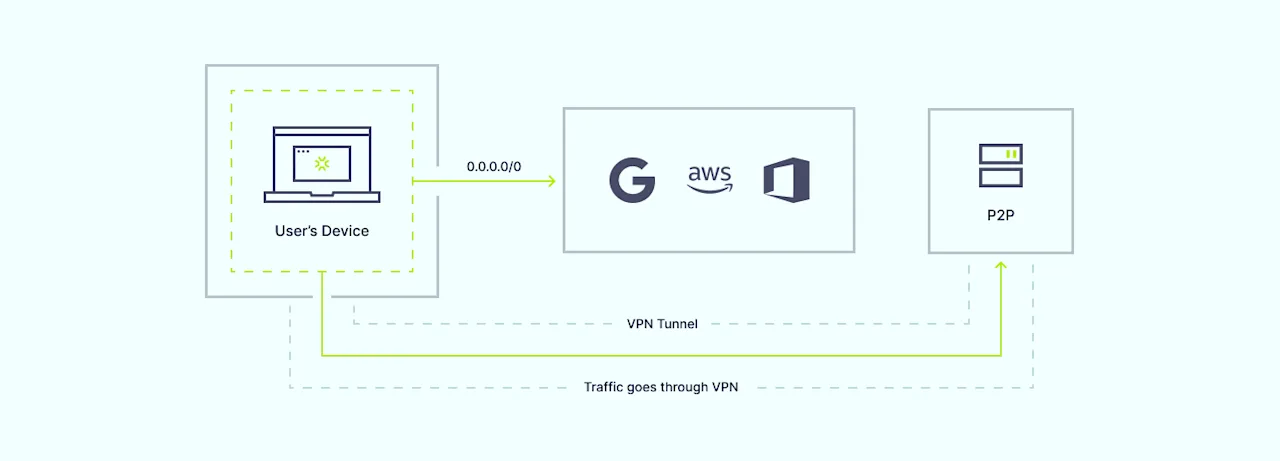
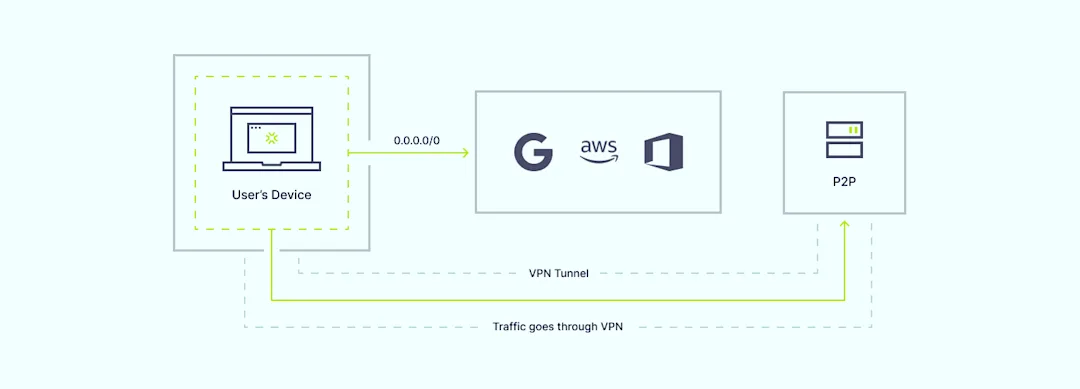
Split tunneling allows you to specify which traffic should traverse the secure VPN tunnel and which can access the internet directly. By “splitting” the traffic based on user-defined rules, you can tailor your network security approach to meet your organization’s unique needs.

Our VPN split tunneling functionality offers a tailored approach to traffic management, enabling you to selectively encrypt and route specific data streams while maintaining optimal speeds for non-sensitive traffic. This innovative feature provides a fresh approach to network security, paving the way for enhanced productivity, flexibility, and peace of mind.

How does VPN split tunneling work?

Traditional VPN connections route all internet traffic through an encrypted tunnel, providing robust security but potentially impacting performance for certain applications or services. VPN split tunneling breaks free from this one-size-fits-all approach by enabling you to specify which traffic should traverse the secure VPN tunnel and which can access the internet directly.

How NordLayer VPN split tunneling works

The process is remarkably straightforward: IT administrators define rules based on IP addresses, subnets, domain names, or even specific applications. By tailoring the rules to the organization’s needs, they can determine which network resources require the added protection of encrypted tunneling. This granular control ensures that mission-critical data associated with specific applications remains secure while other traffic, such as regular web browsing, flows uninterrupted. This optimization of network performance reduces potential bottlenecks, enhancing the user’s experience.

VPN split tunneling with NordLayer

At NordLayer, we’ve made it our mission to simplify the implementation of advanced networking solutions. Our VPN split tunneling feature easily integrates with our existing suite of products, providing a seamless and user-friendly experience.

To harness the power of VPN split tunneling, simply navigate to the “Network” section of the NordLayer Control Panel, select the desired server, and configure the split tunneling settings. Here, you can input the specific IP addresses or subnets you wish to route through our secure VPN servers, ensuring that only designated traffic utilizes the encrypted tunnel.

You also have the option to enable URL-based split tunneling directly from the Control Panel. Go to “Settings” and choose “Browser Extension Settings” to add specific domains you want to exclude from the encrypted VPN tunnel. This allows certain internet traffic to bypass encryption for optimized performance while maintaining security for other resources.

With our Core and Premium subscription plans, you gain access to this feature, unlocking new realms of network control and optimization. Premium subscribers can further leverage the Site-to-Site and Cloud Firewall capability, allowing secure access to private network subnets through the NordLayer gateway.

Differences between URL-based and IP-based split tunneling

While VPN split tunneling is not a novel concept, NordLayer’s implementation stands apart, offering a flexible split tunneling solution with both URL-based and IP-based filtering options. This dual approach addresses the needs of modern organizations by allowing customized network security configurations.

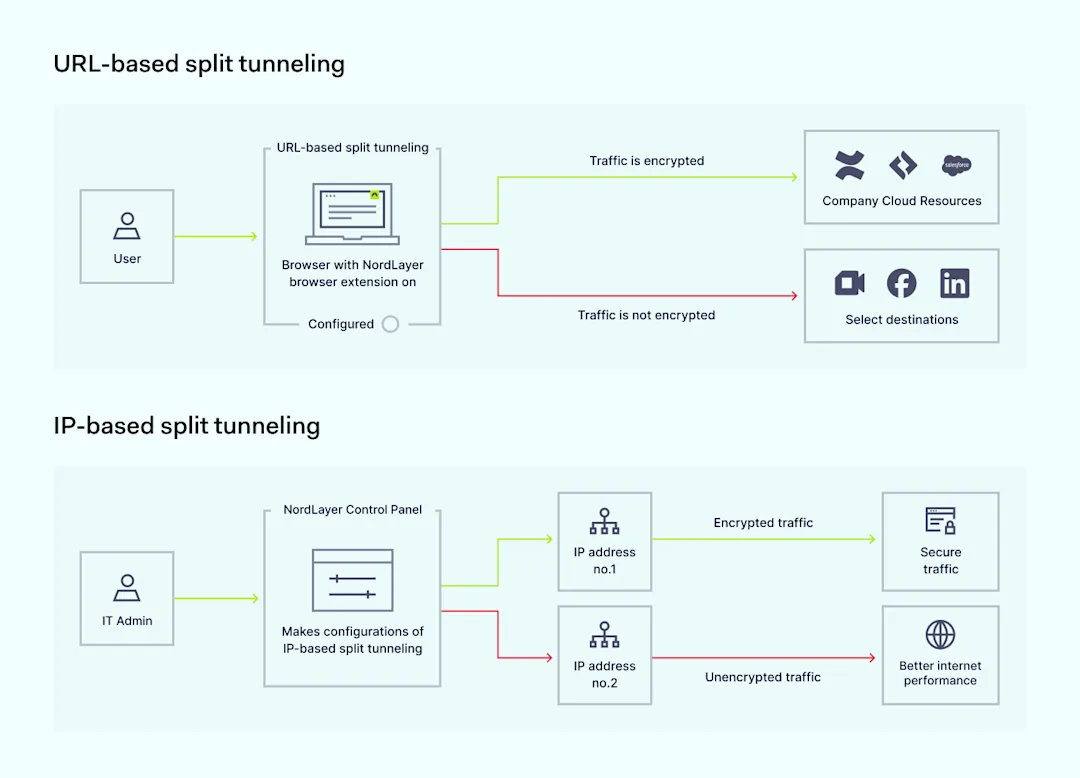
URL-based split tunneling vs IP-based split tunneling

URL-based split tunneling

URL-based split tunneling for the Browser Extension allows you to create exceptions by excluding specific domains from the encrypted VPN tunnel. This method is ideal for scenarios where you want to bypass VPN encryption for certain domains to optimize the internet performance while keeping the security for organizational resources.

IP-based split tunneling

On the other hand, IP-based split tunneling, our newly released feature for desktop and mobile apps, takes a more targeted approach. Instead of excluding domains, it allows you to include specific IP addresses or subnets for encryption through the NordLayer VPN tunnel. It provides less sensitive web browsing traffic to bypass encryption while keeping the protective layer on through the use of NordLayer’s Secure Internet Access features, such as DNS Filtering by Category and ThreatBlock.

This granular control enables you to pinpoint the exact network resources that require the heightened security of encrypted tunneling, while all other traffic traverses the internet directly.

Together, these two methods create NordLayer’s comprehensive VPN split tunneling feature, providing unprecedented flexibility in tailoring your organization’s network security posture. By combining URL-based and IP-based split tunneling, NordLayer enables you to customize your network security posture according to your organization’s specific needs and use cases.

Benefits of VPN split tunneling

The advantages of implementing NordLayer’s VPN split tunneling are multifaceted, catering to the diverse needs of IT administrators, end-users, and the organization as a whole.

  • Selective encryption for resource access: By encrypting only the traffic destined for specific resources, IT administrators maintain optimal performance for non-sensitive data streams, ensuring critical resources remain secure

  • Increased flexibility for network access security: IT admins can choose whom to grant access to specific resources

  • Better VPN and internet performance: VPN split tunneling helps when users experience latency or disruptions by optimizing traffic flows

  • Optimized bandwidth usage: Some traffic bypasses the corporate network, reducing VPN congestion and improving overall performance

  • Enabling access to restricted sites: Certain websites like financial services or government portals may block VPN connections, but VPN split tunneling allows making exceptions while keeping other traffic secure

For IT administrators

Enhanced control over network traffic allows tailored routing policies based on organizational priorities. Additionally, streamlined management from the Control Panel provides the flexibility to configure the feature to suit the organization’s unique requirements.

For end-users

Improved productivity stems from encrypting only selected sensitive traffic, reducing potential latency and performance bottlenecks. VPN split tunneling also increases flexibility and freedom to access organizational resources or specific domains or applications without compromising speed or user experience.

For organizations

Optimized network efficiency results from selectively routing traffic through the VPN tunnel, reducing congestion and optimizing bandwidth usage. Furthermore, elevated security and risk mitigation are attained by directing critical internal systems through a VPN while allowing web browsing traffic to bypass encryption.

Should you use NordLayer’s VPN split tunneling?

The answer to this question lies in your organization’s specific needs and priorities. If you’re seeking a solution that strikes the perfect balance between robust security measures and uninterrupted performance, NordLayer’s VPN split tunneling is an invaluable asset.

This feature is particularly beneficial for organizations with remote or hybrid workforces, where employees require seamless access to both corporate resources and the open internet. By selectively encrypting traffic to internal systems and applications, you can maintain a high level of security without sacrificing productivity or user experience.

Additionally, VPN split tunneling can be a game-changer for businesses operating in regulated industries or those with strict compliance requirements. By granularly controlling the flow of sensitive data, you can ensure adherence to industry-specific regulations while optimizing network performance.

Take control of your network traffic with NordLayer

In the realm of cybersecurity, where threats evolve and network demands surge, mastering the delicate balance between security and performance becomes paramount. NordLayer’s VPN split tunneling feature empowers organizations to take control of their network traffic, ensuring sensitive data remains secure while maintaining optimal speeds for non-sensitive activities.

Embrace the power of VPN split tunneling and experience a new level of network control, flexibility, and peace of mind. Don’t settle for compromise—choose NordLayer’s VPN split tunneling to level up your network security and performance. Reach out to our team and discover how this innovative solution can transform the way you approach network management.

Together, let’s redefine what’s possible in the world of secure networking.

About Version 2 Digital

Version 2 Digital is one of the most dynamic IT companies in Asia. The company distributes a wide range of IT products across various areas including cyber security, cloud, data protection, end points, infrastructures, system monitoring, storage, networking, business productivity and communication products.

Through an extensive network of channels, point of sales, resellers, and partnership companies, Version 2 offers quality products and services which are highly acclaimed in the market. Its customers cover a wide spectrum which include Global 1000 enterprises, regional listed companies, different vertical industries, public utilities, Government, a vast number of successful SMEs, and consumers in various Asian cities.

About NordLayer
NordLayer is an adaptive network access security solution for modern businesses – from the world’s most trusted cybersecurity brand, Nord Security.

The web has become a chaotic space where safety and trust have been compromised by cybercrime and data protection issues. Therefore, our team has a global mission to shape a more trusted and peaceful online future for people everywhere.

About NordLayer
NordLayer is an adaptive network access security solution for modern businesses – from the world’s most trusted cybersecurity brand, Nord Security.

The web has become a chaotic space where safety and trust have been compromised by cybercrime and data protection issues. Therefore, our team has a global mission to shape a more trusted and peaceful online future for people everywhere.

Making sense of popular methods of authentication

They: Authenticate yourself! — You: But how?

Every time you log in to an account, you must first prove that you are who you say you are. It’s like entering a military base: no pass, no entry. But that’s what authentication is essentially about — verifying a user’s identity so that no unauthorized parties can get on the inside.

Depending on the platform, the methods used for authentication vary in complexity. Sometimes, a single password is enough to gain access. Other times, you must provide additional codes, click a link sent to you via email, or stare at your device’s camera so it can scan your face.

With so many methods of authentication available, we aim to help you navigate this landscape and understand why it’s important to authenticate and how to do so safely and conveniently. Let’s start with the “why.”

Why is user authentication important?

While we’ve already touched on the importance of authentication in the previous section, let’s delve deeper into why it’s so crucial.

Authentication serves as the gatekeeper to your online accounts and services. Its primary role is to ensure that only you — and authorized individuals — can access your financial records, personal messages, and other sensitive information.

Moreover, authentication helps prevent attempts to misuse your accounts for fraudulent transactions or nefarious activities under false identities. In other words, it ensures that you have control of your accounts and that no deceitful actions can be made in your name.

Needless to say, as a user, you are also more likely to engage with online services, share personal information, and conduct transactions when user authentication methods are in place. So, in a way, it is also a way to form and nurture trust between you, the user, and the service provider.

Types of authentication methods

Among the array of user authentication methods available today, six stand out as the most popular and crucial for cybersecurity. These include:

Token authentication

This form of authentication involves the use of a physical device, such as a USB token or smart card, to generate a one-time password or cryptographic key for accessing systems or services. The token authentication method provides an additional layer of security as the token must be in your possession.

Password authentication

Passwords are the most widely used method for user authentication, requiring individuals to provide unique combinations of characters to access their accounts or systems. Strong passwords should be complex and unique, incorporating a mix of letters, symbols, and numbers arranged randomly to thwart cybercriminals’ attempts at guessing them.

Biometric authentication

Biometric authentication utilizes unique physical or behavioral characteristics of individuals to verify their identity. This can include fingerprint recognition, facial recognition, iris scanning, or voice recognition. Biometric authentication offers a high level of security as it is difficult to replicate or fake these biological traits.

Multi-factor authentication

Multi-factor authentication (MFA) combines two or more authentication factors, such as something you know (password), something you have (token), or something you are (biometric), to verify a user’s identity. By requiring users to provide multiple identity proofs, MFA adds an extra layer of security, reducing the risk of unauthorized access — even if one factor is compromised.

A common implementation of MFA is two-factor authentication (2FA), which requires users to provide two different types of authentication factors before accessing their accounts

Certificate-based authentication

This method involves the use of digital certificates issued by a trusted authority to verify the identity of users or devices. The certificates are used in combination with public-key cryptography to authenticate users and encrypt data during transmission, ensuring secure communication between parties.

Passkey authentication

Passkeys are a new form of authentication where users are granted access without providing their password. Passkey technology combines biometric verification with cryptographic keys for a safer and easier way to log in. Each user has a unique pair of keys: a public one stored on the server and a private one on their device. When logging in, the server asks for the private key, which the device provides. If they match, you’re granted access.

Which authentication method is the safest one?

Naming just one of the secure authentication methods described above as the safest is not easy, especially since each method has its own strengths and weaknesses depending on the situation. For instance, while biometric authentication methods are highly effective, they are not immune to theft. So, if a cybercriminal gains access to someone’s fingerprint, that authentication method becomes compromised. After all, unlike a password, you cannot change your fingerprint.

So, if we were pushed to choose just one, we would say that passkeys are the safest authentication method because they help eliminate the risk of phishing, cannot be easily stolen or guessed (unlike weak passwords), and utilize strong cryptographic techniques to ensure the integrity and confidentiality of user credentials. Passkeys also avoid the pitfalls of traditional methods as they do not rely on something you need to remember, like a password, or something that can be physically stolen, like a security token.

In reality, however, the best approach is to use a combination of different methods tailored to the specific situation and required level of security. The best part is that you only need one tool to make this possible.

You don’t have to settle for just one authentication method

If you use NordPass, an advanced yet intuitive password manager designed by the team behind NordVPN, you gain immediate access to many of the best authentication methods available, allowing you to mix and match them for optimal security. How so?

First, NordPass can generate strong passwords on the spot and allows you to store your credentials safely in an encrypted vault that only you can access. It also enables you to implement multi-factor authentication for your online accounts, using the NordPass app as your authenticator to provide TOTP codes. Additionally, NordPass supports passkey technology, empowering you to effectively protect your accounts without passwords and access them instantly through methods such as biometric authentication.

With NordPass, authentication management becomes seamless and secure — get the 14-day free trial and see for yourself.

About Version 2 Digital

Version 2 Digital is one of the most dynamic IT companies in Asia. The company distributes a wide range of IT products across various areas including cyber security, cloud, data protection, end points, infrastructures, system monitoring, storage, networking, business productivity and communication products.

Through an extensive network of channels, point of sales, resellers, and partnership companies, Version 2 offers quality products and services which are highly acclaimed in the market. Its customers cover a wide spectrum which include Global 1000 enterprises, regional listed companies, different vertical industries, public utilities, Government, a vast number of successful SMEs, and consumers in various Asian cities.

About NordPass
NordPass is developed by Nord Security, a company leading the global market of cybersecurity products.

The web has become a chaotic space where safety and trust have been compromised by cybercrime and data protection issues. Therefore, our team has a global mission to shape a more trusted and peaceful online future for people everywhere.

×

Hello!

Click one of our contacts below to chat on WhatsApp

×