Skip to content

What to do if your iPhone warns you of a compromised password

Getting a security notification is always unexpected and stressful. So when a compromised password warning pops up on your iPhone, it’s completely normal to feel a little unsettled. Let’s go over what this notification means and what steps you should take if you see it.


What is a compromised password notification on an iPhone?

Basically, an iPhone notification about a compromised password appears when Apple detects that a password you’ve used on a website or app has been exposed. This notification is sent so that you can change your password immediately to prevent data leaks and protect the account associated with that compromised password.


How was your password compromised?

It’s difficult to tell exactly how one of your passwords got compromised, as there are so many ways. Cybercriminals use all sorts of methods—like phishing, credential stuffing, social engineering, and brute-force attacks—to try to steal your passwords. So, if one of your passwords has been compromised, it may have been due to one of these tactics. It could also be that your password wasn’t strong enough to begin with, or that it was leaked in a data breach of a company whose services you use.


How does Apple know your password is compromised?

Apple detects compromised passwords through an iCloud Keychain feature that checks your saved passwords against a database of known data breaches. When a breach occurs, Apple compares your passwords to this database to determine if any have been exposed. If a match is found, Apple notifies you that your password has been compromised.


How to find compromised passwords on your iPhone

To find compromised passwords on your iPhone, just go to “Settings” and then “Passwords.” Once you’re there, look for any alerts with a red triangle or under “Security Recommendations.” If any of your saved passwords are compromised, you’ll get a notification, and Apple will suggest updating them for better security.

How to fix a compromised password

If you’ve received a compromised password notification on your iPhone, you must act immediately. Here’s what you should do:

  • Change your password to a stronger one—aim for at least 18 characters, with a mix of letters, numbers, and special characters.

  • Enable two-factor authentication (2FA) for extra protection on your account.

  • Check other accounts where you’ve used the same password for any suspicious activity, and update those passwords too.

  • Start using a password manager to securely store and manage your passwords.


How to stop your iPhone from sending compromised password notifications

To stop your iPhone from sending compromised password notifications, just follow these steps:

  1. Open the “Settings” app.

  2. Scroll down and tap on “Passwords.”

  3. Click on “Security Recommendations” at the top.

  4. Turn off “Detect Compromised Passwords.”


How to enhance the security of your passwords and accounts

Online threats can strike at any time, so it’s crucial to stay vigilant and use the right tools to protect your data. One of the most effective ways to do that is with a password manager. You might be thinking, “But iPhones come with a built-in password manager, right?” And while using it is definitely better than nothing, it doesn’t offer the same level of security as some third-party options like NordPass.

NordPass is a top-tier password manager that’s not only easy to use but also available across all major platforms and browsers, including iOS. Unlike Apple’s built-in password manager, NordPass uses a more advanced encryption algorithm (XChaCha20) to keep your data safe. It can also generate strong passwords on the spot and sync your passwords across all your devices. Plus, it offers much more than just password management. With features like Data Breach Scanner, Password Health, and Email Masking, NordPass goes the extra mile to enhance your online security.

So, if you’re serious about protecting your passwords, give NordPass a try and see how it can improve your online experience.

About NordPass
NordPass is developed by Nord Security, a company leading the global market of cybersecurity products.

The web has become a chaotic space where safety and trust have been compromised by cybercrime and data protection issues. Therefore, our team has a global mission to shape a more trusted and peaceful online future for people everywhere.

About Version 2 Digital

Version 2 Digital is one of the most dynamic IT companies in Asia. The company distributes a wide range of IT products across various areas including cyber security, cloud, data protection, end points, infrastructures, system monitoring, storage, networking, business productivity and communication products.

Through an extensive network of channels, point of sales, resellers, and partnership companies, Version 2 offers quality products and services which are highly acclaimed in the market. Its customers cover a wide spectrum which include Global 1000 enterprises, regional listed companies, different vertical industries, public utilities, Government, a vast number of successful SMEs, and consumers in various Asian cities.

PatientMpower prioritises privacy and security in remote healthcare with NordLayer

Summary: PatientMpower is a digital healthcare company that helps people with chronic illnesses monitor their health at home. Based in Dublin, they serve patients worldwide.

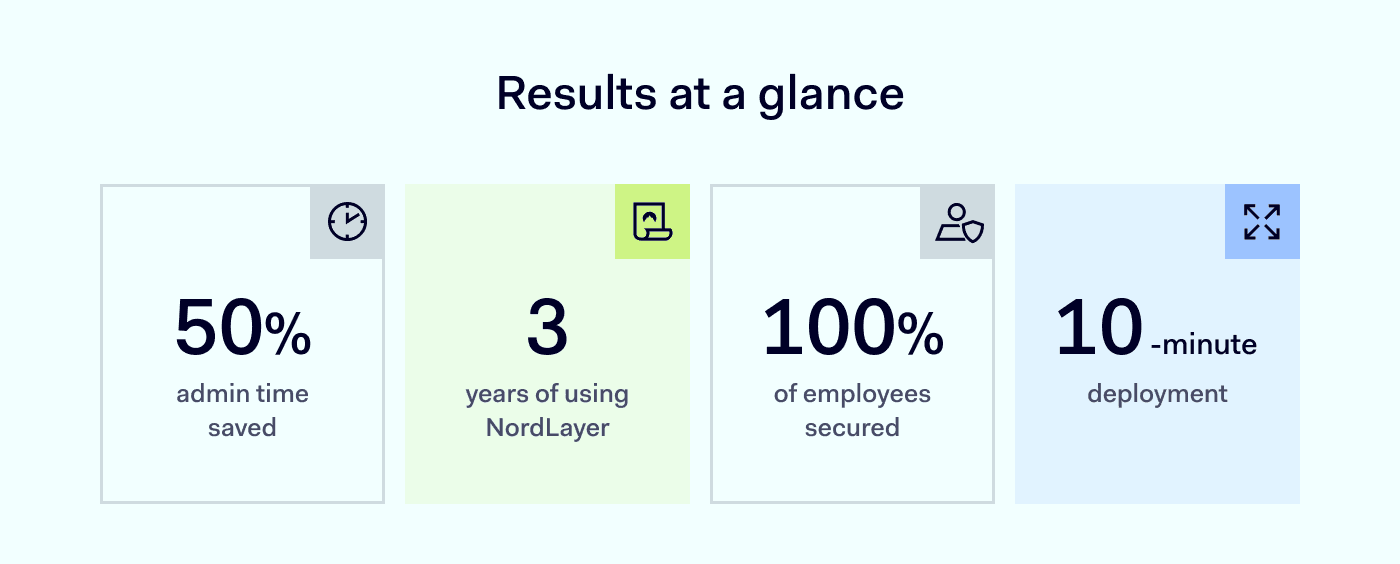
Results at a glance patientmpower

PatientMpower is a digital healthcare innovator. They help people with chronic illnesses manage their conditions at home. Their remote monitoring platform integrates with Bluetooth devices like spirometers and blood pressure monitors. Healthcare providers can then access this data through a secure portal.

They are based in Dublin, Ireland, but serve customers in the US, UK, Canada, and Europe. Their platform supports chronic conditions, including COPD, heart failure, pulmonary fibrosis, and lung transplants.

Profile of patientMpower

PatientMpower needed a flexible VPN to support their global team and keep data safe. Hardware VPNs caused downtime and needed constant upkeep. NordLayer’s cloud-based solution fixed these issues, saving time and making security easier.

The challenge: old physical VPN caused problems

PatientMpower’s hardware VPN was fine when most people were in the office. Then COVID-19 forced them to work from home. The physical VPN kept failing. The company wanted a cloud-based service that offered a static IP in Ireland. Oisín Hayes, Business Operations Manager & Data Protection Officer, says:

“Before NordLayer, we had a physical hardware VPN in the office. It was hard to maintain. It shut down often, and nobody was there to restart it when we all worked remotely.”

They checked many VPN providers. Some charged extra for a dedicated IP. Others had hidden fees. NordLayer stood out by offering a fair price and an admin console that was easy to use.

Step 1. Deploy NordLayer in 10 minutes

They switched to NordLayer in 2022. It replaced their old VPN right away.

  1. They chose a NordLayer plan
  2. Created user accounts
  3. Trained employees on the new client

“NordLayer was the one that felt most accommodating. We wanted a dedicated IP in Ireland, and they didn’t charge us extra.”

Step 2. Set up a Server with a dedicated IP

PatientMpower uses Amazon Web Services (AWS) to host their database. They need strong encryption and secure connections. Here’s what they did:

  1. Configured a server in Ireland
  2. Enabled a static IP for NordLayer
  3. Restricted access to only those on the VPN

They stay HIPAA-compliant and ISO 27001-compliant. ISO 27001 requires an external auditor every year. That means they must prove their security and alignment with best practices, and NordLayer helps with that.

“ISO 27001 is a top standard. Using a dedicated IP solves many security problems and helps to stay compliant with it.”

NordLayer Network - Gateways - Filter

* Example screenshot for illustration purposes.

Step 3. Combine NordLayer with AWS encryption

AWS encrypts data at rest. NordLayer encrypts data in transit. This two-layer approach keeps patient data safe.

  1. Linked AWS with the VPN
  2. Allowed access only from the NordLayer IP
  3. Met encryption and data breach controls

“We set it up so you can only access AWS if you go through our VPN.”

Step 4. Enable Web Protection

NordLayer’s Web Protection (ex-ThreatBlock) feature blocks harmful websites. It also removes pop-up ads and other distractions.

  1. Turned on Web Protection to filter malware
  2. Monitored for any sites falsely blocked
  3. Reduced risk of accidental infection

“When enabled, it blocks websites flagged as threats, so malware can’t infect your device.”

Step 5. Use Dashboards for ISO 27001 audits

NordLayer’s dashboards track user logins and network activity. These insights help with ISO 27001 audits.

PatientMpower reaches full 2FA adoption

Here is what they did:

  1. Pulled reports from the dashboard
  2. Shared data with external auditors
  3. Proved secure remote access for employees

“We use the dashboard for our ISO 27001 audit. It’s easy to show proof of security.”

Results: 50% admin time saved

  • 50% admin time saved
    They no longer waste hours fixing a physical VPN. It just works in the background.
  • Committed to NordLayer
    They compared other solutions but decided to stay. NordLayer had better pricing and support.
  • Seamless operation

“Our physical VPN caused no end of issues and it just wasn’t really functioning. NordLayer just exists in the background and does its job, and we don’t know it’s there.”

Why NordLayer works for patientMpower

They have used NordLayer for three years. It meets their top priorities: security and reliability. It also keeps remote work simple. Adding or removing seats is easy.

“You just add a seat, and then they bill you next month. It’s very straightforward.”

Pro cybersecurity tips from patientMpower

Quote

Conclusion

PatientMpower replaced their old physical VPN with NordLayer. They set up a Dedicated IP, turned on Web Protection, and used Dashboards for ISO 27001.

“It only took 10 minutes to deploy NordLayer. Now it keeps data secure without any hassle.”

Any business can do the same. NordLayer offers quick deployment, flexible pricing, and strong data protection.

Visit NordLayer and find the plan that fits your needs.

About NordLayer
NordLayer is an adaptive network access security solution for modern businesses – from the world’s most trusted cybersecurity brand, Nord Security.

The web has become a chaotic space where safety and trust have been compromised by cybercrime and data protection issues. Therefore, our team has a global mission to shape a more trusted and peaceful online future for people everywhere.

About Version 2 Digital

Version 2 Digital is one of the most dynamic IT companies in Asia. The company distributes a wide range of IT products across various areas including cyber security, cloud, data protection, end points, infrastructures, system monitoring, storage, networking, business productivity and communication products.

Through an extensive network of channels, point of sales, resellers, and partnership companies, Version 2 offers quality products and services which are highly acclaimed in the market. Its customers cover a wide spectrum which include Global 1000 enterprises, regional listed companies, different vertical industries, public utilities, Government, a vast number of successful SMEs, and consumers in various Asian cities.

Navigating tax season safely: an overview of credential security risks

The tax season has always been a critical time for both individuals and businesses, but it has never been quite as fraught with cyber threats as it is these days. The hard shift to digital filing—along with a constantly evolving threat environment—has turned this annual ritual into a prime time for cybercrime.


In 2024 alone, the Internal Revenue Service (IRS) uncovered $9.1 billion in tax fraud cases and received nearly 300,000 reports of identity theft. Whether it’s phishing emails designed to trick filers into disclosing personal details or sophisticated malware operations targeting tax professionals, cyber crooks during this period are disturbingly active. Today, we dive into the scope of these threats, examine their real-world implications, and provide practical steps to help mitigate them.

The landscape of tax season cyber threats

Tax season generally stretches from January to mid-April, when an estimated 165 million Americans and numerous businesses hustle to prepare and file tax returns. About 80 million of those returns are prepared by Certified Public Accountants (CPAs), according to recent industry data. Unfortunately, cybercriminals treat this turn to digital transactions as an annual opportunity and launch tailored attacks that aim to exploit both individuals as well as companies.

Phishing campaigns 

One of the most common attack vectors is phishing—where criminals send bogus emails designed to trick recipients into unsuspectingly providing sensitive personal data. These emails may appear to be from the IRS or reputable tax prep services, complete with official logos or references to “overdue payments.” A 2024 Hornetsecurity report pegged phishing at 39.6% of all email-based attacks, a trend amplified during tax season.

Malware and ransomware 

Tax forms often contain everything a hacker needs for identity theft: Social Security numbers, addresses, and banking details. And once cybercriminals gain access to your system—often via hidden malware in an attachment labeled “tax form” or “software update”—they can install spyware, key loggers, or even launch a full ransomware attack. Faced with a major filing deadline, victims might be more inclined to pay a ransom rather than miss the cut-off for submission.

“Ghost” preparers and fake platforms

Cybercriminals have also found success posing as tax professionals. In such a scenario, an unsuspecting taxpayer hands over a trove of personal information—bank account details, W-2 forms, Social Security numbers—only to see fraudulent returns filed in their name. The IRS warns that these “ghost” preparers usually vanish after submitting false forms and pocketing refunds—with identity theft-related tax fraud costing American taxpayers $5.5 billion in 2023.

Business-focused threats 

For small and midsize businesses, there’s another layer of complexity. Employee data—including Social Security numbers, addresses, and payroll information—often reside on shared drives or distributed networks. A single compromised password can open the door to large-scale identity theft or financial fraud. Given that many businesses rely on internal accounting departments or external consultants, the rate of data exchange grows. Each endpoint—whether an employee’s laptop or a tax preparer’s login credentials—can become a gateway to a breach if not safeguarded properly.

Why credential security matters

Data breaches don’t usually happen because a hacker brute-forces encryption algorithms. More often, criminals follow the path of least resistance, which tends to be simple or stolen passwords. Verizon’s 2024 Data Breach Investigations Report found compromised credentials behind 74% of financial sector attacks. And so tax season, with its sudden surge in data transmissions, provides an even bigger opportunity.

Credential stuffing attacks

Cybercriminals purchase stolen username-password pairs on the dark web and systematically test them on popular platforms. If you’re in the habit of reusing passwords, a single breach on one platform can open up multiple high-value accounts to intrusion—including those used for taxes.

Email account takeover

If hackers gain access to an email account, they can reset passwords on numerous services, intercept 2FA codes (if poorly implemented), or conduct spear-phishing attacks against your contacts. During tax season, access to a CFO’s or finance manager’s inbox is a potential gold mine.

Shared passwords for personal and work accounts

A surprisingly large number of incidents stem from people using the same or slightly modified passwords across multiple sites. If an attacker compromises your personal social media password, they can try variations of that password on your business or tax accounts.

With so many potential vulnerabilities arising from insecure credentials, having a robust and systematic approach to password management is critical. Employing a tool like NordPass helps create, store, and even share unique, complex passwords across a network of trusted employees or family members without the friction that leads to risk-laden “shortcut” practices.

Real-world repercussions of tax season breaches

Cyber threats may sound abstract until you experience them firsthand, unfortunately. So let’s consider a few scenarios that can easily play out during tax season.

Hijacked refunds

Criminals who gain access to your tax software account can alter returns, inflate refunds, and have the money deposited into their own accounts. Not only are you left without the anticipated refund, but you could be flagged for fraudulent activity by the IRS. Correcting these records requires time-consuming phone calls, paperwork, and sometimes legal counsel.

Identity theft and financial fraud

Tax documents typically hold Social Security numbers, addresses, and full legal names—crucial data for identity thieves. Armed with this information, cyber crooks can open credit lines, apply for loans, and even file additional fraudulent tax returns under your identity. The IRS estimates that scammers committed $5.5 billion in tax fraud in the last year alone, much of it fueled by stolen credentials.

Operational disruption and ransomware

If a ransomware attack locks down your systems during peak filing season, you may be faced with the unenviable choice of paying the ransom or missing the filing deadline. When your business’s entire payroll system is frozen, you stand to lose not only money but also the trust of your employees, clients, and partners.

Legal and regulatory trouble

Businesses are required by law to protect employee data. Should a breach involving W-2 forms occur, state and federal regulators might levy hefty fines, and employees could file lawsuits. For small businesses, these legal battles can negatively impact public reputation or even outright ruin the business financially. 

Tips for protecting credentials and mitigating risk

Given the scale of digital threats, securing your online identity during the tax filing process necessitates proactive strategies. Below are tangible measures for individuals and organizations.

Use strong, unique passwords

Avoid dictionary words, common phrases, or personal references. Never reuse passwords across services, especially for tax prep, payroll systems, and personal email accounts.

Consider adopting a trusted password manager such as NordPass, which can generate intricate passwords and store them securely.

Enable multi-factor authentication (MFA)

Whenever available, activate MFA on all platforms connected to your finances or email. This extra verification layer can help thwart criminals who may have stolen or guessed your password.

Stay wary of suspicious links and attachments

Phishing remains the easiest door into your personal or corporate systems. Even a single click on a malicious link or attachment can deliver spyware or ransomware. So make sure to always check the email sender’s address carefully, and manually visit official IRS or tax software sites by typing in the address rather than clicking a link.

Conduct routine account monitoring

Regularly review bank statements, credit reports, and your IRS tax account. If you see unfamiliar activity, act immediately. If you’re a business, schedule monthly or quarterly audits of software access logs to identify potential anomalies.

Update software and systems

Ensuring your operating system, antivirus, and tax software are current can close known vulnerabilities that criminals might aim to exploit. Encourage employees to run updates as soon as they’re available, rather than postponing them.

Limit access privileges

In a business environment, not every staff member needs access to all financial or payroll details. Adopt the principle of least privilege to shrink your attack surface. 

For additional protection, consider segmenting your network so that critical tax data is walled off from the rest of the organization’s operations.

Verify tax preparers’ credentials

Legitimate preparers must have a Preparer Tax Identification Number (PTIN). A lot of Americans entrust CPAs and other pros to handle their tax returns, so it’s vital to confirm the authenticity of anyone who deals with your finances. “Ghost preparers” who refuse to sign returns or demand unusual payment methods are immediate red flags.

Maintain an incident response plan

Outline the steps you’ll take if a breach does occur: who will you call first? How will you isolate infected systems? For businesses, having a tested response plan can drastically minimize downtime and financial loss in a worst-case scenario.

Security-first culture

Technical defenses cannot fully compensate for employees or household members who lack security awareness. Training and vigilance must become habits. When staffers comprehend the risks of phishing emails—or why weak passwords are a liability—they usually become active participants security-wise.

Tax season, with its tightly packed deadlines and sudden influx of external correspondences, is especially prone to mistakes. Criminals place their bets on hectic schedules and the assumption that nobody reads the fine print in a rush. By fostering an environment where it’s standard practice to confirm suspicious queries or check unplanned attachments, you reduce the chance of inadvertent leaks.

Of course, tools like NordPass help avoid the pitfalls of shared spreadsheets or stray Post-it notes with login data by providing secure credential storage and encrypted sharing, drastically reducing the friction that leads people to reuse or create weak passwords. 

Beyond tax season: building a resilient foundation

Keeping digital attackers at bay during tax season shouldn’t be a last-minute scramble. It must be part of a larger, year-round approach to cybersecurity. Tax season simply throws these issues into the spotlight because the stakes—and the volume of targeted scams—are higher.

View security as ongoing

While certain threats may peak from January to April, scammers work continuously. Make sure your security protocols— from patch management to employee training—are consistent and not just “tax-time activities.”

Leverage intelligence and reports

The IRS publishes alerts on emerging scams. Likewise, major cybersecurity outlets offer real-time threat briefings. By staying updated on known risks, you can proactively adjust or harden policies.

Invest in infrastructure

For businesses, upgrading legacy systems and implementing advanced threat detection can prevent criminals from exploiting outdated software. For individuals, maintaining secure Wi-Fi networks and establishing personal firewalls can be an impactful step.

Strengthen vendor and partner relationships

If your business deals with external tax preparers or payroll service providers, insist on strong security practices and confirm that they uphold data-protection protocols. Transparent discussions about cybersecurity responsibilities can avert confusion or blame in the event of a breach.

Encourage swift reporting

If something does go wrong—like an employee clicking a suspicious link—delays in reporting can allow malware to spread or cyber crooks to siphon off data unnoticed. Cultivate a culture where immediate reporting, rather than fear of reprimand, is the norm.

Wrapping up

Amid the hustle of calculating deductions, aligning your statements, and meeting deadlines, it’s all too easy to underestimate the value of robust credential security. Yet, in the end, the difference between a secure, worry-free filing and a catastrophic breach often hinges on consistent, disciplined adherence to fundamental security principles. As you gather receipts, consult accountants, or log in to tax software, remember that each login credential is a potential gateway. By making calculated, informed decisions, you maintain control over your security.




About NordPass
NordPass is developed by Nord Security, a company leading the global market of cybersecurity products.

The web has become a chaotic space where safety and trust have been compromised by cybercrime and data protection issues. Therefore, our team has a global mission to shape a more trusted and peaceful online future for people everywhere.

About Version 2 Digital

Version 2 Digital is one of the most dynamic IT companies in Asia. The company distributes a wide range of IT products across various areas including cyber security, cloud, data protection, end points, infrastructures, system monitoring, storage, networking, business productivity and communication products.

Through an extensive network of channels, point of sales, resellers, and partnership companies, Version 2 offers quality products and services which are highly acclaimed in the market. Its customers cover a wide spectrum which include Global 1000 enterprises, regional listed companies, different vertical industries, public utilities, Government, a vast number of successful SMEs, and consumers in various Asian cities.

What are drive-by download attacks, and how do they work?

Summary: Drive-by downloads install malware without user action, often through compromised websites or ads. Prevent attacks with software updates, ad blockers, and malware scanning.

A drive-by download attack can infect a device without a single click. For example, Cloak ransomware spreads through fake Windows updates by exploiting security flaws. Just visiting an infected website can trigger an infection.

Understanding how drive-by download attacks work is the first step in preventing them.

Key takeaways

  1. Drive-by download attacks install malicious code silently without user consent or action
  2. These attacks are increasing, targeting vulnerable web pages with security weaknesses
  3. A compromised website can infect visitors without requiring them to click anything
  4. Threat actors use exploit kits to find weaknesses and trigger unauthorized downloads of harmful payloads
  5. Malware installations happen in the background, often without users realizing it
  6. Organizations can mitigate risks with strong security practices, patching, and real-time monitoring
  7. Third-party components in web pages can introduce vulnerabilities, making them easier to exploit
  8. Malware scanning and access controls help block drive-by download attacks


What are drive-by download attacks?

A drive-by download attack occurs when a user loads a web page that contains malicious code. No clicks are needed—just visiting the page is enough to trigger an unintentional download. Attackers use hidden scripts and exploit kits to take advantage of security flaws, leading to covert downloads of dangerous software.

Most victims don’t realize an attack has happened until malware installs and starts causing damage. Web pages with outdated third-party components are prime targets. Once the harmful code executes, it can quickly deliver download payloads to endpoint users. Even legitimate websites can be dangerous if compromised.

How drive-by download attacks work

Threat actors design drive-by download attacks to exploit vulnerabilities in browsers, plug-ins, and outdated software. They begin by compromising a website or ad network, planting rogue code that waits for visitors.

Once a user loads the infected web page, the malicious script automatically scans for security weaknesses in the browser or any third-party software. If it finds a vulnerability, exploit kits take over, silently executing malware code and triggering a hidden download.

The malware installs in the background, often running unnoticed while it steals data or grants cybercriminals remote access. Since this entire process happens without user interaction, infections are difficult to detect before damage occurs.

How drive-by download attacks work


Who is most at risk?

Anyone browsing the web can be exposed to a drive-by download. However, certain users and organizations face higher risks:

  • People using outdated browsers or skipping security updates
  • Users with weak browser settings allowing unauthorized downloads
  • Companies with lax security policies, making endpoint users easy targets
  • Employees with admin privileges who can trigger large-scale malicious installations

Many drive-by download attacks happen through a silent download—when a user visits a breached website, and malicious code installs automatically. Keeping browsers updated and restricting third-party software can reduce the risk of malware downloads.

Types of drive-by download attacks

1. Malicious advertising networks (Malvertising)

Malicious advertising networks, also known as “malvertising,” are a leading source of drive-by downloads. Threat actors inject harmful scripts into legitimate ad networks. When users load these ads, hidden code attempts to download malware. Even trusted websites can unknowingly serve these infected ads.

  • Attackers exploit security vulnerabilities in ads to trigger unauthorized downloads
  • Victims don’t need to click on an ad—just viewing it can start the drive-by download attack
  • Attack kits scan for weaknesses, delivering download payloads without warning


2. Cross-site scripting (XSS) through compromised websites

Cross-site scripting allows attackers to inject malicious scripts into an infected website. When users visit, the script triggers an unintentional download.

  • XSS attacks blend into normal site content, making them hard to detect
  • Threat actors insert malicious code into user-generated pages, forums, or comment sections
  • Poor input validation allows these scripts to stay active for months, infecting visitors

3. Automated exploit kit attacks

Exploit kits scan a visitor’s device for known vulnerabilities. Once they find one, they deliver a hidden script that installs harmful software.

  • Common attack kits include RIG and Fallout, which automate attacks
  • The kit selects the best vulnerability to exploit, maximizing its success
  • Malware installs silently, often granting remote control to cybercriminals


Major drive-by download incidents

Several large-scale attacks highlight how destructive drive-by download attacks can be:

2016 malicious ads on major news sites
In March 2016, attackers compromised ad networks on sites like The New York Times, BBC, and AOL. Just loading these pages exposed users to hidden scripts. Exploit kits, including Angler, scanned for browser vulnerabilities and silently installed ransomware—no clicks needed.

2016 Chrome on Fedora drive-by download attack
In November 2016, researcher Chris Evans revealed how Chrome’s auto-download behavior and Fedora’s unsandboxed “Tracker” tool enabled silent malware infections. Chrome downloaded files without asking, and Fedora’s Tracker indexed them automatically. This let attackers execute malicious code without user action. Gstreamer, Fedora’s preview tool, had security flaws that made the attack even easier.

SocGholish (FakeUpdates) malware campaign
SocGholish, also called “FakeUpdates,” spreads through infected websites. Users see fake update prompts for browsers or Flash Player. Clicking downloads malware silently. Once inside, it can deliver ransomware, steal data, or open backdoors for future attacks.

Attackers rely on external components, ad networks, and security weaknesses to spread their malware quickly, catching even well-secured organizations off guard.

Major drive-by download incidents

How to prevent drive-by downloads

Preventing these attacks requires a layered security approach. Here’s what helps:

  1. Keep software updated—patch browsers, plug-ins, and operating systems
  2. Use intrusion detection systems to monitor traffic for suspicious activity
  3. Install ad blockers to reduce exposure to malicious advertising networks
  4. Use sandboxing tools to isolate and analyze suspicious downloads
  5. Limit third-party plugins in web pages and applications
  6. Train users to recognize warning signs of compromised websites
  7. Back up data regularly to recover quickly in case of malware installation
  8. Implement endpoint protection solutions that offer real-time malware detection and threat intelligence to monitor and block malicious activities on devices

Strong security policies and real-time monitoring help reduce the risk of unintentional downloads.

How NordLayer helps prevent drive-by downloads

NordLayer offers advanced security tools to protect against drive-by download attacks. Its real-time malware protection scans files before they reach your system. If it detects a threat, it blocks the file before an infection can occur.

Key features include:

  • Automatic scanning of downloaded files, preventing unauthorized downloads
  • Blocking of known malicious domains, reducing exposure to compromised websites
  • Detection of suspicious activity during file transfers, stopping malware deployment before it happens
  • Adaptive integration with existing security setups, ensuring no disruption to workflows

NordLayer also encrypts traffic, keeping data safe whether employees work on-site or remotely. Adding its Download Protection feature gives organizations an extra layer of defense against stealthy cyber threats. Learn more about real-time malware protection at the link above.

About NordLayer
NordLayer is an adaptive network access security solution for modern businesses – from the world’s most trusted cybersecurity brand, Nord Security.

The web has become a chaotic space where safety and trust have been compromised by cybercrime and data protection issues. Therefore, our team has a global mission to shape a more trusted and peaceful online future for people everywhere.

About Version 2 Digital

Version 2 Digital is one of the most dynamic IT companies in Asia. The company distributes a wide range of IT products across various areas including cyber security, cloud, data protection, end points, infrastructures, system monitoring, storage, networking, business productivity and communication products.

Through an extensive network of channels, point of sales, resellers, and partnership companies, Version 2 offers quality products and services which are highly acclaimed in the market. Its customers cover a wide spectrum which include Global 1000 enterprises, regional listed companies, different vertical industries, public utilities, Government, a vast number of successful SMEs, and consumers in various Asian cities.

How do you know if your email has been hacked?

Signs that your email could have been hacked

It’s not always immediately obvious that your email has been hacked, but there are signs you can look for that should alert you if something is wrong. Here’s what to watch out for:

Unexpected password change notifications

If you receive a notification or email saying that your password has been changed, and it wasn’t your doing, it’s highly likely that someone has taken over your email account. After all, who else could have done it? If you haven’t shared access to your email with anyone before, this situation should raise a major red flag. Additionally, if you receive messages indicating that someone is trying to change your password, stay alert as clearly someone is targeting your account and attempting to break in.

Login alerts from unknown locations or devices

Another disturbing message you might receive is about a successful login to your email account from an unfamiliar location or device. If you haven’t recently changed your computer or mobile phone, or you’re not on holiday somewhere far from home, this could mean that someone has bypassed your email security and gained access to your account. Treat every such notification very seriously.

Emails you didn’t send appearing in your “Sent” folder

The “Sent” folder in your email account should only contain messages you remember sending to your contacts. If you notice emails you don’t recognize, it could indicate that someone has hacked your account and is using it to send malicious messages that appear to come from you.

Strange or missing emails in your inbox

Having weird, unknown emails in your “Inbox” folder is also a sign of a potential email break-in. The same applies if you cannot find a specific email that you are certain was there before. So, if your inbox contains unfamiliar messages or is missing something, stay vigilant—it may indicate that your email account has been hacked.

Complaints from contacts about receiving spam from you

Have any of your friends told you they got a strange email from you saying you’re in trouble and need money? Or maybe one of your contacts got a message asking for your or their personal information? If you haven’t sent any messages like that, but people are getting them from your email, it could mean someone’s hacked your account and is using it to try and scam the people you know.

Being locked out of your email account

If you can’t log in to your email on any device you usually use, it might mean someone’s hacked your account and changed the password to lock you out. Unless you’ve forgotten your password or made a typo, take this seriously and assume your email’s been hacked.

How to check if your email has been hacked

To verify if your email account has been compromised, you’ll want to keep an eye out for the signs we’ve mentioned earlier and also do a little digging on your own.

First off, review your login activity. Most email providers, like Google, Yahoo, and Microsoft Outlook, allow you to check your account’s login history, including the IP address, device, location, date, and time of your recent logins. If anything looks unfamiliar, that’s a red flag.

Next, check for any strange, unexpected activity in your email inbox and the “Sent” folder. Go over the messages from the past few days/weeks and see if there are any phishing emails sent from your account or password reset emails you didn’t request. If something feels off, make sure to secure any accounts that might be affected.

Also, it’s a good idea to see if anyone outside your trusted circle has been granted permissions linked to your email, or if your account has been used to sign in to any services you don’t recognize.

Lastly, you can use online tools, like the Data Breach Scanner from NordPass, to check if your account has been exposed. Simply enter your email address, and the tool will scan the dark web for any mentions to determine if it is at risk.

What to do if you suspect your email has been hacked

If you suspect your email has been hacked, you might be wondering, “What do I do now?” Fortunately, you’re not left helpless—you can take steps to regain access to your account. Here are some things you should do:

  • Change your email password right away to prevent unauthorized access. TIP: Use NordPass’ online Password Generator to create a new, strong password in no time.

  • Enable two-factor authentication (2FA), so that logging in to your email requires more than just a password.

  • Use the “Log out of all devices and sessions” option to ensure anyone who’s gained access is immediately logged out.

  • If you can’t access your account, report the issue to your email provider right away. They’ll help you restore access and block any outsiders from using your account.

If you need more information, we have another article titled “What to do if a scammer has your email address,” which provides detailed instructions on how to proceed when an unauthorized party has taken control of your email account.

How to prevent your email from being hacked

There’s no single technique you can use to protect your email from being hijacked, but combining a few methods can significantly boost your email security. First, how safe your email is depends largely on your online activities and how you share sensitive information. If you’re careful about where and with whom you share your email address, you’re off to a good start.

For an extra layer of protection, a password manager like NordPass can be a game-changer. Not only can it keep all your passwords—including your email password—safe in an encrypted vault, but it can also generate strong passwords on the spot. If your email password is weak or outdated, NordPass will notify you. Plus, with the Data Breach Scanner feature, you’ll get an alert if your email is compromised in a data breach. NordPass also includes Email Masking, which lets you use a fake email address when signing up for services or newsletters, protecting your real email from exposure.

So, if you want to enhance your email security and feel more confident online, NordPass is the way to go. Try the free 14-day trial and see how it can improve your online experience.

About NordPass
NordPass is developed by Nord Security, a company leading the global market of cybersecurity products.

The web has become a chaotic space where safety and trust have been compromised by cybercrime and data protection issues. Therefore, our team has a global mission to shape a more trusted and peaceful online future for people everywhere.

About Version 2 Digital

Version 2 Digital is one of the most dynamic IT companies in Asia. The company distributes a wide range of IT products across various areas including cyber security, cloud, data protection, end points, infrastructures, system monitoring, storage, networking, business productivity and communication products.

Through an extensive network of channels, point of sales, resellers, and partnership companies, Version 2 offers quality products and services which are highly acclaimed in the market. Its customers cover a wide spectrum which include Global 1000 enterprises, regional listed companies, different vertical industries, public utilities, Government, a vast number of successful SMEs, and consumers in various Asian cities.

×

Hello!

Click one of our contacts below to chat on WhatsApp

×