Skip to content

7 Data Loss Prevention best practices


Summary: Cyber threats, compliance demands, and costly breaches make Data Loss Prevention (DLP) a must-have. Learn how to stop data leaks before they happen.

As businesses rely more on digital tools and cloud-based SaaS platforms, keeping sensitive data safe is more important than ever. Cyber threats are evolving at breakneck speed, regulations like GDPR and HIPAA are getting stricter, and data breaches are now hitting the bottom line harder than ever before. Traditional Data Loss Prevention measures (DLP) in consumer browsers don’t cut it anymore.

That’s where enterprise browsers come in. Built with security in mind, they offer stronger DLP capabilities to protect your confidential data.

In this blog, we’ll share simple tips to build a strong DLP strategy. You’ll also learn how enterprise browsers with network security solutions can keep your most valuable assets safe.

Key takeaways

  • DLP includes strategies and tools that protect sensitive data safe from unauthorized access. These tools also help businesses meet regulations like HIPAA, GDPR, and PCI DSS and support SOC 2 compliance.
  • Data loss can happen due to human error, insider threats, cyber-attacks, or hardware failures. By understanding these risks, businesses can take steps to protect their critical data.
  • DLP tools like encryption, access control, and backups ensure data stays secure.
  • Best practices for DLP include setting clear policies, using advanced technology, and maintaining constant monitoring.

What is data loss prevention?

Data breaches are becoming more costly and harder to manage. In 2024, the global average cost of a data breach hit a record $4.88 million, up 10% from the year before. According to Statista, the healthcare sector took the biggest hit, with an average cost of $9.77 million per breach, while the financial sector followed at $6.08 million.

To combat these rising costs and risks, businesses need robust data protection measures in place. Data Loss Prevention (DLP) is about protecting digital information from loss, theft, or unauthorized access. It ensures data stays private, accurate, and available while helping businesses comply with security regulations like HIPAA for healthcare data or PCI DSS for payment card information.

Key measures include encryption, which secures data so only authorized users can access it, and access controls, which restrict who can view or modify sensitive information. Backup and recovery solutions help restore lost data, while data masking hides confidential details. By implementing these practices, organizations can prevent breaches, protect customer trust, and comply with industry regulations.

Common causes of data loss

Data loss occurs when important information is deleted or corrupted. Some causes are more common than others, and each requires specific prevention measures. Understanding these threats helps businesses protect their data.


Human error

Mistakes happen, and human error is one of the main reasons data is lost. For example, accidentally deleting files, entering the wrong information, or mishandling sensitive data can lead to serious problems. In fact, IBM’s Cost of a Data Breach Report 2024 found that human error is behind up to 95% of cybersecurity breaches.

While checking entries twice and limiting access to important files can help, these methods depend on manual actions and still leave room for error. To lower the risk of data loss, businesses should use automated security policies and tools that centralize data protection.

Data Loss Prevention (DLP) strategies, whether through enterprise browsers or other solutions, enforce security policies across all users, reducing errors and ensuring consistent protection. Regular training and clear data-handling procedures further support a strong culture of security.

Insider threats

Insider threats come from employees or trusted individuals with access to sensitive data. Sometimes, mistakes, like sending an email to the wrong person, cause data security incidents. Other times, disgruntled employees may intentionally steal or expose information. The IBM report also states that insider threats account for 34% of data leaks.

Strict access controls and user activity monitoring can help. Government agencies, like the U.S. Department of Defense, use advanced monitoring to prevent insider threats. While most businesses don’t need military-level security, they should still take insider risks seriously.

Cyber-attacks

Cybercriminals use malware, ransomware, and phishing attacks to steal or damage data. IBM X-Force data shows that malware deployment was the most common attack method in 2024, making up 43% of incidents. Ransomware accounted for 20%, while backdoors and crypto miners were found in 6% and 5% of cases, respectively.

Strong cybersecurity measures—such as firewalls, antivirus software, and employee training, are crucial for protection. But in web-based SaaS environments, enterprise browsers add an extra layer of defense. They help protect against threats like malware, ransomware, and phishing by using centrally managed security policies, access controls, and other built-in functionalities. This works alongside traditional security measures to keep your systems safe.

Hardware failures

Storage devices can fail, causing data loss. A server crash, hard drive failure, or power surge can make critical data inaccessible. While less common, hardware failures can be devastating.

Regular backups and redundant storage solutions help prevent permanent data loss. Think of it as having a spare tire ready in case of a flat.

Natural disasters

Floods, earthquakes, and fires can destroy physical storage devices. For example, Hurricane Sandy in 2012 caused widespread data loss for businesses.

While natural disasters can’t be prevented, businesses can prepare. Off-site backups and cloud storage solutions keep data safe and accessible, even if disaster strikes.


Why Data Loss Prevention matters to your business

As businesses rely more on digital tools, data flows across various devices, cloud services, and networks, creating a “borderless” environment. This is further complicated by:

  • Hybrid work models
  • Bring Your Own Device (BYOD) policies
  • Increased use of contractors
  • The rapid growth of web-based SaaS apps

These factors introduce new risks, making it harder to track and protect sensitive data. Without strong security measures, your data could be exposed, stolen, or misused.

Data Loss Prevention (DLP) helps businesses secure their most valuable information, including customer data, financial records, and intellectual property. DLP also ensures compliance with regulations and helps prevent costly data breaches caused by accidental leaks or cyber threats.

As this environment grows more complex, traditional security measures are often no longer enough. A tailored approach, especially within web-based SaaS environments, is critical to safeguarding your data effectively.

Do you know where your sensitive data is?

In modern work environments, traditional DLP methods are no longer enough, especially as more people use their own devices (BYOD) and rely on web-based SaaS apps.

Why is DLP critical? Because it helps businesses gain full visibility into how data flows across their network. It allows IT and security teams to monitor and enforce policies, preventing unauthorized sharing of sensitive information like customer records and financial details.

Enterprise browsers provide a more granular solution. They track data flow within the browser in real time. This allows IT and security teams to block the unauthorized sharing of sensitive information, whether employees are using corporate or personal devices.

With granular access and centralized security policy control, businesses can create stronger, more flexible security rules to protect their most valuable assets.

Employees can also put data at risk, not only external threats

Most companies focus on external cyber threats but overlook insider risks, employees, or partners who unintentionally or intentionally expose sensitive data. According to Verizon’s Data Breach Investigations Report, 28% of breaches involve insiders.

Traditional Data Loss Prevention (DLP) tools have primarily focused on preventing accidental data leaks. They do this by blocking sensitive files from being shared through unsecured channels like USB drives or personal email accounts. These tools also detect unusual activity and restrict access to prevent data theft. If a security incident occurs, traditional DLP can quarantine or encrypt the data to protect against exposure.

Enterprise browsers take DLP a step further by offering a more granular, real-time approach. This is especially useful in today’s web-focused environments. With centrally managed security policies, enterprise browsers can implement DLP controls directly within the browser, addressing data risks at the source.

This includes features like:

  • Copy/paste restrictions to prevent unauthorized data transfer
  • Download limitations to control sensitive file movement
  • Real-time monitoring to spot and block risky behavior instantly

By using these advanced controls, businesses can protect data more effectively and prevent accidental or intentional leaks.

The cost of a data breach is higher than you think

A single data breach can lead to financial penalties, reputational damage, lost customers, and legal consequences. According to IBM’s Cost of a Data Breach Report 2024, on average, it takes 191 days to detect a breach, giving hackers plenty of time to steal valuable information.

DLP minimizes this risk by enforcing strict security policies, reducing the chances of a costly data breach. Organizations that protect their data avoid regulatory fines, lawsuits, and the financial impact of lost business.


Stay compliant and avoid costly fines

Regulations like GDPR, HIPAA, and PCI DSS require businesses to implement strict data protection measures. Non-compliance can lead to fines of up to 4% of global annual revenue or restrictions on business operations.

DLP helps businesses meet compliance requirements with built-in policy templates and reporting tools. It simplifies audits and ensures sensitive data is protected according to industry standards.

Secure data across all devices, including BYOD and IoT

With employees using personal devices, data moves beyond traditional networks. Add IoT into the mix, and the security challenges grow even more complex. That’s why businesses need to adopt BYOD security practices, such as DLP.

DLP, according to security policy, monitors and protects sensitive data across all devices, whether it’s being accessed, stored, or transmitted. By working alongside other security measures, DLP helps businesses prevent unauthorized data sharing and reduce security risks in an increasingly mobile world.

Take control of your data before it’s too late

Data protection isn’t just about avoiding breaches. It’s about maintaining trust, staying compliant, and keeping your business secure. Implementing a strong DLP strategy gives your organization the tools to prevent data loss, control sensitive information, and stay ahead of advanced threats.

Top 7 best practices for data loss prevention

Implementing a Data Loss Prevention solution combines cybersecurity best practices with advanced technology to protect sensitive information. DLP solutions typically focus on four key areas:

  • Prevention: Monitors data in real-time and blocks unauthorized access or suspicious activity
  • Detection: Identifies unusual behavior and improves data visibility to catch potential threats early
  • Response: Tracks and reports data access and movement to streamline incident response
  • Analysis: Helps security teams understand high-risk activity and improve future protection strategies

DLP gives businesses real-time visibility and control, helping safeguard data, reduce risks, and stay compliant. To learn more, download our free PDF on best practices for data loss prevention.


Step 1: Conduct a data inventory & risk assessment

Start by identifying and classifying all sensitive data within your organization. Determine where the data is stored, how it moves, and who can access it. Conduct a thorough risk assessment to understand potential vulnerabilities and threats.

Use data discovery software to automate this process. By gaining insight into your data’s landscape, you can tailor your DLP efforts.

Step 2: Use encryption to protect your files

Encryption turns data into a code that only authorized users can read. It helps protect sensitive information from cybercriminals. When data needs to be accessed, a decryption key is used to turn it back into its original form.

Encryption safeguards data both when it’s stored and when it’s being transferred. Encryption is required by data protection laws like GDPR and PCI DSS, as it helps reduce the risk of data loss and helps businesses stay compliant with regulations.

NordLayer’s advanced encryption protocols, such as AES 256-bit and ChaCha20 encryption, further strengthen your data’s confidentiality and integrity.

Step 3: Enable access controls

Access controls limit who can see your sensitive data. This can include defining data classification, access controls, encryption standards, and incident response procedures. You can strengthen access with the following solutions:

  • Network Access Control (NAC) ensures that unauthorized users and devices are kept out of your business network.
  • Identity and Access Management (IAM) verifies that every user accessing the network is properly authorized.
  • Network segmentation restricts access so employees and contractors only see the data they need to do their jobs, nothing more.
  • Cloud Firewall lets you control who and how to access internal resources and cloud tools, adding an extra layer of protection.

Step 4: Monitor data access

Monitoring allows you to track who accesses data and helps quickly spot unauthorized activity. By tracking user interactions and reviewing logs, businesses can detect breaches and respond faster. Real-time monitoring solutions can alert security teams about suspicious behavior.

Additionally, Device Posture Security monitors access to every application on every device. Real-time alerts inform security teams about suspicious behavior, while automated monitoring tools help identify anomalies and uncover potential breaches. Regular audits should measure incident detection and response times, data breach reductions, and cost savings.

Step 5: Conduct regular security audits

Regular security audits help identify vulnerabilities in systems that could lead to data loss. These audits examine software, hardware, networks, and policies. Once vulnerabilities are found, businesses can take steps to fix them, such as updating software or improving security protocols.

Evaluate your DLP using these key performance indicators (KPIs):

  • Incident detection & response times: How quickly data breaches are detected and resolved
  • Reduction in data breaches: A decrease in the frequency and severity of data breaches
  • Cost savings: Financial benefits from preventing breaches and avoiding regulatory penalties

Regular monitoring and audits, combined with the integration of NordLayer’s security solutions, will help optimize your DLP strategy. This approach ensures ongoing data protection and supports your SOC 2 compliance efforts.

Step 6: Train your team

Employee training is key to preventing data breaches caused by human error. As we have already mentioned, 95% of breaches happen because of mistakes made by people. That’s why teaching staff to spot phishing emails, use strong passwords, and follow data protection rules can reduce these risks.

Regular training keeps employees aware of current threats and reinforces their role in protecting sensitive information. It also helps build a strong security culture.

Step 7: Create a strong incident response plan

Data breaches can still happen, so it’s crucial to have a plan for responding quickly. The plan should include identifying the breach, containing it, notifying affected individuals, investigating the cause, and taking corrective actions to prevent future breaches.

A clear incident response plan minimizes damage and helps businesses recover quickly. In short, having an incident response plan is crucial for managing data breaches and minimizing their impact.

Why choose NordLayer for enhanced data protection?

We provide robust solutions for Data Loss Prevention to protect your business:

  • Network Access Control (NAC): Ensures only authorized users and devices can access your network by enforcing security policies.
  • Identity and Access Management (IAM): Allows only authorized users to access your resources.
  • Network Segmentation: Restricts access to data, ensuring employees and contractors only see what’s relevant to their roles.
  • Cloud Firewall: Network segmentation with customized access controls ensures only authorized users can access sensitive data and reduces the risk of insider threats or data leaks.

Additional solutions include:

  • Single Sign-On (SSO): Secure, easy login that integrates with popular Identity and Access Management (IAM) providers.
  • Two-factor authentication (2FA): Adds an extra layer of security with a second verification step.
  • Advanced traffic encryption: AES 256-bit and ChaCha20 encryption protect data in transit, ensuring data confidentiality and integrity.

NordLayer’s solutions seamlessly integrate into your existing infrastructure, offering advanced monitoring, threat detection, and incident response capabilities.

Strengthen your data protection strategy today and prepare for even more with our upcoming Enterprise Browser. Don’t wait for a breach—join the waiting list now!


Senior Copywriter


About NordLayer
NordLayer is an adaptive network access security solution for modern businesses – from the world’s most trusted cybersecurity brand, Nord Security.

The web has become a chaotic space where safety and trust have been compromised by cybercrime and data protection issues. Therefore, our team has a global mission to shape a more trusted and peaceful online future for people everywhere.

About Version 2 Digital

Version 2 Digital is one of the most dynamic IT companies in Asia. The company distributes a wide range of IT products across various areas including cyber security, cloud, data protection, end points, infrastructures, system monitoring, storage, networking, business productivity and communication products.

Through an extensive network of channels, point of sales, resellers, and partnership companies, Version 2 offers quality products and services which are highly acclaimed in the market. Its customers cover a wide spectrum which include Global 1000 enterprises, regional listed companies, different vertical industries, public utilities, Government, a vast number of successful SMEs, and consumers in various Asian cities.

How to find all accounts linked to your email

Why check accounts linked to your email?

When you link accounts to your email, it’s like you’re taking a shortcut—and sometimes that comes with a little risk. That’s why you should be aware of what could go wrong.

So, for instance, if an account that is associated with your email gets compromised, the attackers could learn your email address and then spam you with phishing messages. On the flip side, if your email gets exposed (say, on the dark web), hackers might try to break into and access your linked accounts.

But don’t panic just yet—if you haven’t noticed any weird behavior on your accounts, you’re probably fine. In case you have doubts, use an online tool to check if your email or any other account has been compromised. Basically, what we’re simply trying to say here is that it’s generally wise to be mindful of your digital footprint and know which platforms and services are linked to your email.

How to check accounts linked to your email providers

One of the most common ways to link accounts is by connecting an account—like one for shopping, gaming, or other services—to your email, such as Google, Outlook, or Yahoo. Let’s go over the steps to find all the accounts associated with your email, depending on which email provider you use.

Google account

  1. Go to your Google Account settings and click on “Security.”

  2. Find the section called “Your connections to third-party apps & services.”

  3. Click “See all connections” at the bottom to view the full list of accounts linked to your Google account.

Outlook and Microsoft account

  1. Sign in to your Microsoft Account.

  2. Click on “Privacy” or “Security” in the menu.

  3. Find the “Apps and Services” section to see the accounts linked to your Microsoft account.

Apple account

  1. Go to the Settings app on your iPhone or iPad (or open System Settings if you’re using a Mac), then tap your name.

  2. Find and tap “Sign in with Apple” to view the list of all accounts you’ve signed into using your Apple ID.

Yahoo account

Unfortunately, Yahoo doesn’t offer a way to directly see all the external accounts linked to your Yahoo email. So, there’s no easy way to get a full list of all the accounts using your Yahoo address.

How to check accounts linked to your social media accounts

Another way to link your accounts is by connecting them to one of your social media profiles. If you’ve already done that, here’s how you can check which accounts are linked to your Facebook, X, Instagram, or LinkedIn.

Facebook

  1. Log in to your Facebook account, click on your profile picture in the top-right corner, and then select “Settings & Privacy.”

  2. In the left sidebar, click “Apps and Websites” to see a list of online services linked to your Facebook account.

X (Twitter)

  1. Open the X app.

  2. Tap the profile icon in the top-left corner and select “Settings and Privacy.”

  3. Click on “Apps and Sessions” to see all accounts linked to your X account.

Instagram

  1. Open the Instagram app and go to your profile.

  2. Tap the three horizontal lines in the top-right corner.

  3. Go to “Settings,” then “Account,” and “Linked Accounts.”

LinkedIn

  1. Open LinkedIn

  2. Click on your profile icon in the top-right corner and select “Settings & Privacy.”

  3. Under the “Account” tab, click “Partners and Services.”

Other options

Although checking which accounts are linked to your email or social media is usually pretty straightforward, sometimes it can still get tricky—especially if you’ve been locked out of your accounts. So, what are your options then?

In this case, you’ll have to rely on the information you already have and piece things together to figure out what accounts are linked to your email or social media. If you still have access to your email, try searching through your messages for any information about linked accounts. You can also check your browser history to see which online services you’ve used and possibly signed into with your email or social media.

Another option is to use account recovery tools. These can help you verify which email or phone number is tied to your account and might offer hints or recovery links to help you regain access.

What to do with accounts you no longer use

If there are online accounts you no longer use but that are still linked to your email, it’s a good idea to delete them to avoid any potential data exposure or unauthorized access.

But if you don’t want to delete them for some reason, at least consider boosting their security. You can do this by creating a super-strong password (around 18 characters long with a mix of uppercase and lowercase letters, numbers, and symbols), turning on two-factor authentication (2FA), and maybe even unlinking them from your email or social media accounts. That way, you’ll keep them safer even if they’re not actively in use.

How to better manage your online accounts

It’s simple: if you want easy logins without sacrificing security—or even better, want to boost your account security—then it’s time to try a solid password manager like NordPass.

NordPass is an end-to-end encrypted password manager that allows you to securely store and manage your passwords, credit card details, and other sensitive info. It makes logging in a breeze by autofilling your credentials across all major browsers and devices. Plus, it can generate strong passwords on the spot, monitor the dark web for any signs of your data being compromised, and even mask your email when signing up for newsletters or services.

With NordPass, you get the same convenience of linking accounts for easy logins, but with far more protection to help you avoid data leaks and account lockouts. So, give NordPass a try and see how it can make your online life easier and more secure.

About NordPass
NordPass is developed by Nord Security, a company leading the global market of cybersecurity products.

The web has become a chaotic space where safety and trust have been compromised by cybercrime and data protection issues. Therefore, our team has a global mission to shape a more trusted and peaceful online future for people everywhere.

About Version 2 Digital

Version 2 Digital is one of the most dynamic IT companies in Asia. The company distributes a wide range of IT products across various areas including cyber security, cloud, data protection, end points, infrastructures, system monitoring, storage, networking, business productivity and communication products.

Through an extensive network of channels, point of sales, resellers, and partnership companies, Version 2 offers quality products and services which are highly acclaimed in the market. Its customers cover a wide spectrum which include Global 1000 enterprises, regional listed companies, different vertical industries, public utilities, Government, a vast number of successful SMEs, and consumers in various Asian cities.

Can a PDF have a virus? Practical solutions for cyber-safe businesses

Summary: PDFs can carry malware through scripts, embedded files, and exploits. Learn how to identify threats and protect your business.

Imagine getting an urgent email from a supplier with an attached invoice in PDF format. Without hesitation, you open it—only to realize later that your system has been compromised. This scenario is more common than you might think. According to cybersecurity reports, PDFs are becoming increasingly popular for distributing malware. Attackers exploit the trust users have in these documents to deliver malware, steal sensitive information, and gain unauthorized access to systems.

But how do PDF viruses work, and how can you protect your business from them? In this guide, we’ll explore how malicious PDF files operate, how they infect devices, and what cybersecurity measures can keep your business safe.

Key takeaways

  • PDF files can contain malicious code that exploits vulnerabilities to spread malware.
  • Cybercriminals use PDF documents to deliver malware, execute code, and steal sensitive information.
  • Some malicious PDF files contain JavaScript exploits, embedded executables, or phishing links.
  • Email attachments and downloading PDFs from untrusted sources are significant security risks.
  • Businesses should implement robust cybersecurity measures, including antivirus software and real-time malware protection.

What types of malware can PDFs have?

While PDFs are commonly used for business documents, reports, and invoices, they can also carry harmful software. Below are some ways an infected PDF file can pose a risk to your system

JavaScript code exploits

Some PDF viruses use JavaScript code. This programming language allows interactive features like forms or digital signatures. However, cybercriminals can exploit this functionality to run hidden scripts when the document is opened. These scripts can:

  • Download and install malware on the system
  • Steal sensitive information, such as login credentials
  • Redirect users to phishing websites designed to capture personal data

Embedded executable files and malicious software

PDF documents can contain embedded files, including executable programs (.exe), scripts, or other payloads. If a user clicks on an embedded file, it can install harmful software on the device. Common examples include:

  • Ransomware that encrypts files and demands payment
  • Keyloggers that capture keystrokes to steal passwords
  • Trojans that provide remote access to the system

PDF viruses that execute code

Certain malicious PDF files exploit vulnerabilities in PDF readers to run code without the user’s knowledge. This method allows attackers to:

  • Distribute malware across networks
  • Modify system files
  • Gain unauthorized access to company resources

Common PDF attack scenarios

Since PDF files are widely trusted and frequently shared in business settings, bad actors take advantage of that to trick users into opening infected files. Below are some of the most common attack scenarios businesses should be aware of:

  • Email attachments: Cybercriminals often distribute compromised PDF files through phishing emails, impersonating trusted senders
  • Fake invoices and reports: Fraudsters send malicious PDFs disguised as legitimate business documents
  • Downloadable PDFs on websites: Attackers upload infected files to compromised websites, luring victims into downloading PDF files

These methods allow malicious actors to distribute malware quickly without raising suspicion. Once a harmful PDF is opened, it can exploit vulnerabilities, run code, and steal sensitive data. Understanding how these attacks work is the first step in preventing them.

Now, let’s examine how an infected PDF file infiltrates your system.

How PDF viruses infect your device

A compromised PDF file can spread malware in various ways:

  1. Exploiting software vulnerabilities: If a PDF reader isn’t updated, attackers can use known security flaws to execute malicious code.
  2. Encouraging users to enable permissions: Some PDFs request additional permissions that, when granted, allow malicious actions.
  3. Triggering automatic scripts: JavaScript-based attacks can initiate downloads or connect to malicious servers.
  4. Embedding infected links: Clicking on a link inside a PDF may redirect users to phishing pages designed to steal credentials.

Other hidden threats in PDF attachments

While malicious PDFs are often associated with direct malware infections, they can also serve as gateways for other cybersecurity threats. Bad actors are always improving their tactics. They embed hidden dangers within seemingly harmless documents to compromise devices and steal sensitive data.


Understanding these risks is essential for businesses looking to protect their cyberspace.

Malicious links and phishing attempts

Many malicious PDFs contain links that appear legitimate but direct users to harmful websites. These sites may:

  • Trick users into entering login credentials.
  • Install malware upon page load.
  • Request fake security updates to compromise devices.

Hidden form fields and data harvesting

Attackers can embed hidden form fields within PDF documents to collect sensitive data. Unsuspecting users might unknowingly submit information such as:

  • Banking details
  • Company login credentials
  • Personal identification numbers

Additional threats to watch for

Beyond traditional malware and phishing tactics, additional threats that can compromise your security are:

  • Obfuscated code: Malicious PDFs can use encrypted or hidden code to bypass security detection
  • Redirect chains: Clicking a link in a PDF might trigger multiple redirects (a bunch of hidden websites) before landing on the final malicious page

These hidden threats illustrate how PDFs can be manipulated for cyber-attacks beyond traditional malware infections. By recognizing these dangers, businesses can take proactive steps to secure their systems. Next, let’s explore how to identify the signs of a malicious PDF before it compromises your security.

Signs of a malicious PDF

Be cautious if you notice any of the following:

  • Unexpected prompts requesting permissions
  • PDF attachments from unknown senders
  • Unusual file sizes or strange formatting
  • Warning messages from your PDF reader or antivirus software
  • Links that don’t match their displayed URLs

PDF security best practices

Protecting your business from malicious PDFs means taking a proactive approach. Implementing best practices can significantly reduce the risk of malware infections and data breaches.

To protect your business from PDF malware, follow these security measures:

  1. Use real-time malware protection. Deploy security solutions that scan PDF attachments before opening. Many modern antivirus software solutions include real-time scanning features that help block suspicious PDFs immediately.
  2. Keep software up to date. Regularly update your PDF reader, operating system, and antivirus software to patch vulnerabilities. Cybercriminals exploit outdated software with known security flaws, so keeping all applications current is essential. Enabling automatic updates for your antivirus software ensures you have the latest threat definitions and security patches.
  3. Disable JavaScript in your PDF reader. This reduces the risk of script-based attacks. Disabling JavaScript in your PDF viewer limits the chances of unauthorized code running on your system and strengthens overall security.
  4. Avoid opening suspicious email attachments. Verify senders before downloading PDFs. Attackers frequently disguise malicious PDFs as legitimate business documents, such as invoices or contracts. If you happen to receive an unexpected attachment, please confirm its legitimacy through a separate communication channel before opening it.
  5. Enable email security filters. Use advanced email protection to detect and block malicious PDFs. Many email security solutions offer automated scanning and filtering of incoming messages, preventing phishing emails and malware-laden attachments from reaching your inbox. Configuring these filters to work alongside your antivirus software strengthens your business’s defense against cyber threats.
  6. Train employees on cybersecurity awareness. Educate your team about recognizing phishing emails and malicious PDF files. Regular cybersecurity training sessions help employees identify suspicious attachments, avoid clicking on malicious links, and follow best practices for handling digital documents. Encouraging a security-conscious workplace culture is one of the most effective ways to prevent cyberattacks.

By following these best practices, businesses can create a safer digital environment and minimize the risk of falling victim to PDF-based cyber threats. However, staying vigilant and employing additional security solutions is just as critical.

How NordLayer can help

Cybercriminals constantly evolve their tactics, making it crucial to implement proactive security measures. NordLayer’s toggle-ready network security platform offers real-time malware protection to scan and block malicious downloads before they reach your systems.

With NordLayer’s advanced security features, businesses can:

  • Detect and prevent malicious software in PDF attachments
  • Block suspicious links and phishing attempts
  • Secure sensitive information against cyber threats

Protect your company from PDF malware and ensure a safer digital workspace today.

About NordLayer
NordLayer is an adaptive network access security solution for modern businesses – from the world’s most trusted cybersecurity brand, Nord Security.

The web has become a chaotic space where safety and trust have been compromised by cybercrime and data protection issues. Therefore, our team has a global mission to shape a more trusted and peaceful online future for people everywhere.

About Version 2 Digital

Version 2 Digital is one of the most dynamic IT companies in Asia. The company distributes a wide range of IT products across various areas including cyber security, cloud, data protection, end points, infrastructures, system monitoring, storage, networking, business productivity and communication products.

Through an extensive network of channels, point of sales, resellers, and partnership companies, Version 2 offers quality products and services which are highly acclaimed in the market. Its customers cover a wide spectrum which include Global 1000 enterprises, regional listed companies, different vertical industries, public utilities, Government, a vast number of successful SMEs, and consumers in various Asian cities.

What to do if your iPhone warns you of a compromised password

Getting a security notification is always unexpected and stressful. So when a compromised password warning pops up on your iPhone, it’s completely normal to feel a little unsettled. Let’s go over what this notification means and what steps you should take if you see it.


What is a compromised password notification on an iPhone?

Basically, an iPhone notification about a compromised password appears when Apple detects that a password you’ve used on a website or app has been exposed. This notification is sent so that you can change your password immediately to prevent data leaks and protect the account associated with that compromised password.


How was your password compromised?

It’s difficult to tell exactly how one of your passwords got compromised, as there are so many ways. Cybercriminals use all sorts of methods—like phishing, credential stuffing, social engineering, and brute-force attacks—to try to steal your passwords. So, if one of your passwords has been compromised, it may have been due to one of these tactics. It could also be that your password wasn’t strong enough to begin with, or that it was leaked in a data breach of a company whose services you use.


How does Apple know your password is compromised?

Apple detects compromised passwords through an iCloud Keychain feature that checks your saved passwords against a database of known data breaches. When a breach occurs, Apple compares your passwords to this database to determine if any have been exposed. If a match is found, Apple notifies you that your password has been compromised.


How to find compromised passwords on your iPhone

To find compromised passwords on your iPhone, just go to “Settings” and then “Passwords.” Once you’re there, look for any alerts with a red triangle or under “Security Recommendations.” If any of your saved passwords are compromised, you’ll get a notification, and Apple will suggest updating them for better security.

How to fix a compromised password

If you’ve received a compromised password notification on your iPhone, you must act immediately. Here’s what you should do:

  • Change your password to a stronger one—aim for at least 18 characters, with a mix of letters, numbers, and special characters.

  • Enable two-factor authentication (2FA) for extra protection on your account.

  • Check other accounts where you’ve used the same password for any suspicious activity, and update those passwords too.

  • Start using a password manager to securely store and manage your passwords.


How to stop your iPhone from sending compromised password notifications

To stop your iPhone from sending compromised password notifications, just follow these steps:

  1. Open the “Settings” app.

  2. Scroll down and tap on “Passwords.”

  3. Click on “Security Recommendations” at the top.

  4. Turn off “Detect Compromised Passwords.”


How to enhance the security of your passwords and accounts

Online threats can strike at any time, so it’s crucial to stay vigilant and use the right tools to protect your data. One of the most effective ways to do that is with a password manager. You might be thinking, “But iPhones come with a built-in password manager, right?” And while using it is definitely better than nothing, it doesn’t offer the same level of security as some third-party options like NordPass.

NordPass is a top-tier password manager that’s not only easy to use but also available across all major platforms and browsers, including iOS. Unlike Apple’s built-in password manager, NordPass uses a more advanced encryption algorithm (XChaCha20) to keep your data safe. It can also generate strong passwords on the spot and sync your passwords across all your devices. Plus, it offers much more than just password management. With features like Data Breach Scanner, Password Health, and Email Masking, NordPass goes the extra mile to enhance your online security.

So, if you’re serious about protecting your passwords, give NordPass a try and see how it can improve your online experience.

About NordPass
NordPass is developed by Nord Security, a company leading the global market of cybersecurity products.

The web has become a chaotic space where safety and trust have been compromised by cybercrime and data protection issues. Therefore, our team has a global mission to shape a more trusted and peaceful online future for people everywhere.

About Version 2 Digital

Version 2 Digital is one of the most dynamic IT companies in Asia. The company distributes a wide range of IT products across various areas including cyber security, cloud, data protection, end points, infrastructures, system monitoring, storage, networking, business productivity and communication products.

Through an extensive network of channels, point of sales, resellers, and partnership companies, Version 2 offers quality products and services which are highly acclaimed in the market. Its customers cover a wide spectrum which include Global 1000 enterprises, regional listed companies, different vertical industries, public utilities, Government, a vast number of successful SMEs, and consumers in various Asian cities.

PatientMpower prioritises privacy and security in remote healthcare with NordLayer

Summary: PatientMpower is a digital healthcare company that helps people with chronic illnesses monitor their health at home. Based in Dublin, they serve patients worldwide.

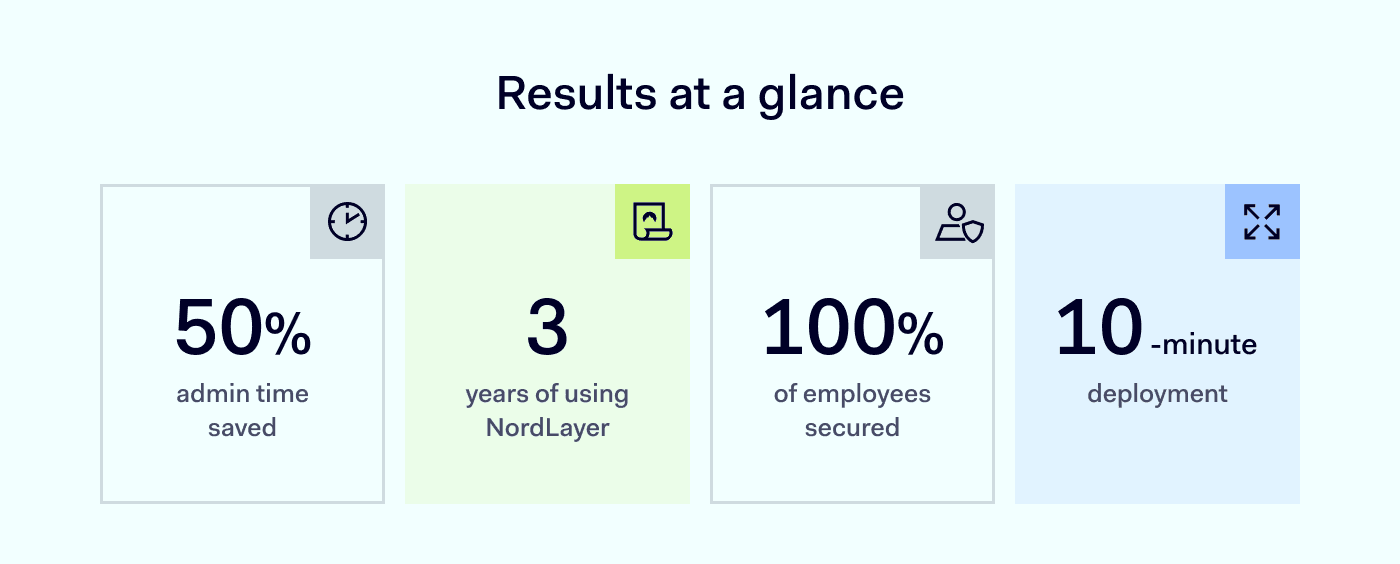
Results at a glance patientmpower

PatientMpower is a digital healthcare innovator. They help people with chronic illnesses manage their conditions at home. Their remote monitoring platform integrates with Bluetooth devices like spirometers and blood pressure monitors. Healthcare providers can then access this data through a secure portal.

They are based in Dublin, Ireland, but serve customers in the US, UK, Canada, and Europe. Their platform supports chronic conditions, including COPD, heart failure, pulmonary fibrosis, and lung transplants.

Profile of patientMpower

PatientMpower needed a flexible VPN to support their global team and keep data safe. Hardware VPNs caused downtime and needed constant upkeep. NordLayer’s cloud-based solution fixed these issues, saving time and making security easier.

The challenge: old physical VPN caused problems

PatientMpower’s hardware VPN was fine when most people were in the office. Then COVID-19 forced them to work from home. The physical VPN kept failing. The company wanted a cloud-based service that offered a static IP in Ireland. Oisín Hayes, Business Operations Manager & Data Protection Officer, says:

“Before NordLayer, we had a physical hardware VPN in the office. It was hard to maintain. It shut down often, and nobody was there to restart it when we all worked remotely.”

They checked many VPN providers. Some charged extra for a dedicated IP. Others had hidden fees. NordLayer stood out by offering a fair price and an admin console that was easy to use.

Step 1. Deploy NordLayer in 10 minutes

They switched to NordLayer in 2022. It replaced their old VPN right away.

  1. They chose a NordLayer plan
  2. Created user accounts
  3. Trained employees on the new client

“NordLayer was the one that felt most accommodating. We wanted a dedicated IP in Ireland, and they didn’t charge us extra.”

Step 2. Set up a Server with a dedicated IP

PatientMpower uses Amazon Web Services (AWS) to host their database. They need strong encryption and secure connections. Here’s what they did:

  1. Configured a server in Ireland
  2. Enabled a static IP for NordLayer
  3. Restricted access to only those on the VPN

They stay HIPAA-compliant and ISO 27001-compliant. ISO 27001 requires an external auditor every year. That means they must prove their security and alignment with best practices, and NordLayer helps with that.

“ISO 27001 is a top standard. Using a dedicated IP solves many security problems and helps to stay compliant with it.”

NordLayer Network - Gateways - Filter

* Example screenshot for illustration purposes.

Step 3. Combine NordLayer with AWS encryption

AWS encrypts data at rest. NordLayer encrypts data in transit. This two-layer approach keeps patient data safe.

  1. Linked AWS with the VPN
  2. Allowed access only from the NordLayer IP
  3. Met encryption and data breach controls

“We set it up so you can only access AWS if you go through our VPN.”

Step 4. Enable Web Protection

NordLayer’s Web Protection (ex-ThreatBlock) feature blocks harmful websites. It also removes pop-up ads and other distractions.

  1. Turned on Web Protection to filter malware
  2. Monitored for any sites falsely blocked
  3. Reduced risk of accidental infection

“When enabled, it blocks websites flagged as threats, so malware can’t infect your device.”

Step 5. Use Dashboards for ISO 27001 audits

NordLayer’s dashboards track user logins and network activity. These insights help with ISO 27001 audits.

PatientMpower reaches full 2FA adoption

Here is what they did:

  1. Pulled reports from the dashboard
  2. Shared data with external auditors
  3. Proved secure remote access for employees

“We use the dashboard for our ISO 27001 audit. It’s easy to show proof of security.”

Results: 50% admin time saved

  • 50% admin time saved
    They no longer waste hours fixing a physical VPN. It just works in the background.
  • Committed to NordLayer
    They compared other solutions but decided to stay. NordLayer had better pricing and support.
  • Seamless operation

“Our physical VPN caused no end of issues and it just wasn’t really functioning. NordLayer just exists in the background and does its job, and we don’t know it’s there.”

Why NordLayer works for patientMpower

They have used NordLayer for three years. It meets their top priorities: security and reliability. It also keeps remote work simple. Adding or removing seats is easy.

“You just add a seat, and then they bill you next month. It’s very straightforward.”

Pro cybersecurity tips from patientMpower

Quote

Conclusion

PatientMpower replaced their old physical VPN with NordLayer. They set up a Dedicated IP, turned on Web Protection, and used Dashboards for ISO 27001.

“It only took 10 minutes to deploy NordLayer. Now it keeps data secure without any hassle.”

Any business can do the same. NordLayer offers quick deployment, flexible pricing, and strong data protection.

Visit NordLayer and find the plan that fits your needs.

About NordLayer
NordLayer is an adaptive network access security solution for modern businesses – from the world’s most trusted cybersecurity brand, Nord Security.

The web has become a chaotic space where safety and trust have been compromised by cybercrime and data protection issues. Therefore, our team has a global mission to shape a more trusted and peaceful online future for people everywhere.

About Version 2 Digital

Version 2 Digital is one of the most dynamic IT companies in Asia. The company distributes a wide range of IT products across various areas including cyber security, cloud, data protection, end points, infrastructures, system monitoring, storage, networking, business productivity and communication products.

Through an extensive network of channels, point of sales, resellers, and partnership companies, Version 2 offers quality products and services which are highly acclaimed in the market. Its customers cover a wide spectrum which include Global 1000 enterprises, regional listed companies, different vertical industries, public utilities, Government, a vast number of successful SMEs, and consumers in various Asian cities.

×

Hello!

Click one of our contacts below to chat on WhatsApp

×