Skip to content

8 Expert Recommended Best Practices to Secure Linux Systems

Similar to MacOS and Windows systems, securing Linux devices is paramount to ensure critical and sensitive data is safe from outside threats. 

While many developers view Linux’s wide range of distribution and configuration options as desirable, the operating system (OS) presents a real challenge to IT admins. Those seeking to centrally monitor and secure Linux endpoints alongside other OS face challenges like managing root access/permissions, lack of centralized MDM while trying to stay up to date with the latest security patches across all of the different distributions.

Since there are numerous threat vectors, we recommend a simple, best practices approach to safeguarding organizational systems and data. This article highlights eight Linux System best practices worth following for better security.  

8 Ways to Safeguard Linux Systems from Cybersecurity Threats

Though by no means exhaustive, the following tips lay a strong foundation for implementing a Zero Trust Security framework in a Linux environment: 

1. Stay Current on Patches and Updates

Always update the software running on your devices as soon as possible to protect against vulnerabilities and/or security enhancements. This means ensuring your Linux distributions as well as other installed software are running the latest versions.

The JumpCloud Directory Platform makes it easy to set up patching policies for Ubuntu systems. You can also use JumpCloud to create your own custom scripts/commands to ensure all your devices and installed software are kept up to date.

screenshot of Linux
JumpCloud’s Linux (Ubuntu) portal

2. Practice the Principle of Least Privilege 

NIST defines least privilege as follows:

The principle that a security architecture should be designed so that each entity is granted the minimum system resources and authorizations that the entity needs to perform its function.

In other words, only provide access to needed resources at any given time. 

For example, the marketing department probably doesn’t need access to the same applications and data as the finance department. Use a platform like JumpCloud to manage which users have access to your Linux devices and what specific permissions and applications are available and/or accessible.

3. Utilize Data Encryption

Encrypt Linux systems data by ensuring only authorized users (with an encryption key) have access. Full-disk encryption only releases decrypted data contents after users provide proof of identity via a passphrase or key. 

This extra measure provides additional security beyond existing OS security mechanisms because it continues to protect content even after breach or removal. Follow JumpCloud’s recommended Linux Encryption Best Practices along with the Linux Check Disk Encryption Policy to verify your data is protected.

screenshot of Linux
JumpCloud’s Linux Disk Encryption Policy Portal

4. Maintain Up-to-Date Images

Linux systems are often built or copied from “golden” images. While this hack is great scaling without building from the ground up, many admins forget to update the golden images regularly. 

Ensure you’re building secure systems by maintaining your images with the latest patches and security updates. Here is a quick tutorial that walks through setting up critical policies and management practices with the JumpCloud agent.

5. Secure and Monitor Network Activity

Monitor and secure your network devices and traffic to mitigate vulnerabilities, threats,  and potential for breeches. Regularly monitor your networks for abnormal activity that might indicate a new threat. 

You can utilize Jumpcloud’s Network Parameters Policy to enhance your systems’ network security. This policy can disable IP and packet forwarding, prevent routed packets from being accepted, ignore ICMP broadcasts, enable path filtering and TCP SYN cookies, and log information about suspicious packets.

6. Minimize Software Footprint

Only install the software necessary for any given system. Unneeded and/or unused software increases the security risk and potential threat vectors. Further, by removing unneeded software, you also get the benefits of reduced storage space, memory allocation, any associated licensing costs while optimizing your system performance

7. Enforce Strong Passwords, MFA and/or SSH keys

Protect and prevent unauthorized access to organizational systems by enforcing strong passwords, SSH keys, and multi-factor authentication. 

Ensure passwords and/or SSH keys are changed regularly. Further, utilize Jumpcloud’s SSH Root Access and SSH Server Security Enforcement to help ensure only authorized access. The SSH Server securely provides remote access to devices. 

The settings in this policy only apply if the SSH daemon is installed on the system. To ensure access is restricted to only authorized users, configure your server to: place sensible resource limits, disable features with high potential for abuse, and disable algorithms and ciphers known to be weak.

8. Stay Vigilant with Ongoing Training 

IT Security is always changing to adapt and protect against new threats. We are all in this together to foster a safe IT environment as the backbone of our technologies. 

As the saying goes, “It takes a village!” IT professionals must stay abreast of emerging security threats and openly share their knowledge with the community. We recommend monitoring the following resources for the latest security landscape happenings:

Of course, the above list is certainly not exhaustive. Each IT admin and organization should determine which security measures to take in order to best achieve their objectives. 

Manage Your Linux Systems With JumpCloud for Free!

At JumpCloud, we’re constantly building additional security and management measures to help meet emerging regulatory compliance requirements, security posture, and device management needs. 

Please review our growing suite of Linux Security Policies and let us know how we can help provide you the tools you need to better manage your Linux systems. JumpCloud’s cross-OS platform makes it easy to manage Linux (Ubuntu) servers, Red Hat clients, Windows fleets, and macOS devices.
About Version 2 Digital

Version 2 Digital is one of the most dynamic IT companies in Asia. The company distributes a wide range of IT products across various areas including cyber security, cloud, data protection, end points, infrastructures, system monitoring, storage, networking, business productivity and communication products.

Through an extensive network of channels, point of sales, resellers, and partnership companies, Version 2 offers quality products and services which are highly acclaimed in the market. Its customers cover a wide spectrum which include Global 1000 enterprises, regional listed companies, different vertical industries, public utilities, Government, a vast number of successful SMEs, and consumers in various Asian cities.

About JumpCloud
At JumpCloud, our mission is to build a world-class cloud directory. Not just the evolution of Active Directory to the cloud, but a reinvention of how modern IT teams get work done. The JumpCloud Directory Platform is a directory for your users, their IT resources, your fleet of devices, and the secure connections between them with full control, security, and visibility.

Federated Authentication vs. Delegated Authentication: What’s the Difference?

The demand for web applications compelled tech vendors to adopt standards that allow authorized users to access resources, across domains, through a single set of credentials. That approach, called federated authentication, has simplified SaaS adoption. However, small and medium-sized enterprises (SMEs) still face barriers when they attempt to extend single sign-on (SSO) to all of their resources. Not every asset is an app, and IT teams struggle to set up access control throughout their entire infrastructure and often turn to complex or siloed systems.

Delegated authentication is a simpler approach that addresses the shortcomings of federated authentication by broadening the protocols (and resources) that your identities can interface with. This article explores both types of authentication in more detail and outlines how an open directory adds more value to your existing identity and access management (IAM) investments.

What Is Federated Authentication?

One identity should log your users into all of their web apps.

Overview

Standards of federated authentication including OAuth, OIDC, and SAML make it possible for one identity provider (IdP) to manage access and authorization into many service providers (SP). For instance, that’s what happens when you log into a non-Google service with your Google Workspace credentials. Your credentials don’t pass over the web and the IdP determines whether access is granted. SSO users are managed from a single directory, even if applications have unique entitlements. 

Benefits and Drawbacks

Federated authentication increases productivity, lowers management overhead, simplifies user lifecycle management, and increases security. There’s fewer passwords to manage (assuming passwords are still required) and service providers don’t store credentials. That has the benefit of reducing the risk of identities being compromised from third-party breaches. This form of authentication has given rise to entire ecosystems of cloud-native apps with seamless integrations that wouldn’t have been possible without SSO. Those authentications are protected by other IdP security controls such as multi-factor authentication (MFA). Some IdPs are even adopting more user-friendly and secure passwordless solutions for frictionless access control. 

Entitlement management, through a directory and groups, can enforce least privilege computing to ensure that users don’t become a risk. For example, JumpCloud automates group memberships by continually auditing attributes. The result is that IT admins remember to remove access when one of your team members changes his/her role.

This approach to identity management is auditable and serves to satisfy cloud compliance requirements. Your organization can more easily attest to its compliance by using SSO.

Potential Lock-In

The spirit of openness doesn’t always survive a vendor’s stack. Identity providers and service providers can diminish the intention and effectiveness of using open standards by introducing closed practices and roadblocks. IAM lock-in presents itself in the form of vendor-specific considerations such as integrations with proprietary APIs that are roadblocks to accessing data and features. Spending on development projects for APIs creates a higher cost of switching. Other roadblocks include requiring components and licensing to work with other systems. 

For example, Microsoft’s approach to IAM can obligate organizations to adopt its extended stack including Azure Active Directory (AAD), licensing Windows Server, in addition to either Active Directory Domain Services (AD DS), or Active Directory Federation Service (AD FS) for users to access web apps. That’s because Active Directory wasn’t intended for the internet. Microsoft embraced open standards, but intertwined its monoculture with the IAM services it introduced.

Hidden Costs

Service providers may also upcharge for SSO, a practice that’s dubbed the “SSO Tax.” Interoperability is possible, but it comes at a higher cost per user. The SSO tax runs contrary to the spirit of open standards and may even compromise security if the MFA solution that your organization has implemented can’t function environment-wide. Some IdPs, such as Microsoft, restrict the number of apps your users can access without incurring additional charges. Always consider hidden costs and how subscriptions change over time before you select an IdP or service provider. A directory that provides true federated authentication should make it possible to assemble the optimal stack of services from the vendors of your choosing, without limits.

Accessing Non-Web Apps

SMEs commonly have resources that authenticate using RADIUS or LDAP, including VPNs or Wi-Fi networks. Identity and access management (IAM) suites strive to fill in the gaps when interoperability falls short, but not every solution works the same way. Operational overhead can vary dramatically, depending on the use case, and how those solutions are implemented.

Typically, this work is prerequisite:

  • Installing and provisioning the server
  • Configuring policies
  • Managing user access to the RADIUS server
  • Ongoing maintenance of the server including updating and patching

Without delegated authentication, SMEs must implement dedicated authentication tools that exist independently from IAM infrastructure, creating identity silos, and more work. Other interventions include configuring physical servers such as Microsoft Network Policy Server (NPS) or FreeRADIUS. These setups increase the cyberattack surface area in addition to overall management overhead and operational costs. It can also be cumbersome to integrate those services with your IdP, or a solution may lock you into a specific stack. Cloud RADIUS is another option, but these solutions generally don’t support authentication via an in-place IdP.

Use Cases

SSO protocols make many different scenarios possible.

  • Mobile apps commonly deploy OIDC for SSO, because it’s lightweight, and many of the facilities that developers use are pre-built or available from add-on libraries.
  • Most web apps have SAML built-in, providing an readily available method for federated authentication. IdPs provide pre-built connectors to streamline SSO connectivity. It is also ideal for accessing enterprise apps via a user portal.
  • OAuth 2.0 or OIDC extend federated identity to APIs and microservices architecture.
  • Enterprises sometimes favor SAML due to its capacity for customization and prioritization of secure data exchange.

What Is Delegated Authentication?

Your existing IdP credentials can be used to grant secure access beyond web apps.

Overview

Delegated authentication is a standards-based approach (OAuth 2.0 and TLS) that securely brokers established policy and credentials from one IdP to services provided by an open directory. For example, AAD doesn’t offer Cloud RADIUS, but AAD credentials can be leveraged through delegated authentication for seamless and appropriate access into network resources.

Benefits and Drawbacks

The primary benefit is maximizing your existing IAM infrastructure with an in-place IdP while minimizing the number of vendors and siloed solutions necessary to use RADIUS. 

There’s very little technical overhead involved to use delegated authentication and non-centralized logins are eliminated. Delegated authentication reduces the need for IT involvement in RADIUS infrastructure, freeing resources to focus on higher priorities that add business value. This also lowers the potential for security and operational failings through credential sharing and improves the user experience while enabling secure employee Wi-Fi access that segregates out undesirable traffic. Guests and vendors can access your network on a separate VLAN.

Technical constraints restrict authentications to a single factor, but additional security controls such as role-based access control can be layered on for a stronger posture. Group management permits you to achieve fine-grained control of Wi-Fi and VPN access based on established policy and identity settings. JumpCloud has plans to add device-level logins.

Use Cases

The primary use case is authentication for WAP2 Enterprise/802.1x applications, switches, and networking appliances. No configuration is required on device endpoints, and there’s no need for physical servers.

What Is Cloud RADIUS?

Can Federated and Delegated Authentication Be Used Together?

Federated authentication and delegated authentication are complementary IAM solutions that benefit SMEs that have standardized on IdPs that don’t offer readily available RADIUS services.

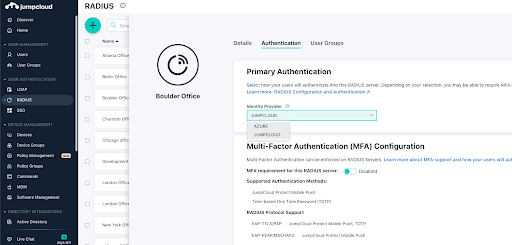
screenshot of JumpCloud primary authentication

Try JumpCloud

JumpCloud’s open directory platform consumes identities from established IdPs such as AAD to grant convenient, secure, and appropriate access to RADIUS resources. The platform also provides identity management with environment-wide Push MFA, and LDAP, in addition to cross-OS unified device management. Conditional access rules, patching and password management are also available as add-ons. New accounts are fully functional and free for up to 10 users/devices. Complimentary chat support is available to help you get started.

Sometimes self-service doesn’t get you everything you need. If that’s how you’re feeling, schedule a 30-minute consultation to discuss options for implementation assistance, migration services, custom scripting, and more.

About Version 2 Digital

Version 2 Digital is one of the most dynamic IT companies in Asia. The company distributes a wide range of IT products across various areas including cyber security, cloud, data protection, end points, infrastructures, system monitoring, storage, networking, business productivity and communication products.

Through an extensive network of channels, point of sales, resellers, and partnership companies, Version 2 offers quality products and services which are highly acclaimed in the market. Its customers cover a wide spectrum which include Global 1000 enterprises, regional listed companies, different vertical industries, public utilities, Government, a vast number of successful SMEs, and consumers in various Asian cities.

About JumpCloud
At JumpCloud, our mission is to build a world-class cloud directory. Not just the evolution of Active Directory to the cloud, but a reinvention of how modern IT teams get work done. The JumpCloud Directory Platform is a directory for your users, their IT resources, your fleet of devices, and the secure connections between them with full control, security, and visibility.

Counting the (recurring) costs of AU licenses

How much is keeping users on Archive User licenses costing your business and how much could you save if you used CloudM Archive instead?

Gone but not forgotten.

Even years after an employee has left your business, data compliance regulations such as GDPR and Freedom of Information requests require you to keep their data in some form.

You obviously don’t want to keep these legacy leavers on a full Google license as it is a) expensive and b) it means that if the former employee (or someone else) can access the account, they can use your business’s applications and access sensitive business data.

So, businesses like yours have had to find ways to keep the data (and allow it to be searchable and restorable) without allowing access, and preferably, cheaper.

Historically, they would simply change the user’s full license to a VFE (Vault Former Employee) license. This license SKU was free and archived the data to Vault. Perfect!

What is the issue then?
Well, Google introduced the AU (Archive User) license as a replacement for the VFE, and charged for it (currently ~$60 per user per year). If you had 1000 users on a VFE, this would cost you $60,000…every year (+ any additional offboarded users you apply an AU license too).

Now, this is obviously cheaper and more secure than a full license. But, it’s not exactly pocket change when it’s coming out of your budget (especially when it used to be free).

How does CloudM Archive solve the issue?
The only real legal requirements for data when an employee leaves is to make sure that it is stored somewhere, can easily be restored or retrieved (down to a single file or email) if required, and deleted after a set amount of time. CloudM Archive does all of that for you!

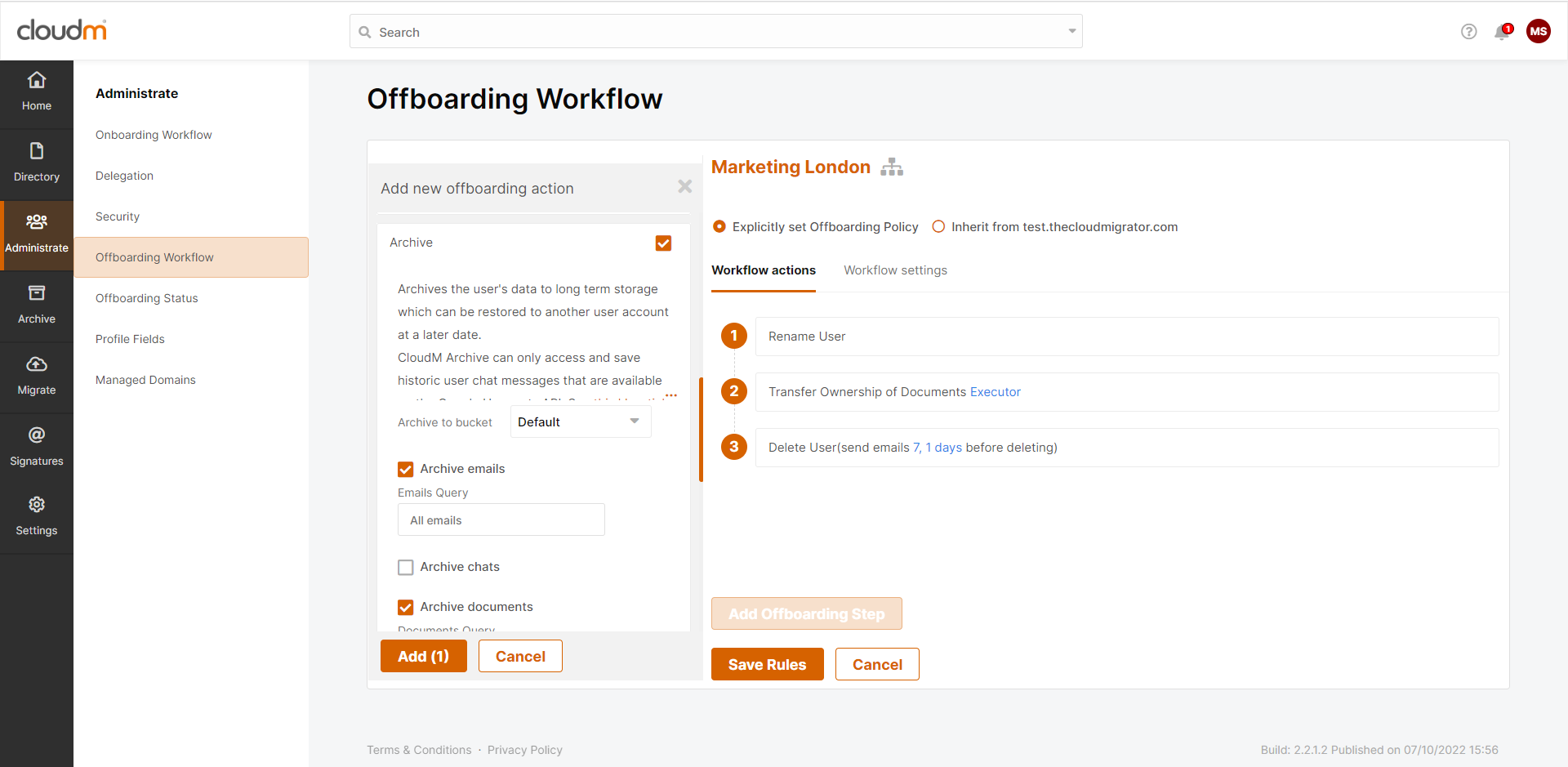
CloudM Archive will automatically send the data of any offboarded user straight to a Google Storage bucket that you own and control, as an optional step in our innovative Offboarding Workflow process. If the step is in the workflow for the user, you do not need to do anything except press a button to trigger the offboarding.

If you need anything back (e.g. you receive a Freedom of Information request), CloudM Archive allows you to see all the data stored in the Storage bucket, indexed by user, so you can quickly find and restore any and all the data you want, and you can restore it to any user within CloudM Manage. All in a matter of minutes.

Oh, and when the time comes when you want are legally obliged to delete the data, CloudM Archive will use data retention policies to automatically purge the data when it’s been stored for a set time. Remember John who left 7 years ago? Of course you don’t. You started 4 years ago. CloudM will remember to delete his data on time so you don’t have to (and so you don’t get hit with a massive data regulation fine too).

And, best of all, you don’t need to pay for a Google license (full or AU) for the user you just archived. You just need to pay for CloudM Archive and the cost of storing your data in your Google Storage buckets, which, even when combined, works out considerably cheaper than an AU license. We’ve done the math and some businesses could be saving up to 75%. Whether that’s Euros, Dollars, Pounds or Pesos, that’s gotta look good on your balance sheet.

The full Google license can even be removed from the user and returned to your license pool as part of the offboarding workflow, ready to be instantly reassigned. You will only ever need to pay for the licenses you actually use.

This all sounds great, right? But, what if it would actually work out cheaper to keep a specific power user’s data on an AU license instead of incurring the cost of storage? Well, we’ve got you covered as well. Simply create a Smart Team of Power / High Volume users and create a bespoke offboarding policy that has the “Apply Google Archived User (AU) license” step included.

CloudM Archive is already helping (and saving) organizations around the world, big and small. If you would like the opportunity to cut the costs and manual effort of keeping former employee data, why not have a quick 15 minute call with one of our expert CloudM Team.

About Version 2 Digital

Version 2 Digital is one of the most dynamic IT companies in Asia. The company distributes a wide range of IT products across various areas including cyber security, cloud, data protection, end points, infrastructures, system monitoring, storage, networking, business productivity and communication products.

Through an extensive network of channels, point of sales, resellers, and partnership companies, Version 2 offers quality products and services which are highly acclaimed in the market. Its customers cover a wide spectrum which include Global 1000 enterprises, regional listed companies, different vertical industries, public utilities, Government, a vast number of successful SMEs, and consumers in various Asian cities.

About CloudM
CloudM is an award-winning SaaS company whose humble beginnings in Manchester have grown into a global business in just a few short years.

Our team of tech-driven innovators have designed a SaaS data management platform for you to get the most from your digital workspace. Whether it’s Microsoft 365, Google Workspace or other SaaS applications, CloudM drives your business through a simple, easy-to-use interface, helping you to work smarter, not harder.

By automating time-consuming tasks like IT admin, onboarding & offboarding, archiving and migrations, the CloudM platform takes care of the day-to-day, allowing you to focus on the big picture.

With over 35,000 customers including the likes of Spotify, Netflix and Uber, our all-in-one platform is putting office life on auto-pilot, saving you time, stress and money.

CloudM Smart Teams

If you manage a Google Workspace domain, you will be very familiar with Organizational Units (OUs) and how they can be used to group users together, making managing a large number of employees significantly easier.

But, one of the disadvantages we found when using OUs was that, inherently, they were very structured and hierarchical – A user could only belong to one OU at a time.

If a user was in the Marketing OU, they would have access to all the shared Marketing resources. But, if you wanted to add the Marketing Team Lead to another “Manager” OU so you could assign a more complex offboarding policy, they would lose access to the Marketing resources. Far from ideal. Far from flexible.

So, we created a way to give you the flexibility to group users together, without breaking your OU structure, whilst assigning bespoke workflows and automations to meet the requirements of their role. We call these group types Smart Teams.

Let’s take a look at a “Manager” Smart Team, as an example, and explore some of the cool things you can do in CloudM:

  • You can make the Smart Team dynamic and set it so users that have a tag added to their profile (e.g. Manager) will be added to the group automatically.
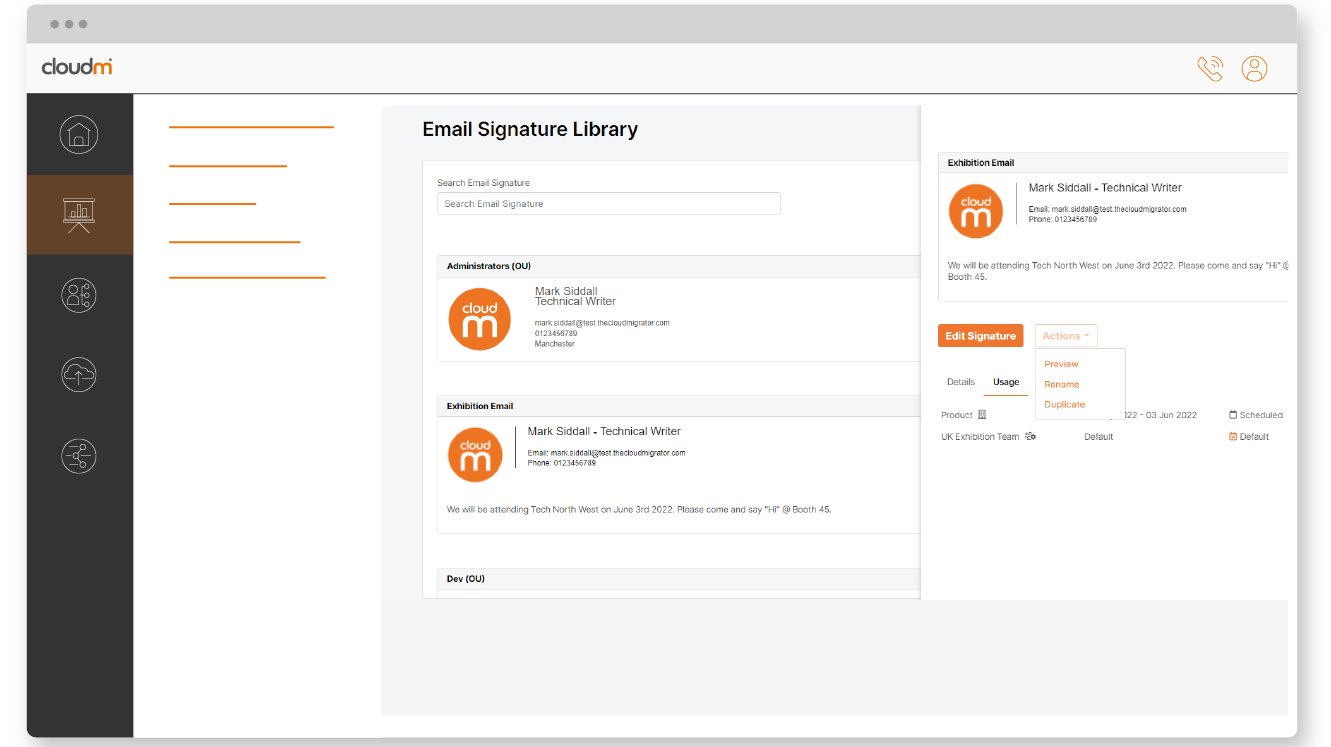
  • You can set a bespoke Email Signature template for all Managers. For example, you may wish for your Management Team to have their personal LinkedIn accounts displayed instead of the company account.
  • You can automatically share access to Management calendars and documents.
  • You can set a different offboarding policy that might include additional steps (such as requiring manual confirmation or archiving data to a different Storage bucket).
  • You can set a custom Security policy that requires a Manager to use a more complicated, and secure, password to access CloudM (as they are more likely to have admin access to features).

Smart Teams aren’t just reserved for creating custom policies for Management, and you don’t have to make such wholesale changes as shown on the previous example.

In fact, some of the best uses of Smart Teams are when you want to make one small change to a few policies or share resources with a select group of employees.

  • You can add a custom footer to the bottom of the email signature of any user that is going to attend an event or convention, so that your customers, partners and suppliers that are attending know you will be there.
  • You can share calendars and documents with all your First Aiders, regardless of location or department.
  • You can set a quicker, less detailed offboarding policy for all temporary/seasonal staff.

Want to find out more?

Check out our Smart Teams video on YouTube and visit our CloudM website, or book a 15 minute discovery call to speak to one of our brilliant team.

YouTube

About Version 2 Digital

Version 2 Digital is one of the most dynamic IT companies in Asia. The company distributes a wide range of IT products across various areas including cyber security, cloud, data protection, end points, infrastructures, system monitoring, storage, networking, business productivity and communication products.

Through an extensive network of channels, point of sales, resellers, and partnership companies, Version 2 offers quality products and services which are highly acclaimed in the market. Its customers cover a wide spectrum which include Global 1000 enterprises, regional listed companies, different vertical industries, public utilities, Government, a vast number of successful SMEs, and consumers in various Asian cities.

About CloudM
CloudM is an award-winning SaaS company whose humble beginnings in Manchester have grown into a global business in just a few short years.

Our team of tech-driven innovators have designed a SaaS data management platform for you to get the most from your digital workspace. Whether it’s Microsoft 365, Google Workspace or other SaaS applications, CloudM drives your business through a simple, easy-to-use interface, helping you to work smarter, not harder.

By automating time-consuming tasks like IT admin, onboarding & offboarding, archiving and migrations, the CloudM platform takes care of the day-to-day, allowing you to focus on the big picture.

With over 35,000 customers including the likes of Spotify, Netflix and Uber, our all-in-one platform is putting office life on auto-pilot, saving you time, stress and money.

Integrating with ConnectWise and Autotask

Integrations are an oft-requested item from customers and prospects of JumpCloud. This is especially true with our Managed Service Providers (MSPs) who use many tools to run their business efficiently. One of the most common tools MSPs use are Professional Services Automation (PSA) tools. These PSA tools serve several purposes: CRM, project management, help desk management, billing, and invoicing (to name a few). 

Most IT Admins start their day with a cup of coffee (at least they do in the US) and an email check-in for any urgent issues. They spend a great part of their day solving support tickets, responding to phone calls, and answering emails from end users in addition to trying to get ahead on any projects. However, the process to access the information they need to solve support tickets can quickly become untenable, which will always take away from strategic projects and initiatives. 

Having different systems and communication tools to solve problems can in itself be very time consuming. In order to simplify that process, we built a native connector from JumpCloud to PSAs such that, when an important alert is generated on any of your clients, a ticket gets created in your PSA and assigned to a tech or a queue automatically. This helps technicians more quickly respond to client issues by centralizing the pertinent information they need in their preferred platform of action.

Helping Admins Stay on Top of Issues

JumpCloud’s open directory platform generates alerts that require an admin to take action and fix. Some common alerts include: 

  • User Lockout: This is generated when a user has tried to login to their managed device with a wrong password too many times. They are now locked out and in need of being unlocked. 
  • Password Expiration: A user’s password has gone past the organization’s threshold for number of days of usage.
  • Sudo Admin Access Granted: A user has been granted superuser access on a device or a group of devices. This access might need to be revoked to avoid accidental damage.

When such actionable alerts are generated, MSPs can configure them to automatically create tickets in their PSA. Then they can take pre-emptive action before the user calls or submits a support request.

Configuring the Integration

Here are the 3 things you need to do to set up an integration to your PSA from JumpCloud:

1) Authentication

ConnectWise Manage requires you to have a public key and private key combination in order to authenticate and set up the integration.

Autotask requires you to have an API key and secret.  

2) Company Mapping

Map the companies in your PSA to the organizations in JumpCloud to ensure that the ticket is properly associated with the company that had the alert.

3) Configure and Enable Ticketing

Turn on ticket generation overall and configure the alert level. Every alert can be assigned a priority, status, source, due date and resource or queue assigned to.

Congratulations! You are good to go and should start receiving tickets in your PSA when important alerts happen. 

Want to check out more integrations? Not a partner yet? Sign up here to trial JumpCloud For MSPs!

About Version 2 Digital

Version 2 Digital is one of the most dynamic IT companies in Asia. The company distributes a wide range of IT products across various areas including cyber security, cloud, data protection, end points, infrastructures, system monitoring, storage, networking, business productivity and communication products.

Through an extensive network of channels, point of sales, resellers, and partnership companies, Version 2 offers quality products and services which are highly acclaimed in the market. Its customers cover a wide spectrum which include Global 1000 enterprises, regional listed companies, different vertical industries, public utilities, Government, a vast number of successful SMEs, and consumers in various Asian cities.

About JumpCloud
At JumpCloud, our mission is to build a world-class cloud directory. Not just the evolution of Active Directory to the cloud, but a reinvention of how modern IT teams get work done. The JumpCloud Directory Platform is a directory for your users, their IT resources, your fleet of devices, and the secure connections between them with full control, security, and visibility.

×

Hello!

Click one of our contacts below to chat on WhatsApp

×