Skip to content

Engineering and development in Pandora FMS

Pandora FMS started as a totally personal open source project back in 2004. I wasn’t even a professional programmer, I was doing Unix security consulting. In fact, I chose PHP but Pandora FMS was my first application with PHP, I knew some things about ASP and my favorite programming language had been C.

A project with a single programmer and no professional users of his software yet is very different from a project with several dozen programmers and hundreds of clients using the software in critical environments. The evolution that Pandora FMS has undergone from 2004 to 2021 is a real case of steady improvement in software engineering.

Fortunately, I did not pay much attention to that subject of the degree, because most of the things that work and that I have learned with practice do not come in a book, nor are they explained at the university, because each software project and each team of people is very different. It may sound cliché, but it is the truth, and it is better to accept it and avoid formulas, because building a solid software product that can grow over time is not trivial at all.

In this article, I am going to talk about our experience, our evolution over time, but above all, about how our engineering processes work today. I have always believed that the most important part of open source is transparency, and that this should apply to everything, not only to software but also to processes and knowledge in general.

Version control system

It is an essential part of any software project. Today the ubiquitous GIT is everywhere (by the way, not everyone knows that Git is the work of Linus Torvalds, original author of the Linux kernel). A version control system helps, in short, a group of developers work without overlapping their jobs.

When the Pandora FMS project started, I was working without version control, because there were no other people. When some people began to collaborate on it, we realized that a simple shared directory was not worth it, because we were overlapping the code and, yes, making backups to save old versions was not a very efficient method.

The first version control system we used was CVS, which we have been using for eight years or more. Around 2008, we started using SVN (Subversion) another slightly more efficient system and it wasn’t until 2013 when we started using GIT and opened our official repository on Github.

Ingeniería-y-desarrollo-en-Pandora-FMS

Pandora FMS public repository on Github

Since Pandora FMS has an open source version and an Enterprise version -with proprietary code and commercial licenses- we have two GIT projects, one public on GitHub and the other private, which we manage with GitLab. The GitHub version is in sync with our private copy on GitLab at our offices. Some partners who collaborate with us in developing have access to this private repository, and through an extension of our support application (Integria IMS) we share all development planning tickets by releases with some of our partners, so that they can see in real time, the development planning based on “releases” and all the details of each ticket.
Ingeniería-y-desarrollo-en-Pandora-FMS

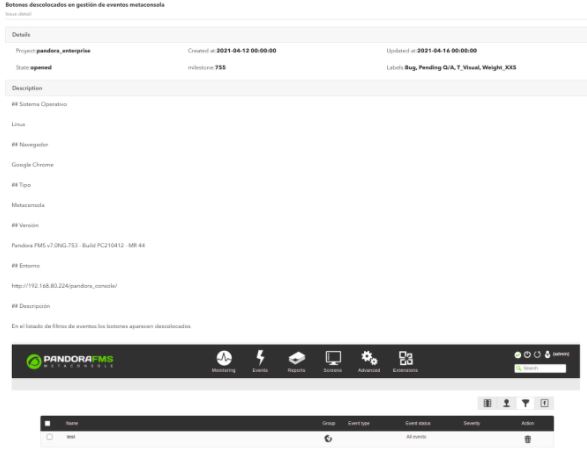
GitLab ticket view in Integria IMS/em>

Ingeniería-y-desarrollo-en-Pandora-FMS

Release ticket view

Development methodology used in Pandora FMS

At Pandora FMS, we have been using our own methodology from the beginning, although we have borrowed many ideas from agile methodologies, especially from SCRUM. From a life cycle point of view, we use an adaptation of the Rolling Release methodology

These are some important definitions when defining how we work, some of them come from Scrum, others from other methodologies.

Objectives of Pandora FMS work methodology

The objectives involve not only the development members, but also QA, the documentation team and part of the marketing team:

    • Maximum visualization: The entire team must see the same information, and it must flow from bottom to top and from top to bottom. By sharing objectives we will be able to do a more effective job.
    • What is not seen does not exist, which implies that all information relevant to the project must be reflected in the management, implemented with Gitlab. What is not seen does not exist, and what does not exist will not be taken into account for any purpose. Strictly following this methodology will allow everyone to be very aware of the planning:

-Strict deadline compliance.

-Advance planning without last minute modifications.

-Clearer information and in due time.

-Elimination of work peaks and etc.

  • Integrity,, with an increasingly large and complex project, it is imperative to keep integrity during development. All code must follow standards..


Ticket

The ticket is the minimum work unit. There is a single person responsible for its completion and it is planned to be carried out in a milestone (version release).

A ticket is the way in which the development work is broken down, so a big feature will be made up by different tickets, on which ideally several people can work.

The ticket must contain a functional or description of the requirements, which can include diagrams, specifications, interface diagrams (mockup), test sets, examples, etc. In some cases it may even contain the analysis and design of the whole solution.

A completed ticket must perform as specified in the functional document (ticket) and the changes that have been made to these specifications must be reflected in the ticket.

The functional is key so that QA can validate a ticket or not. QA will have to reopen a ticket if it does not meet any of the functional aspects.

Members and working groups

Product Owner (PO)

The PO defines where Pandora FMS has to go, in contact with customers, support and
the “real” market situation, providing technical and functional guidelines but without getting involved in development as such.

Product Committee

Group of people who will meet permanently with the PO to agree where the product is going to, trying to ensure that all PO decisions are collegiate. It is made up of the leader of each Development, QA, Support, Projects and Documentation team.

Development Manager (DM)

The DM will manage the entire development cycle: define milestones, priorities, manage
individually all members and make operational decisions. The DM reports exclusively to PO and is the leader of the development team.

Development Team

They are in charge of the development of large features and product improvements, complete code refactoring, change development (small features), bug fixes and product maintenance improvements.

QA Team

They verify that each development atomic unit works as defined in the
specifications. They will also create and maintain an ecosystem of automated testing for both backend and user experience.

Support Team

They are the ones who deal directly with the client solving issues. Their experience with the product’s day-to-day means that their opinions must be taken into account, that is why they are part of the product committee.

Project team

They implement it on the end customer and are the ones closest to the customer, since they are often there before the project exists, and they usually offer ideas and all kinds of features in hand, for all purposes they are the “speaker” of the commercial department, therefore they are part of the product committee.

Training and Documentation Team

Responsible for training and the product’s documentation. They coordinate with the marketing team and the translation team.

Remote working

All team members (development, QA, documentation) telework freely. In fact, developers from Europe, Asia and America participate in Pandora FMS, and within Spain they are distributed throughout the national territory. We are a 100% distributed and decentralized company, although with traditional hierarchies.

In order to telework, we need each member to take responsibility for their work, be autonomous and commit to planning. Teleworking entails minimizing the need for oral communication and physical personal meeting, replacing them not with teleconferences, but with a precise use of the tools of the development process.

Development watch-keeping

A developer on the team is especially devoted to solving incidences involving code, in permanent connection with the support team (from 8 am to 8 pm, CEST). This allows not only to have maximum agility when solving a problem on a client, but also code changes are integrated into the code repository in an organized way.

Ticket creation and classification process

Any member of the company (including salespeople) can create a ticket in GitLab. This includes customers and partners, although in their case there is a prior filter by the support team and the sales team respectively.

The more detailed the ticket, the more unequivocal the development will be. Add images, gifs, animations and all the necessary clarifications. As well as the way to access the environment where the problem has been found or the contact persons. A developer will never contact a customer directly. If there is the need to interact with them, it will be done through the support or project team.

Nobody, except for the DM or PO, can change a ticket milestone. On creation, the ticket will not have an assigned milestone or assigned user. The task of defining which release a ticket belongs to is the responsibility of PO and DM exclusively.

When a ticket is finished and the developer thinks it should be reviewed by a colleague, they mention it in the merge request through @xxxxx. The review must be nominal. This review is independent of the code review carried out by the department manager.

General ticket workflow

  • The ticket is assigned to a programmer by the DM. If it does not have a ticket assigned, the ticket will be auto-assigned. (See below the terms that regulate this system).
  • The developer must understand/solve any questions that may arise after reading the functional document, if necessary, check with the DM or the author of the ticket. This must be done before starting to develop. Once read, you must, in order:
  1. Evaluate (by assigning labels) its complexity and size, reaching a prior consensus with the DM.
  2. Develop the feature following the ticket specifications
  3. Document everything developed in the same ticket or, if required, in a new documentation ticket. This ticket must relate to the “parent” ticket by ticket #ID.
  4. The developer must test its functionality at least in:
    -standard docker development environment
    -docker development environment with data.
  • When it is deemed complete, it will be tagged ~ QA Pending and placed in the hands of QA.
  • For each FEATURE ticket, there will be a reference person, generally from projects, support or even the PO itself. This person will be the one who will define part of the functional (together with the DM and PO), but above all, this person will be the reference person for the developer to ask any details during development, and most importantly, should see the development progress, step by step, so that it is validated.
  • Any change to the functional will be reflected by the reference person in the ticket as comments, without altering the original functional.
  • If there is a child documentation ticket, QA will validate the ticket using the documentation generated by the reference person, NOT by the functional of the ticket, validating the documentation and the feature at the same time.

Release planning

When creating a ticket, the milestone must be empty (not assigned) like the user. The only ones that can classify a ticket are: DM and PO.

A series of milestones have been defined to support the ticket classification process, some of them, those dated (releases), can be seen as milestones, while the rest should be seen as simple ticket containers.

  • (Not allocated): It is the absence of milestones in a ticket. For all intents and purposes, this ticket “does not exist yet.” The DM and PO will validate each and every one of these tickets to see if they make sense in the product roadmap. No developer should take any of these tickets.
  • Feature backlog: Tickets that will be made at some indeterminate time in the future that sooner or later will have to be addressed. No developer should take any of these tickets.
  • Low priority bugs: Reported bugs with no priority assigned yet by PO/DM. No developer should take any of these tickets.
  • STAGE: Tickets proposed by each department for planning in a product release. At each planning meeting, these tickets will be discussed, and moved to other milestones. At the end of the cycle start meeting, this milestone should be empty. The DM is the one who has the final decision as to which STAGE tickets are assigned to a certain release and which are not, relying on the product committee if necessary. No developer should take any of these tickets.
  • XXX: Release XXX. Milestone that groups a series of tickets that will be released on a certain date. A milestone has a deadline associated with it. In the case of RRR releases, this date could change, in the case of LTS not.
  1. The development of the tickets associated with a release must be finished 5 days before the scheduled day for the release. Tickets not completed before that date will be delayed to the next release and the delay will have to be justified to the DM.
  2. There are two types of release milestones:
    -LTS: in April and November. They are 6 months apart.
    -Regular Releases (RRR): There will be 2 to 4 regular releases between LTS releases.
  • A developer with no assigned tasks for a release, as long as there are no pending assignment tickets in the release milestones for the developer’s team, can take one of the unassigned tickets from:
    -The closest release, based on date.
    -Second closest release, based on date.

CICD

Pandora FMS developers integrate the code of their branches in a central repository several times a day, causing a series of automatic tests to be executed whose objective is to detect faults as soon as possible and improve the quality of the product.

These tests run dynamically in a series of executors or “runners”, some of them specific, for certain architectures (e.g., ARM), that execute static code analyzers, unit tests, and activate containers to carry out integration tests in a real installation of the application.

The generation of Pandora FMS packages is completely automated. Packages are generated every night from the development branch for manual testing. They can also be generated on demand by any developer or member of the QA or support teams, from any branch through the GitLab web interface.

When a release is made from the stable branch, in addition to package generation, a series of steps are executed that deploy them to Ártica’s internal package server, to SourceForge, to Ártica’s customer support environment, and that, likewise, update the Debian, SUSE and CentOS repositories along with the official Docker images.

About Version 2 Digital

Version 2 Digital is one of the most dynamic IT companies in Asia. The company distributes a wide range of IT products across various areas including cyber security, cloud, data protection, end points, infrastructures, system monitoring, storage, networking, business productivity and communication products.

Through an extensive network of channels, point of sales, resellers, and partnership companies, Version 2 offers quality products and services which are highly acclaimed in the market. Its customers cover a wide spectrum which include Global 1000 enterprises, regional listed companies, different vertical industries, public utilities, Government, a vast number of successful SMEs, and consumers in various Asian cities.

About PandoraFMS
Pandora FMS is a flexible monitoring system, capable of monitoring devices, infrastructures, applications, services and business processes.
Of course, one of the things that Pandora FMS can control is the hard disks of your computers.

實物攝影機應用:博物館、書展及繪本導讀

圖文來源參考:https://www.facebook.com/ipevotw/posts/10158447552678851

常有博物館策展人因展覽所需而應用實物攝影機,以增進展覽的豐富性及互動性。

國立臺灣博物館(National Taiwan Museum) 展出的「繪自然-博物畫裡的臺灣特展」,介紹科學繪圖在臺灣的發展與演進,並集結19世紀以來珍貴動植物圖鑑手稿,是場結合科學與藝術的展覽。

展覽中使用VZ-R 實物攝影機,幫助科學繪圖師藉由實物攝影機將所繪物件放大投影至筆電或平板後,一筆一畫去描繪成圖。

圖文來源參考:https://www.facebook.com/ipevotw/posts/10157079818083851

書展或是簽書會,常會請大師現場展露一手,讓台下慕名而來的粉絲一飽眼福。透過實物攝影機繪畫過程可即時投影至大螢幕上,現場觀眾都能清楚看見藝術創作的產生,讓簽書會的活動更完美。

德國繪本大師薛弗斯(Axel Scheffler)其最出名的「古飛樂」(The Gruffalo)系列作品,不僅榮獲英國繪本最高榮譽──凱特格林威大獎(The CILIP Kate Greenaway Medal)提名,亦獲得英國聰明書金獎和英國藍彼得童書獎肯定,並改編成為獲獎無數、受大小朋友歡迎的動畫作品,已是繪本界的經典作品。

在國際書展中,德國繪本大師薛弗斯(Axel Scheffler)使用愛比科技的「VZ-R 實物攝影機」展示繪畫過程。

圖文來源參考:https://www.facebook.com/ipevotw/posts/10157103990323851

國際書展中,繪製「夜巡貓」的日本漫畫家深谷薰老師使亦是使用VZ-R 實物攝影機,即時投影似顏繪的創作過程。

圖文來源參考:https://www.facebook.com/ipevotw/posts/10157218232833851

劍橋藝術大學童書插畫碩士,莊予瀞老師的「新老鼠娶親」榮獲美國3X3國際插畫大獎優選獎,以剪紙拼貼融入繪畫,呈現出帶有奇幻色彩的故事場景。

「新老鼠娶親」繪本導讀及手作拼貼活動現場使用了VZ-R 實物攝影機,莊予瀞老師帶領大、小朋友利用剪紙及色筆,做出生動有趣老鼠先生手作拼貼畫,透過實物攝影機,每位小朋友都可以很清楚看到老師的動作。

關於Version 2

Version 2 Digital 是立足亞洲的增值代理商及IT開發者。公司在網絡安全、雲端、數據保護、終端設備、基礎設施、系統監控、存儲、網絡管理、商業生產力和通信產品等各個領域代理發展各種 IT 產品。透過公司龐大的網絡、通路、銷售點、分銷商及合作夥伴,Version 2 提供廣被市場讚賞的產品及服務。Version 2 的銷售網絡包括台灣、香港、澳門、中國大陸、新加坡、馬來西亞等各亞太地區,客戶來自各行各業,包括全球 1000 大跨國企業、上市公司、公用事業、醫療、金融、教育機構、政府部門、無數成功的中小企及來自亞洲各城市的消費市場客戶。

關於IPEVO
IPEVO源自於PChome Online硬體事業部門,2007年7月正式獨立。自2004年於台灣營運Skype網絡電信服務,使台灣成為Skype全球發展中最成功的市場。2005年起以IPEVO品牌推出一系列Skype專屬硬件產品,將Skype虛擬服務轉化為使用者實質經驗。IPEVO以簡單、實際且具有價值的經驗為產品目標,其簡潔俐落的產品風格呼應著IPEVO的核心思考與產品精神。目前已研發之產品包括:Skype有線USB話機、Skype無線話機、Skype會議系統、Skype視訊設備、Stand-alone免電腦Skype話機。

7 signs that your company needs to improve the security of sensitive data

 width=

Undoubtedly, we are in the moment where the most precious asset is information. In addition to being much more dynamic, how information flows through the company must always be made with the security of sensitive data in mind.

First, you need to understand that if your company does not invest in security yet, it is taking serious risks. To give you an idea, there were about 30 billion records compromised by criminal actions in 2020 alone.

Moreover, companies have started to look for security areas to prevent attacks. Last year, about US $ 53 billion more was invested in cybersecurity, according to Canalys’s data.

Thus, it is necessary to pay more attention to the security of sensitive data, since attacks are more and more frequent. With that in mind, check out 7 signs that your company needs to improve the security of sensitive data!

#1. Systems Are Out of Date

Applications and software, in particular, always need to be updated to maintain security. Over time, malicious people study software and develop threats to their data.

This concerns all applications or programs in the company. Does the application developed for customers stay updated? Is the computer software up to date?

Besides, if your company does not provide maintenance to software and machines, the situation may be even worse. When a program fails, it is quickly exploited by potential attackers.

Thus, to improve the security of your data, it is essential to keep programs and machines up to date. Older programs are a loophole for possible invasions.

#2. Your Company Spends a Lot on Repairs

Some equipment simply does not meet current security requirements anymore. Not only that, but they also lack the capacity to maintain the functionality that is needed.

For this reason, outdated hardware tends to have many flaws, and your organization needs to replace them. What usually happens is that repairs do not solve the problem.

Quite the opposite: they generate more expenses and make a company even less secure. So, if you notice a lot of old equipment or high repair costs, it is time to improve security to solve this problem once and for all.

#3. Backups Are Rare and Information has Already Been Lost Because of That

There is no use waiting for the worst to happen. To keep your data protected, periodic backup is critical. When performing this procedure with less frequency, the company is automatically in the hands of luck in cases of invasions.

In addition to being prepared to prevent this type of loss, you should be aware that a backup is a great option. It is also important to invest in good tools that keep data saved in secure places.

Without a secure storage location for your data, it will only be stored on the equipment. Thus, the chance of a leak is much greater and you will lose all the information at once.

#4. The Company has No Control Over Privileged Accounts

In a company, privileged accounts are those that have access to the organization’s sensitive data. Therefore, they are accounts that can, for example, disable security systems and access any information on those systems.

So, it is important to always know who is viewing and accessing this information. Even within a company, there may be people with negative intentions, leaking this sensitive data to the web or elsewhere.

So, if you have no idea who accesses this type of account, your company’s data security is at serious risk. You can check out ways to maintain control over this type of access here.

Do not forget to fill out the form below to receive a demo of our protection services!

#5. Your Employees Access Unverified Websites

It is important to invest in access restrictions for company employees on the web. Whether intentionally or not, someone may end up downloading malware that damages and disrupts the company’s security.

Also, several websites are exclusively known for offering hacking services and making cyberattacks. In this way, it is interesting to invest in restriction settings that prevent access to this type of website.

#6. Security Passwords for Sensitive Data Are Not Administered

It is very common that when entering passwords for certain accesses, some people use very simple templates. Besides, always choosing the same password for all company accesses can be very dangerous.

This is because invasions can often occur on behalf of the employees themselves. So, the use of the same password can facilitate the access by malicious people to very important information.

If there is no good formulation for passwords, the company’s security is automatically more limited. Even due to unintended employee failures, data loss can create serious problems.

Therefore, regardless of the factors that allow improper access to this data, it is necessary to formulate good and unique access passwords.

#7. Slow Internet

Many malware work by downloading various programs on users’ machines. For this reason, the internet may be slower and it may be difficult to perform tasks that require more agility from this service.

As a result, a slow connection may indicate that your sensitive data are not protected. An infected computer can attract several hackers who work with information theft, and this can affect your company’s credibility.

The security of sensitive data cannot be endangered

Nowadays, a company needs to keep investments in data protection. Having confidential information leaked can even mean the end of a business.

For this reason, if your company needs to improve the security of sensitive data, according to the signs we have listed, pay attention. Hackers are increasingly qualified, and protection needs to be at the best level. Investing in security is essential.

Do you want to learn more about how to improve the security of your company? Check out the post we made explaining a little better about the management of privileged accesses! Click here and understand it.

About Version 2 Digital

Version 2 Digital is one of the most dynamic IT companies in Asia. The company distributes a wide range of IT products across various areas including cyber security, cloud, data protection, end points, infrastructures, system monitoring, storage, networking, business productivity and communication products.

Through an extensive network of channels, point of sales, resellers, and partnership companies, Version 2 offers quality products and services which are highly acclaimed in the market. Its customers cover a wide spectrum which include Global 1000 enterprises, regional listed companies, different vertical industries, public utilities, Government, a vast number of successful SMEs, and consumers in various Asian cities.

About Segura®
Segura® strive to ensure the sovereignty of companies over actions and privileged information. To this end, we work against data theft through traceability of administrator actions on networks, servers, databases and a multitude of devices. In addition, we pursue compliance with auditing requirements and the most demanding standards, including PCI DSS, Sarbanes-Oxley, ISO 27001 and HIPAA.

Proactive Monitoring in Digital Transformation Times

Pandora FMS is a proactive, advanced, flexible and easy-to-configure monitoring tool according to each business. Pandora FMS integrates with the needs of the business, being able to monitor servers, network equipment, terminals and whatever is necessary.

In this article we will focus on monitoring using Pandora FMS, bearing in mind the new reality, which has arrived to stay, known as “Digital Transformation”.

Digital Transformation

First of all, let’s start by understanding what Digital Transformation is all about, a widely used term, but at the same time somewhat confusing for many people, due to its broad definition.

Digital transformation is a concept that encompasses the integration of the different technologies, used in the different areas of a company, fundamentally changing the way it works and delivers value to its customers. It is also a cultural shift that requires organizations to constantly challenge the status quo, experiment, and feel comfortable with the change.

It is not new that technology advances faster and faster generating a constant challenge, that is why we must be on the watch for these advances, to be able to adopt new technologies and achieve the cycle of “Continuous Improvement”, taking advantage of the tools that allow us to be more and more efficient.

As part of this change, there are key technologies that allow us to digitize our information and adapt to this new reality that is here to stay.

  • Cloud Computing (Amazon AWS, Microsoft Azure, Google Cloud): It gives your organization faster access to the software it needs, new features and updates, as well as data storage. Cloud computing allows you to be agile enough to transform quickly.
  • Information technology: It allows an organization to focus its investment on talent, research and development, and customized solutions that support the requirements and processes that differentiate it in the market.
  • Machine learning and artificial intelligence technologies: They provide organizations with more accurate information for decision-making on sales, marketing, product development and other strategic areas.
  • Other technologies that drive business transformation are: blockchain, blockchain, augmented reality and virtual reality, social networks, and the Internet of Things (IoT).

Since the beginning of computing, companies had at least one server/computer as part of their daily tasks. This implied additional tasks such as: technical support, and infrastructure maintenance.

Some years ago, it was common to find email servers, installed in the company, generating the great challenge to keep a critical service, like this one, running 24/7. Today there are private cloud solutions such as: Microsoft 365 or Google Apps, that allow you to have email with a very high SLA, without the need for your own infrastructure, using the service as SAAS (Software as a Service).

To understand where we are at and where to start, with the digital transformation process, we are going to explain the four most common infrastructure scenarios:

On-Premise (Local Infrastructure): Servers that work in the company and require a great effort to maintain them.

IaS Cloud (Infrastructure as a Service): In this scenario, virtual machines can be run in the cloud, such as, for example, a Windows Server, some Linux distribution where you install the essential tools to use the corporate application that you need to use. The provider ensures the availability of the virtual machine and the company is responsible for the software that is installed. In this case, Amazon AWS, Microsoft Azure, Google Cloud, etc. can be used.

PaaS Cloud (Platform as a Service): Services that work in the cloud and that have a platform such as: SQL Server, Oracle, SAP, Docker, Etc.

SaaS Cloud (Software as a Service):
 Services that work in the cloud and have a management tool, such as Exchange Online, Google Apps (Corporate Gmail), OneDrive, Google Docs, Etc.

After this introduction, we are going to understand the value of Pandora FMS for any of the previous scenarios, at the time of Digital Transformation.

Some time ago, we already published an article on this blog with the installation script for IaS Cloud. As a requirement you need to have a Virtual Machine with CentOS 7, which has 2 GB of RAM and 20 GB of Disk.

Executing the following command: curl -Ls https://pfms.me/deploy-pandora | sh on a computer that has an Internet connection, you will obtain an installation of Pandora FMS Community in an On-Premise scenario or in the cloud that you use:

https://pandorafms.com/community/get-started/

For the Enterprise version, we have a Free 30-day Trial. 

Now that you know that you can install Pandora FMS in the scenario that is most convenient for you, we are going to see which are the required ports to be able to use the tool from a public cloud:

PortDescription
443 TCP (https)WEB console
41121 TCP (Tentacle)Software Agent Connection/td>

With this configuration you can use Pandora FMS key features. We are going to see just a few of them. Very useful for this reality of continuous changes.

Remote Configuration, Policies and Collections: With this configuration you can make all the changes on the monitoring agents, using Pandora FMS web console, being able to build the Agent Plugins and distributing them in a centralized and simple way.

Agents with Remote Configuration

Satellite Server: A very interesting possibility is to set up an agent with advanced features. It allows you to discover the different remote networks, servers, and network computers, using ICMP, SNMP and WMI protocols. It is not necessary to open any ports on the firewall, where the Satellite Server is installed. You have the possibility of reaching Pandora FMS server with port 41121 TCP Tentacle and, for example, remotely monitor the devices from the different locations and/or branches.

 Several Satellite Servers, reporting to a console in Azure


Ubiquiti AP UC-AC-LR (Satellite through SNMP)

Pandora FMS Ubiquiti AP UC-AC-LR Web Console

https://pandorafms.com/docs/index.php?title=Pandora:Documentation_es:Arquitectura#Servidor_Sat.C3.A9lite

Finally, and as a complementary tool, you can count on the possibility of having usage and consumption metrics in the cloud, from the “Discovery” option, or with add-ons from the Enterprise library.

Discovery Cloud View

At the time I wrote this article, the clouds supported by Pandora FMS were:

*It is possible that new cloud technologies will be added over time.

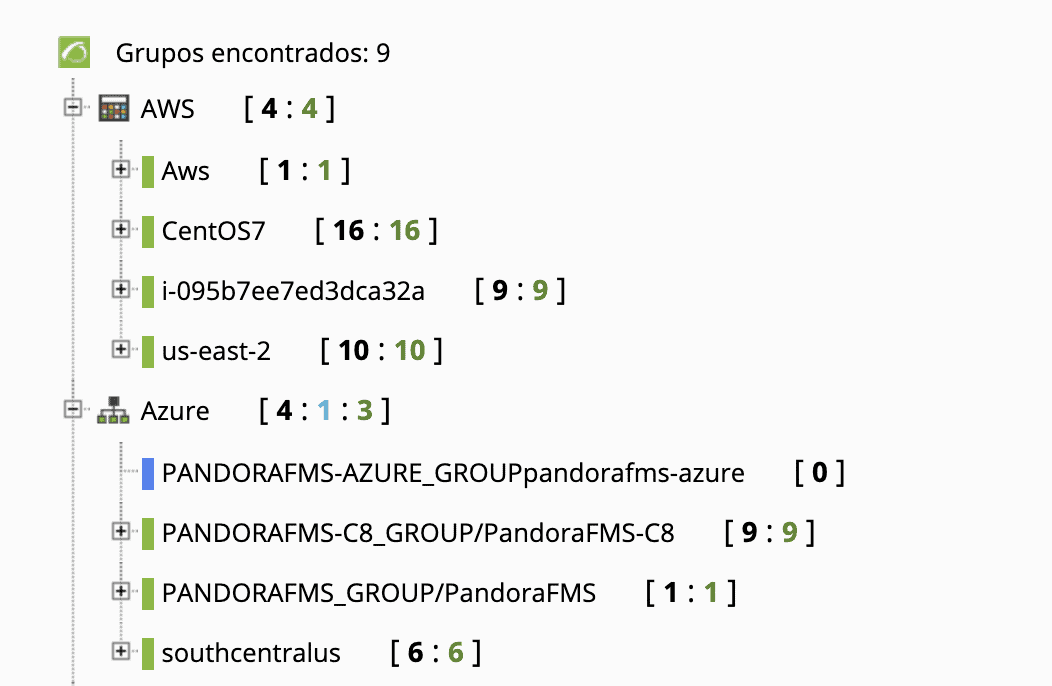
In the next tree view you can see some of the metrics that we have available for AWS and Azure. In this view, you can see the status of the virtual machines, the consumption of Network, Memory, etc.
All these parameters are configured according to the specific needs of each client.

https://pandorafms.com/docs/index.php?title=Pandora:Documentation_en:Discovery#Discovery_Cloud (Discovery Cloud Documentation)

Finally, Microsoft 365 cloud has an API to be able to monitor the health status of its services. Pandora FMS has a plugin in the Enterprise library that allows you to collect data from the Microsoft 365 API.

https://pandorafms.com/library/pandora-office-365-monitoring/

Partial View of Microsoft 365 Services

I hope this article was useful for you to understand what the best monitoring scenario for your company is.

About Version 2 Digital

Version 2 Digital is one of the most dynamic IT companies in Asia. The company distributes a wide range of IT products across various areas including cyber security, cloud, data protection, end points, infrastructures, system monitoring, storage, networking, business productivity and communication products.

Through an extensive network of channels, point of sales, resellers, and partnership companies, Version 2 offers quality products and services which are highly acclaimed in the market. Its customers cover a wide spectrum which include Global 1000 enterprises, regional listed companies, different vertical industries, public utilities, Government, a vast number of successful SMEs, and consumers in various Asian cities.

About PandoraFMS
Pandora FMS is a flexible monitoring system, capable of monitoring devices, infrastructures, applications, services and business processes.
Of course, one of the things that Pandora FMS can control is the hard disks of your computers.

Zero Standing Privileges

With the growth of cyberattacks, access credentials have become a strong attack vector. In 74% of cases of data breaches, companies confirm unauthorized access to a privileged account as its main cause.

In addition, The Verizon Data Breach Investigations Report (DBIR) has found that 29% of the total breaches in cyberattacks involved the use of stolen credentials, second only to phishing.

Once a credential is compromised, a malicious attacker is able to move sideways, infecting other devices and increasing the risk of data leaks, or even infection by ransomware. The reason behind this (and because administrator credentials remain an easy target for attackers) is the high level of access that these credentials provide.

Generally, PAM or Endpoint Privilege Management (EPM) solutions are not designed to deal with the risks associated with standing privilege.

The standing privilege is when administrator accounts with privileged access are always active (always-on). On average, in a large company, it is possible to find 480 users with administrator access on their workstations.

Thus, the concept of Zero Standing Privileges (ZSP) aims to eliminate standing privileges within organizations and mitigate cybersecurity risks.

What is Zero Standing Privileges (ZSP)?

Administrative privilege provides the means by which attackers need to take criminal action, be it data exfiltration, data destruction, or other crimes.

When an organization has identities with standing privileges (always-on), it must prioritize efforts to control access to such identities, monitor their use, and protect them from misuse.

However, for most of the day, these highly privileged identities remain idle, unused, but still pose risks.

Traditional PAM approaches have focused on managing and controlling access to privileged account passwords or temporarily elevating privileges to manage when users can work with administrative privileges.

For example, a server administrator employee can check the password of the day to access their privileged personal account each morning. Or they can simply use a solution   to have their privileges elevated on demand.

Nevertheless, the focus of each of these approaches is to ensure that the employee uses their privileges in an authorized manner, considering that they are a good employee and not an attacker looking for ways to compromise the organization.

In both cases, the privileges granted to their privileged personal account or in the sudo configuration are permanent and at risk of being abused by a motivated criminal.

Just Enough Privilege (JEP) and Just in Time (JIT)

What if we can eliminate these standing privileges and replace them with a policy-driven process to allow privileged access only when necessary and with scope only for the required tasks?

The answer to that is using the concepts of Just Enough Privilege (JEP) and Just in Time (JIT). In a just-in-time workflow, there are no standing privileges for employees – no sudo settings to manage, no privileged personal account to monitor.

Instead, potential employee privileges are detailed in a centralized policy. When an employee’s job requires privileged access, they start an activity that describes what they want to do and what resources they need to do it.

Behind the scenes, an activity identity is created or activated and only required privileges are granted to perform just the desired task.

The activity is then performed interactively by the employee (for example, a remote desktop protocol for a server – RDP) or by the system on their behalf (for example, rebooting a server).

Upon completion of the activity, privileges are revoked from the activity’s identity and it is destroyed or deactivated.

By adopting this workflow, the privilege attack surface is reduced to the window during which the employee is actively using the privilege, which decreases the risk that an attacker will steal credential passwords.

Unlike traditional PAM, where the focus is on protecting the means (for example, privileged accounts or settings) that provide privileges, the focus of the JEP and JIT workflow is on the user.

All an employee needs to know is that they are required to restart a specific server, and the system will take care of providing, protecting, and destroying the privilege when they are done.

The goal of Zero Standing Privileges (ZSP) can be achieved through just-in-time privilege access, improving operational sustainability for your privilege access program and dramatically reducing the privilege attack surface.

Benefits of Zero Standing Privileges (ZSP)

Standing privilege is defined as the fact that accounts have access with persistent privileges at all times to some set of systems. Zero Standing Privileges (ZSP) is just the opposite.

It is the purest form of just-in-time administrator access, ensuring that the principle of least privilege is applied by granting authorized users the privileged access they need for a minimum period and only the minimum rights they need.

This elimination of permanent privilege through Zero Standing Privilege is really an advantage for understanding the current privileged access and mitigating possible cybersecurity risks.

Final Thoughts

It is encouraging to see the market has started to recognize standing privilege as a key risk that needs to be addressed and that storing secrets and rotating local administrator passwords on critical servers is not enough.

Attackers are targeting workstations as the easiest way and using the administrator access available on those workstations to spread across corporate networks.

It is necessary to consider a position of Zero Standing Privilege in our environments. Stolen credentials will continue to be the easiest target for attackers and will continue to contribute to 80% of data breaches.

About Version 2 Digital

Version 2 Digital is one of the most dynamic IT companies in Asia. The company distributes a wide range of IT products across various areas including cyber security, cloud, data protection, end points, infrastructures, system monitoring, storage, networking, business productivity and communication products.

Through an extensive network of channels, point of sales, resellers, and partnership companies, Version 2 offers quality products and services which are highly acclaimed in the market. Its customers cover a wide spectrum which include Global 1000 enterprises, regional listed companies, different vertical industries, public utilities, Government, a vast number of successful SMEs, and consumers in various Asian cities.

About Segura®
Segura® strive to ensure the sovereignty of companies over actions and privileged information. To this end, we work against data theft through traceability of administrator actions on networks, servers, databases and a multitude of devices. In addition, we pursue compliance with auditing requirements and the most demanding standards, including PCI DSS, Sarbanes-Oxley, ISO 27001 and HIPAA.

×

Hello!

Click one of our contacts below to chat on WhatsApp

×