Skip to content

Why Integrated Network Security Architecture is the Future

Integrated network security architecture is the design of a network to defend against cyber attacks. It is simply securing a network by integrating different security features. It is a systematic approach to designing and implementing a set of cybersecurity measures that are synergistic and mutually supportive to one another, to provide an increased level of protection.

With an integrated network security architecture, you can integrate multiple layers of protection into one cohesive system. This includes technologies, people, processes and policies. These layers work together to provide comprehensive protection for the company’s IT resources and data. It involves selecting hardware, software and services, their configuration and deployment, and how they are managed.

The security method is often referred to as the “defense-in-depth” approach. This means that it focuses on protecting data from a variety of different angles, as opposed to using just one single method. No wonder it has proven to be the most effective means of securing your network.

The three main layers of network security architecture are:

I. The Physical Layer

This includes everything from the cables and wireless antennas to the actual devices that make up your network. It is a form of perimeter protection that shields your network from wireless interference.

II. The Data Link Layer

This is where all data passes through on its way to being transmitted over the network. By default, this poses a vulnerable pathway requiring network and data protection.

III. The Network Layer

It is also referred to as endpoint protection because it is the last layer to ensure your network’s security.

Why is Integrated Network Security Architecture Important?

The integration of network security architecture is important as it helps to protect the network against cyber threats. It effectively provides a holistic view of the entire system, which is necessary for maintaining a secure and reliable network environment.

Network security is a vital part of any organization’s IT infrastructure. It is important to have an integrated network security architecture in place to protect the organization’s data and resources. This is especially crucial for organizations or even individuals that have data that they want to protect.

Four Proven Practices In Integrated Network Security Architecture

I. Perform a Threat Assessment of Your Organization’s Networks

A threat assessment is a process of identifying the potential threats to an organization and then determining how these threats might be realized. This would help to determine what measures to take to prevent it, thereby protecting your network and data.

Therefore, during any threat assessment, the first thing to do is to identify the assets in your organization. This aims to determine what would be at the risk in an attack. By putting yourself in the shoes of an attacker, you will be able to detect the assets that need to be protected.

The next step is to determine what type of threats might be present. It is important to know what kind of technology your company uses and how it might be vulnerable. Note that the major difference between threats and vulnerability is that threats are those who would want to cause harm, while vulnerabilities are weaknesses that the threats can exploit.

The last step is to develop a response plan for preventing, detecting, and responding to threats. This includes prioritizing the threats and vulnerabilities based on their level of severity and probability of occurrence.

When it comes to integrated network security architecture, threats can be categorized in two ways:

  • Technical Threats – A technical threat is when a system or network is compromised through a computer exploit or malware that disrupts its operations. This type involves exploiting security vulnerabilities in software or hardware to gain access to data and resources. Some common examples are; hacking, malware, denial of service attacks, etc.
  • Non-Technical Threats – This takes a more hands-on approach and can consist of things like insider fraud and theft of trade secrets.

II. Conduct a Business Impact Analysis

A business impact analysis is a process that can help an organization identify its risks and impacts related to network disruptions or attacks. It also helps businesses understand the vulnerabilities they might have.

It serves as a methodology that can be used to assess the impacts of disruption that might occur in the event of a cyber attack.. The analysis should be conducted by the risk management team, with input from other stakeholders within the organization.

The main objective of this analysis is to identify and prioritize risks and impacts, as well as to understand how an event will affect different parts of the organization. Analysis should also help in understanding how much time is required for recovery after a disruption or attack.

This type of analysis helps the business make decisions to mitigate its risks and impacts for the future. If an organization fully understands what would happen if there were network disruptions or attacks on their systems, it will help them understand the precise impact it might have on their business operations. Moreover, it could also prepare them for a scenario where events could happen more frequently in the future.

III. Develop a Strategy for Handling Security Incidents

Security incidents are occurring these days at an unprecedented rate. This includes any event that can negatively impact the confidentiality, integrity, or availability of an organization’s data.

It is important to have a strategy in place for how to handle them, which includes clear priorities, responsibilities, and procedures. Below is a tested incident response plan template or incident response process that you need to emulate.

IV. Assess the Severity of the Situation

When faced with a security threat, the first step is to assess the severity of the security incident and determine whether it needs to be handled by higher-level personnel or not.

If it does, they should be notified and assigned responsibility for handling the incident. If not, then a lower-level employee should take on responsibility for handling it themselves or with assistance from someone else who is available and qualified to do so.

Your assessment should follow this pattern:

  • Think about the threats that you are likely to face.
  • Make sure that your plan is flexible enough to adapt to new threats as they emerge.
  • Consider the need for interoperability with other networks, such as your partners’ networks, suppliers’ networks and customers’ networks, when designing your network architecture.
  • Determine the level of protection needed, and how much funding is available before designing your security architecture and plan.

Consider your business needs and how much risk you are willing to take on, your when designing your security architecture and plan so that these factors can be aligned.

Contain the Damage

The second priority in handling a security incident is to contain the damage. This includes notifying those who need to know, containing the spread of any virus or malware, and preventing future incidents. Depending on the type of breach, this may include initiating a forensic investigation or contacting law enforcement.

Your containment strategy should:

  • Properly segment networks with firewalls
  • Perform vulnerability assessments
  • Implement intrusion detection systems
  • Install antivirus protection on all devices
  • Use two-factor authentication for access to data and accounts
  • Protect endpoints with endpoint security solutions
  • Ensure that servers are patched and updated regularly
  • Encrypt sensitive data that is stored on the network or devices

Prevent Similar Future Attacks

The third priority when it comes to integrated network security architecture is to identify what happened and how it happened. This includes identifying who and what data was affected by the breach, if any other systems were compromised, and how to prevent similar future attacks.

Make sure that your prevention plan encompasses the two implementations below:

  • Develop an operational plan
  • Implement controls to address identified risks in the system design, physical architecture, logical architecture designs, and operational plans.

IV. Assign IT Staff to Identified Roles & Tasks

By having a dedicated IT security team, you can effectively delegate security roles and responsibilities to ensure quick detection and mitigation of present and future security threats.

About Version 2 Digital

Version 2 Digital is one of the most dynamic IT companies in Asia. The company distributes a wide range of IT products across various areas including cyber security, cloud, data protection, end points, infrastructures, system monitoring, storage, networking, business productivity and communication products.

Through an extensive network of channels, point of sales, resellers, and partnership companies, Version 2 offers quality products and services which are highly acclaimed in the market. Its customers cover a wide spectrum which include Global 1000 enterprises, regional listed companies, different vertical industries, public utilities, Government, a vast number of successful SMEs, and consumers in various Asian cities.

About Portnox
Portnox provides simple-to-deploy, operate and maintain network access control, security and visibility solutions. Portnox software can be deployed on-premises, as a cloud-delivered service, or in hybrid mode. It is agentless and vendor-agnostic, allowing organizations to maximize their existing network and cybersecurity investments. Hundreds of enterprises around the world rely on Portnox for network visibility, cybersecurity policy enforcement and regulatory compliance. The company has been recognized for its innovations by Info Security Products Guide, Cyber Security Excellence Awards, IoT Innovator Awards, Computing Security Awards, Best of Interop ITX and Cyber Defense Magazine. Portnox has offices in the U.S., Europe and Asia. For information visit http://www.portnox.com, and follow us on Twitter and LinkedIn.。

CISA BOD 23-01 requires asset visibility and vulnerability detection as foundational requirements

On October 3, 2022, the Cybersecurity and Infrastructure Security Agency (CISA) released the Binding Operational Directive (BOD) 23-01: Improving Asset Visibility and Vulnerability Detection on Federal Networks. This directive requires all Federal Civilian Executive Branch (FCEB) departments and agencies to comply with a set of cybersecurity requirements by April 3, 2023. Under the directive, asset visibility and vulnerability detection capabilities must be improved to meet the requirements outlined by CISA.

The BOD 23-01 strives to improve visibility and vulnerability detection on federal networks. However, the issues addressed by this directive are not exclusive to federal agencies. Asset inventory and vulnerability management are encouraged as best practices for all organizations, even though only FCEB agencies are legally required to comply by the April 3, 2023 deadline. In fact, CISA Director Jen Easterly told reporters, “Knowing what’s on your network is the first step for any organization to reduce risks.”

Asset visibility is foundational to cyber security

Cyber security is a universal challenge where asset inventory plays a major role. In other words, knowing your asset inventory is necessary for effective cyber security practices to be implemented. Easterly also said, “While this Directive applies to federal civilian agencies, we urge all organizations to adopt the guidance in the directive to gain a complete understanding of vulnerabilities that may exist on their network. We all have a role to play in building a more cyber resilient nation.” Regardless of whether or not an organization is a federal civilian agency, asset inventory should be the first step in reaching meaningful risk mitigation.

Modern cyber security practices require multi-part defensive measures. As technology has evolved, so have the threats to our security. More recently, the diversification of network environments in the civilian workplace has made network security and tracking more difficult. What had been a gradual transition to hybrid networks as the norm escalated rapidly during the pandemic, forcing security teams to suddenly manage on-premise, hybrid, and cloud networks more quickly than they were prepared to do. Network visibility now faces new challenges as networking environments have shifted.

There are too many assets to be tracked via manual methods, like spreadsheets. Not to mention unknown assets that may have been missed by traditional discovery methods. If you don’t know about an asset, how can you scan it for vulnerabilities?

Asset visibility is a critical building block for security measures, allowing you to have context around every asset connected to your network. You can leverage this data to assess endpoint detection and response (EDR) and vulnerability scan gaps in your network security. Thus ensuring you have strong, comprehensive network security coverage.

BOD 23-01 requires asset inventory and vulnerability enumeration

The number of assets has only continued to increase over time and CISA says “continuous and comprehensive asset visibility is a basic precondition for any organization to effectively manage cybersecurity risk.” In a 2021 US Senate report, federal agencies highlighted common asset and vulnerability challenges regarding their cyber security posture. That’s where CISA BOD 23-01 comes into play.

government cyber security diagram

BOD 23-01 focuses specifically on asset discovery and vulnerability enumeration which, as indicated in the diagram above, are critical pieces of any cyber security program. By April 3, 2023, federal civilian agencies need to have taken steps to comply with the following requirements:

  • Perform automated asset discovery every 7 days, covering a minimum of the organization’s IPv4 space.
  • Ingest on-demand vulnerability scan reports within 72 hours of a CISA request and be able to present findings to CISA within 7 days.
  • Perform vulnerability enumerations every 14 days with detection signatures that are no more than 24 hours old.

This criteria demands automated, on-demand, and rapid asset discovery capabilities. For many organizations, the volume of assets is too large for manual processing. BOD 23-01 aims to ensure federal agencies can keep up with their asset visibility and tracking. Automation must be able to report vulnerability data into a CDM dashboard to comply with BOD 23-01. CISA BOD 23-01 implementation guidelines specify what assets types fall within the scope of this directive, such as bring-your-own-device (BYOD) assets, communication devices, and more.

Asset discovery and vulnerability enumeration

The CISA BOD 23-01 requires that asset discovery capabilities must be able to capture high-fidelity data for managed and unmanaged devices. This data must be readily available, and presented in a digestible format to be considered compliant with the new directive. But asset discovery is only half the battle. There are several agencies that use vulnerability scanners to conduct discovery in addition to the traditional use of conducting vulnerability assessments. Vulnerability scanners are not an effective way to meet the new CISA requirements for asset inventory because they have limitations in terms of when they can run and how long the scans can take. FCEB agencies, and other organizations are encouraged, need a discovery solution that enables same-day response.

Asset discovery and vulnerability enumeration are the focal points of BOD 23-01. These two aspects of cyber security empower organizations to “better account” for assets and risks that have previously been unknown, and therefore unprotected, within their networks. While the CISA BOD 23-01 aspires to discover and protect the critical infrastructure and networks of the government, the same values can be applied to networks at large, no matter how the network is structured.

Asset discovery is a foundational security measure

The BOD 23-01 states, “Asset visibility is the building block for operational visibility.” Organizations must be able to identify IP addresses directly in the network as well as associated IP addresses. BYOD, cloud, and other assets are included in this identification requirement. IPv4 addresses need to be accounted for in their entirety at a minimum, though full visibility of other IP addressable assets are highly encouraged.

There are several ways to perform asset discovery, including active, passive, and external scanning. Each method will bring certain assets to light, but these methods also come with their own challenges.

  • Active: An active scan transmits network packets or queries local hosts and then analyzes responses. In other words, active scanning creates traffic for the network. If you are scanning a network with fragile devices, ensure that you pick a scanner that has been designed to safely scan these devices.
  • Passive: These scans observe traffic that traverses the network adapter the scanner is configured to listen in on. Passive scanning collects data about the assets actively talking on a limited section of the network, limiting visibility to a singular “choke point” and active assets. Passive collection is difficult to deploy across a sprawling organization. Encrypted protocols have made passive asset inventory increasingly harder.
  • External: External attack surface management (EASM) tools provide a perimeter view of IP addresses outside your network. Scanning external attack surfaces helps with gaining visibility to external hosts or exposed services, reconnaissance in penetration testing, and more. However, network owners can opt to hide their IP ranges, preventing those assets from showing up on your scan. Additionally, these are conducted without direct access to the network so visibility may be limited even further.

Effective asset discovery capabilities will deliver visibility into both internally and externally facing assets. As a result, you’ll have a more comprehensive asset inventory, allowing you to quickly identify and track when assets come online or go offline.

Critical vulnerabilities must be enumerated within 72 hours

Cyber security programs must be able to identify asset-specific vulnerabilities on-demand to comply with BOD 23-01 requirements. This applies to any information technology or operational technology asset that is accessible via IPv4 or IPv6 networks. BOD 23-01 mandates that agencies enumerate vulnerabilities across all discovered assets, such as operating systems, software and versions, potential misconfigurations, and missing updates. However, vulnerability enumeration has its own challenges and limitations with fingerprinting.

On top of struggling to meet data requirements, vulnerability management solutions lack the ability to meet the requirements outlined in CISA BOD 23-01, particularly, the 72 hour response timeline. Vulnerability scan times can vary greatly, depending on the business restrictions in place. Oftentimes, teams need to wait until the new vulnerability checks are available in order to scan for the newest security flaw. The solutions then need to scan the network again, which often requires waiting for the next maintenance window. This makes the required 72 hour response time extremely challenging to meet.

A modern approach to identifying potentially vulnerable systems much faster is to decouple the network scan from the vulnerability analysis. A modern asset discovery solution will be able to scan the hardware and software assets on the network with enough detail that it already contains enough information to identify potentially vulnerable systems. As a result, security teams can identify potentially impacted systems in minutes by querying the database. This approach is much faster than the traditional path of waiting for updated vulnerability checks, updating the scanners, scanning the network, and running reports on the new vulnerability.

Reducing the network security threat surface through asset inventory and vulnerability management solutions is critical to one’s overall security posture. One tool without the other is not enough to comply with the recent directive. Asset inventory and vulnerability management solutions work together to provide a clearer picture of an organization’s security posture.

How runZero helps comply with BOD 23-01

runZero is a comprehensive asset inventory solution that uses active, unauthenticated scanning capabilities as well as the ability to pull in third-party data, for example from vulnerability scanners, for a full picture of your network. runZero was founded by HD Moore, the creator of Metasploit, with cyber security fundamentals in mind. The runZero scan engine was designed from scratch to safely scan fragile devices.

runZero can help with administering asset discovery and inventory management in several ways including:

  • Discover the entire IPv4 space in less than 7 days: BOD 23-01 requires that the entire RFC 1918 space is scanned every 7 days for asset inventory. Most scanning technologies, especially vulnerability scanners, will struggle to cover an entire agency in this amount of time. runZero can cover the entire internally addressable RFC 1918 space overnight. runZero can also scan the agency’s external perimeter.
  • No credentials required: BOD 23-01 states that “asset discovery is non-intrusive and usually does not require special logical access privileges.” runZero features a proprietary unauthenticated active scanner that was designed with asset inventory in mind. Many other solutions require credentials to obtain enough information about systems
  • Respond rapidly to imminent threats: BOD 23-01 requires agencies to “develop and maintain the operational capability to initiate on-demand asset discovery and vulnerability enumeration to identify specific assets or subsets of vulnerabilities within 72 hours of receiving a request from CISA and provide the available results to CISA within 7 days of request.” After a new vulnerability story breaks, vulnerability scanners often take 1-2 weeks to create a vulnerability check for new vulnerabilities before agencies can even start testing. In most cases, you can use runZero’ existing scan data to find affected systems in a matter of seconds without having to rescan.
  • Get asset context on enumerated vulnerabilities: runZero integrates with Tenable, Rapid7 and Qualys to import vulnerability data into the asset inventory to provide contextual information on what assets a vulnerability was found on as well as the network context of the asset. In addition, runZero makes it easy to check that your vulnerability scanners are covering all of your subnets, highlighting any security control coverage gaps.
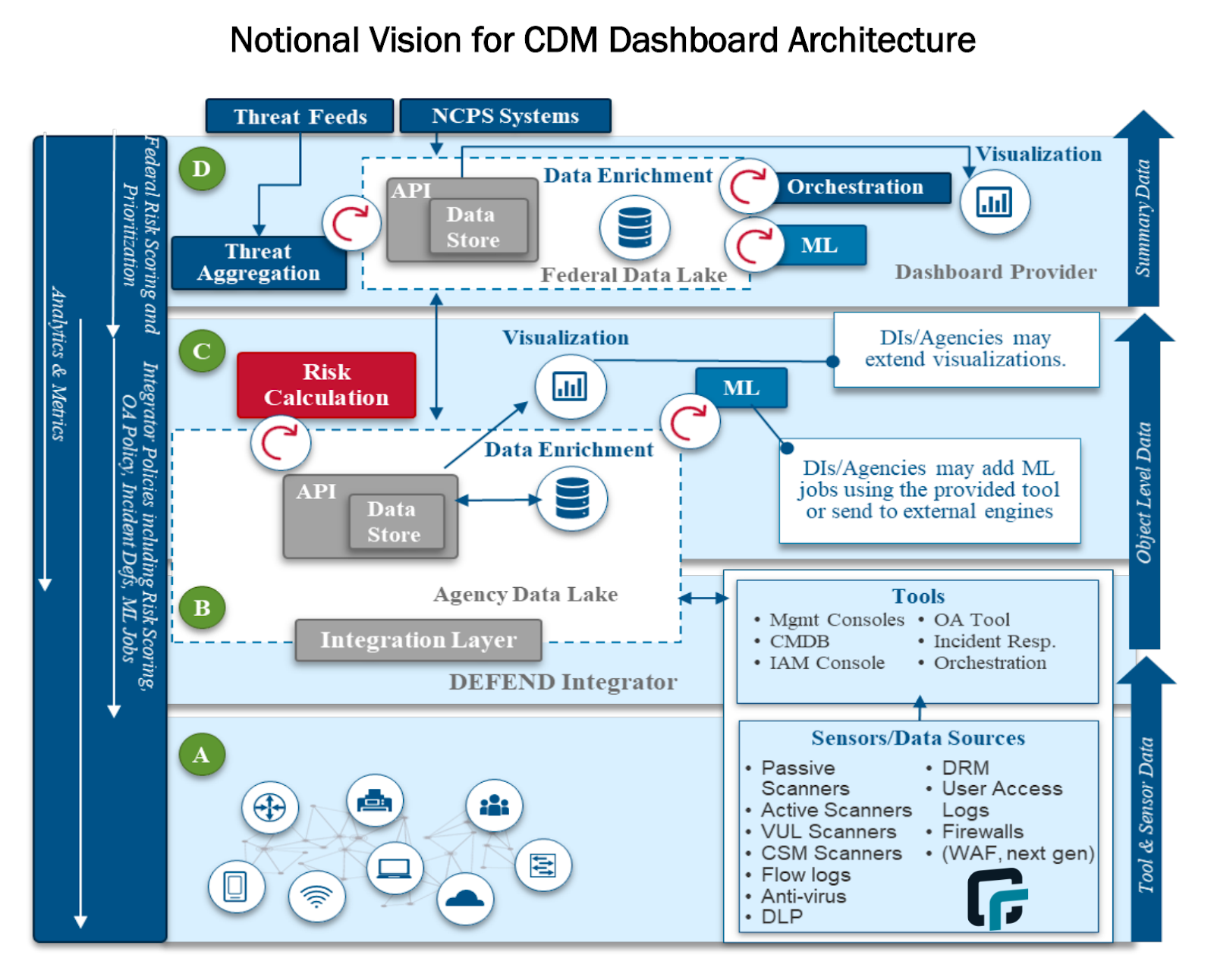
  • Import asset inventory data to the CMDB or Agency Data Lake: According to the CISA CDM architecture diagram, active scanners should push their data into the CMDB, which publishes data to the agency data lake that feeds the CDM. runZero integrates with CMDBs (e.g. ServiceNow). Some agencies that do not have an existing CMDB may even choose to aggregate data in runZero directly and feed the Agency Data Lake from there. runZero integrates with vulnerability scanners, endpoint detection and response (EDR) solutions, mobile device management (MDM) software, Microsoft Active Directory / Azure AD, attack surface management vendors, and cloud hosting providers to aggregate and consolidate all asset data in a single platform. It then offers a simple JSON export API to pull the asset inventory into a data lake.
Discover internal and external assets

runZero discovers internal and external assets, providing the high-fidelity context needed to fulfill BOD 23-01 requirements. Set up recurring unauthenticated scans to keep your asset inventory awareness up. Alerts for new asset connections or existing asset changes can be easily added to your scans. You can also conduct on-demand scans as needed and get the asset contextualization you need in minutes, complete with downloadable, digestible reports that you can present to your team (or CISA).

To meet the requirements outlined in BOD 23-01, your asset discovery solution needs to be able to quickly capture high-fidelity asset data on everything within your firewall as well as exposed services to properly assess your asset vulnerabilities. runZero can give you a strong picture of your external attack surface. Through active scanning and integrations, runZero augments data found by taking inputs from internal IPs that have been discovered and identifying public-facing hosts. Additionally, our unauthenticated scans can discover assets on a network without requiring a username/password. This approach is unobtrusive, because it doesn’t require credentials and agent deployment is time consuming and only covers managed assets.

Build a comprehensive asset inventory

A complete asset inventory includes unmanaged devices, internal and external assets, and having relevant data available on all of these assets. This level of visibility is essential both for strengthening your security posture and for meeting BOD 23-01 requirements. Unauthenticated scanning is the best way to quickly capture this information without having to worry about system fragility or resource-intensive setup like with agent-based solutions.

runZero creates a comprehensive picture of your asset inventory through on-demand unauthenticated scans and integrations, giving you more accurate fingerprinting of your assets, including those you don’t know about. You can find unmanaged devices and see when assets come on or offline in your network. Additionally, runZero gives you full control of your scans and queries, including the ability to create custom queries, generating alerts for specific assets in your scan results.

Enrich assets with vulnerability data

runZero leverages asset data from multiple sources, as well as its own unauthenticated scanner, to deliver full visibility into assets across any environment. Integrations with vulnerability scanners, like Tenable, Qualys, and Rapid7, will help you:

  • Add additional asset context to your vulnerability data
  • Find gaps in your vulnerability scan coverage
  • Respond to emerging vulnerabilities faster

Search web screenshots for oddities, identify outliers, and see assets that may need to be patched with on-demand custom queries. For example, let’s assume developers were aware of Log4Shell on the first day. They weren’t able to immediately go into their systems to find and fix the vulnerability because no one had checks available on day one. As a result, teams typically had to wait for their vuln scanner to have the checks available and then wait for a maintenance window to scan their targets resulting in delays in their ability to assess and remediate issues.

During one of our case studies, a customer that had been using ServiceNow ITOM (IT Operation Management) realized they struggled with getting all of the asset data they needed. This was especially true for their unmanaged assets, but they didn’t have the desired data for their managed assets either. The customer said, “The team looked at Qualys as an alternative data source for ServiceNow Discovery, but the system (scanned through appliances) was too slow.”

Log4Shell highlighted the importance of having the ability to quickly search an existing inventory to find assets that may be impacted by a new vulnerability without having to run a new vulnerability scan. runZero was able to provide prebuilt queries to help customers find potentially affected assets before vulnerability scanners had checks available for products and services using the Log4J.

runZero exceeds the asset visibility requirements of BOD 23-01

CISA BOD 23-01 was created to strengthen the overall cyber security posture of federal civilian agencies by requiring improvements around asset inventory and vulnerability management. With several tools and methods being used to conduct these practices, the new timeline requirements will force agencies to evaluate existing processes to comply with BOD 23-01 runZero will unify and enrich asset data from your existing security tools to deliver visibility across your internally and externally facing assets. You can take runZero for a test run with our free 21-day Enterprise trial or get a demo to learn how runZero can help your business. Contact us if you’d like to test our self-hosted version.

About Version 2 Digital

Version 2 Digital is one of the most dynamic IT companies in Asia. The company distributes a wide range of IT products across various areas including cyber security, cloud, data protection, end points, infrastructures, system monitoring, storage, networking, business productivity and communication products.

Through an extensive network of channels, point of sales, resellers, and partnership companies, Version 2 offers quality products and services which are highly acclaimed in the market. Its customers cover a wide spectrum which include Global 1000 enterprises, regional listed companies, different vertical industries, public utilities, Government, a vast number of successful SMEs, and consumers in various Asian cities.

About runZero
runZero, a network discovery and asset inventory solution, was founded in 2018 by HD Moore, the creator of Metasploit. HD envisioned a modern active discovery solution that could find and identify everything on a network–without credentials. As a security researcher and penetration tester, he often employed benign ways to get information leaks and piece them together to build device profiles. Eventually, this work led him to leverage applied research and the discovery techniques developed for security and penetration testing to create runZero.

Lessons learned from the Uber data breach

Uber employees last month discovered a hacker intrusion into their internal network. This was possible because the attacker announced his feat on the organization’s Slack channel, as well as sharing it with the New York Times, which brought the story about the Uber data breach to light.

This isn’t the first time a data breach has occurred at Uber. Previously, the company had to pay a fine of US$148 million due to the theft of data from 57 million users and 7 million drivers worldwide in the year 2016.

The 2016 attack further prompted the conviction of former Uber CSO Joe Sullivan for hiding data breaches and theft from authorities.
In this article, we??re going to dig into the two times Uber data was breached and the lessons learned from those intrusions. To facilitate your understanding, we have divided our text into topics. They are:

  • How did the data breach at Uber happen?
  • How did Uber respond to the hack?
  • What was the impact for the organization?
  • Who is responsible?
  • How did the 2016 Uber data breach occured?
  • About senhasegura
  • Conclusion

Good read!

How did the Uber data breach happen?

An attacker is believed to have purchased an Uber contractor’s corporate password on the dark web after their personal device was infected with malware, exposing their credentials.

The contractor received multiple requests for two-factor login approval and ended up releasing access to the attacker, who was able to log into the collaborators account and gain access to various tools, such as the organization’s Slack.

Known as an MFA fatigue attack, this social engineering technique involves bombarding the victim’s authentication app with push notifications so that they accept and allow access to their accounts and devices.

He then posted a message on the Slack channel announcing the Uber data breach. He complained that the company’s drivers are underpaid, as well as exposing screenshots showing assets he has gained access to, such as Amazon accounts, Web Services and code repositories.

How did Uber respond to the hack?

According to Uber’s website, its security monitoring processes allowed it to quickly identify and respond to the attack.

Their focus would have been on ensuring that the hacker no longer had access to their systems, thus protecting user data, as well as investigating the scope and consequences of the incident.
His actions included:

  • Identify employee accounts that could be compromised and
  • block their access to request a password reset;
  • Disable tools potentially affected by data breach at Uber;
  • Reset access to keys for internal services;
  • Prevent new code changes;
  • Require employees to re-authenticate when restoring access to internal tools, as well as strengthen policies related to multiple factor authentication (MFA); and
  • Expand monitoring of the internal environment.

What was the impact for the organization?

Also according to information released by Uber, the hacker had access to the company’s internal systems, but investigations are still ongoing. On the other hand, it was already possible to obtain some information:

  • Uber did not find access to its production systems, that is, to public-facing tools; user accounts and databases with their information;
  • The company encrypted its users’ credit card and health data, providing them with more protection;
  • It also revised its codebase, which did not point to attacker access to customer data stored in its cloud environments;
  • Apparently, the hacker downloaded internal Slack messages and information from an internal invoice management tool;
  • The attacker was also successful when he tried to join Uber’s dashboard on HackerOne, where there are bugs. However, the bugs accessed by it have already been fixed;
  • Despite being able to keep its services running during the process, Uber had its support operations impacted due to the need to disable internal tools.

Who is responsible?

What we do know about the hacker is that he claims to be 18, did nothing to hide the Uber data leak, and likely his actions were not motivated by financial gain through espionage, extortion or ransomware.

Furthermore, he is believed to be a member of a group of cybercriminals called Lapsus$, which has already breached Microsoft, Samsung and Cisco, among other major corporations. The US Department of Justice and the FBI are investigating the case.
How did the 2016 Uber data breach occured?

The news about a data leak at Uber, which took place in 2016, also became public some time ago. At the time, cybercriminals had access to the data of 57 million users worldwide, in addition to 7 million drivers, which 600 thousand are from the United States.

When Uber discovered the hack, it did not communicate the victims. Other than that, he paid a hacker to keep the fact secret. This conduct violated state law and prompted the Pennsylvania attorney general to demand changes in the organization’s corporate behavior.
In addition, Uber had to pay $148 million in a national settlement, which was distributed among the 50 states and the District of Columbia.

Another consequence was the recent conviction of former Uber CSO Joe Sullivan for obstructing Federal Trade Commission proceedings and covering up the hack. He faces up to eight years in prison on the charges.

About senhasegura

We, at senhasegura, are part of MT4 Tecnologia, a group of companies focused on digital security, founded in 2001 and active in more than 50 countries.

Our main objective is to ensure digital sovereignty and security to our contractors, granting control of privileged actions and data and preventing theft and leakage of information.

For this, we follow the life cycle of privileged access management through machine automation, before, during and after access. We also work for:

  • Avoid interruptions in the activities of the companies, which may impair their performance;
  • Automatically audit privilege usage;
  • Automatically audit privileged changes to identify privilege abuses;
  • Offer advanced PAM solutions;
  • Reduce cyber risks;
  • Bring organizations into compliance with audit criteria and standards such as HIPAA, PCI DSS, ISO 27001 and Sarbanes-Oxley.

Conclusion

In this article, we show you how a data breach occurred at Uber recently and another in 2016. If you found it interesting, share it with someone who wants to know more about this topic.

About Version 2 Digital

Version 2 Digital is one of the most dynamic IT companies in Asia. The company distributes a wide range of IT products across various areas including cyber security, cloud, data protection, end points, infrastructures, system monitoring, storage, networking, business productivity and communication products.

Through an extensive network of channels, point of sales, resellers, and partnership companies, Version 2 offers quality products and services which are highly acclaimed in the market. Its customers cover a wide spectrum which include Global 1000 enterprises, regional listed companies, different vertical industries, public utilities, Government, a vast number of successful SMEs, and consumers in various Asian cities.

About Segura®
Segura® strive to ensure the sovereignty of companies over actions and privileged information. To this end, we work against data theft through traceability of administrator actions on networks, servers, databases and a multitude of devices. In addition, we pursue compliance with auditing requirements and the most demanding standards, including PCI DSS, Sarbanes-Oxley, ISO 27001 and HIPAA.

Can your home device be a threat to you?

Have you ever thought that your vacuum cleaner may not only sweep your floor but also listen to your conversations? Or that your home security cameras might be used by someone else to stalk you? Smart gadgets are making our lives easier, but they can also pose a serious risk to our property, privacy, and even life if they fall into the hands of hackers. If you don’t want to become their next cybercrime victim, let’s take a look at some of the potentially risky connected devices surrounding you and ways to protect your security.
 

Blog image 2022 11 09 1


Innocent-looking smart toys

AI-powered and internet-connected toys provide much more than just entertainment for children. They boost creativity and develop social, motor, problem-solving, and other skills that can significantly impact their future performance. However, buying smart toys can be a not-so-smart idea – along with bringing kids joy, they can also attract hackers and identity thieves.

Security flaws are common, even in toys from parents’ most-trusted toy brands. Mattel’s Wi-Fi-connected Barbie doll, My Friend Cayla, Fisher-Price’s Chatter Bluetooth telephone, VTech InnoTab Max, Furby Connect doll, and many other toys have been labeled by cybersecurity experts as spying devices. Because of their security gaps, hackers can turn their cameras and microphones on and use them to see and hear everything the toy sees and hears. Moreover, fraudsters can interact with your children, give them orders, extract secrets or collect data, and track their location. In addition, the data collected can be used for blackmail and ransom demands or sold on the dark web or to advertisers.

Spying webcams

The desire to protect your home space from burglars can backfire – you can find yourself being spied on by others. That’s exactly what happened to Amazon’s Ring and Google’s Nest security cameras when malicious actors hacked them to surveil, threaten, and insult people who own them.

In one case, a home’s Ring camera loudspeaker started playing a song that a girl heard, so she went to investigate. When she came into the room where the camera was located, a deep masculine voice spoke to her through the camera speaker, saying that he was Santa Claus and calling her racist slurs.

In another Ring hack case, the virtual intruder harassed a woman, calling her vulgar names and asking her to respond.

Similar situations have also occurred with Nest camera holders. A few families reported that hackers talked to them through these cameras and messed with house thermostats by cranking up the heat.

These are just a few examples of how you can unexpectedly become a victim of cybercrime, which in addition to home security cameras, can happen with baby monitors or even pet cams.

Risky home cleanliness

The truth is that robot vacuum cleaners make life much easier. You can mind your own business while a robot vacuum sweeps your house. Although it may seem that cleaning dust from the floor is its sole task, in the hands of fraudsters, it can have a wholly different purpose as a spying device that may make you a victim of cybercrime.

Researchers revealed that hackers who gained access to a robot vacuum cleaner could get a house map or its GPS as well as record people’s conversations by repurposing its LiDAR sensors to act as microphones. In addition, some robot vacuums can enable hackers to take control of the vacuum or even watch the live video feed produced by the device. All this collected data can be sold to advertisers or used by criminals to plan a robbery or other crimes.

Deadly medical devices

It is no longer surprising that we can become victims of cybercrime when our bank card details are stolen or our mobile devices or online accounts are hacked. All this is nothing compared to what can happen when malicious actors hack into medical devices such as pacemakers, implanted defibrillators, drug-infusion pumps, and other health tech gadgets, which can have fatal consequences.

In 2017, the FDA recalled 465,000 pacemakers after the security firm, MedSec, found security flaws that could allow hackers to reprogram the devices and put patients’ lives at risk. For the same reason, doctors replaced former U.S. Vice President Dick Cheney’s heart defibrillator so it couldn’t be hacked by terrorists who might try to kill him. Infusion pumps automating the delivery of medications and nutrients into patients’ bodies can also become deadly weapons if hackers increase the doses. Moreover, such hijacked healthcare devices can be used to steal personal or medical records or even urge victims to go to the hospital by sending them false messages about their medical condition, so they leave their houses unattended.

How to protect

While some of the above-mentioned connected devices have no recorded cases of anyone maliciously hacking them, various investigations by cybersecurity experts have shown that the potential for problems exists. Therefore, security measures must be put in place to avoid any possible threats.

  • Don’t recycle passwords. Create complex and unique ones for all your connected devices and accounts.

  • Where it’s possible, set up multi-factor authentication (MFA).

  • Use secure Wi-Fi and make sure its password is hard to guess.

  • If you have a problem remembering different passwords for your accounts, use a password manager.

  • Always keep the software of your devices up to date. Updates patch potential security flaws.

  • When the device is not being used, for example, a vacuum robot or kid’s toy, unplug it or turn it off, so it stops collecting data.

  • If it’s possible to use the device without the internet, disconnect it.

  • Make sure that the smartphone you have connected to your devices is malware free.

  • Stay vigilant, and don’t provide your or your kid’s personally identifiable information if it’s not necessary. For example, children’s toys can be updated without knowing your kid’s age. However, be sure to provide the correct contact details so that developers can notify you of possible updates or security flaws.

About Version 2 Digital

Version 2 Digital is one of the most dynamic IT companies in Asia. The company distributes a wide range of IT products across various areas including cyber security, cloud, data protection, end points, infrastructures, system monitoring, storage, networking, business productivity and communication products.

Through an extensive network of channels, point of sales, resellers, and partnership companies, Version 2 offers quality products and services which are highly acclaimed in the market. Its customers cover a wide spectrum which include Global 1000 enterprises, regional listed companies, different vertical industries, public utilities, Government, a vast number of successful SMEs, and consumers in various Asian cities.

About Nord Security
The web has become a chaotic space where safety and trust have been compromised by cybercrime and data protection issues. Therefore, our team has a global mission to shape a more trusted and peaceful online future for people everywhere.

What Is Remote Desktop Protocol (RDP)?

Remote desktop protocol (RDP) is a proprietary communication protocol initially built by Microsoft. It allows two computers to exchange a graphical user interface (GUI) via transmission control protocol (TCP)/internet protocol (IP). RDP is an extension of the T.120 point-to-point (P2P) communication protocols that are standardized by the International Telecommunications Union (ITU). 

There are three primary use cases for RDP. Firstly, IT admins can use this protocol to remotely perform administrative tasks, such as PC tuneups, ID protection settings, software installations, computer troubleshooting, and printer setups. By using RDP, IT teams can easily maintain and diagnose problems that individual employees are encountering from afar. 

Secondly, employees can leverage RDP to access their workstations remotely. For example, they could access enterprise resources while working from home or traveling. Thirdly, RDP is also helpful for “headless computers” or thin clients that employees may want to leverage to access powerful workstations in the office. 

How Remote Desktop Protocol Works

RDP is a secure protocol that furnishes the user on one computer with a GUI that they can use to connect to another PC over TCP/IP network directly. For this to work, the user originating the request must have an RDP client application installed on their computer. Similarly, the PC the user is trying to access must be running an RDP server software, allowing the client to connect remotely. 

Once linked, the user can now see the desktop of the PC to which they have connected through RDP to access applications and files on that desktop. All current Windows operating systems (OSs), including Windows Server and desktop versions, come with a built-in RDP server that provides remote desktop connection capabilities. 

However, the RDP client software is only available to Windows Pro and higher versions. For example, Windows Home users must upgrade their OSs to Windows Pro or higher versions to use remote desktop connection (RDC) services. 

RDC is one of the three client components of Microsoft’s Remote Desktop Services (RDS). It enables remote client PCs — powered by RDP — to connect with Windows-based platforms. The two other client components of Microsoft’s RDS are Fast User Switching and Windows Remote Assistance. Aside from RDCs, RDP clients are available for Unix, Linux, macOS, Android, and iOS. 

By default, RDP-based communications are established over TCP port 3389, or if the remote desktop gateway is used, the connections are made over TCP port 443. When a user connects to a remote PC, the RDP client redirects the mouse and keyboard events to the remote server. RDP uses its own on-screen mouse and keyboard driver on the remote server to receive these input events from RDC clients. 

To help render the user’s actions, RDP uses its own graphics driver to construct the display output into TCP/IP packets that are then redirected to the RDC client. On the client’s side, the RDC client receives the rendered data and translates it into corresponding graphics device interface (GDI) application programming interface (API) calls. 

As a multi-channel platform, RDP uses separate virtual channels for device communication, presentation data, and encrypted input events between the RDP client and server. RDP’s virtual channel ecosystem is extensible and can support up to 6,400 disparate channels for data connections and multipoint transmissions. 

Pros and Cons of RDP

Below are some advantages that organizations and users can derive from RDP:

  • Easy access to enterprise resources. Employees can easily connect to their workstations from anywhere in the world. The protocol eliminates the need for employees to travel with flash drives. 
  • Streamlined IT management. IT teams can manage every aspect of the enterprise’s network in real time from one location. For example, they can edit the permissions to individual users or groups within the organization through RDC. 
  • Cost savings. Using RDP for RDC can help an organization save on hardware and ongoing maintenance costs. Employees can use their personal devices under the bring-your-own-device (BYOD) framework for work-related activities. 

Despite the advantages, RDP has its own disadvantages. Below are a few of them:

  • Internet connectivity. You need reliable internet connectivity for a client PC to connect successfully to a remote machine. Otherwise, the entire RDC will break down.
  • Security vulnerabilities. Although RDP-based sessions have inbuilt data encryption, access control, and activity logging capabilities, the protocol has inherent weaknesses that hackers can exploit and compromise the network. Let’s discuss some of these risks in more detail in the next section. 

RDP Security Risks 

RDP is the foundation for many remote access solutions within Windows-based environments. As such, it has become one of the most popular targets for hackers. Below are three common RDP security risks that hackers can exploit:

Weak Authentication

Most users rely on passwords to protect their workstations. They often reuse the same password across different systems, including RDP logins. If the password is weak, any hacker can attempt a brute force attack through techniques such as credential stuffing or rainbow table attack to gain access to the enterprise network. To mitigate these attacks, organizations can use single sign-on (SSO), multi-factor authentication (MFA), and adhere to password management best practices.

Unrestricted Port Access

By default, RDP connections take place on TCP port 3389. If this port is left open, an attacker can easily carry out on-path attacks and compromise the network. To protect against port-based attacks, you’ll need to lock down port 3389 and implement firewall rules. 

Unpatched Vulnerabilities

Microsoft has already provided and continues to provide OS updates and hotfixes for some of the most severe RDP vulnerabilities. Still, some of these vulnerabilities can cause damage, especially when left unpatched. 

For example, “BlueKeep”—a wormable attack that allows hackers to execute arbitrary codes on a remote PC—can cause damage to the organization if the OS is not patched. To mitigate against these vulnerabilities, you can leverage patch management tools to ensure their OS and applications are up to date. 

RDP Alternative

It’s no longer a secret that the shift to hybrid workplaces is having severe security implications for most modern organizations. To succeed in such environments, companies must ensure remote access solutions like mobile device management (MDM) tools are secure and fit into the organization’s budget. 

JumpCloud Remote Assist is a low-cost, easy-to-use, and secure remote access solution. IT admins can leverage the tool to connect to end users’ Windows, macOS, and Linux endpoints and fix technical issues from an intuitive cloud-based console. 

When used in an organization, JumpCloud Remote Assist allows IT admins to streamline access to organization resources. For example, they can easily customize, provision, and manage new security policies that better suit evolving workflows from a single place. 

Remote Assist will be a FREE add-on for organizations already using the JumpCloud Directory Platform® to manage Windows, macOS, and Linux endpoints. 

About Version 2 Digital

Version 2 Digital is one of the most dynamic IT companies in Asia. The company distributes a wide range of IT products across various areas including cyber security, cloud, data protection, end points, infrastructures, system monitoring, storage, networking, business productivity and communication products.

Through an extensive network of channels, point of sales, resellers, and partnership companies, Version 2 offers quality products and services which are highly acclaimed in the market. Its customers cover a wide spectrum which include Global 1000 enterprises, regional listed companies, different vertical industries, public utilities, Government, a vast number of successful SMEs, and consumers in various Asian cities.

About JumpCloud
At JumpCloud, our mission is to build a world-class cloud directory. Not just the evolution of Active Directory to the cloud, but a reinvention of how modern IT teams get work done. The JumpCloud Directory Platform is a directory for your users, their IT resources, your fleet of devices, and the secure connections between them with full control, security, and visibility.

×

Hello!

Click one of our contacts below to chat on WhatsApp

×