Skip to content

How to Optimize MPLS Network Monitoring to Improve Performance and SLAs

Introduction to MPLS and its Relevance in Business Networks

What is MPLS?

In the IT infrastructure serving increasingly digitized enterprises, the criticality of network quality of service is more than evident to ensure connectivity to everyone at any time. System and network administrators need to understand which technology enables efficient, reliable, and lowest latency data transmission between IT applications and services. That’s why we’re introducing the MPLS method (Multiprotocol Label Switching), which refers to “switching” or multiprotocol label switching (circuit-switched networks and packet-switched networks). That is because MPLS integrates network link information (bandwidth, latency, network usage) with IP (Internet ProtocolInternet Protocol) within a particular system (an ISP, Internet Service Provider) to simplify and improve IP packet exchange. Unlike traditional, IP-based networks, MPLS uses a tag system to manage traffic on the network more quickly and effectively.

Importance of MPLS in Network Infrastructures for Businesses Seeking to Reduce Latency and Improve Reliability

For a comprehensive resilient connectivity strategy, the value of MPLS lies in the ability to assist operators in the proper management of network resources, from tags, to divert and route traffic flexibly and according to business needs, achieving greater speed and reducing latency, while avoiding link failures, network congestion and bottleneck generation.

Advantages of MPLS for IT Infrastructures

As we have seen, the primary goal of MPLS is to significantly simplify routing and improve overall network performance. Among its advantages, there are the following:
  • Improvement in Quality of Service (QoS) From a QoS perspective, ISPs help manage different types of data flows based on priority and service plan. For example, there are different needs for a business area with a premium service plan or that receives a large amount of streaming (or high-bandwidth) multimedia content, and may experience latency in the network service. When entering packets into an MPLS network, Label Edge Routers (LER) assign a label or identifier that contains information based on the routing table input (i.e. destination, bandwidth, latency, and other metrics) and references the IP header field (source IP address), the socket number information and the differentiated service. Each core router uses tags to determine the most efficient path to its destination. That is, switching is being performed based on labels and their priority, so that data packets move throughout the network accurately and quickly. It should be noted that QoS metrics include parameters such as bandwidth, delay, jitter, packet loss, availability, and reliability, which reflect network features and performance, as well as traffic. What’s relevant about this is that MPLS supports QoS mechanisms that prioritize critical traffic, ensuring that high-priority applications benefit from bandwidth optimization and low latency.
  • SLA Compliance in Distributed Networks In service management, compliance with the commitments set out in a Service Level Agreement (SLA) must be monitored. By using MPLS, it is possible to ensure network performance by enabling the creation of dedicated paths for data packets. This ensures that network performance metrics (latency, jitter, and packet loss) are implemented consistently. MPLS networks are also designed with redundancy and failover capabilities, which improve network reliability and uptime. The sum of this ensures that network operability remains operational and meets the availability targets specified in the SLAs.
  • Bandwidth Usage Efficiency and Traffic Prioritization MPLS networks provide strong tools for monitoring and managing network performance, as tags are used to route packets through the network. Each package is assigned a label that states its path and priority. Compared to traditional routing, MPLS is more efficient as it allows traffic engineering to be implemented, helping network operators optimize data flow through the network. By controlling the paths that data packets take, MPLS can avoid congestion and ensure that high-priority traffic is delivered efficiently. MPLS also allows adopting (CoS, Class of service), which is a parameter used in data and voice protocols, critical for many business applications. This is because MPLS helps to classify and manage traffic based on predefined classes of service, according to their criticality and the level of service required. For that reason, service providers may address issues more proactively with MPLS and even easily scale to accommodate growing network demands without compromising network performance.

MPLS vs. emerging technologies such as SD-WAN

When it comes to network management, as experts say, the choice between MPLS, SD-WAN, and emerging technologies should be based on the specific needs and context of the organization.

Comparison between MPLS and SD-WAN

To be able to compare these methods, we must first consider that software-defined wide area networks (SD-WAN) use virtualization technology to apply the advantages of software-defined networks, unlike traditional networks, which are hardware-based and router-centric to direct traffic across a wide area network (WAN). SD-WAN leverages network connectivity to improve application performance, accelerate productivity, and simplify network management. Typically, SD-WAN devices are usually connected to multiple network links to ensure resilience to a potential outage or degradation of service from a provider’s network. What you do have to keep in mind is that SD-WAN is not necessarily subject to compliance and service levels (SLAs). On the other hand, MPLS, as we explained before, sends packets on predetermined network routes, avoiding connection to the public Internet and providing a greater guarantee of reliability and performance for the corporate WAN service. In addition, MPLS Service Level Agreements (SLAs) ensure a certain level of performance and uptime. Therefore, MPLS is a recommended method for organizations that need high reliability, low latency and Quality of Service (QoS) for critical applications, although its implementation cost is higher and less flexible than SD-WAN. This is because MPLS requires dedicated circuits between each location, which has its science and can take considerable time to add or remove locations from the network. To clarify the differences, we added this table:
SD-WAN MPLS

Offers a more predictable cost model with fixed pricing.

The cost is usually based on bandwidth usage.

It delivers good performance by leveraging multiple transport links and smart traffic management.

It offers increased reliability and performance, particularly for latency-sensitive applications such as VoIP and video conferencing.

It can be easily integrated with cloud-based applications and services, which can be ideal for quickly-expanding organizations or for those that have a distributed workforce.

Dedicated circuits are required between network destinations, so making changes is not as agile and can take your time and cost to make.

It offers advanced security features (example: encryption and micro-segmentation) that may enhance network security and protect against cyber threats.

It generally relies on physical security measures, such as private circuits and dedicated lines to protect network traffic.

Potentially lower reliability than MPLS, particularly for latency sensitive applications.

High reliability, especially for applications that are highly sensitive to latency and performance.

How SD-WAN and MPLS can complement each other

Now that we are clear about the difference between SD-WAN and MPLS, we must also consider that both methods do not compete with each other, but can be complemented by the following:
  • Profitability: SD-WAN can leverage lower-cost broadband Internet connections together with MPLS, reducing overall network costs while maintaining high network performance for critical applications.
  • Network Performance: MPLS provides reliable, low-latency connections for mission-critical applications, while SD-WAN can route less critical traffic over broadband or other available connections. Both methods together optimizes bandwidth usage.
  • Redundancy and reliability: Combining MPLS and SD-WAN offers greater redundancy. If an MPLS link fails, SD-WAN can automatically redirect traffic through alternate paths. This ensures steady connectivity.
  • Scalability: By means of SD-WAN, your team can simplify the onboarding of new sites and connections. With MPLS you may manage high priority traffic, leaving the rest to be managed with SD-WAN. With that, you will be implementing scalability and flexibility to adapt to business needs.
  • Security: Using SD-WAN, your IT and security employees can take advantage of the fact that it is common for it to include integrated security features (encryption and firewalls) that can complement the MPLS security strategy, as you would be adding an additional protection layer.
Also, MPLS combined with emerging technologies such as Artificial Intelligence, can offer significant improvements in network management and optimization by optimizing network traffic, detecting anomalies, automating tasks to manage networks, among others. As you can see, your team can leverage the strengths of both methods and emerging technologies to achieve a more efficient, reliable, and cost-effective network.

How Pandora FMS monitors MPLS networks

Pandora FMS features to monitor MPLS network traffic

Pandora FMS is a flexible and scalable monitoring solution that offers multiple specific features to monitor MPLS (Multiprotocol Label Switching) networks. The main features that make this monitoring available are detailed below:
  • Bandwidth and Traffic Monitoring:
    • SNMP (Simple Network Management Protocol): Pandora FMS uses SNMP to collect real-time data on bandwidth usage and traffic from MPLS network interfaces.
    • NetFlow and sFlow: These technologies allow detailed analysis of traffic flow, identifying patterns and possible bottlenecks in the MPLS network.
  • Latency and Packet Loss Monitoring:
    • Ping and Traceroute Tests: Pandora FMS runs these tests periodically to measure latency and detect packet loss on MPLS paths.
    • Round-Trip Time Monitoring: Continuous evaluation of the time it takes for packages to travel from the source to the destination and vice versa.
  • Service Level Agreements (SLA) Management:
    • Custom Alerts: Alert configuration based on compliance with the SLAs defined for the MPLS network, ensuring that any deviation is detected and managed immediately.
    • Compliance Reports: Generation of detailed reports that show the degree of compliance with SLAs, rendering informed decision making easier.
  • Display and Dashboards:
    • Custom Dashboards: Pandora FMS allows you to create specific dashboards for MPLS networks, showing key metrics such as bandwidth usage, latency, and packet loss.
    • Interactive Network Maps: Graphic display of the MPLS network topology, facilitating quick identification of critical points and potential problems.
  • Integration with Network Management Tools:
    • APIs and Webhooks: Integration with other management and automation tools, allowing fast and coordinated responses to incidents in MPLS networks.
    • Compatibility with Security Protocols: It ensures that monitoring is performed securely, protecting sensitive data on the MPLS network.

Examples of how to ensure Quality of Service and SLA optimization

Ensuring Quality of Service (QoS) and optimizing SLAs is critical to maintain efficient and reliable MPLS networks. Pandora FMS offers several features that make this process easier:
  • Traffic Priority:
    • Traffic Classification: By using defined rules, Pandora FMS can identify and prioritize critical traffic types (such as VoIP or real-time applications) over less latency-sensitive ones.
    • Bandwidth Allocation: Dynamic adjustment of the bandwidth allocated to different types of traffic to ensure that priority applications always have the necessary resources.
  • Proactive SLA Monitoring:
    • Real-Time Alerts: Setting up alerts to notify the IT team when SLA indicators (such as availability or response time) fall below agreed levels.
    • Trend Analysis: Evaluation of history data to identify trends that may affect future SLAs, allowing for preventive adjustments in MPLS network configuration.
  • Path Optimization:
    • Traffic and Performance Analysis: By using data collected by Pandora FMS, sub-optimal paths may be identified and MPLS routing reconfigured to improve overall network performance.
    • Load Distribution: Equal distribution of traffic between different MPLS routes to avoid overloads and improve bandwidth usage efficiency.
  • SLA Detailed Reports:
    • Custom Reports: Creation of reports showing compliance with SLAs at specific intervals, providing a clear view of MPLS network performance.
    • Incident Analysis: Documentation of incidents that affected SLAs, making the identification of root causes and the implementation of corrective measures easier.

Use cases of MPLS featuring Pandora FMS

Pandora FMS (Flexible Monitoring System) can be effectively used with MPLS in multiple scenarios to improve network monitoring and management:
  • Centralized System Monitoring: Pandora FMS can monitor multiple sites connected through MPLS from a central location. That is because from devices, data can be collected automatically from remote sources (for example, Telemetry) and then transmitted to a central location (in Pandora FMS panel) where they are analyzed for system and network monitoring and control. In business ecosystems, telemetry is critical to managing and managing IT infrastructure. This configuration enables comprehensive monitoring of network performance, ensuring that all MPLS links work optimally.
  • Performance Tracking: By integrating with MPLS, Pandora FMS can track network performance metrics such as latency, jitter, and packet loss. This helps maintain Quality of Service (QoS) and ensure that critical applications receive the necessary bandwidth.
  • Fault detection and resolution: Pandora FMS detects faults in MPLS networks and generates alerts in real time. This allows your team to identify and solve issues quickly and efficiently, minimizing downtime and maintaining network reliability.
  • Traffic Analysis: With Pandora FMS, you may analyze patterns in MPLS link traffic. This helps analyze bandwidth usage, prevent bottlenecks, and optimize traffic flow.
  • Scalability: Pandora FMS, from a single console, offers the ability to monitor MPLS networks at large scale, especially for organizations with very extensive and complex network infrastructures.
  • Implementation of monitoring solutions and detection of security problems: Pandora FMS can monitor the security aspects of MPLS networks, ensuring that it remains safe and, in the event of a potential threat, issues are quickly identified and addressed.

Conclusion

Without a doubt, those in charge of networks must design a true management strategy, relying on emerging methodologies and technologies to meet the need for efficient, reliable data transmission with the lowest possible latency, while avoiding link failures, network congestion and bottleneck generation. MPLS is a methodology, that, when combined with Pandora FMS, can help your team implement mechanisms to prioritize critical traffic for high-priority applications, which demand optimal bandwidth and low latency. Additionally, the advantages of MPLS can be combined with those of SD-WAN to address potential issues more proactively and even scale flexibly to fit business needs. That is, with Pandora FMS the three main advantages of MPLS in network monitoring are promoted:
  • Quality of Service Improvement. MPLS supports QoS mechanisms to prioritize critical traffic. Pandora FMS can identify and prioritize critical traffic types over less latency-sensitive ones. From a console, you may measure bandwidth and network consumption in real time to ensure Quality of Service.
  • SLA Compliance in Distributed Networks. Dedicated paths for data packets can be created using MPLS. This ensures that network performance metrics (latency, jitter, and packet loss) are implemented consistently. With Pandora FMS you may configure alerts to notify IT staff when any SLA indicator is below the agreed levels.
  • Bandwidth Usage Efficiency and Traffic Prioritization. Compared to traditional routing, MPLS is more efficient because it can control and prioritize routes for data packets. Pandora FMS can help you identify sub-optimal paths and reconfigure MPLS routing to improve overall network performance.

I invite you to experience using Pandora FMS. Access a full-featured trial license at: Pandora FMS free trial. Or if you already have Pandora FMS, visit our version and update system on our website→
Olivia Diaz
Market analyst and writer with +30 years in the IT market for demand generation, ranking and relationships with end customers, as well as corporate communication and industry analysis. Analista de mercado y escritora con más de 30 años en el mercado TIC en áreas de generación de demanda, posicionamiento y relaciones con usuarios finales, así como comunicación corporativa y análisis de la industria. Analyste du marché et écrivaine avec plus de 30 ans d’expérience dans le domaine informatique, particulièrement la demande, positionnement et relations avec les utilisateurs finaux, la communication corporative et l’anayse de l’indutrie.

About PandoraFMS
Pandora FMS is a flexible monitoring system, capable of monitoring devices, infrastructures, applications, services and business processes.
Of course, one of the things that Pandora FMS can control is the hard disks of your computers.

About Version 2 Digital

Version 2 Digital is one of the most dynamic IT companies in Asia. The company distributes a wide range of IT products across various areas including cyber security, cloud, data protection, end points, infrastructures, system monitoring, storage, networking, business productivity and communication products.

Through an extensive network of channels, point of sales, resellers, and partnership companies, Version 2 offers quality products and services which are highly acclaimed in the market. Its customers cover a wide spectrum which include Global 1000 enterprises, regional listed companies, different vertical industries, public utilities, Government, a vast number of successful SMEs, and consumers in various Asian cities.

How to disable Edge password manager

Why you might want to deactivate Edge password manager

The Edge password manager is a convenient addition to the browser as it offers basic functionality by saving your passwords directly in the browser. However, there are several reasons you might consider moving away from the built-in tool.

  • Security risks: Sometimes, storing passwords in a browser can make them vulnerable to hacking attempts, especially if your device is lost or compromised. Cybercrooks often target browsers because quite a few people use them to store sensitive data such as passwords, payment cards, and personal details.

  • Limited features: While Edge’s password manager is convenient, it still lacks advanced features like password health analysis, secure password sharing, email masking, sub domain matching for autofill, and so much more.

  • Cross-platform incompatibility: If you use multiple browsers or devices on a daily basis for work or just to run personal errands, syncing passwords across those devices is critical; this way you’ll have your credentials with you at all times. Unfortunately, Edge’s password manager doesn’t offer seamless cross-platform support.

  • Preference for dedicated solutions: Dedicated password managers like NordPass provide enhanced security features, user-friendly interfaces, and better overall management of your digital credentials.

By deactivating Edge’s built-in password manager, you can opt for a solution that offers better security, more advanced features, and more flexibility.

Before you disable your Edge password manager

Disabling the password manager in your Edge browser is more than just flipping a switch. One critical step before disabling the built-in password manager is exporting and saving all your stored passwords. This backup is critical because once the password manager is disabled, your saved passwords may no longer be accessible.

Here’s how you can export your passwords from Edge:

  1. Open Microsoft Edge and click on the three horizontal dots in the upper-right corner.

  2. Select Settings from the drop-down menu.

  3. Click Profiles, then choose Passwords.

  4. At the top of the Saved passwords section, you’ll see an option with three dots. Click it and select Export passwords.

  5. Confirm the action, and choose a secure location on your device to save the exported file.

By exporting your passwords, you ensure that all your login information is safely stored and can be easily imported into a dedicated password manager like NordPass. This not only prevents the hassle of resetting passwords but also provides an opportunity to enhance your online security.


How to turn off Edge password manager

Disabling the password manager in Edge is quite simple and should not take too much of your time. Follow these detailed steps:

  1. Launch Microsoft Edge.

  2. Click the three horizontal dots in the upper-right corner of the browser window.

  3. From the dropdown, select Settings.

  4. In the left sidebar of the Settings page, click Profiles.

  5. Under the Profiles section, select Passwords.

  6. Find the option labeled Offer to save passwords.

  7. Toggle the switch to the Off position.

  8. Below that, toggle off Sign in automatically.

  9. If you want to delete the passwords already saved in Edge, scroll down to the Saved passwords section. Here, you can remove individual passwords by clicking the three dots next to each entry and selecting Delete.

  10. Close and reopen the browser to ensure that the changes take effect.

By following these steps, you’ve successfully turned off the password manager in Microsoft Edge.

What happens after disabling Edge password manager

Once you have turned the password manager off in Edge, the browser will no longer prompt you to save passwords when you sign into the website, nor will it automatically fill out your login credentials. In turn, this means that you will need to manually enter your usernames and passwords each time you access your accounts. This change presents a chance to improve your overall online security by switching to a password manager like NordPass. With NordPass, you can securely store your passwords, enjoy automatic form filling, and benefit from advanced security features that offer stronger protection than the built-in password managers.

Advantages of using NordPass over a built-in password manager

Switching to a dedicated password manager like NordPass is not an upgrade but a full change in how you secure and manage your life online. While the built-in password manager offers basic and convenient functionality, NordPass takes that to the next level with advanced features, advanced security, and unmatched convenience.

Advanced security measures

NordPass uses state-of-the-art encryption protocols, more precisely XChaCha20 encryption combined with zero-knowledge architecture. This essentially means that your data is encrypted on your device before reaching the servers of NordPass, and you alone retain keys for decrypting it. On top of that, NordPass supports multi-factor authentication (MFA), adding that extra layer of security by requiring further verification methods when trying to access your vault.

Seamless cross-platform functionality

With NordPass, your passwords, passkeys, payment card data, secure notes, and personal information are synchronized across all your devices, whether you’re using Windows, macOS, Linux, Android, or iOS. This cross-platform accessibility eliminates the limitations associated with browser-specific password managers. At the end of the day, with a dedicated password manager, you will have access to your credentials whenever and wherever you need them.

Better user experience and features

NordPass is designed in such a way that its intuitiveness and user-friendly interface make password management pretty easy, even if you’re not a tech-head. The Password Health feature goes through the passwords stored in your NordPass vault and identifies weak, reused, or old passwords, suggesting updates toward stronger alternatives. The built-in Data Breach Scanner monitors your credentials for exposure. If your information has been compromised, NordPass alerts you immediately so you can take immediate action to secure your accounts.

By transitioning to NordPass, you’re not merely replacing Edge’s basic password storage—you’re adopting a comprehensive security solution that actively safeguards your digital identity. NordPass’ advanced encryption, cross-platform accessibility, and user-friendly features elevate your online security to a higher standard.

About NordPass
NordPass is developed by Nord Security, a company leading the global market of cybersecurity products.

The web has become a chaotic space where safety and trust have been compromised by cybercrime and data protection issues. Therefore, our team has a global mission to shape a more trusted and peaceful online future for people everywhere.

About Version 2 Digital

Version 2 Digital is one of the most dynamic IT companies in Asia. The company distributes a wide range of IT products across various areas including cyber security, cloud, data protection, end points, infrastructures, system monitoring, storage, networking, business productivity and communication products.

Through an extensive network of channels, point of sales, resellers, and partnership companies, Version 2 offers quality products and services which are highly acclaimed in the market. Its customers cover a wide spectrum which include Global 1000 enterprises, regional listed companies, different vertical industries, public utilities, Government, a vast number of successful SMEs, and consumers in various Asian cities.

ETeC 2024: Prevention first, Success second: An ESET MDR tale

At the annual internal ESET Technology Conference 2024 (ETeC), a series of high-powered workshops, seminars, hackathons, and presentations occurred.

ESET experts Gabriel Balla (product manager for Enterprise Solutions and Services), James Rodewald (security monitoring analyst), and Michal Hajovsky (global sales lead) provided a sneak peek into ESET MDR – its evolution, backend systems, delivery, as well as success stories demonstrating its ultimate value for businesses of all sizes.

The road to success with ESET MDR

During the initial session with Gabriel Balla and James Rodewald, some of the most influential aspects of ESET MDR on business security, both past successes and future prospects, were discussed.

Balla began by describing a familiar situation many generalist IT admins face – an overabundance of tasks that heavily impact the overall quality of an organization’s security, as admins have to contend with matters such as user support, various device maintenance, monitoring, and more – daily at that.

This is especially burdensome for small and medium-sized businesses (SMBs), which might lack:

  • Budget: SMBs have fewer resources to spend on high-level security and, as specialists are costly and not in abundance, they face tough competition from competitors with larger wallets.
  • Time: An average EDR/XDR solution might generate up to 160,000 detections for an SMB with just 250 seats. This requires lots of dedicated time and understanding to sort through, possibly resulting in alert fatigue.
  • Knowledge: Identifying threats requires professional skills while understanding the newest threats targeting businesses is another heavy task altogether.

While enterprises might not see these points as untenable, they have their specific issues, such as having a larger attack surface with multiple weak spots. Moreover, an enterprise requires finely-tuned preventive security, since the larger a business is, the more likely it is to face issues related to spotty coverage (missed devices) or compliance (country-specific regulations).

In fact, Rodewald later described a situation in which someone had purchased a security service but forgot to deploy it – which might sound comical, if not for its potential to end up causing a costly incident.

How to demonstrate the value of MDR within 30 days

So, why would an SMB want an MDR service? Equally, why would an enterprise need something other than its own Security Operation Center (SOC)?

Hajovsky easily answered these questions: “As much as 82% of ransomware attacks target SMBs. Businesses can break even with endpoint on, as threat actors can get in without using malware, just by abusing RDP or MS SQL…so the initial behavior is, therefore, crucial to monitor for,” he said. Time to detect and respond is crucial. On average, the detection of malicious behavior in business systems takes around 277 days, without any EDR/XDR solution.

For an enterprise SOC, it should take around 16 hours, which is a lot better, but with MDR, this can all be done in less than 30 minutes, due to the way an MDR service is set up. Hajovsky also highlighted that many businesses don’t have the time to dedicate their teams solely to security management. Likewise, with the need for constant education on novel threats, more expertise for threat hunting and incident remediation is required – which is often missing due to skills shortages.

However, ESET MDR, for example, is manned by top experts working with powerful in-house SOAR/SIEM tools ingesting data from multiple points, using a dash of AI-native power, ESET research, and actionable threat intelligence to empower fast proactive threat detection and threat hunting. Additional value can also be found in satisfying compliance and insurance requirements – often asking for EDR/XDR for lower premiums or as a condition.

Don’t believe it? Try it. ESET offers an ESET MDR Trial that can demonstrate its power shortly after deployment – so if the prospects are that you’re not ready to buy, you are most probably ready to try 🙂

ESET MDR success stories

Rodewald dedicated his side of the ESET MDR tale to describing successes – in detail.

In one success story, ESET MDR operators noticed that odd-looking user accounts had started to appear, each added to local administrators. This was being done by a mesh agent (an open-source RMM tool for network management), which is not usually malicious. However, the mesh agent had been installed in a c2Update folder (sounding suspiciously like a C&C server) by notepad.exe running from ProgramData – signaling malicious activity.

When a user account started to perform more actions, such as trying to create a reverse shell, or dropping an EXE (doing a CVE in Veeam software to dump backups) immediately detected and deleted by ESET, the intent became clear: “I suspect that this was likely the beginning of a ransomware or extortionware attack, since we have seen mesh agents used in the US to deploy ransomware,” said Rodewald.

In another success story, ESET analysts saw EsetIpBlacklist detected on a port that was actively used by an sqlserver.exe process, exposed to the internet. The same process was compromised by an outside connection, logging into MS SQL, making themselves into an admin, and starting to execute commands on the OS. The MDR team acted quickly. “The best course of action was to isolate the device – by cutting them off, they weren’t able to execute new commands,” elaborated Rodewald.

Upon further analysis, the team discovered that the MS SQL server command tried to create a PowerShell script named updt.ps1 (downloading a file saved as tzt.bat) and execute it with WMI. “This breaks the process tree a little bit, so without an EDR solution capable of connecting it back together, it wouldn’t look like MS SQL did anything.”

After additional research, the team was able to attribute the latter attack to a case of Mallox Ransomware. “We stopped the attack before it was able to drop an EXE payload just in its initial stages as it was exploring if it could get the .bat file to run. This means that ESET MDR was able to prevent ransomware for a customer, that is a huge success as I see it,” Rodewald concluded.

Prevention first with ESET MDR

According to ESET telemetry, ransomware attacks rose by 32% in H1 2024, compared to the previous semester. This comes in tandem with large-scale compromises of small and large businesses and critical infrastructure (such as hospitals), highlighting a growing problem.

However, sophisticated threats, such as ransomware, are exactly what services like ESET MDR thrive on. They fulfill the notions of a prevention-first security approach by stealthily working in the background to let businesses keep ahead of threats without disrupting their processes.

The main takeaway, as pointed out by Gabriel Balla, should be security success without worry, free from constant notifications about detection or remediation efforts. That is the way of ESET MDR, so let ESET take care of you, and live a life full of green checkmarks indicating that everything is secure in your world.

About ESET
For 30 years, ESET® has been developing industry-leading IT security software and services for businesses and consumers worldwide. With solutions ranging from endpoint security to encryption and two-factor authentication, ESET’s high-performing, easy-to-use products give individuals and businesses the peace of mind to enjoy the full potential of their technology. ESET unobtrusively protects and monitors 24/7, updating defenses in real time to keep users safe and businesses running without interruption. Evolving threats require an evolving IT security company. Backed by R&D facilities worldwide, ESET became the first IT security company to earn 100 Virus Bulletin VB100 awards, identifying every single “in-the-wild” malware without interruption since 2003.

About Version 2 Digital

Version 2 Digital is one of the most dynamic IT companies in Asia. The company distributes a wide range of IT products across various areas including cyber security, cloud, data protection, end points, infrastructures, system monitoring, storage, networking, business productivity and communication products.

Through an extensive network of channels, point of sales, resellers, and partnership companies, Version 2 offers quality products and services which are highly acclaimed in the market. Its customers cover a wide spectrum which include Global 1000 enterprises, regional listed companies, different vertical industries, public utilities, Government, a vast number of successful SMEs, and consumers in various Asian cities.

New ransomware group Embargo uses toolkit that disables security solutions, ESET Research discovers

  • New ransomware group Embargo is developing and testing Rust-based tooling.
  • The threat actor is capable of disabling security solutions running on the victim’s machine.
  • Embargo tailors its tools to each victim’s environment.

PRAGUE, BRATISLAVAOctober 23, 2024 —ESET researchers have discovered new tooling leading to the deployment of Embargo ransomware. Embargo is a relatively new group in the ransomware scene, first observed by ESET in June 2024. The new toolkit consists of a loader and an endpoint detection and response killer (EDR), which ESET has named MDeployer and MS4Killer, respectively. MS4Killer is particularly noteworthy as it is custom-compiled for each victim’s environment, targeting only selected security solutions. The malware abuses Safe Mode and a vulnerable driver to disable the security products running on the victim’s machine. Both tools are written in Rust, the Embargo group’s language of choice for developing its ransomware.

Based on its modus operandi, Embargo seems to be a well-resourced group. It sets up its own infrastructure to communicate with victims. Moreover, the group pressures victims into paying by using double extortion: the operators exfiltrate victims’ sensitive data and threaten to publish it on a leak site, in addition to encrypting it. In an interview with an alleged group member, an Embargo representative mentioned a basic payout scheme for affiliates, suggesting that the group is providing RaaS (ransomware as a service). “Given the group’s sophistication, the existence of a typical leak site, and the group’s claims, we assume that Embargo indeed operates as a RaaS provider,” says ESET researcher Jan Holman, who analyzed the threat along with fellow researcher Tomáš Zvara.

Differences in deployed versions, bugs, and leftover artifacts suggest that these tools are under active development. Embargo is still in the process of building its brand and establishing itself as a prominent ransomware operator.

Developing custom loaders and EDR removal tools is a common tactic used by multiple ransomware groups. Besides the fact that MDeployer and MS4Killer were always observed deployed together, there are further connections between them. The strong ties between the tools suggest that both are developed by the same threat actor, and the active development of the toolkit suggests that the threat actor is proficient in Rust.

With MDeployer, the Embargo threat actor abuses Safe Mode to disable security solutions. MS4Killer is a typical defense evasion tool that terminates security product processes using the technique known as Bring Your Own Vulnerable Driver (BYOVD). In this technique, the threat actor abuses signed, vulnerable kernel drivers to gain kernel-level code execution. Ransomware affiliates often incorporate BYOVD tooling in their compromise chain to tamper with security solutions protecting the infrastructure being attacked. After disabling the security software, affiliates can run the ransomware payload without worrying whether their payload gets detected.

The main purpose of the Embargo toolkit is to secure the successful deployment of the ransomware payload by disabling the security solution in the victim’s infrastructure. Embargo puts a lot of effort into that, replicating the same functionality at different stages of the attack. “We have also observed the attackers’ ability to adjust their tools on the fly, during an active intrusion, for a particular security solution,” adds ESET researcher Tomáš Zvara.

For a more detailed analysis and technical breakdown of Embargo’s tools, check out the latest ESET Research blogpost “Embargo ransomware: Rock’n’Rust” on WeLiveSecurity.com. Make sure to follow ESET Research on Twitter (today known as X) for the latest news from ESET Research.

Malware execution diagram


About ESET
For 30 years, ESET® has been developing industry-leading IT security software and services for businesses and consumers worldwide. With solutions ranging from endpoint security to encryption and two-factor authentication, ESET’s high-performing, easy-to-use products give individuals and businesses the peace of mind to enjoy the full potential of their technology. ESET unobtrusively protects and monitors 24/7, updating defenses in real time to keep users safe and businesses running without interruption. Evolving threats require an evolving IT security company. Backed by R&D facilities worldwide, ESET became the first IT security company to earn 100 Virus Bulletin VB100 awards, identifying every single “in-the-wild” malware without interruption since 2003.

About Version 2 Digital

Version 2 Digital is one of the most dynamic IT companies in Asia. The company distributes a wide range of IT products across various areas including cyber security, cloud, data protection, end points, infrastructures, system monitoring, storage, networking, business productivity and communication products.

Through an extensive network of channels, point of sales, resellers, and partnership companies, Version 2 offers quality products and services which are highly acclaimed in the market. Its customers cover a wide spectrum which include Global 1000 enterprises, regional listed companies, different vertical industries, public utilities, Government, a vast number of successful SMEs, and consumers in various Asian cities.

How To Improve Industrial Equipment Lifecycle Management with MDM

Managing the lifecycle of industrial equipment is exhausting. Be it paperwork or keeping a log of maintenance schedules. Thankfully, with digitization, mobile devices have been replacing a lot of conventional devices on industrial floors. Rugged devices, custom devices, and modern lightweight tablets and laptops are quickly becoming popular choices to replace bulky computers or pen-paper-based operations. 

Industrial Equipment Lifecycle Management with MDM

If your mobile devices are connected to your machines and sensors and if your machine overheats and is about to break down, the mobile device will quickly issue an alert and or even automatically schedule a repair!

That’s where Mobile Device Management (MDM) comes in. It’s a software that gives you complete control to manage and monitor all your critical mobile assets, remotely.

MDM provides real-time insights into all your mobile equipment for proactive monitoring. 

Sounds amazing, right?

Let’s find out how you can use MDM to improve industrial equipment lifecycle management at every phase. 

Phase 1: Equipment Acquisition and Integration with MDM

Acquisition is a crucial phase in the lifecycle of the equipment. Manual setup, integration hiccups, or even poor documentation can cost you big in the long run.

Mobile device management provides a streamlined and automated approach to mobile equipment onboarding. Let’s understand how:

Centralized Equipment Configuration

Let’s say you have hundreds of devices in your factory. Now, can you imagine configuring each of them manually? 

No, right?

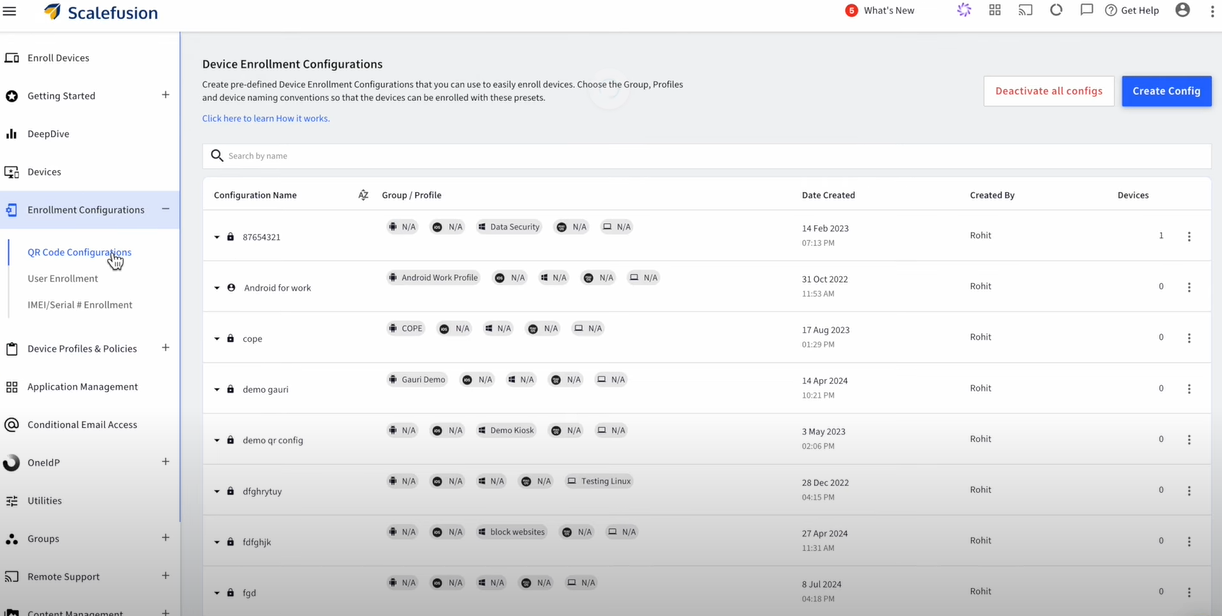
Thankfully, with MDM software, you can quickly adjust the settings of the newly acquired devices and configure them remotely from a single dashboard. Thus, you can instantly apply uniform protocols to each device.

In fact, some MDM vendors also allow you to enroll your devices using QR codes. All you have to do is scan the code and your preferred settings will be applied to them.

Centralized Equipment Configuration

Source

Seamless Integration with Existing Systems

At the same time, you can integrate new and old devices under a unified management system so that they can communicate efficiently without any disruption in the operations.

So, if you’re adding new mobile devices to the production line, you can use MDM to ensure smooth interaction between the old and new mobile equipment.

Automated Asset Registration

MDM also automates asset registration by tagging every new device with important data like serial numbers, model types, warranty details, installation dates, etc. This eliminates inaccuracies and missed entries.

Phase 2: Equipment Usage and Operational Efficiency

Once you’ve set up your system and integrated it with MDM, it’s time to optimize it for day-to-day operations. 

Here’s how MDM can help:

Streamlined Workflow Management

The biggest advantage of using MDM to manage equipment lifecycle is that it gives you centralized control over all the devices connected to your machines. 

That means you can monitor how different devices interact (with machines and each other) and contribute to the overall performance, all from a single place.

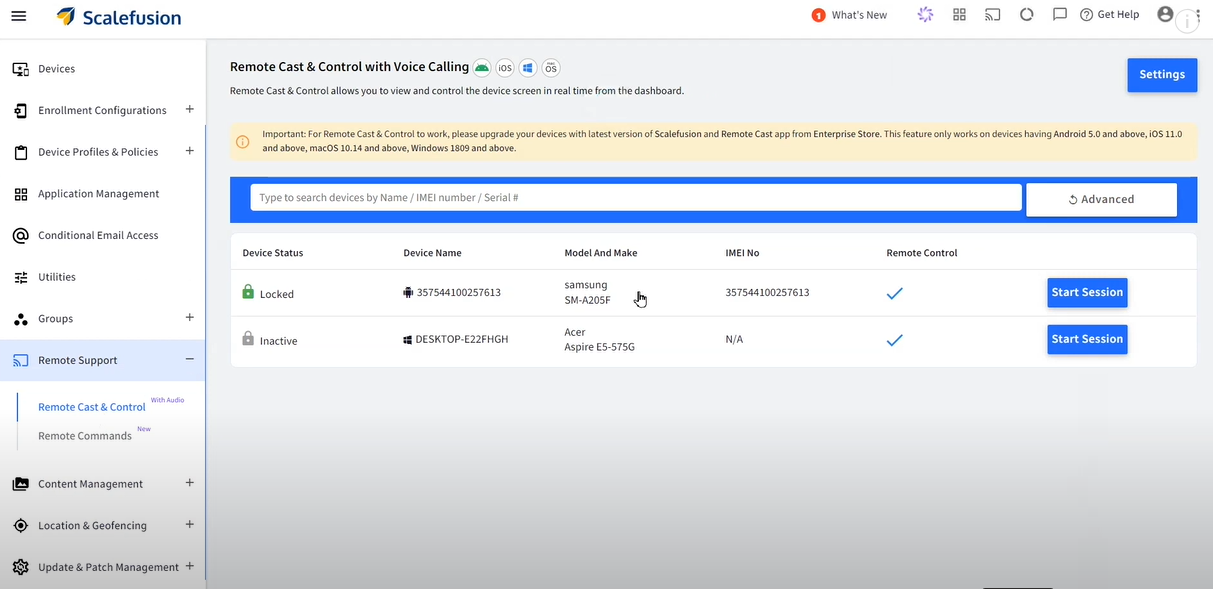
Remote Access and Control

Streamlined Workflow Management

Source

Say, you run a chain of restaurants. Each outlet has order printers, inventory trackers, etc, that run on Windows, Android, iOS, macOS, ChromeOS or Linux.  Now, you can’t be everywhere at once to make sure things run smoothly. But with an MDM, you get full access to monitor and adjust these devices remotely.

Be it lowering the threshold level across all devices or troubleshooting them. You can do all of that from anywhere in the world, thanks to MDM.

Workforce Productivity

Did you know that at least 74% of employees feel burned out at work? That’s almost every 4 out of 5 employees!

MDM can reduce this burden by automating monotonous and time-consuming operational tasks.

For example, instead of manually inspecting each device for faults, employees can receive instant, real-time alerts from the MDM system. As a result, they can resolve issues quickly and stay ahead of time.

Phase 3: Maintenance Management and Predictive Analytics

There’s no doubt that mobile device management helps extend the lifespan of your machines. You can it to track device performance and even stay on top of maintenance updates. 

Below are three ways mobile device management helps you achieve this:

Real-time Equipment Monitoring

Monitoring the performance of your devices in real time is super important.

But we’re not just talking about whether a device is active or inactive. But if it’s giving accurate insights, communicating with other devices correctly, and so on.

With an MDM platform, you can get a 360° view of such performance metrics. As a result, you can take swift action when something goes off the track, like if there’s a battery issue or if the device’s been hacked.

Automated Maintenance Scheduling

Let’s say you have a large factory that houses at least 15 ELSCO Transformers to run everything smoothly, each connected to a mobile device. And this is besides other machines and their OS-based equipment.

So, how do you carry out routine maintenance for all such devices while staying on top of other operational tasks?

Answer: MDM software.

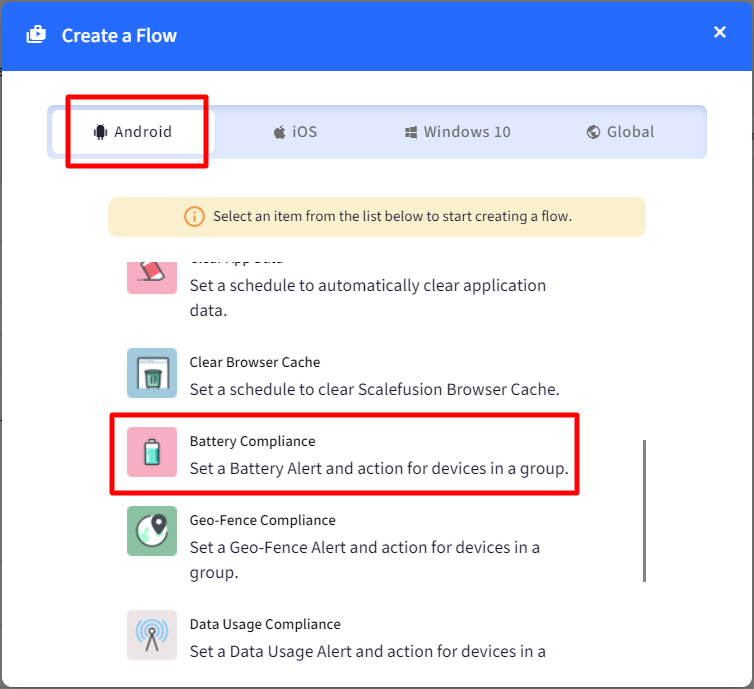
With MDM, you can automatically track operational hours and performance metrics for each device to decide when it needs servicing. The software also automatically schedules maintenance checks when set thresholds are crossed.

To make it easier, MDM also lets you manage and maintain different types of supported devices from a single platform. So, it doesn’t matter if you have 10 laptops, 25 mobiles, and 10+ PCs in your factory for your machines. With MDM, you can monitor each device without any hassle.

create a flow

Source

Predictive Analytics for Preventive Maintenance

“Think of predictive analytics like your mobile device’s personal trainer. It recognizes the signs of fatigue and overexertion so that you can maintain peak performance without overworking your mobile equipment.”

[ — Vineet Gupta, Founder of 2xSaS ]

MDM runs on built-in algorithms that can predict potential issues in your equipment by considering factors like usage patterns, environmental conditions, etc. 

Thus, you shift from a reactive maintenance strategy to a proactive one with enhanced safety and minimum unplanned downtimes.

Phase 4: Equipment Renewal or Disposal

As your mobile equipment reaches the end of its lifecycle, it’s time to make a tough call: Should you upgrade or replace it?

This decision can have a huge impact on the operations, costs, and sustainability of your business.

MDM equips you with all the necessary data to make the right choice. Here’s how:

Evaluating Equipment Longevity

MDM allows you to track how the mobile equipment is used, how often it needs repairs, and how well it’s performing. This information helps decide if it’s worth fixing or replacing.

For example, if a device consistently shows signs of declining precision, it’s time you replace it with a new piece.

Sustainability Considerations

If you decide to dispose of the equipment, MDM can help you find the best way to do it without costing the planet.

It can assist you in evaluating the environmental impact of the disposal and ensuring compliance with the necessary standards.

Implementation of Replacement Strategies

Additionally, you can also use MDM to make the switch to new equipment—whether that’s upgrading old devices or purchasing brand-new ones.

For example, say you wish to replace your rugged laptops with those that have a higher processing capacity.  Using MDM software, you can not only start from the first phase (equipment acquisition) but also train employees regarding the change (new features).

MDM Best Practices for Improving Equipment Lifecycle Management

Besides the above four phases, you must keep the following ten tips in mind to get the most out of your mobile equipment lifecycle management with MDM:

  1. Choose an MDM software that aligns with your industry’s needs and business objectives. Remember, customization is key. So, select a solution that offers flexibility and automation.
  1. Customize alerts for predictive maintenance based on historical data. For example, if a mobile device tends to wear out after 30,000 hours, set an alert for 28,000 hours to stay ahead of issues.
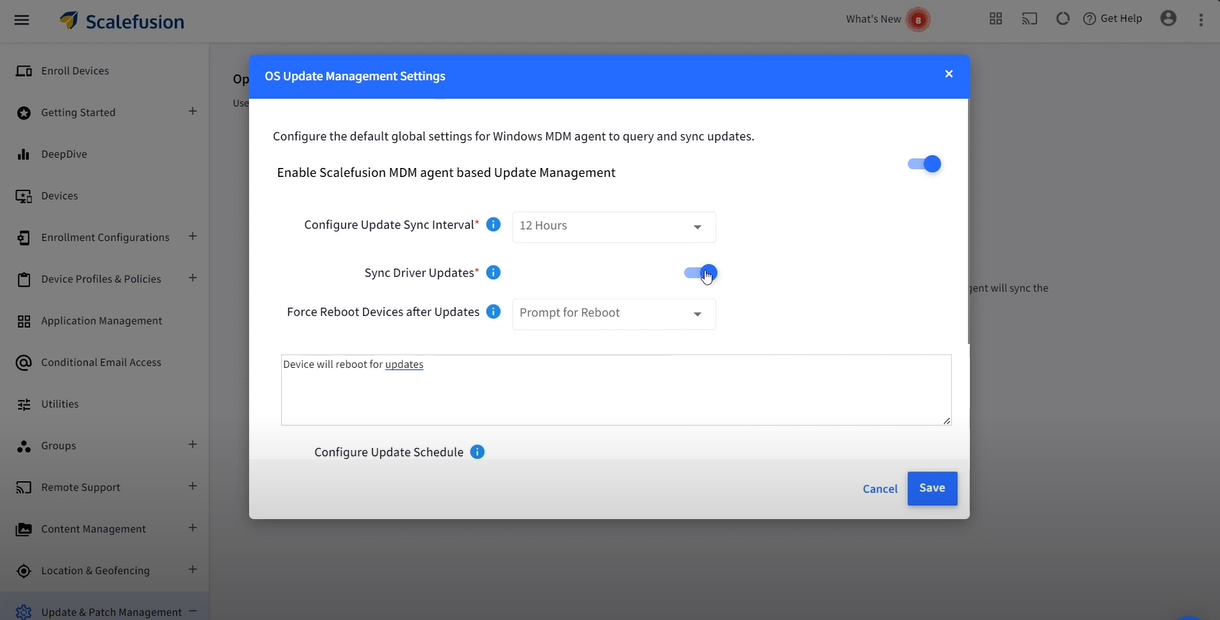
  1. Schedule automatic firmware and OS updates to ensure optimal device performance.
automatic os updates

Source

  1. Establish feedback loops to gather suggestions from employees to interact directly with the mobile devices. This will help you configure MDM software the right way.
  1. Regularly train your employees on how to use MDM software to reduce errors, improve workflow, and maximize benefits.
  1. Monitor and analyze lifecycle trends consistently to make informed decisions about mobile equipment renewal, upgrades, etc.
  1. Set up Role-Based Access Control (RBAC) so only authorized employees can access sensitive data and critical system controls.
  1. Use digital twins to simulate various operational scenarios (like cyberattacks) and predict outcomes without putting your actual devices at risk.
  1. Integrate MDM with your Enterprise Asset Management (EAM) system for seamless data flow between device monitoring and broader asset management activities.
  1. Restrict device usage if it doesn’t meet the compliance criteria by setting up conditional access via the MDM software.

Conclusion

Managing industrial equipment might seem like a tough nut to crack, but it really isn’t if you have the right tools.

MDM can do wonders by automatically updating mobile equipment software, granting remote access, and even predicting repairs in mobile devices before they occur.

However, not all MDM software are equal. 

Scalefusion brings the simplest yet most advanced MDM solution that can transform your industrial equipment lifecycle management.

With features like real-time location tracking, encrypted data transfer, 24/7 remote access, bulk device enrollment, etc., you can manage your mobile devices smartly.

Start a free trial today to explore our features and keep your mobile equipment safe.

About Scalefusion
Scalefusion’s company DNA is built on the foundation of providing world-class customer service and making endpoint management simple and effortless for businesses globally. We prioritize the needs and feedback of our customers, making sure that they are at the forefront of all decision-making processes. We are dedicated to providing comprehensive customer support services, and place emphasis on customer-centric thinking throughout the organization.

About Version 2 Digital

Version 2 Digital is one of the most dynamic IT companies in Asia. The company distributes a wide range of IT products across various areas including cyber security, cloud, data protection, end points, infrastructures, system monitoring, storage, networking, business productivity and communication products.

Through an extensive network of channels, point of sales, resellers, and partnership companies, Version 2 offers quality products and services which are highly acclaimed in the market. Its customers cover a wide spectrum which include Global 1000 enterprises, regional listed companies, different vertical industries, public utilities, Government, a vast number of successful SMEs, and consumers in various Asian cities.

×

Hello!

Click one of our contacts below to chat on WhatsApp

×