The convergence of IT and OT has unlocked unprecedented efficiency and productivity gains across various industries. However, this also makes OT networks increasingly vulnerable to cybersecurity threats. One significant attack vector that is often overlooked is the USB drive.
Internet security now tops the priority list of users worldwide. At the heart of this effort are Internet Service Providers (ISPs), whose job it is to provide secure and reliable access to the Web. This positions ISPs as the first line of defense, protecting their customers from a range of online threats while ensuring a smooth surfing experience. By understanding and managing malicious traffic, ISPs can safeguard their networks more effectively.
What Are Internet Service Providers (ISPs)? Internet Service Providers (ISPs) are companies that provide individuals and businesses with access to the internet. They connect users to the internet through various technologies such as DSL, fiber-optic cables, and wireless connections. Beyond basic connectivity, ISPs often offer additional services like email, web hosting, and online storage. Since ISPs enable Internet access, they have a big responsibility to make sure their networks are secure and that users can browse safely. By analyzing traffic patterns, ISPs can detect and mitigate potential threats more efficiently.
Threats Faced by ISPs ISPs are frequently targeted by various cyber threats because of their key role in the digital ecosystem. Some of the most common threats include:
Malware Attacks: Malware, which stands for malicious software, includes harmful programs like viruses, worms, and Trojans. These can sneak into networks and devices, causing serious damage. ISPs are often targeted to spread malware to users connected to their networks, leading to significant security breaches in the digital world.
Phishing Attacks: Phishing is when scammers try to trick people into giving away sensitive info by pretending to be a trusted source in emails or messages. This, therefore, means that ISPs should block phishing attempts to prevent customers from falling prey to these malicious attempts.
Distributed Denial of Service (DDoS) Attacks: DDoS attacks flood a network with too much internet traffic, which overwhelms the system and makes services stop working. ISPs, being big providers, are often targeted by these attacks, which can seriously mess up their operations and affect lots of users. Implementing effective DDoS protection measures is crucial to mitigate these attacks and ensure continuous service.
Content Exploitation: ISPs should take appropriate measures against offensive and unlawful content relating to pornography, child sex abuse material, or any other extremist propaganda. Failure to block such content might invite a sequence of litigation and loss of reputation.
Botnet Infiltration: Botnets are networks of compromised computers controlled by a central operator. They can be used to spam huge volumes of emails, steal data, and launch DDoS attacks. ISPs need to monitor network connections closely to prevent botnet infiltration and the subsequent malicious activities.
Why ISPs Benefit from SafeDNS Web Filtering Solutions
Protecting Users: SafeDNS defends users against malicious websites, phishing attacks, and other internet threats, ensuring a safer browsing experience across the web. This also helps in controlling malicious traffic and maintaining a secure network.
Attracting New Subscribers: Customers who want safe and secure internet access are attracted to advanced web filtering and security features.
Increasing Customer Loyalty: When subscribers trust that their internet service provider offers reliable security measures and controls content effectively, it strengthens their loyalty and reduces the likelihood of them switching to another provider.
Ensuring Compliance: SafeDNS helps ISPs follow strict rules about accessing content and securing data, making sure they meet local and international laws.
Enhancing Service Offerings: Integrating SafeDNS allows ISPs to enhance their service capabilities by offering premium features, thereby improving their value proposition and opening up new revenue opportunities.
Key Advantages of SafeDNS for ISPs
Internet Access Management and Content Filtering SafeDNS provides ISPs with full control over internet access and content filtering. This feature is important in public Wi-Fi networks due to the high possibility of managing and blocking access to inappropriate or heavy sites. By monitoring traffic patterns, ISPs can optimize their network performance and security.
Enhanced Protection Against Pornographic and Child Sexual Abuse Content This is indeed one of the priorities of any ISP: to be sure that their network does not let in any harmful or inappropriate content. In particular, that is pornographic and child sexual abuse material. SafeDNS ensures strong filtering options against this content.
Insights on User Behavior Knowing the behavior of users can be very instrumental to ISPs customizing services towards improving customer happiness. In other words, SafeDNS provides relevant data for the analysis of the browsing trends and preferences of online users, which becomes critical to ISPs. Such data will help in developing focused marketing campaigns oriented at improving the user experience and building stronger subscriber loyalty.
Cases of cyber threats are increasing; hence, it’s no surprise that various ISPs are partnering with advanced web filtering solutions like SafeDNS to bolster their networks. SafeDNS provides ISPs with powerful tools for internet access management, content filtering, and cybersecurity, ensuring users enjoy a safe, controlled, and reliable internet experience. By leveraging these tools, ISPs can better protect against protocol attacks and maintain the integrity of their services.
About Version 2 Digital
Version 2 Digital is one of the most dynamic IT companies in Asia. The company distributes a wide range of IT products across various areas including cyber security, cloud, data protection, end points, infrastructures, system monitoring, storage, networking, business productivity and communication products.
Through an extensive network of channels, point of sales, resellers, and partnership companies, Version 2 offers quality products and services which are highly acclaimed in the market. Its customers cover a wide spectrum which include Global 1000 enterprises, regional listed companies, different vertical industries, public utilities, Government, a vast number of successful SMEs, and consumers in various Asian cities.
About SafeDNS SafeDNS breathes to make the internet safer for people all over the world with solutions ranging from AI & ML-powered web filtering, cybersecurity to threat intelligence. Moreover, we strive to create the next generation of safer and more affordable web filtering products. Endlessly working to improve our users’ online protection, SafeDNS has also launched an innovative system powered by continuous machine learning and user behavior analytics to detect botnets and malicious websites.
The only constant in information security is that this year will be different from last year. Not only will new individual threats emerge, but entirely new classes of threats will make their debut. Some evergreen threats will finally die off, while others will roar back from oblivion. More devices (and more types of devices!) will be connected to networks, and attack surfaces will continue to grow in sophistication and scope.
Amidst all of these dynamics, one thing remains clear: as more and more devices are attached to networks, we need faster ways to focus limited information security resources where they are needed most. The runZero research team works tirelessly to find the most efficient ways to pinpoint at-risk devices, through both precise fingerprinting and fast outlier analysis. This results in an unprecedented view of both internal and external attack surfaces across IT, OT, IoT, cloud, mobile, and remote environments.
Mining our rich Cyber Asset Attack Surface Management (CAASM) knowledge base yields insights every day that can aid in exposure mitigation. And this treasure trove of data ultimately served as the genesis of our recent runZero Research Report, which offers our perspective on the changing security landscape and provides recommendations for what your organization can do to evolve with these changes.
The power of CAASM
CAASM was born out of the old adage that security teams can’t defend what they don’t know about. The same goes for assets with unknown attributes, like their location, type, and nature. In addition to discovering devices and their associated details, CAASM attempts to methodically uncover the types and severity of exposures impacting those assets, offering defenders a new vantage point to observe the attack surface.
CAASM elevates the discovery and visibility of assets to a first-class field under the infosec umbrella, and is now considered a foundational and critical component of an organization’s information security posture. This dynamic is directly tied to the exponential expansion of attack surfaces and to exposures outpacing defenders’ resources.
The runZero knowledge base
runZero’s primary data collection method is the runZero Explorer: a lightweight network point-of-presence that is delivered as software and performs active scans, analyzes traffic passively, and integrates with dozens of applications and services.
runZero Explorers provide a true insider’s perspective on global cybersecurity, finding ephemeral devices (phones, watches, cars), devices that normally are less monitored (thermostats, projectors, door locks), and the vast “dark matter” of ad hoc and forgotten networks, alongside the assets already on IT’s radar.
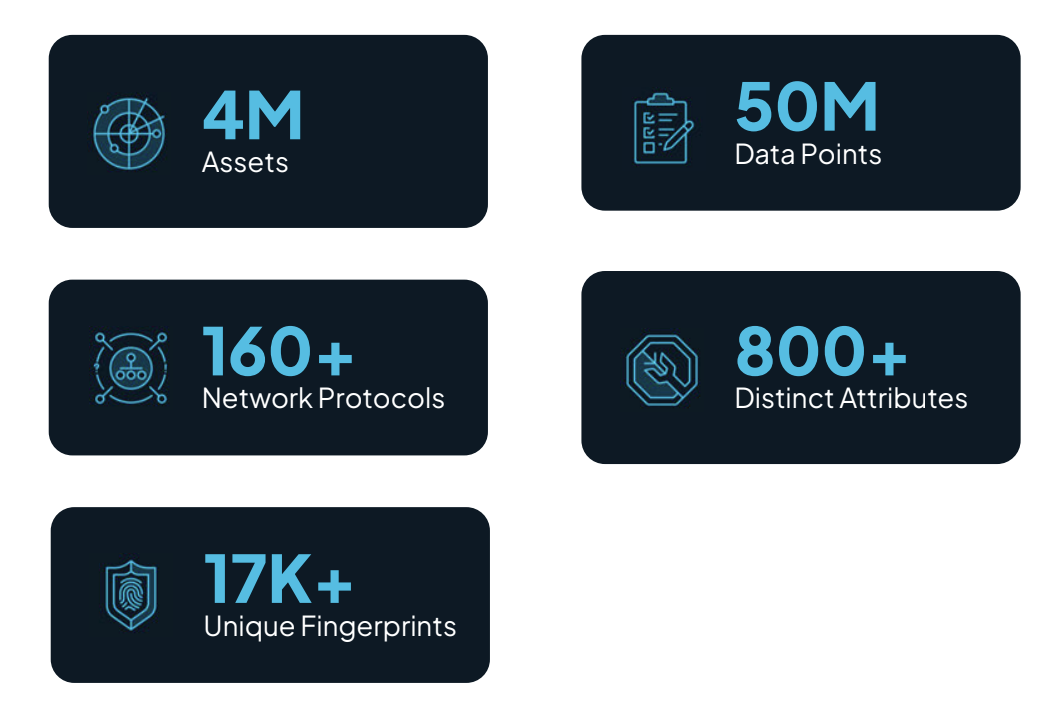
To provide insight into what the runZero Explorers are seeing in the wild, we investigated the public runZero cloud platform data and extracted a representative, anonymized data sample for analysis. This sample consisted of nearly four million assets with almost fifty million associated, distinct data points, including more than 160 network protocols + that have been normalized into 800+ distinct attributes and filtered through more than 17,000 unique fingerprints.
This culmination of data was transformed into the first-ever runZero Research Report, a compendium of CAASM insights on the state of asset security.
Redefining attack surfaces in the era of remote work and IT/OT convergence
The attack surface of an organization is no longer defined by on-premises locations with a known set of managed devices. Today, the attack surface consists of personal mobile phones, smart watches, thermostats in conference rooms, aquarium pumps in the lobby, game consoles in the CEO’s living room, and countless other devices, many of which come and go from the network on a regular basis.
The COVID-19 pandemic resulted in an explosion of the attack surface perimeter. While remote work was previously a perk, suddenly it became the standard for countless organizations. Huge numbers of employees retreated from the office and added their home networks as entry points to the previously gated and walled garden under the CISO’s watchful eye.
Further complicating today’s attack surfaces, operational technology (OT) and industrial control systems (ICS) have converged with IT. The whole world has, with very rare exceptions, settled on Ethernet and the Internet Protocol stack for IT. The vast, chaotic sea of proprietary protocols and competing standards of the OT/ICS world have now joined the fray in earnest, along with all the growing pains that come with it.
Today, the world’s living rooms and parking lots have become the CISO’s responsibility, as well as its factories and utility grids. In 2024, the US Environmental Protection Agency (EPA) wrote an open letter describing how “disabling cyberattacks” are attacking water and wastewater systems throughout the United States. Not so long ago, these systems were unreachable directly from the wider Internet. Today, many of them are perilously and openly exposed to attackers from around the world. It is in this world that we, as information security practitioners, now find ourselves. Defining attack surfaces is no longer an academic exercise that can be table-topped once a quarter. As exposures emerge at light speed, rapid, real-time discovery and CAASM are more critical than ever before.
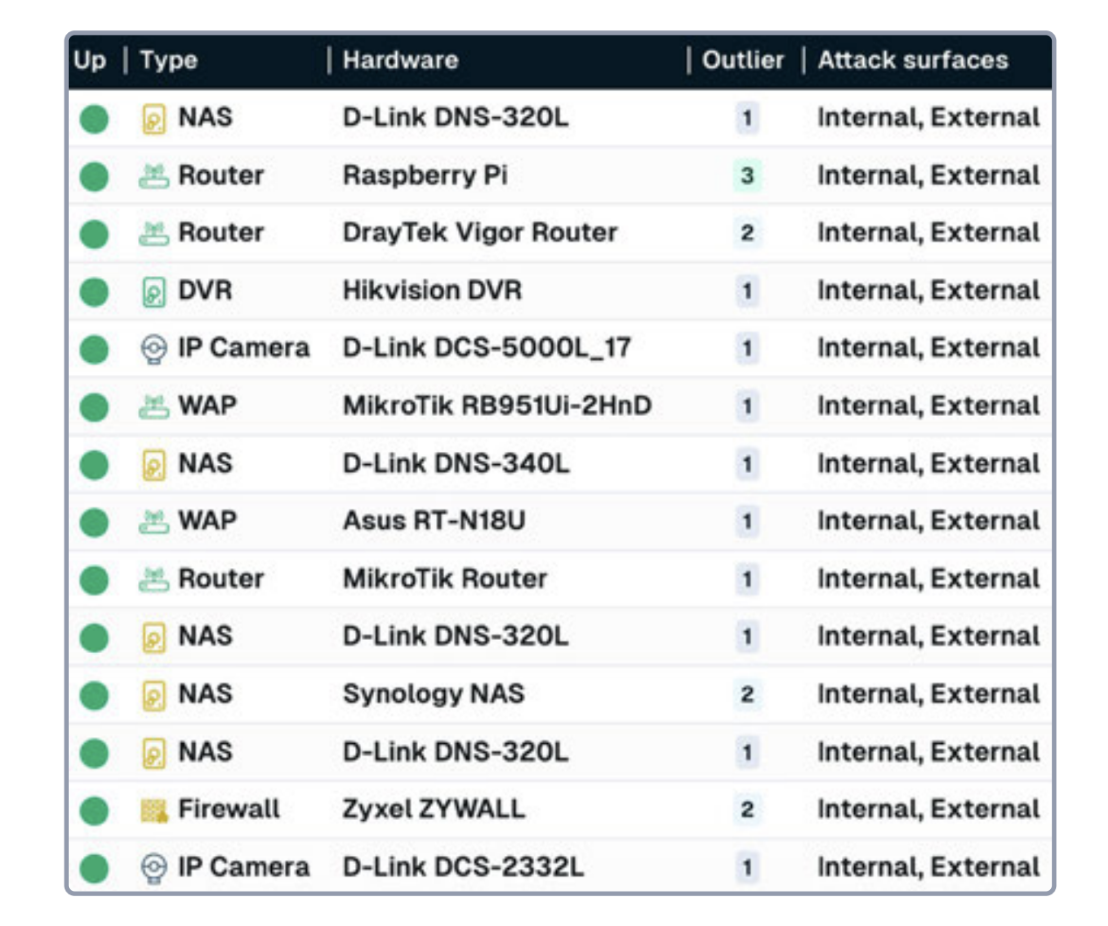
FIGURE 1 – A list of devices with multiple attack surface designations found by runZero. Devices that span attack surfaces can provide entry points for attackers into internal organizational networks.
New dynamics emerge while persistent problems remain
Tectonic shifts are happening in the cybersecurity industry, brought about by the rapid coalescence of several powerful trends and technological developments that have been years in the making. First and foremost, vulnerabilities are being exploited at a truly unprecedented pace. And it’s working. So much so that the SEC now requires 8K filings for data breaches, not to mention the constant flow of news about emerging vulnerabilities and successful compromises across organizations of every size and sector.
While zero day attacks at the network edge have surged, suppliers are struggling to provide timely patches for their products, often leaving customers at the mercy of attackers for days or weeks. In response to the acceleration of exploitation, suppliers are now often releasing indicators of compromise (IOCs) in conjunction with their initial notifications to customers. Earlier in 2024, the xz-utils backdoor became a stark reminder that supply chains are still under immense attack with catastrophic potential. The incident also catalyzed conversations about what it means to be a responsible consumer of open source products, and what “supplier” means in a shared security model.
Meanwhile, security programs are dogged by end-of-life systems, unknown assets, and network segmentation challenges. These time-consuming issues compete for resources with short-term fire drills related to emerging threats and exposures. Defenders continue to juggle scoping, patch management, emergency response, and incident analysis on top of business requirements – all while security budgets shrink.
Our analysis also indicates that large organizations are still struggling with long-standing configuration problems. Remote management services are not in great shape. The trends for outdated TLS stacks, continued use of outdated protocols like SMB v1, and general hygiene issues with the Secure Shell and Remote Desktop Protocols continue unabated, with serious implications for long-term security. The silver lining is that default choices by operating system vendors are making a difference, but not fast enough to reduce the risk to the overall attack surface.
While generative artificial intelligence (Gen AI) and large language models (LLMs) have been touted as the next big thing for security, the reality is more modest. LLMs are helpful in many contexts, but are still prediction engines at heart. As a result, LLMs are limited to helping with the human side of security and struggle to replace expert systems and logic-based decision-making.
Closing thought
The constantly evolving threat landscape demands agility and visibility like never before. As organizations brace for the emergence of new threats and bid farewell to obsolete ones, the need for efficient allocation of security resources becomes paramount. Speedy and accurate asset discovery, attack surface assessment, and exposure management are at the forefront of today’s most advanced cybersecurity programs.
Stay tuned for more insights from the runZero research team on what you need to know about the state of asset security and how to use runZero to strengthen your defenses.
Not a runZero customer? Start a free trial and gain complete asset inventory and attack surface visibility in minutes.
About Version 2 Digital
Version 2 Digital is one of the most dynamic IT companies in Asia. The company distributes a wide range of IT products across various areas including cyber security, cloud, data protection, end points, infrastructures, system monitoring, storage, networking, business productivity and communication products.
Through an extensive network of channels, point of sales, resellers, and partnership companies, Version 2 offers quality products and services which are highly acclaimed in the market. Its customers cover a wide spectrum which include Global 1000 enterprises, regional listed companies, different vertical industries, public utilities, Government, a vast number of successful SMEs, and consumers in various Asian cities.
About runZero runZero, a network discovery and asset inventory solution, was founded in 2018 by HD Moore, the creator of Metasploit. HD envisioned a modern active discovery solution that could find and identify everything on a network–without credentials. As a security researcher and penetration tester, he often employed benign ways to get information leaks and piece them together to build device profiles. Eventually, this work led him to leverage applied research and the discovery techniques developed for security and penetration testing to create runZero.
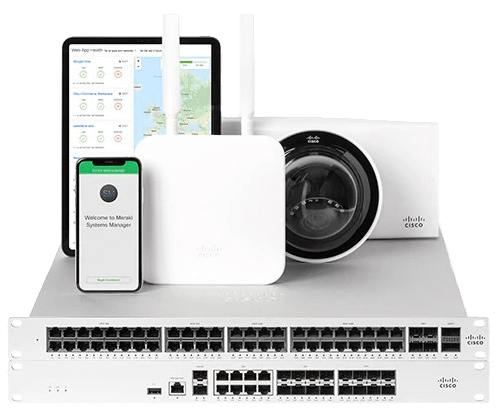
In a business world increasingly oriented towards efficiency and mobility, network management becomes a critical factor for success. Cisco Meraki stands as an undisputed leader thanks to its ability to offer a fully cloud-based technology, allowing companies of any size to manage their network devices remotely and centrally. This platform not only ensures the security and scalability required in enterprise environments, but also optimizes network performance by adapting the available bandwidth to the demands of the devices. However, to take full advantage of Cisco Meraki and ensure optimal infrastructure performance, proper monitoring becomes essential. In this context, Pandora FMS emerges as an end-to-end solution that allows adding a customized monitoring layer to the Cisco Meraki platform, facilitating early problem detection, performance analysis and scalability planning. Next, we will explore in detail why the combination of Cisco Meraki and Pandora FMS is the ideal choice for companies looking for efficient and proactive management of their network.
LThe great advantage of Cisco Meraki, which has made it stand out as a leader in its sector, is that it allows companies, regardless of the size of their network infrastructure, to offer 100% cloud-based technology.
Of course, this allows you to manage devices from multiple locations remotely through a centralized tool, which has an API through which you may query through Pandora FMS, to add the whole monitoring of the environment in an easily and quickly, through plugins already designed for this function.
Why to Choose Cisco Meraki?
It is worth mentioning that the great advantage of Cisco Meraki is the technology of its cloud-based platform, which is widespread among companies of all sizes, and which includes the following advantages:
Security: It offers malware protection, state-of-the-art firewalls, and data encryption. The standards comply with PCI level 1 regulations.
Scalability: Cisco Meraki integration can be done both for one site and for thousands of devices distributed at different points. In addition, once deployed from the beginning, tools are offered to make the growth of the environment as efficient as possible.
Performance: It provides network administrators with optimal performance by adapting the available bandwidth to the devices available.
Why monitor Cisco Meraki?
Network Troubleshooting: It includes equipment malfunction or network overflow through traffic analysis tools.
Environment Performance Analysis: Equipment that appears to be working properly but is actually flapping at its ports or a network interface whose speed is not enough to meet bandwidth needs can be as disruptive to your infrastructure as a device that is downright down.
Infrastructure Scalability Scheduling: Are you sure that your devices are enough to meet the needs of your network? Monitoring the environment is key both to find out if it is necessary to add more devices, and to know whether there are lots of them for your real traffic.
Why choose Pandora FMS to monitor Cisco Meraki?
Let’s face it, Meraki’s own Cloud already includes infrastructure monitoring tools such as dashboards. So why should you worry about monitoring your Cloud devices with external software like Pandora FMS?
Here are just a few of the advantages you would enjoy by adding Cloud devices to Pandora FMS:
Fully Custom Alerting Settings: Defining an alert when a problem is detected in a sensor (module) in Pandora FMS goes beyond notifying you by email or other notification tools, such as SMS or Telegram, the number of times and in the period of time you need. This section also includes the possibility of performing custom actions, such as trying to reboot a device automatically, writing on log files, opening an incident ticket on a ticketing platform…
Custom Infrastructure Definition: Differentiating between groups of agents, agents and modules is fully definable depending on how you want to define computer division in your infrastructure.
Stored Event History: Any status change and alert triggering from your sensors generates an event that is stored in a history that can be checked to perform a problem analysis in your network.
Creating custom services, reports and visual consoles: Pandora FMS services allow you to assign importance to the different computers through a weighting system, visual consoles allow you to build your whole network infrastructure through icons that may change color according to device status in real time. Reports can be configured to prepare a summary of availability of a equipment or a network interface in an estimated time… these are just some examples of the analysis that you may get by storing your device data in Pandora FMS.
Ease of integration between platforms: We have a plugin with which to add the devices within the Meraki Cloud with a simple execution. It is also possible to customize the modules you wish to add if you have direct access to the equipment using the SNMP protocol.
Pandora FMS Modules for Cisco Meraki
A Pandora FMS module is an information entity that stores data from a numeric or alphanumeric individual check (CPU. RAM, traffic, etc.). That is, if in a switch you wish to monitor its general CPU, and the operating state and input and output traffic of two of its interfaces, you will need to create 7 modules: one for the general CPU, two for the operating state of the two interfaces, two for the input traffic of the two interfaces and two for the output traffic of the two interfaces.
Modules are stored in dummy entities called agents. Generally, each agent represents a different device.
Finally, an agent always belongs to a group. Groups are sets that contain agents and are used to filter and control visibility and permissions.
By knowing these terms, we can get to know the structure of devices and checks that are automatically created in Pandora FMS with the execution of the “pandora_meraki” plugin that we have to add to our monitoring the information that can be retrieved from the cloud.
Meraki device agents and modules created using plugins
We have an official PandoraFMS plugin that will hugely improve the task of adding devices from the Meraki Cloud to your monitoring.
The plugin documentation can be found at the following link.
It is a server plugin (it must be located on the machine where PandoraFMS server is located), which must be indicated through parameters the URL of your Cloud, the organization ID of the company and the name of the group to add the agents that will be created through the plugin. With a simple execution, agents will be created for each appliance, switch and wireless device within a Network that matches the name of the group indicated by the parameter.
The modules created will be the following:
For each appliance device:
Device status
Operational status of its interfaces
Performance percentage
For each switch device:
Device status
Operational status of its enabled interfaces
Inbound traffic from its enabled interfaces
Outbound traffic from its enabled interfaces
For each wireless device:
Device status
Meraki device agents and modules created through SNMP checks
If it is necessary to add an extra module to those created by the plugin and there is connectivity between Pandora FMS server and the Meraki network devices, it is also possible to add monitoring through SNMP check polling network modules.
SNMP version 1, 2 or 3 protocol must be activated in the configuration of the Meraki devices and a network server module must be created for each check that is needed, as in any other network device.
This video explains how to create these types of modules.
Conclusions
Delving into more extensive monitoring than that offered by Meraki’s own Cloud-native systems is necessary to detect medium/long-term problems such as network saturation and perform a performance and scalability analysis. And it is downright essential for the configuration of a custom and immediate alert and the automation of tasks such as ticket creation.
To delve into it, it is necessary to have a system specifically oriented to monitoring and that offers the integration of this system with the devices added to the Cloud.
Pandora FMS allows, not only all this ease of integration and analysis tools for the Meraki Cloud, but also in the same environment it is possible to add the whole monitoring of the rest of the company’s areas and devices, such as servers, or the addition of metrics from other manufacturers.
About Version 2 Digital
Version 2 Digital is one of the most dynamic IT companies in Asia. The company distributes a wide range of IT products across various areas including cyber security, cloud, data protection, end points, infrastructures, system monitoring, storage, networking, business productivity and communication products.
Through an extensive network of channels, point of sales, resellers, and partnership companies, Version 2 offers quality products and services which are highly acclaimed in the market. Its customers cover a wide spectrum which include Global 1000 enterprises, regional listed companies, different vertical industries, public utilities, Government, a vast number of successful SMEs, and consumers in various Asian cities.
About PandoraFMS
Pandora FMS is a flexible monitoring system, capable of monitoring devices, infrastructures, applications, services and business processes.
Of course, one of the things that Pandora FMS can control is the hard disks of your computers.
How to manage autofill for your contact information
Here’s how you can quickly edit your contact information, such as your address or phone number:
Open Settings on your iPhone.
Scroll down and tap on Safari.
Select Autofill.
Tap on My Info and choose your contact card.
Update your information in the Contacts app, and it will automatically reflect in your autofill settings.
How to manage autofill for your credit card information
Storing your credit card information on your iPhone can make online shopping a breeze. Here’s how to add or update your credit card details:
Open Settings.
Go to Safari.
Tap on Autofill.
Select Saved Credit Cards.
Authenticate via Face ID, Touch ID, or passcode.
You can also add a new card by tapping Add Credit Card or update existing ones by selecting the card you want to edit.
How to autofill passwords on iPhone
Automatically filling out passwords saves time and reduces frustration related to manually typing long, complex passwords. Using autofill also allows you to forget your passwords, which is a nice bonus.
Here’s how to start using the autofill feature for passwords on your iPhone:
Open Settings.
Tap the Apple ID banner.
Select iCloud.
Tap Passwords and Keychain.
Turn on the Sync this iPhone toggle switch and enter your Apple ID credentials if prompted.
Here’s how you can add new passwords or manage them on your iOS device:
Open Settings.
Scroll down to Passwords.
Use Face ID, Touch ID, or passcode to access your saved passwords.
Here, you can add new passwords or update existing ones.
Why could NordPass be a better option for managing your passwords and personal information?
While built-in options like the native iOS Passwords app provide basic functionalities, NordPass takes password and personal information management to a markedly higher level.
One of NordPass’s standout features is its seamless synchronization, allowing users to access their passwords and personal information across multiple devices and platforms—be it Windows, macOS, Linux, Android, or iOS. This cross-compatibility is a significant advantage for users who operate within diverse technological ecosystems.
NordPass also goes beyond simple password management and offers a comprehensive suite of advanced tools designed to help individuals and businesses alike improve their digital security.
The Data Breach Scanner provides a way to check whether your sensitive data such as emails, passwords, or personal information, has been compromised in a breach. You can also set Breach Monitoring and receive real-time alerts in case your data appears in the breach.
Complementing the Data Breach Scanner, the Password Health feature can help you identify weak, old, and reused passwords, improving your passwords and overall security posture.
In addition, NordPass includes an Email Masking feature—a tool that generates fake, disposable email addresses that can be leveraged for online signups, making sure your real email remains a secret. This limits spam, and minimizes the risks of phishing.
In terms of support, NordPass offers 24/7 customer service, ensuring that help is available whenever it is needed. If you are already using NordPass, here’s a quick guide on enabling the NordPass autofill on iOS.
FAQ
How do I change the autofill address on my iPhone?
Open Settings. Select Safari, click Autofill, and choose My Info. Select your contact card. Update your address in the Contacts app, and it will automatically update your autofill settings.
How do I turn off autofill on my iPhone?
If you prefer not to use autofill, you can turn it off by going to Settings, selecting Safari, and taping Autofill. Toggle off the options for Use Contact Info and Credit Cards.
About Version 2 Digital
Version 2 Digital is one of the most dynamic IT companies in Asia. The company distributes a wide range of IT products across various areas including cyber security, cloud, data protection, end points, infrastructures, system monitoring, storage, networking, business productivity and communication products.
Through an extensive network of channels, point of sales, resellers, and partnership companies, Version 2 offers quality products and services which are highly acclaimed in the market. Its customers cover a wide spectrum which include Global 1000 enterprises, regional listed companies, different vertical industries, public utilities, Government, a vast number of successful SMEs, and consumers in various Asian cities.
About NordPass NordPass is developed by Nord Security, a company leading the global market of cybersecurity products.
The web has become a chaotic space where safety and trust have been compromised by cybercrime and data protection issues. Therefore, our team has a global mission to shape a more trusted and peaceful online future for people everywhere.










)
