Skip to content

Securing Internet: Protecting ISPs from Malicious Attacks

Internet security now tops the priority list of users worldwide. At the heart of this effort are Internet Service Providers (ISPs), whose job it is to provide secure and reliable access to the Web. This positions ISPs as the first line of defense, protecting their customers from a range of online threats while ensuring a smooth surfing experience. By understanding and managing malicious traffic, ISPs can safeguard their networks more effectively.

What Are Internet Service Providers (ISPs)?
Internet Service Providers (ISPs) are companies that provide individuals and businesses with access to the internet. They connect users to the internet through various technologies such as DSL, fiber-optic cables, and wireless connections. Beyond basic connectivity, ISPs often offer additional services like email, web hosting, and online storage. Since ISPs enable Internet access, they have a big responsibility to make sure their networks are secure and that users can browse safely. By analyzing traffic patterns, ISPs can detect and mitigate potential threats more efficiently.

Threats Faced by ISPs
ISPs are frequently targeted by various cyber threats because of their key role in the digital ecosystem. Some of the most common threats include:

  • Malware Attacks: Malware, which stands for malicious software, includes harmful programs like viruses, worms, and Trojans. These can sneak into networks and devices, causing serious damage. ISPs are often targeted to spread malware to users connected to their networks, leading to significant security breaches in the digital world.
  • Phishing Attacks: Phishing is when scammers try to trick people into giving away sensitive info by pretending to be a trusted source in emails or messages. This, therefore, means that ISPs should block phishing attempts to prevent customers from falling prey to these malicious attempts.
  • Distributed Denial of Service (DDoS) Attacks: DDoS attacks flood a network with too much internet traffic, which overwhelms the system and makes services stop working. ISPs, being big providers, are often targeted by these attacks, which can seriously mess up their operations and affect lots of users. Implementing effective DDoS protection measures is crucial to mitigate these attacks and ensure continuous service.
  • Content Exploitation: ISPs should take appropriate measures against offensive and unlawful content relating to pornography, child sex abuse material, or any other extremist propaganda. Failure to block such content might invite a sequence of litigation and loss of reputation.
  • Botnet Infiltration: Botnets are networks of compromised computers controlled by a central operator. They can be used to spam huge volumes of emails, steal data, and launch DDoS attacks. ISPs need to monitor network connections closely to prevent botnet infiltration and the subsequent malicious activities.


Why ISPs Benefit from SafeDNS Web Filtering Solutions

  • Protecting Users: SafeDNS defends users against malicious websites, phishing attacks, and other internet threats, ensuring a safer browsing experience across the web. This also helps in controlling malicious traffic and maintaining a secure network.
  • Attracting New Subscribers: Customers who want safe and secure internet access are attracted to advanced web filtering and security features.
  • Increasing Customer Loyalty: When subscribers trust that their internet service provider offers reliable security measures and controls content effectively, it strengthens their loyalty and reduces the likelihood of them switching to another provider.
  • Ensuring Compliance: SafeDNS helps ISPs follow strict rules about accessing content and securing data, making sure they meet local and international laws.
  • Enhancing Service Offerings: Integrating SafeDNS allows ISPs to enhance their service capabilities by offering premium features, thereby improving their value proposition and opening up new revenue opportunities.


Key Advantages of SafeDNS for ISPs

Internet Access Management and Content Filtering
SafeDNS provides ISPs with full control over internet access and content filtering. This feature is important in public Wi-Fi networks due to the high possibility of managing and blocking access to inappropriate or heavy sites. By monitoring traffic patterns, ISPs can optimize their network performance and security.

Enhanced Protection Against Pornographic and Child Sexual Abuse Content
This is indeed one of the priorities of any ISP: to be sure that their network does not let in any harmful or inappropriate content. In particular, that is pornographic and child sexual abuse material. SafeDNS ensures strong filtering options against this content.

Insights on User Behavior
Knowing the behavior of users can be very instrumental to ISPs customizing services towards improving customer happiness. In other words, SafeDNS provides relevant data for the analysis of the browsing trends and preferences of online users, which becomes critical to ISPs. Such data will help in developing focused marketing campaigns oriented at improving the user experience and building stronger subscriber loyalty.

Cases of cyber threats are increasing; hence, it’s no surprise that various ISPs are partnering with advanced web filtering solutions like SafeDNS to bolster their networks. SafeDNS provides ISPs with powerful tools for internet access management, content filtering, and cybersecurity, ensuring users enjoy a safe, controlled, and reliable internet experience. By leveraging these tools, ISPs can better protect against protocol attacks and maintain the integrity of their services.

About Version 2 Digital

Version 2 Digital is one of the most dynamic IT companies in Asia. The company distributes a wide range of IT products across various areas including cyber security, cloud, data protection, end points, infrastructures, system monitoring, storage, networking, business productivity and communication products.

Through an extensive network of channels, point of sales, resellers, and partnership companies, Version 2 offers quality products and services which are highly acclaimed in the market. Its customers cover a wide spectrum which include Global 1000 enterprises, regional listed companies, different vertical industries, public utilities, Government, a vast number of successful SMEs, and consumers in various Asian cities.

About SafeDNS
SafeDNS breathes to make the internet safer for people all over the world with solutions ranging from AI & ML-powered web filtering, cybersecurity to threat intelligence. Moreover, we strive to create the next generation of safer and more affordable web filtering products. Endlessly working to improve our users’ online protection, SafeDNS has also launched an innovative system powered by continuous machine learning and user behavior analytics to detect botnets and malicious websites.

Cisco Meraki Monitoring with Pandora FMS

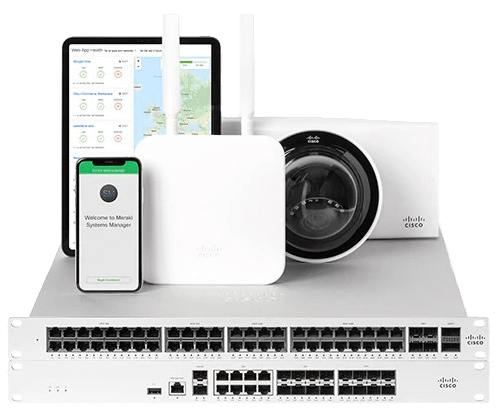
In a business world increasingly oriented towards efficiency and mobility, network management becomes a critical factor for success. Cisco Meraki stands as an undisputed leader thanks to its ability to offer a fully cloud-based technology, allowing companies of any size to manage their network devices remotely and centrally. This platform not only ensures the security and scalability required in enterprise environments, but also optimizes network performance by adapting the available bandwidth to the demands of the devices. However, to take full advantage of Cisco Meraki and ensure optimal infrastructure performance, proper monitoring becomes essential. In this context, Pandora FMS emerges as an end-to-end solution that allows adding a customized monitoring layer to the Cisco Meraki platform, facilitating early problem detection, performance analysis and scalability planning. Next, we will explore in detail why the combination of Cisco Meraki and Pandora FMS is the ideal choice for companies looking for efficient and proactive management of their network.

LThe great advantage of Cisco Meraki, which has made it stand out as a leader in its sector, is that it allows companies, regardless of the size of their network infrastructure, to offer 100% cloud-based technology. Of course, this allows you to manage devices from multiple locations remotely through a centralized tool, which has an API through which you may query through Pandora FMS, to add the whole monitoring of the environment in an easily and quickly, through plugins already designed for this function.

Why to Choose Cisco Meraki?

It is worth mentioning that the great advantage of Cisco Meraki is the technology of its cloud-based platform, which is widespread among companies of all sizes, and which includes the following advantages:
  • Security: It offers malware protection, state-of-the-art firewalls, and data encryption. The standards comply with PCI level 1 regulations.
  • Scalability: Cisco Meraki integration can be done both for one site and for thousands of devices distributed at different points. In addition, once deployed from the beginning, tools are offered to make the growth of the environment as efficient as possible.
  • Performance: It provides network administrators with optimal performance by adapting the available bandwidth to the devices available.

Why monitor Cisco Meraki?

  • Network Troubleshooting: It includes equipment malfunction or network overflow through traffic analysis tools.
  • Environment Performance Analysis: Equipment that appears to be working properly but is actually flapping at its ports or a network interface whose speed is not enough to meet bandwidth needs can be as disruptive to your infrastructure as a device that is downright down.
  • Infrastructure Scalability Scheduling: Are you sure that your devices are enough to meet the needs of your network? Monitoring the environment is key both to find out if it is necessary to add more devices, and to know whether there are lots of them for your real traffic.

Why choose Pandora FMS to monitor Cisco Meraki?

Let’s face it, Meraki’s own Cloud already includes infrastructure monitoring tools such as dashboards. So why should you worry about monitoring your Cloud devices with external software like Pandora FMS? Here are just a few of the advantages you would enjoy by adding Cloud devices to Pandora FMS:
  • Fully Custom Alerting Settings: Defining an alert when a problem is detected in a sensor (module) in Pandora FMS goes beyond notifying you by email or other notification tools, such as SMS or Telegram, the number of times and in the period of time you need. This section also includes the possibility of performing custom actions, such as trying to reboot a device automatically, writing on log files, opening an incident ticket on a ticketing platform…
  • Custom Infrastructure Definition: Differentiating between groups of agents, agents and modules is fully definable depending on how you want to define computer division in your infrastructure.
  • Stored Event History: Any status change and alert triggering from your sensors generates an event that is stored in a history that can be checked to perform a problem analysis in your network.
  • Creating custom services, reports and visual consoles: Pandora FMS services allow you to assign importance to the different computers through a weighting system, visual consoles allow you to build your whole network infrastructure through icons that may change color according to device status in real time. Reports can be configured to prepare a summary of availability of a equipment or a network interface in an estimated time… these are just some examples of the analysis that you may get by storing your device data in Pandora FMS.
  • Ease of integration between platforms: We have a plugin with which to add the devices within the Meraki Cloud with a simple execution. It is also possible to customize the modules you wish to add if you have direct access to the equipment using the SNMP protocol.

Pandora FMS Modules for Cisco Meraki

A Pandora FMS module is an information entity that stores data from a numeric or alphanumeric individual check (CPU. RAM, traffic, etc.). That is, if in a switch you wish to monitor its general CPU, and the operating state and input and output traffic of two of its interfaces, you will need to create 7 modules: one for the general CPU, two for the operating state of the two interfaces, two for the input traffic of the two interfaces and two for the output traffic of the two interfaces. Modules are stored in dummy entities called agents. Generally, each agent represents a different device. Finally, an agent always belongs to a group. Groups are sets that contain agents and are used to filter and control visibility and permissions. By knowing these terms, we can get to know the structure of devices and checks that are automatically created in Pandora FMS with the execution of the “pandora_meraki” plugin that we have to add to our monitoring the information that can be retrieved from the cloud.

Meraki device agents and modules created using plugins

We have an official PandoraFMS plugin that will hugely improve the task of adding devices from the Meraki Cloud to your monitoring. The plugin documentation can be found at the following link. It is a server plugin (it must be located on the machine where PandoraFMS server is located), which must be indicated through parameters the URL of your Cloud, the organization ID of the company and the name of the group to add the agents that will be created through the plugin. With a simple execution, agents will be created for each appliance, switch and wireless device within a Network that matches the name of the group indicated by the parameter. The modules created will be the following:
  • For each appliance device:
    • Device status
    • Operational status of its interfaces
    • Performance percentage
  • For each switch device:
    • Device status
    • Operational status of its enabled interfaces
    • Inbound traffic from its enabled interfaces
    • Outbound traffic from its enabled interfaces
  • For each wireless device:
    • Device status

Meraki device agents and modules created through SNMP checks

If it is necessary to add an extra module to those created by the plugin and there is connectivity between Pandora FMS server and the Meraki network devices, it is also possible to add monitoring through SNMP check polling network modules. SNMP version 1, 2 or 3 protocol must be activated in the configuration of the Meraki devices and a network server module must be created for each check that is needed, as in any other network device. This video explains how to create these types of modules.

Conclusions

Delving into more extensive monitoring than that offered by Meraki’s own Cloud-native systems is necessary to detect medium/long-term problems such as network saturation and perform a performance and scalability analysis. And it is downright essential for the configuration of a custom and immediate alert and the automation of tasks such as ticket creation. To delve into it, it is necessary to have a system specifically oriented to monitoring and that offers the integration of this system with the devices added to the Cloud. Pandora FMS allows, not only all this ease of integration and analysis tools for the Meraki Cloud, but also in the same environment it is possible to add the whole monitoring of the rest of the company’s areas and devices, such as servers, or the addition of metrics from other manufacturers.

About Version 2 Digital

Version 2 Digital is one of the most dynamic IT companies in Asia. The company distributes a wide range of IT products across various areas including cyber security, cloud, data protection, end points, infrastructures, system monitoring, storage, networking, business productivity and communication products.

Through an extensive network of channels, point of sales, resellers, and partnership companies, Version 2 offers quality products and services which are highly acclaimed in the market. Its customers cover a wide spectrum which include Global 1000 enterprises, regional listed companies, different vertical industries, public utilities, Government, a vast number of successful SMEs, and consumers in various Asian cities.

About PandoraFMS
Pandora FMS is a flexible monitoring system, capable of monitoring devices, infrastructures, applications, services and business processes.
Of course, one of the things that Pandora FMS can control is the hard disks of your computers.

How to change autofill settings on iPhone

How to manage autofill for your contact information

Here’s how you can quickly edit your contact information, such as your address or phone number:

  1. Open Settings on your iPhone.

  2. Scroll down and tap on Safari.

  3. Select Autofill.

  4. Tap on My Info and choose your contact card.

  5. Update your information in the Contacts app, and it will automatically reflect in your autofill settings.

How to manage autofill for your credit card information

Storing your credit card information on your iPhone can make online shopping a breeze. Here’s how to add or update your credit card details:

  1. Open Settings.

  2. Go to Safari.

  3. Tap on Autofill.

  4. Select Saved Credit Cards.

  5. Authenticate via Face ID, Touch ID, or passcode.

  6. You can also add a new card by tapping Add Credit Card or update existing ones by selecting the card you want to edit.

How to autofill passwords on iPhone

Automatically filling out passwords saves time and reduces frustration related to manually typing long, complex passwords. Using autofill also allows you to forget your passwords, which is a nice bonus.

Here’s how to start using the autofill feature for passwords on your iPhone:

  1. Open Settings.

  2. Tap the Apple ID banner.

  3. Select iCloud.

  4. Tap Passwords and Keychain.

  5. Turn on the Sync this iPhone toggle switch and enter your Apple ID credentials if prompted.

Here’s how you can add new passwords or manage them on your iOS device:

  1. Open Settings.

  2. Scroll down to Passwords.

  3. Use Face ID, Touch ID, or passcode to access your saved passwords.

  4. Here, you can add new passwords or update existing ones.

Here’s an in-depth guide about managing your passwords on an iPhone.

Why could NordPass be a better option for managing your passwords and personal information?

While built-in options like the native iOS Passwords app provide basic functionalities, NordPass takes password and personal information management to a markedly higher level.

One of NordPass’s standout features is its seamless synchronization, allowing users to access their passwords and personal information across multiple devices and platforms—be it Windows, macOS, Linux, Android, or iOS. This cross-compatibility is a significant advantage for users who operate within diverse technological ecosystems​.

NordPass also goes beyond simple password management and offers a comprehensive suite of advanced tools designed to help individuals and businesses alike improve their digital security.

The Data Breach Scanner provides a way to check whether your sensitive data such as emails, passwords, or personal information, has been compromised in a breach. You can also set Breach Monitoring and receive real-time alerts in case your data appears in the breach.

Complementing the Data Breach Scanner, the Password Health feature can help you identify weak, old, and reused passwords, improving your passwords and overall security posture.

In addition, NordPass includes an Email Masking feature—a tool that generates fake, disposable email addresses that can be leveraged for online signups, making sure your real email remains a secret. This limits spam, and minimizes the risks of phishing.

In terms of support, NordPass offers 24/7 customer service, ensuring that help is available whenever it is needed. If you are already using NordPass, here’s a quick guide on enabling the NordPass autofill on iOS.

FAQ

How do I change the autofill address on my iPhone?

Open Settings. Select Safari, click Autofill, and choose My Info. Select your contact card. Update your address in the Contacts app, and it will automatically update your autofill settings.

How do I turn off autofill on my iPhone?

If you prefer not to use autofill, you can turn it off by going to Settings, selecting Safari, and taping Autofill. Toggle off the options for Use Contact Info and Credit Cards.

About Version 2 Digital

Version 2 Digital is one of the most dynamic IT companies in Asia. The company distributes a wide range of IT products across various areas including cyber security, cloud, data protection, end points, infrastructures, system monitoring, storage, networking, business productivity and communication products.

Through an extensive network of channels, point of sales, resellers, and partnership companies, Version 2 offers quality products and services which are highly acclaimed in the market. Its customers cover a wide spectrum which include Global 1000 enterprises, regional listed companies, different vertical industries, public utilities, Government, a vast number of successful SMEs, and consumers in various Asian cities.

About NordPass
NordPass is developed by Nord Security, a company leading the global market of cybersecurity products.

The web has become a chaotic space where safety and trust have been compromised by cybercrime and data protection issues. Therefore, our team has a global mission to shape a more trusted and peaceful online future for people everywhere.

Guardz and ConnectWise PSA Integration: Empowering MSPs with Enhanced Cybersecurity

Introduction

In a major development for MSPs, Guardz has announced its successful integration with ConnectWise PSA through the ConnectWise Invent program. This collaboration brings together the Guardz AI-powered, unified cybersecurity platform, and ConnectWise’s leading software solutions, promising enhanced security and operational efficiency for MSPs and their clients.

Certified Integration: A Milestone Achievement

Guardz has completed all necessary security certifications mandated by ConnectWise, ensuring the highest levels of safety and security for this integration. The ConnectWise Invent program, known for its rigorous standards, requires third-party software providers to pass an independent security review to certify their integration.

What is the ConnectWise Invent Program?

The ConnectWise Invent program is an integration collaboration initiative designed to help third-party software providers merge their solutions with ConnectWise’s innovative software. It supports MSPs globally in leveraging cutting-edge technologies to grow their businesses, offering Tier 1 integration support and fostering mutual productivity.

The Benefits of Guardz and ConnectWise PSA Integration

This integration brings several significant advantages to MSPs, enabling them to offer better cybersecurity solutions to their SMB clients.

Streamlined Cybersecurity Management

With the integration, MSPs can seamlessly incorporate Guardz incident data into their clients’ ConnectWise PSA environment. This enables efficient detection, prioritization, and response to security incidents directly from the service board.

Enhanced Threat Intelligence and Automation

By combining Guardz’s actionable insights into emerging threats with ConnectWise PSA’s robust automation and management capabilities, MSPs can proactively identify and address security gaps. This minimizes risks, protects critical assets, and drives operational efficiency.

Empowering MSPs to Grow and Succeed

Dor Eisner, CEO and Co-Founder of Guardz emphasized the significance of this integration: “With everything required to protect a business in one package, this integration allows more MSPs to significantly increase their range of capabilities while cutting their costs and growing their businesses.” This powerful combination of threat intelligence, remediation, and automation equips MSPs with the tools they need to deliver comprehensive security tailored specifically for SMBs.

ConnectWise’s Commitment to MSP Success

Chris Timms, EVP and GM Ecosystems at ConnectWise, expressed excitement about welcoming Guardz to the Invent Program: “Their expertise in security solutions aligns to our mission to enable MSPs with the tools and resources they need to succeed. We look forward to the innovative solutions and value they will bring to our community through the power of the Invent Program.”

The Integration Process

Integrators in the ConnectWise Invent program work closely with the ConnectWise API team to create integration roadmaps, ensuring comprehensive support throughout the development process. Upon certification, they gain access to a wealth of valuable resources, tools, and additional benefits designed to support their growth and success.

Conclusion

The integration of Guardz with ConnectWise PSA marks a significant advancement in the cybersecurity landscape for MSPs and SMBs. By leveraging the strengths of both platforms, MSPs can now offer enhanced security solutions, streamline their operations, and protect their clients more effectively.

About Version 2 Digital

Version 2 Digital is one of the most dynamic IT companies in Asia. The company distributes a wide range of IT products across various areas including cyber security, cloud, data protection, end points, infrastructures, system monitoring, storage, networking, business productivity and communication products.

Through an extensive network of channels, point of sales, resellers, and partnership companies, Version 2 offers quality products and services which are highly acclaimed in the market. Its customers cover a wide spectrum which include Global 1000 enterprises, regional listed companies, different vertical industries, public utilities, Government, a vast number of successful SMEs, and consumers in various Asian cities.

About Guardz
Guardz is on a mission to create a safer digital world by empowering Managed Service Providers (MSPs). Their goal is to proactively secure and insure Small and Medium Enterprises (SMEs) against ever-evolving threats while simultaneously creating new revenue streams, all on one unified platform.

24.6.4 Voyager released

Changes compared to 24.6.3

Enhancements

  • Added a new log message to backups that indicates that all pre-job steps are complete and backup work has begun

Bug Fixes

  • Fixed an issue for Hyper-V Protected Items that caused the error message “Incorrect Function” to occur when backing up guest VMs
  • Fixed an issue for Microsoft 365 Protected Items that caused the error message “invalid character ‘S’ looking for beginning of value” to be returned during listing of accounts
  • Fixed an issue with the Comet Backup desktop app and Comet Server changing device ID unexpectedly when SSH host keys are changed on Linux
  • Fixed an issue with backups not getting skipped even if “Skip if already running” is set when there are simultaneous backup jobs running
  • Fixed an issue with “warning 6001” error messages outputted in the Comet Server server log when generating a custom codesigned Windows client installer
  • Fixed an issue where backup jobs could complete successfully when a previous retention pass failed due to retention pass failures not being recorded properly
  • Fixed an issue with the Comet Backup desktop app crashing when a user browses a target directory using the web interface
  • Fixed an issue with Constellation Role where buckets with Object Lock enabled were not deleted
  • Fixed an issue with Hyper-V Changed Block Tracking falling back to full scans

About Version 2 Digital

Version 2 Digital is one of the most dynamic IT companies in Asia. The company distributes a wide range of IT products across various areas including cyber security, cloud, data protection, end points, infrastructures, system monitoring, storage, networking, business productivity and communication products.

Through an extensive network of channels, point of sales, resellers, and partnership companies, Version 2 offers quality products and services which are highly acclaimed in the market. Its customers cover a wide spectrum which include Global 1000 enterprises, regional listed companies, different vertical industries, public utilities, Government, a vast number of successful SMEs, and consumers in various Asian cities.

About Comet
We are a team of dedicated professionals committed to developing reliable and secure backup solutions for MSP’s, Businesses and IT professionals. With over 10 years of experience in the industry, we understand the importance of having a reliable backup solution in place to protect your valuable data. That’s why we’ve developed a comprehensive suite of backup solutions that are easy to use, scalable and highly secure.