Skip to content

Data speaks volumes: how analytics improves network visibility

Network management is pivotal and complex in the increasingly connected world. The task is enormous, whether it’s understanding the intricate user activity patterns, keeping a keen eye on data traffic, or monitoring device activity within the network.

Enter the analytics territory, where data doesn’t just speak; it roars volumes. By harnessing tools such as activity logs, server usage analytics, and Device Posture Monitoring, network visibility reaches a new height into a new dimension.

Different challenges require diverse solutions

A company network is a complicated organizational ecosystem. Various aspects, like the load of data traffic and employee connections, require specific attention. These targeted approaches help in decision-making, identifying problems, and streamlining network performance.

The use of data analytics in network management is transformative in addressing different issues:

Security concerns

  • Behavior analysis – continuous monitoring and analyzing data traffic, unusual patterns, or anomalies can help detect signs of a security breach or threats.

  • Compliance monitoring – regular scans and assessments ensure that network configurations meet the industry’s compliance regulations.

Network performance optimization

  • Bottleneck identification – real-time analysis of network traffic data helps identify potential bottlenecks or overloaded devices, allowing proactive action to prevent slowdowns.

  • Capacity planning – historical data analysis allows organizations to predict future network needs, making planning for expansion or upgrades easier.

Troubleshooting and maintenance

  • Root cause analysis – analytics can provide deep insights into the root causes of network issues, allowing for quicker and more accurate resolutions.

  • Predictive maintenance – by analyzing trends and historical data, predictive algorithms can forecast potential hardware failures or performance degradation, enabling preventative maintenance.

User experience and behavior understanding

  • Application performance monitoring – insights into how applications perform on the network can lead to optimizations that enhance user experience.

  • User behavior tracking – understanding how users interact with the network provides valuable security and performance-tuning insights.

Cost Management

  • Resource allocation – data-driven insights help efficiently allocate resources, ensuring no part of the network is over- or underutilized.

  • Cost prediction – analyzing trends helps forecast bandwidth usage, hardware upgrades, and maintenance costs, aiding budget planning.

Strategic planning and decision-making

  • Trend analysis – long-term data analysis can uncover emerging trends and potential opportunities for innovation or improvement.

  • Decision support – data-driven insights support informed strategic decisions, aligning network management with business goals.

Device monitoring in network management

  • Device Posture Monitoring – understanding the state and security of all connected devices is crucial for a robust network environment, including:

    1. Real-time assessment – monitoring device states in real-time, tracking factors like software versions, security patch levels, and endpoint configurations to determine their compliance with security policies.

    2. Threat detection – identifying potential vulnerabilities through continuous device behavior surveillance and comparing them against established baselines. This allows for an immediate response to unusual activities.

    3. Integration with security protocols – Ensuring devices connecting to the network meet specific compliance and security standards is crucial. This is achieved by integrating posture assessments with existing network access controls.

    4. Automated remediation – to prevent potential security breaches, execute automatic actions to correct non-compliant devices, such as quarantining or patching.

    5. Visibility and reporting – providing comprehensive visibility into the devices connected to the network and generating detailed reports for compliance tracking and security auditing.

How NordLayer incorporates analytics for network visibility

NordLayer’s approach is all about simplicity. We offer a unified platform to manage your organization’s network from one central place. Different pieces of information give insights into varying elements monitored from a data perspective.

Here are the scenarios where NordLayer can come in handy when looking for an analytical angle of network performance.

An overview of connections and actions: Activity monitoring
Activity log 1400x7000 (1)

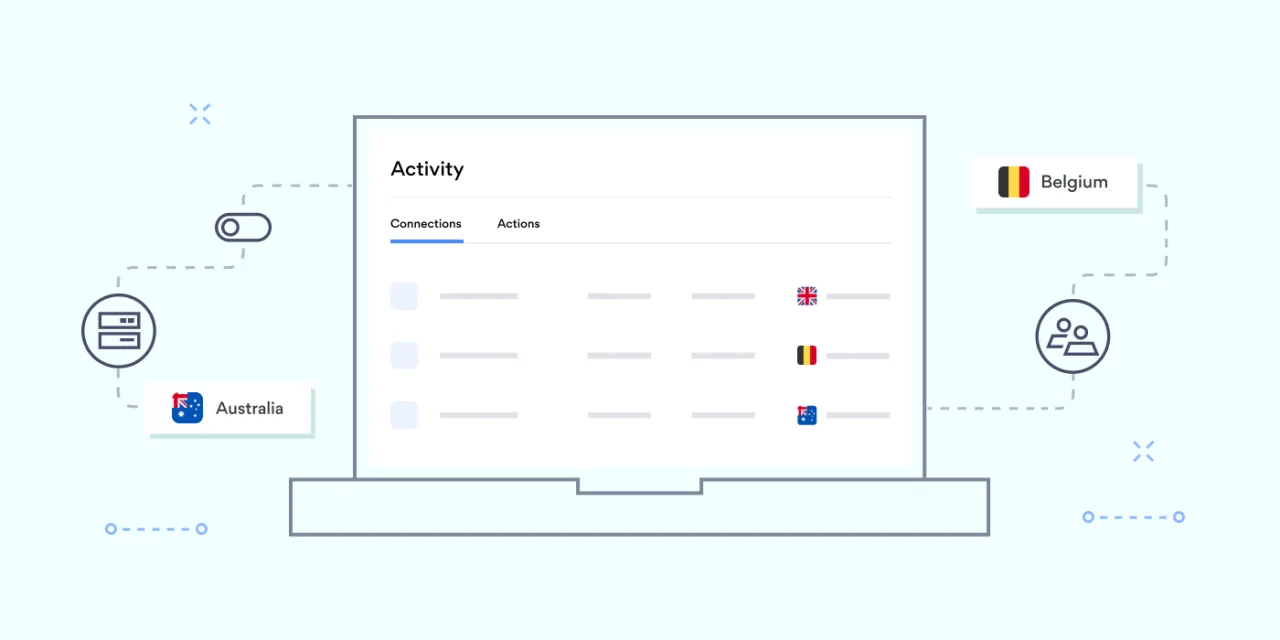
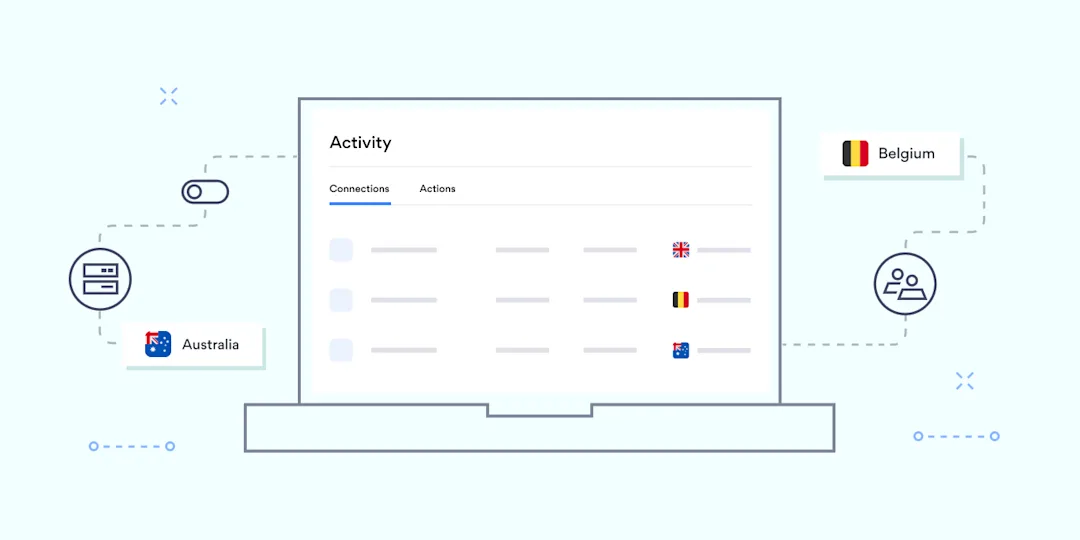
The network of a small company and a large enterprise needs to record every organization member to identify who has access to connect. It’s like a window into what’s happening within the network and how each element behaves at a surface level.

NordLayer’s Activity monitoring is a helpful functionality for admins. It allows organizations to not only identify a connected member but also have their details and session time to evaluate the tool’s usage.

From a user activity perspective, information like member name, device name, given ID number, and email helps spot any deviations in created user profiles. You can also track when members connect and disconnect from the network in a provided table, ensuring compliance with security policies.

The Activity monitoring also shows a list of admin’s actions, from creating gateways and logging in to enabling or enforcing specific features. It’s practical to track down what actions were performed retrospectively in case of an audit, procedure revision, or simply to avoid accidentally duplicate actions. The functionality supports troubleshooting, helping to find if single errors have affected the team level.

Admins can use an export capability to have all concise data in one place and use it for generating insights. The export capability allows downloading encrypted connection reports, often used for compliance audits and internal process reviews.

Track service performance: server usage analytics

Connection statistics help better understand bottlenecks and overloads of the company network. From the number of members to what servers they are connected to, it provides visibility to network managers to distribute teams more effectively.

Cramped servers lead to performance issues that impact your workforce’s productivity. Therefore, the data about service usage is crucial in future decision-making and establishing processes. NordLayer’s Insights tab in the Control Panel has interactive dashboards for server usage visibility.

The Insights tab provides a detailed data summary to analyze protocol connectivity patterns and see active sessions in a given time. The information available for protocol usage displays the company’s dedicated server metrics.

The active sessions dashboard lists data about the number of users connected to specific dedicated servers. It makes it easy for admins to analyze the distribution of connections and plan for potential future needs, such as additional dedicated servers.

Maintaining a record of network activity: Device Posture Monitoring
Hybrid work and bring-your-own-device (BYOD) policies increase the risk of malicious connections.

Managing and gaining visibility into the devices within the network is challenging. You need to verify the identity of connecting individuals and ensure their connecting devices aren’t infected and don’t threaten the organization’s network.

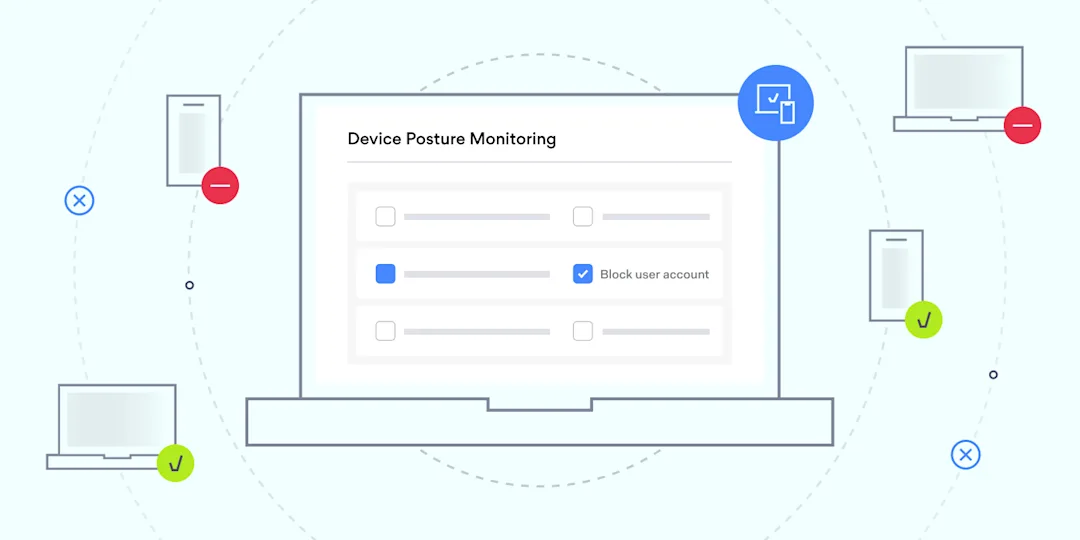
NordLayer’s Device Posture Monitoring functionality addresses this challenge by accurately monitoring who connects to the company network based on predefined rules. The feature is convenient for registering deviations from established norms.

Device Posture Security allows admins to define periodical device check rules listed below.

  1. Enabling a list of organization admin-trusted devices.

  2. Defining a preferred OS and its version.

  3. Specifying the supported NordLayer app version.

  4. Enforcing checks if the device is jailbroken or rooted.

  5. Confirming that the device contains a specific file.

  6. Checking for an allowlisted IP address on the device.

The functionality improves the admin’s visibility of a device’s compliance with internal policies and its up-to-date status. To increase actions based on the Zero Trust framework, the functionality provides information about access, device health, and activity data for devices in the organization.

Benefits of network visibility features

Having data and knowing what to do with it offers substantial benefits for organizations. By offering a panoramic view into the complex labyrinth of connections, server usage, connected devices, and their security posture, network visibility features not only enhance the control and management of the network but open doors to numerous advantages.

Additional security

Network visibility allows organizations to monitor and analyze network traffic effectively. By observing network behavior, IT admins can detect and respond to security threats. This approach helps identify suspicious activities or unauthorized access attempts.

Network performance

Insights into the network enable understanding and optimization. It assists with the identification of bottlenecks, congestion, latency issues, and network failures. Better network management enables a landscape where data informs and empowers, leading to a smarter, safer, and more efficient work environment.

Troubleshooting

Detailed insights provide information to make troubleshooting and resolving issues easier, thus saving time. When problems occur, IT admin can use all of these capabilities to analyze traffic patterns and pinpoint the source of the problem.

Embracing the future with advanced network visibility

As the digital landscape expands, the importance of a transparent, secure, and efficient network cannot be emphasized enough. With tools like NordLayer, organizations can confidently navigate this evolving terrain.

NordLayer showcases the future of network management, where data doesn’t just inform but empowers growing businesses that face increasingly complex network challenges. Embracing advanced analytics and visibility tools is not just a luxury—it’s a necessity.

Share article


Copied

Copy failed

 

Genetic data leak, 23andMe point to credential stuffing

Hackers are selling genetic data stolen from users of the company 23andMe. The company itself says they weren’t breached, although their users’ data was used by what seems to be a single threat actor stealing personal details and genetic data. This data was then published or advertised online. 23andMe suggested that the threat actor(s) gained unauthorized access with “recycled login credentials”, a technique known as credential stuffing.

The logic is simple: Keep trying stolen username/password combinations, and eventually, they’ll work on another site. An easy solution to credential stuffing attacks? You guessed it: Multi-factor authentication (MFA). While 23andMe has offered an MFA feature since 2019, it was not made mandatory for users. With genetic and personal data at stake and up to 7 million users affected by these recent breaches, it might be time for a change in policy.

The Bleach Breach: Clorox revenue and supply chain hit

Clorox, the household cleaning giant, predicts a more than 20% drop in quarterly sales due to a cyberattack (thought to be ransomware) that caused product shortages and operational disruptions. Manufacturing, often kept running by legacy systems and sprawling workforces, suffers more cyberattacks than any other industry.

The Clorox incident is being linked to the same group responsible for the MGM and Caesars Palace hacks, discussed in our previous episode, which occurred around the same time in August 2023. “Scattered Spider” is notorious for using social engineering methods to gain access to internal systems. The Clorox Company’s share price has dropped by over 7 percent in the last month.

Wearable AI: Trendy or just trending?

Tech companies are rushing to secure the lead in wearable AI products. Meta has collaborated with Ray-Ban on a pair of high-tech glasses, enabling wearers to live stream directly from the glasses to Facebook or Instagram and voice activate Meta AI, “an advanced conversational assistant”. Jony Ive, Apple’s legendary former design lead, and OpenAI are reportedly teaming up to design the “iPhone of AI”.

Rewind.ai unveiled a neck-worn pendant that records conversations to your smartphone and creates a searchable database of life moments. Humane, imagining “a world where you can take AI everywhere”, have developed a smart device that resembles a badge or lapel pin.

The common goal here seems to be for technology to rely less on screens, to fade from view, and become all but invisible.

Stay tuned for the next episode of Cyberview.

About Version 2 Digital

Version 2 Digital is one of the most dynamic IT companies in Asia. The company distributes a wide range of IT products across various areas including cyber security, cloud, data protection, end points, infrastructures, system monitoring, storage, networking, business productivity and communication products.

Through an extensive network of channels, point of sales, resellers, and partnership companies, Version 2 offers quality products and services which are highly acclaimed in the market. Its customers cover a wide spectrum which include Global 1000 enterprises, regional listed companies, different vertical industries, public utilities, Government, a vast number of successful SMEs, and consumers in various Asian cities.

About NordLayer
NordLayer is an adaptive network access security solution for modern businesses – from the world’s most trusted cybersecurity brand, Nord Security.

The web has become a chaotic space where safety and trust have been compromised by cybercrime and data protection issues. Therefore, our team has a global mission to shape a more trusted and peaceful online future for people everywhere.

Scale Computing Announces New Edge Computing Innovations for Fleet Manager, HE100 Product Line

Gartner IT Infrastructure, Operations & Cloud Strategies Conference, Las Vegas, Nev. – December 5, 2023 — Scale Computing, a market leader in edge computing, virtualization, and hyperconverged solutions, today announced several new innovations and options for its award-winning edge computing products, Scale Computing Fleet Manager (SC//Fleet Manager) and the HE100 product family from the Gartner IT Infrastructure, Operations & Cloud Strategies Conference 2023.

Jeff Ready, Scale Computing CEO and Co-Founder will present at the Gartner IT Infrastructure, Operations & Cloud Strategies Conference 2023 event at 3:20pm on Dec 6th at the Exhibitor Showcase Theater 2. Event attendees can see this new technology demonstrated at the Scale Computing booth, #104.

Introducing the HE153, the Smallest Form Factor HCI Edge Appliance Available Today

The HE153 is the first new release in the HE100 series of hardware, based on the ASUS Next Unit of Computing (NUC). This innovative, new appliance delivers a small, powerful, and efficient HCI edge solution that can be deployed almost anywhere with the latest in performance and reliability. The HE153 series will have both a dual NIC option and a single NIC, slim option, making edge computing deployments even easier for IT teams.

The award-winning HE100 series of appliances combines Scale Computing’s self-healing software platform for autonomously running applications at the edge, with a small, all-flash, NVMe storage-based compute appliance that delivers all the simplicity, efficiency, and enterprise-ready virtualization associated with Scale Computing Platform.

The small form factor can be deployed without requiring a rack or server closet. While taking up only the space needed to stack four smartphones, it provides a fully functional, integrated platform for running applications that includes high availability clustering, rolling upgrades, and integrated data protection.

“Scale Computing’s first new release of the ASUS-based NUC allows IT teams to consolidate everything they need: virtualization, servers, storage, and backup/disaster recovery with powerful fleet management to deliver a single manageable solution at scale in the data center, in the branch office, and for distributed edge locations,” said Jeff Ready, CEO and Co-founder, Scale Computing. “Regardless of your hardware requirements, the same innovative software and intuitive user interface give IT admins the power to run infrastructure efficiently both in the data center and at the edge.”

The HE153 will be available in the first half of 2024, with pricing for a three-node cluster starting at $5,400. For more information on features and specifications, please visit https://www.scalecomputing.com/sc-hardware

SC//Fleet Manager VM List: Another Industry First

Simplicity is engineered into SC//Fleet Manager, making it easier than ever to securely monitor and manage workloads and infrastructure across an entire edge fleet of clusters running Scale Computing HyperCore. Instead of managing individual deployments, SC//Fleet Manager allows users to see and manage their entire fleet at once from an intuitive cloud-based console. Users can easily monitor connectivity and cluster health. Any problems across the fleet are highlighted automatically, and if there is an issue, IT administrators can drill down into a specific cluster to further diagnose and fix the problem.

The new fleet-wide virtual machines (VMs) list feature of SC//Fleet Manager makes real-time monitoring of all workloads across a global fleet of Scale Computing HyperCore clusters easier with a searchable and customizable view. With the ability to jump straight to the console of the VM using Secure Link technology, customers and MSPs who need to monitor and manage workloads running on multiple clusters now have immediate access to workloads no matter where they sit. With high availability and data resiliency guaranteed by SC//HyperCore, customers and MSPs can focus on ensuring workloads are running smoothly and as required, whether it be across ten or ten thousand sites. This new feature is available today to current and future SC//Fleet Manager customers.

Scale Computing Platform (SC//Platform) brings simplicity, high availability, and scalability together, replacing the existing infrastructure for running VMs in a single, easy-to-manage platform. SC//Fleet Manager allows users to centrally monitor and manage hundreds or thousands of distributed edge infrastructure deployments with few or no on-site IT personnel. The award-winning SC//HyperCore software delivers on-premises edge computing with high availability and disaster recovery to remote locations at an affordable entry-level cost. All SC//Hardware can be deployed quickly, managed locally or remotely, and can self-heal almost instantly. Scale Computing provides the benefits of affordable edge computing infrastructure without sacrificing reliability, ease of deployment, and ease of use.

About the Gartner IT Infrastructure, Operations & Cloud Strategies Conference

The Gartner IT Infrastructure, Operations & Cloud Strategies Conference focuses on key topics for infrastructure and operations (I&O) leaders, including how to embrace change and serve evolving enterprise needs through optimizing workloads, maximizing efficiency, and building resilient systems and teams.

About Scale Computing

Scale Computing is a leader in edge computing, virtualization, and hyperconverged solutions. Using patented HyperCore™ technology, Scale Computing Platform automatically identifies, mitigates, and corrects infrastructure problems in real-time, enabling applications to achieve maximum uptime, even when local IT resources and staff are scarce. Edge Computing is the fastest-growing area of IT infrastructure, and industry analysts have named Scale Computing an outperformer and leader in the space, including being named the #1 edge computing vendor by CRN. Scale Computing’s products are sold by thousands of value-added resellers, integrators, and service providers worldwide. When ease-of-use, high availability, and TCO matter, Scale Computing Platform is the ideal infrastructure platform. Read what our customers have to say on Gartner Peer Insights, G2, and TrustRadius.

About Version 2 Digital

Version 2 Digital is one of the most dynamic IT companies in Asia. The company distributes a wide range of IT products across various areas including cyber security, cloud, data protection, end points, infrastructures, system monitoring, storage, networking, business productivity and communication products.

Through an extensive network of channels, point of sales, resellers, and partnership companies, Version 2 offers quality products and services which are highly acclaimed in the market. Its customers cover a wide spectrum which include Global 1000 enterprises, regional listed companies, different vertical industries, public utilities, Government, a vast number of successful SMEs, and consumers in various Asian cities.

About Scale Computing 
Scale Computing is a leader in edge computing, virtualization, and hyperconverged solutions. Scale Computing HC3 software eliminates the need for traditional virtualization software, disaster recovery software, servers, and shared storage, replacing these with a fully integrated, highly available system for running applications. Using patented HyperCore™ technology, the HC3 self-healing platform automatically identifies, mitigates, and corrects infrastructure problems in real-time, enabling applications to achieve maximum uptime. When ease-of-use, high availability, and TCO matter, Scale Computing HC3 is the ideal infrastructure platform. Read what our customers have to say on Gartner Peer Insights, Spiceworks, TechValidate and TrustRadius.

DNS Security Best Practices


What is DNS Security?


DNS security,

often referred to as DNSSEC (Domain Name System Security Extensions), is a set of protocols and techniques designed to protect the DNS from various threats and vulnerabilities. The primary goal of DNS security is to ensure the integrity, authenticity, and confidentiality of DNS data. By doing so, it helps prevent malicious activities such as DNS spoofing, cache poisoning, and man-in-the-middle attacks that can redirect users to fake websites or compromise their data.


Why DNS Security Is Important

DNS security is vital for preventing disruptions in operations. Any disruption to a business’s online presence can have devastating consequences. DNS attacks, such as DDoS attacks or cache poisoning, can render websites and services inaccessible. DNS security measures, including robust DNS hosting and protection, mitigate these risks, ensuring uninterrupted operations and customer access to primary and secondary DNS servers. Moreover, DNS security protects sensitive data. DNS queries contain sensitive information about the websites users intend to visit, and without adequate security, these queries can be intercepted by malicious actors. Implementing DNS security ensures the confidentiality of DNS data, and protects user privacy.

Without DNS security, there are risks of phishing and fraud. Cybercriminals often use DNS to conduct phishing attacks. Malicious actors create deceptive websites with domain names similar to legitimate ones, tricking users into revealing personal information. DNS security measures help detect and block these fraudulent domains, reducing the risk of phishing and fraud incidents.

In addition, many industries and jurisdictions have specific regulations and compliance requirements related to data protection and cybersecurity. Implementing DNS security measures can help companies meet these legal obligations and avoid enormous fines for non-compliance related to IP addresses and DNS settings.

DNS Security Best Practices

Log all DNS activities: Maintain detailed logs of DNS queries and responses to monitor for suspicious activities and troubleshoot issues effectively. Analyze these logs regularly to detect security vulnerabilities and respond to potential threats.

Keep the DNS cache locked: Make sure that cached data in your DNS server is secure and not vulnerable to cache poisoning attacks. Implement measures to prevent unauthorized access or manipulation of the cache.

Configure access control lists (ACL) precisely: Implement strict ACLs to control which devices and networks are allowed to access and use your DNS servers. Only authorized users and systems should have access to internal DNS servers.

Regularly update the DNS server: Remember to update your DNS server software regularly and keep it patched to address known vulnerabilities and security weaknesses. Stay informed about security advisories related to your specific DNS server software.

Deploy dedicated DNS applications: Use dedicated DNS server software designed for security and performance, such as BIND, Microsoft DNS, or other reputable options, rather than repurposing general-purpose servers.

Implement DNSSEC (DNS Security Extensions): DNSSEC adds a layer of security by digitally signing DNS records, ensuring data integrity and authenticity. Enforce DNSSEC for your domains to protect against DNS spoofing and cache poisoning attacks and validate DNS data integrity.

Mask the primary DNS server and information: Hide the identity of your primary DNS server and its version number to minimize the risk of attackers targeting known vulnerabilities in your DNS software.

Time limit the recursive DNS query response: Set a time limit for how long your DNS server will spend processing a recursive query. This helps prevent your server from being tied up by malicious or excessive requests.

Facilitate random DNS socket pool utilization: Configure your DNS server to use a random selection of source ports and request IDs to make it harder for attackers to predict and spoof DNS responses.

Ensure DNS availability with adept redundancy: Implement redundant DNS servers to maintain service availability even if one server becomes compromised or goes offline. Use load balancing and failover mechanisms for seamless DNS operation.

Reinforce the name servers: Secure the physical and network infrastructure of your name servers. Limit physical access, use strong authentication for administrative access, and employ firewalls and intrusion detection systems.

Filter and Monitor DNS Traffic: Employ DNS traffic filtering to block known malicious domains and monitor DNS traffic for anomalies and suspicious patterns. Tools like DNS filtering services and intrusion detection systems can be useful for this purpose.

In addition to these best practices, it’s important to stay updated on the latest DNS security threats, as this landscape evolves continuously. Regular security audits, penetration testing, and employee training can also help ensure the overall security of your DNS infrastructure.

DNS security is a critical component of a robust cybersecurity strategy. By implementing DNS security best practices, you can protect your organization’s online presence, maintain user trust, and ensure the availability and integrity of your online services. Remember that security is an ongoing process, and staying vigilant against emerging threats is key to a secure DNS infrastructure.

About Version 2 Digital

Version 2 Digital is one of the most dynamic IT companies in Asia. The company distributes a wide range of IT products across various areas including cyber security, cloud, data protection, end points, infrastructures, system monitoring, storage, networking, business productivity and communication products.

Through an extensive network of channels, point of sales, resellers, and partnership companies, Version 2 offers quality products and services which are highly acclaimed in the market. Its customers cover a wide spectrum which include Global 1000 enterprises, regional listed companies, different vertical industries, public utilities, Government, a vast number of successful SMEs, and consumers in various Asian cities.

About SafeDNS
SafeDNS breathes to make the internet safer for people all over the world with solutions ranging from AI & ML-powered web filtering, cybersecurity to threat intelligence. Moreover, we strive to create the next generation of safer and more affordable web filtering products. Endlessly working to improve our users’ online protection, SafeDNS has also launched an innovative system powered by continuous machine learning and user behavior analytics to detect botnets and malicious websites.

Improving NordVPN’s Android performance using the Compose Compiler plugin

At NordVPN, we’ve harnessed the power of Jetpack Compose and its feature-rich capabilities to craft the user interface of our Android app. While Compose has accelerated our feature development workflow, our commitment to product quality drives us above all. We’re continuously exploring strategies for maintaining optimal performance.

The new Compose integration has sparked a lot of internal discussion regarding the app’s performance. One of the things we at NordVPN do is to integrate the Compose Compiler plugin in our day-to-day development process, which helps us improve our code. In this blog post, we explain what the Compose Compiler plugin is, how it works, and how we use it at NordVPN.

What problems did we have?

When working with Jetpack Compose, we encountered performance issues related to the stability of composable functions. Our primary goal in working with composable functions was to make them as stable as possible, or “skippable” in Compose terminology. In this context, “skippable” means that if a composable function is recomposed and its parameters haven’t changed since the previous recomposition, Compose will skip the function and reuse the previous values.

With Compose, we can see significant performance improvements because even minor improvements can reduce recomposition count levels throughout the app. To assess the stability of composable functions, we can leverage the Compose Compiler plugin.

The Compose Compiler plugin

Compose Compiler is a plugin that can generate reports and metrics for components or code written in Compose. These reports provide detailed insights into the behavior of our Compose code. The plugin was added in version 1.2 of the Compose library.

With this detailed insight, we can begin making improvements to our code.

How does it work?

The Compose Compiler plugin is a Gradle task that generates reports for composable code within a module. It assesses the stability of the code, offering the flexibility to run it locally or in a CI pipeline when necessary.

It is recommended to generate the report in Release builds.

To ensure that the plugin works perfectly, we first need to configure it in the project’s Gradle file.

1

tasks.withType(org.jetbrains.kotlin.gradle.tasks.KotlinCompile).configureEach {

2

compilerOptions {

3

if (project.findProperty(“nordvpn-app.enableComposeCompilerReports”) == “true”) {

4

freeCompilerArgs.addAll([

5

“-P”,

6

“plugin:androidx.compose.compiler.plugins.kotlin:reportsDestination=” +

7

project.buildDir.absolutePath + “/compose_metrics”

8

])

9

freeCompilerArgs.addAll([

10

“-P”,

11

“plugin:androidx.compose.compiler.plugins.kotlin:metricsDestination=” +

12

project.buildDir.absolutePath + “/compose_metrics”

13

])

14

}

15

}

16

}
 

The first part of the code generates reports, while the second one generates metrics for those reports.

To run this code, we use the Gradle command as follows:

1

./gradlew assembleRelease -Pnordvpn-app.enableComposeCompilerReports=true
 

Generating a report on release builds is recommended.

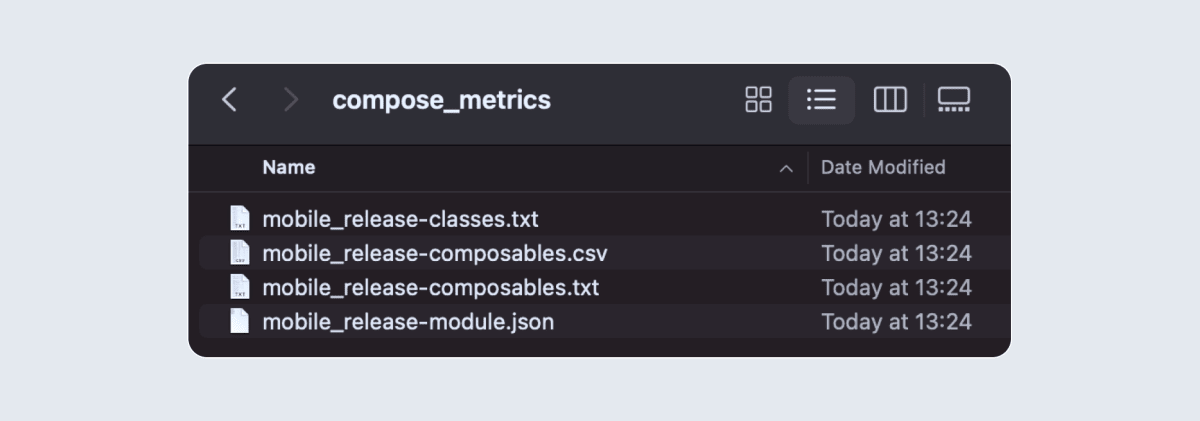
When the execution is completed, it generates a file in the build folder like the one below.

compose_generated_report folder

Where,

*-classes.txt: contains information about classes referenced from a composable function.

*-composables.csv: CSV version of the TXT file

*-composables.txt: contains a detailed output of each Composable.

*-module.json: provides detailed statistics as a comprehensive view.

In our case, we’re primarily focused on the *-composables.txt files and will be working with those.

The image above displays the generated value for only one module. However, for NordVPN, we have multiple UI modules, and each module generates its own compose_metrics folder (that has its Compose code) with all relevant reports included.

Refining the generated report

With all of our modules generating reports, here’s an example of how an individual -composables.txt file can contain multiple blocks of code like:

1

restartable scheme(“[androidx.compose.ui.UiComposable]”) fun ScreenContent(

2

stable onBack: Function0<Unit>

3

stable onSettingToggled: Function0<Unit>

4

unstable state: State?

5

stable modifier: Modifier? = @static Companion

6

}
 

Each of these files contains numerous functions that exhibit a Kotlin-style code structure. Additionally, each module with Compose code has a dedicated text file. Before delving into the details, let’s take a closer look at the significance of this code:

Restartable: When Compose detects changes in the function inputs, it restarts the function, invoking it again with the updated inputs.

Stable: This parameter in the provided function is stable; if they have not changed, Compose will skip it.

Unstable: This parameter in the provided function is unstable and Compose always recomposes it when the parent is recomposed.

We then merge all the *-composables.txt files into a single text file within our project using a script we’ve created for this purpose. This combined file plays a crucial role in our development process. Let’s see how we utilize it.

How do we use it in our day-to-day development?

At NordVPN, we’ve seamlessly integrated this workflow into our CI pipeline for every pull request we create, ensuring that we merge only stable Compose code (whenever possible) into our main branches.

However, before implementing this process, we conduct a thorough review to ensure that all of our Composable code contains no unnecessary unstable parameters. This proactive step guarantees that when we introduce this to our pull request flow, we initiate with a clean slate.

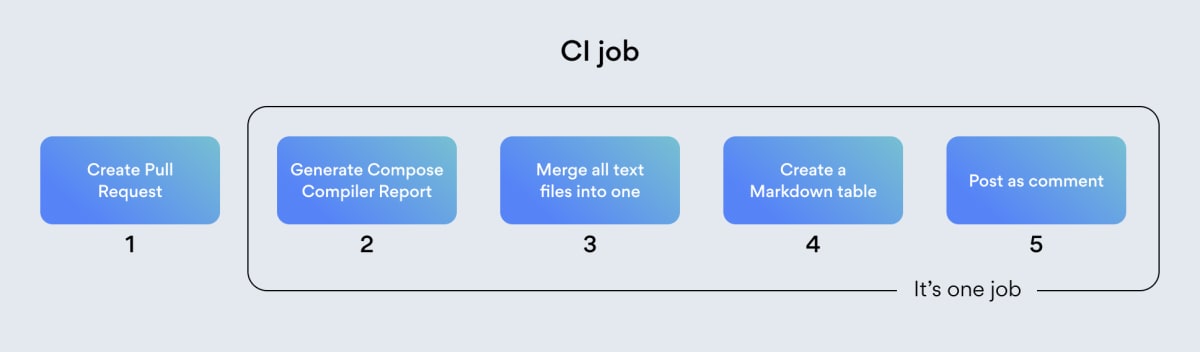
Let’s take a closer look at the steps in our pull request workflow:

1. Create pull request: The process begins with the creation of a pull request (PR).
2. CI job: A Continuous integration (CI) job is triggered for the current PR if there’s a change in any of the UI modules. The CI job performs several tasks:
a. Generate report: We generate a report on the release branch, which results in the creation of multiple text files in each module containing Compose code.
b. Merge the text files: At this stage, we execute a script that combines these text files, retaining only the functions containing unstable parameters.
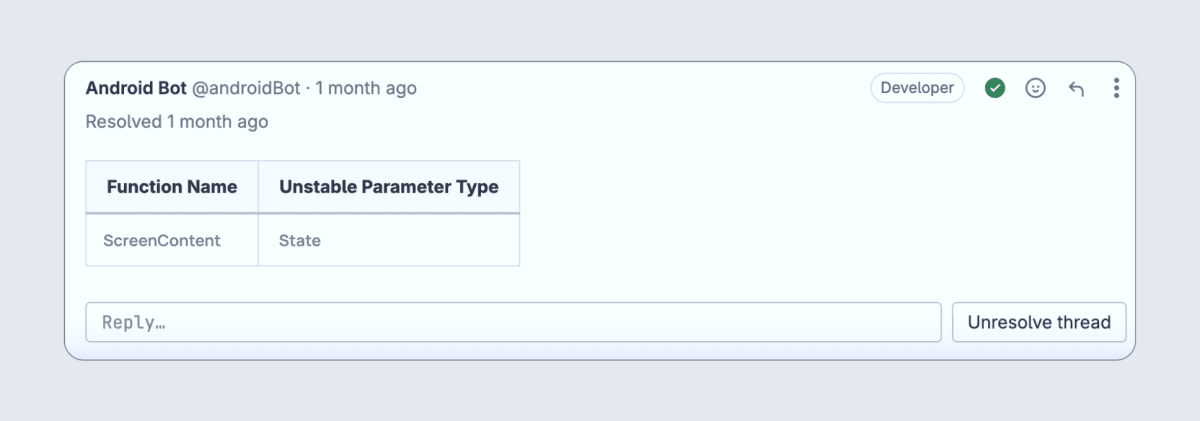
c. Create a markdown table: Next, we create a markdown table that lists the function names along with their associated unstable parameters.

Output Markdown table

d. Post comment: We post this markdown table as a comment within the PR. This informs developers about any potential instability introduced in the PR.
e. Fix: If instability issues are identified, we proceed to fix the affected functions and commit the changes.

The entire process is then rerun, and if the unstable parameter issues have been addressed, no further comment will be posted. Any previous comments on the matter can be resolved.

Execution of the CI pipeline

This practice aids us in utilizing the Compose Compiler plugin as a lint check for our Composable code, which maintains coding standards and contributes to improved performance for the NordVPN Android app.

About Version 2 Digital

Version 2 Digital is one of the most dynamic IT companies in Asia. The company distributes a wide range of IT products across various areas including cyber security, cloud, data protection, end points, infrastructures, system monitoring, storage, networking, business productivity and communication products.

Through an extensive network of channels, point of sales, resellers, and partnership companies, Version 2 offers quality products and services which are highly acclaimed in the market. Its customers cover a wide spectrum which include Global 1000 enterprises, regional listed companies, different vertical industries, public utilities, Government, a vast number of successful SMEs, and consumers in various Asian cities.

About NordLayer
NordLayer is an adaptive network access security solution for modern businesses – from the world’s most trusted cybersecurity brand, Nord Security.

The web has become a chaotic space where safety and trust have been compromised by cybercrime and data protection issues. Therefore, our team has a global mission to shape a more trusted and peaceful online future for people everywhere.

ESET extends its portfolio with VPN and Identity Protection* in a brand-new, all-in-one offering

In the new offering ESET introduces all-in-one subscription-based protection for individuals and their households.

As digitalization penetrates even deeper into lives across the globe, so does the everyday reality of cyber threats. Email accounts, data on laptops, mobile apps, and even your personal identity have become targets for bad actors. While this problematic situation needs a complex solution, it must be a solution that remains simple enough for everyone, not just those with educations in IT, to manage on their own.

For that reason, ESET has decided to introduce security subscriptions covering the complex needs of individuals and their households.

Protecting digital lives from one platform

The importance of digital life protection can be illustrated by data shared in the latest 2022 report conducted by the FBI’s Internet Crime Complaint Center (IC3).

Between 2018 and 2022, the total number of cyber-crime complaints received from individuals and companies around the world rose from almost 352,000 to slightly fewer than 801,000. Total reported financial losses increased from $2.7 billion to $10.3 billion.

Attacks such as fake tech support, personal data breaches, and phishing made it to the top five reported crime types for 2018 to 2022 globally.

The brand-new product, ESET HOME Security, aims to protect from almost all of these cyber threats targeting households, small companies, and self-employed persons.

Moreover, managing digital life protection has never been easier, with the improved ESET HOME platform and subscription-based cybersecurity. 

What are ESET HOME and ESET HOME Security?

ESET HOME is the complete security management platform–a web portal and mobile app for Android and iOS. It serves as a notification hub presenting connected devices as an ecosystem, with their security as a household-level issue.

It offers users a convenient single place for managing their ESET products, devices, licenses, and services while making it all accessible anywhere they go, whenever they need it. Users can activate and renew their subscriptions, add new devices, and download or upgrade security solutions on one platform.

For example, now, when users want to protect their Android devices, they can use the ESET HOME portal on their laptop to manage the installation of the ESET Mobile Security (EMS) app on an Android device, where it is automatically activated and connected to the users’ ESET HOME accounts. Then, if the users want to connect to their ESET HOME accounts from their Android devices, all they have to do is open the ESET Mobile Security app in their devices and connect to ESET HOME in the side-bar menu section. Users no longer have to copy the license key into the app.

The ESET HOME platform also enables users to share subscriptions with friends and family, and to monitor their security status.

ESET HOME Security is a brand new offering, with three subscription tiers for this new ecosystem: ESET HOME Security Essential, ESET HOME Security Premium, and ESET HOME Security Ultimate.

This customer-focused, subscription-based offering also introduces new features to ESET HOME, such as Identity Protection*, VPN, and a newly developed extension of the Browser Privacy & Security feature.

How can you benefit from VPN, Identity Protection* and Browser Security?

Due to both our evolving digital lives and today’s cyber threats, the demand for personal online privacy and data protection is rising. According to the 2022 Consumer Digital Life Protection Survey conducted in the UK, US, and France, more than 25% of participants want to adopt VPN and Identity Protection technology in 2023.

Virtual Private Network (VPN) is a functionality that establishes a private network connection making internet users anonymous. After connecting to the VPN application, the user’s device gets a new IP address, and online traffic is secured and encrypted.

This way, ESET VPN prevents cyber criminals from stealing user data while using public Wi-Fi and makes it more difficult for third parties to track user activity online, while ESET does not keep logs

Benefits & features of ESET VPN

  • Encrypts users’ online activities,
  • Prevents hackers from stealing user data while using public Wi-Fi,
  • ESET has a no logs, no tracking policy
  • Unlimited bandwidth, that allows you to browse, stream or play games without restrictions.
  • Enables geo-restricted content,
  • Users can securely access their home country’s TV shows and movies while traveling abroad,
  • Users can enjoy their favorite streaming services from different parts of the world. Even more features are available on the VPN service while running on desktop, such as DNS leak protection, MAC spoofing, proxy gateway for other devices, and firewall. The split tunneling feature is also available on Android.

Identity Protection* (IP) is a service providing dark web monitoring that searches for leaked sensitive information previously entered by users.  

For example, if a user is a victim of a mass data breach, they will be notified if the data they previously entered are found somewhere online.

For US customers, the IP feature also includes Credit & Social Security Number Monitoring, Social Media Monitoring, insurance up to $1 mil., and on-call identity restoration service. Users will also be notified concerning changes made to credit reports so that they can act against potential misuse of their personal information.

With the new products, ESET also improves the performance of its Browser Security & Privacy features for Windows with the latest browser extensions.

How browsing is protected:

  • Secure Search checks Google results links for phishing,
  • Browser Cleanup cleans cookies, history, and much more from the browser, when either scheduled or on-demand,
  • Metadata Cleanup removes metadata from uploaded pictures to the browsers on Windows,
  • Website Settings Review allows users to easily review and change permissions granted to websites.

What can you find on the ESET HOME platform?

These aforementioned features, tools, and improvements complement the whole ESET security ecosystem for individuals and their households, while all major features are merged into a single space on the ESET HOME portal.

Visual and user experience improvements, such as overall security status, make the portal easy to monitor and manage despite its underlying complexity.

ESET HOME portal features:

  • VPN user access management
  • Identity Protection1
  • Overall Security Status
  • List of connected devices with their security status, and their management
  • List of licenses, their management and sharing with family and friends
  • Downloadable ESET software to protect devices
  • The ability to buy or renew licenses
  • Security, license, and account notifications
  • The ability to login with Google and Apple account
  • Remote connection to suggested devices
  • Anti-Theft
  • Parental Control
  • Password Management and user access management
  • Two Factor authentication

Aiming for an all-in-one, reliable, and convenient solution

The innovative and simplified ESET consumer offering provides enhanced security with attractive feature sets brought by the Ultimate line that go hand in hand with a new modern subscription model.

This illustrates ESET´s commitment, not only to innovating its security solutions, thus keeping pace with malicious actors, but also to meeting customers´ needs for convenience.

*Currently available in US market only, with global roll out planned in H1/2024

About Version 2 Digital

Version 2 Digital is one of the most dynamic IT companies in Asia. The company distributes a wide range of IT products across various areas including cyber security, cloud, data protection, end points, infrastructures, system monitoring, storage, networking, business productivity and communication products.

Through an extensive network of channels, point of sales, resellers, and partnership companies, Version 2 offers quality products and services which are highly acclaimed in the market. Its customers cover a wide spectrum which include Global 1000 enterprises, regional listed companies, different vertical industries, public utilities, Government, a vast number of successful SMEs, and consumers in various Asian cities.

About ESET
For 30 years, ESET® has been developing industry-leading IT security software and services for businesses and consumers worldwide. With solutions ranging from endpoint security to encryption and two-factor authentication, ESET’s high-performing, easy-to-use products give individuals and businesses the peace of mind to enjoy the full potential of their technology. ESET unobtrusively protects and monitors 24/7, updating defenses in real time to keep users safe and businesses running without interruption. Evolving threats require an evolving IT security company. Backed by R&D facilities worldwide, ESET became the first IT security company to earn 100 Virus Bulletin VB100 awards, identifying every single “in-the-wild” malware without interruption since 2003.

×

Hello!

Click one of our contacts below to chat on WhatsApp

×