Skip to content

No more mistakes! Learn how to create strong, flawless software deployments with the help of automation

Friends, welcome to the world of software development! There have been more changes here in recent years than in Lady Gaga’s wardrobe during her Super Bowl halftime performance! You know, Agile, DevOps, the Cloud… These innovations have enabled organizations to develop and deploy software faster and more efficiently than ever before. One of the key DevOps practices is automated deployments.

In this article, we will discuss the importance of creating and monitoring strong automated implementations.

Automated deployments: achieve error-free software

Why do you need strong automated deployments?

Traditionally, software deployment was a manual process that implied manifold steps and was prone to human error. 

Automated implantations, on the other hand, allow organizations to implement software automatically without human intervention, reducing the chances of errors.

Automated implementations also offer the following advantages:

  1. Faster deployment: Manual implementation is a slow process that implies manifold steps. Automated implementation reduces the implementation time and allows companies to implement software more frequently.
  2. Coherence: Automated deployments guarantee that the deployment process is documented and can be repeated, which reduces the chances of errors caused by human errors.
  3. Downgrade: Automated deployments allow organizations to return to the previous software version quickly and simply if some problem arises.
  4. Profitability: Automated implementations reduce the need for manual intervention, which can be expensive and time-consuming.
  5. Improved tests: Automated deployments can be tested in a test or pre-production environment before going into production, reducing the likelihood of problems arising.

Steps to create strong automated implementations

Creating strong automated deployments involves the following steps:

  • Defining the deployment process: Define the steps needed to deploy the software, including dependencies, configuration settings, and environment requirements.
  • Automating the deployment process: It uses tools like Terraform, Ansible, Jenkins, and YAML to write the deployment process as code, store it in source control, and test it.
  • Add doors and approvals: It adds doors and approvals to require external approvals, perform quality validations, and collect status signals from external services before the implementation can be completed.
  • Develop a rollback strategy: Develop a rollback strategy that includes feature indicators and bluish-green deployments to roll back to the previous version of the software easier should any issues arise.
  • Implement automated monitoring: Implement automated monitoring of system metrics such as memory usage, disk usage, logged errors, database performance, average database response time, long-duration queries, simultaneous database connections, and SQL query performance.
  • Test and refine: Test and refine the automated deployment process, making the necessary adjustments.

Monitoring of strong automated deployments

Automated implementations must be accompanied by automated monitoring.

Organizations must monitor system metrics such as memory usage, disk usage, logged errors, database performance, average database response time, long-duration queries, simultaneous database connections, and SQL query performance.

Mature monitoring systems make obtaining a baseline prior to implementation easier as well as spotting deviations after the implementation.

Holistic hybrid cloud monitoring tools that alert organizations to errors or abnormal patterns are an important part of feature flags and bluish-green deployments.

They are the indicators that allow organizations to find out whether they need to deactivate a feature or return to the previous production environment.

Tools and processes

Although implementation and monitoring tools alone do not guarantee the success of the implementation, they certainly help.

It is also important to create a DevOps culture of good communication, design reviews throughout development, and thorough testing.

Automated deployments are just part of the DevOps lifecycle, and organizations can decide at what point in the cycle automation it adds value and create it in small chunks over time.

Automated deployments reduce the risk and effort required. Their high return on investment often makes them a great place to start automating considering DevOps best practices.

Conclusion

Automated deployments are an essential part of the DevOps culture. They reduce the likelihood of human error, allowing faster deployment.

Closing the circle with a reference to Lady Gaga:

Automated deployments are like having Lady Gaga’s costume assistant as your personal assistant – there’s no room for error!

Dimas P.L., de la lejana y exótica Vega Baja, CasiMurcia, periodista, redactor, taumaturgo del contenido y campeón de espantar palomas en los parques. Actualmente resido en Madrid donde trabajo como paladín de la comunicación en Pandora FMS y periodista freelance cultural en cualquier medio que se ofrezca. También me vuelvo loco escribiendo y recitando por los círculos poéticos más profundos y oscuros de la ciudad.

Dimas P.L., from the distant and exotic Vega Baja, CasiMurcia, journalist, editor, thaumaturgist of content and champion of scaring pigeons in parks. I currently live in Madrid where I work as a communication champion in Pandora FMS and as a freelance cultural journalist in any media offered. I also go crazy writing and reciting in the deepest and darkest poetic circles of the city.

About Version 2 Digital

Version 2 Digital is one of the most dynamic IT companies in Asia. The company distributes a wide range of IT products across various areas including cyber security, cloud, data protection, end points, infrastructures, system monitoring, storage, networking, business productivity and communication products.

Through an extensive network of channels, point of sales, resellers, and partnership companies, Version 2 offers quality products and services which are highly acclaimed in the market. Its customers cover a wide spectrum which include Global 1000 enterprises, regional listed companies, different vertical industries, public utilities, Government, a vast number of successful SMEs, and consumers in various Asian cities.

About PandoraFMS
Pandora FMS is a flexible monitoring system, capable of monitoring devices, infrastructures, applications, services and business processes.
Of course, one of the things that Pandora FMS can control is the hard disks of your computers.

Binary memory protection measures on Windows OS

Binary memory protection is a core part of cybersecurity, but there are many different options for implementing it. In this article, we explore common mechanisms and protection measures for Windows OS.

Why is binary memory protection important?

You may remember when the Blaster worm struck the internet, or more recently when WannaCry caused global havoc using a leaked EternalBlue Windows OS exploit. Both are examples of malware that used buffer overflow memory corruption vulnerabilities, causing remote code execution and infecting millions of machines worldwide.

Most operating systems, written in C or C++, have limited memory protection, allowing these attacks to occur. Malware like Blaster and WannaCry manipulate the environment, instructions, and memory layout of a program or operating system to gain control over it.

Security professionals have implemented mechanisms to prevent software exploitation and minimize damage caused by memory corruption bugs. A “silver bullet” solution would be a mechanism that makes it challenging and unreliable for attackers to exploit vulnerabilities, allowing developers to leave buggy code in place while they work on fixing or rewriting it in memory-safe languages.

Common mechanisms and protection measures

Let’s review some of the most common mechanisms and protection measures provided inside Windows OS from Windows XP to Windows 11.

ASLR

Address space layout randomization (ASLR) is a computer security technique that prevents an attacker from reliably jumping to, for example, a particular exploited function in a program’s memory. ASLR randomly arranges the address space positions of a process’s key data areas, including the base of the executable and the positions of the stack, heap, and libraries. The effectiveness of ASLR depends on the entropy of the process’s address space (simply put, the probability of finding a random local variable).

Because of this protection, exploit payloads must be uniquely tailored to a specific process address space.

Vista and Windows Server 2008 were the first operating systems in the Windows family to provide ASLR natively, though this system was first developed back in 2001. Prior to these releases, there were several third-party solutions like WehnTrust available that provided ASLR functionality to varying degrees.

When Symantec conducted research on ASLR in Windows Vista, they found that ASLR had a significant effect when implemented in Windows 8 (or Windows 8.1). It provided higher entropy for address space layouts. The larger address space for 64-bit processes also increased the entropy of the ASLR for any given process.

  Exploit mitigation improvements in Windows 8

Windows 8 added randomization for all BottomUp and TopDown memory allocations, increasing the effectiveness of ASLR, which was not available in Windows 7.

Exploit mitigation improvements in Windows 8   Exploit mitigation improvements in Windows 8

In Windows 8, Microsoft introduced operating system support to force EXEs/DLLs to be rebased at runtime if they did not opt-in to ASLR. This mitigation can be enabled system-wide or on a per-process basis. You can modify the settings of mandatory ASLR through the Windows Security app.

ASLR, like any other security technique, has its weaknesses and attack vectors (heap spray, offset2libc, Jump Over ASLR, and others). Even one memory disclosure can completely defeat ASLR and provide an attacker with a significant opportunity. In addition to this, ASLR is only efficient when all executables and shared libraries loaded in the address space of a process are randomized. For example, research by Trend Micro researchers showed that Microsoft Edge browser exploit mitigations, including ASLR, could be bypassed. You can watch a video from the BlackHat conference to learn more.

DEP

Data Execution Prevention (DEP) is a protection mechanism that blocks the execution of code in memory pages marked non-executable. The NX (No-Execute) bit is a protection feature on CPUs used by DEP to prevent attackers from executing shellcode (instructions injected and executed by attackers) on the stack, heap, or in data sections. If DEP is enabled and a program attempts to execute code on a non-executable page, an access violation exception will be triggered.

Starting with Windows XP Service Pack 2 (2004) and Windows Server 2003 Service Pack 1 (2005), the DEP was implemented for the first time on x86 architecture.

An application can be compiled with the /NXCOMPAT flag to enable DEP for that application. You can also use editbin.exe /NXCOMPAT over a .exe file to enable it on a previously compiled file.

On 64-bit versions of Windows, DEP is always turned on for 64-bit processes and cannot be disabled. Windows also implemented software DEP (without the use of the NX bit) through Microsoft’s “Safe Structured Exception Handling” (SafeSEH), which I will talk about a bit later.

Despite being a useful protection measure, the NX bit can be bypassed. This leaves us unable to execute instructions placed on the stack, but still able to control the execution flow of the application. This is where the ROP (Return Oriented Programming) technique becomes relevant.

GS (Stack Canaries)

Stack canaries are a security feature that helps protect against binary exploits. They are random values that are generated every time a program is run. When placed in certain locations, they can be used to detect stack corruption. The /GS compiler option, when specified, causes the compiler to store a random value on the stack between the local variables and the return address of a function. According to Microsoft, these application elements will be protected:

  • Any array (regardless of length or element size)

  • Structs (regardless of their contents)

In a typical buffer overflow attack, the attacker’s data is used to try to overwrite the saved EIP (Extended Instruction Pointer) on the stack. However, before this can happen, the cookie is also overwritten, rendering the exploit ineffective (though it may still cause a denial of service). If the function epilogue detects the altered cookie and the application terminates.

Example of memory layout during the buffer overflow
 
Example of memory layout during the buffer overflow

The second important protection mechanism of /GS is variable reordering. To prevent attackers from overwriting local variables or arguments used by the function, the compiler will rearrange the layout of the stack frame and will put string buffers at a higher address than all other variables. So when a string buffer overflow occurs, it cannot overwrite any other local variables.

It was introduced with the release of Visual Studio 2003. Two years later, they enabled it by default with the release of Visual Studio 2005.

However, this protection measure is also not bullet-proof, since the attacker can either try to read the canary value from the memory or brute force the value. By using these two techniques, attackers can acquire the canary value, place it into the payload, and successfully redirect program flow or corrupt important program data.

CFG/XFG

Control Flow Guard (CFG) is a highly-optimized platform security feature that was created to combat memory corruption vulnerabilities. Placing tight restrictions on where an application can execute code makes it much harder for exploits to execute arbitrary code through vulnerabilities such as buffer overflows.

CFG creates a per-process bitmap, where a set bit indicates that the address is a valid destination. Before performing each indirect function call, the application checks if the destination address is in the bitmap. If the destination address is not in the bitmap, the program terminates.

How Windows CFG works
 
How Windows CFG works

Microsoft has enabled a new mechanism by default in Windows 10 and in Windows 8.1 Update 3. Developers can now add CFG to their programs by adding the /guard:cf linker flag before program linking in Visual Studio 2015 or newer. As of the Windows 10 Creators Update (Windows 10 version 1703), the Windows kernel is compiled with CFG.

To enhance CFG (Control Flow Guard), Microsoft introduced Xtended Control Flow Guard (XFG). By design, CFG only checks if functions are included in the CFG bitmap, which means that technically if a function pointer is overwritten with another function that exists in the bitmap, it would be considered a valid target.

XFG addresses this issue by creating a ~55-bit hash of the function prototype (consisting of the return value and function arguments) and placing it 8 bytes above the function itself when the dispatch function is called. This hash is used as an additional verification before transferring the control flow.

Getting back to the CFG, there are multiple techniques to bypass it. For example, you can set the destination to code located in a non-CFG module loaded in the same process, or find an indirect call that was not protected by CFG. A brief write-up about the CFG bypass by Zhang Yunhai can be found here.

SafeSEH

SafeSEH is an exception handler. An exception handler is a programming construct used to provide a structured way of handling both system and application-level error conditions. Commonly they will look something like the code sample below:

1
try {
2
}
3
catch (Exception e)
4
{
5
// Exception handling goes here
6
}

Windows supplies a default exception handler when an application has no exception handlers applicable to the associated error condition. When the Windows exception handler is called, the application will be terminated.

Exception handlers are stored in the format of a linked list with the final element being the Windows default exception handler. This is represented by a pointer with the value 0xFFFFFFFF. Elements in the SEH chain before the Windows default exception handler are the exception handlers defined by the application.

Exception handler layout on stack
 
Exception handler layout on stack

If an attacker can overwrite a pointer to a handler and then cause an exception, they might be able to get control of the program.

SafeSEH is a security mechanism introduced with Visual Studio 2003. It works by adding a static list of good exception handlers in the PE file at the timing of compiling. Before executing an exception handler, it is checked against the table. Execution is passed to the handler only if it matches an entry in the table. SafeSEH only exists in 32-bit applications because 64-bit exception handlers are not stored on the stack. By default, they build a list of valid exception handlers and store it in the file’s PE header.

Preventing SEH exploits in most applications can be achieved by specifying the /SAFESEH compiler switch. When /SAFESEH is specified, the linker will also produce a table of the image’s safe exception handlers. This table specifies for the operating system which exception handlers are valid for the image, removing the ability to overwrite them with arbitrary values. If you want to see how this mitigation technique can be bypassed in real-life, this blog post offers more useful information.

Conclusion

Memory corruption vulnerabilities have plagued software for decades. As mentioned in the beginning, there are multiple mitigation techniques to prevent software exploitation and minimize damage caused by memory corruption bugs. However, those protections are definitely not a “silver bullet” solution for all memory corruption vulnerabilities.

For the developer, this means that no one should not blindly rely on the OS-provided protections. Instead, try to propagate secure coding practices and integrate security toolings like fuzzers and static code analyzers.

Lastly, move to memory-safe languages like Rust, if possible. For the attackers, even if the target application has all available mitigation measures, there may still be ways to bypass those protections.

About Version 2 Digital

Version 2 Digital is one of the most dynamic IT companies in Asia. The company distributes a wide range of IT products across various areas including cyber security, cloud, data protection, end points, infrastructures, system monitoring, storage, networking, business productivity and communication products.

Through an extensive network of channels, point of sales, resellers, and partnership companies, Version 2 offers quality products and services which are highly acclaimed in the market. Its customers cover a wide spectrum which include Global 1000 enterprises, regional listed companies, different vertical industries, public utilities, Government, a vast number of successful SMEs, and consumers in various Asian cities.

About NordLayer
NordLayer is an adaptive network access security solution for modern businesses – from the world’s most trusted cybersecurity brand, Nord Security.

The web has become a chaotic space where safety and trust have been compromised by cybercrime and data protection issues. Therefore, our team has a global mission to shape a more trusted and peaceful online future for people everywhere.

Optimizing your business IT processes

In today’s fast-paced business environment, information technology shapes the way companies operate, compete, and grow. The pace of technological advancements adoption can play a deciding role in a company’s success or failure. However, how this can be achieved within an organization may not always be clear.

For this reason, we’ve invited co-founder and CPO at Kubernetes automation, optimization, security, and cost management platform CAST AI, Laurent Gil. Additionally, our Head of Platform Engineering at NordLayer, Carlos Salas, for his take on improving the current organization’s IT infrastructure.

Let’s take a deep dive into your current IT infrastructure assessment, automation areas identification, the right automation tools selection, its implementation, and the best practices.

Assessing your current IT infrastructure

Laurent Gil shared his valuable insights on how businesses can optimize their IT infrastructure to drive efficiency and productivity. According to him, one crucial step in this process is conducting a comprehensive assessment of your current infrastructure.

“A successful IT optimization strategy always starts with a gaining clarity around the current state of the infrastructure. A thorough assessment helps to identify issues and bottlenecks that are good candidates for automation – and where automation will make the biggest impact. Quick wins are just as important as long-term strategy and keeping your eye on the bigger picture, considering your company’s specific needs and direction.”

Click to tweet

Here’s how your current IT infrastructure could be evaluated in 8 steps:

  1. Define assessment objectives. Assessment objectives can be diverse, and they should focus on particular areas that could use improvements. For some businesses, it may be ironing out security vulnerabilities, while for others, it may be performance improvements. 

  2. Gather information. Regardless of assessment objectives, the next step will always be data collection. This will form a solid foundation for the evaluation process providing useful insights in later steps.

  3. Evaluate your used hardware and software. All used servers, storage devices, routers, switches, as well as operating systems, databases, applications, and security software should be reviewed. Check for potential bottlenecks and clunky setups that are slowing down your operations. 

  4. Perform network checks. Analyze your network topology, bandwidth, and latency. Evaluate your network security measures, such as firewalls, intrusion detection, and prevention systems.

  5. Look into data backups and disaster recovery. Verify that your data backup and recovery plans are up-to-date, reliable, and effective. Test your disaster recovery procedures to ensure that they meet your recovery time objectives.

  6. Analyze your security setup. Assess your security policies and procedures, including access controls, authentication, and authorization. Test your security controls to identify weaknesses or gaps.

  7. Consider the IT budget. Evaluate your IT budget and spending to identify areas for improvement or cost savings. Identify potential areas where technology investments can drive business value and growth.

  8. Document your findings. Document your findings and recommendations in a detailed report. This will serve as a reference document providing actionable recommendations for improving your IT infrastructure.

Identifying areas for automation

Findings from the IT infrastructure assessment should help you identify areas that could benefit the most from automation. As different companies have different IT struggles, going through this process should be a highly individualized approach. That said, here are some common areas that could be easily automated.

Data entry and data processing. Routine maintenance tasks like data entry, migration, and validation can be easily automated using macros, scripts, and other robotic processes.

Network and system administration. Tasks like server monitoring, backup, and patch management can be time-consuming and repetitive. Automations enable the creation of templates to perform the tasks identically, leaving less room for human error. In addition, this frees the staff from manual processes allowing them to focus on strategic activities.

Software deployment. Every software deployment instance involves a lot of repetitive tasks to ensure that it’s deployed correctly and without errors. Automating them can help reduce the time and effort required for deployment and improve the reliability of the process.

Customer support. Simple customer support tasks like answering frequently asked questions, providing account information, and processing routine requests can be solved without human involvement. Leveraging chatbots and virtual assistants can combine convenience and efficiency for businesses and their customers.

Choosing automation tools

When it comes to selecting automation tools, Laurent Gil highlights the significance of putting business needs at the forefront.

“I’ve seen the benefits automation can bring to organizations of all sizes firsthand. However, not all automation tools are created equal, and choosing the right one for your business can be a daunting task.

What you need to consider are first and foremost your specific business requirements. Understanding business needs and matching them to the right automation offering ensures that what you invest in represents the best fit for your company.”

Click to tweet

Here’s a brief overview of the approach that businesses can take when selecting automation tools:

Research what’s available on the market 

Clear business objectives and defined areas for improvement will allow you to fill in the gaps with automation tools. This can involve various routes like reviewing industry publications or consulting with vendors directly.

Evaluate select tool features 

Once a list of potential features has been compiled, it’s important to evaluate its features. Depending on needed functionalities, this can involve scalability, customizability or other ease of use adjustments.

Consider integrations

Industry expert and Head of Platform Engineering Carlos Salas highlighted the importance of considering the bigger picture when selecting automation tools, highlighting their interoperability.

“Whatever automation tools you select won’t exist in a vacuum, so thinking about potential integrations with existing systems and processes isn’t a bad idea.”

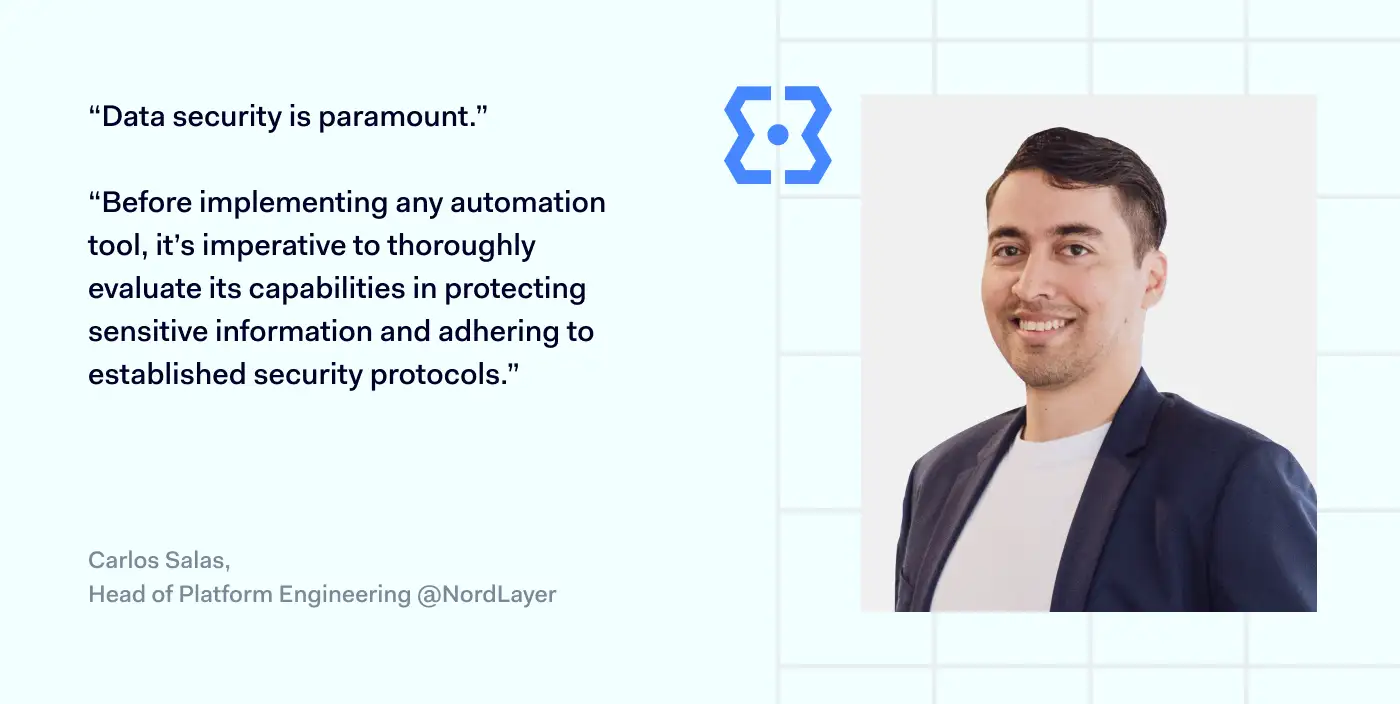
“Data security is paramount. Before implementing any automation tool, it’s imperative to thoroughly evaluate its capabilities in protecting sensitive information and adhering to established security protocols.”

Click to tweet

This paves the way for seamless automation implementation without hiccups and ensures optimal performance down the line.

Test and trial 

Before making a final decision, businesses should take chosen automation tools for a test drive. Various methods like setting up a proof of concept or pilot project to evaluate the effectiveness of the tool in real-world scenarios will help to realistically evaluate its usefulness.

Implementing automation

Implementing business IT automation can be a complex task that requires careful planning and execution. Here are some general steps that you can follow to implement business IT automation.

  1. Design the automation process. Start by creating a plan for automation, including a timeline and a list of tasks to be automated. It also helps to break the process into smaller tasks and identify the rules and conditions that must be followed.

  2. Deploy the automation. The exact route of automation deployment will depend on whether it’s an in-house built tool or a third-party provider was chosen. Still, it’s best to test in a production environment initially and, after testing, move on to full-scale implementation.

  3. Train employees. Expect that your workforce will only know how to use it after a while. Expect that there will be a transitionary period during which various training will help staff to familiarize themselves with the tool better.

  4. Evaluate the results. After the automation has been implemented and employees get used to it, it’s worth checking its impact on productivity, efficiency, and accuracy. This information can be highly useful when identifying shortcomings in your current setup as well as planning and identifying new areas for automation.

Best practices for automating IT

To maximize your chances that your automation process goes smoothly, it can be good advice to follow the best industry practices. These include:

Focusing on standardization 

Standardization is critical when it comes to automating IT processes. It also makes it easier to automate routine tasks, reduces the chances of errors, and helps ensure consistency across your IT infrastructure.

Make use of automation platforms

Laurent Gil quote

According to Laurent Gil, automation platforms have the power to enhance business efficiency and streamline operations.

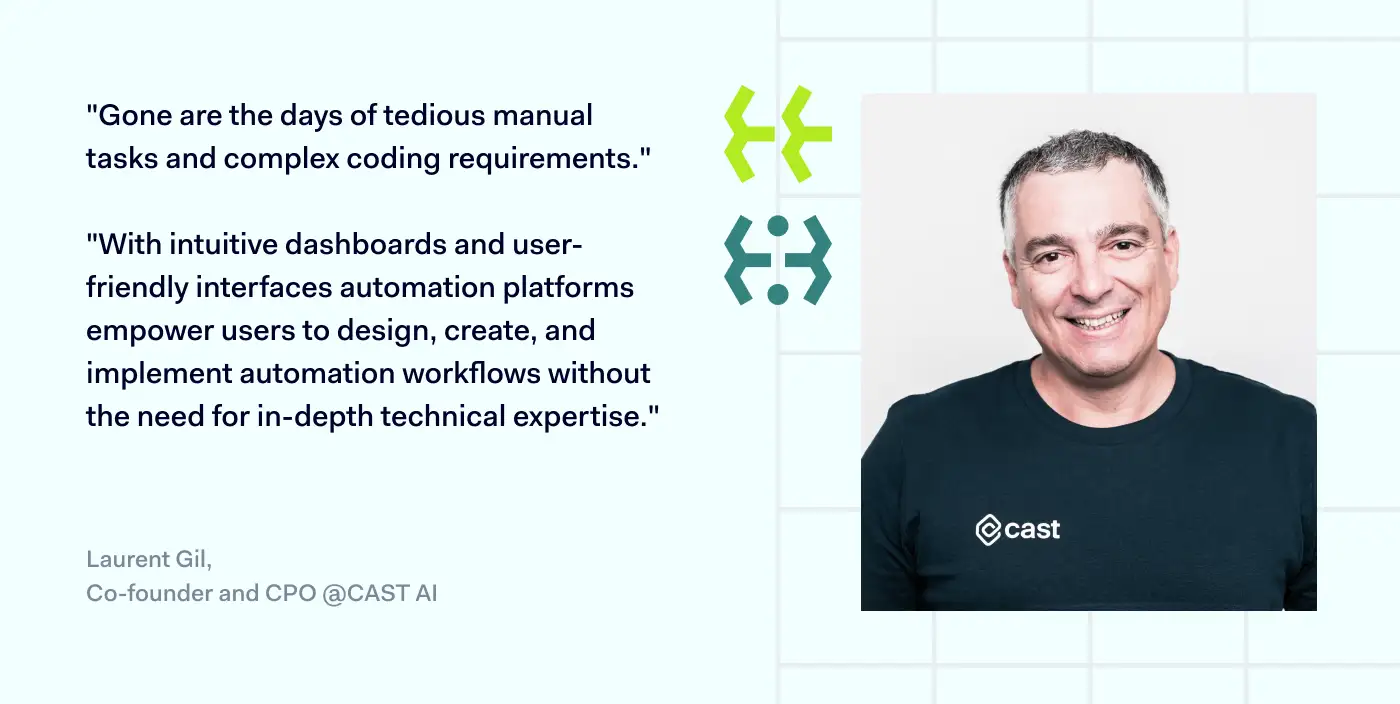
“Automation platforms enable businesses to accelerate and streamline their workflows and processes. Gone are the days of tedious manual tasks and complex coding requirements. With intuitive dashboards and user-friendly interfaces, these platforms empower users to design, create, and implement automation workflows without the need for in-depth technical expertise. And that’s a very good thing.”

Click to tweet

Gil’s words highlight the significant shift brought about by automation platforms in the business landscape. With these powerful tools at their disposal, organizations of all sizes can leverage automation to optimize their workflows, freeing up valuable time and resources for more strategic endeavors.

Adopt a DevOps approach 

Adopting a DevOps approach to automation can help streamline the IT development and deployment processes. Integrating development and operations teams allows the entire software development lifecycle to be automated. This can help you deliver software faster and with fewer errors.

Involving stakeholders 

Stakeholders are the personnel that the automation process will directly impact. Therefore, their input can help to identify potential pain points in advance. This can lead to more effective automation that addresses real problems and is designed to meet the organization’s specific needs.

Bottom line

Optimizing your business IT requires a systematic approach based on evaluating your current setup. The thorough analysis of the current businesses’ IT environment allows them to identify potential automation areas.

The process is finalized by choosing appropriate automation tools and going through the implementation process. It’s important to consider specific needs, evaluate tool features, integration, and test and try the solutions before fully committing. Automation adoption has the potential to make businesses even better adjusted to the current digital landscape.

About Version 2 Digital

Version 2 Digital is one of the most dynamic IT companies in Asia. The company distributes a wide range of IT products across various areas including cyber security, cloud, data protection, end points, infrastructures, system monitoring, storage, networking, business productivity and communication products.

Through an extensive network of channels, point of sales, resellers, and partnership companies, Version 2 offers quality products and services which are highly acclaimed in the market. Its customers cover a wide spectrum which include Global 1000 enterprises, regional listed companies, different vertical industries, public utilities, Government, a vast number of successful SMEs, and consumers in various Asian cities.

About NordLayer
NordLayer is an adaptive network access security solution for modern businesses – from the world’s most trusted cybersecurity brand, Nord Security.

The web has become a chaotic space where safety and trust have been compromised by cybercrime and data protection issues. Therefore, our team has a global mission to shape a more trusted and peaceful online future for people everywhere.

Elevating healthcare: a definitive guide to robust cloud security in the industry

When compared to other industries, healthcare has remained quite reluctant to digitalization. However, as technology evolves, cloud computing has become vital in streamlining operations and enhancing data accessibility. On the flip side, this also introduces various security concerns that demand attention.

This comprehensive guide delves into the importance of robust cloud security in healthcare. It provides valuable insights to safeguard sensitive patient information, maintain regulatory compliance, and fortify the industry against evolving threats. Join us as we explore all the essential information regarding cloud security in healthcare.

The growing importance of cloud security in healthcare

After the COVID-19 pandemic, the healthcare industry experienced a heightened demand for improved and more modern services. Distributed care and telemedicine pushed healthcare organizations to move to cloud computing, meaning data security had to be considered. The problem is that the same techniques that were valid for data security on-premises don’t translate well into externally kept data.

Some of the challenges facing the healthcare industry transitioning to cloud infrastructure included:

  • Resource and budget strains. Most healthcare providers work with limited IT budgets, so major infrastructure overhauls are long and tedious.

  • Continuity of operations. Data migrations to the cloud shouldn’t disrupt everyday operations, which isn’t something that all healthcare providers can allow.

  • Regulatory compliance. Patient data is highly confidential information so various local regulations sanction its security.

Generally, healthcare organizations want to move to cloud computing to make their services more effective while avoiding unnecessary or unmanaged risks. As patient data is one of the most sensitive data types, ensuring robust security measures is a top priority.

Types of healthcare cloud security solutions
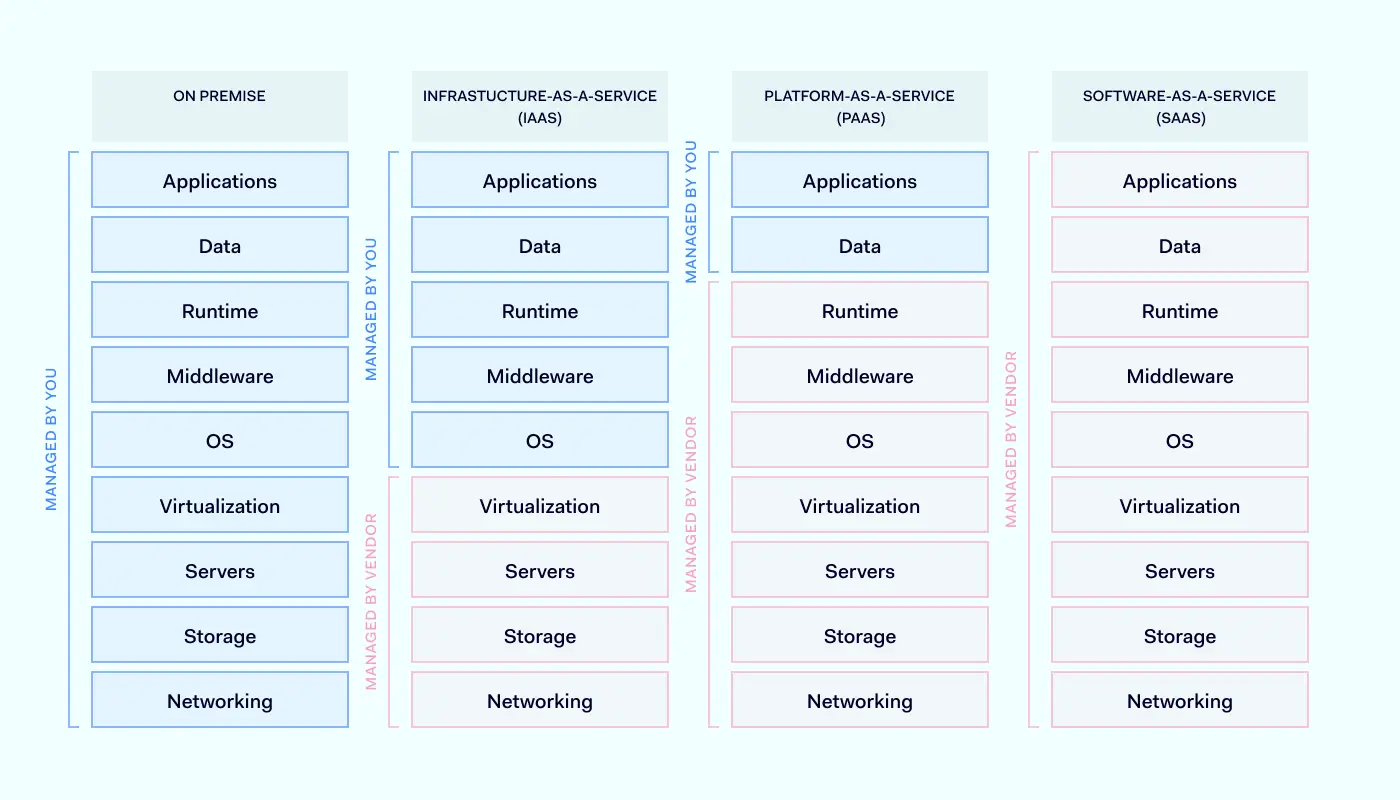
Healthcare providers (and, by extension, most industries) rely on three main types of cloud computing services. This includes Infrastructure-as-a-Service (IaaS), Platform-as-a-Service (PaaS), and Software-as-a-Service (SaaS).

Infrastructure-as-a-Service (IaaS)
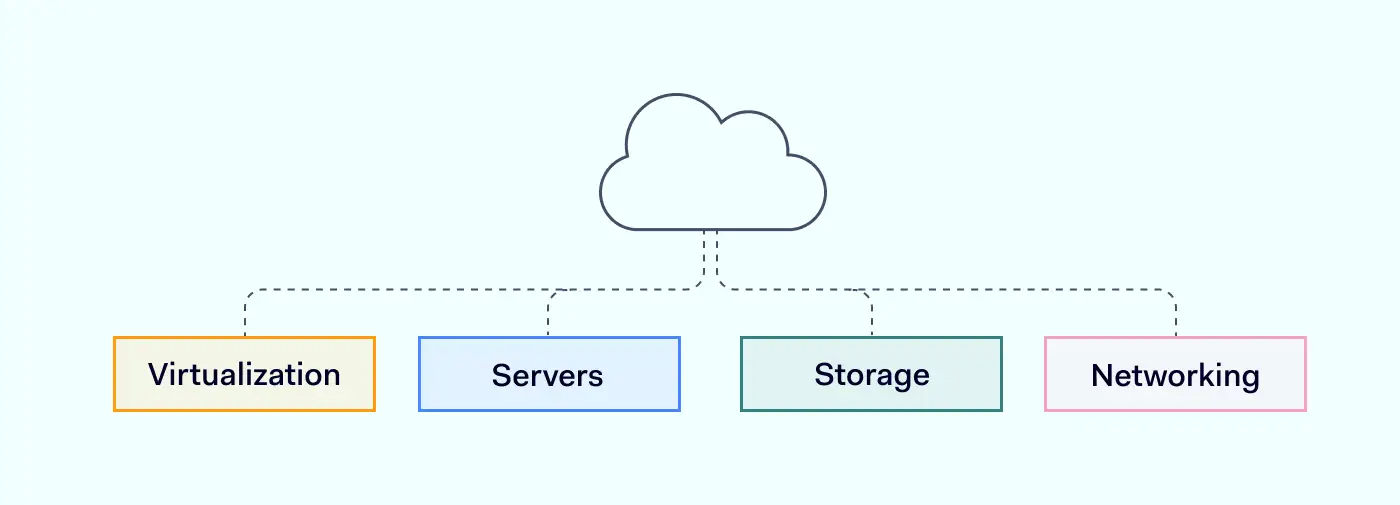
Infrastructure-as-a-Service provides virtualized computing resources as services over the internet. In IaaS, the service provider manages and delivers all associated hardware and software components: servers, storage, networking, and virtualization resources. With IaaS, users can provision and control these resources on-demand, scaling them up or down as needed.

Benefits of IaaS in healthcare

Aside from the fact that cloud computing makes it easier to deploy workloads, IaaS has a range of benefits that could be useful for healthcare companies.

  • Scalability and flexibility. By leveraging IaaS, users can rapidly deploy and configure virtual machines, storage, and network components. This allows healthcare organizations to scale their infrastructure up or down based on their actual needs.

  • Disaster recovery. IaaS enables organizations to back up and recover their critical data and remote machines. As critical data and applications are kept in cloud storage, this ensures their availability and integrity.

  • Cost efficiency. IaaS service providers use a flexible pay-as-you-go pricing model allowing users to pay only for the resources they use. This enables cost optimization, eliminating the need for upfront hardware and infrastructure maintenance investments.

Security challenges and how to address them

IaaS security is shared between the service provider and the user. While the service provider is responsible for managing underlying networking, storage, servers, and virtualization, the user is responsible for managing the security of everything running on top of the infrastructure. This involves operating systems, middleware, data, and applications. This setup is not without cybersecurity challenges.

  • Data protection. Sensitive patient data must be protected using encryption and access controls. As the data is physically located in third-party data centers, unauthorized access or breaches are the primary concern.

  • Compliance. Patient data falls under government-protected information, so regulatory compliance applies to it. Organizations must ensure that their IaaS providers adhere to sensitive patient data from unauthorized access or breaches.

For these reasons, IaaS provider selection is crucial to avoid collateral damage. Implementing multi-factor authentication, regular vulnerability assessments, and proactive monitoring can enhance security.

Platform-as-a-Service (PaaS)
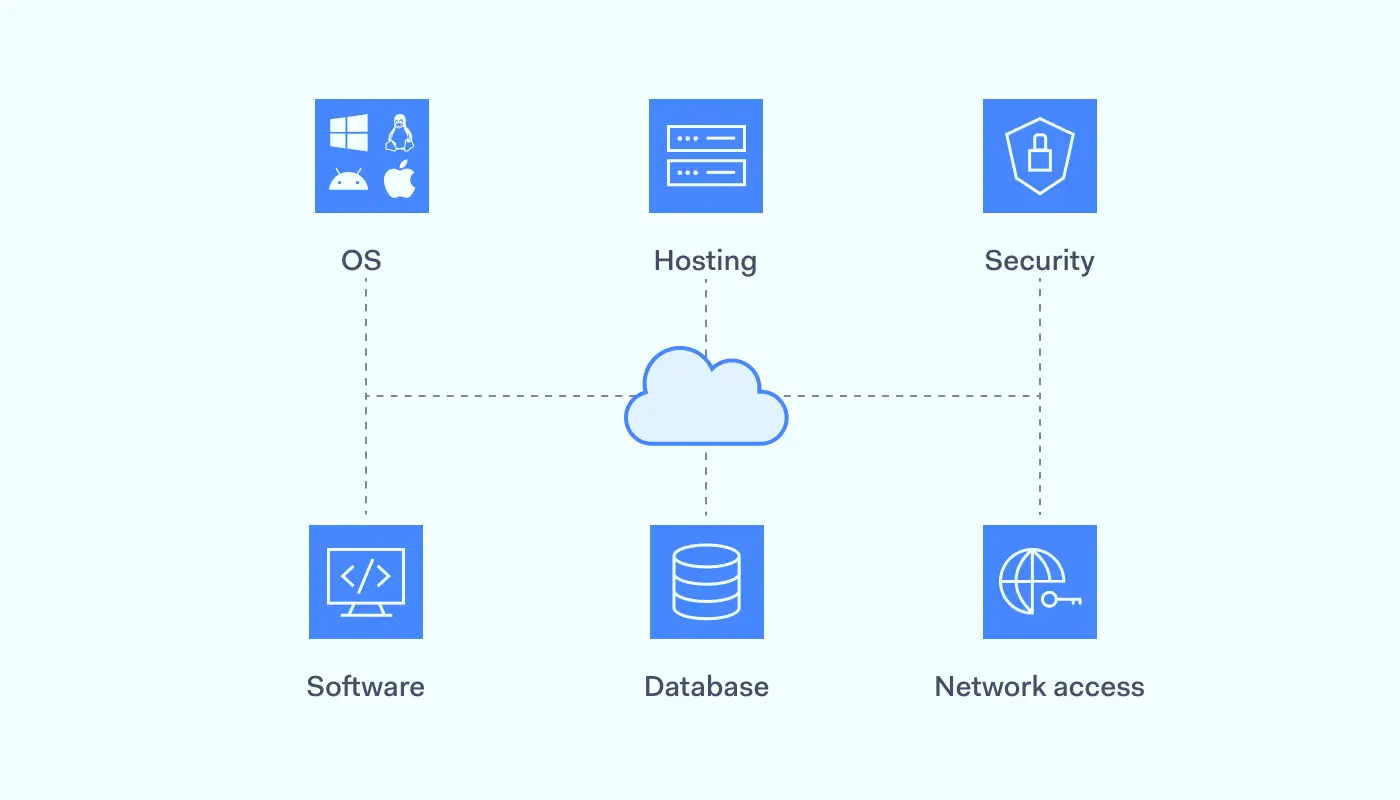
Platform-as-a-Service includes everything from IaaS with a dedicated environment for developing, deploying, and managing applications over the internet. It offers tools, frameworks, and services that enable developers to build, test, and run applications. Much like a physical data centre, PaaS providers handle hardware provisioning, operating system management, and network setup, allowing developers to focus solely on application development.

Benefits of PaaS in healthcare

With PaaS, healthcare providers get a platform for developing, testing and deploying applications in the cloud. Here are its main benefits:

  • Rapid application development. PaaS simplifies the application development process, allowing one to skip multiple setup steps and go directly to the deployment. This can accelerate innovation and provide new solutions quickly.

  • Scalability and performance. As with all cloud-based tools, they can automatically scale based on demand, ensuring high availability and optimal performance.

  • Collaboration and integration. PaaS is compatible with existing systems, meaning currently used tools can be integrated into a unified system.

Security challenges and how to address them

When adopting PaaS, organizations need to be wary of its security challenges. Here are some examples:

  • Application security. PaaS environments involve the deployment and running of custom applications. Therefore, businesses should conduct regular code reviews, implement secure coding practices, and perform vulnerability assessments.

  • Secure configuration. Businesses need to make sure that used PaaS platforms are properly configured. This includes firewalls, network access controls, and encryption protocols.

  • Incident response and monitoring. PaaS environments require ongoing monitoring and timely incident response capabilities. By establishing robust logging and monitoring systems and employing detection and prevention mechanisms, we can have a ready system in case of an intrusion.

Software-as-a-Service (SaaS)
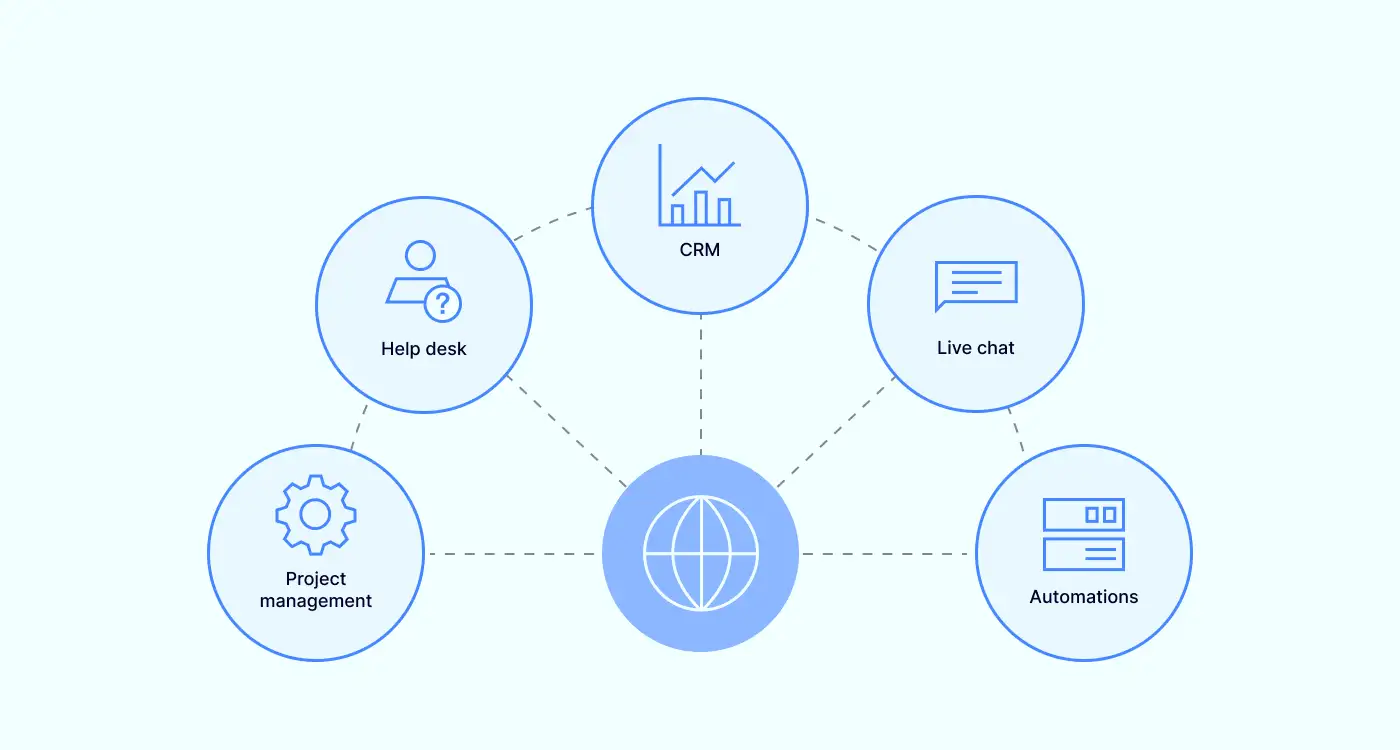
Software-as-a-Service is a cloud computing model in which hosted software is delivered over the internet instead of installed on local premises. In this model, the software is centrally hosted by a provider who manages and maintains the underlying infrastructure, database, and updates. Users only pay a subscription fee to access and use the software on a pay-as-you-go basis.

Many healthcare-related applications are delivered via SaaS, including healthcare picture archiving and communication systems (PACs), electronic health records (EHR), telehealth services, and more.

Benefits of SaaS in healthcare

With SaaS, healthcare organizations are provided with the service directly without the need to handle setup and maintenance. Here are its main benefits:

  • Accessibility and mobility. SaaS applications can be accessed from everywhere, enabling healthcare professionals to securely access patient information on various devices, enhancing workflow efficiency.

  • Automatic updates. The responsibility to handle software updates and patches fall on the service provider, meaning that healthcare applications are always up to date and protected against emerging security threats.

  • Fast deployment. SaaS applications are provided instantly and with minimal setup compared to on-premises software. Software updates and maintenance are handled by the SaaS provider, ensuring smooth operation.

Security challenges and how to address them

The problem is that SaaS brings healthcare organizations not only benefits. It does have some security challenges that need to be addressed by IT personnel.

  • Access control. As SaaS applications are externally hosted, managing user access and authentication is critical. This is the only way to prevent unauthorized intrusions.

  • Third-party integrations. Some SaaS applications need to be integrated with third-party services or APIs. These integrations can introduce security risks if not properly managed or if they have exploitable vulnerabilities.

  • Multi-tenancy risks. The same SaaS application can serve multiple consumers, sharing the same underlying structure and resources. This is why logical separation and isolation between tenants are crucial to prevent data leakage or unauthorized access to customer data.

Compliance and regulatory landscape in cloud security

Regulatory landscape and compliance are critical considerations for organizations across various industries. Most countries have recently implemented various data protection and cybersecurity laws. The government regulates the privacy protection of medical data, and breaching the law ensues grave consequences.

Here are some prominent regulations, guidelines that could impact cloud security, and strategies for ensuring compliance.

HIPAA and HITECH

The Health Insurance Portability and Accountability Act (HIPAA) and the Health Information Technology for Economic and Clinical Health (HITECH) Act are crucial regulations in the healthcare industry. They both perform different functions:

HIPAA — sets standards for protecting sensitive patient health information

HITECH — promotes the adoption of electronic health records

Compliance with both is essential when leveraging cloud computing services in the healthcare sector. Organizations need to take care of security measures like data encryption, access controls, and regular audits to safeguard patient data and meet the requirements outlined in these regulations.

GDPR

The General Data Protection Regulation (GDPR) is a comprehensive data protection framework that affects organizations operating in European Union countries or handling EU citizen data. It emphasizes individual privacy rights, consent management, and data breach notification.

Cloud service providers and organizations utilizing cloud computing services must comply with GDPR by implementing appropriate security measures, conducting data protection impact assessments, and ensuring cross-border data transfers adhere to GDPR guidelines. Encryption, pseudonymization, and privacy-by-design principles are critical for achieving compliance with GDPR in cloud computing.

Other regional regulations and guidelines

In addition to HIPAA, HITECH, and GDPR, other regional regulations and guidelines impact cloud security in specific industries or geographic locations. Examples include the Payment Card Industry Data Security Standard (PCI DSS) for the payment card industry and the Federal Risk and Authorization Management Program (FedRAMP) for U.S. government agencies.

Compliance with these regulations requires organizations to align their cloud security practices with specific requirements. Depending on the regulation and area, this may include data encryption, access controls, vulnerability management, and incident response protocols. Staying informed about relevant regional regulations is crucial to ensure compliance and avoid potential penalties or reputational damage.

As it was mentioned previously, cloud services adoption would involve collaboration with third parties. Here are some key considerations of security responsibilities between the cloud service provider and the customer:

Vendor risk assessment

A thorough vendor risk assessment helps to make sure that a cloud provider will be a matching fit for a healthcare organization’s needs. The cloud service provider’s market is saturated, but not everyone has compliant security controls, certifications, incident response capabilities, and data protection practices. The same strict requirements for healthcare organizations also apply to their third-party partners.

By assessing vendor risks, organizations can make informed decisions and select providers aligning with their security requirements and compliance obligations. Provider’s failure to secure the underlying infrastructure can open the gap in the security set up by the healthcare provider.

Understanding the shared responsibility model

The shared responsibility model defines the division of security responsibilities between cloud service providers and customers. While providers are responsible for securing the underlying infrastructure, customers are accountable for securing their data and applications within the cloud.

Organizations must understand and fulfill their share of responsibilities, which may involve tasks such as configuring access controls, encrypting sensitive data, applying patches and updates, and regularly monitoring for security incidents.

Key cloud security strategies and solutions for healthcare

While cloud computing is appealing to make operations more modern and effective, the downside is the potential cybersecurity risks. Safeguarding sensitive patient data and navigating regulatory compliance requirements are the primary concerns for healthcare providers. There are three main cloud security strategies and solutions to consider.

Advanced threat prevention

Advanced threat prevention is one of the key cloud security strategies for healthcare. It involves deploying sophisticated security measures to identify and mitigate potential threats before they cause any damage. Relying on technologies like machine learning algorithms, behavior analysis, Deep Packet Inspection, and real-time monitoring, organizations aim to detect and respond to suspicious activities.

As a proactive approach to cybersecurity, advanced threat monitoring allows healthcare organizations to identify and effectively neutralize threats. This helps businesses to reduce the risk of data breaches and unauthorized access to patient information.

Cloud-based security operations and monitoring

Monitoring is critical in ensuring the integrity and confidentiality of healthcare data stored in the cloud. By providing continuous oversight and proactive detection of potential security breaches or unauthorized access attempts, monitoring enables organizations to secure against security incidents promptly.

In addition, by leveraging cloud-based security tools, healthcare organizations can centralize security operations, streamline incident response, and gain insights into potential vulnerabilities. The systems can be automated, helping organizations detect and mitigate security breaches on time and enhancing overall security posture without human involvement.

Secure remote work

During the COVID-19 pandemic, the adoption of remote work in the healthcare sector accelerated. Secure remote access became critical as healthcare professionals needed to access patient data and collaborate remotely.

Cloud security solutions enable secure sensitive data storage, ensuring healthcare providers can work efficiently while adhering to strict security protocols. Implementing secure virtual private networks (VPNs), multi-factor authentication, and encryption technologies safeguard data transmission and prevent unauthorized access, mitigating risks associated with remote work.

Cloud security in action: enabling new healthcare capabilities

Cloud security not only performs the function of safeguarding patient data, it also empowers healthcare organizations to embrace new capabilities and innovate. Here are some routes in which cloud security can facilitate advancements.

Redundancies to prevent ransomware attacks

Ransomware attacks use malware that encrypts data stored in the device’s hard drive rendering it inaccessible until a payment is made to the attacker. This is extremely disruptive to organizations relying on on-premises infrastructure as this can completely shut down all operations and compromise patient data.

The only solution to this issue is data replication in multiple dispersed locations. That way, there’s no centralized storage that could be tampered with. In an accident, data can be restored from unaffected backups, minimizing downtime and ensuring continuity of care. Cloud servers enable effective mirroring solutions allowing distributed backups.

Delegation of security responsibilities to third-party firms

Cloud security can catalyze operations outsourcing, allowing better work distribution in your organization. Managing and maintaining robust cloud security infrastructure requires specialized expertise. That’s one of the key reasons why many healthcare organizations delegate their security responsibilities to reputable third-party vendors.

Cloud computing partners already possess the knowledge and resources to implement industry best practices, conduct regular security assessments, and respond to emerging threats promptly. This allows organizations to enhance the cloud security posture and focus on quality patient care.

Automation to free up healthcare resources

Cloud security can be improved by adopting various innovations to improve the setup. By automating vulnerability scanning, log analysis, and security policy enforcement, healthcare providers can free up their workforce from manual and time-consuming tasks.

Automation improves efficiency, reduces the risk of human error, and ensures consistent application of security controls. As IT professionals aren’t burdened with recurring manual tasks. This leaves them more time to focus on advanced security measures and stay updated with evolving threats.

Expert insights and resources for healthcare cloud security

Several organizations provide expert insights and resources for healthcare cloud security. Cloud Security Alliance (CSA), the European Union Agency for Cybersecurity (ENISA), and the National Institute of Standards and Technology (NIST) are the main ones providing various recommendations for cloud security in healthcare companies.

CSA

CSA has established requirements for healthcare organizations to ensure secure cloud computing practices. These requirements mainly focus on several key areas:

  • Implement strong access controls and authentication mechanisms to protect sensitive data.

  • Regularly monitor and audit cloud services for security vulnerabilities and incidents.

  • Encrypt data both in transit and at rest to maintain confidentiality.

  • Conduct regular risk assessments and threat modelling to identify and mitigate potential risks.

  • Establish incident response and recovery plans to handle security breaches effectively.

  • Stay updated with the latest security best practices and standards.

By adhering to these CSA requirements, healthcare organizations can enhance the security of their cloud computing environments and protect patient information from unauthorized access or data breaches.

ENISA

ENISA lays out comprehensive requirements for healthcare organizations in the European Union to enhance their cybersecurity measures. These requirements encompass multiple aspects of cloud security:

  • Develop and enforce robust security policies and procedures for cloud adoption.

  • Perform thorough risk assessments to identify and address potential security threats.

  • Ensure the secure configuration and hardening of cloud computing environments.

  • Employ strong access controls and authentication mechanisms to protect sensitive data.

  • Regularly monitor and log cloud computing activities to detect any suspicious behaviour.

  • Establish incident response plans and conduct regular security audits.

Adherence to these ENISA requirements is vital to safeguarding patient data, protecting critical healthcare systems, and maintaining the resilience and trustworthiness of healthcare services within the EU.

NIST

NIST provides guidelines and requirements and guidelines for healthcare organizations to ensure the security and privacy of patient information. These requirements include:

  • Follow the NIST Cybersecurity Framework for risk management and cybersecurity best practices.

  • Employ strong identity and access management controls to protect data and resources.

  • Use encryption to safeguard data both in transit and at rest.

  • Regularly update and patch cloud infrastructure and applications to address security vulnerabilities.

  • Implement robust network security controls, such as firewalls and intrusion detection/prevention systems.

  • Conduct continuous monitoring and log analysis to promptly detect and respond to security incidents.

Healthcare companies must review and adapt these recommendations to their organizational needs and regulatory requirements.

How can NordLayer help?

Securing cloud infrastructure can be challenging for healthcare companies. Still, the benefits outweigh the risks, so it’s worth considering digitally transforming an organization and improving its services. It’s not a bad idea to turn to third-party partners that could help to take a leap.

NordLayer streamlines network access controls to ensure only authorized users can access confidential data. Access to cloud resources happens using encrypted tunnels using AES 256-bit and ChaCha20 cyphers. The service is also compatible with major cloud platforms like Azure and AWS, allowing seamless integration with other solutions and services.

With correct control mechanisms, NordLayer is a valuable ally to follow through with the best cloud environment security practices. With an extensive set of centrally implemented features and monitoring controls that are all managed via the Control Panel, NordLayer allows the implementation of security policies reducing various risks.

Contact NordLayer and discuss your security options today to ensure safe access to patient data and protect your cloud infrastructure.

FAQ

How can healthcare organizations ensure compliance in the cloud?

Healthcare organizations can ensure compliance in the cloud by understanding applicable regulations. Familiarizing with regulations like HIPAA and GDPR will allow organizations to identify specific compliance requirements. This will serve as a basis for cloud provider choice and guide what access controls and other cybersecurity functionalities must be implemented to align with requirements.

What are examples of cloud security?

Cloud security is an umbrella term encompassing various technologies to protect data and systems in the cloud. This includes encryption, access controls, firewalls, intrusion detection and prevention systems, security information and event management, and data loss prevention.

How does the shared responsibility model work in healthcare cloud security?

The shared responsibility model defines the division of security responsibilities between the cloud service provider (CSP) and the healthcare organization. While the specifics entirely depend on the cloud service model, the cloud service provider usually takes care of the underlying cloud infrastructure. At the same time, the healthcare organization is responsible for application data security and access control.

What steps can healthcare organizations take to mitigate third-party risks?

To mitigate third-party risks, healthcare organizations must establish clear contractual agreements outlining security expectations, data handling procedures, breach notification requirements, and liability provisions. Then, a good plan is to perform ongoing maintenance with regular risk assessments. This should help organizations minimize risks associated with third parties.

About Version 2 Digital

Version 2 Digital is one of the most dynamic IT companies in Asia. The company distributes a wide range of IT products across various areas including cyber security, cloud, data protection, end points, infrastructures, system monitoring, storage, networking, business productivity and communication products.

Through an extensive network of channels, point of sales, resellers, and partnership companies, Version 2 offers quality products and services which are highly acclaimed in the market. Its customers cover a wide spectrum which include Global 1000 enterprises, regional listed companies, different vertical industries, public utilities, Government, a vast number of successful SMEs, and consumers in various Asian cities.

About NordLayer
NordLayer is an adaptive network access security solution for modern businesses – from the world’s most trusted cybersecurity brand, Nord Security.

The web has become a chaotic space where safety and trust have been compromised by cybercrime and data protection issues. Therefore, our team has a global mission to shape a more trusted and peaceful online future for people everywhere.

GREYCORTEX Mendel 4.1 Introduces a New User Interface

[May 31, 2023] — GREYCORTEX, a leading provider of network detection and response solutions, is pleased to announce the release of GREYCORTEX Mendel 4.1, featuring an all-new visually appealing interface that enhances the user experience.
 
With a strong focus on usability, GREYCORTEX Mendel 4.1 introduces a cleaner and more modern look, offering users an intuitive environment. The new user interface has been meticulously designed to reduce visual complexity and provide seamless access to essential data, enabling users to effortlessly navigate through the system.

We understand the importance of simplicity in user interfaces,” said Radek Hloušek, Product Manager at GREYCORTEX. ​Our goal with GREYCORTEX Mendel 4.1 was to create an interface that not only looks great but also enhances the overall user experience. We wanted to make complex functionality accessible and intuitive for our users, allowing them to focus on what matters most – detecting and mitigating cyber threats.

One of the standout features of the new Mendel UI is the availability of light and dark themes, providing users with the flexibility to choose a visual style that suits their preference and working environment. Whether it’s a bright and vibrant theme or a sleek and sophisticated dark mode, GREYCORTEX Mendel 4.1 offers a personalized experience to cater to diverse user needs.

Additionally, the new version brings integration with endpoint detection and response platforms and software-defined networking solutions to enable extended detection and response capabilities. Moreover, advanced filtering helps power users extract the precise information they are looking for. For OT customers, BACnet protocol processing offers visibility into building management systems.

GREYCORTEX Mendel 4.1 represents the company’s commitment to continuously innovating and improving its offerings, ensuring customers have access to cutting-edge solutions that enhance their cybersecurity.

More about GREYCORTEX Mendel 4.1.
 

About Version 2 Digital

Version 2 Digital is one of the most dynamic IT companies in Asia. The company distributes a wide range of IT products across various areas including cyber security, cloud, data protection, end points, infrastructures, system monitoring, storage, networking, business productivity and communication products.

Through an extensive network of channels, point of sales, resellers, and partnership companies, Version 2 offers quality products and services which are highly acclaimed in the market. Its customers cover a wide spectrum which include Global 1000 enterprises, regional listed companies, different vertical industries, public utilities, Government, a vast number of successful SMEs, and consumers in various Asian cities.

About GREYCORTEX
GREYCORTEX uses advanced artificial intelligence, machine learning, and data mining methods to help organizations make their IT operations secure and reliable.

MENDEL, GREYCORTEX’s network traffic analysis solution, helps corporations, governments, and the critical infrastructure sector protect their futures by detecting cyber threats to sensitive data, networks, trade secrets, and reputations, which other network security products miss.

MENDEL is based on 10 years of extensive academic research and is designed using the same technology which was successful in four US-based NIST Challenges.

×

Hello!

Click one of our contacts below to chat on WhatsApp

×