





You probably all know that headers are directives that web applications use to configure the security defense in web browsers.
They are also called seatbelts for web applications. The name describes their usage because they can save you in an emergency and are not difficult to use or time-consuming.
The header topic is vast and can be complex because of it. The best is to be familiar with all of them so you can choose which one to use for your type of web application.
In this article, I will focus on one type of header called the Nonce header. Nonce means “number used once”! This CSP additional layer of security could protect your web application from some attacks such as data injection attacks, CSRF, XSS, etc.
*As you probably know, if you are familiar with developing a web application, it is very easy to implement headers. You can apply them on the web server or in your code. They are often just one line of code to add or check a box to configure the web server.
What is CSP?
The nonce header is used as an extra added level of security for the Content Security Policy (CSP) security header. I will get back to it in the next section. I will just summarize the function of CSP:
CSP is a list of sources for content (such as scripts, images, frames, etc.) the web site is using which are outside of the domain. CSP usage would stop vulnerable web application calling out and running the secondary part of the attack.
The main win of CSP is to disallow inline styles and inline scripts. For example, CSP is used by adding this line of code, which would block everything for the static application. If you want to prevent not calling any content from anywhere, you can implement CSP like this:
Content-Security-Policy: default-src 'self'; block-all-mixed-content;If you want to check out the list of additional layers you can use with CSP, check out this site.
Of course, there is plenty of documentation regarding CSP on the internet if you want to dig deeper into it.
What is the Nonce header?
So, let’s get back to the script-nonce header.
Nonce is a string of characters. It is used one single time to prove that a specific script is the one you mean to call. Using this setting means you require the nonce to run the script.
When and how is Nonce used?
The unsafe-inline directive should be avoided because it allows all inline scripts and styles. Nonce is used to avoid using mentioned directive because with nonce, we can allow only specific elements, such as specific inline script or style elements.
The nonce should be a secured random string, and you should not reuse it somewhere else in the application (it should be unique).
This directive is CSP level 2. This means that the support for nonce has existed since 2015 in Chrome and Firefox, Safari 10+, or Edge 15+. You can check out more about level 2 on this site.
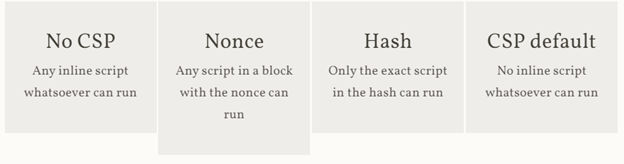
If your script, which you want to allow, is static, you could also use CSP hash. The difference between these two is that hash is whitelisting precise script block, and nonce will allow the whitelisting of the entire script block no matter what is in there.
If we want to summarize the difference and make up your mind easily about what to use: nonce, hash, or default CSP, check out this table from TroyHunt site:
How to use Nonce?
To use nonce, we would provide the script tag a nonce attribute. Also, we would need to add nonce to our script-src directive. These two values of nonce attribute need to match.
<script type="text/javascript" nonce="55EemGb1xKptoIGTP4Nd"> </script>
and
Content-Security-Policy: default-src 'self'; script-src 'nonce-55EemGb1xKptoIGTP4Nd'
To get the nonce, you can generate a random base64-encoded string using a cryptographically secure random number generator on the site CyberChef or the classic site base64. The string should be at least 128 bits of data to be secure enough (32 hex characters or 24 base64 characters).
Very important to know is that nonces should be generated differently each time the page loads (single-time usage). So, if you are using node.js you can use randomBytes method and then convert it to toString base64. You can check out more about the mentioned method on this site.
When you create a nonce, the content is hidden. This means if the attackers try to get the attribute nonce, they will get the empty string! The nonce value can be just accessed by the nonce property of the script: script.nonce.
If you want to give trust to all scripts loaded by the root script when adding nonce (or maybe hash), you will also add ‘strict-dynamic’ directive.
The CSP would look like this if we are using nonce:
Content-Security-Policy: script-src 'strict-dynamic' 'nonce-55EemGb1xKptoIGTP4Nd'
Or like this, if we are using hash:
Content-Security-Policy: script-src 'strict-dynamic' ' sha256-0fr9ylGr2R2tsWMhq4lfEQc'
*Just to note that using a hash is CSP level 2 also. Level 2 specification also allows sha384 and sha512. Check out this site for more info!
Make sure that script tags with nonce attribute don’t have any untrusted variables within them!
Cool security header tool
There is one cool site where you can check out all the headers used in the web application. In the mentioned security headers site, you can just put the domain of your web application in the input field and click the scan button. After scanning, you will get a security report summary, all information about raw headers, and warnings about the used headers. You will also have new info about upcoming headers and see some additional information (more description of concepts used).
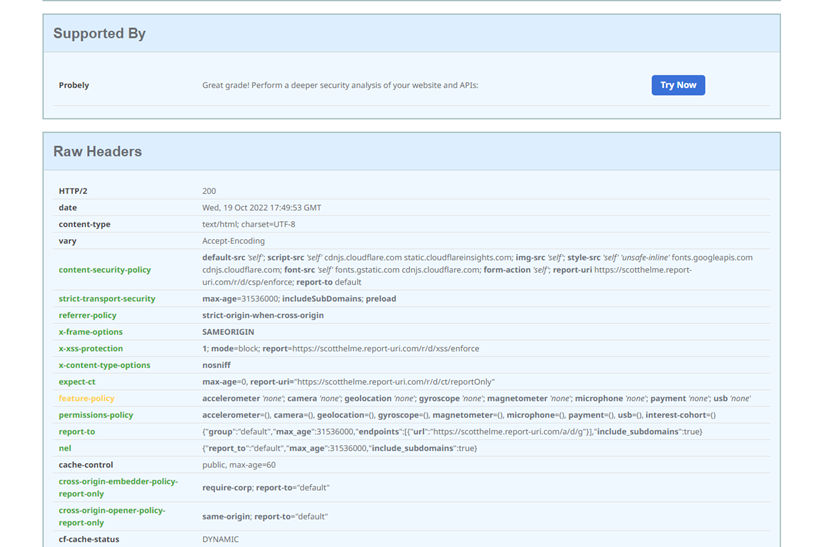
In the picture above, you can see one section about the headers which target application is using. You can also check out headers in the DevTools, but I like this tool because it is easy to use.
Browser compatibility on Oct 1, 2022
On Developer Mozilla official site you can find the latest information on browser compatibility for nonce attribute:

Conclusion
As I mentioned, Nonces are a very complex topic, and the implementation of this feature has changed over time. If you are planning to use it, you will need to be in touch with the latest information about updates. OWASP is always providing the latest info regarding CSP and you can find more information on their site.
There are so many cool security headers out there. We will for sure get back to some of them.
Cover photo by Brandi Redd
#Security_headers #CSP #Nonce
