Elevating IT Infrastructure: The Integration of MDM

Have you ever purchased a security system or saw one? If not, let’s paint a picture. Just imagine that you have purchased a state-of-the-art home security system. It has all the bells and whistles, cameras, motion sensors, smart locks, and whatnot. But now you face the challenge of integrating it with your existing household setup. You need it to work smoothly with your current security protocols, connect effortlessly to your home network, and make sure it doesn’t disrupt your daily routine.

Do you get the idea? Similarly, in the mobile-driven corporate world, simply acquiring a Mobile Device Management (MDM) solution is insufficient. The challenge lies in seamlessly integrating it into your existing IT infrastructure to maintain operational integrity and security.

Integration of MDM
Integrate MDM Solutions Into Your Existing IT Infrastructure
This blog discusses the strategic considerations for seamlessly integrating MDM solutions, which promise streamlined management and better security without causing disruptions.

Challenges of Managing IT Infrastructure Without MDM
When did you last try to juggle multiple responsibilities without a proper system? It could be organizing a family vacation, where you had to book flights, hotels, and activities while managing work deadlines and household chores. The stress and inefficiency can be overwhelming, right?

The same applies to businesses managing hundreds or thousands of mobile devices without a centralized solution.

1. Security and Compliance Risks
Security is a top priority for any industry. Without a centralized MDM solution, ensuring all devices are consistently updated with the latest security patches is like trying to herd cats. Each device has its schedule, and users often delay updates, either out of convenience or simply because of forgetfulness. This lack of uniformity leaves significant gaps in your security.

Inconsistent security updates can lead to major headaches. What if a new malware strain is spreading rapidly? IT teams must manually scramble to update each device without an MDM solution—a slow and error-prone process. In the meantime, the organization remains exposed to potential breaches, risking sensitive data and regulatory non-compliance. It’s like locking some doors in your house while leaving others wide open, hoping intruders won’t find the unlocked ones.

2. Operational Inefficiencies
Operational inefficiencies are another major issue. Manual device management has substantial operational overhead and resource consumption. IT staff spend countless hours on mundane tasks like setting up devices, pushing updates, and troubleshooting issues, which could be better spent on strategic initiatives. This wastes valuable resources and stifles innovation and growth.

3. User Experience and Support
A diverse device environment can be a support nightmare. Different devices and operating systems require specialized knowledge and tools, making it challenging to provide consistent support. Consistent access to corporate resources can be critical without a unified management solution. Some users might have access to their emails and files, while others struggle with intermittent connectivity and permission issues. This inconsistency hampers productivity and can lead to dissatisfaction among employees, as they feel unsupported and hindered in their work.

Strategic Considerations for Integrating MDM into IT Infrastructure
Careful planning and strategic considerations are essential when integrating an MDM solution into your IT infrastructure to ensure a smooth and effective deployment. Here, we look into some key aspects, such as compatibility and deployment models, providing insights to help you navigate the integration process.

1. Compatibility
Before implementing an MDM solution, verifying its compatibility with your current IT infrastructure is important. This includes assessing compatibility with servers, network configurations, and security protocols. This compatibility check helps:

Avoid Potential Conflicts: Ensuring the MDM solution works seamlessly with existing components and prevents disruptions during and after integration.
Facilitate Smooth Integration: Compatibility ensures the MDM software can be deployed efficiently, reducing the risk of integration issues that could lead to downtime or compromised security.
Maintain Security Standards: Verifying compatibility ensures the MDM solution aligns with your existing security measures, maintaining the integrity of your overall security posture.
2. Deployment Models
Selecting the appropriate deployment model for your MDM solution is vital. The choice will depend on your industry’s specific needs, resources, and strategic goals. Here are the three primary deployment models:

a) Cloud-based
Benefits

Quick Deployment: Cloud-based MDM solutions can be deployed rapidly, allowing for faster implementation.
Scalability: Cloud solutions offer the flexibility to scale up or down based on business needs, accommodating growth or changes in device management requirements.
Reduces Upfront Costs: Cloud models typically involve lower initial investments, as there is no need for extensive hardware purchases or infrastructure upgrades.
Challenges

Data Privacy Concerns: Storing data in the cloud raises potential privacy issues, especially for businesses dealing with sensitive information.
Dependency on Internet Connectivity: Cloud solutions rely on stable Internet connections, and any disruption in server connectivity can affect access and functionality.
Best Practices

Conduct Thorough Risk Assessments: Evaluate potential risks associated with data storage and access to the cloud.
Ensure Compliance with Data Protection Regulations: Verify that the cloud provider complies with relevant data protection laws and standards.
Establish Clear SLAs with the Cloud Provider: Define service level agreements that outline performance expectations, support, and security measures.
b) On-Premise
Security Considerations

Greater Control Over Data: On-premise solutions provide direct control over data storage and security measures, which is critical for businesses with stringent data protection requirements.
Customizable Security Measures: Businesses can customize security protocols and configurations to meet their specific needs.
Resource Requirements

Significant Investment: Implementing an on-premise solution requires substantial hardware, software, and ongoing maintenance investment.
Dedicated Resources: Ensure sufficient resources are allocated to manage and support the on-premise MDM infrastructure.
Best Practices

Regularly Update and Patch the MDM Software: Keep the MDM software updated to protect against vulnerabilities and ensure optimal performance.
Maintain Backup and Disaster Recovery Plans: Implement comprehensive backup and recovery strategies to safeguard data and ensure business continuity.
Allocate Dedicated Resources for Management and Support: Ensure skilled personnel can manage and support the MDM infrastructure.
c) Virtual Private Cloud (VPC)
Flexibility and Control
Combines Cloud and On-Premise Benefits: VPCs offer the scalability and flexibility of cloud solutions while providing control similar to on-premise deployments.
Customizable Environment: Businesses can configure the VPC to meet specific needs and security requirements.
Benefits of Integrating MDM into IT Infrastructure
Integrating MDM into your IT infrastructure offers numerous advantages that enhance security, efficiency, and user experience. Here are the key benefits:

1. Streamlined Device Enrollment and Configuration
MDM solutions simplify enrolling and configuring new devices, ensuring they meet corporate standards from the start. This reduces the time and effort required to set up devices and ensures consistency across the industry.

2. Strengthened Security
MDM provides centralized control over security policies, ensuring consistent updates and reducing vulnerabilities across all devices. Features like remote-wipe and encryption further safeguard corporate data, protecting against breaches and unauthorized access.

3. Increased Productivity
By consolidating management tasks into a single platform, MDM software reduces the complexity and overhead of device management. Automated processes streamline operations and free up IT resources, allowing them to focus on strategic initiatives that drive business growth.

4. Improved Regulatory Compliance
MDM solutions help businesses comply with industry regulations by enforcing security policies and maintaining audit trails. This ensures all devices adhere to compliance standards, reducing the risk of fines and legal issues.

5. Cost Savings
MDM solutions can lead to significant cost savings by automating device management and reducing the need for manual interventions. They also minimize the resources required for IT support and reduce downtime.

Seamlessly Integrate your Existing IT Infrastructure with Scalefusion
Scalefusion offers flexible deployment options to fit your business needs, whether you prefer cloud, on-premise, or VPC solutions. This versatility ensures you can seamlessly integrate Scalefusion’s MDM capabilities into your existing IT infrastructure without disrupting your current operations.


About Scalefusion
Scalefusion’s company DNA is built on the foundation of providing world-class customer service and making endpoint management simple and effortless for businesses globally. We prioritize the needs and feedback of our customers, making sure that they are at the forefront of all decision-making processes. We are dedicated to providing comprehensive customer support services, and place emphasis on customer-centric thinking throughout the organization.

About Version 2 Digital

Version 2 Digital is one of the most dynamic IT companies in Asia. The company distributes a wide range of IT products across various areas including cyber security, cloud, data protection, end points, infrastructures, system monitoring, storage, networking, business productivity and communication products.

Through an extensive network of channels, point of sales, resellers, and partnership companies, Version 2 offers quality products and services which are highly acclaimed in the market. Its customers cover a wide spectrum which include Global 1000 enterprises, regional listed companies, different vertical industries, public utilities, Government, a vast number of successful SMEs, and consumers in various Asian cities.

Zero-touch Deployment for Macs with Scalefusion UEM

Have you ever bought a new gadget, only to find it packed with lengthy setup steps? Now suppose the same happening with every device in your company. That’s where zero-touch deployment steps in—removing the bother for IT admins and employees.
Zero-touch deployment for mac
What is Zero-touch Deployment for Mac?
Zero-touch deployment allows new Mac devices to be shipped directly to employees, fully configured and ready to go right out of the box. IT admins no longer need to spend hours configuring security settings, installing apps, or personalizing devices. Zero-touch deployment is a smarter way for businesses to manage their growing fleets of devices while keeping things simple for everyone involved. The result? Happy employees, smoother operations, and an easier life for IT.

What is Zero-touch Deployment for Mac?

Zero-touch deployment on Mac is a method that enables IT teams to remotely configure and deploy Mac devices without the need for physical handling. When a MacBook is unboxed by an employee, it is already fully set up with the necessary applications, configurations, and security protocols in place. This approach eliminates the need for IT to manually set up each device, as the entire process is automated. As a result, new hires or remote workers can start using their Mac devices immediately, enhancing productivity from day one. Zero-touch deployment is an efficient solution for businesses looking to streamline Mac device management while ensuring robust security and compliance measures are maintained.

The Key Benefits of Zero-touch: Simplifying Mac Deployments

1. Faster Deployments

Zero-touch deployment eliminates manual setup, allowing IT teams to configure and ship devices like Macs directly to users. For large-scale deployments, this drastically reduces time spent on device setup, enabling quick rollouts for new hires or department-wide refreshes.

2. Simplified Mac Enterprise Deployment

With Apple zero-touch deployment, devices are pre-configured with apps, settings, and security protocols, making it ideal for Mac enterprise deployment. IT teams can focus on other tasks instead of repetitive configurations.

3. Improved Security

Since all devices are set up with predetermined security policies, there’s no risk of users misconfiguring or skipping vital security steps. This ensures company-wide compliance and peace of mind.

4. Cost Efficiency

By automating the deployment process, companies can save significantly on labor and resources. IT teams can manage devices remotely, reducing the need for on-site staff, especially in remote work scenarios.

5. Consistency Across Devices

For businesses wondering, “How does IT benefit organizations with large-scale deployments?” Zero-touch ensures every device follows the same standard setup, resulting in uniformity across all Macs, regardless of location.

How to Implement Zero-touch Deployment for Mac with Scalefusion UEM

Step-by-Step Guide

Step 1: Log in to Scalefusion
  • Access your Scalefusion Dashboard.
  • Go to Getting Started > Apple Setup > ADE/DEP.
Step 2: Download ADE Public Key
  • Click the Download Public Key button and save the ADETokenKey.pem file.
Step 3: Set Up Scalefusion as an MDM Server
  • Log in to https://business.apple.com or https://school.apple.com/.
  • Navigate to Preferences (under your profile name) and go to MDM Servers.
  • Click Add to create a new MDM server.
  • Name the MDM server (e.g., “Scalefusion”).
  • Upload the Scalefusion ADETokenKey.pem file you downloaded.
  • Click Save and then download the Server Token.
Read more about: What is Apple Business Manager  &  What is Apple School Manager Step 4: Upload the Server Token
  • Return to the Scalefusion Dashboard.
  • In the ADE/DEP section, upload the Server Token file you downloaded from ABM/ASM.
  • Click Next to complete the setup.
Step 5: Assign Devices to Scalefusion
  • In ABM/ASM, go to Device Enrollment and select Manage Devices.
  • Assign devices by their Serial Numbers,Order Numbers, or upload a CSV file with this information.
  • Choose Scalefusion as the MDM server for these devices.
Step 6: Sync Devices in Scalefusion
  • Return to the ADE/DEP section of Scalefusion.
  • Click Sync Now to sync the assigned devices. Automatic syncing may take up to 6 hours.
  • You can now see the synced devices listed under the Total Devices section.
Read more about: What is Apple DEP Step 7: Start Enrollment
  • Unbox new devices or reset existing devices.
    • For new devices, go through the initial setup (language, Wi-Fi).
    • For existing iOS devices, navigate to Settings > General > Reset > Reset All Content & Settings.
    • For macOS, use CMD + R to reinstall macOS.
Step 8: Complete Enrollment
  • After initial setup, the devices will show a Remote Management screen.
  • Enter the required credentials (email, OTP) for User Authenticated Enrollment, if enabled.
  • Follow the remaining steps to complete the enrollment.
Step 9: Check Enrollment Status
  • Verify the enrollment status of your devices in the Scalefusion Dashboard under Devices. The devices will be managed automatically under the chosen configuration.
This setup enables zero-touch deployment, allowing ADE devices to automatically enroll into the Apple MDM as soon as they are set up or reset.

Wrapping Up: The Future of Mac Enterprise Deployment

Zero-touch deployment is more than just a convenience—it’s a transformation in how businesses manage their devices. As organizations scale, particularly those deploying a large number of Macs, the simplicity and efficiency of automating the setup process become invaluable. With Scalefusion UEM, IT teams can streamline operations, ensure security, and maintain consistency across all devices, no matter where they are. Whether you’re deploying 10 or 1,000 Macs, this solution ensures your teams are always ready to work, right out of the box.

About Version 2 Digital

Version 2 Digital is one of the most dynamic IT companies in Asia. The company distributes a wide range of IT products across various areas including cyber security, cloud, data protection, end points, infrastructures, system monitoring, storage, networking, business productivity and communication products.

Through an extensive network of channels, point of sales, resellers, and partnership companies, Version 2 offers quality products and services which are highly acclaimed in the market. Its customers cover a wide spectrum which include Global 1000 enterprises, regional listed companies, different vertical industries, public utilities, Government, a vast number of successful SMEs, and consumers in various Asian cities.
About Scalefusion
Scalefusion’s company DNA is built on the foundation of providing world-class customer service and making endpoint management simple and effortless for businesses globally. We prioritize the needs and feedback of our customers, making sure that they are at the forefront of all decision-making processes. We are dedicated to providing comprehensive customer support services, and place emphasis on customer-centric thinking throughout the organization.

How Unified Endpoint Management Supports Zero Trust Architecture

“Never trust, always verify.” It’s more than just a catchy phrase, it’s the core principle behind the Zero Trust security model.

But where threats constantly evolve, how can businesses ensure they’re truly following this mandate? Are traditional security methods enough to keep up with the complexities of digital frameworks? How do you ensure that every device, user, and access point in your network is secure?

Unified endpoint management (UEM) in Zero trust security
Implementing Zero-Trust with UEM
From mobile phones and laptops to IoT devices, each endpoint represents a potential vulnerability. As businesses adopt the Zero Trust model, Unified Endpoint Management (UEM) appears to be a key solution. It’s not just about managing devices, it’s about continuously verifying them, controlling access, and monitoring activity to prevent unauthorized access at every turn.

Let’s find out how UEM enforces the principle of “never trust, always verify” across all endpoints, ensuring that your network remains secure in a world where trust is a luxury no one can afford.

Understanding Zero Trust Architecture
Digital threats are rapidly evolving in sophistication, so relying on outdated security models that trust users and devices by default simply won’t cut it. Zero Trust flips this concept on its head, demanding rigorous checks at every level of access and interaction.

So, what exactly does Zero Trust entail? It’s about ensuring that every access request—whether from inside or outside the network—undergoes continuous verification. There’s no inherent trust based on a user’s location or device, instead, every request is treated with suspicion until proven otherwise. This means that even if a device or user is inside the corporate network, they’re not automatically granted access to all resources. Instead, access is tightly controlled and continuously validated.

Key principles of Zero Trust include:

Least Privilege Access: Users and devices are given the minimum level of access necessary to perform their functions. This reduces the risk of unauthorized access and limits the potential damage in case of a breach.
Micro-Segmentation: The network is divided into smaller, isolated segments, so even if one segment is compromised, the threat is contained and doesn’t spread across the entire network.
Continuous Monitoring: Regularly checking the health and behavior of users and devices helps detect anomalies and real-time potential threats, ensuring that any suspicious activity is addressed immediately.
With people accessing corporate resources from different locations and devices, the traditional security perimeter has all but disappeared. This shift requires a new approach to security.

Unified Endpoint Management: Beyond Device Management
UEM is an all-in-one toolkit that goes beyond the basic device management we’re used to. It’s about harmonizing and securing every device, application, and data within your business. While traditional device management might have focused solely on deploying and maintaining hardware, UEM takes a broader approach, integrating multiple aspects of IT management into a single platform.

UEM is a comprehensive solution that manages and regulates a diverse range of devices and applications. It unifies the management of mobile devices, desktops, applications, VR devices, wearables, rugged devices, digital screens, and IoT devices, all within a single platform. It’s designed to streamline the oversight of various endpoints, from smartphones and tablets to laptops and IoT devices.

But UEM doesn’t stop there; it also encompasses application management, identity management, and data security, providing a holistic view of your entire IT ecosystem.

The evolution of UEM is a testament to its growing importance. It began as Mobile Device Management (MDM), focusing on mobile devices and their security. As the IT sector evolved, so did MDM, transforming into UEM to address the complexities of managing a wider range of endpoints, ensuring that every endpoint remains secure, compliant, and optimized, regardless of where or how it’s used.

UEM and Zero Trust: The Perfect Synergy
When it comes to integrating security and management, UEM and Zero Trust are the duo that complement each other seamlessly. Many CXOs now recognize that pairing UEM with Zero Trust is essential for safeguarding their companies. Here’s how UEM supports and enhances the Zero Trust model, making it a powerful ally:

1. Enforcing the Principle of Least Privilege
Zero Trust is all about ensuring that users and devices have only the minimum level of access based on their level of responsibility. UEM plays an important role by meticulously managing and controlling access across all devices. It ensures that permissions are granted based on role, necessity, and context, so users get just enough access to do their job. This granular control minimizes potential risks and enforces the Zero Trust principle of least privilege effectively.

2. Continuous Monitoring and Threat Detection
In the Zero Trust model, constant vigilance is key. UEM’s robust monitoring capabilities align perfectly with this need. It continuously tracks user behavior and device health, looking out for any anomalies that could indicate a threat. This real-time oversight ensures that any suspicious activity is detected and addressed promptly, keeping your network secure from emerging threats.

Scalefusion UEM further enhances this approach by enabling overall centralized visibility, allowing organizations to monitor all endpoints from a single platform. This centralization streamlines threat detection and response, making it easier to identify potential vulnerabilities and take swift action to mitigate risks.

3. Identity and Access Management (IAM) Integration
Effective security requires tight integration between identity management and access controls. UEM enhances Zero Trust by working seamlessly with IAM solutions. This integration ensures that access permissions are managed consistently and securely across all endpoints, enforcing Zero Trust principles by validating every access request against strict identity and access controls. Solutions like Scalefusion OneIdP play a key role here by focusing on conditional access management, ensuring that users are granted access based on real-time conditions and policies, further strengthening the security framework.

4. Multi-Factor Authentication (MFA)
MFA is a critical component of Zero Trust, adding an extra layer of security to user authentication. UEM solutions enable the implementation of MFA, requiring users to provide multiple forms of verification —such as something they know (a password), something they have (a smartphone or security token), and something they are (biometric data like a fingerprint or facial recognition). By integrating MFA with UEM, these solutions streamline the enforcement of MFA policies, ensuring compliance and security across all endpoints.

5. Single Sign-On (SSO)
SSO simplifies user access by allowing individuals to log in to multiple applications with a single set of credentials, streamlining the login process and maximizing productivity.

Enterprises increasingly recognize the value of SSO for enhancing multi-application usage and centralizing user activity monitoring, which facilitates tracking resource utilization and identifying behavioral patterns. UEM solutions support SSO capabilities, improving user experience while reducing the risk of password-related vulnerabilities. This approach aligns seamlessly with Zero Trust principles by ensuring that access is managed efficiently and securely.

6. Automated Response and Remediation
One of the key challenges in maintaining the Zero Trust environment is quickly responding to potential threats and vulnerabilities. UEM enhances Zero Trust by automating response and remediation processes. For instance, when a device exhibits suspicious behavior or fails to meet compliance standards, UEM can automatically take remediation actions, such as isolating the device, blocking access, or initiating a security scan. This automation supports Zero Trust’s requirement for continuous monitoring and quick responses, ensuring potential threats are managed effectively.

Future Outlook: The Role of Automation in UEM and Zero Trust
1. Automation in Zero Trust Enforcement
Enforcing Zero Trust policies manually is increasingly impractical, especially for large-scale enterprises with numerous endpoints. Automation helps streamline and enhance the enforcement of Zero Trust principles. It allows for real-time compliance checks, automatic threat detection, and seamless policy application. By taking over routine tasks and monitoring, automation ensures that security measures are consistently applied, reducing human error and accelerating response times to potential threats.

2. Emerging Trends
Several key trends are shaping the future of UEM and Zero Trust. The integration of Internet of Things (IoT) devices is one such trend, as these devices become more prevalent in business environments. UEM solutions are evolving to include advanced capabilities for managing and securing a wide range of connected devices, such as smart thermostats in offices and connected medical devices in healthcare, ensuring only authorized access and continuous monitoring for compliance and anomalies.

Another notable trend is the shift toward edge computing. As data processing moves closer to the source of data generation, securing these edge environments is important. UEM will increasingly focus on extending Zero Trust principles to decentralized endpoints, ensuring comprehensive protection even in the most distributed IT environment.

UEM as the Backbone of the Zero Trust Architecture
UEM supports Zero Trust by ensuring continuous verification of every device, enforcing strict access controls, and maintaining constant monitoring. From automating threat responses to integrating identity management, UEM enhances the effectiveness of Zero Trust principles. By managing and securing all endpoints, Scalefusion UEM helps create a strong fortress around your digital environment, making it harder for threats to breach and move within your network.

Now is the time to assess your current security posture. It’s worth exploring how UEM in Zero Trust security can be a critical component of your strategy. With the right approach, you can walk through modern threats and complexities and secure your digital environment.

Scalefusion UEM, integrated with IAM, can help achieve this synergy seamlessly. By combining robust endpoint management with identity and access controls, Scalefusion enables you to implement Zero Trust principles efficiently, ensuring that every endpoint is continuously secured and compliant.

About Scalefusion
Scalefusion’s company DNA is built on the foundation of providing world-class customer service and making endpoint management simple and effortless for businesses globally. We prioritize the needs and feedback of our customers, making sure that they are at the forefront of all decision-making processes. We are dedicated to providing comprehensive customer support services, and place emphasis on customer-centric thinking throughout the organization.

About Version 2 Digital

Version 2 Digital is one of the most dynamic IT companies in Asia. The company distributes a wide range of IT products across various areas including cyber security, cloud, data protection, end points, infrastructures, system monitoring, storage, networking, business productivity and communication products.

Through an extensive network of channels, point of sales, resellers, and partnership companies, Version 2 offers quality products and services which are highly acclaimed in the market. Its customers cover a wide spectrum which include Global 1000 enterprises, regional listed companies, different vertical industries, public utilities, Government, a vast number of successful SMEs, and consumers in various Asian cities.
How to Remotely Wipe a Mac Device with Scalefusion UEM

Ever had an employee leave unexpectedly, and you needed to secure their device immediately? Or maybe a MacBook went missing, and you’re left worrying about the sensitive data it holds? 

Situations like these are not just headaches—they’re security risks. For IT teams managing a fleet of macOS devices, ensuring that lost, stolen, or repurposed devices are wiped clean is essential to safeguard company information.

Remote wiping is a vital tool for maintaining control over your business assets. With the right solution, like Scalefusion UEM, you can remotely wipe Mac devices instantly, ensuring that sensitive data is erased without the need for physical access to the device. 

erase MacBook remotely
Remotely Wipe Mac Devices

In this blog, we’ll dive into the importance of remote wiping, walk you through the steps to remotely wipe a macOS device using Scalefusion Mac MDM, and explore common use cases where this feature proves invaluable for businesses.

Understanding Remote Wiping on Mac: Why Is It Important?

It’s possible for an employee to leave their MacBook in a rideshare, or an ex-employee to hold onto their device a little too long. What happens to the sensitive company data on that machine? That’s where remote wiping steps in, offering an instant, secure solution.

Data security is a top priority. Losing control of a device means risking exposure to confidential information. Remote wiping allows businesses to instantly erase data from any device, no matter where it is, preventing security breaches and data leaks. It’s all about staying in control of your assets.

Whether it’s preparing a device for the next employee, protecting data on lost or stolen equipment, or managing devices at the end of their lifecycle, remote wiping ensures that your data doesn’t fall into the wrong hands. With Scalefusion UEM, you can erase MacBook remotely with ease, allowing for a seamless transition between users while maintaining security. 

Read more: Troubleshooting a Mac Device

How to Remotely Wipe a macOS Device Using Scalefusion UEM

Step 1. Access the dashboardLog in to the Scalefusion Dashboard and navigate to the Devices section.

Scalefusion - erase MacBook remotely

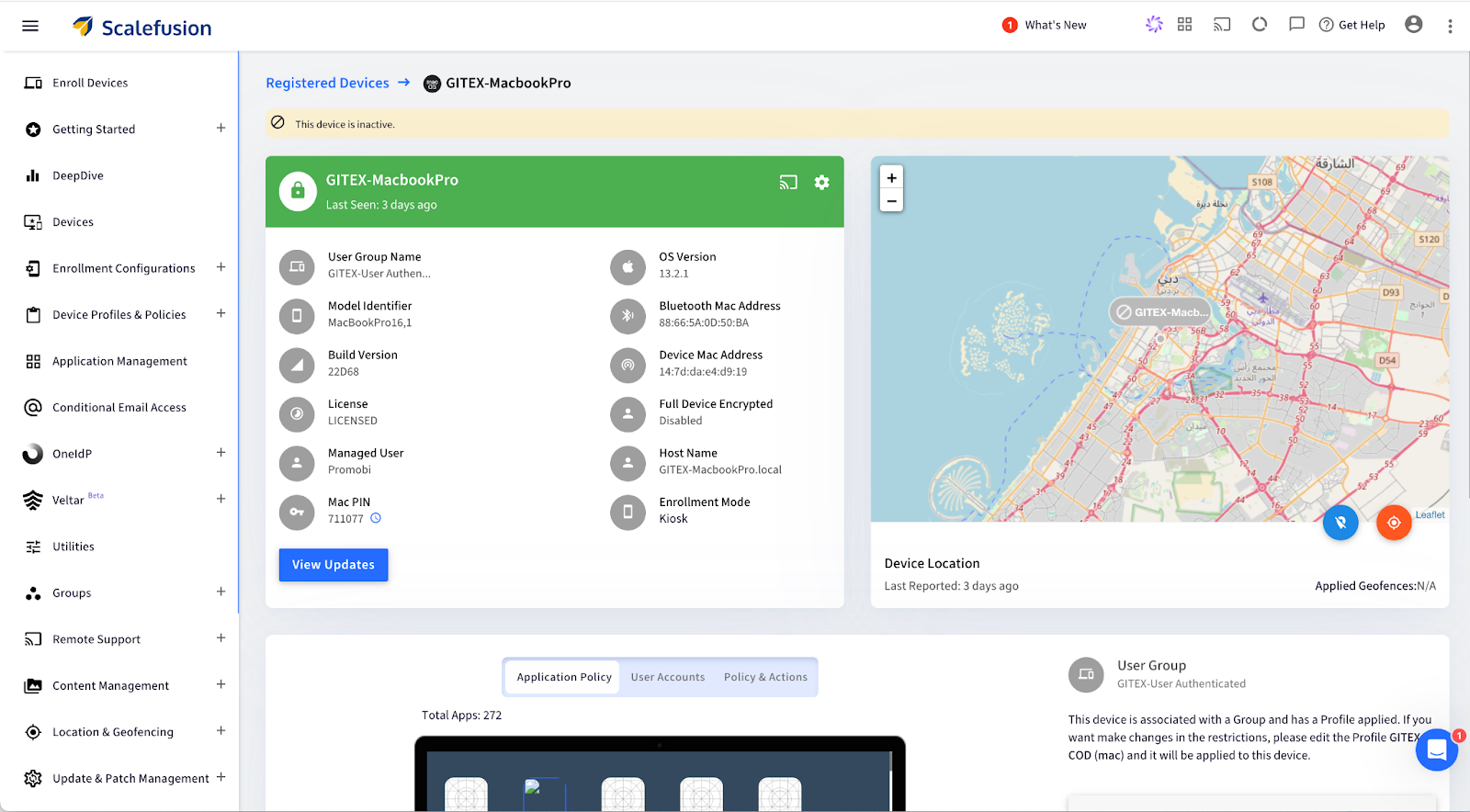
Step 2. Select the device: Click on the specific macOS device to view its details.

Scalefusion - Remotely wipe mac

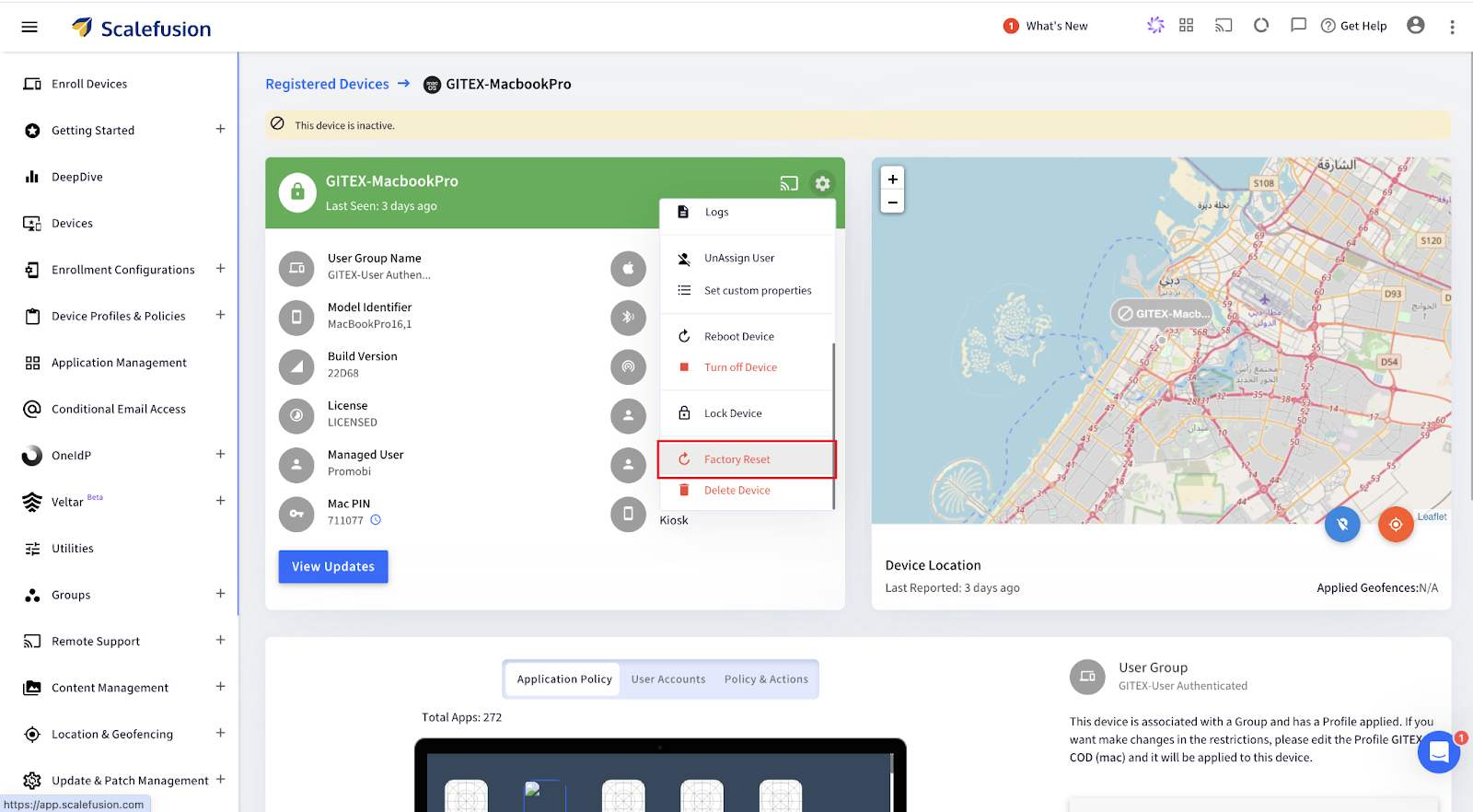
Step 3. Open Factory Reset Option: Click on the Settings icon, scroll down, and select Factory Reset from the menu options.

Scalefusion - wipe Mac remotely

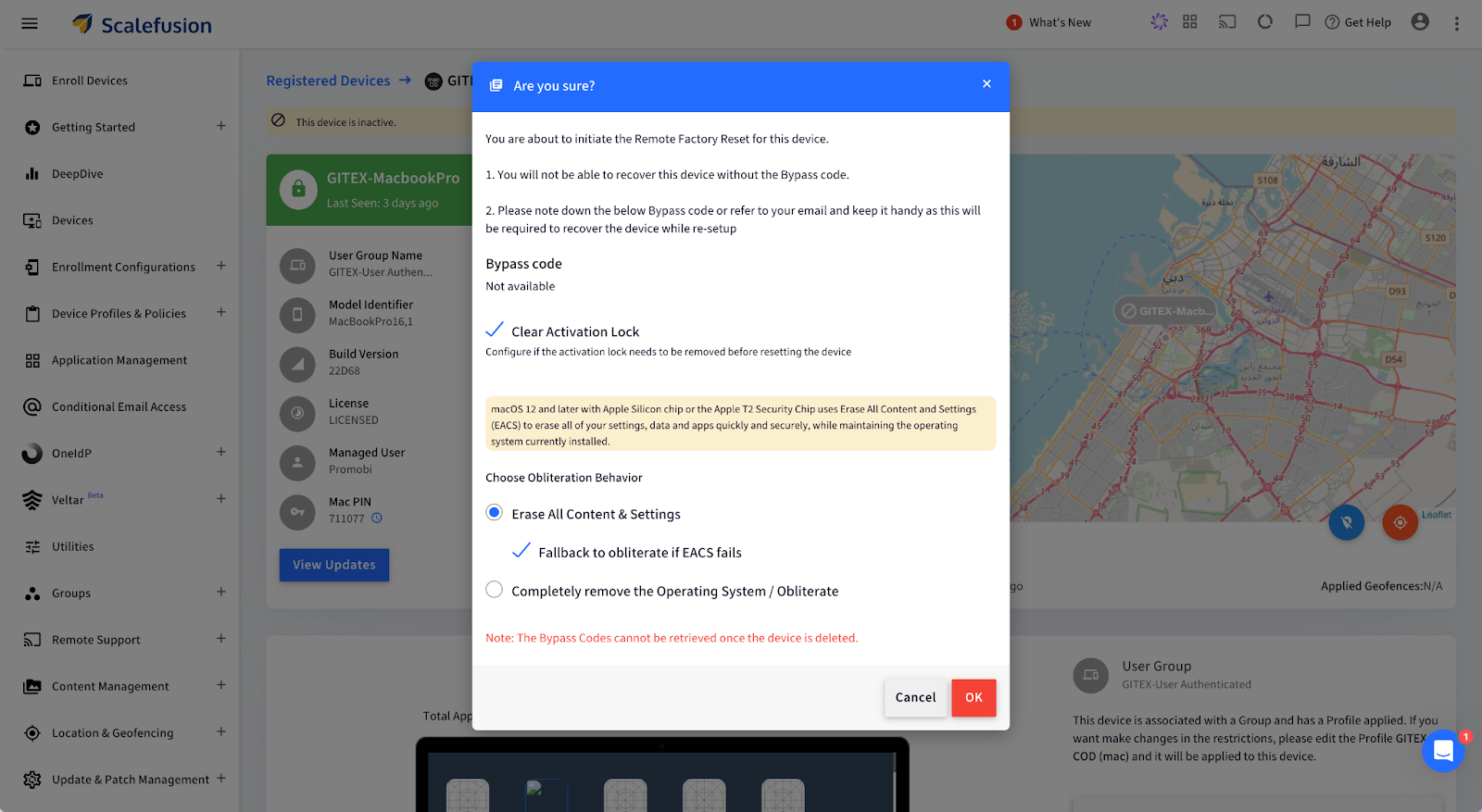
Step 4. For Apple Silicon/Intel (with T2 Security Chip):

  • Choose Obliteration Behavior: Select whether to erase all content, settings, and apps while retaining the operating system.
Scalefusion - Remotely wipe mac

Alternatively, for Intel Mac (without T2 Security Chip):

  • Configure a new Mac PIN: Enter a 6-digit PIN, then confirm by clicking OK. The PIN is also emailed to the admin.

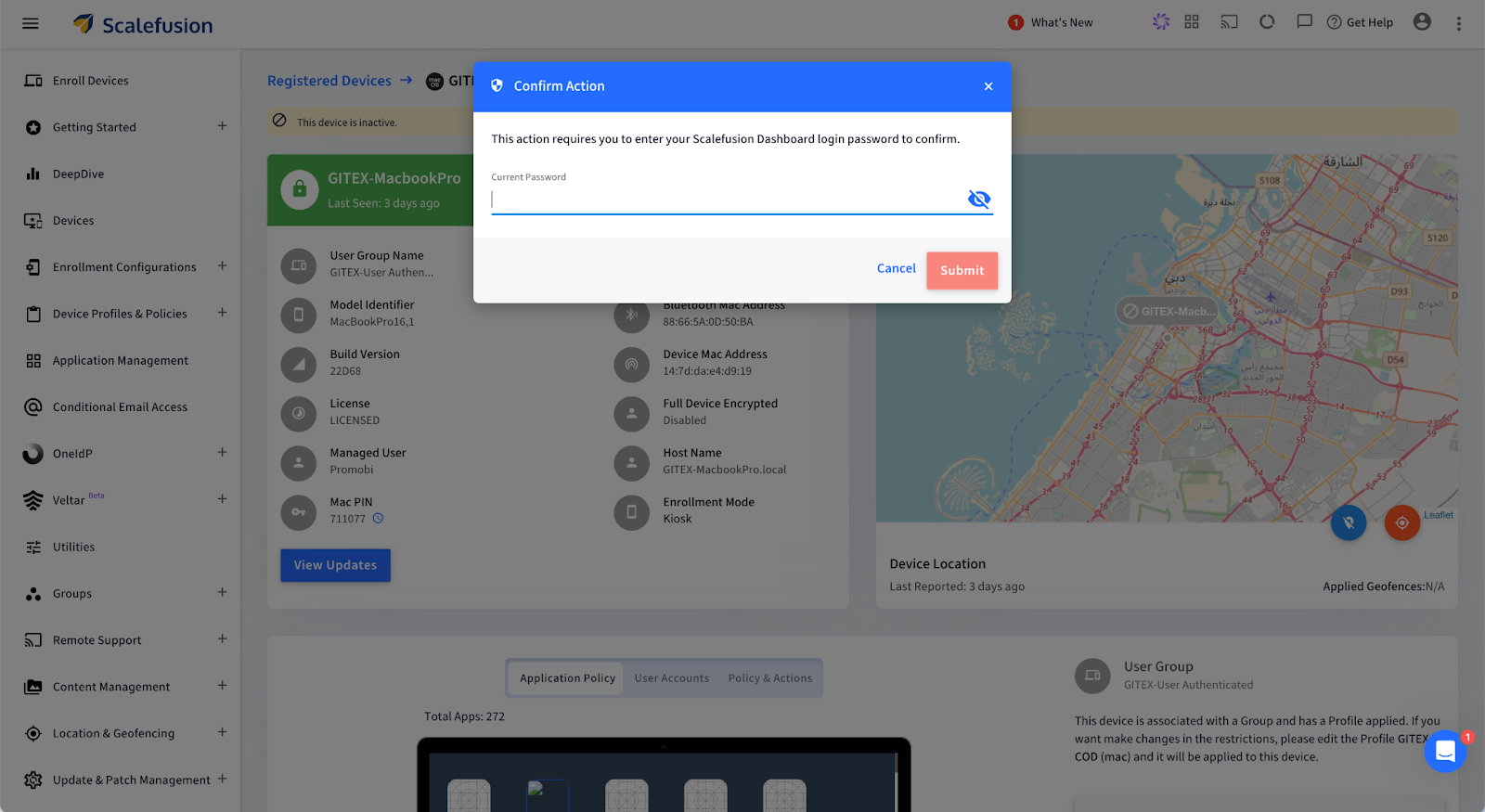
Step 5. Confirm and Submit: Enter your password and click Submit. A push notification will be sent to the device, confirming the factory reset.

Scalefusion - erase MacBook remotely

Your macOS device will now be wiped remotely and restored to factory settings.

What Happens After You Remote Wipe a Mac?

Once the remote wipe is complete, the Mac device is reset to its factory state, making it fully secure and ready for its next phase. But what does that look like at an enterprise level?

  1. Complete Data Erasure: Every piece of data, including user profiles, business applications, and sensitive information, is permanently deleted. This ensures that no traces of your company’s data remain, protecting you from potential data breaches or unauthorized access.
  2. Operating System Reset: The macOS is restored to its original, unconfigured state, essentially taking the device back to square one. This provides a clean slate, removing all previous settings, and ensuring no configurations are left that could pose a security risk.
  3. Ready for New User Setup: The device will display the macOS Setup Assistant, making it ready to be deployed for a new employee. This streamlines IT operations, enabling quick reassignment of devices without the hassle of manual resets.

Use Cases for Remote Wiping on Mac

Remote wiping proves invaluable in several business scenarios, helping IT teams maintain security and streamline device management. Here are some key use cases:

1. Employee Offboarding: When employees leave the company, ensuring their assigned Mac is cleared of any sensitive data is necessary. Remote wiping guarantees that no personal or business data remains on the device, allowing it to be securely redeployed to another team member without privacy risks or manual intervention.

2. Lost or Stolen Devices: Losing a company Mac can create a significant security threat, as it may contain confidential files, emails, or proprietary software. With Scalefusion’s remote wipe feature, IT admins can swiftly erase all data on the lost or stolen device, ensuring that sensitive information remains protected from unauthorized access.

3. Device Lifecycle Management: For businesses that frequently upgrade or redistribute devices, remote wiping helps maintain data security and device readiness. It ensures that each device is completely reset before being assigned to a new user, reducing risks associated with leftover data and simplifying the device management process.

Safeguard Your Mac Devices with Scalefusion UEM

Managing Mac devices in your business doesn’t have to be a headache. With Scalefusion UEM, you can handle everything from employee offboarding to lost devices with confidence. With just a few clicks, you can wipe your Mac remotely, ensuring that all sensitive data is securely erased and the device is ready for the next team member—all without breaking a sweat. 

No more fretting about sensitive information lingering on devices after someone leaves or when a Mac goes missing. Scalefusion’s remote wipe feature ensures that all data is gone in an instant.

About Scalefusion
Scalefusion’s company DNA is built on the foundation of providing world-class customer service and making endpoint management simple and effortless for businesses globally. We prioritize the needs and feedback of our customers, making sure that they are at the forefront of all decision-making processes. We are dedicated to providing comprehensive customer support services, and place emphasis on customer-centric thinking throughout the organization.

About Version 2 Digital

Version 2 Digital is one of the most dynamic IT companies in Asia. The company distributes a wide range of IT products across various areas including cyber security, cloud, data protection, end points, infrastructures, system monitoring, storage, networking, business productivity and communication products.

Through an extensive network of channels, point of sales, resellers, and partnership companies, Version 2 offers quality products and services which are highly acclaimed in the market. Its customers cover a wide spectrum which include Global 1000 enterprises, regional listed companies, different vertical industries, public utilities, Government, a vast number of successful SMEs, and consumers in various Asian cities.
How To Improve Industrial Equipment Lifecycle Management with MDM

Managing the lifecycle of industrial equipment is exhausting. Be it paperwork or keeping a log of maintenance schedules. Thankfully, with digitization, mobile devices have been replacing a lot of conventional devices on industrial floors. Rugged devices, custom devices, and modern lightweight tablets and laptops are quickly becoming popular choices to replace bulky computers or pen-paper-based operations. 

Industrial Equipment Lifecycle Management with MDM

If your mobile devices are connected to your machines and sensors and if your machine overheats and is about to break down, the mobile device will quickly issue an alert and or even automatically schedule a repair!

That’s where Mobile Device Management (MDM) comes in. It’s a software that gives you complete control to manage and monitor all your critical mobile assets, remotely.

MDM provides real-time insights into all your mobile equipment for proactive monitoring. 

Sounds amazing, right?

Let’s find out how you can use MDM to improve industrial equipment lifecycle management at every phase. 

Phase 1: Equipment Acquisition and Integration with MDM

Acquisition is a crucial phase in the lifecycle of the equipment. Manual setup, integration hiccups, or even poor documentation can cost you big in the long run.

Mobile device management provides a streamlined and automated approach to mobile equipment onboarding. Let’s understand how:

Centralized Equipment Configuration

Let’s say you have hundreds of devices in your factory. Now, can you imagine configuring each of them manually? 

No, right?

Thankfully, with MDM software, you can quickly adjust the settings of the newly acquired devices and configure them remotely from a single dashboard. Thus, you can instantly apply uniform protocols to each device.

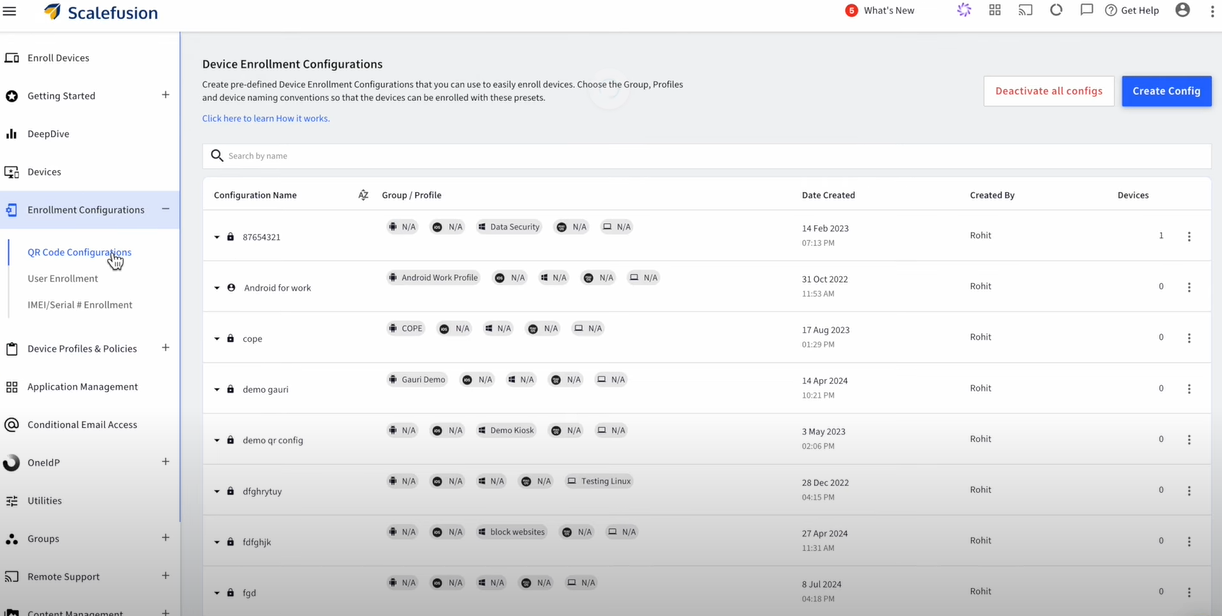
In fact, some MDM vendors also allow you to enroll your devices using QR codes. All you have to do is scan the code and your preferred settings will be applied to them.

Centralized Equipment Configuration

Source

Seamless Integration with Existing Systems

At the same time, you can integrate new and old devices under a unified management system so that they can communicate efficiently without any disruption in the operations.

So, if you’re adding new mobile devices to the production line, you can use MDM to ensure smooth interaction between the old and new mobile equipment.

Automated Asset Registration

MDM also automates asset registration by tagging every new device with important data like serial numbers, model types, warranty details, installation dates, etc. This eliminates inaccuracies and missed entries.

Phase 2: Equipment Usage and Operational Efficiency

Once you’ve set up your system and integrated it with MDM, it’s time to optimize it for day-to-day operations. 

Here’s how MDM can help:

Streamlined Workflow Management

The biggest advantage of using MDM to manage equipment lifecycle is that it gives you centralized control over all the devices connected to your machines. 

That means you can monitor how different devices interact (with machines and each other) and contribute to the overall performance, all from a single place.

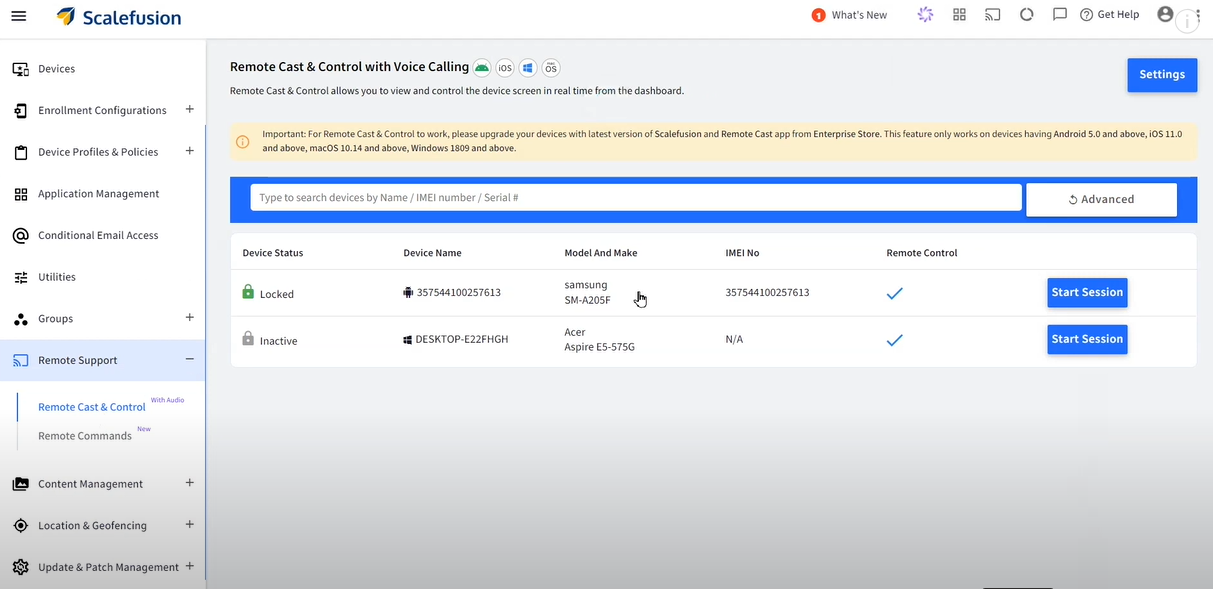
Remote Access and Control

Streamlined Workflow Management

Source

Say, you run a chain of restaurants. Each outlet has order printers, inventory trackers, etc, that run on Windows, Android, iOS, macOS, ChromeOS or Linux.  Now, you can’t be everywhere at once to make sure things run smoothly. But with an MDM, you get full access to monitor and adjust these devices remotely.

Be it lowering the threshold level across all devices or troubleshooting them. You can do all of that from anywhere in the world, thanks to MDM.

Workforce Productivity

Did you know that at least 74% of employees feel burned out at work? That’s almost every 4 out of 5 employees!

MDM can reduce this burden by automating monotonous and time-consuming operational tasks.

For example, instead of manually inspecting each device for faults, employees can receive instant, real-time alerts from the MDM system. As a result, they can resolve issues quickly and stay ahead of time.

Phase 3: Maintenance Management and Predictive Analytics

There’s no doubt that mobile device management helps extend the lifespan of your machines. You can it to track device performance and even stay on top of maintenance updates. 

Below are three ways mobile device management helps you achieve this:

Real-time Equipment Monitoring

Monitoring the performance of your devices in real time is super important.

But we’re not just talking about whether a device is active or inactive. But if it’s giving accurate insights, communicating with other devices correctly, and so on.

With an MDM platform, you can get a 360° view of such performance metrics. As a result, you can take swift action when something goes off the track, like if there’s a battery issue or if the device’s been hacked.

Automated Maintenance Scheduling

Let’s say you have a large factory that houses at least 15 ELSCO Transformers to run everything smoothly, each connected to a mobile device. And this is besides other machines and their OS-based equipment.

So, how do you carry out routine maintenance for all such devices while staying on top of other operational tasks?

Answer: MDM software.

With MDM, you can automatically track operational hours and performance metrics for each device to decide when it needs servicing. The software also automatically schedules maintenance checks when set thresholds are crossed.

To make it easier, MDM also lets you manage and maintain different types of supported devices from a single platform. So, it doesn’t matter if you have 10 laptops, 25 mobiles, and 10+ PCs in your factory for your machines. With MDM, you can monitor each device without any hassle.

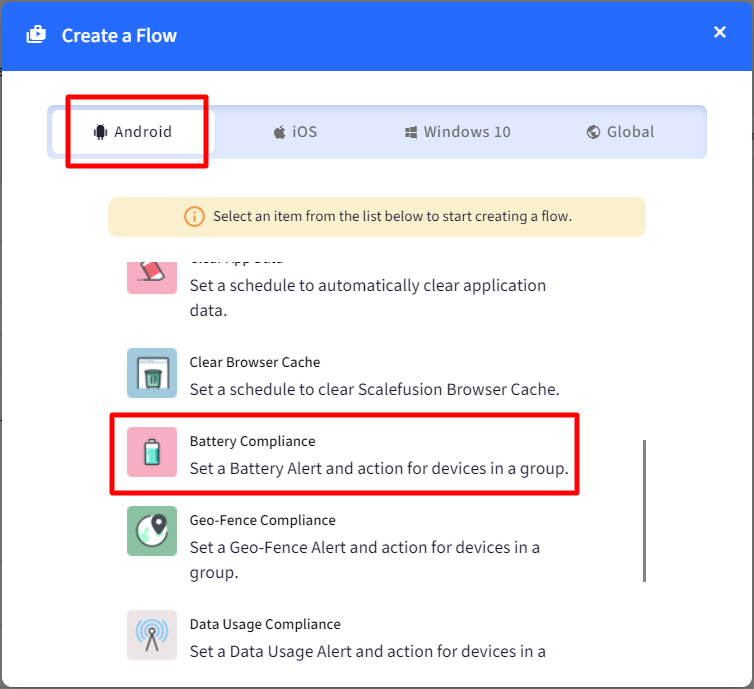
create a flow

Source

Predictive Analytics for Preventive Maintenance

“Think of predictive analytics like your mobile device’s personal trainer. It recognizes the signs of fatigue and overexertion so that you can maintain peak performance without overworking your mobile equipment.”

[ — Vineet Gupta, Founder of 2xSaS ]

MDM runs on built-in algorithms that can predict potential issues in your equipment by considering factors like usage patterns, environmental conditions, etc. 

Thus, you shift from a reactive maintenance strategy to a proactive one with enhanced safety and minimum unplanned downtimes.

Phase 4: Equipment Renewal or Disposal

As your mobile equipment reaches the end of its lifecycle, it’s time to make a tough call: Should you upgrade or replace it?

This decision can have a huge impact on the operations, costs, and sustainability of your business.

MDM equips you with all the necessary data to make the right choice. Here’s how:

Evaluating Equipment Longevity

MDM allows you to track how the mobile equipment is used, how often it needs repairs, and how well it’s performing. This information helps decide if it’s worth fixing or replacing.

For example, if a device consistently shows signs of declining precision, it’s time you replace it with a new piece.

Sustainability Considerations

If you decide to dispose of the equipment, MDM can help you find the best way to do it without costing the planet.

It can assist you in evaluating the environmental impact of the disposal and ensuring compliance with the necessary standards.

Implementation of Replacement Strategies

Additionally, you can also use MDM to make the switch to new equipment—whether that’s upgrading old devices or purchasing brand-new ones.

For example, say you wish to replace your rugged laptops with those that have a higher processing capacity.  Using MDM software, you can not only start from the first phase (equipment acquisition) but also train employees regarding the change (new features).

MDM Best Practices for Improving Equipment Lifecycle Management

Besides the above four phases, you must keep the following ten tips in mind to get the most out of your mobile equipment lifecycle management with MDM:

  1. Choose an MDM software that aligns with your industry’s needs and business objectives. Remember, customization is key. So, select a solution that offers flexibility and automation.
  1. Customize alerts for predictive maintenance based on historical data. For example, if a mobile device tends to wear out after 30,000 hours, set an alert for 28,000 hours to stay ahead of issues.
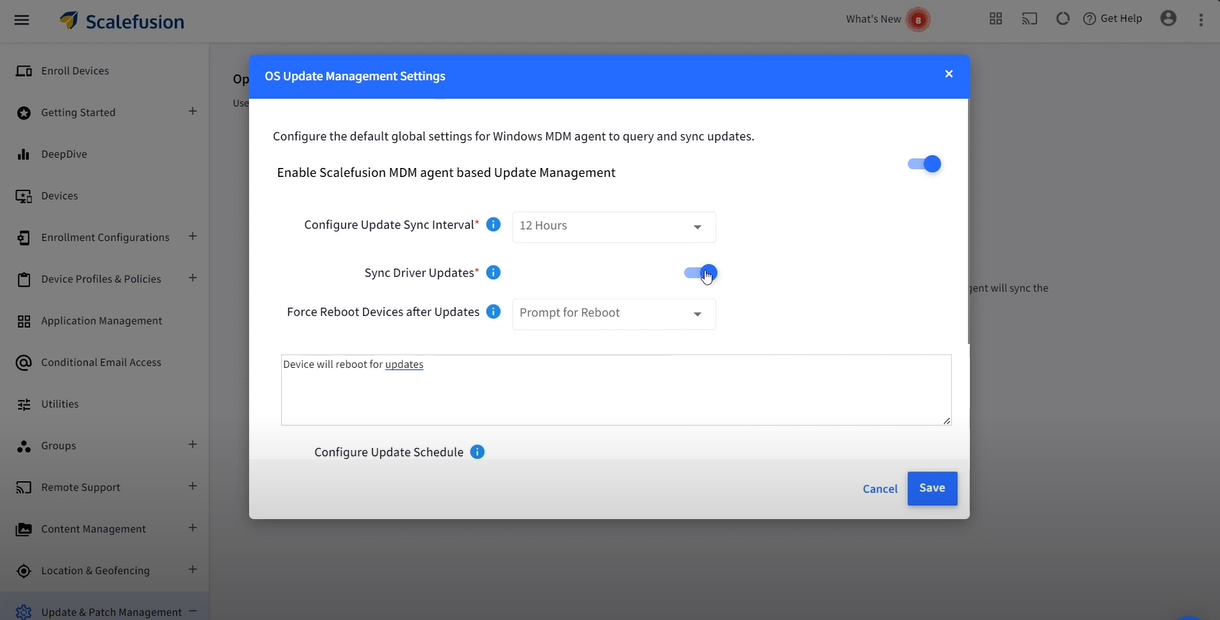
  1. Schedule automatic firmware and OS updates to ensure optimal device performance.
automatic os updates

Source

  1. Establish feedback loops to gather suggestions from employees to interact directly with the mobile devices. This will help you configure MDM software the right way.
  1. Regularly train your employees on how to use MDM software to reduce errors, improve workflow, and maximize benefits.
  1. Monitor and analyze lifecycle trends consistently to make informed decisions about mobile equipment renewal, upgrades, etc.
  1. Set up Role-Based Access Control (RBAC) so only authorized employees can access sensitive data and critical system controls.
  1. Use digital twins to simulate various operational scenarios (like cyberattacks) and predict outcomes without putting your actual devices at risk.
  1. Integrate MDM with your Enterprise Asset Management (EAM) system for seamless data flow between device monitoring and broader asset management activities.
  1. Restrict device usage if it doesn’t meet the compliance criteria by setting up conditional access via the MDM software.

Conclusion

Managing industrial equipment might seem like a tough nut to crack, but it really isn’t if you have the right tools.

MDM can do wonders by automatically updating mobile equipment software, granting remote access, and even predicting repairs in mobile devices before they occur.

However, not all MDM software are equal. 

Scalefusion brings the simplest yet most advanced MDM solution that can transform your industrial equipment lifecycle management.

With features like real-time location tracking, encrypted data transfer, 24/7 remote access, bulk device enrollment, etc., you can manage your mobile devices smartly.

Start a free trial today to explore our features and keep your mobile equipment safe.

About Scalefusion
Scalefusion’s company DNA is built on the foundation of providing world-class customer service and making endpoint management simple and effortless for businesses globally. We prioritize the needs and feedback of our customers, making sure that they are at the forefront of all decision-making processes. We are dedicated to providing comprehensive customer support services, and place emphasis on customer-centric thinking throughout the organization.

About Version 2 Digital

Version 2 Digital is one of the most dynamic IT companies in Asia. The company distributes a wide range of IT products across various areas including cyber security, cloud, data protection, end points, infrastructures, system monitoring, storage, networking, business productivity and communication products.

Through an extensive network of channels, point of sales, resellers, and partnership companies, Version 2 offers quality products and services which are highly acclaimed in the market. Its customers cover a wide spectrum which include Global 1000 enterprises, regional listed companies, different vertical industries, public utilities, Government, a vast number of successful SMEs, and consumers in various Asian cities.