ProMobi Technologies today announced that Scalefusion- its leading unified endpoint management solution (UEM), has now launched support for ChromeOS device management. This addition reinforces Scalefusion’s commitment to offering a versatile multi-OS management platform that caters to the diverse needs of modern businesses.
With the integration of ChromeOS, Scalefusion enables IT administrators to streamline the management of ChromeOS devices alongside Windows, macOS, Android, and Linux, simplifying the complexities of multi-OS environments.
ChromeOS has seen significant adoption across industries, from education to enterprise, thanks to its balance of affordability, speed, and security. Recognizing this growing trend, Scalefusion’s new ChromeOS device management provides organizations with the ability to provision, secure, and monitor ChromeOS devices seamlessly through the same intuitive platform used for their existing device ecosystems.
Scalefusion’s ChromeOS management empowers businesses to streamline device management by integrating ChromeOS into their existing device strategy. With Scalefusion’s unified platform, IT administrators can boost productivity by providing a consistent, unified experience for users across all platforms. Whether organizations are deploying Chromebooks in educational settings or managing ChromeOS devices for remote workforces, Scalefusion makes it simple to provision, secure, and monitor these devices—all from a single dashboard. With the addition of ChromeFlex, businesses can repurpose existing PCs and Macs by converting them to ChromeOS devices, further extending the life of their hardware while maintaining seamless management through Scalefusion’s unified platform.
Sriram Kakarala, Chief Product Officer at Scalefusion, highlighted the importance of this new addition: “With the rise of ChromeOS in diverse sectors, we saw a clear opportunity to enhance the Scalefusion platform. By adding ChromeOS support, we are delivering on our promise to simplify device management for our customers, regardless of which operating systems they choose to deploy.”
Scalefusion’s integration aims to provide organizations with a straightforward approach to managing their multi-OS device ecosystems. Request a free trial of this release by setting up a demo of Scalefusion for ChromeOS here.
About Scalefusion
ProMobi Technologies provides a leading Unified Endpoint Management solution under the brand Scalefusion. Scalefusion UEM allows organizations to secure and manage endpoints, including smartphones, tablets, laptops, rugged devices, POS and digital signage, and apps and content. It supports the management of Android, iOS, macOS, Windows, Linux, and ChromeOS devices and ensures streamlined device management operations with Scalefusion Remote Troubleshooting.
More than 8000 companies worldwide are unlocking their true potential using Scalefusion, which is used across various industries, such as Transportation & Logistics, Retail, Education, Healthcare, Manufacturing, Construction & Real Estate, Hospitality, Software & Telecom, Financial Services, and others.
About Version 2 Digital
Version 2 Digital is one of the most dynamic IT companies in Asia. The company distributes a wide range of IT products across various areas including cyber security, cloud, data protection, end points, infrastructures, system monitoring, storage, networking, business productivity and communication products.
Through an extensive network of channels, point of sales, resellers, and partnership companies, Version 2 offers quality products and services which are highly acclaimed in the market. Its customers cover a wide spectrum which include Global 1000 enterprises, regional listed companies, different vertical industries, public utilities, Government, a vast number of successful SMEs, and consumers in various Asian cities.
About Scalefusion Scalefusion’s company DNA is built on the foundation of providing world-class customer service and making endpoint management simple and effortless for businesses globally. We prioritize the needs and feedback of our customers, making sure that they are at the forefront of all decision-making processes. We are dedicated to providing comprehensive customer support services, and place emphasis on customer-centric thinking throughout the organization.
Just-in-time (JIT) paradigm reforms the concept of identity and access management by emphasizing efficiency and security through time-sensitive access control and optimal resource provisioning.
It focuses on providing access and resources exactly when they are needed, rather than pre-allocating them in advance. This approach aligns with modern IT demands, where flexibility and precision are crucial.
Difference between Just-in-Time Provisioning vs Just-in-Time Privilege
JIT ensures that users receive permissions only for the duration necessary to complete their tasks. This minimizes the window of opportunity for unauthorized access and reduces the potential attack surface.
This blog will provide a comparative overview of JIT provisioning and JIT privileged access, highlighting how they work, their key components, benefits, and challenges.
What is Just-in-Time Provisioning?
Just-in-time (JIT) provisioning automates the creation of user accounts for single-sign-on (SSO) powered web applications using the security assertion markup language (SAML) protocol. When a new user attempts to log into an authorized app for the first time, JIT provisioning triggers the transfer of necessary information from the identity provider to the application.
This process of information transfer eliminates the need for manual account setup, significantly reducing administrative tasks and enhancing productivity. JIT provisioning ensures a seamless log-in experience for new users while maintaining high security and efficiency by streamlining account creation
How does it Work?
To establish just-in-time (JIT) provisioning IT admins need to configure an SSO connection between an identity provider and the target service provider (web application) and include the necessary user attributes that the service provider requires.
When a new user logs in, the identity provider sends the required information to the service provider via SAML assertions. This automatically creates the user’s account without manual intervention.
To implement JIT provisioning, administrators can use a centralized cloud identity provider or an SSO provider integrated with their existing directory. Moreover, the target service provider (web application) must also support JIT provisioning to ensure smooth operation.
JIT provisioning centralizes the application of authorization policies, providing log-in access based on user roles or groups. For instance, when a developer logs in, they automatically receive all the permissions associated with the developer role, ensuring they have immediate access to the required tools and resources.
Use Cases
Just-in-time (JIT) provisioning is particularly useful for industries with high turnover rates, a need for rapid onboarding, and significant user access management needs. JIT provisioning is most useful for the following industries:
Knowledge Worker: Just-in-Time (JIT) Provisioning serves knowledge workers by automating account creation enabling them to log into new web applications, tools and data across cross different teams or projects. With SSO integration, JIT Provisioning automatically grants access based on roles, ensuring knowledge workers have immediate access to the tools and resources they need, boosting productivity and security.
Retail: Retail environments often experience high employee turnover and need to quickly onboard new staff. JIT provisioning streamlines the process of user lifecycle management, ensuring that new hires can start working with minimal delays.
Healthcare: Healthcare organizations require strict access controls to ensure compliance with regulations such as HIPAA, and do rapid onboarding of new healthcare staff to provide them with immediate access to patient information. JIT provisioning helps maintain security and efficiency in managing healthcare professionals’ accounts.
Last mile delivery: The delivery sector frequently hires new drivers and needs to quickly integrate them into its systems. JIT provisioning facilitates rapid account creation and access to delivery management tools, improving operational efficiency and service speed.
Cab Aggregators: Ride-sharing companies experience high turnover and need to quickly onboard drivers. JIT provisioning helps manage driver accounts efficiently, ensuring that new drivers can start working as soon as possible.
What is Just-in-Time Privileged Access?
Just-in-time (JIT) privileged access is a security practice within privileged access management (PAM). It grants temporary privileged access to devices, applications, or systems, upon user request for a limited time frame. This method aligns with the principle of least privilege (PoLP), ensuring users receive just enough access to perform specific tasks, minimizing the risk of excessive or standing privileges that malicious actors could exploit.
JIT privileged access helps prevent unauthorized access and privilege creep by providing time-limited access, enhancing the overall security posture of an organization. This approach reduces the risks associated with giving users more than required privileges, creating a more secure and controlled environment.
How does it Work?
Just-in-time (JIT) privileged access is a security approach that optimizes control over user log-in based on three critical aspects: location, time, and actions. Here’s a closer look at how JIT access functions:
Location: Access is granted only to specific instances, network devices, servers, or virtual machines where the user needs to perform their tasks.
Time: Permissions are provided for a short, predefined duration, ensuring access is limited to the necessary timeframe.
Actions: Access is tailored to the user’s specific intent, allowing only the actions required for the task at hand.
In a typical JIT access workflow, a user submits a request to access a particular resource. This request is evaluated against established policies, or an administrator reviews and decides whether to grant or deny access.
Once approved, the user performs their tasks within the designated timeframe. After completion, the privileged access is automatically revoked until it is needed again in the future. This systematic approach enhances security and ensures efficient access management within an organization.
Use Case
Just-in-Time (JIT) Privileged Access is particularly useful for industries where sensitive data and systems need to be tightly controlled, and where temporary or task-specific access is common. JIT-privileged access is most beneficial for the following industries:
Banking, Financial Services, and Insurance (BFSI): JIT privileged access is extremely beneficial in the BFSI sector due to the high sensitivity of financial data and transactions. The principle of least privilege is crucial here to prevent fraud and data breaches. JIT access ensures that investigators, auditors, and IT staff only have access for the exact duration required, minimizing risk.
Healthcare: In healthcare, maintaining the confidentiality of patient data and securing medical devices is critical. JIT privileged access allows healthcare professionals to gain temporary access to sensitive information or systems for emergencies or specific tasks, enhancing security and ensuring compliance with data protection regulations.
Education: While JIT access is beneficial in educational institutions for managing IT system maintenance and administrative tasks, its impact may not be as critical compared to the BFSI and healthcare sectors. However, it still adds value by providing controlled, temporary access.
Hospitality: In the hospitality industry, JIT access helps manage and secure booking systems and guest information during special events or high-demand periods. While important, the need might not be as critical compared to industries with more stringent data protection requirements.
Knowledge Workers: Just-in-Time Privileged Access grants knowledge workers temporary elevated permissions for doing specific tasks, based on their location, time, and required actions. This ensures they only access what’s necessary for their job role within a limited timeframe, reducing the risk of excessive access while maintaining security.
Difference Between Just-in-Time Provisioning and Just-in-Time Privileged Access: Key Components, Benefits and Challenges
Just-in-Time Provisioning
Key components of JIT Provisioning
a. Real-time account creation: JIT provisioning enables the user to send a request to generate a user account in real time for accessing a web application.
b. Contextual user account: User accounts are granted according to the user’s role in the organization and the task that is to be performed.
c. Automated account management: JIT provisioning automates the process of managing account creation and deactivation without the intervention of IT admins.
What are the benefits of JIT Provisioning?
a. Efficient onboarding: JIT provisioning streamlines the onboarding process by automating user account creation. New users receive immediate access to necessary resources when they need them, enhancing overall efficiency.
b. Reduced IT workload: Automated provisioning of user accounts, minimizes the manual workload of IT teams. This allows them to focus on more strategic initiatives, saving time and reducing administrative burdens.
c. Enhanced security: JIT provisioning minimizes the risk of unnecessary or excessive access. Accounts are only created when users log in for the first time, ensuring that access levels are appropriate and creating a more secure environment.
d. Quick login experience: JIT provisioning facilitates a seamless user experience, with reduced friction during login. Users gain access to applications through Single Sign-On (SSO) avoiding unnecessary delays.
Challenges of JIT Provisioning
a. Dependency on SAML: JIT provisioning relies on the security assertion markup language (SAML) protocol. Any issues or complexities with SAML can disrupt the provisioning process and affect overall functionality.
b. Limited user assignment control: In some systems, such as project management tools, users can only be assigned roles after their initial login. This limitation can reduce control over user assignment and management.
c. Challenges with offboarding: JIT provisioning often lacks automated offboarding and account revocation features. This can make it difficult for users who no longer need it to deactivate access immediately.
d. Complexity of XML-based structure: The XML-based nature of SAML introduces complexity, which can impact the readability and ease of integration of provisioning processes.
e. Potential for SSO disruption: JIT provisioning is tied to the SAML protocol, making it vulnerable to disruptions in single sign-on (SSO) systems. Such disruptions can affect the overall authentication experience.
Just-in-Time Privileged Access
Key Components
a. Access policies and rules: Access policies and rules outline the conditions under which users can request access to specific resources, ensuring that access is granted only to authorized individuals for legitimate purposes, and complies with organizational security standards.
b. Identity verification mechanisms: Identity verification mechanisms authenticate the user requesting access to ensure that only legitimate individuals with valid credentials are granted entry, preventing unauthorized access to sensitive resources.
c. Time-limited access tokens: Users receive tokens with a set expiration time, allowing temporary access to perform tasks. Once the token expires, access is automatically revoked, reducing the risk of unauthorized privileges.
What are the benefits of JIT Privileged Access?
a. Reduces the attack surface: JIT privileged access reduces the attack surface by minimizing standing privileges, thereby minimizing the risk of malicious users exploiting privileged accounts. Once a task is completed, privileges expire and accounts are disabled, improving the overall security posture.
b. Streamlines access workflow: JIT privileged access automates the approval process for privileged access requests, streamlining workflows for administrators, operations teams, and end-users without compromising productivity. Access can be granted as needed, ensuring operational efficiency.
C. Simplified auditing: Just-in-time access controls privileged sessions and simplifies audits by keeping a detailed log of user activities carried out during the session.
d. Defines third-party access: JIT privileged access facilitates secure, time-bound access for third-party users such as contractors and vendors. Administrators can grant standard users elevated time-based privilege access for tasks like testing and maintenance. Once the time frame expires, the privileged access is automatically revoked.
e. Eases management of privileged accounts: JIT privileged access simplifies privileged user management by eliminating standing privileges, reducing the need for constant password resets and recoveries. Automated tasks include credential rotation, access expiration, and account deletion, with request approvals handled automatically.
Challenges of Just-in-Time Privileged Access
a. Violates zero-trust policy:Zero-trust security policies operate on the principle of “never trust, always verify.” Once JIT access is granted, there is an implicit trust that the user’s actions are legitimate during the active session. If an attacker gains access during this period, they can exploit the privileges without continuous verification.
b. Compliance breach: Implementing just-in-time privileged access can lead to compliance challenges. For instance, if a healthcare organization adopts JIT privilege access and a healthcare professional with JIT access leaks sensitive patient information, this breaches the Health Insurance Portability and Accountability Act (HIPAA) compliance policy which can result in legal and financial repercussions. Similarly, other compliance regulations such as the General Data Protection Regulation (GDPR) and Payment Card Industry Data Security Standard (PCI DSS) can also be violated.
c. User resistance: Due to the perceived inconvenience of frequently requesting access users might experience resistance using JIT privilege access. This resistance can hinder the effectiveness of the ongoing operations and impact overall productivity if users find the process cumbersome or disruptive to their workflow.
d. Implementation: JIT privileged access is a stand-alone feature. Its standalone nature makes it heavily dependent on a service provider such as an IAM or UEM solution. Organizations will need to adopt an IAM or a UEM solution with IAM capabilities to implement just-in-time privileged access within their organization.
Just-in-Time Provisioning vs Just-in-Time Privileged Access: A Tabular Comparison
Features
Just-in-Time Provisioning
Just-in-Time Privileged Access
Focus
Automated provision of user attributes or credentials.
Providing time-based privileged access.
Purpose
Ensures that necessary information is transferred from the identity provider to the service provider (web application).
Ensures users receive just enough access to perform specific tasks for a predefined time frame.
Best Used For
Managing temporary user profiles and accounts.
Elevating user access privilege.
Just-in-Time Provisioning and Just-in-Time Privileged Access: Leverage the Best of Both
Integrating just-in-time provisioning and just-in-time privileged access offers IT admins a balanced approach to managing users and their access. JIT provisioning optimizes resource allocation by providing them when needed, enhancing efficiency and scalability.
Simultaneously, JIT privileged access offers security by granting temporary, time-based access, minimizing the risk of unauthorized use. Together, these practices offer a comprehensive solution that enhances agility in business operations while safeguarding against potential security threats, making them best suited for modern IT environments.
Get in touch with our experts to book a demo and implement just-in-time privileged access with Scalefusion UEM.
About Version 2 Digital
Version 2 Digital is one of the most dynamic IT companies in Asia. The company distributes a wide range of IT products across various areas including cyber security, cloud, data protection, end points, infrastructures, system monitoring, storage, networking, business productivity and communication products.
Through an extensive network of channels, point of sales, resellers, and partnership companies, Version 2 offers quality products and services which are highly acclaimed in the market. Its customers cover a wide spectrum which include Global 1000 enterprises, regional listed companies, different vertical industries, public utilities, Government, a vast number of successful SMEs, and consumers in various Asian cities.
About Scalefusion Scalefusion’s company DNA is built on the foundation of providing world-class customer service and making endpoint management simple and effortless for businesses globally. We prioritize the needs and feedback of our customers, making sure that they are at the forefront of all decision-making processes. We are dedicated to providing comprehensive customer support services, and place emphasis on customer-centric thinking throughout the organization.
Managing corporate-owned macOS devices presents unique challenges as businesses grow. Scalefusion, a comprehensive Mobile Device Management (MDM) solution, addresses these challenges by providing a centralized platform to manage, monitor, and secure macOS devices.
Imagine a scenario where a company’s engineering team rapidly expands, increasing the number of macOS devices that need to be configured and maintained. Since 87% of engineering professionals rely on macOS for its stability and security[1], an efficient MDM solution like Scalefusion becomes crucial.
Enrolling macOS devices in an MDM solution like Scalefusion is essential for ensuring smooth operations and maintaining security. With approximately 100 million macOS users worldwide and Apple shipping 28.9 million Macs in a year[2], the demand for effective management solutions continues to grow.
For Mac devices not under Apple’s Device Enrollment Program (DEP), manual Mac device enrollment in the Scalefusion Dashboard is required. This blog will explore how to enroll corporate-owned macOS devices on Scalefusion.
How to Enroll Corporate-owned macOS Devices on Scalefusion MDM
Organizations can streamline the macOS device enrollment process by utilizing the Mac device enrollment program, ensuring all their Mac devices are configured and managed efficiently. Let’s explore this more.
On the dashboard:
Power on the Mac device and sign in to the user that you want to manage.
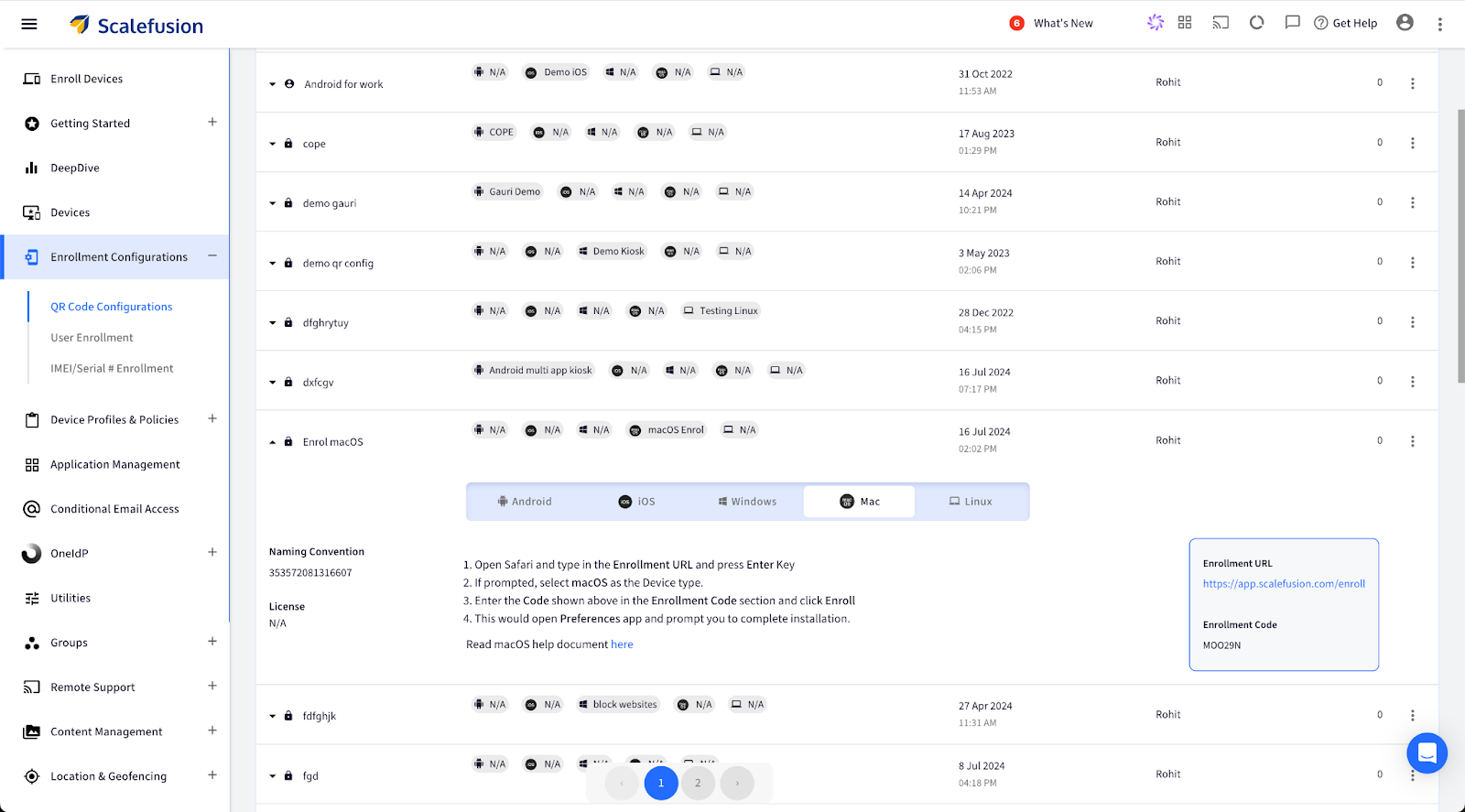
Sign In to Scalefusion Dashboard, and navigate to Enrollment Configuration> QR Code Configuration. Click the button to show the Enrollment URL. This opens a new box with the Enrollment URL and the Enrollment Code.
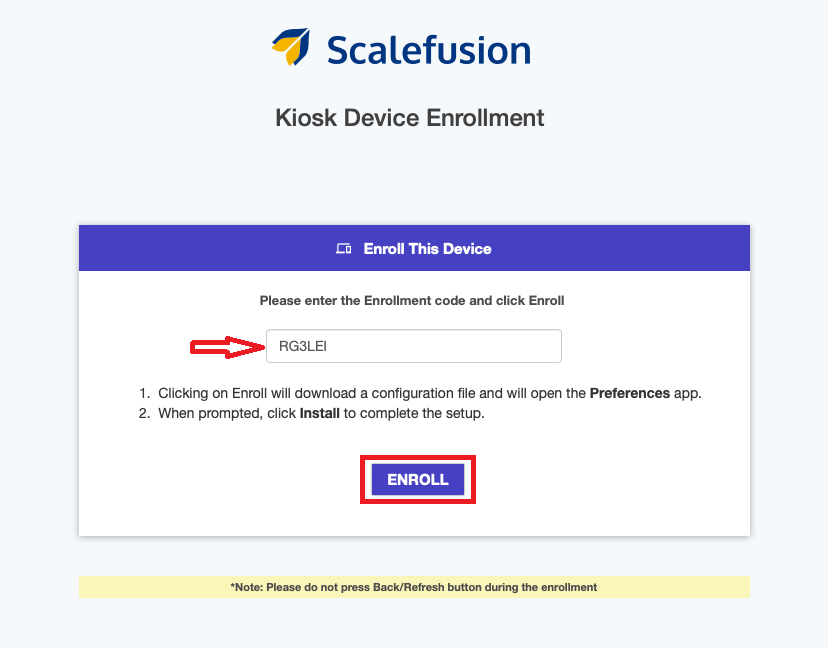
In the Safari browser, type in the enrollment URL and press the enter key. After this process, a new window, Kiosk Device Enrollment, will appear. Enter the code you have received in the Enrollment Code section and click Enroll.
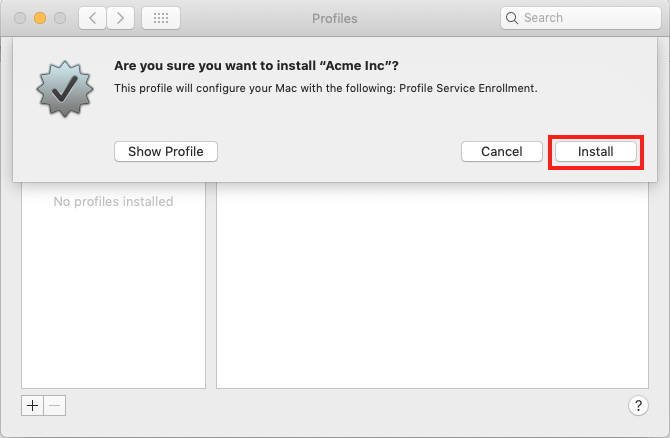
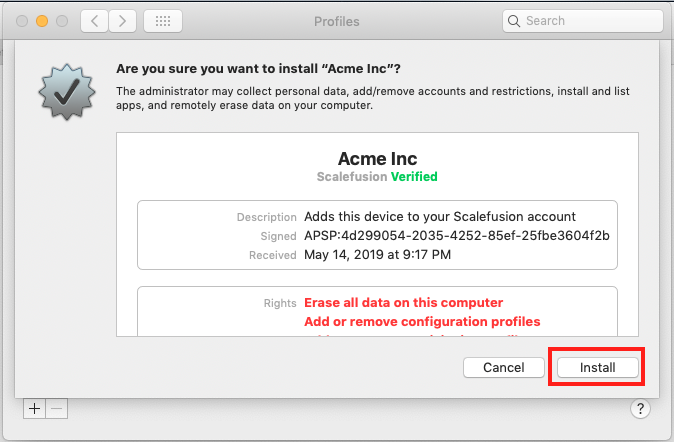
This will open the System Preferences pane, where a dialog box will appear. To proceed with the enrollment, click on “Install”.
You will be shown the enrollment profile details and asked to confirm the installation. Simply click “Install” to proceed.
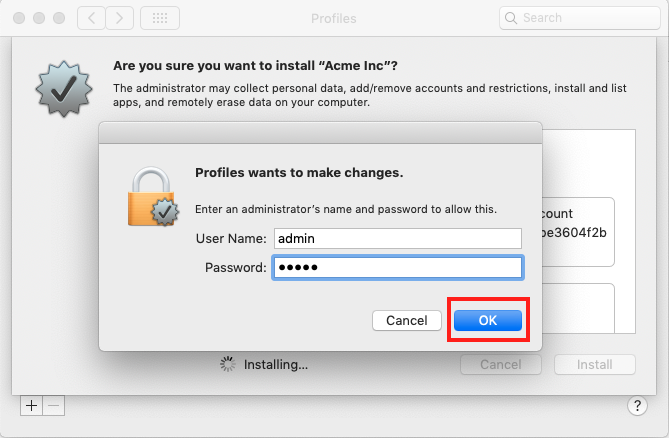
If you are enrolling from a non-administrator user account, you will need to enter administrator credentials to proceed with the installation. Simply provide the administrator credentials and click OK to confirm.
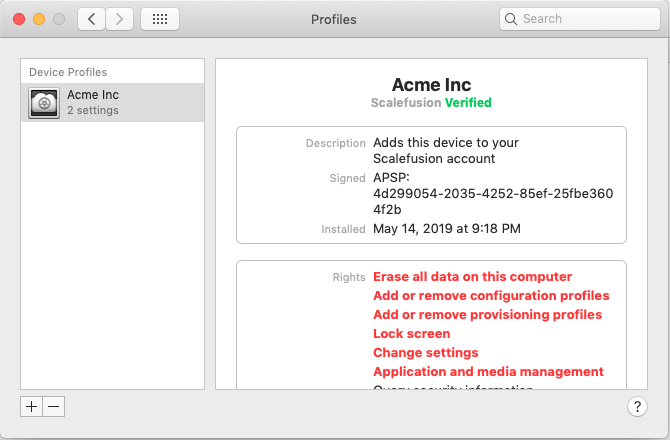
The enrollment process will be complete in about a minute, after which you will see the confirmation screen.
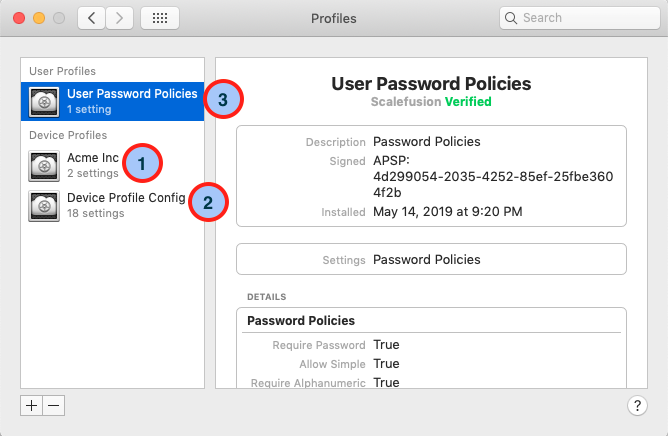
The enrollment process typically takes about 2-3 minutes. Once completed, a confirmation screen will appear. According to the Device and User Policies section, you will see three profiles installed, indicating successful enrollment.
Device Profiles
This section details the device profiles and policies applicable at the device level. Items marked 1 and 2 are device-level profiles, meaning the policies they implement affect all users of the machine.
User Profiles
This section details all Profiles/Policies applicable at the user level. Identified as point 3 in the image below, these policies are specific to the Mac user account from which the enrollment was performed.
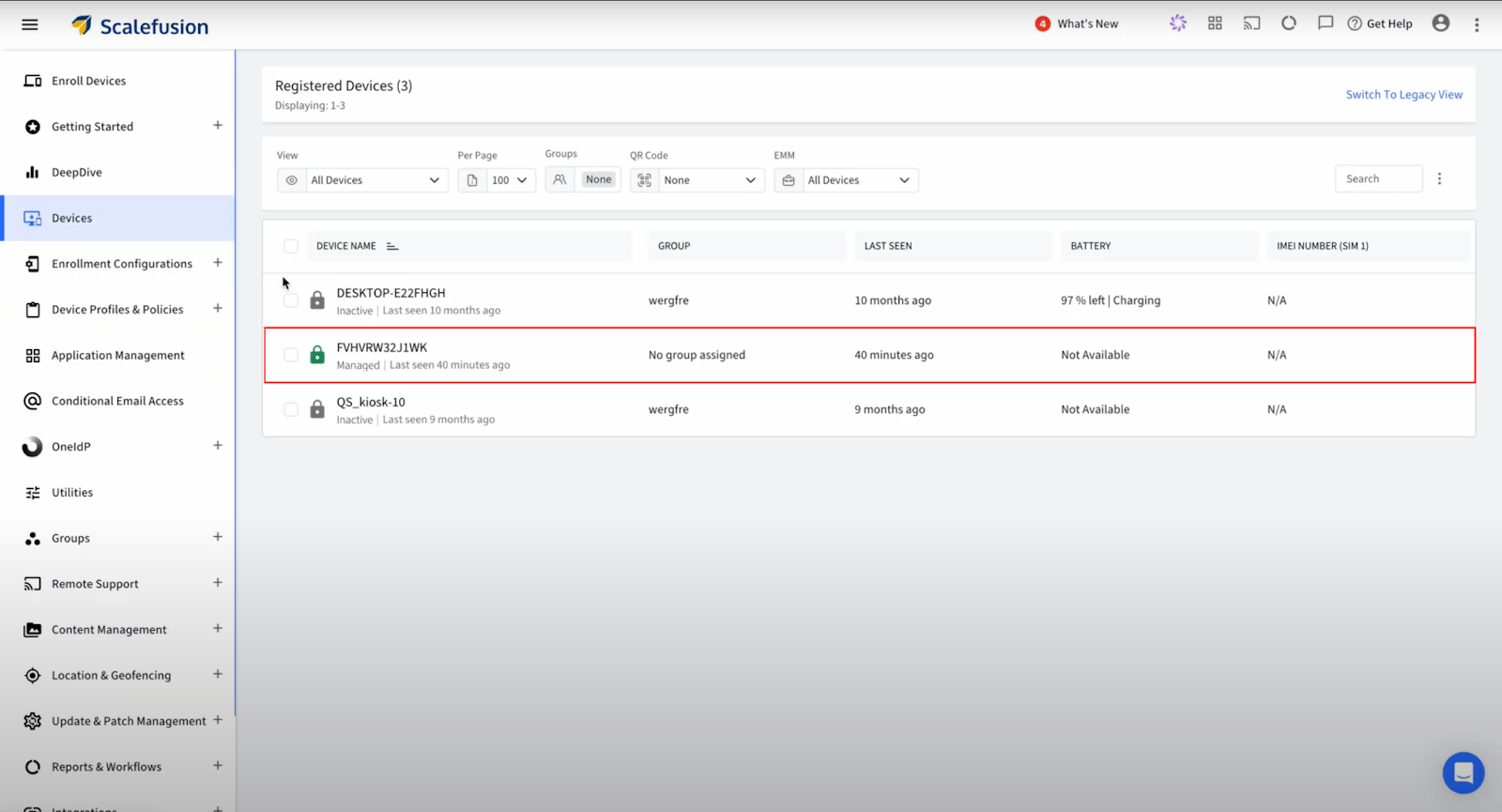
9. Once you log in to the Scalefusion Dashboard and navigate to the Devices section, you will see the newly enrolled device, confirming that the enrollment process was successful.
Enrolling corporate-owned macOS devices in Scalefusion is a game-changer for businesses aiming to streamline their device management. Scalefusion not only simplifies the enrollment process but also ensures your devices are secure and compliant with corporate policies. This powerful solution allows your IT team to focus on driving innovation and productivity. Ready to take the next step? Dive into Scalefusion and experience seamless macOS device management today!
About Version 2 Digital
Version 2 Digital is one of the most dynamic IT companies in Asia. The company distributes a wide range of IT products across various areas including cyber security, cloud, data protection, end points, infrastructures, system monitoring, storage, networking, business productivity and communication products.
Through an extensive network of channels, point of sales, resellers, and partnership companies, Version 2 offers quality products and services which are highly acclaimed in the market. Its customers cover a wide spectrum which include Global 1000 enterprises, regional listed companies, different vertical industries, public utilities, Government, a vast number of successful SMEs, and consumers in various Asian cities.
About Scalefusion Scalefusion’s company DNA is built on the foundation of providing world-class customer service and making endpoint management simple and effortless for businesses globally. We prioritize the needs and feedback of our customers, making sure that they are at the forefront of all decision-making processes. We are dedicated to providing comprehensive customer support services, and place emphasis on customer-centric thinking throughout the organization.
Do you doubt data-driven decision-making is crucial, particularly in enterprise mobility? The answer is simple. Just as a driver relies on a GPS to navigate unfamiliar roads, businesses depend on data to guide their strategies and operations. Imagine driving without a GPS. You might take wrong turns, miss the quickest routes, or even get lost.
Just like that, businesses may struggle to make informed decisions without leveraging data, leading to inefficiencies and missed opportunities.
What is Data-Driven Decision Making?
According to a recent study [1], businesses that leverage data-driven strategies are 23 times more likely to acquire customers and 6 times as likely to retain them. This statistic highlights the role that data-driven decision-making plays in achieving success.
Making data-driven decisions can drastically increase productivity, improve security, and achieve cost efficiency in enterprise mobility. By integrating comprehensive data analytics into their strategies, businesses can simplify the complexities with greater accuracy and effectiveness.
What is Data-Driven Decision-Making?
Data-driven decision-making includes using data analytics and insights to inform and guide business decisions. This approach allows businesses to make more accurate, objective, and impactful choices.
Think of it as making decisions based on clear evidence rather than gut feelings or guesswork. Businesses can identify trends, measure performance, and predict future outcomes by analyzing data collected from various sources. This leads to more reliable and effective strategies, ensuring resources are allocated efficiently and goals are met with greater precision.
With context to enterprise mobility, data-driven decision-making is necessary for managing mobile devices, applications, and security. It helps businesses understand how their mobile resources are being used, identify potential issues, and optimize their operations for better performance and security.
All in all, data-driven decision-making provides businesses with the knowledge they need to keep up with modern enterprise mobility and effectively achieve their objectives.
Importance of Data for Decision-Making
How do you think the business world was two decades ago? Decisions were often made based on intuition, experience, and, sometimes, sheer guesswork. Leaders usually relied on their gut feelings, industry trends, and a handful of reports to drive their companies forward. It was a time when adapting to change meant taking risks without the concrete reassurance of data.
Now, let’s jump back to today, and you can see a dramatic transformation. Data-driven decision-making has become the oxygen of successful enterprises. Instead of relying solely on hunches, businesses now use the power of data analytics to gain deep insights into customer behavior and market trends. This shift has revolutionized how strategies are crafted and executed.
In the past, identifying opportunities and challenges was like hoping that you wouldn’t hit your toe in the dark. Today, data illuminates the path ahead, offering a clear view of what works and what doesn’t. Companies can now predict market demands with precision, optimize their resources effectively, and modify their offerings to meet customer expectations.
A recent study by the Centre for Economics and Business[2] found that 80% of businesses that leverage real-time data experience significant revenue growth. This statistic highlights the substantial impact that real-time data can have on a company’s financial performance.
Moreover, data-driven decisions are not just about numbers; they reflect a shift toward objective reasoning and informed choices. By analyzing vast amounts of data from diverse sources, businesses uncover hidden patterns and correlations that were once elusive. This empowers them to act swiftly and decisively, minimizing risks and maximizing opportunities in a rapidly evolving marketplace.
In short, the evolution from traditional decision-making to data-driven insights marks a profound leap forward for businesses. It’s not merely about accepting technology; it’s about having a mindset that values clarity, efficiency, and innovation.
Role of Data in Enterprise Mobility
What is enterprise mobility? Enterprise mobility refers to the trend of businesses allowing employees to work from various locations using mobile devices such as smartphones, tablets, and laptops. This approach makes it feasible, flexible, and productive for employees to access corporate data and applications from anywhere, at any time.
Types of Data Used
User Behavior Data: This tracks how employees use their devices and applications, providing insights into their work habits and preferences. It also helps identify which applications are most frequently used and which ones might need improvement or support.
Device Data: This includes information about the devices being used, such as their operating system, model, location, and status. It is vital for managing device inventory, ensuring devices are up-to-date, and can identify potential security risks.
Application Performance Data: This measures how well applications are functioning, including load times, crash reports, and user feedback. It enables IT teams to optimize application performance, ensuring a smooth and efficient user experience.
How Data from Various Sources Can Be Integrated for Comprehensive Insights
Integrating data from multiple sources provides a holistic view of enterprise mobility, helping with more informed decision-making. Here’s how this can be done:
Centralized EMM Solutions: Platforms like Scalefusion aggregate data from different devices, applications, and users into a single platform. This centralization simplifies the management, security, and analysis of mobile devices and endpoints. EMM solutions encompass mobile device management (MDM), mobile application management (MAM), mobile content management (MCM), and identity and access management (IAM). They provide features like device provisioning, policy enforcement, app distribution, data encryption, remote wipe, and compliance monitoring, ensuring that enterprise mobility is secure and efficient.
Cross-Data Analysis: By correlating data from various sources, businesses can uncover patterns and trends that might not be evident when analyzing `data in isolation. For example, combining user behavior data with application performance data can highlight which applications are most critical to productivity and require more resources or support.
Real-Time Monitoring and Reporting: Real-time data integration allows for immediate insights and faster response times. Continuous monitoring of device data can quickly identify and mitigate security threats, while real-time application performance data can ensure optimal functionality and user satisfaction.
Key Data Sources in Enterprise Mobility
1. Unlocking Insights: Device Usage Analytics
Device usage analytics provide invaluable insights into how mobile devices are utilized within a business. Tracking metrics, such as device uptime, usage patterns, and application usage rates, help businesses optimize resource allocation and improve workforce productivity. For example, analyzing which applications are most frequently accessed can guide decisions on software investments and user training programs, ensuring employees have the tools they need to perform at their best.
Monitoring application performance metrics is essential for maintaining smooth and efficient operations. Metrics such as load times, crash rates, and user feedback help IT teams identify performance bottlenecks and prioritize improvements. This approach enhances user satisfaction and ensures critical business applications operate smoothly across diverse mobile platforms and environments.
3. Shielding Operations: Security and Compliance Data
Security and compliance data counts monitoring activities related to mobile device security, data protection, and regulatory compliance. This includes tracking security incidents, enforcing access controls, and looking after adherence to industry standards. By leveraging security analytics, businesses can detect and mitigate potential threats actively, safeguarding sensitive data and maintaining regulatory compliance.
Network performance data focuses on evaluating the efficiency and reliability of mobile networks supporting enterprise operations. Metrics such as bandwidth utilization, latency rates, and network availability help IT admins calculate network configurations and troubleshoot connectivity issues promptly. This management approach promises uninterrupted access to critical business applications and services, supporting mobile workforce productivity.
Data Intelligence with Scalefusion DeepDive
We talked about the importance of data-driven decision-making and its role in enterprise mobility. That is how businesses should use actionable insights derived from data to walk through complexities and drive informed decisions. While device usage analytics, application performance metrics, security, and compliance data, as well as network performance data, provide foundational insights, Scalefusion DeepDive takes this capability to the next level.
Unlocking Insights with Scalefusion DeepDive
1. Mission Control: Your Inventory at a Glance
The Mission Control section of Scalefusion DeepDive offers a snapshot of your device inventory, featuring a Platform Summary, Device Type, and License Overview. This section is designed to provide a quick yet thorough overview of your entire fleet:
Platform Summary: View a high-level overview of all managed devices across various platforms, such as Android, Windows, iOS, macOS, and Linux.
Inventory Snapshot: View detailed device information based on different operating systems.
Active vs. Inactive Devices: Easily distinguish between online, actively used devices and those that are offline or idle, helping you optimize your device management strategy.
2. Detailed Insights at Your Fingertips
DeepDive allows you to drill down into specific details to gain deeper insights into your device ecosystem:
Device Details: Explore graphical representations of OS versions, device make, and storage capacity across different platforms. It helps you understand the distribution of your devices and their available resources.
Compliance Violations: Get a visual breakdown of compliance violations, such as geofence compliance, and security incidents, like failed unlock attempts and SIM swaps.
Data and Connectivity: Track data usage, device connectivity status, and the frequency of device syncs with the Scalefusion dashboard. This ensures you have real-time visibility into your device activity and connectivity health.
3. Enterprise Store and Content Management
DeepDive also provides a detailed overview of your enterprise content and storage:
Enterprise Storage Space: Monitor the available and used space in your Enterprise Store.
Content Management Space: Keep track of the available and used content management space.
Application Details: View the number of enterprise APKs, Play for Work apps, and iOS apps uploaded to the Scalefusion dashboard, with direct links to manage these applications efficiently.
4. Geofence Compliance: Keeping It Secure
Understanding your geofence compliance is important for maintaining security and efficiency:
Geofence Summary: Get an overview of the number of geofences created and the devices that comply with them. This summary helps you ensure your workforce adheres to predefined geographic boundaries.
Geofence Compliance Details: Access detailed views of each geofence, including device statuses and logs. Get information on geofence names to review specific logs and ensure compliance.
Empower Your Business with Data-Driven Insights
Data-driven decision-making is not just a trend but a necessity in today’s competitive business world, especially in enterprise mobility. From optimizing device management to enhancing security and performance, the insights provided by Scalefusion can transform your approach to IT management.
Dive deeper into your device inventory, performance metrics, and compliance data. Start a 14-day free trial or schedule a demo with our experts today!
Version 2 Digital is one of the most dynamic IT companies in Asia. The company distributes a wide range of IT products across various areas including cyber security, cloud, data protection, end points, infrastructures, system monitoring, storage, networking, business productivity and communication products.
Through an extensive network of channels, point of sales, resellers, and partnership companies, Version 2 offers quality products and services which are highly acclaimed in the market. Its customers cover a wide spectrum which include Global 1000 enterprises, regional listed companies, different vertical industries, public utilities, Government, a vast number of successful SMEs, and consumers in various Asian cities.
About Scalefusion Scalefusion’s company DNA is built on the foundation of providing world-class customer service and making endpoint management simple and effortless for businesses globally. We prioritize the needs and feedback of our customers, making sure that they are at the forefront of all decision-making processes. We are dedicated to providing comprehensive customer support services, and place emphasis on customer-centric thinking throughout the organization.
Imagine you’re an IT administrator at a rapidly growing tech firm. Each day, you juggle the demands of securely managing and distributing a vast array of digital content across hundreds of devices; the pressure is uncanny.
According to a recent study, the global mobile content management market, valued at USD 2.48 billion in 2022, is projected to grow at a compound annual growth rate (CAGR) of 22.2% from 2023 to 2030[1]. In such a dynamic scenario, efficient content management is not just a luxury—it’s a necessity.
Enter Scalefusion FileDock, an innovative application designed to streamline content management on Windows devices. This powerful tool extends Scalefusion’s kiosk feature set, providing a secure gateway for IT admins to upload, manage, and distribute content seamlessly from a central dashboard.
This blog will explore how FileDock revolutionizes enterprise content management, its key features, and real-world applications. Discover how this essential tool can enhance your organization’s efficiency and security in the ever-evolving modern workspace.
What is Scalefusion FileDock?
Let’s understand the core concept of Scalefusion FileDock for Windows.
FileDock’s Primary Function
Scalefusion FileDock is an enterprise application designed to enhance content management on managed Windows devices. It serves as a secure gateway, allowing IT administrators to upload, manage, and distribute content directly from the Scalefusion dashboard to managed Windows devices. By integrating seamlessly with the Scalefusion ecosystem, FileDock ensures that any content uploaded via the Windows content management module is accessible only through the FileDock app on the device, maintaining high security and control over distributed content.
Core Features
a. Secure Content Upload and Distribution
FileDock provides a secure platform for uploading various types of content, including files, folders, presentations, and multimedia. Once uploaded, content is distributed over the air directly to the devices, ensuring that all data remains secure during transmission.
b. Content Categorization
FileDock categorizes content into different types such as documents, pictures, videos, music, and others. This categorization simplifies content organization and retrieval for end-users, allowing them to quickly find and access the necessary files.
c. User-friendly Interface
The FileDock application features an intuitive interface similar to traditional file explorers. It includes:
Menu Bar: Options to sync files, view logs, and access help.
Left Panel: Lists file categories.
Main Section: Displays the list of files based on selected categories.
Toolbar: Includes search, filter, and sync options.
Status Bar: Shows the total number of items and other relevant information.
d. Advanced Security Features
FileDock enhances security by restricting content sharing, applying file expiry settings, and supporting secure content distribution protocols. Administrators can define additional locations for file storage and set specific expiry periods to ensure content is automatically removed after a certain time.
e. Remote Management Capabilities
FileDock allows IT admins to manage content remotely, making it ideal for distributed work environments. Admins can push updates, publish new content, and manage existing files without needing physical access to the devices.
f. Presentation Mode for Digital Signage
In addition to content management, FileDock can run presentations and turn Windows devices into digital signage kiosks. This feature is useful for marketing and information dissemination in public spaces.
Content Management with FileDock
Let’s discover how you can efficiently manage content with FileDock.
1. Empowering IT Administrators
FileDock revolutionizes how IT administrators manage and distribute content across multiple devices from a centralized location. Using the Scalefusion dashboard, admins can effortlessly push new content, manage existing files, and update applications on all enrolled devices. This centralized control eliminates the need for physical access, making content management efficient and seamless.
2. Streamlined Content Delivery
FileDock allows IT admins to remotely transfer files to Windows desktops. This means that whether it’s a critical information update, a company-wide policy document, or training materials, admins can ensure that all devices receive the necessary content without delay. This capability is crucial for maintaining operational consistency and ensuring all users have the latest resources.
3. Real-Time Updates
One of the standout features of FileDock is the ability to perform real-time updates. This ensures that all managed devices are always up-to-date with the latest content. The endpoint users can access required content instantly with FileDock, avoiding unwanted delays.
4. Enhanced Security Protocols
FileDock places a strong emphasis on security, incorporating advanced protocols to safeguard sensitive information. Admins can control who has access to what content, setting permissions and restrictions to prevent unauthorized sharing or viewing. This is particularly important for protecting proprietary information and ensuring that sensitive data does not fall into the wrong hands.
5. Granular Control with File Expiry
To further enhance security, FileDock allows admins to set expiry dates for files. This means that content will automatically become inaccessible after a specified period, reducing the risk of outdated or sensitive information lingering on devices. This feature is particularly useful for managing temporary projects or time-sensitive information that should not remain accessible indefinitely.
6. Customized Download Locations
IT admins can define custom locations for downloading files, providing an additional layer of control over where data is stored. This flexibility allows organizations to enforce data storage and access policies, ensuring that files are stored in secure, approved locations and reducing the risk of data breaches.
7. Comprehensive Audit Trails
FileDock also supports comprehensive logging and audit trails, enabling IT admins to track all content-related activities. This includes who accessed which files, when updates were made, and any changes to permissions or settings. These logs are invaluable for maintaining accountability and ensuring compliance with regulatory requirements.
Real-world Applications of FileDock App
Scalefusion’s FileDock app provides numerous advantages to different industries. Let’s explore them one by one.
1. Healthcare
Managing sensitive patient information and ensuring regulatory compliance is crucial in healthcare. FileDock enables healthcare providers to securely distribute and manage patient records, treatment plans, and medical imaging files. Hospitals can push updated protocols to Windows devices, ensuring staff have immediate access to the latest information, improving patient care and streamlining operations.
2. Education
Educational institutions benefit by efficiently managing and distributing content to students and faculty. Universities can push curriculum updates, lecture notes, and multimedia content directly to students’ Windows laptops and desktops, ensuring consistent access to necessary resources and enhancing the learning experience.
3. Retail
Timely and accurate information is vital in retail. FileDock enables retail chains to manage and distribute product information, training materials, and promotional content to store computers. Retailers can push new product information and training videos to store devices simultaneously, ensuring employees are well-informed and providing a consistent customer experience.
4. Vehicle Fleet Management
Real-time data and updates are essential in vehicle fleet management. FileDock helps fleet managers distribute important information such as route changes, maintenance schedules, and compliance documents to vehicles equipped with Windows tablets or laptops. This improves operational efficiency and ensures the fleet operates within regulatory guidelines.
5. Corporate Offices
Large corporations can standardize communication and content distribution. FileDock allows businesses to push corporate policies, training materials, and announcements to all Windows desktops and laptops, ensuring every employee has access to the same information. This is particularly beneficial for compliance with company policies and onboarding new employees.
The Future is Now with Scalefusion FileDock
As the business perspective evolves, staying ahead requires tools that are not just functional but transformative. Scalefusion FileDock is not just another content management solution—it’s a gateway to a more efficient, secure, and streamlined way of handling your digital content assets. Imagine a world where every file, every update, and every piece of critical information is just a click away, securely delivered to all your devices, no matter where they are.
With Scalefusion FileDock, the future of content management is not just a possibility; it’s here. Embrace the power of seamless integration, strong security, and unparalleled efficiency. Ready to revolutionize how you manage content? The next step is yours to take.
About Version 2 Digital
Version 2 Digital is one of the most dynamic IT companies in Asia. The company distributes a wide range of IT products across various areas including cyber security, cloud, data protection, end points, infrastructures, system monitoring, storage, networking, business productivity and communication products.
Through an extensive network of channels, point of sales, resellers, and partnership companies, Version 2 offers quality products and services which are highly acclaimed in the market. Its customers cover a wide spectrum which include Global 1000 enterprises, regional listed companies, different vertical industries, public utilities, Government, a vast number of successful SMEs, and consumers in various Asian cities.
About Scalefusion Scalefusion’s company DNA is built on the foundation of providing world-class customer service and making endpoint management simple and effortless for businesses globally. We prioritize the needs and feedback of our customers, making sure that they are at the forefront of all decision-making processes. We are dedicated to providing comprehensive customer support services, and place emphasis on customer-centric thinking throughout the organization.