Skip to content

NoSQL Databases: The ultimate Guide

Today, many companies generate and store huge amounts of data. To give you an idea, decades ago, the size of the Internet was measured in Terabytes (TB) and now it is measured in Zettabytes (ZB). 

Relational databases were designed to meet the storage and information management needs of the time. Today we have a new scenario where social networks, IoT devices and Edge Computing generate millions of unstructured and highly variable data. Many modern applications require high performance to provide quick responses to user queries.

In relational DBMSs, an increase in data volume must be accompanied by improvements in hardware capacity. This technological challenge forced companies to look for more flexible and scalable solutions.

NoSQL databases have a distributed architecture that allows them to scale horizontally and handle continuous and fast data flows. This makes them a viable option in high-demand environments such as streaming platforms where data processing takes place in real time.

Given the interest in NoSQL databases in the current context, we believe it is essential to develop a user guide that helps developers understand and effectively use this technology. In this article we aim to clarify some basics about NoSQL, giving practical examples and providing recommendations on implementation and optimization to make the most of its advantages.

NoSQL data modeling

One of the biggest differences between relational and non-relational bases lies in the approach we took to data modeling.

NoSQL databases do not follow a rigid and predefined scheme. This allows developers to freely choose the data model based on the features of the project.

The fundamental goal is to improve query performance, getting rid of the need to structure information in complex tables. Thus, NoSQL supports a wide variety of denormalized data such as JSON documents, key values, columns, and graph relationships.

Each NoSQL database type is optimized for easy access, query, and modification of a specific class of data. The main ones are:

  • Key-value: Redis, Riak or DyamoDB. These are the simplest NoSQL databases. They store the information as if it were a dictionary based on key-value pairs, where each value is associated with a unique key. They were designed to scale quickly ensuring system performance and data availability.
  • Documentary: MongoDB, Couchbase. Data is stored in documents such as JSON, BSON or XML. Some consider them an upper echelon of key-value systems since they allow encapsulating key-value pairs in more complex structures for advanced queries.
  • Column-oriented: BigTable, Cassandra, HBase. Instead of storing data in rows like relational databases do, they do it in columns. These in turn are organized into logically ordered column families in the database. The system is optimized to work with large datasets and distributed workloads.
  • Graph-oriented: Neo4J, InfiniteGraph. They save data as entities and relationships between entities. The entities are called “nodes” and the relationships that bind the nodes are the “edges”. They are perfect for managing data with complex relationships, such as social networks or applications with geospatial location.

NoSQL data storage and partitioning

Instead of making use of a monolithic and expensive architecture where all data is stored on a single server, NoSQL distributes the information on different servers known as “nodes” that join in a network called “cluster“.
This feature allows NoSQL DBMSs to scale horizontally and manage large volumes of data using partitioning techniques.

What is NoSQL database partitioning?

It is a process of breaking up a large database into smaller, easier-to-manage chunks.

It is necessary to clarify that data partitioning is not exclusive to NoSQL. SQL databases also support partitioning, but NoSQL systems have a native function called “auto-sharding” that automatically splits data, balancing the load between servers.

When to partition a NoSQL database?

There are several situations in which it is necessary to partition a NoSQL database:

  • When the server is at the limit of its storage capacity or RAM.
  • When you need to reduce latency. In this case you get to balance the workload on different cluster nodes to improve performance.
  • When you wish to ensure data availability by initiating a replication procedure.

Although partitioning is used in large databases, you should not wait for the data volume to become excessive because in that case it could cause system overload.
Many programmers use AWS or Azure to simplify the process. These platforms offer a wide variety of cloud services that allow developers to skip the tasks related to database administration and focus on writing the code of their applications.

Partitioning techniques

There are different techniques for partitioning a distributed architecture database.

  • Clustering
    It consists of grouping several servers so that they work together as if they were one. In a clustering environment, all nodes in the cluster share the workload to increase system throughput and fault tolerance.
  • Separation of Reads and Writes
    It consists of directing read and write operations to different nodes in the cluster. For example, read operations can be directed to replica servers acting as children to ease the load on the parent node.
  • Sharding
    Data is divided horizontally into smaller chunks called “shards” and distributed across different nodes in the cluster.
    It is the most widely used partitioning technique in databases with distributed architecture due to its scalability and ability to self-balance the system load, avoiding bottlenecks.
  • Consistent Hashing
    It is an algorithm that is used to efficiently allocate data to nodes in a distributed environment.
    The idea of consistent hashes was introduced by David Karger in a research paper published in 1997 and entitled “Consistent Hashing and Random Trees: Distributed Caching Protocols for Relieving Hot Spots on the World Wide Web“.
    In this academic work, the “Consistent Hashing” algorithm was proposed for the first time as a solution to balance the workload of servers with distributed databases.
    It is a technique that is used in both partitioning and data replication, since it allows to solve problems common to both processes such as the redistribution of keys and resources when adding or removing nodes in a cluster.

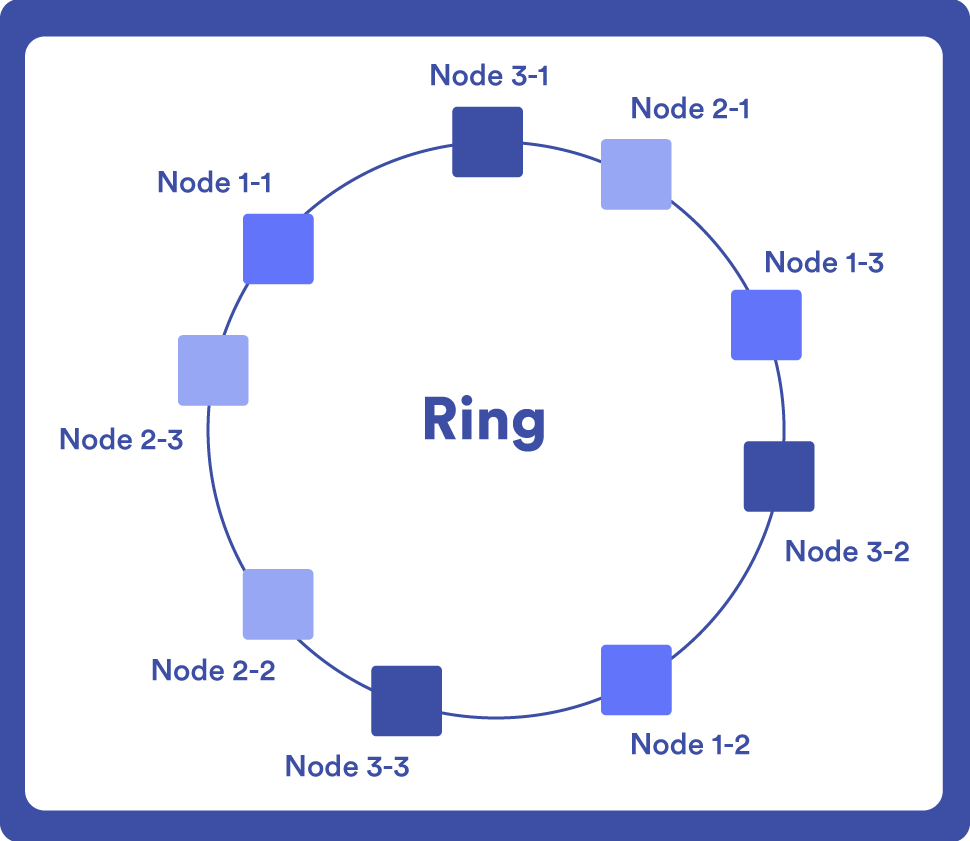
    Nodes are represented in a circular ring and each data is assigned to a node using a hash function. When a new node is added to the system, the data is redistributed between the existing nodes and the new node.
    The hash works as a unique identifier so that when you make a query, you just have to locate that point on the ring.
    An example of a NoSQL database that uses “Consistent Hashing” is DynamoDB, since one of its strengths is incremental scaling, and to achieve this it needs a procedure capable of fractionating data dynamically.

Replication in NoSQL databases

It consists of creating copies of the data on multiple machines. This process seeks to improve database performance by distributing queries among different nodes. At the same time, it ensures that the information will continue to be available, even if the hardware fails.
The two main ways to perform data replication (in addition to the Consistent Hashing that we already mentioned in the previous section) are:

Master-slave server

Writing is made to the primary node and from there data is replicated to secondary nodes.

Peer to peer

All nodes in the cluster have the same hierarchical level and can accept writing. When data is written to one node it spreads to all the others. This ensures availability, but can also lead to inconsistencies if conflict resolution mechanisms are not implemented (for example, if two nodes try to write to the same location at the same time).

CAP theorem and consistency of NoSQL databases.

The CAP theorem was introduced by Professor Eric Brewer of the University of Berkeley in the year 2000. He explains that a distributed database can meet two of these three qualities at the same time:

  • Consistency: All requests after the writing operation get the same value, regardless of where the queries are made.
  • Availability: The database always responds to requests, even if a failure takes place.
  • Partition Tolerance: The system continues to operate even if communication between some nodes is interrupted.

Under this scheme we could choose a DBMS that is consistent and partition tolerant (MongoDB, HBase), available and partition tolerant (DynamoDB, Cassandra), or consistent and available (MySQL), but all three features cannot be preserved at once.
Each development has its requirements and the CAP theorem helps us find the DBMS that best suits your needs. Sometimes it is imperative for data to be consistent at all times (for example, in a stock control system). In these cases, we usually work with a relational database. In NoSQL databases, consistency is not one hundred percent guaranteed, since changes must propagate between all nodes in the cluster.

BASIS and eventual consistency model in NoSQL

BASE is a concept opposed to the ACID properties (atomicity, consistency, isolation, durability) of relational databases. In this approach, we prioritize data availability over immediate consistency, which is especially important in applications that process data in real time.

The BASE acronym means:

  • Basically Available: The database always sends a response, even if it contains errors if readings occur from nodes that did not yet receive the last writing.
  • Soft state: The database may be in an inconsistent state when reading takes place, so you may get different results on different readings.
  • Eventually Consistent: Database consistency is reached once the information has been propagated to all nodes. Up to that point we talk about an eventual consistency.

Even though the BASE approach arose in response to ACID, they are not exclusionary options. In fact, some NoSQL databases like MongoDB offer configurable consistency.

Tree indexing in NoSQL databases. What are the best-known structures?

So far we have seen how data is distributed and replicated in a NoSQL database, but we need to explain how it is structured efficiently to make its search and retrieval easier.
Trees are the most commonly used data structures. They organize nodes hierarchically starting from a root node, which is the first tree node; parent nodes, which are all those nodes that have at least one child; and child nodes, which complete the tree.
The number of levels of a tree determines its height. It is important to consider the final size of the tree and the number of nodes it contains, as this can influence query performance and data recovery time.
There are different tree indexes that you may use in NoSQL databases.

B Trees

They are balanced trees and perfect for distributed systems for their ability to maintain index consistency, although they can also be used in relational databases.
The main feature of B trees is that they can have several child nodes for each parent node, but they always keep their height balanced. This means that they have an identical or very similar number of levels in each tree branch, a particularity that makes it possible to handle insertions and deletions efficiently.
They are widely used in filing systems, where large data sets need to be accessed quickly.

T Trees

They are also balanced trees that can have a maximum of two or three child nodes.
Unlike B-trees, which are designed to make searches on large volumes of data easier, T-trees work best in applications where quick access to sorted data is needed.

AVL Trees

They are binary trees, which means that each parent node can have a maximum of two child nodes.
Another outstanding feature of AVL trees is that they are balanced in height. The self-balancing system serves to ensure that the tree does not grow in an uncontrolled manner, something that could harm the database performance.
They are a good choice for developing applications that require quick queries and logarithmic time insertion and deletion operations.

KD Trees

They are binary, balanced trees that organize data into multiple dimensions. A specific dimension is created at each tree level.
They are used in applications that work with geospatial data or scientific data.

Merkle Trees

They represent a special case of data structures in distributed systems. They are known for their utility in Blockchain to efficiently and securely encrypt data.
A Merkle tree is a type of binary tree that offers a first-rate solution to the data verification problem. Its creator was an American computer scientist and cryptographer named Ralph Merkle in 1979.
Merkle trees have a mathematical structure made up by hashes of several blocks of data that summarize all transactions in a block.

Data is grouped into larger datasets and related to the main nodes until all the data within the system is gathered. As a result, the Merkle Root is obtained.

How is the Merkle Root calculated?

1. The data is divided into blocks of a fixed size.

2. Each data block is subjected to a cryptographic hash function.

3. Hashes are grouped into pairs and a function is again applied to these pairs to generate their corresponding parent hashes until only one hash remains, which is the Merkle root.

The Merkle root is at the top of the tree and is the value that securely represents data integrity. This is because it is strongly related to all datasets and the hash that identifies each of them. Any changes to the original data will alter the Merkle Root. That way, you can make sure that the data has not been modified at any point.
This is why Merkle trees are frequently employed to verify the integrity of data blocks in Blockchain transactions.
NoSQL databases like Cassandra draw on these structures to validate data without sacrificing speed and performance.

Comparison between NoSQL database management systems

From what we have seen so far, NoSQL DBMSs are extraordinarily complex and varied. Each of them can adopt a different data model and present unique storage, consultation and scalability features. This range of options allows developers to select the most appropriate database for their project needs.
Below, we will give as an example two of the most widely used NoSQL DBMSs for the development of scalable and high-performance applications: MongoDB and Apache Cassandra.

MongoDB

It is a documentary DBMS developed by 10gen in 2007. It is open source and has been created in programming languages such as C++, C and JavaScript.

MongoDB is one of the most popular systems for distributed databases. Social networks such as LinkedIn, telecommunications companies such as Telefónica or news media such as the Washington Post use MongoDB.
Here are some of its main features.

  • Database storage with MongoDB: MongoDB stores data in BSON files (binary JSON). Each database consists of a collection of documents. Once MongoDB is installed and Shell is running, you may create the DB just by indicating the name you wish to use. If the database does not already exist, MongoDB will automatically create it when adding the first collection. Similarly, a collection is created automatically when you store a file in it. You just have to add the first document and execute the “insert” statement and MongoDB will create an ID field assigning it an ObjectID value that is unique for each machine at the time the operation is executed.
  • DB Partitioning with MongoDB: MongoDB makes it easy to distribute data across multiple servers using the automatic sharding feature. Data fragmentation takes place at the collection level, distributing documents among the different cluster nodes. To carry out this distribution, a “partition key” defined as a field is used in all collection documents. Data is fragmented into “chunks”, which have a default size of 64 MB and are stored in different shards within the cluster, ensuring that there is a balance. MongoBD monitors continuously chunk distribution among the shard nodes and, if necessary, performs automatic rebalancing to ensure that the workload supported by these nodes is balanced.
  • DB Replication with MongoDB: MongoDB uses a replication system based on the master-slave architecture. The master server can perform writing and reading operations, but slave nodes only perform reads (replica set). Updates are communicated to slave nodes via an operation log called oplog.
  • Database Queries with MongoDB: MongoDB has a powerful API that allows you to access and analyze data in real time, as well as perform ad-hoc queries, that is, direct queries on a database that are not predefined. This gives users the ability to perform custom searches, filter documents, and sort results by specific fields. To carry out these queries, MongoDB uses the “find” method on the desired collection or “findAndModify” to query and update the values of one or more fields simultaneously.
  • DB Consistency with MongoDB: From version 4.0 (the most recent one is 6.0), MongoDB supports ACID transactions at document level. The “snapshot isolation” function provides a consistent view of the data and allows atomic operations to be performed on multiple documents within a single transaction. This feature is especially relevant for NoSQL databases, as it poses solutions to different consistency-related issues, such as concurrent writes or queries that return outdated file versions. In this respect, MongoDB comes very close to the stability of RDMSs.
  • Database indexing with MongoDB: MongoDB uses B trees to index the data stored in its collections. This is a variant of the B trees with index nodes that contain keys and pointers to other nodes. These indexes store the value of a specific field, allowing data recovery and deletion operations to be more efficient.
  • DB Security with MongoDB: MongoDB has a high level of security to ensure the confidentiality of stored data. It has several authentication mechanisms, role-based access configuration, data encryption at rest and the possibility of restricting access to certain IP addresses. In addition, it allows you to audit the activity of the system and keep a record of the operations carried out in the database.

Apache Cassandra

It is a column-oriented DBMS that was developed by Facebook to optimize searches within its platform. One of the creators of Cassandra is computer scientist Avinash Lakshman, who previously worked for Amazon, as part of the group of engineers who developed DynamoDB. For that reason, it does not come as a surprise that it shares some features with this other system.
In 2008 it was launched as an open source project, and in 2010 it became a top-level project of the Apache Foundation. Since then, Cassandra continued to grow to become one of the most popular NoSQL DBMSs.
Although Meta uses other technologies today, Cassandra is still part of its data infrastructure. Other companies that use it are Netflix, Apple or Ebay. In terms of scalability, it is considered one of the best NoSQL databases.

Let’s take a look at some of its key properties:

  • Database storage with Apache Cassandra: Cassandra uses a “Column Family” data model, which is similar to relational databases, but more flexible. It does not refer to a hierarchical structure of columns that contain other columns, but rather to a collection of key-value pairs, where the key identifies a row and the value is a set of columns. It is designed to store large amounts of data and perform more efficient writing and reading operations.
  • DB Partitioning with Apache Cassandra: For data distribution, Cassandra uses a partitioner that distributes data to different cluster nodes. This partitioner uses the algorithm “consistent hashing” to assign a unique partition key to each data row. Data possessing the same partition key will stay together on the same nodes. It also supports virtual nodes (vnodes), which means that the same physical node may have multiple data ranges.
  • DB Replication with Apache Cassandra: Cassandra proposes a replication model based on Peer to peer in which all cluster nodes accept reads and writes. By not relying on a master node to process requests, the chance of a bottleneck occurring is minimal. Nodes communicate with each other and share data using a gossiping protocol.
  • DB Queries with Apache Cassandra: Like MongoDB, Cassandra also supports ad-hoc queries, but these tend to be more efficient if they are based on the primary key. In addition, it has its own query language called CQL (Cassandra Query Language) with a syntax similar to that of SQL, but instead of using joins, it takes its chances on data denormalization.
  • DB Indexation with Apache Cassandra: Cassandra uses secondary indexes to allow efficient queries on columns that are not part of the primary key. These indices may affect individual columns or multiple columns (SSTable Attached Secondary Index). They are created to allow complex range, prefix or text search queries in a large number of columns.
  • DB Coherence with Apache Cassandra: By using Peer to Peer architecture, Cassandra plays with eventual consistency. Data is propagated asynchronously across multiple nodes. This means that, for a short period of time, there may be discrepancies between the different replicas. However, Cassandra also provides mechanisms for setting the consistency level. When a conflict takes place (for example, if the replicas have different versions), use the timestamp and validate the most recent version. In addition, perform automatic repairs to maintain data consistency and integrity if hardware failures or other events that may cause discrepancies between replicas take place.
  • DB Security with Apache Cassandra: To use Cassandra in a safe environment, it is necessary to perform configurations, since many options are not enabled by default. For example, activate the authentication system and set permissions for each user role. In addition, it is critical to encrypt data in transit and at rest. For communication between the nodes and the client, data in transit can be encrypted using SSL/TLS.

Challenges in managing NoSQL databases. How does Pandora FMS help?

NoSQL DBMSs offer developers the ability to manage large volumes of data and scale horizontally by adding multiple nodes to a cluster.
To manage these distributed infrastructures, it is necessary to master different data partitioning and replication techniques (for example, we have seen that MongoDB uses a master-slave architecture, while Cassandra prioritizes availability with the Peer to peermodel).
Unlike RDMS, which share many similarities, in NoSQL databases there is no common paradigm and each system has its own APIs, languages and a different implementation, so getting used to working with each of them can be a real challenge.
Considering that monitoring is a fundamental component for managing any database, we must be pragmatic and rely on those resources that make our lives easier.
Both MongoDB and Apache Cassandra have commands that return system status information and allow problems to be diagnosed before they become critical failures. Another possibility is to use Pandora FMS software to simplify the whole process.

How to do so?

If this is a database in MongoDB, download Pandora FMS plugin for MongoDB. This plugin uses the mongostat command to collect basic information about system performance. Once the relevant metrics are obtained, they are sent to Pandora FMS data server for their analysis.
On the other hand, if the database works with Apache Cassandra, download the corresponding plugin for this system. This plugin obtains the information by internally running the tool nodetool, which is already included in the standard Cassandra installation, and offers a wide range of commands to monitor server status. Once the results are analyzed, the plugin structures the data in XML format and sends it to Pandora FMS server for further analysis and display.
For these plugins to work properly, copy the files to the plugin directory of Pandora FMS agent, edit the configuration file and, finally, restart the system (the linked articles explain the procedure very well).
Once the plugins are active, you will be able to monitor the activity of the cluster nodes in a graph view and receive alerts should any failures take place. These and other automation options help us save considerable time and resources in maintaining NoSQL databases.

Create a free account and discover all Pandora FMS utilities to boost your digital project!

And if you have doubts about the difference between NoSQL and SQL you can consult our post “NoSQL vs SQL: main differences and when to choose each of them“.

About Version 2 Digital

Version 2 Digital is one of the most dynamic IT companies in Asia. The company distributes a wide range of IT products across various areas including cyber security, cloud, data protection, end points, infrastructures, system monitoring, storage, networking, business productivity and communication products.

Through an extensive network of channels, point of sales, resellers, and partnership companies, Version 2 offers quality products and services which are highly acclaimed in the market. Its customers cover a wide spectrum which include Global 1000 enterprises, regional listed companies, different vertical industries, public utilities, Government, a vast number of successful SMEs, and consumers in various Asian cities.

About PandoraFMS
Pandora FMS is a flexible monitoring system, capable of monitoring devices, infrastructures, applications, services and business processes.
Of course, one of the things that Pandora FMS can control is the hard disks of your computers.

System Hardening: Why the Need to Strengthen System Cybersecurity

Today, digital trust is required inside and outside the organization, so tools must be implemented, with cybersecurity methods and best practices in each layer of your systems and their infrastructure: applications, operating systems, users, both on-premise and in the cloud. This is what we call System Hardening an essential practice that lays the foundation for a safe IT infrastructure. Its goal is to reduce the attack surface as much as possible, strengthening the systems to be able to face possible security attacks and get rid of as many entry points for cybercrime as possible.

Comprehensive Approach to Organizational Security

To implement organizational security, a comprehensive approach is undoubtedly required, since devices (endpoints, sensors, IoT), hardware, software, local environments, cloud (and hybrid) environments must be considered, along with security policies and local and even international regulatory compliance. It should be remembered that today and in the future we must not only protect an organization’s digital assets, but also avoid downtime and possible regulatory sanctions (associated with non-compliance with GDPR and data protection laws). Hardening also helps lay the solid foundation on which to implement advanced security solutions. Later, in Types of Hardening we will see where it is possible to implement security strengthening.

Benefits of Hardening in Cybersecurity

  • Improved system functionality: Hardening measures help optimize system resources, eliminate unnecessary services and software, and apply security patches and updates. The consequences of actions lead to better system performance, as fewer resources are also wasted on unused or vulnerable components.
  • Increased security level: A strengthened system reduces the surface area of a potential attack and strengthens defenses against threats (e.g., malware, unauthorized access, and data breaches). Confidential information is protected and user privacy is guaranteed.
  • Compliance simplification and auditing: Organizations must comply with industry-specific security standards and regulations to protect sensitive data. Hardening helps meet these requirements and ensures compliance with industry-specific standards, such as GDPR (personal data protection), the payment card industry’s data security standard (PCI DSS) or the Health Insurance Portability and Accountability Acts (HIPAA, to protect a health insurance user’s data).

Other benefits include ensuring business continuity (without disruption or frictions), multi-layered defense (access controls, encryption, firewalls, intrusion detection systems, and regular security audits), and the ability to take a more proactive stance on security, with regular assessments and updates to prepare for emerging threats and vulnerabilities.
Every safe system must have been previously secured, and this is precisely what hardening consists of.

Types of Hardening

In the IT infrastructure set, there are several subsets that require different security approaches:

1. Configuration Management Hardening

Implementing and configuring security for multiple system components (including hardware, operating systems, and software applications). It also involves disabling unnecessary services and protocols, configuring access controls, implementing encryption, and safe communication protocols. It’s worth mentioning that security and IT teams often keep conflicting agendas. The hardening policy should take into account discussions between the two parties. It is also recommended to implement:

  • Configurable item assessment: From user accounts and logins, server components and subsystems, what software and application updates and vulnerabilities to perform, networks and firewalls, remote access and log management, etc.
  • Finding the balance between security and features: Hardening’s policy should consider both the requirements of the security team and the ability of the IT team to implement it using currently assigned levels of time and manpower. It must also be decided which challenges must be faced and which are not worthwhile for operational times and costs.
  • Change management and “configuration drift” prevention: In Hardening, continuous monitoring must be implemented, where automation tools contribute to compliance with requirements at any time, getting rid of the need for constant scanning. Also, in unwanted changes, hardening policies that can happen in the production environment can be reinforced. Finally, in case of unauthorized changes, automation tools help detect anomalies and attacks to implement preventive actions.

2. Application Hardening

Protection of software applications running on the system, by removing or disabling unnecessary features, application-specific patching and security updates, along with safe coding practices and access controls, in addition to application-level authentication mechanisms. The importance of application security lies in the fact that users in the organization ask for safe and stable environments; on the part of the staff, patch and update application allows them to react to threats and implement preventive measures. Remember that users are often the entry point into the organization for cybercrime. Among the most common techniques, we can highlight:

  • Install applications only from trusted repositories.
  • Patch automations of standard and third-party applications.
  • Installation of firewalls, antivirus and malware or spyware protection programs.
  • Software-based data encryption.
  • Password management and encryption applications.

3. Operating System (OS) Hardening

Configuring the operating system to minimize vulnerabilities, either by disabling unnecessary services, shutting down unused ports, implementing firewalls and intrusion detection systems, enforcing strong password policies, and regularly applying security patches and updates. Among the most recommended methods, there are the following:

  • Applying the latest updates released by the operating system developer.
  • Enable built-in security features (Microsoft Defender or third-party Endpoint Protection platform software or EPP, Endpoint Detection Rate or EDR from third parties). This will perform a malware search on the system (Trojan horses, sniffer, password sniffers, remote control systems, etc.).
  • Remove unnecessary drivers and update used ones.
  • Delete software installed on the machine that is unnecessary.
  • Enable secure boot.
  • Restrict system access privileges.
  • Use biometrics or authentication FIDO (Fast Identity Online) in addition to passwords.

Also, a strong password policy can be implemented, protect sensitive data with AES encryption or self-encrypting drives, firmware resiliency technologies, and/or multi-factor authentication.

4. Server Hardening

Removing vulnerabilities (also known as attack vectors) that a hacker could use to access the server. It focuses on securing data, ports, components and server functions, implementing security protocols at hardware, firmware and software level. The following is recommended:

  • Patch and update your operating systems periodically.
  • Update third-party software needed to run your servers according to industry security standards.
  • Require users to create and maintain complex passwords consisting of letters, numbers, and special characters, and update these passwords frequently.
  • Lock an account after a certain number of failed login attempts.
  • Disable certain USB ports when a server is booted.
  • Leverage multi-factor authentication (MFA)
  • Using encryption AES or self-encrypted drives to hide and protect business-critical information.
  • Use virus and firewall protection and other advanced security solutions.

5. Network Hardening

Protecting network infrastructure and communication channels. It involves configuring firewalls, implementing intrusion prevention systems (IPS) and intrusion detection systems (IDS), encryption protocols such as SSL/TLS, and segmenting the network to reduce the impact of a breach and implement strong network access controls. It is recommended to combine IPS and IDS systems, in addition to:

  • Proper configuration of network firewalls.
  • Audits of network rules and access privileges.
  • Disable unnecessary network ports and network protocols.
  • Disable unused network services and devices.
  • Network traffic encryption.

It is worth mentioning that the implementation of robust monitoring and recording mechanisms is essential to strengthen our system. It involves setting up a security event log, monitoring system logs for suspicious activity, implementing intrusion detection systems, and conducting periodic security audits and reviews to identify and respond to potential threats in a timely manner.

Practical 9-Step Hardening Application

Although each organization has its particularities in business systems, there are general hardening tasks applicable to most systems. Below is a list of the most important tasks as a basic checklist:

1. Manage access: Ensure that the system is physically safe and that staff are informed about security procedures. Set up custom roles and strong passwords. Remove unnecessary users from the operating system and prevent the use of root or “superadmin” accounts with excessive privileges. Also, limit the membership of administrator groups: only grant elevated privileges when necessary.

2. Monitor network traffic: Install hardened systems behind a firewall or, if possible, isolated from public networks. A VPN or reverse proxy must be required to connect. Also, encrypt communications and establish firewall rules to restrict access to known IP ranges.

3. Patch vulnerabilities: Keep operating systems, browsers, and any other applications up to date and apply all security patches. It is recommended to keep track of vendor safety advisories and the latest CVEs.

4. Remove Unnecessary Software: Uninstall any unnecessary software and remove redundant operating system components. Unnecessary services and any unnecessary application components or functions that may expand the threat surface must be disabled.

5. Implement continuous monitoring: Periodically review logs for anomalous activity, with a focus on authentications, user access, and privilege escalation. Reflect records in a separate location to protect the integrity of records and prevent tampering. Conduct regular vulnerability and malware scans and, if possible, conduct an external audit or penetration test.

6. Implement secure communications: Secure data transfer using safe encryption. Close all but essential network ports and disable unsafe protocols such as SMBv1, Telnet, and HTTP.

7. Performs periodic backups: Hardened systems are, by definition, sensitive resources and should be backed up periodically using the 3-2-1 rule (three copies of the backup, on two types of media, with one copy stored off-site).

8. Strengthen remote sessions: If you must allow Secure Shell or SSH (remote administration protocol), make sure a safe password or certificate is used. The default port must be avoided, in addition to disabling elevated privileges for SSH access. Monitor SSH records to identify anomalous uses or privilege escalation.

9. Monitor important metrics for security:Monitor logs, accesses, number of connections, service load (CPU, Memory), disk growth. All these metrics and many more are important to find out if you are being subjected to an attack. Having them monitored and known in real time can free you from many attacks or service degradations.

Hardening on Pandora FMS

Pandora FMS incorporates a series of specific features to monitor server hardening, both Linux and Windows. For that, it runs a special plugin that will perform a series of checks, scoring whether or not it passes the registration. These checks are scheduled to run from time to time. The graphical interface structures what is found in different categories, and the evolution of system security over time can be visually analyzed, as a temporal graph. In addition, detailed technical reports can be generated for each machine, by groups or made comparative.

It is important to approach the security tasks of the systems in a methodical and organized way, attending first to the most critical and being methodical, in order to be able to do it in all systems equally. One of the fundamental pillars of computer security is the fact of not leaving cracks, if there is an entrance door, however small it may be, and as much as we secured the rest of the machines, it may be enough to have an intrusion in our systems.

The Center for Internet Security (CIS) leads the development of international hardening standards and publishes security guidelines to improve cybersecurity controls. Pandora FMS uses the recommendations of the CIS to implement a security audit system, integrated with monitoring to observe the evolution of Hardening throughout your organization, system by system.

Use of CIS Categories for Safety Checks

There are more than 1500 individual checks to ensure the security of systems managed by Pandora FMS. Next, we mention the CIS categories audited by Pandora FMS and some recommendations:

  • Hardware and software asset inventory and control
    It refers to all devices and software in your organization. Keeping an up-to-date inventory of your technology assets and using authentication to block unauthorized processes is recommended.
  • Device inventory and control
    It refers to identifying and managing your hardware devices so that only those who are authorized have access to systems. To do this, you have to maintain adequate inventory, minimize internal risks, organize your environment and provide clarity to your network.
  • Vulnerability Management
    Continuously scanning assets for potential vulnerabilities and remediating them before they become the gateway to an attack. Patch updating and security measures in the software and operating systems must be ensured.
  • Controlled use of administrative privileges
    It consists of monitoring access controls and user performance with privileged accounts to prevent any unauthorized access to critical systems. It must be ensured that only authorized people have elevated privileges to avoid any misuse of administrative privileges.
  • Safe hardware and software configuration
    Security configuration and maintenance based on standards approved by your organization. A rigorous configuration management system should be created, to detect and alert about any misconfigurations, along with a change control process to prevent attackers from taking advantage of vulnerable services and configurations.
  • Maintenance, supervision and analysis of audit logs and records
    Collection, administration and analysis of event audit logs to identify possible anomalies. Detailed logs are required to fully understand attacks and to be able to effectively respond to security incidents.
  • Defenses against malware
    Supervision and control of installation and execution of malicious code at multiple points in the organization to prevent attacks. Anti-malware software should be configured and used and take advantage of automation to ensure quick defense updates and swift corrective action in the event of attacks.
  • Email and Web Browser Protection
    Protecting and managing your web browsers and email systems against online threats to reduce the attack surface. Deactivate unauthorized email add-ons and ensure that users only access trusted websites using network-based URL filters. Remember to keep these most common gateways safe from attacks.
  • Data recovery capabilities
    Processes and tools to ensure your organization’s critical information is adequately supported. Make sure you have a reliable data recovery system in place to restore information in the event of attacks that compromise critical data.
  • Boundary defense and data protection
    Identification and classification of sensitive data, along with a number of processes including encryption, data leak protection plans, and data loss prevention techniques. It establishes strong barriers to prevent unauthorized access.
  • Account Monitoring and Control
    Monitor the entire lifecycle of your systems and application accounts, from creation through use and inactivity to deletion. This active management prevents attackers from taking advantage of legitimate but inactive user accounts for malicious purposes and allows them to maintain constant control over the accounts and their activities.
    It is worth mentioning that not all categories are applicable in a system, but there are controls to verify whether or not they apply. Let’s look at some screens as an example of display.

Detail example in a hardening control of a Linux (Debian) server

This control explains that it is advisable to disable the ICMP packet forwarding, as contemplated in the recommendations of CIS, PCI_DSS, NIST and TSC.

Example listing of checks by group (in this case, network security)

Example of controls, by category on a server:

The separation of the controls by category is key to be able to organize the work and to delimit the scope, for example, there will be systems not exposed to the network where you may “ignore” the network category, or systems without users, where you may avoid user control.

Example of the evolution of the hardening of a system over time:

This allows you to see the evolution of securitization in a system (or in a group of systems). Securitization is not an easy process, since there are dozens of changes, so it is important to address it in a gradual way, that is, planning their correction in stages, this should produce a trend over time, like the one you may see in the attached image. Pandora FMS is a useful tool not only for auditing, but also for monitoring the system securitization process.

Other additional safety measures related to hardening

  • Permanent vulnerability monitoring. Pandora FMS also integrates a continuous vulnerability detection system, based on mitre databases (CVE, Common Vulnerabilities and Exposure) and NIST to continuously audit vulnerable software across your organization. Both the agents and the remote Discovery component are used to determine on which of your systems there is software with vulnerabilities. More information here.
  • Flexibility in inventory: Whether you use Linux systems from different distributions or any Windows version, the important thing is to know and map our infrastructure well: installed software, users, paths, addresses, IP, hardware, disks, etc. Security cannot be guaranteed if you do not have a detailed inventory.
  • Constant monitoring of security infrastructure: It is important to monitor the status of specific security infrastructures, such as backups, antivirus, VPN, firewalls, IDs/IPS, SIEM, honeypots, authentication systems, storage systems, log collection, etc.
  • Permanent monitoring of server security: Verifying in real time the security of remote access, passwords, open ports and changes to key system files.
  • Proactive alerts: Not only do we help you spot potential security breaches, but we also provide proactive alerts and recommendations to address any issues before they become a real threat.

I invite you to watch this video about Hardening on Pandora FMS

Positive impact on safety and operability

As we have seen, hardening is part of the efforts to ensure business continuity. A proactive stance on server protection must be taken, prioritizing risks identified in the technological environment and applying changes gradually and logically. Patches and updates must be applied constantly as a priority, relying on automated monitoring and management tools that ensure the fast correction of possible vulnerabilities. It is also recommended to follow the best practices specific to each hardening area in order to guarantee the security of the whole technological infrastructure with a comprehensive approach.

Additional Resources

Links to Pandora FMS documentation or read the references to CIS security guidelines: See interview with Alexander Twaradze, Pandora FMS representative to countries implementing CIS standards.

Pandora FMS’s editorial team is made up of a group of writers and IT professionals with one thing in common: their passion for computer system monitoring. Pandora FMS’s editorial team is made up of a group of writers and IT professionals with one thing in common: their passion for computer system monitoring.

About Version 2 Digital

Version 2 Digital is one of the most dynamic IT companies in Asia. The company distributes a wide range of IT products across various areas including cyber security, cloud, data protection, end points, infrastructures, system monitoring, storage, networking, business productivity and communication products.

Through an extensive network of channels, point of sales, resellers, and partnership companies, Version 2 offers quality products and services which are highly acclaimed in the market. Its customers cover a wide spectrum which include Global 1000 enterprises, regional listed companies, different vertical industries, public utilities, Government, a vast number of successful SMEs, and consumers in various Asian cities.

About PandoraFMS
Pandora FMS is a flexible monitoring system, capable of monitoring devices, infrastructures, applications, services and business processes.
Of course, one of the things that Pandora FMS can control is the hard disks of your computers.

How to reduce CPU usage

From the computer, we increasingly perform different tasks simultaneously (listening to music while writing a report, receiving files by email and downloading videos), which involve executing commands, and sending and receiving data. Over time, computer performance can suffer if CPU usage is not optimized.

But what is a CPU?

CPU stands for central processing unit. The CPU itself is the brain of a computer, on which most calculations and processes are performed. The two components of a CPU are:

  • The arithmetic logic unit (ALU), which performs arithmetic and logical operations.
  • The Control Unit (CU), which retrieves instructions from the memory, decodes and executes them, calling the ALU when necessary.

In this diagram you may see that the CPU also contains the memory unit, which contains the following elements:

  • The ROM (Read Only Memory): It is a read-only memory; that is, you may only read the programs and data stored in it. It is also a primary memory unit of the computer system, and contains some electronic fuses that can be programmed for specific information. The information is stored in ROM in binary format. It is also known as permanent memory.
  • The RAM (Random Access Memory): As its name suggests, it is a type of computer memory that can be accessed randomly, any byte of memory without handling the previous bytes. RAM is a high-speed component on devices that temporarily stores all the information a device needs.
  • Cache: The cache stores data and allows quick access to it. Cache speed and capacity improves device performance.

Its crucial role in the computer operation

By its components, the speed and performance of a computer are directly related to the CPU features, such as:

  • Energy consumption. It refers to the amount of power that the CPU consumes when executing actions, the higher the quality, the higher the power consumption.
  • The clock frequency. It refers to the clock speed that the CPU has and that determines the number of actions it can execute in a period of time.
  • The number of cores. The greater the number of cores, the greater the number of actions that can be performed simultaneously.
  • The number of threads. It helps the processor handle and execute actions more efficiently. It splits tasks or processes to optimize waiting times between actions.
  • Cache memory. It stores data and allows quick access to it.
  • The type of bus. It refers to the communication that the CPU establishes with the rest of the system.

Relationship between CPU speed/power and computer performance

Impact of speed and power on system effectiveness.

CPUs are classified by the number of cores:

  • De un solo núcleo, en el que el procesador sólo puede realizar una acción a la vez, es el procesador más antiguo.
  • Two-core, which allows you to perform more than one action at a time.
  • Four cores, separate from each other, which allows them to perform several actions at once and are much more efficient.

Considering this, we understand why current CPUs have two or more cores to be able to perform several operations at the same time or balance the load so that the processor does not become 100% busy, which would prevent performing some operations.

Consequences of a slow or overloaded CPU

When a CPU is overloaded, the consequences are as follows, and in the indicated order:

  • Loss of performance, encouraging task processing.
  • Overheating of the computer, a sign that the components receive more demand than the capacity they have.
  • If the temperature of a processor exceeds its limit, it slows down and can even lead to a total system shutdown.

With this, if you do not want to reach the last consequence that puts your equipment at risk, the CPU load must be optimized.

Importance of Reducing CPU Usage

Benefits of optimizing CPU load

When CPU consumption is minimized, the benefits become noticeable in:

  • Energy savings: Lower power consumption, avoiding unnecessary use of processor resources.
  • Battery life: It extends battery life by reducing power consumption.
  • Higher performance: Performance improvements at all times.
  • Lower processor overheating and exhaustion.
  • Lower environmental impact: With lower energy consumption, the carbon footprint of the organization is reduced and it is possible to contribute to ESG goals (Environment, Social, Governance).

Monitoring CPU usage in IT environments

Role of IT support service agents

To give continuity to the business, it is always necessary to supervise systems and equipment to ensure service delivery without interruptions or events that may put the company at risk. IT support agents precisely provide face-to-face or remote support at:

  • Install and configure equipment, operating systems, programs and applications.
  • Regularly maintain equipment and systems.
  • Support employees on technology use or needs.
  • Detect risks and problems in equipment and systems, and take action to prevent or correct them.
  • Perform diagnostics on hardware and software operation.
  • Replace parts or the whole equipment when necessary.
  • Make and analyze reports on the state of equipment and systems.
  • Order parts and spare parts, and, if possible, schedule inventories.
  • Provide guidance on the execution of new equipment, applications or operating systems.
  • Test and evaluate systems and equipment prior to implementation.
  • Configure profiles and access to networks and equipment.
  • Carry out security checks on all equipment and systems.

Remote monitoring and management (RMM) tools for effective monitoring.

In order to carry out the functions of the technical support service agent, there are tools for remote monitoring and management. Remote Monitoring and Management (RMM) is software that helps run and automate IT tasks such as updates and patch management, device health checks, and network monitoring. The approach of RMM, of great support for internal IT teams as well as for Managed Service Providers (MSPs), is to centralize the support management process remotely, from tracking devices, knowing their status, to performing routine maintenance and solving problems that arise in equipment and systems. This becomes valuable considering that IT services and resources are in hybrid environments, especially to support the demand of users who not only work in the office but those who are working remotely. Tracking or maintaining resources manually is literally impossible.
To learn more about RMM, visit this Pandora FMS blog: What is RMM software?

Tips for reducing CPU usage on Chromebooks and Windows

Closing tabs or unnecessary applications

This is one of the easiest methods to reduce CPU usage. Close any tabs or apps you’re not using in your web browser. This frees up resources on your computer, allowing you to perform other tasks.
To open the Task Manager on a Chromebook, press “Ctrl” + “Shift” + “T”.
Right-click on the Windows taskbar and select “Task Manager”.
In Task Manager, close any tabs or apps you’re no longer using.

Disabling non-essential animations or effects

Some animations and effects can take up large CPU resources, so it’s best to disable them. First go to system settings and look for an option called “Performance” or “Graphics”, from which you may turn off animations and effects.
On Chromebook, go to Settings > Advanced > Performance and turn off any unnecessary animation or effects.
In Windows, go to Dashboards > System & Security > Performance and turn off unnecessary animations or effects.

Driver update

Outdated drivers can degrade computer performance, leading to excessive CPU usage. To update your drivers, visit your computer manufacturer’s website and download the latest drivers for your hardware. Install and then restart your computer.

Hard drive defragmentation

Over time, the hard drive can fragment, affecting computer performance. Open the “Disk Defragmenter” tool from the Start menu to defragment it. Select “Disk Defragmenter” from the Start menu. Restart the computer after defragmenting the hard drive.

Malware scanning

Malware is malicious software that aims to cause damage to systems and computers. Sometimes malware can take up CPU resources, so it’s key to scan your computer and perform a scan on a regular basis to find malware. For that, use a trusted antivirus program. Once the scan is complete, remove any malware that may have been detected.

System restoration

If you are experiencing high CPU usage, you may try performing a system restore. It can be a drastic solution, but it will return the computer to a previous state where it worked normally. To do this, open the Start menu and search for “System Restore”.
Click the “Start” button and type “System Restore”.
Choose a restore point that was created before you started experiencing problems with high CPU usage. Restart the computer.

Software update

Outdated software also causes performance issues on your computer, including high CPU usage. To update the software, open the Control Panel and go to the “Windows Update” settings, check for updates and install those that are available.
In addition to these tips, it is recommended to use RMM tools and agents installed on the company’s computers, servers, workstations and devices, which run in the background in order to collect information on network activity, performance and system security in real time. Through its analysis, it is possible to detect patterns and anomalies to generate support tickets (and scale them if necessary according to their severity) or, ideally, act preventively.
Proactive monitoring by internal IT teams or MSP providers is also recommended to ensure a stable and safe IT environment for users. Importantly, proactivity reduces the costs associated with equipment repair and data recovery.

Advanced Optimization: Overclocking and CPU Switching

Explanation of advanced options such as overclocking

overclocking is a technique used to increase clock frequency of an electronic component, such as the CPU (processor) or the GPU (graphics card), beyond the specifications set by the equipment manufacturer. That is, overlocking tries to force the component to operate at a higher speed than it originally offers.

Considerations on installing a new CPU

While it may seem like a simple matter to install a new CPU, there are considerations for installing a new CPU to ensure your computer’s performance. It is recommended to have the following at hand:

  • A screwdriver: Depending on your PC and the content that is installed on it, you may need one or more screwdrivers to remove the screws from your CPU and even the motherboard, in case you need to remove it.
  • Thermal paste: This is a must when installing a new CPU, especially if you do not have a CPU cooler with pre-applied thermal paste.
  • Isopropyl alcohol wipes: You will need them to clean the residual thermal paste of the processor and the contact point of the CPU cooler. You may even use isopropyl alcohol along with some very absorbent paper towels.
  • Antistatic Wristband: Since fragile and expensive components such as the CPU, motherboard and cooler will be worked on, we suggest using an antistatic wristband to protect the components from static discharges.

With this at hand, we now let you know three important considerations:

  • Take static precautions:
    The CPU is sensitive to static discharges. Its pins are delicate and work at high temperatures, so you have to take precautions. It is recommended to wear an antistatic bracelet or take a metal surface to “unload” yourself. In case the CPU has been used in another machine or if the fan is being replaced, you may need to remove the old thermal compound with isopropyl alcohol (not on the CPU contacts). There is no need to remove the battery from the motherboard during CPU installation. This would cause saved BIOS configurations to be lost. A minimum force must be required to lock the CPU charging lever in place.
  • Motherboard compatibility:
    It is important to check the documentation of your motherboard to know the type of socket that is used. Remember that AMD and Intel use different sockets, so you can’t install an Intel processor on an AMD board (and vice versa). If you can’t find this information, you may use the CPU-Z program to determine the type of socket to use.
  • Correct location and alignment:
    The CPU must be properly placed in the socket. If you do not do it correctly, the CPU will not work. You should make sure to properly install the fan and heat sink to avoid temperature problems.

In a nutshell…

The demand for resources on our computers to be able to process multiple tasks simultaneously has made it clear why attention should be paid to using the CPU with speed and power. For that reason, remote supervision and management tools are a resource for IT employees (or Managed Service Provider) in order to be able to know from a central point the status of systems and equipment and undertake maintenance and prevention actions remotely, such as driver updates, malware scanning, software updates, among others. The results of these efforts will be energy savings, increased performance, and extended battery life, along with reduced processor overheating and reduced environmental impact.

About Version 2 Digital

Version 2 Digital is one of the most dynamic IT companies in Asia. The company distributes a wide range of IT products across various areas including cyber security, cloud, data protection, end points, infrastructures, system monitoring, storage, networking, business productivity and communication products.

Through an extensive network of channels, point of sales, resellers, and partnership companies, Version 2 offers quality products and services which are highly acclaimed in the market. Its customers cover a wide spectrum which include Global 1000 enterprises, regional listed companies, different vertical industries, public utilities, Government, a vast number of successful SMEs, and consumers in various Asian cities.

About PandoraFMS
Pandora FMS is a flexible monitoring system, capable of monitoring devices, infrastructures, applications, services and business processes.
Of course, one of the things that Pandora FMS can control is the hard disks of your computers.

Collectd Pandora FMS: Maximizing Monitoring Efficiency

Collectd is a daemon (i.e. running in the background on computers and devices) that periodically collects metrics from different sources such as operating systems, applications, log files, and external devices, providing mechanisms to store values in different ways (e.g. RRD files) or makes it available over the network. With this data and its statistics you may monitor systems, find performance bottlenecks (by performance analysis) and predict system load (capacity planning).

Programming language and compatibility with operating systems

Collectd is written in C for *nix operating systems; that is, UNIX-based, such as BSD, macOS and Linux, for portability and performance, since its design allows it to run on systems without scripting language or cron daemon, as integrated systems. For Windows it can be connected using Cygwin (GNU and open source tools that provide similar features to a Linux distribution on Windows).
Collectd is optimized to take up the least amount of system resources, making it a great tool for monitoring with a low cost of performance.

Plug-ins of collectd

Collectd as a modular demon

The collectd system is modular. In its core it has limited features and to use it, you need to know how to compile a program in C. You also need to know how to start the executable in the right way so that the data is sent to where it is needed. However, through plug-ins, value is obtained from the data collected and sent, extending its functionality for multiple use cases. This makes the daemon modular and flexible and the statistics obtained (and their format) can be defined by plug-ins.

Plug-in types

Currently, there are 171 plug-ins available for collectd. Not all plug-ins define data collection themes, as some extend capabilities with interfaces for specific technologies (e.g. programming languages such as Python).

  • Read plug-ins fetch data and are generally classified into three categories:
    • Operating system plug-ins, which collect information such as CPU usage, memory, or the number of users who logged into a system. Usually, these plug-ins need to be ported to each operating system.
    • Application plug-ins, which collect performance data about an application running on the same computer or at a remote site. These plug-ins normally use software libraries, but are otherwise usually independent of the operating system.
    • Generic plug-ins, which offer basic functions that users may make use for specific tasks. Some examples are the query for network monitoring (from SNMP) or the execution of custom programs or scripts.
  • Writing plug-ins offer the ability to store collected data on disk using RRD or CSV files; or send data over the network to a remote daemon instance.
  • Unixsock plugins allow you to open a socket to connect to the collectd daemon. Thanks to the collectd utility, you may directly obtain the monitors in your terminal with the getval or listval parameters, where you may indicate the specific parameter you wish to obtain or obtain a list with all the parameters that collectd has collected.
  • You also have the network plug-in, which is used to send and receive data to and from other daemon instances. In a common network configuration, the daemon would run on each monitored host (called “clients”) with the network plug-in configured to send the collected data to one or more network addresses. On one or more of the so-called “servers”, the same daemon would run, but with a different configuration, so that the network plug-in receives data instead of sending it. Often, the RRDtool plugin is used in servers to store performance data (e.g. bandwidth, temperature, CPU workload, etc.)

To activate and deactivate the plug-ins you have, you may do so from the configuration file “collectd.conf”, in addition to configuring them or adding custom plugins.

Benefits of Collectd


  • Open source nature
    Collectd is open source software, just like its plug-ins, though some plug-ins don’t have the same open source license.


Collectd Integration with Pandora FMS

Monitoring IT environments

Collectd provides statistics to an interpretation package, so in a third-party tool, it must be configured to generate graphs and analysis from the data obtained, in order to see and optimize IT environment monitoring. Collectd has a large community that contributes improvements, new plugins, and bug fixes.

Effective execution in Pandora FMS

The pandora_collectd plugin (https://pandorafms.com/guides/public/books/collectd) allows to collect this information generated by collectd itself and send it to your Pandora FMS server for further processing and storage.
The plugin execution generates an agent with all the information of collectd transformed in Pandora FMS modules; with this, you may have any device monitored with collectd and obtain a data history, create reports, dashboards, visual consoles, trigger alerts and a long etcetera.

A very important feature of “pandora_collectd” is that it is a very versatile plugin, as it allows you to process data collected from collectd before sending it to your Pandora FMS server. By means of regular expressions, it allows you to decide according to the features you have, which metrics you want to collect and which ones you want to download, to send the desired metrics to your Pandora FMS server, in an optimal way. In addition, it allows you to modify parameters such as the port or the IP address of the tentacle server that you wish to use.
Also, it is possible to customize what we want your agent to be called, where the modules will be created, and modify their description.
Another important aspect of this plug-in is that it can run both as an agent plug-in and as a server plug-in. By being able to modify the agents resulting from the monitoring, you may easily differentiate one from the other and monitor a high amount of devices in your Pandora FMS environment.
In addition, your plugin is compatible with the vast majority of Linux and Unix devices so there will be no problems with its implementation with collectd.
To learn how to set up collectd in Pandora FMS, visit Pandora FMS Guides for details.

Collectd vs StatsD: A Comparison

Key differences

As we have seen, collectd is suitable for monitoring CPU, network, memory usage and different plugins for specific services such as NGinx. Due to its features, it collects ready-to-use metrics and must be installed on machines that need monitoring.

Whereas StatsD (written in Node.js) is generally used for applications that require accurate data aggregation and sends data to servers at regular intervals. Also, StatsD provides libraries in multiple programming languages for easy data tracking.

Once this is understood, collectd is a statistics gathering daemon, while StatsD is an aggregation service or event counter. The reason for explaining their differences is that collectd and StatsD can be used together (and it is common practice) depending on the monitoring needs in the organization.

Use cases and approaches

  • Cases of StatsD use:
    • Monitoring Web Applications: Tracking the number of requests, errors, response times, etc.
    • Performance Analysis: Identification of bottlenecks and optimization of application performance.
  • Cases of use of collectd:
    • Monitoring hardware resources such as CPU usage, memory used, hard disk usage, etc.
    • Monitoring specific metrics of available IT services.

The Importance of Collectd Integration with Pandora FMS

    • Lightweight and efficient
      Collectd in Pandora FMS is lightweight and efficient, with the ability to write metrics across the network, by itself a modular architecture and because it runs mainly in memory.
    • Versatility and flexibility
      This plugin allows you to decide which metrics you want to collect and which to discard in order to send only the metrics you want to your Pandora FMS server. It also allows you to adjust the data collected from time to time, according to the needs of the organization.
    • Community support and continuous improvement
      In addition to the fact that collectd is a popular plugin, there is community support for those who constantly make improvements, including specialized documentation and installation guides.
      All this makes us understand why collectd has been widely adopted for monitoring IT resources and services.

Conclusion

Collectd is a very popular daemon for measuring metrics from different sources such as operating systems, applications, log files and external devices, being able to take advantage of the information for system monitoring. Among its key features we can mention that, being written in C, in open source, it can be executed on systems without the need for a scripting language. As it is modular, it is quite portable through plug-ins and the value of the collected and sent data is obtained, the collectd feature is extended to give a better use in monitoring IT resources. It is also scalable, whether one or a thousand hosts, to collect statistics and performance metrics. This is of great value in IT ecosystems that continue growing for any company in any industry.

The pandora_collectd plugin collects information generated by the collectd itself and sends it to Pandora FMS server from which you may enhance the monitoring of any monitored device and obtain data from which to generate reports or performance dashboards, schedule alerts and obtain history information for capacity planning, among other high-value functions in IT management.

For better use of collectd, with the ability to be so granular in data collection, it is also good to consolidate statistics to make them more understandable to the human eye and simplify things for the system administrator who analyzes the data. Also, it is recommended to rely on IT monitoring experts such as Pandora FMS, with best monitoring and observability practices. Contact our experts in Professional services | Pandora FMS

About Version 2 Digital

Version 2 Digital is one of the most dynamic IT companies in Asia. The company distributes a wide range of IT products across various areas including cyber security, cloud, data protection, end points, infrastructures, system monitoring, storage, networking, business productivity and communication products.

Through an extensive network of channels, point of sales, resellers, and partnership companies, Version 2 offers quality products and services which are highly acclaimed in the market. Its customers cover a wide spectrum which include Global 1000 enterprises, regional listed companies, different vertical industries, public utilities, Government, a vast number of successful SMEs, and consumers in various Asian cities.

About PandoraFMS
Pandora FMS is a flexible monitoring system, capable of monitoring devices, infrastructures, applications, services and business processes.
Of course, one of the things that Pandora FMS can control is the hard disks of your computers.

NOSQL vs SQL. Key differences and when to choose each

Until recently, the default model for application development was SQL. However, in recent years NoSQL has become a popular alternative.

The wide variety of data that is stored today and the workload that servers must support force developers to consider other more flexible and scalable options. NoSQL databases provide agile development and ease of adapting to changes. Even so, they cannot be considered as a replacement for SQL nor are they the most successful choice for all types of projects.

Choosing between NoSQL vs SQL is an important decision, if you wish to avoid technical difficulties during the development of an application. In this article we aim to explore the differences between these two database management systems and guide readers on the use of each of them, taking into account the needs of the project and the type of data to be handled.

Content:

What is NoSQL?

The term NoSQL is short for “Not only SQL” and refers to a category of DBMSs that do not use SQL as their primary query language.

The NoSQL database boom began in 2000, matching the arrival of web 2.0. From then on, applications became more interactive and began to handle large volumes of data, often unstructured. Soon traditional databases fell short in terms of performance and scalability.

Big tech companies at the time decided to look for solutions to address their specific needs. Google was the first to launch a distributed and highly scalable DBMS: BigTable, in 2005. Two years later, Amazon announced the release of Dynamo DB (2007). These databases (and others that were appearing) did not use tables or a structured language, so they were much faster in data processing.

Currently, the NoSQL approach has become very popular due to the rise of Big Data and IoT devices, that generate huge amounts of data, both structured and unstructured.

Thanks to its performance and ability to handle different types of data, NoSQL managed to overcome many limitations present in the relational model. Netflix, Meta, Amazon or LinkedIn are examples of modern applications that use NoSQL database to manage structured information (transactions and payments) as well as unstructured information (comments, content recommendations and user profiles).

Difference between NoSQL and SQL

NoSQL and SQL are two database management systems (DBMS) that differ in the way they store, access and modify information.

The SQL system

SQL follows the relational model, formulated by E.F. Codd in 1970. This English scientist proposed replacing the hierarchical system used by the programmers of the time with a model in which data are stored in tables and related to each other through a common attribute known as “primary key”. Based on their ideas, IBM created SQL (Structured Query Language), the first language designed specifically for relational databases. The company tried unsuccessfully to develop its own RDBMS, so it had to wait until 1979, the year of the release of Oracle DB.

Relational databases turned out to be much more flexible than hierarchical systems and solved the issue of redundancy, following a process known as “normalization” that allows developers to expand or modify databases without having to change their whole structure. For example, an important function in SQL is JOIN, which allows developers to perform complex queries and combine data from different tables for analysis.

The NoSQL system

NoSQL databases are even more flexible than relational databases since they do not have a fixed structure. Instead, they employ a wide variety of models optimized for the specific requirements of the data they store: spreadsheets, text documents, emails, social media posts, etc.

Some data models that NoSQL uses are:

  • Key-value: Redis, Amazon DynamoDB, Riak. They organize data into key and value pairs. They are very fast and scalable.
  • Documentaries: MongoDB, Couchbase, CouchDB. They organize data into documents, usually in JSON format.
  • Graph-oriented: Amazon Neptune, InfiniteGraph. They use graph structures to perform semantic queries and represent data such as nodes, edges, and properties.
  • Column-oriented: Apache Cassandra. They are designed to store data in columns instead of rows as in SQL. Columns are arranged contiguously to improve read speed and allow efficient retrieval of the data subset.
  • Databases in memory: They get rid of the need to access disks. They are used in applications that require microsecond response times or that have high traffic spikes.

In summary, to work with SQL databases, developers must first declare the structure and types of data they will use. In contrast, NoSQL is an open storage model that allows new types of data to be incorporated without this implying project restructuring.

Relational vs. non-relational database

To choose between an SQL or NoSQL database management system, you must carefully study the advantages and disadvantages of each of them.

Advantages of relational databases

  • Data integrity: SQL databases apply a wide variety of restrictions in order to ensure that the information stored is accurate, complete and reliable at all times.
  • Ability to perform complex queries: SQL offers programmers a variety of functions that allow them to perform complex queries involving multiple conditions or subqueries.
  • Support: RDBMS have been around for decades; they have been extensively tested and have detailed and comprehensive documentation describing their functions.

Disadvantages of relational databases

  • Difficulty handling unstructured data: SQL databases have been designed to store structured data in a relational table. This means they may have difficulties handling unstructured or semi-structured data such as JSON or XML documents.
  • Limited performance: They are not optimized for complex and fast queries on large datasets. This can result in long response times and latency periods.
  • Major investment: Working with SQL means taking on the cost of licenses. In addition, relational databases scale vertically, which implies that as a project grows, it is necessary to invest in more powerful servers with more RAM to increase the workload.

Advantages of non-relational databases

  • Flexibility: NoSQL databases allow you to store and manage structured, semi-structured and unstructured data. Developers can change the data model in an agile way or work with different schemas according to the needs of the project.
  • High performance: They are optimized to perform fast queries and work with large volumes of data in contexts where relational databases find limitations. A widely used programming paradigm in NoSQL databases such as MongoDB is “MapReduce” which allows developers to process huge amounts of data in batches, breaking them up into smaller chunks on different nodes in the cluster for later analysis.
  • Availability: NoSQL uses a distributed architecture. The information is replicated on different remote or local servers to ensure that it will always be available.
  • They avoid bottlenecks: In relational databases, each statement needs to be analyzed and optimized before being executed. If there are many requests at once, a bottleneck may take place, limiting the system’s ability to continue processing new requests. Instead, NoSQL databases distribute the workload across multiple nodes in the cluster. As there is no single point of entry for enquiries, the potential for bottlenecks is very low.
  • Higher profitability: NoSQL offers fast and horizontal scalability thanks to its distributed architecture. Instead of investing in expensive servers, more nodes are added to the cluster to expand data processing capacity. In addition, many NoSQL databases are open source, which saves on licensing costs.

Disadvantages of NoSQL databases

  • Restriction on complex queries: NoSQL databases lack a standard query language and may experience difficulties performing complex queries or require combining multiple datasets.
  • Less coherence: NoSQL relaxes some of the consistency constraints of relational databases for greater performance and scalability.
  • Less resources and documentation: Although NoSQL is constantly growing, the documentation available is little compared to that of relational databases that have been in operation for more years.
  • Complex maintenance: Some NoSQL systems may require complex maintenance due to their distributed architecture and variety of configurations. This involves optimizing data distribution, load balancing, or troubleshooting network issues.

When to use SQL databases and when to use NoSQL?

The decision to use a relational or non-relational database will depend on the context. First, study the technical requirements of the application such as the amount and type of data to be used.

In general, it is recommended to use SQL databases in the following cases:

  • If you are going to work with well-defined data structures, for example, a CRM or an inventory management system.
  • If you are developing business applications, where data integrity is the most important: accounting programs, banking systems, etc.

In contrast, NoSQL is the most interesting option in these situations:

  • If you are going to work with unstructured or semi-structured data such as JSON or XML documents.
  • If you need to create applications that process data in real time and require low latency, for example, online games.
  • When you want to store, manage and analyze large volumes of data in Big Data environments. In these cases, NoSQL databases offer horizontal scalability and the possibility of distributing the workload on multiple servers.
  • When you launch a prototype of a NoSQL application, it provides you with fast and agile development.

In most cases, back-end developers decide to use a relational database, unless it is not feasible because the application handles a large amount of denormalized data or has very high performance needs.

In some cases it is possible to adopt a hybrid approach and use both types of databases.

SQL vs NoSQL Comparison

CTO Mark Smallcombe published an article titled “SQL vs NoSQL: 5 Critical Differences” where he details the differences between these two DBMS.

Below is a summary of the essentials of your article, along with other important considerations in comparing SQL vs NoSQL.

How data is stored

In relational databases, data are organized into a set of formally described tables and are related to each other through common identifiers that provide access, consultation and modification.
NoSQL databases store data in its original format. They do not have a predefined structure and can use documents, columns, graphs or a key-value schema.

Language

Relational databases use the SQL structured query language.
Non-relational databases have their own query languages and APIs. For example, MongoDB uses MongoDB Query Language (MQL) which is similar to JSON and Cassandra uses Cassandra Query Language (CQL) which looks like SQL, but is optimized for working with data in columns.

Compliance with ACID properties

Relational databases follow the ACID guidelines (atomicity, consistency, isolation, durability) that guarantee the integrity and validity of the data, even if unexpected errors occur. Adopting the ACID approach is a priority in applications that handle critical data, but it comes at a cost in terms of performance, since data must be written to disk before it is accessible.
NoSQL databases opt instead for the BASE model (basic availability, soft state, eventual consistency), which prioritizes performance over data integrity. A key concept is that of “eventual consistency”. Instead of waiting for the data to be written to disk, some degree of temporal inconsistency is tolerated, assuming that, although there may be a delay in change propagation, once the write operation is finished, all the nodes will have the same version of the data. This approach ensures faster data processing and is ideal in applications where performance is more important than consistency.

Vertical or horizontal scalability

Relational databases scale vertically by increasing server power.
Non-relational databases have a distributed architecture and scale horizontally by adding servers to the cluster. This feature makes NoSQL a more sustainable option for developing applications that handle a large volume of data.

Flexibility and adaptability to change

SQL databases follow strict programming schemes and require detailed planning as subsequent changes are often difficult to implement.
NoSQL databases provide a more flexible development model, allowing easy adaptation to changes without having to perform complex migrations. They are a practical option in agile environments where requirements change frequently.

Role of Pandora FMS in database management

Pandora FMS provides IT teams with advanced capabilities to monitor SQL and NoSQL databases, including MySQL, PostgreSQL, Oracle, and MongoDB, among others. In addition, it supports virtualization and cloud computing environments (e.g., Azure) to effectively manage cloud services and applications.

Some practical examples of the use of Pandora FMS in SQL and NoSQL databases:

  • Optimize data distribution in NoSQL: It monitors performance and workload on cluster nodes avoiding overloads on individual nodes.
  • Ensure data availability: It replicates the information in different nodes thus minimizing the risk of losses.
  • Send Performance Alerts: It monitors server resources and sends alerts to administrators when it detects query errors or slow response times. This is especially useful in SQL databases whose performance depends on the power of the server where the data is stored.
  • Encourage scalability: It allows you to add or remove nodes from the cluster and adjust the system requirements to the workload in applications that work with NoSQL database.
  • Reduce Latency: It helps administrators identify and troubleshoot latency issues in applications that work with real-time data. For example, it allows you to adjust NoSQL database settings, such as the number of simultaneous connections or the size of the network buffer, thus improving query speed.

Conclusion

Making a correct choice of the type of database is key so that no setbacks arise during the development of a project and expand the possibilities of growth in the future.

Historically, SQL databases were the cornerstone of application programming, but the evolution of the Internet and the need to store large amounts of structured and unstructured data pushed developers to look for alternatives outside the relational model. NoSQL databases stand out for their flexibility and performance, although they are not a good alternative in environments where data integrity is paramount.

It is important to take some time to study the advantages and disadvantages of these two DBMSs. In addition, we must understand that both SQL and NoSQL databases require continuous maintenance to optimize their performance.

Pandora FMS provides administrators with the tools necessary to improve the operation of any type of database, making applications faster and more secure, which translates into a good experience for users.


About Version 2 Digital

Version 2 Digital is one of the most dynamic IT companies in Asia. The company distributes a wide range of IT products across various areas including cyber security, cloud, data protection, end points, infrastructures, system monitoring, storage, networking, business productivity and communication products.

Through an extensive network of channels, point of sales, resellers, and partnership companies, Version 2 offers quality products and services which are highly acclaimed in the market. Its customers cover a wide spectrum which include Global 1000 enterprises, regional listed companies, different vertical industries, public utilities, Government, a vast number of successful SMEs, and consumers in various Asian cities.

About PandoraFMS
Pandora FMS is a flexible monitoring system, capable of monitoring devices, infrastructures, applications, services and business processes.
Of course, one of the things that Pandora FMS can control is the hard disks of your computers.

×

Hello!

Click one of our contacts below to chat on WhatsApp

×