Skip to content

How to Change Your Netflix Password

You’re dozing off to one of your favorite shows on Netflix, and suddenly a notification flashes on your phone. You look down and see a weird message: “Someone signed into your Netflix account at 03:23 in Nigeria.” Odd, because you were asleep at that time – and certainly haven’t been to Nigeria before. Looks like it’s time to change your Netflix password.

Whether you have forgotten your password, want to wrangle Netflix away from your ex-spouse, or just want to update your passwords, this guide will tell you how to easily change your Netflix password.

How to change your Netflix password on desktop

Fortunately, Netflix foresaw the need for expediency when it comes to changing your password – the process is quick and straightforward.

  1. Open up your browser and go to the Netflix login page. Once you’ve logged in, bring your mouse to hover over your profile picture in the top right corner. Click on “Account.”

  2. The first thing you’ll see is a section marked “Membership and billing.” On the right-hand side of this section are a few hyperlinked options. Click on the “Change password” link.

  3. You’re now on the page where you can reset your password. Before you do, check out our password generator to craft the perfect password that will be extremely difficult to crack.

  4. There you have it — your Netflix password is now changed. Remember that you’ll need to re-enter this new password on whatever devices your Netflix account is connected to.

How to change your Netflix password on mobile devices

  1. Open the Netflix app on your mobile device and log in to your account.

  2. Tap the profile icon located in the upper-left corner of the screen and select “Account.” If you are using a tablet, tap “More” at the bottom of the screen and select “Account” there.

  3. Now tap “Change password.”

  4. Now enter your current and new passwords.

  5. Tap “Save” to confirm. The changes should take effect immediately.

How can you reset your Netflix password?

If you have forgotten your Netflix password, the only way to regain access to your account is by resetting your passwords. Here’s a quick guide on how to reset your Netflix password:

  1. Visit the “Sign in” page and select “Need help?” which is located below the “Sign in” button.

  2. Choose “Email” and enter your email address. Click “Email me.”

  3. You will receive an email from Netflix with instructions on how to reset your password and create a new one.

  4. You can also choose the “Text message” (SMS) option. Simply enter your phone number and select “Text me.”

  5. You will receive a text message from Netflix with instructions on how to reset your password and create a new one.

If it’s been years since you last had to reset your password, don’t worry: all hope is not lost yet! In the above image, you can see the option at the bottom that says “I don’t remember my email or phone.” Click on it.

Now, you can enter your personal and payment details to reset your password. Netflix’s UI is intuitive enough to make resetting the details of your account effortless. Just follow the on-screen instructions, and you’ll have a new password in no time.

Invest in a password manager

This is the most guaranteed way to never have to worry about your passwords again. NordPass can automatically generate top-tier strength passwords, store them in an encrypted vault, and then autofill them to whichever account it’s associated with. The unnecessary hassle of memorizing and creating passwords will be a thing of the past. With NordPass, online life is smoother and safer.
About Version 2 Digital

Version 2 Digital is one of the most dynamic IT companies in Asia. The company distributes a wide range of IT products across various areas including cyber security, cloud, data protection, end points, infrastructures, system monitoring, storage, networking, business productivity and communication products.

Through an extensive network of channels, point of sales, resellers, and partnership companies, Version 2 offers quality products and services which are highly acclaimed in the market. Its customers cover a wide spectrum which include Global 1000 enterprises, regional listed companies, different vertical industries, public utilities, Government, a vast number of successful SMEs, and consumers in various Asian cities.

These days, cybercrime is rampant. It’s no longer a matter of “if” you’re going to suffer an attack but “when” it will happen. All companies want to be ready for any crisis. And this is where a business continuity plan comes into play.

But what is a business continuity plan exactly? Why is it important? What should one include? Today, we’re exploring all these questions in-depth.

What is a business continuity plan?

A business continuity plan (BCP) is a document that sets guidelines for how an organization will continue its operations in the event of a disruption, whether it’s a fire, flood, other natural disaster or a cybersecurity incident. A BCP aims to help organizations resume operations without significant downtime.

Unfortunately, according to a 2020 Mercer survey, 51% of businesses across the globe don’t have a business continuity plan in place.

What’s the difference between business continuity and disaster recovery plans?

We often confuse the terms business continuity plan and disaster recovery plan. The two overlap and often work together, but the disaster recovery plan focuses on containing, examining, and restoring operations after a cyber incident. On the other hand, BCP is a broader concept that considers the whole organization. A business continuity plan helps organizations stay prepared for dealing with a potential crisis and usually encompasses a disaster recovery plan.

Importance of business continuity planning

The number of news headlines announcing data breaches has numbed us to the fact that cybercrime is very real and frequent and poses an existential risk to companies of all sizes and industries.

Consider that in 2021, approximately 37% of global organizations fell victim to a ransomware attack. Then consider that business interruption and restoration costs account for 50% of cyberattack-related losses. Finally, take into account that most cyberattacks are financially motivated and the global cost of cybercrime topped $6 trillion last year. The picture is quite clear — cybercrime is a lucrative venture for bad actors and potentially disastrous for those on the receiving end.

To thrive in these unpredictable times, organizations go beyond conventional security measures. Many companies develop a business continuity plan parallel to secure infrastructure and consider the plan a critical part of the security ecosystem. The Purpose of a business continuity plan is to significantly reduce the downtime in an emergency and, in turn, reduce the potential reputational damage and — of course — revenue losses.

Business continuity plan template

Password security for your business

Store, manage and share passwords.

30-day money-back guarantee

Business Continuity Plan Example

[Company Name]

[Date]

I. Introduction

  • Purpose of the Plan

  • Scope of the Plan

  • Budget

  • Timeline

The initial stage of developing a business continuity plan starts with a statement of the plan’s purpose, which explains the main objective of the plan, such as ensuring the organization’s ability to continue its operations during and after a disruptive event.

The Scope of the Plan outlines the areas or functions that the plan will cover, including business processes, personnel, equipment, and technology.

The Budget specifies the estimated financial resources required to implement and maintain the BCP. It includes costs related to technology, personnel, equipment, training, and other necessary expenses.

The Timeline provides a detailed schedule for developing, implementing, testing, and updating the BCP.

II. Risk Assessment

  • Identification of Risks

  • Prioritization of Risks

  • Mitigation Strategies

The Risk Assessment section of a Business Continuity Plan (BCP) is an essential part of the plan that identifies potential risks that could disrupt an organization’s critical functions.

The Identification of Risks involves identifying potential threats to the organization, such cybersecurity breaches, supply chain disruptions, power outages, and other potential risks. This step is critical to understand the risks and their potential impact on the organization.

Once the risks have been identified, the Prioritization of Risks follows, which helps determine which risks require the most attention and resources.

The final step in the Risk Assessment section is developing Mitigation Strategies to minimize the impact of identified risks. Mitigation strategies may include preventative measures, such as system redundancies, data backups, cybersecurity measures, as well as response and recovery measures, such as emergency protocols and employee training.

III. Emergency Response

  • Emergency Response Team

  • Communication Plan

  • Emergency Procedures

This section of the plan focuses on immediate actions that should be taken to ensure the safety and well-being of employees and minimize the impact of the event on the organization’s operations.

The Emergency Response Team is responsible for managing the response to an emergency or disaster situation. This team should be composed of individuals who are trained in emergency response procedures and can act quickly and decisively during an emergency. The team should also include a designated leader who is responsible for coordinating the emergency response efforts.

The Communication Plan outlines how information will be disseminated during an emergency situation. It includes contact information for employees, stakeholders, and emergency response personnel, as well as protocols for communicating with these individuals.

The Emergency Procedures detail the steps that should be taken during an emergency or disaster situation. The emergency procedures should be developed based on the potential risks identified in the Risk Assessment section and should be tested regularly to ensure that they are effective.

IV. Business Impact Analysis

The Business Impact Analysis (BIA) section of a Business Continuity Plan (BCP) is a critical step in identifying the potential impact of a disruption to an organization’s critical operations.

The Business Impact Analysis is typically conducted by a team of individuals who understand the organization’s critical functions and can assess the potential impact of a disruption to those functions. The team may include representatives from various departments, including finance, operations, IT, and human resources.

V. Recovery and Restoration

  • Procedures for recovery and restoration of critical processes

  • Prioritization of recovery efforts

  • Establishment of recovery time objectives

The Recovery and Restoration section of a Business Continuity Plan (BCP) outlines the procedures for recovering and restoring critical processes and functions following a disruption.

The Procedures for recovery and restoration of critical processes describe the steps required to restore critical processes and functions following a disruption. This may include steps such as relocating to alternate facilities, restoring data and systems, and re-establishing key business relationships.

The Prioritization section of the plan identifies the order in which critical processes will be restored, based on their importance to the organization’s operations and overall mission.

Recovery time objectives (RTOs) define the maximum amount of time that critical processes and functions can be unavailable following a disruption. Establishing RTOs ensures that recovery efforts are focused on restoring critical functions within a specific timeframe.

VI. Plan Activation

  • Plan Activation Procedures

The Plan Activation section is critical in ensuring that an organization can quickly and effectively activate the plan and respond to a potential emergency.

The Plan Activation Procedures describe the steps required to activate the BCP in response to a disruption. The procedures should be clear and concise, with specific instructions for each step to ensure a prompt and effective response.

VII. Testing and Maintenance

  • Testing Procedures

  • Maintenance Procedures

  • Review and Update Procedures

This section of the plan is critical to ensure that an organization can effectively respond to disruptions and quickly resume its essential functions.

Testing procedures may include scenarios such as natural disasters, cyber-attacks, and other potential risks. The testing procedures should include clear objectives, testing scenarios, roles and responsibilities, and evaluation criteria to assess the effectiveness of the plan.

The Maintenance Procedures detail the steps necessary to keep the BCP up-to-date and relevant.

The Review and Update Procedures describe how the BCP will be reviewed and updated regularly to ensure its continued effectiveness. This may involve conducting a review of the plan on a regular basis or after significant changes to the organization’s operations or threats.

What should a business continuity plan checklist include?

Organizations looking to develop a BCP have more than a few things to think through and consider. Variables such as the size of the organization, its IT infrastructure, personnel, and resources all play a significant role in developing a continuity plan. Remember, each crisis is different, and each organization will have a view on handling it according to all the variables in play. However, all business continuity plans will include a few elements in one way or another.

  • Clearly defined areas of responsibility

    A BCP should define specific roles and responsibilities for cases of emergency. Detail who is responsible for what tasks and clarify what course of action a person in a specific position should take. Clearly defined roles and responsibilities in an emergency event allow you to act quickly and decisively and minimize potential damage.

  • Crisis communication plan

    In an emergency, communication is vital. It is the determining factor when it comes to crisis handling. For communication to be effective, it is critical to establish clear communication pipelines. Furthermore, it is crucial to understand that alternative communication channels should not be overlooked and outlined in a business continuity plan.

  • Recovery teams

    A recovery team is a collective of different professionals who ensure that business operations are restored as soon as possible after the organization confronts a crisis.

  • Alternative site of operations

    Today, when we think of an incident in a business environment, we usually think of something related to cybersecurity. However, as discussed earlier, a BCP covers many possible disasters. In a natural disaster, determine potential alternate sites where the company could continue to operate.

  • Backup power and data backups

    Whether a cyber event or a real-life physical event, ensuring that you have access to power is crucial if you wish to continue operations. In a BCP, you can often come across lists of alternative power sources such as generators, where such tools are located, and who should oversee them. The same applies to data. Regularly scheduled data backups can significantly reduce potential losses incurred by a crisis event.

  • Recovery guidelines

    If a crisis is significant, a comprehensive business continuity plan usually includes detailed guidelines on how the recovery process will be carried out.

Business continuity planning steps
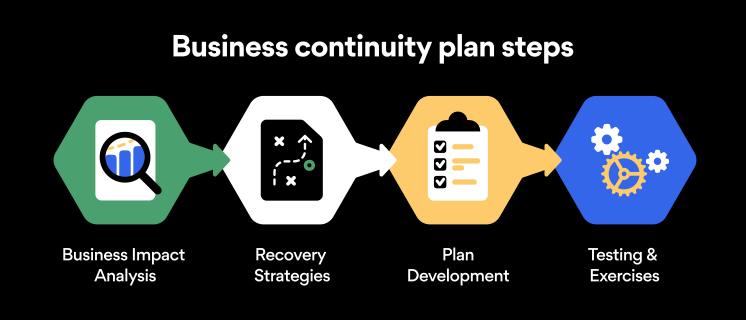
Here are some general guidelines that an organization looking to develop a BCP should consider:

Analysis

A business continuity plan should include an in-depth analysis of everything that could negatively affect the overall organizational infrastructure and operations. Assessing different levels of risk should also be a part of the analysis phase.

Design and development

Once you have a clear overview of potential risks your company could face, start developing a plan. Create a draft and reassess it to see if it takes into account even the smallest of details.

Implementation

Implement BCP within the organization by providing training sessions for the staff to get familiar with the plan. Getting everyone on the same page regarding crisis management is critical.

Testing

Rigorously test the plan. Play out a variety of scenarios in training sessions to learn the overall effectiveness of the continuity plan. By doing so, everyone on the team will be closely familiar with the business continuity plan’s guidelines.

Maintenance and updating

Because the threat landscape constantly changes and evolves, you should regularly reassess your BCP and take steps to update it. By making your continuity plan in tune with the times, you will be able to stay a step ahead of a crisis.

Level up your company’s security with NordPass Business

A comprehensive business continuity plan is vital for the entire organization’s security posture. However, in a perfect world, you wouldn’t have to use it. This is where NordPass Business can help.

Remember, weak, reused, or compromised passwords are often cited as one of the top contributing factors in data breaches. It’s not surprising, considering that an average user has around 100 passwords. Password fatigue is real and significantly affects how people treat their credentials. NordPass Business counters these issues.

With NordPass Business, your team will have a single secure place to store all work-related passwords, credit cards, and other sensitive information. Accessing all the data stored in NordPass is quick and easy, which allows your employees not to be distracted by the task of finding the correct passwords for the correct account.

In cyber incidents, NordPass Business ensures that company credentials remain secure at all times. Everything stored in the NordPass vault is secured with advanced encryption algorithms, which would take hundreds of years to brute force.

If you are interested in learning more about NordPass Business and how it can fortify corporate security, do not hesitate to book a demo with our representative.

About Version 2 Digital

Version 2 Digital is one of the most dynamic IT companies in Asia. The company distributes a wide range of IT products across various areas including cyber security, cloud, data protection, end points, infrastructures, system monitoring, storage, networking, business productivity and communication products.

Through an extensive network of channels, point of sales, resellers, and partnership companies, Version 2 offers quality products and services which are highly acclaimed in the market. Its customers cover a wide spectrum which include Global 1000 enterprises, regional listed companies, different vertical industries, public utilities, Government, a vast number of successful SMEs, and consumers in various Asian cities.

About NordPass
NordPass is developed by Nord Security, a company leading the global market of cybersecurity products.

The web has become a chaotic space where safety and trust have been compromised by cybercrime and data protection issues. Therefore, our team has a global mission to shape a more trusted and peaceful online future for people everywhere.

Should Couples Share Passwords?

So what’s the deal with password sharing? Would you give your partner the password to your banking account but not your phone? Is laying all your codes on the table a sign of trust or a massive security risk? Should couples share passwords at all? While it can help to build trust with a partner, sharing your passwords isn’t always the best idea.

We are asking some basic questions on a very touchy subject just to help keep your security tip top. Don’t worry — we’re not judging your loving relationship. We just believe in safety precautions no matter what, and you will too once you get a dose of reality from these not-so-lovely situations.

It’s all about how you share them

Sometimes the risk isn’t who you share your password with, but how you do it. Sharing your passwords over the internet, whether over unencrypted email or messaging apps, is like sharing them in plain view of the world. The next time you think about doing this, remember that any of the following situations can take hold (without you even knowing).

  • Your messaging app may not be as honest as you think. A messaging app without end-to-end encryption has full access to everything you send. End-to-end encryption means that the only person who can read your message is the person you send it to. Sounds like a given, right? Not when you consider the genuine possibility that your messaging app could be giving employees access to your private conversations.
  • Man-in-the-middle attacks. It’s true, attackers lurk in the middle of an exchange waiting to steal vital information, like passwords, credit card numbers, addresses… you name it. Without end-to-end encryption and zero-knowledge architecture, your credentials could be exposed, and a cybercriminal could be in and out of your bank account within seconds.

The easy way to share passwords securely

Looking at the potential risks that one might face when trying to share passwords online, it is quite natural to question whether couples should share passwords at all and is it worth the risk? The good news is that there’s a way to share passwords securely.

Obviously, the best defense is encryption. A messaging service or website using end-to-end encryption makes sure your data is kept safe from attackers. Password managers like NordPass help you store and share your passwords in a completely secure way.

With NordPass, encryption happens on your device, scrambling your data into gibberish before it even reaches the servers. This way everything you send remains locked, even from us – until it reaches your verified recipient.

NordPass Family is a great way for couples, families, or even groups of friends to further improve their online security. The Family plan comes with six Premium accounts and includes all the advanced security features. Best of all — you’ll be able to share passwords with other NordPass users instantly and effortlessly without sacrificing security.

The takeaway

Matters of the heart aside, always think twice before you send a password by text or messaging apps. Even if the service offers encryption, subpar ciphers and weak protocols can be broken by even a mediocre cyberattacker.

Sending a password securely with NordPass is easy. It locks your sensitive credentials in an encrypted vault. You can select them from a simple drop-down list and send in complete confidence.

The internet’s primary concern and priority is functionality. Your security and privacy probably aren’t. Don’t risk all of your accounts over something as small as sending a password.

About Version 2 Digital

Version 2 Digital is one of the most dynamic IT companies in Asia. The company distributes a wide range of IT products across various areas including cyber security, cloud, data protection, end points, infrastructures, system monitoring, storage, networking, business productivity and communication products.

Through an extensive network of channels, point of sales, resellers, and partnership companies, Version 2 offers quality products and services which are highly acclaimed in the market. Its customers cover a wide spectrum which include Global 1000 enterprises, regional listed companies, different vertical industries, public utilities, Government, a vast number of successful SMEs, and consumers in various Asian cities.

These days, cybercrime is rampant. It’s no longer a matter of “if” you’re going to suffer an attack but “when” it will happen. All companies want to be ready for any crisis. And this is where a business continuity plan comes into play.

But what is a business continuity plan exactly? Why is it important? What should one include? Today, we’re exploring all these questions in-depth.

What is a business continuity plan?

A business continuity plan (BCP) is a document that sets guidelines for how an organization will continue its operations in the event of a disruption, whether it’s a fire, flood, other natural disaster or a cybersecurity incident. A BCP aims to help organizations resume operations without significant downtime.

Unfortunately, according to a 2020 Mercer survey, 51% of businesses across the globe don’t have a business continuity plan in place.

What’s the difference between business continuity and disaster recovery plans?

We often confuse the terms business continuity plan and disaster recovery plan. The two overlap and often work together, but the disaster recovery plan focuses on containing, examining, and restoring operations after a cyber incident. On the other hand, BCP is a broader concept that considers the whole organization. A business continuity plan helps organizations stay prepared for dealing with a potential crisis and usually encompasses a disaster recovery plan.

Importance of business continuity planning

The number of news headlines announcing data breaches has numbed us to the fact that cybercrime is very real and frequent and poses an existential risk to companies of all sizes and industries.

Consider that in 2021, approximately 37% of global organizations fell victim to a ransomware attack. Then consider that business interruption and restoration costs account for 50% of cyberattack-related losses. Finally, take into account that most cyberattacks are financially motivated and the global cost of cybercrime topped $6 trillion last year. The picture is quite clear — cybercrime is a lucrative venture for bad actors and potentially disastrous for those on the receiving end.

To thrive in these unpredictable times, organizations go beyond conventional security measures. Many companies develop a business continuity plan parallel to secure infrastructure and consider the plan a critical part of the security ecosystem. The Purpose of a business continuity plan is to significantly reduce the downtime in an emergency and, in turn, reduce the potential reputational damage and — of course — revenue losses.

Business continuity plan template

Password security for your business

Store, manage and share passwords.

30-day money-back guarantee

Business Continuity Plan Example

[Company Name]

[Date]

I. Introduction

  • Purpose of the Plan

  • Scope of the Plan

  • Budget

  • Timeline

The initial stage of developing a business continuity plan starts with a statement of the plan’s purpose, which explains the main objective of the plan, such as ensuring the organization’s ability to continue its operations during and after a disruptive event.

The Scope of the Plan outlines the areas or functions that the plan will cover, including business processes, personnel, equipment, and technology.

The Budget specifies the estimated financial resources required to implement and maintain the BCP. It includes costs related to technology, personnel, equipment, training, and other necessary expenses.

The Timeline provides a detailed schedule for developing, implementing, testing, and updating the BCP.

II. Risk Assessment

  • Identification of Risks

  • Prioritization of Risks

  • Mitigation Strategies

The Risk Assessment section of a Business Continuity Plan (BCP) is an essential part of the plan that identifies potential risks that could disrupt an organization’s critical functions.

The Identification of Risks involves identifying potential threats to the organization, such cybersecurity breaches, supply chain disruptions, power outages, and other potential risks. This step is critical to understand the risks and their potential impact on the organization.

Once the risks have been identified, the Prioritization of Risks follows, which helps determine which risks require the most attention and resources.

The final step in the Risk Assessment section is developing Mitigation Strategies to minimize the impact of identified risks. Mitigation strategies may include preventative measures, such as system redundancies, data backups, cybersecurity measures, as well as response and recovery measures, such as emergency protocols and employee training.

III. Emergency Response

  • Emergency Response Team

  • Communication Plan

  • Emergency Procedures

This section of the plan focuses on immediate actions that should be taken to ensure the safety and well-being of employees and minimize the impact of the event on the organization’s operations.

The Emergency Response Team is responsible for managing the response to an emergency or disaster situation. This team should be composed of individuals who are trained in emergency response procedures and can act quickly and decisively during an emergency. The team should also include a designated leader who is responsible for coordinating the emergency response efforts.

The Communication Plan outlines how information will be disseminated during an emergency situation. It includes contact information for employees, stakeholders, and emergency response personnel, as well as protocols for communicating with these individuals.

The Emergency Procedures detail the steps that should be taken during an emergency or disaster situation. The emergency procedures should be developed based on the potential risks identified in the Risk Assessment section and should be tested regularly to ensure that they are effective.

IV. Business Impact Analysis

The Business Impact Analysis (BIA) section of a Business Continuity Plan (BCP) is a critical step in identifying the potential impact of a disruption to an organization’s critical operations.

The Business Impact Analysis is typically conducted by a team of individuals who understand the organization’s critical functions and can assess the potential impact of a disruption to those functions. The team may include representatives from various departments, including finance, operations, IT, and human resources.

V. Recovery and Restoration

  • Procedures for recovery and restoration of critical processes

  • Prioritization of recovery efforts

  • Establishment of recovery time objectives

The Recovery and Restoration section of a Business Continuity Plan (BCP) outlines the procedures for recovering and restoring critical processes and functions following a disruption.

The Procedures for recovery and restoration of critical processes describe the steps required to restore critical processes and functions following a disruption. This may include steps such as relocating to alternate facilities, restoring data and systems, and re-establishing key business relationships.

The Prioritization section of the plan identifies the order in which critical processes will be restored, based on their importance to the organization’s operations and overall mission.

Recovery time objectives (RTOs) define the maximum amount of time that critical processes and functions can be unavailable following a disruption. Establishing RTOs ensures that recovery efforts are focused on restoring critical functions within a specific timeframe.

VI. Plan Activation

  • Plan Activation Procedures

The Plan Activation section is critical in ensuring that an organization can quickly and effectively activate the plan and respond to a potential emergency.

The Plan Activation Procedures describe the steps required to activate the BCP in response to a disruption. The procedures should be clear and concise, with specific instructions for each step to ensure a prompt and effective response.

VII. Testing and Maintenance

  • Testing Procedures

  • Maintenance Procedures

  • Review and Update Procedures

This section of the plan is critical to ensure that an organization can effectively respond to disruptions and quickly resume its essential functions.

Testing procedures may include scenarios such as natural disasters, cyber-attacks, and other potential risks. The testing procedures should include clear objectives, testing scenarios, roles and responsibilities, and evaluation criteria to assess the effectiveness of the plan.

The Maintenance Procedures detail the steps necessary to keep the BCP up-to-date and relevant.

The Review and Update Procedures describe how the BCP will be reviewed and updated regularly to ensure its continued effectiveness. This may involve conducting a review of the plan on a regular basis or after significant changes to the organization’s operations or threats.

What should a business continuity plan checklist include?

Organizations looking to develop a BCP have more than a few things to think through and consider. Variables such as the size of the organization, its IT infrastructure, personnel, and resources all play a significant role in developing a continuity plan. Remember, each crisis is different, and each organization will have a view on handling it according to all the variables in play. However, all business continuity plans will include a few elements in one way or another.

  • Clearly defined areas of responsibility

    A BCP should define specific roles and responsibilities for cases of emergency. Detail who is responsible for what tasks and clarify what course of action a person in a specific position should take. Clearly defined roles and responsibilities in an emergency event allow you to act quickly and decisively and minimize potential damage.

  • Crisis communication plan

    In an emergency, communication is vital. It is the determining factor when it comes to crisis handling. For communication to be effective, it is critical to establish clear communication pipelines. Furthermore, it is crucial to understand that alternative communication channels should not be overlooked and outlined in a business continuity plan.

  • Recovery teams

    A recovery team is a collective of different professionals who ensure that business operations are restored as soon as possible after the organization confronts a crisis.

  • Alternative site of operations

    Today, when we think of an incident in a business environment, we usually think of something related to cybersecurity. However, as discussed earlier, a BCP covers many possible disasters. In a natural disaster, determine potential alternate sites where the company could continue to operate.

  • Backup power and data backups

    Whether a cyber event or a real-life physical event, ensuring that you have access to power is crucial if you wish to continue operations. In a BCP, you can often come across lists of alternative power sources such as generators, where such tools are located, and who should oversee them. The same applies to data. Regularly scheduled data backups can significantly reduce potential losses incurred by a crisis event.

  • Recovery guidelines

    If a crisis is significant, a comprehensive business continuity plan usually includes detailed guidelines on how the recovery process will be carried out.

Business continuity planning steps

Here are some general guidelines that an organization looking to develop a BCP should consider:

Analysis

A business continuity plan should include an in-depth analysis of everything that could negatively affect the overall organizational infrastructure and operations. Assessing different levels of risk should also be a part of the analysis phase.

Design and development

Once you have a clear overview of potential risks your company could face, start developing a plan. Create a draft and reassess it to see if it takes into account even the smallest of details.

Implementation

Implement BCP within the organization by providing training sessions for the staff to get familiar with the plan. Getting everyone on the same page regarding crisis management is critical.

Testing

Rigorously test the plan. Play out a variety of scenarios in training sessions to learn the overall effectiveness of the continuity plan. By doing so, everyone on the team will be closely familiar with the business continuity plan’s guidelines.

Maintenance and updating

Because the threat landscape constantly changes and evolves, you should regularly reassess your BCP and take steps to update it. By making your continuity plan in tune with the times, you will be able to stay a step ahead of a crisis.

Level up your company’s security with NordPass Business

A comprehensive business continuity plan is vital for the entire organization’s security posture. However, in a perfect world, you wouldn’t have to use it. This is where NordPass Business can help.

Remember, weak, reused, or compromised passwords are often cited as one of the top contributing factors in data breaches. It’s not surprising, considering that an average user has around 100 passwords. Password fatigue is real and significantly affects how people treat their credentials. NordPass Business counters these issues.

With NordPass Business, your team will have a single secure place to store all work-related passwords, credit cards, and other sensitive information. Accessing all the data stored in NordPass is quick and easy, which allows your employees not to be distracted by the task of finding the correct passwords for the correct account.

In cyber incidents, NordPass Business ensures that company credentials remain secure at all times. Everything stored in the NordPass vault is secured with advanced encryption algorithms, which would take hundreds of years to brute force.

If you are interested in learning more about NordPass Business and how it can fortify corporate security, do not hesitate to book a demo with our representative.

About Version 2 Digital

Version 2 Digital is one of the most dynamic IT companies in Asia. The company distributes a wide range of IT products across various areas including cyber security, cloud, data protection, end points, infrastructures, system monitoring, storage, networking, business productivity and communication products.

Through an extensive network of channels, point of sales, resellers, and partnership companies, Version 2 offers quality products and services which are highly acclaimed in the market. Its customers cover a wide spectrum which include Global 1000 enterprises, regional listed companies, different vertical industries, public utilities, Government, a vast number of successful SMEs, and consumers in various Asian cities.

About NordPass
NordPass is developed by Nord Security, a company leading the global market of cybersecurity products.

The web has become a chaotic space where safety and trust have been compromised by cybercrime and data protection issues. Therefore, our team has a global mission to shape a more trusted and peaceful online future for people everywhere.

NordPass Desktop App: Release Note

NordPass 4.37 (latest)

We’ve waved bye-bye to some pesky bugs and have also spruced up the place a touch – enjoy!

NordPass 4.36

We’re starting off 2023 on the right foot with a release that’s faster and more reliable. Stay tuned for some bigger announcements!

NordPass 4.35

No major updates this time, just a new and improved app release with some under-the-hood performance upgrades – enjoy!

NordPass 4.34

We’re happy to present you with a new release. Here’s what we’ve got this time:

  • DESIGN CHANGES TO ITEMS. We updated how your item details are displayed. Hope you’ll like it.

NordPass 4.33

Building good things takes time. So since the last release, we have mainly focused on catching and eliminating pesky bugs.

NordPass 4.32

This time we’ve waved bye-bye to some pesky bugs and have also spruced up the place a touch – enjoy.

NordPass 4.31

We’re happy to present you with a new release. Here’s what we’ve got this time:

  • AUTOFILL DISABLEMENT ON WEBSITES. You can now disable autofill on any page that you don’t want to fill your details. It won’t reset when you refresh the page but you can turn it back on at any time.

  • BUG FIXES.

NordPass 4.30

Here’s what you’ll see in the new NordPass release:

  • ONBOARDING UPDATE. New users will be greeted by a refreshed onboarding experience that will help them familiarize themselves with NordPass.

NordPass 4.29

No major updates this time, just a new and improved app release with some under-the-hood performance upgrades – enjoy!

NordPass 4.28

Building good things takes time. So since the last release, we have mainly focused on catching and eliminating pesky bugs.

NordPass 4.27

This time we’ve waved bye-bye to some pesky bugs and have also spruced up the place a touch – enjoy!

NordPass 4.26

No big announcements from us this time. However, we hope you’ll still enjoy an updated NordPass version with fewer bugs and better autofill.

NordPass 4.25

Our bug busters have been working hard since the last time you heard from us. That’s why today we can proudly present another NordPass release with even fewer bugs. We hope you’ll like it.

NordPass 4.24

Building good things takes time. So since the last release, we have mainly focused on catching and eliminating pesky bugs.

NordPass 4.23

We’re happy to present you with a new NordPass release. Here’s what we’ve got this time:

  • UPDATED PASSWORD INFO. Now you’ll get more guidance on making your passwords more secure. Open any of your passwords, and you’ll see whether it’s been reused on other accounts or it’s too old and needs changing.

  • BUG FIXES. Rome wasn’t built in a day. Therefore, we continuously aim to catch pesky bugs and provide you with the best password management experience.

NordPass 4.22

Here’s what you’ll see in the new NordPass release:

  • SWITCH ACCOUNT. A long-awaited feature is here! If you have a few NordPass accounts, like personal and business, switching between them will now be a breeze. Just click on your profile account and look for a “Switch Account” button.

  • LITHUANIAN LANGUAGE. For our Lithuanian friends out there, you can now use NordPass in your mother tongue. Simply head to Settings to change the language.

  • BUG FIXES.

NordPass 4.21

Our bug busters have been working hard since the last time you heard from us. That’s why today we can proudly present another NordPass release with even fewer bugs. We hope you’ll like it.

NordPass 4.20

We’re happy to present you with a new NordPass release. Here’s what we’ve got this week:

  • CARD PIN. From now on, you can also add your PIN when saving card details. Don’t worry; it won’t be autofilled. It’s for your reference only.

  • DELETE CLIPBOARD SETTING. When you copy your password or other item data, it’s normally saved in the clipboard. To avoid pasting it somewhere you didn’t intend; you can now choose the clipboard to clear after a set time.

  • BUG FIXES.

NordPass 4.19

It’s international women’s day! So we want to take this opportunity and say thank you to all the beautiful women who tirelessly work at NordPass. It wouldn’t be the same without you.

P.S. We mainly focused on fixing bugs this time, so we hope you like a better running app.

NordPass 4.18

Here’s what you’ll see in the new NordPass release:

  • SUBDOMAIN SORTING IMPROVEMENTS. From now on, if you have multiple items saved for one domain, the account with the matching subdomain will be shown first.

  • BUG FIXES.

NordPass 4.17

Did you know that January has a Blue Monday – the most depressing day of the year? The good news is it’s over. But if you’re still feeling a little bit blue, here’s a few things we’ve updated to hopefully cheer you up.

  • Safari import. You can now import passwords saved in Safari straight to NordPass.

  • Data Breach Report update. If your password appears in a Data Breach report and you update it on the website, select “Resolve” and the same details won’t appear next time you run the report.

  • Bug fixes. Caught many annoying bugs that hinder your experience.

Some write songs, some dedicate sonnets, some built monuments. We create release notes to honor each update of NordPass app for Windows, macOS and Linux. A single click of that magical “Update” button unlocks the newer, faster, better-performing world of stress-free password management.

NordPass 4.16

As Christmas is over, it’s time to make some New Year’s resolutions. But why wait? We want to become a better, smoother-running, and more user-friendly app now. We have strived for perfection since NordPass was launched, and this week is no exception. So we present you a new NordPass version with fewer bugs and more Autofill fixes.

NordPass 4.15

A good beginning makes a good ending, so why not start a week with a new NordPass release? Here’s what we’ve got this week:

  • BREACH SCANNER UPDATE. If your password was leaked in a data breach and you’ve reused it on other accounts, a new ‘Accounts at risk` tab will appear. There you’ll see a list of accounts that may be vulnerable. Don’t wait for a second and change their passwords to prevent cyber attacks.

  • AUTOFILL UPDATE. We’ve fixed a ton of autofill bugs so you’d have a smoother autofill experience on even more websites.

NordPass 4.14

We know that sometimes life throws challenges right at you. At those times, the last thing you want to think about is how and where to access your passwords.

That’s why from now on, you can give emergency access to your passwords and other items. Choose a person you really trust and invite them to be your emergency contact. Once they accept it, you can give them access immediately or wait for 7 days to be given automatically. Note: You can only give emergency access to another NordPass user with a Personal or Family plan.

NordPass 4.13

Trick or treat? Who are we kidding? It’s always just treated here at NordPass. So here’s our Halloween treat to you – a brand new NordPass release. Don’t worry, nothing to be scared of—just a smoother running version of your password manager.

NordPass 4.12

Tired of too many emails and banners? We get you, and we want to improve our communication with you. That’s why from now on, a lot of important information will appear as in-app notifications. So if you open the app and see a red dot next to a bell icon, just know that it’s something important from us to you.

P.S. We also solved a number of bugs.

NordPass 4.11

Getting your data stolen isn’t nice. But if that happens to you, it’s important to identify the stolen information and act quickly. That’s why with this release, Data Breach Scanner has gone even better. How?

If your data has ever appeared in any breach, you can now use the Breach Scanner to identify not just what type of data was leaked, but also see it in plain text. This includes passwords, your address, social security number, birth date, and other data types.

In addition to all this, we are continually working to improve one of our core features – Autofill. So expect to see more websites working flawlessly with NordPass.

NordPass 4.10

Can’t find tools to improve your password security? We got you. You’ll find security tools such as Password Generator, Data Breach Scanner, and Password Health in the sidebar from this release. More accessible to access and easier to use.

We also solved some pesky bugs to make your NordPass experience more enjoyable.

NordPass 4.9

What do you have in the box this time NordPass? Well, let me see…

  • Title and website address suggestion. That’s right, now when creating a new item, you only need to enter a few letters in the Title or Website address fields, and NordPass will suggest filling it with one of the thousand popular websites.

  • Spanish and Italian languages are now available on the NordPass extension.

  • Bug fixes, bug fixes, and more bug fixes.

NordPass 4.8

It’s August my friend. And you know what August is good for? Learning new languages.

Hablas español? Parli italiano? If you do, lucky you. Because you can now use NordPass in Spanish and Italian. Enjoy!

NordPass 4.7

Did you know that no one else has the same fingerprint as you? That’s why it’s the most unique password you can have. Dedicated Mac users, this release is for you. Yes, you can now sign in to your NordPass app with a fingerprint. Feeling like James Bond yet? We are!

P.S. We also solved a ton of pesky bugs to make your experience smoother than ever.

NordPass 4.6

Dear bugs, it’s time. Time to say goodbye. It won’t be the same without you. It will be better. The password managing experience will be much greater now.

NordPass 4.5

It’s officially summer, NordPass people! (Or winter, if you live in the southern hemisphere.) Wherever you are, we hope it’s sunny so that you can enjoy the brand new release. Here’s what we’ve got:

  • MULTIPLE ITEM SHARING. Sharing is caring, right? Well, now you can select multiple items and share them all at once. Easy peasy. Just always make sure you trust the people you share your credentials with.

  • PASSWORD GENERATOR HISTORY. You know that moment when you create a super-strong password with the NordPass Generator and forget to save it? Yeah, we’ve been there too. That’s why you’ll now see a little clock icon in your Generator where you can check your previously generated passwords.

  • BUG FIXES. And, of course, we won’t release a new NordPass version without getting rid of as many bugs as possible.

NordPass 4.4

“Speed” was the main keyword at NordPass this week. So what to expect in this release?

  • Updated designs so you could find your passwords or any other items at the speed of light.

  • Tons of bug fixes and maintenance work so that your app would work faster than ever and would be as pretty on the inside as it is on the outside.

NordPass 4.3

Don’t worry if you missed the chance to get NordPass Premium for less. The Summer Kick-Off Sale is here! Use this offer to get access to all the amazing Premium features.

Also, we have a little something for our Business users. From now on, all members who are added or removed from groups will be notified by email.

NordPass 4.2.18

Hello, world! We’ve prepared a nice little juicy pack of updates – just for you. Please give a warm welcome to:

  • Double EXTENSION-upgrade: from now on, not only it speaks German fluently but also is available in Dark Mode. Ready to give some rest for those sore eyes?

  • A new ge-ne-ra-tion for stronger passwords! Check out the PASSWORD GENERATOR to enjoy shiny new looks and (finally!) PASS-PHRASES for nice-and-strong-memorable-passwords.

NordPass 4.1

We are working hard on bringing Dark Mode to the NordPass extension. In the meantime, we are also doing some good old maintenance work. So expect to see some design changes in the browser extension and forget the existence of annoying bugs.

NordPass 4.0

Today is the day! You know what we are talking about. You asked for it; we delivered it. And oh boy, how good it looks! You’ll believe it once you see it.

OK, we recommend sitting down for this one. Then open your NordPass app, update it to the newest version and enjoy the shiny new DARK MODE.

And if that doesn’t impress you, well, then we have more news. You can now use NordPass in German. Whether it’s your mother tongue or just want to polish your German skills, you can now change your language preference in Settings.

NordPass 3.31

This time we’ve got many design changes to make your life easier. So let’s get to it. Here’s what you’ll see in this release.

  • TOAST MESSAGES UPDATE. Some of the success messages, such as when you import items or update your app, were outdated, so we made them easier to understand.

  • MULTISELECT REWORK. We noticed that the sorting option was missing when multiple items were selected. We introduced this option and changed long-winded buttons to visually pleasing icons.

  • BROWSER EXTENSION UPDATE. You can now access Tools from the NordPass extension, including the Password Health and the Data Breach Scanner.

NordPass 3.30

Are you ready to switch off the lights? Because Dark Mode is coming very very soon. We are working hard to make sure everything looks perfect for the release. A few more things, and we are done. Keep your eyes peeled.

In other news, we fixed some annoying bugs we found in Groups and took care of other bugs.

NordPass 3.29

Sometimes what we do is either too difficult to explain or too difficult to see. Yes, you guessed it. This week we put all our effort into finding and getting rid of bugs. We hope we’ll have something more exciting for you next week.

NordPass 2.34

NordPass has gone through some serious spring cleaning with this release. Why do we say so? Here’s what we did:

  • B2B GROUPS BUG FIXES. It’s new, fresh, and now with fewer bugs.

  • APP BUG FIXES. We’ll never give up on perfecting NordPass.

  • EXTENSION DESIGN REWORK. So much better looking now! You have to see it to believe it.

And something exciting is coming up very soon. So stay tuned. 😉

NordPass 2.33

This time, we’ve got good news for Business users. Let us introduce GROUPS. Admins and Owners can now assign members to groups and share passwords with a number of people instantly. Think, your finance department sharing login details every accountant needs to access.

Anything else? Of course, we got rid of more nasty bugs.

NordPass 2.32

Happy April Fool’s! Stay vigilant, and don’t get tricked by any hackers. Keep your passwords safe with an updated NordPass app. Here’s what we’ve got this time:

  • CHANGES TO MASTER PASSWORD CREATION. Now it’s easier to understand what that mysterious Master Password is and how it is different from your Nord Account password. BUG FIXES as usual.

NordPass 2.31

It’s spring! Flowers are blooming, birds are chirping, and NordPass is releasing another update. In this release, you’ll find: KEYBOARD SHORTCUTS. You can now use CTRL + F to search your items and CTRL + L to lock your app instantly. BUG FIXES. No bugs allowed here.

NordPass 2.30

NordPass bug hunters strike again. Yes, you guessed it. We got rid of more pesky bugs so you could enjoy an even smoother experience with NordPass. That’s it for now!

NordPass 2.29

“Could NordPass be any better?” asks our team every single week. And the answer never changes. YES, it can!

But it’s not always about new features and crazy advancements. Sometimes it’s all about perfecting those nitty-gritty details. So this week, we say another goodbye to a bunch of bugs. Bye, we won’t miss you.

NordPass 2.28

Another week, another release of a better, faster, and more secure NordPass app. And for this we say a BIG thank you to our bug hunters (aka developers). You guys rock.

NordPass 2.27

If NordPass was a dog, what would he say to a flea?

  • Stop bugging me.

The good news NordPass doesn’t need to endure nasty bugs. Bye-bye, bugs. We don’t wanna see you no more.

NordPass 2.26

Ready, set, new release! What can you expect to see in the new and shiny NordPass 2.26?

EXTENSION REWORK. Updated, upgraded, and overall better-looking browser extension. But what did we actually do? Well, we just made it even more similar to your desktop app, meaning more functional and easier to use. Voila!

BUG FIXES. Can you tell we don’t like insects? No bugs are allowed in our app. Yuck.

NordPass 2.25

It’s a very special day today. We thought about it over and over again. We were constantly considering, overthinking, and having sleepless nights about it. We even visited a fortune teller to ask if you’ll like it, or not. Yet still, our developers were nervously (but carefully!) coding that code.

And here it comes. A sincere love letter. In PDF format. Containing your Recovery Code. Save it, delete it, save it again, print it – do whatever you want, but please, keep it safe. And don’t show to anyone else! It was created from the bottom of our hearts to express how much we LOVE YOU.

Take care!

And don’t forget to update the app to get those extra bug fixes.

NordPass 2.24

Once upon a time, in a faraway land, a password manager named NordPass lived. His goal was to become the best password manager that there ever was. And he did it one release at a time.

He proudly presents his latest achievements:

  • AUTOSAVE AND PASSWORD EDIT UPDATES. Now it will be easier to understand when NordPass is prompting to update an old password or when it is offering to save a new one automatically.

  • HELP SECTION ADDED TO SETTINGS. If you need help using NordPass, head to Settings to be directed to the Help Center.

  • COPY CHANGES. Salvador Dali might have said not to fear perfection as we’ll never reach it, but we’ll still give it a good go.

  • BUG FIXES. No need to call the pest control officer; we got it fixed.

NordPass 2.23

AbraCadabra boom! No, it’s not magic. It’s just your passwords and personal information filling in quicker and smoother than ever before. Bye-bye, annoying bugs who tried to stop you. What else can you expect in this release?

  • ONLINE/OFFLINE INDICATOR appears in the NordPass extension.

  • COPY CHANGES to make the app easier to navigate.

  • MORE BUG FIXES.

NordPass 2.22

New Year, new NordPass release. Here’s what you’ll see in the latest version:

  • EASIER LOG IN WITH NORD ACCOUNT. We tweaked the steps you take logging in to NordPass for a smoother experience.

  • BUG FIXES, because no one likes bugs.

  • RECOVERY CODE PDF. You will now be able to download your Recovery Code in PDF. Keep it somewhere safe. 😉

NordPass 2.21

Yeah, Christmas will be different this year. But we’ve still got something to spread a little cheer.

In this release, you will see:

  • ICONLESS ITEMS STYLING. Your passwords that don’t have dedicated icons will light up in a variety of colors.

  • BUG FIXES. Well, it cannot be called a release without bug fixes, right?

NordPass 2.20

“You guys give up? Or are you thirsty for more?” – Kevin, Home Alone, 1990

That’s the NordPass spirit, Kevin! We’ve got more:

  • Design changes. Yes, the sky’s the limit for our designers, sorry.

  • Password Generator update. Did we mention that it’s important to have long and unique passwords?

  • Browser extension update. Easier to understand, prettier to look at.

NordPass 2.19

I don’t want a lot for Christmas
There is just one thing I need
I don’t care about the presents
Underneath the Christmas tree

Don’t want NordPass for my own
More than you could ever know
Making this wish come true
Giving a bug-free NordPass for you

P.S. Thanks Mariah Carey for inspiration.

NordPass 2.18

NordPass has turned 1 year old this week. Just on time for Thanksgiving, can you believe it? And we can honestly say this year we are the most grateful for YOU, our dear NordPass user. You, who believed in us and drove us to release one update after another.

So here’s one more. Full of even more design edits, bug fixes, and love:

  • LOGINS TURN TO PASSWORDS. Now all across the app, you’ll see the term “Password” instead of “Login” because it’s just easier to understand.

  • CHOOSE FOLDER WHEN AUTOSAVING to organize your passwords there and then.

  • RENEWED IMPORT. Importing passwords in bulk is now easier than ever.

  • MINOR DESIGN CHANGES because, let’s be honest, who doesn’t like a good-looking app.

  • NORD ACCOUNT DEEPLINK FIXES. No more accidental logouts when you use NordVPN and change your IP.

NordPass 2.17

Xmas is in less than 35 days. You’re welcome.

In other news, our designers, developers, and copywriters are presenting you with another brand new update. This time we fixed the annoying-forever-loading spinner, made minor changes to the way you see your items’ details, and updated the copy to make your app even more easier to navigate. Until next time 😉

NordPass 2.16

We know you have better things to do (like keep up with the news on the current presidential election. Yikes, so intense!). So we thought, ‘who are we to bombard you with more messages?’. Poof! Your login and logout messages are gone.

To make your day a little bit brighter, we also made some improvements to your items layout. And we can describe it with just one word – SLEEK. You’ll believe it when you see it 😉

And NordPass update wouldn’t be an update without bug fixes. We did the dirty work and crushed them once again.

NordPass 2.15

Trick or treat? Treat, always. We might be a few days late to any online Halloween party, but, to make up for it, we are bringing new treats to your desktop app:

  • ADD ITEM IN FOLDER. You can now add items straight from your folders. Easy, breazy, and all your items are organized.

  • ITEM DETAILS FIXES. “There is no limit to perfection!” screams the NordPass design team. Your items will now look more beautiful than ever.

  • OTHER LITTLE BUG FIXES. Little bugs and spiders might fit the Halloween theme, but they don’t look good in your NordPass app. We got rid of them to make your experience smoother and safer.

NordPass 2.14

Providing high-quality password-managing experience, routine maintenance and working under-the-hood is just as essential as releasing a new shiny feature. So nothing grand this time — just the usual bug-fixing and design-improving business. We’re packing and sending best wishes along with app improvements your way!

NordPass 2.13

  • BUG FIXES. Sometimes you couldn’t scroll down to the end of your passwords list. You simply couldn’t. The good news is that we did some magic tricks, so now you can.

  • BUG FIXES. We’ve also changed the font style, the button style, and the spacing style in the context menu of your passwords list (not exactly a bug, but we wanted to keep the release notes in style).

  • BUG FIXES for everyone.

  • BUG FIXES. Sometimes you couldn’t scroll down to the end of your passwords list. You simply couldn’t. The good news is that we did some magic tricks, so now you can.

NordPass 2.12

When life gives you Monday, we release the app update. Let’s see what we’ve got:

  • IN-APP NOTIFICATIONS sometimes were over-competitive and tried to overlap each other. Someone smart once said that the best way to kill competition is to partner it. So after some inspiring conversations about team spirit, the attitude was fixed – all notifications now act super friendly.

  • DESIGN BUG FIXES. Yes, sometimes bugs may look stylish. Even pretty. They are still bugs – and they are out now.

  • PASSWORD HEALTH IMPROVEMENTS. The development department was very excited about changing something with the algorithm. All I know is that the health of your passwords will be calculated even more accurately. I only write release notes – please don’t judge me. And have a nice day!

NordPass 2.11

Hey there! How are you? Ready for the update? Let’s go:

  • BREACH REPORT. This one feels like a lottery. By clicking a ‘Scan’ button, you can find out if any of your accounts were ever caught in data breaches. However, it probably is the first lottery where it’s better not to ‘win’ anything.

  • DESIGN IMPROVEMENTS. They see you scrollin’, they hatin’, – because scrolling with that new scroll bar has never felt so good. Just give it a go.

NordPass 2.1

Another week – another update. Let’s roll!

  • DESIGN IMPROVEMENTS. Yes, we did it again. We’ve played with UI, got lost in perfecting the details. Oh, baby baby. Yes, the item lists now look neat, the font is sent from above. It all looks perfect now!

  • PERFORMANCE IMPROVEMENTS. Let’s be honest – after entering your Master Password to unlock the vault, the app window was getting overexcited and moved all over the place. Not that it was a bad thing – but those moves really weren’t good. So, we’ve sent the app to some dancing classes. The result – the app learned some solid, stylish but still moves – more like JLo style.

NordPass 2.9

Faster than light.
Supersonic.
Fleet-footed.
Pronto.
Winged.

We’ve spent hours trying to find the right word to describe the improved speed of opening your passwords (and other items) in the vault, but none of them was good enough. They say that action speaks a thousand words, so enjoy viewing your items at full speed.

NordPass 2.8

Passwords are more human-natured than you could possibly think. They need a safe and cozy place to stay. Most of them eat well (cheat days included 😉 ) and constantly work out to become faster and stronger. However, sometimes they also may feel weak and unwell, so regular health check-ups are crucial. Luckily, we’ve found an easy way to maintain their well-being – set up a password health checker in the app. Take a chance to make your precious passwords happier (and accounts safer) without leaving the house.

Stay safe, everyone!

NordPass 2.7

The idea of throwing this party came out of thin air. Why not, we thought – work hard, party harder, right?

So we’ve ordered lots of food and drinks (everyone was curious seeing what new employees look like when they’re drunk), brought in a magical photo booth (making selfies was too mainstream), and prized trivia (to avoid awkward silences), and live music by our beloved DJ “Vibe Manager”.

Time flew, the party’s got in full swing (no one seemed to be running out of things to talk about – phew). Even NordVPN and NordLocker stopped by. After a not-work-related heated discussion about data privacy and online security, they promised to join our “Tools” department. Like, forever.

Autofill department surprised everyone with funky moves – those icons felt like dancin’ till the break of dawn. It was fun until the ‘fun’ went out of control – and out of login fields. Luckily, after taking a chill pill, everything’s got back in order.

By the way, some unwanted URL spaces were trying to crash both the party and the app. That’s kind of rude, so we’ve asked them to leave.

We’ve finished with a small team-building session with cleaning the office – it’s now nice and clean – and so is the app (we hope so).

That’s it – peace out!

NordPass 2.6

Our engineers are all about perfection. They literally were calculating coordinates for pixel-perfect autofill icons placement. However, some “wind of change” has happened, and those icons ended up finding their home OUTSIDE the login fields. Sorry for that – this unforgivable mistake was fixed.

Also, some sneaky, crawly, totally gross bugs were caught and removed. The app is much better without them – enjoy!

NordPass 2.5

This release contains some behind-the-scenes magic, usual tinkering-under-the-hood and minor design tweaks. By hitting the “Update” button, you will get one step closer to top-notch password-managing experience. Stay well!

NordPass 2.4

They say – small changes make a big difference. Behold – the update with a bunch of app upgrades is here. Let’s see what we’ve got here:

  • VISUAL IMPROVEMENTS. Mirror mirror on the wall, who is prettiest of them all? Well, our designer’s brush made some magic tweaks, so the answer is clear now – it’s those tiny cute little app icons. Lookin’ good!

  • APP LOADING FASTER. Need for speed? You’re welcome! Fasten your seatbelt and put the pedal to the metal – the project “Make the app faster” was completed successfully.

  • BUG FIXES. Dear sneaky bugs, thanks for visiting, farewell, let’s never meet again.

About Version 2 Digital

Version 2 Digital is one of the most dynamic IT companies in Asia. The company distributes a wide range of IT products across various areas including cyber security, cloud, data protection, end points, infrastructures, system monitoring, storage, networking, business productivity and communication products.

Through an extensive network of channels, point of sales, resellers, and partnership companies, Version 2 offers quality products and services which are highly acclaimed in the market. Its customers cover a wide spectrum which include Global 1000 enterprises, regional listed companies, different vertical industries, public utilities, Government, a vast number of successful SMEs, and consumers in various Asian cities.

These days, cybercrime is rampant. It’s no longer a matter of “if” you’re going to suffer an attack but “when” it will happen. All companies want to be ready for any crisis. And this is where a business continuity plan comes into play.

But what is a business continuity plan exactly? Why is it important? What should one include? Today, we’re exploring all these questions in-depth.

What is a business continuity plan?

A business continuity plan (BCP) is a document that sets guidelines for how an organization will continue its operations in the event of a disruption, whether it’s a fire, flood, other natural disaster or a cybersecurity incident. A BCP aims to help organizations resume operations without significant downtime.

Unfortunately, according to a 2020 Mercer survey, 51% of businesses across the globe don’t have a business continuity plan in place.

What’s the difference between business continuity and disaster recovery plans?

We often confuse the terms business continuity plan and disaster recovery plan. The two overlap and often work together, but the disaster recovery plan focuses on containing, examining, and restoring operations after a cyber incident. On the other hand, BCP is a broader concept that considers the whole organization. A business continuity plan helps organizations stay prepared for dealing with a potential crisis and usually encompasses a disaster recovery plan.

Importance of business continuity planning

The number of news headlines announcing data breaches has numbed us to the fact that cybercrime is very real and frequent and poses an existential risk to companies of all sizes and industries.

Consider that in 2021, approximately 37% of global organizations fell victim to a ransomware attack. Then consider that business interruption and restoration costs account for 50% of cyberattack-related losses. Finally, take into account that most cyberattacks are financially motivated and the global cost of cybercrime topped $6 trillion last year. The picture is quite clear — cybercrime is a lucrative venture for bad actors and potentially disastrous for those on the receiving end.

To thrive in these unpredictable times, organizations go beyond conventional security measures. Many companies develop a business continuity plan parallel to secure infrastructure and consider the plan a critical part of the security ecosystem. The Purpose of a business continuity plan is to significantly reduce the downtime in an emergency and, in turn, reduce the potential reputational damage and — of course — revenue losses.

Business continuity plan template

Password security for your business

Store, manage and share passwords.

30-day money-back guarantee

Business Continuity Plan Example

[Company Name]

[Date]

I. Introduction

  • Purpose of the Plan

  • Scope of the Plan

  • Budget

  • Timeline

The initial stage of developing a business continuity plan starts with a statement of the plan’s purpose, which explains the main objective of the plan, such as ensuring the organization’s ability to continue its operations during and after a disruptive event.

The Scope of the Plan outlines the areas or functions that the plan will cover, including business processes, personnel, equipment, and technology.

The Budget specifies the estimated financial resources required to implement and maintain the BCP. It includes costs related to technology, personnel, equipment, training, and other necessary expenses.

The Timeline provides a detailed schedule for developing, implementing, testing, and updating the BCP.

II. Risk Assessment

  • Identification of Risks

  • Prioritization of Risks

  • Mitigation Strategies

The Risk Assessment section of a Business Continuity Plan (BCP) is an essential part of the plan that identifies potential risks that could disrupt an organization’s critical functions.

The Identification of Risks involves identifying potential threats to the organization, such cybersecurity breaches, supply chain disruptions, power outages, and other potential risks. This step is critical to understand the risks and their potential impact on the organization.

Once the risks have been identified, the Prioritization of Risks follows, which helps determine which risks require the most attention and resources.

The final step in the Risk Assessment section is developing Mitigation Strategies to minimize the impact of identified risks. Mitigation strategies may include preventative measures, such as system redundancies, data backups, cybersecurity measures, as well as response and recovery measures, such as emergency protocols and employee training.

III. Emergency Response

  • Emergency Response Team

  • Communication Plan

  • Emergency Procedures

This section of the plan focuses on immediate actions that should be taken to ensure the safety and well-being of employees and minimize the impact of the event on the organization’s operations.

The Emergency Response Team is responsible for managing the response to an emergency or disaster situation. This team should be composed of individuals who are trained in emergency response procedures and can act quickly and decisively during an emergency. The team should also include a designated leader who is responsible for coordinating the emergency response efforts.

The Communication Plan outlines how information will be disseminated during an emergency situation. It includes contact information for employees, stakeholders, and emergency response personnel, as well as protocols for communicating with these individuals.

The Emergency Procedures detail the steps that should be taken during an emergency or disaster situation. The emergency procedures should be developed based on the potential risks identified in the Risk Assessment section and should be tested regularly to ensure that they are effective.

IV. Business Impact Analysis

The Business Impact Analysis (BIA) section of a Business Continuity Plan (BCP) is a critical step in identifying the potential impact of a disruption to an organization’s critical operations.

The Business Impact Analysis is typically conducted by a team of individuals who understand the organization’s critical functions and can assess the potential impact of a disruption to those functions. The team may include representatives from various departments, including finance, operations, IT, and human resources.

V. Recovery and Restoration

  • Procedures for recovery and restoration of critical processes

  • Prioritization of recovery efforts

  • Establishment of recovery time objectives

The Recovery and Restoration section of a Business Continuity Plan (BCP) outlines the procedures for recovering and restoring critical processes and functions following a disruption.

The Procedures for recovery and restoration of critical processes describe the steps required to restore critical processes and functions following a disruption. This may include steps such as relocating to alternate facilities, restoring data and systems, and re-establishing key business relationships.

The Prioritization section of the plan identifies the order in which critical processes will be restored, based on their importance to the organization’s operations and overall mission.

Recovery time objectives (RTOs) define the maximum amount of time that critical processes and functions can be unavailable following a disruption. Establishing RTOs ensures that recovery efforts are focused on restoring critical functions within a specific timeframe.

VI. Plan Activation

  • Plan Activation Procedures

The Plan Activation section is critical in ensuring that an organization can quickly and effectively activate the plan and respond to a potential emergency.

The Plan Activation Procedures describe the steps required to activate the BCP in response to a disruption. The procedures should be clear and concise, with specific instructions for each step to ensure a prompt and effective response.

VII. Testing and Maintenance

  • Testing Procedures

  • Maintenance Procedures

  • Review and Update Procedures

This section of the plan is critical to ensure that an organization can effectively respond to disruptions and quickly resume its essential functions.

Testing procedures may include scenarios such as natural disasters, cyber-attacks, and other potential risks. The testing procedures should include clear objectives, testing scenarios, roles and responsibilities, and evaluation criteria to assess the effectiveness of the plan.

The Maintenance Procedures detail the steps necessary to keep the BCP up-to-date and relevant.

The Review and Update Procedures describe how the BCP will be reviewed and updated regularly to ensure its continued effectiveness. This may involve conducting a review of the plan on a regular basis or after significant changes to the organization’s operations or threats.

What should a business continuity plan checklist include?

Organizations looking to develop a BCP have more than a few things to think through and consider. Variables such as the size of the organization, its IT infrastructure, personnel, and resources all play a significant role in developing a continuity plan. Remember, each crisis is different, and each organization will have a view on handling it according to all the variables in play. However, all business continuity plans will include a few elements in one way or another.

  • Clearly defined areas of responsibility

    A BCP should define specific roles and responsibilities for cases of emergency. Detail who is responsible for what tasks and clarify what course of action a person in a specific position should take. Clearly defined roles and responsibilities in an emergency event allow you to act quickly and decisively and minimize potential damage.

  • Crisis communication plan

    In an emergency, communication is vital. It is the determining factor when it comes to crisis handling. For communication to be effective, it is critical to establish clear communication pipelines. Furthermore, it is crucial to understand that alternative communication channels should not be overlooked and outlined in a business continuity plan.

  • Recovery teams

    A recovery team is a collective of different professionals who ensure that business operations are restored as soon as possible after the organization confronts a crisis.

  • Alternative site of operations

    Today, when we think of an incident in a business environment, we usually think of something related to cybersecurity. However, as discussed earlier, a BCP covers many possible disasters. In a natural disaster, determine potential alternate sites where the company could continue to operate.

  • Backup power and data backups

    Whether a cyber event or a real-life physical event, ensuring that you have access to power is crucial if you wish to continue operations. In a BCP, you can often come across lists of alternative power sources such as generators, where such tools are located, and who should oversee them. The same applies to data. Regularly scheduled data backups can significantly reduce potential losses incurred by a crisis event.

  • Recovery guidelines

    If a crisis is significant, a comprehensive business continuity plan usually includes detailed guidelines on how the recovery process will be carried out.

Business continuity planning steps

Here are some general guidelines that an organization looking to develop a BCP should consider:

Analysis

A business continuity plan should include an in-depth analysis of everything that could negatively affect the overall organizational infrastructure and operations. Assessing different levels of risk should also be a part of the analysis phase.

Design and development

Once you have a clear overview of potential risks your company could face, start developing a plan. Create a draft and reassess it to see if it takes into account even the smallest of details.

Implementation

Implement BCP within the organization by providing training sessions for the staff to get familiar with the plan. Getting everyone on the same page regarding crisis management is critical.

Testing

Rigorously test the plan. Play out a variety of scenarios in training sessions to learn the overall effectiveness of the continuity plan. By doing so, everyone on the team will be closely familiar with the business continuity plan’s guidelines.

Maintenance and updating

Because the threat landscape constantly changes and evolves, you should regularly reassess your BCP and take steps to update it. By making your continuity plan in tune with the times, you will be able to stay a step ahead of a crisis.

Level up your company’s security with NordPass Business

A comprehensive business continuity plan is vital for the entire organization’s security posture. However, in a perfect world, you wouldn’t have to use it. This is where NordPass Business can help.

Remember, weak, reused, or compromised passwords are often cited as one of the top contributing factors in data breaches. It’s not surprising, considering that an average user has around 100 passwords. Password fatigue is real and significantly affects how people treat their credentials. NordPass Business counters these issues.

With NordPass Business, your team will have a single secure place to store all work-related passwords, credit cards, and other sensitive information. Accessing all the data stored in NordPass is quick and easy, which allows your employees not to be distracted by the task of finding the correct passwords for the correct account.

In cyber incidents, NordPass Business ensures that company credentials remain secure at all times. Everything stored in the NordPass vault is secured with advanced encryption algorithms, which would take hundreds of years to brute force.

If you are interested in learning more about NordPass Business and how it can fortify corporate security, do not hesitate to book a demo with our representative.

About Version 2 Digital

Version 2 Digital is one of the most dynamic IT companies in Asia. The company distributes a wide range of IT products across various areas including cyber security, cloud, data protection, end points, infrastructures, system monitoring, storage, networking, business productivity and communication products.

Through an extensive network of channels, point of sales, resellers, and partnership companies, Version 2 offers quality products and services which are highly acclaimed in the market. Its customers cover a wide spectrum which include Global 1000 enterprises, regional listed companies, different vertical industries, public utilities, Government, a vast number of successful SMEs, and consumers in various Asian cities.

About NordPass
NordPass is developed by Nord Security, a company leading the global market of cybersecurity products.

The web has become a chaotic space where safety and trust have been compromised by cybercrime and data protection issues. Therefore, our team has a global mission to shape a more trusted and peaceful online future for people everywhere.

The LastPass Data Breach and How NordPass Keeps Your Data Safe

On December 22, 2022, LastPass announced that a data breach first disclosed in August 2022 was far more extensive than initially thought. The news sent shockwaves through the industry, leaving many password manager users — especially LastPass users — concerned about the security of their sensitive information.

The breach serves as a stark reminder that no online service provider may be completely bulletproof breach-wise. So today, let’s get into the LastPass data breach and what it means for NordPass users.

The LastPass data breach breakdown

Cybercriminal activity has been on a steady rise for the last decade, and it looks that the trend is not about to change. In fact, today, cybercrime is the most lucrative criminal activity and is estimated to cost the world $10.5 trillion annually by 2025.

So as our personal and financial information is increasingly getting stored online, it is critical that companies take all necessary steps to protect their customers’ data. Unfortunately, the recent LastPass data breach shows that even well-known companies can fall short security-wise.

The company’s latest statement explains that an unauthorized party was able to access LastPass’ cloud-based storage environment and copy customer vault data along with information from a backup of customer account information.

The extent of the breach is not yet clear, but it is likely that it included some personally identifiable data such as email addresses, phone numbers, and billing information for some users.

The response from LastPass to the breach has been met with criticism from both industry experts and customers. In fact, it has already led to a class-action lawsuit, with one plaintiff alleging that the data breach resulted in the theft of around $53,000 worth of Bitcoin.

Did the LastPass data breach affect all password manager users?

Let’s be clear — the LastPass data breach does not have any direct effect on NordPass, its users, or users data.

After all, we’re two different companies and products with completely different security approaches and mindsets. However, we admit that seeing a competitor affected by a breach of this magnitude is an acute reminder to stay vigilant and prepared at all times.

Is NordPass a secure place for your digital valuables?

Given the severity of the LastPass data breach, it’s only natural that people are questioning the security of their password manager, including NordPass.

First, one of the key elements of NordPass is that it is a zero-knowledge password manager equipped with an advanced encryption algorithm known as XChaCha20 to ensure protection of everything you store in NordPass.

This means that all data stored in the NordPass vault is first encrypted on your device and only then sent to the cloud-based server. Because of the way NordPass is set up, it is only you — the user — who holds the decryption key and has access to everything stored in their vault.

The NordPass team can’t see or access anything. The same principle applies in situations of breaches. Even if a bad actor were able to get their hands on your vault data, they would still need your device, which holds the decryption key, to access the actual contents of the vault data.

NordPass CTO Tomas Smalakys offers a more detailed explanation:

quotes

Each NordPass user has a unique public-key cryptography key pair. The Public Key is always stored in plaintext form. The Private Key, on the other hand, exists in plaintext form only on the user’s end device for a limited period of time and never leaves it.

When we need to store a user’s Private Key, it’s encrypted with secret-key cryptography (XChaCha20-Poly1305-IETF) on the user’s device and only then passed to us. While the app is unlocked, the unencrypted Private Key is stored in the secure memory accessible only to the NordPass application. When the application is locked, either by the user or automatically after a set period of inactivity, the Private Key is deleted from the secure memory.

For the user’s Private Key encryption, the Master Key is used. The Master Key is derived from the Master Password and a 16-byte unique-per-user cryptographic salt using the key derivation function (Argon2id). We ask the user for the Master Password every time we need to decrypt the user’s Private Key.


– Tomas Smalakys

NordPass CTO

Tomas further explains that in addition to the encryption principles above, every item (folder, password, credit card, etc.) has two types of data:

  • Metadata (title, website address, cardholder name, etc.)

  • Secret data.

For secret-key (symmetric) cryptography, we use an authenticated encryption algorithm:

  • XChaCha20 stream cipher encryption.

  • Poly1305 MAC authentication.

For public-key (asymmetric) cryptography, we use an authenticated encryption algorithm:

  • X25519 key exchange.

  • XSalsa20 stream cipher encryption.

  • Poly1305 MAC authentication.

User data is encrypted on their devices and never leaves the device in plain text. This means that when the data is in transit or at rest, it is fully encrypted. In the database, both metadata and secret data is encrypted. This means that if bad actors are able to get access to the database or any of its backups, no user data can be accessed.

Furthermore, at NordPass, we feel that due to the nature of our product, our security practices should be transparent. Both NordPass and NordPass Business have had their security posture thoroughly audited by Cure53, a renowned German auditing firm.

NordPass Business has also successfully passed the SOC 2 Type 1 Audit, which ensures that NordPass Business provides proper security controls to manage customer data and protect their interests with regard to privacy.

All these measures help to ensure that the sensitive data stored in NordPass vaults is protected at all times. However, these days bad actors are creative and no longer function as a one-person operation. So it’s always important to be vigilant with your own security and use strong, unique passwords for each account as well as enable two-factor authentication whenever possible.

Bottom line

It remains to be seen how the LastPass breach will impact the company and the password management industry as a whole, but one thing is clear: it has shaken user trust and serves as a cautionary tale for the importance of data security.

Regulatory Compliance and NordPass Business

Designed to ensure the safety and security of an organization’s operations and protection of its customers, regulatory compliance standards are a fact of life in today’s business world. Fail to comply and be ready to face serious financial, legal, and reputational harm to your organization.

Today, we’re taking an in depth look at regulatory compliance, exploring different standards, and looking into how NordPass Business can help your organization meet the requirements in an easier and more efficient way.

What is regulatory compliance?

Regulatory compliance refers to various processes and procedures of adhering to the laws, regulations, and standards set by various governing bodies. The regulations can come from numerous sources such as local, state, federal, or even international agencies, industry groups, and professional associations. The intention behind various regulatory compliance is to protect consumers and other stakeholders.

Importance of regulatory compliance

The aim of regulatory compliance is to make sure that businesses and organizations operate in a secure, responsible, and ethical manner. Regulatory compliance can also provide businesses and organizations with a competitive advantage by helping to create a culture of transparency and credibility with customers, employees, and other involved parties. Furthermore, adhering to regulatory compliance can improve internal processes, risk management procedures, and mitigate potential legal issues, which in turn lays a great foundation for a sustainable organization.

However, it’s critical to remember that most regulatory compliance is mandatory. Failing to comply with any of the mandatory regulations can result in hefty fines. For instance, Google has been fined nearly $57 million by French regulators for violation of the General Data Protection Regulation (GDPR). Meta — the company formerly known as Facebook — recently has been fined over $400 million by top EU regulators for forcing users to accept targeted ads.

Besides financial losses, non-compliance can cause major damage to the organization’s reputation as clients may lose trust in the organization. This can even lead to serious legal issues.

Below are some of the most common regulatory compliance standards.

National Institute of Standards and Technology (NIST)

The National Institute of Standards and Technology (NIST) is a US federal agency that develops technology, metrics, and standards to drive innovation and ensure operational security within a business environment. NIST compliance is mandatory for all US-based federal information systems except those related to national security. However, the standard can be adopted by any organization.

To be NIST-compliant, a company needs to implement access controls to limit the risk of unauthorized access, develop a comprehensive incident response plan, and devise audit procedures and schedules.

General Data Protection Regulation (GDPR)

The General Data Protection Regulation (GDPR) is a data protection law that applies to businesses and organizations operating within the European Union (EU) and the European Economic Area (EEA). It sets out rules for how organizations can collect, use, and store personal data, and provides individuals the right to access and control their personal data.

To adhere to the GDPR, organizations and businesses need to implement measures such as obtaining consent from individuals before collecting their data, providing clear and concise information about their data collection practices, and implementing appropriate security measures to protect personal data.

Health Insurance Portability and Accountability Act (HIPAA)

The Health Insurance Portability and Accountability Act (HIPAA) is a US law that sets out standards for the protection of personal health information. The law applies to healthcare providers and all other entities that handle personal health information in the US.

To meet the requirements set out by the HIPAA, organizations need to implement secure systems for storing and transmitting personal health information, providing training to employees on HIPAA requirements, and implementing access controls to prevent unauthorized access to personal health information.

Payment Card Industry Data Security Standard (PCI DSS)

The Payment Card Industry Data Security Standard (PCI DSS) is a set of security standards that apply internationally to organizations that handle credit card transactions. The regulatory standard sets out requirements for protecting cardholder data and preventing unauthorized access to such data.

The PCI DSS regulations require businesses and organizations that process payment card information to implement secure systems for storing and transmitting cardholder data, conduct regular security assessments, and implement further security controls to prevent unauthorized access to cardholder data.

ISO/IEC 27001

The ISO/IEC 27001 is an international standard that outlines best practices for an information security management system (ISMS). The standard has been developed to help organizations protect their information assets and manage risks related to information security. The ISO/IEC 27001 is not a mandatory requirement.

To meet the ISO/IEC 27001 compliance, organizations need to conduct regular risk assessments, implement controls to protect against unauthorized access, and regularly review and update their information security management systems.

California Consumer Privacy Act (CCPA)

The California Consumer Privacy Act (CCPA) is a privacy law that in many ways mimics its European counterpart — the GDPR. However, the CCPA applies to businesses operating in California and it provides California residents with the right to access and control their personal data, and imposes certain requirements on businesses that collect and handle personal data.

For an organization to be CCPA compliant, it needs to implement security measures to protect customer data. Furthermore, companies are also required to provide clear and concise information about data collection practices, allowing California residents to request access to and deletion of their personal data.

Gramm-Leach-Bliley Act (GLBA)

The Gramm-Leach-Bliley Act (GLBA) is a US law that applies to financial institutions within the US. Like many of the regulatory compliance standards we already discussed, GLBA requires financial institutions to implement safeguards that would protect personal information as well as to disclose their data collection and sharing practices to customers.

To comply with the GLBA regulatory standards, financial institutions may need to implement secure systems for storing and transmitting personal financial information, providing customers with information about their data collection and sharing practices, and implementing access controls to prevent unauthorized access to personal financial information.

Center for Internet Security (CIS)

The Center for Internet Security (CIS) is a nonprofit organization that provides cybersecurity guidance and best practices to help organizations protect their systems and data. The CIS comprises 18 Critical Security Controls for identifying and protecting against the most common cyber threats.

To be CIS compliant, companies and organizations need to establish a comprehensive cybersecurity perimeter to ensure protection of their data and information management systems.

Opinion 498

The Formal Opinion 498 outlined by the American Bar Association (ABA) provides guidance for US-based lawyers and law firms with regard to virtual practice. While the ABA Model Rules of Professional Conduct permit virtual practice, the Formal Opinion 498 provides an additional set of guidelines for virtual practice.

To follow the guidelines set out by the Opinion 498, organizations or individuals are urged to establish secure information management systems and protect them with complex passwords to ensure secure storage and access to client data.

Agence nationale de la sécurité des systèmes d’information (ANSSI)

ANSSI compliance combines a set of security standards set by the French National Cybersecurity Agency. The ANSSI has been developed as a regulatory standard in France to protect sensitive information and systems from cyber threats such as hacking, malware, and data breaches. Companies that store and handle sensitive information may be required to comply with the ANSSI standards in order to ensure the security of that information.

Compliance with the ANSSI standards may involve regular audits, penetration testing, and other security measures to identify and address vulnerabilities in a company’s systems.

How can NordPass help with regulatory compliance?

Meeting regulations and staying compliant can be a complex and time-consuming process, as businesses and organizations must stay up-to-date with the latest regulatory requirements and implement appropriate policies, procedures, and tools.

However, with the right tools at your disposal compliance can be less of a hassle than you might think. One such tool is NordPass Business — a secure and easy-to-use password manager designed for business use and it can help your organization comply with the security guidelines and requirements outlined in the regulatory compliance standards listed above. But how exactly can it help?

Strong passwords and secure password storage

Most regulatory compliance standards require organizations to implement some sort of security measures to limit the possibility of unauthorized access.

For instance, PCI DSS, GLBA, GDPR, and CIS Controls all have outlined guidelines for ensuring the security of personal data processing and storage.

This is where NordPass comes in as a tool that can help. Designed by the principles of zero-knowledge architecture and equipped with an advanced XChaCha20 encryption algorithm, NordPass offers a secure way to store and access business passwords and other sensitive information in line with regulatory requirements.

Password Policy — a NordPass Business feature — can also play a critical role in compliance. Using Password Policy, companies can set certain specifications for password complexity for the entire organization, which can significantly fortify the overall security of the organization.

To easily follow Password Policy rules and specifications, users can use our very own Password Generator — a tool that can generate a password adhering to all the specifications outlined in the Password Policy in just a few clicks.

On top of that, NordPass Business can ensure that all of your organization’s passwords are stored securely and in line with the regulatory requirements.

Secure access management

Some compliance standards require organizations to implement secure access management solutions. For example, this is the case with ANSSI compliance as well as with HIPAA and NIST.

Here NordPass Business and its Admin Panel can play a major role because it is designed to provide organizations a way to effectively and easily manage access privileges across the entire organization.

Via the Admin Panel, solution owners and admins can grant or revoke access to systems as well as monitor member activity within the organization. The Admin Panel is also the place where you can set the Password Policy for the organization, ensuring that passwords throughout the company adhere to certain specifications.

Breach Monitoring

Regulatory compliance standards also tend to outline best practices for responding to a security incident such as a data breach. This is explicitly outlined in the GDPR’s Article 33, which states that data breach including personal data breach should be reported within 72 hours to the supervisory authority. Failing to do so may result in a fine of 10 million or 2% of annual revenue.

NordPass Business is equipped with a Data Breach Scanner — a tool that can scan the entire company’s domain list for potential breaches. Because the Data Breach Scanner issues a notification to all members of the organization, the company potentially affected by a breach can act quickly and efficiently to contain it.

The NordPass Password Health tool can help you detect potentially weak, old, or reused passwords throughout the organization and significantly reduce the risk of unauthorized access.

Bottom line

These days, regulatory compliance is an inseparable part of running a business. Fail to comply and be ready to face hefty fines and serious reputational damage. However, compliance is never easy. But with the right tools at your disposal, the whole process can be a lot smoother.

NordPass Business can be a tool to assist organizations in meeting various requirements in an easier and more efficient way. By staying compliant, organizations can not only avoid costly fines and legal issues, but also gain a competitive advantage by building a culture of transparency and credibility with their customer base or investors.

About Version 2 Digital

Version 2 Digital is one of the most dynamic IT companies in Asia. The company distributes a wide range of IT products across various areas including cyber security, cloud, data protection, end points, infrastructures, system monitoring, storage, networking, business productivity and communication products.

Through an extensive network of channels, point of sales, resellers, and partnership companies, Version 2 offers quality products and services which are highly acclaimed in the market. Its customers cover a wide spectrum which include Global 1000 enterprises, regional listed companies, different vertical industries, public utilities, Government, a vast number of successful SMEs, and consumers in various Asian cities.

These days, cybercrime is rampant. It’s no longer a matter of “if” you’re going to suffer an attack but “when” it will happen. All companies want to be ready for any crisis. And this is where a business continuity plan comes into play.

But what is a business continuity plan exactly? Why is it important? What should one include? Today, we’re exploring all these questions in-depth.

What is a business continuity plan?

A business continuity plan (BCP) is a document that sets guidelines for how an organization will continue its operations in the event of a disruption, whether it’s a fire, flood, other natural disaster or a cybersecurity incident. A BCP aims to help organizations resume operations without significant downtime.

Unfortunately, according to a 2020 Mercer survey, 51% of businesses across the globe don’t have a business continuity plan in place.

What’s the difference between business continuity and disaster recovery plans?

We often confuse the terms business continuity plan and disaster recovery plan. The two overlap and often work together, but the disaster recovery plan focuses on containing, examining, and restoring operations after a cyber incident. On the other hand, BCP is a broader concept that considers the whole organization. A business continuity plan helps organizations stay prepared for dealing with a potential crisis and usually encompasses a disaster recovery plan.

Importance of business continuity planning

The number of news headlines announcing data breaches has numbed us to the fact that cybercrime is very real and frequent and poses an existential risk to companies of all sizes and industries.

Consider that in 2021, approximately 37% of global organizations fell victim to a ransomware attack. Then consider that business interruption and restoration costs account for 50% of cyberattack-related losses. Finally, take into account that most cyberattacks are financially motivated and the global cost of cybercrime topped $6 trillion last year. The picture is quite clear — cybercrime is a lucrative venture for bad actors and potentially disastrous for those on the receiving end.

To thrive in these unpredictable times, organizations go beyond conventional security measures. Many companies develop a business continuity plan parallel to secure infrastructure and consider the plan a critical part of the security ecosystem. The Purpose of a business continuity plan is to significantly reduce the downtime in an emergency and, in turn, reduce the potential reputational damage and — of course — revenue losses.

Business continuity plan template

Password security for your business

Store, manage and share passwords.

30-day money-back guarantee

Business Continuity Plan Example

[Company Name]

[Date]

I. Introduction

  • Purpose of the Plan

  • Scope of the Plan

  • Budget

  • Timeline

The initial stage of developing a business continuity plan starts with a statement of the plan’s purpose, which explains the main objective of the plan, such as ensuring the organization’s ability to continue its operations during and after a disruptive event.

The Scope of the Plan outlines the areas or functions that the plan will cover, including business processes, personnel, equipment, and technology.

The Budget specifies the estimated financial resources required to implement and maintain the BCP. It includes costs related to technology, personnel, equipment, training, and other necessary expenses.

The Timeline provides a detailed schedule for developing, implementing, testing, and updating the BCP.

II. Risk Assessment

  • Identification of Risks

  • Prioritization of Risks

  • Mitigation Strategies

The Risk Assessment section of a Business Continuity Plan (BCP) is an essential part of the plan that identifies potential risks that could disrupt an organization’s critical functions.

The Identification of Risks involves identifying potential threats to the organization, such cybersecurity breaches, supply chain disruptions, power outages, and other potential risks. This step is critical to understand the risks and their potential impact on the organization.

Once the risks have been identified, the Prioritization of Risks follows, which helps determine which risks require the most attention and resources.

The final step in the Risk Assessment section is developing Mitigation Strategies to minimize the impact of identified risks. Mitigation strategies may include preventative measures, such as system redundancies, data backups, cybersecurity measures, as well as response and recovery measures, such as emergency protocols and employee training.

III. Emergency Response

  • Emergency Response Team

  • Communication Plan

  • Emergency Procedures

This section of the plan focuses on immediate actions that should be taken to ensure the safety and well-being of employees and minimize the impact of the event on the organization’s operations.

The Emergency Response Team is responsible for managing the response to an emergency or disaster situation. This team should be composed of individuals who are trained in emergency response procedures and can act quickly and decisively during an emergency. The team should also include a designated leader who is responsible for coordinating the emergency response efforts.

The Communication Plan outlines how information will be disseminated during an emergency situation. It includes contact information for employees, stakeholders, and emergency response personnel, as well as protocols for communicating with these individuals.

The Emergency Procedures detail the steps that should be taken during an emergency or disaster situation. The emergency procedures should be developed based on the potential risks identified in the Risk Assessment section and should be tested regularly to ensure that they are effective.

IV. Business Impact Analysis

The Business Impact Analysis (BIA) section of a Business Continuity Plan (BCP) is a critical step in identifying the potential impact of a disruption to an organization’s critical operations.

The Business Impact Analysis is typically conducted by a team of individuals who understand the organization’s critical functions and can assess the potential impact of a disruption to those functions. The team may include representatives from various departments, including finance, operations, IT, and human resources.

V. Recovery and Restoration

  • Procedures for recovery and restoration of critical processes

  • Prioritization of recovery efforts

  • Establishment of recovery time objectives

The Recovery and Restoration section of a Business Continuity Plan (BCP) outlines the procedures for recovering and restoring critical processes and functions following a disruption.

The Procedures for recovery and restoration of critical processes describe the steps required to restore critical processes and functions following a disruption. This may include steps such as relocating to alternate facilities, restoring data and systems, and re-establishing key business relationships.

The Prioritization section of the plan identifies the order in which critical processes will be restored, based on their importance to the organization’s operations and overall mission.

Recovery time objectives (RTOs) define the maximum amount of time that critical processes and functions can be unavailable following a disruption. Establishing RTOs ensures that recovery efforts are focused on restoring critical functions within a specific timeframe.

VI. Plan Activation

  • Plan Activation Procedures

The Plan Activation section is critical in ensuring that an organization can quickly and effectively activate the plan and respond to a potential emergency.

The Plan Activation Procedures describe the steps required to activate the BCP in response to a disruption. The procedures should be clear and concise, with specific instructions for each step to ensure a prompt and effective response.

VII. Testing and Maintenance

  • Testing Procedures

  • Maintenance Procedures

  • Review and Update Procedures

This section of the plan is critical to ensure that an organization can effectively respond to disruptions and quickly resume its essential functions.

Testing procedures may include scenarios such as natural disasters, cyber-attacks, and other potential risks. The testing procedures should include clear objectives, testing scenarios, roles and responsibilities, and evaluation criteria to assess the effectiveness of the plan.

The Maintenance Procedures detail the steps necessary to keep the BCP up-to-date and relevant.

The Review and Update Procedures describe how the BCP will be reviewed and updated regularly to ensure its continued effectiveness. This may involve conducting a review of the plan on a regular basis or after significant changes to the organization’s operations or threats.

What should a business continuity plan checklist include?

Organizations looking to develop a BCP have more than a few things to think through and consider. Variables such as the size of the organization, its IT infrastructure, personnel, and resources all play a significant role in developing a continuity plan. Remember, each crisis is different, and each organization will have a view on handling it according to all the variables in play. However, all business continuity plans will include a few elements in one way or another.

  • Clearly defined areas of responsibility

    A BCP should define specific roles and responsibilities for cases of emergency. Detail who is responsible for what tasks and clarify what course of action a person in a specific position should take. Clearly defined roles and responsibilities in an emergency event allow you to act quickly and decisively and minimize potential damage.

  • Crisis communication plan

    In an emergency, communication is vital. It is the determining factor when it comes to crisis handling. For communication to be effective, it is critical to establish clear communication pipelines. Furthermore, it is crucial to understand that alternative communication channels should not be overlooked and outlined in a business continuity plan.

  • Recovery teams

    A recovery team is a collective of different professionals who ensure that business operations are restored as soon as possible after the organization confronts a crisis.

  • Alternative site of operations

    Today, when we think of an incident in a business environment, we usually think of something related to cybersecurity. However, as discussed earlier, a BCP covers many possible disasters. In a natural disaster, determine potential alternate sites where the company could continue to operate.

  • Backup power and data backups

    Whether a cyber event or a real-life physical event, ensuring that you have access to power is crucial if you wish to continue operations. In a BCP, you can often come across lists of alternative power sources such as generators, where such tools are located, and who should oversee them. The same applies to data. Regularly scheduled data backups can significantly reduce potential losses incurred by a crisis event.

  • Recovery guidelines

    If a crisis is significant, a comprehensive business continuity plan usually includes detailed guidelines on how the recovery process will be carried out.

Business continuity planning steps

Here are some general guidelines that an organization looking to develop a BCP should consider:

Analysis

A business continuity plan should include an in-depth analysis of everything that could negatively affect the overall organizational infrastructure and operations. Assessing different levels of risk should also be a part of the analysis phase.

Design and development

Once you have a clear overview of potential risks your company could face, start developing a plan. Create a draft and reassess it to see if it takes into account even the smallest of details.

Implementation

Implement BCP within the organization by providing training sessions for the staff to get familiar with the plan. Getting everyone on the same page regarding crisis management is critical.

Testing

Rigorously test the plan. Play out a variety of scenarios in training sessions to learn the overall effectiveness of the continuity plan. By doing so, everyone on the team will be closely familiar with the business continuity plan’s guidelines.

Maintenance and updating

Because the threat landscape constantly changes and evolves, you should regularly reassess your BCP and take steps to update it. By making your continuity plan in tune with the times, you will be able to stay a step ahead of a crisis.

Level up your company’s security with NordPass Business

A comprehensive business continuity plan is vital for the entire organization’s security posture. However, in a perfect world, you wouldn’t have to use it. This is where NordPass Business can help.

Remember, weak, reused, or compromised passwords are often cited as one of the top contributing factors in data breaches. It’s not surprising, considering that an average user has around 100 passwords. Password fatigue is real and significantly affects how people treat their credentials. NordPass Business counters these issues.

With NordPass Business, your team will have a single secure place to store all work-related passwords, credit cards, and other sensitive information. Accessing all the data stored in NordPass is quick and easy, which allows your employees not to be distracted by the task of finding the correct passwords for the correct account.

In cyber incidents, NordPass Business ensures that company credentials remain secure at all times. Everything stored in the NordPass vault is secured with advanced encryption algorithms, which would take hundreds of years to brute force.

If you are interested in learning more about NordPass Business and how it can fortify corporate security, do not hesitate to book a demo with our representative.

About Version 2 Digital

Version 2 Digital is one of the most dynamic IT companies in Asia. The company distributes a wide range of IT products across various areas including cyber security, cloud, data protection, end points, infrastructures, system monitoring, storage, networking, business productivity and communication products.

Through an extensive network of channels, point of sales, resellers, and partnership companies, Version 2 offers quality products and services which are highly acclaimed in the market. Its customers cover a wide spectrum which include Global 1000 enterprises, regional listed companies, different vertical industries, public utilities, Government, a vast number of successful SMEs, and consumers in various Asian cities.

About NordPass
NordPass is developed by Nord Security, a company leading the global market of cybersecurity products.

The web has become a chaotic space where safety and trust have been compromised by cybercrime and data protection issues. Therefore, our team has a global mission to shape a more trusted and peaceful online future for people everywhere.

×

Hello!

Click one of our contacts below to chat on WhatsApp

×