Skip to content

AES encryption: how does it safeguard your data?

Today, the primary method of information storage is digital, which is something hackers are well aware of. Consequently, threats targeting data security have increased relatively quickly, with businesses becoming the primary targets. This sets forth a precedent to balance data availability, ease of use, and security, enabling them to carry out daily operations while ensuring the confidentiality of sensitive data.

Businesses must ensure that they can perform their daily operations smoothly while guaranteeing data confidentiality. Advanced Encryption Standard (AES) was developed to address this challenge — an encryption algorithm that has become the de facto standard for protecting electronic data. In this article, we’ll explore what the AES encryption algorithm is, how it works, its features, and its security capabilities. We’ll also compare the Advanced Encryption Standard to other encryption methods.

What is AES?

AES stands for Advanced Encryption Standard, a specification for the encryption of electronic data. It was established by the United States National Institute of Standards and Technology (NIST) in 2001. Since then, it has become a widely used algorithm for symmetric key encryption.

The advanced encryption algorithm is based on the Rijndael cipher developed by two Belgian cryptographers, Joan Daemen and Vincent Rijmen, who submitted it to the NIST during the Advanced Encryption Standard selection process. As a block cipher, AES encrypts data in fixed-size blocks, so 128, 192, or 256 bits in length. This makes up various AES designations like AES-128, AES-192, and AES-256.

Advanced Encryption Standard has been extensively tested and is considered secure against all known practical attacks (like brute forcing) when used properly. For this reason, it’s used worldwide in various applications, including secure communications, file transfers, and storage.

AES implementation types

AES can be implemented using different modes of operation. They introduce new ways to apply symmetric block cipher to encrypt or decrypt data. The choice of implementation depends on the specific requirements of the application and the desired security properties. Here are its most commonly used types:

ECB (Electronic Codebook). Divides plaintext into blocks; each block is encrypted independently using the AES algorithm. This mode is simple and parallelizable, but it is unsuitable for encrypting large amounts of data or when there is repetitive data, as it can lead to patterns in the ciphertext.

CBC (Cipher Block Chaining). XORs each plaintext block with the previous ciphertext block before encryption. This introduces a dependency between blocks, making it more secure than ECB against pattern analysis attacks. Initialization Vector (IV) is used to encrypt the first block, and the ciphertext of each block is used as the IV for the next block.

CTR (Counter). Converts the block cipher AES into a stream cipher. It uses a counter value combined with a unique nonce (number used once) as the input to the AES algorithm. The resulting output is XORed with the plaintext to produce the ciphertext. CTR mode allows parallel encryption and decryption and is commonly used in scenarios where random access to encrypted data is required.

OFB (Output Feedback). Also converts AES into a stream cipher. It generates a keystream by encrypting an IV with AES and then XORs the keystream with the plaintext to produce the ciphertext. Unlike CTR, OFB requires sequential encryption and decryption, as errors in transmission can propagate to subsequent blocks.

CFB (Cipher Feedback). Very similar to OFB but operates on smaller units, typically individual bytes. It encrypts the IV and XORs the resulting output with the plaintext to produce the ciphertext. The keystream is then generated by encrypting the previous ciphertext block. Like OFB, CFB requires sequential processing.

GCM (Galois/Counter Mode). Combines AES encryption with a cryptographic hash function called GHASH. It provides both confidentiality and integrity of the data. GCM mode is commonly used in network communication protocols and is suitable for parallel processing.

Remember that these are just a few examples of AES encryption modes. The best choice for a specific use case will depend on factors like security requirements, performance, parallelizability, and specific needs of the application.

How AES encryption works

Fixed-length blocks of data (so 128, 192, or 256 bits) are transformed as a series of substitutions, permutations, and mixing operations are applied to encrypt and decrypt the data. As AES encryption uses a symmetric key, the same one is used for encryption and decryption.

The process occurs in stages:

1. Key expansion. The initial key is expanded into 44, 52, or 60 32-bit words for 128, 192, and 256-bit keys. These expanded words are used in the subsequent rounds of AES encryption. The key expansion process involves generating additional round keys from the initial key.

2. Initial round. The input or plaintext block is mixed with the initial round key before proceeding to the main rounds of AES encryption.

3. Each round of AES encryption consists of four transformations:

  • SubBytes. Each byte in the block is replaced with its corresponding byte in a predefined substitution box designed to resist known cryptographic attacks.

  • ShiftRows. Bytes in each block row are shifted cyclically to the left, with different offsets for different rows. This step ensures that each column of the output state of the ShiftRows operation is composed of bytes originating from each column of the input state.

  • MixColumns. Each column is transformed using a matrix multiplication operation, which provides diffusion and enhances the security of AES. This operation affects all four bytes in a column together.

  • AddRoundKey. The resulting block is combined with the round key derived from the key schedule. This step combines the data with the key, providing diffusion.

4. Finalization. After all the main rounds, a final round is performed, including all the steps except MixColumns.

5. Output. The resulting bits are the ciphertext corresponding to the input plaintext block.

Decryption is performed with the reverse operations in the opposite order. The key schedule is used directly (not reversed) to derive the round keys for decryption.

What are the features of AES?

AES is one of the most popular algorithms for securing sensitive data. Here are some key features that make it a robust encryption algorithm.

  • Symmetric key encryption. AES uses the same key for encrypting and decrypting data. This is different from other setups, using different keys for each stage.

  • Key sizes. AES supports various key sizes like 128, 192, and 256 bits. These different versions mean that the larger the key is, the stronger the encryption is. On the other hand, this also means that more computational resources are needed.

  • Security and efficiency. AES is one of the algorithms without any practical cryptanalytics attacks performed. In addition, it’s also relatively fast and efficient in both hardware and software implementations.

  • Widely accepted standard. AES is a de facto standard when securing wireless networks, VPNs, SSL/TLS for secure web browsing, and more.

  • Open-source. AES is an open standard. It’s freely available to the public and can be implemented in any software or hardware without paying royalties.

Is AES secure?

AES encryption is considered highly secure. Its widespread adoption and extensive analysis by security experts have field tested its resilience against cryptographic attacks. Currently, AES is believed to be resistant to all known practical attacks. That said, its security depends not only on the strength of the encryption algorithm itself but also on its use. Using a predictable or easily guessable encryption key could render AES ineffective.

While AES encryption is secure against cryptographic attacks, it’s also important to note that it’s not immune to other hacking attempts. Methods like side-channel attacks, which involve gaining information from the physical implementation of the cryptosystem rather than weaknesses in the algorithm itself, or social engineering attacks can still pose threats.

Future developments of technology in the fields like quantum computing could potentially impact the security of AES. Large-scale quantum computers, if they become widely accessible, could theoretically break AES, but this remains a distant prospect.

What’s the difference between AES-128 and AES-256?

The main difference between AES-128 and AES-256 lies in their key length. They both refer to different versions of the AES standard, with the numbers referring to the length of the encryption key used in bits:

  • AES-128 uses a 128-bit key length. It’s quicker and requires less computational power. The key space is huge and generally considered very secure and suitable for most purposes.

  • AES-256 uses a 256-bit key length. It’s slightly slower and requires more computational power due to the longer key. However, it provides a significantly larger key space, making it even harder for an attacker to guess the key. This makes it more secure than AES-128.

In practical terms, the security difference between AES-128 and AES-256 is relatively minimal. Both are considered secure and suitable for encrypting sensitive information.

What’s the difference between AES vs. DES?

DES encryption vs. AES encryption comparison table

AES and DES (Data Encryption Standard) are both symmetric key encryption methods, but they differ in various aspects like security, key size, block size, and round of operation.

AES allows key sizes of 128, 192, and 256 bits, making it more flexible and secure. Regardless of key size, it uses a block size of 128 bits. Also, the number of rounds in AES varies based on the key size (10 for 128-bit, 12 for 192-bit, and 14 for 256-bit). Due to its large key sizes, this algorithm is very secure and efficient. As it’s based on a design principle known as a substitution-permutation network (a combination of both substitution and permutation) and is fast in software and hardware.

Meanwhile, DES uses a fixed key size of 56 bits with a block size of 64 bits, which is relatively small and susceptible to brute-force attacks. As the key size is always fixed, DES always operates in 16 rounds. With enough computational power, DES is less secure and can be broken. Its cousin, 3DES, applies the DES algorithm three times to each data block, but it’s slower and less efficient than AES. DES is based on the so-called Feistel network, a symmetric structure used in most block cipher algorithms, which is still not as efficient as AES.

In conclusion, AES is a more robust and efficient encryption standard than DES in the modern computing landscape. For this reason, DES has been rendered largely obsolete due to its susceptibility to brute-force attacks and overall lower performance.

What’s the difference between AES vs. RSA?

illustration on How RSA encryption works 1400x596

While AES is a symmetric block cipher, RSA (Rivest-Shamir-Adleman) is an asymmetric encryption algorithm. AES is primarily used for encrypting data in transit and at rest. RSA is mainly used for secure data transmission, key exchange protocols, digital signatures, and small data encryption.

  • AES — uses symmetric keys to encrypt and decrypt data, so it’s faster, but the encryption key must be shared securely. The used key sizes are 128, 192, and 256 bits. Overall, AES is much faster and more efficient, particularly for encrypting large data.

  • RSA — uses asymmetric keys: a public key shared with everyone and a private key that’s kept secret and is used for encryption. RSA key sizes must be much larger to match equivalent security to AES, so 1024 to 4096 bits long. Due to its complexity and size RSA is rarely used for encrypting large amounts of data.

However, in practice, many systems use a combination of both RSA and AES. For example, RSA is used to securely share an AES key, which is then used to encrypt the actual data. This approach combines the speed and efficiency of AES with the convenience and security of RSA’s public-key system.

How does NordLayer incorporate AES encryption?

NordLayer encrypts data in transit using AES-256 or ChaCha20 ciphers (depending on the selected tunneling protocol. When OpenVPN and IKEv2 tunneling protocols are enabled, they use AES-256 encryption, while NordLynx uses ChaCha20. This leverages advanced encryption capabilities to ensure robust electronic data protection.

By utilizing AES encryption algorithms with a key length of up to 256 bits, NordLayer secures sensitive data transmitted across networks, protecting it from unauthorized access and interception. NordLayer’s implementation of AES encryption ensures the confidentiality and integrity of data, offering users peace of mind that their business communication is safe.

Contact NordLayer today to discuss your options for creating secure data exchange and access.

About Version 2 Digital

Version 2 Digital is one of the most dynamic IT companies in Asia. The company distributes a wide range of IT products across various areas including cyber security, cloud, data protection, end points, infrastructures, system monitoring, storage, networking, business productivity and communication products.

Through an extensive network of channels, point of sales, resellers, and partnership companies, Version 2 offers quality products and services which are highly acclaimed in the market. Its customers cover a wide spectrum which include Global 1000 enterprises, regional listed companies, different vertical industries, public utilities, Government, a vast number of successful SMEs, and consumers in various Asian cities.

About NordLayer
NordLayer is an adaptive network access security solution for modern businesses – from the world’s most trusted cybersecurity brand, Nord Security.

The web has become a chaotic space where safety and trust have been compromised by cybercrime and data protection issues. Therefore, our team has a global mission to shape a more trusted and peaceful online future for people everywhere.

2023 cybersecurity checklist for small businesses

Cybersecurity should be a major theme for small businesses in 2023. We hear about data breaches and exploit attacks targeting smaller organizations every week. And the threat environment constantly changes, presenting new risks for businesses to worry about.

Don’t worry, there are plenty of solutions and strategies to help SMBs. This article will help you handle 2023’s most urgent security risks. Our security checklist will cover critical areas of concern, with practical steps to respond effectively.

Importance of cybersecurity for small businesses

Cyber threats to big corporations and government bodies tend to dominate the news media. But SMBs are just as likely to fall victim to digital attacks, and the effects can be devastating.

In 2022, around 43 percent of ransomware attacks and data breaches targeted small and medium-sized businesses. Cyber-attacks hit 42 percent of SMBs in 2021.

The consequences can be dire. According to IBM, the average cost of a data breach has reached $4.35 million. Forbes reports that as many as 60 percent of small businesses targeted by cyber-attacks shut down within 6 months.

Larger corporations may be able to absorb the costs of data security failures, but smaller organizations struggle. When the risks are so high, SMBs simply cannot afford to neglect cybersecurity.

Understand the threat landscape

Small businesses face many potential cyber threats in today’s digital economy. Understanding the main risks is the first step toward improving your security posture.

  • Data breach risks – Malicious software (malware), account hijacking, and disgruntled insiders can all result in data breaches. The results can be financial losses, reputational damage, and even criminal prosecution.

  • Ransomware – Small businesses can also fall victim to ransomware. 2022 saw some high-profile cases, such as co-ordinated attacks on educational institutions, but any type of business is vulnerable.

  • Phishing – Social engineering attacks continue to rise, with a huge spike in Business Email Compromises in 2022. The growth of remote work and SaaS services also presents small businesses with new challenges, from IP spoofing to performance-destroying DDoS attacks.

When you add in DDoS attacks, worms, and viruses, securing business networks has never been more complex. That’s why we’ve come up with a small business cyber security checklist to guide SMBs.

If you check all of these boxes, your systems should be covered against today’s most damaging threats. So let’s get started.

Small business cybersecurity checklist

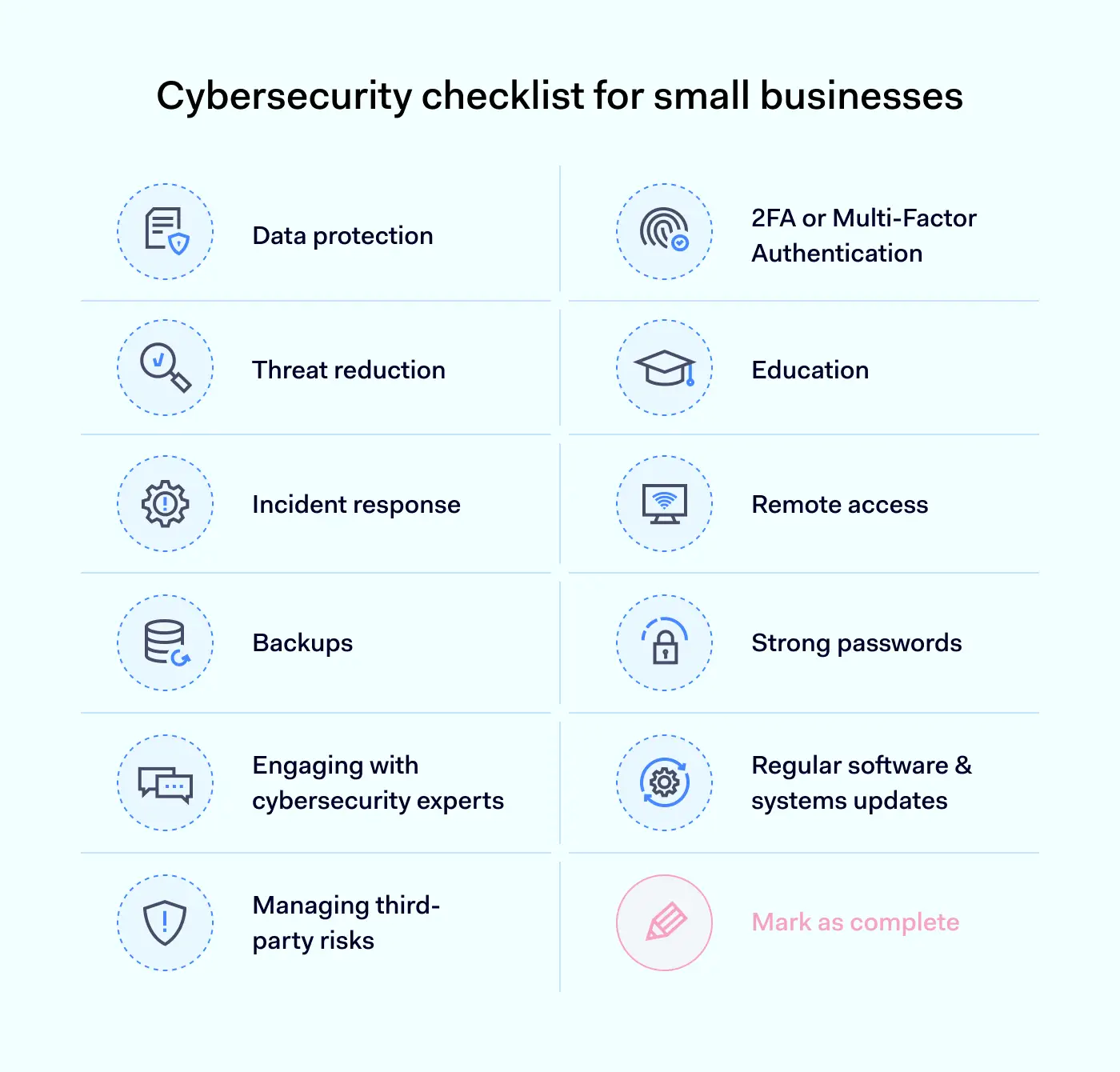
interactive cybersecurity checklist for small businesses

1. Data protection

Customer data is the number one target for cyber-attackers. So small businesses must prioritize data security when strengthening network security.

To start with, encryption is the most important data protection tool. Small businesses should:

  • Classify and protect all sensitive data with secure encryption.

  • Apply encryption to data at rest and in transit throughout network resources.

  • Couple encryption with Data Loss Prevention (DLP) tools. These tools track critical data and block exfiltration attempts by unauthorized users.

It is also important to limit employee access to confidential data. This restricts the threat surface for cybercriminals. If malicious actors gain access, they will have limited access to the data that matters. Measures to put in place include:

  • Applying the principle of least privilege via access controls. Authorized users should have access to the resources they need. But the rest of the network should be off-limits without authorization.

  • Minimizing the number of accounts with administrative privileges. Users should not be able to make global changes without approval from a user at the same or higher seniority level. Administrators should routinely remove unused or over-privileged accounts.

  • Using network segmentation tools. Segmenting your network creates safe zones for sensitive data. These zones are separated from general network traffic, making a data breach far less likely.

2. Threat reduction

Proactively meeting potential threats is a good way to reduce the chances of a successful attack. There are many ways to counter cyber threats, and small businesses should leverage tools that are both affordable and effective.

  • Email encryption and threat scanning tools make employee emails virtually unreadable to outsiders. And they scan incoming attachments to detect malware. The system quarantines suspicious emails, dramatically reducing phishing risks.

  • Malware scanners track incoming and outgoing network traffic. Intrusion prevention systems actively seek out known threats. Choose regularly updated tools that counter the most relevant attack vectors.

  • Firewalls screen access requests from outside the network. A properly-configured firewall implements tight access controls at the network edge. This creates a primary barrier that excludes users without the right credentials.

3. Incident response

All small businesses are at risk from cyber-attacks. And a natural disaster could occur at any time. Having a robust incident response plan is essential, providing a roadmap to system restoration and threat containment.

Incident response plans activate when attacks take place and generally feature the following steps:

  • Threat identification and containment

  • Protection of critical data

  • Threat elimination and mitigation

  • Restoration of system functionality

  • Mapping network damage or loss of data integrity

  • Auditing the incident response process and learning lessons to improve the security posture.

Carry out testing drills that simulate real-life attacks, and make sure all employees know their role in the incident response. Try to balance thoroughness and speed when responding. Be clear about when to move to the next stage, but move as quickly as possible.

4. Backups

Small businesses cannot afford to spend time and money rebuilding IT systems after an attack. There is no way back for companies that lose all of their customer data. That’s why an SMB cybersecurity plan should require backups of data and critical workloads before attacks occur.

  • There is no need to store all data. Categorize databases and workloads according to their importance.

  • Backup data is required to restore network and website functionality in the event of ransomware attacks.

  • Choose a cloud backup partner that encrypts your files securely and provides rapid access to company data when needed.

Robust data retention policies complement regular backups. These policies record:

  • How long the organization stores user or customer data

  • Where critical company data resides

  • Deletion procedures to safely erase stored data.

Storing too much data wastes valuable space, but it is also a security risk. Attackers may steal valuable data on company servers, even if that data has no business value for the organization itself. Compliance also matters. For instance, healthcare companies need data retention policies that conform to HIPAA standards.

5. 2FA or multi-factor authentication

Authentication protects the frontline of small business network security: user access. Without proper authentication systems, malicious users can easily gain access to sensitive information. And with the technology available today, there is no excuse to leave networks undefended.

Implement multi-factor authentication (MFA) for all critical assets. MFA goes beyond passwords and demands additional identification factors. This could include biometric data, one-time passcodes, or mobile scans. The idea is to add additional protective layers and make it harder to access valuable data.

MFA or 2FA is not advisable for all network actions, such as using SaaS collaboration tools or sending emails. Limit their use to systems that matter. This ensures a seamless user experience while guarding high-value assets.

6. Education

Small business employees may mean well. But good intentions mean nothing without training and access to clear security policies. Staff need to know how to access network resources safely and how to prevent avoidable cyber-attacks.

Ensure staff are aware of phishing risks, and focus on the dangers associated with unsolicited email attachments. Business phishing is becoming increasingly sophisticated. All network users must be aware of how to detect malicious messages.

It also helps to train staff to use access controls safely. Explain why multi-factor authentication exists and how authentication systems work. Write clear policies explaining the security obligations of employees. And include details about how to change security settings via secure channels. Store your security policies centrally, and make them freely available to all network users.

7. Remote access

Remote access allows workers to move around their sales region while staying in touch with their central office. It makes life easier for employees who need to be at home to care for children. And remote work is an appealing feature for new hires.

The problem is that remote access can be insecure. Small businesses need clear security policies for remote access. Security measures should include:

  • User access via Virtual Private Networks or secure remote access software.

  • Denial of access from insecure public WiFi networks.

  • Automated delivery of patched antivirus or DLP tools to remote workstations.

  • Central approval of all remote work devices.

  • IP allowlists and adaptive access controls to block unapproved devices.

  • Training to enforce password hygiene and anti-phishing knowledge.

  • Mandatory reporting of lost devices. Automated removal of access rights for users affected by device theft.

8. Strong passwords

Companies often invest huge sums in threat detection systems and encryption. But if employees use weak passwords, these efforts will have little effect. Enforcing a strong password policy is essential when defending critical resources.

  • Make password hygiene a core part of your security training procedures

  • Require strong passwords with a mix of lower and upper case letters, as well as non-alphabetic characters.

  • Enforce mandatory password changes. Users should change passwords at least quarterly to protect against credential thefts.

  • Source a secure password manager to automate password management. Make this available to all network users.

9. Engaging with cybersecurity professionals

SMBs usually don’t have sufficient resources to hire an IT security team. But they still need access to cutting-edge threat intelligence and advice when securing their networks. Enlisting the help of cyber security professionals is a good alternative strategy.

Businesses can commission security companies to carry out penetration testing and audit existing security systems.

Government agencies are also available to help. For example, the Federal Communications Commission (FCC) also assists small businesses, including the useful Small Biz Cyber Planner. It lets you organize milestones and covers the most important cybersecurity themes.

10. Regularly updating software and systems

Cyber-attackers routinely use exploits in unpatched software to force access to small business networks. It’s vital to deliver patches as soon as they become available. Delays expose your network to attack, resulting in data leaks before you have a chance to respond.

  • Automate updates on all network applications and devices. This includes servers, routers, and hardware firewalls (if you use one).

  • Audit software updates at least once a year. Apply any patches missed by automated delivery systems.

  • Regularly consult threat databases to stay aware of current exploits. Remember to check exploits to SaaS services as well as on-premises applications.

11. Managing vendor and third-party risks

Small businesses rarely work alone. They depend on partnerships with suppliers, maintenance professionals, freelancers, and security experts. But not all companies manage third-party risks effectively.

When choosing third parties to work with, assess potential partners carefully. They should have clear security policies, including information about data collection and sharing. And potential partners should be happy to adapt to your access management practices.

Treat third-party accounts just like employees. Add them to centralized access management systems, and limit their privileges to prevent access to confidential data. Make sure employees gain approval for all third-party access, including non-human APIs associated with cloud services.

How can NordLayer help?

NordLayer is the ideal cybersecurity partner for small businesses. We offer a range of services that will help you tick off the boxes in your cybersecurity checklist. And our solutions can adapt to suit almost any SMB.

  • IP allowlisting makes it easier to limit employee access and block unapproved addresses.

  • Our Cloud VPN lets users connect securely from homes or public locations.

  • IAM systems authenticate access requests and provide users with privileges matching their roles.

  • Device Posture Checks assess remote work devices and highlight vulnerabilities. And admins receive instant alerts about connections from unknown devices.

With the right technology and expert assistance, SMBs can protect data, block malware, and avoid damaging data breaches. Get in touch with NordLayer today. Together we’ll find a way to solve your cybersecurity concerns.

FAQ

Can small businesses be targeted by ransomware attacks?

Yes, they can. Small businesses often fall victim to ransomware attacks. Stats from the UK suggest that a quarter of SMBs suffer ransomware attacks annually, while around 50% of targets pay their attackers.

Ransomware attacks can be more damaging for small businesses than established corporations. Small enterprises work on tight margins. The cost of paying ransoms may be ruinous. And they are also sensitive to reputational damage. Putting customer data at risk with poor security practices will hurt any company’s prospects.

How often should I update my passwords?

Small business employees should update their passwords every three months (or once per quarter). Users should change their password if the organization suffers a cyber-attack. And administrative users should change their passwords more often than low-level users.

About Version 2 Digital

Version 2 Digital is one of the most dynamic IT companies in Asia. The company distributes a wide range of IT products across various areas including cyber security, cloud, data protection, end points, infrastructures, system monitoring, storage, networking, business productivity and communication products.

Through an extensive network of channels, point of sales, resellers, and partnership companies, Version 2 offers quality products and services which are highly acclaimed in the market. Its customers cover a wide spectrum which include Global 1000 enterprises, regional listed companies, different vertical industries, public utilities, Government, a vast number of successful SMEs, and consumers in various Asian cities.

About NordLayer
NordLayer is an adaptive network access security solution for modern businesses – from the world’s most trusted cybersecurity brand, Nord Security.

The web has become a chaotic space where safety and trust have been compromised by cybercrime and data protection issues. Therefore, our team has a global mission to shape a more trusted and peaceful online future for people everywhere.

Meet Nord People: Insights from our Engineering Managers

Cloud network security is a general term for the measures needed to secure virtualized cloud environments. It covers policies, processes, controls, and technologies. And it applies to private, public, and hybrid cloud deployments.

Basics of cloud network security

Cloud network security resembles traditional on-premises network security but with important divergences related to defending virtualized environments.

Like on-premises security, cloud network security defends network assets against external threats. Security systems for the cloud assess access requests and authorize users to access resources. They provide visibility for security managers, including real-time alerts and audit logs. And they neutralize malware and illegitimate data transfers.

Unlike standard security solutions, cloud defenses are not based on-site. Cloud security systems function via software-defined networking tools. Virtual gateways reside in the cloud, where they can protect applications and data from access requests – wherever users may be.

The context: understanding cloud computing

Cloud computing is the use of virtualized platforms to host applications and store data. The cloud exists as a worldwide network of servers and is accessible via a standard internet connection.

The user’s apps and data reside off-site, removing the need for on-premises hardware. Instead, network resources are “virtualized”. Resources are accessible to the owner or user, but they are hosted by cloud providers.

Users can choose to access software-as-a-service (SaaS) apps. Or they can build customized cloud deployments via platform-as-a-service (PaaS). In all cases, security is a shared responsibility between users and cloud service providers (CSPs).

Providers must secure hardware used to host cloud apps or data. Users must protect any data passing through cloud environments. They are also responsible for managing access to cloud assets.

Elements of cloud network security

Cloud network security solutions vary, but could include:

  • Integrated cloud security stacks – Includes next-generation firewall protection, anti-virus and anti-bot tools, intrusion prevention systems, controls for individual apps, IAM, and data loss prevention tools.

  • Sanitization – Systems can filter low-level traffic and remove potential threats, without the need for full-scale inspection.

  • Exploit protection – Protection against known Zero Day Exploits, with data derived from the latest threat intelligence.

  • Traffic inspection – Inspection of SSL/TLS traffic passing throughout virtualized environments. Analyzes encrypted traffic without compromising speed.

  • Centralized security administration – Solutions cover all cloud applications and storage assets. They integrate seamlessly with existing resources (including on-premises networks), providing total awareness of network activity.

  • Segmentation – Cloud network security applies micro-segmentation to limit user permissions and guard confidential data.

  • Remote access – Ensures secure access for remote workers and third parties. Users can connect to cloud assets safely from any location.

  • Automation tools – Includes automated extension to newly installed cloud services. Automated workflows blend ease of use and security, allowing companies to harness the potential of the cloud.

  • Simple integration – Cloud security tools integrate with legacy applications, operating systems, and third-party security systems.

The importance of cloud network security

The cloud is everywhere in modern life. Businesses, non-profits, and government agencies all rely on cloud infrastructure to deliver services and host workloads. But the rise of the cloud has created new security vulnerabilities. This means that organizations need to rethink their network security policies.

Traditional on-premises networks have simple security architecture. Central resources are protected by the network perimeter. Endpoints are few in number and easy to monitor. Access patterns and user communities change slowly, if at all. In this context putting in place firewalls and threat detection systems is relatively simple.

Cloud network security presents a different set of challenges.

  • In the cloud, there is no standard network perimeter. Users can access cloud gateways anywhere. IT teams rarely manage on-premises resources. Instead, cloud assets are maintained by cloud providers on servers across the world.

  • A public cloud environment can change rapidly. Employees might spin up new SaaS instances or cloud APIs. Staff could bring online new cloud storage containers to backup data or handle overflows.

  • Security teams need to maintain awareness, track user activity, and neutralize threats. Organizations need a cloud network security strategy that locks down critical cloud assets while enabling users to take advantage of cloud computing.

Cloud network security benefits

Adopting a cloud network security strategy has many advantages. The benefits of retooling your security setup for the cloud include:

Improved data security

The most important benefit of cloud network security is enhanced protection for sensitive data.

Cloud security solutions encrypt data at rest on the cloud. If files are stolen, cybercriminals will not be able to read data easily. Encryption of data in transit also makes it harder to track information flows and launch targeted interception attacks.

Micro-segmentation separates confidential data from the rest of an organization’s cloud network. Data resides in software-defined compartments that are accessible with the right credentials. Cloud security systems can define these segments at a granular level.

Better visibility for administrators

IT teams need visibility to monitor threats and user activity. But legacy security solutions are not well-adapted to discovering cloud apps and tracking activity in a cloud environment.

Cloud-native network security systems bring together all virtualized assets. Admins can monitor network activity in real-time via a single pane of glass. And automated alerts deliver information about potential threats before they become critical.

Simplified cloud policy management

Security policies should reflect the security needs of network owners and be delivered to all users. But delivering security policies consistently in cloud settings is a complex task. Unified cloud network security systems solve this problem.

IT teams can automatically deliver updated security policies to endpoints. Cloud-native solutions also make it easier to deliver policies across hybrid or multi-cloud environments.

Threat analysis and neutralization

Cloud resources are vulnerable to data breach attacks. Compromised remote access devices, phishing emails, and credential theft are common entry methods. Cloud-native security controls are the only effective response.

Robust security systems detect, contain, and neutralize malicious threats before they cause damage.

Cloud network security uses threat intelligence to counter the latest threats. Intrusion detection systems guard cloud gateways and scan network traffic. Anti-bot scanners also track emerging DDoS attacks. This prevents downtime from traffic flood attacks.

Security automation

Automation allows IT teams to work efficiently and securely. Users can automatically extend access controls and threat detection to new cloud resources. There is no need for lengthy manual configuration processes. New services receive instant coverage, limiting the risk of human error.

Cloud network security challenges

Cloud network security systems make sense for organizations that manage pure cloud or hybrid networks. But implementing cloud security is not a simple process. Challenges faced by organizations include:

Understanding shared responsibility

Under the shared responsibility model, CSPs and users share responsibility for securing cloud resources. This is accepted by users when they source cloud solutions. But determining areas of security responsibility can be difficult.

  • Cloud users must secure apps and data stored on the cloud. They must manage user access and monitor external threats.

  • CSPs are responsible for securing cloud infrastructure. They harden cloud servers to block data thieves or viruses.

This model leaves scope for overlap and confusion. For example, cloud users may rely on encryption provided by their cloud service provider. As a result, users may not apply encryption for data in transit or use Data Loss Prevention tools.

It’s essential to define areas of responsibility before activating cloud services. Most SaaS providers build security features into their products. But users always have a role to play, and this varies between different cloud contexts.

Managing dynamic cloud environments

Change is a core feature of cloud deployments. Apps come online constantly. Configurations may change to reflect developing workflows. New users connect from home or abroad. And individual employees can connect cloud containers with a few mouse clicks.

Automation can sometimes make this problem worse. For instance, companies may use autoscaling to build cloud deployments quickly. This boosts efficiency, but it also leaves security teams scrambling to catch up.

Cloud network security systems need to adapt to change. Admins must track access requests, respond to alerts, and discover threats if they infiltrate network infrastructure. This is even harder in hybrid environments that mix on-premises systems with extensive public and private cloud deployments.

Cloud network security best practices

Achieving cloud security can be challenging. But managing cloud security is far from impossible, even for small businesses. Follow these cloud network security best practices and build a security solution that meets your goals:

1. Apply Zero Trust principles

Zero Trust Network Architecture (ZTNA) is a security model that teaches users to trust no one. This is a good rule to apply when securing cloud infrastructure.

Avoid situations where users have global network privileges, and adopt a denial-by-default stance. Require more than one authentication factor when allowing user access. And segment cloud environments to limit east-west movement within the network.

Zero Trust changes the focus of security strategies to meet cloud computing needs. Instead of policing the network edge, admins concentrate on managing identities. This is a good fit for dynamic cloud environments. Deployments may constantly change. But user communities are easier to manage.

2. Lock down interfaces between the cloud and the internet

Internet-facing assets are a critical security risk. Access portals, web forms, and email accounts connect with the wider internet. This makes them common vectors for malware and data theft attacks.

Configure cloud apps to minimize contact with the internet. If necessary, leverage threat protection tools to guard vulnerable points. Web Application Firewalls (WAF) can deny access to suspicious network traffic. DDoS and intelligent detection systems handle malicious agents that breach the firewall.

Set automated alerts to inform admins about potential risks. When building cloud network security systems, prioritize internet-facing assets. Carry out enhanced risk assessments, log user activity, and test access controls to secure entry points.

3. Use micro-segmentation to protect critical data

Cloud security systems usually include the ability to micro-segment networks. Micro-segmentation lets you guard critical data with an additional layer of protection. This has security benefits, while also helping companies comply with relevant data security regulations.

4. Use private cloud solutions to enhance security

Private clouds allow users to communicate and collaborate without creating links to the external internet. This limits the scope for attackers, whether they use email phishing or malware injection.

Build networks that blend private and public cloud tools without compromising security. Determine which workflows require internet access. Switch everything else to private access technology that does not require external IP addresses.

5. Work with partners to establish security responsibilities

The principle of shared responsibility divides security functions between service providers and consumers.

Before commissioning new SaaS or IaaS products, be clear about security responsibilities. Create a security policy for each cloud service explaining your areas of responsibility and the security controls you will use. This should complement your cloud partner’s security policy. There should be no areas of ambiguity.

6. Write and deliver clear cloud security policies

Robust cloud network security rests upon good documentation and organization.

Cloud security policies define the controls used to secure cloud resources. This could include multi-factor authentication, Identity and Access Management, and data encryption. Policies also inform users about their security responsibilities.

Every SaaS app or cloud-hosted database should have a security policy. Store policies centrally. And use automated delivery to ensure that policies are implemented consistently and rapidly.

The role of AI and machine learning in cloud network security

Cloud network security is advancing all the time. And one of the most exciting research areas is the application of Artificial Intelligence to secure cloud environments.

AI harnesses machine learning to assess cloud security threats. Also known as User and Entity Based Analytics (UEBA), this technology scans user activity to detect malicious agents. AI engines compare real-time user behavior to logs of previous activity. In theory, this information helps to authenticate legitimate users and unmask intruders.

However, UEBA faces some challenges before becoming mainstream. For example, AI requires structured data sets and huge amounts of information to function properly. Generating useful data takes time and may also breach privacy regulations.

Attackers will also adapt to the use of machine learning. Expect to see Advanced Persistent Threats (APTs) that gather user activity data and build fake profiles to fool UEBA scanners. If IT teams rely too much on AI, this could become a security threat.

Cloud network security: key takeaways

Legacy security systems were designed for on-premises networking. Next-generation cloud security tools are built into the cloud, where they operate alongside SaaS apps and cloud infrastructure.

  • Threat detection systems neutralize malware attacks.

  • Access management tools block unauthorized users.

  • Segmentation keeps high-value assets safe behind additional barriers.

  • Encryption conceals data from external intruders

These features work together to mitigate security risks associated with the cloud. In a world where businesses depend on cloud infrastructure, robust cloud network security is essential.

Looking for a cloud network security solution?

NordLayer will help you build customized cloud network security architecture. Our products include a range of cloud-native features to protect data and enable secure collaboration. For example, users benefit from:

  • Seamless identity management.

  • Threat blocking tools to analyze network traffic and block cloud threats.

  • Secure gateways link remote workers to the cloud

  • Control access with IP allowlisting.

Achieve reliable, comprehensive cloud network security. Get in touch with NordLayer and discuss your options today.

About Version 2 Digital

Version 2 Digital is one of the most dynamic IT companies in Asia. The company distributes a wide range of IT products across various areas including cyber security, cloud, data protection, end points, infrastructures, system monitoring, storage, networking, business productivity and communication products.

Through an extensive network of channels, point of sales, resellers, and partnership companies, Version 2 offers quality products and services which are highly acclaimed in the market. Its customers cover a wide spectrum which include Global 1000 enterprises, regional listed companies, different vertical industries, public utilities, Government, a vast number of successful SMEs, and consumers in various Asian cities.

About NordLayer
NordLayer is an adaptive network access security solution for modern businesses – from the world’s most trusted cybersecurity brand, Nord Security.

The web has become a chaotic space where safety and trust have been compromised by cybercrime and data protection issues. Therefore, our team has a global mission to shape a more trusted and peaceful online future for people everywhere.

Meet Nord People: Insights from our Engineering Managers

As we strive to create a safer cyber future for everyone, our talented engineering team takes center stage. Curious about what it’s like to be at the heart of our operations? We recently caught up with a few engineering leaders at Nord Security: Gerrit Garbereder, Rokas Dambrauskas, and Paulius Kimbartas to discuss their teams, daily tasks, challenges, and skills.

But not everything made it into the video, and we had a few requests for further exploration! So settle back and enjoy, as we delve deeper into the world of Nord Security engineering.

Engineering teams’ role and projects

Hello, Gerrit, Paulius, and Rokas! Thanks for your time today. To start things off, could you tell us how your teams play a role in the success of Nord Security?

Paulius: Hi there. My team at NordVPN is developing the Checkout system, polishing purchase flows so that customers can get our products in the easiest and most secure way possible. So simply enabling people to purchase our products in their preferred way helps grow our user base.

Gerrit: We’re building tools to protect NordPass customers, even when they’re not actively using the app. Further, as the Premium squad, our team concentrates on monetization of the service. We’re driving this by maximizing customer satisfaction and value for money. Delivering high quality tooling will increase premium subscriptions and reduce the churn rate.

Rokas: Our mission is to continuously enhance the NordLocker platform, creating a seamless and efficient experience for everyone who uses it. By doing so, we empower other teams to excel in their work and ultimately drive the success of the entire company.

Awesome! What are some recent interesting projects you’ve worked on?

R: A little more than a year ago, NordLocker made the strategic decision to go serverless and focus on building cloud-based solutions. In recent months, we finally managed to migrate one of our core functionalities to the cloud, which was a very challenging task!

P: On the NordVPN team, we recently added a one-click payment option to enable our existing users to have a seamless purchase experience in a secure way. This feature required multiple components, such as authentication and secure data retrieval.

G: Adding attachments to NordPass was a really challenging project. We had to align the integration with our colleagues at NordLocker while the underlying structure was reworked from the ground up. During this project we created not only new features but also formed new bonds with people across multiple teams.

Work tools and daily operations

And to get these projects over the finish line, which tools do you normally use?

R: Some tools are used across the whole company. GitLab helps us manage our codebase. For snappy communication, we use Slack. Apart from that, engineers are free to use their IDEs and tools of preference.

P: To expand on that, my team uses Docker, Grafana – and those are only off the top of my head! In terms of programming languages, primarily we use TypeScript, PHP, and GO.

G: As a cross-functional team we’re using a whole zoo of tools every day. We provide each guild the tooling that fits their needs. Android, iOS and Backend development is enabled through corresponding IDEs.

What does an engineering manager do on an average day?

R: My day is quite diverse. I spend most of the time communicating with my team, ensuring their projects are on track and addressing any issues that may arise. I also participate in meetings with other teams and help with long-term planning.

P: In one word: dynamic. My primary focus everyday is to enable engineering teams to achieve their goals, so ad-hoc knowledge sharing, brainstorming, and guiding people takes time every day. On the other hand, focus time is really important for me. Planning upcoming features and aligning our goals across teams is a vital part of my work. It contributes to the team’s overall performance and happiness.

G: To add to the above, after the daily scrum in the morning, I typically take care to remove impediments for the team’s current tasks. Once everyone is unblocked I move towards tactical planning together with the Product Owner on upcoming projects and challenges.

R: I always strive to do some hands-on technical work as well, so I can stay connected to my team and the work they’re doing.

Growth opportunities and skills needed

What do you look for in your teammates?

P: It’s all about having an eagerness to learn – the cybersecurity field is very dynamic, new risks arise and our engineers need to be constantly learning and up to date with new technologies and best practices.

R: Strong technical skills are important, but we also look for individuals who are excellent problem-solvers, able to work well in a team, and have a growth mindset.

G: Engineering specialists are of course expected to be experts in their field. However, I believe it’s also necessary for this role to be open-minded with customer success as a focus. And I agree with Paulius, my expectation for any engineer is to be curious and eager to learn.

P: One other crucial thing is to be an honest communicator. If something’s wrong, we don’t wait till the situation develops. We speak about it and solve it.

How does your team grow together?

R: In my team I encourage open communication and knowledge sharing, which helps everyone on the team to continually refine their skills. Also we do regular performance evaluations, 1-on-1 meetings, as well as offering opportunities to attend relevant training and conferences.

P: Yes, 1-on-1 meetings help us to determine how each engineer wants to grow, because growth is such an individual thing. I always plan the team’s work accordingly, and prioritize initiatives that will help us all grow.

G: We benefit from the training possibilities provided through the Tesonet Group, which focus mainly on soft skills. Hard skills are improved through mentorship programs, online courses, and conferences. I encourage my team to spend around 10% of their time learning, which is scheduled into our sprint planning.

Challenges and how we solve them

It sounds like there’s a lot to consider! What challenges do you face as managers?

G: Translating the big picture into actionable items that allow individual contributors to relate their work to the company’s success is a challenge. Making everyone aware of the actual problem we are trying to solve is a difficult task. Often enough engineers tend to dive straight into a sophisticated solution while a simpler solution would have solved the customer’s problem with ease.

R: For me, it’s balancing the needs of my team with the demands of the business. This can include prioritizing tasks, ensuring everyone is on track to meet deadlines, and effectively communicating changes or updates to the team.

P: I agree with that. Alignment across individual, team, and organization goals is a challenge. The ideal situation is when each engineer’s goals are in alignment with what we as a team want to achieve, and the team goals are in alignment with what we as an organization wants to achieve. In such situations any friction disappears and you can simply tackle whatever challenges you have.

How does your team work together?

G: Our distributed team is shaped by people from different nations with a variety of backgrounds. This mixture of people and culture fosters a vivid exchange of experiences. Not every day is joy and laughter, life is full of challenges and we are handling those challenges together. Recent events in Ukraine and Türkiye are two examples of compassion and support within the team beyond professional distance.

P: Smartest restless achievers I’ve ever known. Each person on the team brings ideas on how we can overcome new challenges, which we always have. On top of that some challenges come unforeseen, but that does not stop us. We can simply jump on a call and brainstorm the solution together. Pair programming is a great way to solve problems.

___

Thanks to Gerrit, Paulius, and Rokas for their time today!

If you’re an engineer or manager interested in working with us at Nord Security to create a safer cyber future, check out our job postings below.

About Version 2 Digital

Version 2 Digital is one of the most dynamic IT companies in Asia. The company distributes a wide range of IT products across various areas including cyber security, cloud, data protection, end points, infrastructures, system monitoring, storage, networking, business productivity and communication products.

Through an extensive network of channels, point of sales, resellers, and partnership companies, Version 2 offers quality products and services which are highly acclaimed in the market. Its customers cover a wide spectrum which include Global 1000 enterprises, regional listed companies, different vertical industries, public utilities, Government, a vast number of successful SMEs, and consumers in various Asian cities.

About NordLayer
NordLayer is an adaptive network access security solution for modern businesses – from the world’s most trusted cybersecurity brand, Nord Security.

The web has become a chaotic space where safety and trust have been compromised by cybercrime and data protection issues. Therefore, our team has a global mission to shape a more trusted and peaceful online future for people everywhere.

Best practices for secure access to Figma

As businesses increasingly shift towards digitalization, secure access to apps cannot be overstated. Today, data breaches and cyberattacks are a constant threat, making cloud security a critical business function. It’s especially difficult with collaborative tools where in-house and external team members work on joint projects.

As a web-based interface design and prototyping tool, Figma allows teams to collaborate in real-time, making various design projects easier to manage and execute. Yet, given its collaborative nature and integration capabilities with other tools, this makes Figma’s security a critical concern for these organizations.

In this article, we’ll look at Figma’s access security and highlight some best practices to prevent various risks.

Why is it important to secure access to Figma?

Figma, a collaborative interface design tool, has become an integral part of the work of designers and developers across industries. As a cloud-based application, Figma allows teams to co-design and manage projects easily, bringing together freelancer help and in-house employees allowing them to create, share, and edit designs in real-time. As many enterprise projects are considered confidential information, its secure access has become a growing concern.

Secure access to Figma projects is essential to ensure the integrity of the designs and limit access to protect the intellectual property of the organization or involved individuals. Therefore, its security is a crucial aspect to consider for all users.

Figma security best practices

Several key features in Figma can help organizations to edit privileges, sharing files securely. Here are some best practices that could help your team to secure their work.

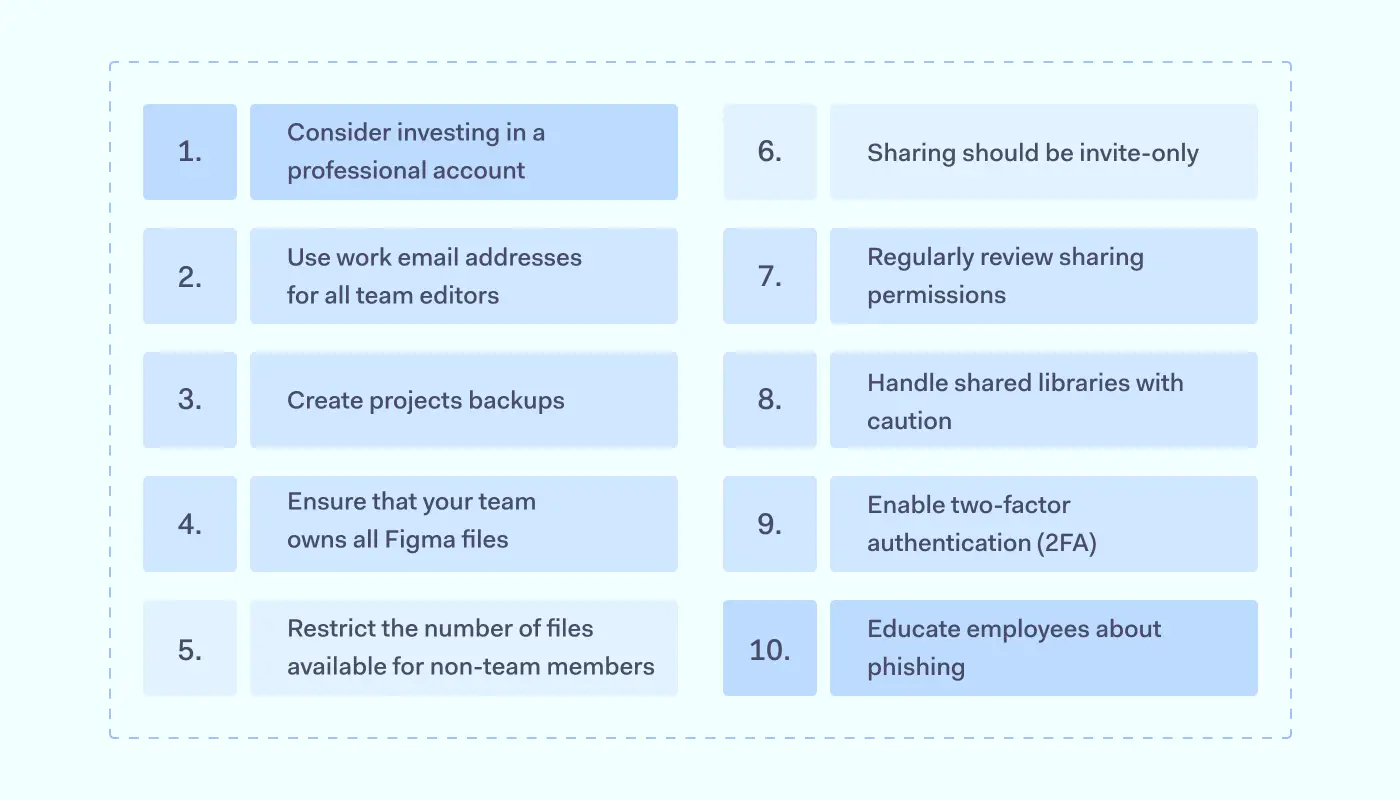
Best practices for secure access to Figma

1. Consider investing in a professional account

Figma’s Professional plan enhances security measures to offer finer controls over file and prototype permissions. This enables effective management of teams and grants members access to specific Figma file folders and projects. The Professional account also includes unlimited version history, facilitating the tracking of modifications made to a Figma file and identifying the individuals responsible.

2. Use work email addresses for all team editors

If a team member engages in unauthorized activities, it’s a good practice to use work email addresses for all team editors. It enables your company’s IT or security team to promptly revoke edit privileges, maintaining the security and integrity of your organization. This creates an effective safety net against potential threats and can mitigate risks arising from unauthorized actions (i.e. a freelancer going rogue).

3. Create projects backups

Once a project reaches a significant milestone or is considered complete, consider archiving .fig files in a separate file system from Figma. This might involve exporting the final work as PDFs or prototype videos, followed by exporting source files. When the project is officially concluded, relocating these files to a yearly archive with tighter access controls makes sense. Developers can also use these files as a reference for new projects.

4. Ensure that your team owns all Figma files

The ownership of crucial Figma files should be exclusively retained within the team and not granted to external individuals, freelancer colleagues or clients. Figma files include sensitive and proprietary information, including design assets, user interface components, and collaborative work. Therefore, passing ownership to external parties could not only compromise the project’s confidentiality but also pose the risk of unauthorized modifications, distribution, or misuse of the content.

5. Restrict the number of files available for non-team members

Figma offers some access controls built-in. For example, it allows sending invites at the file level. As a general guideline, it’s advisable to refrain from sending invitations to external individuals at the project level unless it’s absolutely necessary. Furthermore, Figma allows granting access solely to prototypes within files. This feature is a lifesaver when individuals require visibility into the prototype without access to the underlying design work. These functions combined allow careful control and protect the access of their design files, ensuring collaboration while maintaining data privacy.

6. Sharing should be invite-only

Files sharing is one of the key priorities when setting up secure access to Figma. While public share links may seem quick and easy, they often fall short of providing robust protection for sensitive information. That’s why it’s highly recommended that the default setting for file sharing should be set to invite only. This way, an additional layer of control and accountability is added. By curating a precise list of invited individuals, the Figma file owner can rest assured that only trusted parties can access the file’s contents.

7. Regularly review sharing permissions

Figma file owners should frequently review the individuals invited to access their files. This helps keep invite-only lists in check, keeping them consistently updated (focusing on disabling publicly available links when they’re no longer needed). It not only ensures data security but also safeguards the integrity of the design process. Figma file owners can use this as a proactive measure to mitigate potential security breaches and stay up to date in terms of team access.

8. Handle shared libraries with caution

Shared libraries demand an added level of attention and consideration. It’s imperative to minimize edit access permissions when it comes to critical design libraries. In most cases, this means that individuals outside the team should never have the opportunity to change your design system. By adhering to this stringent approach, you can safeguard the consistency and stability of your design libraries.

9. Enable two-factor authentication (2FA)

The default Figma password protection is inherently vulnerable to various risks like password reuse or exposure through data breaches. 2FA adds an extra layer of authentication beyond just a strong password. It requires the team to provide additional information, typically a one-time password (OTP) or a verification code, usually generated on a separate device. This ensures that even if someone manages to obtain or guess a user’s password, they still need access to the second factor to gain entry.

10. Educate employees about phishing

Many phishing and social engineering attempts rely on tricking users into revealing sensitive information or compromising their accounts. Educating team members about these threats increases their awareness of the tactics employed by malicious actors and may help them to recognize potential attacks. As Figma accounts often contain valuable and confidential information, their hijacking could lead to data breaches or unauthorized modification to design files. Better-educated employees can protect their accounts better, use stronger passwords, and be cautious about sharing account information.

How can NordLayer help?

Figma is a modern necessity for most creatives and designers. With flexible tools to connect everyone in the design process, it helps to deliver better products and services faster. From websites, applications, and logos — Figma allows users to improve workflow and get creative. Yet, its security is a concern requiring finding a balance between security and ease of use.

Secure access to SaaS apps can be easily improved by implementing IP allowlisting with NordLayer. Our tools help to manage access securely, secure network edges, and track user actions across endpoints. Providing an encrypted and secure internet connection safeguards your team’s Figma activity.

Contact us today, and discover how to combine the benefits of Figma with airtight security.

About Version 2 Digital

Version 2 Digital is one of the most dynamic IT companies in Asia. The company distributes a wide range of IT products across various areas including cyber security, cloud, data protection, end points, infrastructures, system monitoring, storage, networking, business productivity and communication products.

Through an extensive network of channels, point of sales, resellers, and partnership companies, Version 2 offers quality products and services which are highly acclaimed in the market. Its customers cover a wide spectrum which include Global 1000 enterprises, regional listed companies, different vertical industries, public utilities, Government, a vast number of successful SMEs, and consumers in various Asian cities.

About NordLayer
NordLayer is an adaptive network access security solution for modern businesses – from the world’s most trusted cybersecurity brand, Nord Security.

The web has become a chaotic space where safety and trust have been compromised by cybercrime and data protection issues. Therefore, our team has a global mission to shape a more trusted and peaceful online future for people everywhere.