
Skip to content

Enforcing 2FA to Intranet Applications and Internal Web Resources with Thinfinity’s RBAC Capabilities: A Secure SSL VPN Solution

I) Introduction 

Virtual Desktop Infrastructure (VDI) and Desktop-as-a-Service (DaaS) are leading innovations in IT resource management, revolutionizing how businesses operate and manage their IT assets. This guide delves into the intricacies of establishing virtual desktop environments, covering the technical groundwork, user management tactics, security measures, and scalability—all vital for accommodating the dynamic requirements of modern businesses.

As organizations strive to boost operational efficiency and fortify their security measures, the roles and benefits of VDI and DaaS become more pronounced. The primary focus here is to unpack the critical components necessary for the successful implementation of virtual desktop solutions. Through an examination of various case studies, this article offers IT professionals and decision-makers a practical framework to navigate the complexities of virtual desktop technologies and to choose the most suitable solution—be it VDI or DaaS—for their needs.

Understanding VDI and DaaS:

  • Virtual Desktop Infrastructure (VDI) is a technology that hosts desktop environments on a centralized server. This setup allows users to access their desktops on any device capable of supporting the VDI’s interface, regardless of the geographic location. The main appeal of VDI is its ability to offer a controlled, customized, and secure desktop experience to multiple users while maintaining the data and applications on a company-managed server.
  • Desktop-as-a-Service (DaaS), on the other hand, is a cloud service model where the entire desktop virtualization is handled by a third-party provider. DaaS solutions deliver similar benefits as VDI, such as accessibility from multiple devices and locations; however, they reduce the organization’s burden of managing the underlying infrastructure, updates, security, and storage, as these responsibilities are managed by the DaaS provider.

II) Key Considerations for Choosing Between VDI and DaaS

Security and Compliance: With VDI, you have direct control over the security and compliance measures, tailoring them to meet specific organizational standards and regulations.

Pros of VDI

  • Endpoint Independence: Users can access their virtual desktop from any device, providing flexibility without compromising the desktop environment or experience.
  • Centralized Management and Control: VDI offers a centralized platform for managing user desktops, streamlining IT operations, and enforcing policies across the organization.
  • Endpoint Choice: Organizations can provide a variety of endpoint options, from high-end workstations for power users to more cost-effective thin clients for standard users.
thumb-down

Cons of VDI

  • Digital Employee Experience Challenges: Implementing VDI requires careful planning to ensure that the digital workspace delivers a responsive and robust user experience.
  • Infrastructure Costs: Initial setup for VDI can be capital intensive, with significant investments needed for servers, storage, and network infrastructure.
  • Solution Complexity: The complexity of a VDI environment can be substantial, requiring a high level of IT expertise to manage the infrastructure, software, and potential issues that arise.

Pros of DaaS

  • Agility and Elasticity: DaaS platforms are highly scalable, allowing businesses to quickly adjust their resources to meet changing demands.
  • Utility Pricing/Pay Per Use: Many DaaS providers offer a pay-as-you-go model, converting a capital expense into an operational one and avoiding the need for large upfront investments.
  • Cloud Service Integration: DaaS often integrates well with other cloud services, allowing for a seamless connection between virtual desktops and cloud-based applications.
  • Disaster Recovery: With DaaS, disaster recovery processes are typically built into the service, offering greater resilience and faster recovery times.
thumb-down

Cons of DaaS

  • Service Insight and Control: While DaaS providers handle much of the infrastructure management, organizations may have less visibility and control over the backend operations.
  • Less Configuration/Customization Choice: There might be limitations on the level of customization available for the virtual desktops compared to a self-hosted VDI solution.
  • Long-Term Cost: Although DaaS can be more affordable upfront, ongoing subscription costs can add up over time, potentially making it more expensive in the long run.

Deciding between VDI and DaaS hinges on balancing these pros and cons against your organization’s strategic objectives, budget constraints, and IT capabilities. Each solution offers distinct benefits and challenges that must be carefully considered to ensure that your chosen virtual desktop infrastructure aligns with your business requirements.

III) VDI Deployment Considerations

Assuming you have the requisite data center capacity, in-house expertise, and cloud management skills, choosing to self-implement a Virtual Desktop Infrastructure (VDI) is a strategic step. This decision sets the stage for a detailed exploration of implementation factors to optimize the deployment within your own facilities or your selected public cloud environment.

A. Choosing the Appropriate Infrastructure

Setting up a virtual desktop infrastructure (VDI) requires a detailed assessment of the necessary hardware, including servers, storage solutions, and networking equipment, to effectively support the virtual desktop environment. This assessment should include not only an evaluation of the current infrastructure to identify any gaps that could hinder implementation but also a consideration of integrating public cloud services. These options offer scalability, flexibility, and potentially lower upfront costs, making them viable alternatives for organizations looking to optimize their VDI strategy.

B. User Management Strategies

Effective user management strategies are crucial for enhancing productivity and ensuring seamless access to virtual desktops. It involves creating user accounts, allocating appropriate resources, and managing access rights to ensure security standards are met and users can efficiently perform their duties.

C. Security Concerns and Protocols

Security is paramount in virtual desktop infrastructures. Implementing stringent security measures, like encryption and multi-factor authentication, protects sensitive information and mitigates potential cyber threats. Regular security audits are also essential to address any vulnerabilities.

D. Scalability and Flexibility

Designing scalable and flexible virtual desktop infrastructures is vital for adapting to business needs. Technologies that allow dynamic resource allocation and access from various devices enhance productivity, especially in remote work scenarios.

E. VDI Deployment Factors to Consider:

  1. End-User Requirements: Understanding how users interact with the infrastructure, including login times and application needs, is crucial to avoiding performance bottlenecks.
  2. Factor in User Location: Different locations may necessitate varied VDI architectures, affecting everything from bandwidth requirements to user experience.
  3. Infrastructure Impact: VDI affects other IT systems; careful planning can prevent issues such as IP address depletion and bandwidth consumption.
  4. Desktop Type (Persistent vs. Nonpersistent): Choose between persistent desktops, which save user settings, and nonpersistent desktops, which reset after each session based on user needs.
  5. High Availability Design: Ensuring that the VDI infrastructure is highly available is crucial to prevent downtime that could affect the entire organization.
  6. Client Device Options: Deciding on client devices, whether repurposing old PCs or employing BYOD (Bring Your Own Device) policies, influences maintenance and operational ease.
  7. BYOD Policy Considerations: Establish clear guidelines on the acceptable devices and operating systems to secure data and reduce support burdens.
  8. Security Strategy: Extend all physical desktop security best practices to virtual desktops, ensuring all systems are secure and compliant.

F. Selecting a Comprehensive Software Solution for Virtual Desktop Infrastructure

To simplify the implementation of the strategies outlined for infrastructure setup, user management, and security, it is crucial to select a comprehensive software solution tailored for virtual desktop infrastructure. A pivotal component of this solution should be a VDI orchestrator, which seamlessly manages VDI deployment and auto scaling across various hypervisors and public clouds. Ideally, the solution would be cloud-agnostic and multi-cloud compatible, reducing dependency on specific cloud vendors and providing flexibility for organizations that may start on-premises but plan to extend their workflows to the cloud in the future.
Additionally, the software should support simple role-based permissions for efficient user management and embody Zero Trust Network Access principles to secure access points. The inclusion of Privileged Access Management (PAM) functionalities is also vital, especially if the workflows are critical, ensuring robust security and compliance. Strong audit and analytics capabilities are essential to monitor and optimize the VDI environment effectively.
Lastly, the solution must guarantee a superior user experience on any device, catering to both internal and external users. This ensures the productivity of the workforce is maintained regardless of their location or the device they use, further enhancing the overall efficiency and effectiveness of the virtual desktop infrastructure.

IV) DaaS Deployment Considerations

Having assessed your organization’s capabilities and workflows, should the balance tip in favor of a third-party Desktop-as-a-Service (DaaS) solution, we transition to a critical phase—DaaS implementation considerations. This phase is dedicated to ensuring that the chosen DaaS offering aligns with your business requirements and operational objectives, reflecting a strategic alignment with your evaluation.

1. Security and Data Protection:

When outsourcing your VDI to a 3rd party DaaS provider, it is crucial to assess their security measures and data protection practices. Ensure that they have robust security protocols in place to protect your sensitive data from unauthorized access or breaches.

2. Reliability and Performance:

Evaluate the reliability and performance of the 3rd party DaaS provider before making a decision. Look for providers that offer high availability, minimal downtime, and guaranteed performance levels to ensure your users have a seamless experience.

3. Scalability and Flexibility:

Consider the scalability and flexibility of the DaaS solution offered by the provider. Your organization’s needs may change over time, so it is essential to choose a provider that can accommodate growth and provide the necessary resources as needed.

4. Compliance and Regulatory Requirements:

If your industry has specific compliance or regulatory requirements, ensure that the 3rd party DaaS provider can meet those standards. They should be able to demonstrate their adherence to relevant regulations and provide the necessary certifications or audits.

5. Cost and Pricing Model:

Evaluate the cost and pricing model offered by the 3rd party DaaS provider. Consider factors such as upfront costs, ongoing maintenance fees, and any additional charges for scaling or customization. It is important to have a clear understanding of the financial implications before committing to a provider.

6. Support and Service Level Agreements:

Assess the level of support provided by the 3rd party DaaS provider. Look for providers that offer proactive monitoring, timely support, and comprehensive service level agreements (SLAs) to ensure a smooth operation of your VDI environment.

By considering these points, you can make an informed decision when choosing a 3rd party DaaS provider and outsourcing your VDI with a DaaS solution.

V) Conclusion: How Thinfinity Can Help with VDI and DaaS

As you approach the culmination of your virtual desktop exploration, choosing between VDI and DaaS, Thinfinity stands ready to empower your decision with versatile solutions. Whether you are at the decision-making stage or ready to implement, Thinfinity offers tools and insights to ensure your choice meets your business’s unique needs.

For VDI, Thinfinity Workspace offers a comprehensive solution that delivers robustsecure, and scalable virtual desktops across your own infrastructure, whether on-premises, hybrid, or entirely cloud-based. It streamlines the complexities of VDI deployment and incorporates zero trust access protocols, allowing secure and efficient access from any device, anywhere with the best user experience. This not only enhances your workforce’s productivity but also fortifies your IT environment against potential security threats.

Thinfinity Virtual Desktops delivers a fully managed DaaS solution that offers an agilecost-effective, and resilient infrastructure. It seamlessly integrates with your existing identity providers and security workflows, ensuring smooth interoperability between DaaS and on-premises workflows. This integration enhances the overall efficiency and security of your IT environment, facilitating a unified management experience.

What’s more, we recognize that one size does not fit all. With the flexibility to mix and match both VDI and DaaS solutions according to specific workflows, your IT team can enjoy the best of both worlds. This hybrid approach allows for a more comprehensive, scalable, and manageable software environment, combined with a secure and reliable DaaS solution.

Our team expertise extends beyond provision to consultation, assisting you in discerning which workflows are best suited to each solution. Leveraging Thinfinity, you can tailor your virtual desktop strategy to provide peak efficiency and reliability, ensuring your IT infrastructure is not just keeping pace with your business growth but driving it forward.

About Cybele Software Inc.
We help organizations extend the life and value of their software. Whether they are looking to improve and empower remote work or turn their business-critical legacy apps into modern SaaS, our software enables customers to focus on what’s most important: expanding and evolving their business.

About Version 2 Digital

Version 2 Digital is one of the most dynamic IT companies in Asia. The company distributes a wide range of IT products across various areas including cyber security, cloud, data protection, end points, infrastructures, system monitoring, storage, networking, business productivity and communication products.

Through an extensive network of channels, point of sales, resellers, and partnership companies, Version 2 offers quality products and services which are highly acclaimed in the market. Its customers cover a wide spectrum which include Global 1000 enterprises, regional listed companies, different vertical industries, public utilities, Government, a vast number of successful SMEs, and consumers in various Asian cities.

How to Securely Access Internal Web Applications Without a VPN

Introduction

If you’ve been following our recent discussions, we’ve explored a variety of critical topics, from Zero Trust models to the importance of modernizing legacy systems. Today, we’re focusing on another pivotal area: secure access to internal web applications.

In this article, we’ll dive into how organizations can safely access internal web applications without the need for a VPN. We’ll cover the limitations of traditional VPNs, discuss how Thinfinity’s Web Application Gateway offers a streamlined alternative, and explore the role of key technologies like outbound-only connections and Zero Trust principles. By the end, you’ll understand why Thinfinity is a game-changer for simplifying remote access without compromising security.

In many traditional setups, accessing internal web applications from outside the organization required setting up a VPN (Virtual Private Network) or using an ADC (Application Delivery Controller). These tools created secure, encrypted tunnels between the user’s device and the organization’s network, enabling access to sensitive internal applications. However, VPNs often come with challenges such as slow connection speeds, complex setups, and increased attack surfaces if misconfigured. This is where Thinfinity’s Web Application Gateway (WAG) comes in, providing a modern, simplified solution for securely publishing web applications without the need for a VPN or ADC.

Why Are VPNs and ADCs Typically Used for Remote Access?

  1.  
  1. Security for Remote Employees: Internal web applications, such as HR systems, CRMs, and ERP platforms, contain sensitive information that needs to be securely transmitted between the user and the internal network. VPNs create encrypted tunnels that protect this data when accessed from outside the organization. However, maintaining VPNs can be resource-intensive and introduces latency.
  2. Access to Legacy or On-Premise Applications: Many businesses use legacy or on-premise web applications that aren’t directly exposed to the public internet. These applications, ranging from custom business tools to accounting software, are typically accessible only within the internal network, necessitating the use of a VPN or ADC to grant remote users access.
  3. Multi-Site Connectivity: When businesses have multiple office locations, a site-to-site VPN is often used to link these offices into a unified network. This makes internal resources, including web applications, accessible across all locations. Similarly, ADCs help manage traffic between these locations, improving performance and load balancing across the network.

Thinfinity’s Web Application Gateway: Zero trust Access to Web Applications

Thinfinity Workspace’s Web Application Gateway offers a simpler, more secure alternative to VPNs and ADCs for publishing internal web applications. Here’s how it addresses the typical needs of secure access:

  1.  
  1. Publishing Web Applications Securely: Thinfinity allows IT administrators to easily publish internal web applications, such as intranet sites, CRMs, or ERP systems, through the Web Application Gateway. This eliminates the need for users to establish a VPN connection, while ensuring the application is securely accessible over SSL/TLS encryption. The WAG ensures that only authenticated users can access the published applications, providing a higher level of security than traditional VPN’s.
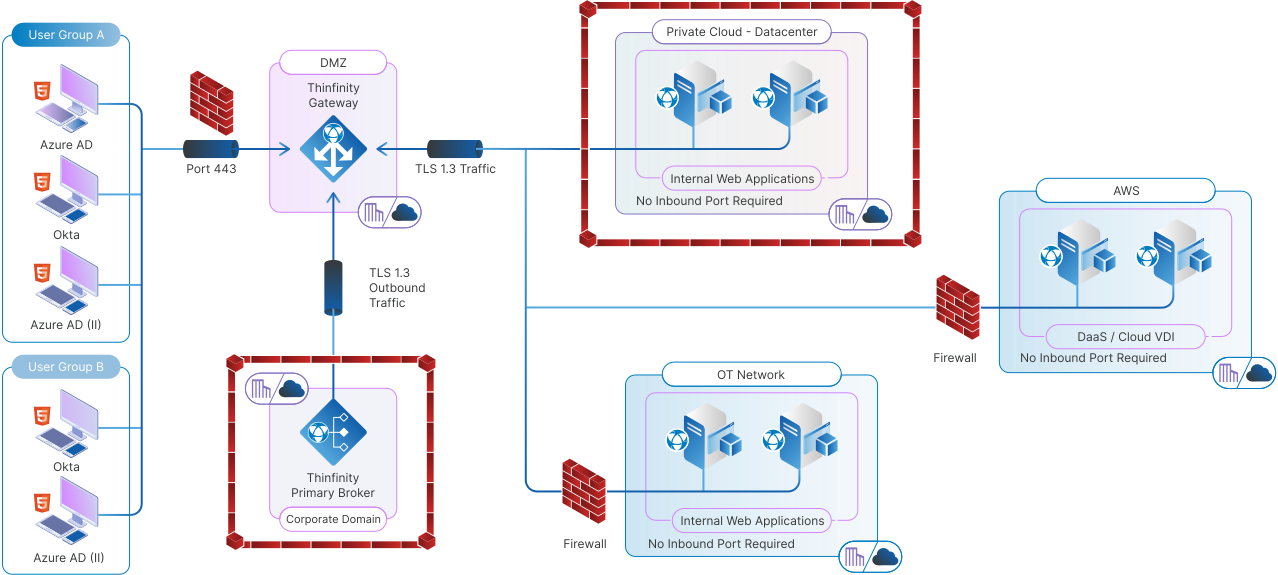
  2. No Need for Inbound Ports: Traditional VPN setups often require opening inbound ports on the network firewall, which can expose the organization to external threats. Thinfinity’s WAG, on the other hand, uses outbound connections to securely forward internal applications to remote users, minimizing the network’s exposure and enhancing security.
  3. Cross-Platform Accessibility: Thinfinity’s WAG allows users to access internal web applications from any device or platform via an HTML5 browser. Whether on a desktop, tablet, or smartphone, users can securely access applications without needing to install additional software like a VPN client.
  4. Role-Based Access and Zero Trust: Just as with VPNs, Thinfinity supports role-based access controls. Administrators can define which users or groups have access to specific applications, ensuring that only authorized personnel can view sensitive data. This aligns with the principles of a Zero Trust security model, where every access request is authenticated and authorized individually.
  5. Improved Performance: Unlike VPNs, which can introduce latency due to encryption overhead and routing through the VPN server, Thinfinity’s WAG optimizes the delivery of web applications directly through the browser. This reduces the performance issues often associated with VPNs, providing a faster and more seamless experience for end-users.

The Role of Thinfinity’s Secondary Broker in Secure WAG Connections

One of Thinfinity’s standout features is its Secondary Broker, which plays a pivotal role in securely connecting remote users to internal resources without the need for inbound ports. The Secondary Broker generates a secure connection between the Web Application Gateway and the target network by initiating outbound connections. Here’s how it works:

  •  
  • Outbound-Only Connections: The Secondary Broker establishes connections to the Thinfinity Gateway from within the target network. These reverse connections are initiated as outbound traffic, which is typically allowed by firewalls, removing the need to open risky inbound ports.
  • Seamless Application Access: Once the connection is established, users can access web applications securely through Thinfinity’s WAG, just as they would in a traditional VPN environment, but without the complexity and security risks of inbound connections.
  • Increased Security and Scalability: By decentralizing traffic management, the Secondary Broker supports large-scale deployments and improves performance without compromising security. This feature makes it ideal for distributed environments where different departments or locations require secure access to the same applications.
Graphic How to Securely Access Internal Web Applications Without a VPN

Use Cases for Thinfinity’s Web Application Gateway

Many types of internal web applications benefit from being published via Thinfinity’s WAG:

  • HR Systems and Portals: Remote employees can securely access sensitive HR data without needing a VPN connection, ensuring privacy while streamlining access.
  • Customer Relationship Management (CRM) Tools: CRMs often contain valuable customer data. Thinfinity’s WAG ensures secure access from anywhere while maintaining compliance with security policies.
  • Enterprise Resource Planning (ERP) Systems: Thinfinity’s WAG enables secure, remote access to ERP systems without the need for complex VPN setups.
  • Custom Web-Based Business Applications: Many companies have proprietary web applications that are crucial for daily operations but need to be accessed securely by remote users. Thinfinity’s WAG simplifies this access.

Conclusion

Thinfinity’s Web Application Gateway offers a powerful, modern solution for businesses looking to securely publish internal web applications without the hassle of VPNs or ADCs. By utilizing outbound SSL connections and role-based access, it simplifies access while maintaining the highest levels of security. Whether it’s for HR systems, CRMs, or custom web-based applications, Thinfinity provides an effective way to streamline remote access, ensuring a smooth experience for users across any device.

As businesses continue to prioritize security and efficiency, Thinfinity’s approach stands out as a clear path forward—enhancing performance while reducing complexity. If you’re ready to take the next step in securing your internal web applications, setting up a Web Application Gateway is the perfect starting point. Here’s a tutorial to guide you through the process of publishing your first web application in Thinfinity.

About Cybele Software Inc.
We help organizations extend the life and value of their software. Whether they are looking to improve and empower remote work or turn their business-critical legacy apps into modern SaaS, our software enables customers to focus on what’s most important: expanding and evolving their business.

About Version 2 Digital

Version 2 Digital is one of the most dynamic IT companies in Asia. The company distributes a wide range of IT products across various areas including cyber security, cloud, data protection, end points, infrastructures, system monitoring, storage, networking, business productivity and communication products.

Through an extensive network of channels, point of sales, resellers, and partnership companies, Version 2 offers quality products and services which are highly acclaimed in the market. Its customers cover a wide spectrum which include Global 1000 enterprises, regional listed companies, different vertical industries, public utilities, Government, a vast number of successful SMEs, and consumers in various Asian cities.

VDI vs DaaS: How to Choose and Implement the Right Virtual Desktop solution for your business

I) Introduction 

Virtual Desktop Infrastructure (VDI) and Desktop-as-a-Service (DaaS) are leading innovations in IT resource management, revolutionizing how businesses operate and manage their IT assets. This guide delves into the intricacies of establishing virtual desktop environments, covering the technical groundwork, user management tactics, security measures, and scalability—all vital for accommodating the dynamic requirements of modern businesses.

As organizations strive to boost operational efficiency and fortify their security measures, the roles and benefits of VDI and DaaS become more pronounced. The primary focus here is to unpack the critical components necessary for the successful implementation of virtual desktop solutions. Through an examination of various case studies, this article offers IT professionals and decision-makers a practical framework to navigate the complexities of virtual desktop technologies and to choose the most suitable solution—be it VDI or DaaS—for their needs.

Understanding VDI and DaaS:

  • Virtual Desktop Infrastructure (VDI) is a technology that hosts desktop environments on a centralized server. This setup allows users to access their desktops on any device capable of supporting the VDI’s interface, regardless of the geographic location. The main appeal of VDI is its ability to offer a controlled, customized, and secure desktop experience to multiple users while maintaining the data and applications on a company-managed server.
  • Desktop-as-a-Service (DaaS), on the other hand, is a cloud service model where the entire desktop virtualization is handled by a third-party provider. DaaS solutions deliver similar benefits as VDI, such as accessibility from multiple devices and locations; however, they reduce the organization’s burden of managing the underlying infrastructure, updates, security, and storage, as these responsibilities are managed by the DaaS provider.

II) Key Considerations for Choosing Between VDI and DaaS

Security and Compliance: With VDI, you have direct control over the security and compliance measures, tailoring them to meet specific organizational standards and regulations.

Pros of VDI

  • Endpoint Independence: Users can access their virtual desktop from any device, providing flexibility without compromising the desktop environment or experience.
  • Centralized Management and Control: VDI offers a centralized platform for managing user desktops, streamlining IT operations, and enforcing policies across the organization.
  • Endpoint Choice: Organizations can provide a variety of endpoint options, from high-end workstations for power users to more cost-effective thin clients for standard users.
thumb-down

Cons of VDI

  • Digital Employee Experience Challenges: Implementing VDI requires careful planning to ensure that the digital workspace delivers a responsive and robust user experience.
  • Infrastructure Costs: Initial setup for VDI can be capital intensive, with significant investments needed for servers, storage, and network infrastructure.
  • Solution Complexity: The complexity of a VDI environment can be substantial, requiring a high level of IT expertise to manage the infrastructure, software, and potential issues that arise.

Pros of DaaS

  • Agility and Elasticity: DaaS platforms are highly scalable, allowing businesses to quickly adjust their resources to meet changing demands.
  • Utility Pricing/Pay Per Use: Many DaaS providers offer a pay-as-you-go model, converting a capital expense into an operational one and avoiding the need for large upfront investments.
  • Cloud Service Integration: DaaS often integrates well with other cloud services, allowing for a seamless connection between virtual desktops and cloud-based applications.
  • Disaster Recovery: With DaaS, disaster recovery processes are typically built into the service, offering greater resilience and faster recovery times.
thumb-down

Cons of DaaS

  • Service Insight and Control: While DaaS providers handle much of the infrastructure management, organizations may have less visibility and control over the backend operations.
  • Less Configuration/Customization Choice: There might be limitations on the level of customization available for the virtual desktops compared to a self-hosted VDI solution.
  • Long-Term Cost: Although DaaS can be more affordable upfront, ongoing subscription costs can add up over time, potentially making it more expensive in the long run.

Deciding between VDI and DaaS hinges on balancing these pros and cons against your organization’s strategic objectives, budget constraints, and IT capabilities. Each solution offers distinct benefits and challenges that must be carefully considered to ensure that your chosen virtual desktop infrastructure aligns with your business requirements.

III) VDI Deployment Considerations

Assuming you have the requisite data center capacity, in-house expertise, and cloud management skills, choosing to self-implement a Virtual Desktop Infrastructure (VDI) is a strategic step. This decision sets the stage for a detailed exploration of implementation factors to optimize the deployment within your own facilities or your selected public cloud environment.

A. Choosing the Appropriate Infrastructure

Setting up a virtual desktop infrastructure (VDI) requires a detailed assessment of the necessary hardware, including servers, storage solutions, and networking equipment, to effectively support the virtual desktop environment. This assessment should include not only an evaluation of the current infrastructure to identify any gaps that could hinder implementation but also a consideration of integrating public cloud services. These options offer scalability, flexibility, and potentially lower upfront costs, making them viable alternatives for organizations looking to optimize their VDI strategy.

B. User Management Strategies

Effective user management strategies are crucial for enhancing productivity and ensuring seamless access to virtual desktops. It involves creating user accounts, allocating appropriate resources, and managing access rights to ensure security standards are met and users can efficiently perform their duties.

C. Security Concerns and Protocols

Security is paramount in virtual desktop infrastructures. Implementing stringent security measures, like encryption and multi-factor authentication, protects sensitive information and mitigates potential cyber threats. Regular security audits are also essential to address any vulnerabilities.

D. Scalability and Flexibility

Designing scalable and flexible virtual desktop infrastructures is vital for adapting to business needs. Technologies that allow dynamic resource allocation and access from various devices enhance productivity, especially in remote work scenarios.

E. VDI Deployment Factors to Consider:

  1. End-User Requirements: Understanding how users interact with the infrastructure, including login times and application needs, is crucial to avoiding performance bottlenecks.
  2. Factor in User Location: Different locations may necessitate varied VDI architectures, affecting everything from bandwidth requirements to user experience.
  3. Infrastructure Impact: VDI affects other IT systems; careful planning can prevent issues such as IP address depletion and bandwidth consumption.
  4. Desktop Type (Persistent vs. Nonpersistent): Choose between persistent desktops, which save user settings, and nonpersistent desktops, which reset after each session based on user needs.
  5. High Availability Design: Ensuring that the VDI infrastructure is highly available is crucial to prevent downtime that could affect the entire organization.
  6. Client Device Options: Deciding on client devices, whether repurposing old PCs or employing BYOD (Bring Your Own Device) policies, influences maintenance and operational ease.
  7. BYOD Policy Considerations: Establish clear guidelines on the acceptable devices and operating systems to secure data and reduce support burdens.
  8. Security Strategy: Extend all physical desktop security best practices to virtual desktops, ensuring all systems are secure and compliant.

F. Selecting a Comprehensive Software Solution for Virtual Desktop Infrastructure

To simplify the implementation of the strategies outlined for infrastructure setup, user management, and security, it is crucial to select a comprehensive software solution tailored for virtual desktop infrastructure. A pivotal component of this solution should be a VDI orchestrator, which seamlessly manages VDI deployment and auto scaling across various hypervisors and public clouds. Ideally, the solution would be cloud-agnostic and multi-cloud compatible, reducing dependency on specific cloud vendors and providing flexibility for organizations that may start on-premises but plan to extend their workflows to the cloud in the future.
Additionally, the software should support simple role-based permissions for efficient user management and embody Zero Trust Network Access principles to secure access points. The inclusion of Privileged Access Management (PAM) functionalities is also vital, especially if the workflows are critical, ensuring robust security and compliance. Strong audit and analytics capabilities are essential to monitor and optimize the VDI environment effectively.
Lastly, the solution must guarantee a superior user experience on any device, catering to both internal and external users. This ensures the productivity of the workforce is maintained regardless of their location or the device they use, further enhancing the overall efficiency and effectiveness of the virtual desktop infrastructure.

IV) DaaS Deployment Considerations

Having assessed your organization’s capabilities and workflows, should the balance tip in favor of a third-party Desktop-as-a-Service (DaaS) solution, we transition to a critical phase—DaaS implementation considerations. This phase is dedicated to ensuring that the chosen DaaS offering aligns with your business requirements and operational objectives, reflecting a strategic alignment with your evaluation.

1. Security and Data Protection:

When outsourcing your VDI to a 3rd party DaaS provider, it is crucial to assess their security measures and data protection practices. Ensure that they have robust security protocols in place to protect your sensitive data from unauthorized access or breaches.

2. Reliability and Performance:

Evaluate the reliability and performance of the 3rd party DaaS provider before making a decision. Look for providers that offer high availability, minimal downtime, and guaranteed performance levels to ensure your users have a seamless experience.

3. Scalability and Flexibility:

Consider the scalability and flexibility of the DaaS solution offered by the provider. Your organization’s needs may change over time, so it is essential to choose a provider that can accommodate growth and provide the necessary resources as needed.

4. Compliance and Regulatory Requirements:

If your industry has specific compliance or regulatory requirements, ensure that the 3rd party DaaS provider can meet those standards. They should be able to demonstrate their adherence to relevant regulations and provide the necessary certifications or audits.

5. Cost and Pricing Model:

Evaluate the cost and pricing model offered by the 3rd party DaaS provider. Consider factors such as upfront costs, ongoing maintenance fees, and any additional charges for scaling or customization. It is important to have a clear understanding of the financial implications before committing to a provider.

6. Support and Service Level Agreements:

Assess the level of support provided by the 3rd party DaaS provider. Look for providers that offer proactive monitoring, timely support, and comprehensive service level agreements (SLAs) to ensure a smooth operation of your VDI environment.

By considering these points, you can make an informed decision when choosing a 3rd party DaaS provider and outsourcing your VDI with a DaaS solution.

V) Conclusion: How Thinfinity Can Help with VDI and DaaS

As you approach the culmination of your virtual desktop exploration, choosing between VDI and DaaS, Thinfinity stands ready to empower your decision with versatile solutions. Whether you are at the decision-making stage or ready to implement, Thinfinity offers tools and insights to ensure your choice meets your business’s unique needs.

For VDI, Thinfinity Workspace offers a comprehensive solution that delivers robustsecure, and scalable virtual desktops across your own infrastructure, whether on-premises, hybrid, or entirely cloud-based. It streamlines the complexities of VDI deployment and incorporates zero trust access protocols, allowing secure and efficient access from any device, anywhere with the best user experience. This not only enhances your workforce’s productivity but also fortifies your IT environment against potential security threats.

Thinfinity Virtual Desktops delivers a fully managed DaaS solution that offers an agilecost-effective, and resilient infrastructure. It seamlessly integrates with your existing identity providers and security workflows, ensuring smooth interoperability between DaaS and on-premises workflows. This integration enhances the overall efficiency and security of your IT environment, facilitating a unified management experience.

What’s more, we recognize that one size does not fit all. With the flexibility to mix and match both VDI and DaaS solutions according to specific workflows, your IT team can enjoy the best of both worlds. This hybrid approach allows for a more comprehensive, scalable, and manageable software environment, combined with a secure and reliable DaaS solution.

Our team expertise extends beyond provision to consultation, assisting you in discerning which workflows are best suited to each solution. Leveraging Thinfinity, you can tailor your virtual desktop strategy to provide peak efficiency and reliability, ensuring your IT infrastructure is not just keeping pace with your business growth but driving it forward.

About Version 2 Digital

Version 2 Digital is one of the most dynamic IT companies in Asia. The company distributes a wide range of IT products across various areas including cyber security, cloud, data protection, end points, infrastructures, system monitoring, storage, networking, business productivity and communication products.

Through an extensive network of channels, point of sales, resellers, and partnership companies, Version 2 offers quality products and services which are highly acclaimed in the market. Its customers cover a wide spectrum which include Global 1000 enterprises, regional listed companies, different vertical industries, public utilities, Government, a vast number of successful SMEs, and consumers in various Asian cities.

About Cybele Software Inc.
We help organizations extend the life and value of their software. Whether they are looking to improve and empower remote work or turn their business-critical legacy apps into modern SaaS, our software enables customers to focus on what’s most important: expanding and evolving their business.

×

Hello!

Click one of our contacts below to chat on WhatsApp

×