

Skip to content

April 2023: What’s New?

“What’s New?” is a series of blog posts covering recent changes to Comet in more detail. This article covers the latest changes in Comet Voyager over April 2023.

There were five Comet software releases during April – four in the weekly 23.3.x Voyager release series, plus one minor patch update 23.2.2 for our quarterly “Leda” release track. We’ve also released a new YouTube tutorial for the new Object Lock feature

There were some very large and exciting features released in Voyager during April:

New design for the Comet Server web interface

When upgrading to Comet Server 23.3.3, you’ll be greeted with a new experience:
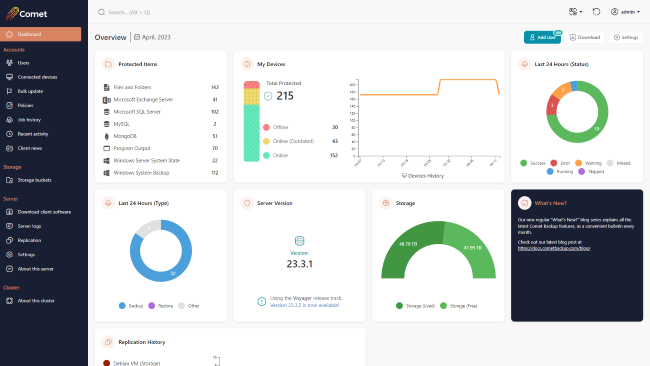
This is the first major Comet Server web interface upgrade in six years. We’re very excited and proud of the new layout. The left-aligned navigation bar allows for faster navigation to pages without clicking through menus, and the quick search bar has been modernized. The new design has also expanded the set of colour customization options that are available: in addition to setting your custom brand colour, you can also set an accent colour for highlights.

The homepage has seen the most dramatic change, including new navigation buttons on the top-right and a rework of all the admin widgets. There are new widgets showing how many of each Protected Item type is being used; how much used/free space there is on your Storage Role data location; the status and last run time of your Server Self-Backup; a live real-time chart of replication progress; and more.

The policies page has also been redesigned. As we add more and more policy options in new versions of Comet, we split the long Policy section to use sub-tabs. This includes a summary page, and a new feature to suggest possible common file path exclusions. We’re continuing to work on additional Policy features, and you can expect to see a highly-voted feature coming soon!

When looking at a user account, on the Protected Items tab, the new user interface design has also added a quick-access “Run Backup” button that can remotely command the device to start a backup job. Previously, this feature was available from the Connected Devices page or from the Devices tab – but adding it to the Protected Items tab is a significantly more convenient place, and demonstrates this functionality more clearly to new Comet administrators.

We would appreciate hearing your feedback on the new web interface design before it lands in the upcoming quarterly release!

Search restore from web

When restoring data, Comet prompts you for the Storage Vault to restore from; the backup snapshot to browse inside; and then the file (or all files), respectively. However if you’re trying to restore a single file without knowing exactly when it was last available, or what folder it was inside, Comet’s Search button can search through all backup job snapshots to find the right match.

The Search button has been available on the Restore dialog in the desktop app for a while. New in Comet 23.3.4 is the ability to remotely perform a file search for restore from the Comet Server web interface.

Test Connection for Storage Templates

Comet is highly flexible in the number of ways you can configure your storage. From the customer’s device running Comet Backup, a Storage Vault could point to a local path; directly at a cloud storage provider; or to your Comet Server with Storage Role enabled – which could then receive the data and store it on a local RAID array or forward it to another cloud storage provider.

Storage Templates are the provisioning system for new Storage Vaults. If you set up a Storage Template for Wasabi or Backblaze, you gain the ability to provision private, per-customer cloud buckets and access credentials with a single click. If you enable Storage Role for receiving data into your Comet Server (or another clustered Comet Server), using a Storage Template can help to very easily provision new Storage Role buckets for each customer.

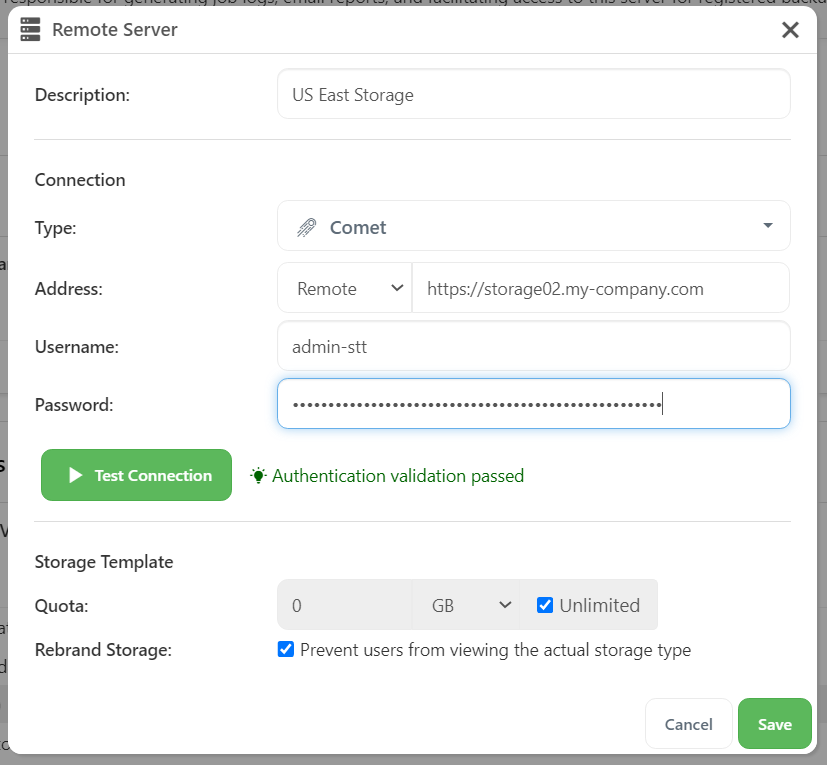
Comet has long supported a Test Connection button on the Storage Vault page, to check that your custom entered credentials are valid. But when setting up a Storage Template for the first time, the only way to verify that everything was functioning was to attempt to provision a new Storage Vault for a test customer.

In Comet 23.3.5, a new Test Connection button was added to the Storage Template configuration popup in the Comet Server web interface. This allows you to quickly verify that your template is working as expected.
Self-Backup

Comet Backup requires a connection to a Comet Server to safely store its configuration. But if you are self-hosting the Comet Server application, the Comet Server also should be backed up to mitigate against the risk of data loss. However, you can’t really use Comet Backup for this purpose, since this creates a circular dependency during recovery.

As a solution, Comet Server includes the Server Self-Backup feature. This creates a consistent snapshot of Comet’s configuration files, and allows you to store it encrypted on any supported storage location, including cloud storage. Multiple targets, custom scheduling, and data retention policies are all supported. The files are simple zip files to ensure that any eventual necessary restore is an easy and low-stress process.

The latest version of Comet Server made improvements to the Server Self-Backup feature. The generated filenames now clearly show the date and time of the backup job, instead of solely an epoch timestamp. Any automatic SSL certificate files provisioned by Let’s Encrypt are now included in the archive, ensuring that it is not required to reissue the certificate. This helps avoid any issues with rate limits on the Let’s Encrypt service, which could otherwise prolong your service outage.

We’ve also added a new option to include server log files in the Self-Backup archive. These log files are not generally required, but for completeness or for an investigation, they can provide an additional view into the circumstances behind the event.

Codesigned uninstallers

Microsoft, along with third-party security vendors, continue to harden the security posture of the Windows operating system. Comet Backup’s client installer is codesigned – either by our company, or if you are using custom branding, then possibly with your own custom codesigning certificate. However over time, the security hardening has increased, and we’ve recently heard reports that the uninstaller for Comet Backup could trigger alerts in some security products. As a result, the latest versions of Comet Server apply Authenticode codesigning to the uninstaller to help avoid this issue.

The 23.5 Quarterly release is coming soon

At Comet, we release our software under two tracks – the “Voyager” release track approximately weekly, with all of our very latest changes; and the quarterly release track, where we bundle up three months’ worth of development into a new fixed point for you to qualify, offer, and build upon, in order to provide a consistent experience for your own customers. Depending on your market position or your requirements, you may find either one of these tracks better suits your needs. As per our regular release schedule, you can expect a 23.5.0 quarterly release towards the end of this month, which will bring all of the exciting features to the quarterly track and also for Comet-Hosted users.

That’s all for this month! Thanks for reading – there are some more great features currently under development that we’re excited to be able to share with you soon. As always, please follow @CometBackup on Twitter and you can always contact us if you have any questions.
About Version 2 Digital

Version 2 Digital is one of the most dynamic IT companies in Asia. The company distributes a wide range of IT products across various areas including cyber security, cloud, data protection, end points, infrastructures, system monitoring, storage, networking, business productivity and communication products.

Through an extensive network of channels, point of sales, resellers, and partnership companies, Version 2 offers quality products and services which are highly acclaimed in the market. Its customers cover a wide spectrum which include Global 1000 enterprises, regional listed companies, different vertical industries, public utilities, Government, a vast number of successful SMEs, and consumers in various Asian cities.

About Comet
We are a team of dedicated professionals committed to developing reliable and secure backup solutions for MSP’s, Businesses and IT professionals. With over 10 years of experience in the industry, we understand the importance of having a reliable backup solution in place to protect your valuable data. That’s why we’ve developed a comprehensive suite of backup solutions that are easy to use, scalable and highly secure.

23.3.4 ‘Voyager’ released

Changes compared to 23.3.3

New Features

  • Add the ability to search for items to restore within Storage Vault snapshots via the Comet Server web interface

Bug Fixes

  • Fix an issue with opening the Comet Server web interface for some admin accounts with restricted permissions
  • Fix an issue with pre-configuring backup options when clicking “Run backup” on a Protected Item in the Comet Server web interface
  • Fix an issue adding email addresses to user profiles in the Comet Server web interface
  • Fix an issue with incorrect Backblaze B2 storage validation
  • Fix an issue with validation on the Storage Role while the Storage Role is disabled
  • Fix a cosmetic issue with widgets on the About This Server page in the Comet Server web interface
  • Fix a cosmetic issue with widgets on the Comet Server web interface homepage disappearing on page reload

About Version 2 Digital

Version 2 Digital is one of the most dynamic IT companies in Asia. The company distributes a wide range of IT products across various areas including cyber security, cloud, data protection, end points, infrastructures, system monitoring, storage, networking, business productivity and communication products.

Through an extensive network of channels, point of sales, resellers, and partnership companies, Version 2 offers quality products and services which are highly acclaimed in the market. Its customers cover a wide spectrum which include Global 1000 enterprises, regional listed companies, different vertical industries, public utilities, Government, a vast number of successful SMEs, and consumers in various Asian cities.

About Comet
We are a team of dedicated professionals committed to developing reliable and secure backup solutions for MSP’s, Businesses and IT professionals. With over 10 years of experience in the industry, we understand the importance of having a reliable backup solution in place to protect your valuable data. That’s why we’ve developed a comprehensive suite of backup solutions that are easy to use, scalable and highly secure.

March 2023: What’s New?

“What’s New?” is a series of blog posts covering recent changes to Comet in more detail. This article covers the latest changes in Comet Voyager over March 2023.

There were just three Comet software releases during March – two in the 23.3.x Voyager release series, plus one minor patch update 23.2.1 for our quarterly “Leda” release track.

We’ve landed a few large and exciting features this March:

S3 Object Lock

Comet 23.3.1 adds support for Object Lock on S3. This feature allows Comet to “lock” an object inside a S3-compatible bucket, preventing it from being deleted or modified for a fixed period of time.

This is a fantastic new capability for Comet and it is a key defense against ransomware. Comet generally requires the capability to add and delete files within your Storage location; deleting files is necessary for applying retention passes, updating index files, and coordinating locking across multiple devices. However, if malware is running on your PC and manages to intercept Comet’s storage credentials, the malware would also be able to delete files, causing much wider havoc.

Comet uses S3 “Compliance Mode” to lock individual objects within the storage location. This ensures that there is no way for the object to be deleted for the specified time, not using Comet’s storage credentials, nor even if your administrator S3 keys are leaked or exposed.

For a visual overview of the process, please see our usage guide and also the simplified explanation.

This feature is available for Amazon S3, Wasabi, IDrive (excluding Storage Template provisioning), and other S3-compatible providers including Minio-based providers. Please check with your S3-compatible provider’s documentation to see if Object Lock is available.

Object Lock is an opt-in feature, both in Comet and with cloud storage providers. It also relies on S3 bucket versioning. These properties generally must be set when the S3 bucket is created for the first time. It is not generally possible to enable Object Lock on an existing S3 bucket. To use Object Lock with an existing S3-based Storage Vault, you would have to create a new S3 bucket with Object Lock enabled; migrate the data; and update Comet’s Storage Vault settings to point to the updated bucket.

Comparison to Backblaze B2

Regular users of Comet may be aware of the existing “Hide files rather than deleting them” option for Backblaze B2. Backblaze B2 supports both a native API and also an S3-compatible layer over the native API. Comet Backup integrates with the native API, so the new S3 Object Lock feature is not available for use with Backblaze B2. However, the existing “Hide files instead of deleting them” option can be used to provide the same protection against ransomware.

Codesigning with Azure Key Vault

If you are customizing the branding of the Comet Backup desktop app, then we would recommend setting up codesigning certificates. Having a codesigning certificate means that installing Comet Backup proceeds more smoothly through Smartscreen and Antivirus popup warnings on Windows, and through Gatekeeper on macOS.

The Windows codesigning programme, “Authenticode”, is currently in a period of disruption as new rules are being put in place. Owing to the high number of events where developer codesigning certificate files were leaked or lost, new requirements are being enforced from June 1st 2023 that newly issued codesigning certificates must no longer be stored as plain files on disk, but instead must be stored in a Hardware Security Module (“HSM”) or equivalent isolated device. Comet has long supported Authenticode certificates using either certificate files (“PKCS #12”), or via plug-in HSM devices that are compatible with the “PKCS #11” standard.

There are two tiers of Authenticode available. The Extended Validation (“EV”) service performs a deeper level of business-level and legal checks of the target organization before issuing the certificate. The extra vetting comes with a higher purchase cost, but it also results in a higher level of initial reputation for the resulting codesigned .exe file. An EV certificate was always required to be stored on an HSM.

However, it’s common to install Comet Server on a cloud VM or VPS, where plugging in a USB dongle or smartcard hardware device is not physically possible. This difficulty also discouraged many MSPs from using the higher-quality Extended Validation service. With the impending phaseout of the file-based method for newly issued certificates, neither existing option is suitable, so another option had to be found.

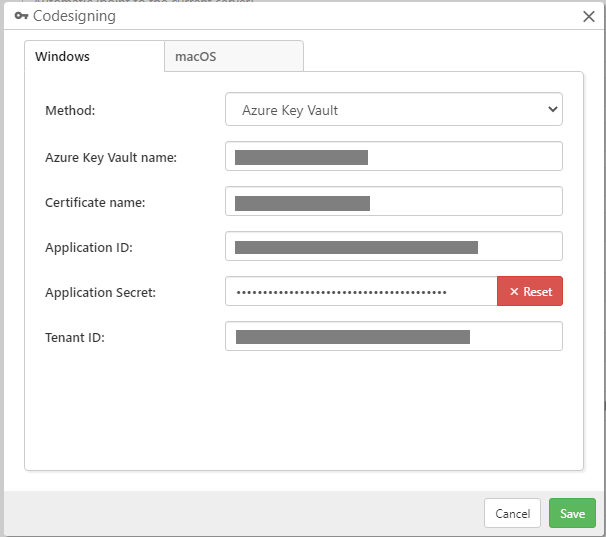
Comet 23.3.0 adds support for codesigning using Azure Key Vault. This is a cloud service from Microsoft to manage the secure provisioning of security keys and certificates, including for Authenticode codesigning. There are various services and pricing tiers available; in particular, it’s possible to purchase a managed cloud HSM, which meets the new June 1st 2023 Authenticode requirements.

At the time of writing, we would recommend GlobalSign or TrustZone for issuing new Authenticode certificates. There is no carry-over reputation with Authenticode, so replacement certificates can be issued from any provider. These particular providers were prepared early for the new requirements and have a secure vetting process to prove your use of an HSM, such as an Azure Key Vault managed HSM, before issuing your certificate. The private key never leaves the managed cloud HSM device, and Comet Server only uses an Azure application ID to remotely perform the signing steps.

Comet Server can perform Authenticode codesigning for Windows, regardless of whether Comet Server is installed on a Windows or Linux host OS. This is achieved by using a cross-platform signing toolchain. To support the new Azure Key Vault feature, we replaced our existing bundled codesigning toolchain from osslsigncode with a new jsign version. Comet ships these third-party utilities as a courtesy in compliance with their redistribution license.

For most existing users of codesigning with a PKCS#12 file-based certificate on disk, there will be no noticeable difference and Comet will continue to work without any configuration changes. However, some users may experience breaking changes:

  • The new jsign program takes different parameters for hardware devices using the PKCS#11 standard, which could not be automatically converted. Users of hardware devices may need to revisit their settings.
  • If Comet Server is installed on ARM64 Linux, the version of jsign distributed by Comet is not compatible with the musl C runtime generally used for static binary distribution. A glibc-based Linux distribution is now required to run the codesigning toolchain on ARM64 Linux. The issue does not apply to x86_64 Linux. We may be able to resolve this issue in a future version of Comet.

For more information, see the full Authenticode codesigning documentation.

New web interface features

Looking beyond these headline features, there have been many more improvements to Comet this month, particularly in the Comet Server web interface.

It’s now possible to select custom snapshots for deletion from the web restore dialog. This builds upon last month’s feature to add this in the Comet Backup desktop app. To use this feature, enable “Advanced Options” from the top-right user menu, and then click the new Actions button in the Restore wizard dialog.

You can now see an online device’s software version, OS platform, and IP address directly on the User Detail page in the Comet Server web interface. This was a minor feature request on our Feature Voting page. To view these new columns, click the “View” button to configure which columns are displayed. Your custom column selection is preserved for this browser throughout multiple page views, but your custom column selection will be reset when a new version of Comet Server is released.

If your Comet Server is configured to show software downloads to logged-out users, the login screen has expanded the number of download options from three (Windows, macOS, and Linux) to four with the new Synology download button. This fixes a minor inconsistency with the web interface as this fourth platform should be shown in the same context as the other three platforms.

There have been many cosmetic improvements to the Comet Server web interface too, including better spacing and padding when configuring an Office 365 Protected Item or a Windows System Backup Protected Item. We regularly make small improvements like this, but this month, we’ve also been working on a much more major cosmetic change for the Comet Server web interface. We will be able to share more information about that soon.

About Version 2 Digital

Version 2 Digital is one of the most dynamic IT companies in Asia. The company distributes a wide range of IT products across various areas including cyber security, cloud, data protection, end points, infrastructures, system monitoring, storage, networking, business productivity and communication products.

Through an extensive network of channels, point of sales, resellers, and partnership companies, Version 2 offers quality products and services which are highly acclaimed in the market. Its customers cover a wide spectrum which include Global 1000 enterprises, regional listed companies, different vertical industries, public utilities, Government, a vast number of successful SMEs, and consumers in various Asian cities.

About Comet
We are a team of dedicated professionals committed to developing reliable and secure backup solutions for MSP’s, Businesses and IT professionals. With over 10 years of experience in the industry, we understand the importance of having a reliable backup solution in place to protect your valuable data. That’s why we’ve developed a comprehensive suite of backup solutions that are easy to use, scalable and highly secure.

February 2023: What’s New?

“What’s New?” is a series of blog posts covering recent changes to Comet in more detail. This article covers the latest changes in Comet Voyager over February 2023.

There were just three Comet software releases during February – two in the 22.12.x Voyager release series, plus the launch of our latest quarterly series 23.3.0 “Leda”.

February is a short month, and it was also a quiet month for new feature development as we focused on quality assurance ahead of the new quarterly software release. Most new feature development this month has been held back as a result, so you will see many more exciting new features land in the 23.3.x “Voyager” series when it reopens shortly next month in March.

Better email reports

The latest 22.12.x versions of Comet included improvements to the email reporting features that launched at the start of the 22.12.x series.

The Recent Activity email report template now includes a table legend in the email footer, helping to distinguish the color series from each other. By way of comparison, when you view Comet Server’s Recent Activity page in a web browser, it’s possible to hover the mouse over each color segment to display more detailed information about the breakdown of different job types. However, email is a more limited technology medium and an equivalent hover feature is not available. The legend is a simple solution that makes the Recent Activity email report more accessible to Comet Server operators who are not yet familiar with the colors.

The email feature has received more attention to detail, leading to us developing additional fixes for email report previews; for filtering the subset of customers; and for partial configuration of time boundaries.

Better granular restore

Another one of our areas of focus this month has been the granular single-file restore system, that now shares some common core functionality across both the Disk Image and Hyper-V Protected Item types. Granular restore now supports more types of NTFS compressed file, including a fix for files that have been compressed with the LZNT1 algorithm. We also fixed an issue with reading single files from within NTFS partitions that have a highly fragmented MFT (Master File Table).

Additionally, we have fixed additional issues with the new Hyper-V single-file restore if a single Protected Item contains multiple virtual machines with multiple VHDX images, as well as fixing cosmetic issues when toggling between Protected Item types in the Comet Backup desktop app.

Better syncing with Gradient MSP

There have been improvements to the process of syncing Comet data with Gradient MSP. As a reminder, this is an external service that can correlate your Comet user accounts and storage usage with RMM invoices in systems such as Autotask, Syncro RMM, Connectwise, and many more.

The latest versions of Comet Server allow more fine-grained control of the connected feature set; the ability to toggle sending backup job failures to the RMM; optimizing the number of alerts that are sent; and providing clearer error messages if there is an error from Gradient’s service.

Comet 23.3.0 “Leda”

All of our focus on bugfixes this month has been building up to one thing – a smooth and seamless release of our latest quarterly milestone software version. This time, it’s named “Leda”, and this rolls up the whole quarter’s worth of 22.12.x enhancements into a new fixed point for you to build your business on.

Like Comet’s previous recent quarterly software releases, “Leda” is named after a moon of Jupiter. Jupiter has a great number of moons and more are continuing to be discovered. When Leda was discovered as recently as 1974, it was one of Jupiter’s 13 known moons. Today, Jupiter has 92 known moons, with the most recent discovered just this month in February 2023!

You can read the full release notes for Comet 23.2.0 “Leda” to see the full details – or if you’d prefer to watch rather than read, I’m hosting a webinar next week to discuss this new quarterly release and all its new features. Please register for a notification before we go live on March 7th (PST) to catch up on all the latest Comet news with me – there will be a free live Q&A session after the presentation.

As well as that, we have many more videos available on our YouTube channel, including guides on getting started with Comet, individual features, demonstrations with our technology partners, and webinars for previous quarterly software releases.

About Version 2 Digital

Version 2 Digital is one of the most dynamic IT companies in Asia. The company distributes a wide range of IT products across various areas including cyber security, cloud, data protection, end points, infrastructures, system monitoring, storage, networking, business productivity and communication products.

Through an extensive network of channels, point of sales, resellers, and partnership companies, Version 2 offers quality products and services which are highly acclaimed in the market. Its customers cover a wide spectrum which include Global 1000 enterprises, regional listed companies, different vertical industries, public utilities, Government, a vast number of successful SMEs, and consumers in various Asian cities.

About Comet
We are a team of dedicated professionals committed to developing reliable and secure backup solutions for MSP’s, Businesses and IT professionals. With over 10 years of experience in the industry, we understand the importance of having a reliable backup solution in place to protect your valuable data. That’s why we’ve developed a comprehensive suite of backup solutions that are easy to use, scalable and highly secure.

×

Hello!

Click one of our contacts below to chat on WhatsApp

×