

Skip to content

Comparison N-Able vs Kaseya vs Pandora FMS: Fight !!!

Official comparison: N-Able vs Kaseya vs Pandora FMS

Lemons, oranges, grapefruits, limes… We know that they are not the same, but if necessary, you can make juice with all of them. And yes, we can and we will. We are in summer and it makes you want to make a good cocktail, doesn’t it? Today, in PFMS blog, we are going to analyze the commonalities of N-Able (Solarwinds MSP), Kaseya and Pandora FMS. Also their -remarkable- differences of course.

Both Kaseya and N-Able stand out for being RMM solutions and integral IT management systems in SaaS mode for MSP. In short, they are a very good solution for managing remote workstations and being able to manage and monitor them remotely. This includes tasks such as patch installation, remote software installation, network equipment configuration, remote desktop access, backups, and of course, receiving alerts when something goes wrong on managed machines.

Kaseya’s client is usually an MSP that provides services to different users, so it needs a tool that with a single license can serve different clients, managing them in an isolated, but centralized and homogeneous manner. This saves costs and is more efficient, since both Kaseya and N-Able are specific tools for Windows desktops that need to be managed remotely.

Pandora FMS client is usually an end company, or an MSP specialized in managing more complex infrastructures, which requires a tool with a more technical profile, which allows its technicians to apply their existing knowledge, scripts, etc. integrating them to compose an effective monitoring that allows them to go where other tools cannot. They are more oriented towards base infrastructure (communications, servers and applications) than to desktop computers.

In this comparison, we will also talk about prices, and both Kaseya and N-Able are above 20K USD in projects of 250 teams, yes, they are expensive tools and they also have a complex and peculiar pricing model, so much so that you will not be able to find these prices clearly on their respective websites.

A very important difference is that both Kaseya and N-Able are usually used in a cloud model (SaaS) (although they also have on-premise licensing), while Pandora FMS is a much more conservative model and is totally on-premise. This is especially relevant regarding the impact on security, since as the last hack to the Kaseya infrastructure showed us, attacking the manufacturer may imply that they can reach the end customer. As we teased long ago, Solarwinds is also not spared from this plague of security problems, and has suffered, since the first attack in 2020, several more attacks.

Given that Pandora FMS is a 100% autonomous installation (it can be installed in an environment without Internet access), and that Pandora FMS agents are not accessible from the outside nor can they be updated remotely, it is, by design, somewhat safer than Kaseya and Solarwinds. However, no one is spared, and Pandora FMS during 2020 and 2021 has published several security patches, as it can be seen in the CVE registry of Mitre.org.

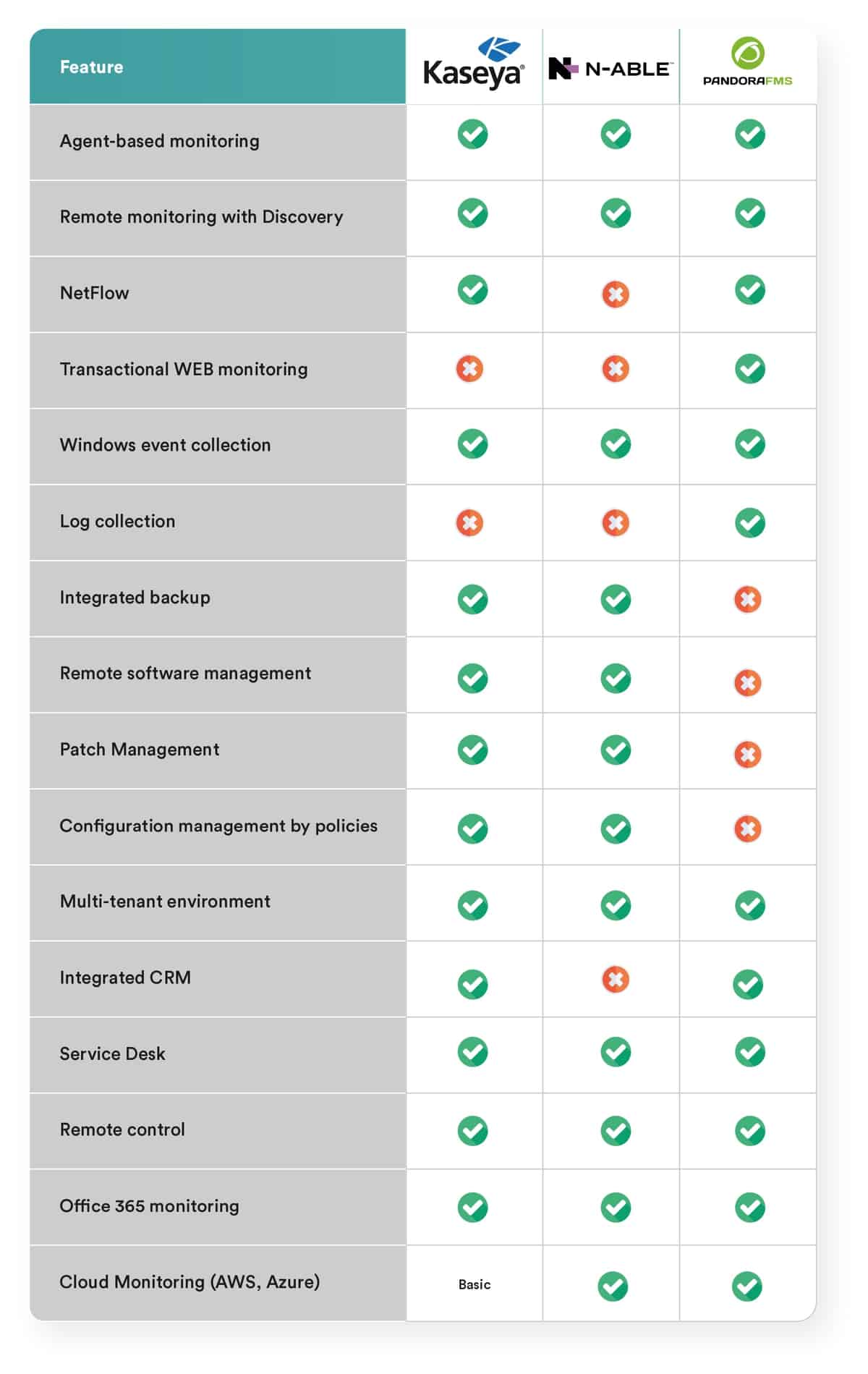
As a summary, we have created a table that describes features. Below there are some additional explanations.

N-Able vs Kaseya vs Pandora FMS
Prices

Others don’t talk about prices, we do. And we do it because it is something that everyone wants and needs to see. We know that it is very difficult to compare them because no product is licensed the same and they do not even share the same concepts. What we do is propose a more or less understandable and standard project to be able to compare the costs in three years. Let’s say, for example, that you want to monitor about 250 computers distributed among virtualized servers (30), workstations (200), physical network equipment and physical servers. Making a total of 250 teams. Well, the cost of a THREE-year project, without professional services and with standard support, would be the following:

  • Kaseya: 30,000 USD
  •  N-Able: 50,000 USD
  •  Pandora FMS: 15,000 USD

Conclusions

Both N-Able and Kaseya are products that excel in desktop management capabilities: patch management, software installation, and configuration change management. They provide added value such as monitoring, backup, security policy management and remote control. To all of this, they offer a layer of additional services such as ticketing and a portal for MSPs to offer their clients an integrated management and billing platform (the latter only in the case of N-Able).

They are very oriented to job monitoring. Monitoring, although it covers many aspects, is not the main focus of the product, especially if we consider some advanced features such as:

  • Distributed transaction monitoring (web applications).
  •  Monitoring Linux environments.
  •  Service-oriented monitoring (defining of service trees).
  •  High capacity (more than 10,000 devices).
  •  Advanced monitoring of enterprise technologies (Oracle, SAP, VMware …).
  •  Detailed monitoring of cloud environments (AWS, Azure).

In general, both N-Able and Kaseya have monitors for all kinds of applications, but only from a very superficial and remote point of view. That is, they are limited and not easily extensible.

If we add the high costs to this, Kaseya and N-Able do not seem like a good option for server monitoring projects or core infrastructure. For that, Solarwinds has a more traditional on-premise solution, although with costs of a similar order of magnitude, while Kaseya can only offer its product in an on-premise model.

About Version 2 Digital

Version 2 Digital is one of the most dynamic IT companies in Asia. The company distributes a wide range of IT products across various areas including cyber security, cloud, data protection, end points, infrastructures, system monitoring, storage, networking, business productivity and communication products.

Through an extensive network of channels, point of sales, resellers, and partnership companies, Version 2 offers quality products and services which are highly acclaimed in the market. Its customers cover a wide spectrum which include Global 1000 enterprises, regional listed companies, different vertical industries, public utilities, Government, a vast number of successful SMEs, and consumers in various Asian cities.

About PandoraFMS
Pandora FMS is a flexible monitoring system, capable of monitoring devices, infrastructures, applications, services and business processes.
Of course, one of the things that Pandora FMS can control is the hard disks of your computers.

The Pillars of Information Security – Part 2

Currently, the use of information is a great ally for companies from different industries. However, along with this, comes the need to protect this information with what is called information security. But do you know what the pillars of information security are?

This article will address these pillars to bring greater clarification and knowledge on the topic, which is of great importance.

Importance of Information Security

Information security works to protect the data and information that a company has against external attacks and data theft. That is because, with technological transformation, the data that a company owns has become one of its most important and valuable assets.

Also, concerning data from third parties, such as customers, it is essential to have protection for a company to work in compliance with the Brazilian legislation that deals with the matter.

In this sense, the company must have excellent information security behavior, with strategies and mechanisms that are efficient and guarantee the integrity and complete security of all data. 

To guide the entire protection network, some pillars are used to obtain the maximum level of security.

They are the following:

  • Confidentiality;
  • Integrity;
  • Availability.

In the following topics, take a look at what each of the pillars described above means to understand more how information security works.

Learn More About Confidentiality

With the Confidentiality pillar, information security works with limited access to the content of stored data. Access to information can only be allowed to authorized people.

With that, not everyone can have unrestricted access, and the system is designed to open information exclusively under authorization.

Learn More About Integrity

In addition to the pillar above, Integrity is another one that must be respected so that information security is robust and adequate.

In other words, integrity means that there must be confirmation that the information is truthful. For this, the pillar protects the data so that it is not tampered with or changed without the proper authorization of those who have access.

Visit our website and find other articles like this one to learn more about information security and related topics of great importance!

Learn More About Availability

Furthermore, the third pillar is Availability, which states that, whenever necessary, data will be available for access. Of course, as the pillars are complementary, this one is only valid for authorized accesses.

Therefore, it offers, within the system, the guarantee that data will not be deleted or relocated and that it can be requested and accessed by authorized people, entities, or processes when it is necessary to have access to the stored information.

So, by integrating these three main pillars, an organization is robust and prepared to offer what the information needs in terms of security.

When all pillars are in place, the company does not have the risk of losing data, suffering unwanted changes, or even theft or unwanted leaks.

This is all thanks to the pillars guiding the protection system and that will work whenever something contrary to the guidelines is identified, such as in the case of an unauthorized person trying to gain access to information.

Also, depending on the type of system created, whenever an attack attempt happens, it is recorded in the system so that further action can be taken, such as investigation and verification of where the found threat came from.

With this, this type of system becomes even more secure and data is more protected.

Therefore, it is through these pillars that companies must protect data they have and that is of great value to their activities and to prevent the law from being breached, especially in relation to customer data and information.

That is because companies that keep personal customer information must maintain strict confidentiality and are responsible for protecting this data, under penalty of even suffering legal consequences.

Thus, the use of information security is extremely important and must always be done carefully, using what is most developed in the industry, because it is one of the segments in which updates and the speed of monitoring must be compatible with the emergence of new systems.

About Version 2 Digital

Version 2 Digital is one of the most dynamic IT companies in Asia. The company distributes a wide range of IT products across various areas including cyber security, cloud, data protection, end points, infrastructures, system monitoring, storage, networking, business productivity and communication products.

Through an extensive network of channels, point of sales, resellers, and partnership companies, Version 2 offers quality products and services which are highly acclaimed in the market. Its customers cover a wide spectrum which include Global 1000 enterprises, regional listed companies, different vertical industries, public utilities, Government, a vast number of successful SMEs, and consumers in various Asian cities.

About Segura®
Segura® strive to ensure the sovereignty of companies over actions and privileged information. To this end, we work against data theft through traceability of administrator actions on networks, servers, databases and a multitude of devices. In addition, we pursue compliance with auditing requirements and the most demanding standards, including PCI DSS, Sarbanes-Oxley, ISO 27001 and HIPAA.

訊連科技FaceMe® Security全新升級,整合即時監控及錄影功能 打造整合人臉辨識的全方位安控、門禁、差勤打卡解決方案

【2021年08月10日,台北訊】 世界級AI臉部辨識技術開發商訊連科技(5203.TW)宣佈推出FaceMe® Security智慧安控解決方案的重大升級版本。於此版本新增的Monitor Add-On可同時監控最多9路的視訊串流,並於偵測特定標註人士及事件時,透過單一介面即時示警保全人員。此外,亦整合了NVR網路監控主機之功能,可將安控攝影機之視訊錄製於伺服器上,供隨時回看重要事件。FaceMe® Security可適用於各式規模的場域,透過人臉辨識、口罩辨識等功能,一次整合安控、門禁、差勤打卡等重要應用。

訊連科技FaceMe® Security全新升級,整合即時監控及錄影功能 打造整合人臉辨識的全方位安控、門禁、差勤打卡解決方案

FaceMe® Security是一款專為智慧安控設計的解決方案,可運行於個人電腦、工作站和伺服器上,並可與Milestone、Network Optix、Vivotek等各主流影像管理系統(VMS)進行整合。FaceMe® Security採用了全球頂尖的FaceMe® AI人臉辨識引擎,可透過邊緣端的工作站即時偵測出現於IP攝影機前之人物,擷取特徵值後與伺服器之資料庫進行比對,並快速辨別身分。針對防疫需求,FaceMe® Security除可於配戴口罩時進行人臉辨識,也可進一步偵測口罩是否正確配戴及量測體溫。於偵測到特定人士(如:黑名單、VIP等)、或有未配戴口罩、發燒等情況,都可透過FaceMe® Security Monitor Add-On、U通訊或第三方的VMS等多種方式,向保全和相關人員發送即時警訊。此外,亦可透過API串接差勤管理系統或電子門鎖,打造一站式的安控、門禁及差勤打卡解決方案。


於此重大升級版本中,FaceMe® Security新增了全新設計的Monitor Add-On軟軟體,可讓IT網管人員或保全人員,於單一介面中同時監控最多9路來自IP攝影機的視訊流,並可獲取偵測到特定人士或特定行為(發燒、未配戴口罩等)之即時通知。此外,此版本亦提供了NVR網路監控主機之功能,可將安控攝影機之視訊,透過安裝於伺服器上的FaceMe® Security Central,將影片錄製於機房的磁碟陣列中,用戶可指定特定攝影機、特定事件,進行視訊錄影之回放。


「自發布以來,FaceMe® Security已受到許多客戶及合作夥伴採用,建置於辦公大樓、廠區、醫院等多種場域。」訊連科技執行長黃肇雄表示:「透過此次的重大升級版本,FaceMe® Security可提供更完整的端對端解決方案,一次滿足安控、門禁、差勤打卡等多樣化應用。」


FaceMe® Security可部署於各種規模的安控場景,於邊緣端運行的FaceMe® Security Workstation可運作於工作站、工業電腦及物聯網裝置上,進行即時的人臉偵測及特徵擷取,用作身分比對。以人流來說,於工廠或科技園區等每小時上萬人流的大型場域,可選擇於單一Windows工作站上安裝一至多張的NVIDIA Quadro加速卡,提供每小時近八萬人的人流臉部辨識。而以數千人的中小型場域,如辦公大樓、零售商場及倉儲,則可運行於NVIDIA Jetson(AGX Xavier或Xavier NX)或採用Intel® Core 處理器或Movidius™ VPU的工業電腦或NUC等設備,以較低的成本和能源消耗下,維持高精準度的人臉辨識監控服務。

關於Version 2

Version 2 Digital 是立足亞洲的增值代理商及IT開發者。公司在網絡安全、雲端、數據保護、終端設備、基礎設施、系統監控、存儲、網絡管理、商業生產力和通信產品等各個領域代理發展各種 IT 產品。透過公司龐大的網絡、通路、銷售點、分銷商及合作夥伴,Version 2 提供廣被市場讚賞的產品及服務。Version 2 的銷售網絡包括台灣、香港、澳門、中國大陸、新加坡、馬來西亞等各亞太地區,客戶來自各行各業,包括全球 1000 大跨國企業、上市公司、公用事業、醫療、金融、教育機構、政府部門、無數成功的中小企及來自亞洲各城市的消費市場客戶。

關於CyberLink
訊連科技創立於1996年,擁有頂尖視訊與音訊技術的影音軟體公司,專精於數位影音軟體及多媒體串流應用解決方案產品研發,並以「抓準技術板塊,擴大全球行銷布局」的策略,深根台灣、佈局全球,展現亮麗的成績。訊連科技以先進的技術提供完美的高解析影音播放效果、以尖端的科技提供完整的高解析度擷取、編輯、製片及燒錄功能且完整支援各種高解析度影片及音訊格式。產品包括:「威力導演」、「PowerDVD」、「威力製片」、「威力酷燒」等。

What is a Sysadmin?

In a world of constantly evolving technology, SysAdmin is one of the oldest and most in-demand roles in the technology field. 

While not always getting all the glory, SysAdmin is a critical piece of the technology organization and essential to the success of a business.

SysAdmin or Systems Administrator is the person responsible for configuring and managing a company’s entire infrastructure, including all the hardware, software, and operating systems required to support the business’ operations.

With the evolution of DevOps, traditional SysAdmin has become a more hybrid role, often wearing multiple hats and helping with a variety of tasks and actions that may require some development and programming. 

As such, this type of administrator must have a solid knowledge of hardware and software to effectively configure a resilient and secure architecture to protect the business and ensure a seamless customer experience.

Keep reading and learn more about the responsibilities of a SysAdmin and the differences between SysAdmin and DevOps.

What does a SysAdmin do?

SysAdmins are always available, whether it is to update their company’s software or repair a corrupt SQL database. Here are other tasks that IT professionals do that you might not even notice:

  • A SysAdmin installed the server for this website, installed an operating system, fixed it for security, made sure the power and router were working in the server room, monitored stability, configured the software, and kept backups in case anything goes wrong. 
  • Another SysAdmin installed the routers, laid the cables, set up the networks, set up the firewalls, watched and guided the traffic for each hop of the network that passes through copper, fiberglass, and even air itself to bring the Internet to your computer. 
  • SysAdmins ensure that your computer is working properly on a healthy network. They back up to safeguard and protect the environment from disasters, protect firewalls from security threats and hackers, and keep printers running. 
  • A SysAdmin takes care of spam, viruses, malware, spyware, as well as power outages, fires, and floods. 
  • When the mail server goes down at 2 am on a Sunday, a SysAdmin is notified, wakes up, and starts working. 
  • A system administrator is an expert who plans, takes care, fixes, pushes, defends, protects, and builds good computer networks.

What is the difference between DevOps and SysAdmin?

Since DevOps encompasses so many different tasks and processes, getting to a clear and comprehensive definition is a challenge.

DevOps is not necessarily about individual tools or roles, but rather a set of practices that developers and operators use to deliver software to end-users more holistically and efficiently. It is another philosophy along the lines of Agile that seeks to break down organizational silos and promote cross-functional teamwork and cooperation.

In other words, DevOps represents a convergence of many different spheres within enterprise IT.

Meanwhile, a system administrator, or SysAdmin, is a person responsible for maintaining, configuring, and reliably operating computer systems, especially multi-user computers such as servers.

As the descriptions above show, there is a clear difference between the two. So where does the confusion come from?

Much of the confusion occurs because “DevOps” has become a buzzword in the tech space.

The word “DevOps” has been misused countless times by companies looking to save money and get things done quickly. Using the word to cover up the desire to save money by reducing staff often creates big problems in the future.

Many companies and startups think DevOps engineers can do everything themselves and will solve all their problems once they are hired. This is not the case. It is wrong to think that a DevOps expert can be called upon to clean up all the mess a company has made until now with its infrastructure.

What to do to become a SysAdmin?

Becoming a system administrator will require learning some specialized skills. Earning a certification can bring you the necessary experience and enhance your resume.

As a SysAdmin, you will need to develop a basic set of skills that will allow you to make sure the computer systems in your organization are running smoothly. Here are the key skills you should want on your resume.

  • In-depth Knowledge of Operating Systems: Whether Windows, Linux or Mac, hiring managers often look for competence in administering the operating system used in their company. Windows and Linux operating systems have been widely adopted and are good systems to start with, although it is a good idea to see if your industry favors one over the others.
  • Hardware Familiarity: Running physical devices such as servers or printers will be an important part of a systems administrator’s job.
  • Cloud Administration Skills: Familiarity with cloud applications like Office365, Google Apps, and AWS can boost the hiring process.

  • Networking Knowledge: Being able to configure and maintain Local Area Networks (LAN) and Wide Area Networks (WAN), in addition to configuring network security features such as firewalls, are often expected of system administrators. This can often be the case in smaller companies where IT professionals are expected to play many roles. 
  • Communication and Interpersonal Skills: In addition to working as a team, system administrators often must help other employees who do not have the same technical knowledge, through help desk support or other means. Being able to communicate well will be a critical part of the success of a system administrator’s daily tasks.

Final Thoughts

A SysAdmin reviews the big picture to ensure their business is running as efficiently and securely as possible.

This means being able to not only survive a major failure, but also protect against minor issues such as security breaches, system failures, and large financial costs.

The latter may seem like an odd role for IT, but think about it. How many computers does your organization have and how often do you replace them? Are you waiting until they are completely obsolete or fail before replacing them?

A large part of a SysAdmin’s job is to plan and maintain an up-to-date system. This means installing a regular hardware routine based on an approved schedule.

If you are interested in the subject, we also recommend reading the article Risks Associated with the Lack of Protection in Cloud Access below.

About Version 2 Digital

Version 2 Digital is one of the most dynamic IT companies in Asia. The company distributes a wide range of IT products across various areas including cyber security, cloud, data protection, end points, infrastructures, system monitoring, storage, networking, business productivity and communication products.

Through an extensive network of channels, point of sales, resellers, and partnership companies, Version 2 offers quality products and services which are highly acclaimed in the market. Its customers cover a wide spectrum which include Global 1000 enterprises, regional listed companies, different vertical industries, public utilities, Government, a vast number of successful SMEs, and consumers in various Asian cities.

About Segura®
Segura® strive to ensure the sovereignty of companies over actions and privileged information. To this end, we work against data theft through traceability of administrator actions on networks, servers, databases and a multitude of devices. In addition, we pursue compliance with auditing requirements and the most demanding standards, including PCI DSS, Sarbanes-Oxley, ISO 27001 and HIPAA.

Average Time to Remediation Hits 205 Days

According to a report from NTT | Application Security, the average time it takes for vulnerability management teams to remediate cybersecurity vulnerabilities has increased to 205 days. This implies that vulnerability management and patch management don’t receive the support required for effective security hygiene on a systemic level even in the face of the numerous security breaches that have become a mainstay in the global news.

Continue reading
