Skip to content

Google Authenticator and Pandora FMS, defend yourself from cyberattacks

Double authentication with Google Authenticator in Pandora FMS

Introduction – Internet and its issues

For a long time, the Internet has been an easily accessible place for most people around the world, full of information, fun, and in general, it is an almost indispensable tool for most companies, if not all, and very useful in many other areas, such as education, administration, etc. But, since evil is a latent quality in the human being, this useful tool has also become a double-edged sword.

We speak of “cyberattacks”, or computer attacks. These “cyberattacks” are a set of code in a programming language, usually C, prepared to exploit a vulnerability in a system, or to find them. Although the most effective ones are created by people with great computer knowledge, some use already created programs, although yes, less effective than the first. That is why we hear news about cyberattacks on a daily basis. With each year that goes by, these cyberattacks multiply exponentially, being one of the biggest concerns for companies around the world. Because of this, protecting your system must be your highest priority in fighting against this problem.

From firewalls to applications, you must add all the security measures at your reach to your computing devices, both in the work environment and in your personal space, to guarantee the highest security. Although cybercriminals are more focused on attacking companies, obviously because there are more benefits, it never hurts to protect your personal life.

Problem Description – Password Attacks

Among all possible computer attacks, one of the most frequent ones is the brute force attack or password attack. This attack consists of using a series of commands or programs, together with a combination of alphanumeric characters and sets of symbols, simulating a username and password. Later, these data are launched against the entity, application or web page, as can be the case of Pandora FMS. It has that name because it is a constant attack, it does not try to exploit any specific vulnerability, but simply seeks to crack the username and password by constantly launching that code, with all possible user and password combinations. Although there are thousands of other attacks, we will focus on this one in particular, since it is one of the easiest to perform.

Solution – Google Authenticator

One of the simplest and most useful solutions to try to minimize this problem is to use a two-step authentication program (2FA). The most recommended and used one is the Google version, called “Google Authenticator“. It is a mobile application, available for both Android and iOS. This application consists of linking our account with the application itself, by scanning a QR code. Once you scan it, it will show you a 6-digit number that you must enter to verify your identity and link your account with Google’s. After having linked it, the application will provide you with a 6-digit number, with an expiration of thirty seconds, which you must enter each time you log into your account, and thus verify that you are the owner of said account.

Pandora FMS offers the possibility of configuring this application integrating its use with the server. That way, when you want to log in to Pandora FMS console, it will be necessary to enter a “code”, and thus guarantee that only the user who can obtain that code through the application can log in.

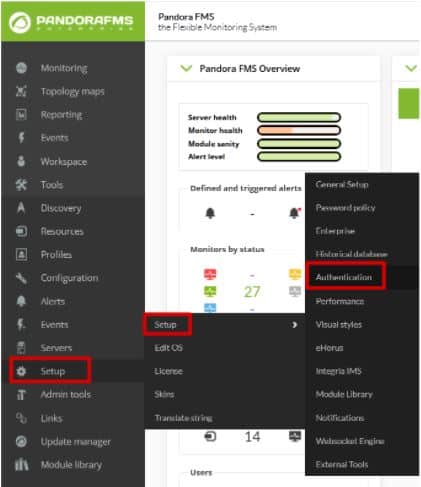
Configuring that tool is as simple as going to the “Authentication” section within the “Setup” tab.

Google-Authenticator

Here the task will be as simple as activating “Double authentication” and, if desired, forcing its use on all users. Once it is done, click on “Update”.

Google-Authenticator

Google-Authenticator

When updating, a window will appear asking you to download the Google authenticator application. Remember it is a mobile application, and, although the link redirects you to the website, you may download it from the Android Play Store or Apple App Store. If you already had it, you would only have to click continue.

Google-Authenticator

Then, open the application and scan the QR code with it. This will add an account to your application’s registry where a 6-digit number will appear. In case this fails, click “Refresh code”. If everything goes well, continue.

Google-Authenticator

The last window that will appear will be to ask you for the code that was generated in the application, to finish linking your Pandora FMS user with the device where the codes are generated. You will only have to enter this code and you will have finished the configuration of your double authenticator.

Google-Authenticator

To do the test, log out of Pandora FMS and re-enter the credentials of your user, and this time instead of showing you the console it will ask you to enter the application code.

Google-Authenticator

Farewell

Once you have correctly configured this tool, your system will be somewhat more secure, although of course, that does not mean that it is impenetrable, since every day, the so-called “hackers” create new codes to violate this type of security. That is why we always recommend changing passwords frequently and keeping all your devices updated to the latest version of their programs and software in general and continue adding new security measures throughout your network.

About Version 2 Digital

Version 2 Digital is one of the most dynamic IT companies in Asia. The company distributes a wide range of IT products across various areas including cyber security, cloud, data protection, end points, infrastructures, system monitoring, storage, networking, business productivity and communication products.

Through an extensive network of channels, point of sales, resellers, and partnership companies, Version 2 offers quality products and services which are highly acclaimed in the market. Its customers cover a wide spectrum which include Global 1000 enterprises, regional listed companies, different vertical industries, public utilities, Government, a vast number of successful SMEs, and consumers in various Asian cities.

About PandoraFMS
Pandora FMS is a flexible monitoring system, capable of monitoring devices, infrastructures, applications, services and business processes.
Of course, one of the things that Pandora FMS can control is the hard disks of your computers.

PuTTY from a monitoring perspective

What is PuTTY and some useful tips to use it easily

PuTTY is a free program (MIT license) for x86 and AMD 64 architectures (now in experimental stages for ARM). It was developed in 1997!, by Simon Tatham, a British programmer. In this blog, we have been reviewing this useful program for several years, and even the great Pandora FMS team has confirmed it just now in 2020, in the list of network commands for Microsoft Windows® and GNU/Linux®. What if it deserves its own article? Read and judge for yourselves.

Before GNU/Linux®

For those of you who visit us for the first time (welcome all) I will tell you that, when I started hitting the keyboard keys, Mr. Linus Torvalds had not even begun to study at the University of Helsinki, Finland. Age aside, we didn’t even have a graphical environment on our computers, as we know them today. Each program managed the best it could, making calls directly to the hardware, which was expensive and primal and in turn did not allow for more powerful operating systems.

The command line or terminal window was the one we used for almost everything and when operating systems with a graphical interface arrived, this resource was relegated to communicating network computers, given its low cost in terms of data transmission and its powerful use (for example, with a single command you may shut down or restart a computer, and many other things). The surprising thing is that even today we continue to use this work scheme, and even more so in terms of monitoring.

The world of computers today

Since the birth of GNU/Linux® its natural niche has been the server sector, especially web servers. By 2012, Pandora FMS team, with a keen eye, noticed the irruption of Android® in computing and we surely know that today the number of mobile phones with this operating system far exceeds the rest of devices.

Oh, I almost forgot, Android® is a somewhat weird GNU/Linux®, because manufacturers and phone operators do not let us use our “own” computers as root users. Leaving aside the arrival of 5G technology and new mobile operating systems, Android® has no major problems downloading multiple applications, to connect our beloved and precious servers with GNU/Linux (administration, monitoring).

The Windows® platform still retains a powerful slice on desktop systems (mostly for its use in video games). For administration and/or monitoring tasks just getting your hands on a handful of applications is more than enough. Here is where PuTTY, a free tool written in C language, comes into play. I guess here the name PuTTY is the complement of getty (short for get TTY) a program written in Unix by Wietse Zweitze Venema (co-author of the popular Postfix email server) and ported to GNU/Linux. In both worlds, getty has the function of detecting a connection, requesting user credentials, and authenticating them. PuTTY would then be, I guess, an abbreviation for put TTY. Let us also take into account that TTY is the abbreviation of TeleTYpewriter, the first devices based on a typewriter but electrically connected for sending and receiving written messages by telegraph (Télétype® or teletype).

Of course, PuTTY is not the only one – nor will it be the last – that you can use for teletasks: I recognize that Cmder is also a very useful program that includes more options for Windows®: cmd, Powershell® and SSH. But that, ladies and gentlemen, that is another story.

putty
PuTTY main screen

EU-FOSSA 2

European Union Free and Open Source Software Auditing project included PuTTY, in 2019, in the rewards program for hunting software bugs (bug bounty), which I consider shows its importance for computing.

To date, the European Commission has committed € 320,000 in reward payments (up to € 10,000 for revealing a software bug) in this project, and in the case of PuTTY (January to July 2019) they made 34 reports that were rewarded with an average of 285 euros each (I estimate more than twenty thousand euros in total, the highest prize was 6,772.08 euros). With such incentives it is clear that version 0.71 was born specifically by the initiative of all of Europe, considering PuTTY a common good. In this article I talk about the most recent version 0.74, paying my tribute.

Human resources

While money is important, we human beings are even more important, since we bear symbols and we give meaning to this Universe. PuTTY has, apart from Simon Tatham, a small but very select group of developers:

  • Alexandra Lanes: code reviewer who… responds to development emails. Yes, after the bug bounty program, sponsored by the European Commission, they went back to their previous scheme of receiving all improvements, criticisms, comments, etc., by email. Back to old school!
  • Jacob Nevins: Helps receiving email, and sometimes also encrypts.
  • Ben Harris: With high character encoding studies, he helps in the process of porting to other platforms.

In detail, what does PuTTY do for us?

Don’t ask that, ask what you can do with PuTTY. To sum it up a lot, PuTTY turns your powerful computer with a certain number of cores and huge amounts of RAM (with hard disk space and a monitor that would make film director George Lucas turn pale) into… a dumb terminal window. Yes, sometimes little things do titanic jobs, and the other way around!

Do not take the dumb terminal the wrong way, I call it that because everything we write on this side is sent to a Unix or Linux machine (this is usually abbreviated as *nix) and everything sent from there is reflected on our screen.

At a higher level (and I respect that opinion) there are those who think that personal computers have died… If we see it that way, anyone would say let’s move on this is over, but wait, there are still a few things left.

putty
PuTTY special commands for SSH

PuTTY Features

  • PuTTY, by default, will communicate with you through SSH safely, through certificates (public and private key), although if you want to skip security, you have to explicitly request SSH-1.
  • PuTTY has its own format (PuTTY Private Key or PPK) to store the public key without encryption on your disk but with the guarantee of Message Authentication Code (MAC – yes, yet another repeated acronym). That means you need an extra step if you already had a certificate made for OpenSSH, which is the current standard. Otherwise, PuTTY has its own certificate generator in several different formats. The author indicates that the difficulty for PuTTY to stop using PPK is the number of tweets they send them: the more messages, the easier it is. Their account on Twitter is… they don’t have an account on that social network (humor is also an indication of intelligence).
  • If you wish for higher security, you can use a security sentence to your pair of keys when generating them, but then you have to enter that sentence in each connection, each time. PuTTY has Pageant, who stays in memory and does that work for you.
  • PuTTY can use the connection protocol created by Richard Stallman himself – father of the free software movement – back in 1983: SUPDUP. I in particular did not know about it, so I just learned something new with you… Who uses that protocol currently? You see, geek stuff!
  • The PuTTY code has been used by third parties as the basis for an experimental SSH server (developing free software is spreading). PuTTY is written in C language and it is monolithic, it does not use dynamic link libraries, so if you download the appropriate version already compiled in 32 or 64 bits, it is ready to be executed.

putty
“PuTTY preferences for serial port”

  • Some Cisco® brand network switches use a serial port, conveniently disguised as an RJ-45 terminal, through which you can manage and/or monitor these devices (some other commercial brands do the same). I recommend using the serial port of the motherboard (buy an extension cable for the external slot of the case) which guarantees a better connection than USB to 9-pin serial port adapter cables. Once you have all this, PuTTY will kindly connect you to the serial port, usually COM1
  • In a similar way, you can set a graphical server X on the *xnix machine you will connect to and forward said output through PuTTY to your local machine, in order to use a program like Xming to monitor user experience (in a web browser, for example)./li>

putty
PuTTY preferences X11 forwarding

Tips to save time

When working with PuTTY, these suggestions are very welcomed:

By clicking and dragging directly, it will be copied to the clipboard, without using CTRL + C. If you want to select a rectangular area just press the ALT key before clicking in the session window opened with PuTTY. Remember that clicking with the right button inside the window will paste (CTRL + V) what you have on the clipboard, although you may also use SHIFT + INSERT to paste.

By secondary clicking on the title bar of the window you will have some very interesting options, such as:

  • Work in full screen. This allows you to work without distractions.
  • Duplicate the session, that is, another terminal window with the same server (there is also another option to open a totally new connection or choose between the profiles you have saved).
  • In the configuration option, you can check the option to reuse the connection and then when connecting, right click and choose to duplicate session. From there, all the connections you make will use a single path, even if you use CMD.exe to run other PuTTY executables (psftp,plink, etc.) followed by the profile name you use for the connection and the rest of required parameters.
  • Depending on the type of connection you have established, PuTTY can offer the most used special commands, for example in SSH you will have SIGKILL, SIGTERM, etc
  • Remember that PuTTY stores, by default, the last 200 lines that you worked with (regardless of how keyboard shortcuts are handled in the terminal), because with the configuration option you can increase it to 5,000, just as an example. What use is this to us? Well, if for some reason you lose the connection, then right click again on the title bar of the window and select “Restart connection” and you will still keep everything you have written up to 5,000 lines up!

Remember the lock icon on web pages? Based on that same concept, and to avoid malicious SSH servers (ask them to send you questions of some kind about your passwords) PuTTY has an ingenious method of drawing an icon to differentiate – and legitimize – the warnings and questions that PuTTY asks you in the terminal window. However, this defense cannot be done in Windows CMD windows like for Plink (this executable is used to automate connections and you may never use it directly, but I make an exception).

If you use Powerline to give each of your remote machines a professional look (and to differentiate them as well), you can clone the repository and take the fonts and install them in Windows®. Then upload the necessary profile and set the recently installed font to your liking. In any case, PuTTY also allows customizing colors, styles and behaviors when resizing the terminal window and many other things.

putty
PuTTY configured with Powerline font

PuTTY and Pandora FMS

As you can see, PuTTY is actually an additional tool for monitoring as it helps you test and/or debug applications in general because, although SSH is its strength, it has other protocols such as Telnet and even live TCP! How can you contribute to PuTTY? Apart from receiving donations through Paypal, there is something you can do that will make the authors happier: spread and tell others about this software. For example, you can set up your very own mirror site that syncs monthly with the original. If you want to get more committed you can download its source code and help debugging.

About Version 2 Digital

Version 2 Digital is one of the most dynamic IT companies in Asia. The company distributes a wide range of IT products across various areas including cyber security, cloud, data protection, end points, infrastructures, system monitoring, storage, networking, business productivity and communication products.

Through an extensive network of channels, point of sales, resellers, and partnership companies, Version 2 offers quality products and services which are highly acclaimed in the market. Its customers cover a wide spectrum which include Global 1000 enterprises, regional listed companies, different vertical industries, public utilities, Government, a vast number of successful SMEs, and consumers in various Asian cities.

About PandoraFMS
Pandora FMS is a flexible monitoring system, capable of monitoring devices, infrastructures, applications, services and business processes.
Of course, one of the things that Pandora FMS can control is the hard disks of your computers.

Do you already know what Active Directory is and how to use it with Pandora FMS?

What is Active Directory and how to use it with Pandora FMS?

As you may already know, in this blog, we’re so into answering the big questions. After answering in previous episodes what the meaning of our existence is or explaining everything you need to know about Office 365 Monitoring, in today’s episode we are going to discuss what Active Directory is. I hope you are very comfortable sitting in your respective gamer chairs or in your two-seater sofas, because here we go!

What is Active Directory?

Active Directory is a tool that provides directory services, which entails many benefits in the business sector. Many companies have a large number of employees, they need a connected device to do their work, and there we have Active Directory, with it we can build a network of devices for users or employees.

How to collect information on user and service monitoring with Active Directory?

We already know that obtaining information is a very important section of monitoring. All these data can be very useful for us to see the status of something, find a possible problem or simply improve a certain system. Active Discovery is a process by which information can be collected while managing everything in a very simple way. We will be able to see what we need from a single computer, which will make the task much easier, since we will not have to act on each of the devices. In this article, we are going to give you the guidelines to configure Active Discovery and be able to use it.

What are the benefits of using Active Directory?

  • It is focused on professional and business use. It allows you to manage everything easily and without having to intervene in the computers of each user, which saves a lot of time.
  • Store data in real time. With data related to users and their authentication.
  • User authentication. If everything’s ok, the user’s information will reach the computer. This means that if one computer breaks down, you will be able to access it from another with authentication.
  • Easily manage all servers and applications, ensuring that everything runs at peak performance.
  • Prevention of replication errors. To verify that all replications are being performed optimally. Active Directory monitoring is essential, since you will obtain accurate information from them.
  • Obtaining information from remote sites and much more…

And here Pandora FMS comes into play

It is our standard: One of the principles of Pandora FMS is its flexibility. It is highly configurable and by using plugins you will be able to do almost anything in terms of monitoring. Making use of Active Directory in Pandora FMS is quite simple. You can use a specific plugin with which to collect different types of data. Like, for example, the number of users connected or inactive to be able to see them from the console. The data you may obtain is easily configurable from a simple txt, which will be the configuration file. The plugin can be found at the following link: https://pandorafms.com/library/active-directory/ Once downloaded, install it on the console. This short and simple process that will offer you great advantages will be explained below.

What is needed for the plugin to work?

  1. Powershell v3.0 or higher.
  2. Active Directory Powershell Module.
  3. Repadmin. The plugin needs a configuration file that will be divided into the following blocks and will be called “adparams.txt” :
  4. In user, you can choose whether to see the full list of all users or one in particular. In unused, a list of users that have not been used for at least two months. 1 to enable it and 0 to disable it.
  5. Spn allows you to see spn suffixes. 1 to enable and 0 to disable, as in the previous point.
  6. Upn allows you to see spn suffixes. 1 to enable and 0 to disable.
  7. You may also add the test block, which retrieves the information from the AD diagnostic tests that the dcdiag tool returns. 1 to enable and 0 to disable. Example: #tests Tests = 0
  8. We can run the plugin manually, calling executable.exe, writing the following output through the powershell terminal: [path_plugin]\active_directory.exe [path_conf]\adparams.txt
  9. It is recommended to save the file in pandora_agent/util.
  10. In the remote configuration of the agent that we have installed, add the following:
  11. When the interval goes by, modules collected by the users of Active Discovery, the connectivity, the status of the service or the suffixes spn and upn will be obtained.

Execution from the web console

To be able to run it from the console, the plugin will be distributed through collections. In configuration -> collections, create a collection, it will be named “Active Directory plugin” and short name “Ad_plugin”, in the following image you can see the process.

Go to files after creating the collection :

Click on “Upload Files”:

And upload the executable of the plugin and the configuration file that we created previously, then return to the previous menu and click “Create a file again” and later “Update”. In the agent where you want to use the plugin, go to the collections section and add it:

Next, go to “Agent plugins” and add the route with the plugin execution. In this case, as it is by means of collections, they will be created in the software agent installation path.

The path by default would be the view in the image (2).

Modules generated by the plugin

These will be the modules returned by a standard run.

Monitoring:

  • AD Users
  • Unused AD User
  • AD Schema Master
  • AD Root Domain
  • AD Forest Domains
  • AD Computer DNS Host Name
  • AD Global Catalogs
  • AD SPN suffixes
  • AD UPN suffixes
  • Connectivity
  • Replication admin
  • Service DNS status
  • Service DFS Replication status
  • Service Kerberos Key Distribution Center status
  • Service Active Directory Domain Services status
  • Test Advertising status
  • Test FrsEvent status
  • Test SysVolCheck status
  • Test KccEvent status
  • Test KnowsOfRoleHolders status
  • Test MachineAccount status
  • Test NCSecDesc status
  • Test Netlogons status
  • Test ObjectsReplicated status
  • Test Replication status
  • Test RidManager status
  • Test Services status
  • Test SystemLog status
  • Test VerifyReferences status

Service NetLogon status

  • Service Intersite Messaging status

And this is how they would look like in the created agent:

And, up to here that would be everything required to be able to make the plugin work. It was easy, huh? I hope many things in this life, but above all I hope this article was useful, especially to help you understand better Active Directory and how to use it in such a simple way in Pandora FMS. I will not take anymore of your time, indeed, I say goodbye, not before, of course, encouraging you to read other articles on the blog that may be to your liking and taste.

About Version 2 Digital

Version 2 Digital is one of the most dynamic IT companies in Asia. The company distributes a wide range of IT products across various areas including cyber security, cloud, data protection, end points, infrastructures, system monitoring, storage, networking, business productivity and communication products.

Through an extensive network of channels, point of sales, resellers, and partnership companies, Version 2 offers quality products and services which are highly acclaimed in the market. Its customers cover a wide spectrum which include Global 1000 enterprises, regional listed companies, different vertical industries, public utilities, Government, a vast number of successful SMEs, and consumers in various Asian cities.

About PandoraFMS
Pandora FMS is a flexible monitoring system, capable of monitoring devices, infrastructures, applications, services and business processes.
Of course, one of the things that Pandora FMS can control is the hard disks of your computers.

We present you Pandora FMS Roadmap 2021 – 2023

Pandora FMS presents you our Roadmap 2021 – 2023

In this article, we will introduce you to the new Pandora FMS Roadmap for the next 24 months (June 2021 – June 2023). For its creation, we had the participation of our clients and partners, who, through a survey, helped us choose all kinds of features and their priority.

It’s been really satisfying for us to complete this challenge, as it was one of those enthusiastically proposed among our closest goals.

  • Warp update (Q2).
  • Command center (Q2).
  • New agent inventory report (Q2).
  • Graphic agent installer for Mac (Q2).
  • Services report (Q3).
  • Policy auto-implementation (Q3).
  • New visual console elements (Odometer, Simple graph) (Q3).
  • Netflow: Data monitoring of the flows defined in the filter (Q3).
  • Trend modules (Q3).
  • Capacity planning modules (AI) (Q3).
  • Enhanced anomaly detection (AI) (Q3).
  • Authentication with KERBEROS (Q3).
  • New service view widget for Dashboard (Q3).
  • Basic network computer configuration management (Q4).
  • Centralized agent update (Q4).
  • APM (code application monitoring) (Q4).
  • Security Center (Q4).
  • IPv6 monitoring in SNMP with Satellite server (Q4).
  • ITSM integration: SysAid, Zendesk, OTRS, Redmine, Jira, Zammad, TopDesk (Q4).
  • Impact simulation in service view (2022+).
  • Discovery: Google Cloud.
  • AWS Monitoring improvements with Discovery: RDS for postgreSQL, Autoscaling groups, VPCS, Lampdas.
  • Azure Monitoring improvements with Discovery: Databases, Storage, Data Factory, PostgreSQL, Event hubs.
  • GIS Alerts (2022+).
  • IPAM Report (2022+).
  • Data consultation to agents in real time (2022+).
  • Public/private certificate validation system in remote agent configuration (2022+).
  • Load Balancing in API/Console (2022+).
  • Automatic remote inventory with satellite (SNMP, WMI, SSH/Linux) (2022+).
  • New view to show systems currently affected by a scheduled downtime (2022+).
  • SNMP trap reports (top-N by source, type of trap, etc) (2022+).
  • Desktop application to configure Pandora FMS agent and see its status (2022+).
  • IOT on Satellite server (2022+).

Warp Update

A unified system that allows updating console, server and agents. Fully integrated into the console, which does everything with a single click without having to execute commands, copy files or pray for everything to go smoothly. Fast and centralized, in the case of deployment of centralized updates through the Metaconsole.

Command Center

Command Center is the long-awaited evolution of the Metaconsole, which will allow dozens of nodes to be managed in a totally transparent and centralized way simultaneously, without having to manually synchronize any element.

Security Center

An innovative way to manage server and workstation security, fully integrated with system monitoring.

APM in source code

We want to reach the last frontier of monitoring, the code in applications to measure their times and detect bottlenecks and overloads, combining all the information on the same platform where the infrastructure, servers and application metrics are.

Trend modules

Create a new type of predictive module that compares two time ranges and evaluates, in a percentage or an absolute way, their differences. These modules can be used in alerts, graphs or reports.

E.g.: Access router outbound traffic is 25% higher than last month. This month there are 22 new users compared to the previous month.

Centralized agent update

Update agents centrally from the console. A current enhancement to the remote agent distribution system.

Network computer configuration management

Being able to edit “download” and “upload” full configurations of network equipment through several protocols (TFTP, Telnet, SSH) in order to centrally manage network equipment such as switches and routers. Some of its purposes:

  • Schedule configuration backups, restore trusted configuration versions with a single click.
  • Detect changes in real time and know “who”, “what” and “when” about configuration changes.
  • Upgrading device firmware.
  • Save time by automating time-consuming and repetitive tasks using templates and configuration application scripts.
  • Make sure changes made to running configurations are saved.
  • Compare NVRAM (running) configurations with startup ones (saved) to identify changes that need to be saved.
  • Quickly identify and correct unauthorized or failed changes (restoring backup manually).
  • Compare configurations with base configurations to identify and reverse unwanted changes.

Netflow

Be able to integrate simple data from a Netflow filter as a Pandora FMS numerical module, to be able to, for example, set alarms when the traffic of a certain flow exceeds its threshold or to be able to measure SLA in flow traffic.

Capacity planning modules

Modules that operate like Capacity Planning reports and can estimate in a future time threshold, e.g.: 1 month, 3 months, the value of a given module, estimating its growth based on a statistical analysis of its history.

Policy auto-implementation

Add a policy self-enforcement system (optional) that works well. Either based on the detection of new elements (in the added group or directly in agents in the policy itself) or even just the possibility of scheduling policy application at a certain time interval.

Data consultation to agents in real time

Upon manual request: configuration data, status, hardware status, OS items, logs, etc., in real time, all from a library of predefined elements. Without complementary configuration, it would only need the deployment of an additional agent to that of Pandora FMS. These data are only for screen display, not for making alerts or reports. The data range would be very broad and standard. It requires direct connectivity from the console and the agent that must listen on a specific port.

Service report

Reports to show service SLA compliance, numerically (%) and with a histogram.

IPAM reports

New reports to, among other things, show the usage percentage of each network, and some other information of interest that appears on the IPAM screens but that cannot be included in reports.

GIS alerts

Be able to send alerts when an agent leaves a delimited coordinate zone, which is often called “geo-fencing”.

Load balancing in Console and API

Provide a standard system that allows load balancing in the console and the API, in order to scale and distribute the load. Perfect for environments where the use of the API is intensive or the console is used in multi tenant environments.

IoT

Offer support to the Satellite Server to natively support modbus and MQTT protocols.

It’s been hard work, but thanks to Pandora FMS employees and our partners and clients, we achieved this Roadmap 2021 – 2023 that will make our work easier in the future and speed it up.

About Version 2 Digital

Version 2 Digital is one of the most dynamic IT companies in Asia. The company distributes a wide range of IT products across various areas including cyber security, cloud, data protection, end points, infrastructures, system monitoring, storage, networking, business productivity and communication products.

Through an extensive network of channels, point of sales, resellers, and partnership companies, Version 2 offers quality products and services which are highly acclaimed in the market. Its customers cover a wide spectrum which include Global 1000 enterprises, regional listed companies, different vertical industries, public utilities, Government, a vast number of successful SMEs, and consumers in various Asian cities.

About PandoraFMS
Pandora FMS is a flexible monitoring system, capable of monitoring devices, infrastructures, applications, services and business processes.
Of course, one of the things that Pandora FMS can control is the hard disks of your computers.

SaaS vs onPremise: Pros, Cons and Cost Analysis

SaaS vs onPremise, do you use the cloud?

Do you use the cloud?

Be aware that we’re not saying that you are in cloud nine, but that you may most likely be using the cloud. That is, if you use Google mail, Microsoft Office 365 office suite or you take a photo with your cell phone and then it gets automatically uploaded to iCloud or something similar, you are using the cloud.

The cloud, as an abstract concept, encompasses a series of technical terminology such as SaaS, IaaS, PaaS, etc. The good thing about the concept of the cloud is that you can guess what it does thanks to the metaphor: we do not know where our data are, or how they get there, nor does it matter much for us, because it is far away and it does not affect us. The great success of the cloud of the 21st century has been to find an especially powerful metaphor that omits the complexity behind that technology and gives us peace of mind.

The concept of using third-party infrastructure for “our stuff” is the oldest thing in computing. In fact, back in the 60s of the last century, most computing worked like this. You connected to a large machine from a computer that was not as such, but a screen and a keyboard. Then the microcomputer craze turned around and every computer was self-sufficient. Now, almost a century later, we have rediscovered that it is more efficient to have everything centralized in one big system.

I have nothing against the cloud. Well, my life is not at stake, unless for example, I entrust the IT infrastructure of my business to the cloud. This is what happened to a number of companies in Asia, such as CITEX or BitMax that used the Amazon cloud (AWS) to host their Bitcoin exchange service (Exchangers), well, them and also the Asian sites from Adobe, Business Insider, Expedia, Expensify, FanDuel, FiftyThree, Flipboard, Lonely Planet, Mailchimp, Medium, Quora, Razer, Signal, Slack, Airbnb, Pinterest, SendGrid and a few hundred more. The cloud is not infallible, the cloud is comfortable.

Today many companies have relied so much on the cloud that it is impossible to take a step back, get out of the cloud, because they would literally have to remake the system with another technology. The cloud is easy but implies total dependence on the provider, especially in technologically optimized systems such as Amazon’s. It’s too good a candy to resist.

Realistically, if you’ve already risen to the sky and are floating with the clouds, and the technology that supports your business is floating above your head, it may not be easy or comfortable to go back, in fact, you may have probably already realized that the cloud is not cheap at all and the costs are increasing over time, and are difficult to predict.

Well, it’s already in, and it’s not going to change, so you should at least be able to keep an eye on what your provider is doing. Monitor the quality of service they offer you and make sure for yourself, because who is watching the watchdog? That’s right, do it yourself, trust no one, do it with your own systems, don’t use a cloud system to monitor another cloud system, put your feet on the ground and buy yourself an umbrella, just in case it rains.

The “lifetime” model: onPremise

On the contrary, we have the classic model of “buying the software” and using it however you want, wherever you want and, whenever you want you change programs without much thought. Oddly enough, this is really the new model, the pay-per-use model that SaaS has copied predates conventional software licenses. The onPremise model gives you the right to use the software on your own computers, in your own facilities and where the manufacturer or software owner does not have any access or rights. The only requirement is to pay for it and use it under the conditions approved by the license you acquired.

Cost analysis: onPremise vs SaaS

The onPremise model has some undeniable advantages, the main one being data security. As it is running on your systems, you own both the information and the processes that use that information. This has legal and business implications, since changing providers can be easier than when you use its SaaS equivalent.

Although it may seem a lie, in the long term the SaaS model is more expensive than the onPremise model, and above all, with the onPremise model it is much easier to estimate the Total Cost of Ownership (TCO) in the medium term. This can be easily demonstrated if we compare the costs in the subscription/pay-per-use model (SaaS) and the license ownership model (onPremise) for one, three and five years.

  • Suppose a SaaS license annual cost is €5,000/year. In this case it is pure OPEX (operating costs).
  • Let’s picture an onPremise license whose annual cost is €10,000 the first year, and whose annual maintenance cost is 20% (which is the standard in the market). That supposes a renewal cost of €2000/year. In this case, it is pure CAPEX (investment in assets, software).
 SaaS onPremise
1 year5,000 €10,000 €
3 years15,000 €14,000 €
5 years25,000 €18,000 €

There are intangible factors, such as input barriers, higher in onPremise models, and output barriers, higher in SaaS models. It is also true that an onPremise installation involves additional costs: those of infrastructure, operation and training.

In certain types of applications with little added value such as office tools, the SaaS model is here to stay. Office 365 or Google Docs are a perfect example.

In other cases, such as Adobe Photoshop, the onPremise model has been combined with a pay-per-use -subscription- model (but without being SaaS) combined with the conventional onPremise licensing model.

Summary of arguments in favor of each model

SaaSonPremise
Security depends on the provider.Security depends on the customer.
The responsibility for the operation lies with the supplier.The data is owned by the customer.
Savings in infrastructure and operating costs.Lower long-term license costs.
Ease of financing (monthly or quarterly payment).Easier-to-plan long-term costs.
OpexCapex
Lower input barriers.Higher input barriers.
Higher output barriers.Lower output barriers.
Faster deployment times.It is easier to integrate with the rest of the business processes.

About Version 2 Digital

Version 2 Digital is one of the most dynamic IT companies in Asia. The company distributes a wide range of IT products across various areas including cyber security, cloud, data protection, end points, infrastructures, system monitoring, storage, networking, business productivity and communication products.

Through an extensive network of channels, point of sales, resellers, and partnership companies, Version 2 offers quality products and services which are highly acclaimed in the market. Its customers cover a wide spectrum which include Global 1000 enterprises, regional listed companies, different vertical industries, public utilities, Government, a vast number of successful SMEs, and consumers in various Asian cities.

About PandoraFMS
Pandora FMS is a flexible monitoring system, capable of monitoring devices, infrastructures, applications, services and business processes.
Of course, one of the things that Pandora FMS can control is the hard disks of your computers.